PRISM Technology GS-729 PSP CAR ADAPTER & FM TRANSMITTER User Manual
PRISM Technology Limited PSP CAR ADAPTER & FM TRANSMITTER Users Manual
USERS MANUAL
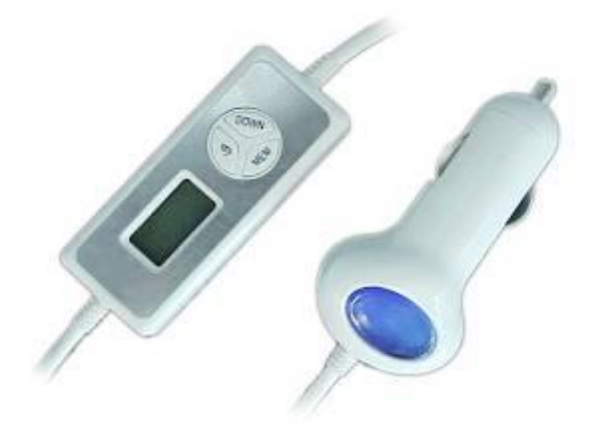
GS-729 FM Transmitter with Car Adapter
Instruction Manual
This FM Transmitter with Car Adapter is designed for the PSP consoles to use inside your car. The Car
Adapter not only can recharge power of your PSP consoles, but also broadcast PSP music from the FM
radio channels in your car. Listen to your favor songs without using earphone while driving. FM Transmitter
can memorize channel used last time.
Features
1. Listening and Charging at the same time
2. Easy Operation by Up and Down buttons to select radio frequency
3. LCD display showing the frequency on the FM Transmitter
4. Digital frequency selection allows stable and clear broadcast of the FM Transmitter
5. LED lights up on the Car Adapter for indication of connection
6. Memorize your channel, keep interfere from other FM signals
Operation
1. Turn off the PSP console before connecting FM Transmitter with Car Adapter
2. Plug the Car Adapter into the cigarette socket of your car, the LED of the Car Adapter will light on and
the FM transmitter will display the channel
3. Plug the power cable into the PSP console which indicates the charging status if it is connected
properly
4. Plug the earphone head into the PSP earphone slot of the left PSP console.
5. Turn on PSP console.
6. Press the Up or Down button, select the transmit frequency
7. Match the FM Transmitter with your car radio to the same frequency
8. adjust the volume to your desire value and efficient.
9. The sound will be broadcast with your car speaker system once the frequency of car radio is the same
10. Press MEM button more than 3 seconds that channel will flashing with 1 times/second to memorize
the desire radio channel for next time use
11. Turn off the PSP console before unplug this FM transmitter with Car Adapter or when not in use
Save the clear channel
1. Press one times MEM button
2. Display M and channel NO on the left of the LCD
3. Press the DOWN or UP button select the desire radio channel
4. Press the MEM button more than 3 seconds and the channel NO will flash with
1times /second, then loosen the MEM button
5. Press the MEM button one times

Specification
1. Input Voltage: DC12 V 1A
2. Output Voltage: DC5 V 2V
3. Safety fuse: 2A
4. FM Stereo transmission
5. Audio frequency range: 20Hz to 20KHz
6. Radio Frequency Range: 88.1MHz-107.9MHz
7. Station Memory Presets: 10 Channels
8. Maximum receivable range: Within 6 meters
9. Can be use other music device eg: MP3, MD ect..
Precautions
l Avoid using the FM Transmitter with Car Adapter with any devices simultaneously except PSP console
l Storage temperature is less than 60 degree
l Only be used in car
l Do not short the DC output head
l Do not disassemble the part of the PSP car adaptor
l Clear the LED and the cable with dry cloth
l Do not dispose the device direct sun light for long time.
l Do not recharge other device.
Federal Communication C
ommission Interference Statement:
This equipment has been tested and found to comply with the limits for a Class B digital device, pursuant to Part
15 of the FCC Rules. These limits are designed to provide reasonable protection against harmful interference in a
residential installation. This equipment generates, uses and can radiate radio frequency energy and, if not installed
and used in accordance with the instructions, may cause harmful interference to radio communications. However,
there is no guarantee that interference will not occur in a particular installation. If this equipment does cause
harmful interference to radio or television reception, which can be determined by turning the equipment off and on,
the user is encouraged to try to correct the interference by one of the following measures:
- Reorient or relocate the receiving antenna.
- Increase the separation between the equipment and receiver.
- Connect the equipment into an outlet on a circuit different from that to which the receiver is connected.
- Consult the dealer or an experienced radio/TV technician for help.
FCC Caution: Any changes or modifications not expressly approved by the party responsible for compliance could
void the user’s authority to operate this equipment.
This device complies with Part 15 of the FCC Rules. Operation is subject to the following two conditions: (1) This
device may not cause harmful interference, and (2) this device must accept any interference received, including
interference that may cause undesired operation.