PUMP MEDICAL SYSTEM BFA01 Arm Automatic Blood Pressure Monitor User Manual

SHENZHEN PUMP MEDICAL SYSTEM CO., LTD. Arm Automatic Blood Pressure Monitor

User Manual

                                                                                  Rev. A1  1   Arm Automatic Blood Pressure Monitor  Instruction Manual BF5000B    Thanks  for  purchasing  the  Arm  Automatic  Blood  Pressure  Monitor  manufactured  by Bpump.  Please read the instruction manual before usage;  Please dispose  the  Arm  Automatic  Blood  Pressure  Monitor and battery  in  accordance with local regulations.
                                                                                  Rev. A1  2  Table of Contents 1. Safety Information ................................................................................................... 3 1.1. Warning ............................................................................................................................. 3 1.2. Contraindications ............................................................................................................. 4 1.3. Care and maintenance ..................................................................................................... 4 2. Product Feature ....................................................................................................... 5 3. Power source ............................................................................................................. 6 4. Clock mode ............................................................................................................... 7 5. First touch mode ...................................................................................................... 7 6. Standby mode ........................................................................................................... 8 7. System Setting .......................................................................................................... 8 7.1 User conversion ................................................................................................................... 8 7.2. Setting ................................................................................................................................ 8 2) Unit with broadcast. ............................................................................................. 8 8. Take a measurement ................................................................................................ 9 8.1. Important Noted ............................................................................................................... 9 8.2. Fitting the cuff ................................................................................................................ 10 8.3. Body posture during measurement ............................................................................... 10 8.4. Take Measurement ......................................................................................................... 11 8.5. Average value ................................................................................................................. 13 8.6. Memory ........................................................................................................................... 14 9. Data transmission .................................................................................................. 15 10. Power off ............................................................................................................... 15 11. Error Indication ................................................................................................... 15 12. Trouble Shooting .................................................................................................. 15 13. Environment protection ...................................................................................... 16 14. Specification ......................................................................................................... 16 8. About Blood Pressure ............................................................................................ 18 8.1. What is Blood Pressure? ................................................................................................ 18 8.2. What is high blood pressure? ........................................................................................ 18 8.3. What is morning hypertension (morning surge)? ....................................................... 19 Reference Standard .................................................................................................... 19 Blood Pressure Measurement Chart ........................................................................ 20 Guarantee Card ......................................................................................................... 20 Explanation of Symbols ............................................................................................. 21 After-Sale Service ....................................................................................................... 21
                                                                                  Rev. A1  3  1. Safety Information 1.1. Warning 1) Self diagnosis and treatment which use measured results may be dangerous. Follow the instructions of your physician or licensed healthcare provider. 2) If cuff inflation doesn’t stop, remove the cuff or power off the unit, otherwise, it may result in a hazard condition. 3) Only take measurement with the manufacturer supplied cuff, or else it will lead to inaccurate results. 4) Do not use the blood pressure monitor when you are close proximity to strong static electricity or electromagnetic fields, and avoid using the mobile during measurement. 5) Do not use in combination with a hyperbaric oxygen therapy device, or in an environment where combustible gas may be generated. 6) Do not use in combination with other monitoring device at the same limb, because the pressurization of the CUFF can temporarily cause loss of function of simultaneously used monitoring ME EQUIPMENT on the same limb; 7) Do not install or use the unit in the following locations: Locations subject to vibration such as ambulances and emergency helicopters. - A location where there is gas or flame. - A location where there is water or steam. - A location where chemicals are stored. - A location where the unit may easily fall. 8) Measurements or stores need to take into account environment variables, or else it would lead to the inaccurate measurement. 9) Do not kink the connection tube, or it may cause blood flow interference and result in harmful injury to the PATIENT due to continuous CUFF pressure; 10) Do not use Luer lock. If Luer lock connectors are used in the construction of tubing, there is a possibility that they might be inadvertently connected to intravascular fluid systems, allowing air to be pumped into a blood vessel. 11) This product is suitable for use to self- monitoring of blood pressure in home or used by the licensed healthcare personnel in hospital. 12) Blood pressure measurements determined with the device are equivalent to those obtained by a trained observer using the cuff/stethoscope auscultatory method, within the limit prescribed by the American National Standard, Manual, electronic or automated sphygmomanometers. 13) Keep out of reach of infants, small children, and compromised people who cannot express their consent. Playing the air tube may result in suffocate children, and Children may swallow small parts and lead to suffocation. 14) Children must be supervised to ensure that they are not play with the device. 15) Use only manufacturer authorized parts and accessories. Parts and accessories not approved for use with the device may damage the unit. 16) Be careful not to rest your arm on the air tube. This will restrict the flow of air to the cuff.
                                                                                  Rev. A1  4 17) Do not measurement too frequent, or else it may result in bruising where the cuff is applied. 18) Do not apply the cuff over a wound or inflamed area. 19) Do  not  apply  the  cuff on the same  limb  where  intravascular  access  or  therapy  or  an arterio-venous (A-V) shunt is present, because of temporary interference to blood flow and could result in injury to the patient. 20) Do not apply the cuff on the arm on the side where a mastectomy has done, because of temporary interference to blood flow and could result in injury to the patient. 21) The application of the cuff and its pressurization on the arm can cause temporary interference to blood flow, but it would not result in injury to the patient. 22) Operation of the device does not result in prolonged impairment of the circulation of the blood of the patient. 23) Direct plug is considered as disconnect device, please do not place the equipment in a difficultly operation position. 24) When using the device, the patient is an intended operator. 25) Do not serviced or maintained while in use with the patient.  1.2. Contraindications 1) Do not use the blood pressure monitor for any other purpose except measuring the blood pressure of human body. 2) Those who have arrhythmia, diabetes, blood circulation or apoplexy problem, please use under the physician’s instruction. 3) Clinical testing has not been conducted on newborn infants and pregnant women. Do not use in infants and pregnant women. 4) The common arrhythmia such as atria premature beats, premature ventricular and atrial fibrillation will lead to inaccurate results or error.  1.3. Care and maintenance 1) The battery can’t be replaced, do not attempt to disassemble, repair or modify the unit or cuff. 2) Avoid high temperature, moisture, dust and direct sunlight. 3) Clean the body with soft clean wet cloth, do not wipe with alcohol or other corrosive liquids. 4) Do not wet or clean the cuff with water. 5) Clean the cuff with soft dry cloth after measurement. 6) Do not use at extremely high temperature, high humidity, or high altitude. 7) Do not drop or expose the device to heavy shock. 8) Do not use the unit near large equipment that uses a switching relay for power ON/OFF. 9) Turn off the power switch if the unit will not use for a long time. 10) The blood pressure monitor has gone through several trials of testing to ensure the measurement accuracy. It is recommended that the performance be checked every 2 years and after maintenance and repair. 11) Do not disassemble or modify the structure of the unit and damage the safety performance. If you need service, please contact the manufacturer, the maintenance
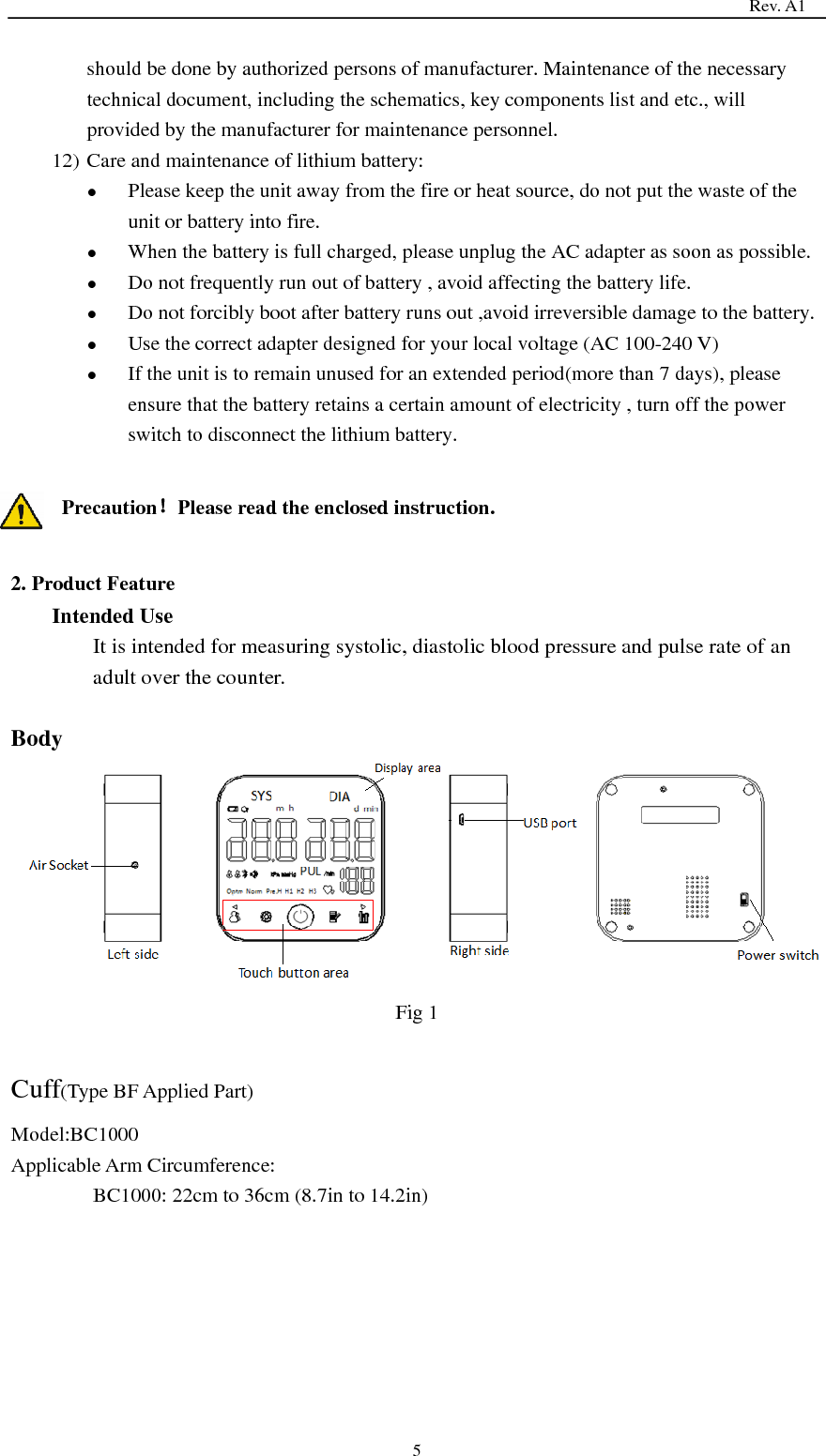
                                                                                  Rev. A1  5 should be done by authorized persons of manufacturer. Maintenance of the necessary technical document, including the schematics, key components list and etc., will provided by the manufacturer for maintenance personnel. 12) Care and maintenance of lithium battery:  Please keep the unit away from the fire or heat source, do not put the waste of the unit or battery into fire.  When the battery is full charged, please unplug the AC adapter as soon as possible.  Do not frequently run out of battery , avoid affecting the battery life.  Do not forcibly boot after battery runs out ,avoid irreversible damage to the battery.  Use the correct adapter designed for your local voltage (AC 100-240 V)  If the unit is to remain unused for an extended period(more than 7 days), please ensure that the battery retains a certain amount of electricity , turn off the power switch to disconnect the lithium battery.  Precaution!Please read the enclosed instruction.  2. Product Feature Intended Use It is intended for measuring systolic, diastolic blood pressure and pulse rate of an adult over the counter.  Body  Fig 1  Cuff(Type BF Applied Part) Model:BC1000 Applicable Arm Circumference:   BC1000: 22cm to 36cm (8.7in to 14.2in)
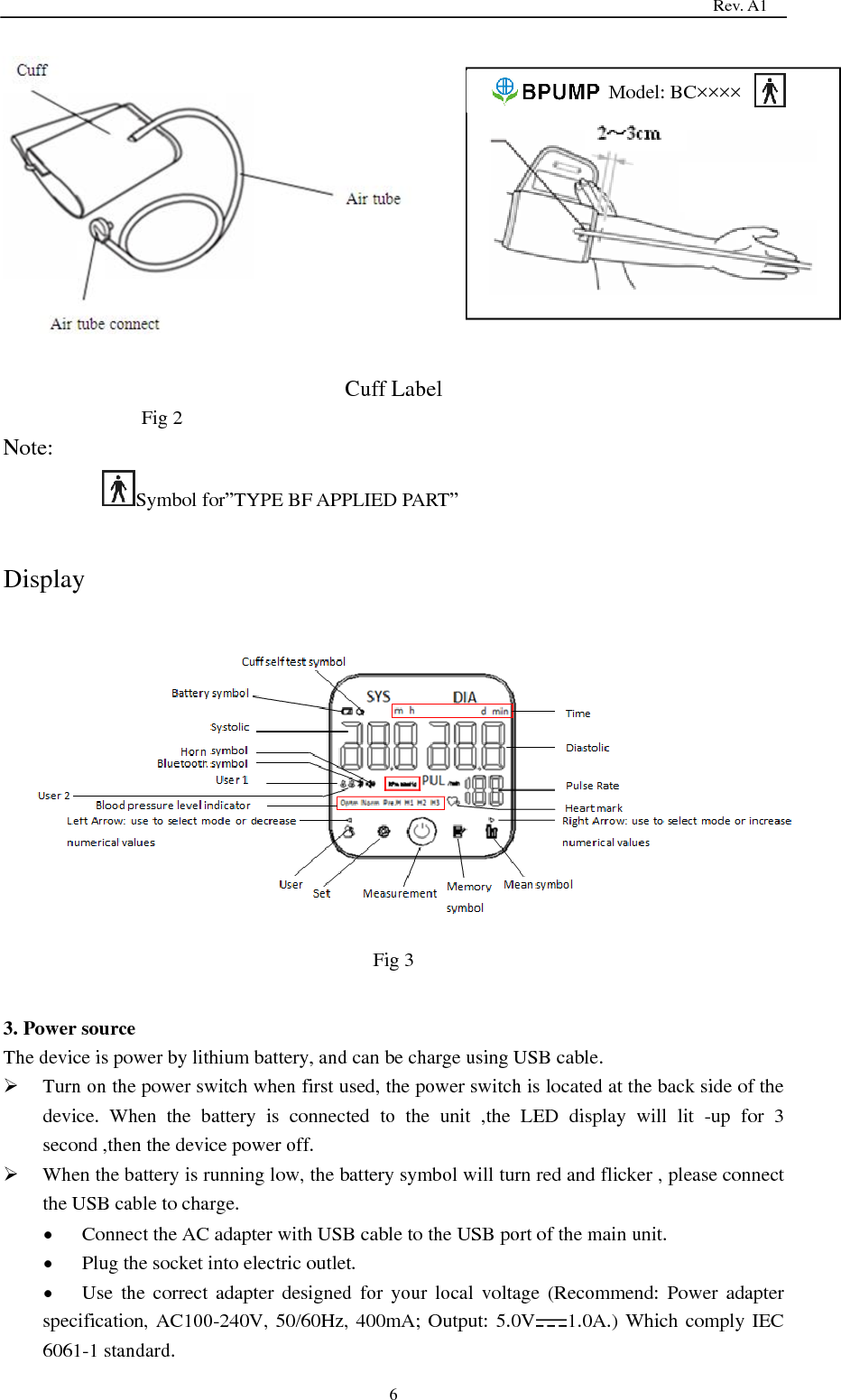
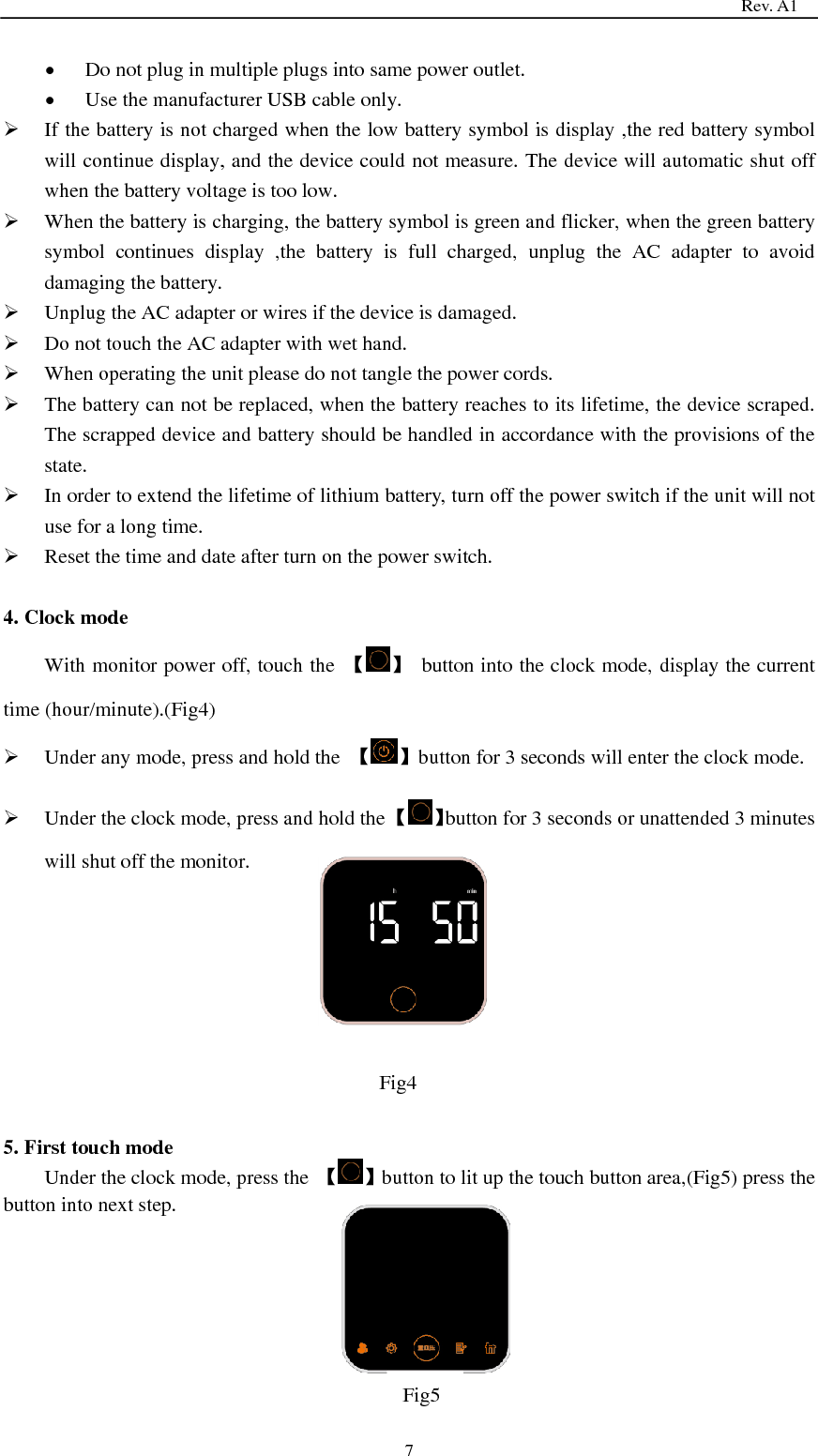
                                                                                  Rev. A1  6   Cuff Label Fig 2 Note: Symbol for‖TYPE BF APPLIED PART‖  Display  Fig 3  3. Power source The device is power by lithium battery, and can be charge using USB cable.  Turn on the power switch when first used, the power switch is located at the back side of the device.  When  the  battery  is  connected  to  the  unit  ,the  LED  display  will  lit  -up  for  3 second ,then the device power off.  When the battery is running low, the battery symbol will turn red and flicker , please connect the USB cable to charge.  Connect the AC adapter with USB cable to the USB port of the main unit.  Plug the socket into electric outlet.  Use  the correct adapter designed for your  local  voltage  (Recommend:  Power  adapter specification, AC100-240V, 50/60Hz, 400mA; Output: 5.0V 1.0A.) Which comply IEC 6061-1 standard.                             Model: BC××××
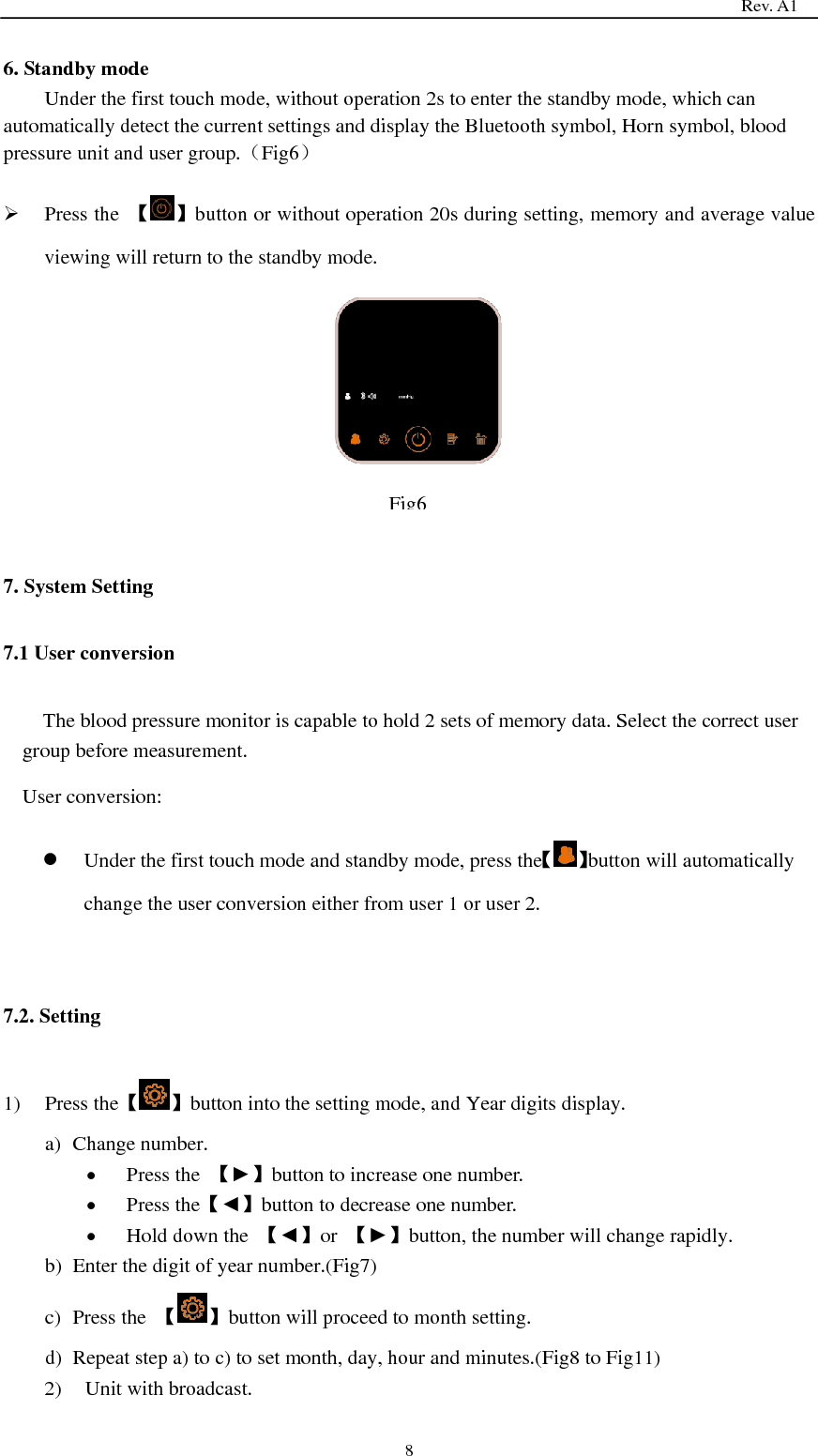
                                                                                  Rev. A1  7  Do not plug in multiple plugs into same power outlet.    Use the manufacturer USB cable only.  If the battery is not charged when the low battery symbol is display ,the red battery symbol will continue display, and the device could not measure. The device will automatic shut off when the battery voltage is too low.  When the battery is charging, the battery symbol is green and flicker, when the green battery symbol  continues  display  ,the  battery  is  full  charged,  unplug  the  AC  adapter  to  avoid damaging the battery.  Unplug the AC adapter or wires if the device is damaged.  Do not touch the AC adapter with wet hand.  When operating the unit please do not tangle the power cords.  The battery can not be replaced, when the battery reaches to its lifetime, the device scraped. The scrapped device and battery should be handled in accordance with the provisions of the state.  In order to extend the lifetime of lithium battery, turn off the power switch if the unit will not use for a long time.  Reset the time and date after turn on the power switch.  4. Clock mode With monitor power off, touch the  【 】  button into the clock mode, display the current time (hour/minute).(Fig4)  Under any mode, press and hold the  【 】button for 3 seconds will enter the clock mode.  Under the clock mode, press and hold the 【 】button for 3 seconds or unattended 3 minutes will shut off the monitor.       5. First touch mode Under the clock mode, press the  【 】button to lit up the touch button area,(Fig5) press the button into next step.      Fig4   Fig5
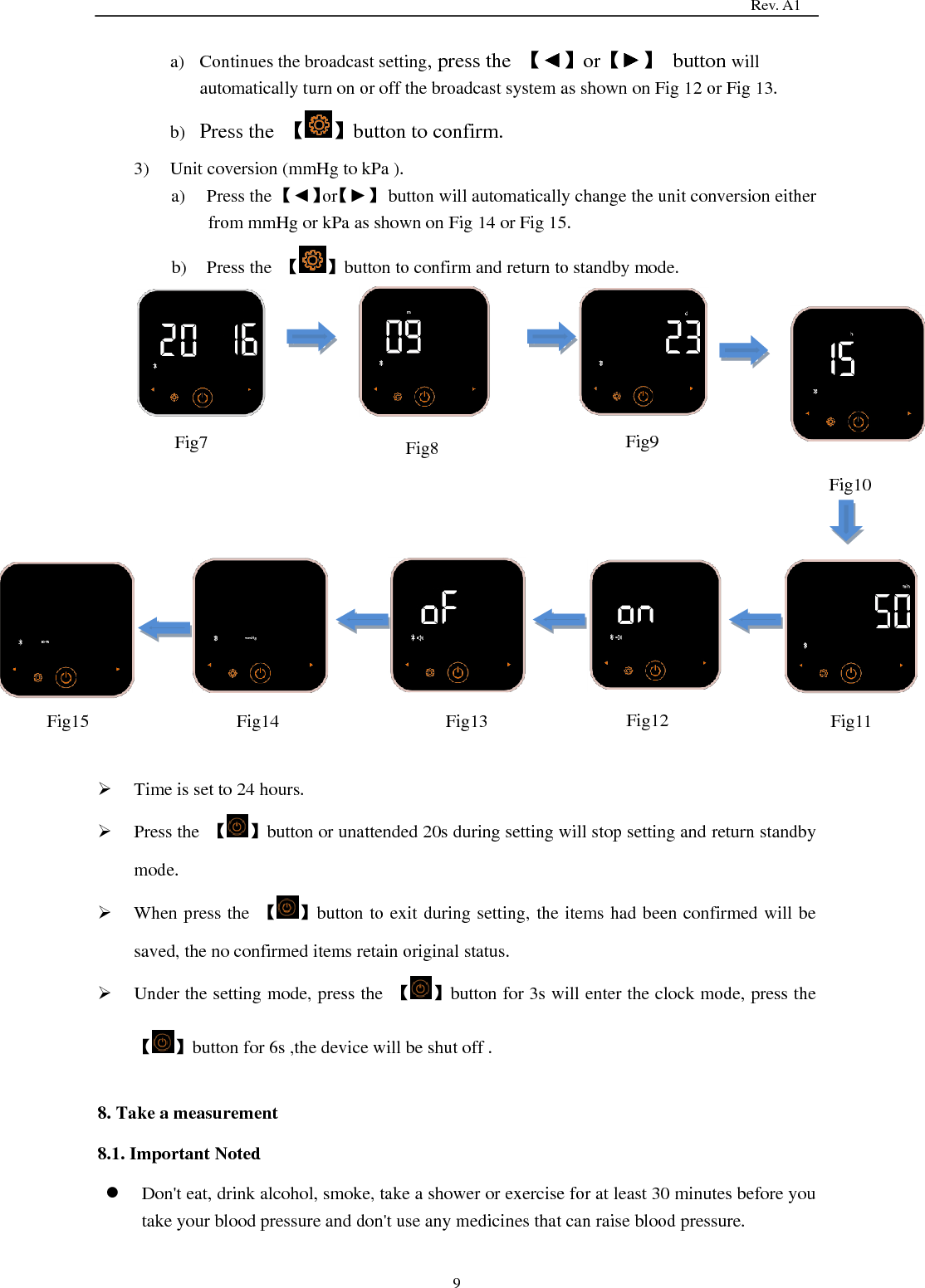
                                                                                  Rev. A1  8 6. Standby mode Under the first touch mode, without operation 2s to enter the standby mode, which can automatically detect the current settings and display the Bluetooth symbol, Horn symbol, blood pressure unit and user group.(Fig6)  Press the  【 】button or without operation 20s during setting, memory and average value viewing will return to the standby mode.        7. System Setting 7.1 User conversion The blood pressure monitor is capable to hold 2 sets of memory data. Select the correct user group before measurement. User conversion:    Under the first touch mode and standby mode, press the【 】button will automatically change the user conversion either from user 1 or user 2.  7.2. Setting 1) Press the【 】button into the setting mode, and Year digits display. a) Change number.  Press the  【►】button to increase one number.  Press the【◄】button to decrease one number.  Hold down the  【◄】or  【►】button, the number will change rapidly. b) Enter the digit of year number.(Fig7) c) Press the  【 】button will proceed to month setting. d) Repeat step a) to c) to set month, day, hour and minutes.(Fig8 to Fig11) 2) Unit with broadcast.  Fig6
                                                                                  Rev. A1  9 a) Continues the broadcast setting, press the  【◄】or【►】  button will automatically turn on or off the broadcast system as shown on Fig 12 or Fig 13.   b) Press the  【 】button to confirm. 3) Unit coversion (mmHg to kPa ). a) Press the 【◄】or【►】  button will automatically change the unit conversion either from mmHg or kPa as shown on Fig 14 or Fig 15. b) Press the  【 】button to confirm and return to standby mode.                    Time is set to 24 hours.  Press the  【 】button or unattended 20s during setting will stop setting and return standby mode.  When press the  【 】button to exit during setting, the items had been confirmed will be saved, the no confirmed items retain original status.  Under the setting mode, press the  【 】button for 3s will enter the clock mode, press the 【 】button for 6s ,the device will be shut off .  8. Take a measurement 8.1. Important Noted  Don't eat, drink alcohol, smoke, take a shower or exercise for at least 30 minutes before you take your blood pressure and don't use any medicines that can raise blood pressure.  Fig7  Fig8  Fig9 Fig10   Fig11  Fig12  Fig13  Fig14  Fig15
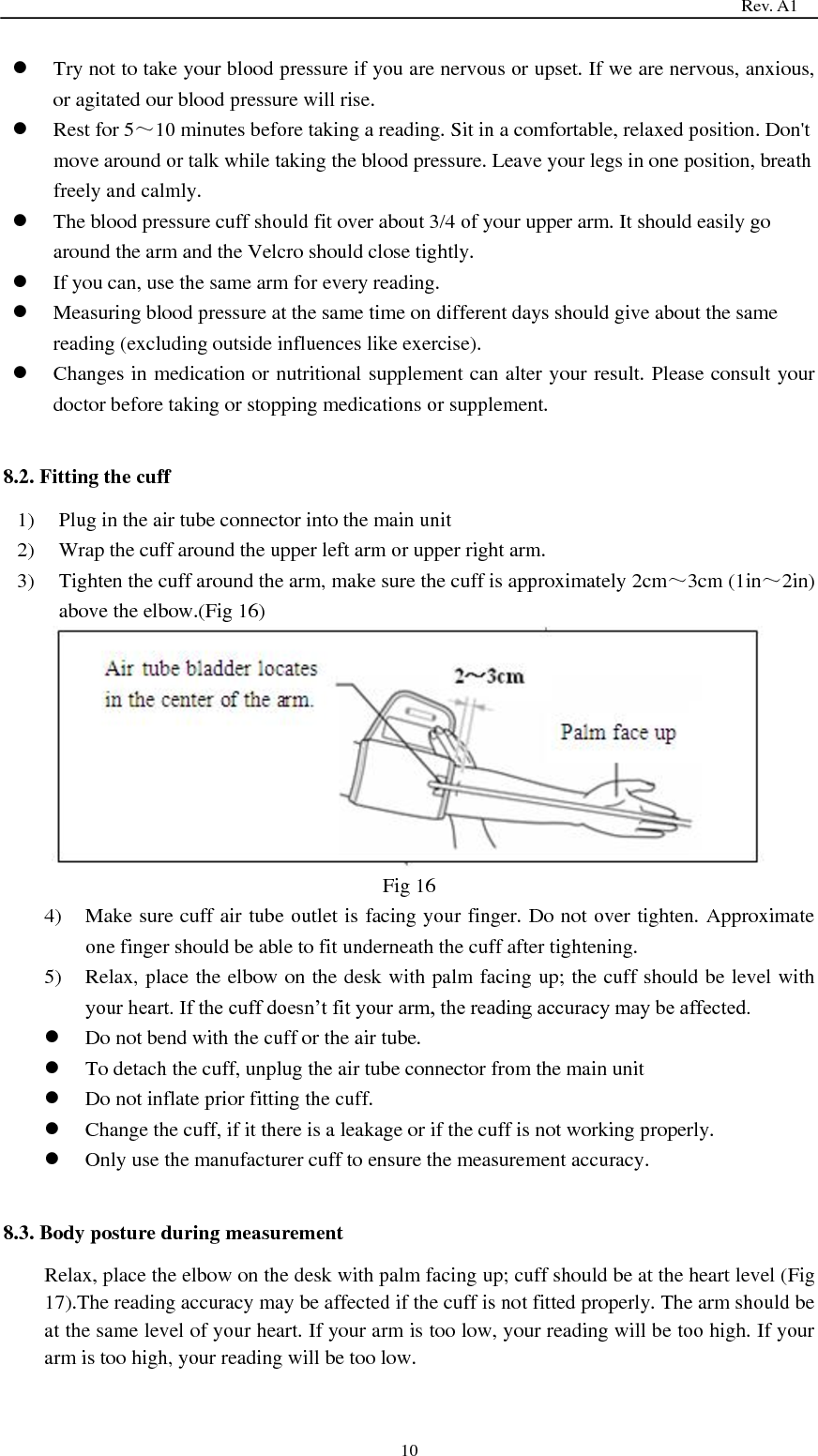
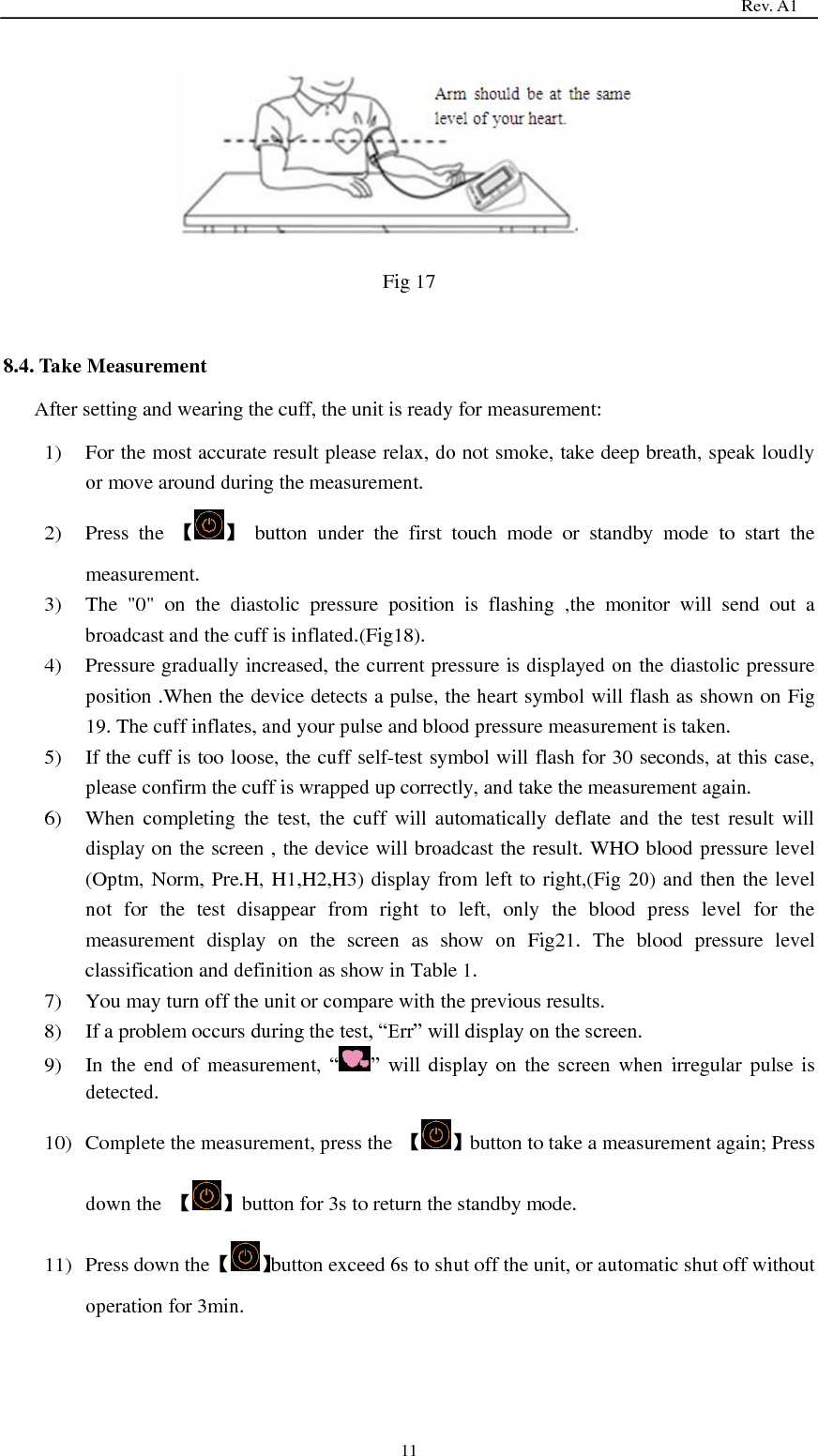
                                                                                  Rev. A1  10  Try not to take your blood pressure if you are nervous or upset. If we are nervous, anxious, or agitated our blood pressure will rise.    Rest for 5~10 minutes before taking a reading. Sit in a comfortable, relaxed position. Don't move around or talk while taking the blood pressure. Leave your legs in one position, breath freely and calmly.    The blood pressure cuff should fit over about 3/4 of your upper arm. It should easily go around the arm and the Velcro should close tightly.  If you can, use the same arm for every reading.    Measuring blood pressure at the same time on different days should give about the same reading (excluding outside influences like exercise).    Changes in medication or nutritional supplement can alter your result. Please consult your doctor before taking or stopping medications or supplement.  8.2. Fitting the cuff 1) Plug in the air tube connector into the main unit 2) Wrap the cuff around the upper left arm or upper right arm. 3) Tighten the cuff around the arm, make sure the cuff is approximately 2cm~3cm (1in~2in) above the elbow.(Fig 16)  Fig 16 4) Make sure cuff air tube outlet is facing your finger. Do not over tighten. Approximate one finger should be able to fit underneath the cuff after tightening. 5) Relax, place the elbow on the desk with palm facing up; the cuff should be level with your heart. If the cuff doesn’t fit your arm, the reading accuracy may be affected.  Do not bend with the cuff or the air tube.  To detach the cuff, unplug the air tube connector from the main unit    Do not inflate prior fitting the cuff.  Change the cuff, if it there is a leakage or if the cuff is not working properly.  Only use the manufacturer cuff to ensure the measurement accuracy.  8.3. Body posture during measurement Relax, place the elbow on the desk with palm facing up; cuff should be at the heart level (Fig 17).The reading accuracy may be affected if the cuff is not fitted properly. The arm should be at the same level of your heart. If your arm is too low, your reading will be too high. If your arm is too high, your reading will be too low.
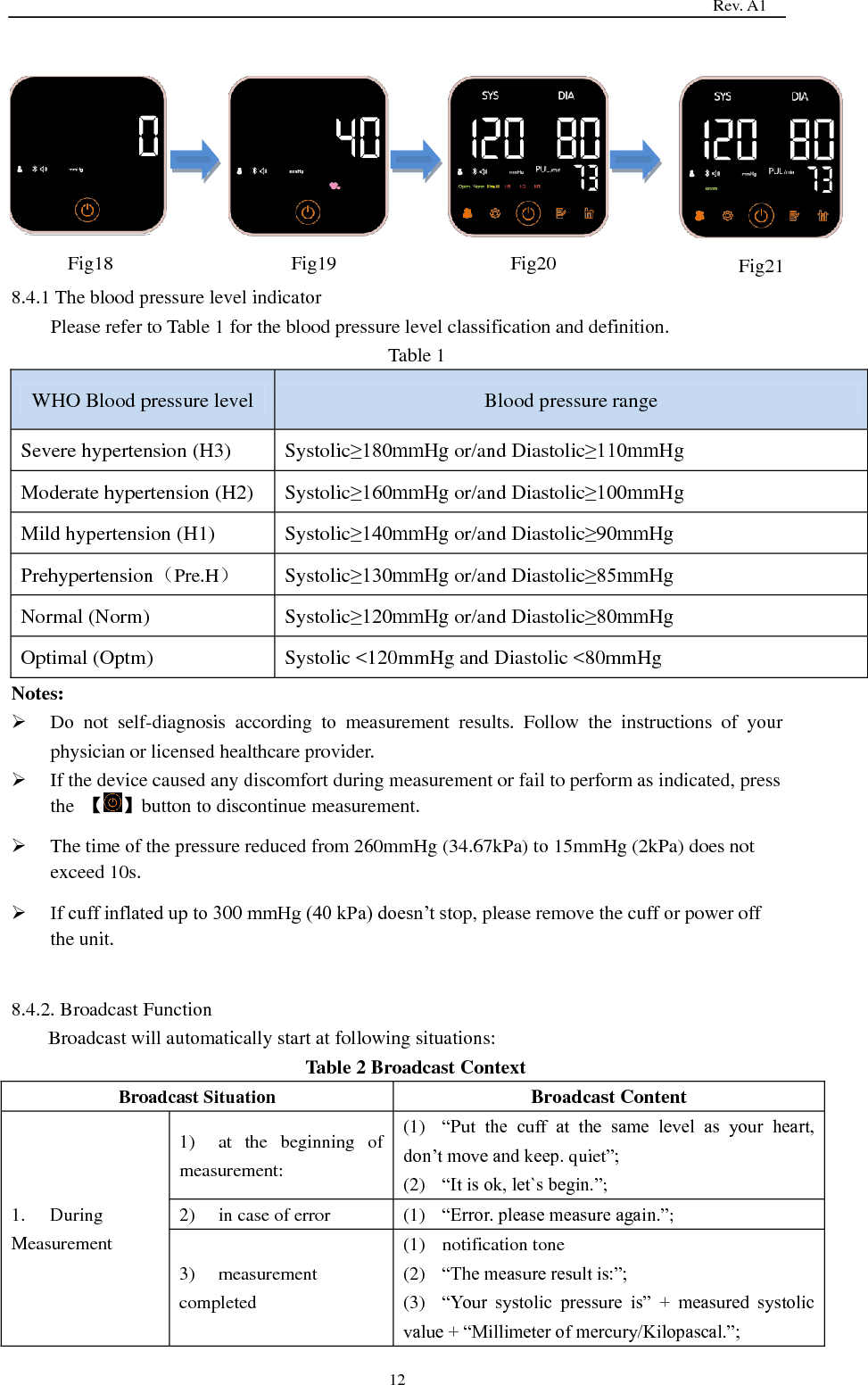
                                                                                  Rev. A1  11      Fig 17  8.4. Take Measurement After setting and wearing the cuff, the unit is ready for measurement: 1) For the most accurate result please relax, do not smoke, take deep breath, speak loudly or move around during the measurement. 2) Press  the  【 】  button  under  the  first  touch  mode  or  standby  mode  to  start  the measurement. 3) The  "0"  on  the  diastolic  pressure  position  is  flashing  ,the  monitor  will  send  out  a broadcast and the cuff is inflated.(Fig18). 4) Pressure gradually increased, the current pressure is displayed on the diastolic pressure position .When the device detects a pulse, the heart symbol will flash as shown on Fig 19. The cuff inflates, and your pulse and blood pressure measurement is taken. 5) If the cuff is too loose, the cuff self-test symbol will flash for 30 seconds, at this case, please confirm the cuff is wrapped up correctly, and take the measurement again. 6) When  completing  the  test,  the  cuff  will  automatically  deflate  and  the  test  result  will display on the screen , the device will broadcast the result. WHO blood pressure level (Optm, Norm, Pre.H, H1,H2,H3) display from left to right,(Fig 20) and then the level not  for  the  test  disappear  from  right  to  left,  only  the  blood  press  level  for  the measurement  display  on  the  screen  as  show  on  Fig21.  The  blood  pressure  level classification and definition as show in Table 1. 7) You may turn off the unit or compare with the previous results. 8) If a problem occurs during the test, ―Err‖ will display on the screen. 9) In the end of  measurement,  ― ‖  will  display  on  the  screen when irregular pulse  is detected.   10) Complete the measurement, press the  【 】button to take a measurement again; Press down the  【 】button for 3s to return the standby mode. 11) Press down the 【 】button exceed 6s to shut off the unit, or automatic shut off without operation for 3min.
                                                                                  Rev. A1  12         8.4.1 The blood pressure level indicator Please refer to Table 1 for the blood pressure level classification and definition. Table 1 WHO Blood pressure level Blood pressure range Severe hypertension (H3) Systolic≥180mmHg or/and Diastolic≥110mmHg Moderate hypertension (H2) Systolic≥160mmHg or/and Diastolic≥100mmHg Mild hypertension (H1) Systolic≥140mmHg or/and Diastolic≥90mmHg Prehypertension(Pre.H) Systolic≥130mmHg or/and Diastolic≥85mmHg Normal (Norm) Systolic≥120mmHg or/and Diastolic≥80mmHg Optimal (Optm) Systolic <120mmHg and Diastolic <80mmHg Notes:  Do  not  self-diagnosis  according  to  measurement  results.  Follow  the  instructions  of  your physician or licensed healthcare provider.  If the device caused any discomfort during measurement or fail to perform as indicated, press the  【 】button to discontinue measurement.    The time of the pressure reduced from 260mmHg (34.67kPa) to 15mmHg (2kPa) does not exceed 10s.  If cuff inflated up to 300 mmHg (40 kPa) doesn’t stop, please remove the cuff or power off the unit.  8.4.2. Broadcast Function Broadcast will automatically start at following situations:   Table 2 Broadcast Context Broadcast Situation Broadcast Content 1.    During Measurement 1)  at  the  beginning  of measurement: (1)  ―Put  the  cuff  at  the  same  level  as  your  heart, don’t move and keep. quiet‖; (2)  ―It is ok, let`s begin.‖; 2)  in case of error (1)  ―Error. please measure again.‖; 3)  measurement completed (1)  notification tone (2)  ―The measure result is:‖; (3)  ―Your  systolic  pressure  is‖  +  measured  systolic value + ―Millimeter of mercury/Kilopascal.‖;  Fig18  Fig19  Fig20  Fig21
                                                                                  Rev. A1  13 (4)  ―Your diastolic pressure is‖ + measured diastolic value + ―Millimeter of mercury/Kilopascal.‖; (5)  ―Your pulse is‖ + measured pulse value + ―pulse per minute.‖; (6)  ―According  to  World  Health  organization standard,  your  blood  pressure  level  is optimal/normal/pre_hypertension/mild_hypertension/moderate_hypertension/severe_hypertension.‖; 2.  Data Review 1)  reviewing  average value: (1)  ―Your average for the last three times:‖; (2)  ―Your  systolic  pressure  is‖  +  measured  systolic value + ―Millimeter of mercury/Kilopascal.‖; (3)  ―Your diastolic pressure is‖ + measured diastolic value + ―Millimeter of mercury/Kilopascal.‖; (4)  ―Your pulse is‖ + measured pulse value + ―pulse per minute.‖; 2)  reviewing  measured value: (1)  ―The measure result is‖ (2)  ―Your  systolic  pressure  is‖  +  measured  systolic value + ―Millimeter of mercury/Kilopascal.‖; (3)  ―Your diastolic pressure is‖ + measured diastolic value + ―Millimeter of mercury/Kilopascal.‖; (4)  ―Your pulse is‖ + measured pulse value + ―pulse per minute.‖; 3.  Low Battery 1)  in case of low battery ―Low battery, please charge the battery‖   Note:  ―/‖ means ―OR‖  text in ―‖ is detail content of broadcast  8.5. Average value 1) Press the  【 】button to read the average value. 2) The screen will display the average data of the most recent 3 sets as show on Fig22 and broadcast the data. 3) Press the  【 】button to change user group.      Press the 【 】button when viewing the average value, the average data will flick and the device broadcasts the data again.  Without any operation for 20s, the unit will automatically turn to standby mode.  Under average value mode, press down the 【 】button for 3s to return the clock Fig22
                                                                                  Rev. A1  14 mode, press down the  【 】button exceed 6s to shut off the unit.   8.6. Memory The Memory 1 and Memory 2 can hold up to 60 readings each. 1) Enter the memory reading mode. Press the  【 】  button to enter the memory reading mode. 2) Read the memory values. Under the Memory reading mode, press  【►】button to view the latest value to the earliest value. Press the【◄】button to view the earliest value to the latest value. a) Enter the memory reading mode, the month, day and data number of the memory data being viewed will display for 1s,(Fig23) and then turns to b). b)   Hour, minute and data number of the memory data being viewed will display for 1s,(Fig24) and then turns to c). c) Display the systolic, diastolic, pulse rate and the blood pressure level as show on Fig25. Press the  【 】  button to return a).           When viewing the memory, if the result shows the heart mark, it is suggested that the irregular pulse is detected.    .Refer 7.1 to change user group.  Without any operation for 20s, the unit will automatically turn to standby mode.  Under memory reading mode, press down the  【 】button for 3s to return the clock mode, press down the  【 】button exceed 6s to shut off the unit. 3) Delete the memory values a) Enter the memory reading mode. b) Press and hold the  【 】  button until the ―—― displays. c) The unit will only delete the present memory data set, the other memory data set will not be affected. d) The device is not capable to delete a single data.   Fig23  Fig24  Fig25
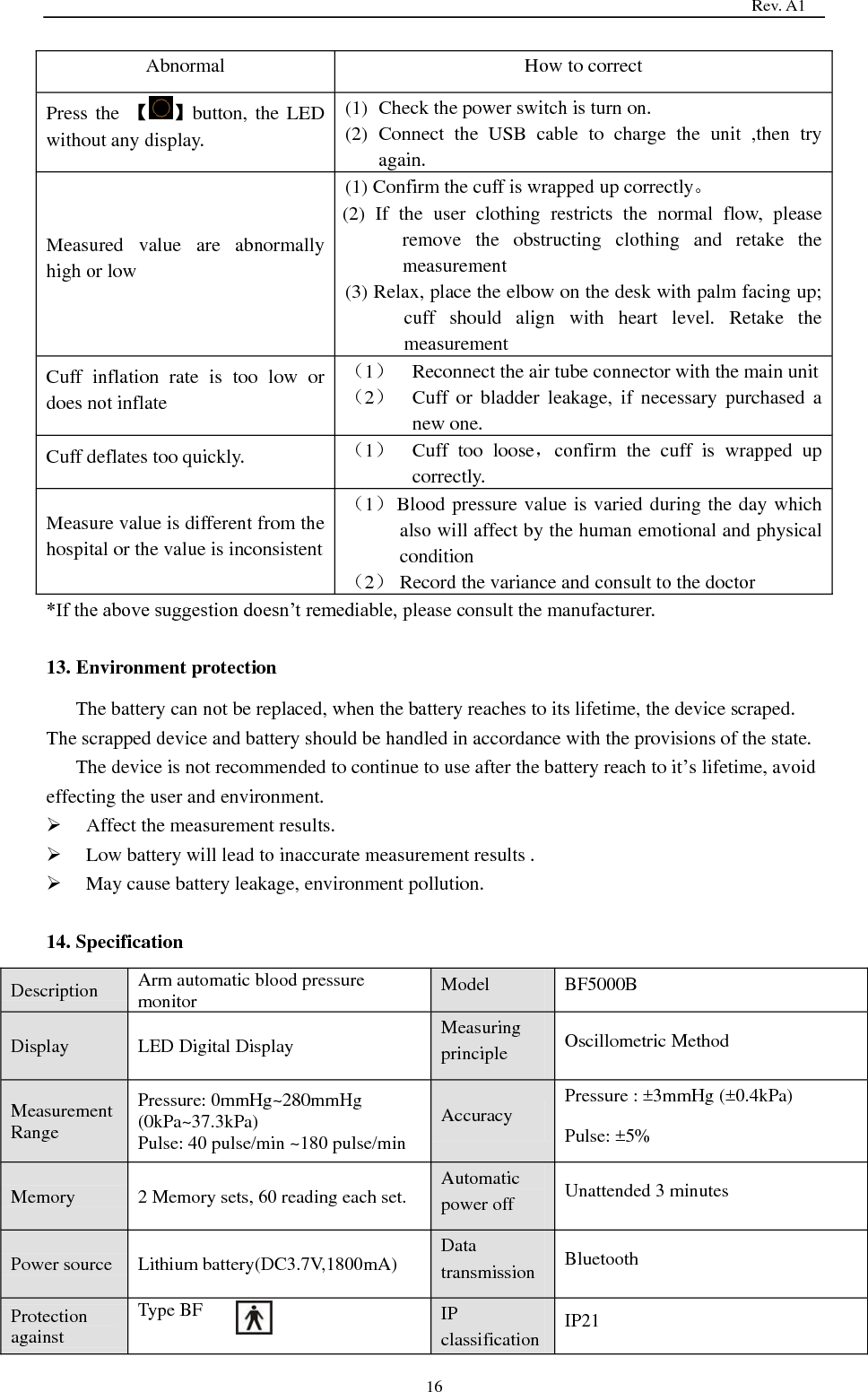
                                                                                  Rev. A1  15 9. Data transmission The Bluetooth function of Blood pressure monitor turns on automatically simultaneously with device’s powering on, which can be searched by corresponding app used for physiological indexes management on Mobile phone for data transportation.  10. Power off (1)Under the clock mode, press the  【 】button for 3s. (2)Press and hold the  【 】button for 6s except the clock mode. (3)While completing the measurement or under the standby mode, without operation for 3min, the device will automatically shut off.  11. Error Indication List of Error code. Error Cause How to correct cuff self-test symbol   Power on, cuff inflation rate is too low or main unit does not connect with the cuff.   (1) Reconnect the air tube connector with the main unit . (2) Cuff or bladder leakage, if necessary purchased a new one.   (3) Confirm the cuff is wrapped up correctly (ref 8), retake the measurement . Er 02  Weak Signal or cuff is too loose;  Heavy shock during the measurement;  Bad Signal,moving or talking during the measurement;  Abnormal measurement results.  Cuff too loose,Confirm the cuff is wrapped up correctly(ref 8)retake the measurement.  Remain still, retake the measurement (ref 8)  Remain still, retake the measurement.  Cuff should be at the heart level, quiet and relaxed when measuring. Lo Low battery power, cannot inflate Charge the battery(ref 3).  12. Trouble Shooting When the unit encounters malfunction during the use, refer to table below:
                                                                                  Rev. A1  16 Abnormal How to correct Press the  【 】button, the  LED without any display. (1) Check the power switch is turn on. (2) Connect  the  USB  cable  to  charge  the  unit  ,then  try again. Measured  value  are  abnormally high or low (1) Confirm the cuff is wrapped up correctly。 (2)  If  the  user  clothing  restricts  the  normal  flow,  please remove  the  obstructing  clothing  and  retake  the measurement (3) Relax, place the elbow on the desk with palm facing up; cuff  should  align  with  heart  level.  Retake  the measurement Cuff  inflation  rate  is  too  low  or does not inflate (1) Reconnect the air tube connector with the main unit (2) Cuff  or  bladder  leakage,  if  necessary  purchased  a new one.   Cuff deflates too quickly. (1) Cuff  too  loose,confirm  the  cuff  is  wrapped  up correctly. Measure value is different from the hospital or the value is inconsistent (1) Blood pressure value is varied during the day which also will affect by the human emotional and physical condition (2) Record the variance and consult to the doctor *If the above suggestion doesn’t remediable, please consult the manufacturer.  13. Environment protection The battery can not be replaced, when the battery reaches to its lifetime, the device scraped. The scrapped device and battery should be handled in accordance with the provisions of the state. The device is not recommended to continue to use after the battery reach to it’s lifetime, avoid effecting the user and environment.  Affect the measurement results.  Low battery will lead to inaccurate measurement results .  May cause battery leakage, environment pollution.  14. Specification Description Arm automatic blood pressure monitor Model BF5000B Display LED Digital Display Measuring principle Oscillometric Method Measurement Range Pressure: 0mmHg~280mmHg   (0kPa~37.3kPa) Pulse: 40 pulse/min ~180 pulse/min Accuracy Pressure : ±3mmHg (±0.4kPa) Pulse: ±5% Memory 2 Memory sets, 60 reading each set. Automatic power off Unattended 3 minutes Power source Lithium battery(DC3.7V,1800mA) Data transmission Bluetooth   Protection against Type BF IP classification IP21
                                                                                  Rev. A1  17 electric shock Mode of operation Continuous Applied part Cuff Operating Environment Temperature:+5℃~+40℃; Humidity:15%~93% Pressure: 70.0kPa~106.0kPa Altitude: ≤3000 m Storage  and transport Environment Temperature:-25℃~+70℃; Humidity:10%~95% Pressure:50.0kPa~106.0kPa Weight 382g Size 120 mm×120mm×40mm Life time (Body) Body 10000 times Contents ·Cuff ·USB cable ·Storage case (Optional) ·Instruction Manual   Cuff 10000 times This unit is intended for home use and the specification may be changed without prior notice.    This device complies with Part 15 of the FCC Rules. Operation is subject to the following two conditions:  (1) This device may not cause harmful interference, and   (2)  This  device  must  accept  any  interference  received,  including  interference  that  may  cause undesired operation  Note: This equipment has been tested and found to comply with the limits for a Class B digital device, pursuant to Part 15 of the FCC Rules.  These limits are designed to provide reasonable protection against harmful interference in a residential installation. This equipment generates, uses, and  can  radiate  radio  frequency  energy,  and  if  not  installed  and  used  in  accordance  with  the instructions,  may  cause  harmful  interference  to  radio  communications.  However,  there  is  no guarantee that interference will not occur in a particular installation. If this equipment does cause harmful  interference  to  radio  or  television  reception,  which  can  be  determined  by  turning  the equipment off and on, the user is encouraged to try to correct the interference by one or more of the following measures: – Reorient or relocate the receiving antenna. – Increase the separation between the equipment and receiver. – Connect the equipment into an outlet on a circuit different from that to which the receiver is connected. – Consult the dealer or an experienced radio/TV technician for help.  You are cautioned that changes or modifications not expressly approved by the party responsible for compliance could void your authority to operate the equipment.  The device complies with RF specifications when the device used at 0mm form your body.
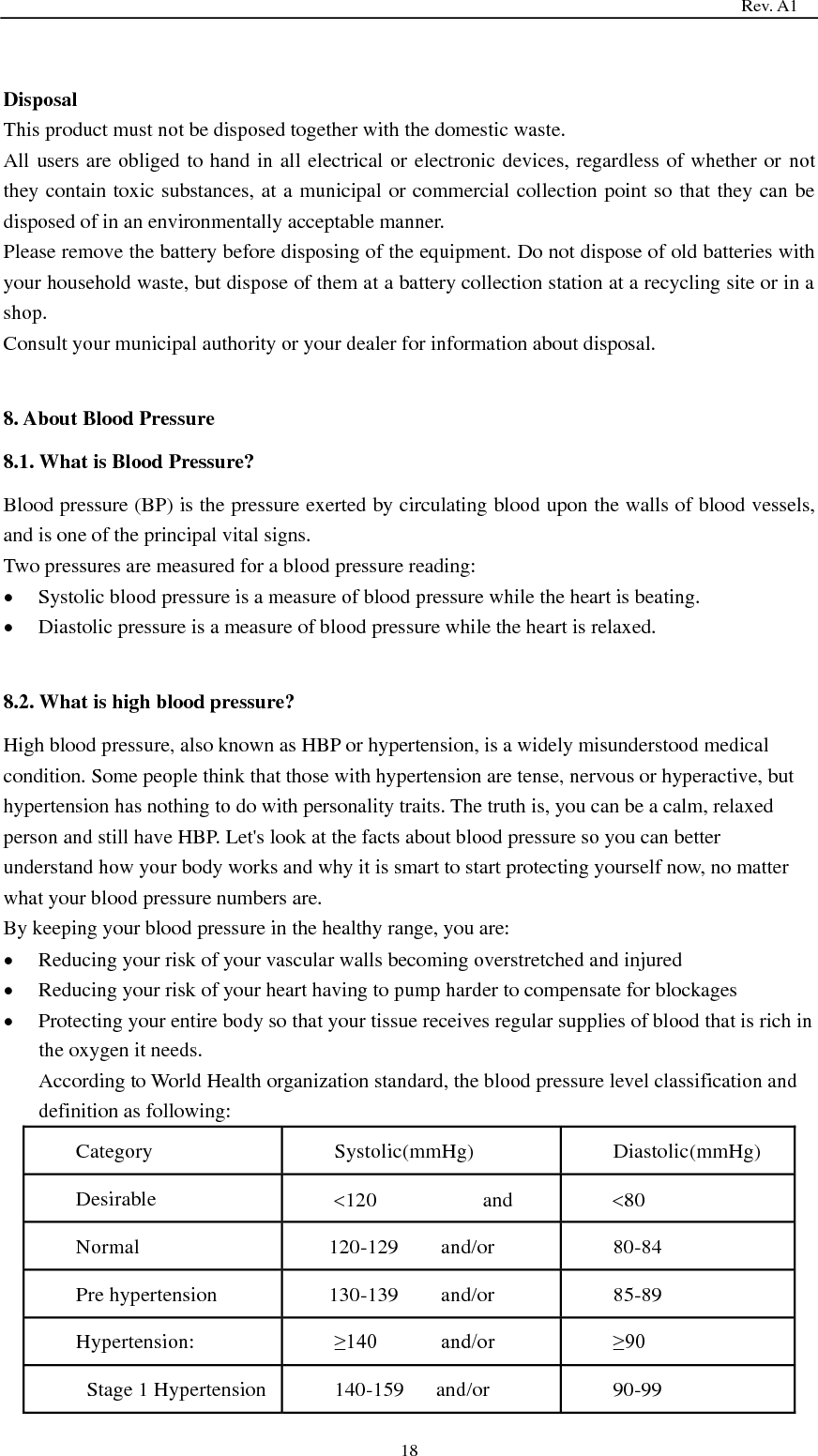
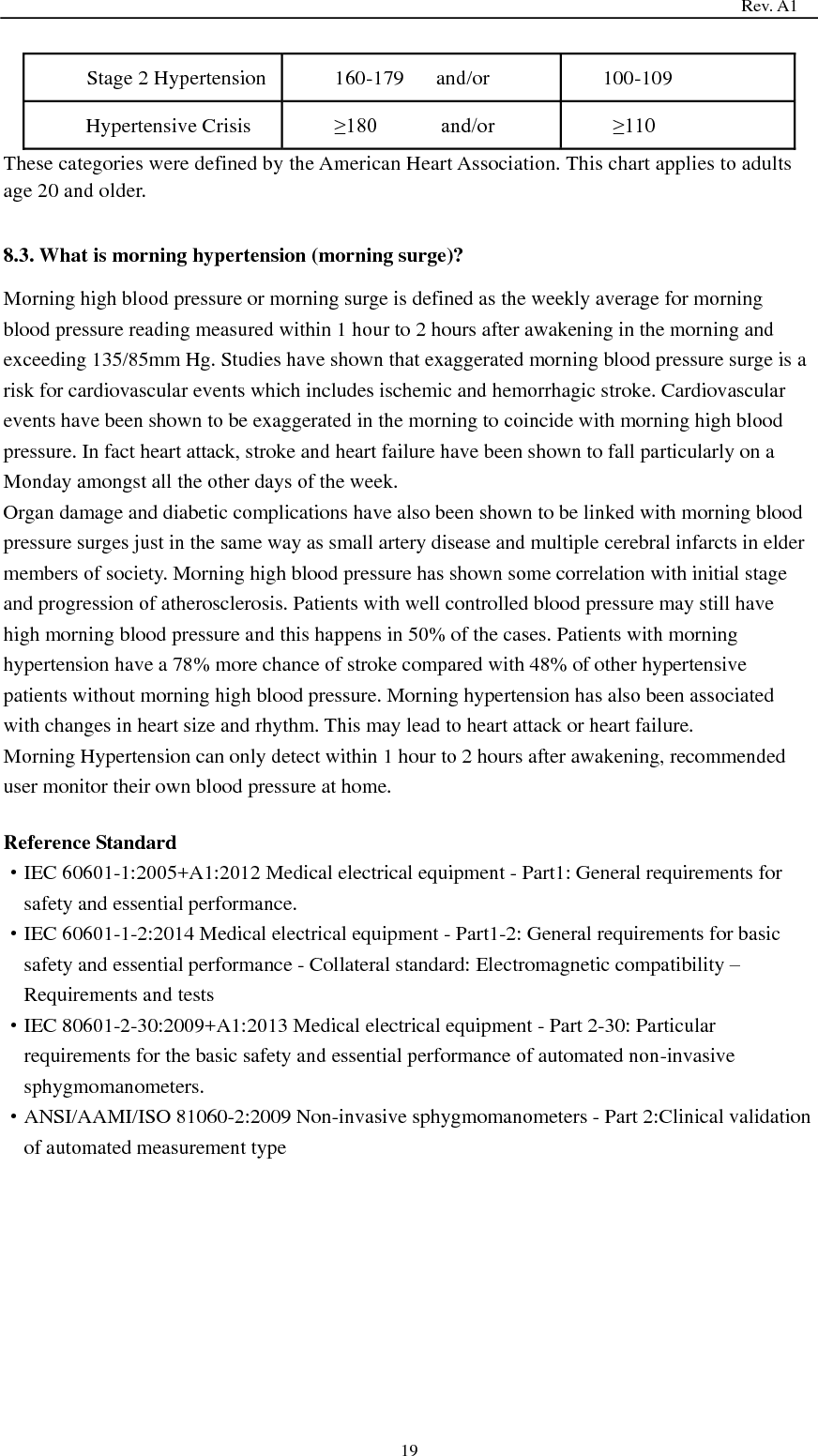
                                                                                  Rev. A1  18  Disposal This product must not be disposed together with the domestic waste. All users are obliged to hand in all electrical or electronic devices, regardless of whether or not they contain toxic substances, at a municipal or commercial collection point so that they can be disposed of in an environmentally acceptable manner. Please remove the battery before disposing of the equipment. Do not dispose of old batteries with your household waste, but dispose of them at a battery collection station at a recycling site or in a shop. Consult your municipal authority or your dealer for information about disposal.  8. About Blood Pressure 8.1. What is Blood Pressure? Blood pressure (BP) is the pressure exerted by circulating blood upon the walls of blood vessels, and is one of the principal vital signs. Two pressures are measured for a blood pressure reading:  Systolic blood pressure is a measure of blood pressure while the heart is beating.    Diastolic pressure is a measure of blood pressure while the heart is relaxed.    8.2. What is high blood pressure? High blood pressure, also known as HBP or hypertension, is a widely misunderstood medical condition. Some people think that those with hypertension are tense, nervous or hyperactive, but hypertension has nothing to do with personality traits. The truth is, you can be a calm, relaxed person and still have HBP. Let's look at the facts about blood pressure so you can better understand how your body works and why it is smart to start protecting yourself now, no matter what your blood pressure numbers are. By keeping your blood pressure in the healthy range, you are:  Reducing your risk of your vascular walls becoming overstretched and injured  Reducing your risk of your heart having to pump harder to compensate for blockages  Protecting your entire body so that your tissue receives regular supplies of blood that is rich in the oxygen it needs. According to World Health organization standard, the blood pressure level classification and definition as following: Category Systolic(mmHg) Diastolic(mmHg) Desirable 120                    and 80 Normal   120-129        and/or 80-84 Pre hypertension 130-139        and/or 85-89 Hypertension: ≥140            and/or ≥90   Stage 1 Hypertension 140-159      and/or 90-99
                                                                                  Rev. A1  19   Stage 2 Hypertension 160-179      and/or 100-109 Hypertensive Crisis ≥180            and/or ≥110 These categories were defined by the American Heart Association. This chart applies to adults age 20 and older.  8.3. What is morning hypertension (morning surge)? Morning high blood pressure or morning surge is defined as the weekly average for morning blood pressure reading measured within 1 hour to 2 hours after awakening in the morning and exceeding 135/85mm Hg. Studies have shown that exaggerated morning blood pressure surge is a risk for cardiovascular events which includes ischemic and hemorrhagic stroke. Cardiovascular events have been shown to be exaggerated in the morning to coincide with morning high blood pressure. In fact heart attack, stroke and heart failure have been shown to fall particularly on a Monday amongst all the other days of the week. Organ damage and diabetic complications have also been shown to be linked with morning blood pressure surges just in the same way as small artery disease and multiple cerebral infarcts in elder members of society. Morning high blood pressure has shown some correlation with initial stage and progression of atherosclerosis. Patients with well controlled blood pressure may still have high morning blood pressure and this happens in 50% of the cases. Patients with morning hypertension have a 78% more chance of stroke compared with 48% of other hypertensive patients without morning high blood pressure. Morning hypertension has also been associated with changes in heart size and rhythm. This may lead to heart attack or heart failure. Morning Hypertension can only detect within 1 hour to 2 hours after awakening, recommended user monitor their own blood pressure at home.    Reference Standard ·IEC 60601-1:2005+A1:2012 Medical electrical equipment - Part1: General requirements for safety and essential performance. ·IEC 60601-1-2:2014 Medical electrical equipment - Part1-2: General requirements for basic safety and essential performance - Collateral standard: Electromagnetic compatibility – Requirements and tests ·IEC 80601-2-30:2009+A1:2013 Medical electrical equipment - Part 2-30: Particular requirements for the basic safety and essential performance of automated non-invasive sphygmomanometers. ·ANSI/AAMI/ISO 81060-2:2009 Non-invasive sphygmomanometers - Part 2:Clinical validation of automated measurement type
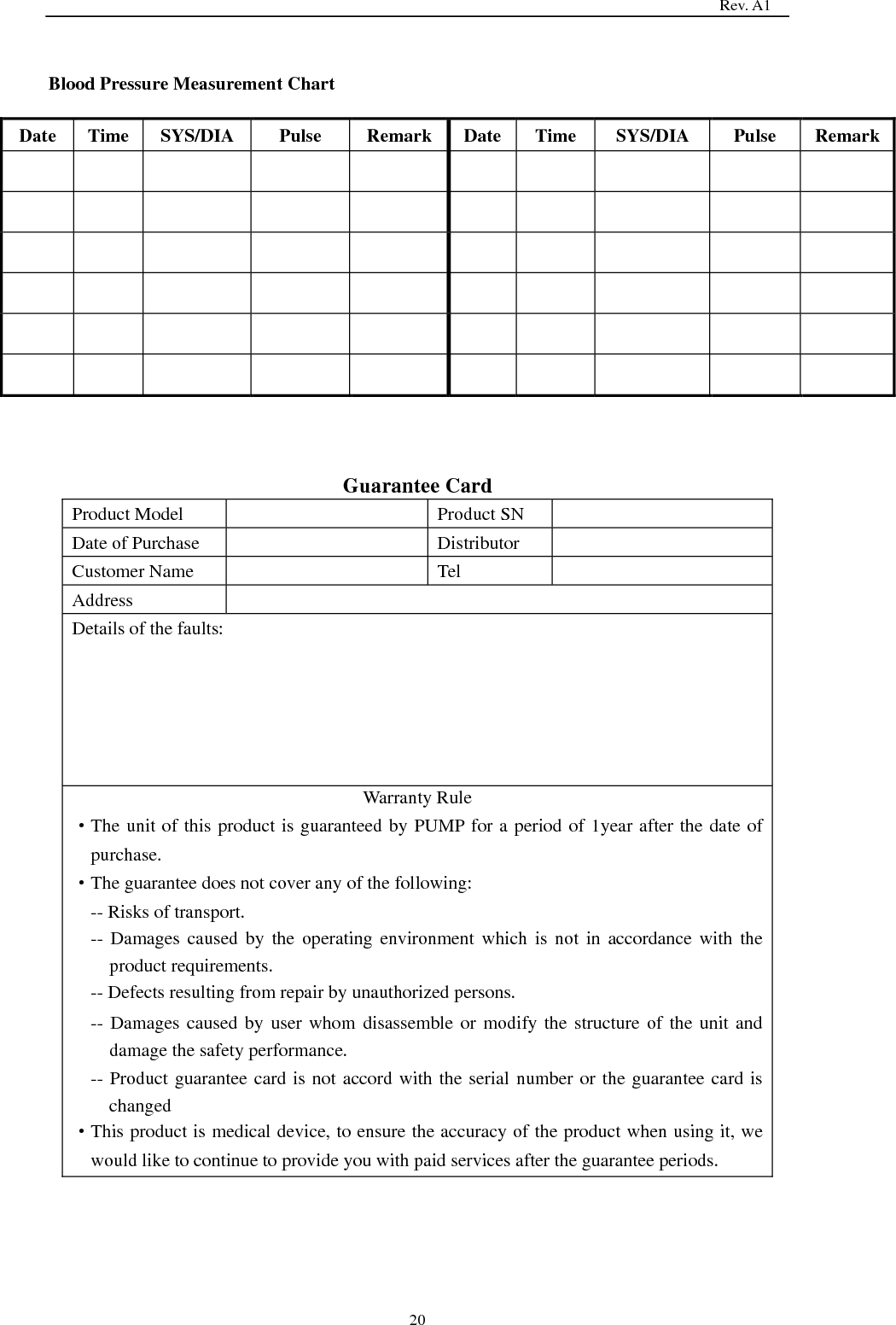
                                                                                  Rev. A1  20  Blood Pressure Measurement Chart   Date Time SYS/DIA   Pulse Remark Date Time SYS/DIA   Pulse Remark                                                                Guarantee Card Product Model  Product SN  Date of Purchase  Distributor  Customer Name  Tel  Address  Details of the faults: Warranty Rule   ·The unit of this product is guaranteed by PUMP for a period of 1year after the date of purchase. ·The guarantee does not cover any of the following: -- Risks of transport. -- Damages caused by  the  operating  environment  which is not  in  accordance with the product requirements. -- Defects resulting from repair by unauthorized persons. -- Damages caused by user whom disassemble or modify the structure of the unit and damage the safety performance. -- Product guarantee card is not accord with the serial number or the guarantee card is changed ·This product is medical device, to ensure the accuracy of the product when using it, we would like to continue to provide you with paid services after the guarantee periods.
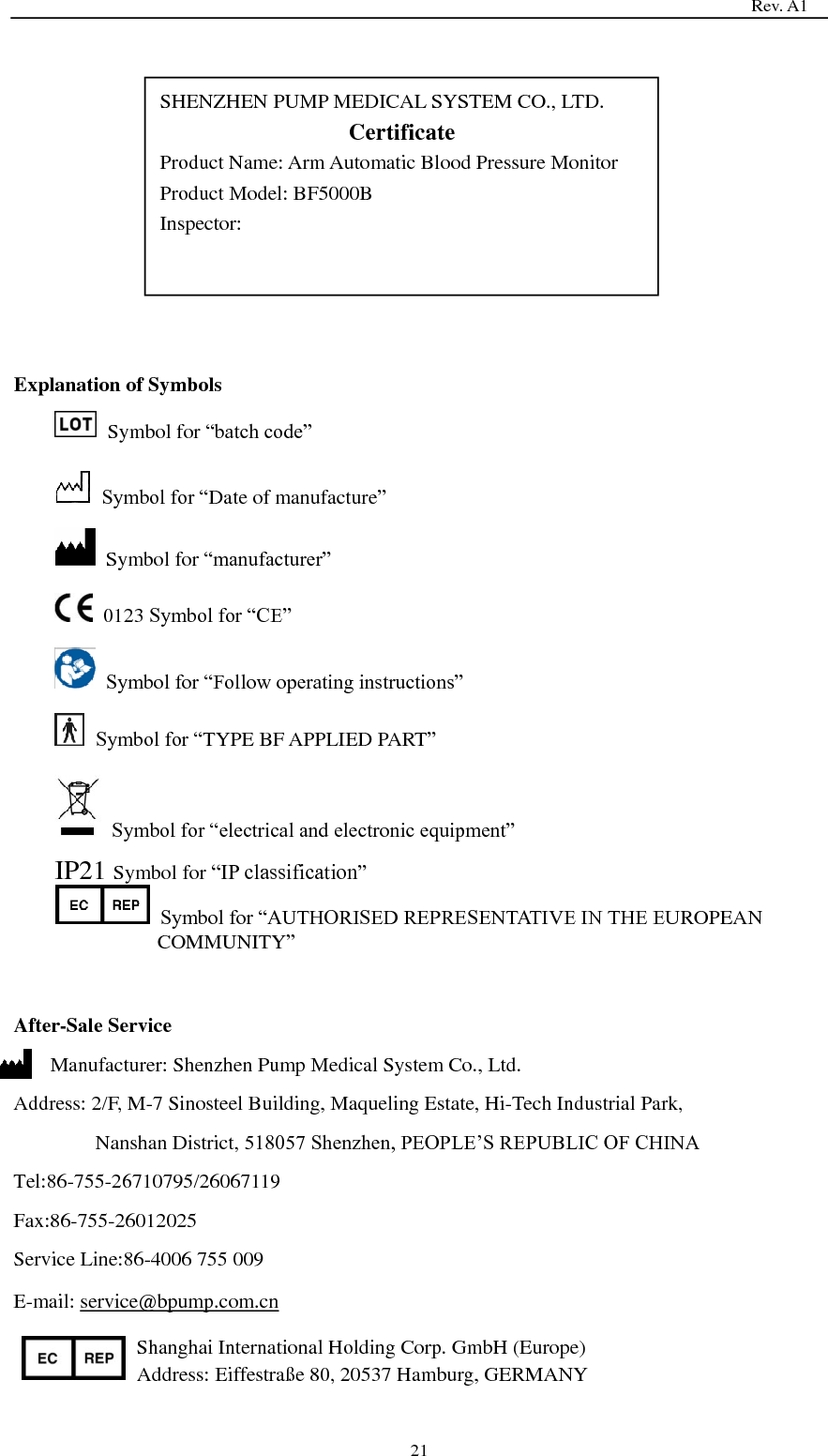
                                                                                  Rev. A1  21             Explanation of Symbols   Symbol for ―batch code‖  Symbol for ―Date of manufacture‖   Symbol for ―manufacturer‖   0123 Symbol for ―CE‖  Symbol for ―Follow operating instructions‖  Symbol for ―TYPE BF APPLIED PART‖  Symbol for ―electrical and electronic equipment‖ IP21 Symbol for ―IP classification‖  Symbol for ―AUTHORISED REPRESENTATIVE IN THE EUROPEAN COMMUNITY‖   After-Sale Service Manufacturer: Shenzhen Pump Medical System Co., Ltd. Address: 2/F, M-7 Sinosteel Building, Maqueling Estate, Hi-Tech Industrial Park,   Nanshan District, 518057 Shenzhen, PEOPLE’S REPUBLIC OF CHINA Tel:86-755-26710795/26067119 Fax:86-755-26012025 Service Line:86-4006 755 009 E-mail: service@bpump.com.cn Shanghai International Holding Corp. GmbH (Europe) Address: Eiffestraße  80, 20537 Hamburg, GERMANY SHENZHEN PUMP MEDICAL SYSTEM CO., LTD. Certificate Product Name: Arm Automatic Blood Pressure Monitor Product Model: BF5000B Inspector:

Navigation menu