Panasonic AJ HPX2700 User Manual To The 06534f1e Cbc0 4193 8da4 B5c848301baf
User Manual: Panasonic AJ-HPX2700 to the manual
Open the PDF directly: View PDF  .
.
Page Count: 20
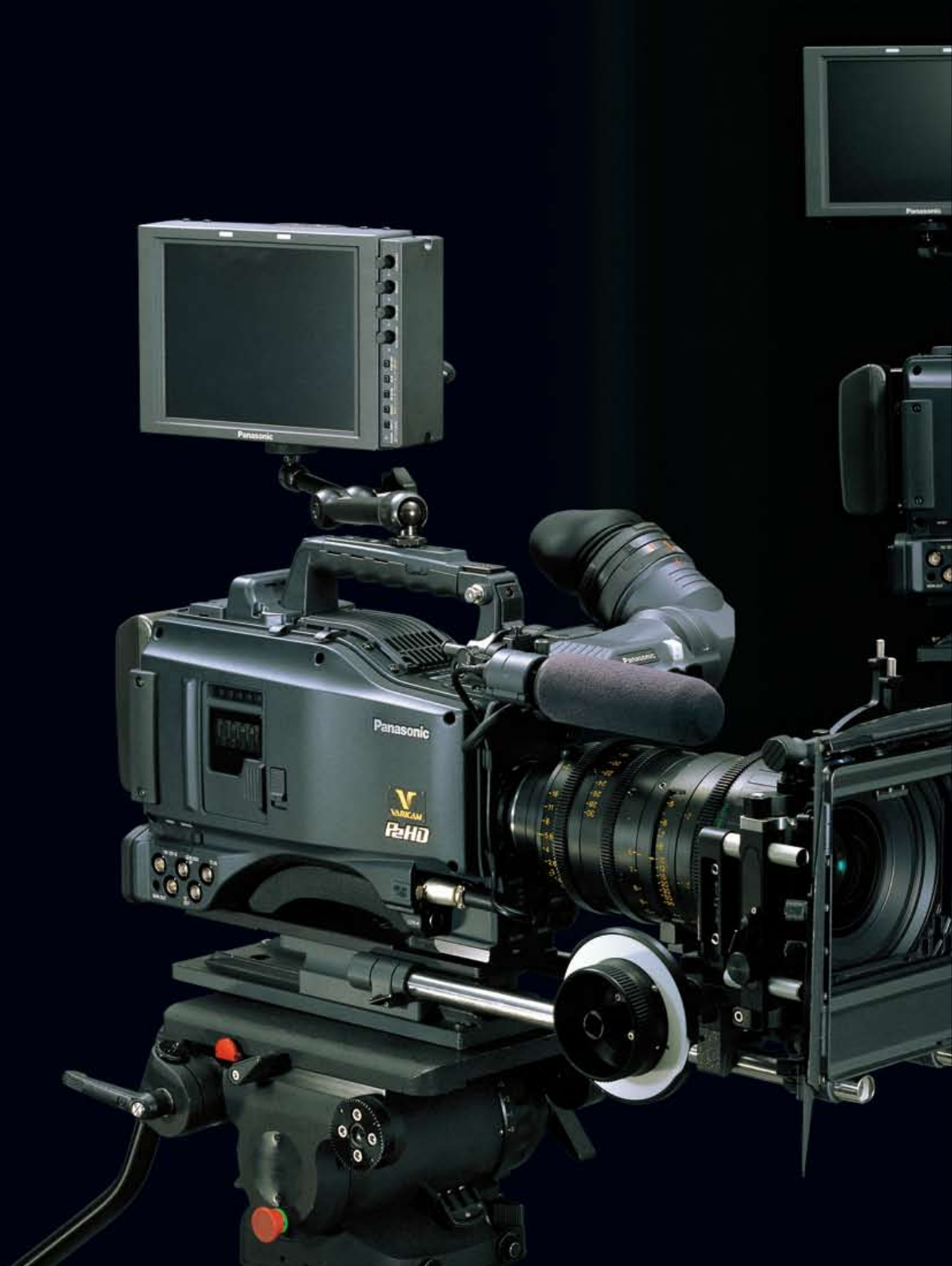
AJ-HPX3700
AJ-HPX2700
Memory Card Camera-Recorder
1
VariCam Creativity and P2 HD Workflow
2
AJ-HPX3700
High-Quality P2 HD VariCam for
High-End Production, with RGB 4:4:4
Output in Full 1920 x 1080-Pixel
Resolution and P-10Log Gamma
• 2.2-megapixel 2/3" CCD for full 1920 x
1080 HD images.
• Dual-link HD SDI output for camera-
through RGB4:4:4/10-bit log gamma
signals. Compatible with uncompressed,
high-end cinema workflows.
• Recording formats: AVC-Intra 100/50
and DVCPRO HD. AVC-Intra 100 uses
10-bit 4:2:2 full raster sampling.
• HD SDI output of 23.98PsF/24PsF
video signals.
• Variable frame rate function ranging
from 1 fps to 30 fps.
• Selectable gamma modes, including
Film-Rec.
• Scan-reverse function for film lens use.
• Chromatic Aberration Compensation
(CAC) function compensates for
registration error and minimizes lateral
chromatic aberration in lenses.
• High F10 sensitivity at 2,000 lx.
Minimum illumination of 0.042 lx (at 1
fps VFR and +30-dB gain-up).
• Reliability, speed, and IT compatibility
with advanced P2 card recording.
AJ-HPX2700
Multifunctional P2 HD VariCam with a
Variable Frame Rate from 1 to 60 fps:
Superior Creativity and Outstanding
Cost-Performance
• Variable frame rate of 1 fps to 60 fps in
720p, for creative over-cranked or
under-cranked shooting.
• Progressive CCD for multi-format
recording*1 in 1080/24p, 1080/30p,
1080/60i, and 720/60p.
• Recording formats: AVC-Intra 100/50
and DVCPRO HD. AVC-Intra 100 uses
10-bit 4:2:2 full raster sampling.
• HD SDI output of 23.98PsF/24PsF
video signals.
• Selectable gamma modes, including
Film-Rec.
• Scan-reverse function for film lens use.
• Chromatic Aberration Compensation
(CAC) function compensates for
registration error and minimizes lateral
chromatic aberration in lenses.
• High F10 sensitivity at 2,000 lx.
Minimum illumination of 0.021 lx
(at 1 fps VFR and +30-dB gain-up).
• DVCPRO (IEEE 1394) output terminal*2
for back-up use.
• Reliability, speed, and IT compatibility
with advanced P2 card recording.
*1:See the Input/Output Video Format table on page 6 for
details. *2:Outputs DVCPRO HD codec recording only.
The P2 HD VariCam Series Transforms the Moviemaking Workflow
The Panasonic VariCam is well known in the movie industry as a video camera that
captures images with an appealing warm, film-like tone and texture. Now the superior
image quality and creativity that characterize this ground-breaking camera have been
passed on to two advanced new P2 HD camera-recorders. The AJ-HPX3700 outputs
RGB 4:4:4 images with full-pixel resolution and P-10Log gamma, and the AJ-HPX2700
features a full-rate (1 to 60 fps) variable frame function. Adding P2's advanced file-based
and tapeless recording to VariCam's world-recognized image quality and expressiveness,
these powerful new camera-recorders facilitate the workflow while cutting costs.
3
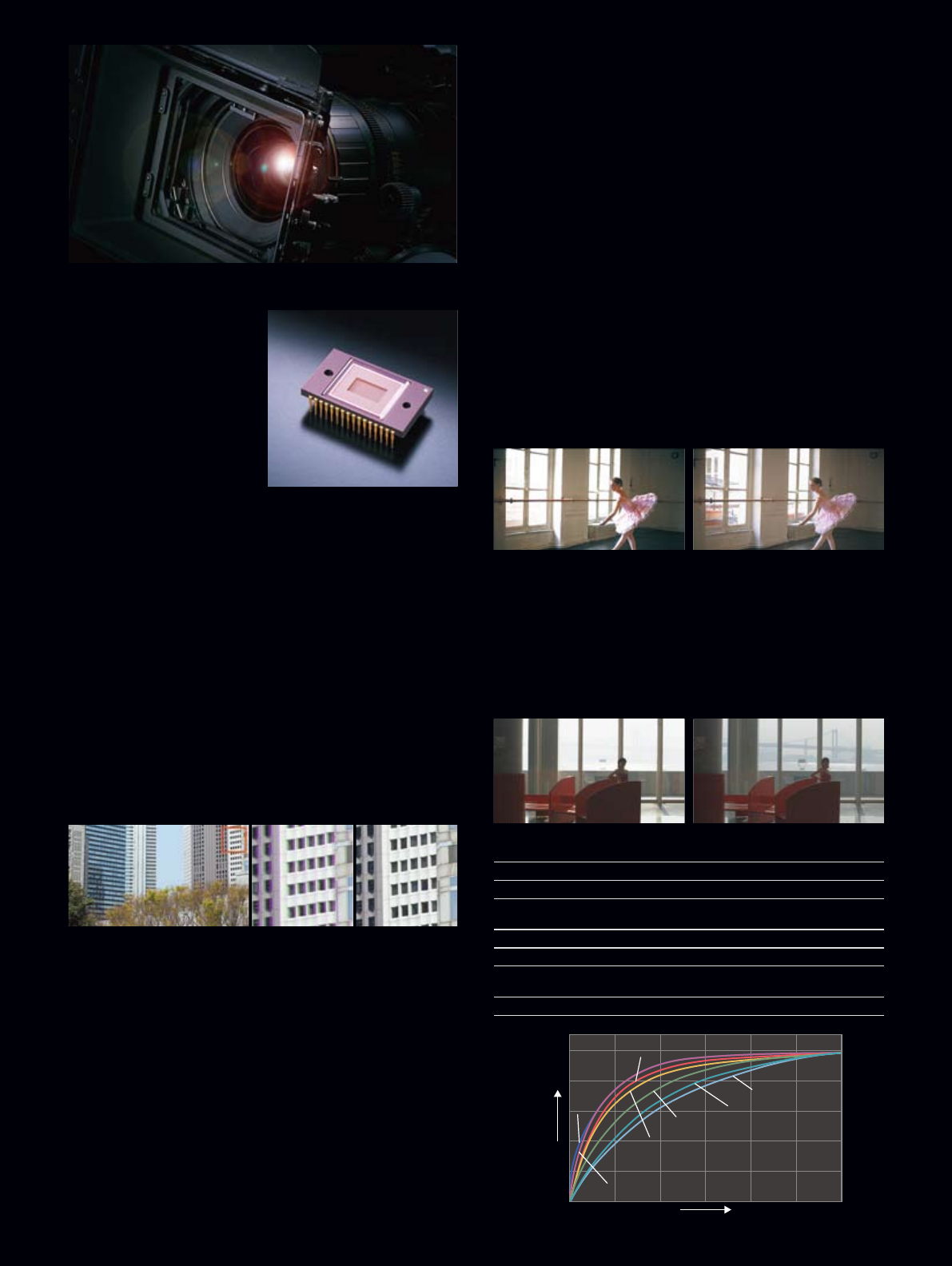
High Resolution 2.2-megapixel CCD (AJ-HPX3700)
For the AJ-HPX3700, Panasonic
developed a high-density
2.2-megapixel 2/3-inch CCD
that provides high-resolution
full-pixel (1920 x 1080) HD
images. The AJ-HPX3700
provides a choice of
progressive/interlace HD video
formats, supporting native 1080
23.98p/24p/25p/29.97p, as well
as 1080 50i and 1080 59.94i.
The camera offers a high F10
sensitivity at 2000 lux when operating in 1080i.
1-Megapixel Progressive CCD (AJ-HPX2700)
The AJ-HPX2700's 1-megapixel 2/3-inch progressive CCD
combines with a digital signal processing (DSP) circuit to output
high-quality 1080/720 HD images.*1 In 720p mode, it provides
variable frame rate recording over the full 1 to 60 fps range.
The camera's high F10 sensitivity allows shooting in light as
low as 0.021 lx.*2
*1: See the Input/Output Video Format table on page 6 for details.
*2: Shooting at F1.4 in variable frame rate mode at 1 fps, with +30dB gain up.
Chromatic Aberration Compensation (CAC)
This exclusive technology works between lens and camera, allowing
for a highly sophisticated algorithm to be deployed that
automatically compensates the registration error that is caused
mainly by lens chromatic aberration, and minimizes the neighboring
blur. By using a CAC-compatible zoom lens, the P2 VariCam Series
can obtain images similar to those captured with a prime lens.
14-Bit Digital Processing with 12-Axis Color Correction
We offer a 14-bit A/D conversion system along with the new high-
performance DSP circuit. The 12-axis color correction matrix lets
you make fine adjustments in specific color regions. Functions such
as skin detail let you further fine-tune the image.
Scan Reverse Function for Film Lens Use
The P2 VariCam Series can use an ultra prime lens and even an
anamorphic lens adapter that creates a 2.35:1 aspect image for
wide-screen cinematic shooting without cropping the image. Its
scan reverse function cancels the image inversion that occurs when
Angenieux's HD lens adaptor is used.
Dynamic Range Stretch (DRS)
In scenes with mixed contrast, such as when panning from indoors
to outdoors, the DRS function automatically suppresses blocked
shadows and blown highlights. A gamma curve and knee slope is
estimated to match the contrast of each pixel, and applied in real
time. When dark, bright, and intermediate shades are all contained
in the same scene, this produces excellent gradation for each shade
and minimizes blocked shadows and blown highlights. The images
that result are enhanced by a visually wide dynamic range.
Seven Gamma Modes Including VariCam Film-Rec
The DSP circuit in the P2 VariCam Series has seven selectable
gamma modes. These include Film-Rec and Video-Rec gamma for
movie production, which are the same modes incorporated in the
VariCam. When using HD SDI dual-link output with the AJ-HPX3700,
images recorded in Film-Rec gamma mode can be converted to
P-10Log gamma, or "live" P-10 Log content can be recorded to
external devices for high-end digital cinema production.
AJ-HPX3700/HPX2700 Gamma Modes
HD: A video gamma curve for HDTV
SD: A video gamma curve for SDTV (higher gain in dark areas)
FILMLIKE 1: For FILMLIKE TV production. This reproduces gradation in
highlight areas more clearly than the HD gamma.
FILMLIKE 2: Smoother film-like characteristics than FILMLIKE 1
FILMLIKE 3: Smoother film-like characteristics than even FILMLIKE 2
FILM-REC: For film-style image capture, provides low contrast
wide dynamic range
VIDEO-REC: For cinema production that is also suitable for video display
All-new, Next-generation, Premier Digital
Cinematography Cameras Feature Native HD
2/3” Imagers with Premium-quality Optics
Full screen image CAC OFF CAC ON
Luminance
Image level
SD
HD
FILMLIKE1
FILMLIKE2
FILMLIKE3
FILM-REC
VIDEO-REC
VIDEO GAMMA FILM-LIKE GAMMA
DRS OFF DRS ON
4
RGB 4:4:4/10-bit
Log Output (AJ-HPX3700)
Both models come ready for system expansion with an HD SDI
terminal that allows camera-through 1080/24PsF output.
The AJ-HPX3700 adds a second HD SDI output terminal that can
serve for dual-link output. HD images can be output with RGB 4:4:4
quality and the 10-bit Log (P-10Log) gamma curve*, ideal for
high-end movie production using an uncompressed recorder.
*P-10Log images can be used only with camera-through output. They cannot be recorded
onto a P2 card.
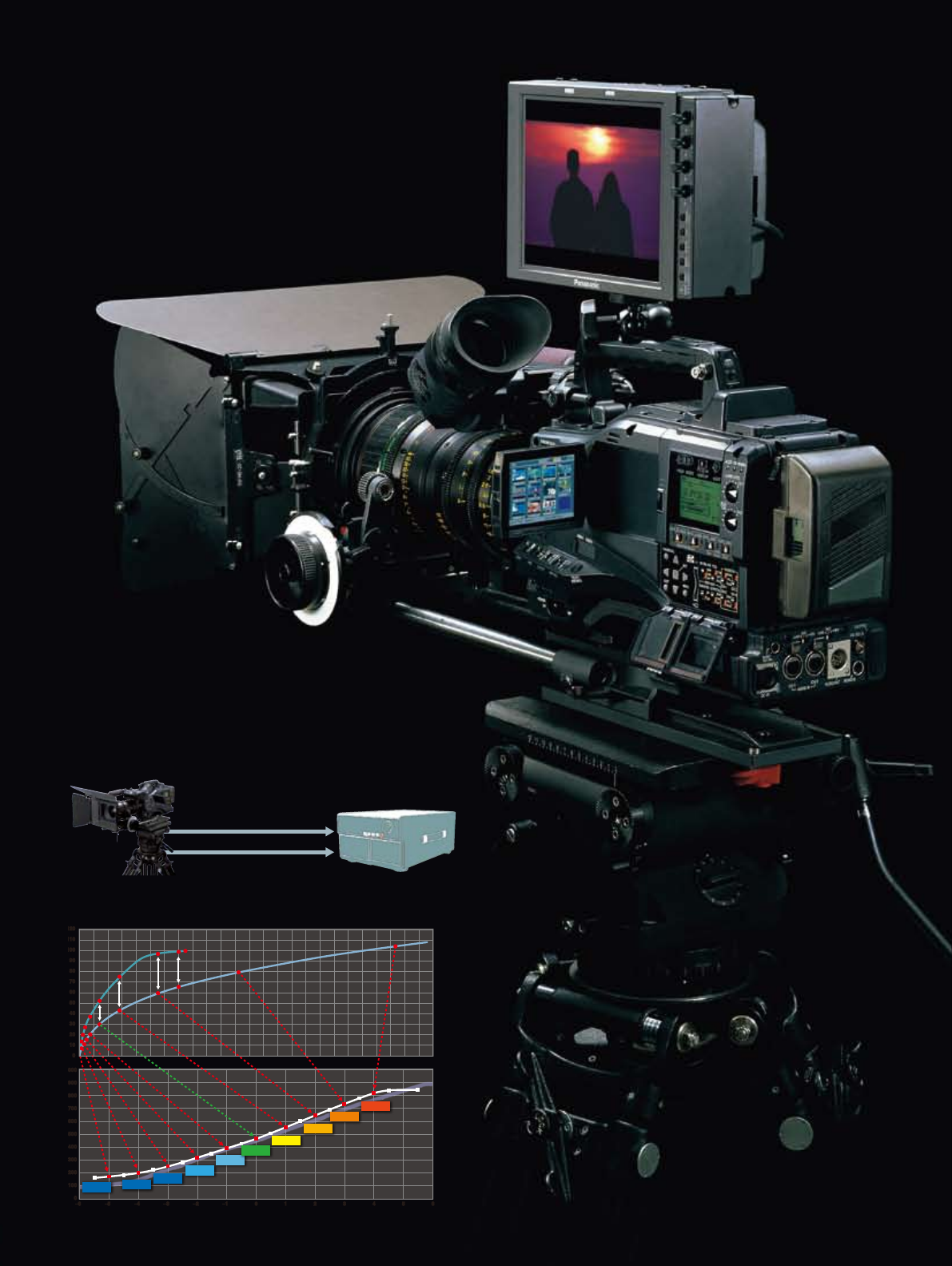
Film-Rec Gamma Monitor
In Film-Rec gamma mode, a cinema compensation function
converts the signal to provide high-contrast images for monitoring
with ideal gradation. Both the viewfinder and monitor display a fully
preserved Film-Rec gamma curve while the images are recorded
onto a P2 card or output from the HD SDI terminal. "VF Gamma"
can be set from the menu for the LCD and viewfinder display, and
"Mon Gamma" can be set for monitor or remote output.
P-10LOG
VIDEO-REC
–6–5–4–3–2–10123456
0
0
100
200
300
400
500
600
700
800
900
1000
10
20
30
40
50
60
70
80
90
100
110
120
–6–5–4–3–2–10123456
0
0
100
200
300
400
500
600
700
800
900
1000
10
20
30
40
50
60
70
80
90
100
110
120
–5 stop –4 stop
–3 stop
–2 stop
–1 stop
Normal
+1stop
+2 stop
+3 stop
+4 stop
VARICAM FILM-REC
HD SDI
RGB 4:4:4 Dual link
(1920 X 1080p, 10bit)
HD SDI
Uncompressed Video recorder
AJ-HPX3700
Conversion chart from FILM-REC gamma to P-10LOG gamma

5
VariCam's exclusive variable frame rate
Panasonic led the industry in developing the variable frame rate
function. This ground-breaking function, from which VariCam takes
its name, allows undercranking and overcranking to produce
expressive quick-motion and slow-motion scenes.
The AJ-HPX2700's frame rate can be set all the way from 1 to 60
fps, and the AJ-HPX3700's from 1 to 30 fps.
*The settable frame-rate range varies with the system mode and the
video format or recording format. See the Input/Output Video
Format table on page 6 for details.
•Normal cinematic shooting (at 24 fps or 30 fps)
The 24 fps rate refers to the same rate as used in film cameras.
The 30 fps rate is the standard frame rate used in the production of
TV commercials.
•Higher-speed shooting (at over 25 fps*)
This produces slow-motion effects. It is especially effective for
high-action scenes like car chases or crashes, or to create a
dramatic impact in a scene.
*When the standard speed is 24 fps. For a standard speed of 30 fps, anything over 31 fps
will be overcranked.
•Lower-speed shooting (at under 23 fps*)
This lets you attain a fast-motion effect. It can be combined with a
warp-speed effect to give special emphasis to flowing water,
fast-moving clouds, etc.
*When the standard speed is 24 fps. For a standard speed of 30 fps, anything under 29 fps
will be undercranked.
1080p/720p* Native mode
In Native mode, the P2 HD VariCam records images at the frame
rate set in the camera. For example in 24pN mode, it only records
24 frames instead of the normal 60 frames. Playing back the
recording at the normal rate, you can preview the speed effect right
on the spot, without using a frame rate converter. Native mode also
extends the recording time of a P2 card.
*The AJ-HPX3700 cannot record in 720p mode.
720p over 60p mode (AJ-HPX2700)
This mode makes the AJ-HPX2700 compatible with previous VTR
VariCam systems. In 720/24p mode,* it applies a 2:3 pulldown to
record 60 frames. The recording time is the same as in 1080i or
720p mode, but the unit can output a DVCPRO HD stream from the
IEEE 1394 connector as it records. This lets you produce a backup
copy using a connected external P2 Mobile, P2 Gear, DVCPRO HD
VTR, or Focus Enhancements FireStore FS-100.
*See the Input/Output Vdeo Format table on page 6 for details.
1080/24p Advance Mode (DVCPRO HD Only)
The 24p Advance mode applies 2:3:3:2 pulldown to one of the
1080/24p recording modes to allow over 60i recording.*
This provides compatibility with the AG-HVX200/HPX170 Series P2
handheld cameras that record using an HD codec.
*See the Input/Output Video Format table on page 6 for details. For information on
compatible nonlinear editing systems, visit <https://eww.pavc.panasonic.co.jp/pro-av/>
and click "Nonlinear Compatibility Information."
Electronic Shutter with Half Mode and Angle Setting
Both models feature an electronic shutter that offers 7 shutter
speeds up to a maximum 1/2000 second, plus a Half mode, as well
as an angle setting similar to a film camera. This combines with the
variable frame rate function to support a wide variety of shooting
techniques. A synchro scan function also provides optimal
recording when shooting CRT monitors.
Master-quality, 10-bit 4:2:2
AVC-Intra 100 Recording Assures
the VariCams Deliver a Distinct Look
That Closely Matches The Color and
Response of Film Stock
6
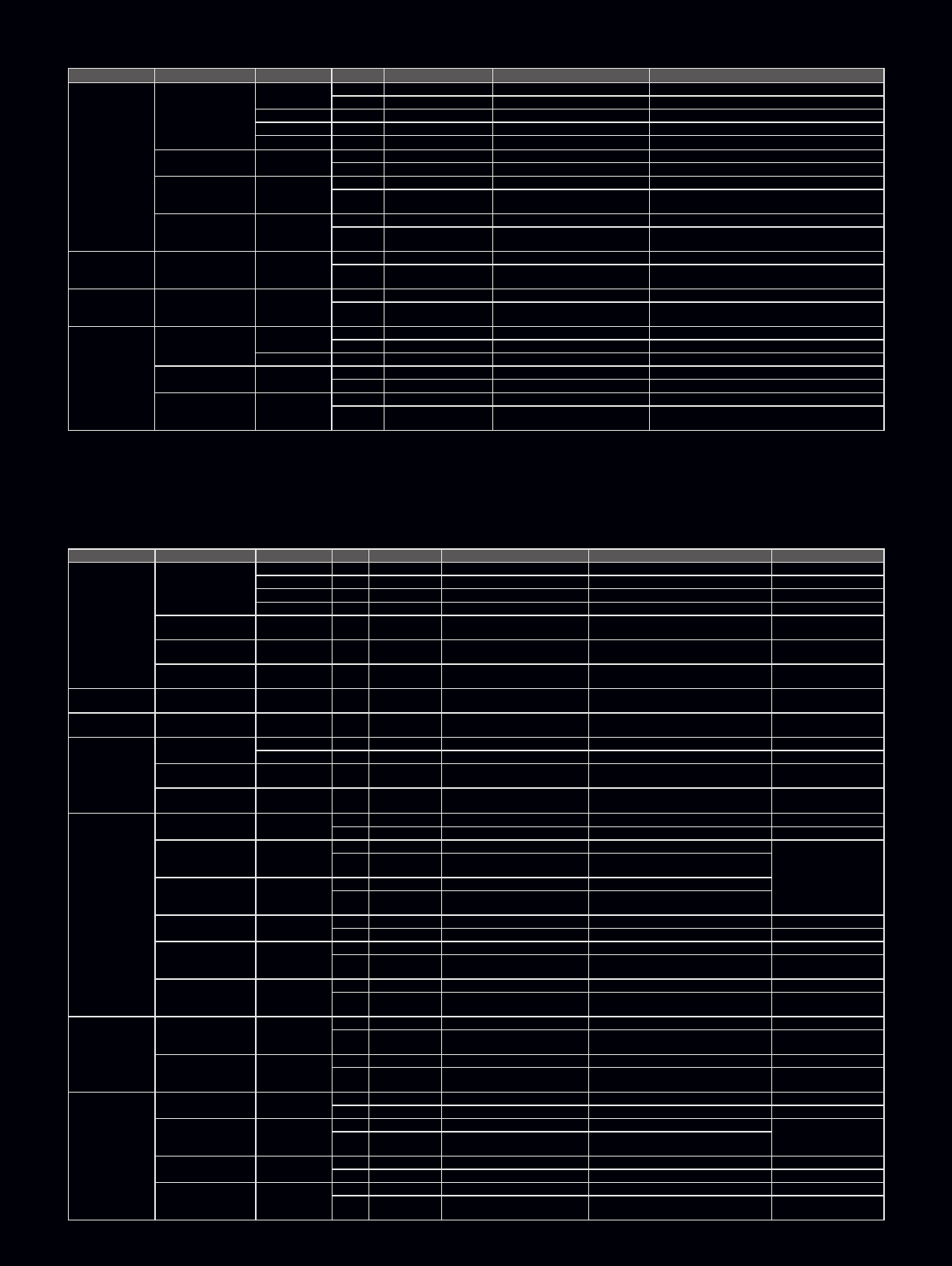
System Mode Recording Mode Camera Mode VFR Frame Rate Recording Video Signal Output Video Signal
1080/59.94i
DVCPRO HD/60i
60i OFF Not Effective 59.94i 1080/59.94i
ON 1 to 30 Frame 59.94i (All frames effective) 1080/59.94i (All frames effective)
30P OFF Fix Not Effective 29.97p over 59.94i 1080/29.97PsF over 59.94i (2:2)
24P OFF Fix Not Effective 23.98p over 59.94i (2:3) 1080/23.98PsF over 59.94i (2:3)
24PA OFF Fix Not Effective 23.98p over 59.94i (2:3:3:2) 1080/23.98PsF over 59.94i (2:3:3:2)
AVC-Intra 100/60i
AVC-Intra 50/60i
60i OFF Not Effective 59.94i 1080/59.94i
ON 1 to 30 Frame 59.94i (All frames effective) 1080/59.94i (All frames effective)
AVC-Intra 100/30pN
AVC-Intra 50/30pN 30P
OFF Not Effective 29.97p-29.97pN (Native) 1080/29.97PsF over 59.94i (2:2)
ON 1 to 30 Frame 1 to 29.97p-29.97pN (Native) EE: 1080/XX (1 to 30p) PsF over 59.94i
Play: 1080/29.97PsF over 59.94i (2:2)
AVC-Intra 100/24pN
AVC-Intra 50/24pN 24P
OFF Not Effective 23.98p-23.98pN (Native) 1080/23.98PsF over 59.94i (2:3)
ON 1 to 30 Frame 1 to 29.97p-23.98pN (Native) EE: 1080/XX (1 to 30p) PsF over 59.94i
Play: 1080/23.98PsF over 59.94i (2:3)
1080/23.98PsF AVC-Intra 100/24pN
AVC-Intra 50/24pN 24P
OFF Not Effective 23.98p-23.98pN (Native) 1080/23.98PsF over 47.96i (2:2)
ON 1 to 24 or 30 Frame* 1 to 23.98p or 29.97p-23.98pN
(Native)
EE: 1080/XX (1 to 24p or 30p) PsF over 47.96i
Play: 1080/23.98PsF over 47.96i (2:2)
1080/24PsF AVC-Intra 100/24pN
AVC-Intra 50/24pN 24P
OFF Not Effective 24p-24pN (Native) 1080/24PsF over 48i (2:2)
ON 1 to 24 or 30 Frame* 1 to 24p or 30p -24pN (Native) EE: 1080/XX (1 to 24p or 30p) PsF over 48i
Play: 1080/24PsF over 48i (2:2)
1080/50i
DVCPRO HD/50i 50i OFF Not Effective 50i 1080/50i
ON 1 to 25 Frame 50i (All frames effective) 1080/50i (All frames effective)
25P OFF Fix Not Effective 25p over 50i (2:2) 1080/25PsF over 50i (2:2)
AVC-Intra 100/50i
AVC-Intra 50/50i 50i OFF Not Effective 50i 1080/50i
ON 1 to 25 Frame 50i (All frames effective) 1080/50i (All frames effective)
AVC-Intra 100/25pN
AVC-Intra 50/25pN 25P
OFF Not Effective 25p-25pN (Native) 1080/25PsFover 50i (2:2)
ON 1 to 25 Frame 1 to 25p-25pN (Native) EE: 1080/XX (1 to 25p) PsF over 50i
Play: 1080/25PsF over 50i (2:2)
System Mode Recording Mode Camera Mode VFR Frame Rate Recording Video Signal Output Video Signal Output IEEE 1394
1080/59.94i
DVCPRO HD/60i
60i — — 59.94i 1080/59.94i 60i
30P — — 29.97p over 59.94i 1080/29.97PsF over 59.94i (2:2) 30p over 60i
24P — — 23.98p over 59.94i (2:3) 1080/23.98PsF over 59.94i (2:3) 24p over 60i
24PA — — 23.98p over 59.94i (2:3:3:2) 1080/23.98PsF over 59.94i (2:3:3:2) 24pA over 60i
AVC-Intra 100/60i
AVC-Intra 50/60i 60i — — 59.94i 1080/59.94i —
AVC-Intra 100/30pN
AVC-Intra 50/30pN 30P — — 29.97p-29.97pN (Native) 1080/29.97PsF over 59.94i (2:2) —
AVC-Intra 100/24pN
AVC-Intra 50/24pN 24P — — 23.98p-23.98pN (Native) 1080/23.98PsF over 59.94i (2:3) —
1080/23.98PsF AVC-Intra 100/24pN
AVC-Intra 50/24pN 24P — — 23.98p-23.98pN (Native) 1080/23.98PsF over 47.96i (2:2) —
1080/24PsF AVC-Intra 100/24pN
AVC-Intra 50/24pN 24P — — 24p-24pN (Native) 1080/24PsF over 48i (2:2) —
1080/50i
DVCPRO HD/50i 50i — — 50i 1080/50i 50i
25P — — 25p over 50i (2:2) 1080/25PsF over 50i (2:2) 25p over 50i
AVC-Intra 100/50i
AVC-Intra 50/50i 50i — — 50i 1080/50i —
AVC-Intra 100/25pN
AVC-Intra 50/25pN 25P — — 25p-25pN (Native) 1080/25PsF over 50i (2:2) —
720/59.94p
DVCPRO HD/60p — OFF Not Effective 59.94p 720/59.94p 60p
ON 1 to 60 Frame 1 to 59.94p over 59.94p 720/XX (1 to 60) p over 59.94p XX (1 to 60) p over 60p
DVCPRO HD/30pN —
OFF Not Effective 29.97p-29.97pN (Native) 720/29.97p over 59.94p (2:2)
EE: —
Playback:
over 60p
ON 1 to 60 Frame 1 to 59.94p-29.97pN (Native) EE: 720/XX (1 to 60) p over 59.94p
Play: 720/29.97p over 59.94p (2:2)
DVCPRO HD/24pN —
OFF Not Effective 23.98p-23.98pN (Native) 720/23.98p over 59.94p (2:3)
ON 1 to 60 Frame 1 to 59.94p-23.98pN (Native) EE: 720/XX (1 to 60) p over 59.94p
Play: 720/23.98p over 59.94p (2:3)
AVC-Intra 100/60p
AVC-Intra 50/60p — OFF Not Effective 59.94p 720/59.94p —
ON 1 to 60 Frame 1 to 59.94p over 59.94p 720/XX (1 to 60) p over 59.94p —
AVC-Intra 100/30pN
AVC-Intra 50/30pN —
OFF Not Effective 29.97p-29.97pN (Native) 720/29.97p over 59.94p (2:2) —
ON 1 to 60 Frame 1 to 59.94p-29.97pN (Native) EE: 720/XX (1 to 60) p over 59.94p
Play: 720/29.97p over 59.94p (2:2) —
AVC-Intra 100/24pN
AVC-Intra 50/24pN —
OFF Not Effective 23.98p-23.98pN (Native) 720/23.98p over 59.94p (2:3) —
ON 1 to 60 Frame 1 to 59.94p-23.98pN (Native) EE: 720/XX (1 to 60) p over 59.94p
Play: 720/23.98p over 59.94p (2:3) —
720/60p
DVCPRO HD/24pN —
OFF Not Effective 24p-24pN (Native) 720/24p over 60p (2:3) —
ON 1 to 60 Frame 1 to 60p-24pN (Native) EE: 720/XX (1 to 60) p over 60p
Play: 720/24p over 60p (2:3) —
AVC-Intra 100/24pN
AVC-Intra 50/24pN —
OFF Not Effective 24p-24pN (Native) 720/24p over 60p (2:3) —
ON 1 to 60 Frame 1 to 60p-24pN (Native) EE: 720/XX (1 to 60) p over 60p
Play: 720/24p over 60p (2:3) —
720/50p
DVCPRO HD/50p — OFF Not Effective 50p 720/50p 50p
ON 1 to 50 Frame 1 to 50p over 50p 720/XX (1 to 50) p over 50p XX (1 to 50) p over 50p
DVCPRO HD/25pN —
OFF Not Effective 25p-25pN (Native) 720/25p over 50p EE: —
Play: over 50p
ON 1 to 50 Frame 1 to 50p-25pN (Native) EE: 720/XX (1 to 50) p over 50p
Play: 720/25p over 50p (2:2)
AVC-Intra 100/50p
AVC-Intra 50/50p — OFF Not Effective 50p 720/50p —
ON 1 to 50 Frame 1 to 50p over 50p 720/XX (1 to 50) p over 50p —
AVC-Intra 100/25pN
AVC-Intra 50/25pN —
OFF Not Effective 25p-25pN (Native) 720/25p over 50p —
ON 1 to 50 Frame 1 to 50p-25pN (Native) EE: 720/XX (1 to 50) p over 50p
Play: 720/25p over 50p (2:2) —
AJ-HPX3700 Input/Output Video Format
AJ-HPX2700 Input/Output Video Format
* When the 24p frame range is set to "30 Frame" for the 1080/23.98PsF or 1080/24PsF system mode, up to 30 frames of the video signal will be recorded onto the P2 card.
However, when the rate is set to 25 frames or higher, the signal sequence will not be correctly maintained because the HD SDI output signal is 23.98PsF or 24PsF.
7
Comes Equipped with AVC-Intra Codec
An AVC-Intra codec board is included as standard equipment.
It allows recording in either of two modes: AVC-Intra 100, for
full-pixel HD (1920 x 1080 and 1280 x 720) images, or AVC-Intra 50
for low-bit-rate, low-cost operation. AVC-Intra is a new codec that
further advances HD production. It complies with the MPEG-4 AVC/
H.264 international standard based on advanced image
compression technology, and offers both superb image quality and
highly efficient compression. It uses an intra-frame compression
system to bring important advantages to professional editing.
High-Image-Quality AVC-Intra 100 Mode
With the same bit rate as DVCPRO HD, this mode supports full 10
bit recordings with 1920 x 1080 pixels. It enables the AJ-HPX3700
to capture master-quality video for high-end video production.
Low-Bit-Rate AVC-Intra 50 Mode
This mode delivers video quality very similar to DVCPRO HD, yet is
able to do so at bit rates usually associated with standard definition
(e.g. DVCPRO 50). AVC-Intra 50's lower bit rate doubles the
recording time per P2 card over DVCPRO HD and lowers storage
requirements for editing.
HD Multi-Format Capability, Including Native 24p
The AVC-Intra 100 and 50 codecs let you record in a choice of HD
video formats: 1080 23.98p/24p/29.97p/25p, as well as 1080
50i/59.94i. These worldwide HD formats bring extra flexibility to all
of your production needs. The AJ-HPX2700 also supports 720p
recording for HD image production in a variety of formats, including
60p and 50p.
See the Input/Output Video Format table on page 6 for details.
Selectable DVCPRO HD Recording
The P2 VariCam Series also supports the conventional DVCPRO HD
codec. This lets it flexibly adapt to various applications and system
environments, and makes for a smooth transition from existing VTR
VariCam (AJ-HDC27H) systems.
48-kHz/16-Bit, 4-Channel Digital Audio
These camcorders can record full 48-kHz/16-bit digital audio on all
four channels. You can freely select the audio source for each
channel, choosing from mic, line, wireless receiver, and others.
A 5 pin XLR jack with 2-channel compatibility is used for the front
mic input. Using the optional AJ-MC900G stereo microphone lets
you record stereo with a single mic.
AVC-Intra: The most advanced compression
technology for master quality video acquisition
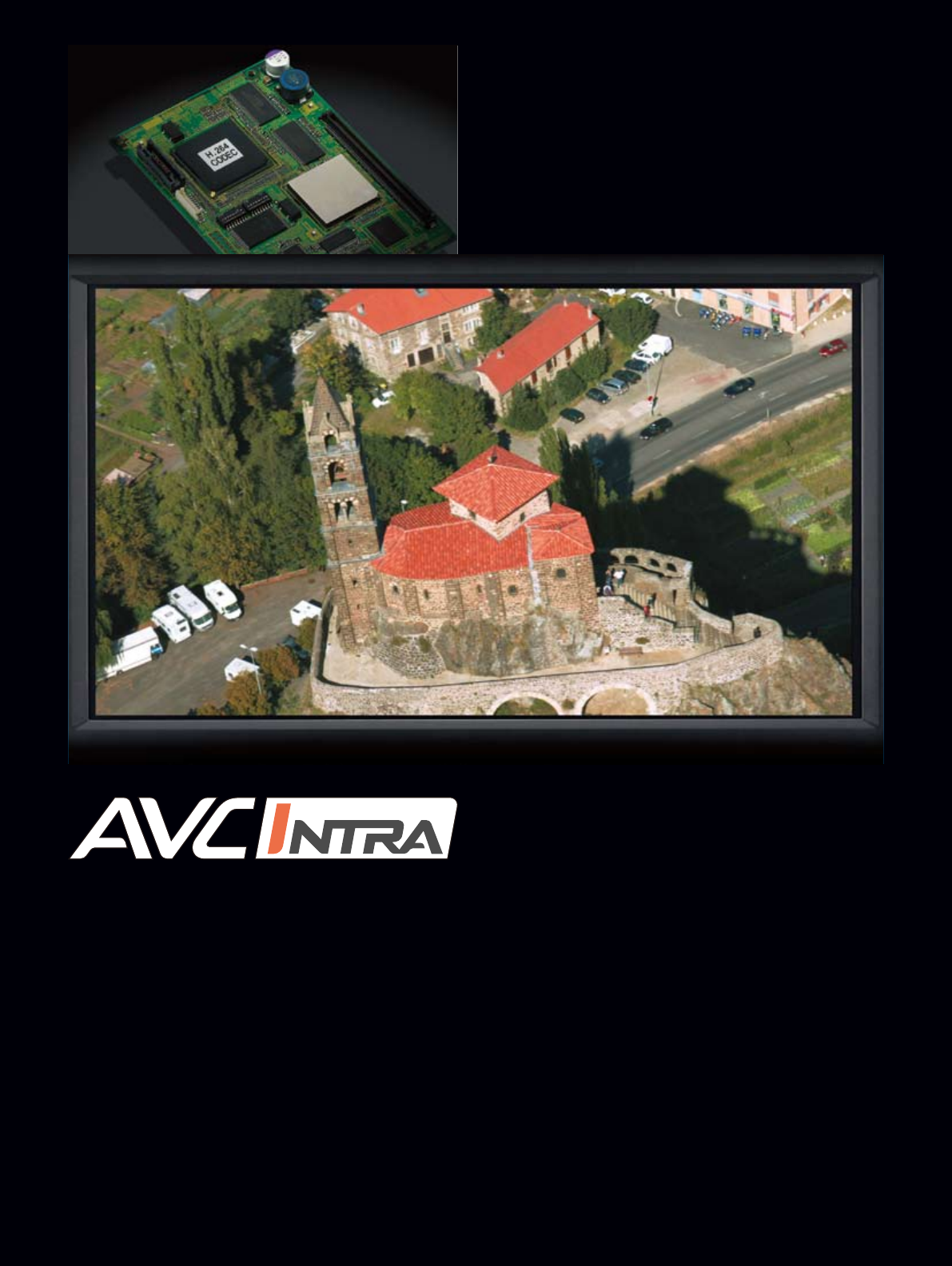
A sample image recorded by an AVC-Intra 100 codec. It is a still image captured from 1920 x 1080-pixel video recorded using 10-bit/4:2:2 sampling.
8
AVC-INTRA TECHNOLOGY
Intra-Frame (I-Only) Compression Superiority
Motion-image compression can be divided roughly into two
methods: I-Only compression, which completes all processing
within each frame, and Long GOP compression, which processes
across multiple frames. AVC-Intra and DVCPRO HD use I-Only
compression, while HDV uses Long GOP compression.
The MPEG-4 AVC/H.264 standard encompasses both methods.
When the images of adjacent frames are similar, Long GOP
compression achieves an advantageously low bit rate. However,
this trait is not often seen in broadcasts like flash-filled press
conferences, fast-action sports, and music shows with confetti
and electronic displays.
Also, because processing is performed frame-by-frame in I-Only,
new-generation multi-core CPUs offer high-speed parallel
processing. This makes I-Only compression more suitable for
Non-linear editing than Long GOP, for which parallel processing is
difficult due to its inter-frame dependence.
With its I-Only compression, AVC-Intra produces remarkably
stable images that are unaffected by adjacent frames, and meets
professional needs in virtually all situations and workflows.
Twice the Compression Efficiency of MPEG-2
By selecting the most effective compression techniques from
among those in compliance with the H.264 standard, AVC-Intra
has doubled the compression efficiently over earlier Intra frame
compression schemes. Its intraframe predictive and context-
adaptive entropy coding are particularly effective methods for
boosting compression efficiency.
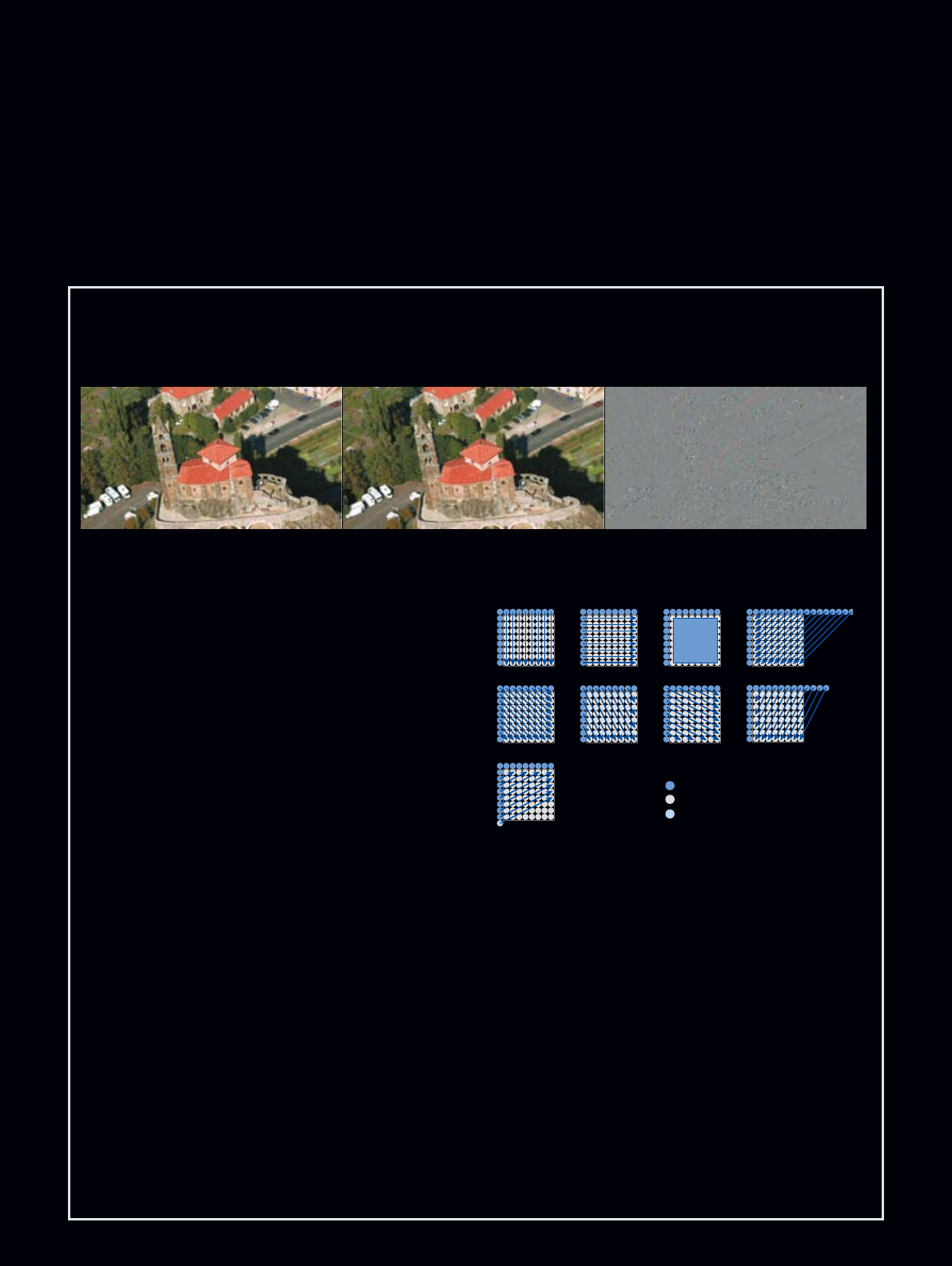
Intraframe predictive coding (intra prediction)
This process generates predictive images based on adjacent
blocks of 8 x 8 pixels. Selecting the most suitable predictive
mode from among nine luminance signal modes (see illustration)
and four color signal modes, it generates accurate predictive
images. The residual data (obtained by subtracting a predictive
image from the original input image) is recorded together with the
predictive image. Because the prediction accuracy is high,
there's minimal residual data, and thus high compression is
achieved. This process is conducted within the frame, so
prediction accuracy remains high even with fast-motion images.
Context-adaptive entropy coding
The entropy coding process used in MPEG-4 AVC/H.264 utilizes
CAVLC (Context Adaptive VLC) and CAVBAC (Context Adaptive
Binary Arithmetic Coding), both of which are context adaptive.
MPEG-2 uses a fixed table when performing the VLC coding,
with the result that compression efficiency is low with some types
of images. In context-adaptive coding, on the other hand,
operation varies with different kinds of images and high
compression efficiency is maintained at all times.
Conceptual Illustration of Luminance Signal (Y) Intra Prediction Mode
This process generates predictive images based on adjacent blocks of 8 x 8
pixels. Selecting the most suitable predictive mode from among nine luminance
signal modes (see illustration) and four color signal modes, it generates
accurate predictive images.
Left: Original image Center: Intra-frame predictive image Right: Difference image obtained from subtracting the intra-frame predictive image from the original image.
This shows the high accuracy of intra prediction.
Sample Images of Intraframe Preduction
mode 0 mode 1 mode 2 mode 3
mode 4 mode 5 mode 6 mode 7
mode 8
Copy of below pixels
Predictive pixels
Adjacent pixels
Average
9
P2 Card: Superior Mobility, Reliability,
Compatibility, plus Fast Workflows
and Long Recording Times.
P2 Cards Offer Outstanding Mobility and Reliability
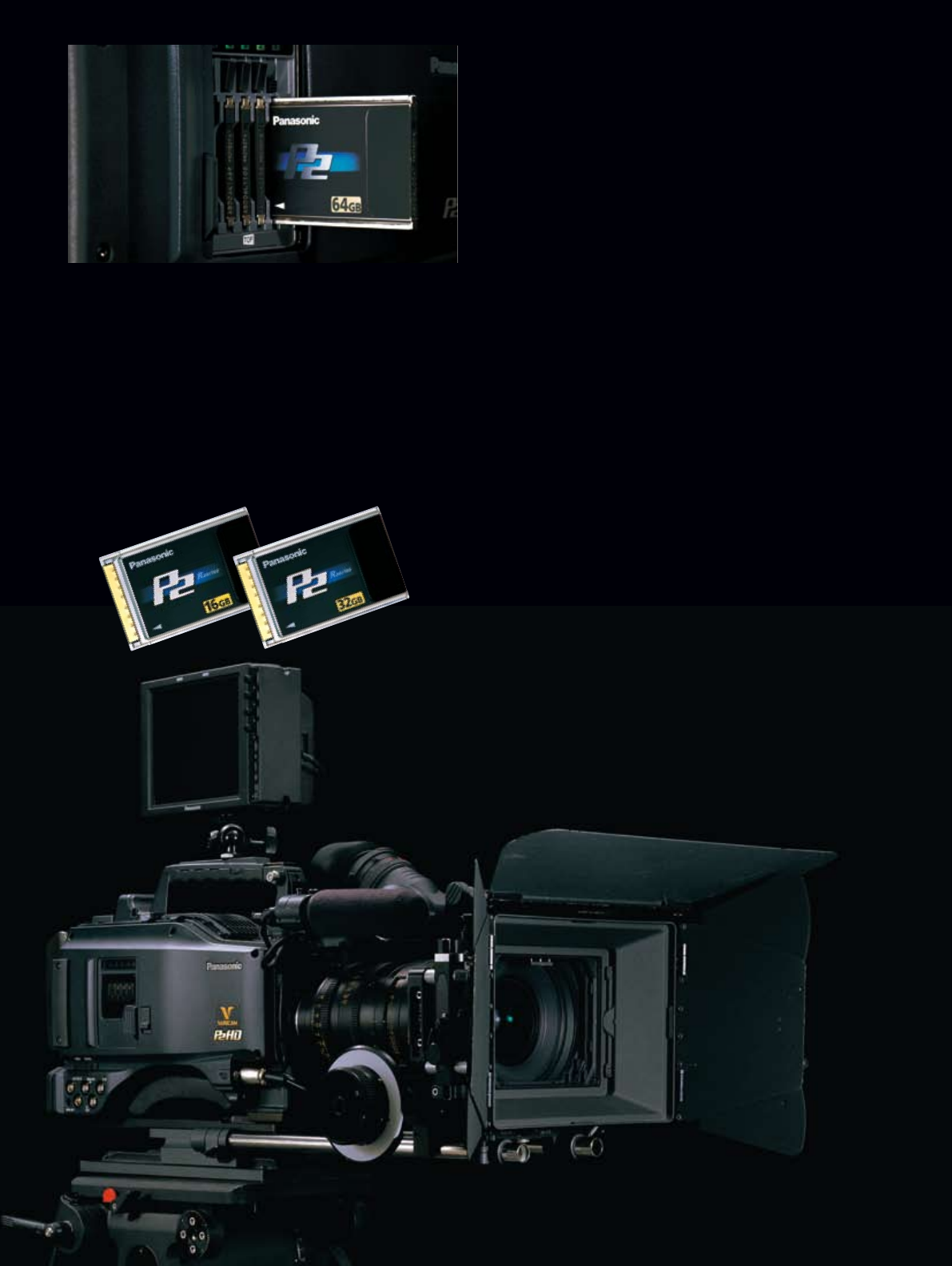
P2 cards feature a large capacity of up to 64 GB* (using the
AJ-P2C064, fourth quarter 2008), a compact size, and light weight
of 45 grams (1.5 ounces).
This solid-state memory card is highly resistant to shock and
vibration, so it brings high reliability and mobility to outdoor
shooting. It lets the camera start recording immediately from
Standby mode, and allows shooting to start within three seconds of
turning the power on. This speedy response shortens downtime
when replacing batteries, and greatly cuts down on battery power
consumption by letting you turn the power off during standby.
P2 cards can even be exchanged with the power off. Recorded data
is automatically stored in blank card areas with no cueing required.
This eliminates the risk of accidentally overwriting valuable data.
*Total card capacity includes space for data management such as system data, so the
actual usable area is less than the capacity indicated on the card.
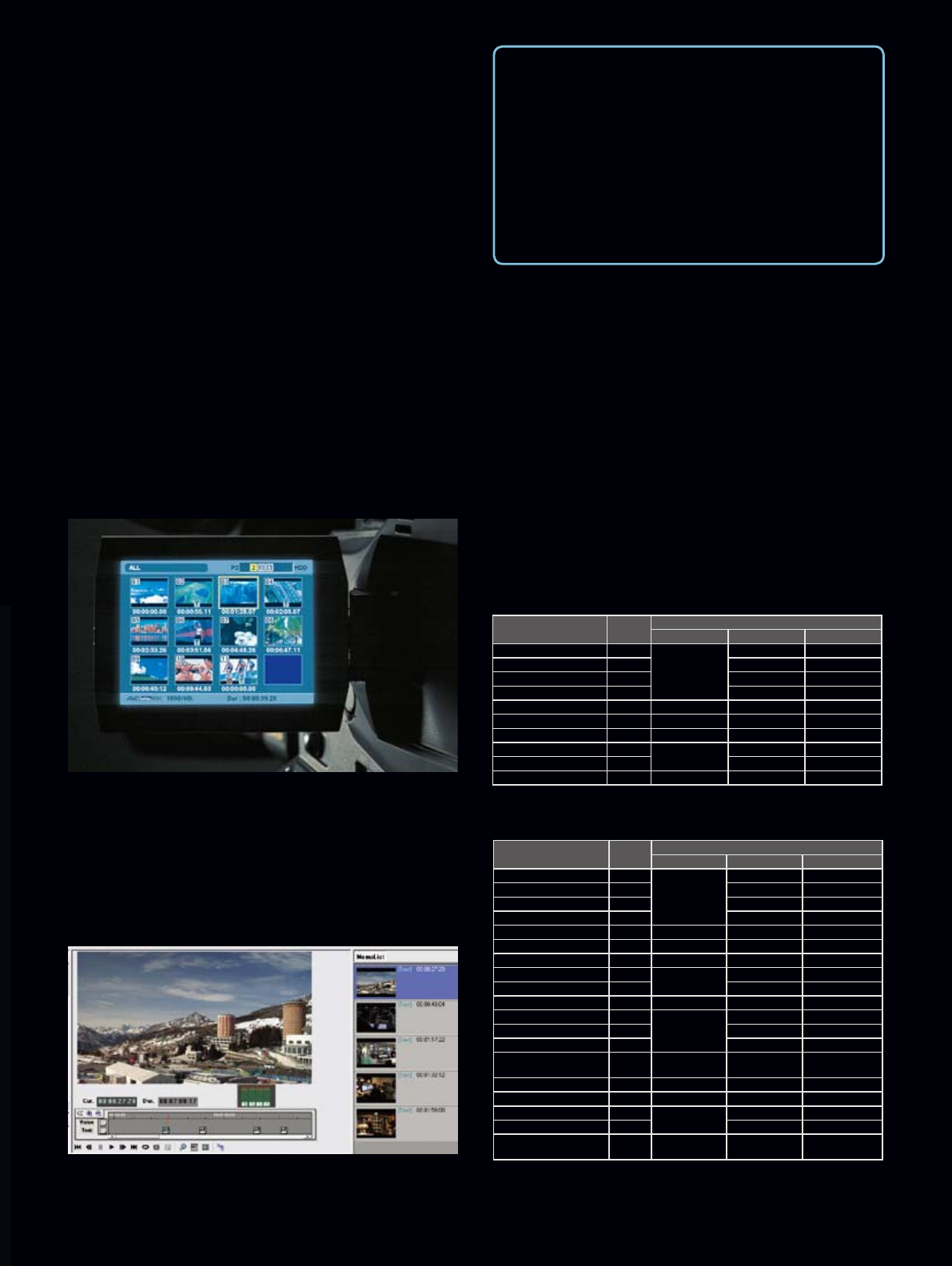
Recording Functions with Five P2 Card Slots
With five P2 cards installed, the P2 HD VariCam can capture up to
800 minutes of 1080/24p content. It also provides several recording
functions that are possible only with memory cards.
•Card selection: The recording slot can be changed (sequential
switching) even during recording. This lets you review, organize, edit
and transmit just recorded content. Content can also be organized
while shooting, by switching cards for each scene category.
•Hot-swap-rec: You can replace a full memory card with a blank
one while the P2 cam is recording onto a second card. Successively
swapping cards this way gives you virtually unlimited recording
capability.
•Loop-rec*: By loop recording onto a specified recording area, you
can continue to record over a fixed area.
•Pre-rec*: While in standby mode, you can continuously store, and
subsequently record, up to 8 seconds of video and audio. In effect,
this lets you record footage of events that occur even before you
press the rec start button, giving you a way to "go back" and
capture moments you otherwise would have missed.
•Interval rec*: This gives you automatic intermittent recording
based on a set interval and recording time.
•One-shot rec*: This frame-shot recording function is useful for
producing animations.
•Rec review: This lets you run a quick playback check of the 2 to 10
seconds that lead up to the end of the clip you have just recorded.
*These functions cannot be used for variable frame rate recording.
Card slot
10
*1: Native modes record only the effective frames. *2: Released in autumn 2008.
AJ-HPX3700 Recording Format and Recording Time
Recording Format Pull down Rec. Time (using five 64GB*2 P2 cards) and Codec
DVCPRO HD AVC-Intra 100 AVC-Intra 50
1080/59.94i —
Approx. 320 min.
Approx. 320 min. Approx. 640 min.
1080/29.97p (over 59.94i) 2-2 — —
1080/23.98p (over 59.94i) 2-3 — —
1080/23.98pA (over 59.94i) 2-3-3-2 — —
1080/29.97pN (Native)*1— — Approx. 320 min. Approx. 640 min.
1080/24pN (Native)*1— — Approx. 400 min. Approx. 800 min.
1080/23.98pN (Native)*1— — Approx. 400 min. Approx.800 min.
1080/50i —Approx. 320 min. Approx. 320 min. Approx.640 min.
1080/25p (over 50i) 2-2 — —
1080/25pN (Native)*1— — Approx.320 min. Approx.640 min.
*1: Native modes record only the effective frames. *2: Released in autumn 2008.
AJ-HPX2700 Recording Format and Recording Time
Recording Format Pull
down
Rec. Time (using five 64GB*2 P2 cards) and Codec
DVCPRO HD AVC-Intra 100 AVC-Intra 50
1080/59.94i —
Approx. 320 min.
Approx. 320 min. Approx. 640 min.
1080/29.97p (over 59.94i ) 2-2 — —
1080/23.98p (over 59.94i ) 2-3 — —
1080/23.98pA (over 59.94i ) 2-3-3-2 — —
1080/29.97pN (Native )*1— — Approx. 320 min. Approx. 640 min.
1080/24pN (Native )*1— — Approx. 400 min. Approx. 800 min.
1080/23.98pN (Native )*1— — Approx. 400 min. Approx. 800 min.
1080/50i —Approx. 320 min. Approx. 320 min. Approx. 640 min.
1080/25p (over 50i ) 2-2 — —
1080/25pN (Native )*1— — Approx. 320 min. Approx. 640 min.
720/59.94p —
Approx. 320 min.
Approx. 320 min. Approx. 640 min.
720/29.97p (over 59.94p ) 2-2 — —
720/23.98p (over 59.94p ) 2-3 — —
720/29.97pN (Native )*1—Approx. 640 min. Approx. 640 min. Approx. 1280 min.
720/60p —Approx. 320 min. Approx. 320 min. Approx. 640 min.
720/23.98pN (Native )*1— Approx. 800 min. Approx. 800 min. Approx. 1600 min.
720/50p —Approx. 320 min. Approx. 320 min. Approx. 640 min.
720/25p (over 50p ) 2-2 — —
720/25pN (Native )*1—Approx. 640 min. Approx. 640 min. Approx. 1280 min.
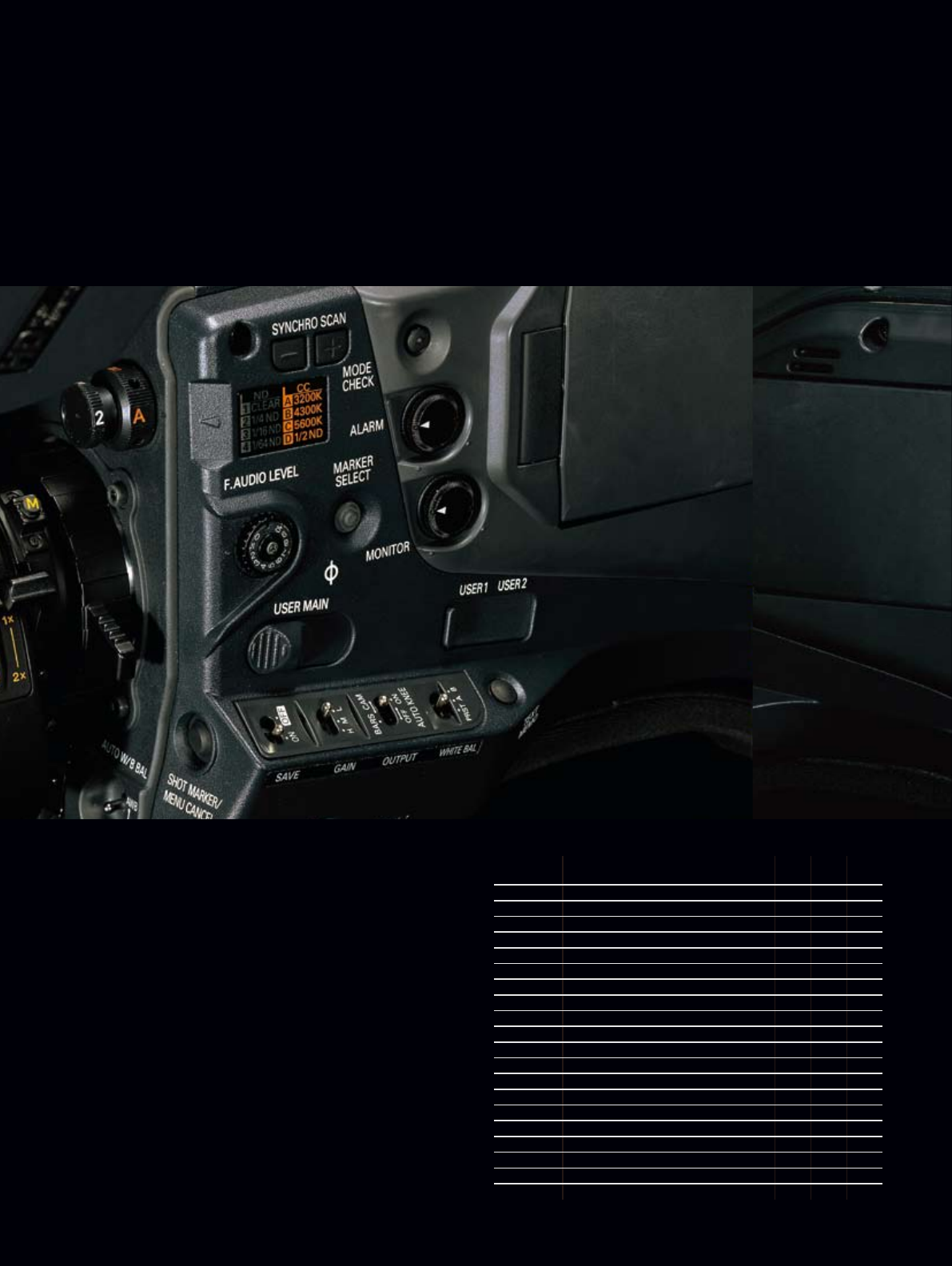
Clip Thumbnail Function
The P2 HD cam automatically generates a thumbnail image for each
clip. You can view thumbnails on the built-in 3.5" color LCD monitor,
or, by connecting the camera's Monitor Out to a separate display.
Any of the clips can be accessed instantly. Thumbnail images can
be paused, fast-forwarded, and reversed just like a tape, and
unwanted cuts can be deleted by selecting and deleting the
corresponding thumbnail image. You can also specify a number of
clips for seamless playback* or on-air broadcasting. And if a
shooting opportunity should arise during playback, the P2 HD cam
lets you start recording immediately with no cueing required and no
risk of accidentally overwriting valuable data.
*Seamless playback is not possible between clips recorded in different formats.
Text Memo (Bookmark) for Simple Editing
When recording or previewing a clip, press the Text Memo button at
any of up to 100 locations and a text memo label, similar to a
bookmark, is registered. Using only the P2 VariCam, you can create
a new clip with data copied between text memo labels. Text
information can also be written into each memo using the P2
VariCam or a PC with P2 Viewer installed. A shot mark, which
allows convenient OK and NG marking, can also be added to each
clip during or after recording.
Proxy Data Recording (Option)
When the AJ-YAX800G proxy video encoder is installed, the P2
VariCam can record MPEG-4 proxy (low-resolution) data onto a P2
card or SD/SDHC Memory Card. This can be used for quick viewing
of dailies with timecode and its low bit rate provides easy
transmission over wired and wireless networks.
*Proxy data cannot be recorded when recording with the variable frame rate in Native
mode, or when Pre-rec or Loop-rec is used.
Proxy data refers to MPEG-4 low-resolution AV data in file form for moving pictures and
audio, with timecode, metadata, and other management data included.
The use of DCF Technologies is under license from Multi-Format, Inc.
SD/SDHC Memory Card Slot
The P2 VariCam Series comes with an SD/SDHC Memory Card slot.
You can create a metadata upload file (produced with P2 Viewer
software) containing information such as the name of the camera
operator, the recording location, and text memos on an SD/SDHC
Memory Card, and load it as clip metadata. The SD slot is also used
to upload scene files and firmware updates.
This shows the text memo editing window of the provided Windows PC software,
P2 Viewer. A list of memos is shown on the right side. The clip time line below the view
window shows the memo marks. Text can be written to an empty memo space created by
the camera-recorder. Memos can also be added, deleted or moved.
Ecological Benefits — Thanks to Solid-State
Technology, Broadcasting Can Help Conservation.
Because P2 cards are re-usable and moving parts are
substantially reduced, P2 HD is an environmentally-friendly
technology. The wear-free and dropout-free memory card
recording system does not need the tapes required by
conventional VCRs.
The memory card system reduces waste generated when the
heads, tape drive mechanisms, etc., are replaced.
11
16 Scene Files and 64 Lens Files
•Scene files: Store specific camera settings in built-in memory.
Up to 16 files with settings can be stored in the camera's memory.
Files can also be copied onto an SD/SDHC Memory Card, allowing
storage of up to 8 files.
•Lens files: Store settings for interchangeable lenses. Up to 64 files
can be stored in the camera unit, and 64 files can be saved on an
SD/SDHC Memory Card.
•User files: Setup conditions can also be stored in built-in memory,
and quickly retrieved when changed.
5 User Buttons
The User buttons let you turn frequently used functions on or off
with a single touch. In addition to USER MAIN, USER 1, and
USER 2, you can change MARKER SELECT and TEXT MEMO to
other functions if desired. This lets you allocate up to 5 functions
from the many camera-recorder functions, such as SLOT SELECT
and Y GET.
Menu Function User Text
Memo
Marker
Select
I.OVR Half-step/1-step aperture during Auto Iris √— —
S.BLK Lower black level below the pedestal √— —
B.GAMMA Emphasize black gamma, black gradation √— —
Y GET Display the center brightness value √ √ √
DRS Dynamic range stretch √— —
ASSIST Focus assist (graph display) √ √ √
C.TEMP Change to a specified color temperature √— —
VFR Variable frame rate on/off √— —
FRATE Change to a specified frame rate √— —
VF GAM Convert the gamma only for the viewfinder √ √ √
AUDIO CH1 Switch audio channel 1 input √— —
AUDIO CH2 Switch audio channel 2 input √— —
REC SW Rec start/stop √ √ √
RET SW RET √ √ √
PRE REC Pre-rec on/off √ √ √
SLOT SEL Switch recording slot √ √ √
PC MODE Switch device/host for USB mode √ √ √
TEXT MEMO Add text memo —√—
VF MARK Switch marker type — — √
Versatile Shooting Assist Functions and
Simple Operation Make Recording Quick and Easy
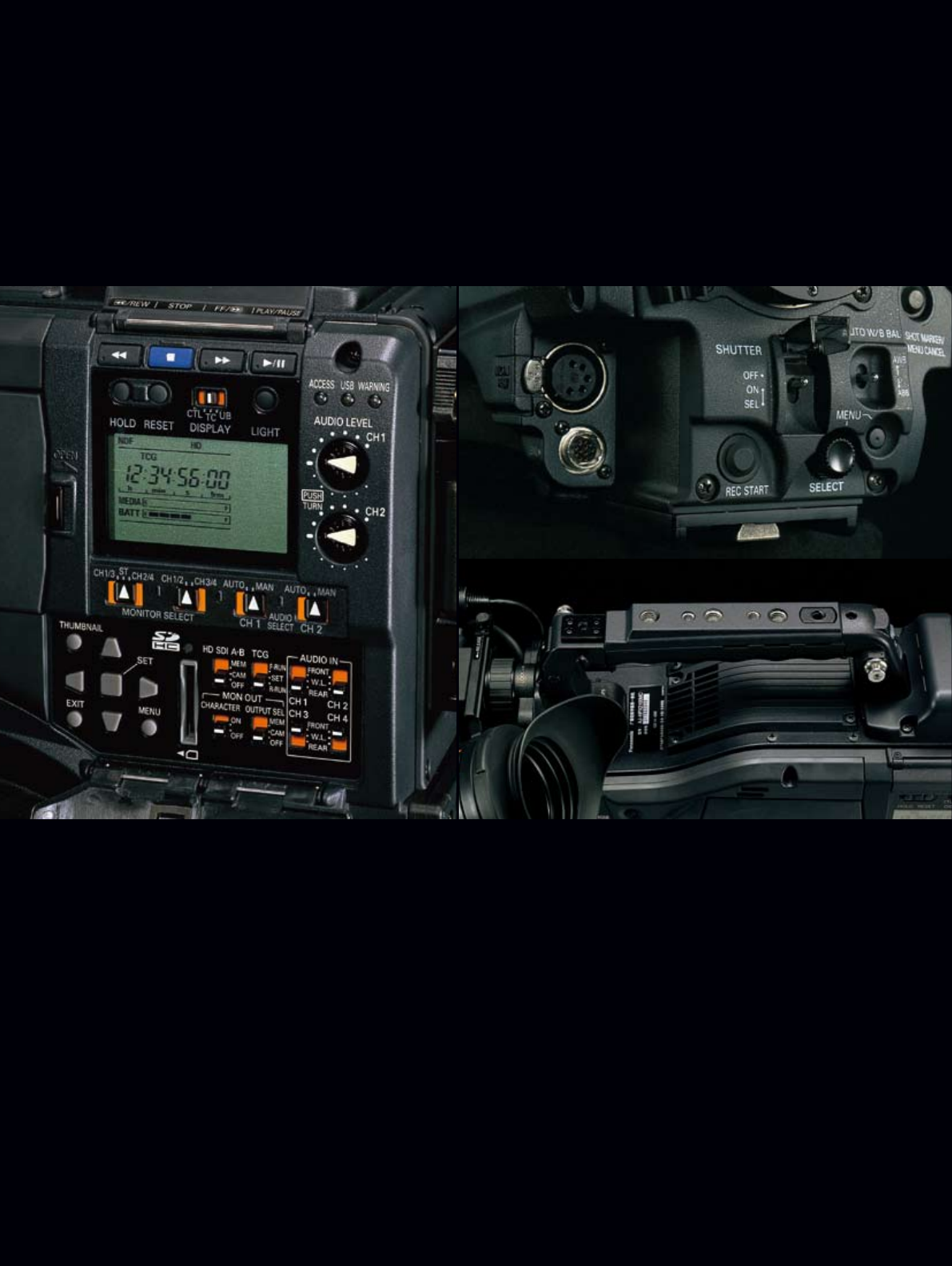
Camera operation part (both models)
12
Focus Assist Function
This function simplifies focusing by displaying, in graph form, the
frequency distribution of the incoming signal in the viewfinder and
LCD monitor. By allocating this function to one of the User buttons,
you can use it with a single touch.
Two-Layer Optical Filter
The 2-layer optical filter consists of an ND layer (clear, 1/4ND,
1/16ND, 1/64ND) and a CC layer (3200K, 4300K, 5600K, 1/2ND).
Adding the 1/2ND to the CC layer enables finer aperture
adjustment.
Versatile Shooting Assist Functions
• Variable color temperature: The color temperature can be adjusted
with the jog dial after the white balance is set.
• Color bar (switchable between SMPTE, ARIB, and full color) and
standard audio signal (1 kHz test tone) output
• Zebra: Select any two levels.
• Marker: Select from center, safety zone, safety area, and frame.
New Grip Handle
This innovative grip handle has five threaded holes that let you
mount a variety of film accessories to it during on-site production.
Designed for High Reliability and Easy Mobility
• A 3-point locking viewfinder mount allows precise adjustment.
• The Audio Rec level adjustment features a push lock function.
• The Audio Input level adjustment (front) can be switched on/off
and allocated to desired channels.
• Color viewfinder compatibility.
• A switch layout and design that reflect the requests of
professional users.
Recorder operation part (both models)
Front lower part (both models)
Upper new grip handle (both models)
13
1080/24PsF Line Output and Other System Interfaces
to Meet High-End Production Needs
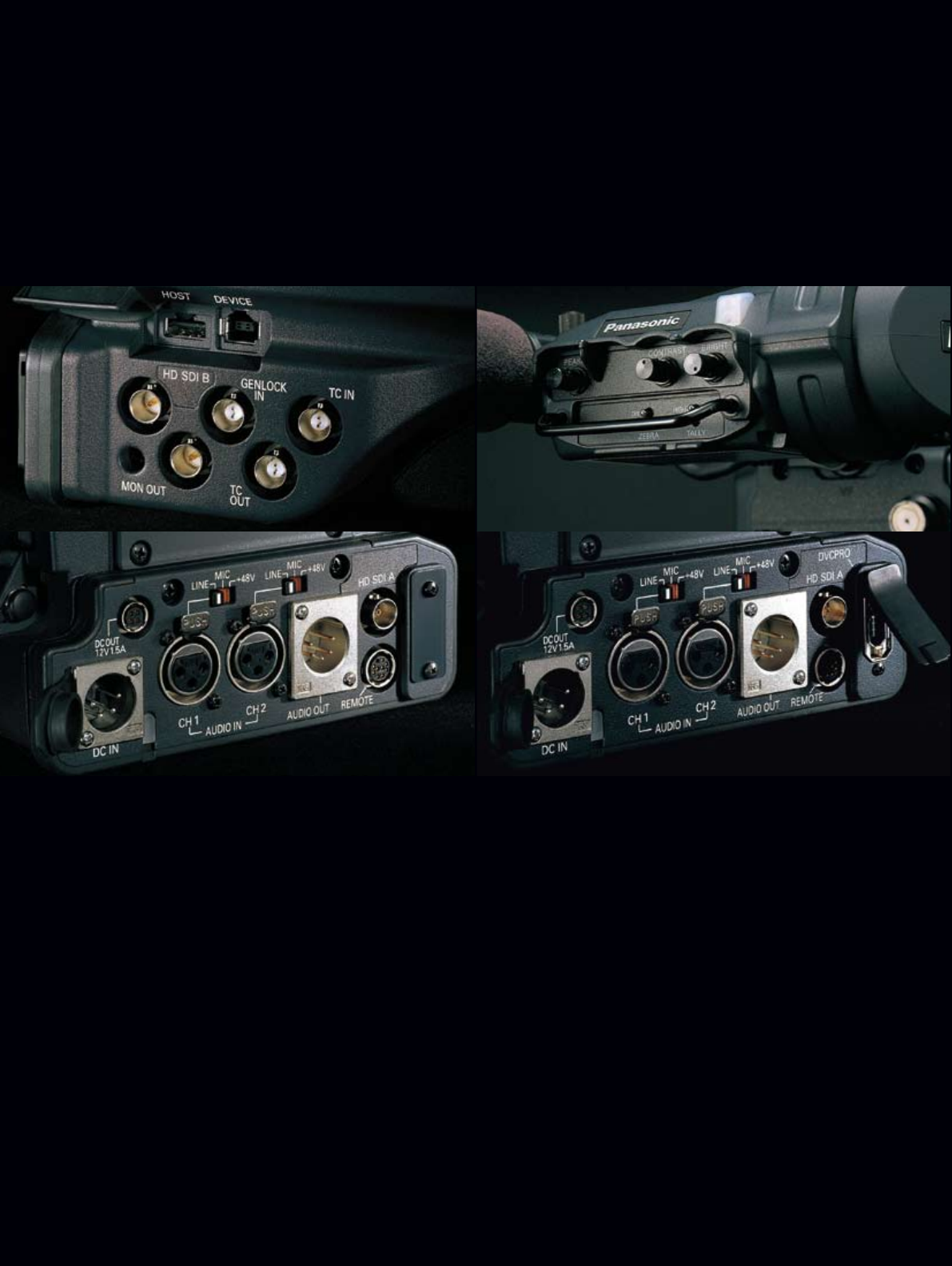
Three HD SDI Outputs
Two HD SDI output terminals (A/B) that also comply with
1080/24PsF standards and include embedded audio are standard
equipment. This lets you make backup recordings on an
AJ-HPM110 P2 Mobile or digital VTR, with rec start/stop linking.
An HD SDI video signal can also be output from the MON OUT
terminal. Character and marker displays can be set separately for
HD SDI OUT and MON OUT.
Down-Converted SD Video Output
The output signal from the MON OUT terminal can be switched to
HD SDI or VBS. When VBS is selected, a down-converted SD video
signal (analog composite) is output.
IEEE 1394 DVCPRO Output (AJ-HPX2700 only)
The AJ-HPX2700 comes equipped with an IEEE 1394-compliant
DVCPRO output (6 pin) terminal. Use the AJ-HPX2700 in tandem
with a compatible recorder such as the AG-HPG10G P2 Gear,
AJ-HPM100 P2 Mobile or Focus Enhancements FS-100 FireStore,
and the AJ-HPX2700 can make degradation-free backup recordings
with DVCPRO HD stream output.*
*IEEE 1394 backup recording is possible only with the DVCPRO HD codec.
USB 2.0 Interface Compatible with Host and Device Mode
In device mode, the P2 HD cam's card slot can be used to connect
a PC as an external device for nonlinear editing and transmission
over networks. In host mode, P2 files can be copied onto a hard
disk without using a PC.
Multi-Function RCU System (Option)
The P2 HD VariCam comes equipped with an RCU terminal for
connecting the optional AJ-RC10G Remote Control Unit. This lets
you adjust the image and control the recording operation while
monitoring the camera image.
Multipurpose DC OUT Terminal (4 pin)
In addition to supplying power to an LCD monitor, this terminal can
be used for remote rec start/stop control by connecting it to an
external switch, or as a tally lamp by connecting it to an LED lamp.
This kind of multipurpose switch is handy for mounting the P2 HD
VariCam to a crane or other location.
Additional Features
• By mounting the optional AJ-GPS910G GPS unit, the P2 HD
VariCam can record real-time position data (latitude, longitude, and
altitude), conforming to UMID standards.
* The GPS unit is not available in some areas.
• Built-in SMPTE time code generator/reader, with TC in/out terminal.
• Genlock input terminal can also be used as return video (HD-Y/
VBS) *It can not verify 23.98PsF and the 24PsF signal.
• UniSlot® wireless receiver compatible (dual channel)
* UniSlot® is a trademark of Ikegami Tsusinki Co., Ltd.
Side terminal (both models)
Rear terminal (AJ-HPX3700) Rear terminal (AJ-HPX2700)
HD view finder (optional AJ-HVF21G— both models)
14
Easy to Ingest and Manage P2 Content with a Windows PC or Mac
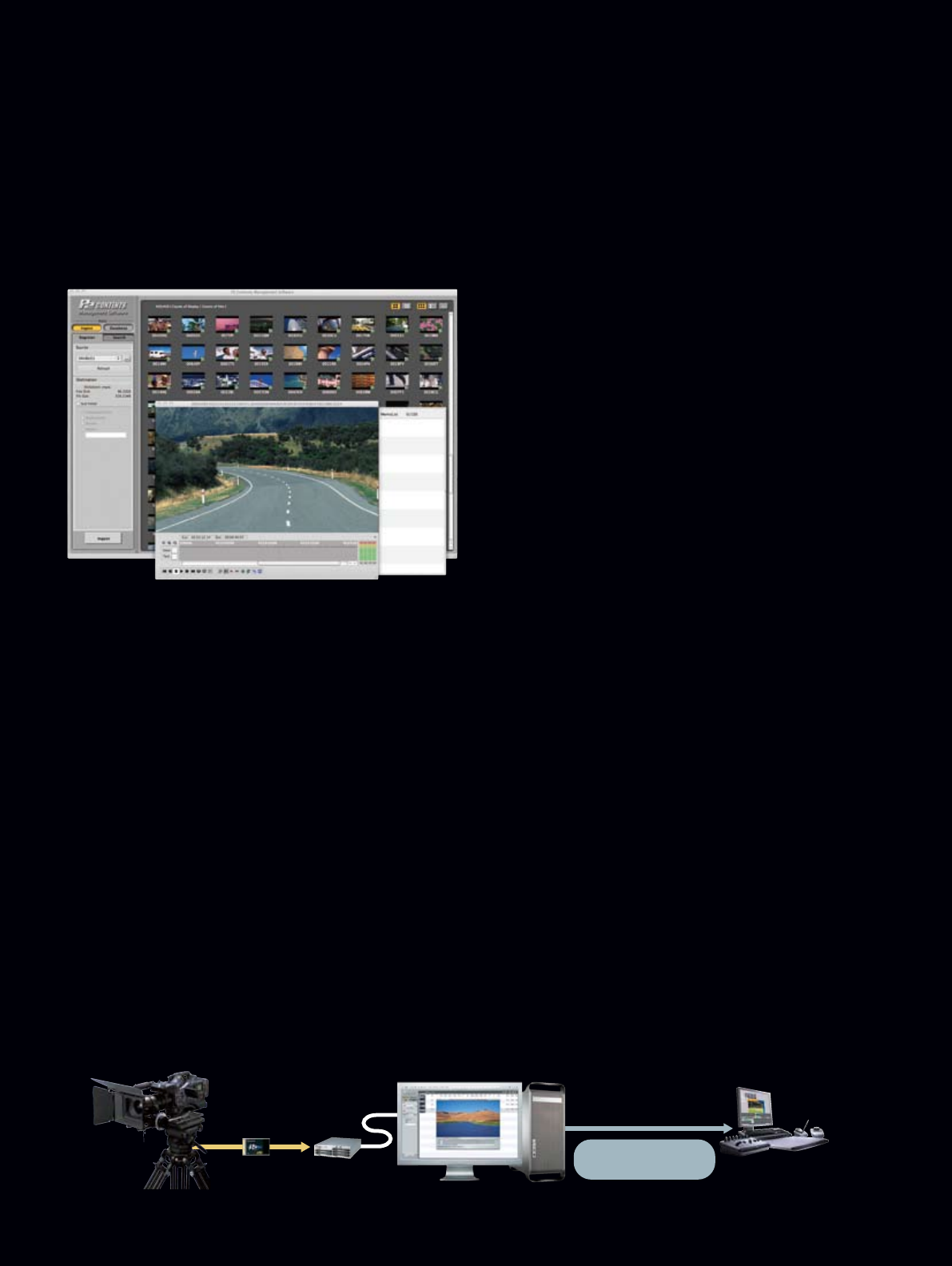
The newest Mac P2CMS version is equipped with a DPX file conversion function.
P2 Contents Management Software
P2 CMS
(Ver. 1.2 for Windows, Ver. 1.3 for Mac)
P2 Content Management Software (Free Download)
Editing & finishing system
Mac Pro
(Installing P2 CMS)
DPX (uncompressed)
10 bits log Gamma
P2 VariCam
AJ-PCD20
P2 drive
AVC-Intra 100
(FILM-REC Gamma)
Functions Featured on Both Models
• Support for AVC-Intra files (Ver. 1.2 or later)
• A built-in P2 Viewer provides easy viewing of P2 content. Content
can be played back at normal speed or +/- 4x speed in 0.5x steps.
• P2 content can be displayed in three modes: Thumbnail, Detail
and Text.
• For quick content retrieval, a database can be automatically
constructed using the P2 content metadata at the time of ingestion.
Metadata can be added, edited, or deleted.
• Quick searching of P2 content using a metadata keyword or
categorized view
• A property window indicates lists of P2 content metadata. Some
metadata can be changed by editing the properties.
• Text memos and voice memos can be indicated, edited, deleted,
or added.
• Export: Lets you copy P2 content to a hard drive or optical media
for distribution and storage
• Backup: Lets you copy P2 content to optical media in the native
P2CMS format – ideal for backing up P2 content registered in a
database.
• Archive: After copying, automatically deletes video and audio MXF
files from a hard drive to save space.
New Functions for Mac Ver. 1.3*1
The new Mac version supports a plug-in for converting AVC-Intra
100 files to DPX*2 files. This helps to speed up and lower the cost of
film production.
*1: Operates only on an Intel Mac. Does not operate on the Power Mac.
*2: DPX (Digital Picture Exchange) is a common file format for digital film work.
Operating Environment (Windows)
• Microsoft® Windows XP Professional SP2. (Windows 2000 and Windows Vista are not
supported.) • Microsoft® DirectX 9.0b or newer version must be installed. (This can be
downloaded from the Microsoft Website) • Microsoft® .NET Framework 2.0 must be
installed. (This can be downloaded from the Microsoft website automatically during
installation.) • Full-color (32 bit) display, and an audio function must be equipped.
• The P2 driver included with the P2 product must be installed.
*To play back the AVC-Intra format, it is necessary to download the AVC-Intra decoder.
To play back Proxy data, it is necessary to download the MPEG-4 decoder. DVCPRO HD
format and AVC-Intra format clips cannot be played back with PCs that do not have a CPU
that supports SSE2 instructions, such as Pentium M, Pentium 4, Pentium D and Celeron D.
[Recommended Environment for Playing Codec Files]
DVCPRO HD: 3.2 GHz or greater Pentium D, 1 GB or greater RAM
AVC-Intra 50: 2.66 GHz or greater Intel Core2 Duo processor,
1 GB or greater DDR2-667 RAM
AVC-Intra 100: 3 GHz or greater dual-core Xeon processor,
1 GB or greater DDR2-667 RAM
Operating Environment (Macintosh)
• Mac OS X 10.4.11 (Intel Mac) • Mac OS X 10.5.1, 10.5.2 (Intel Mac) • Quick Time 7.4.1 or
greater • 2 GHz or greater Intel Core Duo processor. • 1 GB or greater RAM • 1,024 x 768
or greater display • The P2 driver included with the P2 product must be installed.
*To play back the AVC-Intra format, it is necessary to download the AVC-Intra decoder.
When you convert into DPX files, it is necessary to download the AVC-Intra decoder and
DPX Plug-in. The system requirements of the installed software influences the system
requirements of the application.
[Recommended Environment to Play AVC-Intra Format Clips, and Convert into DPX Files]
•Dual CPU configuration quad-core Xeon processor
•2 GB or greater RAM
Mac version
15
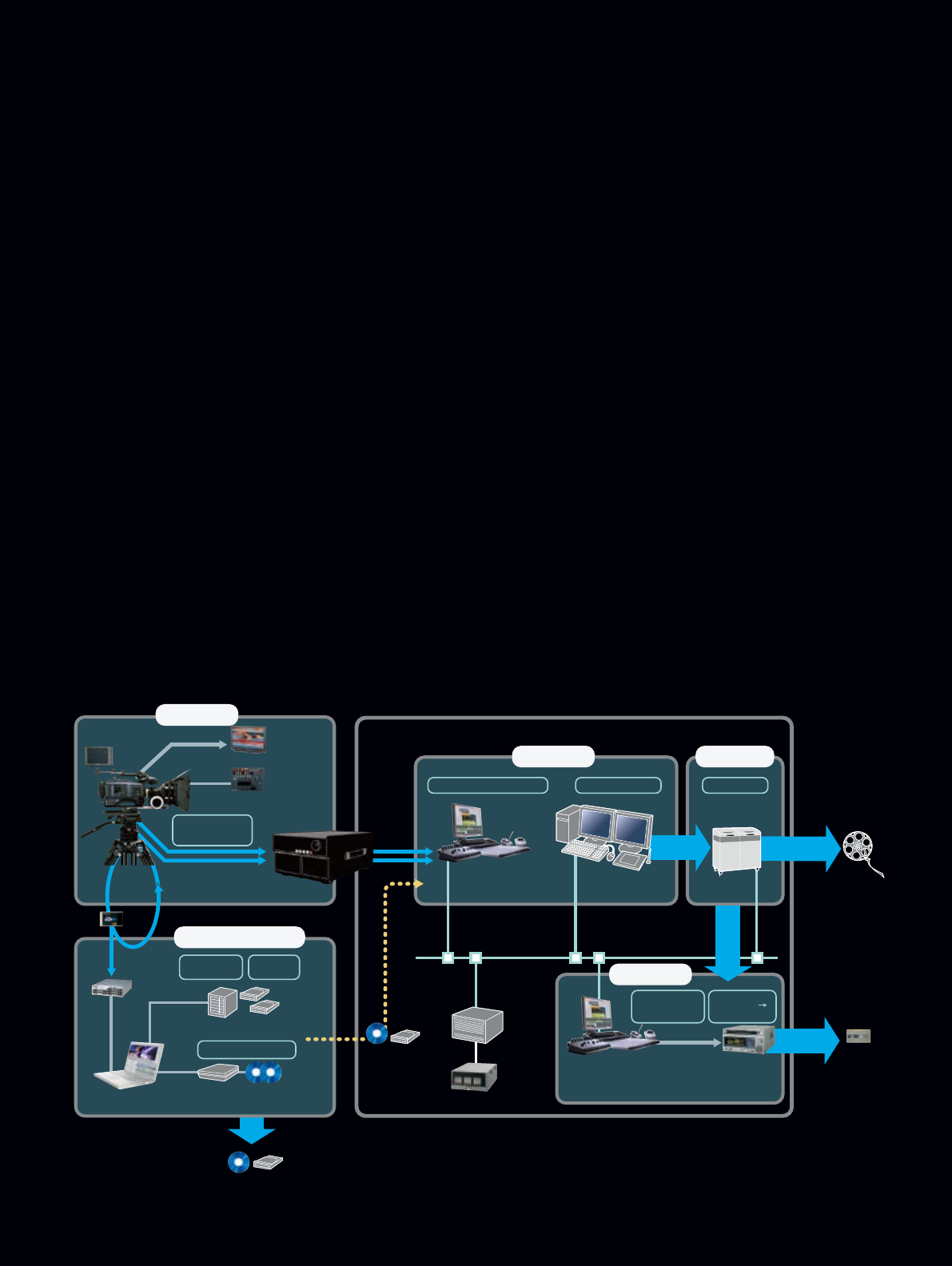
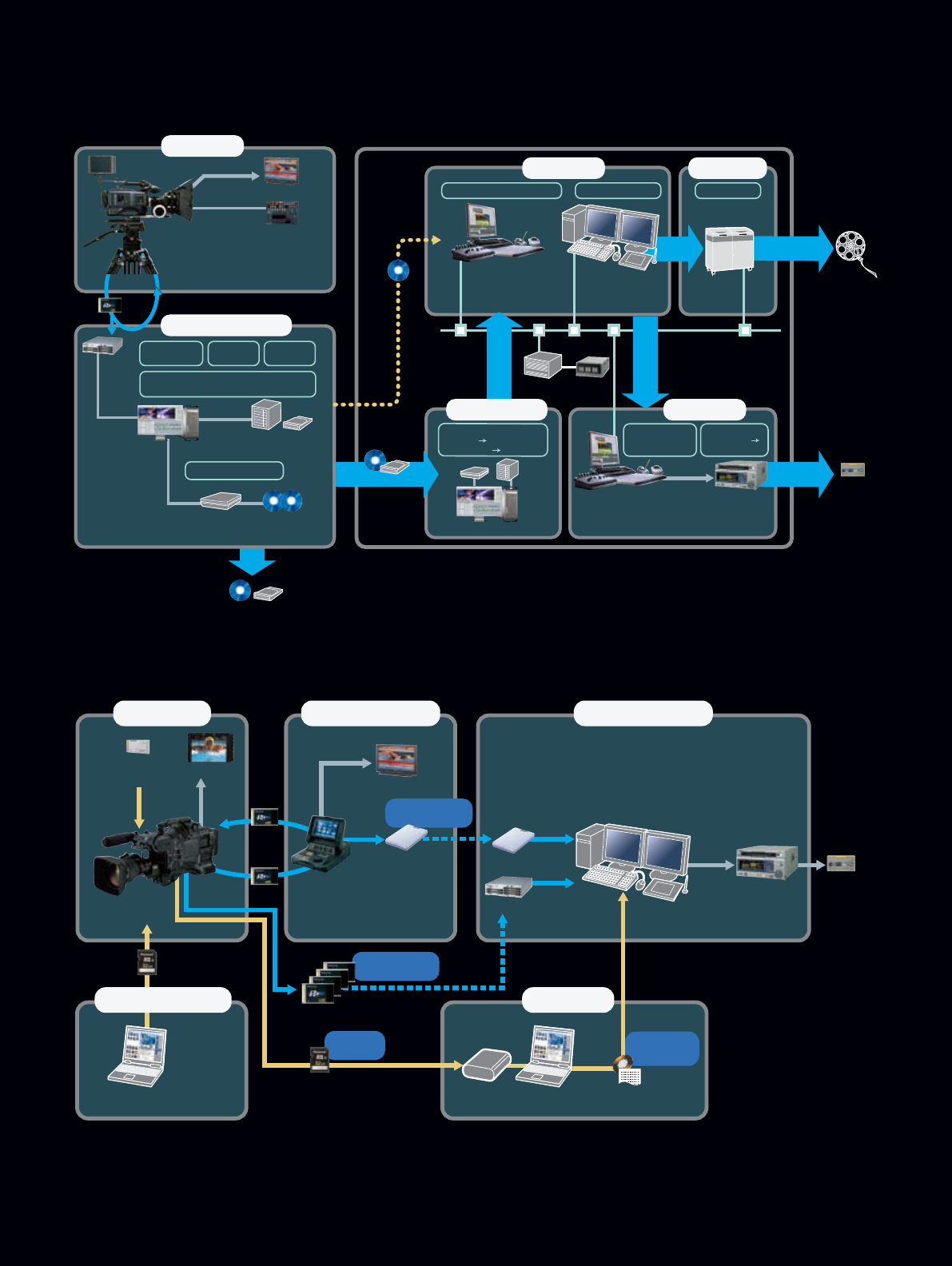
1. Cinema Production Workflow (P2 Card Recording)
P2 HD is an ideal system for producing 24p film for movie theater
use or creating 30p finished packages for TV use from high-quality
progressive images. The P2 card greatly improves shooting mobility.
P2 Content Management Software version 1.3 (for Mac*) lets you
convert AVC-Intra files recorded in Film-Rec gamma mode to
uncompressed DPX (P10-Log gamma) files. Also, still images can
be output as DPX files, so color grading instructions can be
prepared in advance.
*The software comes in both Windows and Mac versions, but only the Mac version
(version 1.3) includes the DPX conversion function.
2. AJ-HPX3700 Cinema Workflow
(Uncompressed Recording)
With its HD SDI dual-link capability, the AJ-HPX3700 can output
high-quality 1920 x 1080, RGB 4:4:4/10-bit images directly from the
camera. Also, images recorded in Film-Rec gamma mode can be
converted to P10-Log gamma images. Using a line connection to an
uncompressed video recorder (with a hard drive, etc.), the
AJ-HPX3700 can directly record images as DPX files, giving you the
highest possible image quality for P2 HD recording. Using files
recorded onto P2 cards for offline editing, you can achieve greater
efficiency in the final editing stage.
3. Workflow for 1080/59.94i Broadcasting
The P2 HD VariCam Series is an outstanding solution for producing
HDTV programs with 10-bit/4:2:2 sampling. It offers the high quality
provided by the advanced AVC-Intra 100 codec. And it can record
video data to a P2 card while at the same time saving onto an SD
Memory Card a low-resolution proxy file that can be used for off-line
editing. Editing a project off-line makes the final editing process
quicker and easier, which means greater production efficiency.
At the recording site, the AJ-HPM110 P2 Mobile by itself can be
used to monitor images, initialize P2 cards and copy data to them,
and copy files to an external hard drive.
*Proxy data cannot be recorded when using the variable frame rate function in Native
mode, or when the Pre-rec or Loop-rec functions are used.
Nonlinear Editing Partner
Panasonic has been working on the collaboration with strategic P2
Partners. Many nonlinear editing products from Apple, Avid, Grass
Valley, Harris and Quantel already support AVC-Intra. Autodesk has
announced AVC-Intra support too. The AVC-Intra editing workflow
is in place in the market.
The P2 HD System Workflow Adapts to HDTV and Movie Production
P2 Card (P2 File)
Reuse
HD SDI
HD Master Monitor
AJ-HPX3700
Uncompressed
VIdeo Recorder
Offline Editing
Project Data
(FCP)
eS ATA
USB2.0
IEEE
1394b
Ethernet
AJ-RC10G
Remote Control Unit
Mac Book Pro
P2 CMS/Final Cut Pro
HD SDI
Dual-Link
HD SDI
Dual-Link
Uncompressed 10 bits
4:4:4 Output
Server
LTO4 etc.
BD Drive BD-R
(AVC-Intra/P2 File)
Removable HDD
(AVC-Intra/P2 File)
Media conversion
Backup (P2 File)
Metadata
Editing
1. Acquisition
2. Contents Management
/Off-line Editing
Contents
Management
Editing & finishing system Color Grading
System Film Recorder Film
3. DI Process 4. Film Output
Color Grading Film Recording24p editing & processing
HD-D5 VTR
Editing & finishing system
5. HDOutput
Video Conversion
<2:3 Pull-down>
<1080i Conversion>
Gamma Conversion
<10bit log
Telecine-look>
Package
1.AJ-HPX3700 Cinema Workflow (Uncompressed Recording)
16
Off-line Editing
Preparation
(Metadata Upload)
Laptop PC with P2 viewer software
(Windows)
SD/SDHC Card
Video Encoder Card
(option)
AJ-YAX800G
HD SDI
HD SDI
AJ-HPX3700
AJ-HPX2700
BT-LH900A
P2 Card
P2 Card
Reuse
Acquisition Preview, Copy and
Media Conversion Final (On-line) Editing
HD SDI
HD-D5 VTR Package
USB2.0
USB2.0
Portable HDD Portable HDD
AJ-PCD20
USB2.0
HD Master Monitor
AJ-HPM100 with
AVC-Intra (option)
SD/SDHC Card
P2 card
Project Data
(
Low Res)
& Script
Off-line Non-linear Editor*
Non-linear Editor
(compatible with P2 HD and AVC-Intra)*
P2 Contents File
(AVC-Intra 100
)
Proxy AV
(
mp4)
P2 Contents File
(AVC-Intra 100
)
*Please refer to the latest P2 Compatibility Table at
<https://eww.pavc.panasonic.co.jp/pro-av/sales_o/p2comp/index.html>.
Breakout Box
3. Workflow for 1080/59.94i Broadcasting
P2 Card (AVC-Intra/P2 File)
Reuse
HD-D5 VTR Package
HD SDI
HD Master Monitor
AJ-HPX3700
AJ-HPX2700
BD Drive BD-R
(AVC-Intra/P2 File)
Backup (DVCPRO HD/P2 File)
Color Grading,
Reference DPX,
Offline project data,
EDL etc.
Main data (AVC-Intra)
File transfer
(DPX File)
Removable HDD
(AVC-Intra/P2 File)
eS ATA
USB2.0
IEEE 1394b
Server LTO4 etc.
Editing & finishing system
Editing & finishing system
Color Grading
System Film Recorder Film
Ethernet
AJ-RC10G
Remote Control Unit
Mac Pro/P2 CMS
Mac Pro / P2 CMS
1. Acquisition
2. Contents Management
/Off-line Editing
6. HDOutput3. DPX Transcode
4. DI Process 5. Film Output
Video Conversion
<2:3 Pull-down>
<1080i Conversion>
Color Grading Film Recording24p editing & processing
Contents
Management
Off-line
Editing
Metadata
Editing
Media conversion
Images can be Output as DPX Files,
Color Grading Instruction
Gamma Conversion
<10bit log
Telecine-look>
DPX Conversion
<AVC-Intra Uncompressed>
<FILM-REC 10bit log>
2. Cinema Production Workflow (P2 Card Recording)
17
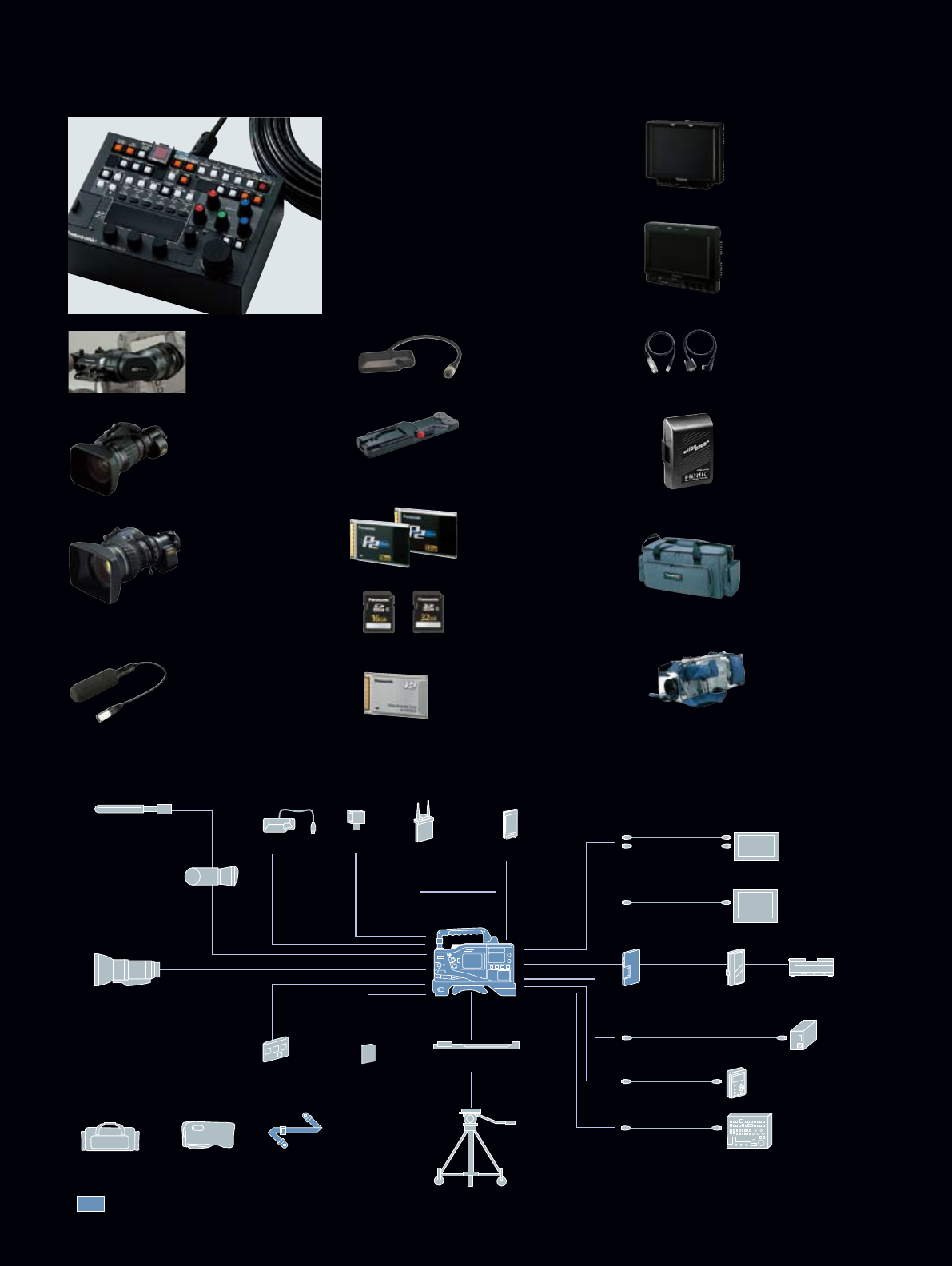
OPTIONAL ACCESSORIES
AJ-HVF21G
2" HD EVF
59.94Hz/50Hz
switchable
SHAN-TM700
Tripod Adapter
AJ-GPS910G
GPS Unit
SHAN-RC700
Rain Cover
*Not available in some areas.
AJ-RC10G
RCU (Remote Control Unit) with 10m remote
control cable
*When using with AJ-HPX3700/AJ-HPX2700, the software
of the AJ-RC10G need to be updated to version 1.11 or
upper. Please see the details on our web at <https://eww.
pavc.panasonic.co.jp/pro-av/support/desk/e/index.htm>.
AJ-C10050G
Remote Control cable (50m)
BT-LH900A
8.4" HD/SD
LCD monitor
Anton/Bauer
Battery System
AJ-MC900G
Stereo Microphone
HA22x7.8BERM-M58
HA22x7.8BERD-S58
HA16x6.3BERM-M58
HA16x6.3BERD-S58
FUJINON 2/3" LENS
compatible with CAC
HJ22ex7.6B IASE
HJ17ex7.6B IASE
CANON 2/3" LENS
compatible with CAC
AJ-P2C016RG
AJ-P2C032RG
P2 card
AJ-YAX800G
Proxy Video Encoder
SD/SDHC memory card
AJ-MC900G
Microphone Kit
AJ-HVF21G
2.0" HD EVF
Anton/Bauer
Ultra Light
SHAN-TM700
Tripod Adapter
SHAN-RC700*1
Rain Cover*1
Shoulder StrapAJ-SC900
Soft Carrying Case*1
2/3" HD Lens
AJ-HPX3700
AJ-HPX2700
Standard Accessories
UniSlot®
Wireless
Mic Receiver
AJ-GPS910G
GPS Unit AJ-YAX800G
Proxy Video Encoder
10-pin Remote Cable
BNC cable (HD-SDI)
BT-CS80G
VF Cable
IEEE 1394 cable*3
Anton/Bauer
Gold Mount Platea
Anton/Bauer Batteries System
AJ-RC10G
Remote Control Unit
BT-LH900A*2
8.4" LCD Monitor
BT-LH80WU*2
7.9" LCD Monitor
Fire Store FS-100*3
Portable DTE Recorder
DC Cable (XLR)
SD Memory Card
AC Adapter
AJ-YA350AG
HD/SD SDI Input Board
Tripod *1: Not available in some areas.
*2: Mounting bracket is required to mount on a Camera-Recorder.
*3: AJ-HPX2700 only
AJ-SC900
Soft Carrying Case
*Not available in some areas.
BT-CS80G
VF Cable
(Viewfinder Cable,
DC Cable)
BT-LH80WU
7.9"Wide HD/SD
LCD monitor

18
SPECIFICATIONS
AJ-HPX3700 AJ-HPX2700
General Specification
Power Supply DC 12 V (11.0 V to 17.0 V)
Power Consumption 42 W 38 W
Temperature Operating Temperature : 0°C to +40°C (32°F to +104°F) Keeping Temperature: –20 °C to +60 °C (–4 °F to +140 °F)
Operating Humidity 10% to 85 % (relative humidity)
Operating Time approx. 120 min. (when using DIONIC90 battery)
Weight approx. 4.9 kg (10.8 lbs, main unit only, excluding VF)
Dimensions (W x H x D) 137 mm x 209 mm x 318 mm (5-7/16" x 8-1/4" x 12-9/16", excluding handle and option slot cover)
Camera Section
CCD Elements CCD x 3 (2/3 inch interline transfer type, 2,200,000 pixel) CCD x 3 (2/3 inch interline transfer type, 1,000,000 pixel)
Video Format RGB 3CCD
Total Picture Elements 2010 (H) x 1120 (V) 1370 (H) x 744 (V)
Effective Picture Elements 1920 (H) x 1080 (V) 1280 (H) x 720 (V)
Optical Filters CC: 3200 K, 4300 K, 5600 K, 1/2 ND ND: CLEAR, 1/4 ND, 1/16 ND, 1/64 ND
Quantizing 14 bits
Horizontal Drive Frequncy 74.1758 MHz (59.94 Hz/23.98 Hz) , 74.25 MHz (50 Hz/24 Hz) 74.1758 MHz (59.94 Hz) , 74.25 MHz (50 Hz, 60 Hz)
Sampling Frequncy 74.1758 MHz (59.94 Hz/23.98 Hz) , 74.25 MHz (50 Hz/24 Hz) 74.1758 MHz (59.94 Hz) , 74.25 MHz (50 Hz, 60 Hz)
Digital Signal Process 74.1758 MHz (59.94 Hz/23.98 Hz) , 74.25 MHz (50 Hz/24 Hz) 74.1758 MHz (59.94 Hz) , 74.25 MHz (50 Hz, 60 Hz)
Programmable Gain –3 dB, 0 dB, +3 dB, +6 dB, +9 dB, +12 dB, +15 dB, +18 dB, +21 dB, +24 dB, +27 dB, +30 dB
VFR 1 to 30 fps (1080/59.94i) ,1 to 25 fps (1080/50p) 1 to 60 fps (720/59.94p, 720/60p), 1 to 50 fps (720/50p)
Shutter Speed 1/50 (50 Hz) sec., 1/60 sec., 1/100 (59.94 Hz) sec., 1/120 sec., 1/250 sec., 1/500 sec., 1/1000 sec., 1/2000 sec., HALF
180 deg, 172.8 deg, 144 deg, 120 deg, 90 deg, 45 deg
Syncro Scan Sutter
1/61.7 sec. to 1/7200 sec. (1080/59.94i)
1/30.9 sec. to 1/3600 sec. (1080/29.97p)
1/24.7 sec. to 1/2880 sec. (1080/23.98p (A) )
1/51.4 sec. to 1/6000 sec. (1080/50i)
1/25.7 sec. to 1/3000 sec. (1080/25p)
1/61.7 sec. to 1/7200 sec. (1080/59.94i, 720/59.94p)
1/30.9 sec. to 1/3600 sec. (1080/29.97p, 720/29.97p)
1/24.7 sec. to 1/2880 sec. (1080/23.98p (A) , 1080/24p, 720/23.98p)
1/51.4 sec. to 1/6000 sec. (1080/50i, 720/50p)
1/25.7 sec. to 1/3000 sec. (1080/25p, 720/50p)
Lens Mount 2/3 inch bayonet mount
Optical System F1.4 Prizm
Sensitivity F10 (2000 lx, 3200 K, 89.9 % reflect, 1080/59.94i)
Minimum Luminance 2.48 lx (F 1.4, +30 dB) 0.042 lx (F 1.4, +30 dB, VFR=1 FRAME) 1.24 lx (F 1.4, +30 dB) 0.021 lx (F 1.4, +30 dB, VFR=1 FRAME)
Video S/N 54 dB (standard)
Registration Less than 0.03 % (whole zone, without lens distortion)
Memory Card Recorder Section
Recording Format AVC-Intra 100/AVC-Intra 50/DVCPRO HD Format switchable
Recording Video Signal 48 kHz/16 bits, 4CH 48 kHz/16 bits, 4CH (AVC-Intra/DVCPRO HD)
48.048 kHz/16 bits, 4CH (720/60p only)
Recording Media P2 card
Recording Playback Time* approx. 32 min. (when using 32GB P2card AJ-P2C032RG,
AVC-Intra 100 codec, recording in 1080/59.94p)
approx. 32 min. (when using 32GB P2card AJ-P2C032RG,
AVC-Intra 100 codec, recording in 1080/59.94p or 720/59.94p)
Digital Video
Sampling HD Frequncy Y: 74.1758 MHz (59.94 Hz) /74.25 MHz (50 Hz) , PB/PR: 37.0879 MHz (59.94 Hz) /37.125 MHz (50 Hz)
Quantizing AVC-Intra 100/AVC-Intra 50: 10 bits, DVCPRO HD: 8 bits
Video Compression AVC-Intra 100/AVC-Intra 50: MPEG-4 AVC/H.264 Intra Profile, DVCPRO HD: DV-Bassed Comperssion (SMPTE370M)
Digital Audio
Quantizing 16 bits
Frequncy Response 20 Hz to 20 kHz ±1.0 dB (reference level)
Dynamic Range More than 85 dB (1 kHz, AWTD)
Distortion Within 0.1 % (1 kHz, reference level)
Headroom 18 dB/20 dB selectable
Input and Output
GENLOCK IN BNC x 1, 1.0Vp-p, 75 Ω, (switchable to VIDEO IN or Return Video)
MONITOR OUT BNC x1 (switchable to VBS/HD SDI) , VBS: 1.0 Vp-p, 75 Ω,
HD SDI: 0.8 Vp-p, 75 Ω (SMPTE292M/299M standards)
BNC x1 (switchable to VBS/HD SDI) , VBS: 1.0 Vp-p, 75 Ω,
HD SDI: 0.8 Vp-p, 75 Ω (SMPTE292M/296M standards)
HD SDI A OUT BNC x1, 0.8 Vp-p, 75 Ω (SMPTE292M/299M/372M/352M standards) ,
with HD SDI B Dual Link BNC x 1, 0.8 Vp-p, 75 Ω (SMPTE292M/296M standards)
HD SDI B OUT BNC x1, 0.8 Vp-p, 75 Ω (SMPTE292M/299M/372M/352M standards) ,
with HD SDI A Dual Link BNC x 1, 0.8 Vp-p, 75 Ω (SMPTE292M/296M standards)
TC IN BNC x 1, 0.5Vp-p to 8 Vp-p, 10 kΩ
TC OUT BNC x 1, low-impedance, 2.0 Vp-p±0.5 Vp-p
DVCPRO —
6 pin (Output) , Transfer Speed: 400/200/100Mbps (selectable),
Transfer Data: IEEE 1394-1995/1394a-2000, IEC61883-1,2,
SPMTE396M standards, Control Command: AV/C Command Set standards
AUDIO IN XLR 3 pin x 2 (CH1/CH2) , LINE/MIC/MIC+48 V switchable, LINE: –3 dBu /0 dBu /+4 dBu selectable
MIC : –60 dBu/–50 dBu selectable , MIC+48 V: Phantom +48 V, –60 dBu/–50 dBu selectable
MIC IN XLR 5 pin x 1, –50 dBu/–40 dBu selectable , Phantom +48 V (ON/OFF)
WIRELESS IN 25 pin, D-SUB, –40 dBu
AUDIO OUT XLR 5 pin x 1 (CH1/CH2) , –3 dBu/0 dBu/+4 dBu selectable , balanced, low-impedance
PHONES OUT Stereo Mini Jack x 2
DC IN XLR 4 pin x 1, DC12 V (11 V to 17 V)
DC OUT 4 pin, DC 12 V (11 V to 17 V) , Max.1.5A
LENS 12 pin
EVF 20 pin
RCU 10 pin for AJ-RC10G
GPS 6 pin for AJ-GPS910G
USB (2.0) USB: 2.0, HOST: 4 pin Type-A , DEVICE: 4 pin Type-B
Monitor and Other packages
LCD Monitor 3.5 inches, LCD color monitor, 210,000 pixels
Supplied Accessories Shoulder strap, Front audio volume knob (with screw), software CD-ROM
*Time shown above is when you record a series of 1 shot to P2 card. Depending on numbers of shots you record, time will get shorter than the number shown above.
Weight and dimensions shown are approximate. Specifications are subject to change without notice.

Panasonic Corporation
Systems Business Group
2-15 Matsuba-cho, Kadoma, Osaka 571-8503
Japan
Phone +81 6 6901 1161 Fax +81 6 6908 5969
https://eww.pavc.panasonic.co.jp/pro-av/
Argentina +54 1 308 1610
Australia +61 2 9986 7400
Bahrain +973 252292
Belgium +32 (0)2 481 04 57
Bulgaria +359 2 946 0786
Brazil +55 11 3889 4035
Canada +1 905 624 5010
China +86 10 6515 8828
(Hong Kong +852 2313 0888)
Czech Republic +420 236 032 552/511
Denmark +45 43 20 08 57
Egypt +20 2 2 3938151
Finland, Latvia, Lithuania, Estonia
+358 (9)521 52 53
France +33 (0)1 55 93 66 67
Germany, Austria
+49 (0)611 235 401
Greece +30 210 96 92 300
Hungary +36 (1)382 60 60
India +91 11 2437 9962
Indonesia +62 21 385 9449
Iran +98 21 2271463
Italy +39 02 6788 367
Kazakhstan +7 3272 504 777
Korea +82 2 2106 6641
Malaysia +60 3 5549 5422 (PSE)
+60 3 5546 7000 (PM)
Mexico +52 55 5488 1000
Montenegro, Serbia
+41 (0)26 466 25 20
Netherlands +31 73 64 02 577
New Zealand +64 9 272 0100
Norway +47 67 91 78 00
Pakistan +92 5370320 21
Panama +507 229 2955
Peru +51 1 614 0000
Philippines +63 2 633 6162
Poland +48 (22)338 1100
Portugal +351 21 425 77 04
Puerto Rico +1 787 750 4300
Romania +40 21 211 4855
Russia & CIS +7 495 980 4205
Singapore +65 6270 0110
Slovak Republic +421 (0)2 52 92 14 23
Slovenia, Croatia, Bosnia, Macedonia
+44 (0)20 76 63 36 57
South Africa +27 11 313 1400
Spain +34 (93) 425 93 00
Sweden +46 (8) 680 26 41
Switzerland +41 (0)41 259 96 32
Taiwan +886 2 2725 9100
Thailand +66 2 731 8888
Turkey +90 216 578 3700
U.A.E. (for All Middle East)
+971 4 886 2142
Ukraine +380 44 4903437
+380 44 4903438
[ext. 112]
U.K +44 (0) 1344 70 69 20
U.S.A. +1 201 348 5300
Vietnam +848 8370 280
[Countries and Regions]
Factories of Systems Business Group have received
ISO14001:2004-the Environmental Management
System certification. (Except for 3rd party's peripherals.)
20K810ZM-1 Printed in Japan
SP-P2VCAMPE1
https://eww.pavc.panasonic.co.jp/pro-av/index.html
Please refer to the latest Non-linear Compatibilty Information,
P2 Support and Downlord and Service Information, etc. at panasonic web site.
Notes Regarding the Handling of P2 Files Using a PC
Mounting and Transferring Files
The PC must be installed with the included P2 driver in order to recognize, copy and transfer P2 files. This driver is also necessary when using the PC card slot and when handling P2 files
stored on a hard-disk device, such as P2 store. The included P2 driver is compatible with Windows Vista, Windows XP, Windows 2000 and Mac OSX. For other operating requirements, refer to
the P2 installation manual. The P2 driver and the P2 installation manual can be downloaded free from a Panasonic website. Visit https://eww.pavc.panasonic.co.jp/pro-av/ and click "P2 Support
and Download."
Preview and Nonlinear Editing
The PC must be installed with the P2 Viewer software for Windows PC, P2 CMS, or P2-compatible editing software available from Adobe, Apple, Avid, Grass Valley, or Matrox in order to
preview P2 files. Note that the specified operating requirements must be met to operate these applications. For playing and editing HD video clips, the PC or Mac must meet additional
operating requirements.
For software download or other information, visit https://eww.pavc.panasonic.co.jp/pro-av/ and click "P2 Support and Download" or "Nonlinear Compatibility Information."
For the operating requirements of other editing software, visit the website of the relevant software manufacturer.
•AVCHD and the AVCHD logo are registered trademark of Sony Corporation and Panasonic Corporation. • SDHC logo marks are a registered trademark. • SD Logo is a trademark. •Microsoft,
Windows, Windows Vista, Windows Server and Direct x are registered trademarks of Microsoft corporation. •Apple, Macintosh, Mac OS, Quick Time and Final Cut Studio are trademarks of
Apple, Inc., registered in the U.S. and other countries. •Autodesk,Smoke, Inferno, Flame or Flint are registered trademarks or trademarks of Autodesk, Inc., in the USA and/or other countries.
• Canopus, EDIUS are registered trademarks of Thomson Canopus Co., Ltd..• Intel, Celeron, Pentium, Core and Xeon are trademarks of Intel Corporation, registered in the U.S. and other
countries. • UniSlot(R) is a trademark of Ikegami Tsusinki Co., Ltd. • FOCUS and FireStore are registered trademarks of FOCUS Enhancements, Inc..
