Panasonic If Not Then B TH 7Series
User Manual: Panasonic If not then Manual: ftp://ftp.panasonic.com/pub/Panasonic/Drivers/PBTS/brochures/B_TH-7Series
Open the PDF directly: View PDF  .
.
Page Count: 9
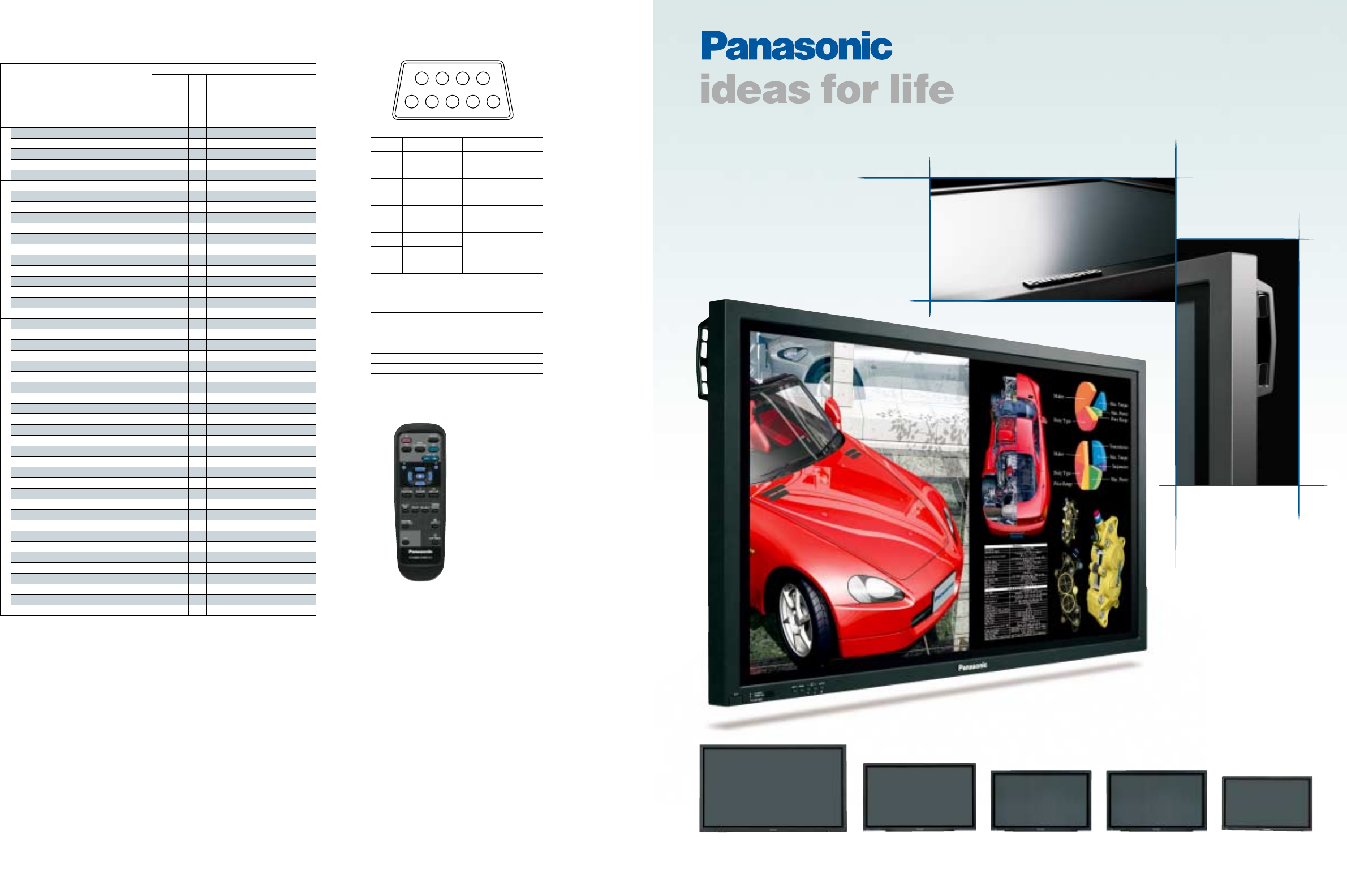
Plasma Display
TH-37PWD7UY
37-inch diagonal
Wide Plasma Display
TH-42PWD7UY
42-inch diagonal
Wide Plasma Display
TH-42PHD7UY
42-inch diagonal
High-Definiiton Plasma Display
TH-50PHD7UY
50-inch diagonal
High-Definiiton Plasma Display
TH-65PHD7UY
65-inch diagonal
High-Definiiton Plasma Display
Serial RS232C: D-Sub 9-Pin (Female)
Pin No. Signal name Descriptions
1CD NC
2 RXD Receive Data
3 TXD Transmit Data
4 DTR Not used
5 GND Ground
6 DSR Not used
7RTS Short Circuit
8 CTS
9RI NC
Pin Assignment and Signal Name
Remote Control Functions
Stand-by (On/Off)
Input Selection
Status
Surround On/Off
Sound Mute On/Off
Volume Up/Down
Normalization (N)
Exit (R)
Position/Action
Digital Zoom
Picture
Sound
Set Up
Picture Position/Size
Aspect
PC Mode Selection
Off Timer
12
6789
345
Signal Level Complied with RS232C
Synchronous System Start/Stop Synchronous
Communication
Baud Rate 9600 bps
Parity Nil
Character Length 8 bits
Stop Bit 1 bit
X Parameter Nil
Transmitting Conditions
Supplied Remote Control
(Comes with every Panasonic Plasma Display model.)
Preset Input Signals
Panasonic Broadcast & Television Systems Company
Division of Matsushita Electric Corporation of America
Executive Office: One Panasonic Way, 4E-7, Secaucus, NJ 07094 (201) 348-5300
EASTERN ZONE: One Panasonic Way, 4E-7, Secaucus, NJ 07094 (201) 348-7196
Central Region: 1707 N Randall Road E1-C-1, Elgin, IL 60123 (847) 468-5200
WESTERN ZONE: 3330 Cahuenga Blvd W., Los Angeles, CA 90068 (323) 436-3608
Government Marketing Department: 52 West Gude Drive, Rockville, MD 20850 (301) 738-3840
Panasonic Sales Company
Division of Matsushita Electric of Puerto Rico, Inc.
San Gabriel Industrial Park, 65th Infantry Ave., K.M.9.5, Carolina, PR 00630 (787) 750-4300
Panasonic Canada Inc.
5770 Ambler Drive, Mississauga, Ontario L4W 2T3 (905) 624-5010
Have assembly and installation done by a qualified electrician.
Simulated pictures on screen.
Specifications are subject to change without notice. Printed in Japan
USA04S-01
Optional Board
NTSC 15.73 59.94 Y Y Y
PAL 15.63 50.00 Y Y Y
PAL60 15.73 59.94 Y Y Y
SECAM 15.63 50.00 Y Y Y
Modified NTSC 15.73 59.94 Y Y Y
525 (480)/60i 15.73 59.94 Y Y Y Y Y Y Y
525 (480)/60p 31.47 59.94 Y Y Y Y Y Y Y
625 (575)/50i 15.63 50.00 Y Y Y Y Y Y Y
625 (575)/50p 31.25 50.00 Y Y Y Y Y Y Y
750 (720)/60p 45.00 60.00 Y Y Y Y Y Y Y Y
750 (720)/50p 37.50 50.00 Y Y Y Y Y
1125 (1080)/60i 33.75 60.00 Y Y Y Y Y Y Y Y
1125 (1080)/50i 28.13 50.00 Y Y Y Y Y Y
1125 (1080)/24sF 27.00 47.92 Y Y Y Y Y Y
1125 (1080)/30p 33.75 30.00 Y Y Y Y Y Y
1125 (1080)/25p 28.13 25.00 Y Y Y Y Y Y
1125 (1080)/24p 27.00 24.00 Y Y Y Y Y Y
1250 (1080)/50i 31.25 50.00 Y Y Y Y Y
640 x 400 @70Hz 31.46 70.07 Y Y Y Y Y
640 x 480 @60Hz 31.47 59.94 Y Y Y Y Y Y Y
640 x 480 @72Hz 37.86 72.81 Y Y Y Y Y
640 x 480 @75Hz 37.50 75.00 Y Y Y Y Y
640 x 480 @85Hz 43.27 85.01 Y Y Y Y Y
852 x 480 @60Hz 31.47 59.94 Y Y Y Y Y Y
800 x 600 @56Hz 35.16 56.25 Y Y Y Y Y
800 x 600 @60Hz 37.88 60.32 Y Y Y Y Y Y
800 x 600 @72Hz 48.08 72.19 Y Y Y Y Y
800 x 600 @75Hz 46.88 75.00 Y Y Y Y Y
800 x 600 @85Hz 53.67 85.06 Y Y Y Y Y
1024 x 768 @60Hz 48.36 60.00 Y Y Y Y Y Y
1024 x 768 @70Hz 56.48 70.07 Y Y Y Y Y
1024 x 768 @75Hz 60.02 75.03 Y Y Y Y Y
1024 x 768 @85Hz 68.68 85.00 Y Y Y Y Y
1152 x 864 @75Hz 67.50 75.00 Y Y Y Y Y
1280 x 960 @60Hz 60.00 60.00 Y Y Y Y Y
1280 x 960 @85Hz 85.94 85.00 Y Y Y Y Y
1280 x 1024 @60Hz 63.98 60.02 Y Y Y Y Y
1280 x 1024 @75Hz 79.98 75.03 Y Y Y Y Y
1280 x 1024 @85Hz 91.15 85.02 Y Y Y Y Y
1600 x 1200 @60Hz 75.00 60.00 Y Y Y Y Y
1600 x 1200 @65Hz 81.25 65.00 Y Y Y Y Y
1066 x 600 @60Hz 37.88 60.32 Y Y Y Y Y Y
1366 x 768 @60Hz 48.36 60.00 Y Y Y Y Y Y
Mac 13˝ (640 x 480) 35.00 66.67 Y Y Y Y Y
Mac 16˝ (832 x 624) 49.72 74.54 Y Y Y Y Y
Mac 21˝ (1152 x 870) 68.68 75.06 Y Y Y Y Y
Signal name
TY-42TM6B/V
Standard-
Equipped Boards
TY-42TM6Y
TY-42TM6A/Z
TY-42TM6P
TY-42TM6D
TY-42TM6G
TY-FB7SD
TY-FB7HD
TY-FB7HM
Horizontal
Frequency (kHz)
Vertical
Frequency (Hz)
CompositeComponentRGB
* When a signal having a resolution that exceeds the panel resolution is input,
a simplified display will be produced.
2
Above and Beyond: The Panasonic
Commitment to Customer Satisfaction
The Image Quality and Versatility You Need Today,
the System Expandability You'll Want Tomorrow
New 65-inch plasma model for use in larger-than-
conventional displays
Demand is rising for extra-large display screens, and Panasonic has the solution. Our
new lineup of displays for professional applications includes a 65-inch plasma model
that offers the superior image quality, extensive functions, and extendibility that make
Panasonic an industry leader. The new unit suits any application calling for a super-
size display. Use it in a directory in a building lobby, an information board for an airport,
train station or other large public facility, or a monitor at event sites.
The ultimate in image quality — Expressivity that goes
above and beyond previous limits
A host of Panasonic imaging technologies combine to achieve both the industry's
highest gradation and outstanding 4,000:1* contrast. The accuracy and detail our
displays provide cannot be adequately expressed by specifications alone. Their overall
image quality goes far beyond conventional standards. They provide pictures with the
kind of breathtaking beauty that stirs emotion.
* SD models
Functions and expandability to meet a variety of applications
Dual Picture, Digital Zoom, multi-screen capability and other advanced functions
enhance the usability of our displays. Our popular Multi-Function Slots are also
provided. And we've expanded our lineup of optional terminal boards, making our
displays solutions to an even wider range of customer needs.
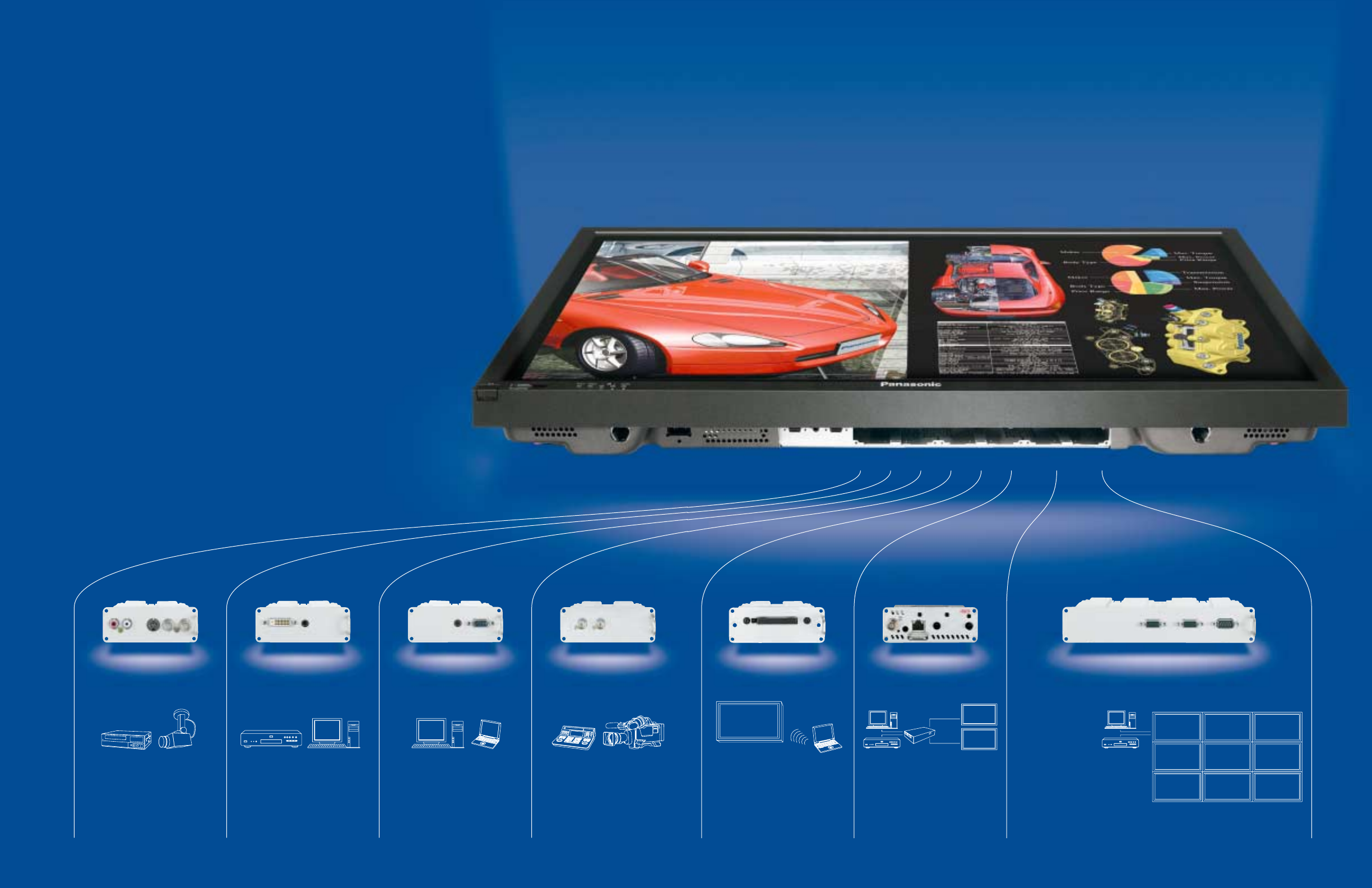
Connection with
analog equipment
Lets you connect an S-VHS VCR
or video camera. This board has a
video output terminal too, so you
can also connect a sub-monitor
device for image monitoring.
BNC Composite Video Terminal Board
TY-42TM6B
Connection with
digital equipment
Allows full-digital transmission of
video signals, with no degradation.
Allows reproduction of high-quality
images from a DVD player, PC or
other compatible digital equipment.
RGB (Digital) Terminal Board (DVI-D with
HDCP) TY-42TM6D
Compatible with the SDI or HD-SDI
(for HDTV) systems used by
broadcasting stations. This board
lets the plasma display reproduce
crisp, clear images in a studio or
control room.
SDI Terminal Board TY-FB7SD
HD-SDI Terminal Board TY-FB7HD
Connection with PC
Lets you connect multiple PCs.
Use it in conference rooms, class
rooms, lecture halls and other sites
where PCs are often used.
PC Input Terminal Board TY-42TM6P
Connection with
broadcast equipment
3
Multi-screen system configuration
This board allows the daisy
chaining of multiple plasma
displays, making it easy to
configure a multi-screen system.
RGB Active-Through Terminal Board
TY-42TM6G
Remote video
distribution
For distant distribution of video
images. Images can be sent to the
plasma display in real time from
distant equipment connected to the
transmitter.
Twisted-Pair-Cable Receiver Board (Video,
Audio and PDP Control) KE0101CRBW
Wireless connection
Lets the plasma display
simultaneously signals from up to
four notebook PCs. With a wireless
connection, you can get a
presentation or meeting under way
quickly without taking the time and
trouble to connect cables.
Wireless Presentation Board TY-FB7WPU
Weak pre-discharge emissions × 12
(Contrast: 550 : 1)
Emission intensity
1 field
Strong pre-discharge emission × 1
(Contrast: 400 :1)
Emission intensity
1 field
Weak pre-discharge emission × 1
(Contrast: 4000 :1)
Emission intensity
1 field
Conventional
Real Black Drive
The Industry's Best Overall Picture Quality
New Super Real Gamma SystemConventional
Adaptive AGCConventional
Active I/P ConversionConventional
Conventional MPD Noise Reduction
High-Contrast Images with a High S/N Ratio —
Adaptive AGC
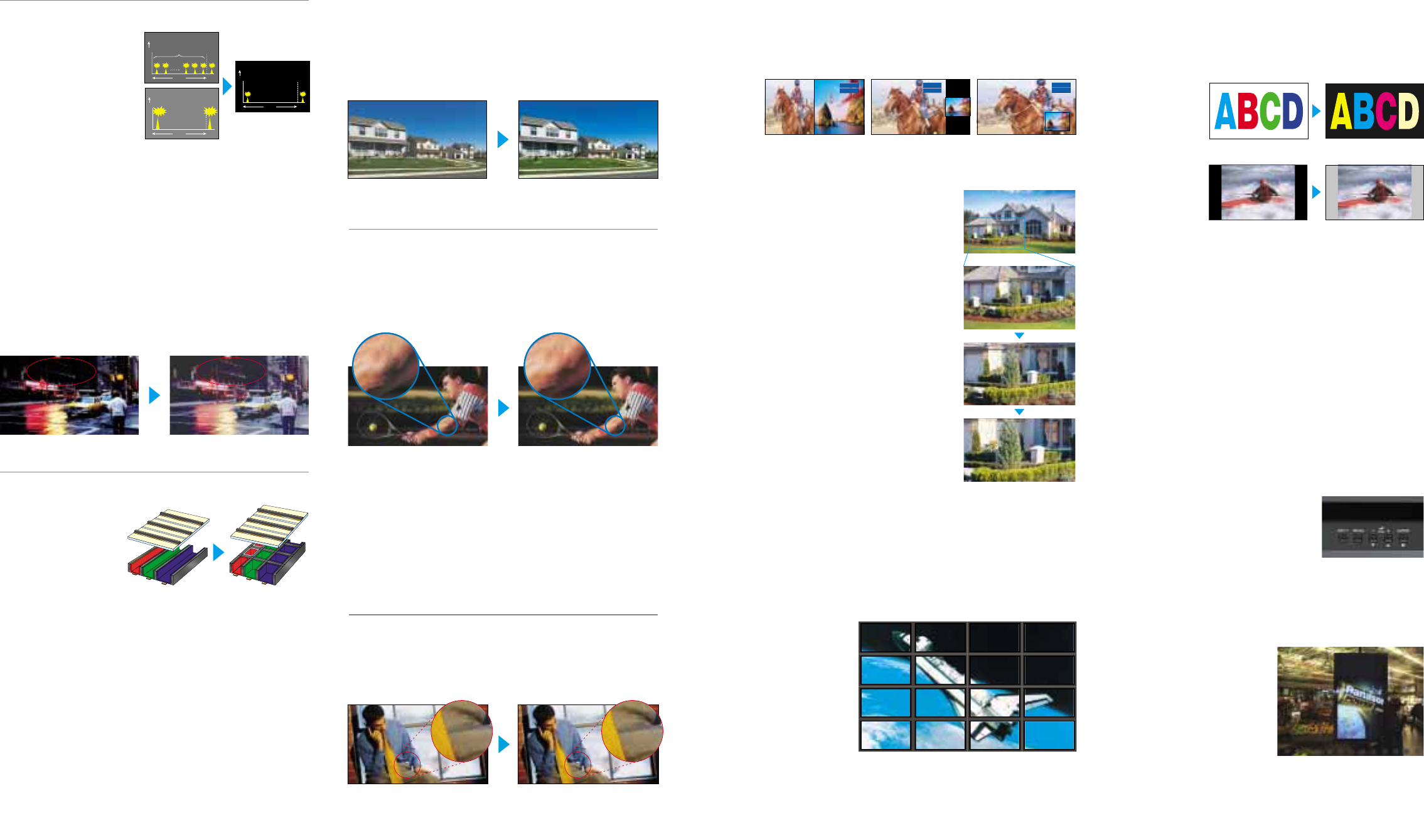
Our previous automatic gain control (AGC) detected the brightness
level of the entire image, then boosted it as necessary. This had a
drawback, in that it tended to increase noise and black-out parts of
the image where the video signal did not require boosting. Adaptive
AGC raises contrast while suppressing noise by detecting and
boosting only the image edges.
Note: The default setting for the Adaptive AGC is OFF.
Technologies for Improving Picture Clarity and
Colors
Cleaner Moving Images —
High-Precision MPD Noise Reduction
This newly developed technology dramatically reduces MPD (Motion
Picture Disturbance) noise to deliver crisp, clean moving images.
Using a Panasonic original algorithm, it detects motion patterns that
tend to generate noise and makes the necessary adjustments to
maximize image quality. And it does this without diminishing the
quality of stationary objects, such as those in the background.
Vibrant Colors and Natural Skin Tones —
3D Color Management System
3D Color Management System is a new correction process that
works in a three-dimensional color matrix (hue, saturation, and
brightness) rather than the conventional two-dimensional color
difference plane. By correcting hue and brightness independently and
providing finer control, this process delivers vibrant colors and natural
skin tones.
Note: The default setting for the 3D Color Management System is OFF.
Technologies for Enhancing Resolution and
Sharpness
Better Vertical Resolution — Active I/P Conversion
The Active I/P (Interlace/Progressive) Conversion system detects
slow movements more precisely by increasing the range for detecting
moving-picture and still-picture pixels. This reduces I/P conversion
noise that often occurs when reproducing tiny movements, thereby
producing crisper images while raising the vertical resolution in
interlaced images.
Functions that Improve Usability
Picture-In-Picture mode
superimposes a small sub-screen
picture over a full-screen picture.
COMPONENT 1
COMPONENT 2
COMPONENT 1
COMPONENT 2
COMPONENT 1
COMPONENT 2
Picture-And-Picture mode splits
the screen in half and shows
different pictures on each half.
Picture-Out-Picture mode displays
a small picture on the right side of
the screen.
4 5
Conventional
stripe rib structure New bounded cell
structure
1x
2x
3x
4x
Two Different Images on One Screen —
Dual Picture Mode
You can simultaneously display images from any two different kinds of
AV sources connected. Or, adding one of the optional terminal boards
lets you display images from two of the same type of image source,
such as two PCs or two DVD players. This function allows you to take
full advantage of the plasma display's large screen.
Up to 4x Enlargement of Image Zones —
Digital Zoom
This function lets you enlarge a portion of
an image by up to four times normal size
and display it on the full screen. Use this
function to give your presentations greater
impact.
* Digital Zoom does not work in Dual Picture
mode. Images of SXGA resolution or higher
from a PC or RGB source may not enlarge
correctly. Some degradation occurs when
images are enlarged.
Huge Display Equivalent to 260-inches —
Multi-Screen Applications
The built-in image-enlarging function makes it easier to set up multi-
screen displays featuring four (2 x 2), nine (3 x 3), or sixteen (4 x 4)
units. For example, with sixteen 65-inch displays you can configure a
huge display equivalent to 260 inches by simply connecting ordinary
cables. That's the kind of display that catches eyes at shopping malls
and event sites. This function works with component video signals, so
you can use enlarged images from DVD and other high-quality
sources in your
display.
* The image-enlarging
function operates on
video signal and on
PC/RGB signal up to
XGA mode. However,
a normal display may
not be obtained with
some PC/RGB
signals.
Note: The ambient temperature varies depending on the installation location.
Provide sufficient air conditioning for surrounding conditions.
Technologies for Increasing Contrast and Gradation
Stunning 4000:1 Dark-Area Contrast* —
New Real Black Drive System
By reducing the pre-discharge
emission when reproducing
black, the New Real Black
Drive System provides deeper,
richer blacks and a stunning
4000:1 contrast*. The result is
dramatically enhanced image
clarity and realism.
* For the SD models.
Even Higher Bright-Area Contrast —
Deep Black Filter
The front protective glass of the plasma display panel incorporates a
Deep Black Filter that suppresses light transmittance and slashes the
amount of external light reflected. This helps our displays achieve the
industry's highest level of contrast when viewed in bright
surroundings.
2,048 Shades of Gradation in Dark Scenes —
New Super Real Gamma System
In scenes with low brightness levels, the New Super Real Gamma
System reproduces gradation in steps equivalent to 2,048 shades. In
other words, this original, non-linear signal processing system
provides superior performance at brightness levels where the human
eye sees best. As a result, it adds subtle nuances to darker scenes
and gives images greater depth.
Technologies for Increasing Brightness
10% Brighter Images —
New MACH Panel with Bounded Cell Structure
The New MACH (Multi-
facet Asymmetrical
Configuration Hyper-pixel)
Panel features a bounded
cell structure in which
wall-like ribs are used to
wrap each individual cell.
By increasing the area in
which the phosphor can
be applied, this
dramatically improves both light-emitting efficiency and intensity.
Furthermore, improvements to the drive circuit and plasma gas inside
the panel have enabled Panasonic to boost peak brightness while
actually lowering power consumption compared with our previous
models. As a result, peak brightness is boosted by 10% compared
with a previous Panasonic model.
The new panel structure boasts a long service life of 60,000 hours*.
A newly developed phosphor also raises the plasma displays'
resistance to static-image screen burning to the same level as CRT
displays.
* The time until panel brightness is reduced to half its initial level. The service
life given above is intended as a guideline when displaying standard moving
images. However, this time varies depending on the content of the images
displayed and the usage environment.
Enhanced Screen Saver Functions
A variety of screen saver functions help minimize the risk of uneven
phosphor aging. You can also use the timer to set the screen saver
operating cycles, operating time, and start and stop times. This lets
you make settings that match your application.
•White Bar Scroll: White bars move across the screen from left to
right at regular intervals. Good for ordinary still-image displays.
•Screen Reversal:
Displays images
with the black and
white reversed.
Good for text
displays.
•Side Panel Adjustment:
Brightens the black
bands on the sides
of the screen when
displaying images
in the 4:3 format.
•Wobbling: Shifts the image's position by several pixels at fixed
time intervals.
•Peak Limit Mode: Lowers the peak brightness level
(image contrast) by 30%.
Energy-Saving Functions
A broad range of environment-friendly functions help minimize energy
consumption.
• DPMS (Display Power Management Signaling)
Power is automatically turned on or off in response to a sync signal
from the PC connected to the built-in PC input terminal.
• Auto Power Off
When you're using a device connected to the multi-function slots,
the display panel goes into standby mode after about 10 minutes if
no sync signal is received.
• Power Save Mode
Reduces the display's brightness.
• Standby Power Save Mode
Reduces power consumption when on standby. (Start-up may take a
few moments once the display is in this mode.)
Front Button Control
The five buttons on the front bezel give you
instant access to all major functions via an
easy-to-read on-screen menu display.
Fan-Less Quiet Operation
Our "silence engineering" has eliminated the
need for a fan — and fan noise — giving you the kind of quiet
operation that makes for a more pleasant viewing experience.
(TH-65PHD7 and TH-50PHD7 feature a noise-suppressing silence design.)
Vertical Mounting
Panasonic plasma display can be
positioned vertically to display
portrait images and can serve as
an effective storefront electronic
signboard.
• Optional Fan Kit for Vertical
Mounting Applications
TY-UPK50HV7 (for TH-50PHD7)
TY-UPK42HV7 (for TH-42PHD7)
* Operating temperature: 32 to 95°F
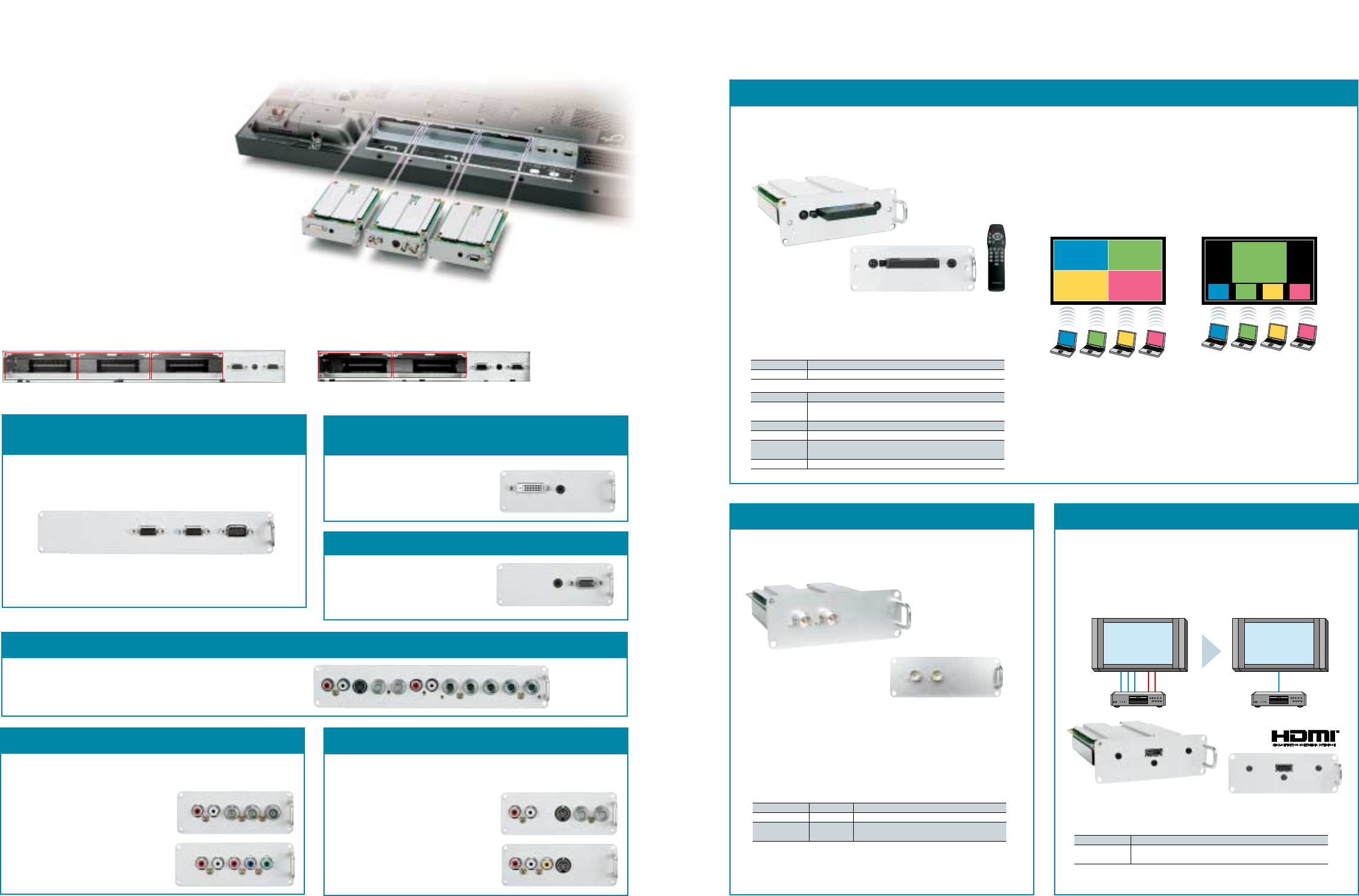
Multi-Function Slots Accommodate
a Host of Uses
Optional Terminal Boards
RGB Active Through Terminal Board
(mounts in slots 1 & 2)
RGB (Digital) Terminal Board (DVI-D w/HDCP)
(mounts in slot 1 or 2)
PC Input Terminal Board (mounts in any slot)
This board sends the signal that's input via the PC1 IN terminal to a second
plasma display connected to the PC1 OUT terminal. Up to nine plasma
displays can be connected together. This connectability adds convenience
when configuring a multi-screen system.
Lets you connect a PC that outputs digital
RGB signals (DVI compliant). Adding this
board permits you to display images with
the equivalent of 4,096 gradation levels.
Lets you display images from two or
more PCs.
* Does not support the DPMS function.
TY-42TM6D
TY-42TM6P
TY-42TM6G
* The characters in red are added for explanation.
PC1 IN PC1 OUT SERIAL
(RS232C)
RGB (DIGITAL) IN
AUDIO IN
AUDIO IN
RGB/COMPONENT IN
Component Video Terminal Board (mounts in any slot) Composite Video Terminal Board (mounts in slot 1 or 2)
Lets you connect devices that output component video signals, such as DVD
players or set-top boxes, or devices that output RGB signals.
* Accepts only RGB signals with "SYNC ON G".
Lets you connect a VCR, video camera or other video equipment.
(Supports through-out configurations.)
BNC Component Video Terminal Board
TY-42TM6A
RCA Component Video Terminal Board
TY-42TM6Z
SDI/HD-SDI Terminal Board HDMI Terminal Board
• Support the same serial digital interface (SDI) that is used in broadcasting.
• Provide fully digital transmission for clear, clean image displays.
• The TY-FB7HD supports HDTV.
Wireless Presentation Board
TY-FB7WPU (mounts in slot 1)
BNC Composite Video Terminal Board
TY-42TM6B
RCA Composite Video Terminal Board
TY-42TM6V
COMPONENT IN
RL
COMPONENT IN
RL
CVBS
S-VIDEO
RL
S-VIDEO CVBS
IN OUT
RL
Slot 1 Slot 2 Slot 3 Slot 1 Slot 2
Multi-Function Slots
In addition to the fixed input interface, the
Panasonic plasma display has three (or two)
interchangeable slots that let you add different
combinations of optional terminal boards. This
gives you the flexibility to add digital or analog
capabilities, as necessary, and to customize your
system for specific needs.
• Multi-Function Slots on the 37˝ Model
These models come with the standard terminal
boards mounted in slots 1 and 2. You can remove
the standard boards and mount one or two
optional boards.
• Multi-Function Slots on 65˝, 50˝ and 42˝ Models
These models come equipped with the standard terminal boards
mounted in slots 2 and 3. You can mount an optional terminal
board in slot 1. Or, you can remove the standard terminal boards
and mount up to three optional boards.
PC1 PC2 PC3 PC4
PC3
PC1
PC4
PC2
Remote Control: You have complete remote control of a variety of
functions from your PC Web browser, including plasma display
power ON/OFF, screen aspect ratio, and input switching.
4-Screen Style Index Style
Divides the display screen into four
to show up to four PC screens at
the same time.
Shows up to four PC screens as
thumbnail images at the bottom of
the display screen. Any of these can
then be enlarged by remote control.
Main Functions
Live Mode: This mode projects the screen from one PC onto the
entire plasma display. It also lets you change the shape of the
mouse pointer on the display screen, and handle PC cursor key
operations with the remote control.
Multi Live Mode: This mode lets you display up to four PC screens
simultaneously.
Specifications
Standards compliance IEEE 802.11b
Frequency range 2.4 GHz
System Configuration Required by Wireless Manager ME
OS Windows XP/2000/ME/98 SE
CPU Pentium III or compatible processor (Recommended: Intel Celeron 633 MHz
or faster. Processing speed of 800 MHz or faster required for Live mode.)
Memory 64 MB or more (128 MB or more for Windows XP/2000)
HDD 44 MB or more of available disk space
Required hardware • CD-ROM drive
• Built-in wireless LAN function or wireless LAN card supporting IEEE802.11b
Web browser Microsoft Internet Explorer 6.0 or newer, Netscape Communicator 7.0 or newer
SDI Terminal Board
TY-FB7SD (mounts in slot 1 or 2)
HD-SDI Terminal Board
TY-FB7HD (mounts in slot 1 or 2)
Specifications
TY-FB7SD TY-FB7HD
Standards compliance SMPTE259M-C SMPTE292M, SMPTE259M-C
Compatible video 525/59.94i 525/59.94i, 625/50i, 750/60p: 59.94p, 1125/30p, 1125/24p,
format 625/50i 1125/60i: 59.94i, 1125/50i, 1125/24sF: 23.98sF
PDP with speakers
DVD HDMI-compatible DVD
Audio cable
(L/R)
Video cable
(PB/PR/Y)
PDP with speakers
Conventional connection HDMI connection
HDMI cable
(video and audio)
TY-FB7HM (mounts in slot 1 or 2)
• Supports HDMI, the next-generation digital broadcast standard.
• Enables fully digital connection of signals from HDMI-compatible DVD
players and other digital equipment for blur-free images with no color
bleeding.
• Transmits both video and audio signals over a single cable.
Specifications
Standards compliance HDMI ver.1.1
Compatible video 525/60p, 625/50p, 750/60p, 1125/60i
format VGA60
6 7
• Allows wireless connection (IEEE 802.11b compliant) of the
plasma display and a PC.
• Displays images from 4 PCs simultaneously.
• Lets you control plasma displays with a Web browser.
* Not compatible with the 6-series plasma display models.
* Not compatible with the 6-series plasma display models.
* Not compatible with the 6-series plasma display models.
* The photo above does not show the actual final product appearance.
The wireless card is covered by a net when shipped.
PC2
PC1 PC2 PC3 PC4
PC1 PC2 PC3 PC4
Component /Composite Video Terminal Board (mounts in slots 1 & 2, or slots 2 & 3)
Lets you connect a wide range of input sources, from composite video, S-
video, and component video signals to RGB signals.
TY-42TM6Y S-VIDEO CVBS
IN OUT
RL
RGB/COMPONENT IN
RL
* High-Definition Multimedia Interface and HDMI are trademarks of
HDMI Licensing, LLC.

System Configuration
Content production and
delivery, System control
Control PC
LAN/Internet/Satellite Network
2F 3F 4F 5F
Near the 1st floor entrance
PDP with
touch panel
PDP with
touch panel
PDP
controller
PDP
controller
Integrated design
(mounts in function slot)
* You can configure a 50-inch display and control system with a slim
4.6-inch profile by simply combining the TH-50PHD7 Plasma Display and
TY-TP50P6-S Touch Panel, then mounting the PLUG-VC250 PDP
Controller in the function slot of the plasma display.
* Content is distributed by a centralized control PC in an office and stored
in the hard disk of each PDP controller, ready to be displayed by touch
panel operation.
PDP
controller
PDP
controller
PDP
controller
PDP
controller
PDP
controller
PDP
controller
PDP with
touch panel
PDP with
touch panel
PDP with
touch panel
PDP with
touch panel
PDP with
touch panel
PDP with
touch panel
Plasma System Solutions
Digital Signage/Narrowcasting System Complete with Touch Panel
Information System Using the Twisted-Pair-Cable Receiver Board
Easy, interactive content distribution system for retail chains and public
spaces such as shopping malls, office buildings and hotels
• Constructing a Multi-Language Environment
In contrast with conventional methods, in which several information
panels are prepared in different languages, this digital system allows
visitors to simply touch the panel itself to switch to the language they
want. It is a highly effective and efficient way to offer people the content
that they want to see.
• Flexible Content Control
Each Controller fits inside the Plasma and has a unique IP address,
allowing content to be streamed to the Plasma on any LAN, modem,
Internet or Satellite network. It speeds up the process of updating
information, and any combination of Plasmas can be controlled locally
or from a central location.
• Space-Saving and Easy to install
We have slimmed down the display system by incorporating the
optional PDP Controller (see page 17) right inside the plasma display. It
requires only two connections, power and network.
• Universal System Design
Since the entire system is configured in a Windows environment, the
Controller is compatible with a wide variety of off-the-shelf software
applications.
Multi-Screen System Using RGB Active Through Terminal Board
Eye-catching huge display system at shopping malls
and event sites
• Easy-to-Configure Multi-Screen System at a
Low Cost
This system shows DVD video and PC data on a giant
9-screen (3 x 3) display. This system, which requires
no image enlargement device, makes it possible to
have a multi-screen system at a low cost.
• Easy-to-See Information
The system displays enlarged XGA images with
excellent quality.
• Various Display Patterns and Powerful Impact
A "control PC" connected through a serial interface
lets you switch the input sources and control various
display patterns.
Displaying up-to-date information such as transportation schedule
changes, stock market conditions, and countless other possible
subjects.
• Real-Time Information Bulletins
The use of the CAT5e twisted-pair cable allows content to be sent from
the server in real-time, for instant response to events such as sudden
changes in transportation schedules or accident information as it
becomes available.
• Long-Distance Transmission of High-Quality Video Signals
High-resolution XGA images, sound and RS232C control signal are
transmitted approximately 492 ft. over a single cable. PDP control
signals can also be sent over the same cable to allow remote operation
of power ON/OFF and other functions.
• Higher Signal Quality, Lower Costs, and Easier Installation
Thin, lightweight CAT5e twisted-pair cables do a better job of
preventing signal degradation than coaxial cables. They also reduce
costs and shorten the time needed for installation.
System Configuration
* By mounting the KE0101CRBW Twisted-Pair-Cable Receiver Board
(video, audio and control) in the plasma display, images can be sent to the
display from an office up to 492 feet away.
* Using the KE0108CHDW Twisted-Pair-Cable Splitter, several plasma displays
can be connected in a cascade configuration.
Twisted-pair-cable
receiver board
Control server
Office
Near the ticket vending machineNear the ticket gate
In a corridorNear the waiting area
Content production,
distribution
System control
Twisted-pair-cable
receiver board
Twisted-pair-cable
receiver board
Twisted-pair-cable
receiver board
Twisted-pair-cable
receiver board
Twisted-pair-cable
receiver board
Twisted-pair-cable
receiver board
Twisted-pair-cable
receiver board
8 9
Twisted-pair-cable splitter
Twisted-pair-
cable transmitter
Multi-Presentation System Using a Variety of Peripheral Equipment
System Configuration
Wireless
presentation
board
Composite video
(RCA) terminal
board
Component video
(RCA) terminal
board
* When equipped with the TY-FB7WPU Wireless Presentation Board, the
TY-42TM6V Composite Video Terminal (RCA) Board, and the TY-42TM6Z
Component Video Terminal (RCA) Board, the TH-50PHD7 Plasma Display
is ready to connect to a wide range of equipment.
* The TY-ST42PF3 Mobile Stand with casters (see page 15 for details).
PC
Speakers
Wireless
connection
Component
video
connection
DVD VCR
The mobile stand makes movement easy.
S-video/
Video
connection
Supports diverse video sources. Mount peripherals to the plasma display
to take advantage of its detailed images and wide viewing angle.
• No Complicated Connections
You can connect multiple notebook PCs to a single plasma display by
simply making the appropriate network settings. Naturally, this means
that the conference room is neater, because there are no connection
cables to clutter it up. The display can also be controlled by the PCs.
• Display Four PC Screens at the Same Time
It is easy to hold group presentations, because the screen images of up
to four PCs can be displayed simultaneously.
• A Wealth of Functions in a Compact System
The large screen and wide viewing angle of the plasma display make it
ideal for use in discussions. You can optimise it even further by adding
an array of peripheral equipment:
• Mounting a component video terminal board lets it receive the input of
high-resolution DVD signals.
• Mounting a composite
video terminal board
enables connection of
various analog
equipment.
You can select the input
for whichever video
source you want easily
with the remote control.
And you can mount the
entire system to a
wheeled stand, for easy
movement.
The devices can be selected by switching the input to the plasma display.
D-sub15P D-sub9P
RGB/COMPONENT SERIAL
D-sub15P D-sub9P
OUT SERIAL
D-sub15P
IN RL PBPRY
Control
Software
DVD
PC
XGA
Control PC
Next Plasma Display
To each PDP unit of the
multi-screen system
Signal Distributor
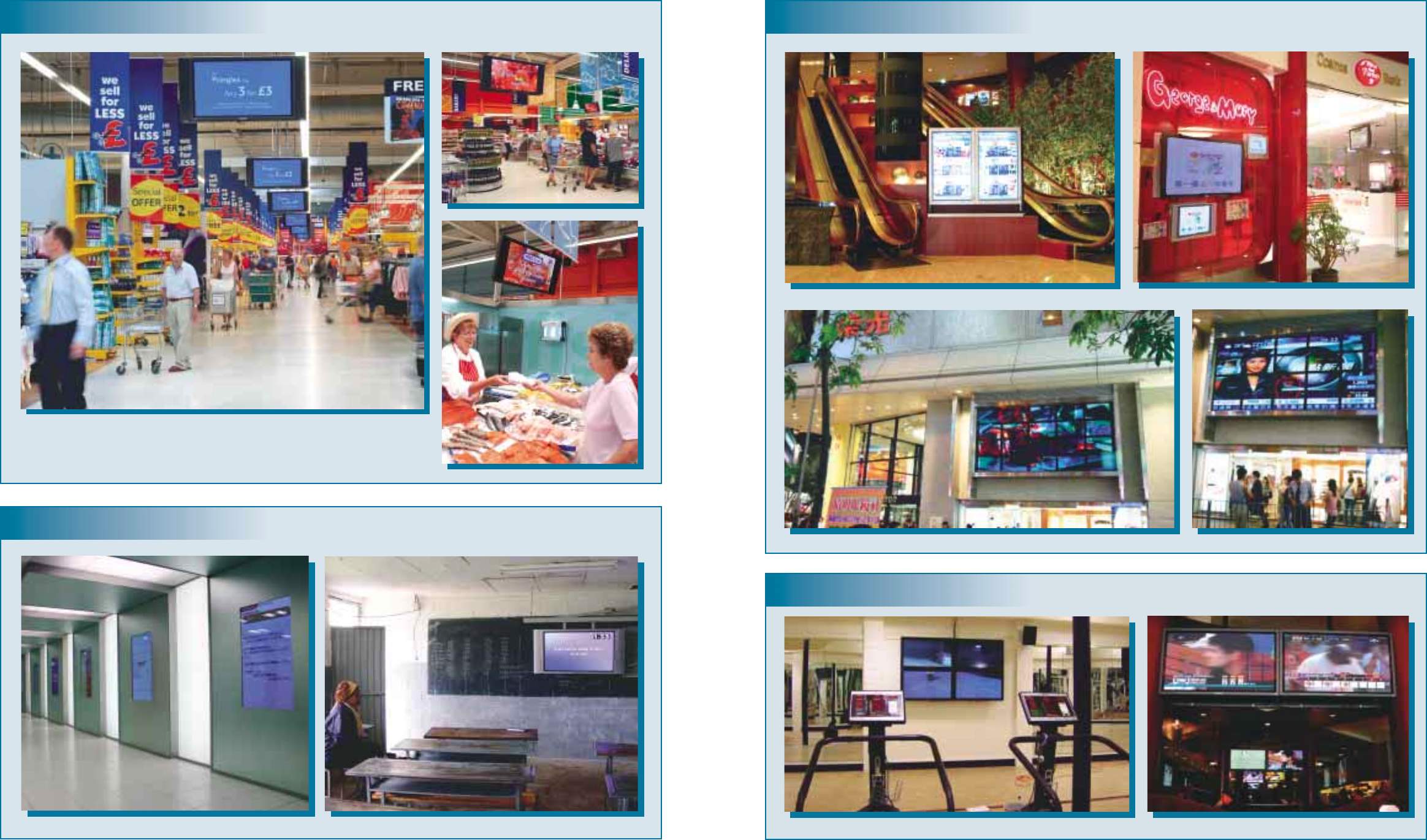
An Unlimited Range of Professional Applications
In-Store Display
Education
Information
TESCO, London, UK
KONAMI SCHOOL, Tokyo, Japan School, Addis Ababa, Ethiopia
10 11
Amusement
SOGO Department Store, HongKong, China
Smooths, Los Angeles, USA
ANA HOTEL TOKYO, Tokyo, Japan Cosmos Bank, Taipei, Taiwan
Les Mills Gym, Dunedin, New Zealand
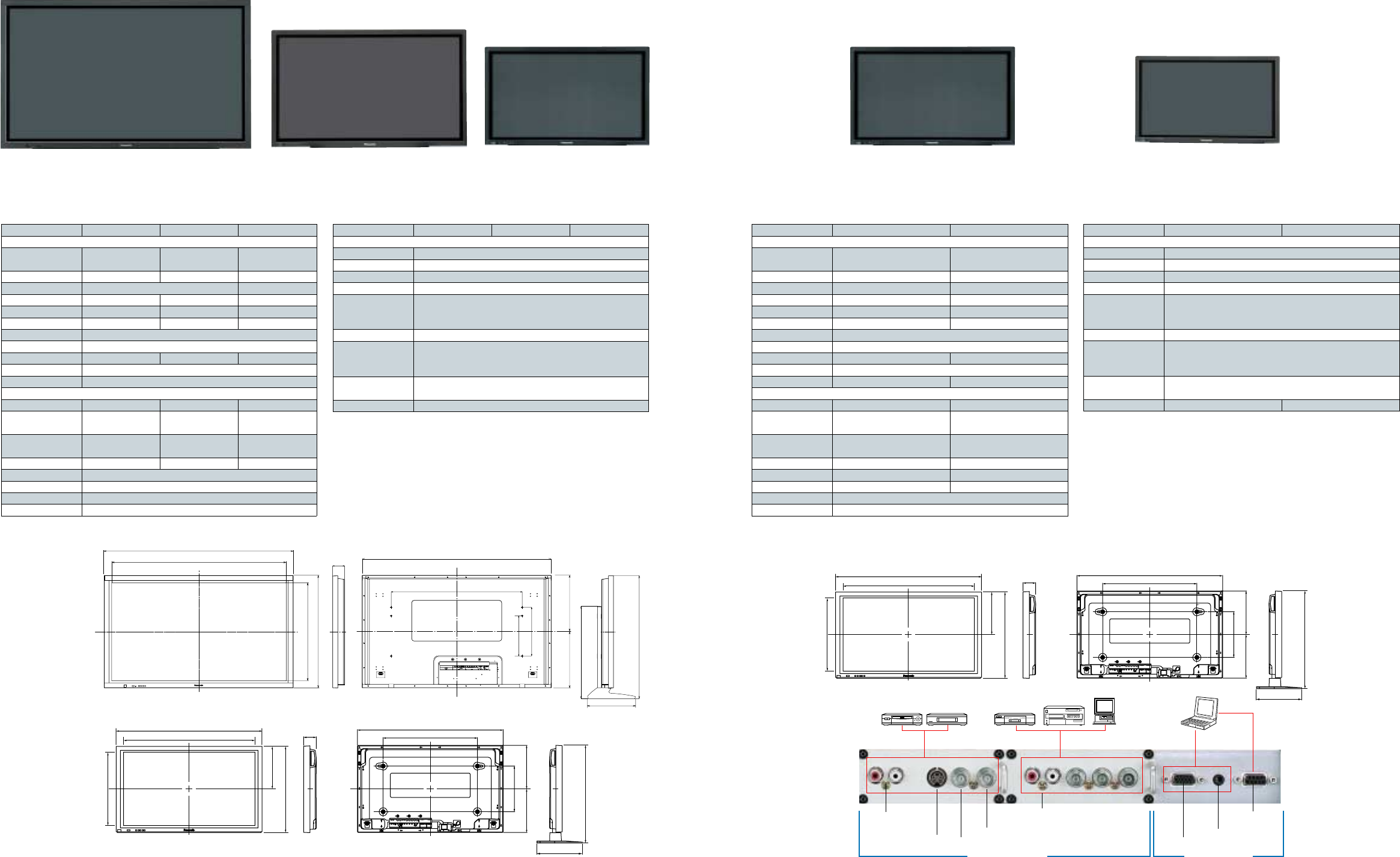
TH-50PHD7UY
50-inch (127 cm) diagonal
High Definition Plasma Display
TH-65PHD7UY
65-inch (165 cm) diagonal
High Definition Plasma Display
TH-42PHD7UY
42-inch (106 cm) diagonal
High Definition Plasma Display
TH-42PWD7UY
42-inch (106 cm) diagonal
Wide Plasma Display
TH-37PWD7UY
37-inch (94 cm) diagonal
Wide Plasma Display
12 13
Dimensions (Unit: inch)
TH-42PWD7UY
TH-37PWD7UY
Side View
with Pedestal
TH-50PHD7UY
TH-42PHD7UY
TH-65PHD7UY
47.6 (40.2)
43.5 (36.2)
28.5 (24)
24.5 (20.4)
14.3 (12)
Side View
with Pedestal
3.7
(3.5)
47.6
(40.2)
26
(26)
12.6
(12.6)
14.3 (12)
12.6 (12.6)
31.1 (26.6)
Figures in parentheses ( ) are for the TH-42PHD7UY.
14.3 (12)
Terminals
Dimensions (Unit: inch)
Figures in parentheses ( ) are for the TH-37PWD7UY.
40.2
(36.2)
36.2
(32.2)
24 (21.7)
20.4 (18.1)
12 (10.8)
Side View
with Pedestal
3.5
(3.5)
40.2
(36.2)
26 (26)
12.6 (12.6)
12 (10.8)
12.6 (12.6)
26.6
(24.2)
12 (10.8)
High Definition Models Standard Definition Models
Specifications
TH-65PHD7UY TH-50PHD7UY TH-42PHD7UY
DISPLAY
Screen Size Diagonal 65˝ (1,645 mm) 50˝ (1,269 mm) 42˝ (1,056 mm)
(Effective) W x H
56.5˝ x 31.7˝ (1,434 x 806 mm) 43.5˝ x 24.5˝ (1,106 x 622 mm) 36.2˝ x 20.4˝ (920 x 518 mm)
Screen Aspect 16 : 9 Wide 16 : 9 Wide 16 : 9 Wide
Number of Pixels 1,049,088 (1366 x 768) 786,432 (1024 x 768)
Pixel Pitch (H x V) 1.05 x 1.05 mm 0.81 x 0.81 mm 0.90 x 0.675 mm
Displayable Colors 3,620 million colors 3,620 million colors 3,620 million colors
Contrast Ratio 3000 : 1 3000 : 1 3000 : 1
Viewing Angle Horizontal: More than 160°; Vertical: More than 160°
Color System NTSC/PAL/SECAM/PAL 60Hz/M-NTSC
Audio Output 20 W (10 W x 2) 16 W (8 W x 2) 16 W (8 W x 2)
On-Screen Display US English/UK English/Spanish/French/German/Italian/Chinese/Japanese
Screen Coating AR (Anti-Reflection) Coating
GENERAL
Power Supply AC 120 V, 50/60Hz AC 120 V, 50/60Hz AC 120 V, 50/60Hz
Power Consumption
Stand-by Save On: 0.8 W, Off: 1.0 W Save On: 0.5 W, Off: 0.8 W Save On: 0.5 W, Off: 0.8 W
480 W695 W 357 W
Dimensions (W x H x D) 61.2˝ x 36.4˝ x 3.9˝ 47.6˝ x 28.5˝ x 3.7˝ 40.2˝ x 24˝ x 3.5˝
(1554 x 925 x 99 mm) (1210 x 724 x 95 mm) (1020 x 610 x 89 mm)
Weight 179.7 lbs. (81.5 kg) 94.8 lbs. (43.0 kg) 66.1 lbs. (30.0 kg)
Operating Temperature 32°F — 104°F (0°C — 40°C)
Operating Humidity 20% — 80% (Non condensation)
EMI Regulations FCC Part 15 Class A Digital Equipment
Safety Standards UL6500/C-UL (CAN/CSA-E65-94)
Specifications
TH-42PWD7UY TH-37PWD7UY
DISPLAY
Screen Size Diagonal 42˝ (1,056 mm) 37˝ (939 mm)
(Effective) W x H 36.2˝ x 20.4˝ (920 x 518 mm) 32.2˝ x 18.1˝ (818 x 461 mm)
Screen Aspect 16 : 9 Wide 16 : 9 Wide
Number of Pixels 408,960 (852 x 480) pixels 408,960 (852 x 480) pixels
Pixel Pitch (H x V) 1.08 x 1.08 mm 0.96 x 0.96 mm
Displayable Colors 3,620 million colors 3,620 million colors
Contrast Ratio 4000 : 1 4000 : 1
Viewing Angle Horizontal: More than 160° ; Vertical: More than 160°
Color System NTSC/PAL/SECAM/PAL 60Hz/M-NTSC
Audio Output 16 W (8 W x 2) 16 W (8 W x 2)
On-Screen Display US English/UK English/Spanish/French/German/Italian/Chinese/Japanese
Screen Coating AR (Anti-Reflection) Coating AR (Anti-Reflection) Coating
GENERAL
Power Supply AC 120 V, 50/60Hz AC 120 V, 50/60Hz
Power Consumption 290 W 225 W
Stand-by Save On: 0.5 W, Off: 0.8 W Save On: 0.5 W, Off: 0.8 W
Dimensions (W x H x D) 40.2" x 24" x 3.5" 36.2" x 21.7" x 3.5"
(1020 x 610 x 89 mm) (920 x 550 x 89 mm)
Weight 63.9 lbs. (29.0 kg) 54.0 lbs. (24.5 kg)
Operating Temperature 32°F — 104°F (0°C — 40°C) 32°F — 104°F (0°C — 40°C)
Operating Humidity 20% — 80% (Non condensation) 20% — 80% (Non condensation)
EMI Regulations FCC Part 15 Class A Digital Equipment
Safety Standards UL6500/C-UL (CAN/CSA-E65-94)
18.2
29.9
18.2
31.7
36.4
61.2
56.5 3.9 61.2
42.3
15.7
13.0
15.6
39.8
The characters in red
are added for explanation.
S-Video Input
Audio Input
(for video)
PC Input
Audio Input (for PC)
Component Video/RGB Input &
Audio Input Serial Input
(RS232C)
Composite Video Input
Composite Video Output
LPR/CR/R PB/CB/BRLRY/G
Slot-type terminals Fixed terminals
PC
S-VHS VCR VCR DVD Player
PC
DVCPRO
TH-65PHD7UY TH-50PHD7UY TH-42PHD7UY
TERMINALS
Composite Video Input BNC coaxial x 1, 1.0 Vp-p (75 ohms or high impedance)
Composite Video Output BNC coaxial x 1, 1.0 Vp-p (75 ohms or high impedance)
S-Video Input S terminal x 1, Y: 1 Vp-p (75 ohms), C: 0.286 Vp-p (75 ohms)
Audio Input (for Video) RCA phono type connectors (L, R) (1 set)
PC Input (RGB/Component) Mini D-sub 15-pin x 1
(VGA, SVGA, XGA display & SXGA, UXGA compressed display)
fH: 15 — 110 kHz; fV: 48 — 120 Hz
Audio Input (for PC) M3 stereo plug
Component/R,G,B Input BNC coaxial x 3 (Y, PB, PR or R, G, B [SYNC ON G])
Y/G: 1.0 Vp-p/composite (75 ohms); 0.7 Vp-p/non-composite (75 ohms)
PB/B, PR/R: 0.7 Vp-p (75 ohms)
Audio Input RCA phono type connectors (L, R) (1 set)
(for Component/R,G,B)
Serial (RS232C) D-Sub 9-pin (Female)
TH-42PWD7UY TH-37PWD7UY
TERMINALS
Composite Video Input BNC coaxial x 1, 1.0 Vp-p (75 ohms or high impedance)
Composite Video Output BNC coaxial x 1, 1.0 Vp-p (75 ohms or high impedance)
S-Video Input S terminal x 1, Y: 1 Vp-p (75 ohms), C: 0.286 Vp-p (75 ohms)
Audio Input (for Video) RCA phono type connectors (L, R) (1 set)
PC Input (RGB/Component) Mini D-sub 15-pin x 1
(VGA display & SVGA, XGA, SXGA, UXGA compressed display)
fH: 15 — 110 kHz; fV: 48 — 120 Hz
Audio Input (for PC)
Component/R,G,B Input BNC coaxial x 3 (Y, PB, PR or R, G, B [SYNC ON G])
Y/G: 1.0 Vp-p/composite (75 ohms); 0.7 Vp-p/non-composite (75 ohms)
PB/B, PR/R: 0.7 Vp-p (75 ohms)
Audio Input RCA phono type connectors (L, R) (1 set)
(for Component/R,G,B)
Serial (RS232C) D-Sub 9-pin (Female) D-Sub 9-pin (Female)
M3 stereo plug
14
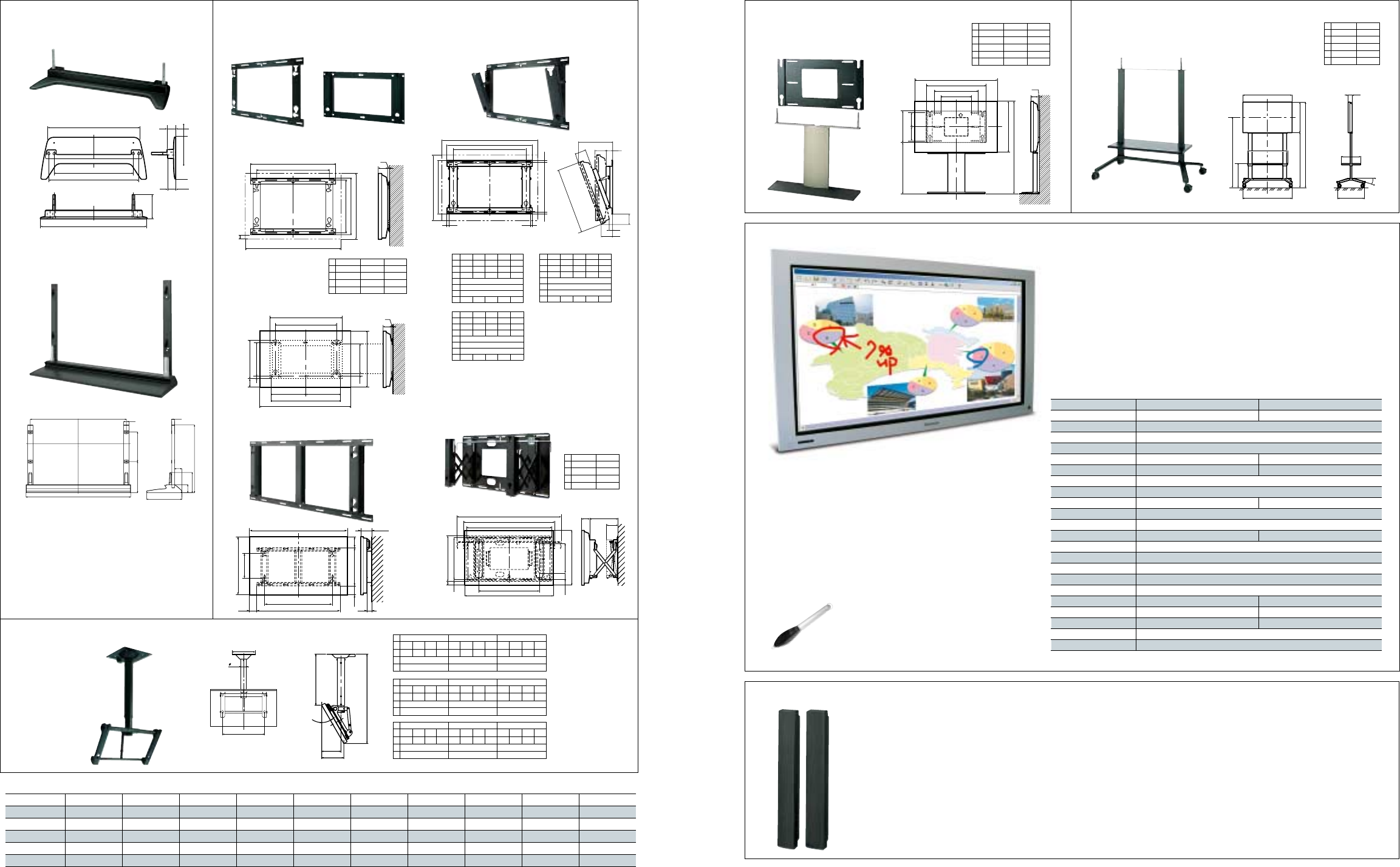
Options
Pedestal
TY-ST07-K
Wall-hanging bracket
(angled)
TY-WK42PR7
Wall-hanging bracket
(drawer type)
TY-WK42DR1
Wall-hanging bracket
TY-WK42PV7
TY-WK37PV3
TY-WK42PV7 TY-WK37PV3
TY-WK37PV3
3.5
0.8
30.7
26.0
29.5
14.8 14.8
36.2
12.6
21.7
1.0
14.2
16.3
2.5
1.1
●: Compatible; —: Not compatible
Compatible Models at a Glance
TY-ST65-K TY-ST07-K TY-WK42DR1 TY-WK65PV7 TY-WK42PV7 TY-WK37PV3 TY-WK42PR7 TY-ST42PW1 TY-ST42PF3 TY-CE42PS7
TH-65PHD7UY ●——●——————
TH-50PHD7UY —●●—●—●●●●
TH-42PHD7UY —●●—●—●●●●
TH-42PWD7UY —●●—●—●●●●
TH-37PWD7UY —●——●●●●—●
23.7
26.9
7.3
31.7
27.1 2.7
2.5
Unit: inch
12.6D
4.7
36.6
39.3
46.8
19.3
C
B
17.7
0.8
26
A
12.6
2.7
Unit: inch
12.6
50˝ model 42˝ model
A 47.6 40.2
B 28.5 24.0
C 4.4 2.2
D 3.7 3.5
TY-WK42PV7
Unit: inch
18.9
20.3
36.5
26.0
C
D
20
B
A
Unit: inch
19.1
17.70.7 0.7
D
E
30.5
0.6 0.6
26.0
F
F
A
D
C
B
G
2.4
Unit: inch
B
A
C
D
R
26.0
13.8
50˝ model
R0°15°30°
A 46.7 50.7 54.6 58.6 47.3 51.2 55.2 59.1 46.5 50.4 54.4 58.3
B 18.3 22.3 26.2 30.1 19.9 23.9 27.8 31.7 22.0 25.9 29.8 33.8
C 7.8 9.8 11.3
D 0 7.3 14.2
42˝ model
R0°15°30°
A 44.5 48.4 52.4 56.3 45.1 49.0 52.9 56.9 44.4 48.4 52.3 56.2
B 20.6 24.5 28.4 32.4 22.1 26.0 29.9 33.9 23.8 27.7 31.7 35.6
C 7.6 9.0 9.9
D 0 6.2 11.9
37˝ model
R0°15°30°
A 43.3 47.3 51.2 55.1 43.9 47.9 51.8 55.7 43.4 47.4 51.3 55.2
B 21.8 25.7 29.6 33.6 23.2 27.1 31.0 35.0 24.8 28.8 32.7 36.6
C 7.6 8.7 9.3
D 0 5.6 10.7
50˝ model 42˝ model 37˝ model
A 47.6 40.2 36.2
B 28.5 24.0 21.7
C 3.6 1.4 1.8
D 3.7 3.5 3.5
42.3 2.4
13.0
13.8
46.1 15.5
3.5
9.0
3.2
29.9
1.4
TY-ST65-K
Unit: inch
TY-WK65PV7
42˝ model
R0°5°10°15°20°
A 5.5 7.4 8.9 10.4 11.8
B 5.5 5.3 4.8 4.2 3.6
C 2.9 3.1 3.5 3.7 4.0
D24.0
E40.2
F 3.5
G 2.4 2.0 1.6 1.1 0.7
37˝ model
R0°5°10°15°20°
A 5.9 7.3 8.7 10.1 11.4
B 5.9 5.4 5.0 4.5 4.0
C 1.7 2.0 2.1 2.2 2.4
D 21.7
E 36.2
F3.5
G 2.4 2.1 1.8 1.5 1.1
50˝ model
R0°5°10°15°20°
A 6.1 7.9 9.6 11.2 12.8
B 6.1 5.4 4.7 3.9 3.1
C 6.1 5.4 5.7 6.0 6.1
D28.5
E47.6
F 3.7
G 2.4 2.2 1.7 1.0 0.4
Ceiling-hanging bracket
TY-CE42PS7
3.5
Unit: inch
61.2
52.0
42.3
4.6
7.0
3.0
23.8 7.05.6
36.4
13.0
Touch panel
Detachable stereo speakers
TY-TP50P6-S (for TH-50PHD7UY)
TY-TP42P6-S (for TH-42PHD7UY/42PWD7UY)
• Highly reliable optical sensor system
• Outstanding resolution, easy operation
• Thin design makes a precise fit with display screen
• Lets you use display as a "whiteboard"
This add-on touch panel lets you write directly onto
the screen with a light touch. Ideal for adding written
comments during a presentation or meeting.
Wall stand
TY-ST42PW1
Mobile stand
TY-ST42PF3
TY-TPEN6 Touch Pen
also available.
Note: You cannot mount both a touch panel and the optional speakers at the same time.
TY-SP65P7W-K (for TH-65PHD7UY)
Configuration: 2-way, 3-speaker
Dimensions (W x H x D): 3.9˝ x 36.4˝ x 3.5˝ (100 x 925 x 90 mm)
Weight: 4.9 lbs. (2.2 kg)/each
TY-SP50P5W-K (for TH-50PHD7UY)
Configuration: 2-way, 3-speaker
Dimensions (W x H x D): 4.1˝ x 28.5˝ x 3.5˝ (104 x 724 x 89 mm)
Weight: 5.1 lbs. (2.3 kg)/each
TY-SP42P5W-K (for TH-42PHD7UY/42PWD7UY)
Configuration: 2-way, 3-speaker
Dimensions (W x H x D): 4.1˝ x 24˝ x 3.5˝ (104 x 610 x 89 mm)
Weight: 4.6 lbs. (2.1 kg)/each
TY-SP37P5W-K (for TH-37PWD7UY)
Configuration: 2-way, 3-speaker
Dimensions (W x H x D): 4.1˝ x 21.7˝ x 3.5˝ (104 x 550 x 89 mm)
Weight: 4.6 lbs. (2.1 kg)/each
Unit: inch
15.7
B
D
C
29.3
A
22
15.4 E
0.7
7.17.1
50˝ model 42˝ model 37˝ model
A 47.6 40.2 36.2
B 28.5 24.0 21.7
C 48.4 44.0 41.6
D 26.3 24.1 22.9
E 3.7 3.5 3.5
Unit: inch A
B
40.4
C
D
13.8/19.7
40.6
32.3
25.6
15.7
15°
E
50˝ model 42˝ model
A 47.6 40.2
B 28.5 24.0
C 68.9 64.4
D 54.7 52.4
E 3.7 3.5
Specifications
TY-TP50P6-S TY-TP42P6-S
Applicable display devices Panasonic 50˝ plasma display Panasonic 42˝ plasma display
Power supply (voltage) DC + 5V ±10% (Through USB)
Electric current DC + 5V, Max 400mA
Detection system Infrared ray interruption
Panel aperture (W x H) 44.0˝ x 24.9˝ (1118 x 632 mm) 36.6˝ x 20.7˝ (928.5 x 526.5 mm)
Detection range (W x H) 43.3˝ x 24.4˝ (1100 x 620 mm) 36.1˝ x 20.3˝ (916 x 516 mm)
Effective detection range Above detection range + 1.0 mm top, bottom, right, and left
Operating modes Input point, Continuous, Moving, End point detection*1
Resolution (W x H) 2201 x 1241*11833 x 1033*1
Detection pitch 2.0 x 2.0 mm
Output system Coordinate output
Optical elements 276 (H) x 156 (V) 230 (H) x 130 (V)
Optical element pitch 4.0 x 4.0 mm
Minimum stylus 6.0 x 6.0 mm
Scan speed First touch: 30 msec/frame max., Moving: 5 msec/frame max.
Interface USB1.1 compliant; Signal: +DATA, -DATA, VCC, GND; I/F connector: TYPE B
Panel shape Integrated flat panel controller
Dimensions (W x H x D) 49.4˝ x 29.4˝ x 2.7˝ (1256 x 748 x 69 mm) 42˝ x 25˝ x 2.7˝ (1066 x 634 x 69 mm)
Depth when mounted 4.6˝ (118 mm) 4.3˝ (110 mm)
Weight (excluding brackets) 9.3 lbs. (4.2 kg) 7.7 lbs. (3.5 kg)
Escutcheon (frame) Aluminum
USB driver/Applicable OS Windows® 98SE/2000/ME/XP
*1 When using the specific driver software.
15
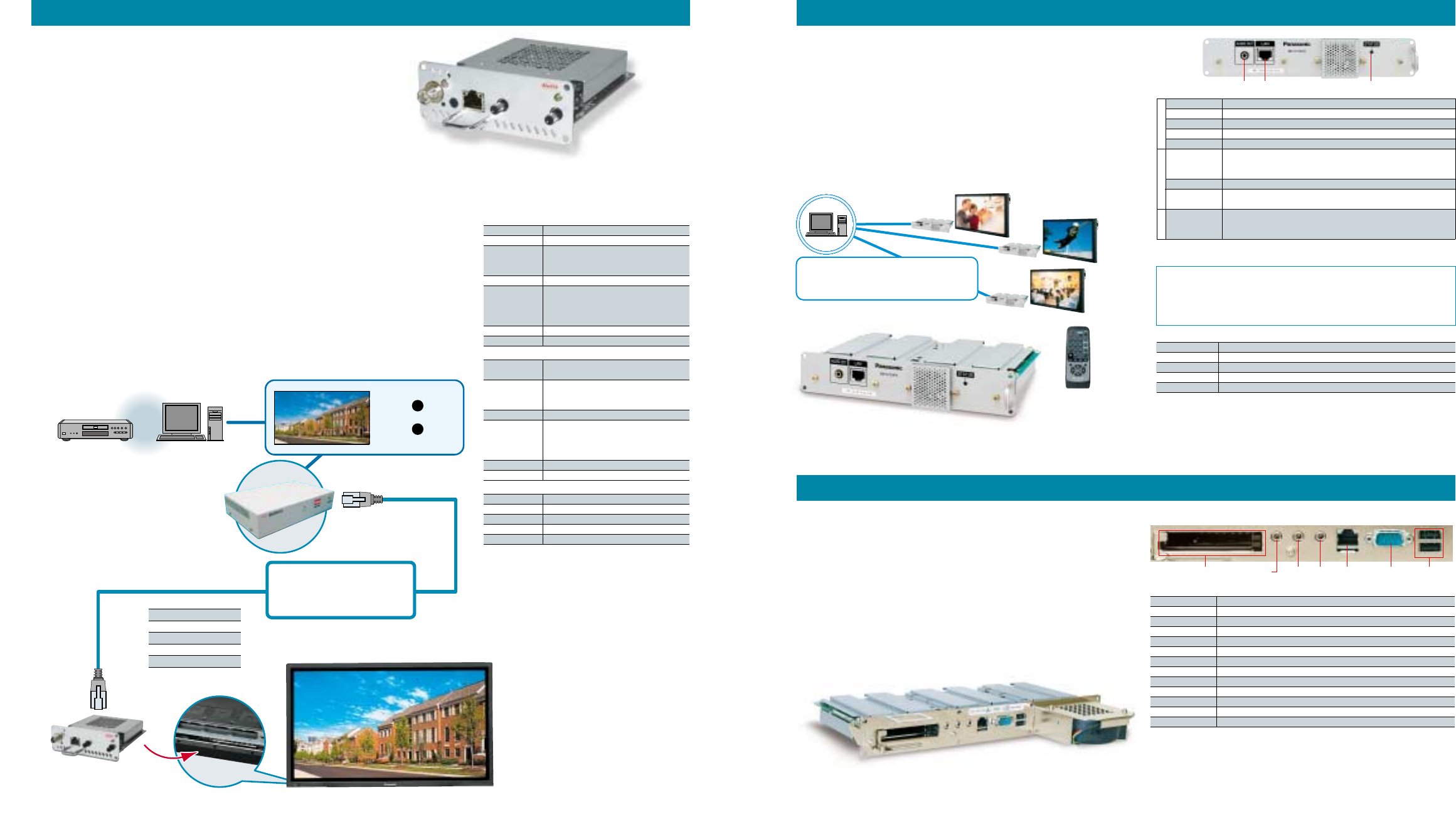
Peripherals
Twisted-Pair-Cable Receiver Board Networked MPEG2 Player
PDP Controller (for 65˝, 50˝ and 42˝ models)
Simultaneous multi-signal
transmission using a
single CAT5e cable
Twisted-Pair-Cable
Transmitter
KE0202CT2W
DVD, VCR
PC Video signal
Audio signal
PDP control signal
+
+
or
Mounted in slot of the
PDP’s rear panel.
Twisted-Pair-
Cable Receiver Board
UXGA
SXGA
XGA
SVGA
VGA
328 ft.
394 ft.
492 ft.
591 ft.
656 ft.
Transmission distance (approx.)
• The Twisted-Pair-Cable Receiver Board makes it possible, using a
single CAT5e cable, to simultaneously send video signal
(RGB, component, or composite), audio signal and the PDP control
signal.
* To send a composite video signal, the Composite Video Terminal Board
(TY-42TM6Y, 42TM6B or 42TM6V) must be mounted in the slot of PDP.
• This reduces both costs and setup time compared with a
conventional BNC cable connection.
• XGA signals (1024 x 768 pixels) can be sent up to 492 ft.
• Because the Twisted-Pair-Cable Receiver Board mounts in a multi-
function slot, it runs on power supplied by the PDP and takes up no
additional equipment space.
KE0101CRBW
(Video, audio and PDP control signals) (Mounts in any slot*)
Audio Out LAN jack Status indicator
Direct playback is also possible
using the included remote control.
An information distribution system consisting of the BB-S700PD and
BB-SMG700 allows the following operations and more:
• Data/content control • Schedule production and control
• Data distribution • Terminal control
Terminals
• Mounts in the function slot to reduce wiring and save space. The local
remote control allows playback control without the need for a mouse
and keyboard.
• Video signals are transmitted digitally to ensure crisp, clear images.
• The hardware decoder produces DVD-level image quality by supporting
MPEG2 MP@ML (Main Profile@Main Level) transport. High-bit-rate data
also streams smoothly because all playback data is first stored in the
built-in hard disk.
• Combination with the BB-SMG700 Management Software makes it
possible to schedule the distribution of motion video, still images and
other content, and deliver over a LAN or Internet.
BB-S700PD
(Mounts in slots 1 & 2)
BB-SMG700 Management Software
Controls up to 100 plasma display panels.
This application contains all of the functions necessary for video
distribution.
Specifications
Applicable displays Panasonic Plasma Displays
HDD capacity Approx. 20 GB*1
External jacks 10BASE-T/100BASE-TX (RJ-45), Audio output (Stereo mini jack*2)
Power supply Supplied from plasma display (DC 14V)
Power consumption Approx. 14V/0.7A max.
Web browser HTML4.01 subset, partial CSS1 and CSS2
ECMA Script 262 3rd edition (JavaScript 1.5 equivalent)
Data distribution
protocol
Partial DOM Level 1, Level 2 and Dynamic HTML
Applicable servers Management Software BB-SMG700*3
Image MPEG2 PS, MPEG2 TS, MP@ML
Audio Linear PCM*4, MPEG Audio Layer 1, Layer 2
Maximum bit rate 10 Mbps (in storage and playback)
HardwareSoftwareMPEG
*1: Part of this capacity is used by the system. *2: Exclusive use with internal connection.
*3: Some functions are performed jointly with the BB-SMG700. *4: At sampling frequency of 48kHz.
BB-SMG700 Operating Environment
CPU Pentium® IV 1GHz or faster, Recommended: Pentium® IV 2.4GHz or faster
Main storage memory 512MB or more, Recommended: 1 GB or more
HDD capacity Required capacity: 10 GB or more
Network interface 1000BASE-T/100BASE-TX/10BASE-T
Applicable OS Windows® XP Professional (SP1)
USB 2.0
connector
Serial port
(RS232C)
100BASE-TX/
10BASE-T
connector
LINE OUT
connector
LINE IN
connector
MIC
connector
PC slot
Terminals
PLUG-VC250 series (Mounts in slots 1, 2 & 3)
• Function board design reduces wiring and saves space.
• Clear images made possible by digital connection using the
function slot of the plasma display.
• Customised to maximise the performance of Panasonic plasma displays.
- Realistic display images achieved by a 1:1 pixel correspondence with
Panasonic plasma displays.
- Can also be used in vertical display applications.
• Models with a pre-installed, digital signage system are also available.
• Easy to install, it requires only a network and power connection.
The mouse/keyboard connections can be wireless, through the
PCMCIA slots.
Specifications
Applicable displays Panasonic 65˝, 50˝ & 42˝ Plasma Displays
CPU ULV Pentium® M 900MHz
Main storage memory Standard 256MB DDR SO-DIMM
Internal HDD 2.5" HDD 30GB x 1
Network 100BASE-TX/10BASE-T x 1, Wake On LAN supported
Interfaces Serial x 2*1, USB2.0/1.1 x 2*2, Line In x 1, Line Out x 1, MIC x 1
PCMCIA slot 2*3
Preinstalled OS Windows® XP Embedded
Dimensions (W x H x D) 12.4˝ x 1.1˝ x 8.3˝ (315 x 29 x 211 mm) (including cooling fan)
Weight 2.6 lbs. (1.2 kg)
Power supply Supplied from the plasma display
Power consumption 20 W max.
Standard FCC Class A
*1: One serial interface is connected internally.
*2: USB 1.1 is for HID (human interface devices) only. Maximum power supply for the two ports is 3.5 W.
*3: Maximum power supply for the two slots is 2.0 W when using 5.0 V, and 3.6 W when using 3.3 V.
16 17
Specifications (KE0101CRBW)
Applicable displays Panasonic Plasma Displays
Input channel 1 input system for extension
Output channel 1 system (internal connector) for RGB
or 1 system (extrenal connector) for Video,
1 system for sound and 1 system for RS232C
Extension cable CAT5/CAT5e/CAT6
Video output signal Analog RGB: 0.7Vp-p (75 ohms); HD, VD: TTL
Component: Y: 1.0Vp-p (75 ohms) sync signal included
PB, PR: ± 0.35Vp-p (75 ohms)
Video: 1.0Vp-p (75 ohms)
Power supply Supplied from the plasma display
Power consumption Approx. 6 W
* Should be mounted in slot 1 to send the PDP control signal.
PDP control signal transmission is one-way. Proprietary method (block data distribution with error-triggered retransmission function
and encoding process)
http://www.kowa.co.jp/i-master/cat5-eng
* The KE0202CT2W and the KE0101CRBW are designed and manufactured by
Kowa Company Ltd. for Panasonic plasma displays, and the products are
branded as KOWA. (KOWA is a registered trademark of Kowa Company Ltd.)
Specifications (KE0202CT2W)
Input channel 1 each for video (RGB and video)
1 each for audio and 1 for RS-232C
Output channel 1 each for monitor output (RGB, video, and audio)
1 for extension output (2 division)
1 for extension output (2 division)
Extension cable CAT5/CAT5e/CAT6
Video output signal Analog RGB: 0.7Vp-p (75 ohms); HD, VD: TTL
Component: Y: 1.0Vp-p (75 ohms) sync signal included
PB, PR: ± 0.35Vp-p (75 ohms)
Video: 1.0Vp-p (75 ohms)
Power supply AC 100 — 240 V, 50/60 hz
Power consumption Approx. 10 W
Specifications (KE0108CHDW)
Input channel 1 input for CAT5e
Output channel 8 outputs for CAT5e
Input connector RJ-45 connector
Output connector RJ-45 connector
Extension cable CAT5e
