Pantech P2030 IPG Commercial OV2 Mono Laserjet Datasheet User Manual To The 5056199e Fcf9 40bb A468 C6f9702aee2f
User Manual: Pantech P2030 to the manual
Open the PDF directly: View PDF  .
.
Page Count: 2
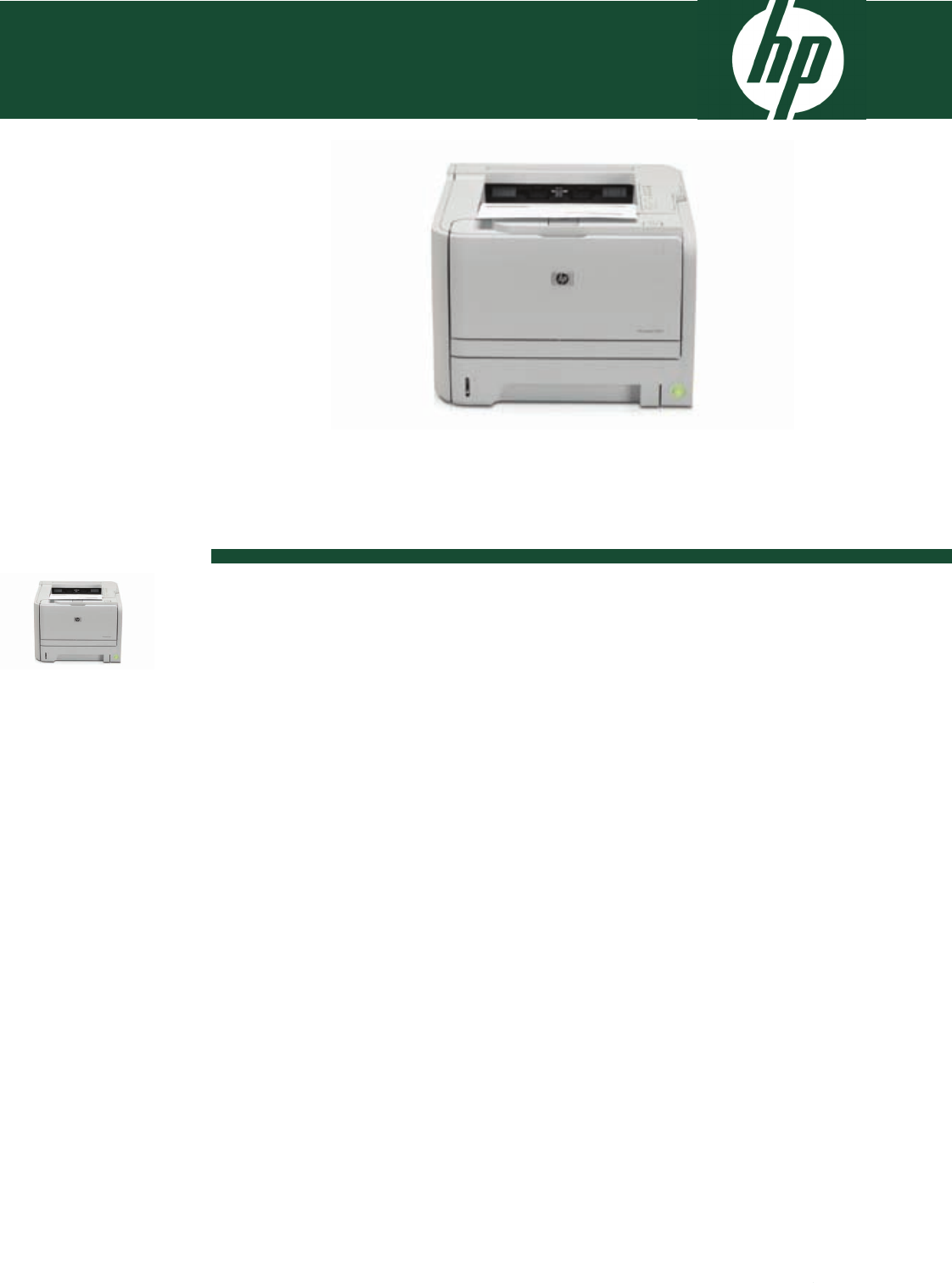
HP LaserJet P2030 Printer series
Enable higher productivity with the HP LaserJet P2030 Printer Series. Produce
professional-looking, black-and-white documents at fast print speeds of up to 30
ppm, get flexible connectivity in an easy-to-use design and all at an affordable
price.
1When Quiet mode is selected, the printer operates at a slower speed.
HP LaserJet P2035 Printer
A great choice for small workteams of 1-3 users in unmanaged SMBs, and productive individuals in any-sized business
who need a compact, reliable printer to produce high quality office documents easily and affordably.
Enhance productivity and get great value for money with this black-and-white HP LaserJet.
Enjoy fast print speeds of up to 30 ppm. Get a fast first page out from low power mode with Instant-on Technology.
Conveniently connect your printer to a computer using the USB or parallel port. Print any type of office document,
including prescription-size forms, of almost any length with a 250-sheet input tray; the 50-sheet multipurpose tray supports
a variety of print media. This compact printer features a 266 MHz processor and 16 MB memory that help to process
complex files quickly.
Achieve impressive, professional quality results with this conveniently compact printer.
Print professional-quality documents with crisp text and sharp images thanks to HP FastRes 1200 which provides 1200 dpi
effective output quality. This sleek, space-saving printer’s compact design ensures that it fits conveniently into a small area
of the desktop. Reduce operation noise with the printer’s unique Quiet mode1. The reliable all-in-one HP LaserJet print
cartridge is designed to meet your usage needs, optimise print quality and provide excellent value.
Extremely easy to set up, use, and maintain.
Interactive intelligence built into the Original HP print cartridge optimises print quality and provides alerts when supplies
are low, making management straightforward. One-door access to the easy-to-install HP LaserJet Print Cartridge means
installation and replacement are simple and convenient. Easily navigate printer functions with the simple LED control panel.
Add network capabilities with an optional HP Jetdirect External Print Server.

Ordering informationTechnical specifications
Print technology Laser
Print speed A4 black: Up to 30 ppm
First page out black: < 8.0 sec (from "ready")
Exact speed varies depending on the system configuration, software application, driver and document
complexity.
Processor 266 MHz, Custom Priority Processor
Memory 16 MB, Not expandable
Print resolution Up to 600 x 600 dpi (1200 dpi effective output with HP FastRes 1200)
Print quality HP FastRes 1200, 600 dpi
Printer languages Host Based, UPD (HP PCL5e)
Economical printing Economode saves toner
Typefaces/fonts 45 scalable TrueType Fonts
Duty cycle (monthly, A4) Up to 25000 pages
Recommended Monthly Page
Volume
500 to 2500
Print margins top: 4 mm, left: 4 mm, right: 4 mm, bottom: 4 mm
Media handling Input Capacity Weight Size
Tray 1 sheets: 50, envelopes: 5,
transparencies: 75
60 to 163 g/m² (straight
through paper path for
special media)
A4, A5, A6, B5, envelopes
(C5, B5, DL); 76 x 127 to
216 x 356 mm
Tray 2 sheets: 250 60 to 120 g/m² (using the
standard output bin)
A4, A5, A6; 105 x 148 to
216 x 356 mm
Output: Sheets: Up to 150. Envelopes: Up to 5. Transparencies: Up to 75;150-sheet output bin
Duplex printing: Manual (driver support provided)
Media types Paper (bond, light, heavy, plain, recycled, rough), envelopes, labels, cardstock, transparencies, heavy media
Interface and connectivity Hi-Speed USB 2.0, IEEE 1284-compliant parallel, optional: HP Jetdirect en1700 IPv4/IPv6 Print Server, HP
Jetdirect en3700 Fast Ethernet Print Server, HP Jetdirect ew2400 802.11g Wireless Print Server, HP Wireless
Printing Upgrade Kit, HP USB Network Print Adapter
Operating systems compatibility Microsoft® Windows® 2000, XP Home, XP Professional, XP Professional x64, Server 2003, NT 4.0 (PCL5
driver on web only); Windows Vista®, x64; Mac OS X v10.3.9, v10.4.3, v10.5; Linux; UNIX
Optional: Latest drivers and software available from the HP LaserJet support Web site at
http://www.hp.com/support/ljp2030series
Minimum system requirements Microsoft® Windows® 2000, XP Home, XP Professional, Server 2003: 512 MB RAM; 350 MB available
hard disk space; Windows Vista®, 32/64: 512 MB RAM, 350 MB available hard disk space, CD-ROM
drive, USBport, Mac OS X v10.3.9, v10.4.3, v10.5; 128 MB RAM minimum (256 MB recommended), 150
MB available hard disk space
Software HP printer software on CD-ROM: installer/uninstaller, drivers (Host-based), HP Embedded Web Server, control
panel simulator, help, documentation
Control panel 6 lights (Jam, Toner low, Paper out, Attention, Ready, Go), 2 buttons (Go, Cancel)
Printer management HP Embedded Web Server, print drivers
Power Requirements: Input voltage: 220 to 240 VAC (+/- 10%), 50 Hz (+/- 2 Hz). Consumption: 550 watts
(active/printing), 7 watts (ready/sleep), 0.4 watts (off); Typical Electricity Consumption (TEC): 1.949
kWhr/week
Dimensions (w x d x h) Out of package: 365 x 368 x 268 mm
Packaged: 481 x 330 x 465 mm
Weight Out of package: 10 kg
Packaged: 12.4 kg
Operating environment Operating temperature: 15 to 32.5º C. Recommended operating temperature: 17.5 to 25º C. Operating
humidity: 10 to 80% RH. Recommended operating humidity: 30 to 70% RH. Storage temperature: -20 to 60º
C. Storage humidity: 10 to 90% RH. Noise level per ISO 9296: Sound power : LwAd6.8 B(A)
(active/printing), inaudible (ready). Sound pressure: LpAm 54 dB(A) (active/printing), inaudible (ready)
Product certifications Safety certifications: IEC 60950-1 (International), EN 60950-1+A11 (EU), IEC 60825-1+A1+A2, UL/cUL
Listed (US/Canada), GS License (Europe), EN 60825-1+A1+A2 (Class 1 Laser/LED Device) GB4943-2001,
Low Voltage Directive 2006/95/EC with CE Marking (Europe); other safety approvals as required by
individual countries
Warranty One-year, return to authorised service centre, limited hardware warranty. Warranty and support options vary
by product, country and local legal requirements.
CE461A HP LaserJet P2035 printer,
pre-installed introductory HP
LaserJet print cartridge with up to
1,000 pages yield (in
accordance with ISO/IEC
19752), Getting Started Guide,
CD (user guide, printer software),
power cord
Accessories
Q6301A HP 2101nw Wireless G Print
Server
Q6275A HP USB Network Print Adapter
Q6236A HP Wireless Printing Upgrade Kit
Supplies
CE505A HP LaserJet CE505A Black Print
Cartridge
Average cartridge yields 2,300
standard pages. Declared yield
value in accordance with
ISO/IEC 19752*
Media supplies
CHP830 HP Recycled Paper 80 g/m²-500
sht/A4/210 x 297 mm
CHP225 HP Multipurpose Paper-500
sht/A4/210 x 297 mm
CHP310 HP LaserJet Paper-500
sht/A4/210 x 297 mm
Connectivity
Q6264A HP Hi-Speed USB Cable (6
ft./1.8 m)
Q6275A HP USB Network Print Adapter
Q6236A HP Wireless Printing Upgrade Kit
J7988G HP Jetdirect en1700 IPv4/IPv6
Print Server
J7942G HP Jetdirect en3700 Fast Ethernet
Print Server
J7951G HP Jetdirect ew2400 802.11g
Wireless Print Server
Service & support
UK923E HP Care Pack, Return to Business, 2
years
UK924E HP Care Pack, Return to Business, 3
years
UK928E HP Care Pack, Next Business Day
Exchange, 2 years
UK929E HP Care Pack, Next Business Day
Exchange, 3 years
UK931E HP Care Pack, Next Business Day
Hardware On Site Hardware Support, 2
years
UK932E HP Care Pack, Next Business Day
Hardware On Site Hardware Support, 3
years
UK933PE HP Care Pack, Post Warranty,
Return to Business, 1 year
UK935PE HP Care Pack, Post Warranty, Next
Business Day Exchange, 1 year
UK936PE HP Care Pack, Post Warranty, Next
Business Day On Site Hardware Support, 1
year
For a complete list of supplies, accessories
and services, please refer to
http://www.hp.com
http://www.hp.com/uk
© Copyright 2008 Hewlett-Packard Development Company, L.P. The information contained herein is subject to change without notice. The only warranties for HP Products and services
are set forth in the express warranty statements accompanying such products and services. Nothing herein should be construed as constituting an additional warranty. HP shall not be
liable for technical or editorial errors or omissions contained herein.
Published in EMEA 10/08 PREVIEWEEE
