Park Air Systems BM7X 50W Transceiver User Manual M7

Park Air Systems Limited 50W Transceiver M7

User manual

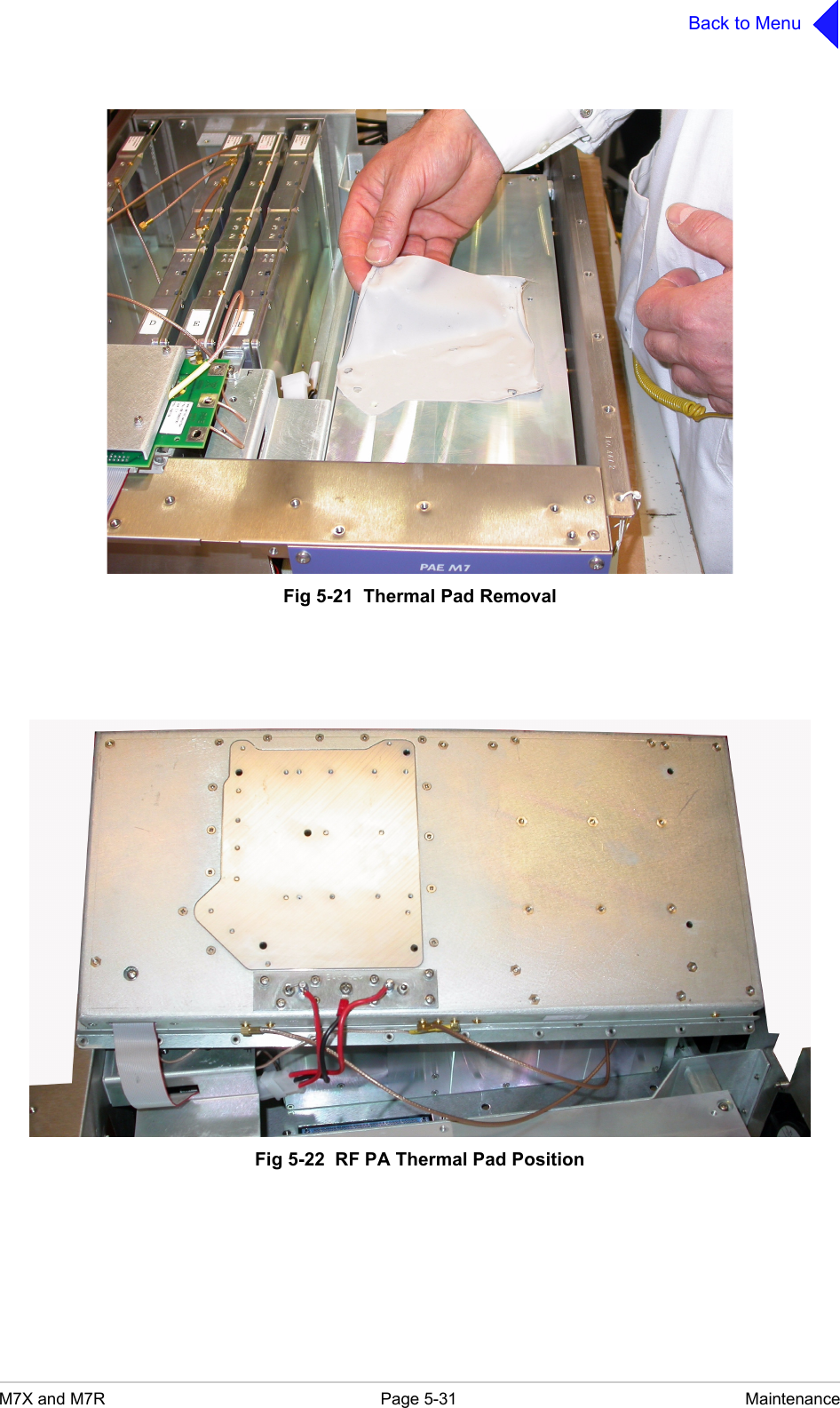
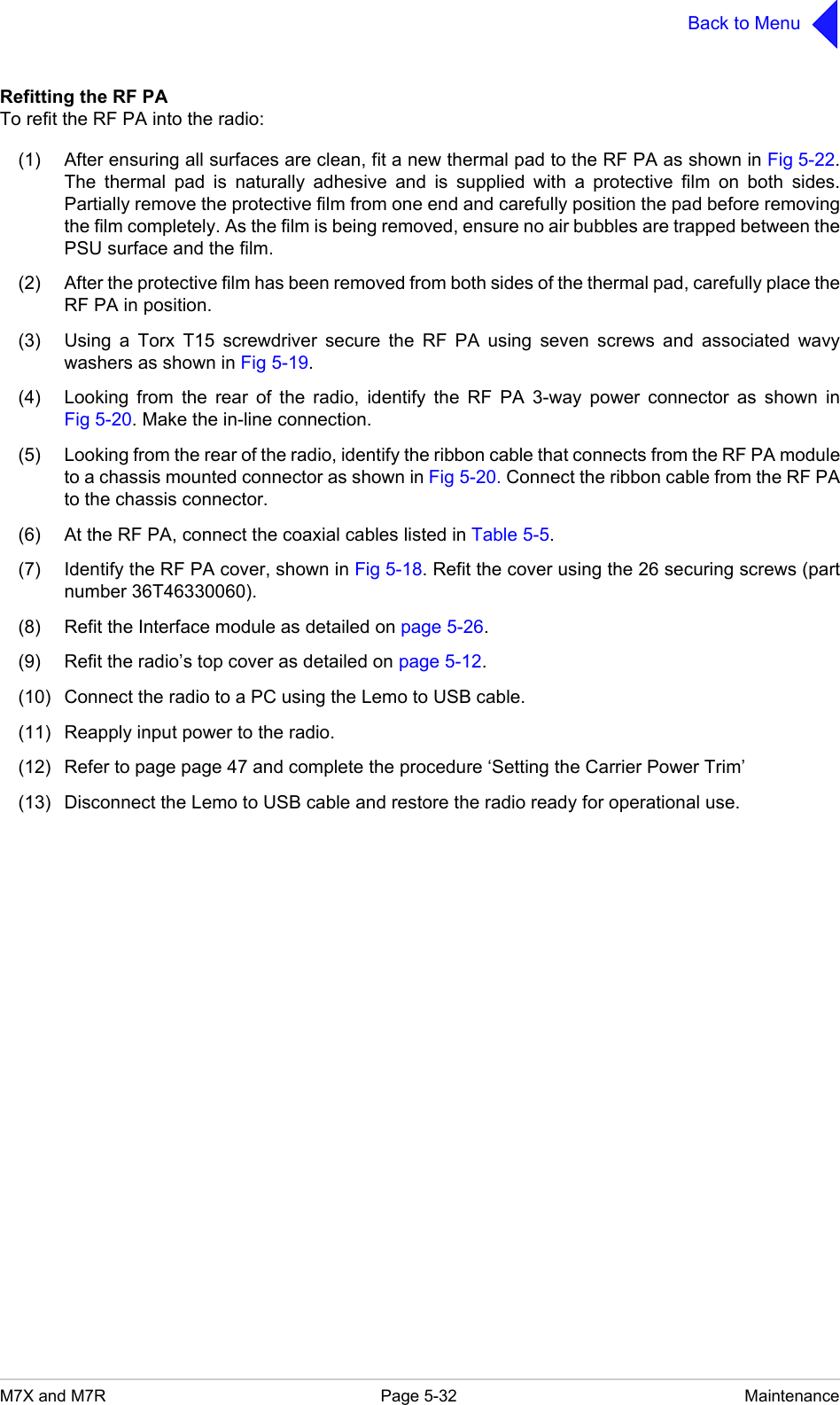
M7X and M7R Page 5-31 MaintenanceBack to MenuFig 5-21  Thermal Pad RemovalFig 5-22  RF PA Thermal Pad Position
M7X and M7R Page 5-32 MaintenanceBack to MenuRefitting the RF PATo refit the RF PA into the radio:(1) After ensuring all surfaces are clean, fit a new thermal pad to the RF PA as shown in Fig 5-22.The thermal pad is naturally adhesive and is supplied with a protective film on both sides.Partially remove the protective film from one end and carefully position the pad before removingthe film completely. As the film is being removed, ensure no air bubbles are trapped between thePSU surface and the film.(2) After the protective film has been removed from both sides of the thermal pad, carefully place theRF PA in position.(3) Using a Torx T15 screwdriver secure the RF PA using seven screws and associated wavywashers as shown in Fig 5-19.(4) Looking from the rear of the radio, identify the RF PA 3-way power connector as shown inFig 5-20. Make the in-line connection.(5) Looking from the rear of the radio, identify the ribbon cable that connects from the RF PA moduleto a chassis mounted connector as shown in Fig 5-20. Connect the ribbon cable from the RF PAto the chassis connector.(6) At the RF PA, connect the coaxial cables listed in Table 5-5.(7) Identify the RF PA cover, shown in Fig 5-18. Refit the cover using the 26 securing screws (partnumber 36T46330060).(8) Refit the Interface module as detailed on page 5-26.(9) Refit the radio’s top cover as detailed on page 5-12.(10) Connect the radio to a PC using the Lemo to USB cable.(11) Reapply input power to the radio.(12) Refer to page page 47 and complete the procedure ‘Setting the Carrier Power Trim’(13) Disconnect the Lemo to USB cable and restore the radio ready for operational use.
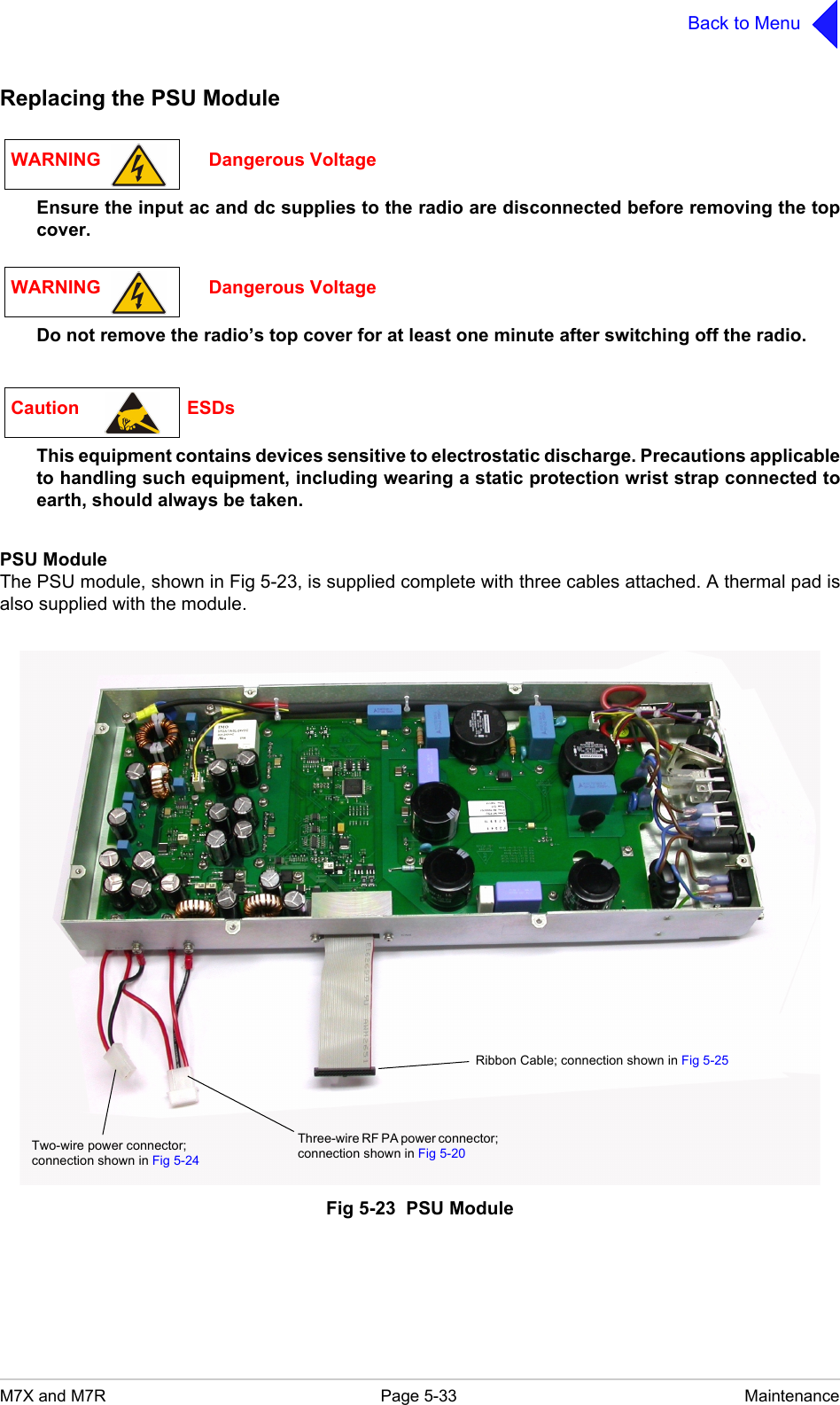
M7X and M7R Page 5-33 MaintenanceBack to MenuReplacing the PSU ModuleEnsure the input ac and dc supplies to the radio are disconnected before removing the topcover.Do not remove the radio’s top cover for at least one minute after switching off the radio.This equipment contains devices sensitive to electrostatic discharge. Precautions applicableto handling such equipment, including wearing a static protection wrist strap connected toearth, should always be taken.PSU ModuleThe PSU module, shown in Fig 5-23, is supplied complete with three cables attached. A thermal pad isalso supplied with the module.Fig 5-23  PSU ModuleWARNING                     Dangerous VoltageWARNING                     Dangerous VoltageCaution                     ESDsRibbon Cable; connection shown in Fig 5-25Two-wire power connector; connection shown in Fig 5-24Three-wire RF PA power connector; connection shown in Fig 5-20
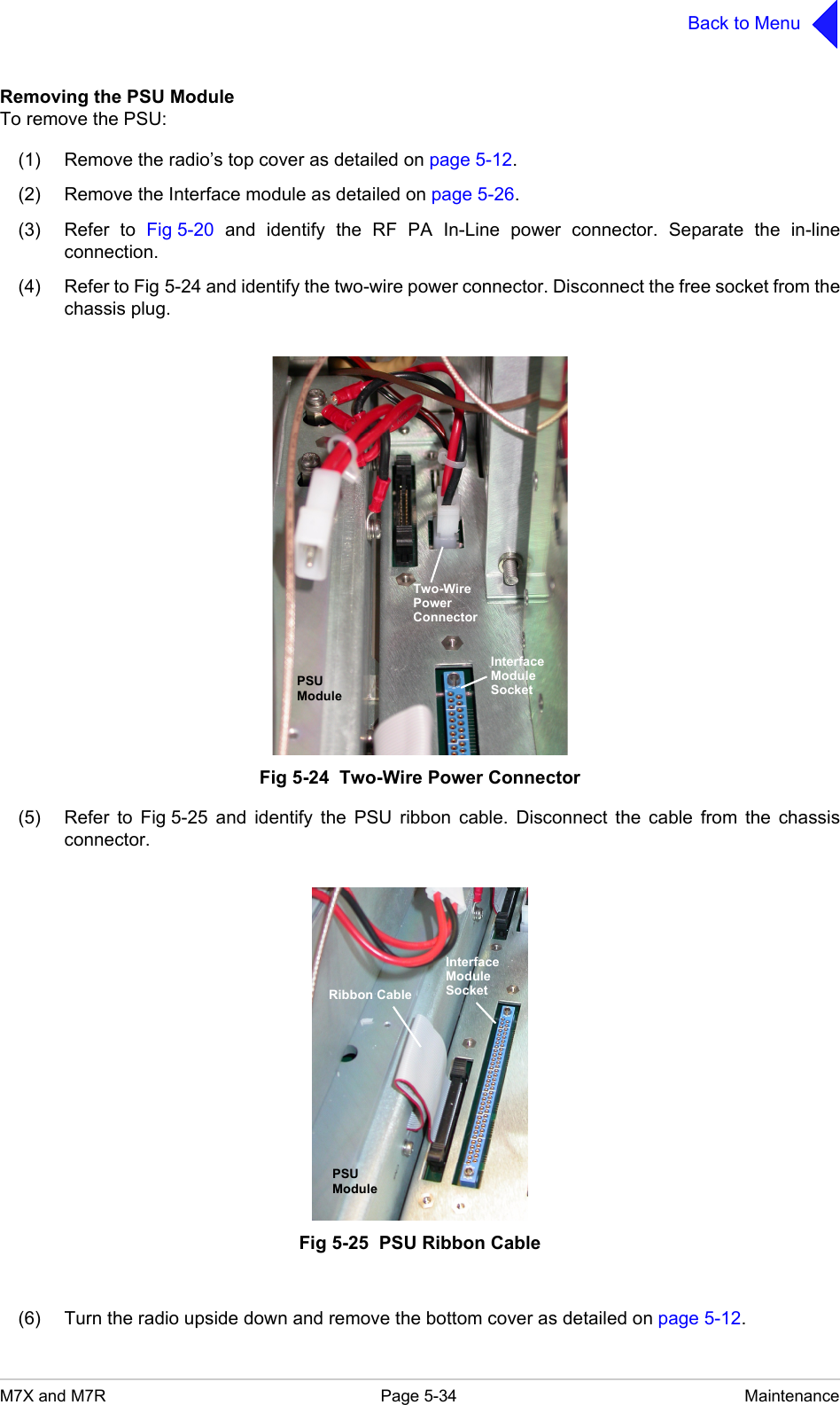
M7X and M7R Page 5-34 MaintenanceBack to MenuRemoving the PSU ModuleTo remove the PSU:(1) Remove the radio’s top cover as detailed on page 5-12.(2) Remove the Interface module as detailed on page 5-26.(3) Refer to Fig 5-20 and identify the RF PA In-Line power connector. Separate the in-lineconnection.(4) Refer to Fig 5-24 and identify the two-wire power connector. Disconnect the free socket from thechassis plug.Fig 5-24  Two-Wire Power Connector(5) Refer to Fig 5-25 and identify the PSU ribbon cable. Disconnect the cable from the chassisconnector.Fig 5-25  PSU Ribbon Cable(6) Turn the radio upside down and remove the bottom cover as detailed on page 5-12.InterfaceModuleSocketTwo-WirePowerConnectorPSUModuleInterfaceModuleSocketPSUModuleRibbon Cable
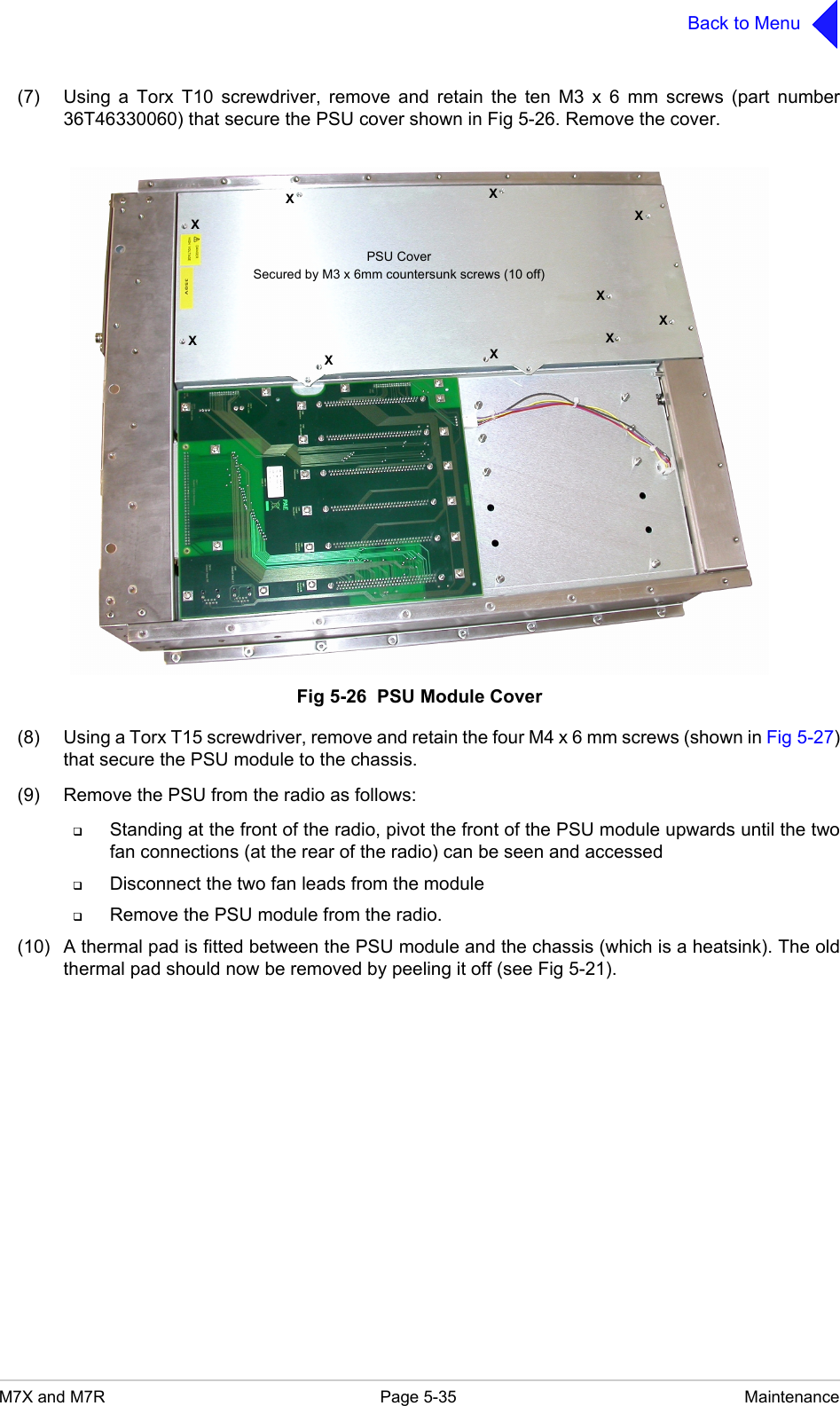
M7X and M7R Page 5-35 MaintenanceBack to Menu(7) Using a Torx T10 screwdriver, remove and retain the ten M3 x 6 mm screws (part number36T46330060) that secure the PSU cover shown in Fig 5-26. Remove the cover.Fig 5-26  PSU Module Cover(8) Using a Torx T15 screwdriver, remove and retain the four M4 x 6 mm screws (shown in Fig 5-27)that secure the PSU module to the chassis.(9) Remove the PSU from the radio as follows:Standing at the front of the radio, pivot the front of the PSU module upwards until the twofan connections (at the rear of the radio) can be seen and accessedDisconnect the two fan leads from the moduleRemove the PSU module from the radio.(10) A thermal pad is fitted between the PSU module and the chassis (which is a heatsink). The oldthermal pad should now be removed by peeling it off (see Fig 5-21).XXXXXXXXXXPSU CoverSecured by M3 x 6mm countersunk screws (10 off)
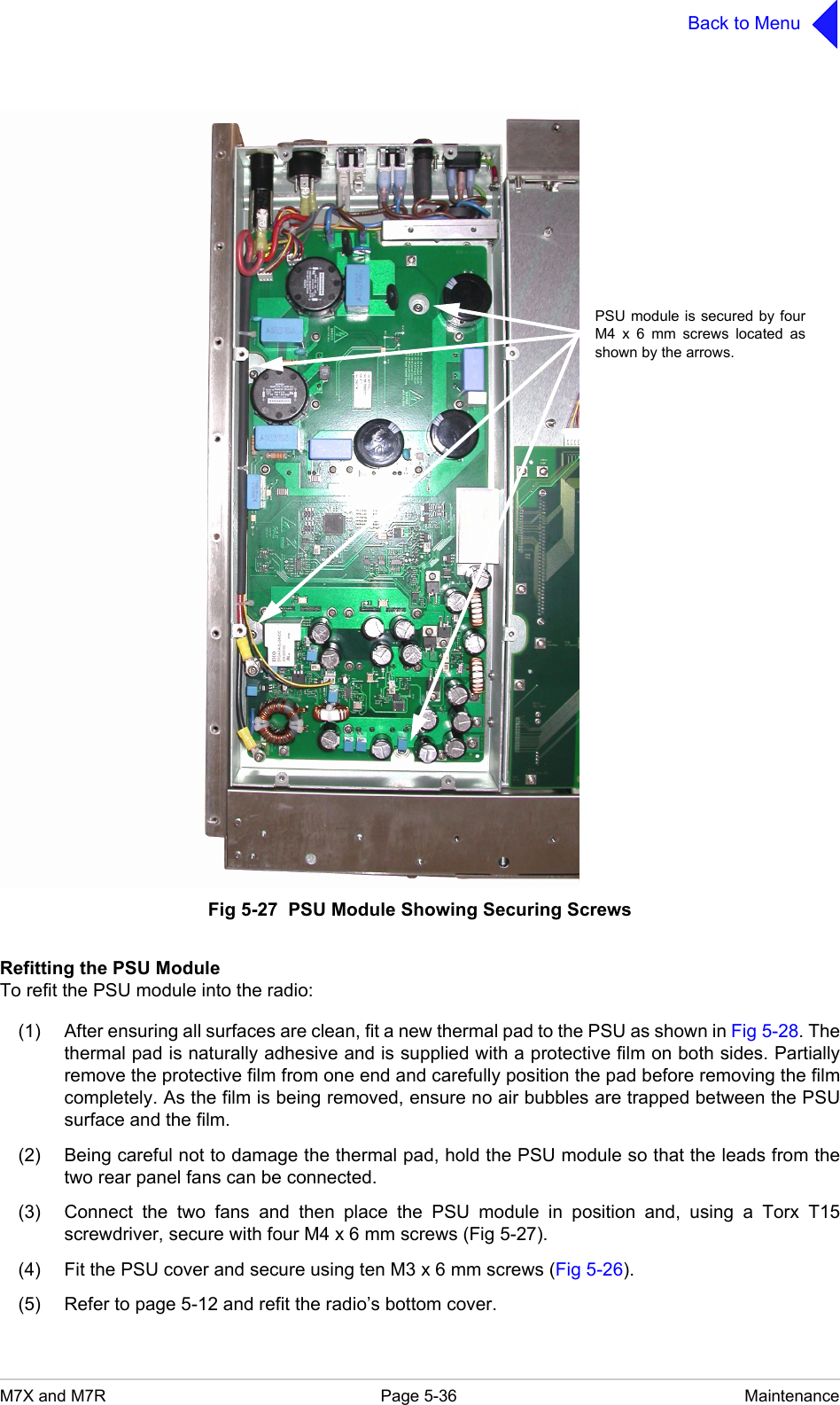
M7X and M7R Page 5-36 MaintenanceBack to MenuFig 5-27  PSU Module Showing Securing ScrewsRefitting the PSU ModuleTo refit the PSU module into the radio:(1) After ensuring all surfaces are clean, fit a new thermal pad to the PSU as shown in Fig 5-28. Thethermal pad is naturally adhesive and is supplied with a protective film on both sides. Partiallyremove the protective film from one end and carefully position the pad before removing the filmcompletely. As the film is being removed, ensure no air bubbles are trapped between the PSUsurface and the film.(2) Being careful not to damage the thermal pad, hold the PSU module so that the leads from thetwo rear panel fans can be connected.(3) Connect the two fans and then place the PSU module in position and, using a Torx T15screwdriver, secure with four M4 x 6 mm screws (Fig 5-27).(4) Fit the PSU cover and secure using ten M3 x 6 mm screws (Fig 5-26).(5) Refer to page 5-12 and refit the radio’s bottom cover.PSU module is secured by fourM4 x 6 mm screws located asshown by the arrows.

Navigation menu