Installation Directions
2016-07-29
: Pdf 1000408614-Installationsheet 1000408614-InstallationSheet B2 unilog
Open the PDF directly: View PDF  .
.
Page Count: 2
Warning: Turn circuit breaker to OFF position or remove fuse(s) and test that power is off before installation process. Never wire any electrical device
with power turned on. Wiring dimmer hot may cause permanent damage to this device and other equipment and void warranty.
Warnings and Cautions:
Tools needed to install the dimmer:
• Screwdriver (Slotted/Phillips) • Pliers • Electrical tape • Cutters
Single or Multi-device Applicaton:
• If installing single device application for a one gang box proceed to
Installation Instructions section.
• If installing dimmer in multi-device application for a 2 or more gang box
proceed as follows:
SF8AP7A-PTA (REV. A)
ENGLISH I
IN
N
U
U.
.S
S.
.A
A.
.:
:Cooper Wiring Devices, 203 Cooper Circle, Peachtree City, GA 30269 • 866-853-4293
DF8AP7, SF8AP7 and 95687
FLUORESCENT DIMMER, SINGLE-POLE/3-WAY 8A-277V AC, 60 Hz.
For use with Mark 10®Powerline dimmable ballasts
• Must be installed and used in accordance with all national and local
electrical codes.
• To reduce the risk of overheating and possible damage to this device or
other equipment, do not install to control a receptacle, motor-operated
appliance, or a transformer-supplied appliance.
• Use only with permanently installed 277V AC dimmable fluorescent
fixtures.
• Only one dimmer can be used in a 3-way circuit. The switch on the
other end will turn on at the brightness level selected at the dimmer.
• Do not exceed maximum rating of dimmer as indicated on the strap.
• For new installations, install a test switch before installing the dimmer,
to verify proper lighting circuit operation.
• If a bare copper or green ground connection is not available in the
wallbox, contact a licensed electrician for installation.
• Use only #14 or #12 copper wire rated for at least 75º C with these
devices. DO NOT USE WITH ALUMINUM WIRE.
• It is normal for the dimmer to feel warm to the touch during operation.
• When retrofitting Mark 10® Powerline dimmable ballast into fixtures
that have instant start ballasts, lamp sockets must be replaced with
rapid start sockets to allow proper dimmer operation and prevent
damage to the ballast. Refer to ballast instructions for details.
• Lamps must be burned in at full intensity for 100 hours prior to dimming
for optimal dimming performance.
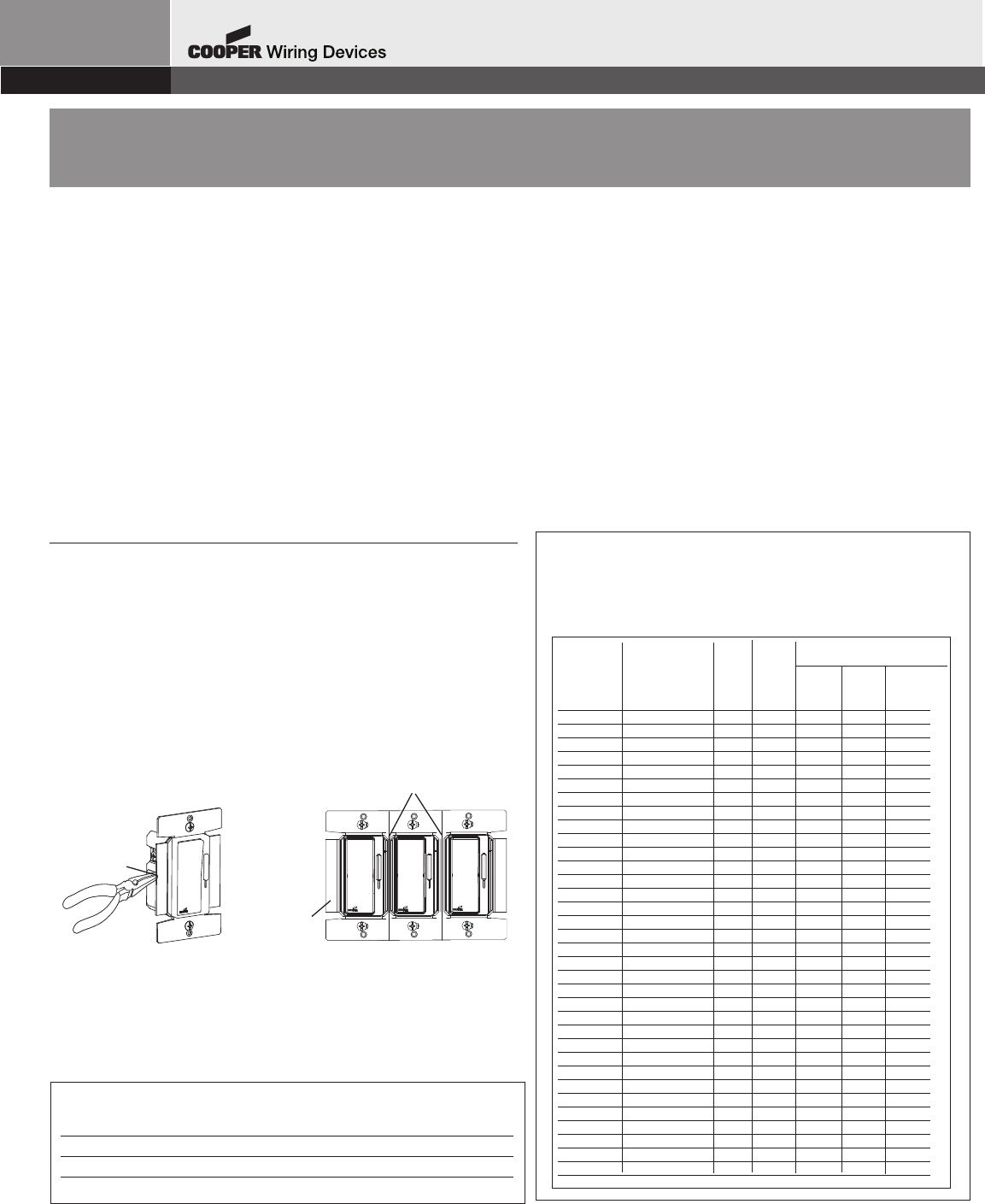
Remove all inner side sections
DO NOT remove
outer side
sections
Bend back and
forth to remove
side section
• The side sections of the mounting strap may require removal. Use pliers
to carefully bend side sections back and forth until they break off.
• Typically, removal of the side sections in multi-dimmer installations
requires a reduction of the dimmer’s capacity. Refer to Table 1 for
maximum load per dimmer for multi-ganging.
TABLE 2
Maximum lamp wattage: The following table lists the maximum
number of Mark 10®or AmbiStar®ballasts that can be connected
to a dimmer for single and multi-device installations in a wallbox.
Maximum Load Per Dimmer for Multiganging
No sides 1 side 2 sides
Catalog No. Removed Removed Removed
DF8AP7 8.3A Max 6.6 A Max 5.4 A Max
SF8AP7 8.3A Max 6.6 A Max 5.4 A Max
95687 8.3A Max 6.6 A Max 5.4 A Max
TABLE 1
Ballast Cat # Lamp Type # of Lamp Max # of ballasts per dimmer
lamps Watts for multiganging
No sides 1 side 2 sides
Removed
Removed
Removed
VEZ-1Q18 CFQ18W/G24q 1 18 119 95 77
VEZ-1Q18 CFTR18W/GX24q 1 18 119 95 77
VEZ-2Q18 CFQ18W/G24q 2 18 52 41 33
VEZ-2Q18 CFTR18W/GX24q 2 18 52 41 33
VEZ-2Q26 CFQ26W/G24q 2 26 39 31 25
VEZ-2Q26 CFTR26W/GX24q 2 26 39 31 25
VEZ-1T42 CFQ26W/G24q 1 26 75 60 49
VEZ-1T42 CFTR26W/GX24q 1 26 75 60 49
VEZ-1T42 CFTR32W/GX24q 1 32 59 47 38
VEZ-1T42 CFTR42W/GX24q 1 42 46 37 30
VEZ-2T42 CFTR32W/GX24q 2 32 29 23 19
VEZ-2T42 CFTR42W/GX24q 2 42 23 18 15
VEZ-2T42 CFTR57W/GX24q 1 57 34 27 22
VEZ-2T42 CFTR70W/GX24q 1 70 28 23 18
IEZ-2S24 FT24W/2G11 2 24/27 39 31 25
IEZ-2S24 F24T5/HO 2 24 39 31 25
VEZ-1TTS40 FT36W/2G11 1 36/39 59 47 38
VEZ-1TTS40 FT40W/2G11/RS 1 40 55 44 36
VEZ-2TTS40 FT36W/2G12 2 36/40 30 24 20
VEZ-2TTS40 FT40W/2G11/RS 2 41 27 22 18
VEZ-154 F54T5/HO 1 54 36 29 23
VEZ-154 FC12T5/HO 1 55 37 30 24
VEZ-154 FT55W/2G11 1 55 37 30 24
VEZ-2S54 F54T5/HO 2 54 18 14 12
VEZ-2S54 FC12T5/HO 2 55 19 15 12
VEZ-2S54 FT55W/2G12 2 55 19 15 12
VEZ-132 F17T8, FBO16T8 1 17 92 74 60
VEZ-132 F25T8, FBO24T8 1 25 75 60 49
VEZ-132 F32T8, FBO31T8 1 32 64 51 41
VEZ-2S32 F17T8, FBO16T9 2 17 59 47 38
VEZ-2S32 F25T8, FBO24T9 2 25 41 33 27
VEZ-2S32 F32T8, FBO31T9 2 32 33 26 21
VEZ-3S32 F17T8, FBO16T10 3 17 39 31 25
VEZ-3S32 F25T8, FBO24T10 3 25 28 23 18
VEZ-3S32 F32T8, FBO31T10 3 32 22 18 14
Installation Instructions:
• Determine what type of installation it is.
Single-pole installation — controls light from one
location.
3-way installation — controls light from two locations.
• Turn off power. Remove wallplate.
• Pull out switch — refer to instructions below:
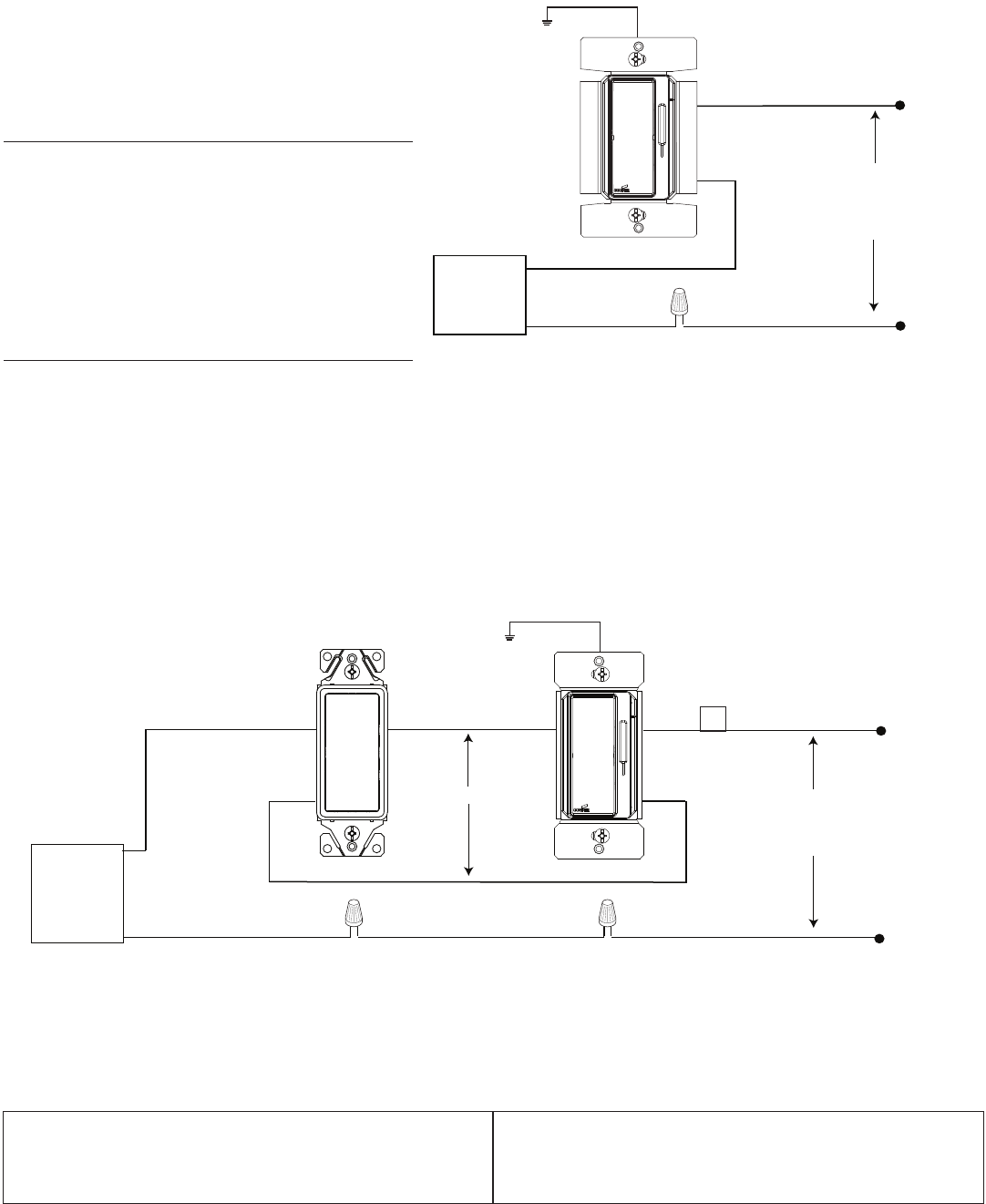
Single-Pole Installation:
Disconnect the existing switch, and connect per
Figure 1 — Single-Pole Wiring Diagram.
• Connect one of the wires of the switch to the
Black screw
• Connect the other wire from the switch to one of
the Yellow screws. NOTE: one of the Yellow screws
is covered by a white label, and is not required for
a single-pole installation.
• Connect the ground wire to the Green screw
3-Way Installation:
• One dimmer can be installed in either switch location, however, you cannot put a dimmer in both locations.
• Select which 3-way switch will be replaced by the dimmer. This will typically be the location that you would normally want to control the dim
level.
• The wire connected to the Common terminal is identified by a marking indicating COM, or the screw color is Black, and is different than
the other two screws. Tag the common wire.
• Disconnect the 3-way switch that will be replaced by the dimmer.
• Connect the dimmer as show in Figure 2 — 3-Way Wiring Diagram.
Connect the tagged common wire to the Black screw on the dimmer.
Connect one of the wires from the switch to one of the two Yellow screws.
Remove the white label, and connect the other wire from the switch to the second Yellow screw.
Connect the Ground wire to the Green screw.
Mount and Test the Dimmer:
• Make sure the word “TOP” is facing up on the dimmer.
• Attach the dimmer to the wallbox with the mounting screws.
• Restore “Power” at circuit breaker or fuse.
• Test if lights turn ON/OFF when pressing the switch. Test dimmer control. Refer to Trouble Shooting section if the device does not function properly.
• Attach wallplate. Test the Dimmer again. Installation is complete.
Trouble Shooting
Product Information
For technical assistance, contact Cooper Wiring Devices at 866-853-4293 or visit our website at www.cooperwiringdevices.com
* Mark 10® Powerline is a registered trademark of Advanced Transformer.
Neutral
YL
Line
277V AC - 60 Hz
Ballast
Green
Hot
LOAD
BK
BK
YL
YL YL
Line
277V AC - 60 Hz
Neutral
Hot
Green
BK
YL
Ballast LOAD
Travellers
TOP
DIMMER
3-WAY SWITCH
Tag
Figure 1: SINGLE POLE WIRING DIAGRAM
If the light does not turn ON • Check to see if circuit breaker or fuse(s)
has tripped.
• Check to see if lamp is burned out.
• Check if lamp neutral connection is
wired.
If lights are flickering • Check if lamp has a bad connection.
• Check if wires are not secured firmly
under terminal screws of dimmer
and/or 3-way switch (if installed).
Figure 2: 3-WAY WIRING DIAGRAM
