RS 422 Terminal Block Conversion Adapter PFXZCBADTM1 Installation Guide Directions
2016-06-25
: Pdf 1000500376-Installationsheet 1000500376-InstallationSheet B1 unilog
Open the PDF directly: View PDF  .
.
Page Count: 3
1
RS-422 Terminal Block
Conversion Adapter
PFXZCBADTM1
Installation Guide
Thank you for purchasing Digital Electronics Corpo-
ration’s RS-422 Terminal Block Conversion Adapter
(PFXZCBADTM1). This RS-422 Terminal Block
Conversion Adapter converts a serial interface
(COM) to Pro-face’s Display (Unit) to an RS-422 ter-
minal block.
Prior to using this product, be sure to read this docu-
ment as well as your Display’s hardware manual.
For PLC connection information, refer to your
"Device/PLC Connection Manual".
The manuals can be downloaded from Pro-face Home
Page.
URL: http://www.pro-face.com/otasuke/
Safety Precautions
• When the product is disposed of, it should be
done so according to your country's regulations
for similar types of industrial waste.
Package Contents
(1) RS-422 Terminal Block Conversion Adapter (1)
(PFXZCBADTM1)
(2) Installation Guide (This Guide)
This unit has been carefully packed, with special
attention to quality. However, if for any reason you
find any of the contents of this package damaged or
missing, please contact your local Pro-face repre-
sentative immediately.
WARNING
HAZARD OF ELECTRIC SHOCK OR EXPLO-
SION
• Do not disassemble or remodel this adapter
in any way. Doing so may cause an electric
shock or fire.
• Do not use this adapter in areas where flam-
mable gases are present. Doing so may
cause an explosion.
• Do not allow water to enter the connector.
Also, do not touch the connector if your
hands are wet. Doing so may cause an elec-
tric shock.
Failure to follow these instructions can result
in death, serious injury, or equipment damage.
NOTICE
PRODUCT DAMAGE
• Be sure not to connect a cable to the RS-422
Terminal Block Conversion Adapter while it is
attached to Display. Doing so can damage
the RS-422 Terminal Block Conversion
Adapter.
Failure to follow these instructions can result
in equipment damage.
NOTICE
LOSS OF COMMUNICATION
• Do not connect or disconnect the RS-422
Terminal Block Conversion Adapter during
data transfer. Doing so may cause a malfunc-
tion or data communication error.
• When attaching a cable that uses a lay wire,
be sure to twist the cable core's wires. Failure
to do so can lead to a short circuit if wire
strands contact another strand or a nearby
electrode.
• Do not put excessive stress on the RS-422
Terminal Block Conversion Adapter.
• Securely attach communication cables to
Display or the panel.
Failure to follow these instructions can result
in equipment damage.
2
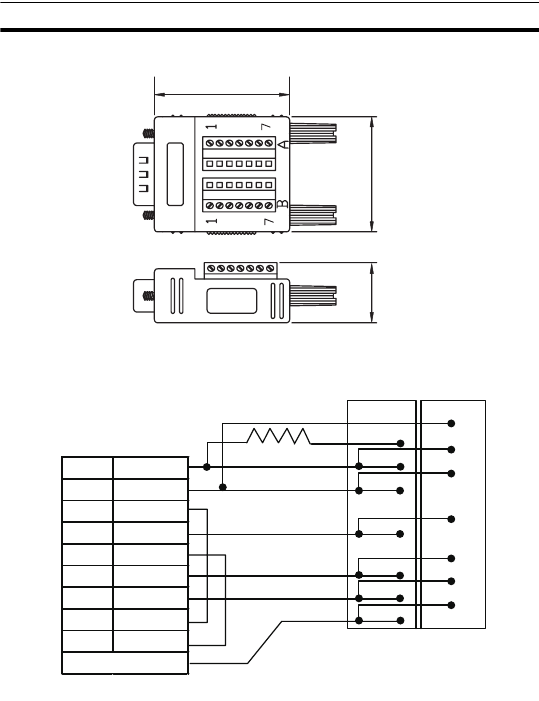
Dimensions and Cable Diagram
Dimensions
Cable Diagram
40 mm [1.57 in.]
34 mm
[1.34 in.]
18.8mm
[0.74in.]
1 RDA
2 RDB
4 ERA
5 SG
6 CSB
3 SDA
7 SDB
8 CSA
9 ERB
Frame (FG)
1 TRM
1 RDB
2 RDA
3 RDB
4 SG
5 SDA
6 SDB
2 RDA
3 RDB
4 SG
5 SDA
6 SDB
7 FG
7 FG
Rt = 100Ω , 1/2W
D-Sub 9 pin (socket) Terminal Block
B A
3
Wiring
Direct Connection Specifications
Pin Terminal Specifications when
using Crimp Terminals
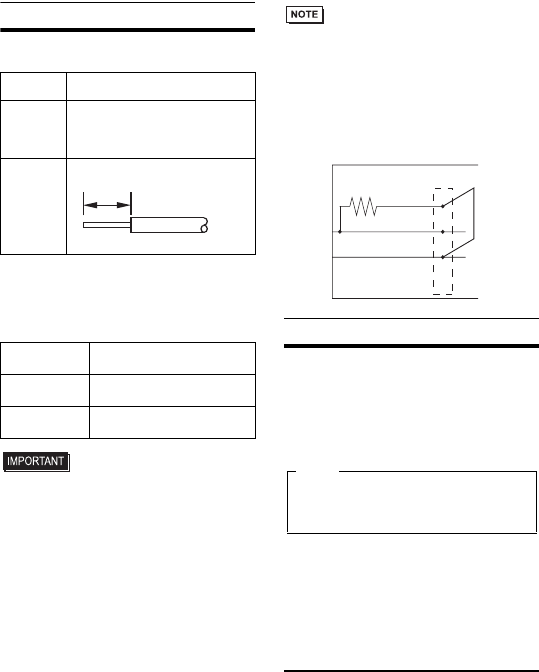
• Please use the following items when creating a
cable. All items listed below are made by Phoenix
Contact.
• When attaching terminal screws, be sure to use a
standard (flatblade: 0.4 x 2.5) type screwdriver.
• The appropriate torque is 0.22 N•m to 0.25 N•m
(1.95 lb-in to 2.21 lb-in).
• Do not solder the cable's joined section.
• Digital's RS-422 Terminal Block Conversion
Adapter cannot be connected to the Mitsubishi
PLC 2Port Adapter (GP030-MD11-0). However, it
can be connected to Digital's Mitsubishi PLC A,
QnA, FX Series 2Port Adapter II (GP070-MD11).
• When termination resistance is needed, shorting
the RS-422 terminal block adapter's TRM and
RDB wires inserts 100
Ω
of resistance between
RDA and RDB.
Connection Information
The wired RS-422 Terminal Block Conversion
Adapter will be attached to Display's Serial Interface
(COM).
Digital Electronics Corporation
8-2-52 Nanko-higashi
Suminoe-ku, Osaka 559-0031
JAPAN
TEL: +81-(0)6-6613-3116
FAX: +81-(0)6-6613-5888
http://www.pro-face.com
The information in this document is subject to
change without notice.
Copyright 2011 Digital Electronics Corporation. All
rights reserved.
PFXZCBADTM1-MT01-CP
2011.8.IT/B
Wire Type Simple wire or Lay wire
Cable
dimensions
(cross
section)
Simple wire :0.14 to 1.5mm2
Lay wire :0.14 to 1.0mm2
Cable size :26 to 16AWG
Strip
Length
Recommended
Driver SZF 0-0,4X2,5 (1204504)
Recommended
Pin Terminals A 0,34-7 (3009202)
A 0,5-6 (3200218)
Recommended
Crimping Tool CRIMPFOX ZA 3 (1201882)
5mm
[0.2in.]
100Ω 1/2W TRM
RDA
RDB
Terminal Block B
RS-422 Terminal Block Conversion Adapter
Please be aware that Digital Electronics Corpora-
tion shall not be held liable by the user for any
damages, losses, or third party claims arising
from the uses of this product.
Note
