GP Pro EX Catalog
2014-11-11
: Pdf 108629-Attachment 108629-Attachment 003339 Batch12 unilog
Open the PDF directly: View PDF  .
.
Page Count: 5
Global Head Office
Digital Electronics Corporation
Osaka, JAPAN
Tel: +81 (0)6 6613 3116
Fax: +81 (0)6 6613 5888
http://www.pro-face.com
info@pro-face.com
China
Pro-face China International Trading Co., Ltd.
Shanghai, P. R. CHINA
Tel: +86 (0)21 6361 5175
Fax: +86 (0)21 6361 5176
http://www.proface.com.cn
proface@proface.com.cn
Singapore
Pro-face Singapore
TechPoint, Singapore
Tel: +65-6832-5533
Fax: +65-6415-1605
http://www.proface.sg
info@proface.sg
South Korea
Pro-face Korea Co., Ltd.
Seoul, SOUTH KOREA
Tel: +82 (0)2 2630 9850
Fax: +82 (0)2 2630 9860
http://www.proface.co.kr
proface@proface.co.kr
Taiwan
Pro-face Taiwan Co., Ltd.
Taipei, TAIWAN
Tel: +886 (0)2 2657 1121
Fax: +886 (0)2 2657 1021
http://www.proface.com.tw
proface@proface.com.tw
South-East Asia Pacific
Pro-face South-East Asia Pacific Co.,Ltd.
Bangkok,
THAILAND
Tel: +66 (0)2 617 5678
Fax: +66 (0)2 617 5688
http://www.proface.co.th
support@proface.co.th
India
Pro-face India
Bangalore, INDIA
Tel: +91 80 4333 3540/3541
Fax: +91 80 4333 3222
http://www.proface.com.in
sales.proface@proface.co.in
Australia and New Zealand
Pro-face Australia
Mt. Waverley, AUSTRALIA
Tel: +61 (0)3 9550 7395
Fax: +61 (0)3 9550 7390
http://www.pro-face.com.au http://www.pro-face.co.nz
pfau@pro-face.com
European Head Office
Pro-face Europe B.V.
Hoofddorp, THE NETHERLANDS
Tel: +31 (0)23 55 44 099
Fax: +31 (0)23 55 44 090
http://www.proface.eu
info@proface.eu
France
Pro-face France S.A.S.
Mitry-Mory, FRANCE
Tel: +33 (0)1 60 21 22 91
Fax: +33 (0)1 60 21 22 92
http://www.proface.fr
info@proface.fr
Austria
Pro-face Europe B.V.(Austria Office)
Hagenberg, AUSTRIA
Tel: +43 7236 3343 620
FAX: +43 7236 3343 629
http://www.proface.at
info@proface.at
United Kingdom
Pro-face UK Ltd
Coventry, ENGLAND
Tel: +44 (0)2476 511288
Fax: +44 (0)2476 511499
http://www.proface.co.uk
info@proface.co.uk
Germany
Pro-face Deutschland GmbH
Solingen, GERMANY
Tel: +49 (0)212 258 260
Fax: +49 (0)212 258 2640
http://www.pro-face.de
info@pro-face.de
Italy
Pro-face Italia S.p.a.
Bovisio Masciago (Milano), ITALY
Tel: +39 (0)362 59 96 1
Fax: +39 (0)362 59 96 69
http://www.proface.it
info@proface.it
Poland
Pro-face Europe B.V.(Warszawa Office)
Warszawa, POLAND
Tel: +48 (22) 465 66 62
Fax: +48 (22) 465 66 67
http://www.proface.pl
info@proface.pl
Sweden
Pro-face Sweden AB
Löddeköpinge (Malmö), SWEDEN
Tel: +46 46 540 90 70
Fax: +46 46 71 27 90
http://www.proface.se
info@proface.se
Switzerland
Pro-face Schweiz GmbH
Regensdorf, SWITZERLAND
Tel: +41 (0)43 343 7272
Fax: +41 (0)43 343 7279
http://www.proface.ch
info@proface.ch
Spain and Portugal
Pro-face España
Cardedeu (Barcelona), SPAIN
Tel: +34 (0)93 846 07 45
Fax: +34 (0)93 845 48 68
http://www.proface.es
info@proface.es
Northern Europe
Pro-face Northern Europe ApS
Roskilde, DENMARK
Tel: +45 70 22 01 22
Fax: +45 70 22 01 33
http://www.proface.dk
info@proface.dk
Russia
Pro-face Europe B.V. (Russia Office)
Saint-Petersburg, RUSSIA
Tel: +007 (812) 336 47 06
Fax: +007 (812) 336 47 18
http://www.pro-face.ru
info@pro-face.ru
North/South American Head Office
Pro-face America, Inc.
Saline, MI U.S.A.
Tel: +1 734 429 4971
Fax: +1 734 429 1010
http://www.profaceamerica.com
sales.info@profaceamerica.com
Easy to Use
Our Environmental Policy and Compliance with the RoHS Directive
Pro-face has taken significant steps to meet increasingly stringent requirements for environmental preservation and has sought to comply with the RoHS Directive by
adopting measures to eliminate specified harmful substances from existing products and products to be manufactured and sold beginning in 2006. For details, please
refer to our web site or contact our sales office in your country.
WI/IP1110-PROEXALL-01E00
We are always striving to bring you the high quality interface designed to
provide a cohesive, evolving connection between customers and the
quality products, service and support from around the world.
We provide our best possible support for each and every individual customer.
Global Network and Global Support
www.pro-face.com
ACCESS!!
ACCESS!!
ACCESS!!
For printing purposes, the colors in this catalog may differ from those of the actual unit.
Actual user screens may differ from the screens shown here.
Electric equipment should be installed, operated, serviced, and maintained only by qualified personnel. No responsibility is assumed by Digital for any consequences arising out of the use of this material.
All product names used in this catalog are the registered trademarks or trademarks of their respective companies.
All information contained in this catalog is subject to change without notice.
Before operating any of these products, be sure to read all related manuals thoroughly.
Failure to follow these instruction can result in death or serious injury, unintended equipment damage.
WARNING
2011.10
HAZARD OF OPERATOR INJURY,OR UNINTEDED EQUIPMENT DAMAGE
Copyright © 2011.10 Digital Electronics Corporation. All Right Reserved.
HMI Screen Editor & Logic Programming Software
HMI Screen Editor & Logic Programming Software
e
iSf
m
in
g
S
oftwar
e
ming Softwar
e
New Products Introducing
HMI Screen Editor & Logic Programming Software
http://www.pro-face.com/
Product Name Model No.
PFXEXEDV30
PFXEXEDLS3X
EX-SDV-V**
EX-SED-LICENSE
EX-SRT-LICENSE
EX-MES-LICENSE-V**
EX-VIEWER-LICENSEv
EX-VIEWER-LICENSE-10
EX-VIEWER-LICENSE-30
GP-Pro EX Ver.3.0
GP-Pro EX Editor License
Pro-Server EX Developer
Pro-Server EX Developer License
Pro-Server EX Runtime License
MES Action License
GP-Viewer EX
Product Name Model No.
EXCAVELS
EX-RPA
EX-RPA-10
EX-RPA-30
EX-LADM-MIT-Q02
EX-LADM-MIT-A01
EX-LADM-OMR-CJ01
EX-MOVCON-LICENSE
EX-WINGP-IPC
EX-WINGP-PCAT
Camera-Viewer EX License
RPA Client
License
Ladder Monitor
License
Video Converter License
WinGP for IPC
WinGP for PC/AT
Single license
10 license
30 license
Single license
10 license
30 license
Mitsubishi’s PLC A Series
Mitsubishi’s PLC A Series
OMRON’s PLC CS/CJ Series
List of available software
AM8
:
00
AM8
:
20
AM8
:
40
AM9
:
00
AM9
:
20
AM9
:
40
AM10
:
00
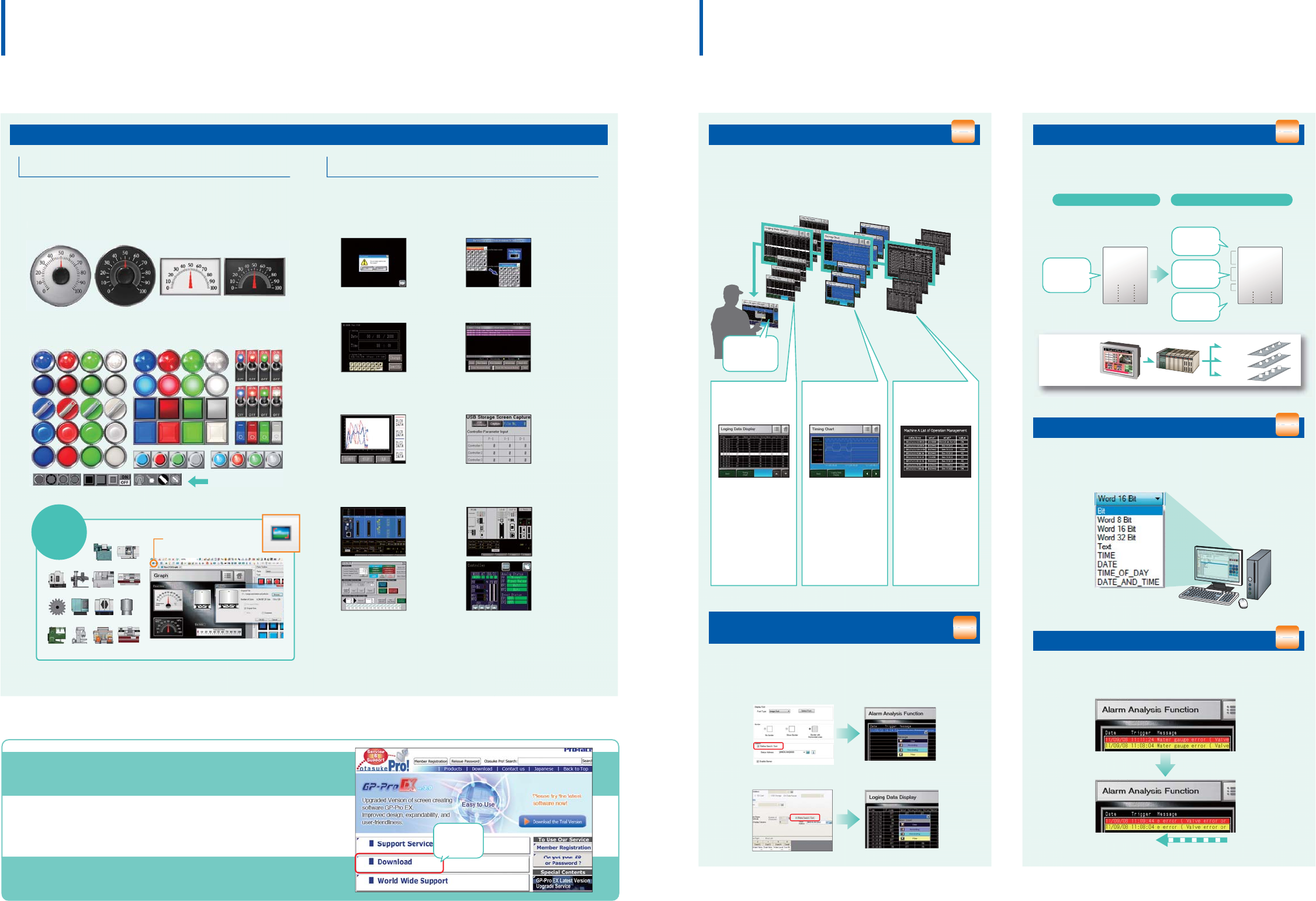
Storing various data
during production
Sampling data
Historical trend graph
Displaying data in an
easy-to-see graph
Recording the operator's
operation
Operation log
Touch operation
for calling up
related data!
Temperature, voltage,
and other desired ad-
dress values can be
stored in the GP.
Data and times can
be confirmed on the
sampling display.
The change in the col-
lected data over time
is displayed in an
easy-to-understand
form with a graph.
The graph can be
traced back to see the
past data.
Operations are saved
to a log, so you can
see who did what,
and when. The log
can also be used for
a trend analysis of er-
roneous operation of
operators.
Add three-dimensional graphical real parts and easily create
easy-to-read screens with high added value.
3D Real Parts
S
witches/Lam
ps
16-level grayscale
parts are available.
M
eter
s
Finished sample parts are available on the web!
Extensive samples
PLC Connected Test Samples
You can download PLC programs with preset communication settings and
GP screen data.
Connected Device
Samples
Simplify complex control settings for controllersand
inverters with these defined samples.
Yokogawa Electric
Corporation:
FA-M3
Yaskawa Electric
Corporation:
MP2300
IAI Corporation:
ROBO Cylinder
Temperature Controller:
OMRON RKC Yamatake
CHINO
More samples of temperature controllers and inverters of various
manufacturers are available.
Feature Samples High-functionality samples with a combination of
multiple functions and scripts.
Multiple Trend
Graph Display
Captured screenshots
can be stored on a
USB storage device.
Parts Samples
Easily add part samples on existing screens.
Production equipment measurements and temperatures are
intuitively displayed.
Can be visually checked like real switches and lamps.
It increases the added value of your screens.
Movable Keypad
"OK", "Cancel"
choice window
Screen Samples Reduce screen development time with the samples.
Clock Data
Change
Alarm History
Display
More support content available. Access the site below.
http://www.pro-face.com/otasuke/
Download sample parts for FREE!
Download
sample parts
here
Sample parts can be downloaded for free to
meet various needs in creating screens.
Repair and other support services are also available.
Design sample parts can be downloaded and used immediately.
Easy creation of
easy-to-read screens
Easy creation of
elaborate screens
Even with different data like bit data, word data, and strings,
recipes can be created for devices.
Enhanced Recipes
Previous New
Recipe data Recipe data
200
500
100
150
D100
D101
D102
D103
200
1000
a
b
1
D100
D200
D300
D301
X000
Random word
addresses
Text
Bit addresses
Sequential word
addresses only
Process A
Process B
Process C
PLC
PLC settings
can be changed
on a GP unit.
Long alarm messages are automatically scrolled and displayed
so their details can be checked.
Alarm History Banner Display
Text, bits, and variables can be mixed. Connected devices +
internal addresses can also be set.
Sampling in different device formats
Easy ascending/descending sorting and conditional search using
symbols such as =, > or < of Alarm Part and Sampling Display.
Searching/sorting alarm and
sampling history
Alarm Analysis
When an error occurs, an operator can easily seek and check
the condition on-site, just by touching the alarm message to call
up various error-related data in chronological order.
Historical trend graph Operation Log
Sampling
Alarm
Sampling
01 02
Easy image data attachment
with a single button
Bitmaps and
other formats
can be used
For details on features and supported models, please go to our website of software product page.
http://www.pro-face.com/product/soft/gpproex/
For details on features and supported models, please go to our website of software product page.
http://www.pro-face.com/product/soft/gpproex/
NEW
NEW
NEW
NEW
NEW
NEW
NEW
NEW
NEW
NEW
NEW
NEW
NEW
NEW
NEW
NEW
NEW
NEW
NEW
NEW
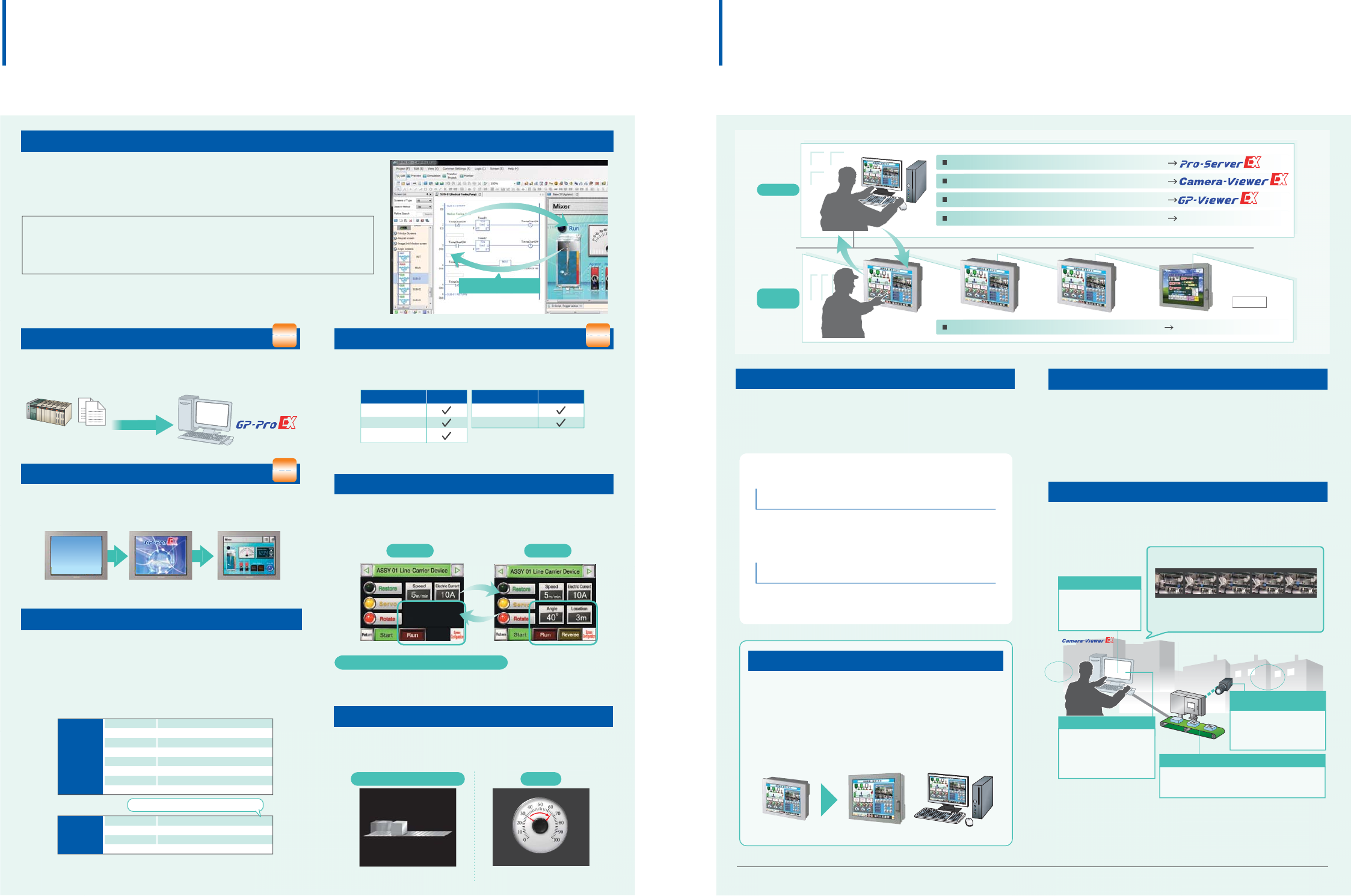
Program with a familiar ladder language [Logic Program]
Create programs with our unique simplified language. D-Scripts created with
GP-PRO/PBIII can be used unmodified so replacement is a breeze.
Configure these settings based on trigger conditions including
"Continuous Action", "Timer", "Bit Change", and "Condition
Satisfied". Many functions are also provided including search
(search and replace strings in the script) and debug functions
(display messages and addresses on the unit).
D-Script
Bit operation
Memory operation
CF file operation
USB file operation
SIO port operation
Printer operation
Draw
Others
ON, OFF, clear
Copy and shift, etc.
File access, delete list output, etc.
File access, delete list output, etc.
Send/receive data
Send data
Call screen, circle, straight line, square, etc.
Debug message and exit WinGP
Trigger
Branching
Comparison
Operation
Bit is ON/OFF, Timer, Condition is Satisfied, etc.
IF, LOOP, etc.
AND, OR >, =, <, etc.
+, x, bit operator, etc.
Control part visibility by device or operator. Save development
time and reduce project file size.
Display/Hide parts
Device A Device B
The same base screen may be used
This can reduce man-hours since separate screens do not need to be created.
Possible to move/rotate graphics, drawings and images, etc.,
allowing you to save time when creating screens with movement.
Move/Rotate Graphics
Rotate
Express progress and movements on a conveyer
Animate meters to display realistic situations.
Horizontal/vertical transfer
Display a registered start screen (image) from when the power is
turned on until when the initial base screen is displayed.
User Original Start Screen
Power ON Display the image Display the initial screen
PLC
STEP7
project file
Supports Siemens AG's tag import function
Reduce screen development time by communicating with
Siemens AG PLCs.
Import
Windows® 7 64-bit
Ultimate
Enterprise
Professional
E
d
iti
on
64/32-bit
Home Premium
Home Basic
E
d
iti
on
64/32-bit
GP-Pro EX can be used in a wide range of PC operating environments
such as Windows
®
7, Windows
®
XP and Windows Vista
®
.
Some features are not supported. For details, visit our website.
Screens and logic programming can be edited with the same software, so editing
between parts and logic elements can be performed via drag and drop. Controller
addresses can be directly written, allowing you to reduce development time.
You can make changes in a program without stopping operation - even while the control function is
in operation. This enables work efficiency at startup and during maintenance.
The online editing function allows you to make program changes on a computer
during operation.
Production
site
Office
LAN
Collect the information about operation progress and data from and send it to a GP
View and operate a remote GP from an office PC
View live streaming video through a remote camera in real-time
View the information of alarms and device addresses on a browser
Operate a remote PC from a GP
RPA(Remote PC Access)
GP GP GP IPC WinGP
*1 To use Pro-Server EX, separate software must be purchased. *2 To use GP-Viewer EX, Camera-Viewer EX, RPA, a separate license must be purchased.
Data Management Software
Pro-Server EX
Collect information of operation progress on a PC via Ethernet
network. Download operating instructions, such as recipes, from
an office PC to a GP.
Assist the office and production sites with remote solutions
View and operate a remote PC from an on-site GP. The GP shows the
PC display on its screen.
Remote monitoring and maintenance can be done from office viewing the
information of alarms and device addresses on a browser. Additionally,
alarm notifications can be sent in real-time through RSS feeds.
RPA (Remote PC Access)
Web Server
WinGP
WinGP allows you to create screens with the screen editor
software, GP-Pro EX, on IPC. You can also reuse screen
data for a GP for the use on IPC.
Reduce screen creation time with the same screen
operations and communication settings as done on a GP.
PCIPCGP/LT3000
*1
*2
To prevevent operation mistakes made by operators, operations on GPs
(or PCs) other than the one being operated can be locked.
Operation Lock
Remote Monitoring Software
GP-Viewer EX
View and operate on-site GP display on a remote PC via
Ethernet to monitor on-site status.
Camera-Viewer EX
Office
Video is stored in a PC's hard disk drive which is
capable of long-time recording.
Camera-Viewer EX allows you to view in real-time, record and
play video through a remote camera connected to a GP on an
office PC.
Site
LAN
1. Check the time when the error occurred in alarm logs
2. Set the error time in Camera-Viewer EX
3. Check the status before and after the error occurred at a glance
Automatically save on a PC
No need to load video to a PC.
Video can be checked
any time you need.
Error diagnostics
Long-time recording allows you to
check data recorded at the
moment, before and after an error
occurs. It helps you conduct error
diagnostics.
Easy check of the actual
status on video
By connecting cameras to a GP, the
statuses on sites where are difficult to be
actually checked by operators can be
easily monitored through the cameras.
Useful for the launch of a new production line
The time which is required for the launch of a new production line can be
reduced because machine operations can be monitored in real-time on
video for a trial run.
*2
*2
Remote monitoring of
on-site situations in real-time
Faster and
more efficient
Drag & Drop
Web Server
Graphic Operator Interface Industrial Personal Computer
Function
Tool
Conditional
03 04
For details on features and supported models, please go to our website of software product page.
http://www.pro-face.com/product/soft/gpproex/
Bit turning ON Condition becoming true
For details on features and supported models, please go to our website of software product page.
http://www.pro-face.com/product/soft/gpproex/
NEW
NEW
NEW
NEW
NEW
NEW
NEW
NEW
NEW
NEW
NEW
NEW
Share Images and Parts
Ethernet
A
B
C
D
Before
GP2000
GP3000
GP510
Project Converter
GP4000
Don't waste the
CAD data!
Plus!
After
GP
Appropriate Data from GP3000 Series to GP4000 Series
Ethernet
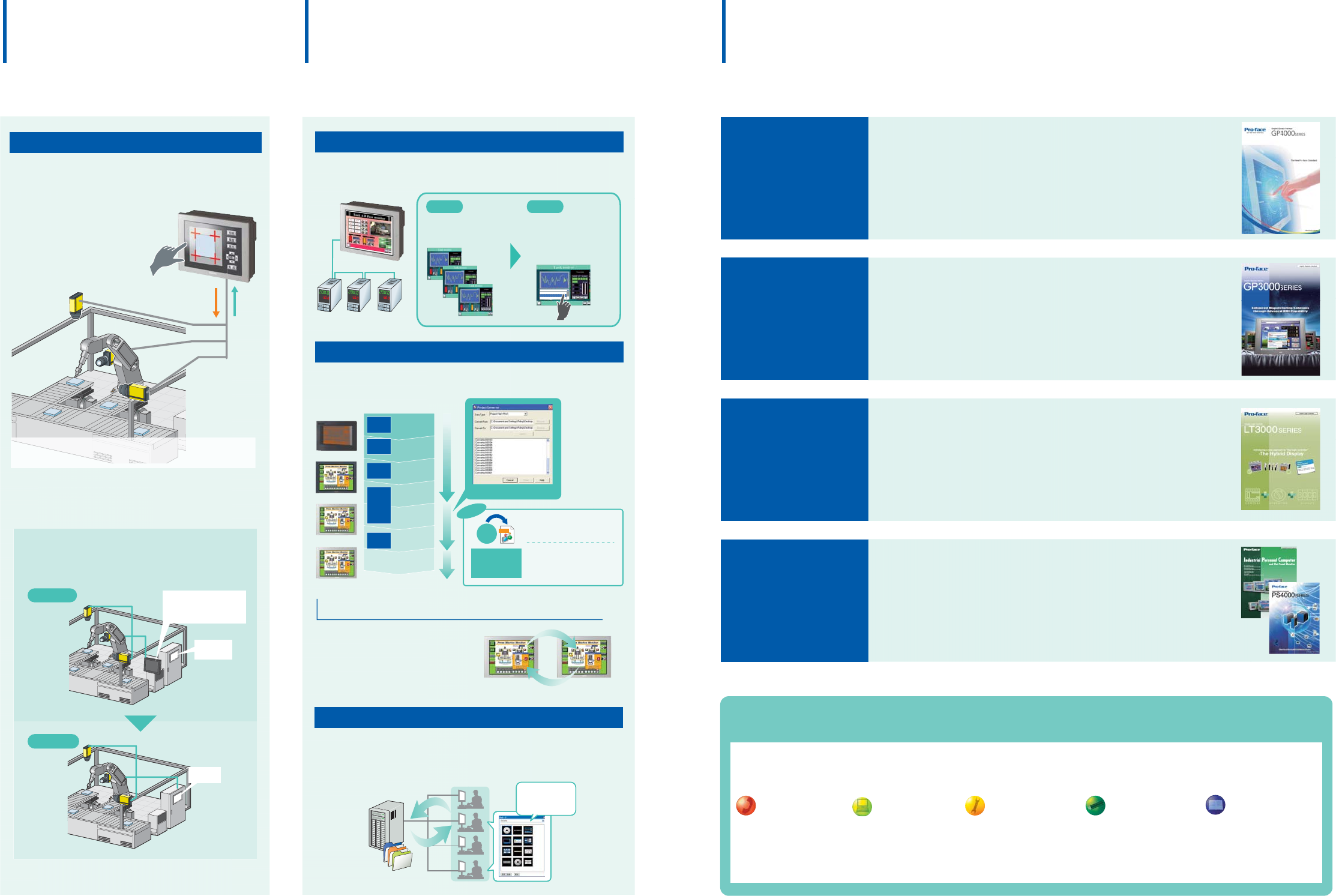
No need for a HMI or PC dedicated to a camera on site.
Only a single GP is required to check and adjust inspection images
and to operate equipment.This integrated functionality enhances
maintainability.
HMI or PC for
camera
Use Video for On-Site Adjustments
In combination with a COGNEX In-Sight vision system*1,
the settings can be changed when watching images from
the cameras on a GP unit on site.
*1: GP3000 Series supports In-Sight Micro series and In-Sight 5000 series.
Images
Configuration
Trip events that occur in the inspection process can be monitored on screen.
Inspection cameras can also be adjusted from GP. *2
*2: You can view video images from up to 3 cameras on a single screen.
Up to 16 cameras can be connected to GP.Display position (X/Y),
exposure time, focus, lighting and brightness can be adjusted on GP.
Indirect Device Setting
Only one screen is required to communicate with multiple devices.
It allows you to reduce time for screen design.
Project files created in GP-PRO/PBIII for Windows can be converted
and used in GP-Pro EX.
Project Converter Tool
PRX
Microsoft
Visio
2003
2007
w
r
i
t
e
Write DXF and DWF files
downloaded using Visio to
GP-Pro EX project files.
Pro-face
converter
The data in GP4000 Series
and GP3000 Series screen
project dara can be mutually
appropriated. GP3000 GP4000
Parts and graphics you have created can be registered as a package.
Save the packages to a server to share them among designers.
E
x
p
o
r
t
I
m
p
o
r
t
Server PC
Common parts
Easily check
on-site statuses
Pro-face meets
your needs
Easily appropriate past
screens and sample parts
GP4000
GP3000
Graphic Logic Controller
LT3000
Industrial Personal
Computer&
Flat Panel Monitor
IPC&FP
The GP3000 Series is available in four classes with diverse
interfaces to suit your application perfectly
- M class offers real visualization through video recording and playback.
- C class offers control functions on HMI units
- S class comes equipped with an information network connection
- The handheld model features enhanced safety and ease of use
Innovative all-in-one HMI integrated with control,
operations, and display functions.
- Compact Design: Space-saving, all-in-one design
- Compact but with powerful functions
- A variety of interfaces
The New Pro-face Standard
- Features 65,536-color TFT
- LED backlight LCD + Lighting adjustment
- Alarm analysis function
- Ethernet I/F featured
Industrial Flat Panel Monitors that can be used as
displays for PCs on site.
- Expandability and Serviceability, "PL3000 Series"
- Value and High Usability, "PS3000 Series"
- DVI I/F Supported Flat Panel Monitors, "FP3000 Series"
- a rugged, high-performance built-in computer, "PS-4000 Series"
GP-PRO
GP-Pro EX
GP-PROⅡ
GP-PROⅢ
GP-PRO/
PBⅢ
for MS-DOS
GP-PRO/
PBⅢ
for Windows
GP-PRO/
PBⅢ
C-Package
GP10
Series
GP30/50
Series
GP70
Series
GP77R
Series
GP2000
Series
ST400
Series
HMI
Register multiple
parts and images
as one group!
Each device required
one screen for its
operation.
Data from multiple devices
can be displayed on the same
screen even when switching
the communications
of the devices.
Screen for
Device 1
Screen for
Device 2
Screen for
Device 3
Device 1
Device 1
Device 2
Device 3
Device 1 Device 3Device 2
Before After
For details on catalog requests, please go to our website or contact the relevant Pro-face office.
Service & Support Information
Service & Support Information
With the Pro-face global brand, get the support you need anytime, anywhere!
We have a reliable service and support system.
Telephone Support
In an effort to gain greater
customer satisfaction,
Pro-face’s telephone support
services are based on the
key words of availability,
quick response and
friendliness.
Web Support
The content of our “Otasuke
Pro!” support site has been
upgraded with services aimed
at reducing development
man-hours for the customer
with contents such as FAQ
and manual downloads.
Manuals
So that even beginners can
use products immediately, we
aim to make manuals
easy-to-understand. We have
already received high
reviews from many
customers.
Seminars
A variety of technical seminars
are offered to help customers
in order to get the most out of
our Pro-face products.
Easy-to-understand textbooks
are prepared for what the
customer wants to learn.
Repair Services
Pro-face has eliminated loss
throughout the entire repair
process. We are constantly
re-evaluating our systems to
ensure satisfaction all of our
customers.
05 06
For details on features and supported models, please go to our website of software product page.
http://www.pro-face.com/product/soft/gpproex/
Global Head Office
Digital Electronics Corporation
Osaka, JAPAN
Tel: +81 (0)6 6613 3116
Fax: +81 (0)6 6613 5888
http://www.pro-face.com
info@pro-face.com
China
Pro-face China International Trading Co., Ltd.
Shanghai, P. R. CHINA
Tel: +86 (0)21 6361 5175
Fax: +86 (0)21 6361 5176
http://www.proface.com.cn
proface@proface.com.cn
Singapore
Pro-face Singapore
TechPoint, Singapore
Tel: +65-6832-5533
Fax: +65-6415-1605
http://www.proface.sg
info@proface.sg
South Korea
Pro-face Korea Co., Ltd.
Seoul, SOUTH KOREA
Tel: +82 (0)2 2630 9850
Fax: +82 (0)2 2630 9860
http://www.proface.co.kr
proface@proface.co.kr
Taiwan
Pro-face Taiwan Co., Ltd.
Taipei, TAIWAN
Tel: +886 (0)2 2657 1121
Fax: +886 (0)2 2657 1021
http://www.proface.com.tw
proface@proface.com.tw
South-East Asia Pacific
Pro-face South-East Asia Pacific Co.,Ltd.
Bangkok,
THAILAND
Tel: +66 (0)2 617 5678
Fax: +66 (0)2 617 5688
http://www.proface.co.th
support@proface.co.th
India
Pro-face India
Bangalore, INDIA
Tel: +91 80 4333 3540/3541
Fax: +91 80 4333 3222
http://www.proface.com.in
sales.proface@proface.co.in
Australia and New Zealand
Pro-face Australia
Mt. Waverley, AUSTRALIA
Tel: +61 (0)3 9550 7395
Fax: +61 (0)3 9550 7390
http://www.pro-face.com.au http://www.pro-face.co.nz
pfau@pro-face.com
European Head Office
Pro-face Europe B.V.
Hoofddorp, THE NETHERLANDS
Tel: +31 (0)23 55 44 099
Fax: +31 (0)23 55 44 090
http://www.proface.eu
info@proface.eu
France
Pro-face France S.A.S.
Mitry-Mory, FRANCE
Tel: +33 (0)1 60 21 22 91
Fax: +33 (0)1 60 21 22 92
http://www.proface.fr
info@proface.fr
Austria
Pro-face Europe B.V.(Austria Office)
Hagenberg, AUSTRIA
Tel: +43 7236 3343 620
FAX: +43 7236 3343 629
http://www.proface.at
info@proface.at
United Kingdom
Pro-face UK Ltd
Coventry, ENGLAND
Tel: +44 (0)2476 511288
Fax: +44 (0)2476 511499
http://www.proface.co.uk
info@proface.co.uk
Germany
Pro-face Deutschland GmbH
Solingen, GERMANY
Tel: +49 (0)212 258 260
Fax: +49 (0)212 258 2640
http://www.pro-face.de
info@pro-face.de
Italy
Pro-face Italia S.p.a.
Bovisio Masciago (Milano), ITALY
Tel: +39 (0)362 59 96 1
Fax: +39 (0)362 59 96 69
http://www.proface.it
info@proface.it
Poland
Pro-face Europe B.V.(Warszawa Office)
Warszawa, POLAND
Tel: +48 (22) 465 66 62
Fax: +48 (22) 465 66 67
http://www.proface.pl
info@proface.pl
Sweden
Pro-face Sweden AB
Löddeköpinge (Malmö), SWEDEN
Tel: +46 46 540 90 70
Fax: +46 46 71 27 90
http://www.proface.se
info@proface.se
Switzerland
Pro-face Schweiz GmbH
Regensdorf, SWITZERLAND
Tel: +41 (0)43 343 7272
Fax: +41 (0)43 343 7279
http://www.proface.ch
info@proface.ch
Spain and Portugal
Pro-face España
Cardedeu (Barcelona), SPAIN
Tel: +34 (0)93 846 07 45
Fax: +34 (0)93 845 48 68
http://www.proface.es
info@proface.es
Northern Europe
Pro-face Northern Europe ApS
Roskilde, DENMARK
Tel: +45 70 22 01 22
Fax: +45 70 22 01 33
http://www.proface.dk
info@proface.dk
Russia
Pro-face Europe B.V. (Russia Office)
Saint-Petersburg, RUSSIA
Tel: +007 (812) 336 47 06
Fax: +007 (812) 336 47 18
http://www.pro-face.ru
info@pro-face.ru
North/South American Head Office
Pro-face America, Inc.
Saline, MI U.S.A.
Tel: +1 734 429 4971
Fax: +1 734 429 1010
http://www.profaceamerica.com
sales.info@profaceamerica.com
Easy to Use
Our Environmental Policy and Compliance with the RoHS Directive
Pro-face has taken significant steps to meet increasingly stringent requirements for environmental preservation and has sought to comply with the RoHS Directive by
adopting measures to eliminate specified harmful substances from existing products and products to be manufactured and sold beginning in 2006. For details, please
refer to our web site or contact our sales office in your country.
WI/IP1110-PROEXALL-01E00
We are always striving to bring you the high quality interface designed to
provide a cohesive, evolving connection between customers and the
quality products, service and support from around the world.
We provide our best possible support for each and every individual customer.
Global Network and Global Support
www.pro-face.com
ACCESS!!
ACCESS!!
ACCESS!!
For printing purposes, the colors in this catalog may differ from those of the actual unit.
Actual user screens may differ from the screens shown here.
Electric equipment should be installed, operated, serviced, and maintained only by qualified personnel. No responsibility is assumed by Digital for any consequences arising out of the use of this material.
All product names used in this catalog are the registered trademarks or trademarks of their respective companies.
All information contained in this catalog is subject to change without notice.
Before operating any of these products, be sure to read all related manuals thoroughly.
Failure to follow these instruction can result in death or serious injury, unintended equipment damage.
WARNING
2011.10
HAZARD OF OPERATOR INJURY,OR UNINTEDED EQUIPMENT DAMAGE
Copyright © 2011.10 Digital Electronics Corporation. All Right Reserved.
HMI Screen Editor & Logic Programming Software
HMI Screen Editor & Logic Programming Software
e
iSf
m
in
g
S
oftwar
e
ming Softwar
e
New Products Introducing
HMI Screen Editor & Logic Programming Software
http://www.pro-face.com/
Product Name Model No.
PFXEXEDV30
PFXEXEDLS3X
EX-SDV-V**
EX-SED-LICENSE
EX-SRT-LICENSE
EX-MES-LICENSE-V**
EX-VIEWER-LICENSEv
EX-VIEWER-LICENSE-10
EX-VIEWER-LICENSE-30
GP-Pro EX Ver.3.0
GP-Pro EX Editor License
Pro-Server EX Developer
Pro-Server EX Developer License
Pro-Server EX Runtime License
MES Action License
GP-Viewer EX
Product Name Model No.
EXCAVELS
EX-RPA
EX-RPA-10
EX-RPA-30
EX-LADM-MIT-Q02
EX-LADM-MIT-A01
EX-LADM-OMR-CJ01
EX-MOVCON-LICENSE
EX-WINGP-IPC
EX-WINGP-PCAT
Camera-Viewer EX License
RPA Client
License
Ladder Monitor
License
Video Converter License
WinGP for IPC
WinGP for PC/AT
Single license
10 license
30 license
Single license
10 license
30 license
Mitsubishi’s PLC A Series
Mitsubishi’s PLC A Series
OMRON’s PLC CS/CJ Series
List of available software
