PACSystems RX3i Serial Communications Modules IC695CMM002 AE/004 AE, GFK 2461E
2014-10-23
: Pdf 111934-Attachment 111934-Attachment Batch9 unilog
Open the PDF directly: View PDF  .
.
Page Count: 9
PACSystems™ RX3i
IC695CMM002 and IC695CMM004
GFK-2461E Serial Communications Modules
January 2010
PACSystems RX3i Serial Communications modules expand the serial
communications capabilities of the RX3i system.
Serial Communications module IC695CMM002 provides two
independent, isolated serial ports. Serial Communications module
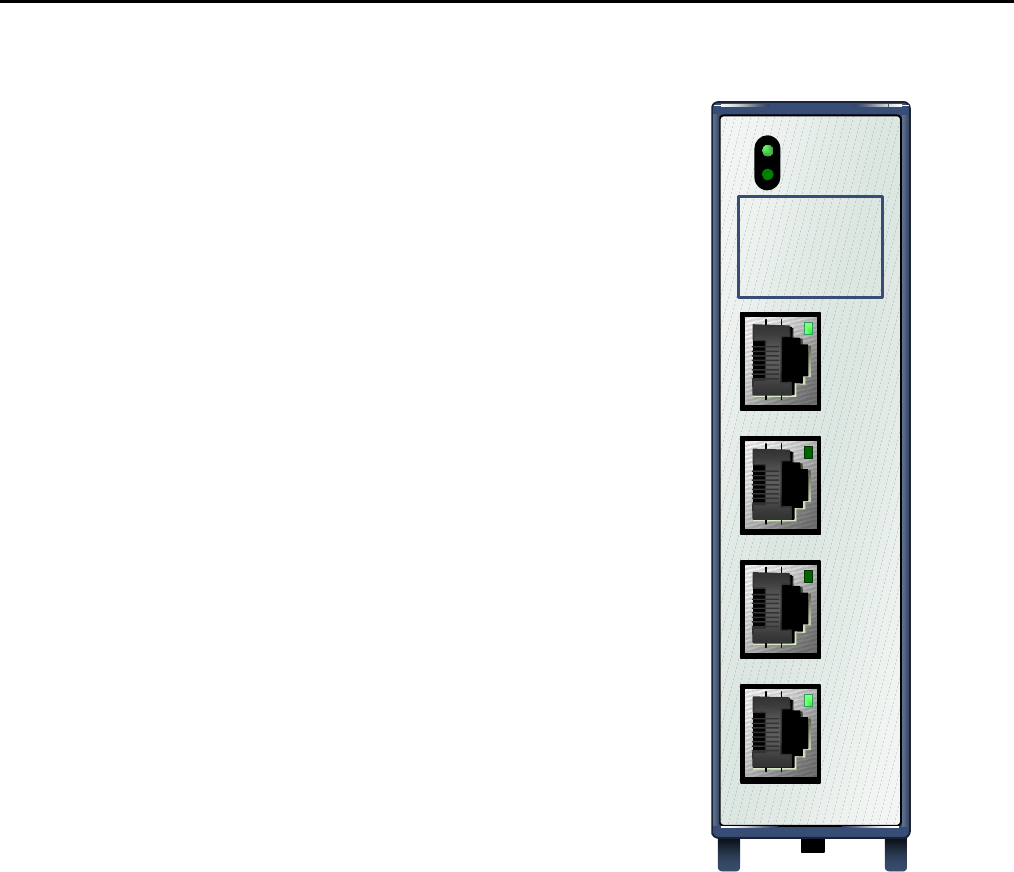
IC695CMM004, illustrated at right, provides four independent, isolated
serial ports. Up to six Serial Communications modules can be located
in the main PACSystems RX3i backplane.
Each port can be configured for MODBUS Master, MODBUS Slave,
CCM Slave, DNP3 Master, DNP3 Slave, or Serial I/O protocol. If any
port is configured for DNP3 Master or Slave, the other ports on the
module can only be configured for DNP3 Master or Slave.
For modules with firmware version 1.32 or later, half-duplex flow
control can be configured using Machine Edition Release 5.90, SP1,
SIM 6 or later. Otherwise, flow control defaults to full-duplex.
Additional module features include:
▪ Port-to-port isolation and port-to-backplane isolation
▪ RS-232, RS-485/422 communication, software-selected
▪ Hardware handshake: RTS/CTS, RFR/CTS for RS-232
▪ Selectable Baud Rates: 1200, 2400, 4800, 9600, 19.2K, 38.4K,
57.6K, 115.2K
▪ Module fault status reporting (Watchdog, Ram Fail, Flash Fail)
▪ Module identity and status reporting, including LED status
indicators
▪ Meets CE, UL/CUL 508 and 1604, and ATEX requirements
▪ Flash memory for future upgrades
These modules must be located in an RX3i Universal Backplane.
RX3i Serial Communications can be hot-inserted and removed
following the instructions in the PACSystems RX3i System Manual,
GFK-2314.
IC695CMM004
MODULE OK
PORT FAULT
P1
P2:
P3:
P4:
STATUS
PORT 1
STATUS
PORT 2
STATUS
PORT 3
STATUS
PORT 4
2 RX3i Serial Communications Modules
GFK-2461E
Release Information
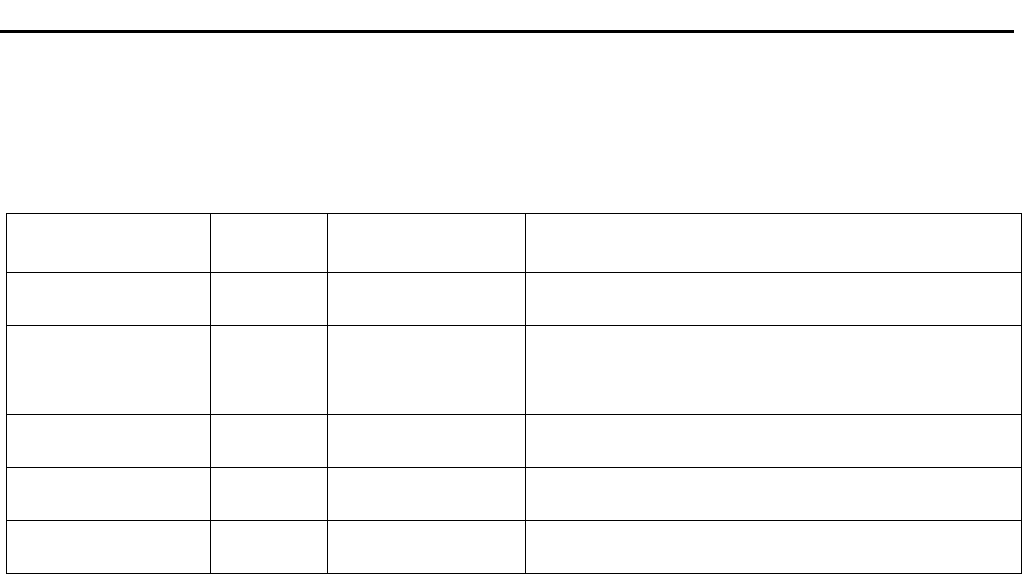
Release History
Release Firmware
Version Upgrade Kit Comments
IC695CMM002-AE
IC695CMM004-AE
1.32 44A753277-G04
44A753278-G04
See “New for this Release” and “Problems
Resolved,” below.
IC695CMM002-AD
IC695CMM004-AD
1.30 44A753277-G04
44A753278-G04
Supports Serial Protocol Language (SPL) scripting.
Corrects DNP3 Slave Bit Write issue. Please refer to
M050803 - IC695CMM002_004 Product Safety Bulletin for
more information.
IC695CMM002-AC
IC695CMM004-AC
1.20 44A753277-G03
44A753278-G03
Supports DNP3 Master and DNP3 Slave Protocol
IC695CMM002-AB
IC695CMM004-AB
1.10 44A753277-G02
44A753278-G02
Supports CCM Slave Protocol
IC695CMM002-AA
IC695CMM004-AA
1.00 N/A Initial Release
Upgrades
The Serial Communications Modules can be upgraded to firmware version 1.32 using the following upgrade kits,
which can be downloaded from http://www.ge-ip.com/support
CMM002: 44A753277-G05
CMM004: 44A753278-G05
Compatibility
Programmer Version Requirements
Proficy® Machine Edition Logic Developer 5.9 SP1 with SIM 6 is required for half duplex flow control
Proficy Machine Edition Logic Developer 5.8 with SIM 2 or newer is required to use SPL
Proficy Machine Edition Logic Developer 5.6 with SIM 10 or newer is required to use DNP3
Proficy Machine Edition Logic Developer 5.6 with SIM 6 or newer is required to use the CMM
CPU Firmware Version Requirements
PACSystems RX3i CPU Version 5.50 or newer is required for SPL
PACSystems RX3i CPU Version 5.50 or newer is required for SPL.
PACSystems RX3i CPU Version 5.00 or newer is required for DNP3 Master to sync its timestamp value
with the CPU.
PACSystems RX3i CPU Version 3.83 or newer is required to be able to use the CMM in the RX3i system.
New for Release 1.32
Enhanced Configuration for Serial Port Flow Control
Releases 1.32 and later support half duplex flow control and full duplex control. Flow control is configurable with
Proficy Machine Edition Logic Developer 5.9 SP1 with SIM 6. Full duplex flow control is the default flow control.
Releases 1.30 and earlier support full duplex flow control only.

RX3i Serial Communications Modules 3
GFK-2461E
Problems Resolved in Release 1.32
SPL - ASCTOVAL function would not accept negative sign
Releases 1.32 and later will allow leading negative sign in char arrays passed into ASCTOVAL
SPL - ASCTOVAL function would over write trailing byte in SRC array
ASCTOVAL writes null to source array byte that follows last converted byte by command
DNP3- Multiple Block Writes were not allowed in single request
In Release 1.30 (only) multiple Control Relay Output Block (CROB) and multiple Analog Output Block (AOB)
writes were not allowed in a single request. Release 1.32 allows multiple Control Relay Output Block (CROB) and
multiple Analog Output Block (AOB) writes.
SPL – ‘dot’ notation for integer values did not work
The 'dot' notation (variable subscript reference GFK-2460C pg 9-11) allows each byte in an integer to be
addressed. This ability was not working correctly from the command line interface (CLI) to the module.
A script, such as this following example, would correctly reference the byte.
DIM iMyInt INTEGER
iMyInt = 256
PRINT "iMyInt.1 = " & iMyInt.1
The command line would not.
1>RUN
iMyInt.1 = 1
1> print iMyInt.1
256
This value of 256 should be 1.
This functionality now behaves as expected from the command line interface.
SPL – Serial.clear command did not work
SPL SERIAL.clear commands did not work. This has been corrected in Firmware revision 1.32.
SPL displayed error -3 when PUTB buffer overflowed.
SPL displayed error -3 when PUTB buffer overflowed.
In firmware version 1.32 the correct error is displayed when PUTB buffer is overflowed as follows:
Reason: code[53] serial transmit buffer overflow

4 RX3i Serial Communications Modules
GFK-2461E
Restrictions and Open Issues in this Release
1. The module will reject a SPL program file containing a literal string of length greater than 127. The SPL
port will return a status in the status byte of 61.
2. The static file checker can miss paired NEXT and FOR statements. If a NEXT statement is missing from
the program, execution will continue without looping back to the FOR statement. Users should check
their FOR/NEXT statements before downloading. A missing NEXT statement can also be detected by
debugging using the CLI debug interface.
3. Each port can be configured for DNP3 Master or DNP3 Slave protocol. If any port is configured for DNP3
Master or Slave, the other ports on the module can only be configured for DNP3 Master or Slave.
4. These modules do not support GE special MODBUS commands for use with a Daniels Flow
Computer.
5. PLC Reference Address Parameters will only allow bit based memory values that are aligned to a byte
boundary.
For example, for a port using MODBUS Slave with coils mapped to %Q memory, the %Q memory
address must start on a byte boundary in %Q. (Target Address 1 can be mapped to %Q00001 or
%Q00009, but it can not be mapped to %Q00007.)
6. When a port is configured for CCM Slave protocol, and:
▪ a new configuration is stored to the PLC using Machine Edition, or
▪ the system is power-cycled, or
▪ the module is hot-inserted
If the first query received from the CCM Master is a Read Scratchpad request, the module will reject that
request. All subsequent Read Scratchpad requests will be successful unless one of the above conditions
occurs again.
7. When multiple group objects (i.e. %I and %AI memory) are read in a single request, the DNP3 port will
ignore all but the first object. Operations of multiple group objects should be split into multiple successive
exchanges (i.e. exchange 1 - %I, exchange 2 - %AI).
8. The DNP3 slave port has problems using the link layer to validate frame receipt. The DNP3 organization
encourages users not to do this.

RX3i Serial Communications Modules 5
GFK-2461E
Operating Notes
SPL
1. In the error message, brackets [ ] are printed only around the key failing token. When looking at the error
message the entire line should be interpreted.
Example:
--- Script file ---
i = 128 )
--- Error output---
Error [3184]: line 1
i = [128] )
2. An SPL wrong error is reported when a “(“ is in an IF statement. IF statements only support comparisons
of variables and constants. Using () to enclose operations (like arithmetic operations or comparisons) will
result in a syntax error. The module will report this error as an unknown identifier for the () symbols rather
than a syntax error.
3. If the SPL program writes to memory that is invalid in the PLC the write will fail and the SPL program will
halt.
Other
The maximum resolution for the MODBUS drop delay is 420μs, so the minimum time for a drop delay
is 420μs.
Installation in Hazardous Locations
• EQUIPMENT LABELED WITH REFERENCE TO CLASS I, GROUPS A, B, C & D, DIV. 2 HAZARDOUS
LOCATIONS IS SUITABLE FOR USE IN CLASS I, DIVISION 2, GROUPS A, B, C, D OR NON-HAZARDOUS
LOCATIONS ONLY
• WARNING - EXPLOSION HAZARD - SUBSTITUTION OF COMPONENTS MAY IMPAIR SUITABILITY FOR CLASS
I, DIVISION 2;
• WARNING - EXPLOSION HAZARD - WHEN IN HAZARDOUS LOCATIONS, TURN OFF POWER BEFORE
REPLACING OR WIRING MODULES; AND
• WARNING - EXPLOSION HAZARD - DO NOT CONNECT OR DISCONNECT EQUIPMENT UNLESS POWER HAS
BEEN SWITCHED OFF OR THE AREA IS KNOWN TO BE NONHAZARDOUS.
6 RX3i Serial Communications Modules
GFK-2461E
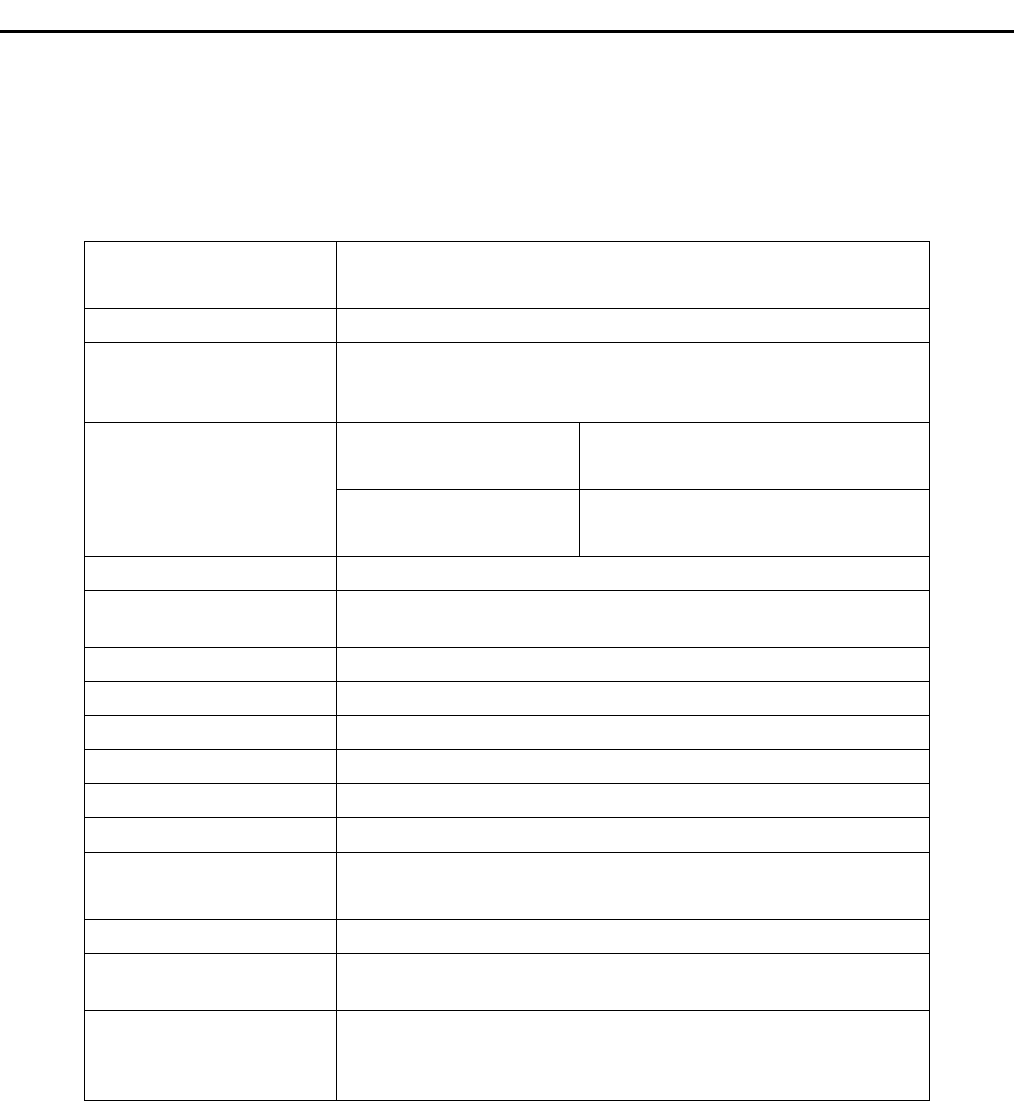
Specifications: IC695CMM002 and IC695CMM004
Refer to the PACSystems RX3i System Manual, GFK-2314, for product standards and general
specifications.
Number of Serial Ports IC695CMM002: two independent serial ports
IC695CMM004: four independent serial ports
Connectors RJ-45
Number of Serial
Communications Modules
per CPU
Six in the main CPU backplane
IC695CMM002 0.7 Amps maximum @ 3.3 VDC
0.115 Amps maximum @ 5.0 VDC
Backplane power
requirements
IC695CMM004 0.7 Amps maximum @ 3.3 VDC
0.150 Amps maximum @ 5.0 VDC
LEDs Module OK, Port Fault, Port Status (2 or 4)
Port Type RS-232 or RS-485/22. 4-wire (full duplex) or 2-wire (half-duplex)
operation for RS-485/422
Flow Control for RS-232 Selectable: Hardware (RTS/CTS, RFR/CTS) or none
Baud rates 1200, 2400, 4800, 9600, 19.2K, 38.4K, 57.6K, 115.2k
Parity Even, odd, none
Data bits 7, 8
Stop bits 1, 2
Operating Temperature 0°C to + 60°C
Input Impedance Zin > 96 kOhm for RS-485/422
3 kOhm < Zin < 7 kOhm for RS-232
Max Overvoltage +/- 25V
Channel-Channel
Crosstalk
–55dB minimum
Isolation Port to Backplane and to frame ground: 250 VAC continuous;
1500 VAC for 1 minute, 2550VDC for one second.
Port to port: 500VDC continuous, 710VDC for one minute.
In order to meet emission and immunity requirements for the EMC directive (CE mark), shielded cable
must be used with this module.
RX3i Serial Communications Modules 7
GFK-2461E
LEDs
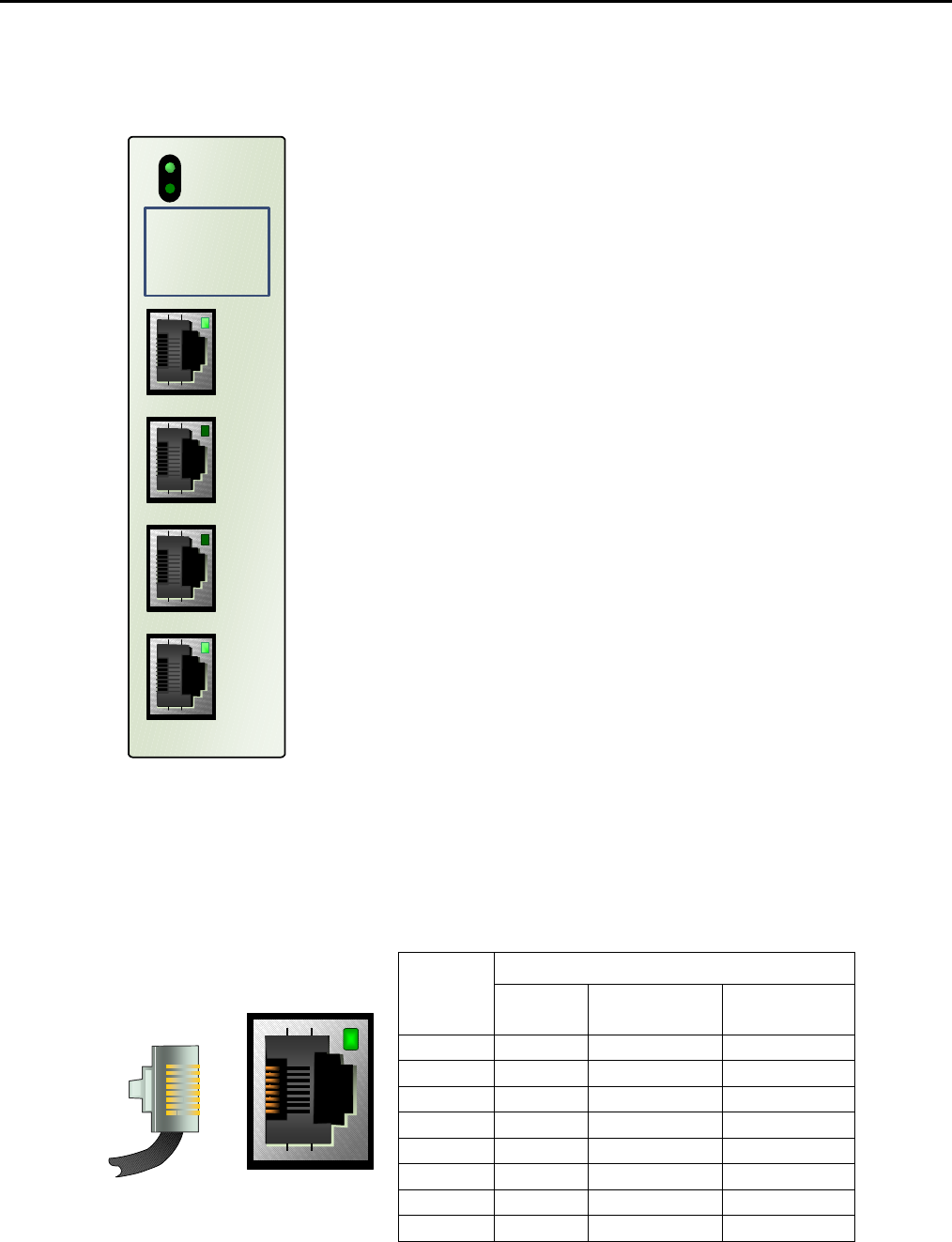
The Module OK LED indicates the status of the module. Solid
green indicates that the module has been configured. The
Module OK LED is off, if the module is not receiving power from
the R3i backplane, or if a serious module fault exists.
At powerup, the Module OK LED flashes green/off while the
module is executing powerup diagnostics. It then flashes more
slowly as the module receives its configuration from the CPU.
If a problem occurs, the Module OK LED flashes amber, The
blink code (see below) indicates the cause of the error.
1 = watchdog expired
2 = RAM error
6 = Invalid CPU Master Interface version
7 = CPU heartbeat failure
8 = Failed to get semaphore
The Port Fault LED indicates the status of all ports. The Port
Fault LED is green when there are no faults present on any
enabled port. If this LED turns amber, there is a fault on at least
one port.
A port’s Status LED flashes green when there is activity on the
port.
IC695CMM004
MODULE OK
PORT FAULT
P1
P2:
P3:
P4:
STATUS
PORT 1
STATUS
PORT 2
STATUS
PORT 3
STATUS
PORT 4
The area below the module LEDs can be used to record
identifying information about each port.
Serial Ports
Each port is a standard RJ-45 female connector with the following pin assignments. For MODBUS applications,
note that these pin assignments are different than the standard MODBUS pin assignments. If the port is
configured for MODBUS master or slave operation, custom cables are needed.
Pinouts
RJ-45
Pin RS-232
DTE RS-485/422
Half Duplex RS-485/422
Full Duplex
8 COM GND GND
7 Termination 2
6 CTS R- (RxD0)
5 COM GND GND
4 Termination 1
3 RxD R+ (RxD1)
2 TxD T- / R- (D0) T- (TxD0)
8
1
1 RTS/RFR T+ / R+ (D1) T+ (TxD1)
Note: There is no shield or frame ground pin on the port connector.

8 RX3i Serial Communications Modules
GFK-2461E
Connecting a Serial Communications Module to a Series 90-30 CPU363 or external RX3i CPU
8
7
6
5
4
3
2
1
RX3i CMM002/004
Module
RX3i CPU/
Series 90-30 CPU363
NC
NC
NC
NC
R+
T-
T+
R-
8
7
5
4
3
2
1
6
NC
NC
NC
NC
RxD+
TxD-
TxD+
RxD-
Signal Name Description Direction
T+ TxD+ Transmitted Data + Output
T- TxD- Transmitted Data - Output
R+ RxD+ Received Data + Input
R- RxD- Received Data - Input
Termination
By default, each port is set for no termination. Termination is needed if the module is the first or last device on an
RS-485 network, even if there is only one other device on the network. Termination can be provided using either
an external resistor as shown below or the port’s built-in 120-Ohm termination. If line termination other than 120
Ohms is required, an appropriate external resistor must be supplied.
User-Supplied Termination for RS-485
6
3
Terminating
Resisto
r
Full Duplex 4-Wire
RS-485
2
1
Terminating
Resistor
Half Duplex 2-Wire
RS-485
RX3i Serial Communications Modules 9
GFK-2461E
Built-in Termination for RS-485
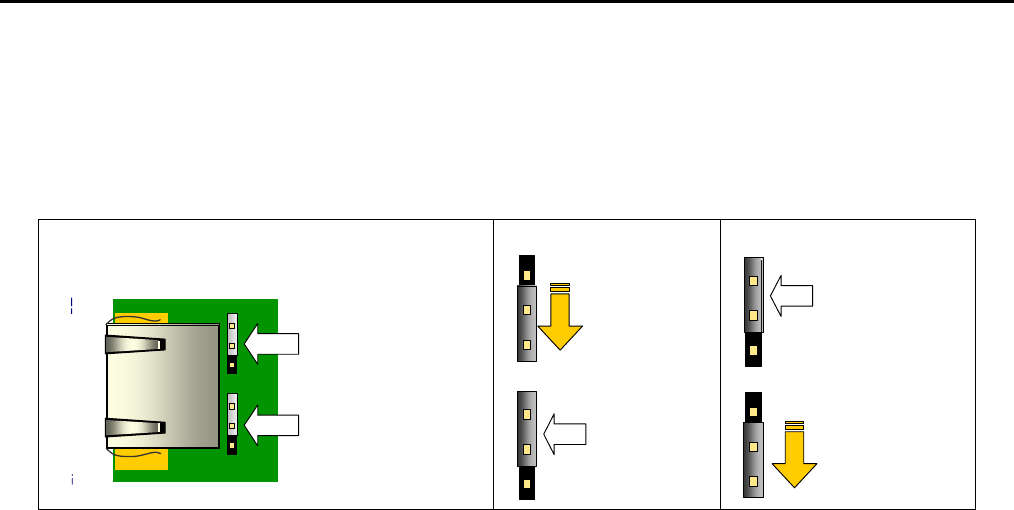
Termination using the built-in 120-Ohm resistor can be provided by either setting the appropriate RS-485
termination jumper OR by installing shorting jumpers on the RS-485 cable connector that attaches to the serial
port.
Jumper for Full Duplex,
4-Wire in
Default (Upper) Position
Jumper for Half Duplex,
2-Wire in
Default (Upper) Position
Front of Module with
Faceplate Removed
Side of
Port
Connector
Move top
j
umper down
or connect
Port pins 7
and 3
Leave bottom
j
umper in
Default
Position
Move bottom
j
umper down or
connect Port
pins 4 and 1
Leave top
Jumper in
Default Position
Full Duplex
Four-Wire RS-485 Half Duplex
Two-Wire RS-485
Internal 120-Ohm Termination,
Default Jumper Positions
To set 120-Ohm termination internally:
1. Remove the module’s faceplate by pressing in on the side tabs and pulling the faceplate away from the
module.
2. With the module oriented as shown, move either the upper or lower jumper.
