AMD Genlock Monitor How To Use
AMD_Genlock_Monitor_.. AMD_Genlock_Monitor_how_to_use
User Manual: Pdf AMD Genlock Monitor how to use
Open the PDF directly: View PDF  .
.
Page Count: 8

1
AMD Genlock Monitor

2
Revision History
Version
Date
Authors
Description
0.10
March 12th 2012
Christopher Mayer
Initial draft.
0.11
March 21st 2012
Christopher Mayer
Added load and store functions
3
Introduction
The FirePro™ S400 synchronization module allows FirePro™ 3D workstation graphics cards to be used in
demanding applications that require synchronization to external sources (Genlock) or synchronization of
3D rendering of multiple GPUs either in a single system or in different systems (Framelock).
The synchronization is controlled by a so called TimingServer who provides all clients with a reference
signal. The reference signal can either be the video signal used by this display or an external signal that is
connected to the BNC of the S400.
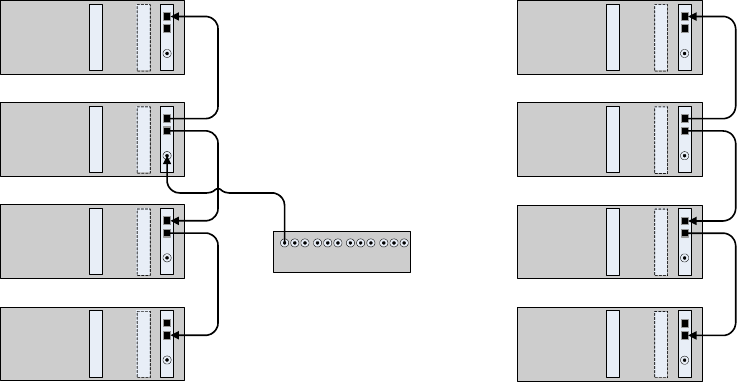
Figure 1: S400 Configurations
As shown in Figure 1 each System can have multiple GPUs that are connected to a S400 and multiple
S400 can be connected using a RJ45 cable. To have Genlock working correctly each TimingClient needs
to receive a reference signal. If the TimingClient is in the same system as the TimingServer, the presence
of the TimingServer is enough. If the TimingClient is on a different system the reference signal is
provided through the RJ45 port. If the presence of the TimingServer is lost, the Genlock configuration
on all clients that depend on this TimingServer is lost as well and needs to be re-applied manually.
Scope
The AMD Genlock Monitor provides the following functionality:
The Genlock configuration of each display is stored at startup
The state of the RJ45 can be monitored
The state of the BNC can be monitored
The presence of the TimingServer can be monitored if the TimingServer runs on the same
system as the AMD Genlock Monitor
GPU 0
GPU 3
…….
GPU 0
GPU 3
…….
GPU 0
GPU 3
…….
Timing Server
Timing Client
Timing Client
GPU 0
GPU 3
…….
Timing Client
GPU 0
GPU 3
…….
GPU 0
GPU 3
…….
GPU 0
GPU 3
…….
GPU 0
GPU 3
…….
Sync Generator
4
The Genlock configuration can be re-applied to a Display after the configuration was lost. Re-
applying the settings will only succeed if a connection to the TimingServer is present (e.g. a
signal is available on the RJ45).
Use cases
Use case 1: TimingServer losing HouseSync
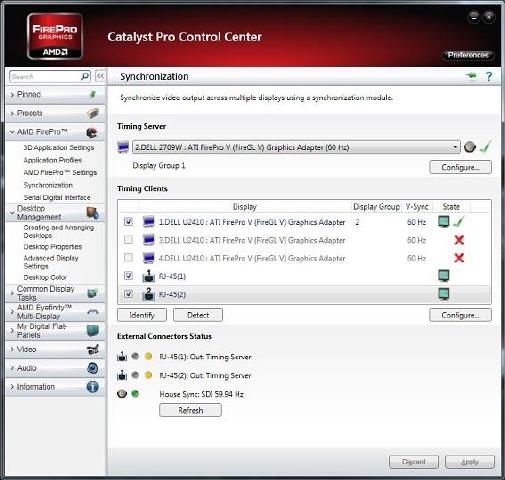
The TimingServer is configured to use an external sync source as reference signal. The configuration in
Catalyst Control Center might look as shown in Figure 2 .
Figure 2: TimingServer using external HouseSync
If the House Sync gets disconnected from the S400, the reference signal is no longer valid and the
Genlock configuration gets lost. The TimingServer and all TimingClients are no longer present.
On the TimingServer the AMD Genlock Monitor will recognize that the signal on the BNC connector was
lost. On the TimingClient the loss of the RJ45 signal will be recognized (see use case 2). Now the Genlock
Monitor starts waiting until a valid signal is present on the BNC again. Once a valid HouseSync is
detected the Genlock Monitor will try to reapply the configuration of the TimingServer. As consequence
of successfully restoring the TimingServer the TimingClients will recognize that a valid signal is on the
RJ45 port and the client configuration will be restored as well.
5
Use case 2: TimingClient losing reference on RJ45
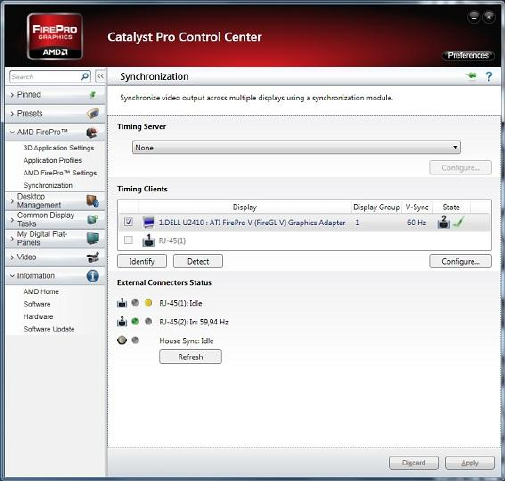
The TimingClient is configured to synchronize to a signal on the RJ45. The configuration might look as
shown in Figure 3.
Figure 3: TimingClient getting signal through RJ45
The TimingClient can lose the reference if e.g. the RJ45 cable is unplugged or if the configuration of the
TimingServer is lost. In this case the TimingClient loses its configuration as well and the Display gets no
longer synchronized to the reference.
The AMD Genlock Monitor will detect that the signal on the RJ45 is lost and wait until it is present again.
If a valid signal is available on the RJ45, the Genlock Monitor will try to reapply the configuration of the
TimingClient.
Use case 3: TimingClient running on the same system as TimingServer
On systems that have multiple GPUs installed it is possible to have one Display acting as TimingServer
and other Displays that act as TimingClients. Figure 2 shows such a setup.
In this case the TimingClient can only work as long as the TimingServer is present on the system. There is
no external signal to monitor. If the TimingServer is lost since e.g. the HouseSync is lost, the TimingClient
will lose its configuration and is no longer synchronized.
The AMD Genlock Monitor will detect that the TimingServer is no longer present and start waiting until
a valid TimingServer is available on the system. Once a TimingServer is found the initial configuration of
the TimingClient is restored.
6
Use case 4: S400 configuration is lost after reboot
If the system is booted the driver will try to reapply the known S400 configuration. If this is not possible
since an external reference is missing the S400 configuration is lost.
The AMD Genlock monitor can read a previously stored configuration, determine the external
dependencies and wait until those are met. Once all required signals are present the saved configuration
can be applied.
Regardless of the use cases, a configuration can only be restored if the Display configuration did not
change. A loss of configuration due to unplugging monitors is not handled by the Genlock Monitor.
ATTENTION: Conflicts will occur if the S400 configuration is changed manually using the Catalyst Control
Center while the Genlock Monitor is running.
Implementation
The functionality to manage and to monitor the Genlock configuration is encapsulated in a class that can
be made available to ISVs. Instead of using a monitor process the ISV application that makes use of the
S400 can monitor the state itself and react on a possible loss of configurations. The GenlockMonitor
class provides the following functionality:
unsigned int enumDisplays()
Enumerates all mapped displays and stores the display related Genlock settings as well as the GPU
related settings.
Returns the number of mapped displays.
bool hasTimingServer()
returns true if a TimingServer is configured otherwise false.
unsigned int getNumTimingClients()
returns the number of TimingClients.
bool signalOnPortPresent(unsigned int uiPort)
[in] uiPort defines which port should be read. 0: BNC 1: RJ45 Port 1 2: RJ45 Port 2
returns true if an external signal is present on the corresponding port.
bool localTSPresent()
returns true if a TimingServer is running.

7
bool localTCPresent(unsigned int uiTCIdx)
[in] uiTCIdx define which TimingClient should be checked.
returns true if this TimingClient is running.
bool configurationPresent()
checks if all Displays are reporting the correct status. A display that was configured to be a TimingClient
when enumDisplays was called is expected to still report this status.
True is returned if all display report the correct status.
bool referencePresent()
returns true if all required external signals are present. If the system depends e.g. on an external BNC
signal the function returns the same result as signalOnPortPresent(0)
bool restoreConfiguration()
Tries to restore the configuration as it was stored when calling enumDisplays. If the configurations was
successfully restored true is returned.
bool saveConfiguration(const char* pFileName)
Saves the display configuration as it was read by enumDisplays to the file pFileName.
Returns true if the file was successfully written.
bool loadConfiguration(const char* pFileName)
Loads a previously stored configuration from the file pFileName and updates the display configuration
created by enumDisplays. When the configuration of a display is loaded the function will check if the list
of currently available displays shows one with the matching ids. If this is the case the display settings of
this display will be updated with the configuration stored in pFileName. If no matching displays are
found false is returned. This should only be the case if monitors were unplugged or added.
The monitoring process will use those functions as follow:
enumDisplays();
if (getSyncDependency() != NONE)
{
bDone = false;
while (!bDone)
{
if (!configurationPresent())
{
// Lost the genlock configuration
if (referencePresent())
{
// all external dependencies are ok, we can try to restore

8
restoreConfiguration();
}
}
// save some cpu cycles
Sleep(1000);
}
}
Loading a configuration could look as follow:
// enumDisplays has to be called prior to loading a config
if ((loadConfiguration("Client.cfg"))
{
// Based con teh configuration read, the external dependencies are set.
// Check if those are fullfilled
if (referencePresent())
{
restoreConfiguration();
}
}
