Atmel AVR2130: Lightweight Mesh Developer Guide AVR2130 LWMesh V1.2.1
AVR2130_LWMesh_Developer_Guide_v1.2.1
AVR2130_LWMesh_Developer_Guide_v1.2.1
AVR2130_LWMesh_Developer_Guide_v1.2.1
User Manual: Pdf
Open the PDF directly: View PDF  .
.
Page Count: 37
- APPLICATION NOTE
- Atmel AVR2130: Lightweight Mesh Developer Guide
- Features
- Description
- Table of Contents
- 1. Introduction
- 2. Lightweight Mesh Protocol Overview
- 3. Lightweight Mesh Architecture
- 4. Network Layer Specification
- 4.1 General Lightweight Mesh frame format
- 4.2 Format of individual command frames
- 4.3 Routing
- 4.4 Transmission, Reception, and Acknowledgement
- 4.5 Security
- 5. Application Programming
- 5.1 WSNDemo sample application
- 5.2 Creating a New Application from ASF
- 5.3 Typical application structure
- 5.4 Basic network configuration
- 5.5 Sending the data
- 5.6 Receiving the data
- 5.7 Multicast groups
- 5.8 Routing Table management
- 5.9 Busy state management
- 5.10 Network layer power management
- 5.11 System services
- 5.12 Advanced transceiver features
- 5.13 Configuration parameters
- 6. Abbreviations and terminology
- 7. Release Notes
- 8. References and suggested literature
- 9. Revision History
APPLICATION NOTE
Atmel AVR2130: Lightweight Mesh Developer Guide
Atmel MCU Wireless
Features
Atmel® Lightweight Mesh stack specification and APIs
Support of several microcontroller families includes ATXMEGA, SAM4L, SAMD20,
SAMD21, SAMR21, SAM4S, SAM4E and ATMEGA_RF
Support of Atmel transceivers and single chips, includes Atmel’s AT86RF212,
AT86RF212B, AT86RF231, AT86RF233, ATmegaRFA1 and ATmegaRFR2 SOC
Example application description
Description
This document describes the specification for Lightweight Mesh – the easy to use
proprietary low power wireless mesh network protocol from Atmel. This document
can be considered a full and complete specification of the protocol and related APIs.
This document also describes a reference implementation of the protocol.
The Lightweight Mesh target audience is system designers, embedded programmers,
and hardware engineers, evaluating, prototyping, and deploying wireless solutions
and products. The Lightweight Mesh stack is delivered as part of ASF release, which
includes complete source code for the stack components, as well as a sample
application.
The audience is assumed to be familiar with the C programming language. Some
knowledge of embedded systems is recommended, but not required.
42028FWIRELESS02/2014

Table of Contents
APPLICATION NOTE .............................................................................. 1
Atmel AVR2130: Lightweight Mesh Developer Guide .............................. 1
Features 1
Description 1
Table of Contents .................................................................................... 2
1. Introduction ........................................................................................ 4
1.1 Target applications ............................................................................................ 4
1.2 Supported Hardware’s ...................................................................................... 4
1.2.1 Supported MCU families ..................................................................... 4
1.2.2 Supported Transceivers ...................................................................... 4
1.2.3 Supported boards ............................................................................... 4
2. Lightweight Mesh Protocol Overview ................................................. 5
2.1 Features ............................................................................................................ 5
2.2 Network topology .............................................................................................. 5
2.3 Provided services .............................................................................................. 6
3. Lightweight Mesh Architecture ........................................................... 7
3.1 Architecture highlights ....................................................................................... 7
3.2 Naming conventions .......................................................................................... 8
3.3 File system layout ............................................................................................. 8
4. Network Layer Specification ............................................................... 9
4.1 General Lightweight Mesh frame format ........................................................... 9
4.1.1 Frame Control field ............................................................................. 9
4.1.1.1 Acknowledgment Request subfield ................................... 9
4.1.1.2 Security Enabled subfield.................................................. 9
4.1.1.3 Link Local subfield ............................................................ 9
4.1.1.4 Multicast subfield ............................................................ 10
4.1.1.5 Reserved subfield ........................................................... 10
4.1.2 Sequence Number field .................................................................... 10
4.1.3 Source Address field ......................................................................... 10
4.1.4 Destination Address field .................................................................. 10
4.1.5 Source Endpoint field ........................................................................ 10
4.1.6 Destination Endpoint field ................................................................. 10
4.1.7 Multicast Header field ....................................................................... 10
4.1.7.2 Non-member Radius subfield .......................................... 10
4.1.7.3 Maximum Non-member Radius subfield ......................... 10
4.1.7.4 Member Radius subfield ................................................. 11
4.1.7.5 Maximum Member Radius subfield ................................. 11
4.2 Format of individual command frames ............................................................ 11
4.2.1 Acknowledgment Command frame format ........................................ 11
4.2.1.2 Command ID field ........................................................... 11
4.2.1.3 Sequence Number field .................................................. 11
4.2.1.4 Control Message field ..................................................... 11
4.2.2 Route Error Command frame format ................................................ 11
4.2.2.2 Command ID field ........................................................... 11
4.2.2.3 Source Address field ....................................................... 11
4.2.2.4 Destination Address field ................................................ 12
4.2.2.5 Multicast field .................................................................. 12
4.2.3 Route Request Command frame format ........................................... 12
4.2.3.2 Command ID field ........................................................... 12
4.2.3.3 Source Address field ....................................................... 12
4.2.3.4 Destination Address field ................................................ 12
4.2.3.5 Multicast field .................................................................. 12
4.2.3.6 Link Quality field .............................................................. 12
4.2.4 Route Reply Command frame format ............................................... 12
4.2.4.2 Command ID field ........................................................... 12
4.2.4.3 Source Address field ....................................................... 12
4.2.4.4 Destination Address field ................................................ 13
4.2.4.5 Multicast field .................................................................. 13
4.2.4.6 Forward Link Quality field................................................ 13
4.2.4.7 Reverse Link Quality field ............................................... 13
4.3 Routing ............................................................................................................ 13
4.3.1 Overview ........................................................................................... 13
4.3.2 Native routing .................................................................................... 14
4.3.2.1 Route discovery and establishment ................................ 14
4.3.2.2 Route maintenance and utilization .................................. 15
4.3.2.3 Route invalidation and removal ....................................... 16
4.3.3 AODV routing .................................................................................... 16
4.3.3.1 Route discovery and establishment ................................ 16
4.3.3.2 Route maintenance and utilization .................................. 17
4.3.3.3 Route invalidation and removal ....................................... 17
4.4 Transmission, Reception, and Acknowledgement........................................... 18
4.4.1 Unicast messaging ........................................................................... 18
4.4.2 Broadcast messaging ....................................................................... 18
4.4.3 Multicast messaging ......................................................................... 18
4.4.4 Link local messaging......................................................................... 19
4.4.5 Broadcast PAN ID messaging .......................................................... 19
4.5 Security ........................................................................................................... 19
5. Application Programming ................................................................. 22
5.1 WSNDemo sample application........................................................................ 22
5.2 Creating a New Application from ASF ............................................................. 23
5.3 Typical application structure ............................................................................ 25
5.4 Basic network configuration ............................................................................ 25
5.4.1 Network address ............................................................................... 25
5.4.2 Network Identifier .............................................................................. 25
5.4.3 Frequency channel ........................................................................... 25
5.4.4 Frequency band ................................................................................ 25
5.4.5 Modulation mode .............................................................................. 26
5.4.6 Transmit power ................................................................................. 26
5.4.7 Receiver state ................................................................................... 26
5.4.8 Security key ...................................................................................... 26
5.4.9 Application endpoints ........................................................................ 26
5.5 Sending the data ............................................................................................. 27
5.6 Receiving the data .......................................................................................... 28
5.7 Multicast groups .............................................................................................. 29
5.8 Routing Table management ............................................................................ 29
5.9 Busy state management ................................................................................. 29
5.10 Network layer power management.................................................................. 30
5.11 System services .............................................................................................. 30
5.11.1 Initialization and task scheduling ...................................................... 30
5.11.2 Software timers ................................................................................. 30
5.12 Advanced transceiver features ........................................................................ 31
5.12.1 Random number generator ............................................................... 31
5.12.2 Energy detection measurement ........................................................ 31
5.13 Configuration parameters ................................................................................ 32
6. Abbreviations and terminology ......................................................... 34
7. Release Notes ................................................................................. 35
7.1 Rel 1.2.1: ......................................................................................................... 35
8. References and suggested literature ................................................ 35
9. Revision History ............................................................................... 36
1. Introduction
1.1 Target applications
Lightweight Mesh was designed to address the needs of a wide range of wireless connectivity applications. Some of
these applications include:
Remote control
Alarms and security
Automatic Meter Reading (AMR)
Home and commercial building automation
Toys and educational equipment
1.2 Supported Hardware’s
Lightweight Mesh is designed to work with all Atmel IEEE® 802.15.4 transceivers and SoCs. Currently the stack works
with AVR®- and ARM®-based MCUs, but given extreme portability and low resource requirements, it can be run on
almost any Atmel MCU.
1.2.1 Supported MCU families
Currently the following generic MCU families are supported:
SAM : Atmel SAM platforms – SAMD20, SAMD21, SAM4L, SAMR21, SAM4S, SAM4E
MEGA_RF: Atmel AVR 8-bit ATmega RF Single Chip platforms
XMEGA-A : Atmel AVR 8-bit ATxmega platforms
1.2.2 Supported Transceivers
Currently following Transceivers are supported:
AT86RF212
AT86RF12B
AT86RF231
AT86RF233
ATMEGARFA1
ATMEGARFR2
1.2.3 Supported boards
Few of the currently supported boards and combinations are given below.
Atmega256RFR2 Xplained Pro
SAMR21 Xplained Pro
SAM4S Xplained Pro
SAM4L Xplained ProUSB stick with ZigBit Xmega-AT86RF233
USB stick with ZigBit Xmega-AT86RF212B
SAMD20 with ZigBit AT86RF233
SAMD20 with ZigBit-AT86RF212B
SAM4L with ZigBit AT86RF233
SAM4L with ZigBit-AT86RF212B
Xmega-a3bu Xplained with RZ600 radio modules
Atmega128rfa1 RCB
Atmega256rfr2 RCB
2. Lightweight Mesh Protocol Overview
2.1 Features
The current implementation of the Lightweight Mesh protocol has the following features:
Simplicity of configuration and use
Up to 65535 nodes in one network (theoretical limit)
Up to 65535 separate PANs on one channel
15 independent application endpoints
No dedicated node is required to start a network
No periodic service traffic occupying bandwidth
Two distinct types of nodes:
Routing (network address < 0x8000)
Non-routing (network address ≥ 0x8000)
Once powered on node is ready to send and receive data; no special joining procedure is required
No child-parent relationship between the nodes
Non-routing nodes can send and receive data to/from any other node (including non-routing nodes), but they
will never be used for routing purposes
Route discovery happens automatically if route to the destination is not known
Routing table is updated automatically based on the data from the received and transmitted frames
Optional support for AODV routing
Optional support for multicast communication
Duplicate frames (broadcast or multipath unicast) are rejected
Small footprint (8KB of Flash and 4KB of RAM for a typical application)
2.2 Network topology
Network topology and possible device types are illustrated by Figure 2-1. Nodes shown in blue are routing nodes; they
form a core of the typical network and expected to be mains-powered. Nodes shown in green are non-routing nodes;
they are part of the network and they can send and receive data as long as they are in range and have the radio turned
on, but they are not expected to be available all the time (they can be sleeping nodes, mobile nodes going out of range,
etc). Non-routing nodes will not be used for routing purposes, so they cannot act as range extenders, and typically will
be located at the edge of the network.
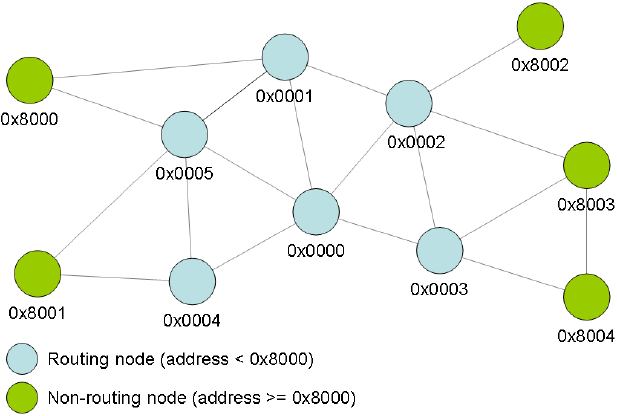
Figure 2-1. Network topology and device types.
2.3 Provided services
Lightweight Mesh provides the following core services:
Basic data services (send and receive data)
Acknowledgments
Routing
Basic security
Power management of the radio transceiver
Interface to the advanced features of the radio transceiver (encryption, energy detection, random number
generation, etc)
An application running Lightweight Mesh is responsible for:
Network management (discovery, joining, commissioning, etc)
Advanced network operation scenarios (sleeping routers, parent-child relationship, data delivery to the
sleeping nodes, etc)
Retries to send data in case of failures
Defining message payload format
Advanced security
Power management of the MCU
Interfacing hardware peripherals (ADC, PWM, EEPROM, etc)
3. Lightweight Mesh Architecture
3.1 Architecture highlights
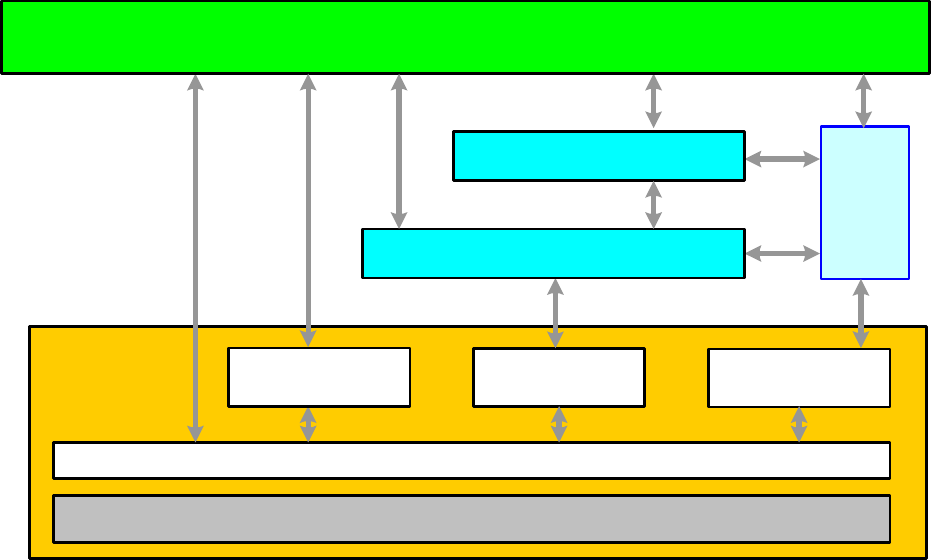
High level architecture of the Lightweight Mesh stack is presented on the Figure 3-1. Lightweight Mesh code is
separated into a number of logical levels each providing a set of APIs accessible for the user. The Stack is designed to
provide only functions absolutely necessary for wireless communication, and it is expected that the rest will be created
by the user, or provided by third-party libraries, if required.
Figure 3-1. Lightweight Mesh architecture.
Hardware Platform (i.e. Microcontroller, Board, Configuration)
TRx Access - SPI,
GPIO and IRQ
Services/Drivers
System
Services
Application
PHY
NWK
ASF Timers
Sleep
Radio physical layer (PHY) provides functions for radio transceiver access. Some of them are accessible only
by the network layer (request to send data, data indication); some of them can be used from the application
(channel selection, random number generation, energy detection, etc.)
Network layer (NWK) provides core stack functionality, which is described in detail throughout this document
System services provide common functions for all layers, which are necessary for normal stack operation.
System services include basic types and definitions, software timers, default configuration parameters,
encryption module access, etc.

3.2 Naming conventions
Lightweight Mesh uses a well defined set of naming conventions that make it very easy to read the source code and
reduce application development time. Here are the basic rules:
Each API function name is prefixed by the name of the layer where the function resides. For example, the
NWK_SetAddr() function is contributed by the network layer of the stack
Each function name prefix is followed by an underscore character separating the prefix from the descriptive
function name
The descriptive function name may have a Req, Ind or Conf suffix, indicating the following:
Req corresponds to the requests from the user application to the stack (for example, NWK_DataReq())
Ind corresponds to the asynchronous indication of events propagated to the user application from the
stack (for example, NWK_DataInd())
Conf corresponds to the user-defined callbacks for the asynchronous requests, which confirm the
request's execution
Each structure and type name carries a _t suffix, standing for type
Enumeration and macro variable names are in capital letters
It is recommended that the application developer adhere to the aforementioned naming conventions in the user
application.
3.3 File system layout
The file system layout closely reflects the architecture of the Lightweight Mesh stack.
Table 3-1. Lightweight Mesh file system layout.
Directory
Table Text
apps
Sample applications
doc
Documentation
source/nwk
Network layer
source/phy
Radio physical layer
source/sys
System services
4. Network Layer Specification
4.1 General Lightweight Mesh frame format
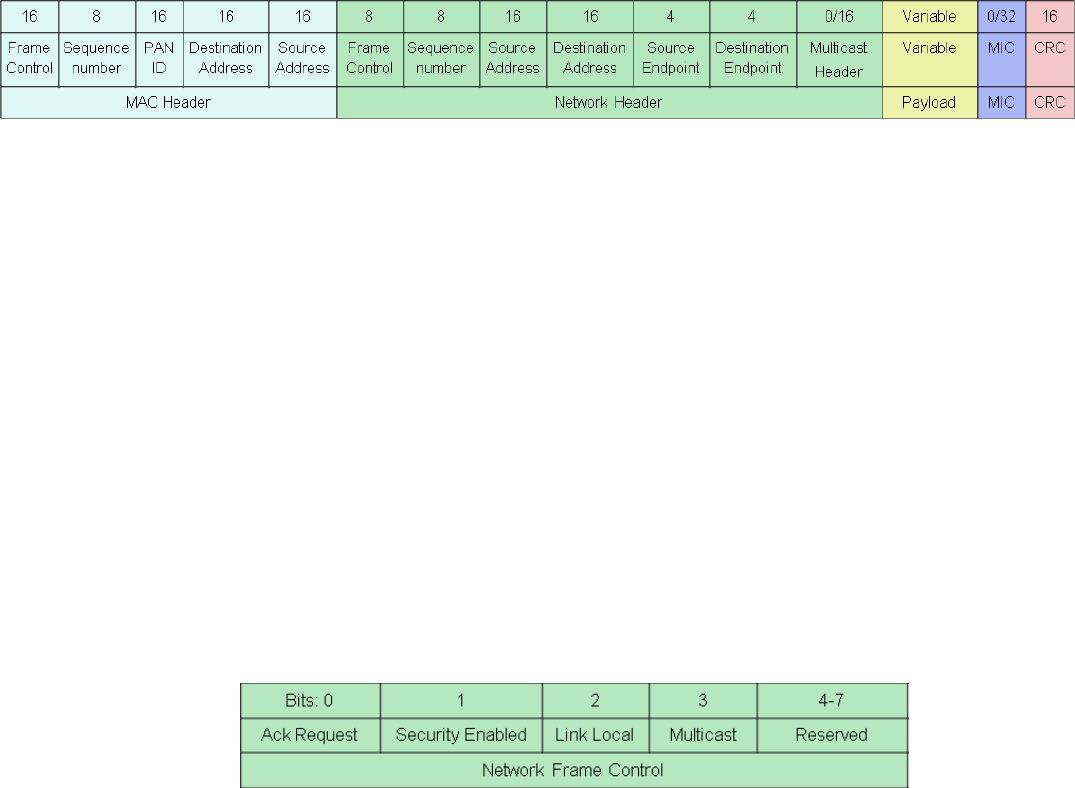
The Lightweight Mesh network header and application payload are encapsulated inside the standard IEEE 805.15.4
data frame payload (see [1]), but the stack itself does not adhere to the standard, so it will not receive and process IEEE
805.15.4 command frames. Figure 4-1 illustrates a general frame format composed of an IEEE 805.15.4 MAC header,
network header, application payload, optional message integrity code (MIC) and a check sum (CRC).
Figure 4-1. General Lightweight Mesh frame format.
The following settings are used for a MAC Frame Control Field as described in [1]:
Frame Type: Data
Security Enabled: False
Frame Pending: False
Acknowledgment Request: True for unicast frames and False for broadcast frames
PAN ID Compression: True
Destination Addressing Mode: 16-bit short address
Frame Version: 0
Source Addressing Mode: 16-bit short address
This gives two possible values for the MAC Frame Control Field that can be generated and recognized by the stack:
0x8841 for broadcast frames, and 0x8861 for unicast frames.
4.1.1 Frame Control field
The Frame Control field is 1 byte in length and contains control information for the frame. The Frame Control field shall
be formatted as illustrated in the Figure 4-2.
Figure 4-2. Lightweight Mesh Frame Control field format.
4.1.1.1 Acknowledgment Request subfield
The Acknowledgment Request subfield is 1 bit in length and specifies whether an acknowledgment is required from the
destination node. If this subfield is set to one, the destination node shall send an acknowledgment command if frame
was received and processed. If this subfield is set to zero, the destination device shall not send an acknowledgment
frame (for exceptions see Section 4.3).
4.1.1.2 Security Enabled subfield
The Security Enabled subfield is 1 bit in length, and it shall be set to one if the frame payload is encrypted, and shall be
set to zero otherwise. Message Integrity Code (MIC) should be present if the Security Enabled subfield is set to one.
4.1.1.3 Link Local subfield
The Link Local subfield is 1 bit in length, and it may be set to one to prevent neighboring nodes from rebroadcasting a
frame. This subfield is only valid for broadcast frames and has no effect on unicast frames.

4.1.1.4 Multicast subfield
The Multicast subfield is 1 bit in length, and it shall be set to one if the destination address is a group address, and shall
be set to zero otherwise. Multicast Header should be present if the Multicast subfield is set to one.
4.1.1.5 Reserved subfield
The Reserved subfield is 4 bits in length, and it shall be set to 0.
4.1.2 Sequence Number field
The Sequence Number field is 1 byte in length and specifies the sequence identifier for the frame. The Sequence
Number field shall be increased by 1 for every outgoing frame originating on the node and it should not change for
routed frames.
4.1.3 Source Address field
The Source Address field is 2 bytes in length and specifies the network address of the node originating the frame.
4.1.4 Destination Address field
The Destination Address field is 2 bytes in length and specifies the network address of the destination node or group
address for multicast messages. Meaning of the Destination Address field is defined by the Multicast subfield of the
Network Frame Control field. The Destination Address field can be set to 0xffff for broadcast frames.
4.1.5 Source Endpoint field
The Source Endpoint field is 4 bits in length and specifies the source endpoint identifier. Value of 0 is reserved for a
stack command endpoint.
4.1.6 Destination Endpoint field
The Destination Endpoint field is 4 bits in length and specifies the destination endpoint identifier. Value of 0 is reserved
for a stack command endpoint.
4.1.7 Multicast Header field
The Multicast Header field is 2 bytes in length and contains control information for the multicast frame. The Multicast
Header field shall be formatted as illustrated in the Figure 4-3.
Figure 4-3. Lightweight Mesh Multicast Header format.
4.1.7.2 Non-member Radius subfield
The Non-member Radius subfield is 4 bits in length and specifies remaining radius (number of hops) to which nodes
that do not belong to the group indicated by the Destination Address field will distribute a frame. If a node that does not
belong to the group receives a frame with Non-member Radius subfield equal to 0 it should indicate this frame to the
application, but should not resend it any further. On the originating node this subfield should have the same value as
Maximum Non-member Radius subfield. Nodes that belong to the group indicated by the Destination Address field shall
set Non-member Radius subfield equal to the value of Maximum Non-member Radius subfield before resending a
frame.
4.1.7.3 Maximum Non-member Radius subfield
The Maximum Non-member Radius subfield is 4 bits in length and specifies maximum radius (number of hops) to which
nodes that don’t belong to the group indicated by the Destination Address field will distribute a frame. The value of this
subfield is set by the originating node and should not be changed by the resending nodes.
4.1.7.4 Member Radius subfield
The Member Radius subfield is 4 bits in length and specifies remaining radius (number of hops) to which nodes that
belong to the group indicated by the Destination Address field will distribute a frame. If a node that belongs to the group
receives a frame with Member Radius subfield equal to 0 it should indicate this frame to the application, but should not
resend it any further. On the originating node this subfield should have the same value as Maximum Member Radius
subfield. Nodes that do not belong to the group indicated by the Destination Address field shall set Member Radius
subfield equal to the value of Maximum Member Radius subfield before resending a frame.
4.1.7.5 Maximum Member Radius subfield
The Maximum Member Radius subfield is 4 bits in length and specifies maximum radius (number of hops) to which
nodes that don’t belong to the group indicated by the Destination Address field will distribute a frame. The value of this
subfield is set by the originating node and should not be changed by the resending nodes.
4.2 Format of individual command frames
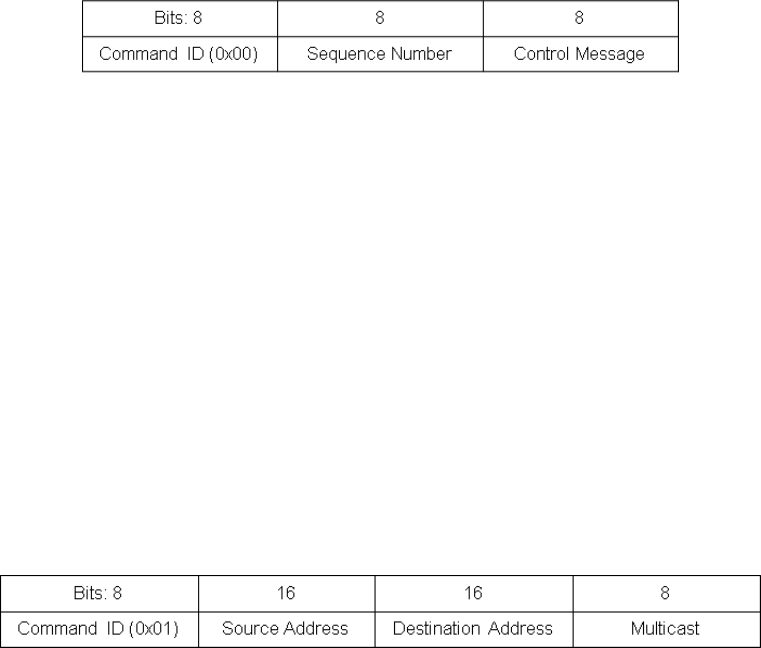
4.2.1 Acknowledgment Command frame format
Acknowledgment Command frame is generated in response to the received frame if Ack Request subfield of the
Network Frame Control field is set to one. Additionally Acknowledgment Command frame is generated during native
route discovery process to establish reverse route (see Section 4.3 for details). Figure 4-4 illustrates the
Acknowledgment Command frame format.
Figure 4-4. Acknowledgment Command frame format.
4.2.1.2 Command ID field
The Command ID field is 1 byte in length, and it contains a constant value (0x00).
4.2.1.3 Sequence Number field
The Sequence Number field is 1 byte in length, and it contains a network sequence number of a frame that is being
acknowledged.
4.2.1.4 Control Message field
The Control Message field is 1 byte in length, and it contains an arbitrary value that can be set on the sending side. This
filed can be used to provide additional instruction to the receiving side.
4.2.2 Route Error Command frame format
Route Error Command frame is generated in response to the received frame in case if routing was required and node
could not locate a valid routing table entry to perform the routing. Figure 4-5 illustrates Route Error Command frame
format.
Figure 4-5. Route Error Command frame format.
4.2.2.2 Command ID field
The Command ID field is 1 byte in length, and it contains a constant value (0x01).
4.2.2.3 Source Address field
The Source Address field is 2 bytes in length, and it contains a source network address from the frame that cannot be
routed.
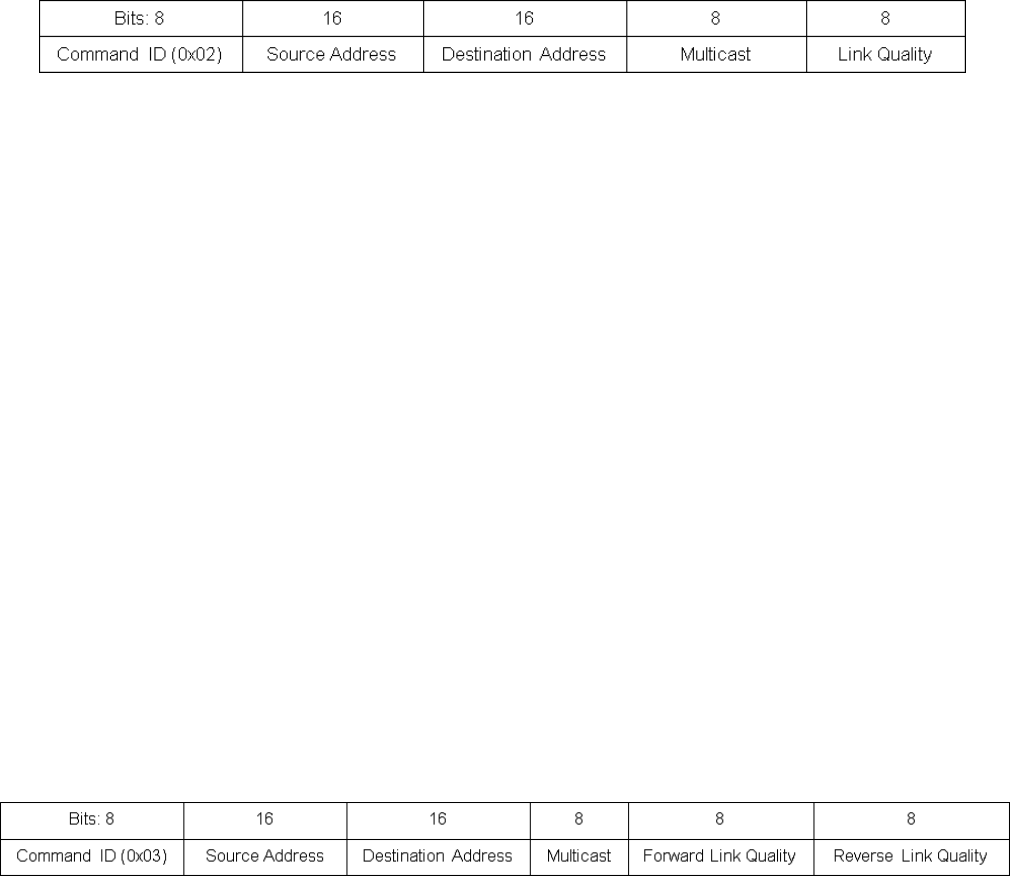
4.2.2.4 Destination Address field
The Destination Address field is 2 bytes in length, and it contains a destination network address or a group ID (as
indicated by Multicast field) from the frame that cannot be routed.
4.2.2.5 Multicast field
The Multicast field is 1 byte in length, and it shall be set to 0 if Destination Address field contains a network address or
to 1 if Destination Address field contains a group ID.
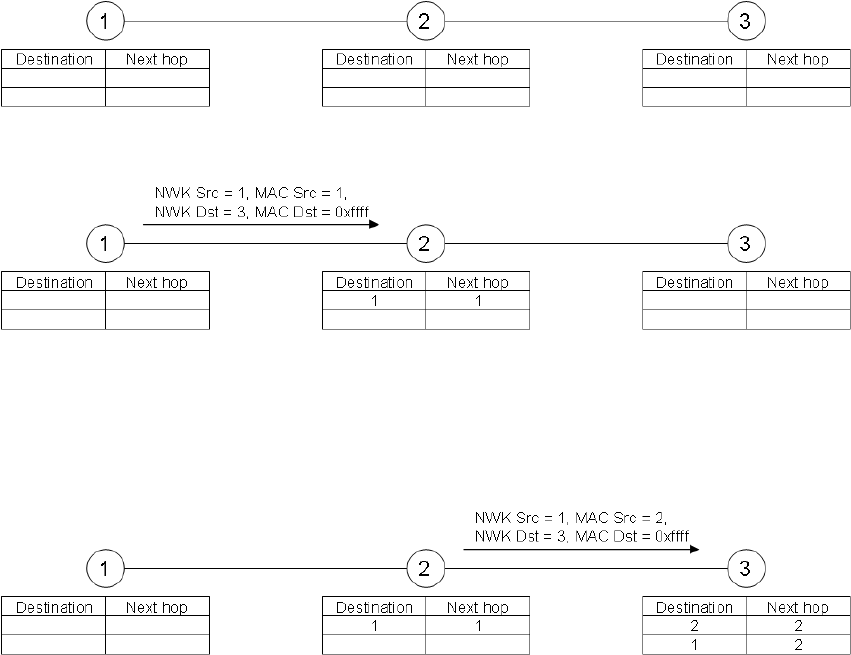
4.2.3 Route Request Command frame format
Route Request Command frame is generated in response to the application request to send the data in case if the
Routing Table does not contain a valid entry for the destination address. Figure 4-6 illustrates Route Request Command
frame format.
Figure 4-6. Route Request Command frame format.
4.2.3.2 Command ID field
The Command ID field is 1 byte in length, and it contains a constant value (0x02).
4.2.3.3 Source Address field
The Source Address field is 2 bytes in length, and it contains a source network address from the frame that cannot be
routed.
4.2.3.4 Destination Address field
The Destination Address field is 2 bytes in length, and it contains a network address of the destination node or a group
ID of the destination group as indicated by Multicast field.
4.2.3.5 Multicast field
The Multicast field is 1 byte in length, and it shall be set to 0 if Destination Address field contains a network address or
to 1 if Destination Address field contains a group ID.
4.2.3.6 Link Quality field
The Link Quality field is 1 byte in length, and it contains a link quality value of the potential route accumulated over all
hops towards the destination. Originating node should set Link Quality field to 255. Each node resending a Route
Request Command frame must update the Link Quality field value with the value of LQI from the received frame.
4.2.4 Route Reply Command frame format
Route Reply Command frame is generated in response to the received Route Request Command frame in case if newly
discovered route is better than any of the previously discovered routes (see Section 4.3 for details). Figure 4-7
illustrates Route Reply Command frame format.
Figure 4-7. Route Reply Command frame format.
4.2.4.2 Command ID field
The Command ID field is 1 byte in length, and it contains a constant value (0x03).
4.2.4.3 Source Address field
The Source Address field is 2 bytes in length, and it contains a source network address from the frame that cannot be
routed.

4.2.4.4 Destination Address field
The Destination Address field is 2 bytes in length, and it contains a network address of the destination node or a group
ID of the destination group as indicated by Multicast field.
4.2.4.5 Multicast field
The Multicast field is 1 byte in length, and it shall be set to 0 if Destination Address field contains a network address or
to 1 if Destination Address field contains a group ID.
4.2.4.6 Forward Link Quality field
The Forward Link Quality field is 1 byte in length, and it contains a value of the Link Quality field from the corresponding
Route Request Command Frame. The value of this field should not be changed by nodes resending the response
towards the originator.
4.2.4.7 Reverse Link Quality field
The Reverse Link Quality field is 1 byte in length, and it contains a link quality value of the discovered route
accumulated over all hops towards the originator. Originating node should set Reverse Link Quality field to 255. Each
node resending a Route Reply Command frame must update Link Quality field value with the value of LQI from the
received frame. The value of Reverse Link Quality is used to compare routes during the route discovery process.
4.3 Routing
4.3.1 Overview
Lightweight Mesh supports two routing algorithms:
Native routing.
This is the original Lightweight Mesh algorithm; it is simple, compact and does not use additional commands to
perform route discovery. But this algorithm cannot guarantee that discovered routes are optimal since it
performs only local optimizations. It also cannot be used to discover routes to the groups.
AODV routing.
This is more standard algorithm; it uses additional commands to perform route discovery and route discovery
process might lake longer time. This algorithm selects optimal routes and can be used to discover routes to the
groups.
Both routing algorithms use Routing Table for their operation. A Routing Table consists of routing entries. Each routing
entry includes the fields described in Figure 4-8. The Routing Table entries have the same format for both algorithms,
but they use slightly different approach to entry maintenance.
Figure 4-8. Routing Table entry fields.
Name
Size, bits
Description
fixed
1
Indicates a fixed entry that cannot be removed even if destination node is no longer
reachable. Stack will never create entries with this field set to one, but application may use it
for creating static routes
multicast
1
Indicates a multicast entry. If this field is set to one then dstAddr field contains a group ID
reserved
2
Reserved and should be set to 0
score
4
Indicates entry health. If the value of this field reaches 0, entry is removed from the Routing
Table
dstAddr
16
Destination network address or a group ID as indicated by multicast field
nextHopAddr
16
Network address of the next node on the route towards the destination node
rank
8
Indicates how often entry is used. Entry with the lowest rank is replaced first if Routing Table
is full and a new entry has to be added
lqi
8
Link quality of the route:
For native routing algorithm this field contains LQI of the last received from the node
with address nextHopAddr. Value of this field might be updated by the stack in run
time
For AODV routing algorithm this field contains a value of the Reverse Link Quality
field from the Route Reply Command that was used to establish this route. Stack
will not update value of this field after the route has been discovered
Routing Table entries are accessible to the application though a set of APIs are described in Chapter 5. No verification
is performed against application modifications to the Routing Table, so application needs to be extra careful when
making changes to the Routing Table. Application has to make sure that at any time there is at least one entry in the
Routing Table that is not fixed and available for allocation.
For the purpose of route discovery Destination Address is an actual network address of the node if multicast support is
disabled, and a combination of a Destination Address field and Multicast flag if multicast support is enabled.
4.3.2 Native routing
4.3.2.1 Route discovery and establishment
In Lightweight Mesh with the native routing algorithm there is no special route discovery procedure; routes are
discovered as part of normal data delivery. This way, the penalty of not having a route is very low and comparable to
the cost of sending a regular broadcast frame.
Route discovery algorithm is illustrated below. Nodes marked “1”, “2” and “3” are routing nodes. This example makes
the following assumptions:
Node 1 wants to send data to node 3
Routing Tables on all nodes are empty
There is no direct path between node 1 and node 3
Initial network configuration is shown on the Figure 4-9.
Figure 4-9. Initial network configuration.
Figure 4-10. First step of a data transfer involving route discovery.
1. Node 1 sends a frame with the Network Destination Address set to 3, and the MAC Destination Address set to
0xffff.
2. Node 2 receives this frame, and adds the entry for node 1 to its Routing Table.
Figure 4-11. Second step of a data transfer involving route discovery.
3. Node 2 broadcasts the frame (because MAC Destination Address is set to 0xffff).
4. Node 3 receives this frame, and adds the entry for node 2 to its Routing Table.
5. Node 3 adds an entry for node 1 to its Routing Table (from a Network Source Address).
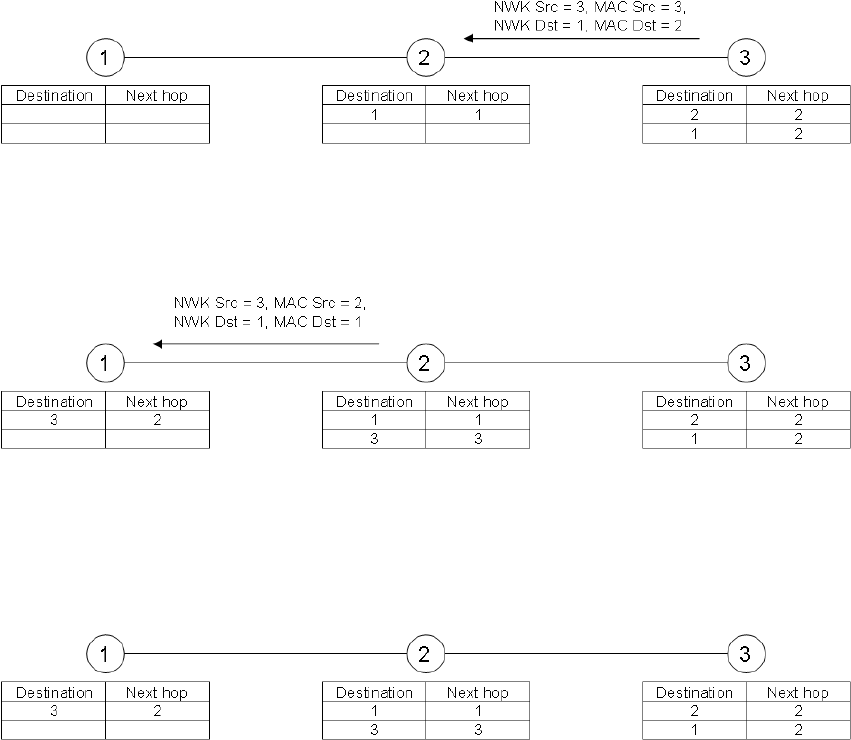
Figure 4-12. Third step of a data transfer involving route discovery.
6. Node 3 handles the frame and sends an Acknowledgment frame, even if one was not requested. This is done
to establish a reverse route. Node 3 now knows the route to node 1, so a unicast frame is sent.
Figure 4-13. Final step of a data transfer involving route discovery.
7. Node 2 receives the frame and adds the route to node 3 to its Routing Table.
8. Node 2 has a route entry for node 1, so it routes the received frame to its final destination.
9. Node 1 receives the frame and adds the route to node 3 to its Routing Table.
Figure 4-14. Final network configuration after a data transfer involving route discovery.
Now a route between node 1 and node 3 is established and it will be used for the following frames. Note that during
route discovery, all nodes along the route learned how to route data to the destination node. Those route entries will be
used for routing purposes without further route discovery. Eventually, given big enough Routing Tables, all nodes in the
network will discover all possible (used) routes.
Also note that for some nodes discovery of one route created more than one entry in the Routing Table. This is a
common property of the routing algorithms and it should be kept in mind when selecting Route Table size for nodes that
are expected to route a lot of traffic. At the same time there is an upper bound on the number of entries in the routing
table which is the maximum number of nodes in the network.
4.3.2.2 Route maintenance and utilization
The Routing Table is updated with every sent or received frame.
When a frame is received, the Routing Table is updated in the following way:
1. No action is performed if the source MAC address indicates that the sending device is a non-routing node (it
cannot be used as part of the route).
2. If there is an entry for the source network address, and this entry contains a next hop address different from
the source MAC address of the received frame, and the LQI of the received frame is better than the LQI in the
routing entry, then the entry is updated to use the source node as the next hop. Entry score is set to
NWK_ROUTE_DEFAULT_SCORE.
3. If there is an entry for the source network address, and this entry contains a next hop address different from
the source MAC address of the received frame, and if the received frame is a route discovery frame (MAC
address is 0xffff and network address is not 0xffff), then the entry is updated to use the source node as the
next hop. Entry score is set to NWK_ROUTE_DEFAULT_SCORE.
4. If there is no entry for the source network address, then a new entry is created in the Routing Table.
5. LQI of the entry (existing or newly created) is set to the LQI of the received frame.
When a frame is sent the routing table is updated in the following way:

6. If there is an entry for the Destination Address, then
1. If the frame was sent successfully, then the entry score is set to NWK_ROUTE_DEFAULT_SCORE.
2. Otherwise the entry score is decreased. If the entry score drops to 0, then the entry is removed from the
Routing Table.
7. If there is no entry for the Destination Address, then no action is performed.
Essentially this algorithm performs local optimizations, so it establishes and maintains routes with the best link quality
on each link, but it does not guarantee shortest routes.
4.3.2.3 Route invalidation and removal
Routing Table entries never expire or timeout, but there are a few ways an entry can be altered:
1. Routing Table entry is replaced by a new entry if there are no free entries, and a new entry has to be placed in
the Routing Table. The least active entries are replaced first (activity of the entry is indicated by the rank field
in the entry).
2. Routing Table entry is removed if its score drops to 0.
3. Routing Table entry is removed when a Route Error command, with the Destination Address field equal to the
route entry destination address, is received.
4.3.3 AODV routing
4.3.3.1 Route discovery and establishment
AODV routing algorithm implies a special route discovery procedure. This procedure is stateful, which means that every
node participating in the route discovery must keep track of the progress and update its information about the routes
being discovered based on the newly received frames. Information about candidate routes is stored in the Route
Discovery Table. After route discovery process is complete this information is transferred into the Routing Table. Size of
the Route Discovery Table defines how many route discovery processes the node can participate in simultaneously.
Fields of the Route Discovery Table are described in the Table 4-1. A Route Discovery Table entry corresponding to the
route discovery process is uniquely identified by the triplet of fields (srcAddr, dstAddr, multicast).
Table 4-1. Route Discovery Table entry fields.
Name
Size, bits
Description
srcAddr
16
Network address of the node requesting the route
dstAddr
16
Network address of the destination node or a group ID as indicated by multicast field
multicast
8
Indicates a multicast route discovery. If this field is set to 1 then dstAddr field contains a
group ID
senderAddr
16
Network address of the node from which the last selected Route Request Command
frame was received. This is a next hop address towards the source node and all Route
Reply Command frames will be sent to this address
forwardLinkQuality
8
Accumulated Link Quality from a source node
reverseLinkQuality
8
Accumulated Link Quality from a destination node
timeout
16
Amount of time left for the route discovery process
Route discovery process is initiated if there is no entry in the Routing Table corresponding to the Destination Address of
the current data transmission request.
Initiating node should check if an entry matching current request parameters already exists in the Route Discovery
Table. If such entry exists then node should wait for completion of ongoing route discovery process and use its results
at the end.
Then node should create a new entry in the Route Discovery Table with parameters from the current data transmission
request. If the Route Discovery Table is full and a new entry cannot be added, then data transmission request should be
confirmed with NWK_NO_ROUTE_STATUS status.
A route discovery process continues with the source node generating a Route Request Command frame. This frame is
sent as a local broadcast, which means that only nodes within direct reach from the source node will receive it. Link
Quality field of the Route Request Command frame must be set to 255.
Any routing node receiving a Route Request Command frame must calculate updated link quality value based on the
Link Quality field of the Route Request Command frame and LQI of the received frame. The Node must then check in
its Route Discovery Table if an entry for this route discovery process already exists:
1. If an entry does not exist a new entry should be created:
1. If Route Discovery Table is full and it is impossible to add a new entry, any further processing of the
Route Request Command frame should be terminated.
2. If new entry was added to the Route Discovery Table the value of forwardLinkQuality field should be set
to the updated link quality value. Then the node should generate Route Request Command frame with
Link Quality field set to the value of forwardLinkQuality field of the Route Discovery Table entry.
2. Otherwise node should check the value of forwardLinkQuality field:
1. If updated link quality value is larger than the value of forwardLinkQuality field the node should update
information in the Route Discovery Table entry based on the information from the received Route
Request Command frame. The node should then generate Route Request Command frame with Link
Quality field set to the value of forwardLinkQuality field of the Route Discovery Table entry.
2. Otherwise node should terminate any further processing of the Route Request Command frame.
3. If the node is the destination node as indicated by the Route Request Command frame then, instead of
generating Route Request Command frame, the node must generate Route Reply Command frame setting
Forward Link Quality field equal to the value of forwardLinkQuality field of the Route Discovery Table entry and
Reverse Link Quality field equal to 255.
Any routing node receiving a Route Reply Command frame must calculate updated reverse link quality value based on
the Reverse Link Quality field of the Route Reply Command frame and LQI of the received frame. The node must then
check in its Route Discovery Table if an entry for this route discovery process exists:
1. If an entry does not exist, any further processing of the frame should be terminated.
2. Otherwise the node should check the value of reverseLinkQuality field:
1. If the value of reverseLinkQuality field is less than the value of Forward Link Quality field of the Route
Reply Command frame, the node should update reverseLinkQuality field with the value of Forward Link
Quality field and update routing tables according to the information from the Route Discovery Table and
Route Reply Command frame. The node should then generate Route Reply Command frame with Link
Quality field set to the value of updated reverse link quality value.
2. Otherwise the node should terminate any further processing of the Route Request Command frame.
4.3.3.2 Route maintenance and utilization
The Routing Table is updated only based on the results for transmitted frames. When a frame is sent the Routing Table
is updated in the following way:
1. If there is an entry for the Destination Address, then:
If the frame was sent successfully, the entry score is set to NWK_ROUTE_DEFAULT_SCORE.
Otherwise the entry score is decreased. If the entry score drops to 0, the entry is removed from the
Routing Table.
2. If there is no entry for the Destination Address, no action is performed.
This means that routes discovered during the route discovery process are never updated based on the received frames
and the only way for the route to change is to be removed from the Routing Table and be discovered again. This
algorithm makes sure that during normal operation routes will follow the same optimization criteria which was used for
route discovery.
4.3.3.3 Route invalidation and removal
Routing Table entries never expire or timeout, but there are a few ways an entry can be altered:
1. Routing Table entry is replaced by a new entry if there are no free entries, and a new entry has to be placed in
the Routing Table. The least active entries are replaced first (activity of the entry is indicated by the rank field
in the entry).
2. Routing Table entry is removed if its score drops to 0.
3. Routing Table entry is removed when a Route Error command, with the Destination Address field equal to the
route entry destination address, is received.
4.4 Transmission, Reception, and Acknowledgement
Any received frame undergoes duplicate rejection screening to detect and reject possible duplicate frames. This
screening is performed using Duplicate Rejection Table – a table that for each node contains a network sequence
number of the last received frame. The same Duplicate Rejection Table is used to keep track of already resent
broadcast frames and for detection and prevention of the loops in the routes. The sections below assume that received
frame has passed through the duplicate rejection filter.
4.4.1 Unicast messaging
Unicast frames are frames with a Multicast subfield of the Network Frame Control field set to 0 and destination network
address not equal to 0xffff.
When unicast message has to be sent:
1. If there is an entry in the Routing Table for the Destination Address of the frame, then destination MAC
address of the frame is set to the nextHopAddr field of the corresponding Routing Table entry.
2. If there is no entry in the Routing Table for the destination network address of the frame, then route discovery
process is initiated.
A received frame has to be routed if the MAC destination address is equal to the node’s own address and the network
destination address is not equal to the node’s own address.
When routing is needed, the following conditions are evaluated:
1. If there is an entry in the Routing Table for the destination network address, then the destination MAC address
of the frame is replaced by the next hop address from the Routing Table, and the frame is sent.
2. If there is no entry in the Routing Table for the destination network address, then a Route Error command is
sent to the originator of the frame.
A received frame is acknowledged in two cases:
3. If acknowledgment was explicitly requested by the application. In this case acknowledgment is sent after
application was notified about the frame. This gives a chance to interrupt the acknowledgment process.
4. If native route discovery is used and received frame had a unicast network address and broadcast MAC
address (route discovery). In this case acknowledgment is used to facilitate discovery of the reverse route.
4.4.2 Broadcast messaging
Broadcast frames are frames with a Multicast subfield of the Network Frame Control field set to 0 and destination
network address equal to 0xffff.
When broadcast frame has to be sent, destination MAC address is set to 0xffff (broadcast) and frame is transmitted.
Route discovery is not performed for broadcast frames.
When broadcast frame is received the node has to resend the frame without making any additional modifications to the
network header.
Broadcast fames cannot be acknowledged.
4.4.3 Multicast messaging
Multicast frames are frames with a Multicast subfield of the Network Frame Control field set to 1 and Destination
Address field set to the group address. In addition to a regular Network Header, multicast frames should have a
Multicast Header.
For the purpose of multicast message delivery all nodes in the network are divided into two sets:
Member nodes – nodes that belong to the group indicated by the Destination Address field
Non-member nodes – all other nodes in the network
When multicast message has to be sent:
1. Multicast Header subfields should be filled as following: Maximum Non-member Radius and Maximum Member
Radius subfields should be set as per application request, Non-member Radius and Member Radius subfields
should be set equal to the Maximum Non-member Radius and Maximum Member Radius subfields
respectively.
2. If originating node is a member of the group then frame is sent as a broadcast. This mode can be used with
either native or AODV route discovery enabled since actual route discovery will not be performed.
3. If originating node is not a member of the group the frame is sent as a regular unicast frame towards the
closest member node. This mode requires AODV route discovery process to be used since native route
discovery cannot discover multicast routes.
When multicast frame is received by the member node:
1. If frame is received as a unicast the node should resend the frame as a broadcast without making any
modifications to the Multicast Header.
2. If frame is received as a broadcast then:
1. If Member Radius subfield is above 0 the node should decrement Member Radius subfield by one, set the
value of Non-member Radius subfield equal to the value of Maximum Non-member Radius subfield and
send the frame as a broadcast.
2. If Member Radius subfield is 0 the message should be indicated to the application and any further
processing of the frame should be terminated.
When multicast frame is received by the non-member node:
1. If frame is received as a unicast then it should be forwarded towards the next hop node on the route to the
group identified by the Destination Address.
2. If frame is received as a broadcast then:
1. If Non-member Radius subfield is above 0 then node should decrement Non-member Radius subfield by
one, set the value of Member Radius subfield equal to the value of Maximum Member Radius subfield and
send the frame as a broadcast.
2. If Non-Member Radius subfield is 0 then any further processing of the frame should be terminated.
Multicast messages cannot be acknowledged.
4.4.4 Link local messaging
A broadcast frame sent with Link Local subfield of the Network Frame Control field set to 1 will not be resent by the
receiving nodes. In all other respects link local broadcast frames are processed as regular broadcast frames.
A unicast frame sent with Link Local subfield of the Network Frame Control field set to 1 will not be routed, but will be
received if destination device is within a local link range.
4.4.5 Broadcast PAN ID messaging
A frame sent to the broadcast PAN ID (0xffff) is received by nodes with the requested destination address in all
immediately accessible PANs. Frames with broadcast PAN ID cannot be routed or acknowledged.
4.5 Security
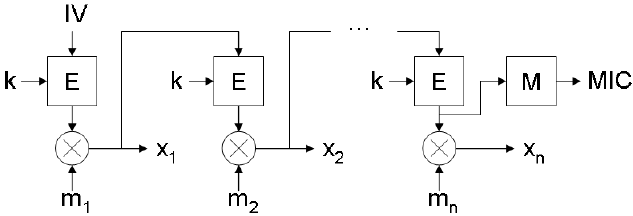
Figure 4-15. Lightweight Mesh support two base encryption algorithms: hardware accelerated AES-128 (where
supported by the hardware) and software XTEA (all platforms). Both AES and XTEA are block-based
algorithms, so messages that exceed the size of the block have to be split into a set of blocks. After
splitting and encryption, blocks are chained in order to derive a Message Integrity Code (MIC) that
covers the entire message. The chaining method is illustrated in the Figure 4-15. Only the encryption
operation is utilized for both encryption and decryption of messages; symmetry of the binary exclusive-
or operation is used to achieve this. Encryption blocks chaining.
Here:
• IV – initialization vector, which is constructed based on the information from the frame header
• K – 128-bit key
• E – base encryption block (AES or XTEA)
• M – message integrity code transform
• MIC – message integrity code (32 bits)
• m1, m2, …, mn – 128-bit blocks of the unencrypted message
• x1, x2, …, xn – 128-bit blocks of the encrypted message
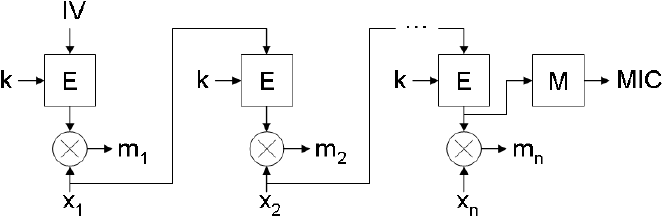
Figure 4-16. Decryption is performed in a similar way. It is illustrated in Figure 4-16.Decryption blocks chaining.
Message integrity code is included in all encrypted frames. It allows verification of the message integrity, validation of the key,
and also protection against altering the network header of the message.
Few notes about security:
• There is no protection against replay attacks; it should be implemented on the application layer if required
• The entire network uses the same shared encryption key, so if additional protection is required, it should be implemented on
the application layer as well
• Although theoretically AES is stronger than XTEA, for external radio chips, encryption keys are sent in plain text over the SPI
bus, so if there is the possibility of physical access to the devices, software XTEA implementation might offer stronger overall
protection.
5. Application Programming
Following sections describes the procedure for writing a basic LW Mesh Application.
5.1 WSNDemo sample application
The WSNDemo application implements a typical wireless sensor network scenario, in which one central node collects
the data from a network of sensors and passes this data over a serial connection for further processing. In the case of
the WSNDemo this processing is performed by the WSNMonitor PC application. The BitCloud® Quick Start Guide [2]
provides a detailed description of the WSNDemo application scenario, and instructions on how to use WSNMonitor.
The majority of the information in [2] applies to the WSNDemo application running on top of Lightweight Mesh stack.
However since BitCloud is a ZigBee® PRO stack, there are a few differences in the protocol:
• Device types (Coordinator, Router and End Device) are simulated on the application level; there is no such
separation in Lightweight Mesh on the stack level
• The value of the extended address field is set equal to the value of the short address field
• For all frames, the LQI and RSSI fields are filled in by the coordinator with the values of LQI and RSSI from the
received frame. This means that nodes that are not connected to the coordinator directly will have the same values
as the last node on the route to the coordinator
• Sensor data values are generated randomly on all platforms
• Sending data to the nodes on the network is not implemented and not supported in this demo application
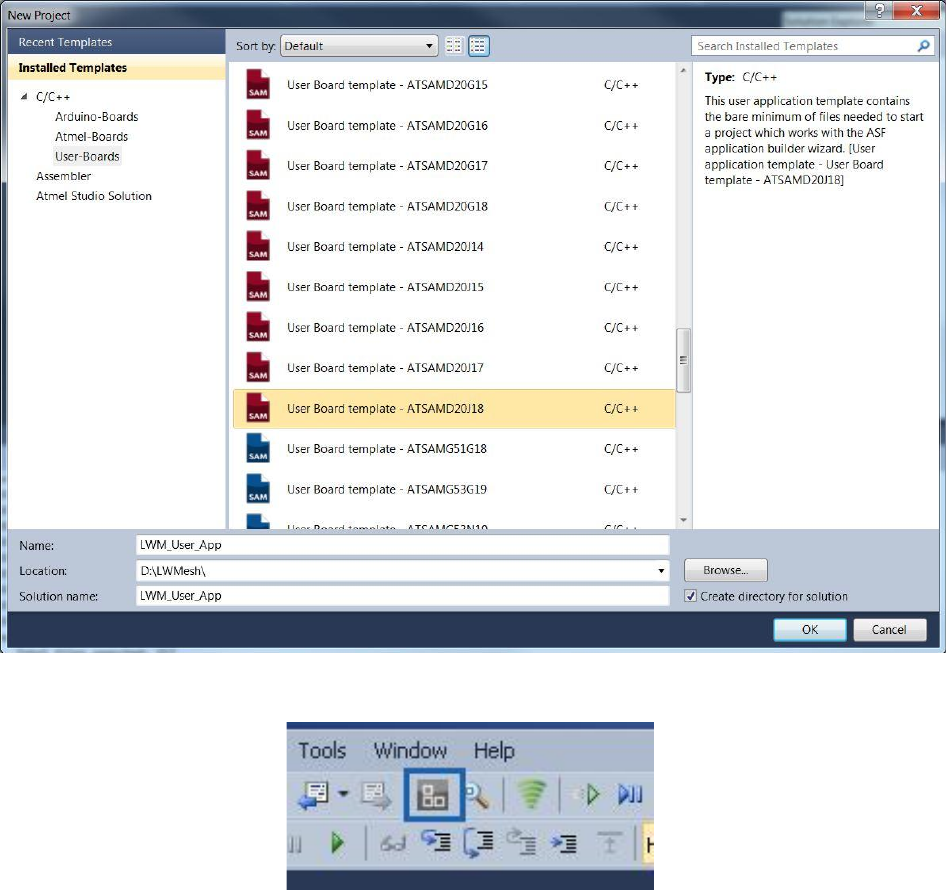
5.2 Creating a New Application from ASF
This section describes the steps involved in the inclusion of Light Weight Mesh Stack from ASF for creating a new
application for custom boards.
Open a New Project Window in Atmel Studio and Select ‘User Boards’
Select the User Board of Interest and enter the project name and select “OK”.
Once the project template for the user board is created ,click on the ASF Wizard Icon
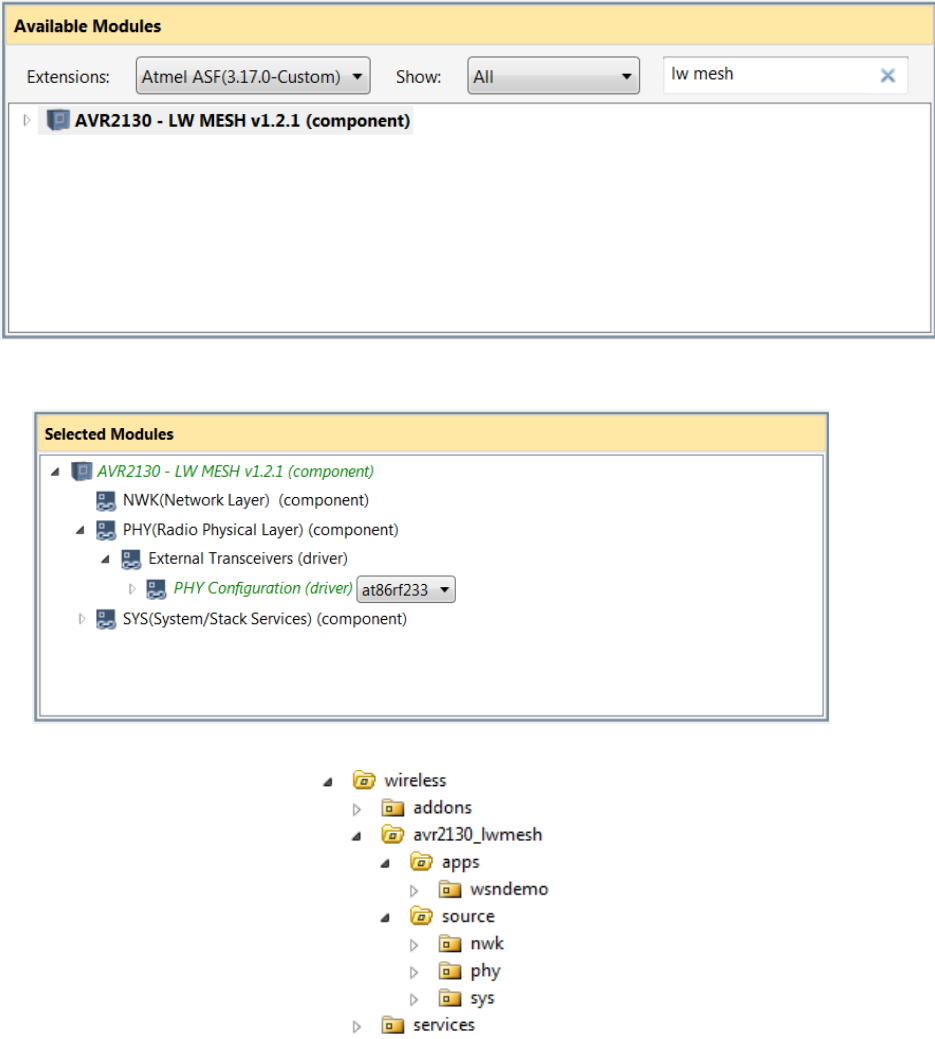
In the ASF Wizard Page you could see the latest ASF version installed. Select AVR2130 - LW Mesh component
by searching for the keyword on the Left side pane and add it to the “Selected modules” pane
Select the transceiver used in the project from the PHY Configuration tab by expanding the AVR2130-LW Mesh
module select apply to add the stack into the Project.
Once the stack is included we could see the folder structure of the stack as below in the Solution Explorer.
Configuring the MCU - TRX Interface:
a. Once the project is created the MCU-TRX interface needs to be configured for proper working of the
PHY layer. In Solution Explorer tab, open the conf_trx_access.h file from ‘config’ folder by double clicking on it. This
file is the configuration file for the mcu-trx interface.
b. Delete the warning message: #warning "Using default values. Edit this conf_trx_access.h file to
modify defines value according to the current board." And add the necessary definitions for the custom board.
c. Add the board initialization api’s in init.c file and include the conf_trx_access.h file in it.

5.3 Typical application structure
Typical Lightweight Mesh application has a structure as shown below.
Typical Lightweight Mesh application
static void APP_TaskHandler(void)
{
// Put your application code here
}
int main(void)
{
SYS_Init();
while (1)
{
SYS_TaskHandler();
APP_TaskHandler();
}
}
On the other hand, if Lightweight Mesh is used inside another environment or task scheduler, it is not necessary to
follow this structure. The only requirement is that SYS_Init() is called before any other Lightweight Mesh function and
SYS_TaskHandler() is called as often as possible.
5.4 Basic network configuration
Below is a list of parameters that should be set in order to send and receive data.
5.4.1 Network address
The network address of the node is set via NWK_SetAddr() function. Parameter addr cannot take value of 0xffff as it is
reserved for broadcast frames.
Setting the network address
NWK_SetAddr(0x0001);
5.4.2 Network Identifier
The network identifier (PAN ID) of the node is set via the NWK_SetPanId() function. Parameter panId cannot take value
of 0xffff as it is reserved.
Setting the network identifier
NWK_SetPanId(0x1234);
5.4.3 Frequency channel
The frequency channel of the node is set via PHY_SetChannel() function. Valid range of values for the channel
parameter on 2.4GHz radios is 11 – 26 (0x0b – 0x1a). For sub-GHz radios this parameter represents channel number
with a valid range of 0 – 10 (0x00 – 0x0a) if frequency band is set to 0, or frequency index otherwise. Refer to the
description of the CC_BAND and CC_NUMBER settings in [3].
Setting the frequency channel
PHY_SetChannel(0x0f);
5.4.4 Frequency band
The frequency band of the node is set via the PHY_SetBand() function. This function is only available for sub-GHz
radios.

Frequency bands and corresponding frequencies are described in [3].
Setting the frequency band
PHY_SetBand(2);
5.4.5 Modulation mode
The modulation mode of the node is set via the PHY_SetModulation() function. This function is only available for sub-
GHz radios. See the description of TRX_CTRL_2 register in [3] for details on various modulation modes.
Setting the modulation mode
PHY_SetModulation(0x35);
5.4.6 Transmit power
The transmit power the node is set via the PHY_SetTxPower() function. This function takes radio-dependent value as a
parameter. Refer to the datasheet for a specific PHY for complete description of the valid input values.
Setting the transmit power
PHY_SetTxPower(0x00);
5.4.7 Receiver state
The transceiver state of the node is set via the PHY_SetRxState() function.
Setting the transceiver state
PHY_SetRxState(true);
5.4.8 Security key
The security key of the node is set via the NWK_SetSecurityKey() function. The size of the security key is 16 bytes.
Setting the security key
NWK_SetSecurityKey((uint8_t *)"Security12345678");
5.4.9 Application endpoints
In order to receive data, the application should register a data indication callback associated with the endpoint identifier.
NWK_OpenEndpoint() function is used to register an endpoint. Endpoint identifier should be greater than 1 and less
than 16. Endpoint identifier 0 is reserved for the network layer command frames.
More than one endpoint can be open at the same time. This allows for implementation of the independent services
running on the device virtually in parallel.
Section 5.6 further explains how to process received data.
Registering the endpoint indication callback
static bool appDataInd(NWK_DataInd_t *ind)
{
// process the frame
return true;
}
NWK_OpenEndpoint(1, appDataInd);

5.5 Sending the data
In order to perform data transmission, the application first needs to create a data transmission request of
NWK_DataReq_t type that specifies the data payload, data payload size, sets various transmission parameters, and
defines the callback function to be executed to inform the application about the transmission results. The
NWK_DataReq() function is used to send the data. Note that NWK_DataReq() must be called only once for the same
NWK_DataReq_t structure until confirmation callback is called. Fields of the NWK_DataReq_t structure, accessible to
the user, are listed in Table 5-1.
Table 5-1. Network data request parameters.
Name
Description
dstAddr
Network address of the destination device
dstEndpoint
Endpoint number on the destination device
srcEndpoint
Local endpoint number
options
Data request options. It may be any combination of the following constants listed in the Table 5-2
(combined using bitwise OR operator “|”)
data
Pointer to the payload data
size
Size of the payload data
confirm
Pointer to the confirmation callback. It should have the following prototype:
“void confirm(NWK_DataReq_t *req)”
status
This field is filled by the stack and can be accessed from the confirmation callback. It can have
one of the values listed in the Table 5-3
control
This field is filled by the stack and can be accessed from the confirmation callback. It contains a
value from the Control field of the Acknowledgment Command frame
Table 5-2. Data request options.
Name
Description
NWK_OPT_ACK_REQUEST
Request an acknowledgment
NWK_OPT_ENABLE_SECURITY
Encrypt the payload
NWK_OPT_BROADCAST_PAN_ID
Set destination PAN ID to 0xffff (broadcast)
NWK_OPT_LINK_LOCAL
Set a Link Local field in the Network Frame Control Field to 1
NWK_OPT_MULTICAST
Set a Multicast field in the Network Frame Control Field to 1 and send a message
to a group indicated by the dstAddr field
Table 5-3. Data request status codes.
Name
Description
NWK_SUCCESS_STATUS
Operation completed successfully
NWK_ERROR_STATUS
Unknown error
NWK_OUT_OF_MEMORY_STATUS
Buffer allocation failed
NWK_NO_ACK_STATUS
Network level acknowledgment was not received
NWK_NO_ROUTE_STATUS
Route to the destination address was not found
NWK_PHY_CHANNEL_ACCESS_FAILURE_STATUS
Radio failed to gain access to the channel
NWK_PHY_NO_ACK_STATUS
Physical level acknowledgment was not received
Sending the data
static uint8_t message;
static NWK_DataReq_t nwkDataReq;
static void appDataConf(NWK_DataReq_t *req)
{
if (NWK_SUCCESS_STATUS == req->status)
// frame was sent successfully
else
// some error happened
}
static void sendFrame(void)
{
nwkDataReq.dstAddr = 0;
nwkDataReq.dstEndpoint = 1;
nwkDataReq.srcEndpoint = 5;
nwkDataReq.options = NWK_OPT_ACK_REQUEST | NWK_OPT_ENABLE_SECURITY;
nwkDataReq.data = &message;
nwkDataReq.size = sizeof(message);
nwkDataReq.confirm = appDataConf;
NWK_DataReq(&nwkDataReq);
}
5.6 Receiving the data
If the application has registered a data indication callback, as described in Section 5.4.9, it will be able to receive data.
When a frame is received and processed by the stack it is indicated to the application via a registered callback function.
This function has the following prototype “bool appDataInd(NWK_DataInd_t *ind)”. Fields of the NWK_DataInd_t
structure are described in Table 5-4. The callback function must return a Boolean value telling the stack whether to
send an acknowledgment frame. This feature allows application data flow control.
Table 5-4. Network data indication structure fields.
Name
Description
srcAddr
Network address of the source device
dstEndpoint
Destination endpoint number (local)
srcEndpoint
Source endpoint number (remote)
options
Data indication options. It may be any combination of the constants listed in the
Table 5-5 (combined using bitwise OR operator “|”)
data
Pointer to the payload data
size
Size of the payload data
lqi
LQI of the received frame
rssi
RSSI of the received frame
Table 5-5. Data indication options.
Name
Description
NWK_IND_OPT_ACK_REQUESTED
Acknowledgment was requested
NWK_IND_OPT_SECURED
Frame was encrypted
NWK_IND_OPT_BROADCAST
Frame was sent to a broadcast address (0xffff)
NWK_IND_OPT_LOCAL
Frame was received from a directly accessible node
NWK_IND_OPT_BROADCAST_PAN_ID
Frame was sent to a broadcast PAN ID (0xffff)
NWK_IND_OPT_LINK_LOCAL
Frame was sent with a Link Local field set to 1
NWK_IND_OPT_MULTICAST
Frame was sent to a group address
The application can set 1 byte of data to be sent in the acknowledgment frame. This is done using the
NWK_SetAckControl() function. This byte can be used to pass additional information to the sending side, for example a
parent can tell a sleeping device not to sleep for a while, and wait for additional data.
Receiving the data
static bool appDataInd(NWK_DataInd_t *ind)
{
if (!appReadyToReceive)

return false;
// process ind->size bytes of the data pointed by ind->data
NWK_SetAckControl(APP_DO_NOT_SLEEP);
return true;
}
5.7 Multicast groups
The multicast groups API are represented by the following functions:
NWK_GroupIsMember() – check if node is a member of a group
NWK_GroupAdd() – add node to the group
NWK_GroupRemove() – remove node from the group
Using multicast groups API
NWK_GroupAdd(0x1234);
if (NWK_GroupIsMember(0x1234))
{
// Now node is a member of 0x1234
}
NWK_GroupRemove(0x1234);
// Node is no longer a member of the group
5.8 Routing Table management
The Routing Table API is represented by the following functions:
NWK_RouteFindEntry() – find an entry in the Routing Table matching requested destination address
NWK_RouteNewEntry() – allocate a new entry in the Routing Table
NWK_RouteFreeEntry() – free previously allocated entry
NWK_RouteNextHop() – get a network address of the next hop node on a route to the requested destination
NWK_RouteTable() – get a pointer to the entire Routing Table
Creating a static route
NWK_RouteTableEntry_t *entry;
entry = NWK_RouteNewEntry();
entry->fixed = 1;
entry->multicast = 0;
entry->score = 1;
entry->dstAddr = 5;
entry->nextHopAddr = 1;
5.9 Busy state management
The network layer provides an API for the stack busy status management. This API is represented by the following
functions:
NWK_Lock() – increment the lock counter
NWK_Unlock() – decrement the lock counter
A positive value of the lock counter will make NWK_Busy() return a true value. This behavior may be used to coordinate
actions between the parts of the application and specifically between the service and the application running in parallel.
NWK_Lock() and NWK_Unlock() must always be called in pairs and in this specific order.
Creating a static route
NWK_Lock();

// NWK_Busy() will return true until corresponding NWK_Lock() is called
NWK_Unock();
// NWK_Busy() will return false unless another lock is set by the stack or
// another part of the application
5.10 Network layer power management
The network layer provides an API to manage the radio transceiver power state. This API is represented by the
following functions:
NWK_Busy() – check if stack is ready to sleep (no frames are being processed at the moment)
NWK_SleepReq() – request to switch radio transceiver into sleep mode. This function should be called only if
the NWK_Busy() function returned true. Radio transceiver is asleep at the function return; there is no special
confirmation callback
NWK_WakeupReq() – request to switch radio transceiver into active mode. Radio transceiver is awake at the
function return; there is no special confirmation callback
Radio transceiver power management
case APP_STATE_PREPARE_TO_SLEEP:
{
if (!NWK_Busy())
{
NWK_SleepReq();
appState = APP_STATE_SLEEP;
}
} break;
...
case APP_STATE_WAKEUP:
{
NWK_WakeupReq();
appState = APP_STATE_SEND;
} break;
5.11 System services
5.11.1 Initialization and task scheduling
Before any Lightweight Mesh APIs can be used the system must be initialized. Initialization is done using the SYS_Init()
function. This function also performs low level hardware initialization, so it is recommended to call this function as early
as possible in the application.
Lightweight Mesh uses cooperative multitasking; in order to run stack internal tasks, the application must call the
SYS_TaskHandler() function as often as possible. Generally this should be done from the main “while (1)” loop.
5.11.2 Software timers
Lightweight Mesh system environment provides support for software timers. Software timers have a low hardware
overhead (they all run from a single hardware timer) and the application can start any number of software timers.
A software timer is described by the SYS_Timer_t structure. Fields of this structure are described in Table 5-6.
Table 5-6. Software timer parameters.
Name
Description
interval
Timer interval in milliseconds

mode
Timer operation mode. One of the following:
SYS_TIMER_INTERVAL_MODE – timer handler will be called once after interval
milliseconds
SYS_TIMER_PERIODIC_MODE – timer handler will be called every interval milliseconds
until stopped by the application
handler
Timer event handler. This function should have following prototype: “void handler(SYS_Timer_t
*timer)”
Software timer API is represented by the following functions:
SYS_TimerStart() – start a timer
SYS_TimerStop() – stop a timer
SYS_TimerStarted() – check if timer is started
Using software timers
static SYS_Timer_t appTimer;
static void appTimerHandler(SYS_Timer_t *timer)
{
// handle timer event
If (timeToStop)
SYS_TimerStop(timer);
}
static void startTimer(void)
{
appTimer.interval = 1000;
appTimer.mode = SYS_TIMER_PERIODIC_MODE;
appTimer.handler = appTimerHandler;
SYS_TimerStart(&appTimer);
}
5.12 Advanced transceiver features
5.12.1 Random number generator
The random number generator can be enabled by defining PHY_ENABLE_RANDOM_NUMBER_GENERATOR in the
configuration file. This setting only has an effect if the radio transceiver supports this feature.
A Random number can be requested using the PHY_RandomReq() function. A 16-bit random value is available
immediately on return from the function.
Using the random number generator
void randomize(void)
{
srand(PHY_RandomReq());
}
5.12.2 Energy detection measurement
An energy detection measurement can be enabled by defining PHY_ENABLE_ENERGY_DETECTION in the
configuration file. This feature is available on all radio transceivers.
A channel energy measurement can be requested using the PHY_EdReq() function. The measured channel energy
value (in dB) is available immediately on return from the function function.
Using energy detection
void scanChannelEnergy(void)
{
int8_t ed;
PHY_SetChannel(0x0d);
ed = PHY_EdReq();
if (ed < -50)
// stay on this channel
else
// scan another channel
}
5.13 Configuration parameters
Every application should provide a file named config.h. This file should contain any overrides of the default parameters,
and it may be empty. It is also recommended that application parameters are stored in this file with prefix APP_. A
complete list of Lightweight Mesh stack configuration parameters and their description’s are provided below.
NWK_BUFFERS_AMOUNT – Number of buffers reserved for stack operation. These buffers are used to send,
receive, and route frames. The minimum useful value is 1; this will allow the stack to send and receive frames.
However, sending a frame with an acknowledgment request requires two buffers – one to send a frame and
another to receive an acknowledgment. The minimum recommended value is 3
NWK_DUPLICATE_REJECTION_TABLE_SIZE – number of entries in the duplicate rejection table. This table
is used to detect and reject frames that already have been received and processed by the stack. This table is
used to resolve:
Loops in the network topology. Sometimes the routing algorithm may create a situation where a frame is
routed in a loop between a few nodes
Already processed broadcast frames, received from the neighboring nodes
Entries in this table remain active for NWK_DUPLICATE_REJECTION_TTL milliseconds and are never
replaced before this timeout, so when a frame is received and there are no free entries in the duplicate
rejection table, the frame will not be processed
NWK_DUPLICATE_REJECTION_TTL – duplicate rejection table entry life time (in milliseconds). This
parameter should be set to at least the maximum anticipated frame propagation time across the network,
multiplied by two
NWK_ROUTE_TABLE_SIZE – number of entries in the Routing Table. Each entry contains a next hop address
for the destination network address. It is recommended to set this parameter to the expected number of nodes
in the network, but if it is impossible (due to memory constraints, for example) then this parameter should be
set as high as possible
NWK_ROUTE_DEFAULT_SCORE – default score assigned to a new entry in the Routing Table. This score
defines how many failed attempts to use this route will be performed, before this entry is removed from the
routing table. Routing algorithm is further described in Section 4.3
NWK_ACK_WAIT_TIME – network acknowledgment wait time (in milliseconds). After this timeout expires,
request to send data is confirmed with the status of NWK_NO_ACK_STATUS. Generally this parameter should
be set to at least the maximum anticipated frame propagation time across the network, multiplied by two. But it
can be reduced in some cases
NWK_GROUPS_AMOUNT – number of groups this node can be a part of
NWK_ROUTE_DISCOVERY_TABLE_SIZE – number of entries in the Route Discovery Table. This parameter
defines how many simultaneous route discovery requests node can support
NWK_ROUTE_DISCOVERY_TIMEOUT – lifetime of an entry in the Route Discovery Table
NWK_ENABLE_ROUTING – if defined, will enable support for routing on the network layer. Disabling routing
for nodes that are not expected to route data (sleepy devices, for example) helps to reduce memory footprint
NWK_ENABLE_SECURITY – if defined, will enable support for data encryption on the network layer. See also
SYS_SECURITY_MODE
NWK_ENABLE_MULTICAST – if defined, will enable support for multicast messages
NWK_ENABLE_ROUTE_DISCOVERY – if defined, will enable support for AODV route discovery process.
NWK_ENABLE_ROUTING must be defined as well for this parameter to have any effect
NWK_ENABLE_SECURE_COMMANDS – if defined, will enable security for all internal network layer
commands
SYS_SECURITY_MODE – selects encryption algorithm if NWK_ENABLE_SECURITY is defined. Possible
values are:
1 – Software XTEA (all platforms)
PHY_ENABLE_ENERGY_DETECTION – if defined, will enable energy detection API in the PHY layer
PHY_ENABLE_RANDOM_NUMBER_GENERATOR – if defined, will enable true random number generation
API in the PHY layer
6. Abbreviations and terminology
AODV – Ad hoc On-Demand Distance Vector
API – Application Programming Interface
Device, Node – Physical device acting as a part of the network
GPIO – General Purpose Input/Output
LQI – Link Quality Indicator
MAC – Medium Access Control
MCU – Microcontroller Unit
MIC – Message Integrity Code
NWK – Network layer
PAN – Personal Area Network
PHY – Physical layer
RAM – Random Access Memory
RSSI – Received Signal Strength Indicator
SDK – Software Development Kit
SoC – System-on-Chip

7. Release Notes
7.1 Rel 1.2.1:
1. SAMR21/D21 and SAM4S/4E Device Support
2. Addition of EDDemo and Peer2Peer app support
3. Addition of SecurityMode0(HW Security) support
4. Identify commands feature support for WSNDemo application
8. References and suggested literature
[1] IEEE Std 802.15.4-2006: Wireless Medium Access Control (MAC) and Physical Layer (PHY) Specifications
for Low-Rate Wireless Personal Area Networks (LR-WPANs).
[2] Atmel AVR2050: Atmel BitCloud® Developer Guide
[3] AT86RF212 Complete Datasheet

9. Revision History
Doc. Rev.
Date
Comments
1.0
02/2014
Initial document release.
1.1
04/2014
Added SAMR21/SAM4S/SAM4E support
Hardware security support added
Atmel Corporation
1600 Technology Drive
San Jose, CA 95110
USA
Tel: (+1)(408) 441-0311
Fax: (+1)(408) 487-2600
www.atmel.com
Atmel Asia Limited
Unit 01-5 & 16, 19F
BEA Tower, Millennium City 5
418 Kwun Tong Road
Kwun Tong, Kowloon
HONG KONG
Tel: (+852) 2245-6100
Fax: (+852) 2722-1369
Atmel Munich GmbH
Business Campus
Parkring 4
D-85748 Garching b. Munich
GERMANY
Tel: (+49) 89-31970-0
Fax: (+49) 89-3194621
Atmel Japan G.K.
16F Shin-Osaki Kangyo Bldg.
1-6-4 Osaki, Shinagawa-ku
Tokyo 141-0032
JAPAN
Tel: (+81)(3) 6417-0300
Fax: (+81)(3) 6417-0370
© 2013 Atmel Corporation. All rights reserved. / Rev.: 42028FWIRELESS02/2014
Atmel®, Atmel logo and combinations thereof, AVR®, BitCloud®, Enabling Unlimited Possibilities®, STK®, XMEGA®, ZigBit®, and others are registered trademarks
or trademarks of Atmel Corporation or its subsidiaries. Other terms and product names may be trademarks of others.
Disclaimer: The information in this document is provided in connection with Atmel products. No license, express or implied, by estoppel or otherwise, to any intellectual property right is granted by this
document or in connection with the sale of Atmel products. EXCEPT AS SET FORTH IN THE ATMEL TERMS AND CONDITIONS OF SALES LOCATED ON THE ATMEL WEBSITE, ATMEL ASSUMES
NO LIABILITY WHATSOEVER AND DISCLAIMS ANY EXPRESS, IMPLIED OR STATUTORY WARRANTY RELATING TO ITS PRODUCTS INCLUDING, BUT NOT LIMITED TO, THE IMPLIED
WARRANTY OF MERCHANTABILITY, FITNESS FOR A PARTICULAR PURPOSE, OR NON-INFRINGEMENT. IN NO EVENT SHALL ATMEL BE LIABLE FOR ANY DIRECT, INDIRECT,
CONSEQUENTIAL, PUNITIVE, SPECIAL OR INCIDENTAL DAMAGES (INCLUDING, WITHOUT LIMITATION, DAMAGES FOR LOSS AND PROFITS, BUSINESS INTERRUPTION, OR LOSS OF
INFORMATION) ARISING OUT OF THE USE OR INABILITY TO USE THIS DOCUMENT, EVEN IF ATMEL HAS BEEN ADVISED OF THE POSSIBILITY OF SUCH DAMAGES. Atmel makes no
representations or warranties with respect to the accuracy or completeness of the contents of this document and reserves the right to make changes to specifications and products descriptions at any time
without notice. Atmel does not make any commitment to update the information contained herein. Unless specifically provided otherwise, Atmel products are not suitable for, and shall not be used in,
automotive applications. Atmel products are not intended, authorized, or warranted for use as components in applications intended to support or sustain life.
