Lexicon Alpha Quickstart Guide English Quick Start 5058234 A Original
Lexicon Alpha Quickstart Guide English alpha_quick_start_5058234-a_original Lexicon - Alpha - Quickstart Guide English
User Manual: Pdf Lexicon Alpha Quickstart Guide English Lexicon - Alpha - Quickstart Guide English
Open the PDF directly: View PDF  .
.
Page Count: 2
PHONE: (801) 566-8800
WEB: lexiconpro.com
SUPPORT: lexiconpro.com/en-US/support
WHAT’S IN THE BOX
• Alpha Studio™ Recording Interface
• Cubase® LE & Lexicon® MPX-i Plug-in
License Card
• USB Cable
DOWNLOAD MANUAL & INSTALL GUIDE
Get the Owner’s Manual and Software Installation Guide at http://
lexiconpro.com/en-US/products/alpha#documentation or scan the code
to the right with a QR scanner app on your mobile device.
PRODUCT REGISTRATION
Register your product at http://lexiconpro.com/en-US/support/warranty_
registration or scan the code to the right with a QR scanner app on your
mobile device.
QUICK START GUIDE
© 2016 Harman.
All rights reserved. Lexicon is a registered trademark of Harman.
Alpha Quick Start Guide
PN: 5058234-A
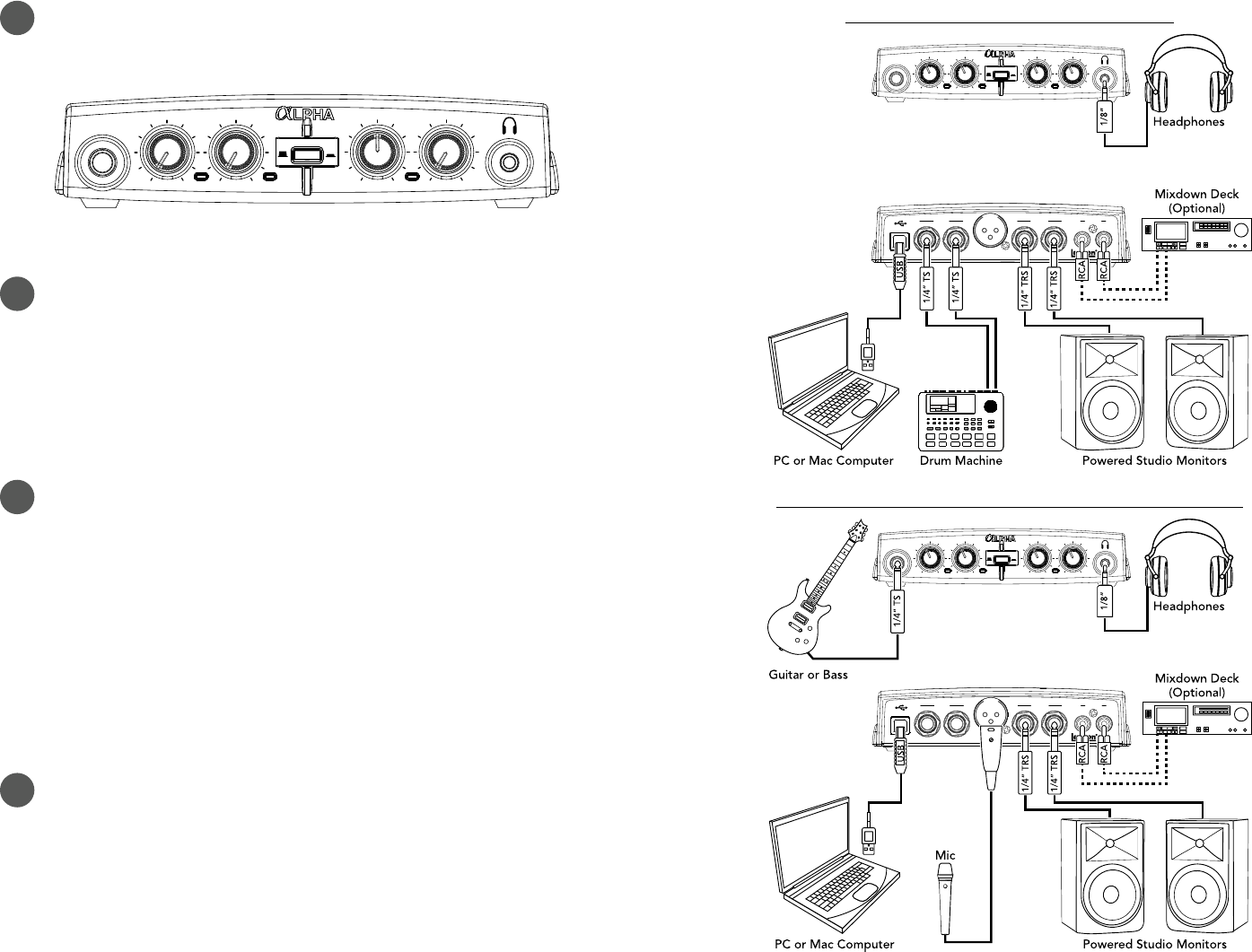
1 MAKE CONNECTIONS
A. Set all of the Alpha’s knobs fully counter-clockwise — with the exception of the Monitor Mix
knob, set it to the 12 o’clock position.
Monitor Mix Output Level
Instrument
Monitor
Stereo Mono
Peak Peak USB
Direct Playback
Line 1/Inst Line 2/Mic
B. Connect the Alpha to your computer’s USB port then make all other connections per your
application. See the connection diagrams to the right for reference.
2 DOWNLOAD & INSTALL THE WINDOWS® USB DRIVER
A. If using a Windows computer, download the Alpha USB driver from http://lexiconpro.com/
en-US/products/alpha#downloads.
B. Close any running software programs then launch the Alpha Driver Installer and follow the
on-screen instructions to install it.
NOTE: If using a Mac® computer, the Alpha will use the CoreAudio driver that was already
installed with OS X, so no additional driver installation is necessary.
3 DOWNLOAD & INSTALL CUBASE® LE & THE REVERB PLUG-IN
A. Go to https://www.steinberg.net/en/mysteinberg/my_products.html and create or log into
your MySteinberg account.
B. Enter the Cubase LE download access code from the included license card then follow the
on-screen instructions to register, download, install, and authorize Cubase LE.
C. To download the Lexicon MPX-i reverb plug-in, follow the instructions provided on the
included license card.
D. Launch the Lexicon MPX-i Plug-in Installer and follow the on-screen installation and
authorization instructions.
TIP: For additional information on software installation, refer to the Software Installation Guide
available at http://lexiconpro.com/en-US/products/alpha#documentation.
4 SET RECORDING & MONITORING LEVELS
A. If you are recording a mic and monitoring through studio monitors in the same room, turn
them down or off and use headphones to avoid bleed and feedback.
B. Set the Output Level knob to the 9 o’clock position.
C. Press the Monitor button to select the monitor mode for your application.
D. With signal present, gradually increase the channel’s gain (Line 1/Inst or Line 2/Mic) knob
until the channel’s Peak LED just begins to light occasionally without distortion. If necessary,
re-adjust the Output Level knob for the desired monitoring level. Repeat this step for the
other channel if applicable.
Line Out
L R Line Out
L R
Line In
1 2
Mic Alpha Studio is
a trademark of
Lexicon Pro, Inc.
Monitor Mix Output Level
Instrument
Monitor
Stereo Mono
Peak Peak USB
Direct Playback
Line 1/Inst Line 2/Mic
RECORDING USING THE LINE INPUTS
Line Out
L R Line Out
L R
Line In
1 2
Mic Alpha Studio is
a trademark of
Lexicon Pro, Inc.
Monitor Mix Output Level
Instrument
Monitor
Stereo Mono
Peak Peak USB
Direct Playback
Line 1/Inst Line 2/Mic
RECORDING USING THE MIC & INSTRUMENT INPUTS
NOTE: When connecting to the Instrument input, the LINE 1 input will be deactivated. When
connecting to the LINE 2 input, the Mic input will be deactivated.
