Assemblyline 3.2 Reference Manual
User Manual: Pdf
Open the PDF directly: View PDF  .
.
Page Count: 67

UNCLASSIFIED
ASSEMBLYLINE 3.2
REFERENCE
MANUAL
2016 - Communication Security Establishment Revision 6

UNCLASSIFIED
TABLE
OF
CONTENTS
Introduction 7
Typical workflows 7
Direct user submission 7
High volume ingest 8
Infrastructure 9
Servers 9
Core 9
Datastore 9
Workers 10
Logger (optional) 11
Support (optional) 11
Components 12
Dispatcher 12
Middleman 12
Expiry / Expiry workers 13
Journalist 13
Alerter 13
Alert actions 13
Workflow filters 14
System metrics 14
Metricsd 14
Controller 14
Hostagent 14
QuotaSniper 14
Deployments 15
Types 15
Development VM 15
Appliance 16
Production cluster 17
Page | 2

UNCLASSIFIED
Custom instance 18
Services 19
Service VM 19
Data layout 20
Common fields 20
Buckets 20
Alert 20
blob 20
emptyresult 20
error 20
file 21
filescore 21
node 21
profile 21
result 21
signature 21
submission 21
user 21
Data security 22
Text representation 22
Parts 22
Level 22
Required 22
Group 22
Subgroup 22
Managing the system 23
Dashboard 23
Management UI 23
Build Documentation 23
Configuration 23
Page | 3

UNCLASSIFIED
Error Viewer 23
Hosts 23
Profiles 24
Provisioning 24
Services 24
Site Map 24
Users 25
Virtual Machines 25
CLI 25
backup <destination_folder> 25
backup <destination_folder> <bucket_name> [follow] [force] <query> 25
delete <bucket> [force] <query> 26
delete submission full [force] <query> 26
index commit [<bucket_name>] 26
restore <backup_directory> 26
signature change_status by_query [force] <status_value> <query> 26
iPython 27
Load datastore 27
What to and not to do with a datastore object 27
Repairing Corrupted eleveldb Index 28
Seed demystified 29
seed.auth 29
seed.auth.internal 30
seed.auth.internal.users 31
seed.core 32
seed.core.alerter 32
seed.core.bulk 33
seed.core.dispatcher 34
seed.core.dispatcher.max 34
seed.core.dispatcher.timeouts 35
Page | 4

UNCLASSIFIED
seed.core.expiry 35
seed.core.expiry.journal 35
seed.core.middleman 36
seed.core.middleman.sampling_at 38
seed.core.redis 39
seed.core.redis.nonpersistent 39
seed.core.redis.persistent 39
seed.datasources 40
seed.datastore 40
seed.datastore.riak 41
seed.datastore.riak.nvals 41
seed.datastore.riak.solr 42
seed.datastore.riak.tweaks 42
seed.filestore 44
seed.installation 45
seed.installation.docker 45
seed.installation.external_packages 45
seed.installation.hooks 46
seed.installation.repositories 46
seed.installation.repositories.realms 46
seed.installation.repositories.repos 47
seed.installation.supplementary_packages 47
seed.logging 48
seed.logging.logserver 48
seed.logging.logserver.elasticsearch 49
seed.logging.logserver.kibana 50
seed.logging.logserver.ssl 51
seed.monitoring 51
seed.services 52
seed.services.limits 52
Page | 5

UNCLASSIFIED
seed.services.master_list 53
seed.services.timeouts 56
seed.statistics 56
seed.submissions 56
seed.submissions.max 57
seed.system 58
seed.system.classification 59
seed.system.internal_repository 60
seed.system.yara 60
seed.ui 61
seed.ui.ssl 63
seed.ui.ssl.certs 63
seed.workers 64
seed.workers.virtualmachines 65
seed.workers.virtualmachines.master_list 65
seed.workers.virtualmachines.master_list.cfg 65
Page | 6
UNCLASSIFIED
INTRODUCTION
Assemblyline is a scalable distributed file analysis framework. It is designed to process millions of files per day
but can also be installed on a single server. It is built in python and has a web interface for users to submit
tasks. Assemblyline also provides a web API for easy scripting.
Think of Assemblyline as an in-out service. You have a file, you need to know as much as you can about it and
potentially if it is malicious or not. You send it to Assemblyline, it gets scanned with as many services as
possible and then the data is aggregated for you in a report so you can make a decision about this file. The files
and reports in Assemblyline have a time to live, they are not stored forever.
Assemblyline can also be integrated in your workflow. It has an ingestion API that can generate alerts for
analysts to monitor.
TYPICAL WORKFLOWS
There are two typical workflows. The first is low volume task submission (Direct user submission). The second is
high volume file ingestion. These workflows are described below.
DIRECT USER SUBMISSION
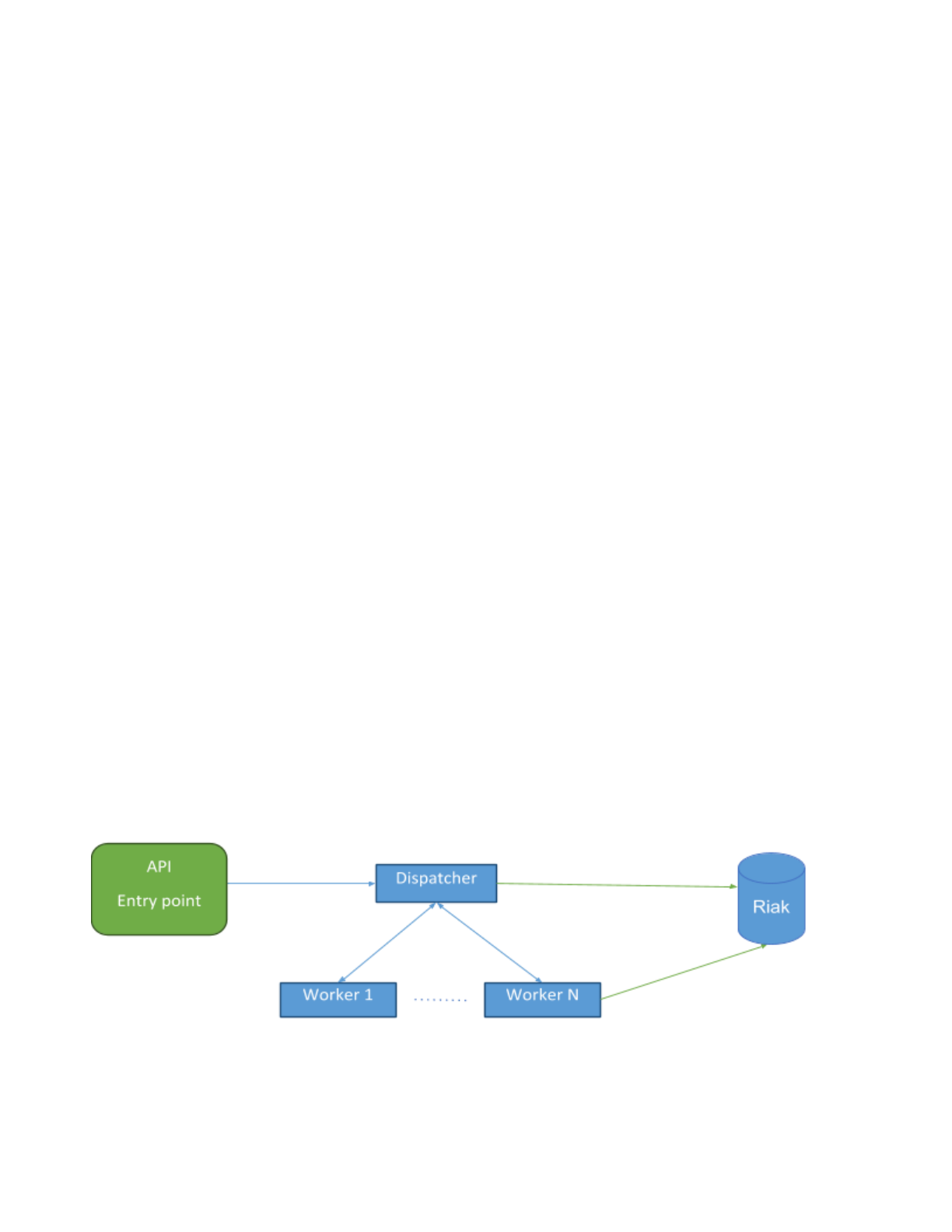
In the case of direct submissions, the task received by the API will be sent directly to the dispatcher for
processing. Dispatcher will analyse the type of file submitted and route the submission to the appropriate
workers for analysis. When the workers are done, they save their analysis results directly in the Datastore and
notify the dispatcher that they have completed their task and move on to the next one. Once the dispatcher
has received all completion messages for a given submission, it marks the submission as completed in the
Datastore.
Direct submissions are subject to submission quotas. What this means is that a given user cannot have more
than X concurrent submissions. Submission quotas prevent the system from being overloaded. Although in this
case, the user is guaranteed to get a result for their submission.
Page | 7
UNCLASSIFIED
HIGH VOLUME INGEST
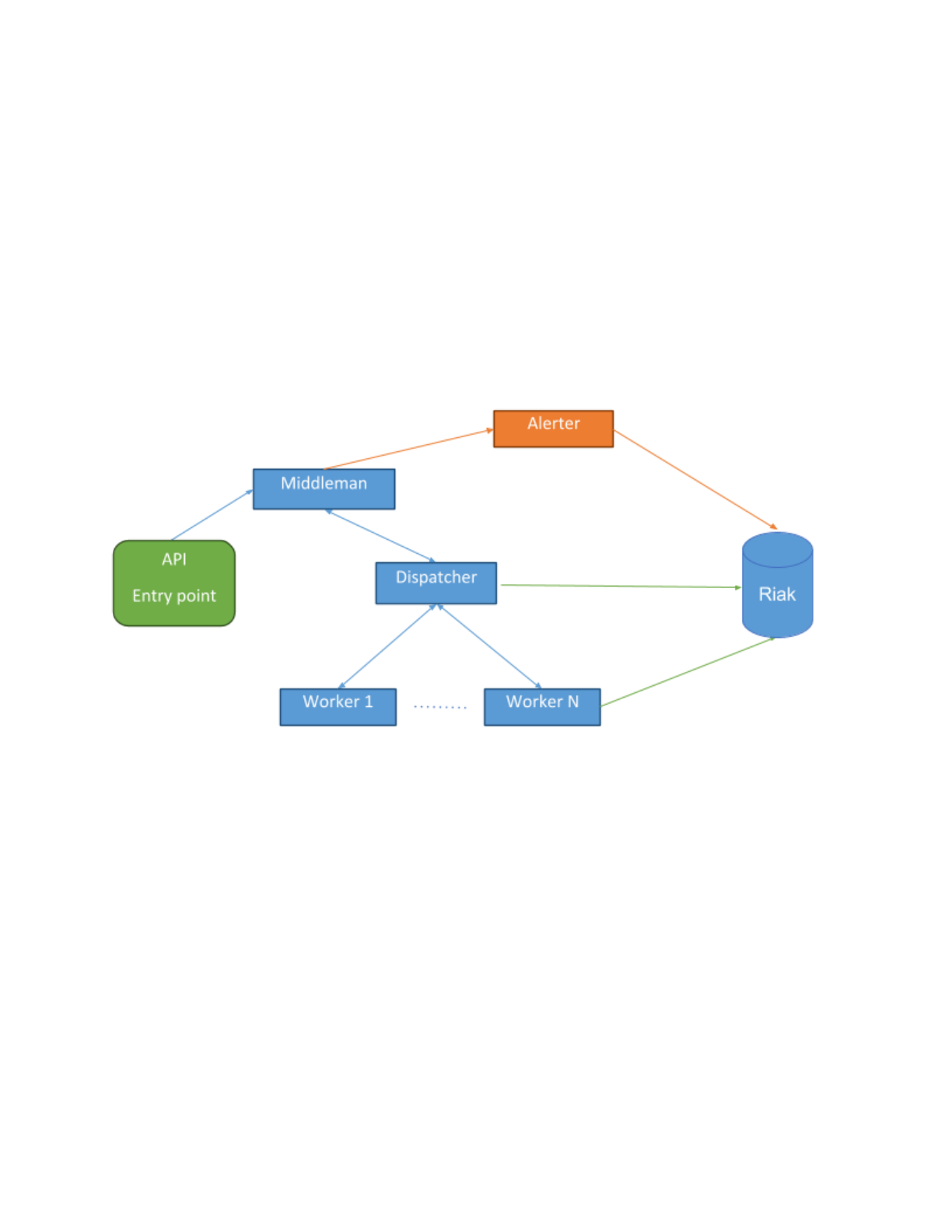
For high volume ingest, all submissions are routed from the API entry point to a persistent ingest queue. The
middleman process will pull from this queue, removing duplicates and whitelisting files, to reduce the load on
the system before sending them for processing. For each unique file that middleman encounters, it sends the
submission to the dispatcher. Once a submission makes it to the dispatcher the workflow is the same as a
direct user submission with one addition. When a submission is completed the dispatcher notifies middleman
that the submission is completed. If the submission’s score reaches the system’s alert threshold, middleman
will task Alerter to create an alert for the given submission.
In this mode, submissions are not subjected to quotas they are instead prioritized and submitted in order of
priority. When the system is overloaded, queued submissions will be randomly deleted to reduce load on the
system. You are not guaranteed to have a result for your submission if the system is overloaded.
Page | 8

UNCLASSIFIED
INFRASTRUCTURE
The Assemblyline infrastructure consists of 5 different type of servers: Core, Datastore, Worker, Logger and
Support.
SERVERS
CORE
The Core server is the central server. It is responsible for orchestrating the operation of the system. It hosts the
web interface/API; the components responsible for receiving and dispatching tasks to the workers; as well as
caching the files being processed, locally..
The following off-the-shelf components run on the core server:
●Redis (Queuing)
●ProFTPd (File transfer to the workers)
●NGinx, UWSGI, Flask, Angularjs (Web server/API)
●Gunicorn (Websocket)
●HaProxy (Load balancing)
The following custom components (described later) also run on the core server:
●Dispatcher (Tasking)
●Middleman (High volume data ingestion)
●Expiry, Journalist (Data deletion)
●Alerter, Alert Action, Workflow Filter (Alerting)
●System metrics, metricsd (Infrastructure health management)
●Quota Sniper (Quota and session manager)
Page | 9

UNCLASSIFIED
DATASTORE
The Datastore servers are where the data is stored before it expires. These server use Riak RV to store the data
with full text indexing using SOLR. Riak is fully distributed with redundancy and is horizontally scalable.
The following off-the-shelf components run on the datastore servers:
●Riak RV (Data storage)
●SOLR (Full text indexing - Built-in Riak KV)
The following custom components (described later) also run on the datastore servers:
●System metrics (Infrastructure health management)
WORKERS
The worker boxes are responsible for hosting the services. There are two types of workers: provisioned and
flex.
Provisioned workers load a profile associated to their MAC address from the datastore and spawn the different
services and VMs associated to the profile. They ensure the services and the VMs stay up 100% of the time for
faster throughput.
Flex workers don't have a specific job to do. Instead they inspect current bottlenecks in the infrastructure and
spawn services or VMs to address the current bottleneck(s)..
The following custom components (described later) run on the workers:
●Controller (Tasking for hostagent)
●Hostagent (Running services and VMs)
●System metrics (Infrastructure health management)
Page | 10

UNCLASSIFIED
LOGGER (OPTIONAL)
The Logger server is where all the metrics and logs from the different servers and components are aggregated.
This server is optional because it is not required for proper processing of the data. That said for cluster
deployment, it is recommended to have a Logger server to make sure the system stays in good health.
The following off-the-shelf components run on the logger:
●NGinx (Web proxy)
●Kibana 4 (Logs and Dashboard display)
●Elasticsearch (Logs and metrics storage)
●Syslogd (Logs aggregator)
●Logstash (Parser for logs going to Elasticsearch)
●Filebeat (File ingestor for Logstash)
The following custom components (described later) also run on the logger:
●System metrics (Infrastructure health management)
SUPPORT (OPTIONAL)
Support servers are optional but some services require external components to be installed to work properly.
A support server is useful for:
●Storing the VMs disks for the multiple Assemblyline VMs you might have in your infrastructure.
●Hosting a Docker registry for the different services that uses Docker containers.
●Hosting a database that a service can query during execution (NSRL for example)
●Hosting an ICAP proxy for scanning your files through an AV scanner
There are no install procedures for support server, there are no internally built components that run on
support servers. They are just another thing you have to consider when you do a deployment.
Page | 11

UNCLASSIFIED
COMPONENTS
The following is a list of all the components in the system, their purpose, and how they fit into the
infrastructure.
DISPATCHER
Dispatcher is the core tasking component in the system. It checks the type of the file submitted and the list of
services that are registered and currently online and routes each file to the appropriate service. It keeps track
of children for a given file (zip extraction, etc...) and ensures that a submission is not completed until all the
children have been processed and all files sent to appropriate services. It keeps track of errors in the system
and re-queues jobs if it detects that a failure is recoverable. It is the dispatcher’s job the mark a submission
completed when all work is done.
Dispatcher does all its queuing using non-persistent Redis queues. If the dispatcher is restarted, all inflight
submissions are restarted from the beginning. This is usually not a problem because Assemblyline has service
level caching.
Dispatcher also keeps metrics on how many files are being completed in the system.
MIDDLEMAN
Middleman is our high volume ingestion component. It takes all submissions created using the ingest API and
sorts them into different priority queues (Critical, High, Medium and Low). It then fills half of the dispatcher's
1
maximum inflight queue with submissions starting with the highest priority queues and continuing until all
queues are exhausted.
Middleman can also deal with impossible to finish backlogs. When the queues reach a certain threshold,
middleman will start sampling the queues using method that is increasingly aggressive in proportion to the size
of the backlog to randomly remove submissions from the priority queues to ensure that the queues don't keep
growing forever. When sampling, submissions are removed from both the front and back of the queues.
Middleman also ensures that we don't duplicate work and will dedup submissions before it sends them to the
dispatcher. It also applies whitelisting regular expressions to the metadata of the submissions, if provided.
Metrics are reported on number of duplicate, ingested, whitelisted, and completed files as well as the number
bytes ingested and completed. Messages are also sent to Alerter to create alerts for submissions with scores
that meet the system alert threshold threshold and where an alert was requested.
1The priority queues are starving queues. All critical submissions are processed before starting highs and so on...
Page | 12

UNCLASSIFIED
EXPIRY / EXPIRY WORKERS
Expiry takes care of data deletion It cleans up of every piece of information that has reached it’s Time To Live
2
(TTL). Every single piece of information in Assemblyline is tagged with an __expiry_ts__ field which dictates the
time at which this information will disappear from the system. Expiry uses SOLR indexing and search for expired
data then queues items of data for the expiry workers which in turn delete the data from the system.
As part of system optimisation, one of the data buckets (emptyresult) does not use search to expire the data.
Instead we use journal files and avoid having to index an insane amount of data that we only use for caching.
This is explained in more detail later in the data layout section.
Assemblyline is not designed to be a Knowledge Base. This is why data is expired from the system. Default TTL
for the data is 15 days.
JOURNALIST
Journalist is an expiry system optimization, it takes care of writing journal files for emptyresult items. It reads
those items from a Redis queues and writes them to timestamped files for expiry to process later.
ALERTER
Alerter is the component responsible for generating alerts. It receives a notification from middleman for all
submissions where an alert was requested and the submission’s score reaches the systems alert threshold.
When creating an alert, alerter gathers the features (Tags) our system has extracted for a submission and
generates an alert based on the mix of these features and the metadata that was part of the original
submission.
Even though submissions are deduped at the middleman level, middleman keeps track of these duplicates and,
in the case of an alert, sends a notification for each duplicate to alerter. Alerter then creates one individual
alert for every file ingested. This way, if one file was seen a 100 times we will have a 100 alerts and the
associated metadata for each individual alert. We can then use all that data to create a threat profile and more
easily mitigate the problem.
ALERT ACTIONS
Alert actions is used to makes sure two actions taken on a specific alerts happen one after the other and not at
the same time. All API calls or workflow actions to label, change priority, take ownership or change status of an
alert are placed in a Redis queue and dispatched to an internal alert action instance using a deterministic
feature of the alert. This ensures the actions are processed sequentially but still distributed to multiple
processes for speed. Alert actions reports metrics on the number of alerts created.
2TTL in assemblyline should be thought of as DTL or Days To Live.
Page | 13

UNCLASSIFIED
WORKFLOW FILTERS
In the alert page of the system, the analyst can build and save search queries that will then be used for
labelling, changing the priority or changing the status of an alert. Workflow filter runs those queries on newly
inserted alerts and sends messages to alert actions to apply the action described to all alerts matching the
query.
SYSTEM METRICS
System metrics is in charge of gathering CPU, memory, load, network and many other metrics and shipping
those directly the elasticsearch database on the Logger server. It also gathers Riak and SOLR specific metrics.
This component is only installed when a Logger server is defined in the seed.
METRICSD
The Metricsd component is in charge of aggregating Assemblyline specific counters reported by middleman,
dispatcher, alerter and hostagent over minute intervals and storing these aggregated counters in the
elasticsearch database on the Logger server. This component is only installed when a Logger server is defined in
the seed.
CONTROLLER
Controller is an extremely lightweight component that runs on the workers. Controller’s only responsibility is to
start, stop and restart the hostagent component. This functionality is used by the host management page so we
can restart the hostagent in batch without having the log in to the different boxes.
HOSTAGENT
Hostagent is the component responsible for reading the worker’s profile from the datastore and loading the
number of services and VMs as described in the profile. It keeps track of each service and VM that it launches
and makes sure that they stay alive. It is also responsible for providing heartbeats to the system to let the UI
and the dispatcher know that the different services are alive and are ready to receive tasks. When the
hostagent tries to instantiate a VM, it will make sure that it actually has the VM disks on the worker host and
download them if they are missing.
Hostagents report metrics on the effectiveness of the service caching.
QUOTASNIPER
QuotaSniper is the component that makes sure that the different quotas and sessions for each user expire at
the right time.
Page | 14

UNCLASSIFIED
DEPLOYMENTS
There are different ways to deploy Assemblyline and each type of deployment has a set of minimum
requirements that must be met to ensure a pleasant experience with the system. It should also be noted that
when you install Assemblyline on a server or VM, it takes over that box. Assemblyline does not play nice if
installed alongside other software because it does not share resources. Stay away from custom partitioning.
Just give Assemblyline machines one partition with the full drive or you will run into issues. Assemblyline writes
tons of logs and makes heavy use of the /tmp
folder. You've been warned...
TYPES
The most common deployment types are described below along with particularities and recommendations for
each type of deployment.
DEVELOPMENT VM
This is the most basic deployment type. You can use this type of deployment when you want to test the system
or if you are working on a new service for the system.
On a development VM, you install the Core, Datastore and Worker all on the same box. No need to install
Logger or any support server for that. (unless the service you're working on requires a support server...)
The minimum requirements for a development VM are as follows:
●2 cores
●6 GB of ram
●20 GB Disk space
You can follow the documentation on GitHub for step by step commands on how to install your development
VM:
https://bitbucket.org/cse-assemblyline/assemblyline/src/master/docs/install_development_vm.md
When you’re done installing your development VM, it will be provisioned with the default set of services that can
run out of the box without additional interventions. Because you will do development on this VM, you should run
the services you are developing using the run_service_live
script.
Page | 15

UNCLASSIFIED
APPLIANCE
This is basically an extremely light weight deployment. When you send only a few thousand files a day at most.
The kind of installation to help your analysts go through their daily samples.
An appliance installation is a one server installation. Ideally you can get your hands on something a bit bigger
then the spec you'd use for a Development VM. For an Appliance installation, you install the Core, Datastore
and Worker all on the same box like the Development VM. You can even install what you'd install on a support
server directly on that box as well. Again, no need to install Logger for such a small install.
An appliance install can still be done inside a VM with better specs than the Development VM but if you do that
you will not be able to run services that need to instantiate a VM (Cuckoo, or any windows based service)
because nested virtualization does not work that well. For this reason, we recommend to do the appliance
install on bare metal.
Recommended specs for an appliance install:
●16+ threads (8 cores + hyper threading)
●96+ GB Ram
●1+ TB Disk space (Get some RAID 5 configuration because this is your only redundancy) - SSD are
preferred but not required
You can follow the documentation on GitHub for step by step commands on how to install your appliance:
https://bitbucket.org/cse-assemblyline/assemblyline/src/master/docs/install_appliance.md
When you’re done installing your appliance, it will be provisioned with the default set of services that can run out of
the box without additional interventions.
Page | 16

UNCLASSIFIED
PRODUCTION CLUSTER
This is the go big or go home type of install. It can easily do millions of files per day depending on the number
of worker boxes you assign to it. The buy-in for this kind of install is significant. It requires at minimum 12 boxes
if you want something that is manageable and that makes sense. It scales somewhat linearly with the exception
of the core server which cannot be scaled out yet. On our current production cluster this has yet to become an
issue.
The minimum setup for this type of installation is: 5 Riak nodes, 5 workers, 1 core and 1 logger.
●Riak recommends for proper distribution of the replicated data that your cluster be at minimum 5
nodes which is why we recommend 5 Riak nodes.
●We recommend at minimum 5 workers because with the size of the Riak cluster and the speed of
the components on the core server, you'll need at least that many workers to make sense of the 6
boxes you've spent on Riak and Core.
●Core cannot be scaled out yet therefore only one box is assigned to it.
●For this type of install it is highly recommended (see almost mandatory) that you run a Logger
server. If you don't have one, it will be really hard for you to maintain your infrastructure in good
health.
●You may need a support box, which brings the total to 13 boxes. Although if your Logger box is
beefy enough you can probably have it fulfill a dual role as both a Logger and Support box.
●You could technically create everything inside a virtual environment like VMWare vSphere or even
Amazon AWS but if you do, you'll lose the ability to run virtualize services (Cuckoo, or any windows
based service) from inside your infrastructure which is why we recommend running on bare metal
hardware.
The recommended specs for the boxes detailed above are as follows:
●1x Core
o16+ threads (8 cores + hyper threading)
o96+ GB Ram
o1+ TB Disk space (Unless you've configured your seed otherwise this server stores your files -
better have lots of HD space.)
●5x Riak
o16+ threads (8 cores + hyper threading)
o96+ GB Ram
o1+ TB Disk Space (SSDs are highly recommended for Riak as they will reduce latency spikes
when the combination of your data and the search index size does not fit in OS cache.)
Page | 17

UNCLASSIFIED
●5x Workers
oAny number of cores (Obviously the bigger the better but this is where you can easily recycle
old hardware.)
o4 GB of ram / core (This will allow you better utilize your CPU power.)
o10GB Disk space per logical core with a minimum of 256 GB
●1x Logger
o8+ threads (4 cores + hyper threading)
o48+ GB Ram (Depending of how long you want to keep logs and metrics. You might have to set
elasticsearch to use up to 31GB of heap and if the elasticsearch indexes can be kept in OS
cache the better...)
o1+ TB Disk Space (All logs and metrics counters will be shipped to this box and indexed and
some of our logs are quite verbose.)
You can follow the documentation on GitHub for step by step commands on how to install your cluster:
https://bitbucket.org/cse-assemblyline/assemblyline/src/master/docs/install_cluster.md
When you’re done installing your cluster, it will be provisioned with the default set of services that can run out of
the box without additional interventions. However it will most likely be over allocated and extremely un-balanced
because the default profile instantiate one of each service on each workers regardless of their CPU and RAM usage.
You should use the provisioner to provision and balance your cluster because you'll quickly find that it is much easier
than creating a profile for each worker by hand.
CUSTOM INSTANCE
Assemblyline provides a foundation for distributed file analysis but when deploying it to your own
infrastructure you should setup a custom instance so you can add in your own authentication layer (LDAP, PKI,
…); your own branding; and/or any other features particular to you use case or features that may not be
shareable with the rest of the community.
Assemblyline provides a create_deployment.py script which you should have ran if you followed any of the
installation documents. This script will ask you questions about your deployment in order to create the
boilerplate for your custom deployment showing you how to add custom installation hooks, custom APIs,
custom web pages, etc…
You can refer to the Assemblyline UI readme file for more details on how to add functionalities to your
deployment: https://bitbucket.org/cse-assemblyline/al_ui/overview
Page | 18

UNCLASSIFIED
SERVICES
The premise of Assemblyline is that any command line tool, API or database can be wrapped with a thin python
layer we call services. Services are easy to write. We provide a quick guide on how to add services to the
system in our documentation:
https://bitbucket.org/cse-assemblyline/assemblyline/src/master/docs/create_new_service.md
If you create a new service that can be shared with the rest of the community, you are encouraged to share the
service with a pull request.
Assemblyline ships with more than 30 services which you can use in your deployment. Some of these service
require external licences or access to external datasets. It is your responsibility to make sure you have all the
appropriate license agreements in place for the services you intend to use.
SERVICE VM
Assemblyline provides a means to use virtual machines to run services that could be damaging to your
infrastructure (for example, they execute the file that they are scanning), that require special packages installed
that may conflict with other service packages or that simply cannot execute from inside a Ubuntu 14.04 host
(e.g. windows only services).
Creating a service VM can be done in a few simple steps:
●Create a base disk for the OS you'll run the service on (if it does not exist already)
https://bitbucket.org/cse-assemblyline/assemblyline/src/master/docs/build_vm_base_disk_ubuntu_14.04.md
https://bitbucket.org/cse-assemblyline/assemblyline/src/master/docs/build_vm_base_disk_windows_10.md
●Derive a VM from the base disk and install dependencies
https://bitbucket.org/cse-assemblyline/assemblyline/src/master/docs/build_worker_vm.md
●Drop the disk in the vmm/disks/ directory on the server referenced in the support_urls section of the
seed
●Create a Virtual Machine entry in the management interface for your service that reference the disk
that you've just created.
●From then on, in the provisioner or from the profile editor, you can add instances of your VM and then
hostagent will download the VM disk and run it.
Page | 19

UNCLASSIFIED
DATA LAYOUT
Assemblyline data is stored in Riak KV using a key as a unique identifier for a JSON object. The data is stored in
different buckets with distinct indexes and replication factors.
COMMON FIELDS
Buckets have a set of common fields related to data expiry and data security.
Buckets that have their data expired after a certain TTL will have and __expiry_ts__
field at the root level in
their JSON document which dictates the time at which the data will be expired.
Buckets that are subject to object level data security will have the following fields at the root level in their JSON
document: __access_grp1__,
__access_grp2__,
__access_lvl__,
__access_req__
and classification
.
BUCKETS
These are the different types of bucket you will find in the datastore:
ALERT
The alert bucket stores metadata about the submissions that were ingested through the ingest API and that
meet the scoring threshold for an alert-able submission. This bucket has a non-fixed set of fields and the index
for this bucket features a catch-all field to index all fields as strings.
Any and all submission metadata is preserved as part of the alert.
BLOB
The blob bucket is one of the few non-indexed buckets. It stores some configuration data and some aggregated
statistics about the system.
EMPTYRESULT
The emptyresult bucket is used for service level caching in the case where the service had nothing to report.
Data in the emptyresult bucket is not indexed and is deleted using a special journaling technique to make it
easier on Riak and SOLR.
ERROR
The error bucket is used to store errors reported by the different services while scanning a given file. This
bucket is fully indexed so admins can search for errors in the system.
Page | 20

UNCLASSIFIED
FILE
The file bucket is used to store information about a given file like the different hashes, its size, its type, ...
basically any static properties of the file. The file bucket is also use to keep the file storage in sync with the
datastore. Every time a file object is deleted from the datastore, it's file equivalent on disk on the filestore is
deleted as well. This bucket is fully indexed so anyone can search for file properties in the system.
FILESCORE
The filescore bucket is used for submission caching by the ingest API. It tracks each file ingested along with
their associated resulting score so if the same file is ingested multiple times in a short period of time, it will not
rescan the file but use its previous results. This bucket indexed only on the __expiry_ts__ field for expiry to
delete the data.
NODE
The node bucket stores information about the different worker nodes that are registered. This bucket is fully
indexed but only admins are allowed to search it.
PROFILE
The profile bucket stores the different service allocation profiles that the worker nodes can use. Profiles usually
contain the number of each service that will run directly on the host and number of VMs of each service that
the host will launch. This bucket is fully indexed but only admins are allowed to search it.
RESULT
The result bucket stores the result of a given service running on a given file. This bucket is fully indexed so
anyone can search for results in the system.
SIGNATURE
The signature bucket stores the different Yara signatures that our Yara service can run. The Yara signatures are
stored into a special JSON encapsulation that makes it easier to enforce our metadata requirements from our
malware standard. This bucket is fully indexed so anyone can search for signatures in the system.
SUBMISSION
The submission bucket store details about a submission to the system. Optional metadata can be provided if
using the ingest API which will then be propagated into the alerts when the alerting score threshold is reached.
This bucket has fields and is fully indexed except a metadata section where a catch-all field indexes all fields
found as strings.
USER
The user bucket stores the user’s details, access controls and options. It is fully indexed but only admins are
allowed to search it.
Page | 21

UNCLASSIFIED
DATA SECURITY
Assemblyline has object level security built into all API endpoints. The data security model is referred to as
classification and is based on the Canadian classification marking model. It has been made generic so you can
create your own classification model. The classification model is saved into 5 fields that are used by either SOLR
or python to only serve data to users that are allowed to see it.
In the case of SOLR, a filter query is added to all queries made to SOLR to filter out the data that the user is not
allowed to see. For direct Riak KV access, the classification string is compared against the user's maximum
classification to be sure he has access to the data.
TEXT REPRESENTATION
The text representation of the classification if saved into the 'classification' field in the JSON document. This
field is used to display the classification to the user and is also used by the python part of the classification
engine to validate user access to data.
PARTS
The classification can be exploded in 4 different parts that each serve different purposes. Each part has a name
and short name value to make it human readable.
LEVEL
Level is a 0 to X integer value where the user has to have a number greater or equal to the object they are
trying to get access. This value is saved in the __access_lvl__
field in the JSON document.
REQUIRED
The required part of the classification is a list of tokens that the user must have in order to access to the
object. This value is saved in the __access_req__
field in the JSON document.
GROUP
The group part of the classification is used more as a dissemination list. A user that tries to access an object
must be part of at least the groups the object disseminates to. If no groups are specified on an object, it means
that all groups have access to it. This value is saved in the __access_grp1__
field in the JSON document.
SUBGROUP
The subgroup part of the classification is used as a second level dissemination list. A user that tries to access an
object must be part of at least the subgroups the object disseminates to. If no subgroups are specified on an
object, it means that all subgroups have access to it. This value is saved in the __access_grp2__ field in the
JSON document.
Page | 22

UNCLASSIFIED
MANAGING THE SYSTEM
There are numerous ways to manage the system. We've tried to build as much functionality in the UI as
possible but where the UI falls short, we have a couple of ways of other ways to fix the system or to perform
some routine management tasks.
DASHBOARD
The dashboard is the only piece of management that is accessible to all users of the system. It gives you an
indication of how busy the system is and which components are falling behind. You get one card for
middleman' s health, one for dispatcher's and one for each of the services currently loaded in the seed. It is the
basic “green card is OK, red you have a problem”-type of interface. When a card goes red, the part that is
problematic will be highlighted so you can easily what is wrong in the system.
MANAGEMENT UI
The management UI should help you perform 90 % of your administrative needs.
BUILD DOCUMENTATION
The Build documentation section is where you'll find step by step instructions on how to create services, how
to create service VMs, how to build an appliance or a cluster, etc... You can add your own build documentation
to this section by adding markdown documents to /opt/al/pkg/private/docs/.
CONFIGURATION
The configuration section is where you can edit your currently deployed seed. You can also use this page to diff
your current running seed with the seed you've used for installation and the seed as it is saved in the code. The
idea is that you can use this section to tweak parameters of the system and that when you are comfortable
with them, you diff your running seed with the seed in the code and you apply the changes that are working
well in the live seed to the seed in the code.
ERROR VIEWER
The error viewer is a place where you can search through the errors that the different services generated so
you can fix those error once and for all.
HOSTS
The hosts management page is used to display the health of all the physical workers and virtual machines of
the system. For each host, it displays CPU usage, RAM Usage, Disk Usage, Number of services and Number of
VMs the host is running. Each card in the hosts management page can be flipped to reveal the full list of
services and VMs on the host. It also reveals buttons that you can use to interact with the hostagent service of
each worker. You can restart, stop and start the hostagent as well as pause and resume task execution. The
flipped side of the card also lets you enable/disable a host or change its profile if you click the expand button.
Page | 23

UNCLASSIFIED
When multiple cards are flipped, there are buttons at the top of the interface that will let you interact with all
the flipped cards at the same time. This is especially handy to restart all hostagents and the same time when
you push a patch to a given service.
Cards in the host management page are color coded:
●Green cards mean that all required processes are running like they are supposed to
●Gray cards mean that the hosts is either disabled or the hostagent is not running
●Orange cards mean the hostagent is running but the controller isn’t this mean that the buttons to
interact with the host won't work on this host, you'll have to SSH to the box
●Red cards mean that the host is unreachable, both hostagent and controller are down
PROFILES
The profile management page lets you edit the different profiles each node is running. For each profile, you can
set the number of each service you'd like to run and the number of each VMs you'd like to run. You can even
set configuration overrides for each service in case one box does not work like the rest.
That said you should not really have to use this page at all, the preferred way to provision the system is by
using the automatic provisioner. It is much simpler to use and it prevents you from over-provisioning the
worker nodes and potentially reducing the performance of the system.
In the case where you are running an appliance, the recommended way to provision an appliance is to add
services or VMs to the al-worker-default profile created at installation and to restart the hostagent from the
hosts management page.
PROVISIONING
The provisioning page gives you an overview of how many cores and how much ram you have in your
infrastructure then lets you provision the different services, VMs and flex nodes without letting you
overprovision the cluster. This is the easiest way to the provision the cluster when you have a lot of nodes.
SERVICES
The service management page lets you change the properties of a service. It is the interface you want to use to
change the configuration variable of a service. When changing properties through this interface, you are in fact
changing properties inside the seed. You could technically use the seed editor and get the same results.
The different properties of the services will be explained in the 'Seed demystified' section of this document.
SITE MAP
The site map gives you a lists of all pages and API with their corresponding function in the code as well as:
●Which HTTP methods you can use on this page
●Is it protected by authentication?
●Does it require admin privileges?
●Are the page parameters are audited in the UI audit logs?
Page | 24

UNCLASSIFIED
USERS
The user management page gives you a way to edit the settings of the different users or to add/remove users
from the system.
Note: By default, Assemblyline uses it’s own internal authentication. You can override the authentication layer
with your own authentication.
VIRTUAL MACHINES
The Virtual Machines management page lets you change the properties of an AL VM. This is the interface you
will want to use to change the configuration variables for VMs. When changing properties through this
interface, you are in fact changing properties inside the seed. You could technically use the seed editor and get
the same results.
The different properties of the VMs will be explained in the 'Seed demystified' section of this document.
CLI
Even though the majority of the management tasks can be done in the UI, there is the occasional time where
you'll have to go through the CLI to right some wrong or to backup/restore data in the system. The
Assemblyline CLI provides loads of functionalities that are extremely dangerous and could lead to disastrous
consequences for your production infrastructure. Use with caution...
We will explain some features of the CLI that you may have to use one day. For the rest, you can always run
al_cli
help
or al_cli
help
<command>
for more detailed help.
BACKUP <DESTINATION_FOLDER>
This backup command will backup the data from all system buckets to a destination folder. The destination
folder must be placed in a directory where the AL user can write, maybe you should backup to /opt/al
or /tmp
.
BACKUP <DESTINATION_FOLDER> <BUCKET_NAME> [FOLLOW] [FORCE] <QUERY>
This backup command lets you issue a SOLR query against a given bucket then backs up all content that
matched your query. The query part of this command must be placed into quotes if the query contains spaces.
Once you run the command, it will show you a piece of the data that matches your query and give you a count
of how many objects will be backed up. It will ask you to confirm that you indeed want to proceed with the
backup.
Note: If you want to skip the confirmation, you add the force keyword to the command
You can also create a follow backup by adding the follow keyword to the command. A follow backup is
an intelligent backup that will not only backup the bucket where you run the query but will also find
any links between the objects that match your query and other objects in other buckets that are
related to what matches your query. A follow backup of a submission, for example, will also backup:
file, result, emptyresult and error.
Page | 25

UNCLASSIFIED
DELETE <BUCKET> [FORCE] <QUERY>
This command is especially useful to get rid of bad data in your system. Do a simple SOLR query to isolate the
data you want to delete in a specific bucket and this command will delete it all.
DELETE SUBMISSION FULL [FORCE] <QUERY>
This command will help you fix the problem where someone submitted a massive number of files that they
were not supposed to or they simply misclassified their submissions. Write a simple SOLR query that isolates
those submissions and this command will delete the submissions and all other associated objects removing any
trace that the submission ever existed.
Note: The full keyword only works on the submission bucket. Also, you can delete a single submission using
the web interface while viewing the submission.
INDEX COMMIT [<BUCKET_NAME>]
Some buckets have their index committed only every 15 minutes for performance reason. This command
instructs SOLR to commit all its indexes now instead of waiting for the commit timeout. Optionally you can
specify the bucket you need the indexes to be committed.
RESTORE <BACKUP_DIRECTORY>
This command is used to restore backups created using the backup command.
SIGNATURE CHANGE_STATUS BY_QUERY [FORCE] <STATUS_VALUE> <QUERY>
This command allows you to switch a bunch of signatures at the same time to another status. Let's say you
have 100 signature in STAGING that you want to promote to DEPLOYED, you can simply write a SOLR query that
can isolate those signatures and run that command to promoted them all at the same time instead of doing
that one signature at the time in the UI.
Page | 26

UNCLASSIFIED
IPYTHON
In the rare case where some data would be corrupted by either a patch gone wrong or something else, you
might have to programmatically fix the datastore by iterating through its data. iPython will be your friend in
those cases. We will provide you with the necessary lines of python to connect to the datastore and a few
pointers regarding what functions from the datastore not to use on a production cluster.
LOAD DATASTORE
It is extremely simple to load the datastore in iPython. Simply type the two following lines:
from assemblyline.al.common import forge
ds = forge.get_datastore()
This will give you a datastore object "ds".
Note: In the rare occasion that your seed is corrupted in a way where forge refuses to load. You can assign a
static seed to be used to load the forge object when launching iPython:
~# AL_SEED_STATIC=python.path.to.seed ipython
WHAT TO AND NOT TO DO WITH A DATASTORE OBJECT
With your datastore object you should avoid any list_debug_keys() function because they can completely take
down your cluster if you have too much data.
Also avoid _stream_bucket_keys() function because this can also take down your cluster.
Try to be as precise as possible and if you need to go through a lot of data, use the stream_search function to
get all the keys related to your data.
Remember that Riak is a key/value pair datastore. To edit an object, you need to know it's key first. For each of
the buckets in the datastore, a datastore object should have a get_<bucket> and a save_<bucket> function to
get an object using a key and to save that object back to the datastore.
If you’re in that deep, the only other thing we can add is, good luck!
Page | 27

UNCLASSIFIED
REPAIRING CORRUPTED ELEVELDB INDEX
In the event of major hardware or filesystem problems, LevelDB can become corrupted. These failures are
uncommon, but they could happen, as heavy loads can push I/O limits.
To check whether one of your nodes has corrupted eleveldb index, you will need to run a shell command that
searches for Compaction
Error
in each LOG
file.
find /var/lib/riak/leveldb -name "LOG" -exec grep -l 'Compaction error' {} \;
If there are compaction errors in any of your vnodes, those will be listed in the console. If any vnode has
experienced such errors, you would see output like this:
/var/lib/riak/leveldb/442446784738847563128068650529343492278651453440/LOG
/var/lib/riak/leveldb/442446784738847563128068650529343492278651453441/LOG
When you have discovered corruption in your LevelDB backend, follow the steps below to heal your corrupted
LevelDB: (
Note:
Repairing
eleveldb
indexes
may
take
several
minutes.)
1. Stop the node:
riak stop
2. Open an erlang shell to run the eleveldb:repair function:
`riak ertspath`/erl
3. Once in the shell, run the following commands one by one, make sure the VNodeList variable reflects
the output of the find command: (commands
ends
with
a
‘.’)
application:set_env(eleveldb, data_root, "").
Options = [].
DataRoot = "/var/lib/riak/leveldb".
VNodeList = ["442446784738847563128068650529343492278651453440",
"442446784738847563128068650529343492278651453441"].
RepairPath = fun(DataRoot, VNodeNumber) -> Path = lists:flatten(DataRoot ++ "/" ++
VNodeNumber), io:format("Repairing ~s.~n",[Path]), Path end.
[eleveldb:repair(RepairPath(DataRoot, VNodeList), Options) || VNodeNumber <-
VNodeList].
4. Stop erlang shell:
ctrl + g
q
5. Restart riak:
riak start
Page | 28

UNCLASSIFIED
SEED DEMYSTIFIED
The seed is basically a one stop shop for the configuration of your infrastructure. It is a giant JSON dictionary
that contains and the installation parameters and the live values. It is comparable to the Windows registry.
We will explain you every single parameter of the seed, their impact and effects on your system after
installation and which components of our infrastructure they affect. If a setting is used at installation, changing
it on a live system will have no effects but if the setting is used live, you need only restart the affected
components and the setting will be in effect.
SEED.AUTH
seed.auth.allow_2fa
Description: Turn on/off 2-Factor authentication via One-Time password (Google Authenticator, Microsoft Authenticator...)
Datatype: bool
Used when: Live
Components affected: UWSGI
seed.auth.allow_apikeys
Description: If ‘true’, allow users to create apikeys to log into the system via scripts instead of using their personal creds.
Datatype: bool
Used when: Live
Components affected: UWSGI
seed.auth.allow_u2f
Description: Turn on/off 2-Factor authentication via FIDO U2F certified hardware tokens
Datatype: bool
Used when: Live
Components affected: UWSGI
seed.auth.apikey_handler
Description: Python class path to the method used to handle apikey login requests.
Datatype: string
Used when: Live
Components affected: UWSGI
Page | 29

UNCLASSIFIED
seed.auth.dn_handler
Description: Python class path to the method used to transform a DN into a username.
Datatype: string
Used when: Live
Components affected: UWSGI
seed.auth.encrypted_login
Description: Turn on/off second level encryption for all passwords send to the login API. (Man in the middle protection)
Datatype: bool
Used when: Live
Components affected: UWSGI
seed.auth.userpass_handler
Description: Python class path to the method used to handle user/password login requests.
Datatype: string
Used when: Live
Components affected: UWSGI
SEED.AUTH.INTERNAL
seed.auth.internal.enabled
Description: Enable or not internal authentication
Datatype: bool
Used when: Installation
Components affected: uwsgi
seed.auth.internal.failure_ttl
Description: Amount of seconds a user will be disabled after too many failed login attempts
Datatype: int
Used when: Live
Components affected: uwsgi
seed.auth.internal.max_failures
Description: Maximum number of login failures before the user account is locked down
Datatype: int
Used when: Live
Components affected: uwsgi
Page | 30

UNCLASSIFIED
seed.auth.internal.strict_requirements
Description: Enable or not strict password requirements (when users change their password)
Datatype: bool
Used when: Live
Components affected: uwsgi
SEED.AUTH.INTERNAL.USERS
seed.auth.internal.users.<uname>.classification
Description: Max classification for the given user
Datatype: string
Used when: Installation
Components affected: Riak
seed.auth.internal.users.<uname>.groups
Description: List of groups the user is a member of
Datatype: list[string]
Used when: Installation
Components affected: Riak
seed.auth.internal.users.<uname>.is_admin
Description: If the user is admin or not
Datatype: bool
Used when: Installation
Components affected: Riak
seed.auth.internal.users.<uname>.name
Description: Full name of the user to create this user at installation
Datatype: string
Used when: Installation
Components affected: Riak
seed.auth.internal.users.<uname>.password
Description: Password used for the user
Datatype: string
Used when: Installation
Components affected: Riak
Page | 31

UNCLASSIFIED
seed.auth.internal.users.<uname>.uname
Description: Username of the user
Datatype: string
Used when: Installation
Components affected: Riak
SEED.CORE
seed.core.nodes
Description: IPs or domains names for the core nodes. This server is not scalable yet so it needs to have only one entry.
Datatype: list[string]
Used when: Installation
Components affected: All
SEED.CORE.ALERTER
seed.core.alerter.constant_alert_fields
Description: List of fields where their content should not change during an alert update.
Datatype: list[string]
Used when: Live
Components affected: alert_action
seed.core.alerter.create_alert
Description: Python class path to the function used to generate an alert
Datatype: string
Used when: Live
Components affected: alerter
seed.core.alerter.default_group_field
Description: Default field used for grouping in the alerts perspective in the UI
Datatype: string
Used when: Live
Components affected: uwsgi
seed.core.alerter.filtering_group_fields
Description: List of possible fields used for grouping the data that reduce the total dataset
Datatype: list[string]
Used when: Live
Components affected: uwsgi
Page | 32

UNCLASSIFIED
seed.core.alerter.metadata_aliases
Description: Dictionary of aliases for the different metadata fields in an alert
Datatype: Dict[string]
Used when: Live
Components affected: uwsgi
seed.core.alerter.metadata_fields
Description: Dictionary that enforces field data types for the alerts.
Datatype: Dict[string]
Used when: Live
Components affected: uwsgi
seed.core.alerter.non_filtering_group_fields
Description: List of possible fields used for grouping the data that does not reduce the dataset
Datatype: list[string]
Used when: Live
Components affected: uwsgi
seed.core.alerter.shards
Description: Number of alerter instances that will be launched at start to be able to handle the processing load
Datatype: int
Used when: Live
Components affected: alerter
SEED.CORE.BULK
seed.core.bulk.compute_notice_field
Description: Generates computed fields based off of underlying metadata fields
Datatype: string
Used when: Live
Components affected: alerter
seed.core.bulk.get_whitelist_verdict
Description: Python class path to the function used to check if a file should be whitelisted
Datatype: string
Used when: Live
Components affected: middleman
Page | 33

UNCLASSIFIED
seed.core.bulk.is_low_priority
Description: Python class path to the function that will lower priority of a ingest submission based on its metadata
Datatype: string
Used when: Live
Components affected: middleman
seed.core.bulk.whitelist
Description: Python class path to the whitelist dictionary
Datatype: string
Used when: Live
Components affected: middleman
SEED.CORE.DISPATCHER
seed.core.dispatcher.shards
Description: Number of dispatcher processes to launch when the dispatcher service restart
Datatype: int
Used when: Live
Components affected: middleman, dispatcher, hostagent, uwsgi
SEED.CORE.DISPATCHER.MAX
seed.core.dispatcher.max.depth
Description: Maximum depth level for children in a submission
Datatype: int
Used when: Live
Components affected: dispatcher
seed.core.dispatcher.max.files
Description: Maximum number of files a submission can have
Datatype: int
Used when: Live
Components affected: dispatcher
seed.core.dispatcher.max.inflight
Description: Maximum number of concurrent inflight requests
Datatype: int
Used when: Live
Components affected: dispatcher, middleman
Page | 34

UNCLASSIFIED
seed.core.dispatcher.max.retries
Description: Maximum number of times a submission will be resent to a service before generating an error
Datatype: int
Used when: Live
Components affected: dispatcher
SEED.CORE.DISPATCHER.TIMEOUTS
seed.core.dispatcher.timeouts.child
Description: Maximum amount of time to wait for a child to be submitted before we expire it
Datatype: int
Used when: Live
Components affected: dispatcher
seed.core.dispatcher.timeouts.watch_queue
Description: Maximum amount of time in seconds a watch_queue message stays in redis before expiring
Datatype: int
Used when: Live
Components affected: dispatcher
SEED.CORE.EXPIRY
seed.core.expiry.delete_storage
Description: Does expiry need to delete the file in the filestorage as well when it delete a file object entry
Datatype: bool
Used when: Live
Components affected: expiry
seed.core.expiry.workers
Description: Number of expiry_workers processes that will be launched when the expiry_workers service start
Datatype: int
Used when: Live
Components affected: expiry_workers
SEED.CORE.EXPIRY.JOURNAL
seed.core.expiry.journal.directory
Description: Directory where the journal files are stored for expiry to delete the containing keys
Datatype: string
Used when: Live
Components affected: journalist, expiry
Page | 35

UNCLASSIFIED
seed.core.expiry.journal.ttl
Description: Number of days old the journal files have to be for expiry to start processing them
Datatype: int
Used when: Live
Components affected: expiry
SEED.CORE.MIDDLEMAN
seed.core.middleman.classification
Description: Default classification of the submission started by middleman
Datatype: string
Used when: Live
Components affected: middleman
seed.core.middleman.default_prefix
Description: Default prefix that will be added to all ingest submissions description
Datatype: string
Used when: Live
Components affected: middleman
seed.core.middleman.dropper_threads
Description: Number of dropper thread spawned by each of the middleman processes
Datatype: int
Used when: Live
Components affected: middleman
seed.core.middleman.expire_after
Description: Time in seconds after which the internal caching expires
Datatype: int
Used when: Live
Components affected: middleman
seed.core.middleman.incomplete_expire_after
Description: Time in seconds after which and incomplete submission expires
Datatype: int
Used when: Live
Components affected: middleman
Page | 36

UNCLASSIFIED
seed.core.middleman.incomplete_stale_after
Description: Time in seconds after which and incomplete submission becomes stale
Datatype: int
Used when: Live
Components affected: middleman
seed.core.middleman.ingester_threads
Description: Number of ingester threads started by each of the middleman processes
Datatype: int
Used when: Live
Components affected: middleman
seed.core.middleman.max_extracted
Description: Maximum number of extracted files extraction services can do per level for middleman submissions
Datatype: int
Used when: Live
Components affected: middleman
seed.core.middleman.max_supplementary
Description: Maximum number of supplementary files services can submit for middleman submissions
Datatype: int
Used when: Live
Components affected: middleman
seed.core.middleman.max_value_size
Description: Max size of the metadata fields that after which they are removed from the metadata section
Datatype: int
Used when: Live
Components affected: middleman
seed.core.middleman.shards
Description: Number of processes of middleman that will be started by the service
Datatype: int
Used when: Live
Components affected: middleman
Page | 37

UNCLASSIFIED
seed.core.middleman.stale_after
Description: Number of seconds after which cache entries are considered stale
Datatype: int
Used when: Live
Components affected: middleman
seed.core.middleman.submitter_threads
Description: Number of submitter threads started by each of the middleman processes
Datatype: int
Used when: Live
Components affected: middleman
seed.core.middleman.user
Description: Username that middleman will use to submit files to the system
Datatype: string
Used when: Live
Components affected: middleman
SEED.CORE.MIDDLEMAN.SAMPLING_AT
seed.core.middleman.sampling_at.critical
Description: Number of queued critical priority samples after which middleman will start sampling
Datatype: int
Used when: Live
Components affected: middleman
seed.core.middleman.sampling_at.high
Description: Number of queued high priority samples after which middleman will start sampling
Datatype: int
Used when: Live
Components affected: middleman
seed.core.middleman.sampling_at.low
Description: Number of queued low priority samples after which middleman will start sampling
Datatype: int
Used when: Live
Components affected: middleman
Page | 38

UNCLASSIFIED
seed.core.middleman.sampling_at.medium
Description: Number of queued medium priority samples after which middleman will start sampling
Datatype: int
Used when: Live
Components affected: middleman
SEED.CORE.REDIS
SEED.CORE.REDIS.NONPERSISTENT
seed.core.redis.nonpersistent.db
Description: Redis db number used to store non-persistent keys
Datatype: int
Used when: Live
Components affected: All
seed.core.redis.nonpersistent.host
Description: IP or domain of the redis non-persistent host
Datatype: string
Used when: Installation
Components affected: All
seed.core.redis.nonpersistent.port
Description: Port on which the redis non-persistent server listen on
Datatype: int
Used when: Installation
Components affected: All
SEED.CORE.REDIS.PERSISTENT
seed.core.redis.persistent.db
Description: Redis db number used to store persistent keys
Datatype: int
Used when: Live
Components affected: All
seed.core.redis.persistent.host
Description: IP or domain of the redis persistent host
Datatype: string
Used when: Installation
Components affected: All
Page | 39

UNCLASSIFIED
seed.core.redis.persistent.port
Description: Port on which the redis persistent server listen on
Datatype: int
Used when: Installation
Components affected: All
SEED.DATASOURCES
seed.datasources.<datasource_name>.classpath
Description: Python class path to the actual datasource object
Datatype: string
Used when: Live
Components affected: uwsgi, hostagent
seed.datasources.<datasource_name>.config
Description: Either a dictionary containing the config or a path in the seed where to get it’s config from
Datatype: dictionary or string
Used when: Live
Components affected: uwsgi, hostagent
SEED.DATASTORE
seed.datastore.default_timeout
Description: Default timeout for connections to the datastore (future - currently unused)
Datatype: int
Used when: Installation
Components affected: All
seed.datastore.hosts
Description: List of hosts IP or domain used as datastore jump points when bootstrapping. Usually the core server.
Datatype: list[string]
Used when: Installation
Components affected: All
seed.datastore.port
Description: Port used to connect to Riak PB. Only change this value in appliance mode.
Datatype: int
Used when: Installation
Components affected: All
Page | 40

UNCLASSIFIED
seed.datastore.solr_port
Description: Port used to connect to SOLR. Only change this value in appliance mode.
Datatype: int
Used when: Installation
Components affected: All
seed.datastore.stream_port
Description: Port use to connect to Riak HTTP interface. Only change this value in appliance mode.
Datatype: int
Used when: Installation
Components affected: All
SEED.DATASTORE.RIAK
seed.datastore.riak.nodes
Description: List of all the Riak nodes IPs or Domain names
Datatype: list[string]
Used when: Installation
Components affected: All
seed.datastore.riak.ring_size
Description: Number of partitions Riak will split the data in. (Once set this can never be changed)
Datatype: int
Used when: Installation
Components affected: Riak
SEED.DATASTORE.RIAK.NVALS
seed.datastore.riak.nvals.high
Description: Number of replication for high concurrency data buckets (Once set, this can’t be changed)
Datatype: int
Used when: Installation
Components affected: Riak, SOLR
seed.datastore.riak.nvals.low
Description: Number of replication for low concurrency data buckets (Once set, this can’t be changed)
Datatype: int
Used when: Installation
Components affected: Riak, SOLR
Page | 41

UNCLASSIFIED
seed.datastore.riak.nvals.med
Description: Number of replication for medium concurrency data buckets (Once set, this can’t be changed)
Datatype: int
Used when: Installation
Components affected: Riak, SOLR
SEED.DATASTORE.RIAK.SOLR
seed.datastore.riak.solr.gc
Description: Extra parameters applied to SOLR Garbage collector (thread lightly... )
Datatype: string
Used when: Installation
Components affected: SOLR
seed.datastore.riak.solr.heap_max_gb
Description: Maximum amount of heap memory in GB allocated to SOLR (Don’t go over 31GB)
Datatype: int
Used when: Installation
Components affected: SOLR
seed.datastore.riak.solr.heap_min_gb
Description: Minimum amount of heap memory in GB allocated to SOLR (Might as well set the same value as maximum)
Datatype: int
Used when: Installation
Components affected: SOLR
SEED.DATASTORE.RIAK.TWEAKS
seed.datastore.riak.tweaks.10gnic
Description: Should we apply the recommended tweaks for 10GB Network cards on the Riak Servers
Datatype: bool
Used when: Installation
Components affected: Riak
seed.datastore.riak.tweaks.disableswap
Description: Should we disable swap on the different Riak nodes
Datatype: bool
Used when: Installation
Components affected: Riak
Page | 42

UNCLASSIFIED
seed.datastore.riak.tweaks.fs
Description: Should we apply recommended tweaks to the file system for Riak
Datatype: bool
Used when: Installation
Components affected: Riak
seed.datastore.riak.tweaks.jetty
Description: Should we apply tweaks to SOLR’s jetty server on the Riak servers (May not actually do much, leave OFF)
Datatype: bool
Used when: Installation
Components affected: Riak
seed.datastore.riak.tweaks.net
Description: Should we apply the recommended network tweaks on the Riak Servers
Datatype: bool
Used when: Installation
Components affected: Riak
seed.datastore.riak.tweaks.noop_scheduler
Description: Should we apply the recommended disk scheduler tweak to the Riak servers
Datatype: bool
Used when: Installation
Components affected: Riak
seed.datastore.riak.tweaks.tuned_solr_configs
Description: Should we tuned each individual SOLR index for high volume (You should leave that ON)
Datatype: bool
Used when: Installation
Components affected: Riak
Page | 43

UNCLASSIFIED
SEED.FILESTORE
seed.filestore.ftp_ip_restriction
Description: CIDR block of allowed IPs to the FTP server
Datatype: string
Used when: Installation
Components affected: ProFTPd
seed.filestore.ftp_password
Description: Password used to login to Core’s FTP server
Datatype: string
Used when: Installation
Components affected: ProFTPd
seed.filestore.ftp_root
Description: Directory where the Core FTP user is locked into
Datatype: string
Used when: Installation
Components affected: ProFTPd
seed.filestore.ftp_user
Description: Username used to login to Core’s FTP server
Datatype: string
Used when: Installation
Components affected: ProFTPd
seed.filestore.support_urls
Description: List of fully qualified URLs (http://user:pass@domain/path) where support files are found (VM disks and such)
Datatype: list[string]
Used when: Live
Components affected: All
seed.filestore.urls
Description: List of fully qualified URLs (http://user:pass@domain/path) where submitted files are found (VM disks and such)
Datatype: list[string]
Used when: Live
Components affected: All
Page | 44

UNCLASSIFIED
SEED.INSTALLATION
seed.installation.pip_index_url
Description: Url to your local PIP repo if you are using one
Datatype: string
Used when: Installation
Components affected: All
SEED.INSTALLATION.DOCKER
seed.installation.docker.apt_repo_info
Description: Apt repo descriptor to add to your apt repos
Datatype: string
Used when: Installation
Components affected: All
seed.installation.docker.apt_repo_key_url
Description: Url to fetch the apt repo key to add the docker apt repo to your repos
Datatype: string
Used when: Installation
Components affected: All
seed.installation.docker.private_registry
Description: Domain:port of your private registry
Datatype: string
Used when: Installation
Components affected: All
SEED.INSTALLATION.EXTERNAL_PACKAGES
seed.installation.external_packages.<realm>.args
Description: Arguments passed to the transport (see PackageFetcher class in /opt/al/pkg/assemblyline/al/install/__init__.py
for more details about the possible arguments of the possible transports)
Datatype: dictionary
Used when: Installation
Components affected: All
Page | 45

UNCLASSIFIED
seed.installation.external_packages.<realm>.transport
Description: Type of transport to be instantiated by the PackageFetcher class
Datatype: string
Used when: Installation
Components affected: All
SEED.INSTALLATION.HOOKS
seed.installation.hooks.core_pre
Description: List of python class path of the different hooks that will be executed during core installation
Datatype: list[string]
Used when: Installation
Components affected: Core
seed.installation.hooks.riak_pre
Description: List of python class path of the different hooks that will be executed during Riak installation
Datatype: list[string]
Used when: Installation
Components affected: Riak
seed.installation.hooks.ui_pre
Description: List of python class path of the different hooks that will be executed during the UI installation
Datatype: list[string]
Used when: Installation
Components affected: uwsgi, nginx
SEED.INSTALLATION.REPOSITORIES
SEED.INSTALLATION.REPOSITORIES.REALMS
seed.installation.repositories.realms.<name>.branch
Description: Name of the branch to checkout for this repo during install time
Datatype: string
Used when: Installation
Components affected: All
seed.installation.repositories.realms.<name>.key
Description: Private key of the user the will checkout the repo (optional)
Datatype: string
Used when: Installation
Components affected: All
Page | 46

UNCLASSIFIED
seed.installation.repositories.realms.<name>.password
Description: Password of the user the will checkout the repo during install time
Datatype: string
Used when: Installation
Components affected: All
seed.installation.repositories.realms.<name>.url
Description: Fully qualified url to checkout the repo except the repo name
Datatype: string
Used when: Installation
Components affected: All
seed.installation.repositories.realms.<name>.user
Description: Username used to checkout the repo during install time
Datatype: string
Used when: Installation
Components affected: All
SEED.INSTALLATION.REPOSITORIES.REPOS
seed.installation.repositories.repos.<repo_name>.realm
Description: Name of the realm where the repo is found in.
Datatype: string
Used when: Installation
Components affected: All
SEED.INSTALLATION.SUPPLEMENTARY_PACKAGES
seed.installation.supplementary_packages.apt
Description: List of apt packages that are not required by the system to function but are useful to manage it
Datatype: list[string]
Used when: Installation
Components affected: All
seed.installation.supplementary_packages.pip
Description: List of pip packages that are not required by the system to function but are useful to manage it
Datatype: list[string]
Used when: Installation
Components affected: All
Page | 47

UNCLASSIFIED
SEED.LOGGING
seed.logging.directory
Description: Directory where the logs are being stored on the system (as to exists and be writeable by AL user)
Datatype: string
Used when: Live
Components affected: All
seed.logging.log_to_console
Description: Should the logger log to console
Datatype: bool
Used when: Live
Components affected: All
seed.logging.log_to_file
Description: Should the logger log to file
Datatype: bool
Used when: Live
Components affected: All
seed.logging.log_to_syslog
Description: Should the logger log to syslog
Datatype: bool
Used when: Live
Components affected: All
SEED.LOGGING.LOGSERVER
seed.logging.logserver.node
Description: IP or Domain of the log server
Datatype: string
Used when: Live
Components affected: All
Page | 48

UNCLASSIFIED
SEED.LOGGING.LOGSERVER.ELASTICSEARCH
seed.logging.logserver.elasticsearch.heap_size
Description: Size of elasticsearch java heap (Do not make bigger than 31GB)
Datatype: int
Used when: Installation
Components affected: elasticsearch
seed.logging.logserver.elasticsearch.index_ttl.al_metrics
Description: Time to live in days for the al_metrics index in elasticsearch
Datatype: int
Used when: Installation
Components affected: cron
seed.logging.logserver.elasticsearch.index_ttl.audit
Description: Time to live in days for the audit index in elasticsearch
Datatype: int
Used when: Installation
Components affected: cron
seed.logging.logserver.elasticsearch.index_ttl.logs
Description: Time to live in days for the logs index in elasticsearch
Datatype: int
Used when: Installation
Components affected: cron
seed.logging.logserver.elasticsearch.index_ttl.riak
Description: Time to live in days for the riak index in elasticsearch
Datatype: int
Used when: Installation
Components affected: cron
seed.logging.logserver.elasticsearch.index_ttl.solr
Description: Time to live in days for the solr index in elasticsearch
Datatype: int
Used when: Installation
Components affected: cron
Page | 49

UNCLASSIFIED
seed.logging.logserver.elasticsearch.index_ttl.system_metrics
Description: Time to live in days for the system_metrics index in elasticsearch
Datatype: int
Used when: Installation
Components affected: cron
SEED.LOGGING.LOGSERVER.KIBANA
seed.logging.logserver.kibana.dashboards
Description: List of available dashboards in the kibana interface that will be exported to Assemblyline UI in an iFrame
Datatype: list[string]
Used when: Live
Components affected: uwsgi
seed.logging.logserver.kibana.extra_indices
Description: List of extra indices to be loaded at install time
Datatype: list[string]
Used when: Installation
Components affected: uwsgi
seed.logging.logserver.kibana.extra_viz
Description: List of extra visualisations and dashboards to be loaded at install time
Datatype: list[string]
Used when: Installation
Components affected: uwsgi
seed.logging.logserver.kibana.host
Description:
Datatype: string
Used when: Live
Components affected: uwsgi
seed.logging.logserver.kibana.password
Description: Password use to connect to the kibana interface on the log server
Datatype: string
Used when: Installation
Components affected: Kibana
Page | 50

UNCLASSIFIED
seed.logging.logserver.kibana.port
Description: Port to access the kibana dashboard
Datatype: int
Used when: Live
Components affected: uwsgi
seed.logging.logserver.kibana.scheme
Description: Scheme to use to access the kibana dashboard (HTTPS)
Datatype: string
Used when: Live
Components affected: uwsgi
SEED.LOGGING.LOGSERVER.SSL
seed.logging.logserver.ssl.crt
Description: Path to the public key of the web server
Datatype: string
Used when: Installation
Components affected: nginx
seed.logging.logserver.ssl.key
Description: Path to the private key of the logserver
Datatype: string
Used when: Installation
Components affected: nginx
SEED.MONITORING
seed.monitoring.harddrive
Description: Should the hard drive monitoring tool be installed on all servers
Datatype: bool
Used when: Installation
Components affected: None
Page | 51

UNCLASSIFIED
SEED.SERVICES
seed.services.categories
Description: List of all the categories of services for easier selection in the UI
Datatype: list[string]
Used when: Live
Components affected: uwsgi, dispatcher, hostagent
seed.services.flex_blacklist
Description: List of services that cannot be instantiated by the flex nodes
Datatype: list[string]
Used when: Live
Components affected: Hostagent
seed.services.stages
Description: List of stages of execution in their actual execution order
Datatype: list[string]
Used when: Live
Components affected: Dispatcher, hostagent
seed.services.system_category
Description: Category for the system services (aka services that are automatically added to all tasks)
Datatype: string
Used when: Live
Components affected: uwsgi, dispatcher, hostagent
SEED.SERVICES.LIMITS
seed.services.limits.max_extracted
Description: Maximum number of extracted files a service can create
Datatype: int
Used when: Live
Components affected: Hostagent, uwsgi
seed.services.limits.max_supplementary
Description: Maximum number of supplementary file a service can create
Datatype: int
Used when: Live
Components affected: Hostagent, uwsgi
Page | 52

UNCLASSIFIED
SEED.SERVICES.MASTER_LIST
seed.services.master_list.<service_name>.accepts
Description: Regular expression of file types accepted by the service
Datatype: string
Used when: Live
Components affected: dispatcher, hostagent
seed.services.master_list.<service_name>.class_name
Description: Name of the class instantiated once installed
Datatype: string
Used when: Installation
Components affected: All
seed.services.master_list.<service_name>.category
Description: Category that the service falls under
Datatype: string
Used when: Live
Components affected: dispatcher, hostagent
seed.services.master_list.<service_name>.classpath
Description: Python class path to the main service class
Datatype: string
Used when: Live
Components affected: dispatcher, hostagent
seed.services.master_list.<service_name>.config
Description: Dictionary of configuration for a given service. This is free for all any service can have any kind of config.
Datatype: dict
Used when: Live
Components affected: hostagent
seed.services.master_list.<service_name>.cpu_cores
Description: Max cpu utilization while the service is running at full capacity - used for provisioning (1.0 = 1 core at 100%)
Datatype: float
Used when: Live
Components affected: uwsgi
Page | 53

UNCLASSIFIED
seed.services.master_list.<service_name>.description
Description: Description of what the service do
Datatype: string
Used when: Live
Components affected: None
seed.services.master_list.<service_name>.enabled
Description: Is the service enabled in the system or not
Datatype: bool
Used when: Live
Components affected: dispatcher, hostagent
seed.services.master_list.<service_name>.install_by_default
Description: Should with call the service installer during installation
Datatype: bool
Used when: Installation
Components affected: hostagent
seed.services.master_list.<service_name>.name
Description: Name of the service. (It has to match the service class name and should never be changed)
Datatype: string
Used when: Installation
Components affected: dispatcher, uwsgi, hostagent
seed.services.master_list.<service_name>.ram_mb
Description: Maximum amount of ram in MB the service can consume while processing files - used for provisioning
Datatype: int
Used when: Live
Components affected: uwsgi
seed.services.master_list.<service_name>.realm
Description: Name of the realm to use to checkout the repository
Datatype: string
Used when: Installation
Components affected: All
Page | 54

UNCLASSIFIED
seed.services.master_list.<service_name>.rejects
Description: Regular expression of file types rejected by the service
Datatype: string
Used when: Live
Components affected: dispatcher, hostagent
seed.services.master_list.<service_name>.repo
Description: Name of the repository on the realm
Datatype: string
Used when: Installation
Components affected: All
seed.services.master_list.<service_name>.stage
Description: Stage at which the service executes
Datatype: string
Used when: Live
Components affected: dispatcher, hostagent
seed.services.master_list.<service_name>.submission_params
Description: List of dictionaries describing the possible parameters that can be added to a submission for a given service.
The dict objects in this list should look like this:
{ “default”: “”, # Default value for the parameter
“type”: “”, # Type of parameter (int, str, bool, list)
“name”: “”, # Name of the parameter
“list”: “”, # (optional) If a list type, the list of possible values
“value”: “” } # Value of the parameter
Datatype: list[dict]
Used when: Live
Components affected: uwsgi
seed.services.master_list.<service_name>.supported_platforms
Description: List of OS the service can run on (possible values: windows, linux)
Datatype: list[string]
Used when: Live
Components affected: hostagent
Page | 55

UNCLASSIFIED
seed.services.master_list.<service_name>.timeout
Description: Time in seconds that after which a task is cancelled if the service did not have time to complete
Datatype: int
Used when: Live
Components affected: dispatcher, hostagent
SEED.SERVICES.TIMEOUTS
seed.services.timeouts.default
Description: Default service timeout in seconds for service that do not provide a timeout
Datatype: int
Used when: Live
Components affected: hostagent
SEED.STATISTICS
seed.statistics.alert_statistics_fields
Description: When generating statistics about currently viewed alerts, this is the list of fields that will be faceted
Datatype: list[string]
Used when: Live
Components affected: uwsgi
seed.statistics.submission_meta_fields
Description: List of submission fields faceted when viewing detailed results about a file
Datatype: list[string]
Used when: Live
Components affected: uwsgi
SEED.SUBMISSIONS
seed.submissions.decode_file
Description: Python path to the built-in file un-neutering function
Datatype: string
Used when: Live
Components affected: uwsgi, hostagent
Page | 56

UNCLASSIFIED
seed.submissions.password
Description: Password used to connect to the submission host by the services
Datatype: string
Used when: Live
Components affected: hostagent
seed.submissions.ttl
Description: Default time to live in days for submissions
Datatype: int
Used when: Live
Components affected: middleman, uwsgi, dispatcher
seed.submissions.url
Description: Url containing scheme, host and port to connect to when doing resubmissions (https://localhost:443)
Datatype: string
Used when: Live
Components affected: hostagent
seed.submissions.user
Description: Uname used to connect to the submission host by the services
Datatype: string
Used when: Live
Components affected: hostagent
seed.submissions.working_dir
Description: Working directory for the submissions to be processed in (deprecated)
Datatype: string
Used when: Live
Components affected: hostagent
SEED.SUBMISSIONS.MAX
seed.submissions.max.priority
Description: Highest priority that can be set in the system
Datatype: int
Used when: Live
Components affected: middleman, uwsgi, dispatcher, hostagent
Page | 57

UNCLASSIFIED
seed.submissions.max.size
Description: Maximum file size of each files in the submission
Datatype: int
Used when: Live
Components affected: uwsgi
SEED.SYSTEM
seed.system.constants
Description: Python path to the constants file
Datatype: string
Used when: Live
Components affected: All
seed.system.country_code_map
Description: Python path to a class that does geolocation for an IP
Datatype: string
Used when: Live
Components affected: hostagent
seed.system.load_config_from_riak
Description: Should the seed information be loaded from Riak (Should be True in a normal install)
Datatype: bool
Used when: Live
Components affected: All
seed.system.name
Description: Name of the system. If ‘production’ the UI will display the production interface else will display the dev interface
Datatype: string
Used when: Live
Components affected: uwsgi
seed.system.organisation
Description: Acronym of the organisation which deployed the system
Datatype: string
Used when: Live
Components affected: uwsgi
Page | 58

UNCLASSIFIED
seed.system.password
Description: Password of the system user (leave null for production system)
Datatype: string
Used when: Installation
Components affected: All
seed.system.root
Description: Assemblyline installation directory (you should leave it to /opt/al)
Datatype: string
Used when: Installation
Components affected: All
seed.system.update_interval
Description: Time interval in seconds at which heartbeats are sent throughout the system
Datatype: int
Used when: Live
Components affected: All
seed.system.use_proxy
Description: Should the system proxy connections to Riak and Redis (leave to True)
Datatype: bool
Used when: Installation
Components affected: All
seed.system.user
Description: Username of the user that will execute the various components
Datatype: string
Used when: Installation
Components affected: All
SEED.SYSTEM.CLASSIFICATION
seed.system.classification.definition
Description: Dictionary that defines how the classification engine works in the system. This is much too complicated to
explain here and the documentation on the class is very complete. Check the classification file for more details
about this:
https://bitbucket.org/cse-assemblyline/assemblyline/src/master/al/common/classification.py
Datatype: dict
Used when: Live
Components affected: All
Page | 59

UNCLASSIFIED
seed.system.classification.engine
Description: Python path to the classification engine class
Datatype: string
Used when: Live
Components affected: All
SEED.SYSTEM.INTERNAL_REPOSITORY
seed.system.internal_repository.<repo_name>.branch
Description: Branch workers will checkout when checking out a given repository
Datatype: string
Used when: Live
Components affected: None
seed.system.internal_repository.<repo_name>.url
Description: Fully qualified url workers will used to checkout a given repository
Datatype: string
Used when: Live
Components affected: None
SEED.SYSTEM.YARA
seed.system.yara.externals
Description: List of external task values that will be accessible from inside the yara rules
Datatype: list[string]
Used when: Live
Components affected: uwsgi, hostagent
seed.system.yara.parser
Description: Python path to the YaraParser class
Datatype: string
Used when: Live
Components affected: uwsgi, hostagent
seed.system.yara.importer
Description: Python path to the YaraImporter class
Datatype: string
Used when: Live
Components affected: uwsgi, hostagent
Page | 60

UNCLASSIFIED
SEED.UI
seed.ui.allow_raw_downloads
Description: Should the UI allow the user to download the files in raw format
Datatype: bool
Used when: Live
Components affected: uwsgi
seed.ui.allowed_checkout_range
Description: CIDR of IPs that are allowed to checkout the code from the core server (restrict this as much as possible)
Datatype: string
Used when: Installation
Components affected: nginx
seed.ui.audit
Description: Should the UI audit the different requests it receives
Datatype: bool
Used when: Live
Components affected: uwsgi
seed.ui.context
Description: Python path to the UI context dictionary
Datatype: string
Used when: Live
Components affected: uwsgi
seed.ui.debug
Description: Should the debug features be turned on into the UI
Datatype: bool
Used when: Live
Components affected: uwsgi
seed.ui.download_encoding
Description: Default download encoding of every files downloaded in the system
Datatype: string
Used when: Live
Components affected: uwsgi
Page | 61

UNCLASSIFIED
seed.ui.email
Description: Administrative email displayed in the terms of service page
Datatype: string
Used when: Live
Components affected: uwsgi
seed.ui.enforce_quota
Description: Should the UI enforme submission and API quotas
Datatype: bool
Used when: Live
Components affected: uwsgi
seed.ui.fqdn
Description: Fully qualified domain name of the web server
Datatype: string
Used when: Installation
Components affected: nginx
seed.ui.install_path
Description: File path where the different repos are checked out
Datatype: string
Used when: Live
Components affected: uwsgi
seed.ui.rsa_key_size
Description: Size of the rsa key used to encode user’s password during the login process
Datatype: int
Used when: Live
Components affected: uwsgi
seed.ui.secret_key
Description: Flask secret key to make sure the session cookies are safe (make this is long and random…)
Datatype: string
Used when: Live
Components affected: uwsgi
Page | 62

UNCLASSIFIED
seed.ui.tos
Description: Terms of service in markdown format
Datatype: string
Used when: Live
Components affected: uwsgi
seed.ui.tos_lockout
Description: Should the UI lockout the user for administrative review after they’ve agreed to terms of service
Datatype: bool
Used when: Live
Components affected: uwsgi
SEED.UI.SSL
seed.ui.ssl.enabled
Description: Should SSL be enabled on the core server
Datatype: bool
Used when: Installation
Components affected: nginx
SEED.UI.SSL.CERTS
seed.ui.ssl.certs.autogen
Description: Should the system automatically generate certs for SSL
Datatype: bool
Used when: Installation
Components affected: nginx
seed.ui.ssl.certs.ca
Description: Path, local to the install_dir, to the client certs ca
Datatype: string
Used when: Installation
Components affected: nginx
seed.ui.ssl.certs.crl
Description: Path, local to the install_dir, to the client certs revocation list
Datatype: string
Used when: Installation
Components affected: nginx
Page | 63

UNCLASSIFIED
seed.ui.ssl.certs.crt
Description: Path, local to the install_dir, to the server's public key
Datatype: string
Used when: Installation
Components affected: nginx
seed.ui.ssl.certs.key
Description: Path, local to the install_dir, to the server's private key
Datatype: string
Used when: Installation
Components affected: nginx
seed.ui.ssl.certs.tc
Description: Path, local to the install_dir, to the server's cert trust chain
Datatype: string
Used when: Installation
Components affected: nginx
SEED.WORKERS
seed.workers.default_profile
Description: Default profile loaded by the workers when they don’t have a specific profile assigned to them
Datatype: string
Used when: Live
Components affected: hostagent
seed.workers.install_kvm
Description: Should the necessary components to run VMs be installed on the workers
Datatype: bool
Used when: Installation
Components affected: None
seed.workers.nodes
Description: List of IP or domains of all the workers in the system
Datatype: list[string]
Used when: Installation
Components affected: None
Page | 64

UNCLASSIFIED
seed.workers.proxy_redis
Description: Should connections to redis be proxied
Datatype: bool
Used when: Installation
Components affected: haproxy
SEED.WORKERS.VIRTUALMACHINES
seed.workers.virtualmachines.disk_root
Description: Path to the folder where the VMs disks are save on the workers
Datatype: string
Used when: Live
Components affected: hostagent
seed.workers.virtualmachines.use_parent_as_datastore
Description: Should the VMs use their parent to access datastore
Datatype: bool
Used when: Live
Components affected: hostagent
seed.workers.virtualmachines.use_parent_as_queue
Description: Should the VMs use their parent to access the queues
Datatype: bool
Used when: Live
Components affected: hostagent
SEED.WORKERS.VIRTUALMACHINES.MASTER_LIST
seed.workers.virtualmachines.master_list.<service_name>.num_workers
Description: Number of worker processes that will be instantiated inside the VMs
Datatype: string
Used when: Live
Components affected: hostagent
SEED.WORKERS.VIRTUALMACHINES.MASTER_LIST.CFG
seed.workers.virtualmachines.master_list.<service_name>.cfg.enabled
Description: Is the VM enabled
Datatype: string
Used when: Live
Components affected: hostagent, dispatcher
Page | 65

UNCLASSIFIED
seed.workers.virtualmachines.master_list.<service_name>.cfg.name
Description: Name of the VM. (Must match the name of the service it launches internally)
Datatype: string
Used when: Live
Components affected: hostagent, dispatcher
seed.workers.virtualmachines.master_list.<service_name>.cfg.os_type
Description: Type of OS the VM runs (windows or linux)
Datatype: string
Used when: Live
Components affected: hostagent
seed.workers.virtualmachines.master_list.<service_name>.cfg.os_variant
Description: Variant of OS the VM runs (win7, win2k8, ubuntu precise, …)
Datatype: string
Used when: Live
Components affected: hostagent
seed.workers.virtualmachines.master_list.<service_name>.cfg.ram
Description: Amount of ram allocated to the VM
Datatype: int
Used when: Live
Components affected: hostagent
seed.workers.virtualmachines.master_list.<service_name>.cfg.revert_every
Description: Time in seconds after which the VM is automatically reverted
Datatype: int
Used when: Live
Components affected: hostagent
seed.workers.virtualmachines.master_list.<service_name>.cfg.vcpus
Description: Number of virtual CPUs allocated to the VM
Datatype: int
Used when: Live
Components affected: hostagent
Page | 66

UNCLASSIFIED
seed.workers.virtualmachines.master_list.<service_name>.cfg.virtual_disk_url
Description: Name of the QCOW2 disk use to create the VM
Datatype: string
Used when: Live
Components affected: hostagent
Page | 67
