Customer Information Manager (CIM) Soap Guide Authorize.Net CIM
User Manual: Pdf
Open the PDF directly: View PDF  .
.
Page Count: 89
- Revision History
- Section 1 Developer Introduction
- Section 2 Using the Hosted CIM Option
- Section 3 Executing an API Call
- Web Service Locations
- CIM Functions
- Field Validation and Test Mode
- Authentication
- Input Parameters for CreateCustomerProfile
- Input Parameters for CreateCustomerPaymentProfile
- Input Parameters for CreateCustomerShippingAddress
- Input Parameters for CreateCustomerProfileTransaction
- Input Parameters for DeleteCustomerProfile
- Input Parameters for DeleteCustomerPaymentProfile
- Input Parameters for DeleteCustomerShippingAddress
- Input Parameters for GetCustomerProfileIds
- Input Parameters for GetCustomerProfile
- Input Parameters for GetCustomerPaymentProfile
- Input Parameters for GetCustomerShippingAddress
- Input Parameters for getHostedProfilePage
- Input Parameters for UpdateCustomerProfile
- Input Parameters for UpdateCustomerPaymentProfile
- Input Parameters for UpdateCustomerShippingAddress
- Input Elements for UpdateSplitTenderGroup
- Input Parameters for ValidateCustomerPaymentProfile
- Section 4 Responses
- CIM Responses
- Output for CreateCustomerProfileResponse
- Output for CreateCustomerPaymentProfileResponse
- Output for CreateCustomerShippingAddressResponse
- Output for CreateCustomerProfileTransactionResponse
- Output for DeleteCustomerProfileResponse
- Output for DeleteCustomerPaymentProfileResponse
- Output for DeleteCustomerShippingAddressResponse
- Output for GetCustomerProfileIdsResponse
- Output for GetCustomerProfileResponse
- Output for GetCustomerPaymentProfileResponse
- Output for GetCustomerShippingAddressResponse
- Output for getHostedProfilePage
- Output for UpdateCustomerProfileResponse
- Output for UpdateCustomerPaymentProfileResponse
- Output for UpdateCustomerShippingAddressResponse
- Output for UpdateSplitTenderGroup
- Output for ValidateCustomerPaymentProfileResponse
- Duplicate Profile Verification
- Response Codes
- CIM Responses
- Index

Merchant Web Services API
Customer Information Manager (CIM)
SOAP Guide
Authorize.Net Developer Support
http://developer.authorize.net
Authorize.Net LLC 082007 Ver.1.0

Last revised: 5/24/2011
Copyright © 1998 - 2009 Authorize.Net, a CyberSource solution 1
Authorize.Net LLC (“Authorize.Net”) has made efforts to ensure the accuracy and completeness of
the information in this document. However, Authorize.Net disclaims all representations, warranties
and conditions, whether express or implied, arising by statute, operation of law, usage of trade,
course of dealing or otherwise, with respect to the information contained herein. Authorize.Net
assumes no liability to any party for any loss or damage, whether direct, indirect, incidental,
consequential, special or exemplary, with respect to (a) the information; and/or (b) the evaluation,
application or use of any product or service described herein.
Authorize.Net disclaims any and all representation that its products or services do not infringe upon
any existing or future intellectual property rights. Authorize.Net owns and retains all right, title and
interest in and to the Authorize.Net intellectual property, including without limitation, its patents,
marks, copyrights and technology associated with the Authorize.Net services. No title or ownership
of any of the foregoing is granted or otherwise transferred hereunder. Authorize.Net reserves the
right to make changes to any information herein without further notice.
Authorize.Net Trademarks:
Advanced Fraud Detection Suite™
Authorize.Net®
Authorize.Net Your Gateway to IP Transactions™
Authorize.Net Verified Merchant Seal™
Authorize.Net Where the World Transacts®
Automated Recurring Billing™
eCheck.Net®
FraudScreen.Net®

Last revised: 5/24/2011
Copyright © 1998 - 2009 Authorize.Net, a CyberSource solution 2
Table of Contents
Revision History ................................................................................. 5
Section 1 Developer Introduction...................................................... 6
Integration Methods .........................................................................................................6
Standard API .............................................................................................................................. 6
Hosted Option API ..................................................................................................................... 6
Minimum Requirements ..................................................................................................7
Developer Support ..........................................................................................................7
Software Development Kits .............................................................................................8
Section 2 Using the Hosted CIM Option ............................................ 9
Designing Your Web Page ........................................................................................................ 9
Implementing a Redirect to Authorize.Net ..................................................................... 10
Example of a redirect to the hosted page: ........................................................................... 11
Implementing an iframe popup ...................................................................................... 11
Add payment ........................................................................................................................ 12
Edit payment ........................................................................................................................ 13
Add shipping ........................................................................................................................ 14
Edit shipping ......................................................................................................................... 15
Manage payment and shipping ............................................................................................ 16
Guidelines for Settings Parameters ............................................................................... 17
Section 3 Executing an API Call ...................................................... 18
Web Service Locations .................................................................................................. 18
CIM Functions ............................................................................................................... 18
Field Validation and Test Mode .............................................................................................. 20
Authentication .......................................................................................................................... 20
Input Parameters for CreateCustomerProfile ....................................................................... 21
Input Parameters for CreateCustomerPaymentProfile ........................................................ 27
Input Parameters for CreateCustomerShippingAddress..................................................... 30
Input Parameters for CreateCustomerProfileTransaction ................................................... 31
For Authorization Only transactions ..................................................................................... 32
For Authorization and Capture Transactions ....................................................................... 36
Last revised: 5/24/2011
Copyright © 1998 - 2007 Authorize.Net Corp. 3
For Capture Only Transactions ............................................................................................ 40
For Prior Authorization and Capture Transactions .............................................................. 45
For Refund Transactions ..................................................................................................... 49
For a Void Transaction ......................................................................................................... 54
Input Parameters for DeleteCustomerProfile ........................................................................ 56
Input Parameters for DeleteCustomerPaymentProfile ......................................................... 56
Input Parameters for DeleteCustomerShippingAddress ..................................................... 56
Input Parameters for GetCustomerProfileIds ....................................................................... 57
Input Parameters for GetCustomerProfile ............................................................................ 57
Input Parameters for GetCustomerPaymentProfile ............................................................. 58
Input Parameters for GetCustomerShippingAddress .......................................................... 58
Input Parameters for getHostedProfilePage ......................................................................... 59
Example ............................................................................................................................... 59
Input Parameters for UpdateCustomerProfile ...................................................................... 60
Input Parameters for UpdateCustomerPaymentProfile ....................................................... 61
Input Parameters for UpdateCustomerShippingAddress.................................................... 66
Input Elements for UpdateSplitTenderGroup ....................................................................... 67
Input Parameters for ValidateCustomerPaymentProfile...................................................... 68
Section 4 Responses ........................................................................ 70
CIM Responses ............................................................................................................. 70
Output for CreateCustomerProfileResponse ........................................................................ 71
Output for CreateCustomerPaymentProfileResponse......................................................... 72
Output for CreateCustomerShippingAddressResponse ..................................................... 72
Output for CreateCustomerProfileTransactionResponse ................................................... 73
Output for DeleteCustomerProfileResponse ........................................................................ 73
Output for DeleteCustomerPaymentProfileResponse ......................................................... 74
Output for DeleteCustomerShippingAddressResponse ..................................................... 74
Output for GetCustomerProfileIdsResponse ........................................................................ 74
Output for GetCustomerProfileResponse ............................................................................. 75
Output for GetCustomerPaymentProfileResponse .............................................................. 78
Output for GetCustomerShippingAddressResponse .......................................................... 81
Output for getHostedProfilePage ........................................................................................... 82
Output for UpdateCustomerProfileResponse ....................................................................... 82
Output for UpdateCustomerPaymentProfileResponse........................................................ 83
Output for UpdateCustomerShippingAddressResponse .................................................... 83
Output for UpdateSplitTenderGroup ..................................................................................... 83
Table of Contents
Last revised: 5/24/2011
Copyright © 1998 - 2007 Authorize.Net Corp. 4
Output for ValidateCustomerPaymentProfileResponse ...................................................... 84
Duplicate Profile Verification .......................................................................................... 84
Response Codes ........................................................................................................... 85
Index ................................................................................................. 87
Last revised: 5/24/2011
Copyright © 1998 - 2009 Authorize.Net, a CyberSource solution 5
Revision History
PUBLISH DATE
UPDATES
November 2007
Initial release of the Customer Information Manager (CIM) API
September 2008
Removal of SecureSource requirements
January 2009
Addition of GetCustomerProfileIds and various updates
May 2009
Specify validationMode parameter as required for CreateCustomerProfile and
UpdateCustomerPaymentProfile.
Clarify usage of validationMode parameter for CustomerProfileRequest and
CreateCustomerProfile calls when no payment profile information is included.
June 2009
Corrected formatting notes for some numeric fields
Added note about optional fields and .NET programming
September 2009 Update validationMode field to document changes for authorizations for Visa
transactions
April 2010
Update to table of error codes
Added explanatory guidelines for createCustomerProfileTransaction for Refund
transactions.
June 2010
Changes required for Partial Authorization processing
July 2010
Correct function name (UpdateSplitTenderGroup) and add output
May 2011
Add hosted option
Clarification of validationMode

Last revised: 5/24/2011
Copyright © 1998 - 2009 Authorize.Net, a CyberSource solution 6
Section 1
Developer Introduction
This guide describes the Web development required to create and manage customer profile
information for the purpose of submitting transactions to the Authorize.Net Payment Gateway
directly from a Web site or other application using Simple Object Access Protocol (SOAP).
SOAP provides a standards-based mechanism to access Web services from a wide range of
platforms. Typically, clients access the Web services using a SOAP client on their respective
programming environment. The SOAP client typically generates the native objects and interfaces
based on a Web Services description Language (WSDL) that is published by Authorize.Net. The
client application initializes the local object and invokes the method as if it is calling a local
procedure. The SOAP client handles the generation and parsing of the underlying extensible
markup language (XML) documents that form the basis of the SOAP protocol.
Specifically, the Authorize.Net Customer Information Manager (CIM) Application Programming
Interface (API) provides a mechanism for developers and value added resellers (VARs) to create,
delete, get, and update customer profile information, including payment and address information,
by means of direct integration between client software or applications and the Authorize.Net
Payment Gateway.
Please refer to specific SOAP client documentation for details on how to consume SOAP-based
Web services.
Integration Methods
Various options exist for integrating payments, designed to accommodate a range of business needs
and coding abilities.
Standard API
You can use the API to submit transaction information to Authorize.Net when your customers enter
data on your website. In this case, the customer enters data on your website, your website calls the
API using either XML or SOAP:
• XML: The Authorize.Net Application Programming Interface (API) offers an XML-only
option, which allows you to invoke methods using XML for the exchange of information.
• SOAP: The Authorize.Net API offers an alternate communication method, SOAP, to
exchange information.
The choice of XML or SOAP depends on the programming language you use. For PHP and Ruby,
XML is recommended. For C# and other .NET languages, SOAP is recommended. With Java,
either option will work.
For information regarding requirements for using the API, see “Minimum Requirements” below.
Hosted Option API
For more secure exchange of information, the API allows you to establish a hosted connection,
where any exchange of information occurs on the Authorize.Net secure servers. If the merchant

Merchant Web Services API
Last revised: 5/24/2011
Copyright © 1998 - 2009 Authorize.Net, a CyberSource solution 7
needs to transmit sensitive cardholder information (for example, if a customer needs to change
credit card information or add a new payment method), the hosted CIM option can be used. Using
the hosted CIM option, credit card data never needs to flow through the merchant’s website. You
can use the hosted option either as an XML or a SOAP implementation.
You must still use the standard API (either SOAP or XML) for some operations, such as creating a
ransaction. The hosted page only provides functionality for creating, updating, and deleting
payment profiles and shipping addresses.
For more information, please refer to Section 2, “Using the Hosted CIM Option,” on page 9.
Minimum Requirements
Before you begin this integration for an Authorize.Net Payment Gateway account, please check
with the merchant to make sure that the following minimum requirements have already been met.
• The merchant must have a U.S. based merchant bank account that allows Internet
transactions.
• The merchant must have an active Authorize.Net Card Not Present Payment Gateway
account.
• The merchant must be signed up for the CIM service.
• The merchant must store account authentication data securely (for example, API login ID,
transaction key).
• The merchant’s website must use https.
• The merchant’s website must support secure user registration for returning users.
Note: Merchants should avoid storing any type of sensitive cardholder information. However, in
the event that a merchant or third party must store sensitive customer business or payment
information, compliance with industry standard storage requirements is required. Please see
the Developer Security Best Practices White Paper at
http://www.authorize.net/files/developerbestpractices.pdf for guidelines.
Developer Support
There are several resources available to help you successfully integrate a merchant Web site or
other application to the Authorize.Net Payment Gateway.
• The Developer Center at http://developer.authorize.net provides test accounts, sample code,
FAQs, and troubleshooting tools.
• If you can’t find what you need in the Developer Center, our Integration Team is available
to answer your questions by e-mail at integration@authorize.net.
• Be sure to read our Developer Security Best Practices White Paper at
http://www.authorize.net/files/developerbestpractices.pdf for information on how to
maximize the security and reliability of your merchant integration solutions.
If you have any suggestions about how we can improve or correct this guide, please e-mail
documentation@authorize.net.

Section 2 Executing an API Call
Last revised: 5/24/2011
Copyright © 1998 - 2009 Authorize.Net, a CyberSource solution 8
Software Development Kits
Authorize.Net offers Software Development Kits (SDKs) that present an alternate object-oriented
model, in several popular languages. The SDK performs the core payment activities (such as error
handling and parsing, network communication, and data encoding) behind the scenes.
The SDK provides utility methods to help developers build payment flows for each of the
integration methods. You can download the SDKs at http://developer.authorize.net/downloads/.

Last revised: 5/24/2011
Copyright © 1998 - 2009 Authorize.Net, a CyberSource solution 9
Section 2
Using the Hosted CIM Option
Authorize.Net offers merchants the option of connecting their customers directly to the
Authorize.Net website if they need to transmit sensitive data such as changes in payment profiles.
The purpose of the hosted CIM API is to collect data, not to process payments. Processing
payments is done using the standard CIM API where payment data is represented by a profile ID.
The steps in a typical hosted CIM process are:
• A customer registers an account with a merchant website
• The merchant calls Authorize.Net API method CreateCustomerProfile to create an
empty profile
− Input: customer’s email address and/or other identifier that the merchant uses to
identify this customer
− Output: customer profile ID
• The customer logs on to the merchant website
• The merchant calls Authorize.Net API method GetHostedProfilePage to get a token
− Inputs: customer profile ID and a list of settings that control how the customer
interacts with the Authorize.Net page. See Guidelines for Settings Parameters for a
description of the settings.
− Output: token (expires in 15 minutes)
• The merchant displays a button on their website
• The customer clicks the button and is directed either to the Authorize.Net page, or the
Authorize.Net page is opened within the merchant’s website as a lightbox popup with an
iframe.
• The customer makes changes to their credit card information, eCheck.Net information, or
shipping information
• The customer returns to the merchant website by clicking a button or closing the popup
• The merchant calls Authorize.Net API method GetCustomerProfile to see what changes
were made by the customer
− Input: customer profile ID
− Output: list of payment profiles with sensitive fields masked, list of shipping addresses
• The merchant can call Authorize.Net API method CreateProfileTransaction at any
time to charge the credit card (or eCheck.Net)
Designing Your Web Page
There are three ways to integrate:

Section 2 Executing an API Call
Last revised: 5/24/2011
Copyright © 1998 - 2009 Authorize.Net, a CyberSource solution 10
• The customer is directed to Authorize.Net to manage payments and shipping all on one
page. For a sample, see “Example of a redirect to the hosted page:” on page Error!
Bookmark not defined..
• Open a lightbox popup with an iframe within your page to manage payments and shipping
all within one popup
• Open a lightbox popup with an iframe within your page for adding or editing individual
payment profiles and shipping addresses. Sample screens begin on page 13.
Implementing a Redirect to Authorize.Net
To implement hosted CIM access by means of a redirect to Authorize.Net, you need to include the
following.
Once you receive the token returned by the getHostedProfilePage function call, put a hidden form
somewhere on your page (the value for the token will be the value returned by the function call).
If you are using the test environment, replace secure.authorize.net/profile/manage with
test.authorize.net/profile/manage.
Example: opening a new page for the Authorize.Net host
<form method="post"
action="https://secure.authorize.net/profile/manage"
id="formAuthorizeNetPage" style="display:none;">
<input type="hidden" name="Token"
value="pfGaUNntoTxZYeqqYDjGCQ4qyCHcsXGXLJ2i7MPCEiH6CH5n5qKqcl8EBiTC
lxu01BSeH5eZg7LVUVVzw5kJKVMitQ3pyMB5UZCduMWd6Ku9aT2gyFm69EKMGfyWPmI
4p+Bb4TJf2F07rInSrn2MWlM6f2xd7aRu1XBn0WXoPxK1j9FMGX2CNCoCBp3cOXB7"
/>
</form>
Add a button on your page that redirects the customer to Authorize.Net’s secure site. You can
customize the text to say anything you want:
<button onclick=
"document.getElementById('formAuthorizeNetPage').submit();">Manage
my payment and shipping information</button>
In this example, the button with the text “Manage my payment and shipping information” directs
the user to the Authorize.Net Customer Information Manager Hosted page, where they can:
• Create a new payment profile
• Update or delete current credit card or bank information
• Enter a new shipping address
• Update or delete current shipping address
When the customer has finished, a link on the bottom of the page returns them to the merchant’s
website.
The following image shows what the customers see when they are connected to the Authorize.Net
hosted page.

Merchant Web Services API
Last revised: 5/24/2011
Copyright © 1998 - 2009 Authorize.Net, a CyberSource solution 11
Example of a redirect to the hosted page:
Implementing an iframe popup
To open the Authorize.Net hosted page in a popup inside your web page, do the following:
• place an <iframe> tag on your page. Add other elements around it, such as a <div> tag and
some images, to give it borders and shading. Make it appear in the middle of your page,
covering anything else that might be on the page.
• Put a hidden <form> on your page with a hidden field inside it that includes the token from
the call to the GetHostedProfilePage API method. The <form> tag should have a target
attribute pointing to the id or name of the <iframe>. The Authorize.Net hosted page
provides a way to dynamically change the size of your popup so that there are no scroll bars.
For the full documentation of this integration method, download the sample application at
http://developer.authorize.net/downloads/samplecode/, listed under the Customer Information
Manager (CIM) heading. You can find two zip files, containing all the necessary html code as well
Section 2 Executing an API Call
Last revised: 5/24/2011
Copyright © 1998 - 2009 Authorize.Net, a CyberSource solution 12
as instructions, to implement iframe popups for managing payment and shipping information on the
same page, or separately.
To implement…
Select
iframe popup for managing payment and
shipping information on the same page
hostedProfileManage.zip
iframe popup for managing only payment
information
hostedProfilePaymentsShipping.zip
iframe popup for managing shipping information
hostedProfilePaymentsShipping.zip
You can design your popup so that it manages either the payment and shipping information on the
same page, or you can add buttons that manage payment and shipping information separately.
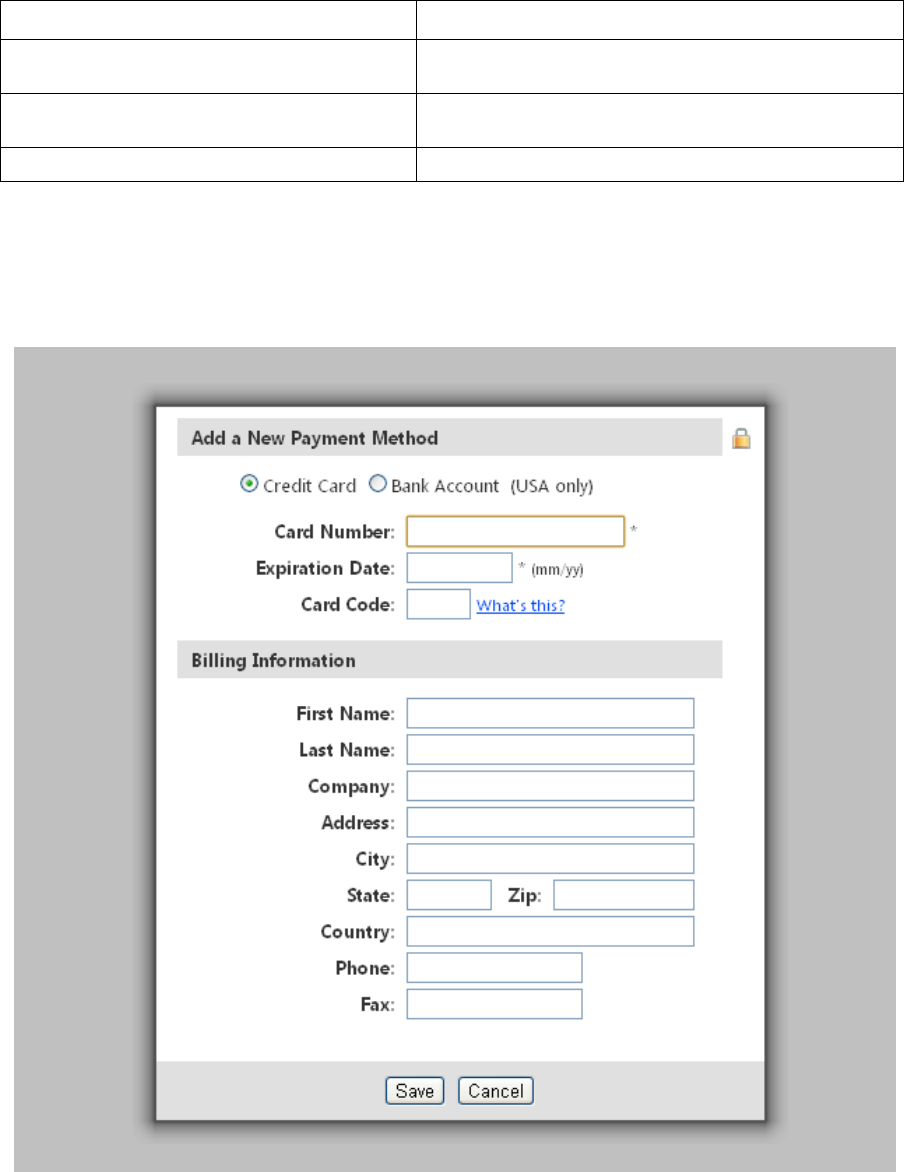
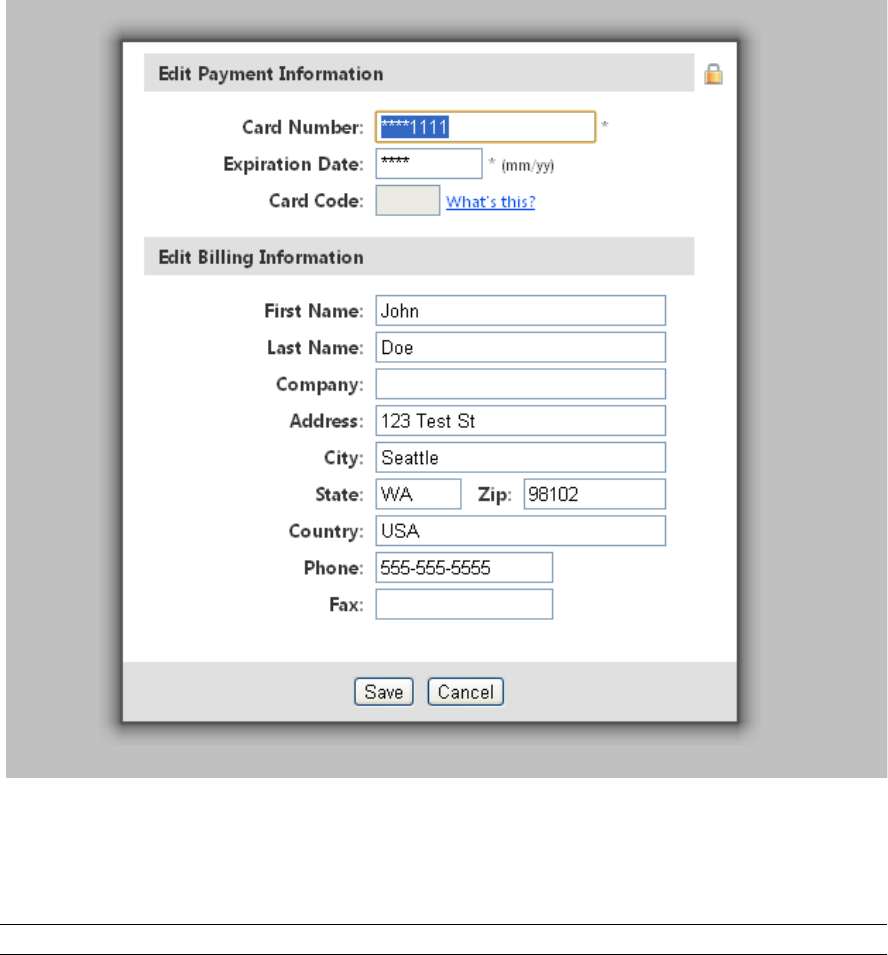
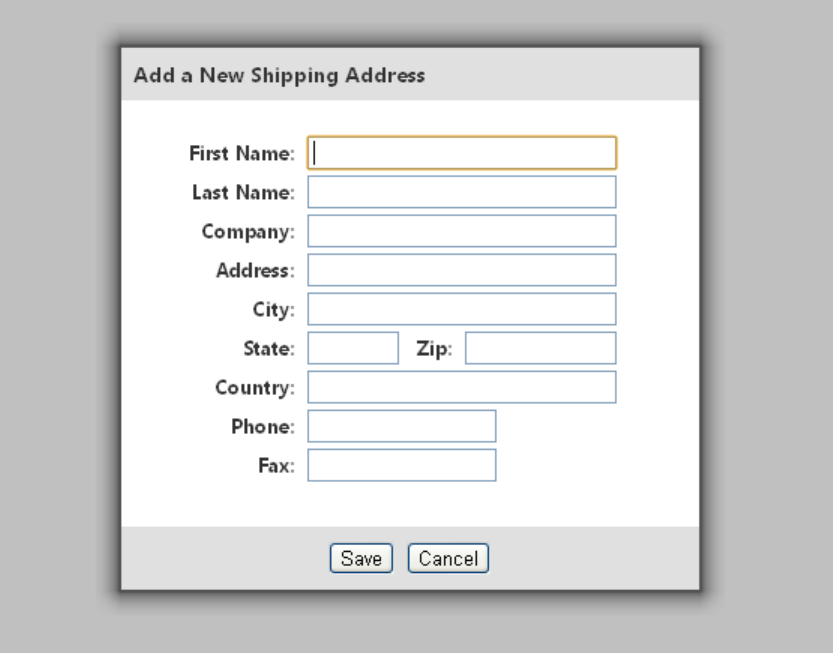
The following images show some sample popups, with their associated buttons.
Add payment
Merchant Web Services API
Last revised: 5/24/2011
Copyright © 1998 - 2009 Authorize.Net, a CyberSource solution 13
<button onclick="AuthorizeNetPopup.openAddPaymentPopup()">Add a New
Payment Method</button>
Edit payment
Add a button with the PaymentProfileId for each payment profile
<button
onclick="AuthorizeNetPopup.openEditPaymentPopup('123456')">Edit
Payment Method</button>
Note: Replace ‘123456’ with the payment profile ID.
Section 2 Executing an API Call
Last revised: 5/24/2011
Copyright © 1998 - 2009 Authorize.Net, a CyberSource solution 14
Add shipping
<button onclick="AuthorizeNetPopup.openAddShippingPopup()">Add a
New Shipping Address</button>
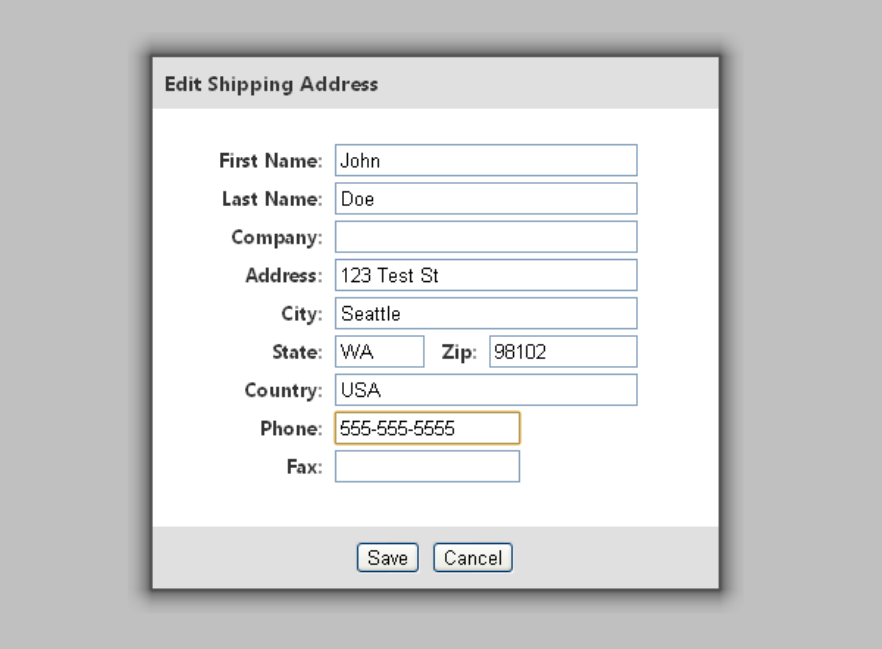
Merchant Web Services API
Last revised: 5/24/2011
Copyright © 1998 - 2009 Authorize.Net, a CyberSource solution 15
Edit shipping
Add a button with the ShippingAddressId for each shipping address
<button
onclick="AuthorizeNetPopup.openEditShippingPopup(‘123456’)">Edit
Shipping Address</button>
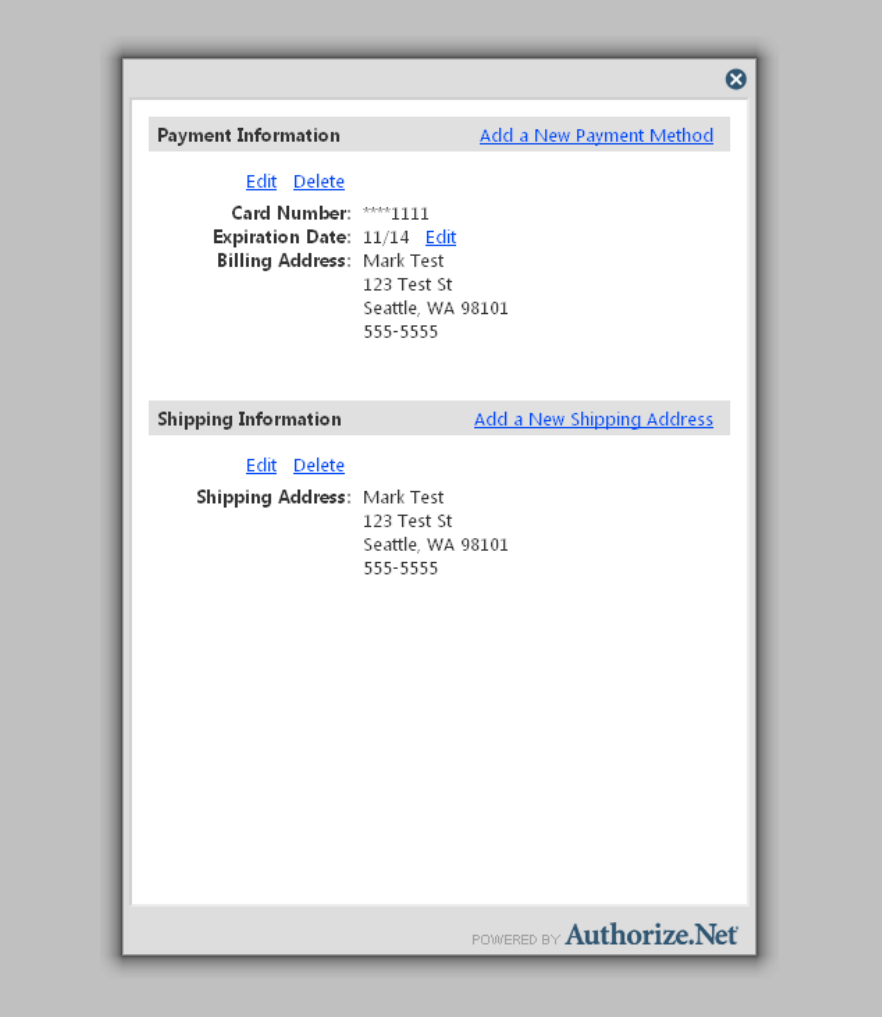
Section 2 Executing an API Call
Last revised: 5/24/2011
Copyright © 1998 - 2009 Authorize.Net, a CyberSource solution 16
Manage payment and shipping
<button onclick="AuthorizeNetPopup.openManagePopup()">Manage my
payment and shipping information</button>
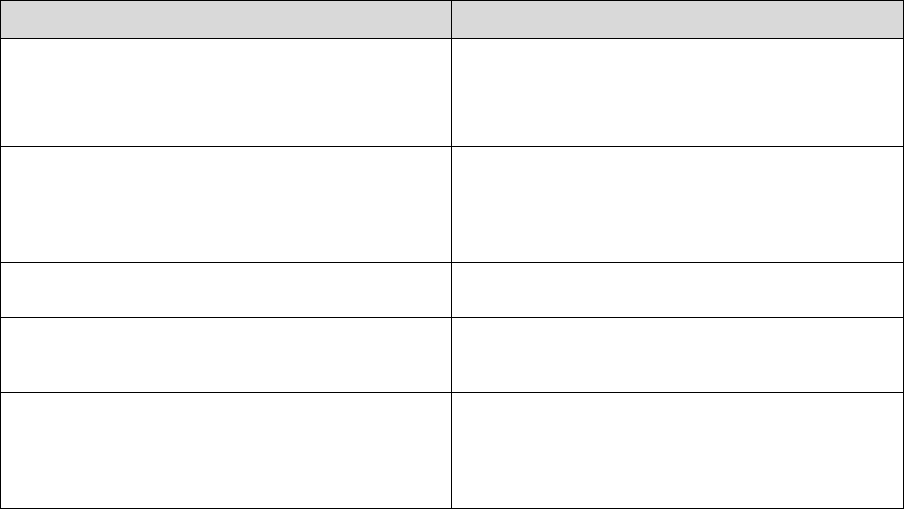
Merchant Web Services API
Last revised: 5/24/2011
Copyright © 1998 - 2009 Authorize.Net, a CyberSource solution 17
Guidelines for Settings Parameters
To integrate to the hosted page as a redirect, pass hostedProfileReturnUrl and
hostedProfileReturnUrlText. Do not pass hostedProfileIFrameCommunicatorUrl.
The parameter hostedProfilePageBorderVisible=true is optional. Do not pass
hostedProfilePageBorderVisible=false.
To integrate to the hosted page as a popup, do not pass hostedProfileReturnUrl or
hostedProfileReturnUrlText. Pass hostedProfilePageBorderVisible=false and pass
hostedProfileIFrameCommunicatorUrl.
The following table shows possible settings:
Parameter
Description
hostedProfileReturnUrl
Enter the URL to return to after the hosted session
ends. Do not pass this setting for iframes or popups.
The return URL is validated to verify that it begins
with http:// or https://.
hostedProfileReturnUrlText
Enter the text to display on the button that returns the
customer to your website. The value can be any text
up to 200 characters. If you do not pass this
parameter, the default button text is Continue. Do not
pass this setting for iframes or popups.
hostedProfilePageBorderVisible Enter true or false. Must be false for iframes or
popups, and must be true for redirects.
hostedProfileHeadingBgColor Enter a hex color string such as #e0e0e0. It changes
the background color of the section headers from
gray to a custom color.
hostedProfileIFrameCommunicatorUrl
Enter the url to a page that can communicate with the
merchant’s main page using javascript. This enables
you to dynamically change the size of the popup so
there are no scroll bars. This is required only for
iframe or lightbox applications
Section 2 Executing an API Call
Last revised: 5/24/2011
Copyright © 1998 - 2009 Authorize.Net, a CyberSource solution 18
Section 3
Executing an API Call
The following sections describe the minimum requirements for executing an API call for managing
customer profiles using SOAP.
There are two options for developing the request script:
• You can develop a custom script yourself using the API fields information provided in this
document, OR
• You can use Authorize.Net sample code in C# and Java available for free from our
Developer Center at http://developer.authorize.net/samplecode.
Note: If you choose to use Authorize.Net sample code, please be aware that in order to achieve a
successful implementation it must be modified with developer test account or the
merchant’s specific payment gateway account information.
Web Service Locations
ITEM
LOCATION
Web Service URL in Production
https://api.authorize.net/soap/v1/Service.asmx
Web Service URL in Developer Test
https://apitest.authorize.net/soap/v1/Service.asmx
WSDL
https://api.authorize.net/soap/v1/Service.asmx?WSDL
Note: The Developer Test URL requires the use of a developer test payment gateway account. You
can request a test account from our Developer Center at
http://developer.authorize.net/testaccount. Developer test accounts cannot be used to test
against the Production URL.
CIM Functions
The CIM API includes the following functions:
• CreateCustomerProfile – Create a new customer profile along with any customer payment
profiles and customer shipping addresses for the customer profile.
• CreateCustomerPaymentProfile – Create a new customer payment profile for an existing
customer profile.
• CreateCustomerShippingAddress – Create a new customer shipping address for an
existing customer profile.

Merchant Web Services API
Last revised: 5/24/2011
Copyright © 1998 - 2009 Authorize.Net, a CyberSource solution 19
• CreateCustomerProfileTransaction – Create a new payment transaction from an existing
customer profile
• DeleteCustomerProfile – Delete an existing customer profile along with all associated
customer payment profiles and customer shipping addresses.
• DeleteCustomerPaymentProfile – Delete a customer payment profile from an existing
customer profile.
• DeleteCustomerShippingAddress – Delete a customer shipping address from an existing
customer profile.
• GetCustomerProfileIds – Retrieve all customer profile IDs you have previously created.
• GetCustomerProfile – Retrieve an existing customer profile along with all the associated
customer payment profiles and customer shipping addresses.
• GetCustomerPaymentProfile – Retrieve a customer payment profile for an existing
customer profile.
• GetCustomerShippingAddress – Retrieve a customer shipping address for an existing
customer profile.
• GetHostedProfilePage—sends a request for access to the hosted CIM page. The response
includes a token that allows the customer to update their information directly on the
Authorize.Net website.
• UpdateCustomerProfile – Update an existing customer profile.
• UpdateCustomerPaymentProfile – Update a customer payment profile for an existing
customer profile.
• UpdateCustomerShippingAddress – Update a shipping address for an existing customer
profile.
• UpdateSplitTenderGroup – Update the status of a split tender group (a group of
transactions, each of which pays for part of one order).
• ValidateCustomerPaymentProfile – Verify an existing customer payment profile by
generating a test transaction.
The following sections provide information about the input parameters required for executing the
functions listed above. Indentations in the Parameter column indicate grouping hierarchy. All
parameters are case sensitive and must be submitted in the order listed here. Parameters are
required unless otherwise indicated. Optional parameters should not be submitted unless
they contain valid values.
Note: Parameters required for individual API calls are in addition to the authentication parameters
required for all API calls.
Note for .NET programmers: When a parameter is optional, and if you use serialization,
then the .NET language you are using automatically creates Boolean properties that
indicate whether or not non-nullable parameters are specified. For example, if there is a
parameter named validationMode that is an Enumeration type, a parameter called
validationModeSpecified is automatically created. By default, these properties are set to
“false.” If a request passes a value for an optional parameter, be sure to set these properties
to “true” so that the value is not ignored.

Section 2 Executing an API Call
Last revised: 5/24/2011
Copyright © 1998 - 2009 Authorize.Net, a CyberSource solution 20
Field Validation and Test Mode
The validationMode parameter allows you to generate a test transaction at the time you create or
update a customer profile. The functions createCustomerProfile, createCustomerPaymentProfile,
updateCustomerPaymentProfile and validateCustomerPaymentProfile all include a validationMode
parameter, which can have one of the following values:
• testMode—performs field validation only. During field validation, all fields are checked.
However, fields with unrestricted field definitions (such as telephone number) do not
generate errors.
If you select testMode, a $1.00 test transaction is submitted to verify that the credit card
number is in a valid format using the Luhn MOD 10 algorithm. This test transaction does
not appear on the customer's credit card statement, but it will generate a transaction receipt
e-mail to the merchant.
• liveMode—generates a transaction to the processor in the amount of $0.01 or $0.00. If
successful, the transaction is immediately voided. Visa authorization transactions are being
switched from $0.01 to $0.00 for all processors. All other credit card types use $0.01. We
recommend you consult your Merchant Account Provider before switching to Zero Dollar
Authorizations for Visa, because you may be subject to fees.
For Visa transactions using $0.00, the billTo address and billTo zip fields are required.
• none—When this value is submitted, no additional validation is performed.
• (blank)—this is the same as using the value none.
When you call createCustomerProfile, then you must use a value of none (or leave the value blank)
if the request does not include any payment profile information.
When you call validateCustomerPaymentProfile, then you must use either testMode or liveMode.
If a validation transaction is unsuccessful, the profile is not created and the merchant will receive an
error.
Authentication
All Web services calls must be authenticated to ensure they originate from authorized sources. This
implementation of the merchant Web services API supports authentication using the API Login ID
and Transaction Key.
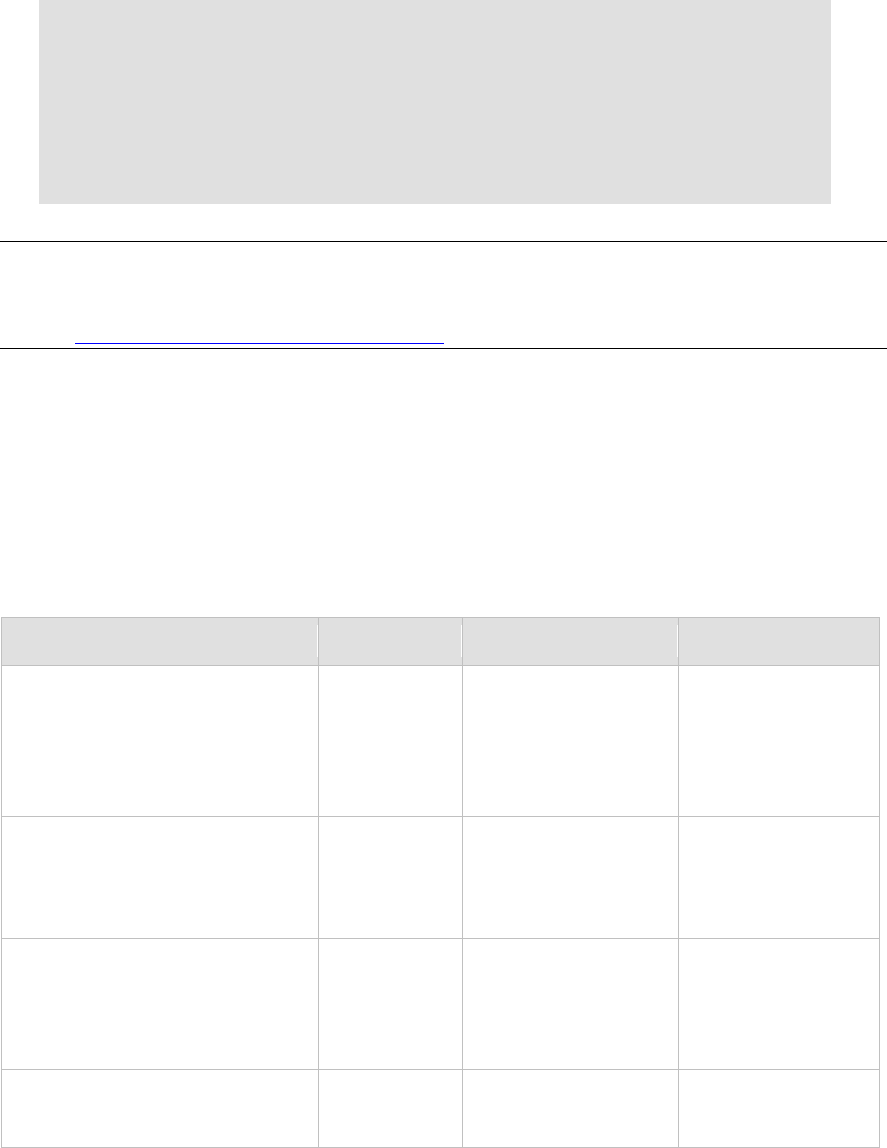
PARAMETER
VALUE
TYPE/FORMAT
NOTES
merchantAuthentication
Contains merchant unique
information for purposes
of authentication
MerchantAuthentication
Type
name
The valid API Login ID for
the developer test or
merchant account
20
Submit the API
Login ID used to
submit transactions
transactionKey
The valid Transaction Key
for the developer test or
merchant account
16
Submit the
Transaction Key
obtained from the
Merchant Interface
Merchant Web Services API
Last revised: 5/24/2011
Copyright © 1998 - 2009 Authorize.Net, a CyberSource solution 21
Example of Authentication with the Login ID and Transaction Key
The authentication information with the merchant’s Login ID and Transaction Key is sent in SOAP
body, as shown below:
<soap:Body>
<FunctionName xmlns="https://api.authorize.net/soap/v1/">
<merchantAuthentication>
<name>API Login ID here</name>
<transactionKey>Transaction Key here</transactionKey>
</merchantAuthentication>
Additional required parameters here
</FunctionName>
</soap:Body>
Note: The sample code included in this document uses dummy field values. When using or
testing sample code, be sure to enter valid field values. Additional sample code is available
for download from the Authorize.Net Developer Center at
http://developer.authorize.net/samplecode.
Input Parameters for CreateCustomerProfile
This function is used to create a new customer profile along with any customer payment profiles
and customer shipping addresses for the customer profile.
The following table lists the input parameters for executing an API call to the
CreateCustomerProfile function.
FIELD VALUE TYPE/FORMAT NOTES
profile Contains
information for
the customer
profile
CustomerProfileType At least one of the
following fields must be
submitted under
profile:
merchantCustomerId,
description or email.
merchantCustomerId Merchant
assigned ID for
the customer
Conditional
Up to 20 characters Required only if no
values for both
description and email
are submitted.
description Description of
the customer or
customer profile
Conditional
Up to 255 characters Required only if no
values for both
merchantCustomerId
and email are
submitted.
email
Email address
associated with
the customer
Up to 255 characters
Required only if no
values for both
description and

Section 2 Executing an API Call
Last revised: 5/24/2011
Copyright © 1998 - 2009 Authorize.Net, a CyberSource solution 22
FIELD
VALUE
TYPE/FORMAT
NOTES
profile
Conditional
merchantCustomerId
are submitted.
paymentProfiles
Contains
payment
profiles for the
customer profile
Optional
CustomerPaymentProfile
Type
Multiple instances of
this parameter and its
children can be
submitted to create
multiple payment
profiles for the
customer profile.
customerType Optional CustomerTypeEnum
individual
business
billTo
CustomerAddressType
firstName The customer’s
first name
Optional
Up to 50 characters (no
symbols)
lastName
The customer’s
last name
Optional
Up to 50 characters (no
symbols)
company
The name of
the company
associated with
the customer, if
applicable
Optional
Up to 50 characters (no
symbols)
address
The customer’s
address
Optional
Up to 60 characters (no
symbols)
city The city of the
customer’s
address
Optional
Up to 40 characters (no
symbols)
state The state of the
customer’s
address
Optional
Up to 40 characters (no
symbols)
zip
The ZIP code of
the customer’s
address
Up to 20 characters (no
symbols)

Merchant Web Services API
Last revised: 5/24/2011
Copyright © 1998 - 2009 Authorize.Net, a CyberSource solution 23
FIELD
VALUE
TYPE/FORMAT
NOTES
Optional
country
The country of
the customer’s
address
Optional
Up to 60 characters (no
symbols)
phoneNumber
The phone
number
associated with
the customer
profile
Optional
Up to 25 digits (no
letters)
Ex. (123)123-1234
faxNumber
The fax number
associated with
the customer
profile
Optional
Up to 25 digits (no
letters)
Ex. (123)123-1234
payment
Contains
payment profile
information for
the customer
profile
PaymentSimpleType
Can contain
CreditCardSimpleType
or BankAccountType.
creditCard
Contains credit
card payment
information for
the payment
profile
CreditCardSimpleType
This parameter and its
children are only
required when the
payment profile is
credit card.
cardNumber
The customer’s
credit card
number
13 to 16 digits
expirationDate
The expiration
date for the
customer’s
credit card
YYYY-MM
For .Net users, the
class
System.Runtime.Remo
ting.Metadata.W3cXsd
2001.SoapYearMonth
can be used to
manage gYearMonth
types.
cardCode The three- or
four-digit
number on the
back of a credit
card (on the
front for
American
Express)
Optional
Numeric This field is required if
the merchant would
like to use the Card
Code Verification
(CCV) security feature.
For more information,
please see the
Merchant Integration
Guide at
http://www.authorize.

Section 2 Executing an API Call
Last revised: 5/24/2011
Copyright © 1998 - 2009 Authorize.Net, a CyberSource solution 24
FIELD
VALUE
TYPE/FORMAT
NOTES
net/support/merchant
/http://www.authoriz
e.net/support/mercha
nt/.
cardCode is only used
for validation and will
not be stored in the
customer profile. It
should only be used
when submitting
validationMode with a
value of testMode or
liveMode.
bankAccount
Contains bank
account
payment
information for
the payment
profile
BankAccountType
This parameter and its
children are only
required when the
payment profile is bank
account.
accountType
The type of
bank account
for the payment
profile
Optional
BankAccountTypeEnum
checking
savings
businessChecking
routingNumber
The routing
number of the
customer’s
bank
9 digits
accountNumber
The customer’s
bank account
number
5 to 17 digits
nameOnAccount
The customer’s
full name as
listed on the
bank account
Up to 22 characters
echeckType
The type of
electronic check
transaction
Optional
EcheckTypeEnum
CCD
PPD
TEL
WEB
Currently, the CIM API
does not support ARC
or BOC transaction
types.
bankName
The name of
the bank
associated with
the bank
account number
Up to 50 characters

Merchant Web Services API
Last revised: 5/24/2011
Copyright © 1998 - 2009 Authorize.Net, a CyberSource solution 25
FIELD
VALUE
TYPE/FORMAT
NOTES
Optional
shipToList
Contains
shipping
address
information for
the customer
profile
CustomerAddressType
firstName
The customer’s
first name
Optional
Up to 50 characters (no
symbols)
lastName The customer’s
last name
Optional
Up to 50 characters (no
symbols)
company
The name of
the company
associated with
the customer, if
applicable
Optional
Up to 50 characters (no
symbols)
address
The customer’s
shipping
address
Optional
Up to 60 characters (no
symbols)
city
The city of the
customer’s
shipping
address
Optional
Up to 40 characters (no
symbols)
state The state of the
customer’s
shipping
address
Optional
Up to 40 characters (no
symbols)
zip
The ZIP code of
the customer’s
shipping
address
Optional
Up to 20 characters (no
symbols)
country The country of
the customer’s
shipping
address
Up to 60 characters (no
symbols)

Section 2 Executing an API Call
Last revised: 5/24/2011
Copyright © 1998 - 2009 Authorize.Net, a CyberSource solution 26
FIELD
VALUE
TYPE/FORMAT
NOTES
Optional
phoneNumber
The phone
number
associated with
the customer
profile
Optional
Up to 25 digits (no
letters)
Ex. (123)123-1234
faxNumber
The fax number
associated with
the customer
profile
Optional
Up to 25 digits (no
letters)
Ex. (123)123-1234
validationMode
Indicates the
processing
mode for the
request
none
testMode
liveMode
For more information
on use and restrictions
of validationMode, see
“Field Validation and
Test Mode.”
For information about output for this function, see the section of this document titled “Output
Parameters for CreateCustomerProfileResponse.”
Example CreateCustomerProfile
<?xml version="1.0" encoding="utf-8"?>
<soap:Envelope
xmlns:soap="http://schemas.xmlsoap.org/soap/envelope/"
xmlns:xsi="http://www.w3.org/2001/XMLSchema-instance"
xmlns:xsd="http://www.w3.org/2001/XMLSchema">
<soap:Body>
<CreateCustomerProfile
xmlns="https://api.authorize.net/soap/v1/">
<merchantAuthentication>
<name>API Login ID here</name>
<transactionKey>Transaction Key here</transactionKey>
</merchantAuthentication>
<profile>
<merchantCustomerId>Merchant Customer ID
here</merchantCustomerId>
<description>Profile description here</description>
<email>customer profile email address here</email>
<paymentProfiles>
<CustomerPaymentProfileType>
<customerType>individual</customerType>
<payment>
<creditCard>
<cardNumber>Credit card number here</cardNumber>
<expirationDate>
Credit card expiration date
Merchant Web Services API
Last revised: 5/24/2011
Copyright © 1998 - 2009 Authorize.Net, a CyberSource solution 27
here</expirationDate>
</creditCard>
</payment>
</CustomerPaymentProfileType>
</paymentProfiles>
</profile>
<validationMode>liveMode</validationMode>
</CreateCustomerProfile>
</soap:Body>
</soap:Envelope>
Note: The sample code included in this document uses dummy field values. When using or
testing sample code, be sure to enter valid field values. Additional sample code is available
for download from the Authorize.Net Developer Center at
http://developer.authorize.net/samplecode.
Input Parameters for CreateCustomerPaymentProfile
This function is used to create a new customer payment profile for an existing customer profile.
The following table lists the input parameters for executing an API call to the
CreateCustomerPaymentProfile function.
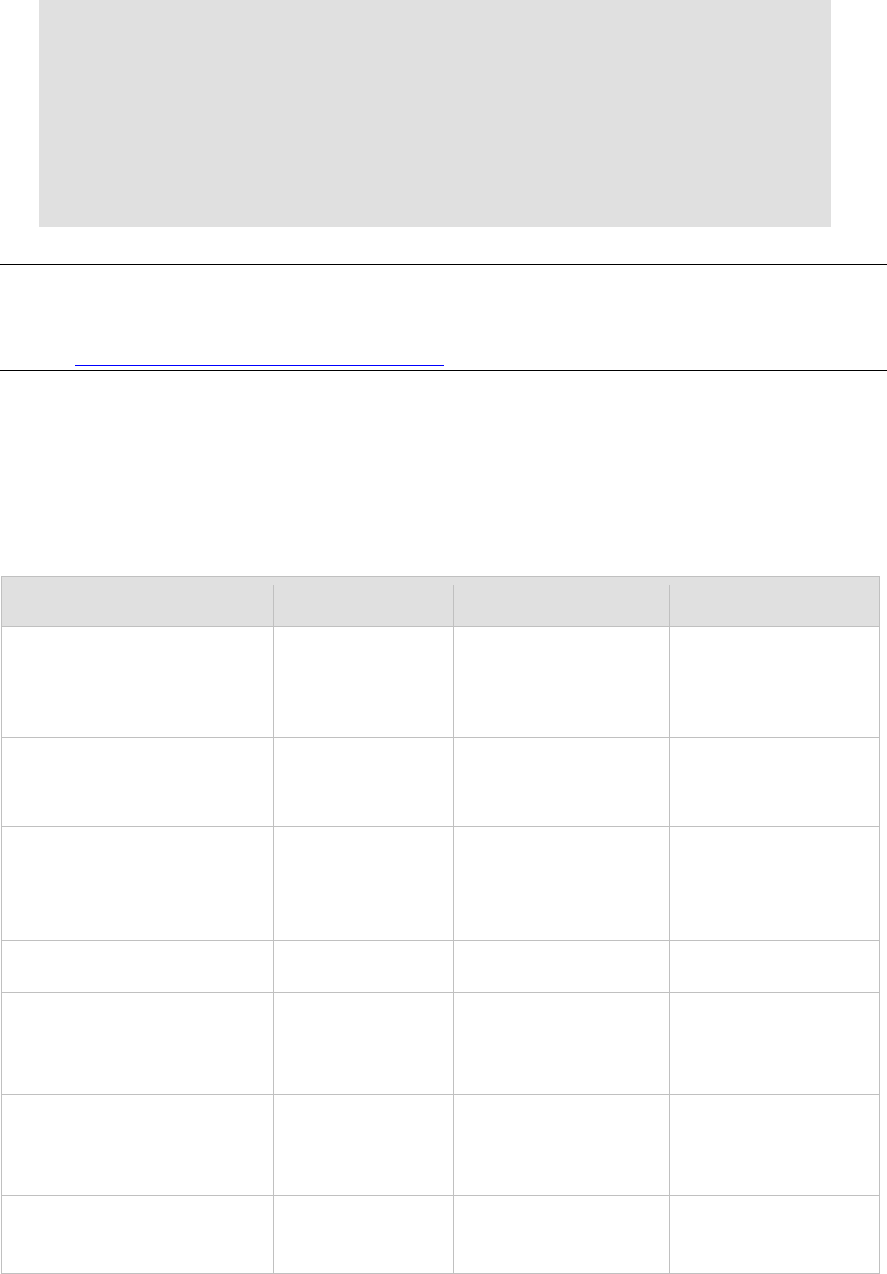
FIELD
VALUE
TYPE/FORMAT
NOTES
customerProfileId
Payment gateway
assigned ID
associated with the
customer profile
Numeric
paymentProfile
Contains payment
information for the
customer profile
CustomerPaymentProfile
Type
customerType
Optional
CustomerTypeEnum
individual
business
billTo
CustomerAddressType
firstName
The customer’s first
name
Optional
Up to 50 characters (no
symbols)
lastName
The customer’s last
name
Optional
Up to 50 characters (no
symbols)
company The name of the
company associated
with the customer, if
Up to 50 characters (no
symbols)

Section 2 Executing an API Call
Last revised: 5/24/2011
Copyright © 1998 - 2009 Authorize.Net, a CyberSource solution 28
FIELD
VALUE
TYPE/FORMAT
NOTES
applicable
Optional
address
The customer’s
address
Optional
Up to 60 characters (no
symbols)
city
The city of the
customer’s address
Optional
Up to 40 characters (no
symbols)
state
The state of the
customer’s address
Optional
Up to 40 characters (no
symbols)
zip The ZIP code of the
customer’s address
Optional
Up to 20 characters (no
symbols)
country
The country of the
customer’s address
Optional
Up to 60 characters (no
symbols)
phoneNumber
The phone number
associated with the
customer’s address
Optional
Up to 25 digits (no
letters)
Ex. (123)123-1234
faxNumber
The fax number
associated with the
customer’s address
Optional
Up to 25 digits (no
letters)
Ex. (123)123-1234
payment
Contains payment
information for the
customer profile
PaymentSimpleType
Can contain
CreditCardSimpleType
or BankAccountType.
creditCard
Contains credit card
payment information
for the customer
profile
CreditCardSimpleType
This parameter and its
children are only
required when the
payment profile is credit
card.
cardNumber
The customer’s
credit card number
13 to 16 digits
expirationDate
The expiration date
for the customer’s
credit card
YYYY-MM
For .Net users, the class
System.Runtime.Remoti
ng.Metadata.W3cXsd20
01.SoapYearMonth can
be used to manage

Merchant Web Services API
Last revised: 5/24/2011
Copyright © 1998 - 2009 Authorize.Net, a CyberSource solution 29
FIELD
VALUE
TYPE/FORMAT
NOTES
gYearMonth types.
cardCode
The three- or four-
digit number on the
back of a credit card
(on the front for
American Express)
Optional
Numeric
This field is required if
the merchant would like
to use the Card Code
Verification (CCV)
security feature. For
more information,
please see the
Merchant Integration
Guide at
http://www.authorize.n
et/support/merchant/ht
tp://www.authorize.n
et/support/Merchant/d
efault.htm.
cardCode is only used
for validation and will
not be stored in the
customer profile. It
should only be used
when submitting
validationMode with a
value of testMode or
liveMode.
bankAccount
Contains bank
account payment
information for the
customer profile
BankAccountType
This parameter and its
children are only
required when the
payment profile is bank
account.
accountType
The type of bank
account for the
payment profile
Optional
BankAccountTypeEnum
checking
savings
businessChecking
routingNumber
The routing number
of the customer’s
bank
9 digits
accountNumber
The customer’s
bank account
number
5 to 17 digits
nameOnAccount
The customer’s full
name as listed on
the bank account
Up to 22 characters
echeckType The type of
electronic check
transaction
EcheckTypeEnum
CCD
PPD
Currently, the CIM API
does not support ARC
or BOC transaction
types.

Section 2 Executing an API Call
Last revised: 5/24/2011
Copyright © 1998 - 2009 Authorize.Net, a CyberSource solution 30
FIELD
VALUE
TYPE/FORMAT
NOTES
Optional
TEL
WEB
bankName
The name of the
bank associated
with the bank
account number
Optional
Up to 50 characters
validationMode
Indicates the
processing mode for
the request
ValidationModeEnum
none
testMode
liveMode
For more information on
use and restrictions of
validationMode, see
“Field Validation and
Test Mode.”
For information about output parameters for this function, see the section of this document titled
“Output Parameters for CreateCustomerPaymentProfileResponse.”
Input Parameters for CreateCustomerShippingAddress
This function is used to create a new customer shipping address for an existing customer profile.
The following table lists the input parameters for executing an API call to the
CreateCustomerShippingAddress function.
FIELD
VALUE
TYPE/FORMAT
NOTES
customerProfileId
Payment gateway
assigned ID associated
with the customer profile
Numeric
address
Contains shipping
address information for
the customer profile
CustomerAddressType
firstName
The customer’s first name
Optional
Up to 50 characters (no
symbols)
lastName
The customer’s last name
Optional
Up to 50 characters (no
symbols)
company The name of the company
associated with the
customer, if applicable
Optional
Up to 50 characters (no
symbols)

Merchant Web Services API
Last revised: 5/24/2011
Copyright © 1998 - 2009 Authorize.Net, a CyberSource solution 31
FIELD
VALUE
TYPE/FORMAT
NOTES
address
The customer’s shipping
address
Optional
Up to 60 characters (no
symbols)
city The city of the customer’s
shipping address
Optional
Up to 40 characters (no
symbols)
state
The state of the
customer’s shipping
address
Optional
Up to 40 characters (no
symbols)
zip
The ZIP code of the
customer’s shipping
address
Optional
Up to 20 characters (no
symbols)
country The country of the
customer’s shipping
address
Optional
Up to 60 characters (no
symbols)
phoneNumber The phone number
associated with the
customer’s shipping
address
Optional
Up to 25 digits (no letters)
Ex. (123)123-1234
faxNumber
The fax number
associated with the
customer’s shipping
address
Optional
Up to 25 digits (no letters)
Ex. (123)123-1234
For information about output parameters for this function, see the section of this document titled
“Output Parameters for CreateCustomerShippingAddressResponse.”
Input Parameters for CreateCustomerProfileTransaction
This function is used to create a payment transaction from an existing customer profile. You can
submit one of six transaction types: Authorization Only, Authorization and Capture, Capture Only,
Prior Authorization and Capture, Refund and Void. For more information on these transaction
types, please see the Merchant Integration Guide at
http://www.authorize.net/support/merchant/http://www.authorize.net/support/Merchant/default.
htm.
Note: The only transaction types that generate a customer receipt email are Authorization Only,
Authorization and Capture, and Refund.

Section 2 Executing an API Call
Last revised: 5/24/2011
Copyright © 1998 - 2009 Authorize.Net, a CyberSource solution 32
For Authorization Only transactions
The following table lists the input parameters for executing an API call to the
CreateCustomerProfileTransaction function for an Authorization Only transaction.
FIELD
VALUE
TYPE/FORMAT
NOTES
transaction
Contains
transaction
information
ProfileTransactionType
profileTransAuthOnly
The transaction
type that is
being requested
ProfileTransAuthOnlyType
Only one
transaction type
is allowed per
request.
amount
The total
amount of the
transaction
Up to 4 digits after the
decimal point (no dollar
symbol)
Ex. 12.99 or 12.9999
This amount
should include
all other
amounts such
as tax amount,
shipping
amount, etc.
tax
Contains tax
information for
the transaction
Optional
ExtendedAmountType
amount
The tax amount
for the
transaction
Optional
Up to 4 digits after the
decimal point (no dollar
symbol)
Ex. 12.99 or 12.9999
This amount
must be
included in the
total amount for
the transaction.
name The name of
the tax for the
transaction
Optional
Up to 31 characters
description
The tax
description for
the transaction
Optional
Up to 255 characters
shipping
Contains
shipping
information for
the transaction
Optional
ExtendedAmountType

Merchant Web Services API
Last revised: 5/24/2011
Copyright © 1998 - 2009 Authorize.Net, a CyberSource solution 33
FIELD
VALUE
TYPE/FORMAT
NOTES
amount
The shipping
amount for the
transaction
Optional
Up to 4 digits after the
decimal point (no dollar
symbol)
Ex. 12.99 or 12.9999
This amount
must be
included in the
total amount for
the transaction.
name
The name of
the shipping for
the transaction
Optional
Up to 31 characters
description
The shipping
description for
the transaction
Optional
Up to 255 characters
duty Contains duty
information for
the transaction
Optional
ExtendedAmountType
amount The duty
amount for the
transaction
Optional
Up to 4 digits after the
decimal point (no dollar
symbol)
Ex. 12.99 or 12.9999
This amount
must be
included in the
total amount for
the transaction.
name
The name of
the duty for the
transaction
Optional
Up to 31 characters
description
The duty
description for
the transaction
Optional
Up to 255 characters
lineItems
Contains line
item details
about the order
Optional
LineItemType
Up to 30 distinct
instances of this
parameter and
its children can
be included per
transaction to
describe items
included in the
order.
itemId
The ID
assigned to the
item
Optional
Up to 31 characters

Section 2 Executing an API Call
Last revised: 5/24/2011
Copyright © 1998 - 2009 Authorize.Net, a CyberSource solution 34
FIELD
VALUE
TYPE/FORMAT
NOTES
name
A short
description of
an item
Optional
Up to 31 characters
description
A detailed
description of
an item
Optional
Up to 255 characters
quantity
The quantity of
an item
Optional
Up to 4 digits (up to two
decimal places)
unitPrice
Cost of an item
per unit
excluding tax,
freight, and duty
Optional
Up to 4 digits with a decimal
point (no dollar symbol)
Ex. 4.95
taxable
Indicates
whether the
item is subject
to tax
Optional
TRUE
FALSE
customerProfileId Payment
gateway
assigned ID
associated with
the customer
profile
Numeric
customerPaymentProfileId Payment
gateway
assigned ID
associated with
the customer
payment profile
Numeric
customerShippingAddressId
Payment
gateway
assigned ID
associated with
the customer
shipping
address
Optional
Numeric
If
customerShippi
ngAddressId is
not passed,
shipping
information will
not be included
with the
transaction.

Merchant Web Services API
Last revised: 5/24/2011
Copyright © 1998 - 2009 Authorize.Net, a CyberSource solution 35
FIELD
VALUE
TYPE/FORMAT
NOTES
order
Contains
information
about the order
Optional
OrderExType
invoiceNumber
The merchant
assigned
invoice number
for the
transaction
Optional
Up to 20 characters (no
symbols)
description The transaction
description
Optional
Up to 255 characters (no
symbols)
purchaseOrderNumber The merchant
assigned
purchase order
number
Optional
Up to 25 characters (no
symbols)
taxExempt
The tax exempt
status
Optional
TRUE
FALSE
recurringBilling The recurring
billing status
Optional
TRUE
FALSE
cardCode
The customer’s
card code (the
three- or four-
digit number on
the back or
front of a credit
card)
Required only
when the
merchant would
like to use the
Card Code
Verification
(CCV) filter
Conditional
3 to 4 digits
This field is
required if the
merchant would
like to use the
CCV security
feature. For
more
information,
please see the
Merchant
Integration
Guide at
http://www.aut
horize.net/supp
ort/merchant/ht
tp://www.auth
orize.net/supp
ort/Merchant/d
efault.htm.
Section 2 Executing an API Call
Last revised: 5/24/2011
Copyright © 1998 - 2009 Authorize.Net, a CyberSource solution 36
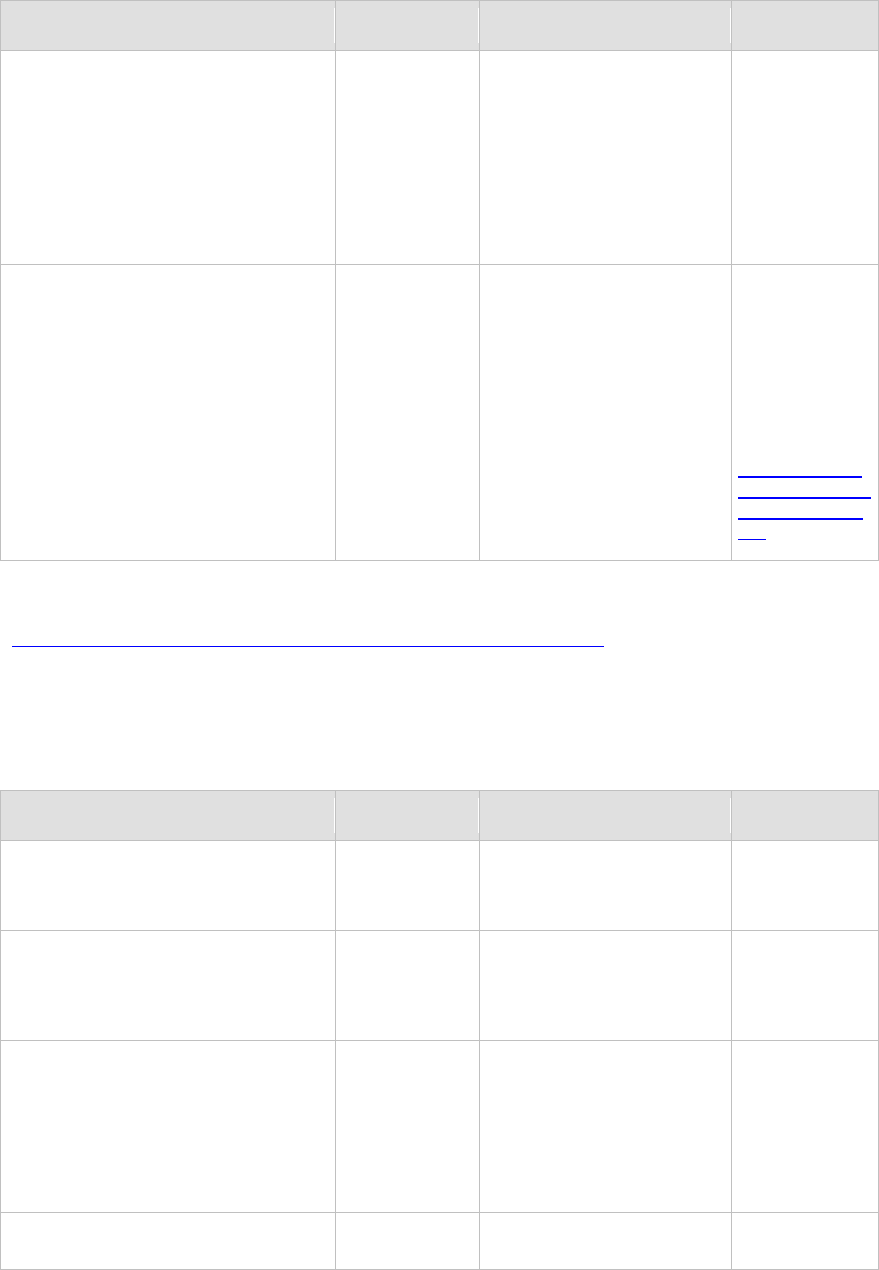
FIELD
VALUE
TYPE/FORMAT
NOTES
splitTenderId
Conditional
Up to 6 digits
This field is
required for
second and
subsequent
transactions
related to a
partial
authorizaqtion
transaction.
extraOptions Information in
name/value pair
format that
does not exist
within CIM,
such as
customer IP
address, etc.
Optional
String For a complete
list of the
transaction
variable names
available,
please review
the AIM
Implementation
Guide located at
http://www.aut
horize.net/supp
ort/AIM_guide.
pdf.
For information about output parameters for this function, see the section of this document titled
“Output Parameters for CreateCustomerProfileTransactionResponse.”
For Authorization and Capture Transactions
The following table lists the input parameters for executing an API call to the
CreateCustomerProfileTransaction function for an Authorization and Capture transaction.
FIELD
VALUE
TYPE/FORMAT
NOTES
transaction
Contains
transaction
information
ProfileTransactionType
profileTransAuthCapture The transaction
type that is
being requested
ProfileTransAuthCaptureTyp
e
Only one
transaction type
is allowed per
request.
amount
The total
amount of the
transaction
Up to 4 digits after the
decimal point (no dollar
symbol)
Ex. 12.99 or 12.9999
This amount
should include
all other
amounts such
as tax amount,
shipping
amount, etc.
tax
Contains tax
information for
ExtendedAmountType

Merchant Web Services API
Last revised: 5/24/2011
Copyright © 1998 - 2009 Authorize.Net, a CyberSource solution 37
FIELD
VALUE
TYPE/FORMAT
NOTES
the transaction
Optional
amount
The tax amount
for the
transaction
Optional
Up to 4 digits after the
decimal point (no dollar
symbol)
Ex. 12.99 or 12.9999
This amount
must be
included in the
total amount for
the transaction.
name
The name of
the tax for the
transaction
Optional
Up to 31 characters
description
The tax
description for
the transaction
Optional
Up to 255 characters
shipping
Contains
shipping
information for
the transaction
Optional
ExtendedAmountType
amount
The shipping
amount for the
transaction
Optional
Up to 4 digits after the
decimal point (no dollar
symbol)
Ex. 12.99 or 12.9999
This amount
must be
included in the
total amount for
the transaction.
name
The name of
the shipping for
the transaction
Optional
Up to 31 characters
description
The shipping
description for
the transaction
Optional
Up to 255 characters
duty
Contains duty
information for
the transaction
Optional
ExtendedAmountType
amount
The duty
amount for the
transaction
Optional
Up to 4 digits after the
decimal point (no dollar
symbol)
Ex. 12.99 or 12.9999
This amount
must be
included in the
total amount for
the transaction.

Section 2 Executing an API Call
Last revised: 5/24/2011
Copyright © 1998 - 2009 Authorize.Net, a CyberSource solution 38
FIELD
VALUE
TYPE/FORMAT
NOTES
name
The name of
the duty for the
transaction
Optional
Up to 31 characters
description
The duty
description for
the transaction
Optional
Up to 255 characters
lineItems
Contains line
item details
about the order
Optional
LineItemType
Up to 30 distinct
instances of this
parameter and
its children can
be included per
transaction to
describe items
included in the
order.
itemId
The ID
assigned to the
item
Optional
Up to 31 characters
name
A short
description of
an item
Optional
Up to 31 characters
description
A detailed
description of
an item
Optional
Up to 255 characters
quantity
The quantity of
an item
Optional
Up to 4 digits (up to two
decimal places)
unitPrice
Cost of an item
per unit
excluding tax,
freight, and duty
Optional
Up to 4 digits with a decimal
point (no dollar symbol)
Ex. 4.95
taxable
Indicates
whether the
item is subject
to tax
Optional
TRUE
FALSE

Merchant Web Services API
Last revised: 5/24/2011
Copyright © 1998 - 2009 Authorize.Net, a CyberSource solution 39
FIELD
VALUE
TYPE/FORMAT
NOTES
customerProfileId
Payment
gateway
assigned ID
associated with
the customer
profile
Numeric
customerPaymentProfileId Payment
gateway
assigned ID
associated with
the customer
payment profile
Numeric
customerShippingAddressId Payment
gateway
assigned ID
associated with
the customer
shipping
address
Optional
Numeric If
customerShippi
ngAddressId is
not passed,
shipping
information will
not be included
with the
transaction.
order
Contains
information
about the order
Optional
OrderExType
invoiceNumber
The merchant
assigned
invoice number
for the
transaction
Optional
Up to 20 characters (no
symbols)
description
The transaction
description
Optional
Up to 255 characters (no
symbols)
purchaseOrderNumber
The merchant
assigned
purchase order
number
Optional
Up to 25 characters (no
symbols)
taxExempt
The tax exempt
status
Optional
TRUE
FALSE
recurringBilling
The recurring
billing status
TRUE
FALSE
Section 2 Executing an API Call
Last revised: 5/24/2011
Copyright © 1998 - 2009 Authorize.Net, a CyberSource solution 40
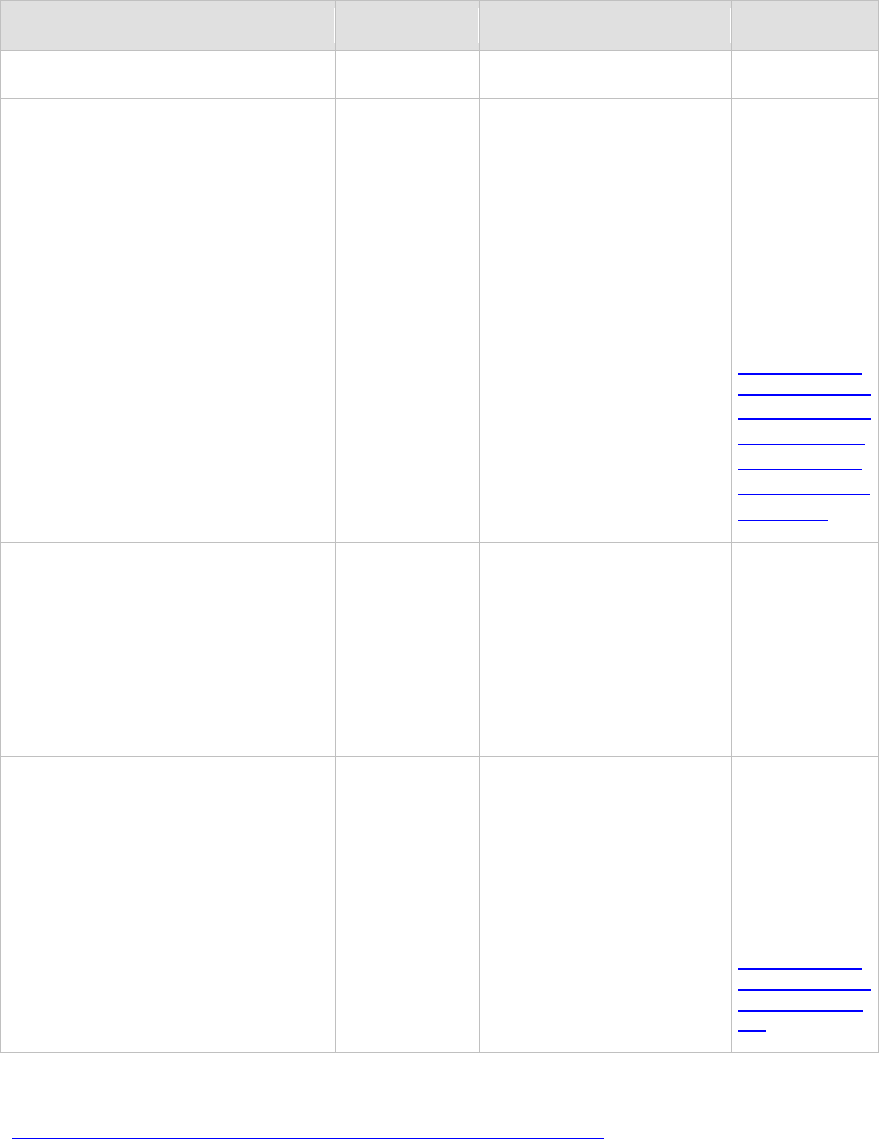
FIELD
VALUE
TYPE/FORMAT
NOTES
Optional
cardCode
The customer’s
card code (the
three- or four-
digit number on
the back or
front of a credit
card)
Required only
when the
merchant would
like to use the
Card Code
Verification
(CCV) filter
Conditional
3 to 4 digits
This field is
required if the
merchant would
like to use the
CCV security
feature. For
more
information,
please see the
Merchant
Integration
Guide at
http://www.aut
horize.net/supp
ort/merchant/ht
tp://www.auth
orize.net/supp
ort/Merchant/d
efault.htm.
splitTenderId
Conditional
Up to 6 digits
This field is
required for
second and
subsequent
transactions
related to a
partial
authorization
transaction.
extraOptions Information in
name/value pair
format that
does not exist
within CIM,
such as
customer IP
address, etc.
Optional
String For a complete
list of the
transaction
variable names
available,
please review
the AIM
Implementation
Guide located at
http://www.aut
horize.net/supp
ort/AIM_guide.
pdf.
For information about output parameters for this function, see the section of this document titled
“Output Parameters for CreateCustomerProfileTransactionResponse.”
For Capture Only Transactions
The following table lists the input parameters for executing an API call to the
CreateCustomerProfileTransaction function for a Capture Only transaction.

Merchant Web Services API
Last revised: 5/24/2011
Copyright © 1998 - 2009 Authorize.Net, a CyberSource solution 41
FIELD VALUE TYPE/FORMAT NOTES
transaction Contains transaction
information ProfileTransactionType
profileTransCaptureOnly
The transaction type
that is being
requested
ProfileTransCaptureOnlyType
Only one
transaction
type is
allowed per
request.
amount
The total amount of
the transaction
Up to 4 digits after the decimal
point (no dollar symbol)
Ex. 12.99 or 12.9999
This amount
should include
all other
amounts such
as tax
amount,
shipping
amount, etc.
tax
Contains tax
information for the
transaction
Optional
ExtendedAmountType
amount
The tax amount for
the transaction
Optional
Up to 4 digits after the decimal
point (no dollar symbol)
Ex. 12.99 or 12.9999
This amount
must be
included in
the total
amount for
the
transaction.
name
The name of the tax
for the transaction
Optional
Up to 31 characters
description
The tax description
for the transaction
Optional
Up to 255 characters
shipping Contains shipping
information for the
transaction
Optional
ExtendedAmountType
amount The shipping
amount for the
transaction
Optional
Up to 4 digits after the decimal
point (no dollar symbol)
Ex. 12.99 or 12.9999
This amount
must be
included in
the total
amount for
the
transaction.

Section 2 Executing an API Call
Last revised: 5/24/2011
Copyright © 1998 - 2009 Authorize.Net, a CyberSource solution 42
FIELD
VALUE
TYPE/FORMAT
NOTES
name
The name of the
shipping for the
transaction
Optional
Up to 31 characters
description
The shipping
description for the
transaction
Optional
Up to 255 characters
duty
Contains duty
information for the
transaction
Optional
ExtendedAmountType
amount
The duty amount for
the transaction
Optional
Up to 4 digits after the decimal
point (no dollar symbol)
Ex. 12.99 or 12.9999
This amount
must be
included in
the total
amount for
the
transaction.
name
The name of the
duty for the
transaction
Optional
Up to 31 characters
description
The duty description
for the transaction
Optional
Up to 255 characters
lineItems
Contains line item
details about the
order
Optional
LineItemType
Up to 30
distinct
instances of
this parameter
and its
children can
be included
per
transaction to
describe
items included
in the order.
itemId
The ID assigned to
the item
Optional
Up to 31 characters
name
A short description
of an item
Optional
Up to 31 characters

Merchant Web Services API
Last revised: 5/24/2011
Copyright © 1998 - 2009 Authorize.Net, a CyberSource solution 43
FIELD
VALUE
TYPE/FORMAT
NOTES
description
A detailed
description of an
item
Optional
Up to 255 characters
quantity
The quantity of an
item
Optional
Up to 4 digits (up to two
decimal places)
unitPrice
Cost of an item per
unit excluding tax,
freight, and duty
Optional
Up to 4 digits with a decimal
point (no dollar symbol)
Ex. 4.95
taxable
Indicates whether
the item is subject to
tax
Optional
TRUE
FALSE
customerProfileId
Payment gateway
assigned ID
associated with the
customer profile
Numeric
customerPaymentProfileId
Payment gateway
assigned ID
associated with the
customer payment
profile
Numeric
customerShippingAddressId
Payment gateway
assigned ID
associated with the
customer shipping
address
Optional
Numeric
If
customerShip
pingAddressId
is not passed,
shipping
information
will not be
included with
the
transaction.
order Contains information
about the order
Optional
OrderExType
invoiceNumber
The merchant
assigned invoice
number for the
transaction
Optional
Up to 20 characters (no
symbols)
description
The transaction
Up to 255 characters (no

Section 2 Executing an API Call
Last revised: 5/24/2011
Copyright © 1998 - 2009 Authorize.Net, a CyberSource solution 44
FIELD
VALUE
TYPE/FORMAT
NOTES
description
Optional
symbols)
purchaseOrderNumber
The merchant
assigned purchase
order number
Optional
Up to 25 characters (no
symbols)
taxExempt
The tax exempt
status
Optional
TRUE
FALSE
recurringBilling
The recurring billing
status
Optional
TRUE
FALSE
cardCode
The customer’s card
code (the three- or
four-digit number on
the back or front of a
credit card)
Required only when
the merchant would
like to use the Card
Code Verification
(CCV) filter
Conditional
3 to 4 digits
This field is
required if the
merchant
would like to
use the CCV
security
feature. For
more
information,
please see
the Merchant
Integration
Guide at
http://www.a
uthorize.net/
support/merc
hant/http://w
ww.authoriz
e.net/support
/Merchant/d
efault.htm.
approvalCode
The authorization
code of an original
transaction required
for a Capture Only
Conditional
6 characters
This field is
only required
for the
Capture Only
transaction
type.

Merchant Web Services API
Last revised: 5/24/2011
Copyright © 1998 - 2009 Authorize.Net, a CyberSource solution 45
FIELD
VALUE
TYPE/FORMAT
NOTES
splitTenderId
Conditional
Up to 6 digits
This field is
required for
second and
subsequent
transactions
related to a
partial
authorizaqtion
transaction.
extraOptions Information in
name/value pair
format that does not
exist within CIM,
such as customer IP
address, etc.
Optional
String For a
complete list
of the
transaction
variable
names
available,
please review
the AIM
Implementatio
n Guide
located at
http://www.a
uthorize.net/
support/AIM_
guide.pdf.
For information about output parameters for this function, see the section of this document titled
“Output Parameters for CreateCustomerProfileTransactionResponse.”
For Prior Authorization and Capture Transactions
The following table lists the input parameters for executing an API call to the
CreateCustomerProfileTransaction function for a Prior Authorization and Capture transaction.
FIELD VALUE TYPE/FORMAT NOTES
transaction Contains
transaction
information
ProfileTransactionType
profileTransPriorAuthCapture The transaction
type that is
being requested
ProfileTransPriorAuthCapture
Type Only one
transaction type
is allowed per
request.
amount The total
amount of the
transaction
Up to 4 digits after the
decimal point (no dollar
symbol)
Ex. 12.99 or 12.9999
This amount
should include
all other
amounts such
as tax amount,
shipping

Section 2 Executing an API Call
Last revised: 5/24/2011
Copyright © 1998 - 2009 Authorize.Net, a CyberSource solution 46
FIELD
VALUE
TYPE/FORMAT
NOTES
amount, etc.
tax
Contains tax
information for
the transaction
Optional
ExtendedAmountType
Tax information
from the original
authorization
transaction will
be used if this
field is not
submitted.
amount
The tax amount
for the
transaction
Optional
Up to 4 digits after the
decimal point (no dollar
symbol)
Ex. 12.99 or 12.9999
This amount
must be
included in the
total amount for
the transaction.
name The name of
the tax for the
transaction
Optional
Up to 31 characters
description The tax
description for
the transaction
Optional
Up to 255 characters
shipping Contains
shipping
information for
the transaction
Optional
ExtendedAmountType Shipping
information from
the original
authorization
transaction will
be used if this
field is not
submitted.
amount
The shipping
amount for the
transaction
Optional
Up to 4 digits after the
decimal point (no dollar
symbol)
Ex. 12.99 or 12.9999
This amount
must be
included in the
total amount for
the transaction.
name The name of
the shipping for
the transaction
Optional
Up to 31 characters
description The shipping
description for
the transaction
Optional
Up to 255 characters
duty
Contains duty
information for
ExtendedAmountType
Duty information
from the original
authorization

Merchant Web Services API
Last revised: 5/24/2011
Copyright © 1998 - 2009 Authorize.Net, a CyberSource solution 47
FIELD
VALUE
TYPE/FORMAT
NOTES
the transaction
Optional
transaction will
be used if this
field is not
submitted.
amount
The duty
amount for the
transaction
Optional
Up to 4 digits after the
decimal point (no dollar
symbol)
Ex. 12.99 or 12.9999
This amount
must be
included in the
total amount for
the transaction.
name
The name of
the duty for the
transaction
Optional
Up to 31 characters
description The duty
description for
the transaction
Optional
Up to 255 characters
lineItems Contains line
item details
about the order
Optional
LineItemType Line item
information from
the original
authorization
transaction will
be used if this
field is not
submitted.
Up to 30 distinct
instances of this
parameter and
its children can
be included per
transaction to
describe items
included in the
order.
itemId
The ID
assigned to the
item
Optional
Up to 31 characters
name
A short
description of
an item
Optional
Up to 31 characters
description A detailed
description of
an item
Optional
Up to 255 characters

Section 2 Executing an API Call
Last revised: 5/24/2011
Copyright © 1998 - 2009 Authorize.Net, a CyberSource solution 48
FIELD
VALUE
TYPE/FORMAT
NOTES
quantity
The quantity of
an item
Optional
Up to 4 digits (up to two
decimal places)
unitPrice Cost of an item
per unit
excluding tax,
freight, and duty
Optional
Up to 4 digits with a decimal
point (no dollar symbol)
Ex. 4.95
taxable
Indicates
whether the
item is subject
to tax
Optional
TRUE
FALSE
customerProfileId Payment
gateway
assigned ID
associated with
the customer
profile
Numeric If a value is
submitted for
this field, it must
be the same ID
used for the
original
authorization
transaction.
customerPaymentProfileId
Payment
gateway
assigned ID
associated with
the customer
payment profile
Numeric
If a value is
submitted for
this field, it must
be the same ID
used for the
original
authorization
transaction.
customerShippingAddressId Payment
gateway
assigned ID
associated with
the customer
shipping
address
Optional
Numeric If a value is
submitted for
this field, it must
be the same ID
used for the
original
authorization
transaction.
transId
The payment
gateway-
assigned
transaction ID
of the original
transaction
Numeric
extraOptions
Information in
name/value pair
format that
does not exist
String
For a complete
list of the
transaction
variable names

Merchant Web Services API
Last revised: 5/24/2011
Copyright © 1998 - 2009 Authorize.Net, a CyberSource solution 49
FIELD
VALUE
TYPE/FORMAT
NOTES
within CIM,
such as
customer IP
address, etc.
Optional
available,
please review
the AIM
Implementation
Guide located at
http://www.aut
horize.net/supp
ort/AIM_guide.
pdf.
For information about output parameters for this function, see the section of this document titled
“Output Parameters for CreateCustomerProfileTransactionResponse.”
For Refund Transactions
• If you are submitting a refund against a previous CIM transaction, the following guidelines
apply: include customerProfileId, customerPaymentProfileId, and transId.
• customerShippingAddressId is optional.
• creditCardNumberMasked, bankRoutingNumberMasked, and bankAccountNumberMasked
do not need to be included, but will be validated if they are included.
If you are submitting a refund against a previous transaction that is not a CIM transaction, the
following guidelines apply:
• you must include transId, creditCardNumberMasked (or bankRoutingNumberMasked and
bankAccountNumberMasked).
• do not include customerProfileId, customerPaymentProfileId, and
customerShippingAddressId.
You can also issue an unlinked refund against a previous CIM transaction. In this case, the
following rules apply:
• you must be enrolled in Expanded Credit Capabilities (ECC). For more information about
ECC, see http://www.authorize.net/files/ecc.pdf.
• you must include customerProfileId and customerPaymentProfileId.
• customerShippingAddressId is optional.
• you should not include transId, creditCardNumberMasked,
bankRoutingNumberMasked, and bankAccountNumberMasked.
The following table lists the input parameters for executing an API call to the
CreateCustomerProfileTransaction function for a Refund transaction.
FIELD
VALUE
TYPE/FORMAT
NOTES
transaction
Contains
transaction
information
ProfileTransactionType

Section 2 Executing an API Call
Last revised: 5/24/2011
Copyright © 1998 - 2009 Authorize.Net, a CyberSource solution 50
FIELD
VALUE
TYPE/FORMAT
NOTES
profileTransRefund
The transaction
type that is
being requested
ProfileTransRefundType
Only one
transaction type
is allowed per
request.
amount
The total
amount to be
refunded
Up to 4 digits after the
decimal point (no dollar
symbol)
Ex. 12.99 or 12.9999
This amount
should include
all other
amounts such
as tax amount,
shipping
amount, etc.
tax
Contains tax
information for
the refund
Optional
ExtendedAmountType
amount
The tax amount
to be refunded
Optional
Up to 4 digits after the
decimal point (no dollar
symbol)
Ex. 12.99 or 12.9999
This amount
must be
included in the
total amount for
the transaction.
name The name of
the tax for the
transaction
Optional
Up to 31 characters
description The tax
description for
the transaction
Optional
Up to 255 characters
shipping
Contains
shipping
information for
the refund
Optional
ExtendedAmountType
amount
The shipping
amount to be
refunded
Optional
Up to 4 digits after the
decimal point (no dollar
symbol)
Ex. 12.99 or 12.9999
This amount
must be
included in the
total amount for
the transaction.
name The name of
the shipping for
the transaction
Optional
Up to 31 characters
description
The shipping
description for
Up to 255 characters

Merchant Web Services API
Last revised: 5/24/2011
Copyright © 1998 - 2009 Authorize.Net, a CyberSource solution 51
FIELD
VALUE
TYPE/FORMAT
NOTES
the transaction
Optional
duty
Contains duty
information for
the refund
Optional
ExtendedAmountType
amount
The duty
amount to be
refunded
Optional
Up to 4 digits after the
decimal point (no dollar
symbol)
Ex. 12.99 or 12.9999
This amount
must be
included in the
total amount for
the transaction.
name
The name of
the duty for the
transaction
Optional
Up to 31 characters
description
The duty
description for
the transaction
Optional
Up to 255 characters
lineItems
Contains line
item details
about the
refund
Optional
LineItemType
Up to 30 distinct
instances of this
parameter and
its children can
be included per
transaction to
describe items
included in the
order.
itemId
The ID
assigned to the
item
Optional
Up to 31 characters
name
A short
description of
an item
Optional
Up to 31 characters
description
A detailed
description of
an item
Optional
Up to 255 characters
quantity
The quantity of
an item
Up to 4 digits (up to two
decimal places)

Section 2 Executing an API Call
Last revised: 5/24/2011
Copyright © 1998 - 2009 Authorize.Net, a CyberSource solution 52
FIELD
VALUE
TYPE/FORMAT
NOTES
Optional
unitPrice
Cost of an item
per unit
excluding tax,
freight, and duty
Optional
Up to 4 digits with a decimal
point (no dollar symbol)
Ex. 4.95
taxable
Indicates
whether the
item is subject
to tax
Optional
TRUE
FALSE
customerProfileId
Payment
gateway
assigned ID
associated with
the customer
profile
Conditional
Numeric
If a value is
submitted for
this field, it must
be the same ID
used for the
original
transaction.
For more
complete
information, see
For Refund
Transactions on
page 49
customerPaymentProfileId
Payment
gateway
assigned ID
associated with
the customer
payment profile
Conditional
Numeric
If a value is
submitted for
this field, it must
be the same ID
used for the
original
transaction.
For more
complete
information, see
For Refund
Transactions on
page 49
customerShippingAddressId
Payment
gateway
assigned ID
associated with
the customer
shipping
address
Optional
Numeric
If a value is
submitted for
this field, it must
be the same ID
used for the
original
authorization
transaction.
For more
complete
information, see
For Refund

Merchant Web Services API
Last revised: 5/24/2011
Copyright © 1998 - 2009 Authorize.Net, a CyberSource solution 53
FIELD
VALUE
TYPE/FORMAT
NOTES
Transactions on
page 49
creditCardNumberMasked
The last four
digits of the
credit card
number to be
refunded
Conditional
Four Xs followed by the last
four digits of the credit card
number to be refunded.
Ex. XXXX1234
If a value is
submitted, the
last four digits
must be the
same ones used
for the original
transaction.
For more
complete
information, see
For Refund
Transactions on
page 49
bankRoutingNumberMasked
The last four
digits of the
routing number
to be refunded
Conditional
Four Xs followed by the last
four digits of the routing
number to be refunded.
Ex. XXXX1234
If a value is
submitted, the
last four digits
must be the
same ones used
for the original
transaction.
For more
complete
information, see
For Refund
Transactions on
page 49
bankAccountNumberMasked
The last four
digits of the
bank account
number to be
refunded
Conditional
Four Xs followed by the last
four digits of the bank
account to be refunded.
Ex. XXXX1234
If a value is
submitted, the
last four digits
must be the
same ones used
for the original
transaction.
For more
complete
information, see
For Refund
Transactions on
page 49
order Contains
information
about the order
Optional
invoiceNumber
The merchant
assigned
Up to 20 characters (no
Section 2 Executing an API Call
Last revised: 5/24/2011
Copyright © 1998 - 2009 Authorize.Net, a CyberSource solution 54
FIELD
VALUE
TYPE/FORMAT
NOTES
invoice number
for the
transaction
Optional
symbols)
description
The transaction
description
Optional
Up to 255 characters (no
symbols)
purchaseOrderNumber
The merchant
assigned
purchase order
number
Optional
Up to 25 characters (no
symbols)
transId
The payment
gateway
assigned
transaction ID
of the original
transaction.
Conditional
Numeric
For more
complete
information, see
For Refund
Transactions on
page 49
extraOptions
Information in
name/value pair
format that
does not exist
within CIM,
such as
customer IP
address, etc.
Optional
String
For a complete
list of the
transaction
variable names
available,
please review
the AIM
Implementation
Guide located at
http://www.aut
horize.net/supp
ort/AIM_guide.
pdf.
For information about output parameters for this function, see the section of this document titled
“Output Parameters for CreateCustomerProfileTransactionResponse.”
For a Void Transaction
The following table lists the input parameters for executing an API call to the
CreateCustomerProfileTransaction function for a Void transaction.
FIELD
VALUE
TYPE/FORMAT
NOTES
transaction
Contains
transaction
ProfileTransactionType

Merchant Web Services API
Last revised: 5/24/2011
Copyright © 1998 - 2009 Authorize.Net, a CyberSource solution 55
FIELD
VALUE
TYPE/FORMAT
NOTES
information
profileTransVoid
The transaction
type that is
being requested
ProfileTransVoidType
Only one
transaction type
is allowed per
request.
customerProfileId
Payment
gateway
assigned ID
associated with
the customer
profile
Conditional
Numeric
If a value is
submitted for
this field, it must
be the same ID
used for the
original
transaction.
customerPaymentProfileId
Payment
gateway
assigned ID
associated with
the customer
payment profile
Optional
Numeric
If a value is
submitted for
this field, it must
be the same ID
used for the
original
transaction.
customerShippingAddressId Payment
gateway
assigned ID
associated with
the customer
shipping
address
Optional
Numeric If a value is
submitted for
this field, it must
be the same ID
used for the
original
transaction.
transId
The payment
gateway
assigned
transaction ID
of the original
transaction
Numeric
extraOptions
Information in
name/value pair
format that
does not exist
within CIM,
such as
customer IP
address, etc.
Optional
String
For a complete
list of the
transaction
variable names
available,
please review
the AIM
Implementation
Guide located at
http://www.aut
horize.net/supp
ort/AIM_guide.
pdf.

Section 2 Executing an API Call
Last revised: 5/24/2011
Copyright © 1998 - 2009 Authorize.Net, a CyberSource solution 56
Input Parameters for DeleteCustomerProfile
This function is used to delete an existing customer profile along with all associated customer
payment profiles and customer shipping addresses.
The following table lists the input parameters for executing an API call to the
DeleteCustomerProfile function.
FIELD
VALUE
TYPE/FORMAT
NOTES
customerProfileId
Payment gateway assigned ID
associated with the customer profile
Numeric
For information about output parameters for this function, see the section of this document titled
“Output Parameters for DeleteCustomerProfileResponse.”
Input Parameters for DeleteCustomerPaymentProfile
This function is used to delete a customer payment profile from an existing customer profile.
The following table lists the input parameters for executing an API call to the
DeleteCustomerPaymentProfile function.
FIELD
VALUE
TYPE/FORMAT
NOTES
customerProfileId
Payment gateway-
assigned ID associated
with the customer
profile
Numeric
customerPaymentProfileId Payment gateway
assigned ID associated
with the customer
payment profile
Numeric
For information about output parameters for this function, see the section of this document titled
“Output Parameters for DeleteCustomerPaymentProfileResponse.”
Input Parameters for DeleteCustomerShippingAddress
This function is used to delete a customer shipping address from an existing customer profile.
The following table lists the input parameters for executing an API call to the
DeleteCustomerShippingAddress function.
FIELD
VALUE
TYPE/FORMAT
NOTES

Merchant Web Services API
Last revised: 5/24/2011
Copyright © 1998 - 2009 Authorize.Net, a CyberSource solution 57
customerProfileId
Payment gateway
assigned ID associated
with the customer profile
Numeric
customerShippingAddressId Payment gateway
assigned ID associated
with the customer
shipping address
Numeric
For information about output parameters for this function, see the section of this document titled
“Output Parameters for DeleteCustomerShippingAddressResponse.”
Input Parameters for GetCustomerProfileIds
This function is used to retrieve all existing customer profile Ids.
The following table lists the input parameters for executing an API call to the
GetCustomerProfileIds function.
FIELD
VALUE
TYPE/FORMAT
NOTES
merchantAuthentication
Contains merchant unique
information for purposes of
authentication
name The valid API Login ID for the
developer test or merchant
account
Up to 25
characters Submit the API Login ID
used to submit
transactions
transactionKey
The valid Transaction Key for
the developer test or merchant
account
16 characters
Submit the Transaction
Key obtained from the
Merchant Interface
For information about output parameters for this function, see the section of this document titled
“Output Parameters for GetCustomerProfileIdsResponse.”
Input Parameters for GetCustomerProfile
This function is used to retrieve an existing customer profile along with all the associated customer
payment profiles and customer shipping addresses.
The following table lists the input parameters for executing an API call to the GetCustomerProfile
function.
FIELD VALUE TYPE/FORMAT NOTES
customerProfileId Payment gateway
assigned ID associated
Numeric

Section 2 Executing an API Call
Last revised: 5/24/2011
Copyright © 1998 - 2009 Authorize.Net, a CyberSource solution 58
with the customer profile
For information about output parameters for this function, see the section of this document titled
“Output Parameters for GetCustomerProfileResponse.”
Input Parameters for GetCustomerPaymentProfile
This function is used to retrieve a customer payment profile for an existing customer profile.
The following table lists the input parameters for executing an API call to the
GetCustomerPaymentProfile function.
FIELD VALUE TYPE/FORMAT NOTES
customerProfileId Payment gateway
assigned ID associated
with the customer
profile
Numeric
customerPaymentProfileId
Payment gateway
assigned ID associated
with the customer
payment profile
Numeric
For information about output parameters for this function, see the section of this document titled
“Output Parameters for GetCustomerPaymentProfileResponse.”
Input Parameters for GetCustomerShippingAddress
This function is used to retrieve a customer shipping address for an existing customer profile.
The following table lists the input parameters for executing an API call to the
GetCustomerShippingAddress function.
FIELD VALUE TYPE/FORMAT NOTES
customerProfileId Payment gateway
assigned ID associated
with the customer profile
Numeric
customerShippingAddressId Payment gateway
assigned ID associated
with the customer
shipping address
Numeric
Merchant Web Services API
Last revised: 5/24/2011
Copyright © 1998 - 2009 Authorize.Net, a CyberSource solution 59
For information about output parameters for this function, see the section of this document titled
“Output Parameters for GetCustomerShippingAddressResponse.”
Input Parameters for getHostedProfilePage
Use this function to initiate a request for direct access to the Authorize.Net website.
The following table lists the input parameters for executing an API call to the getHostedProfilePage
function.
FIELD
VALUE
TYPE/FORMAT
NOTES
customerProfileId
Merchant-assigned ID for the customer
Up to 20
characters
hostedProfileSettings Optional. This is an array of settings for the session.
settingName Optional. One of:
hostedProfileReturnUrl,
hostedProfileReturnUrlText,
hostedProfileHeadingBgColor,
hostedProfilePageBorderVisible,
hostedProfileIFrameCommunicatorUrl
settingValue See “Guidelines for Settings Parameters” on
page 16 for a detailed description of these
parameters.
Example
<?xml version="1.0" encoding="utf-8"?>
<soap:Envelope xmlns:xsi="http://www.w3.org/2001/XMLSchema-instance"
xmlns:xsd="http://www.w3.org/2001/XMLSchema"
xmlns:soap="http://schemas.xmlsoap.org/soap/envelope/">
<soap:Body>
<GetHostedProfilePage xmlns="https://api.authorize.net/soap/v1/">
<merchantAuthentication>
<name>string</name>
<transactionKey>string</transactionKey>
</merchantAuthentication>
<customerProfileId>111111</customerProfileId>
<hostedProfileSettings>
<setting>
<settingName>string</settingName>
<settingValue>string</settingValue>
Section 2 Executing an API Call
Last revised: 5/24/2011
Copyright © 1998 - 2009 Authorize.Net, a CyberSource solution 60
</setting>
<setting>
<settingName>string</settingName>
<settingValue>string</settingValue>
</setting>
</hostedProfileSettings>
</GetHostedProfilePage>
</soap:Body>
</soap:Envelope>
Input Parameters for UpdateCustomerProfile
This function is used to update an existing customer profile.
The following table lists the input parameters for executing an API call to the
UpdateCustomerProfile function.
FIELD
VALUE
TYPE/FORMAT
NOTES
profile
Contains payment
information for the
customer profile
CustomerProfileExType
merchantCustomerId
Merchant assigned ID
for the customer
Optional
Up to 20 characters
description Description of the
customer or customer
profile
Optional
Up to 255 characters
email Email address
associated with the
customer profile
Optional
Up to 255 characters
customerProfileId
Payment gateway
assigned ID associated
with the customer profile
Numeric
For information about output parameters for this function, see the section of this document titled
“Output Parameters for UpdateCustomerProfileResponse.”
Merchant Web Services API
Last revised: 5/24/2011
Copyright © 1998 - 2009 Authorize.Net, a CyberSource solution 61
Input Parameters for UpdateCustomerPaymentProfile
This function is used to update a customer payment profile for an existing customer profile.
The following table lists the input parameters for executing an API call to the
UpdateCustomerPaymentProfile function.
Note: If some fields in this request are not submitted or are submitted with a blank value, the
values in the original profile will be removed. As a best practice to prevent this from
happening, call GetCustomerPaymentProfile before calling
UpdateCustomerPaymentProfile. That will return all current information including masked
payment information. Then, simply change the field that needs updating and use that to call
UpdateCustomerPaymentProfile.
FIELD
VALUE
TYPE/FORMAT
NOTES
customerProfileId Payment gateway
assigned ID associated
with the customer
profile
Numeric
paymentProfile Contains payment
information for the
customer profile
CustomerPaymentProfile
ExType Sensitive
information that is
not being updated
can be masked.
customerType Optional CustomerTypeEnum
individual
business
If this field is not
submitted in the
request, or
submitted with a
blank value, the
original value will be
removed from the
profile.
billTo
CustomerAddressType
If this entire section
is not submitted, the
original billing
information for the
profile will stay the
same.
If updating only one
or more elements
under billTo, all
elements must be
submitted with their
valid values to
prevent the original
values from being
removed.

Section 2 Executing an API Call
Last revised: 5/24/2011
Copyright © 1998 - 2009 Authorize.Net, a CyberSource solution 62
FIELD
VALUE
TYPE/FORMAT
NOTES
firstName
The customer’s first
name
Optional
Up to 50 characters (no
symbols)
If this field is not
submitted in the
request, or
submitted with a
blank value, the
original value will be
removed from the
profile.
lastName
The customer’s last
name
Optional
Up to 50 characters (no
symbols)
If this field is not
submitted in the
request, or
submitted with a
blank value, the
original value will be
removed from the
profile.
company
The name of the
company associated
with the customer, if
applicable
Optional
Up to 50 characters (no
symbols)
If this field is not
submitted in the
request, or
submitted with a
blank value, the
original value will be
removed from the
profile.
address
The customer’s address
Optional
Up to 60 characters (no
symbols)
If this field is not
submitted in the
request, or
submitted with a
blank value, the
original value will be
removed from the
profile.
city
The city of the
customer’s shipping
address
Optional
Up to 40 characters (no
symbols)
If this field is not
submitted in the
request, or
submitted with a
blank value, the
original value will be
removed from the
profile.
state
The state of the
customer’s address
Optional
Up to 40 characters (no
symbols)
If this field is not
submitted in the
request, or
submitted with a
blank value, the
original value will be
removed from the
profile.
zip
The ZIP code of the
customer’s address
Up to 20 characters (no
symbols)
If this field is not
submitted in the
request, or

Merchant Web Services API
Last revised: 5/24/2011
Copyright © 1998 - 2009 Authorize.Net, a CyberSource solution 63
FIELD
VALUE
TYPE/FORMAT
NOTES
Optional
submitted with a
blank value, the
original value will be
removed from the
profile.
country
The country of the
customer’s address
Optional
Up to 60 characters (no
symbols)
If this field is not
submitted in the
request, or
submitted with a
blank value, the
original value will be
removed from the
profile.
phoneNumber
The phone number
associated with the
customer’s address
Optional
Up to 25 digits (no
letters)
Ex. (123)123-1234
If this field is not
submitted in the
request, or
submitted with a
blank value, the
original value will be
removed from the
profile.
faxNumber
The fax number
associated with the
customer’s address
Optional
Up to 25 digits (no
letters)
Ex. (123)123-1234
If this field is not
submitted in the
request, or
submitted with a
blank value, the
original value will be
removed from the
profile.
payment
Contains payment
information for the
customer profile
PaymentSimpleType
Can contain
CreditCardSimpleTy
pe or
BankAccountType.
creditCard
Contains credit card
payment information for
the customer profile
Conditional
CreditCardSimpleType
This parameter and
its children are only
required when the
payment profile is
credit card.
cardNumber
The customer’s credit
card number
13 to 16 digits
Number can also be
masked, ex. XXXX1111
If value is masked,
the last four digits
must match the
original value in the
profile.
If a masked value is
submitted, the
original value will
not be updated.
expirationDate
The expiration date for
the customer’s credit
YYYY-MM
If a masked value is
submitted, the

Section 2 Executing an API Call
Last revised: 5/24/2011
Copyright © 1998 - 2009 Authorize.Net, a CyberSource solution 64
FIELD
VALUE
TYPE/FORMAT
NOTES
card
Number can also be
masked, ex. XXXX
original value will
not be updated.
For .Net users, the
class
System.Runtime.Re
moting.Metadata.W
3cXsd2001.SoapYe
arMonth can be
used to manage
gYearMonth types.
cardCode
The three- or four-digit
number on the back of
a credit card (on the
front for American
Express)
Optional
Numeric
This field is required
if the merchant
would like to use the
Card Code
Verification (CCV)
security feature. For
more information,
please see the
Merchant Integration
Guide at
http://www.authori
ze.net/support/mer
chant/http://www.
authorize.net/supp
ort/Merchant/defa
ult.htm.
cardCode is only
used for validation
and will not be
stored in the
customer profile. It
should only be used
when submitting
validationMode
with a value of
testMode or
liveMode.
bankAccount
Contains bank account
payment information for
the customer profile
Conditional
BankAccountType
This parameter and
its children are only
required when the
payment profile is
bank account.
accountType
The type of bank
account for the
payment profile
Optional
BankAccountTypeEnum
checking
savings
businessChecking
If this field is not
submitted in the
request, or
submitted with a
blank value, the
original value will be
removed from the
profile.
routingNumber
The routing number of
9 digits
If value is masked,
the last four digits

Merchant Web Services API
Last revised: 5/24/2011
Copyright © 1998 - 2009 Authorize.Net, a CyberSource solution 65
FIELD
VALUE
TYPE/FORMAT
NOTES
the customer’s bank
Number can also be
masked, ex. XXXX1111
must match the
original value in the
profile.
If a masked value is
submitted, the
original value will
not be updated.
accountNumber
The customer’s bank
account number
5 to 17 digits
Number can also be
masked, ex. XXXX1111
If value is masked,
the last four digits
must match the
original value in the
profile.
If a masked value is
submitted, the
original value will
not be updated.
nameOnAccount
The customer’s full
name as listed on the
bank account
Up to 22 characters
If this field is not
submitted in the
request, or
submitted with a
blank value, the
original value will be
removed from the
profile.
echeckType
The type of electronic
check transaction
Optional
EcheckTypeEnum
CCD
PPD
TEL
WEB
Currently, the CIM
API does not
support ARC or
BOC transaction
types.
If this field is not
submitted in the
request, or
submitted with a
blank value, the
original value will be
removed from the
profile.
bankName The name of the bank
associated with the
bank account number
Optional
Up to 50 characters If this field is not
submitted in the
request, or
submitted with a
blank value, the
original value will be
removed from the
profile.
customerPaymentProfileId
Payment gateway
assigned ID associated
with the customer
payment profile
Numeric

Section 2 Executing an API Call
Last revised: 5/24/2011
Copyright © 1998 - 2009 Authorize.Net, a CyberSource solution 66
FIELD
VALUE
TYPE/FORMAT
NOTES
validationMode
Indicates the
processing mode for
the request
none
testMode
liveMode
For more
information on use
and restrictions of
validationMode, see
“Field Validation and
Test Mode”
To test to see if the new payment information is valid, you can call ValidateCustomerPaymentProfile
after successfully updating the payment profile. See the section of this document titled “Input
Parameters for ValidateCustomerPaymentProfile” for more information.
For information about output parameters for this function, see the section of this document titled
“Output Parameters for UpdateCustomerPaymentProfileResponse.”
Input Parameters for UpdateCustomerShippingAddress
This function is used to update a shipping address for an existing customer profile.
The following table lists the input parameters for executing an API call to the
UpdateCustomerShippingAddress function.
FIELD
VALUE
TYPE/FORMAT
NOTES
customerProfileId
Payment gateway
assigned ID associated
with the customer
profile
Numeric
address
Contains shipping
address information for
the customer profile
CustomerAddress
ExType
firstName
The customer’s first
name
Optional
Up to 50
characters (no
symbols)
lastName
The customer’s last
name
Optional
Up to 50
characters (no
symbols)
company The name of the
company associated
with the customer, if
applicable
Optional
Up to 50
characters (no
symbols)
address
The customer’s
shipping address
Up to 60
characters (no

Merchant Web Services API
Last revised: 5/24/2011
Copyright © 1998 - 2009 Authorize.Net, a CyberSource solution 67
FIELD
VALUE
TYPE/FORMAT
NOTES
Optional
symbols)
city
The city of the
customer’s shipping
address
Optional
Up to 40
characters (no
symbols)
state
The state of the
customer’s shipping
address
Optional
Up to 40
characters (no
symbols)
zip
The ZIP code of the
customer’s shipping
address
Optional
Up to 20
characters (no
symbols)
country
The country of the
customer’s shipping
address
Optional
Up to 60
characters (no
symbols)
phoneNumber
The phone number
associated with the
customer’s shipping
address
Optional
Up to 25 digits (no
letters)
Ex. (123)123-
1234
faxNumber
The fax number
associated with the
customer’s shipping
address
Optional
Up to 25 digits (no
letters)
Ex. (123)123-
1234
customerShippingAddressId
Payment gateway
assigned ID associated
with the customer
shipping address
Numeric
For information about output parameters for this function, see the section of this document titled
“Output Parameters for UpdateCustomerShippingAddressResponse.”
Input Elements for UpdateSplitTenderGroup
This function is used to update the status of an existing order than contains multiple transactions
with the same splitTenderId.
The following table lists the input elements for executing an API call to the
UpdateSplitTenderGroup function.
Section 2 Executing an API Call
Last revised: 5/24/2011
Copyright © 1998 - 2009 Authorize.Net, a CyberSource solution 68
ELEMENT
VALUE
FORMAT
NOTES
splitTenderId
Payment gateway-
assigned number
associated with the
order.
Required
Numeric
splitTenderStatus
Indicates the status of all
transactions associated
with the order.
voided or completed.
Use voided to void the
entire order; use
completed to indicate
there are no further
transactions in this order.
Input Parameters for ValidateCustomerPaymentProfile
This function is used to verify an existing customer payment profile by generating a test
transaction. No customer receipt emails are sent when calling ValidateCustomerPaymentProfile.
The following table lists the input parameters for executing an API call to the
ValidateCustomerPaymentProfile function.
FIELD VALUE TYPE/FORMAT NOTES
customerProfileId Payment gateway
assigned ID associated
with the customer profile
Numeric
customerPaymentProfileId
Payment gateway
assigned ID associated
with the customer payment
profile
Numeric
customerShippingAddressId Payment gateway
assigned ID associated
with the customer shipping
address
Optional
Numeric If
customerShippingAddressI
d is not passed, shipping
information will not be
included with the
transaction.
cardCode
The three- or four-digit
number on the back of a
credit card (on the front for
American Express)
Optional
Numeric
This field is required if the
merchant would like to use
the Card Code Verification
(CCV) security feature. For
more information, please
see the Merchant
Integration Guide at
http://www.authorize.net/s
upport/merchant/http://w
ww.authorize.net/support
/Merchant/default.htm.
cardCode is only used for
validation and will not be
stored in the customer
profile. It should only be
Merchant Web Services API
Last revised: 5/24/2011
Copyright © 1998 - 2009 Authorize.Net, a CyberSource solution 69
FIELD
VALUE
TYPE/FORMAT
NOTES
used when submitting
validationMode with a
value of testMode or
liveMode.
validationMode
Indicates the processing
mode for the request
testMode
liveMode
For more information on
use and restrictions of
validationMode, see “Field
Validation and Test Mode.”
For information about output parameters for this function, see the section of this document titled
“Output Parameters for ValidateCustomerPaymentProfileResponse.”
Last revised: 5/24/2011
Copyright © 1998 - 2009 Authorize.Net, a CyberSource solution 70
Section 4
Responses
The response from the payment gateway to the API call is a set of fields that provides information
about the status of the request.
The following table lists output for API calls.
FIELD
VALUE
TYPE/FORMAT
NOTES
resultCode
Contains additional
information about the
results of the request
MessageTypeEnum
Ok
Error
messages Contains the result code
and text MessagesTypeMessage Messages provide more
details about the error(s).
code
A code that represents the
reason for the error
String
See the “Response
Codes” section of this
document for possible
values.
text
A text description of the
error
String
See the “Response
Codes” section of this
document for possible
values.
CIM Responses
The sample below illustrates the structure of a typical response from the payment gateway for any
of the CIM API calls.
Sample Response
<?xml version="1.0" encoding="utf-8"?>
<soap:Envelope
xmlns:soap="http://schemas.xmlsoap.org/soap/envelope/"
xmlns:xsi="http://www.w3.org/2001/XMLSchema-instance"
xmlns:xsd="http://www.w3.org/2001/XMLSchema">
<soap:Body>
<CreateCustomerProfileResponse
xmlns="https://api.authorize.net/soap/v1/">
<CreateCustomerProfileResult>
<resultCode>Ok</resultCode>
<messages>
<code>I00001</code>
<text>Successful</text>
Merchant Web Services API
Last revised: 5/24/2011
Copyright © 1998 - 2009 Authorize.Net, a CyberSource solution 71
</messages>
<customerProfileId>1259</customerProfileId>
</CreateCustomerProfileResult>
</CreateCustomerProfileResponse>
</soap:Body>
</soap:Envelope>
Output for CreateCustomerProfileResponse
The following table lists the output returned from the payment gateway for an API call to the
CreateCustomerProfile function.
Note: The createCustomerProfileResponse only returns the assigned customerProfileId for the
created profile. To retrieve the customerPaymentProfileId and the customerShippingId that
may also be created when using the createCustomerProfile function, you must submit the
getCustomerProfile function, using the assigned customerProfileId for that customer
profile.
FIELD VALUE TYPE/FORMAT NOTES
CreateCustomerProfileResult
Contains the result
of the API request
to create a
customer profile
CreateCustomerProfil
eResponseType
See the “Response
Codes” section of
this document for
possible values.
customerProfileId
Payment gateway
assigned ID
associated with the
customer profile
Numeric
This output is only
present for
successful requests.
customerPaymentProfileIdList
A list of all payment
profile IDs created
with the request
Optional
Numeric
This output is only
present for requests
that contain one or
more payment
profiles.
The payment profile
IDs will be returned
in the same order as
they were in the
request.
customerShippingAddressIdList
A list of all shipping
profile IDs created
with the request
Optional
Numeric
This output is only
present for requests
that contain multiple
shipping profiles.
The shipping profile
IDs will be returned
in the same order as
they were in the
request.
validationDirectResponseList
A list of the direct
response results
for the validation
String
See the Advanced
This output is only
present if the
ValidationMode input
Section 3 Responses
Last revised: 5/24/2011
Copyright © 1998 - 2009 Authorize.Net, a CyberSource solution 72
FIELD
VALUE
TYPE/FORMAT
NOTES
transaction for
each payment
profile.
Optional
Integration Guide at
http://www.authoriz
e.net/support/AIM_g
uide.pdf for details
about information
included in the
payment gateway
transaction response.
element is passed
with a value of
testMode or
liveMode.
The list will be
returned in the same
order as the
payment profiles
were submitted in
the request.
Output for CreateCustomerPaymentProfileResponse
The following table lists the output returned from the payment gateway for an API call to the
CreateCustomerPaymentProfile function.
FIELD
VALUE
TYPE/FORMAT
NOTES
CreateCustomerPaymentProfileResult
Contains the
result of the API
request to create
a customer
payment profile
CreateCustomerPayme
ntProfileResponseType
See the “Response
Codes” section of
this document for
possible values.
customerPaymentProfileId Payment
gateway
assigned ID
associated with
the customer
payment profile
Numeric This output is only
present for
successful
requests.
validationDirectResponse Contains
detailed
information
about the result
of the
transaction.
String
See the Advanced
Integration Guide at
http://www.authorize.
net/support/AIM_guid
e.pdf for details about
information included in
the payment gateway
transaction response.
This output is only
present if the
ValidationMode
input parameter is
passed with a value
of testMode or
liveMode.
Output for CreateCustomerShippingAddressResponse
The following table represents the output returned from the payment gateway for an API call to the
CreateCustomerShippingAddress function.
Merchant Web Services API
Last revised: 5/24/2011
Copyright © 1998 - 2009 Authorize.Net, a CyberSource solution 73
FIELD
VALUE
TYPE/FORMAT
NOTES
CreateCustomerShippingAddressResult
Contains the
result of the API
request to create
a customer
shipping address
CreateCustomer
ShippingAddress
ResponseType
See the “Response
Codes” section of this
document for possible
values.
customerShippingAddressId
Payment
gateway
assigned ID
associated with
the customer
shipping address
Numeric
This output is only
present for successful
requests.
Output for CreateCustomerProfileTransactionResponse
The following table represents the output returned from the payment gateway for an API call to the
CreateCustomerProfileTransaction function.
FIELD
VALUE
TYPE/FORMAT
NOTES
CreateCustomerProfileTransactionResult
Contains the
result of the API
request to
create a
customer profile
transaction
CreateCustomerProfile
TransactionResponse
Type
See the
“Response
Codes” section of
this document for
possible values.
directResponse
Contains
detailed
information
about the result
of the
transaction.
String
See the Advanced
Integration Guide at
http://www.authorize.
net/support/AIM_gui
de.pdf for details
about information
included in the
payment gateway
transaction response.
Transactions
created from a
customer profile
will behave the
same as regular
transactions - you
and your customer
will receive all
associated email
notifications.
Additionally, all
fraud settings,
including FDS
filters and AVS
and CCV settings,
will be enforced.
Output for DeleteCustomerProfileResponse
The following table lists the output returned from the payment gateway for an API call to the
DeleteCustomerProfile function.
Section 3 Responses
Last revised: 5/24/2011
Copyright © 1998 - 2009 Authorize.Net, a CyberSource solution 74
FIELD
VALUE
TYPE/FORMAT
NOTES
DeleteCustomerProfileResult
Contains the result of the
API request to delete a
customer profile
DeleteCustomerPr
ofileResponseType
See the “Response
Codes” section of this
document for possible
values.
Output for DeleteCustomerPaymentProfileResponse
The following table lists the output returned from the payment gateway for an API call to the
DeleteCustomerPaymentProfile function.
FIELD
VALUE
TYPE/FORMAT
NOTES
DeleteCustomerPaymentProfileResult
Contains the
result of the API
request to delete
a customer
payment profile
DeleteCustomer
PaymentProfileR
esponseType
See the “Response
Codes” section of this
document for possible
values.
Output for DeleteCustomerShippingAddressResponse
The following table lists the output returned from the payment gateway for an API call to the
DeleteCustomerShippingAddress function.
FIELD
VALUE
TYPE/FORMAT
NOTES
DeleteCustomerShippingAddressResult
Contains the
result of the API
request to delete
a customer
shipping address
DeleteCustomer
ShippingAddress
ResponseType
See the “Response
Codes” section of this
document for possible
values.
Output for GetCustomerProfileIdsResponse
The following table lists the output returned from the payment gateway for an API call to the
GetCustomerProfileIds function.
FIELD VALUE TYPE/FORMAT NOTES
GetCustomerProfileIdsResult
Contains the
result of the
API request to
get all
customer
GetCustomerProfileIdsRe
sponseType
See the
“Response
Codes” section
of this document
for possible
Merchant Web Services API
Last revised: 5/24/2011
Copyright © 1998 - 2009 Authorize.Net, a CyberSource solution 75
FIELD
VALUE
TYPE/FORMAT
NOTES
profile IDs
values.
ids
Payment
gateway
assigned IDs
associated
with the
customer
profiles
Numeric
This output is
only present for
successful
requests.
Output for GetCustomerProfileResponse
The following table lists the output returned from the payment gateway for an API call to the
GetCustomerProfile function.
FIELD VALUE TYPE/FORMAT NOTES
GetCustomerProfileResult Contains the
result of the
API request to
get a customer
profile
GetCustomerProfileRespo
nseType See the
“Response
Codes” section
of this document
for possible
values.
profile Contains
information for
the customer
profile
CustomerProfileMasked
Type
paymentProfiles Contains
payment
profiles for the
customer
profile
CustomerPaymentProfile
MaskedType
customerPaymentProfileId
Payment
gateway
assigned ID
associated
with the
customer
payment
profile
Numeric
payment Contains
payment
profile
information for
the customer
profile
PaymentMaskedType

Section 3 Responses
Last revised: 5/24/2011
Copyright © 1998 - 2009 Authorize.Net, a CyberSource solution 76
FIELD
VALUE
TYPE/FORMAT
NOTES
creditCard
Contains credit
card payment
information for
the customer
profile
CreditCardMaskedType
cardNumber
The
customer’s
credit card
number
13 to 16 digits
All sensitive
payment
information in
the output is
masked.
expirationDate The expiration
date for the
customer’s
credit card
YYYY-MM All sensitive
payment
information in
the output is
masked.
bankAccount
Contains bank
account
payment
information for
the customer
profile
BankAccountMaskedType
routingNumber
The routing
number of the
customer’s
bank
9 digits
All sensitive
payment
information in
the output is
masked.
accountNumber The
customer’s
bank account
number
5 to 17 digits All sensitive
payment
information in
the output is
masked.
driversLicense
Contains the
customer’s
driver’s license
information
DriversLicenseMasked
Type
This field is no
longer
supported in
CIM requests
and is only
returned for
profiles that
were created
under the
SecureSource
product.
state The state of
the customer’s
driver’s license
A valid two-character
state code This field is no
longer
supported in
CIM requests
and is only
returned for
profiles that
were created

Merchant Web Services API
Last revised: 5/24/2011
Copyright © 1998 - 2009 Authorize.Net, a CyberSource solution 77
FIELD
VALUE
TYPE/FORMAT
NOTES
under the
SecureSource
product.
number The
customer’s
driver’s license
number
5 to 20 characters This field is no
longer
supported in
CIM requests
and is only
returned for
profiles that
were created
under the
SecureSource
product.
All sensitive
payment
information in
the output is
masked.
dateOfBirth
The date of
birth listed on
the customer’s
driver’s license
YYYY-MM-DD
This field is no
longer
supported in
CIM requests
and is only
returned for
profiles that
were created
under the
SecureSource
product.
All sensitive
payment
information in
the output is
masked.
taxId
The
customer’s
Social Security
Number or tax
ID
9 digits
This field is no
longer
supported in
CIM requests
and is only
returned for
profiles that
were created
under the
SecureSource
product.
All sensitive
payment
information in
the output is
masked.

Section 3 Responses
Last revised: 5/24/2011
Copyright © 1998 - 2009 Authorize.Net, a CyberSource solution 78
FIELD
VALUE
TYPE/FORMAT
NOTES
shipToList
Contains
shipping
address profile
information for
the customer
profile
CustomerAddressExType
customerShippingAddressId Payment
gateway-
assigned ID
associated
with the
customer
shipping
address
Numeric
Output for GetCustomerPaymentProfileResponse
The following table lists the output returned from the payment gateway for an API call to the
GetCustomerPaymentProfile function.
FIELD
VALUE
TYPE/FORMAT
NOTES
GetCustomerPaymentProfileResult
Contains the
result of the API
request to get a
customer
payment profile
GetCustomerPaymentPro
fileResponseType
See the
“Response
Codes” section of
this document for
possible values.
paymentProfile
Contains payment
information for the
customer profile
CustomerPaymentProfile
MaskedType
customerPaymentProfileId Payment gateway
assigned ID
associated with
the customer
payment profile
Numeric
customerType
CustomerTypeEnum
individual
business
billTo
CustomerAddressType
firstName
The customer’s
first name
Up to 50 characters (no
symbols)
lastName The customer’s
last name Up to 50 characters (no
symbols)

Merchant Web Services API
Last revised: 5/24/2011
Copyright © 1998 - 2009 Authorize.Net, a CyberSource solution 79
FIELD
VALUE
TYPE/FORMAT
NOTES
company
The name of the
company
associated with
the customer, if
applicable
Up to 50 characters (no
symbols)
address
The customer’s
address
Up to 60 characters (no
symbols)
city The city of the
customer’s
address
Up to 40 characters (no
symbols)
state
The state of the
customer’s
address
Up to 40 characters (no
symbols)
zip
The ZIP code of
the customer’s
address
Up to 20 characters (no
symbols)
country
The country of the
customer’s
address
Up to 60 characters (no
symbols)
phoneNumber The phone
number
associated with
the customer’s
address
Up to 25 digits (no letters)
Ex. (123)123-1234
faxNumber
The fax number
associated with
the customer’s
address
Up to 25 digits (no letters)
Ex. (123)123-1234
payment
Contains payment
profile information
for the customer
profile
PaymentMaskedType
creditCard
Contains credit
card payment
information for the
payment profile
CreditCardMaskedType
cardNumber The customer’s
credit card
number
13 to 16 digits All sensitive
payment
information in the
output is masked.
expirationDate The expiration
date for the
customer’s credit
card
YYYY-MM All sensitive
payment
information in the
output is masked.

Section 3 Responses
Last revised: 5/24/2011
Copyright © 1998 - 2009 Authorize.Net, a CyberSource solution 80
FIELD
VALUE
TYPE/FORMAT
NOTES
bankAccount
Contains bank
account payment
information for the
payment profile
BankAccountMaskedType
accountType
The type of bank
account for the
payment profile
checking
savings
businessChecking
routingNumber
The routing
number of the
customer’s bank
9 digits
All sensitive
payment
information in the
output is masked.
accountNumber
The customer’s
bank account
number
5 to 17 digits
All sensitive
payment
information in the
output is masked.
nameOnAccount
The customer’s
full name as listed
on the bank
account
Up to 22 characters
echeckType
The type of
electronic check
transaction
CCD
PPD
TEL
WEB
Currently, the CIM
API does not
support ARC or
BOC transaction
types.
bankName
The name of the
bank associated
with the bank
account number
Up to 50 characters
driversLicense
Contains the
customer’s
driver’s license
information
DriversLicenseMasked
Type
This field is no
longer supported
in CIM requests
and is only
returned for
profiles that were
created under the
SecureSource
product.
state
The state of the
customer’s
driver’s license
A valid two-character
state code
This field is no
longer supported
in CIM requests
and is only
returned for
profiles that were
created under the
SecureSource
product.

Merchant Web Services API
Last revised: 5/24/2011
Copyright © 1998 - 2009 Authorize.Net, a CyberSource solution 81
FIELD
VALUE
TYPE/FORMAT
NOTES
number
The customer’s
driver’s license
number
Between 5 and 20
characters
This field is no
longer supported
in CIM requests
and is only
returned for
profiles that were
created under the
SecureSource
product.
All sensitive
payment
information in the
output is masked.
dateOfBirth
The date of birth
listed on the
customer’s
driver’s license
YYYY-MM-DD
This field is no
longer supported
in CIM requests
and is only
returned for
profiles that were
created under the
SecureSource
product.
All sensitive
payment
information in the
output is masked.
taxId
The customer’s
Social Security
Number or tax ID
9 digits
This field is no
longer supported
in CIM requests
and is only
returned for
profiles that were
created under the
SecureSource
product.
All sensitive
payment
information in the
output is masked.
Output for GetCustomerShippingAddressResponse
The following table lists the output returned from the payment gateway for an API call to the
GetCustomerShippingAddress function.
FIELD VALUE TYPE/FORMAT NOTES
GetCustomerShippingAddressResult
Contains the result
of the API request
GetCustomerShippi
ngAddressRespons
See the “Response
Codes” section of

Section 3 Responses
Last revised: 5/24/2011
Copyright © 1998 - 2009 Authorize.Net, a CyberSource solution 82
FIELD
VALUE
TYPE/FORMAT
NOTES
to get a customer
shipping address
eType
this document for
possible values.
address
Contains shipping
address information
for the customer
profile
CustomerAddress
ExType
customerShippingAddressId
Payment gateway
assigned ID
associated with the
customer shipping
address
Numeric
Output for getHostedProfilePage
The following table lists the output returned from the payment gateway for an API call to the
getHostedProfilePage function.
FIELD
VALUE
TYPE/FORMAT
NOTES
Token
string
An encrypted string that the
merchant must include when
posting to the Authorize.Net web
page.
If not used within 15 minutes of
the original API call, this token
expires.
The customer’s browser posts the token, Authorize.Net validates it, and makes sure the timestamp
is less than 15 minutes old.
For more complete information on how to use hosted CIM access, see “Section 2
Using the Hosted CIM Option” on page 9.
Output for UpdateCustomerProfileResponse
The following table lists the output returned from the payment gateway for an API call to the
UpdateCustomerProfile function.
FIELD
VALUE
TYPE/FORMAT
NOTES
UpdateCustomerProfileResult
Contains the result of
the API request to
update a customer
profile
UpdateCustomerProfile
ResponseType
See the “Response
Codes” section of this
document for possible
values.
Merchant Web Services API
Last revised: 5/24/2011
Copyright © 1998 - 2009 Authorize.Net, a CyberSource solution 83
Output for UpdateCustomerPaymentProfileResponse
The following table lists the output returned from the payment gateway for an API call to the
UpdateCustomerPaymentProfile function.
FIELD
VALUE
TYPE/FORMAT
NOTES
UpdateCustomerPaymentProfileResult
Contains the result
of the API request
to update a
customer payment
profile
UpdateCustomer
PaymentProfileRe
sponseType
See the “Response
Codes” section of
this document for
possible values.
validationDirectResponse
Contains detailed
information about
the result of the
transaction.
Optional
String
See the
Advanced
Integration Guide
at
http://www.autho
rize.net/support/
AIM_guide.pdf
for details about
information
included in the
payment gateway
transaction
response.
This output is only
present if the
ValidationMode input
element is passed
with a value of
testMode or
liveMode.
Output for UpdateCustomerShippingAddressResponse
The following table lists the output returned from the payment gateway for an API call to the
UpdateCustomerShippingAddress function.
FIELD
VALUE
TYPE/FORMAT
NOTES
UpdateCustomerShippingAddressResult
Contains the result
of the API request
to update a
customer shipping
address
UpdateCustomer
ShippingAddress
ResponseType
See the “Response
Codes” section of
this document for
possible values.
Output for UpdateSplitTenderGroup
The following table lists the output returned from the payment gateway for an API call to the
UpdateSplitTenderGroup function.
Section 3 Responses
Last revised: 5/24/2011
Copyright © 1998 - 2009 Authorize.Net, a CyberSource solution 84
FIELD
VALUE
TYPE/FORMAT
NOTES
UpdateSplitTenderGroupResult
Contains the result
of the API request
to update a split
tender group
UpdateSplitTend
erGroupRespons
eType
See the “Response
Codes” section of
this document for
possible values.
Output for ValidateCustomerPaymentProfileResponse
The following table represents the output returned from the payment gateway for an API call to the
ValidateCustomerPaymentProfile function.
FIELD
VALUE
TYPE/FORMAT
NOTES
ValidateCustomerPaymentProfileResult
Contains the
result of the API
request to
validate a
customer
payment profile
ValidateCustomer
PaymentProfileRe
sonseType
See the “Response
Codes” section of this
document for possible
values.
directResponse
Contains
detailed
information
about the result
of the
transaction.
String
See the Advanced
Integration Guide
at
http://www.autho
rize.net/support/
AIM_guide.pdf
for details about
information
included in the
payment gateway
transaction
response.
Duplicate Profile Verification
When submitting calls to the CreateCustomerProfile, CreateCustomerPaymentProfile, and
CreateCustomerShippingAddress functions, the payment gateway checks certain fields in each
request to determine that a profile with that same information does not already exist. If a profile
already exists that contains the values being submitted in the new request, then the payment
gateway returns an error message. If the duplicate profile is a customer profile, the error message
contains the ID of the already-created profile. The duplicate profile verification serves as a
safeguard against accidental duplicate submissions.
The following table lists the fields for each function that cannot match any other profile already
created. An error will only occur if ALL the values for each field being submitted match ALL the
values for each field in the already existing profile.

Merchant Web Services API
Last revised: 5/24/2011
Copyright © 1998 - 2009 Authorize.Net, a CyberSource solution 85
FUNCTION
FIELDS USED FOR DUPLICATE PROFILE VERIFICATION
CreateCustomerProfile
merchantCustomerId, description, email
CreateCustomerPaymentProfile
customerProfileId, cardNumber, accountNumber,
routingNumber, billToFirstName, billToLastName,
billToAddress, and billToZip
CreateCustomerShippingAddress customerProfileId, firstName, lastName, address, zip and
phoneNumber
Response Codes
The following table lists the common response codes and texts for requests to the Customer
Information Manager API.
CODE TEXT DESCRIPTION
I00001 Successful The request was processed successfully.
I00003 The record has already been deleted. The record has already been deleted.
E00001 An error occurred during processing. Please try
again. An unexpected system error occurred while
processing this request.
E00002
The content-type specified is not supported.
The only supported content-types are text/xml
and application/xml.
E00003 An error occurred while parsing the XML
request. This is the result of an XML parser error.
E00004
The name of the requested API method is
invalid.
The name of the root node of the XML request
is the API method being called. It is not valid.
E00005
The merchantAuthentication.transactionKey is
invalid or not present.
Merchant authentication requires a valid value
for transaction key.
E00006 The merchantAuthentication.name is invalid or
not present. Merchant authentication requires a valid value
for name.
E00007
User authentication failed due to invalid
authentication values.
The name/and or transaction key is invalid.
E00008
User authentication failed. The payment
gateway account or user is inactive.
The payment gateway or user account is not
currently active.
E00009
The payment gateway account is in Test Mode.
The request cannot be processed.
The requested API method cannot be executed
while the payment gateway account is in Test
Mode.
E00010 User authentication failed. You do not have the The user does not have permission to call the

Section 3 Responses
Last revised: 5/24/2011
Copyright © 1998 - 2009 Authorize.Net, a CyberSource solution 86
CODE
TEXT
DESCRIPTION
appropriate permissions.
API.
E00011
Access denied. You do not have the
appropriate permissions.
The user does not have permission to call the
API method.
E00013
The field is invalid.
One of the field values is not valid.
E00014
A required field is not present.
One of the required fields was not present.
E00015
The field length is invalid.
One of the fields has an invalid length.
E00016 The field type is invalid. The field type is not valid.
E00019 The customer taxId or driversLicense
information is required. The customer tax ID or driver’s license
information (driver’s license number, driver’s
license state, driver’s license DOB) is required
for the subscription.
E00027 The transaction was unsuccessful. An approval was not returned for the
transaction.
E00029
Payment information is required.
Payment information is required when creating
a subscription or payment profile.
E00039 A duplicate record already exists. A duplicate of the customer profile, customer
payment profile, or customer address was
already submitted.
E00040
The record cannot be found.
The profileID, paymentProfileId, or
shippingAddressId for this request is not valid
for this merchant.
E00041
One or more fields must contain a value.
All of the fields were empty or missing.
E00042
The maximum number of payment profiles
allowed for the customer profile is {0}.
The maximum number of payment profiles for
the customer profile has been reached.
E00043
The maximum number of shipping addresses
allowed for the customer profile is {0}.
The maximum number of shipping addresses
for the customer profile has been reached.
E00044 Customer Information Manager is not enabled. The payment gateway account is not enabled
for Customer Information Manager (CIM).
E00051
The original transaction was not issued for this
payment profile.
If the customer profile ID, payment profile ID,
and shipping address ID are included, they
must match the original transaction.

Merchant Web Services API
Last revised: 5/24/2011
Copyright © 1998 - 2009 Authorize.Net, a CyberSource solution 87
Index
API calls
executing ................................................. 18
responses ................................................. 70
Authentication ............................................. 20
cardholder information
security ...................................................... 7
CIM Functions
summary .................................................. 18
CIM Responses ........................................... 70
CIM, hosted .................................................. 9
CreateCustomerPaymentProfile .................. 27
CreateCustomerPaymentProfileResponse .. 72
CreateCustomerProfile ................................ 21
CreateCustomerProfileResponse ................ 71
CreateCustomerProfileTransaction ............. 31
Authorization and Capture ...................... 36
Authorization Only ................................. 32
Capture Only ........................................... 40
Prior Authorization and Capture ............. 45
Refund ..................................................... 49
Void transaction ...................................... 54
CreateCustomerProfileTransactionResponse
................................................................ 73
CreateCustomerShippingAddress ............... 30
CreateCustomerShippingAddressResponse 72
DeleteCustomerPaymentProfile .................. 56
DeleteCustomerPaymentProfileResponse .. 74
DeleteCustomerProfile ................................ 56
DeleteCustomerProfileResponse ................ 73
DeleteCustomerShippingAddress ............... 56
DeleteCustomerShippingAddressResponse 74
Developer Support ........................................ 7
Duplicate Profile Verification .................... 84
GetCustomerPaymentProfile ...................... 58
GetCustomerPaymentProfileResponse ....... 78
GetCustomerProfile .................................... 57
GetCustomerProfileIds ............................... 57
GetCustomerProfileIdsResponse ................ 74
GetCustomerProfileResponse ..................... 75
GetCustomerShippingAddress ................... 58
GetCustomerShippingAddressResponse .... 81
getHostedProfilePage ................................. 59
response .................................................. 82
hosted CIM ................................................... 9
hostedProfilePage
input ........................................................ 59
output ...................................................... 82
live mode .................................................... 20
Minimum Requirements ............................... 7
Profiles
duplicate ................................................. 84
refund transactions ...................................... 49
refunds
unlinked .................................................. 49
Response Codes .......................................... 85
sample code ................................................ 18
security
best practices ............................................ 7
SOAP
about ......................................................... 6
test mode ..................................................... 20
transactions
Section 3 Responses
Last revised: 5/24/2011
Copyright © 1998 - 2009 Authorize.Net, a CyberSource solution 88
refund ...................................................... 49
unlinked credit ............................................ 49
UpdateCustomerPaymentProfile ................. 61
UpdateCustomerPaymentProfileResponse . 83
UpdateCustomerProfile............................... 60
UpdateCustomerProfileResponse ............... 82
UpdateCustomerShippingAddress .............. 66
UpdateCustomerShippingAddressResponse
................................................................ 83
ValidateCustomerPaymentProfile .............. 68
ValidateCustomerPaymentProfileResponse 84
validationMode
using ....................................................... 20
Web Service Locations ............................... 18
