Fortran 90 Programming Rules Deltares Fortran90_rules Fortran90
User Manual: Pdf Deltares-Fortran90_rules
Open the PDF directly: View PDF  .
.
Page Count: 52

Fortran 90 programming rules
DRAFT
DRAFT
DRAFT
Fortran 90 programming rules
Technical Reference Manual
Version: 1.00
SVN Revision: 52606
April 18, 2018
DRAFT
Fortran 90 programming rules, Technical Reference Manual
Published and printed by:
Deltares
Boussinesqweg 1
2629 HV Delft
P.O. 177
2600 MH Delft
The Netherlands
telephone: +31 88 335 82 73
fax: +31 88 335 85 82
e-mail: info@deltares.nl
www: https://www.deltares.nl
For sales contact:
telephone: +31 88 335 81 88
fax: +31 88 335 81 11
e-mail: software@deltares.nl
www: https://www.deltares.nl/software
For support contact:
telephone: +31 88 335 81 00
fax: +31 88 335 81 11
e-mail: software.support@deltares.nl
www: https://www.deltares.nl/software
Copyright © 2018 Deltares
All rights reserved. No part of this document may be reproduced in any form by print, photo
print, photo copy, microfilm or any other means, without written permission from the publisher:
Deltares.
DRAFT
Title
Fortran 90 programming rules
Client Project Reference Pages
Deltares 11200568 - 44
Classification
public
Keywords
Fortran90
Summary
This report describes the rules a Fortran program as written within Deltares must adhere to.
The rules are an adaptation and modernisation of the rules developed in 2001 for the OMS
project.
References
-
Version Date Author Initials Review Initials Approval Initials
0.1 30 Dec 2009 Arjen Markus
0.2 28 Jan 2010 Arjen Markus Jan Mooiman Arthur Baart
1.0 28 Sep 2011 Arthur van Dam Jan Mooiman
Adri Mourits
Joost Icke
Status
final
Deltares iii

DRAFT
Fortran 90 programming rules, Technical Reference Manual
iv Deltares

DRAFT
Contents
Contents
1 Introduction 1
2 Which Fortran standard? 3
3 Declarations 5
3.1 Overall declarations .............................. 5
3.2 Dummy arguments and intents ........................ 5
3.3 Parameters .................................. 5
3.4 Arrays .................................... 6
3.5 Allocatables versus pointers ......................... 6
3.6 Dimensions .................................. 6
3.7 Character strings ............................... 7
3.8 Numeric variables and kinds ......................... 7
3.9 Variables ................................... 8
3.10 Attributes ................................... 8
3.11 Form of declarations ............................. 8
4 Control structures 11
4.1 GOTO statements .............................. 11
4.2 DO-loops ................................... 11
4.3 IF statements ................................. 12
4.4 STOP statement ............................... 12
4.5 WHERE statement .............................. 13
4.6 SELECT statement .............................. 13
5 I/O statements 15
5.1 File access .................................. 15
5.2 Logical unit numbers ............................. 15
6 Expressions and assignments 17
6.1 Pointers and allocatable arrays . . . . . . . . . . . . . . . . . . . . . . . . 17
6.2 Arrays .................................... 18
6.3 Logical operators ............................... 18
6.4 Mixed precision ................................ 19
6.5 Character strings ............................... 19
6.6 Intrinsic functions ............................... 19
7 Modules 21
7.1 Interfaces to routines ............................. 21
7.2 Derived types ................................. 21
7.3 Controlling access .............................. 22
8 Source code documentation by Doxygen 25
8.1 Documentation for files and modules . . . . . . . . . . . . . . . . . . . . . 25
8.2 Documentation for subroutines and functions . . . . . . . . . . . . . . . . . 25
8.3 Documentation for variables . . . . . . . . . . . . . . . . . . . . . . . . . . 25
9 Source files 27
9.1 File names and extension ........................... 27
9.2 Executable statements . . . . . . . . . . . . . . . . . . . . . . . . . . . . 27
9.3 Letters .................................... 27
9.4 Line length .................................. 27
9.5 Tabs ..................................... 27
9.6 Comments .................................. 27
Deltares v

DRAFT
Fortran 90 programming rules, Technical Reference Manual
9.7 Include files .................................. 28
9.8 Indentation .................................. 28
9.9 Continuation ................................. 28
9.10 END statement ................................ 28
9.11 Header of function/subroutine ......................... 28
10 General recommendations 31
11 Points of attention 33
11.1 SAVE attribute ................................ 33
11.2 Alignment of arrays .............................. 33
11.3 Large datasets ................................ 33
11.4 Scope of variable ............................... 33
12 Prohibited features 35
References 37
A Example of a source file 39
vi Deltares
DRAFT
1 Introduction
When programming in any programming language it is important to avoid obsolete, undesir-
able and overly complex constructions, to have well-documented code (internally or exter-
nally) and code with a well-defined layout to support easy understanding and code reviewing.
Furthermore such code is easier to transfer to other programmers. Rules will help the pro-
grammer to develop and maintain the source code. As such the set of rules has been kept
fairly small.
In 2013 a tool was developed at Deltares to help the programmer fullfill the Fortran90 pro-
gramming rules as stated in this document, the tool is called Fortran_Conformer.
In this document we will give the rules and guidelines on the following subjects:
Chapter 2:Which Fortran standard?
Chapter 3:Declarations
Chapter 4:Control structures
Chapter 5:I/O statements
Chapter 6:Expressions and assignments
Chapter 7:Modules Chapter 9:Source files
Chapter 10:General recommendations
Chapter 11:Points of attention
Chapter 12:Prohibited features
The appendix shows an extended example of the layout and style.
The following literature is used during evaluation of these Fortran 90 programming rules: Akin
(2003), Brainerd (2009), Brainerd et al. (1994), Chapman (2004), Markus (1999), Markus
(2009), Metcalf et al. (2004) and Morgan and Schonfelder (1993)
Notation
The coding guidelines are ranked by four classes: critical rules,rules,recommendations and
suggestions.
CRITICAL:Rules that are mandatory and critical to be satisfied are marked as such in the page margin.
Source code is not shippable when it violates any of these rules.
RULE:Rules that are mandatory are marked as such in the page margin. Source code should in
principle satisfy these rules. Only motivated exceptions allow shipping of the software.
RECOMMENDED:Recommendations are marked as such in the page margin. It is strongly suggested to adhere
to these rules, but this is not required. Software is always shippable.
SUGGESTED:Suggestions are marked as such in the page margin. When applicable, source code can ben-
efit from them, but they are the least critical of the four classes. Software is always shippable.
Deltares 1 of 44

DRAFT
Fortran 90 programming rules, Technical Reference Manual
All may be followed by an explanation and/or example(s).
2 of 44 Deltares

DRAFT
2 Which Fortran standard?
The standard we use in general is Fortran 95 (colloquially known as Fortran 90). That is to
say:
For new code:
When developing new code we use the free form for source files, with a layout as described
in this document.
We also use the modern constructs as defined in the Fortran 90/95 standard and newer
(2003,. . . ), some of which are recommended in this document.
For existing code:
Should (small) changes be made to existing source files which use the fixed form of FOR-
TRAN 77, then it is not necessary to first convert the entire file to free form. Instead you
can continue to use the fixed form.
It is important for readability that a source file uses a consistent layout and coding style.
So, if the original source file is messy, it may be advantageous to first clean up the source
file before making the required changes.
Should undesirable features be found in an existing source file, such as arithmetic ifs, take
the opportunity to clean these up (see chapter 11).
It may also be good opportunity to convert the old do/continue constructions to do/enddo
(if necessary with label names) and convert jumps to controls the execution of do-loops
into their more structured equivalents (exit and cycle).
While all sorts of refactoring are possible, only the ones without any risk of breaking the code
should be considered. (Refactoring is a subject in its own right that should be backed by
appropriate testing.)
Deltares 3 of 44

DRAFT
Fortran 90 programming rules, Technical Reference Manual
4 of 44 Deltares
DRAFT
3 Declarations
In this chapter we describe the rules for declaring and naming variables.
3.1 Overall declarations
CRITICAL:The use of the statement IMPLICIT NONE at the start of a module or a program unit outside
a module is obligatory. The reason for this is simple: it helps the author catch typos like:
do i = 2, 10
x(i) = x(i-l)
enddo
Note: that in the above fragment, l is a lowercase ell, not a one.
3.2 Dummy arguments and intents
RULE:All dummy arguments must have the INTENT attribute (exception: this is not possible for
pointers in Fortran 90).
The Fortran 90 language allows you to define a dummy argument as input-only or that the
dummy argument will get a value in the subroutine. The advantage is that it makes the inten-
tion of the dummy argument clearer. It also prohibits certain errors:
Example:
subroutine suba ( a, b)
real, intent(in) :: a
real, intent(out) :: b
a=b
end subroutine suba
This example gives a compile-time error (assignment of a) and a warning (b used without
initialisation) with some compilers or just an error with others.
3.3 Parameters
RECOMMENDED:Literal real numbers (constants) should be parametrised with the PARAMETER attribute. Ac-
ceptable exceptions are the real numbers that are whole numbers and are easily recognised,
and the inverses of whole numbers that can be written as an exact fraction.
You have to use parameters (named constants) or variables instead of literal numbers for:
local unit numbers
array dimensions
physical constants
The advantage is that the numbers are defined in just one place, so changing the value needs
to be done in just one place. Additionally the meaning of the number will be clearer.
Deltares 5 of 44
DRAFT
Fortran 90 programming rules, Technical Reference Manual
Examples:
The number 0.16 should be parametrised, the numbers 4.0 and 0.25 need not be parametrised.
The number 0.33333 is better written as (1./3.). The number πcan be parametrised as a
literal or computed with an intrinsic function: π= 4.0*atan(1.0)1
The numbers "0.4" or "9.81" may be recognised by knowledgeable programmers as the
Von Kármán constant and the gravitational acceleration on earth, but for other program-
mers they are nearly random.
Example:2
real(kind=sp), parameter :: g = 9.81_sp
real(kind=sp), parameter :: pi = 4.0_sp *atan(1.0_sp)
3.4 Arrays
RECOMMENDED:The use of allocatable arrays is preferred to (potentially large) automatic arrays. The reason is
that automatic arrays are allocated on the stack and if there is not enough space, the program
simply crashes. Allocatable arrays are put on the (much larger) heap. Moreover, with explicit
allocation there is at least the chance of gracefully stopping the program.
RECOMMENDED:Allocatable arrays without the SAVE attribute are automatically deallocated upon return from a
function or subroutine, according to the Fortran 95 standard, but it is preferred that you explic-
itly deallocate them when they are no longer needed. Include an if (allocated(xs) ...
when necessary.
RECOMMENDED:Use utility libraries where possible to re-use functionality instead of implementing it yourself.
Consider the "m_alloc" module in the "utils_flow" library, which offers subroutines "realloc" for
a range of data types and array ranks.
3.5 Allocatables versus pointers
RECOMMENDED:Use of allocatables in favour of pointer arrays is highly recommended. The 2003 extensions to
Fortran 95 now allow allocatable arrays as components of structures, which makes use
of pointers a lot less necessary. Pointers are generally slower and moreover, pointer dummy
arguments are impractical, since the actual arguments at the call site then always need to
have either the pointer or target attribute (as opposed to C-style pointers).
3.6 Dimensions
RULE:Use either explicit dimensioning for dummy arguments or assumed-shape arrays (":"’), not
assumed-size ("*"’). That is:
integer, dimension(1:10) :: array ! Explicit dimension
integer, dimension(:) :: array ! Assumed shape is allowed
but not:
integer, dimension(*) :: array ! Assumed size is not allowed
1Most compilers will accept the use of the intrinsic function here, but there is some controversy possible: the
parameter’s value is computed by the compiler and in a cross-compiler environment the program will be run on a
different platform. There is no guarantee that on that platform the result of that expression will be the same.
2See section 3.8 for an explanation of the use of KIND
6 of 44 Deltares
DRAFT
Declarations
RULE:Note that the interface to a subroutine with assumed-shape dummy arguments must be ex-
plicit on all call sites. In case of a non-module procedure, either an interface must be declared,
or all dummy arguments must be explicitly dimensioned.
Most of the compilers have an option to check the array boundaries, it is a little bit slower but
in the development phase of the project it is very be useful.3The check option does not work
on arrays with assumed size. Furthermore, using these types of arrays, array and memory
facilities that are facilitated by Fortran 90 can not be used.
Example:
integer, dimension(:) :: array
integer, dimension(1:noarr) :: array ! noarr another argument
or (better):
integer, dimension(:) :: array
integer :: noarr = size(array)
The last example is better because the noarr argument does not have to appear in the param-
eter list of the function call, and there can therefore be no mistake.
Note that assumed-shape arrays imply that the interface to the routine must be made explicit.
This is easiest when the routine is part of a module or is an internal routine.
Exception:
Assumed-size arrays are allowed when the routine must be called from a routine in a different
programming language. But then the dimensions must be clear in another way.
3.7 Character strings
RULE:A dummy argument that is a character variable should have a variable length specification
with: character(len=*).
The length of a character variable must not appear in the argument list. The length should
only be determined with the intrinsic function len.
RECOMMENDED:(Local) character string variables should be declared with the form character(len=n) in
favour of character*n.
3.8 Numeric variables and kinds
RULE:The bare declaration REAL is not advocated, as it makes the possible transition to a different
precision more difficult. Always add the KIND attribute.
The declaration DOUBLE PRECISION may not be used, for these the KIND selector is used.
3Related options that are often available is checking for undefined variables and checking for the allocation and
association status.
Deltares 7 of 44
DRAFT
Fortran 90 programming rules, Technical Reference Manual
Example:
integer, parameter :: sp = selected_real_kind(p=6, r=37)
integer, parameter :: dp = selected_real_kind(p=13, r=200)
real(kind=sp) :: var1 = 0.0_sp
real(kind=dp) :: var2 = 0.0_dp
RECOMMENDED:The last two items have the advantage that in a very easy way the accuracy of the numbers
can be increased for the whole program. So these statements should be placed in a include
file or, preferrably a separate module. The "utils_flow" library contains the "precision" module,
which does exactly this.
Literal real (floating-point) numbers should always have their kind (precision) indicated. This
can prevent the inadvertent use of numbers of a lesser precision (see also section 3.3).
3.9 Variables
RULE:All local variables declared should be used and vice versa (the latter will be enforced by
implicit none). The only exception is the case where an external function is used, where
the function requires a fixed number of dummy arguments.
RECOMMENDED:The name of a variable may occur only once within the same scope. So in an internal pro-
cedure a local variable with the same name as one in the containing subroutine might cause
confusion.
RECOMMENDED:Use a variable for one purpose only and provide a meaningful name.
3.10 Attributes
RULE:Define all attributes in just one statement. Only Fortran 90 style is allowed (that is, with double
colons).
Example:
integer, dimension(1:10), save :: array
integer :: simple_variable
instead of
integer array
dimension array(10)
save array
integer simple_variable
3.11 Form of declarations
RULE:Declaration blocks of variables (local, dummy and module) should adhere to the following
rules:
The dummy arguments of a subprogram and its local variable declarations are in two
separate blocks, but the order within these respective blocks is free (e.g, not alphabetical
per se, so dependent on the programmer).
Use initialisation in the declaration statements, with keyword parameter where appro-
priate (see section 3.3). data statements are forbidden.
8 of 44 Deltares

DRAFT
Declarations
RULE:Additionally, declarations of module variables and dummy arguments of subprograms should
adhere to:
The obligatory double colons (::) in a declaration block are vertically aligned.
The obligatory intents in a dummy variables declaration block are vertically aligned.
A comment block with descriptions explains the declared variables, and should be in
Doxygen-format (see section 8.3).
A declaration line for module variables and dummy arguments should contain only one
variable and all attributes should be part of the declaration.
Example:
subroutine get_cell_circumcenter(n, xz, yz, zz)
implicit none
integer, intent(in) :: n !< Netcell number
real(kind=dp), intent( out) :: xz !< x-coordinate of circumcenter point.
real(kind=dp), intent( out) :: yz !< y-coordinate of circumcenter point.
real(kind=dp), intent( out) :: zz !< Depth value at cc point.
integer, parameter :: max_rank = 6
real(kind=dp), dimension(max_rank) :: xv, yv
Deltares 9 of 44

DRAFT
Fortran 90 programming rules, Technical Reference Manual
10 of 44 Deltares
DRAFT
4 Control structures
4.1 GOTO statements
RULE:The GOTO statement may only be used for error handling in the following specific way. It is
only allowed to jump forwards over more than one block to a CONTINUE statement with a
label like 999.
Such a CONTINUE statement for error handling is directly preceded by a RETURN statement,
and is directly followed by the error handling.
Example:
open(lun, file=’general.input’, iostat=open_error)
if (open_error /= 0) goto 999
...
<ordinary processing>
...
return
!
! error handling
!
999 continue
write(lun_diag,’(’’Error opening file: general.input’’)’)
return
This way error handling is visually separated from the normal processing, making the program
flow of the routine clearer.
4.2 DO-loops
RULE:Use the do ... enddo construction (not do/continue).
Use EXIT to jump out a do-loop to the first executable statement after the do-loop. This is not
possible when using OpenMP.
SUGGESTED:Document the enddo in case of nested loops (see example below).
Use labels to identify the structure of do-loops when it is necessary do jump up out of a higher
level loop. Note that label names can not be equal to variable names.
Example:
time_loop: &
do nt = 1,101
do k = 1,23
do j = 1,37
if (...check...)
exit time_loop
end if
enddo ! j
enddo ! k
enddo time_loop
RECOMMENDED:It is preferable not to use the do while loop, but instead to use the exit statement to
terminate the do-loop.
Deltares 11 of 44
DRAFT
Fortran 90 programming rules, Technical Reference Manual
Example:
do nt = 1, 101
if (condition) then
exit
endif
...
enddo
Use the cycle-statement to go to the end of the do-loop, with labels you can jump to another
level.
Example:
time_loop: &
do nt = 1, ntmax
do k = 1, kmax
do j = 1, jmax
do i = 1, imax
...
! (Note that generally this check could better be 3 levels up)
if (nt == nt_skip) then
cycle time_loop
endif
...
enddo ! i
enddo ! j
enddo ! k
enddo &
time_loop
4.3 IF statements
SUGGESTED:IF-statements nested more than three levels deep or with lengthy bodies should be docu-
mented with a short label at their closing (conform DO-loops).
Example:
if (m <= mmax) then
if (k <= kmax) then
if (j <= jmax) then
if (i <= imax) then
...
endif
endif ! jmax
endif ! kmax
endif ! mmax
4.4 STOP statement
RULE:Use the STOP statement only in the main program, not in subprograms. Library routines
should never have a STOP statement, as this may prevent the program that uses that library
from providing useful information to the user to solve the problem. Any of the called subrou-
tines should also not contain STOP statements.
RECOMMENDED:Stopping a program or a library routine can better be handled by simply returning from the
routine, and returning an integer error result code. All possible values of returned error codes
should be defined in named integer parameter constants.
12 of 44 Deltares
DRAFT
Control structures
Example:
integer, parameter :: DFM_MODELNOTINITIALIZED = 21 !< Model was empty or
!! not properly initialized.
! ...
if (ndx == 0) then
iresult = DFM_MODELNOTINITIALIZED
goto 888
end if
4.5 WHERE statement
RECOMMENDED:Use simple do-loops in favour of the where and forall constructs.
4.6 SELECT statement
The construction of a select case replaces the computed goto or, in some cases, large if
... elseif ... elseif ... else ... endif construction. It is a more struc-
tured solution than a computed goto.
RECOMMENDED:When you use a select case you have to use a case default to assure that there are no
unexpected side effects.
Example:
select case ( icase )
case (1)
result = 1.0_dp
case ( 2 )
result = 2.0_dp
case ( 3 )
result = 3.0_dp
case default
write( *,*) ’Impossible case:’, icase
write( *,*) ’Programming error!’
end select
Deltares 13 of 44

DRAFT
Fortran 90 programming rules, Technical Reference Manual
14 of 44 Deltares
DRAFT
5 I/O statements
5.1 File access
RECOMMENDED:In the case of file access you have to check the status of the access with the use of the
IOSTAT= clause, always check it. Never use END= or ERR=.
Example:
open(lun, file=’general.input’, iostat=open_error)
if (open_error /= 0) goto 9999
5.2 Logical unit numbers
RULE:File unit numbers should be provided by a generic function/routine. In Fortran 2008, a NEWU-
NIT specifier is introduced, where the NEWUNIT specifier opens a file on an unused unit
number that is automatically chosen. It also returns the unit number that was chosen.
Example:
...
integer, external :: newunit
...
open (newunit = lunvol, file=trim(filnam)//’vol’, form = ’binary’, SHARED)
Remark:
Be careful when using Fortran90 compilers which does not support the Fortran 2008
standard (so new code with old compilers). Then you have to define your own unit num-
bers because there is no generic routine available; you have to start your unit numbers
at value 11. So 11 is the first unit number.
Traditionally the LU-numbers 5 and 6 are the default input and output devices (keyboard
and screen). However, to access these two devices, always use "*”.
Deltares 15 of 44

DRAFT
Fortran 90 programming rules, Technical Reference Manual
16 of 44 Deltares

DRAFT
6 Expressions and assignments
6.1 Pointers and allocatable arrays
RECOMMENDED:First a repeated recommendation to use allocatables in favour of pointers, see section 3.5.
RULE:When using pointers and allocatable arrays you have to meet the following requirements:
Be sure that initialisation is right:
Pointers should either be explicitly nullified (using nullify(..) or ..=>null())
or point to a valid item before they are used.
Allocatable arrays should have the status "allocated" before you use them.
Check the allocation and deallocation of arrays, use STAT= to check the validity of the
(de)allocation.
Free the memory as soon as convenient, deallocation statements are typically placed at
the end of the routine.
If a pointer refers to an allocatable array, never deallocate the memory by pointer but
deallocate the memory via the array.
Array assignment for pointer arrays should be done with an explicit do-loop to avoid stack
overflows.
Again, it is recommended to use the "realloc" routines in the "m_alloc" module inside
"deltares_common".
Example:
subroutine resize( ptr, newsize, error )
implicit none
real, dimension(:), pointer :: ptr
integer, intent(in) :: newsize
logical, intent(out) :: error
real, dimension(:), pointer :: newptr
integer :: istat
integer :: i
!
! Always give the error flag a value
!
error = .false.
!
! Allocate the new array
!
allocate(newptr(1:newsize),stat=istat)
!
! Check the status
!
if (istat /= 0) then
error = .true.
return
endif
!
! Initialise the new array and copy the
! original values
!
newptr = 0
if (associated(ptr)) then
do i=1,size(ptr)
newptr(i) = ptr(i)
end do
end if
!
Deltares 17 of 44
DRAFT
Fortran 90 programming rules, Technical Reference Manual
! Now free the old memory
!
deallocate(ptr)
ptr => newptr
newptr => null()
end subroutine resize
Example (deallocation rule)
real, dimension(:), allocatable, target :: array
real, dimension(:), pointer :: ptr
allocate( array(1:10) )
ptr => array
deallocate( ptr ) ! WRONG: use: deallocate( array )
6.2 Arrays
RECOMMENDED:Use basic do-loops instead of array expressions. Simple array expressions may be more
compact, but not always more readable. Moreover, when conditions are used (like array >
0.0), you must be aware that a temporary array is often created and this could impact the
performance with large arrays.
Examples:
Initialisation of arrays:
copy = 0.0_dp
do i = 1,noarr
if ( array(i) >= 0.0_dp ) then
copy(i) = array(i)
endif
enddo
instead of:
copy = merge( array, 0.0_dp, array > 0.0_dp )
Adding all positive array elements:
sum1 = 0.0
do i = 1, noarr
if ( array(i) >= 0.0 ) then
sum1 = sum + array(i)
endif
enddo
instead of:
sum1 = sum( array , array > 0.0_dp )
6.3 Logical operators
RECOMMENDED:Use the new style of logical operators: >,>=, ==, <=, <, /=.
This style is chosen to have more distinction between the logical clause: .and.,.or.
18 of 44 Deltares
DRAFT
Expressions and assignments
The operator ’==’ may only be used in combination with REAL numbers if these don’t contain
computed values.
Example:
if ( a >= b .and. &
( b >= c .or. &
a > 0.0 ) ) then
...
endif
6.4 Mixed precision
CRITICAL:Mixed-precision expressions and implicit data-conversions are not allowed, also not in initial-
isations. The reason is that the expressions are evaluated without regard to the precision of
the receiving variable. This may lead to unexpected results as shown in the example below.
To convert to and from a different precision use the REAL() intrinsic function with the proper
kind argument
Example:
program mixed_mode
program mix_mode
!
! test of mixed mode initialisation
!
integer, parameter :: double = selected_real_kind(p=13, r=200)
real(kind=double) :: a1 = 6.666666666666666
real(kind=double) :: a2 = 6.666666666666666_double
double precision :: a3 = 6.666666666666666
double precision :: a4 = 6.666666666666666d0
write(*,*) a1, a2, a3, a4
end program
Result:
6.66666650772095 6.66666666666667 6.66666650772095
6.66666666666667
6.5 Character strings
RULE:Character strings may not appear as operand in an expression with the following relational
operators: .lt. (<), .le.,.gt.,.ge.. Use the Fortran functions lge,lgt,lle,llt
instead.RECOMMENDED:String comparisons can conveniently be done by "strcmpi" in the "string_module"
inside "deltares_common".RULE:Don’t use ichar and char in a way that it depends on the
underlying character set (e.g. ascii or ebcdic). iachar and achar are good alternatives.
RECOMMENDED:The length of a character variable which gets a value (expression), must not be shorter than
that expression. When it does, make sure to initialize it with blanks: str = ’ ’.
6.6 Intrinsic functions
RULE:For intrinsic functies only the generic names may be used, not the type-specific interfaces.
For example, use cos, not dcos and sign, not isign.
Deltares 19 of 44

DRAFT
Fortran 90 programming rules, Technical Reference Manual
20 of 44 Deltares
DRAFT
7 Modules
Modules in Fortran 90 are the main mechanism to package routines and data. As such they
provide a means to hide data and the actual implementation of some functionality. They
also provide a means to automatically expose the interface to routines. If you use modules,
the compiler can check that the call to a subroutine or function uses the correct number of
arguments and the correct types of arguments. This prevents a large class of programming
errors to enter into the program. Because routines and data in a module are only available to a
routine that actually uses the module, you can use them to avoid name clashes (two routines
with the same name for instance in a large program).
RULE:With the introduction of modules as a way to share data and code, common blocks are obso-
lete and should not be used.1
7.1 Interfaces to routines
Explicit interfaces for subroutines and functions should be used. The interfaces are automat-
ically known in the calling routines via the USE statement, if the routines live in a module.
Many of the features that Fortran 90 introduced require an explicit interface, for example the
assumed-shape declaration of arrays (see section 3.6).
You can define interfaces in at least two ways:
RECOMMENDED:Place the whole subroutines in the module
Drawback: a change in a module procedure, even if it is declared as private and the
interfaces are not changed, may cause a cascade of compilations in all the places where
the module is used.
Nevertheless, this is the preferred way for all new software.
Place only the interfaces in the module
Drawback: the interfaces appear twice: once in the actual subroutine and once in the
module.
This method is recommended if the subroutines or functions can not be put in modules
(for instance, they are written in C).
7.2 Derived types
RECOMMENDED:Derived types should always be defined in a module, together with the routines that manipu-
late them. Always avoid duplicate definition of types!
Example (problem: the derived type "GridType" is defined in two places):
program testGrid
type GridType
integer :: gridtype
end type GridType
interface GridGet
function GridGet(fileName) result(grid)
type GridType
integer :: gridtype
end type GridType
type(GridType), pointer :: grid
character(len=*) :: fileName
end function
end interface
1COMMON blocks might be required to communicate with old software. In that case, make their use as
localised as possible.
Deltares 21 of 44
DRAFT
Fortran 90 programming rules, Technical Reference Manual
type(GridType), pointer :: grid
grid = GridGet(’grid1.grd’)
end
This problem can be solved by placing the definition of GridType in a separate module:
modules types
type GridType
integer :: gridtype
end type GridType
end module types
program testGrid
use types
interface GridGet
function GridGet(fileName) result(grid)
use types
type(GridType), pointer :: grid
character(len=*) :: fileName
end function
end interface
type(GridType), pointer :: grid
grid = GridGet(’grid1.grd’)
end
All entities in a module must be declared private by default, and thereafter the entities that
have to be known outside the module are explicitly declared public.
Note:
Do not use "clever" constructions to circumvent compilation cascades when the module changes.
Use only the standard possibilities of the local compiler and build system and accept the im-
possibilities. (For instance: do not compare the module intermediate files by contents to
prevent unnecessary recompilation.)
7.3 Controlling access
Quite often a module will contain data and routines that are meant for internal use only. To
prevent a using routine from accessing these private items, use the PRIVATE statement or
attribute. To make a routine or data items available outside the module, use the PUBLIC
statement or attribute.
RECOMMENDED:The recommended way of using these two attributes is:
Declare everything to be PRIVATE, via the statement PRIVATE
Declare only those items to be PUBLIC that actually should be available.
Example:
module grids
private
type GridType
integer :: gridtype
end type GridType
public :: GridType, definegrid, getgrid
contains
!
! Private routine to set up the arrays
22 of 44 Deltares

DRAFT
Modules
!
subroutine allocategrid( ...
)
...
end subroutine allocategrid
!
! Public routine to create the grid
!
subroutine definegrid( ...
)
...
call allocategrid( ...
)
...
end subroutine definegrid
!
! Public routine to load a grid from file
!
type(gridtype) function getgrid( filename )
...
call allocategrid( ...
)
...
end function getgrid
end module
Deltares 23 of 44

DRAFT
Fortran 90 programming rules, Technical Reference Manual
24 of 44 Deltares
DRAFT
8 Source code documentation by Doxygen
8.1 Documentation for files and modules
RECOMMENDED:Program modules are recommended to be documented in prefix block notation, using !> (and
!! on subsequent lines). If a file contains non-module functions, document at the top of the
file instead using !> @file yourfile.f90
Example:
!> @file modules.f90
!! Modules with global data.
!! call default_*() routines upon program startup and when loading a new MDU.
8.2 Documentation for subroutines and functions
RULE:All subroutines and functions should be documented in prefix block notation, using !> (and
!! on subsequent lines).
Example:
!> Adds an observation station to the current station set.
!! Flow data at this station will end up in the history file.
subroutine addObservation(x, y, name, isMoving)
8.3 Documentation for variables
RULE:Documentation for variables declarations should be in postfix notation, using !<. Large blocks
of dummy argument declarations may also be documented in the subroutine header using
\param.
Example:
subroutine addObservation(x, y, name, isMoving)
real(kind=dp), intent(in) :: x !< x-coordinate
real(kind=dp), intent(in) :: y !< y-coordinate
character(len=*), optional, intent(in) :: name !< Name of the station,
!! appears in output file.
logical, optional, intent(in) :: isMoving !< Whether point is
!! a moving station or not.
Default: .false.
! Alternative:
!>
!! \param[in] x x-coordinate
!! \param[in] y y-coordinate
!! \param[in] name Name of the station, appears in output file.
!! \param[in] isMoving Whether point is a moving station or not.
Default: .false.
subroutine addObservation(x, y, name, isMoving)
real(kind=dp), intent(in) :: x,y
character(len=*), optional, intent(in) :: name
logical, optional, intent(in) :: isMoving
Deltares 25 of 44

DRAFT
Fortran 90 programming rules, Technical Reference Manual
26 of 44 Deltares
DRAFT
9 Source files
9.1 File names and extension
RULE:New source files should always use the free form of Fortran source code. The base name
(i.e., not the extension) should be in lower-case.1Spaces in file names are not allowed.
RULE:Files with source code in fixed form should have the extension .f (not .for as this is a Windows-
only extension).
RULE:Files with source code in free form should have the extension .f90.
RULE:Files that need to be preprocessed by fpp should have an uppercase file extension, i.e., *.F
or *.F90.
9.2 Executable statements
RULE:Only one statement per line is allowed. Also, control structure should span multiple lines
(Example: if (check) return is forbidden, use if ... end if).
RECOMMENDED:The length of a program unit (procedure) should be as short as pragmatic (direction: <500
lines). When an algorithm is complicated and can not reasonably be split up into separate
routines then internal routines may help.
9.3 Letters
RULE:Only lowercase letters are allowed in the executable statements because it improves the read-
ability, except in comments en strings. The only exception on lowercase letters are names
declared as parameter. To improve the readability of long variable names underscores are
recommended.
9.4 Line length
RECOMMENDED:Do not use more than 80 characters on one line. Most of the screens and printers are tuned
to a line length of 80 characters. At least keep (Doxygen-)comment blocks limited to 80
characters per line for direct readability.
9.5 Tabs
RULE:Tabs are not allowed in the source code. The reason is that tabs are interpreted differently
by different editors and printers. Relying on tabs to layout the source code may work in one
environment, but will produce horrible results in an other. See also section 9.8 on indentation
of code.
9.6 Comments
RULE:Comments for the various program blocks (modules, subprograms, declarations) should be in
Doxygen-format, see chapter 8. Furthermore, the code should have enough comment state-
ments explaining the algorithms, in such away that the program flow is easy to understand.
Avoid, however, adding so many comment lines that the code is obscured.
1On Linux file names are case-sensitive, on Windows file names are case-preserving. This leads to all manner
of problems.
Deltares 27 of 44
DRAFT
Fortran 90 programming rules, Technical Reference Manual
Example:
if(x>0)then
...
endif
!
! Start summation loop
!
sum = 0
do i=1, n
sum = sum+i
enddo
9.7 Include files
Be aware of the following problem: an include file in free source form cannot be included in
program using fixed source form. This can especially happen if a program has parts in free
and in (old) fixed source form.
It is possible to combine both source forms, include files, by applying the next four rules:
use an exclamation mark (!) as comment.
use spacing between names, keywords etc.
RULE:Use the above combination of both source forms only when strictly needed.
9.8 Indentation
RECOMMENDED:Use indentation for nested blocks. Do the indentation with 3 or 4 spaces for new developed
code. For adjusted code the number of spaces must be constant per file, or at least per
subroutine.
9.9 Continuation
RECOMMENDED:Ampersands (&) used to continue lines must be preceded by at least one space.
9.10 END statement
RECOMMENDED:Use the name of the module, function or subroutine in the END statement. Do the same for
DO loops and other control structures with a name. This improves the readability of the code.
Example:
subroutine suba( ... )
...
end subroutine suba
9.11 Header of function/subroutine
RECOMMENDED:Each module, function or subroutine must be associated with a block of information (a block
of comment lines). This may appear before or after the statement introducing the item. See
chapter 8 for the respective Doxygen-formats for each of these. The bare minimum of infor-
mation contained in this block is:
Name of the item
Short description of the purpose
28 of 44 Deltares

DRAFT
Source files
Explanation of the arguments and the result
Possibly notes on its usage
In the appendix you will find a more elaborate form of such an information block. This can
be taken as a template. Whatever form is chosen for a particular program it is important that
these information blocks are used and that they have the same form.
Deltares 29 of 44

DRAFT
Fortran 90 programming rules, Technical Reference Manual
30 of 44 Deltares

DRAFT
10 General recommendations
This chapter lists some further guidelines:
1 Consistently use a predefined layout for comment statements.
2 Split up long subroutines in "chapters" via easily recognised comment blocks or other
layout features.
3 Use simple logical expressions and if it is a complex logical expression place each condi-
tion on a separate line.
Example:
bool = ((ifirs <= ibode) .and. &
(ibode <= ilast) .and. &
(ibode-ifirs+incr)/incr > (ibodb-ifirs+incr)/incr) .or. &
(ibode < 0.0) )
4 Use an analysis tool like FORCHECK.
5 Names have to be distinguishable in the first few characters.
Example:
x_position, y_position
instead of
position_x, position_y
6 Use underscores (_) to separate parts of a name (not capital letters), total_number_records.
7 Use mnemonical and functional names.
8 Use verbs in the names of the subroutines and functions: write_data_to_file.
9 Use nouns for single and simple variables: value_in_cell.
10 Use names for logical variables that correspond to the default value. The default value is:
.false.
Example:
If a routine can reasonably be expected to succeed (for instance: solving a system of
linear equations), then a variable called error to indicate an unusual situation occurred (the
system’s matrix is near singular) is better than a variable success to indicate everything
went well.
11 Use the SELECT . . . CASE construct in the case of more than two mutually exclusive
choices.
12 Avoid data dependency in array expressions:
If your are using array expressions then you have to avoid data dependency for two rea-
sons: Loss of performance - the compiler has to assure that the expression is evaluated
correctly and therefore it sometimes copied the array in a local copy – and readability -
complex array expressions are difficult to understand.
Example:
array(10:1:-1) = array(1:10) + array(2:11)
which is the same as
do i = 1, 10
temp(i) = array(i) + array(i+1)
enddo
do i = 1, 10
array(11-i) = temp(i)
enddo
A better solution might be:
temp = array(1:10) + array(2:11)
array(10:1,-1) = temp
13 Use internal procedures:
Because the interface for internal routines and routines within a module are automatically
known, you are able to use that advantage by using internal routines or modules. Inde-
pendent of your choice divides your program in coherent parts.
Deltares 31 of 44

DRAFT
Fortran 90 programming rules, Technical Reference Manual
14 Consider using existing, well-known libraries, for instance BLAS or LAPACK, for certain
generic tasks.
15 Write real numbers in ES (extended scientific) format to print files.
32 of 44 Deltares

DRAFT
11 Points of attention
11.1 SAVE attribute
Use the SAVE attribute (not the SAVE statement!) when the value of a variable must be
retained in the next call of a subroutine. Note that a value assignment in a variable declaration
implicitly assigns that variable the save attribute:
integer :: i = 0 ! i now implicitly has gotten the ’save’ attribute.
therefor use
integer, save :: i = 0
In the past Fortran 77 compilers on PC used static memory for all variables, including the
local ones. As a result the variables retain their value between two successively calls of
the routine, but as a consequence the memory was allocated in the global memory space.
Unfortunately this became a de facto standard. The compilers on UNIX do use the stack
(dynamic memory), so (conform the F77 standard) the value of local variables are not saved
between two successively calls to a routine, despite you use SAVE.
The stack can grow on UNIX and is therefore fairly unlimited so the problems with large
program is less severe on UNIX then on PC, but there is still a limit. Most compilers do
have options to avoid or detect problems with dynamic memory.
So the message is: Without the SAVE attribute you can guarantee nothing about the values
of variables between two successively calls of a subroutine.
11.2 Alignment of arrays
Memory which is allocated for multi-dimensional arrays, cannot be assured to be one block of
memory.
Example:
real, dimension(10,11) :: array
!
! probably wrong
!
do i = 1, 110
array(i,1) = real(i)
enddo
Rather than rely on such tricks, simply respect the array bounds.
11.3 Large datasets
Use allocatable arrays or pointers for very large data sets. Arrays defined in a classical way
or automatic arrays are simple in use but they can lead to stack overflow problems.
11.4 Scope of variable
A disadvantage of the Fortran 90 possibilities is that you are able to introduce scope problems.
Our experience is that the compilers do not always warn you for a scope problem.
Deltares 33 of 44

DRAFT
Fortran 90 programming rules, Technical Reference Manual
Example:
The problem occurs that a module can use a variable x and the routine that uses the module
also has a local variable x:
module A
integer, dimension(1:10) :: x
endmodule A
subroutine b
use A
! Local variables
real :: x
...
some processing
write( *,*) x ! The _local_ version of x is used!
end subroutine b
34 of 44 Deltares
DRAFT
12 Prohibited features
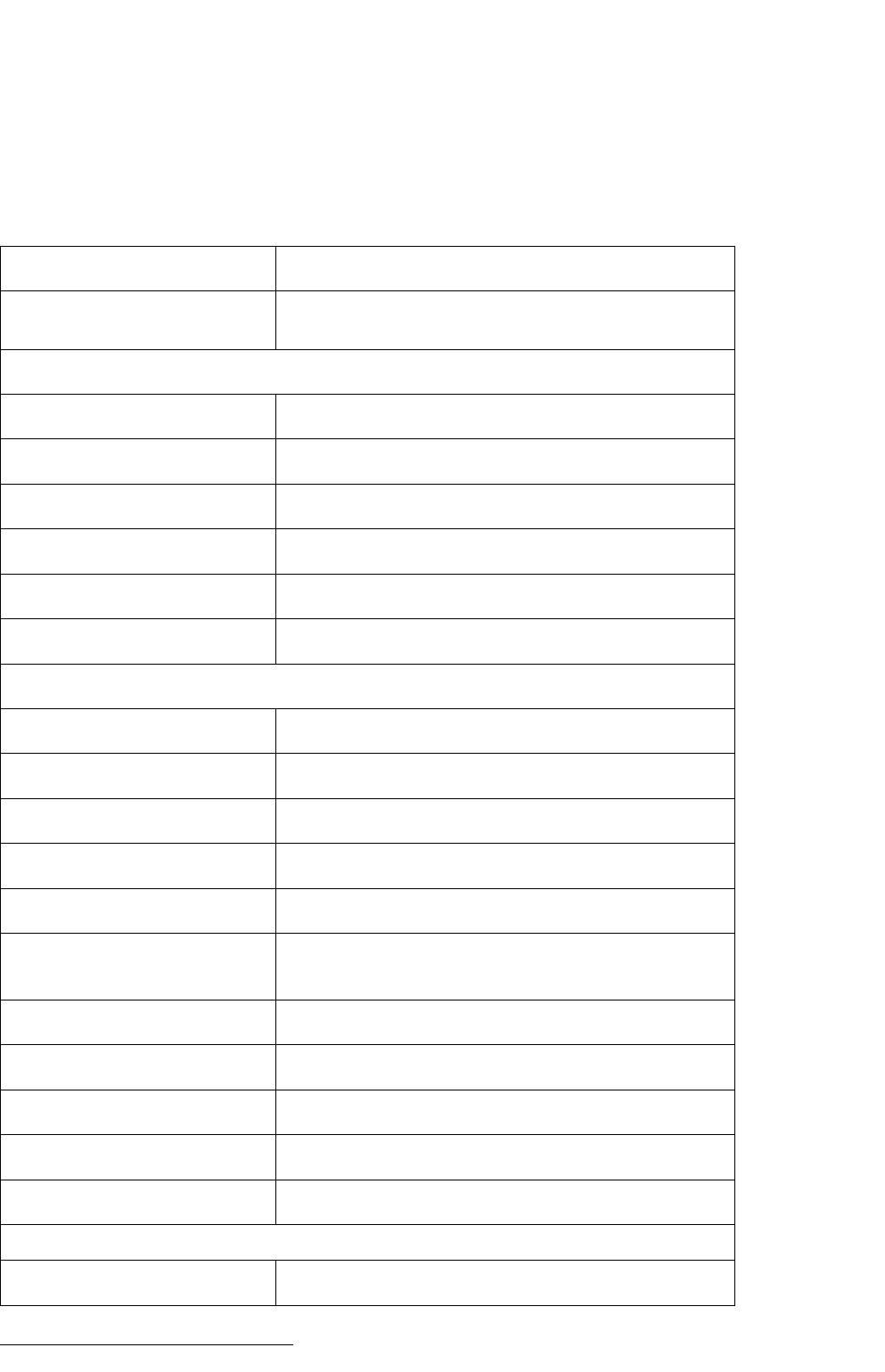
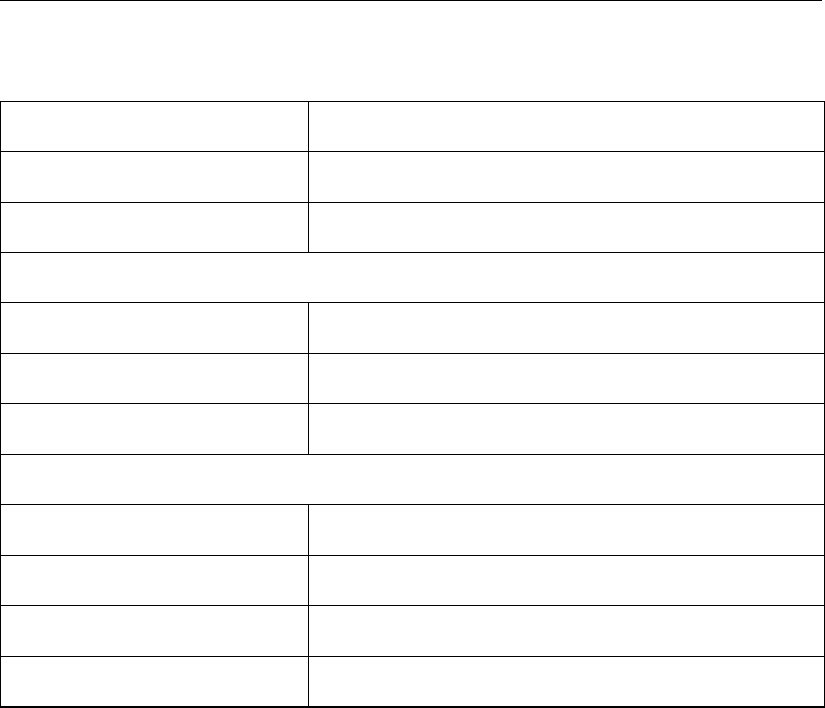
The table below shows the features that are not allowed by the current rules and their alter-
natives.
Statement or construction Alternatives
ASSIGN . . . TO, and
assigned GOTO
None1
Obscure statements
Arithmetic IF if (. . . ) then . . . endif
Statement function Normal or intrinsic functions
PAUSE None
ENTRY None
H-format Write a normal string
PRINT write(*, . . . )
Known statements
Computed GOTO select . . . case
COMMON Via modules
D-format Use ES format
ERR= IOSTAT=
END= IOSTAT=
CONTINUE enddo, endif, . . . (only allowed in case of error handling)
IMPLICIT implicit none (required)
DATA /. . . / Use direct initialisation, with save-attribute
GOTO only allowed in case of error handling
(CHARACTER*(*) FF(a)) Use explicit interface
BLOCK DATA Via modules
Dangerous statements
DO with real do-variable Use integer counter and compute the real
continued on next page
1The main raison d’être for the ASSIGN statement has been obsolete for many decades
Deltares 35 of 44
DRAFT
Fortran 90 programming rules, Technical Reference Manual
Table 12.0 – continued from previous page
Statement or construction Alternatives
Alternate RETURN Use an explicit argument
EQUIVALENCE None
New statements
NAMELIST Difficult in use
DO WHILE Use the exit statement
SEQUENCE None
Attributes
CHARACTER*<length>character(len=<length>)
PARAMETER use parameter-attribute
SAVE use save-attribute
DIMENSION use dimension-attribute
36 of 44 Deltares

DRAFT
References
Akin, E., 2003. Object-Oriented Programming Via Fortran 90/95. Cambridge University Press.
Brainerd, W. S., 2009. Guide to Fortran 2003 Programming. Springer.
Brainerd, W. S., C. H. Goldberg and J. C. Adams, 1994. Programmers Guide to Fortran 90,
Second Edition. UNICOMP, Albuquerque.
Chapman, S. J., 2004. Fortran 90/95 for scientists and engineers. WCB McGraw-Hill, Boston,
USA, second edition.
Markus, A., 1999. WL programmeerrichtlijnen Fortran 90. Tech. rep., WL | Delft Hydraulics,
Delft, The Netherlands. Report A0025.15, november 1999.
Markus, A., 2009. “Code reviews.” The Fortran Forum, ACM .
Metcalf, M., J. Reid and M. Cohen, 2004. Fortran 95/2003 Explained. Oxford University Press.
Morgan, J. S. and J. L. Schonfelder, 1993. Programming in Fortran 90. Alfred Waller Ltd,
Orchards, Fawley, Henley-on-Thames.
Deltares 37 of 44

DRAFT
Fortran 90 programming rules, Technical Reference Manual
38 of 44 Deltares

DRAFT
A Example of a source file
This appendix contains an example of what source code should look like when adhering to the
rules and guidelines given in this document. The internal documentation is fairly extensive.
This type is useful for programs that are maintained by a large group of people.
The information block specifically appears after the subroutine statement and contains the
name of the programmer, date and version as source code control macros, and copyright
(no year). The date and version fields will be filled by the version control system (in casu:
Subversion). The further sections are:
DESCRIPTION
A short description of the subroutine must given here, no more than two lines.
DUMMY ARGUMENTS
First the declarations and then the descriptions of the dummy arguments, one per line and
in alphabetical lexicographical order. If the block has no contents, it should be filled with the
word ‘none’.
MODULES USED
Description of the modules used. If the block has no contents, it should be filled with the word
‘none’.
LOCAL VARIABLES
First the declarations and then the descriptions of the local variables, one per line and in
alphabetical lexicographical order. If the block has no contents, it should be filled with the
word ‘none’.
The description the variables has to be aligned in a proper way
Example:
! a description of array a
! variabele_1 description of variable number 1
If the description of a long variable name does not fit on one line, continue it at the next line
with the same alignment.
Example:
! a description of array a
! a_useless_long_variable_name_01
! variable with 31 characters, this is the maximum
! number in this a example and it is too long.
! variable_1 description of variable number 1
FUNCTIONS CALLED
Description of the functions used
Deltares 39 of 44

DRAFT
Fortran 90 programming rules, Technical Reference Manual
If the block has no contents, it should be filled with the word ‘none’.
CODE DESCRIPTION
Subroutines with more than 100 executables statements need to have a code description. The
codes description is a summary of the functions in the file. Detailed information is not needed
the description should focus on structure and logic. Detailed can be found in the technical
documentation.
If the block has no contents, it should be filled with the word ‘none’.
Actual source code:
subroutine tridia (a, b, c, d, m)
implicit none
!
!------------------------------------------------------------------------
! programmer: J. Mooiman
! date: $date$
! version: $version$
! copyright: Deltares
!
!------------------------------------------------------------------------
! DESCRIPTION
!
!> Find solution of tridiagonal matrix with double sweep method
!! (Gauss elimination)
!
!------------------------------------------------------------------------
! DUMMY ARGUMENTS
!
real, intent(in) , dimension(m) :: a ! a lower sub diagogal
real, intent(in) , dimension(m) :: b ! b main diagonal
real, intent(in) , dimension(m) :: c ! c upper sub diagonal
real, intent(inout), dimension(m) :: d ! d righthandside, solution vector
integer, intent(in) :: m ! m dimension of vector
!
!------------------------------------------------------------------------
! LOCAL VARIABLES
!
integer :: i ! i do-loop counter
!
!------------------------------------------------------------------------
! CODE DESCRIPTION
!
! First sweep: eliminate the lower sub diagonal
! Second sweep: back substitution of the values
!
!------------------------------------------------------------------------
!
! first sweep
!
a(1) = 0.0
c(1) = c(1)/b(1)
d(1) = d(1)/b(1)
doi=2,m
c(i) = c(i) /( b(i)-a(i)*c(i-1) )
d(i) = ( d(i)-a(i)*d(i-1) )/( b(i)-a(i)*c(i-1) )
b(i) = b(i)-a(i)*c(i-1)
enddo
!
! Second sweep
!
40 of 44 Deltares

DRAFT
Example of a source file
i=m-1
d(i)=d(i)-c(i)*d(i+1)
do i = m-2, 1, -1
d(i) = d(i)-c(i)*d(i+1)
enddo
end subroutine tridia
Deltares 41 of 44

DRAFT
Fortran 90 programming rules, Technical Reference Manual
42 of 44 Deltares
DRAFT

www.deltares.nl
DRAFT
