Developement And Customization Guide
User Manual: Pdf
Open the PDF directly: View PDF  .
.
Page Count: 38

Yugandhar
Open Master Data Management (MDM)
Hub
Development and Customization Guide
Yugandhar Open MDM Hub Release - V1.0.0
Date – 27/12/2017
+++++++++++++++++++++++++++++++++++++++++++++++++++++++++++++++++++++
Copyright [2017] [Yugandhar Open MDM Hub]
Licensed under the Apache License, Version 2.0 (the "License");
you may not use this file except in compliance with the License.
You may obtain a copy of the License at
http://www.apache.org/licenses/LICENSE-2.0
Unless required by applicable law or agreed to in writing, software
distributed under the License is distributed on an "AS IS" BASIS,
WITHOUT WARRANTIES OR CONDITIONS OF ANY KIND, either express or implied.
See the License for the specific language governing permissions and
limitations under the License.

Copyright [2017] [Yugandhar Open MDM Hub] Licensed under the Apache License, Version 2.0
1. About Yugandhar Open MDM Hub Project .......................................................................................... 5
2. Before reading this document .............................................................................................................. 6
3. Understanding Java Projects and Workspace ....................................................................................... 7
I. Project structure ............................................................................................................................... 7
YugandharBootProject - ................................................................................................................ 7
YugandharComponent .................................................................................................................. 8
YugandharExternalizedBeans ....................................................................................................... 9
II. Externalization of java classes for customization ........................................................................... 10
III. Understanding Java classes ......................................................................................................... 11
<entity>Component.java ............................................................................................................ 11
<entity>ComponentRule.java ..................................................................................................... 11
<entity> JPA Repository.java ....................................................................................................... 12
<entity>Service.java .................................................................................................................... 12
Entity Data Object Classes .......................................................................................................... 12
IV. Cache configuration .................................................................................................................... 12
V. Spring boot properties .................................................................................................................... 13
4. Understanding different Components ................................................................................................ 13
I. Data Model ..................................................................................................................................... 13
Data entities ................................................................................................................................ 13
Reference data entities (For storing list of values as key – value pairs) ..................................... 13
Configuration tables .................................................................................................................... 13
Audit log tables ........................................................................................................................... 13
II. Understanding Application Configuration ...................................................................................... 13
Application Properties ................................................................................................................ 13
Error Codes registry .................................................................................................................... 13
Transactions Registry .................................................................................................................. 14
Multilingual support for reference tables ................................................................................... 14
III. Extending Data Model................................................................................................................. 14
Extending existing Data Object ................................................................................................... 14
Introducing new Data Object ...................................................................................................... 15
IV. Optimistic Lock ............................................................................................................................ 15

Copyright [2017] [Yugandhar Open MDM Hub] Licensed under the Apache License, Version 2.0
V. Building Services ............................................................................................................................. 15
Service is a spring bean class which can be integrated with Yugandhar Open MDM Hub request
response framework so that set of business logic is executed as one transaction. ........................... 15
Logically there are three types of entity services ............................................................................... 15
VI. Modifying Business Rules using Aspect Oriented Programming ................................................ 17
VII. Authorization Framework (Access Control) ................................................................................ 18
VIII. Inquiry Level Framework ............................................................................................................ 20
Introducing new inquiry level ............................................................................................................. 21
Configuring Default Inquiry levels for Legal Entity and Account ........................................................ 21
Currently configured Inquiry levels for Legal entity ........................................................................... 21
Currently configured Inquiry levels for Account ................................................................................. 22
IX. Pagination Framework ................................................................................................................ 24
Request Parameters -.......................................................................................................................... 24
Response Parameters ......................................................................................................................... 24
X. Reference data management ......................................................................................................... 26
XI. Pluggable primary keys ............................................................................................................... 27
XII. Application Logging ..................................................................................................................... 28
YugandharPerfSummaryLogger .......................................................................................................... 28
YugandharPerfErrorSummaryLogger .................................................................................................. 28
YugandharCommonLogger ................................................................................................................. 28
YugandharCacheLogger ...................................................................................................................... 28
YugandharMQRequestResponseLogger ............................................................................................. 28
YugandharMatchEngineLogger ........................................................................................................... 28
XIII. Audit Logs .................................................................................................................................... 29
XIV. Match and Merge framework ..................................................................................................... 30
Match engine rule types ..................................................................................................................... 30
Modes of Match engine ...................................................................................................................... 30
Configuration properties ..................................................................................................................... 31
Data Model ......................................................................................................................................... 32
Candidate search transaction Service ................................................................................................. 32
Match rules ......................................................................................................................................... 33
Services of match and merge framework ........................................................................................... 33

Copyright [2017] [Yugandhar Open MDM Hub] Licensed under the Apache License, Version 2.0
XV. JMS Integration ........................................................................................................................... 36
Default Listener ................................................................................................................................... 36
Default Sender .................................................................................................................................... 36
XVI. Phonetic searches ....................................................................................................................... 37
Phonetic attributes in PERSONNAMES tables ..................................................................................... 37
Phonetic attribute in CORPORATIONNAMES table ............................................................................. 37
Phonetic attributes in ADDRESS table ................................................................................................ 37
5. Setting up the Development Environment (Workspace) .................................................................... 38
6. Code Generation using Freemarker templates and Hibernate tools.................................................. 38
7. Invoking the transactions .................................................................................................................... 38
8. Understanding Data Model ................................................................................................................. 38

Copyright [2017] [Yugandhar Open MDM Hub] Licensed under the Apache License, Version 2.0
1. About Yugandhar Open MDM Hub Project
Master Data Management came a long way in last decade or so. There are currently more than 20 MDM
solutions catering to various specializations of MDM like Customer Data Integration (CDI), Product
Information Management (PIM), vendor and supplier management etc. However most of these
solutions come with licensing costs amounting to thousands of dollar. To offer a completely free
solution which would be made available through Apache 2.0 license, A Project is started in 2017 under
the name ‘Yugandhar Open MDM Project’ to build Open Source MDM solutions catering to CDI, PIM and
Data Governance Capabilities. Yugandhar in Sanskrit means Ever Lasting and the strongest of its time.
Our vision is to build the strongest, Open Source, Multi Domain, Cross Industry and completely free
MDM Solution.
We are happy to announce that the first release of the Yugandhar MDM Hub catering to CDI solution is
built with Open source technologies like Spring and Hibernate etc, inbuilt data Model, 400+ ready to use
services and having incredible Out of the Box capabilities is currently being distributed. We aim to make
the current CDI offering the strongest and Planning to bring Data Stewardship and PIM solutions in
upcoming years.

Copyright [2017] [Yugandhar Open MDM Hub] Licensed under the Apache License, Version 2.0
2. About this document
This is the development and customization guide of the Yugandhar Open MDM Hub. This is intended for
the use of developers.
3. Before reading this document
Please refer the ‘Yugandhar Open Master Data Management (MDM) Hub Architectural Overview’
document.

Copyright [2017] [Yugandhar Open MDM Hub] Licensed under the Apache License, Version 2.0
4. Understanding Java Projects and Workspace
The Yugandhar Open Master Data Management (MDM) Hub codebase is shared on github at below
location
1. Github public repository - https://github.com/yugandharproject/YugandharMDMHub
2. Javadoc – <github repository>\resources\javadocs
3. Dbdocs – <github repository>\resources\dbdocs
4. Documentation -<github repository>\resources\documentation
5. Database setup scripts -<github repository>\resources\dbsetupscripts
You may choose to download the projects using ‘clone and download’ option available online or
checkout using github client.
I. Project structure
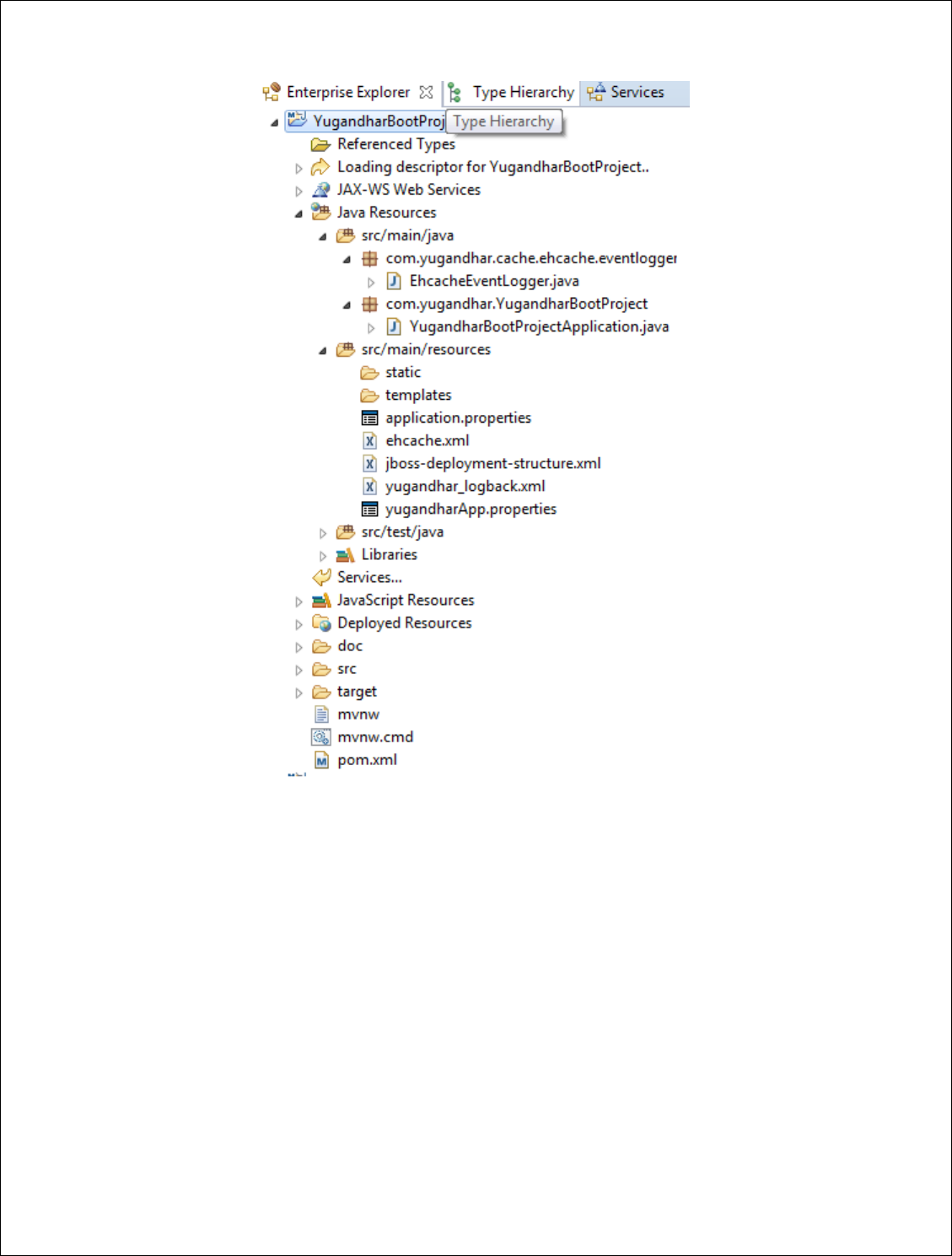
The Yugandhar Open MDM Hub currently has three projects as shown in below screenshot
YugandharBootProject -
This is spring boot project application project having the configuration of Yugandhar Open MDM Hub.
The below screenshot shows the structure of the YugandharBootProject. The class
com.yugandhar.YugandharBootProject.YugandharBootProjectApplication has the spring boot
initialization configuration which is used in conjunction with application.properties file. ehcache.xml and
yugandhar_logback.xml files are used to configure ehcache and logback respectively.
Copyright [2017] [Yugandhar Open MDM Hub] Licensed under the Apache License, Version 2.0
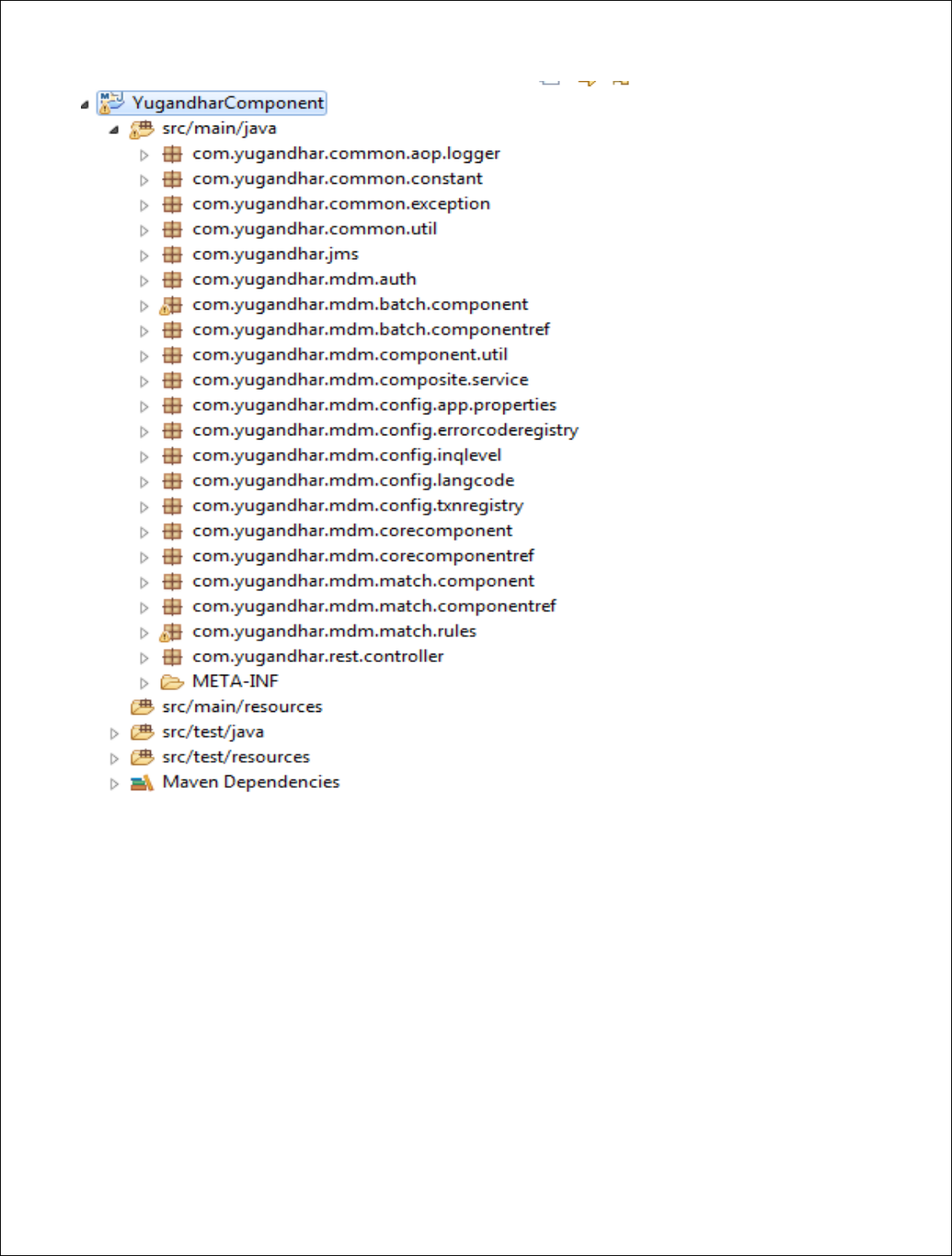
YugandharComponent
This project is the core of all the transactions. The Component, service, repository and rule classes of
every entity are placed in this project.
Copyright [2017] [Yugandhar Open MDM Hub] Licensed under the Apache License, Version 2.0
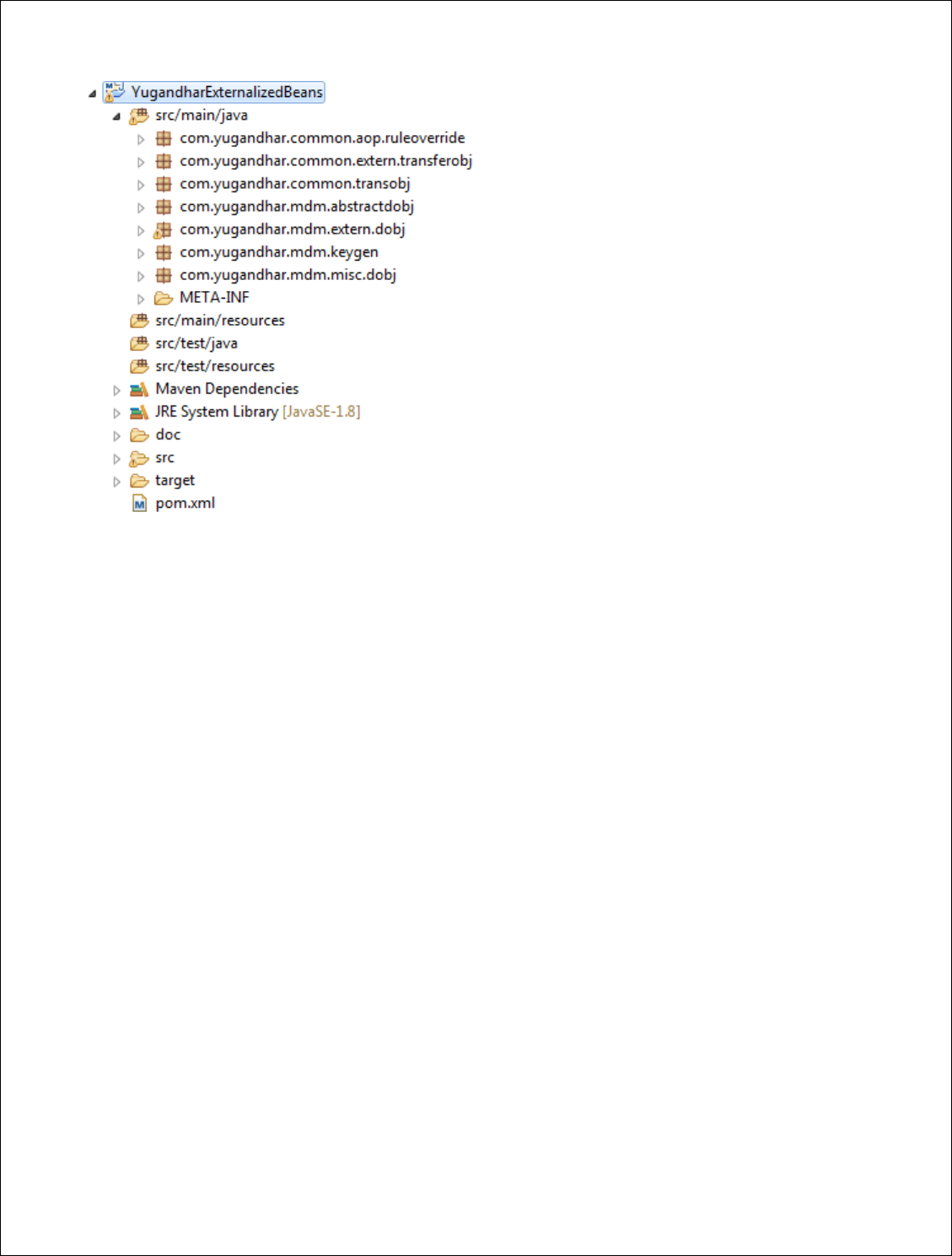
YugandharExternalizedBeans
This project is primarily used to externalize the DOs, rules and unique key generator and transfer
objects.
Copyright [2017] [Yugandhar Open MDM Hub] Licensed under the Apache License, Version 2.0
II. Externalization of java classes for customization
This project YugandharExternalizedBeans makes few classes available for customization to the users of
the Yugandhar Open MDM Hub so that the behavior of the out of the box DOs, rules or services are
modified. This is done so that the modifications of the Yugandhar project team and the user
development team does not mess up with each other while upgrading to latest version of the Yugandhar
Open MDM Hub.
Let’s understand it by use case - The v1.0 of Yungandhar Open MDM Hub has table LE_PERSON which
provides multiple attributes. In your project there may be requirements wherein there is a need to store
an attribute which is not currently present in LE_PERSON table e.g. Ethnicity of the person. So you made
the customization in the code by adding new attribute in LePerson entity DO. In the meantime,
Yugandhar team also introduced additional feature which required to store height of the person in
LE_PERSON table so LePerson entity DO is modified and released in v2.0 of Yungandhar Open MDM
Hub. Now if you upgrade your code to V2.0 then it might mess the code between both the teams. So
there was a genuine need to separate the code for the Yugandhar team and user team to work on. This
is achieved by using abstract class and child classes.
There are two DOs provided for one entity, the abstractDO and the child DO e.g. LePersonDO
AbstractLePersonDO. The thumb rule is that Yugandhar Development team will modify
AbstractLePersonDO and user development team will modify LePersonDO so to keep the change
separate which will help to do code merging simple.
The below packages have the objects which can be used to extend or override the product behavior.
com.yugandhar.mdm.extern.dobj – All the entity data objects

Copyright [2017] [Yugandhar Open MDM Hub] Licensed under the Apache License, Version 2.0
com.yugandhar.common.extern.transferobj – The transfer object encapsulating the
entity object
com.yugandhar.mdm.keygen.YugandharKeygenerator - to override default key
generation
com.yugandhar.common.aop.ruleoverride – This is Aspect Oriented Programming (AOP)
based rule to override the default behavior of transaction at pre and post level with
before, after, around or proceedingJointPoint. You should copy and make as many aop
rules as needed.
Its best practice to avoid making changes to any other class than that of mentioned above.
Also keep in mind that there is no restriction on introducing new service, entities and rules in
your own project which will make use of Yugandhar projects mentioned above.
III. Understanding Java classes
<entity>Component.java
The Component beans handle the entity level data CRUD (Create, Update, Retrieve, Delete)
operations. This bean refers and makes use of Entity Data Objects (DO), entity manager and JPA
repository classes.
Component Bean primary have below methods
Persist() –This method is used to create a new record in a database entity.
merge() –This method is used to update existing record in a database entity based on
primary key.
findById() –This method is used to retrieve existing record in a database based on primary
key.
findByBusinessKey() – This method is used to search a database table based on business key
e.g. firstname and lastName from Person table.
<entity>ComponentRule.java
The component rule class used to write the business rules for a specific entity transaction based on
the method from component bean is invoked. The entity transaction can have rules. The business
rules are defined at below levels based on the transaction
Rule cross points for Persist() method:
prevalidatePersit
preExecutePersist
postExecutePersit
Rule cross points for Merge() method
PrevalidateMerge
preExecuteMerge

Copyright [2017] [Yugandhar Open MDM Hub] Licensed under the Apache License, Version 2.0
postExecuteMerge
Rule cross points for FindById()
postExecuteFindById
prevalidateFindById
Rule cross points for FindByBusinessKey() method
postExecuteFindByBusinessKey
prevalidateFindByBusinessKey
This rule class is carved out separately so that the users make the changes in the rule class instead of
the Component class itself. This way any future changes in the component class made by Yugandhar
Development Team will not mess up with the changes of users.
<entity> JPA Repository.java
The JPA repository is implementation of org.springframework.data.jpa.repository.JpaRepository
interface used primarily to search the data from the single database based business keys.
<entity>Service.java
This is a Service type of Spring bean. The request from request Processor would always come to
Service bean for further processing. The Service bean is a logical layer between RequestProcessor
and Component bean introduced to create base or composite transaction and infuse any additional
business logic so that Component beans are kept intact.
Entity Data Object Classes
The entity data objects are used by hibernate to map the DO to database entities. We have
bifurcated the DOs in AbstractDO and Child DO wherein the Yugandhar team will extend the
Abstract DOs in upcoming releases. The users of the Product must always add additional attributes
in Child DO objects so that the changes of Yugandhar Team and users are kept independent. Refer
section ‘Externalizing the classes for customization’ for more details.
IV. Cache configuration
Yugandhar Open MDM Hub cache the Reference Data values (List of values stored as key-value
pairs) so to improve transaction response time. It uses ehcahce as ehcache is an open source,
standards-based cache that boosts performance, offloads your database, and simplifies scalability.
It's the most widely-used Java-based cache because it's robust, proven, full-featured, and integrates
with other popular libraries and frameworks. The ehcache configuration file is kept in
/src/main/resources/ehcache.xml of the YugandharBootProject of the code base. The default

Copyright [2017] [Yugandhar Open MDM Hub] Licensed under the Apache License, Version 2.0
ehcache expiry time is configured as 1296000 seconds (15 days) in the ehcache.xml configuration
file. This may be revisited as per the requirements.
Ehcache is configured in Spring boot project application.properties file using below property
#ehcache
spring.cache.jcache.config=classpath:ehcache.xml
Visit www.ehcache.org for understanding ehcache in further detail.
V. Spring boot properties
Yugandhar Open MDM Hub users application.properties present at
/YugandharBootProject/src/main/resources folder. The Datasource, logging, ehcache, JTA
transaction manager and Json configuration are currently configured in this property file.
5. Understanding different Components
I. Data Model
Yugandhar Open MDM has below types of entities in the database
Data entities
Reference data entities (For storing list of values as key – value pairs)
Configuration tables
Audit log tables
All the above entities are covered in comprehensive details in Data Model Guide.
II. Understanding Application Configuration
Application Properties
The application properties are stored in CONFIG_APP_PROPERTIES table.
Error Codes registry
The error codes are stored in CONFIG_ERRORCODE_REGISTRY table. This table have
CONFIG_LANGUAGE_CODE_KEY attribute which is used to store multilingual support for the error code.
By default Yugandhar Open MDM Hub take the language code from the header object

Copyright [2017] [Yugandhar Open MDM Hub] Licensed under the Apache License, Version 2.0
(txnHeader.requesterLanguage attribute) of the request message and retrieve the error code on
language code – error code combination.
Transactions Registry
Every transaction is registered in CONFIG_TXN_REGISTRY table so to get picked by the request
processor. The transaction name, class and method needs to be registered in the table.
Multilingual support for reference tables
The list of languages considered for multilingual support is configured in CONFIG_LANGUAGE_CODE.
This table should not be confused with REF_LANGUAGE_CODE which is used to store the LOV of
worldwide languages available or served by enterprise.
The application configuration entities are covered in more detail in Data Model guide.
III. Extending Data Model
Extending existing Data Object
The existing data and reference data entities are extendable i.e. new persistent as well as non-persistent
attributes can be added to existing Data Objects (DO). As mentioned in section ‘Externalization of java
classes for customization’ there are two DOs provided for one entity, the abstractDO and the child DO
e.g. LePersonDO AbstractLePersonDO. The thumb rule is that Yugandhar Development team will modify
AbstractLePersonDO and user development team will modify LePersonDO so to keep the change
separate which will help to do code merging simple.
Below is the process to add new attribute to existing entity
1. Add an attribute in the database in the base table which needs to be extended (e.g.
LE_PERSON).
2. Modify <entity>DO class of the entity (e.g. LePersonDO) and add the new attribute manually.
Generate getters and setters for the same using eclipse IDE.
3. If you want to add any business validation or logic around this attribute then use Aspect
oriented programming to add the business logic of pre / post / around the existing services as
mentioned in section ‘Understanding Java classes’ in the class <entity>ComponentRule.java.
4. Do not modify the OOTB product classes to add any business logic as this will defeat the
externalization purpose. Also it will create trouble while upgrading the product to next version
of Yugandhar Open MDM Hub.
A sample aop rule ‘com.yugandhar.common.aop.ruleoverride.YugandharRuleOverrideAspect’ is
provided in the

Copyright [2017] [Yugandhar Open MDM Hub] Licensed under the Apache License, Version 2.0
Introducing new Data Object
Introduction of New data Object is done when a completely new database entity needs to be created in
database. The details of this step are covered in Code Generation Guide.
IV. Optimistic Lock
To avoid concurrent update of the same record, MDM Hub use optimistic lock based on VERSION
attribute of the database. MDM hub relies heavily on Hibernate Optimistic lock feature.
Optimistic locking assumes that multiple transactions can complete without affecting each other, and
that therefore transactions can proceed without locking the data resources that they affect. Before
committing, each transaction verifies that no other transaction has modified its data. If the check reveals
conflicting modifications, the committing transaction rolls back. When your application uses long
transactions or conversations that span several database transactions, you can store versioning data, so
that if the same entity is updated by two conversations, the last to commit changes is informed of the
conflict, and does not override the other conversation's work. This approach guarantees some isolation,
but scales well and works particularly well in Read-Often Write-Sometimes situations. * (The definition is
as per Hibernate website)
So while updating a record in database through CDI services, the version attribute needs to be provided
in the request having the value matching with the value in the database. e.g. For updating LE_PERSON
table having idpk x, provide the legalentityDO. lePersonDO.version attribute the same as that in the
database for idpk x.
V. Building Services
Service is a spring bean class which can be integrated with Yugandhar Open MDM Hub request response
framework so that set of business logic is executed as one transaction.
Logically there are three types of entity services
1. Base entity services
Base entity services perform CRUD (create, retrieve, update and delete) operations on single
database entity.
2. Composite Services
Composite entity services perform CRUD (create, retrieve, update and delete) operations on
multiple database entities as single transaction. Also composite services can have composition
of create/ retrieve/ update or delete in single services. e.g. updateLegalEntity service update the
legal entity record along with person, corporation, address and identifiers etc. also you may
associate new address or identifier through this service itself.
Also, search services can also considered as composite services.
Samples –
1. Base entity Service – Refer
com.yugandhar.mdm.corecomponent.PersonnamesComponent.findByLegalEntityIdPk() method

Copyright [2017] [Yugandhar Open MDM Hub] Licensed under the Apache License, Version 2.0
which is registered as transaction. You may skip writing the code to rule class (e.g.
PersonnamesComponentRule.prevalidatexxx() ) and directly write the logic in your method.
2. Composite Service – Refer OOTB service class
com.yugandhar.mdm.composite.service.CreateLegalEntityService
3. Search Service – Refer OOTB Service class
com.yugandhar.mdm.composite.service.SearchLegalEntityByLEAttributesService
After writing the code you need to register this as a transaction in Configuration transaction registry
CONFIG_TXN_REGISTRY table. You may use below sql to register the transaction
Insert into <SCHEMA_NAME>.CONFIG_TXN_REGISTRY
(ID_PK, VERSION, TXNSERVICE_NAME, TXNSERVICE_CLASS, TXNSERVICE_CLASSMETHOD,
DESCRIPTION,CREATED_TS, UPDATED_TS, UPDATED_BY_USER, UPDATED_TXN_REF_ID)
Values
(YUG_REGISTRY_SEQ.nextval, 0, '<name of transaction>', '<fully qualified name of
the class which have the method> , '<method name>',
'<description of the service>', CURRENT_TIMESTAMP,CURRENT_TIMESTAMP,'<user
name>', '<transaction id>');
COMMIT;
The MDM Hub request response framework invokes the given method using Spring ReflectionUtils
framework.
The TxnTransferObj is the default transfer object of MDM request and response. The TxnTransferObj
encapsulates TxnPayload object which is the wrapper for all the objects. So if you are introducing a
whole new object as request or response then you need to define this in TxnPayload object. Please refer
Code Generation guide to understand how to define an object in TxnPayload object.

Copyright [2017] [Yugandhar Open MDM Hub] Licensed under the Apache License, Version 2.0
VI. Modifying Business Rules using Aspect Oriented Programming
Validation and Business rules are defined in Component rule classes. Yugandhar
Open MDM Hub provides several Out of the Box (OOTB) business validations for
Create, update, retrieve, find and search transactions of every entity. These rules
are extendable so a developer can use Aspect Oriented programming (AOP) feature
of Spring to add completely new logic or change the logic already written in OOTB
code base. The join points for the rule modification are mentioned in
‘<entity>ComponentRule.java’ section of ‘Understanding Java classes’ section.
A sample rule override aspect YugandharRuleOverrideAspect is provided in the
package com.yugandhar.common.aop.ruleoverride along with code base which
have ProceedingJoinPoint on the preExecuteLegalentityCompMerge method of
com.yugandhar.mdm.corecomponent.LegalentityComponentRule class.
Refer Spring Documentation for detailed understanding of AOP
https://docs.spring.io/spring/docs/4.3.x/spring-framework-reference/html/aop.html
https://docs.spring.io/spring/docs/current/spring-framework-reference/core.html

Copyright [2017] [Yugandhar Open MDM Hub] Licensed under the Apache License, Version 2.0
VII. Authorization Framework (Access Control)
Authorization framework is used to provide access to the user or group to a particular transaction
service. The authorization framework consists of below data entities
AUTH_ROLES_REGISTRY -This Table stores the Authorization roles
AUTH_USER_REGISTRY - This table stores the user names
AUTH_USER_ROLE_ASSOC - This table stores the user to role association.
AUTH_USERROLE_ACCESSCONTROL - This table stores the user/role to txn mapping so
that execution of the transaction is controlled based on the transaction being invoked
from the request. PROFILE_TYPE can be either USER or ROLE, mention the IDPK of the
AUTH_ROLES_REGISTRY if PROFILE_TYPE is role else mention the IDPK of
AUTH_USER_REGISTRY if PROFILE_TYPE is USER
CONFIG_APP_PROPERTIES – the property
com_yugandhar_authorization_framework_enabled must be set to true in this table.
The authorization framework can be disabled altogether if the value is set to false.
There might be a need to disable the authorization framework in non-production
environment or in production for some specific business scenario. If so, this property
must be set to false so that the framework is disabled.
Before invoking the transaction, the request processor performs the authorization based on
txnHeader.userName or txnHeader.userRole and txnHeader.transactionServiceName attributes.
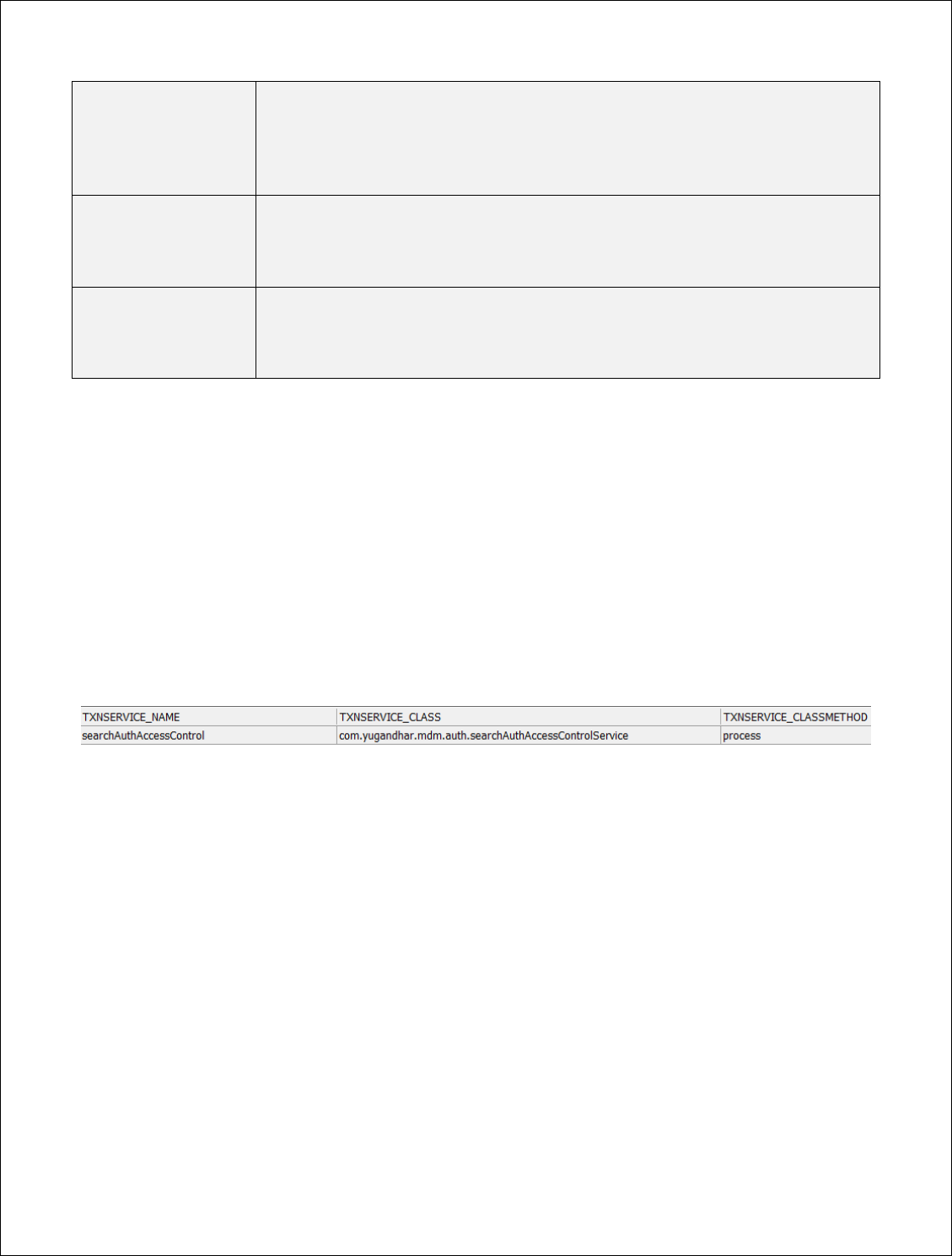
The searchAuthAccessControl service is used to perform the authorization based on below rule
1. If username and userRole are present in the request then authorization if all of the below
conditions are satisfied
The given user must be present in AUTH_USER_REGISTRY table.
The given role must be present in AUTH_ROLES_REGISTRY table.
The user must be associated with the given role in AUTH_USER_ROLE_ASSOC table
The role has access to the transaction invoked i.e. AUTH_USERROLE_ACCESSCONTROL
have entry for given role and transaction service name.
2. If userRole is present and username is null in the request then role is authorized to perform the
given transaction if all the below conditions are satisfied
The given role must be present in AUTH_ROLES_REGISTRY table.
The role has access to the transaction invoked i.e. AUTH_USERROLE_ACCESSCONTROL
have entry for given role and transaction service name.
3. If username is present and userRole is null in the request then user is authorized to perform the
given transaction if all the below conditions are satisfied
The given user must be present in AUTH_USER_REGISTRY table.
The user has access to the transaction invoked i.e. AUTH_USERROLE_ACCESSCONTROL
have entry for given user or role and transaction service name.
Sample header objects are as below
Copyright [2017] [Yugandhar Open MDM Hub] Licensed under the Apache License, Version 2.0
Sample 1 -
username and
roleName both are
present in header
"txnHeader": {
"userName": "rakesh",
"userRole": "admin",
"transactionServiceName": "createLegalEntity"
}
Sample 2-
Only roleName
present in header
"txnHeader": {
"userRole": "admin",
"transactionServiceName": "createLegalEntity"
}
Sample 3 -
Only username is
present in header
"txnHeader": {
"userName": "rakesh",
"transactionServiceName": "createLegalEntity"
}
Note – As Yugandhar Open MDM Hub is built on SOA framework, authentication (user credentials
validation) framework is not provided. The application heavily depends on Application Server features
(e.g. LDAP or webseal integration, SSL handshake etc) for user authentication. It is considered that the
user or role name coming in the request is valid and authenticated.
The rules for authorization are defined in com.yugandhar.mdm.auth.searchAuthAccessControlService
class. So if there is a need to change the above mentioned rules then write a new service for
authorization and replace the TXNSERVICE_CLASS and TXNSERVICE_CLASSMETHOD with appropriate
values as per new rule class.

Copyright [2017] [Yugandhar Open MDM Hub] Licensed under the Apache License, Version 2.0
VIII. Inquiry Level Framework
Inquiry level framework provides capability to define different levels of output for the same transaction
based on inquiry level. e.g. for OOTB transaction, retrieveLegalentity transaction provides different level
of output based on inquiry level 101, 102 and so on.
The Data Model:
The Inquiry level framework consists of single data entity CONFIG_INQUIRY_LEVELS.
OOTB Service: findAllConfigInquiryLevelsByBusinessKeyBase – this service search the
CONFIG_INQUIRY_LEVELS table based on INQUIRY_LEVEL and APPLICABLE_DOBJ attributes.
The model is very simple wherein you need to define the applicable Data object and child object which
would be part of that object as a result. E.g. as mentioned in ‘currently configured Inquiry levels for
Legal entity’ section, you can see that for inquiry level 102 the application Data object is LegalentityDO
which would have LeSystemKeysRegistryDO, LePersonDO or LeCorporationDO if the data for these
object is present. No other data will be pulled for this inquiry level.
102
LegalentityDO
LeSystemKeysRegistryDO
102
LegalentityDO
LePersonDO
102
LegalentityDO
LeCorporationDO
Also it’s very much possible to define multilevel inquiry levels for the same transaction e.g. as shown in
the below snippet, the retrieveLegalEntityByLegalEntityId have legal entity inquiry level as well as
account inquiry level set. So LE inquiry level 106 includes AccountDO and while retrieving account for
the LE the account inquiry level is used. Currently multilevel inquiry levels are NOT widely used in OOTB
services so you may need to do customization for additional level of inquiry levels.
{"txnHeader": {
………
"transactionServiceName": "retrieveLegalEntityByLegalEntityId"
},
"txnPayload": {
"legalentityDO": {
"idPk": "77776663666777799dg",
"inquiryLevel": "106",
"accountInquiryLevel":"103"
}}}

Copyright [2017] [Yugandhar Open MDM Hub] Licensed under the Apache License, Version 2.0
Introducing new inquiry level
For introducing new inquiry level you need to define new inquiry level and insert the rows in
CONFIG_INQUIRY_LEVELS table with applicable_DOBj and child DOBJ.
e.g. if you want to retrieve only the LePersonDO and address of the legal entity then you may create a
new inquiry level (e.g. 200001) and create these rows.
200001
LegalentityDO
LePersonDO
200001
LegalentityDO
LeCorporationDO
200001
LegalentityDO
LeAddressAssocDO
The above example will work for the OOTB transactions where inquiry level is used. (Please note that
the data object names are case sensitive in OOTB services). However if you are creating a new
composite service then you must write the logic to return the response based on inquiry level, you may
refer the code of com.yugandhar.mdm.composite.service.RetrieveLegalEntityByLegalEntityIdService
class and retrieveConfigInquiryLevelChildObjList() method in the same class.
Configuring Default Inquiry levels for Legal Entity and Account
The properties of the CONFIG_APP_PROPERTIES have below properties for defining the default inquiry
level value if inquiry level is not provided in the request. You may change the default inquiry level if
needed.
Property Name
Value
com_yugandhar_inqlevel_defaultvalue_retrieve_AccountDO
101
com_yugandhar_inqlevel_defaultvalue_retrieve_LegalentityDO
102
com_yugandhar_inqlevel_defaultvalue_search_LegalentityDO
101
com_yugandhar_inqlevel_defaultvalue_search_AccountDO
101
Currently configured Inquiry levels for Legal entity
INQUIRY_LEVEL
APPLICABLE_DOBJ
CHILD_DOBJ
101
LegalentityDO
LeSystemKeysRegistryDO
102
LegalentityDO
LeSystemKeysRegistryDO
102
LegalentityDO
LePersonDO
102
LegalentityDO
LeCorporationDO
103
LegalentityDO
LeSystemKeysRegistryDO
103
LegalentityDO
LePersonDO
103
LegalentityDO
LeCorporationDO
103
LegalentityDO
LeAddressAssocDO

Copyright [2017] [Yugandhar Open MDM Hub] Licensed under the Apache License, Version 2.0
103
LegalentityDO
LePhoneAssocDO
103
LegalentityDO
LePreferencesDO
104
LegalentityDO
LeSystemKeysRegistryDO
107
LegalentityDO
LePersonDO
107
LegalentityDO
LeCorporationDO
104
LegalentityDO
LePersonDO
107
LegalentityDO
LeAccountAssocDO
108
LegalentityDO
LePersonDO
108
LegalentityDO
LeCorporationDO
108
LegalentityDO
LeAddressAssocDO
104
LegalentityDO
LeCorporationDO
104
LegalentityDO
LeAddressAssocDO
104
LegalentityDO
LePhoneAssocDO
104
LegalentityDO
LePreferencesDO
104
LegalentityDO
LeIdentifierKycRegistryDO
104
LegalentityDO
MiscellaneousInfoDO
105
LegalentityDO
LeSystemKeysRegistryDO
105
LegalentityDO
LePersonDO
105
LegalentityDO
LeCorporationDO
105
LegalentityDO
LeAddressAssocDO
105
LegalentityDO
LePhoneAssocDO
105
LegalentityDO
LePreferencesDO
105
LegalentityDO
LeIdentifierKycRegistryDO
105
LegalentityDO
MiscellaneousInfoDO
105
LegalentityDO
LeAccountAssocDO
106
LegalentityDO
LeSystemKeysRegistryDO
106
LegalentityDO
LePersonDO
106
LegalentityDO
LeCorporationDO
106
LegalentityDO
LeAddressAssocDO
106
LegalentityDO
LePhoneAssocDO
106
LegalentityDO
LePreferencesDO
106
LegalentityDO
LeIdentifierKycRegistryDO
106
LegalentityDO
MiscellaneousInfoDO
106
LegalentityDO
LeAccountAssocDO
106
LegalentityDO
LePropertyAssocDO
106
LegalentityDO
LeVehicleAssocDO
106
LegalentityDO
LeToLeRelationshipDO
107
LegalentityDO
LeSystemKeysRegistryDO
108
LegalentityDO
LePhoneAssocDO
108
LegalentityDO
LeIdentifierKycRegistryDO
Currently configured Inquiry levels for Account
INQUIRY_LEVEL
APPLICABLE_DOBJ
CHILD_DOBJ

Copyright [2017] [Yugandhar Open MDM Hub] Licensed under the Apache License, Version 2.0
101
AccountDO
AccountDO
102
AccountDO
AccountAddressAssocDO
102
AccountDO
AccountPhoneAssocDO
103
AccountDO
AccountAddressAssocDO
103
AccountDO
AccountPhoneAssocDO
103
AccountDO
LeAccountAssocDO

Copyright [2017] [Yugandhar Open MDM Hub] Licensed under the Apache License, Version 2.0
IX. Pagination Framework
The Pagination framework supports paged retrieval of the information. The txnPayload object have
below attributes which needs to be provided while invoking the transaction.
Request Parameters -
paginationIndexOfCurrentSlice – used to provide the requested page number
paginationPageSize - Input parameter to define the size of the page (e.g. 25 elements
or 100 elements
Response Parameters
The response returns additional information about the total number of pages, elements on current slice
and total elements.
paginationIndexOfCurrentSlice: Same as that of Input parameter
paginationPageSize: Same as that of the request parameter
paginationInfoElementsOnCurrentSlice - Output information on elements database
rows on the current slice or page.
paginationInfoTotalElements: Output information on total number of elements
database rows) for given search/retrieve/find criteria. This attribute is
returned only in case of retrieve transaction response and NOT in search
response as search result may potentially be very large and it will degrade
the transaction response time if total number of elements is to be calculated.
paginationInfoTotalPages: Output information on total number of pages for
given search/retrieve/find criteria. This attribute is returned only in case of
retrieve transaction response and NOT in search response as search result may
potentially be very large and it will degrade the transaction response time if
total number of elements is to be calculated.
Sample request xml
{
"txnHeader": {
……
"transactionServiceName": "searchLegalEntityByLEAttributes"
},
"txnPayload": {
"paginationIndexOfCurrentSlice":0,
"paginationPageSize": 100,
"searchLegalEntityRequestDO": {
"displayName": "%ABC",
"personNameOne": "%Name",
"personLastName": "Last",
"corporationName": null,
"addressLineOne": "Line1",
"addressLineTwo": "Line2",
"city": "Pune",
"stateProvinceRefkey": "1",
"countryRefkey": "1",

Copyright [2017] [Yugandhar Open MDM Hub] Licensed under the Apache License, Version 2.0
"postalCode": "1",
"identificationTypeRefkey": "1",
"identificationNumber":"%111%",
"phoneNumber": "1",
"systemKeysRegistryReferenceId": "1",
"inquiryFilter":"ACTIVE",
"inquiryLevel": null
}}}
At the entity manager level, Yugandhar Open MDM Hub uses the jpa repository in retrieve transactions
and entity manager query parameters for search transactions. Refer the code of below class to
understand at the code level
Configuring pagination for search transactions:
com.yugandhar.mdm.composite.service.SearchLegalEntityByLEAttributesService
Configuring pagination for retrieve transactions: LePreferencesComponent.findByLegalEntityIdPk()

Copyright [2017] [Yugandhar Open MDM Hub] Licensed under the Apache License, Version 2.0
X. Reference data management
Copyright [2017] [Yugandhar Open MDM Hub] Licensed under the Apache License, Version 2.0
XI. Pluggable primary keys
Pluggable primary key feature enables creating the record in the database with given primary key in the
request. Generation of the primary key in MDM Hub happens as per below logic
1. If primaryKeyDO is present for a given DO then verify that no record having given idpk is present
in the database and then create a new record in database.
2. If primaryKeyDO then generate the primary key based on default primary key generator and
create a record in database.
The primary key generator is externalized in YugandharKeygenerator class. You may override the
default generateKey() method if unique key generation logic needs to be customized.
Snippet: Create legal entity transaction with user provided idpk
"transactionServiceName": "createLegalEntity"
},
"txnPayload": {
"legalentityDO": {
"primaryKeyDO": {
"idPk": "77776663666AAAA211"
},
"displayName": "JOHN MCLEAN",
Snippet: Create legal entity transaction with auto generated idpk
"transactionServiceName": "createLegalEntity"
},
"txnPayload": {
"legalentityDO": {
"idPk": null
"displayName": "JOHN MCLEAN",
By default, every persistent data Object (DO) a primaryKeyDO is provided in the MDM Hub. This is also
applicable for DOs generated using Yugandhar free-marker Generators.

Copyright [2017] [Yugandhar Open MDM Hub] Licensed under the Apache License, Version 2.0
XII. Application Logging
The MDM Hub application logging is configured using logback logging framework using below spring
boot properties (application.properties file)
# logging
logging.pattern.console=%d{yyyy-MM-dd HH:mm:ss} %-5level %logger{36} - %msg%n
logging.level.org.hibernate.SQL=info
logging.level.org.hibernate.type.descriptor.sql=trace
logging.level.com.yugandhar.*=INFO
logging.config= classpath:yugandhar_logback.xml
#logging.file= #
Currently below loggers are defined in yugandhar_logback.xml
YugandharPerfSummaryLogger – This logger logs the performance summary of every transaction
having success response.
YugandharPerfErrorSummaryLogger - This logger logs the performance summary of every
transaction having failure response
YugandharCommonLogger – This is the common logger which logs the application processing.
YugandharCacheLogger - This logger logs the ehcache and caching framework related logs.
YugandharMQRequestResponseLogger – This logger logs the request and response messages
received through MQ.
YugandharMatchEngineLogger – This logger is used to log the messages related to matching engine.
You may change the log levels, log file name pattern, appender type etc using logback xml.

Copyright [2017] [Yugandhar Open MDM Hub] Licensed under the Apache License, Version 2.0
XIII. Audit Logs
The Audit log framework consists of database tables to store the insert, update and delete operations
performed on every single record of the database. Refer ‘Understanding Audit Log table structure’ of the
data model guide for complete coverage of the functionality.

Copyright [2017] [Yugandhar Open MDM Hub] Licensed under the Apache License, Version 2.0
XIV. Match and Merge framework
The match and merge framework gets invoked at the end of create and update legal entity composite
services. The matching can be performed in realtime, near-realtime and batch modes.
Match engine rule types
Currently deterministic and fuzzy matching rules can be defined in the matching
Deterministic – find the search candidates with exact matching the search attributes. Objects will be
considered match if all the attributes match exactly.
Fuzzy - find the search candidates with phonetic matching the search attributes which increases the
search candidates which may probably get rejected in deterministic searches. In the current fuzzy
match, the Objects are considered match if all the attributes match exactly.
Modes of Match engine
Realtime Mode: in this mode the matching will be performed at the end of create/update transaction.
As the matching gets performed as part of create/update transactions, the response time would be very
high and it’s not recommended to go for realtime mode unless strongly needed.
Near-Realtime mode: In this mode the legalentity matching will be performed in decoupled mode by
doing the matching through JMS framework. At the end of create/update transaction, a message will be
send to CDI request queue to invoke performLeMatch transaction to do le matching. This way the
matching will be decoupled with the create/update transaction improving the response time of the
transactions.
Batch mode: In batch mode, an entry will be made in BATCH_ENTITY_TO_PROCESS table with proposed
action code as ‘2: SEARCH MATCH CANDIDATE’. Some batch processor job (e.g. ETL or custom job) to
invoke the performLeMatch as per convenient time schedule.
The modes can be configured by setting the
com_yugandhar_match_le_candidateSearch_processing_mode property in configuration properties

Configuration properties
Property Name
Value
description
com_yugandhar_match_le_framework_enabled
true
To enable or disable the match engine /
framework.
com_yugandhar_match_le_engine_type
deterministic
The match engine type. Valid values fuzzy or
deterministic
com_yugandhar_match_le_Deterministic_LePerson
_RuleClass
com.yugandhar.mdm.match.rules.LePersonDetermini
sticMatchRule
Person match deterministic rule class
com_yugandhar_match_le_Deterministic_LePerson
_RuleClassMethod
process
Person match deterministic rule class
method name
com_yugandhar_match_le_Fuzzy_LePerson_RuleCl
ass
com.yugandhar.mdm.match.rules.LePersonFuzzyMat
chRule
Person match fuzzy rule class
com_yugandhar_match_le_Fuzzy_LePerson_RuleCl
assMethod
process
Person match fuzzy rule class method name
com_yugandhar_match_le_Deterministic_LeCorpor
ation_RuleClass
com.yugandhar.mdm.match.rules.LeCorporationDete
rministicMatchRule
corporation match deterministic rule class
com_yugandhar_match_le_Deterministic_LeCorpor
ation_RuleClassMethod
process
corporation match deterministic rule class
method name
com_yugandhar_match_le_Fuzzy_LeCorporation_R
uleClass
com.yugandhar.mdm.match.rules.LeCorporationFuzz
yMatchRule
corporation match fuzzy rule class
com_yugandhar_match_le_Fuzzy_LeCorporation_R
uleClassMethod
process
corporation match fuzzy rule class method
name
com_yugandhar_match_le_Deterministic_LePerson
_inquiryLevel_default
108
Default Legal entity inquiry level for person
match candidates in deterministic rule
com_yugandhar_match_le_Fuzzy_LePerson_inquiry
Level_default
108
Default Legal entity inquiry level for person
match candidates in fuzzy rule
com_yugandhar_match_le_Deterministic_LeCorpor
ation_inquiryLevel_default
108
Default Legal entity inquiry level for
corporation match candidates in
deterministic rule
com_yugandhar_match_le_Fuzzy_LeCorporation_in
quiryLevel_default
108
Default Legal entity inquiry level for
corporation match candidates in fuzzy rule
com_yugandhar_match_le_candidateSearch_proce
ssing_mode
near-realtime
define how the candidate search process
runs, valid values are realtime,near-realtime
or batch

Data Model
MATCH_CANDIDATE_LE_REGISTRY:
This table stores the match results after performing matching on particular legal entity. e.g. if legal
entity A1 is being matched and identified to have A2 and A3 as candidate legal entities having match
pattern with A2 as YYYNYY and with A3 as NYYYYN, identified to be manual reviewed before merging
then two records would be created in this table with ID_PK of A1 legal entity to be mapped to
LEGALENTITY_IDPK attribute and ID_PK of A2 being mapped to CANDIDATE_LEGALENTITYIDPK attribute.
YYYNYY being mapped to MATCH_PATTERN, MATCH_PROPOSED_ACTION_REFKEY as defined in
REF_MATCH_PROPOSED_ACTION, MATCH_ACTIONSTATUS_REFKEY mapped as defined in
REF_MATCH_ACTIONSTATUS tables. The percentage match after performing the matching is stored
inMATCH_PERCENTAGE_DESCRIPTION attribute.
MATCH_MERGED_LE_ASSOC:
This table stores the legal entity relation after performing the matching. e.g. if Legalentity A1 is merged
with A2 where A1 is survivor then the ID_PK of A1 legal entity should be stored in
SURVIVOR_LEGALENTITY_IDPK and ID_PK of A2 legal entity should be stored in
MERGED_LEGALENTITY_IDPK attribute. The reason for the merge should be stored in
MERGE_REASON_REFKEY attribute along with any comments in the COMMENTS column
REF_MATCH_ACTIONSTATUS: The match action status LOV
REF_MATCH_PROPOSED_ACTION: The match Proposed action LOV
REF_MATCH_RESULT: The match result LOV used to store if the match is exact match, close match etc
REF_MATCH_SCORE: The match score LOV used to store the match attribute pattern
REF_MATCH_THRESHOLD : This LOV stores the threshold of the match e.g. if an attribute match 80%
then only it should be considered a close match etc.
Candidate search transaction Service
Service Name - searchMatchCandidateLE
Java Class - com.yugandhar.mdm.composite.service.SearchMatchCandidateLEService class

Copyright [2017] [Yugandhar Open MDM Hub] Licensed under the Apache License, Version 2.0
Match rules
The below rules are defined in com.yugandhar.mdm.match.rules package
Corporation Match Rules
LeCorporationDeterministicMatchRule
LeCorporationFuzzyMatchRule
Person Match Rules
LePersonDeterministicMatchRule
LePersonFuzzyMatchRule
Common Match rule
LeAddressAndPhoneMatchRule
Services of match and merge framework
List of Base Services
Service Name
Description
findAllRefMatchScoreByMatchEntityObjectName
find All records by language code
createRefMatchThresholdBase
create record in the database
updateRefMatchThresholdBase
update the database record based on primary
key i.e. idpk
retrieveRefMatchThresholdBase
retrieve the record from database based on
primary key i.e. idpk
findRefMatchThresholdByBusinessKeyBase
find the unique record from dababase based on
by business key
findAllRefMatchThresholdBase
find All records by language code
createRefMatchActionstatusBase
create record in the database
updateRefMatchActionstatusBase
update the database record based on primary
key i.e. idpk
retrieveRefMatchActionstatusBase
retrieve the record from database based on
primary key i.e. idpk
findRefMatchActionstatusByBusinessKeyBase
find the unique record from dababase based on
by business key
findAllRefMatchActionstatusByLanguageCodeBase
find All records by language code
createRefMatchProposedActionBase
create record in the database
updateRefMatchProposedActionBase
update the database record based on primary
key i.e. idpk
retrieveRefMatchProposedActionBase
retrieve the record from database based on

Copyright [2017] [Yugandhar Open MDM Hub] Licensed under the Apache License, Version 2.0
primary key i.e. idpk
findRefMatchProposedActionByBusinessKeyBase
find the unique record from dababase based on
by business key
findAllRefMatchProposedActionByLanguageCodeBase
find All records by language code
createRefMatchResultBase
create record in the database
updateRefMatchResultBase
update the database record based on primary
key i.e. idpk
retrieveRefMatchResultBase
retrieve the record from database based on
primary key i.e. idpk
findRefMatchResultByBusinessKeyBase
find the unique record from dababase based on
by business key
findAllRefMatchResultByLanguageCodeBase
find All records by language code
createRefMatchScoreBase
create record in the database
updateRefMatchScoreBase
update the database record based on primary
key i.e. idpk
retrieveRefMatchScoreBase
retrieve the record from database based on
primary key i.e. idpk
findRefMatchScoreByBusinessKeyBase
find the unique record from dababase based on
by business key
createMatchCandidateLeRegistryBase
create record in the database
updateMatchCandidateLeRegistryBase
update the database record based on primary
key i.e. idpk
retrieveMatchCandidateLeRegistryBase
retrieve the record from database based on
primary key i.e. idpk
createMatchMergedLeAssocBase
create record in the database
updateMatchMergedLeAssocBase
update the database record based on primary
key i.e. idpk
retrieveMatchMergedLeAssocBase
retrieve the record from database based on
primary key i.e. idpk
searchMatchCandidateLeRegistryBase
search all records of
MATCH_CANDIDATE_LE_REGISTRY table based
on legalentityidpk candidateLegalentityidpk or
matchPattern or matchProposedActionRefkey
or matchActionstatusRefkey or all attributes
searchMatchMergedLeAssocBase
search all records of
MATCH_MERGED_LE_ASSOC table based on
survivorLegalentityIdpk or
mergedLegalentityIdpk or mergeReasonRefkey
or all
Composite services
Service Name
Description
searchMatchCandidateLE
searchMatchCandidateLEService
performLeMatch
Performs the Legal Entity matching and create
candidates

Copyright [2017] [Yugandhar Open MDM Hub] Licensed under the Apache License, Version 2.0
Note – the match and merge framework is currently in BETA mode. The merge and survivorship rules
are yet to be introduced.

Copyright [2017] [Yugandhar Open MDM Hub] Licensed under the Apache License, Version 2.0
XV. JMS Integration
MDM hub provides uses Active MQ as messaging queue. Also it depends heavily on Jboss server
resources to integrate with MQ Server.
The package ‘com.yugandhar.jms’ have the below listener and sender along with some sample and test
classes.
Default Listener
MDM hub has default MQ Listener defined in YugDefaultRequestQueueListener class which listens to
queue YUG.DEFAULT.REQUEST using JMS configuration. As jms destination
‘java:jboss/com/yugandhar/default/requestQueue’ is defined in jboss server configuration which
creates connectivity with queue and listener. The connection factory
‘yugJNDIDestJmsListenerContainerFactory’ is also defined in jboss configuration
Default Sender
Default message sender for outbound messages is defined in YugJMSMessageSender class. The default
response queue of MDM Hub is mapped to jms destination
‘java:jboss/com/yugandhar/default/responseQueue"’. The physical queue corresponding to this jms
destination is YUG.DEFAULT.RESPONSE.
The below entries in the jboss server defines the default request and response queues
Refer section ‘4.3 Configure RedHat JBOSS EAP’ of Development Environment Setup document to
understand more about the jboss configuration.

Copyright [2017] [Yugandhar Open MDM Hub] Licensed under the Apache License, Version 2.0
XVI. Phonetic searches
MDM Hub provides support for Phonetic searches on Person and corporation names as well as address
attributes. In order to support the phonetic searches MDM Hub stores the phonetic attributes of the
actual attribute. E.g. for LAST_NAME of person, there is another attribute PHONETIC_LAST_NAME which
stores the phonetic value of LAST_NAME
Phonetic attributes in PERSONNAMES tables
PHONETIC_LAST_NAME
PHONETIC_NAME_ONE
PHONETIC_NAME_THREE
PHONETIC_NAME_TWO
Phonetic attribute in CORPORATIONNAMES table
PHONETIC_CORPORATION_NAME
Phonetic attributes in ADDRESS table
PHONETIC_ADDRESS_LINE_FOUR
PHONETIC_ADDRESS_LINE_ONE
PHONETIC_ADDRESS_LINE_THREE
PHONETIC_ADDRESS_LINE_TWO
PHONETIC_CITY, PHONETIC_COUNTY
PHONETIC_DISTRICT_ZONE
PHONETIC_STREET_NAME
The configuration properties can be used to turn off the phonetic framework altogether. Also the
default class to generate the phonetic value can also be changed if needed. Currently apache commons
Nysiis class is used to generate phonetic values.
Property Name
Value
com_yugandhar_phonetic_framework_enabled
true
com_yugandhar_phonetic_algorithm_class
org.apache.commons.codec.language.Nysiis
com_yugandhar_phonetic_algorithm_class_method
encode
Note – Currently phonetic searches are used only for searching match candidates. We plan to have
extend the existing search transactions for phonetic searches in upcoming releases. However you can
build your own services to search entities based on phonetic values. You may refer
SearchMatchCandidateLEService code to understand the writing phonetic queries.

Copyright [2017] [Yugandhar Open MDM Hub] Licensed under the Apache License, Version 2.0
6. Setting up the Development Environment (Workspace)
Please refer ‘Development Environment Setup Guide’ document.
7. Code Generation using Freemarker templates and Hibernate tools
Please refer ‘Code Generation Guide’ document.
8. Invoking the transactions
Please refer ‘API and Transaction Reference Guide’ Document.
9. Understanding Data Model
Please refer Data Model Guide and DB Doc.
