Donna Spencer Practical Guide Information Architecture Extract 20pages
User Manual: Pdf
Open the PDF directly: View PDF  .
.
Page Count: 20

179 A Practical Guide to Information Architecture
This chapter is all about IA patterns – common approaches to IA
for dierent types of sites. You can use these patterns as a starting
point when guring out your own IA. Chances are your site will t
into one of the patterns, or maybe a combination of them.
What patterns are
A pattern is a common solution to a design problem that crops up
again and again.
The idea of patterns came from architecture¹. As you can
imagine, buildings have common issues that need to be addressed
over and over – the relationship between food preparation areas
and food serving areas, how people will enter a building, and
integrating the inside of a room with the outside, and so on.
Patterns are also common in software development (another
place where the same issues crop up again and again) and provide
developers with solutions to software design. They are also fairly
common in interaction design, providing designers with re-usable
solutions to common needs such as login forms and pagination.
One of the key ideas of patterns is that they emerge from real-
world use. You don’t sit down and try creating a set of patterns for
a brand new eld. The patterns we discuss below are generated
from the wild – from seeing how people come up with common
approaches to common problems.
IA patterns
I said earlier in the book that IA is relevant for a range of areas
where people need to use information. I’ll be deviating from
that slightly in this chapter and talking mostly about website IA
patterns. These patterns are also relevant for intranets, but may
not apply as easily to things like web applications and mobile
applications – consistent patterns will emerge for these areas
over time.
IA patterns
16
¹ The most famous architectural work on patterns is Christopher Alexander’s The Timeless Way of Building (1979)
~ IA patterns
180
I’m also sure I haven’t found every dierent type of IA pattern.
If you have a site that is very dierent to all of these (and you’ve
seen others like it) let me know and I’ll add it to the book website.
Below I describe the key features of each pattern, when they
are good to use, and provide some examples of sites that
use them.
First I’ll talk about four simple patterns (hierarchy, database,
hypertext and linear) then combinations of the three.
Simple patterns
Hierarchy
We’ve all come across hierarchies, and indeed we have talked
about them already in this book when we talked about groups and
subgroups. In a hierarchy, the relationship between items is one
of parent and child; broader and narrower. It’s about aggregating
upwards into broader groupings or splitting downwards in
narrower groupings.
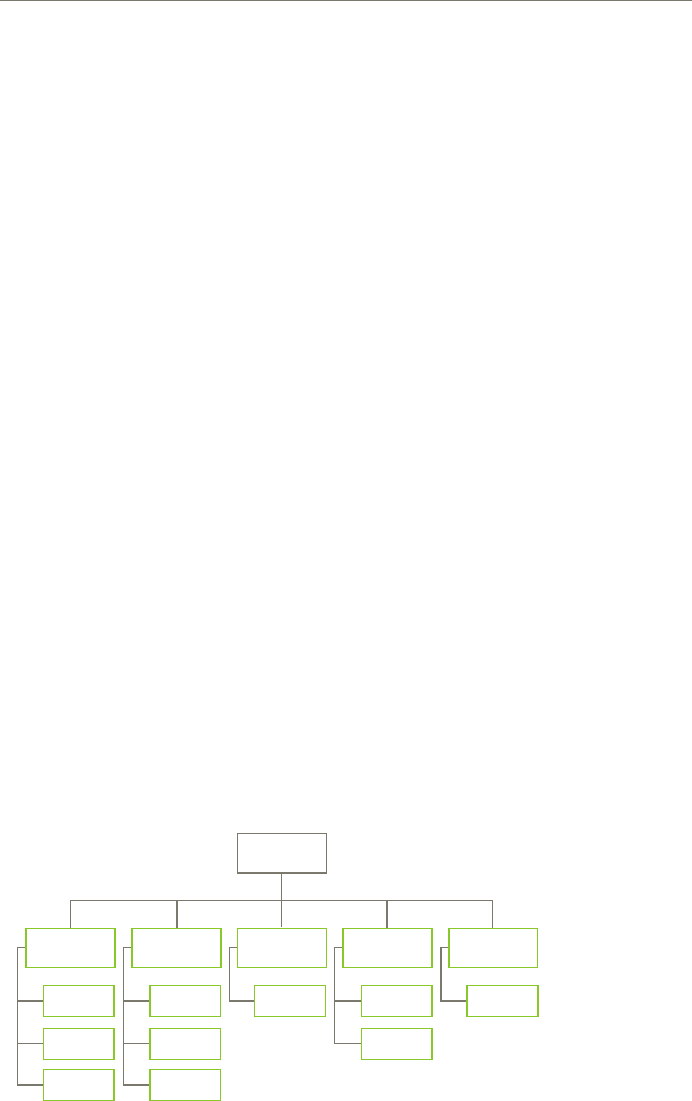
Hierarchies can described as broad or deep:
A broad hierarchy has a lot of items at the top level, but few levels.ü
A deep hierarchy has a few items at the top level, but many levels. ü
Figure 16 – 1. A hierarchy pattern
181 A Practical Guide to Information Architecture
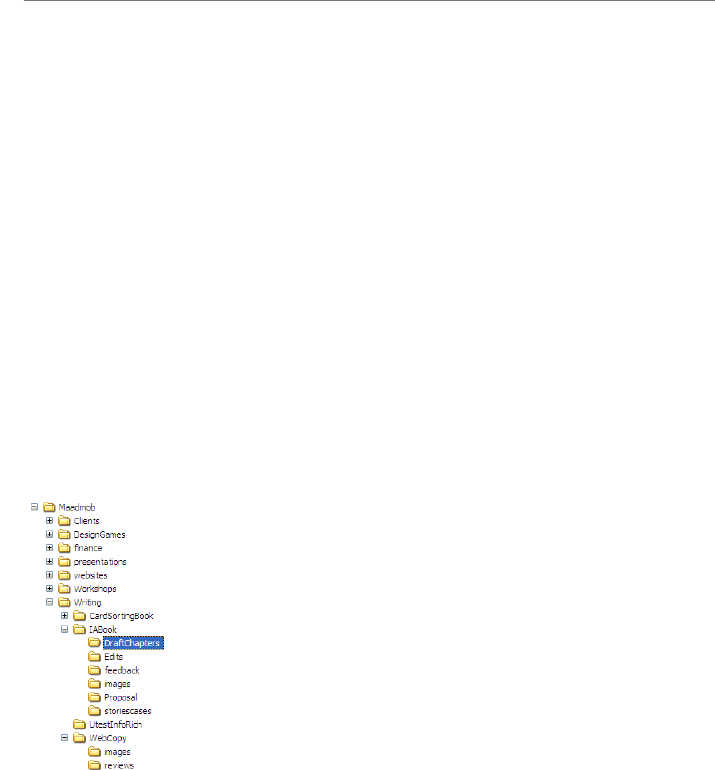
Figure 16 – 2. We’ve
all seen hiearchies -
computer le systems
are a common
example
A hierarchy can also be described as strict or polyhierarchy:
In a strict hierarchy an item can be in one and only one place.ü
In a polyhierarchy an item can be in more than one place.ü
Strict hierarchies are necessary in the physical world – after
all, it is impossible to put an individual item in more than one
place at a time. However, in the electronic world it is easy for us
to put things in more than one place. It also copes better with
the messiness of real-life categories, letting us place things
that people expect to nd in more than one place and allowing
category boundaries to overlap.
Because hierarchies are a simple and familiar way to organise
information, they are suitable for a wide range of content.
They are particularly good for small websites that need
nothing fancier than a couple of levels of hierarchy – a top level
(home page), some second level pages and maybe a few more
detailed pages beneath them.
Although hierarchies are particularly good for small websites,
they can also be used for larger sites as well. They are particularly
suitable for content-heavy websites where the content is
quite varied.
They are also good when your information contains dierent
levels of complexity. For example, you can present overview or
broad information rst, and allow people to drill down into more
detail as they need it.
Everything in 3 clicks?
For many years a web myth stated that everything should be fewer
than three clicks from the home page.
For many sites, this is just impractical. To t everything into a
hierarchy like that, there would be so many items at each level it
would be impossible to select.
Instead, it’s far more important that people can make easy
choices at each level, and know they’re on the correct or
comfortable path. People really will keep clicking if they feel like
they are on the right track and learning as they go.
~ IA patterns
183 A Practical Guide to Information Architecture
Database
You’ve probably come across databases – computerised storage for
all types of information. Here I’m talking about a database not as a
technical object, but rather as a conceptual pattern.
The common aspect of databases (technical ones) is that
there’s a planned structure (or model) and all information has
to t into that structure. You can’t shoe-horn something into a
database that doesn’t t the model.
The database pattern is similar – it’s for content that has a
consistent structure. The individual pieces of content may have no
relationship to one another – they certainly don’t have the parent-
child relationship that hierarchical content does – but they have
the same structure, and are made up of the same pieces.
Figure 16 – 6. A database pattern
For example, on a website like etsy, these two items don’t really
have anything in common:
~ IA patterns

185 A Practical Guide to Information Architecture
But they have the same pieces that make up the listing:
titleü
descriptionü
tagsü
materialsü
locationü
payment methodsü
date addedü
photographü
categoryü
colourü
Every product on etsy has to use this same structure.
The database pattern can be used for quite small sets of
information, or ones that are very, very large!
One of the big advantages of database structures is that you
can store the data once then use the pieces of the structure (the
metadata – see the sidebar on page 187) to display information in
dierent ways.
For example, on etsy, you can nd content via category (which
is a small hierarchy), colour, whether it is local, and even recently
added. This gives your people dierent ways to nd content
they’re interested in. The absolute worst treatment for this type of
content would be a hierarchy or any pattern that allows only one
way into the content.
Database structures are good for music, product catalogues,
books, articles, weblog posts and much more – really, anything
where the content pieces have a consistent structure. They are
great for situations where people may want to access the content
in more than one way.
~ IA patterns

187 A Practical Guide to Information Architecture
Metadata
Let’s not get too technical or scary, but this is where metadata
comes into the information architecture story.
Metadata is often dened as ‘data about data’ (or ‘information
about information’). It may not be a very helpful denition,
but it is an accurate one. Metadata is all of the information that
describes or relates to a piece of content.
There are three dierent types of metadata:
Intrinsic: What the object actually isü
Administrative: How it is usedü
Descriptive: Description of the item ü
For a weblog like the UX Australia, metadata items may include:
Type: blog post (intrinsic)ü
Author (administrative)ü
Date posted (administrative)ü
URL (administrative)ü
Status: published (administrative)ü
Title (descriptive)ü
Category (descriptive)ü
Tags (descriptive)ü
This metadata can be used to for two main things:
Generate lists of particular content (e.g. show all content in the ü
‘Announcements’ category)
Choose what to show on a page (e.g. include title, author, ü
description and category).
That’s really all there is to it. The hardest part for a project is
deciding what items to collect and what their content is (and so,
what categories you will use). We discuss this more in
chapter 18.
~ IA patterns
188
Hypertext
The hypertext pattern is an interesting one for information
architecture as it’s almost a pattern of an anti-structure. In this
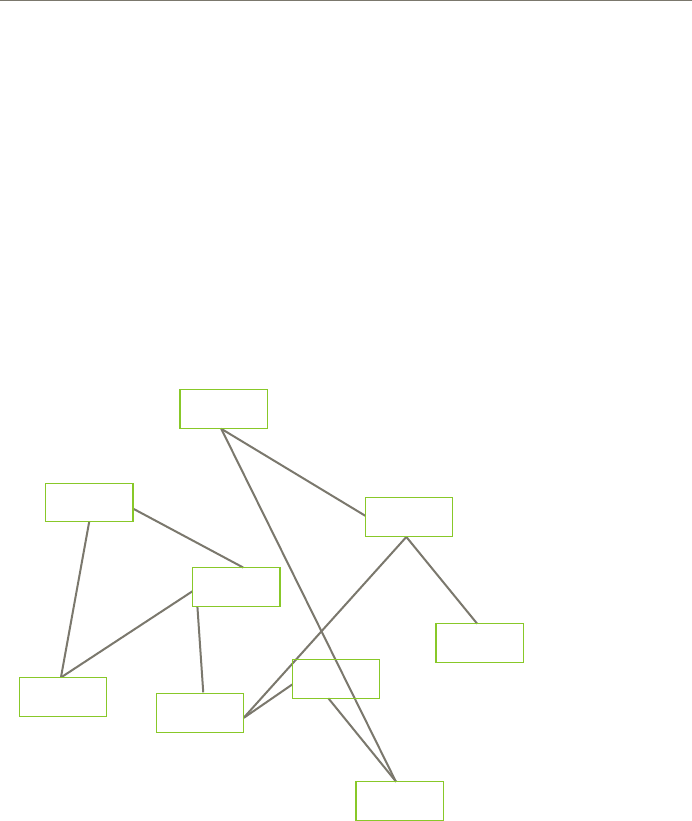
pattern, content pieces are connected to one another simply
according to relationships between them. There’s no master
structure like either a hierarchy or a database – content is just
joined together via links.
Figure 16 – 12. A hypertext pattern
The best example of a hypertext structure is a wiki.
Wikis don’t have a pre-planned structure – content is joined by
links embedded in the text.
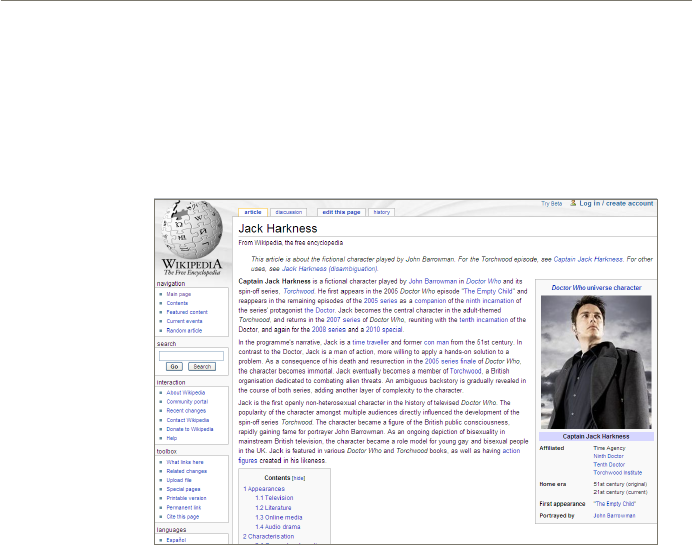
And the best example of a wiki is Wikipedia. It’s a perfect
embodiment of the hypertext structure. There’s no master
hierarchy for Wikipedia content, nor is there a strong database
structure. (Yes, it is stored in a database, and has some very
basic pieces like heading and descriptions. But it isn’t a database
structure like the ones shown above.) Each page is independent,
connected to other pages by associative links:
189 A Practical Guide to Information Architecture
Hypertext structures are particularly useful when the content
is being developed over a period of time and you don’t know
exactly what you are going to create. In this situation it would be
practically impossible to identify a detailed structure up front, or
even to identify a basic pattern for a site. A lot of documentation
projects start like this – people write individual pages of
documentation as they get around to them and make relationships
between them with links.
Many sites that start with a hypertext structure are later re-
organised, when the content is known.
The main issue with hypertext structures is their success
depends entirely on people making connections between content
pieces, and linking them together. Unlike hierarchies where you
can see the next level down, or databases where you can display
all content of a particular type, hypertext structures don’t have
the ability to show related content automatically. If authors don’t
know what’s around and don’t create links, there is no way for
people to nd the information.
Figure 16 – 13. Wikipedia pages are connected via links in context (wikipedia.org)
~ IA patterns
190
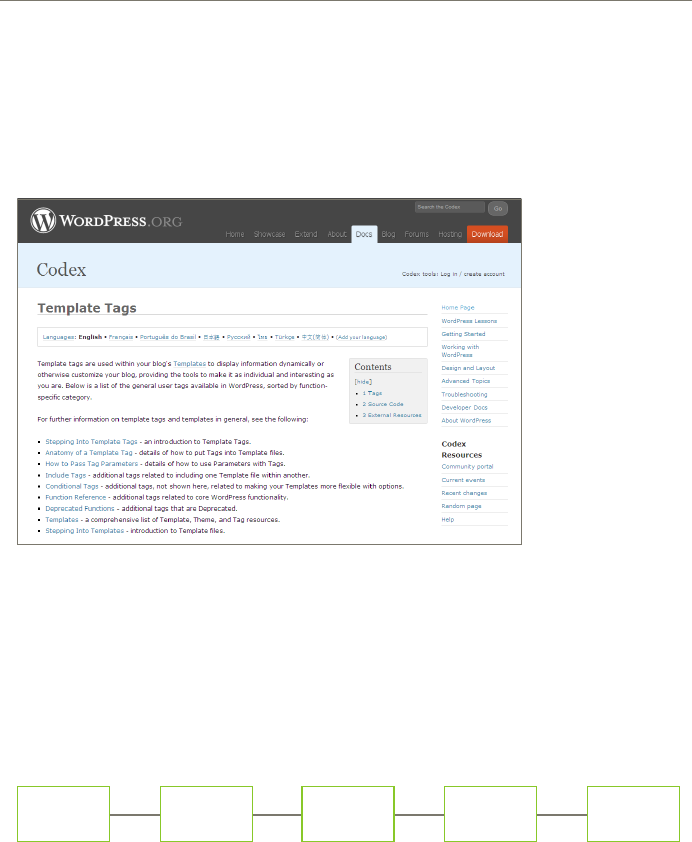
Figure 16 – 14. The wordpress codex (documentation store) is a hypertext pattern – all
pages are at the same ‘level’. There are some entry pages to help people get started
but mostly people will use links to get around (codex.wordpress.org/Template_
Hierarchy)
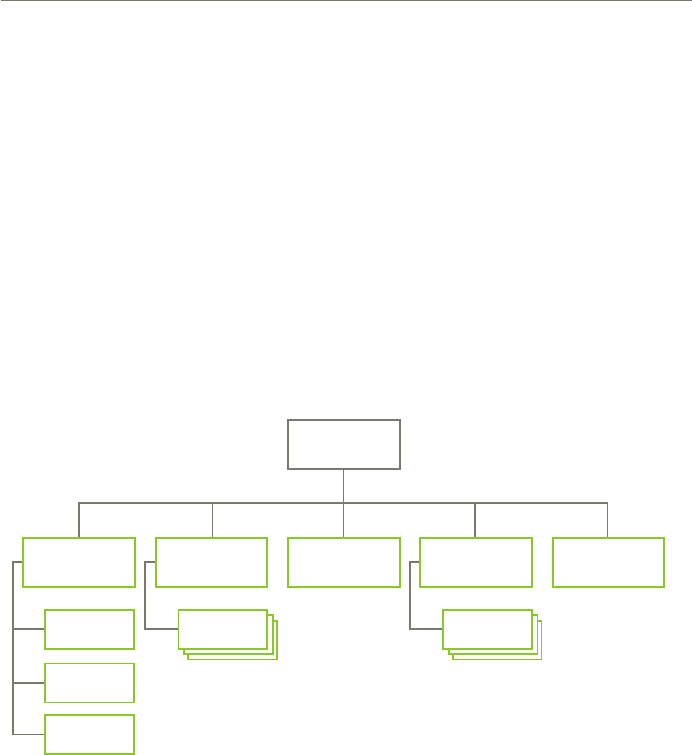
Figure 16 – 15. A linear pattern)
Linear
A linear pattern is just as it sounds – one thing follows another in
a straight line.
Linear patterns aren’t particularly common on the web – we
mostly use patterns that let people jump to content in a way that
makes sense for them.
However, you can use a linear pattern if you have a situation
where people must understand one thing before they move onto
another – usually for instructional material. Don’t use it unless
people really must read things in order, or it will just
frustrate them.
191 A Practical Guide to Information Architecture
Combined patterns
Now let’s look at how these three simple patterns can be combined
to create more complex information architectures. There’s some
overlap between these, so don’t worry if your site doesn’t fall
exactly into one or another.
Simple hierarchy + simple database
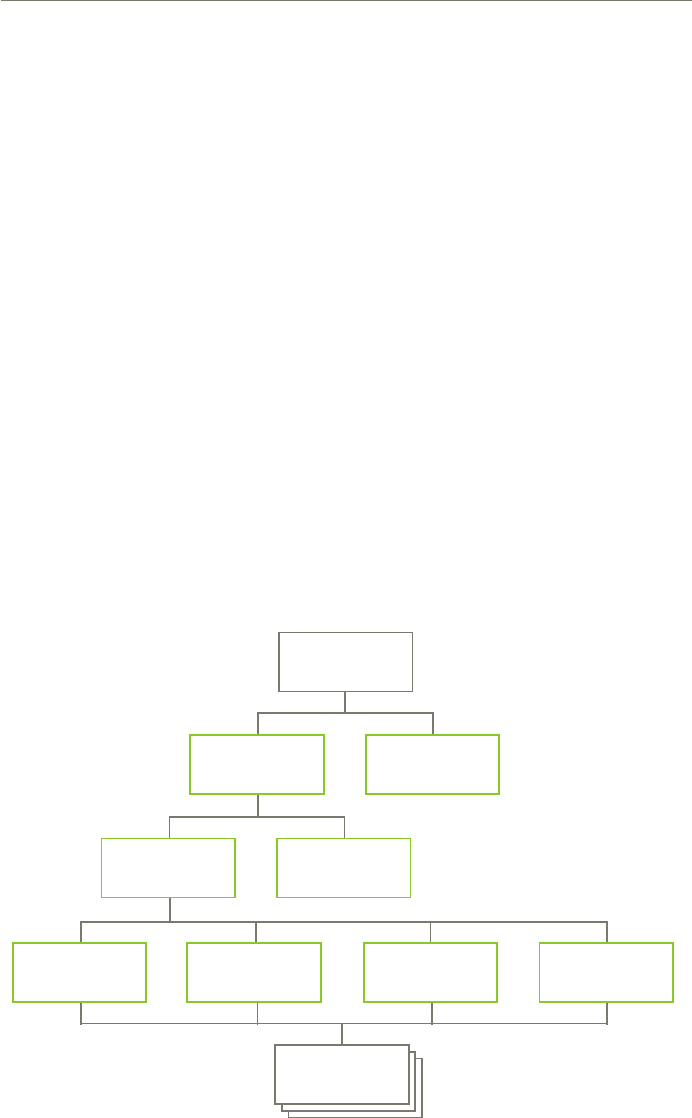
One very common pattern (probably the most common pattern
on the web) is a combination of a simple hierarchy with some
database content.
This pattern is suitable for all sorts of small, medium and
large sites. It lets you create hierarchical sections of the website
for basic content, and then to use the power of a database to
assemble detailed information within a section.
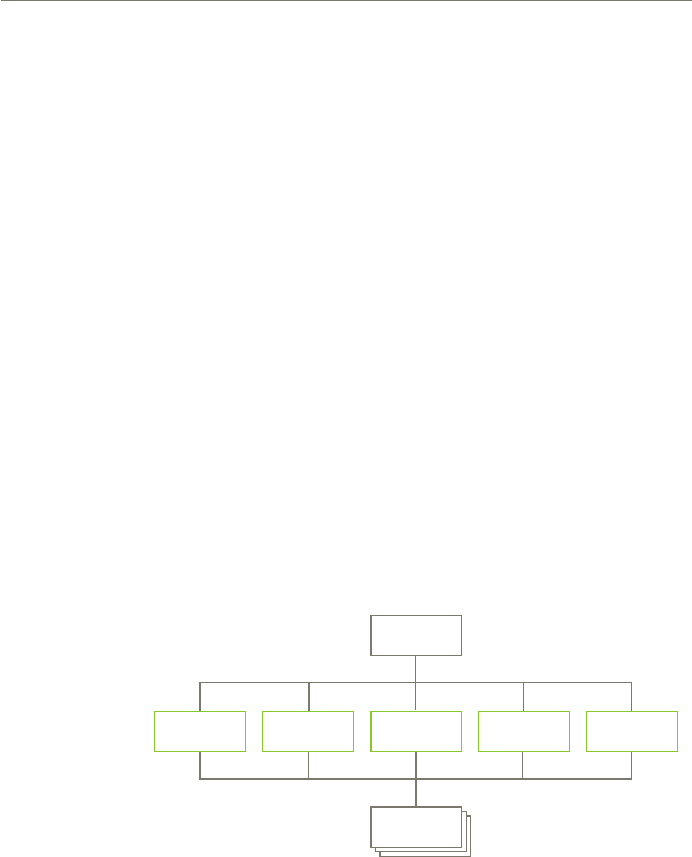
The hierarchy and database pieces may be integrated (e.g. a
database structure within one of the sections of the site), side by
side (e.g. a database structure as a whole section of the site) or any
combination in between.
Figure 16 – 16. A hierarchy plus database pattern
~ IA patterns
193 A Practical Guide to Information Architecture
One of the main challenges with this type of pattern is deciding
what pieces you’ll turn into structured content and what you’ll
leave as hierarchical. Consider:
Do you want to re-use something in another part of the site? If you ü
have no need to re-use something, don’t worry about structuring it
more than necessary – it’s just overkill.
Database structures can help you manage larger volumes of ü
information. If you have a handful of news stories a year, you
can manage them as hierarchical content. If you have hundreds
a day, you’ll probably want to leverage the power of the database
structure to automate the display.
Catalog
If the hierarchy + database is the most common pattern on the
web, the second most common would denitely be a catalog
pattern.
Figure 16 – 19. A catalog pattern
Home
Store
Department
Gallery
Store
Department
Gallery Gallery Gallery
Content
~ IA patterns

194
This structure is really just a database pattern, but is worth
mentioning because it’s so common, particularly in e-commerce.
At the bottom level is the content. Above that are up to three levels
of hierarchy, depending on the size of the site and type of content.
Jared Spool has written about this pattern extensively² and
describes three dierent types of pages between the home page
and the content page:
Gallery pages: these provide direct access to the content pages.ü
Department pages: provide access to the galleries.ü
Store pages: provide access to the department pages.ü
How many of these you use depends on how large your site is. As
you can imagine, a huge product catalog may use all three.
Jared describes the gallery pages as the hardest working pages
on a website as these are the point where people make a decision
(or not) to drill down to your content pages.
¹ This pattern is described in more detail in these articles by Jared Spool: http://www.uie.com/brainsparks/2005/11/28/
the-8-types-of-navigation-pages/ and http://www.uie.com/events/roadshow/articles/
galleries/. It is also described in detail in Jared and Robert Hoekman Jr’s book Web anatomy: Interaction design frameworks that
work (New Riders, 2010)
197 A Practical Guide to Information Architecture
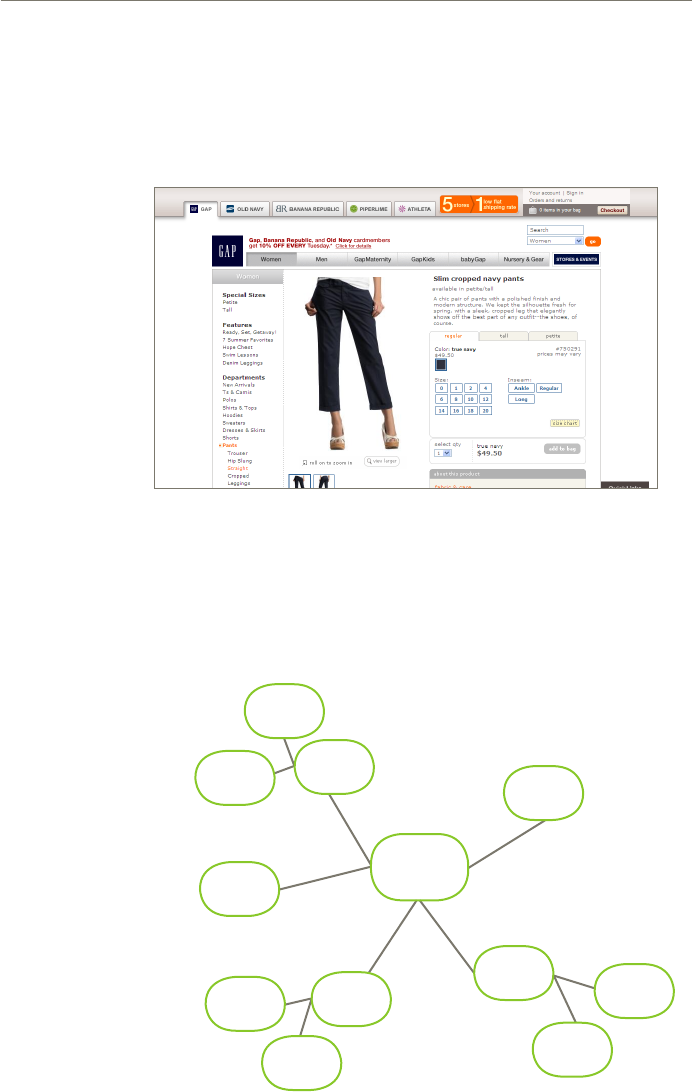
Hub & spoke
The hub & spoke pattern is really just a hierarchy. However, it
is worth noting as a separate pattern as the way people use it is
dierent to a hierarchy.
Figure 16 – 24. A Gap content page
Figure 16 – 25. A hub & spoke pattern
~ IA patterns
198
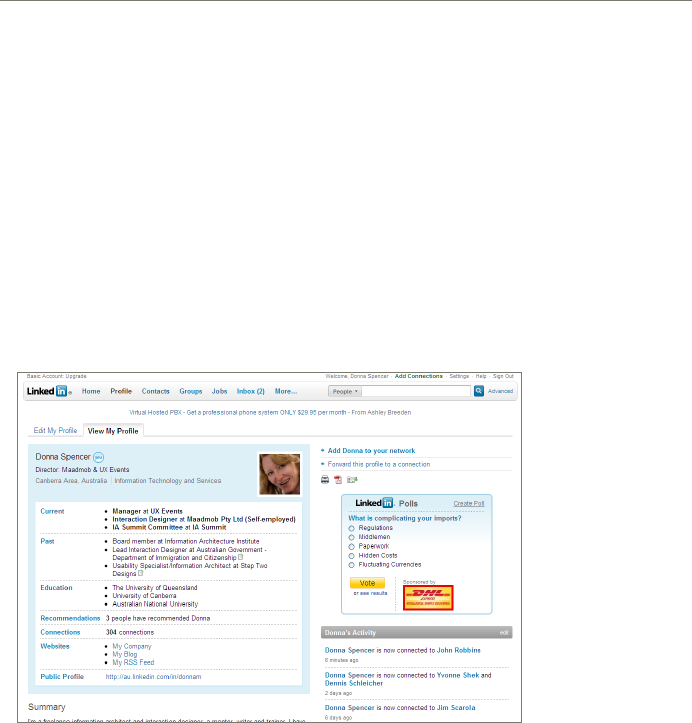
Figure 16 – 26. For LinkedIn, the prole page acts as a hub - it’s the place you return to
often (linkedin.com)
With a hierarchy, people tend to start at a point in it (often the
top level) and move down into deeper and deeper content, often
sticking within the one branch of the hierarchy. With a hub and
spoke, people move down one level into something more detailed,
return to the starting point (the hub) then may move to another
detailed page, back to the hub and so on.
Subsites
I do a lot of work on very large sites – large government sites,
large university sites and large intranets. One pattern I’ve used
time and time again is one I call ‘subsites’ (at one stage people
were calling these ‘portals’ but I haven’t heard that term used for
a while).
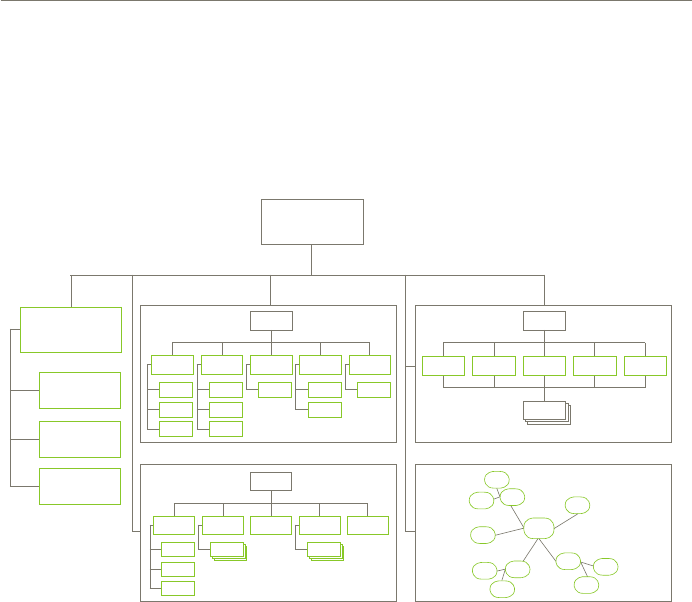
With this pattern the overall site is a series of subsites, held
together by a home page or top-level pages. The subsites can use
any pattern, and don’t all need to use the same one.
In some situations where I’ve seen this pattern, the subsites
all use a consistent approach to navigation and page layout, which
199 A Practical Guide to Information Architecture
Figure 16 – 27. A subsites pattern
reinforces the idea that the subsites are part of a larger brand. In
other situations the subsites have quite dierent approaches to
navigation and page layout as is appropriate for the content and
audience, but still use some approach to show they are part
of a whole.
This pattern is particularly useful for large organisations
that have a range of responsibilities or a range of brands, but still
need to represent themselves as a whole. It’s also perfect for any
situation where, after content analysis, you realise there will be no
one-size-ts-all approach to the IA of various sections, and that
you’ll never be able to force them all into a common approach.
As you can imagine, universities are a perfect example – the
university as a whole represents an organisation and brand, the
content is diverse, and the individual parts of the university have
dierent communication needs (and people, politics and ego). The
same is true for government, big businesses and some intranets.
~ IA patterns
203 A Practical Guide to Information Architecture
Focused entry points
In a lot of situations (again, mainly for large sites) you’ll learn it
won’t be possible to ‘organise’ the content in a single way that will
suit all the users – usually because they have dierent information
needs and dierent levels of experience with the topic.
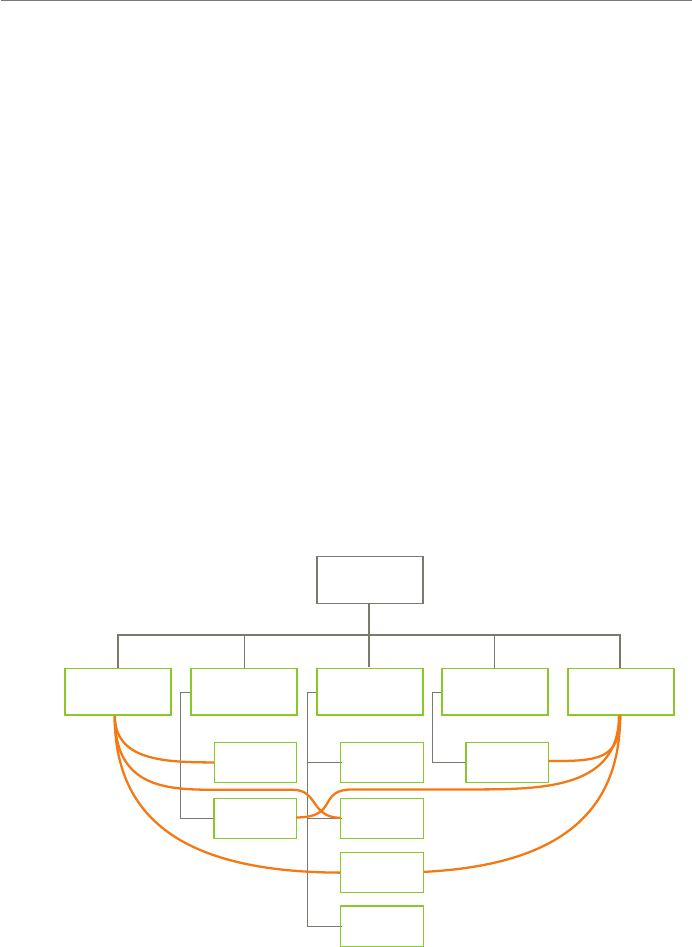
In this situation, I’ve used a ‘focused entry points’ pattern.
When I use this pattern, I set up the site using whichever pattern
best suits the content and the people who need it (usually
a hierarchy).
Then, acknowledging that some people simply won’t be able
to nd information using the main structure, I provide a series
of ‘entry points’ that help other users nd their way. These entry
points don’t have to cover the whole site content – you may use
them to provide easy access to just key information.
Figure 16 – 33. The focused entry points pattern
In chapter 15 I described some classication schemes that could be
hard to use – particularly things like audience and task schemes.
I’ve found these are far better as entry points than as the overall
approach to the site structure. For example, you may organise a
website with a basic hierarchical structure, then provide entry
points for dierent audiences or tasks.
~ IA patterns
204
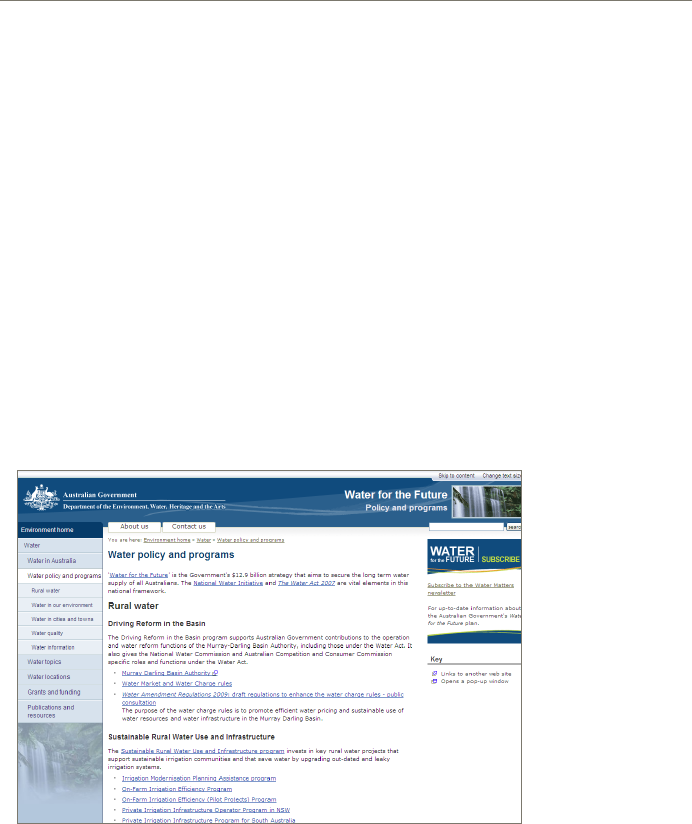
Figure 16 – 34. Water policies and programs, loosely grouped into categories for display
(environment.gov.au/water/policy_programs/)
Example – Australia’s Water
The Australian government’s water website contains information
on Government policies and programs (as many government
sites do). The names of the programs and policies are not always
obvious – some people know them well (other government folks
and the media), and some have no idea (the rest of Australia). Both
need to nd content deep in the website.
This website is a perfect example for the focused entry points
pattern. The main information architecture is a simple hierarchy,
organised around the policies and programs:
Topical ‘entry points’, like desalination, rainwater tanks and
saving water, provide access for people with interest in
particular topics:

206
Figure 16 – 37. Flickr includes tags on all photos, letting you nd all photos with a particular
tag – photographers and visitors can both add tags (flickr.com)
Figure 16 – 38. ABC news uses tags - these are added by the ABC (abc.net.au/news)
Tagged
A tagged pattern uses either the basic database or hypertext
pattern. Each item in the site is ‘tagged’ with keywords, and those
keywords are used to provide access to the content.
The tagging may be done by the original authors of the
content, the readers or by some central authority (such as the
web team).
This pattern works well for very large collections of diverse
content, especially where the content readers will have dierent
ideas what it is about.
It can be useful in situations where people aren’t sure what
they are looking for or what’s around. The tags can help people to
explore and nd related information.

207 A Practical Guide to Information Architecture
Hierarchy
Database
Hypertext
Linear
Simple hierarchy +
database
Catalog
Hub & spoke
Subsites
Focused entry points
Tagged
Suits content
Small sites
Varied content
Content with a consistent structure
Content being developed
Sequential content
General content plus some content types with
consistent structure
Large sets of structured content
Hierarchical content
Large corporate and government sites with many
independent sections of content
Any, but usually a hierarchy
Large sets of content
~ IA patterns

208
Challenges & issuesSuits people
Balancing breadth and depth
All content must t the structure
Don’t collect more metadata than you’ll need
Authors need to know what to link to
You may want to restructure later when the content
is complete
Only use it when people really must read in
sequence or people will be frustrated
Choosing what content to structure and what to
leave as unstructured
Deciding whether the subsites should use the same
approach to navigation, page layout and brand
Who does the tagging, and do the tags come from a
central set or generated by the authors
Read broad information and then more detail
Want to access content in more than one way
Follow links to related material
When people need to understand one thing before
progressing to another
Finding a particular section then looking at detailed
products
When people will want to return to a central place
each time they move to new content
People may want to access it in dierent ways, and
there is no ‘best’ way
Find information according to their own
terminology.
Find related information easily
