ELAN Pakedge SX 24P Setup Guide Rev A 0621 WEB
User Manual: Pdf
Open the PDF directly: View PDF  .
.
Page Count: 13
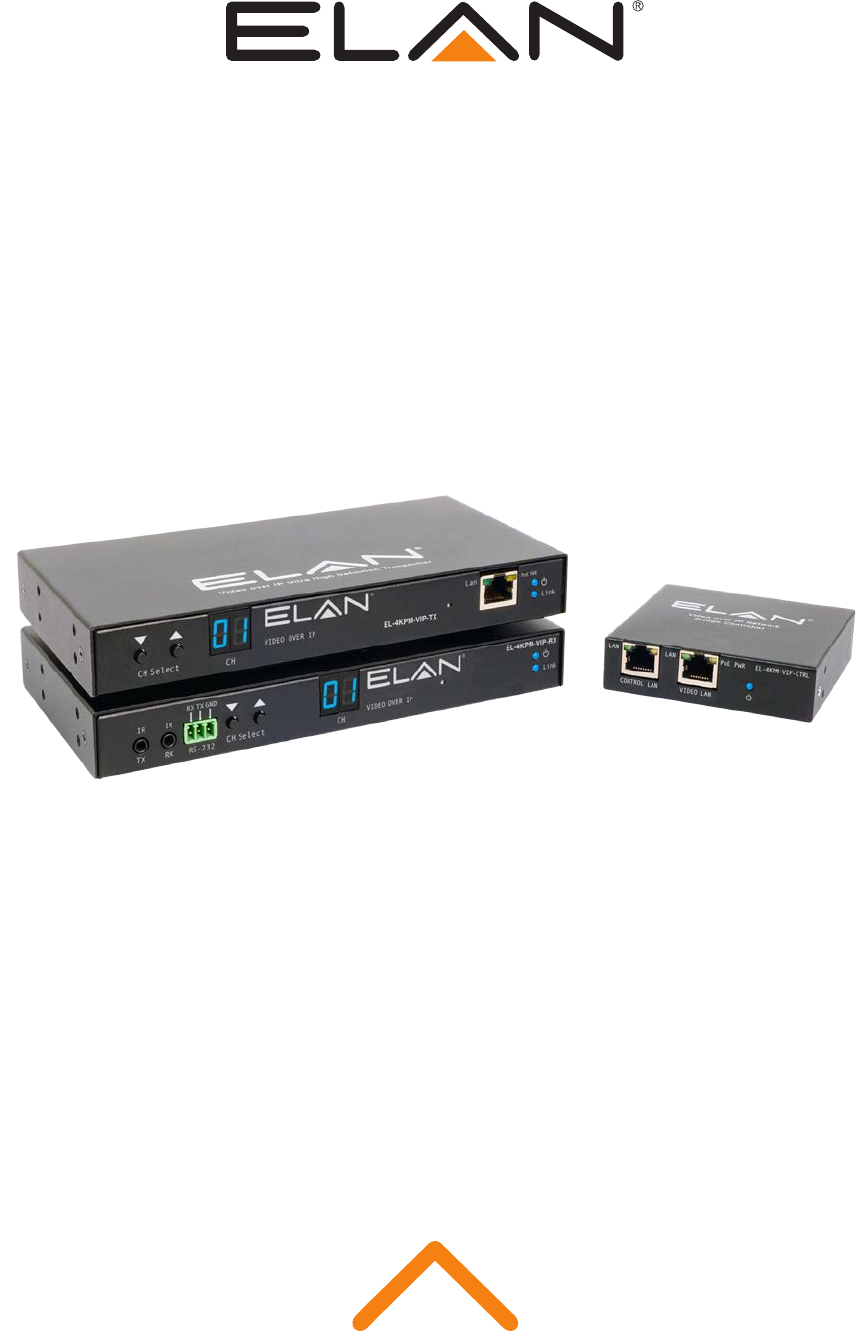
Pakedge SX-24P Setup Guide
When used with ELAN Video Over IP products

Pakedge SX-24P SETUP GUIDE
02 www.elanhomesystems.com
Contents
Introduction 03
Pakedge Feature Requirements 03
Connecting To The Web GUI Interface 04
Maximum Transmission Units 05
IGMP Snooping 06
Unknown Multicast Action 07
Fast Leave 08
Turning On/Off POE 09
Changing Your Computer IP Address 10-12

Pakedge SX-24P SETUP GUIDE
03
contact techsupport@elanhomesystems.com
The ELAN Video Over IP solution requires a layer 3 Managed switch in order for
HDMI distribution to be achieved reliably and with no loss in performance.
The following guide is a step-by-step instruction on how to connect and configure
your Pakedge SX-24P Layer 3 Managed network switch. These instructions may
be suitable for other Pakedge switches. Please see Pakedge’s product manuals for
further information.
Introduction
The following features need to be enabled on the Pakedge network switch:-
1. Layer 3 mode
2. Maximum Transmission Units
3. IGMP Snooping/Video Over IP
4. Fast Leave
5. POE (if utilised)
Feature explanation:
• Video Over IP (one-to-many or many-to-many distribution) is group communication where information is addressed
to a group of network devices simultaneously (ELAN Video Over IP products).
• Maximum transmission units - Jumbo frames are Ethernet frames with more than 1500 bytes of payload.
Conventionally, jumbo frames can carry up to 9000 bytes of payload hence the maximum transmission units must be
raised in order to send large packets of data for HDMI distribution.
• IGMP management & snooping is the process of listening to Internet Group Management Protocol (IGMP) network
traffic. The feature allows a network switch to listen in on the IGMP conversation between hosts, routers & receivers
(Video Over IP Transmitter, network switch and Video Over IP Receiver). By listening to this flow of traffic the switch
maintains a map of which links need which IP Video Over IP streams. (which ELAN Video Over IP products are active
and where the signal is being distributed to).
Pakedge Feature Requirements

Pakedge SX-24P SETUP GUIDE
04 www.elanhomesystems.com
Connecting to the switch Web GUI Interface
To login into the Pakedge network switch the factory default details are:
IP Address: 192.168.1.205
User: pakedge
Password: pakedges
In order to connect to the network switch your computer will need to be physically connected to the Pakedge switch using a
Ethernet network cable. The computer must also be in the same IP range as the Pakedge switch default IP address. If you are
unsure how to update your computer IP range follow the ‘Changing your computer IP address’ instructions at the rear of this guide.
1) Open your internet browser (Google Chrome, Mozilla, Internet Explorer etc)
2) Type the network switch default IP address into the web browser bar
3) Enter the default user name and password
Note: If the switch is not using the factory default settings you will need to know these login details or have to factory reset the unit.
For details how to factory reset the network switch please refer to the networks switch user manual.
Pakedge SX-24P SETUP GUIDE
05
contact techsupport@elanhomesystems.com
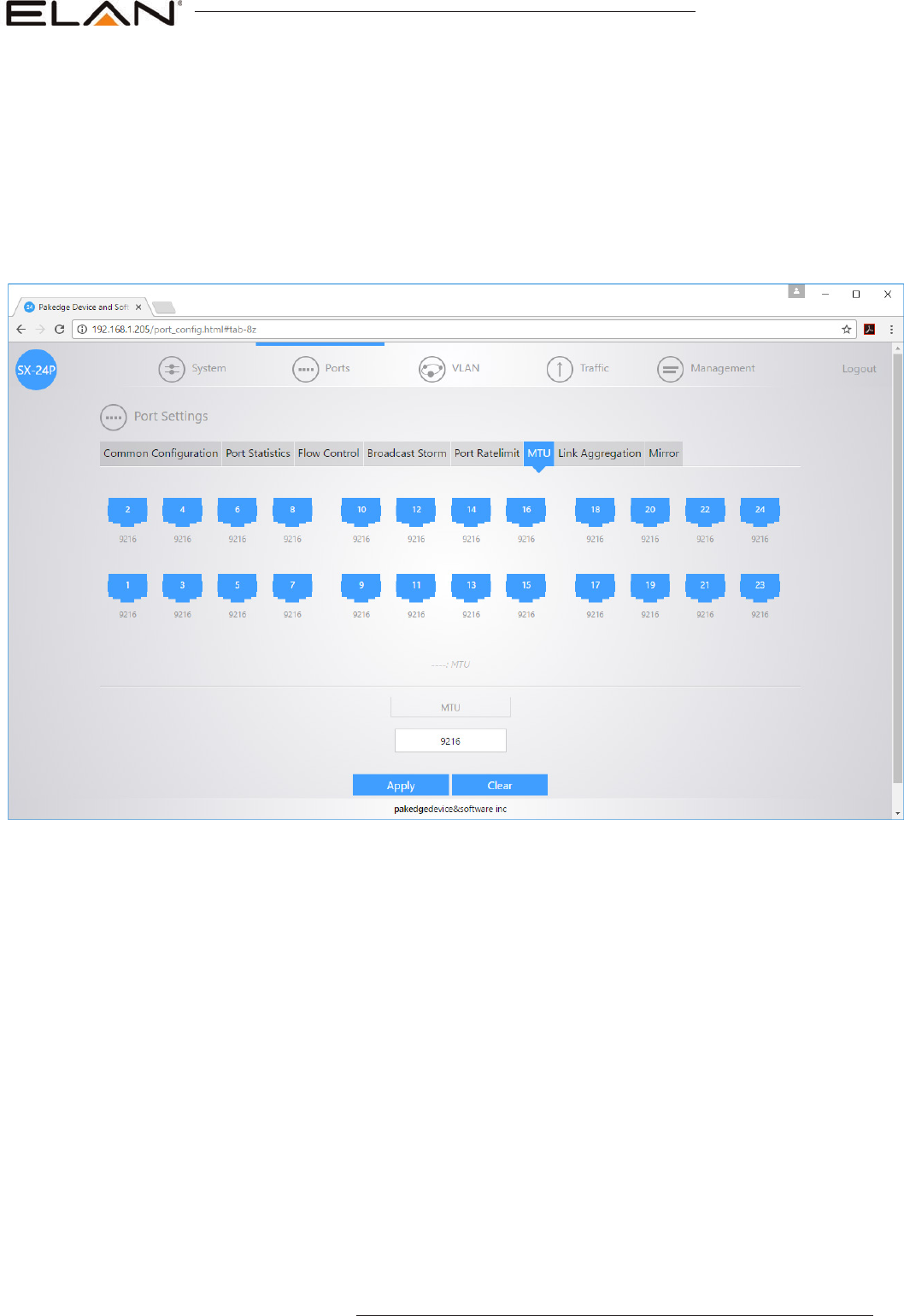
To increase the maximum frame size,
Under ‘Ports’ menu
Select ‘Port Settings’
Select ‘MTU’
Highlight all ports and ensure ‘MTU’ is set to 9216 for all ports.
Maximum Frame Size
Click ‘APPLY’ to update the setting
Pakedge SX-24P SETUP GUIDE
06 www.elanhomesystems.com
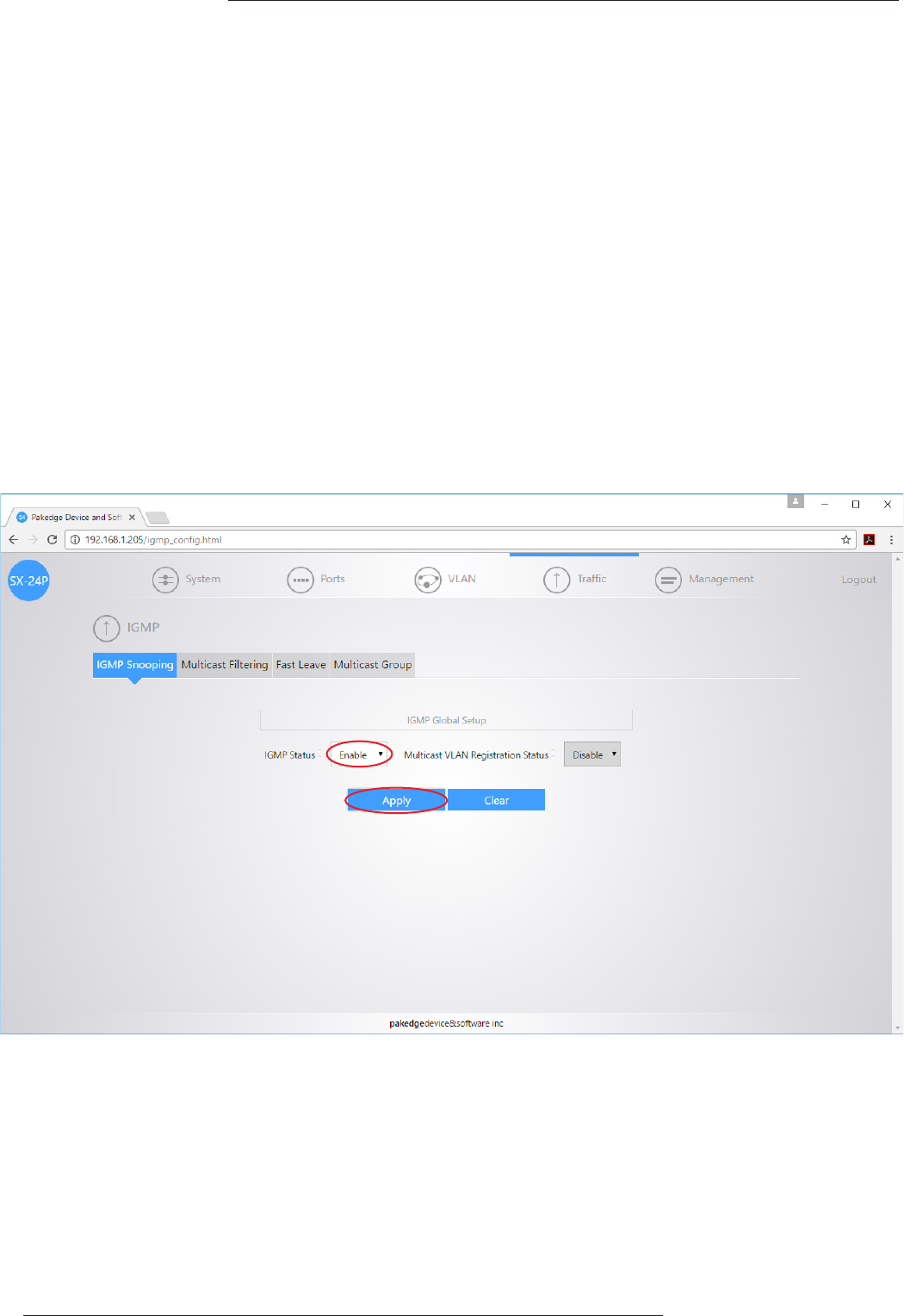
To enable IGMP snooping, there are several steps required to enable this feature:-
• IGMP Snooping
• Unknown Video Over IP Action
• Fast Leave
The following pages explain how to update the above settings.
Under ‘Traffic’ menu
Select ‘IGMP’
Select ‘IGMP Snooping’
Set ‘IGMP Status’ to Enabled
IGMP Snooping
IGMP Snooping
Click ‘Apply’ to update the setting
Pakedge SX-24P SETUP GUIDE
07
contact techsupport@elanhomesystems.com
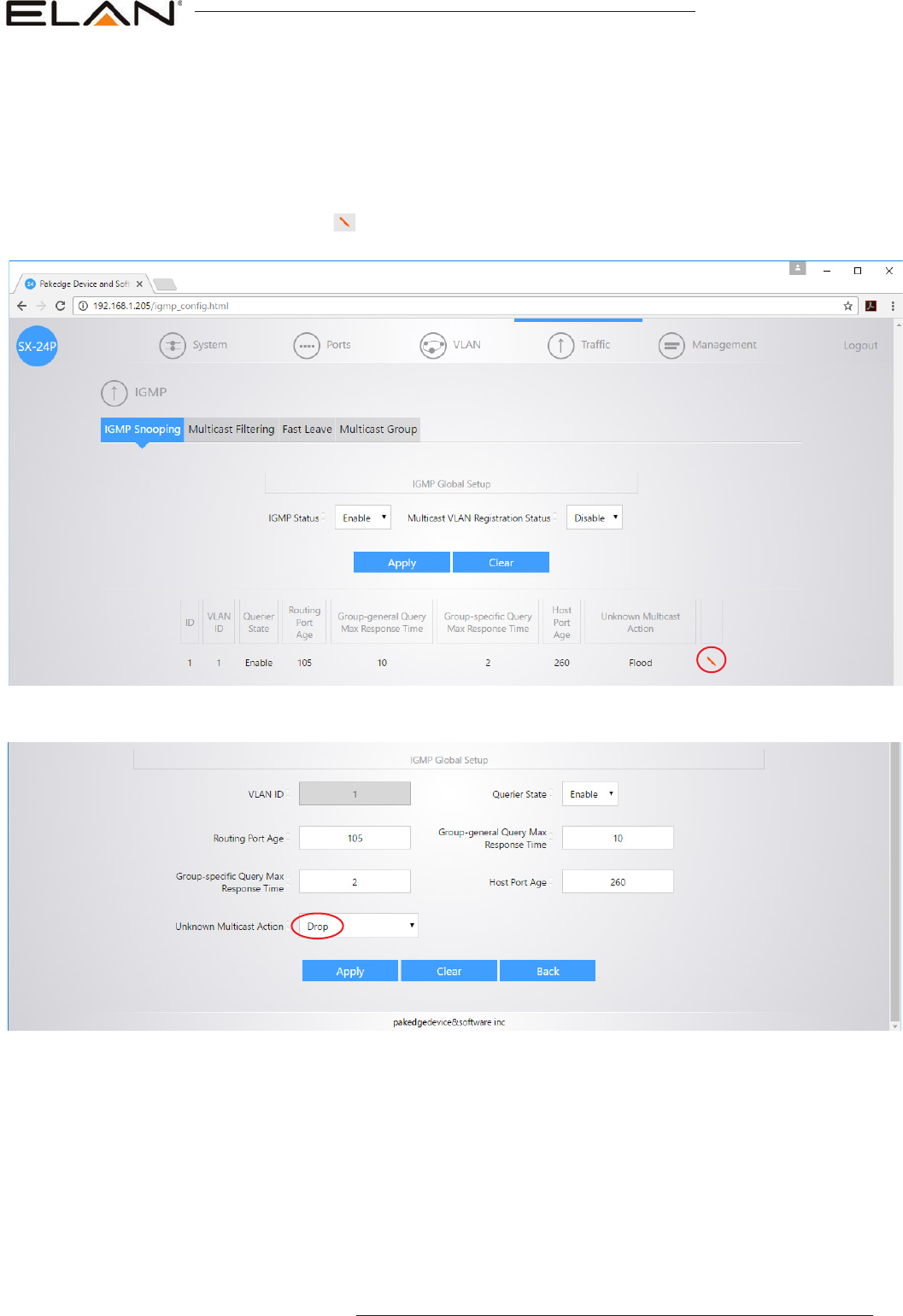
Under ‘Traffic’ menu
Select ‘IGMP’
Select ‘IGMP Snooping’
Select the red strip ( ) to adjust IGMP settings
Unknown Multicast Action
Click ‘Apply’ to update the setting
Change ‘Unknown Multicast Action’ to Drop
Pakedge SX-24P SETUP GUIDE
08 www.elanhomesystems.com
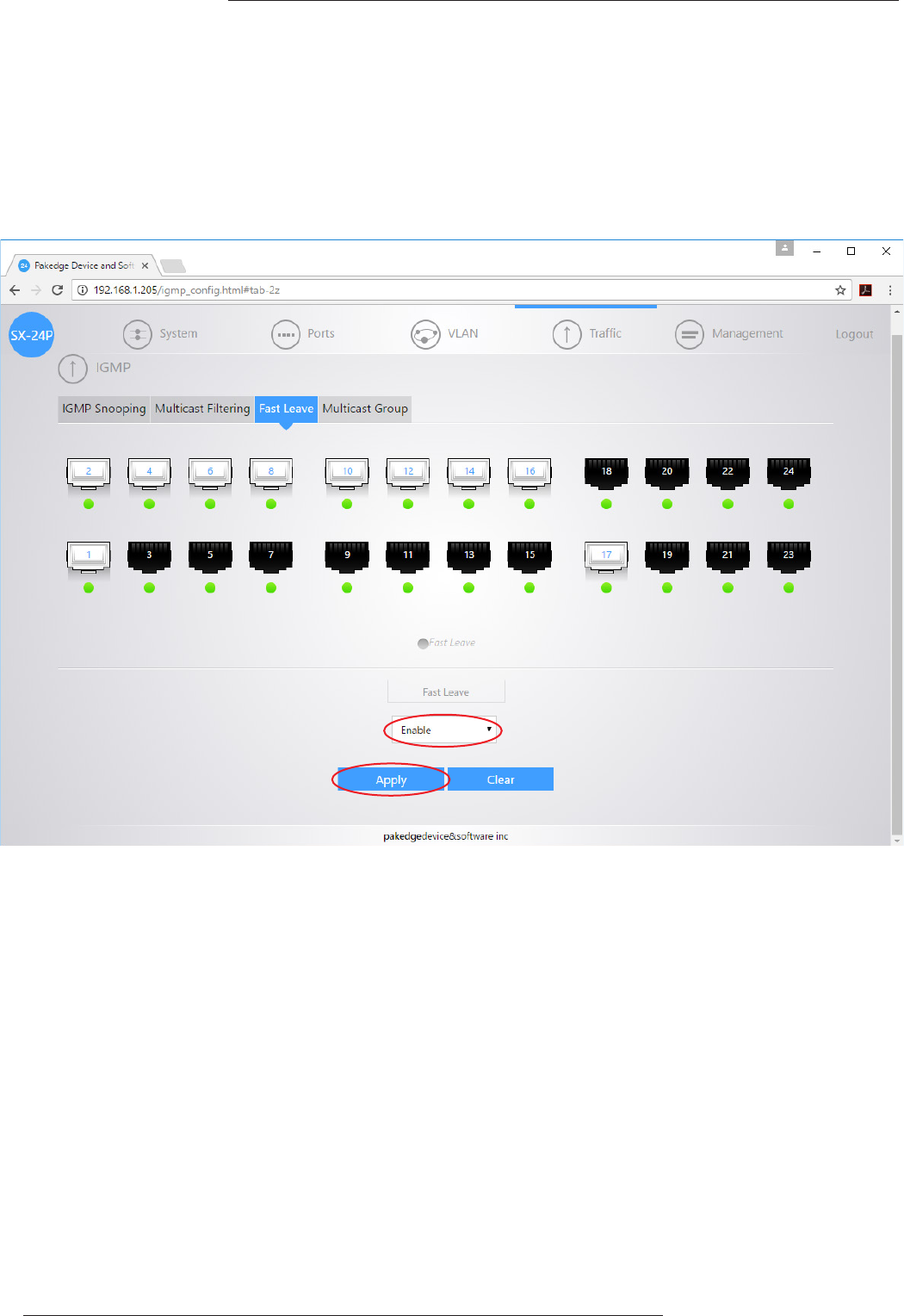
Fast Leave
Under ‘Traffic’ menu
Select ‘IGMP’
Select ‘Fast Leave’’
Highlight the channels you wish to adjust Fast Leave for.
Change ‘Fast Leave’ to Enabled
Click ‘Apply’ to update the setting
Pakedge SX-24P SETUP GUIDE
09
contact techsupport@elanhomesystems.com
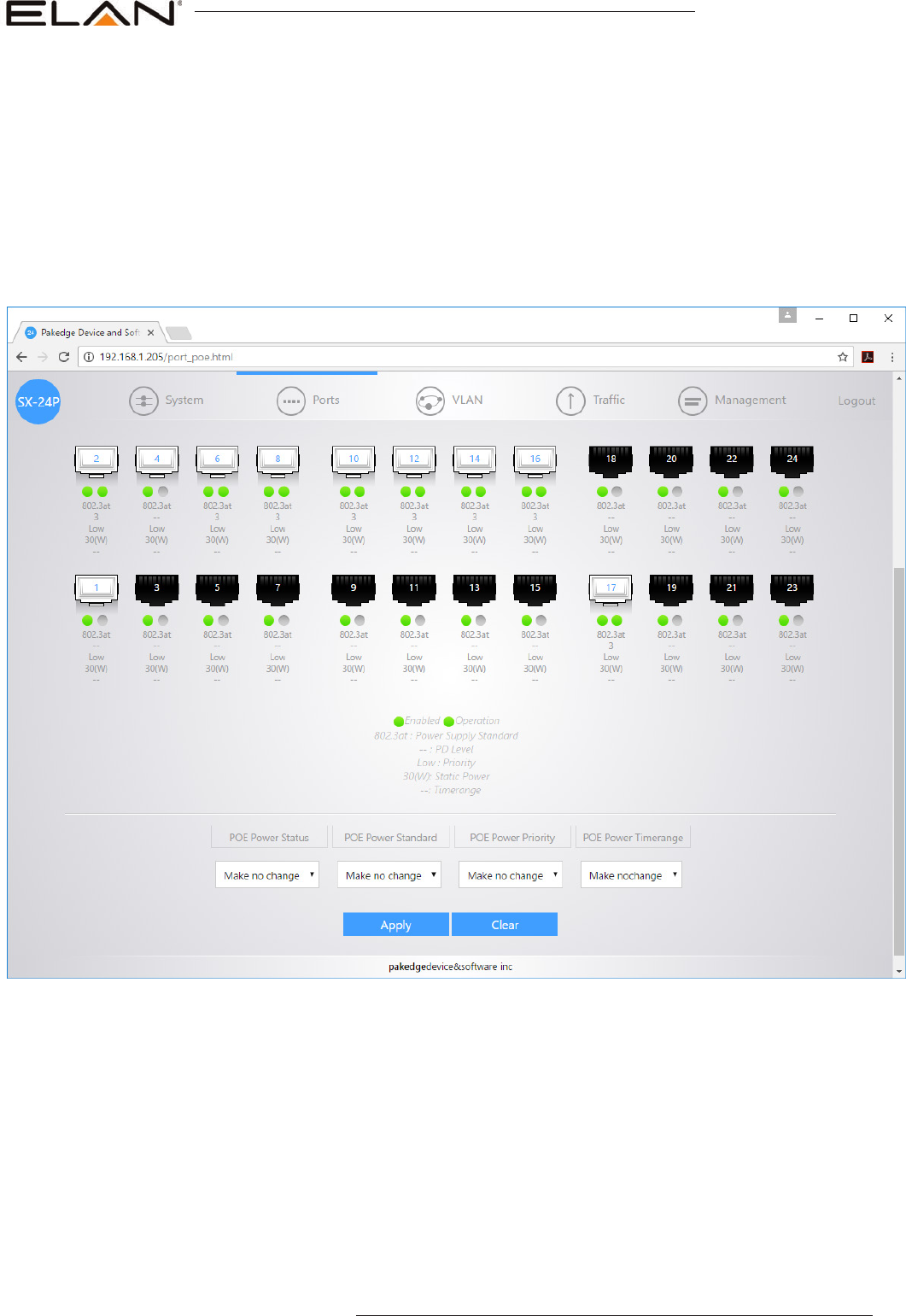
Not all Pakedge SX switches support POE. Furthermore, not all ports on the POE switches support POE. Please ensure your
products are connected to the correct port. If you are unsure of the POE port setting please follow the below instructions.
Under ‘Ports’ menu
Select ‘POE’
The following diagram shows the settings for each RJ45 LAN port on the network switch. Default settings are for POE Mode to be
set to 802.3at (Enabled) so changes should not be required. If POE is ‘Disabled please follow below instructions.
Turning On/Off POE
Highlight the channels you wish to adjust POE for.
Change ‘POE Power Status’ to Enabled
Click ‘Apply’ to update the setting
Pakedge SX-24P SETUP GUIDE
10 www.elanhomesystems.com
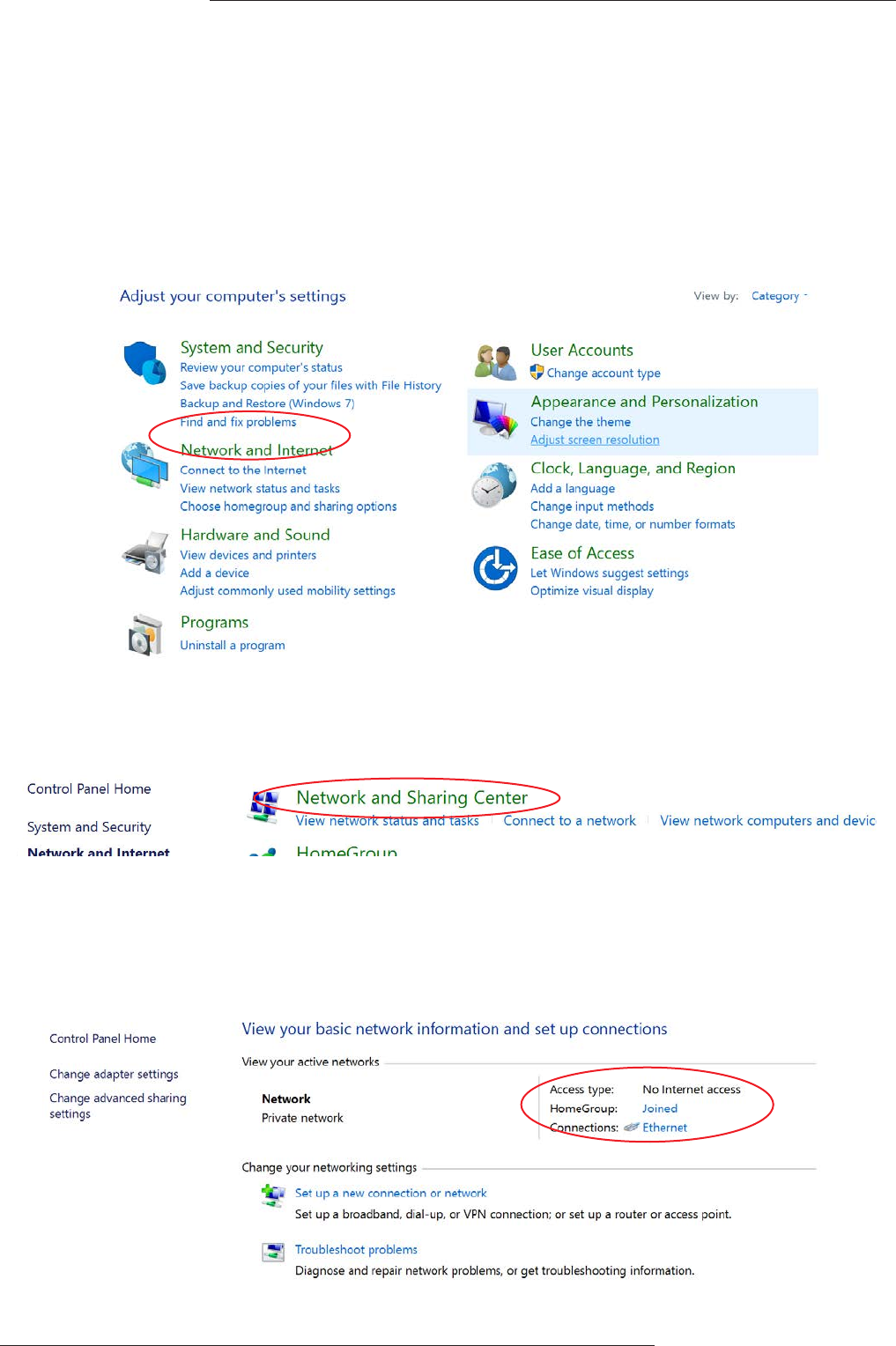
1) Connect your computer to your network switch using Ethernet cable
2) In the Windows toolbar navigate to ‘CONTROL PANEL’
3) Select ‘NETWORK AND INTERNET’
Changing your computer IP address to communicate with
the network switch
5) Select ‘NETWORK AND SHARING CENTER’
6) Under ‘View your Active Networks’ you can see connection types available.
The example below shows both LAN (local area connection) and Wireless.
Select ‘Local Area Connection’ as this is the method of communication you are using with the switch.
Pakedge SX-24P SETUP GUIDE
11
contact techsupport@elanhomesystems.com
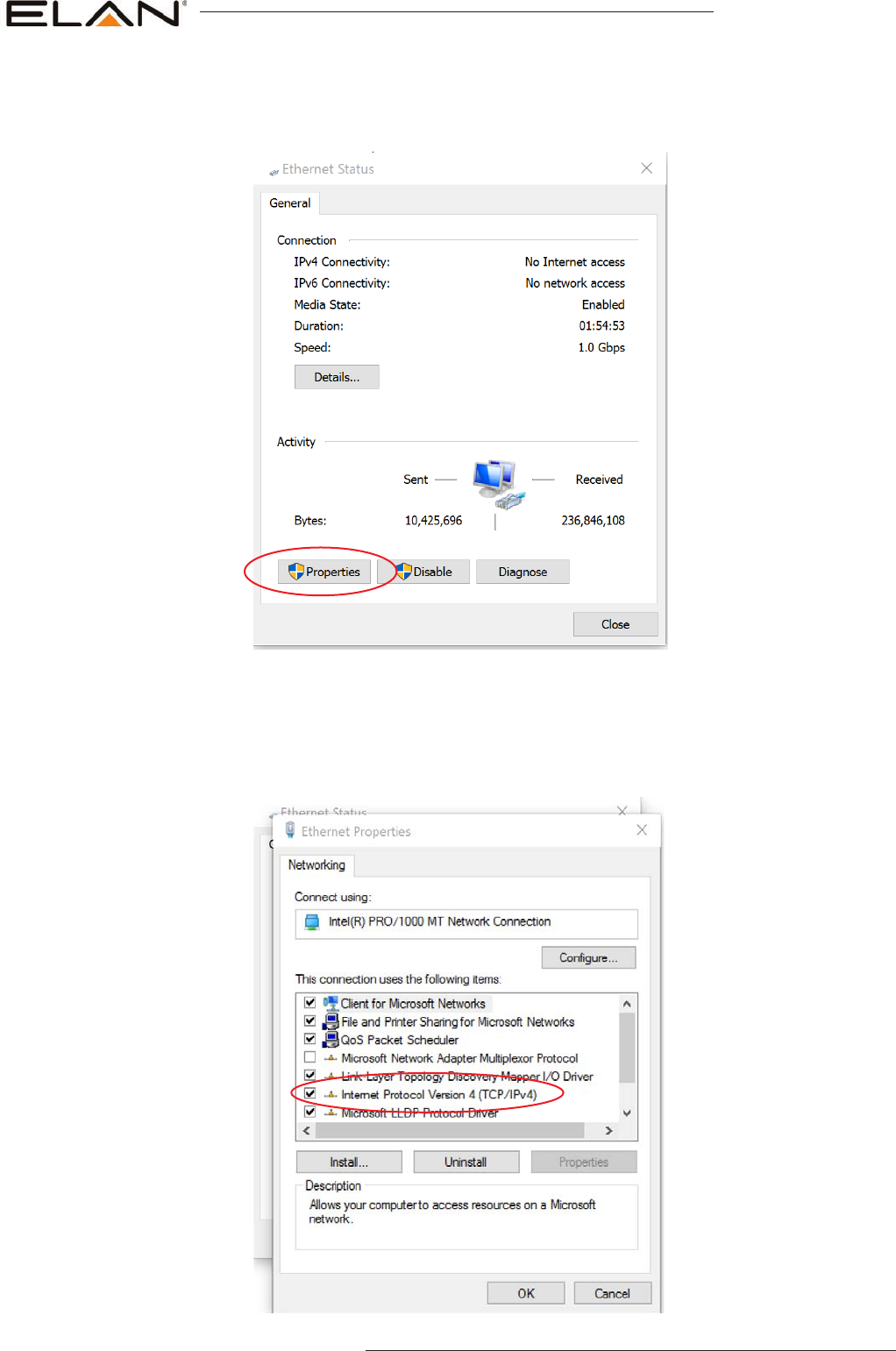
7) In the next window select ‘PROPERTIES’
8) A. In the ‘NETWORKING’ window highlight/select ‘INTERNET PROTOCOL VERSION 4 (TCP/IPv4)
B. Select ‘PROPERTIES’
Pakedge SX-24P SETUP GUIDE
12 www.elanhomesystems.com
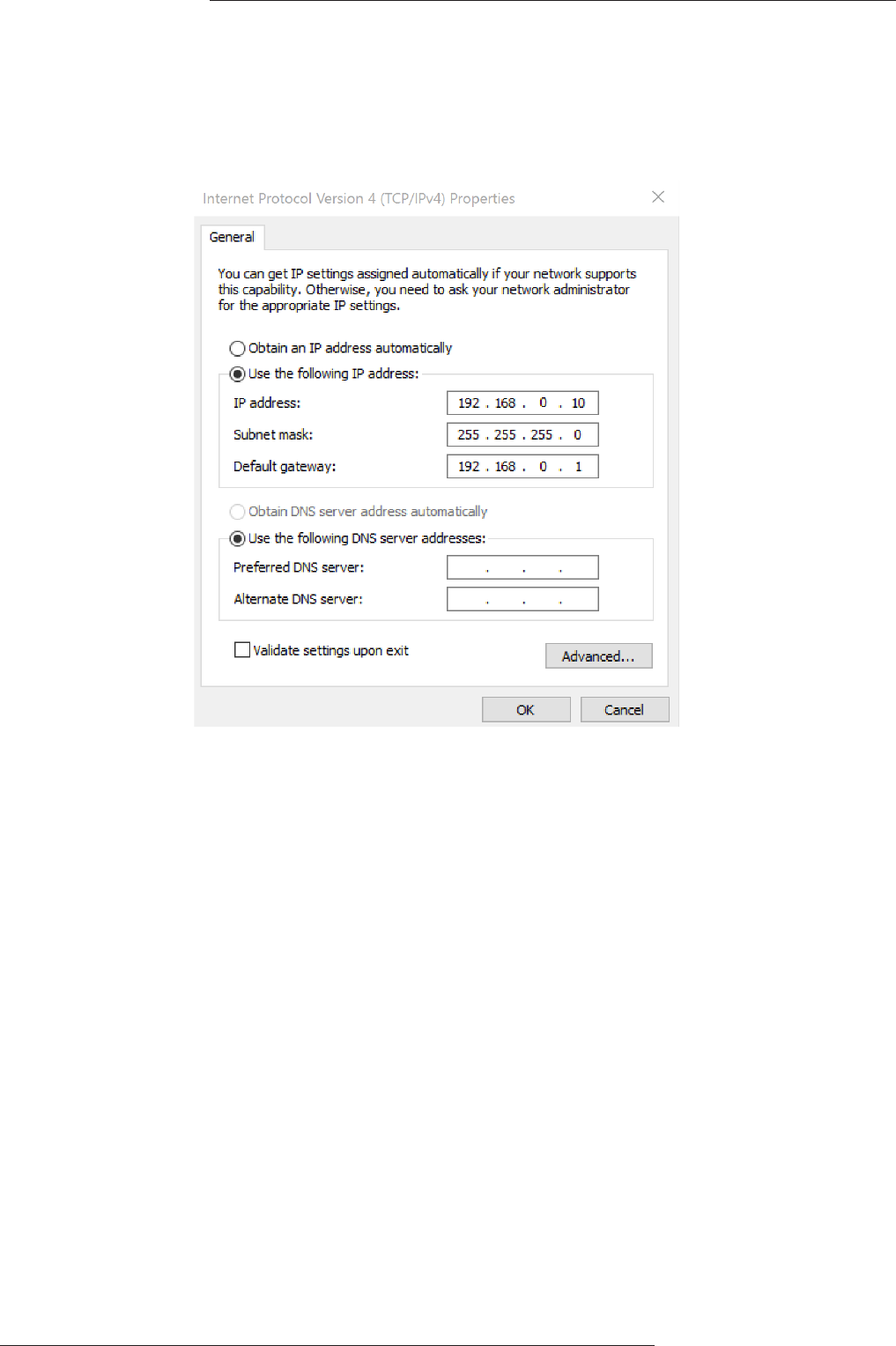
9) A. Under the ‘General’ tab select ‘USE THE FOLLOWING IP ADDRESS’
B. Enter the following FIXED IP network details
10) Click ‘OK’ and exit the network setup
11) Enter the default Pakedge IP address in your web browser and check that you can connect to the unit.

main:
1 (800) 472-5555 - US
1 (707) 283-5900 - International
1 (707) 283-5901 - Fax
tech support:
techsupport@elanhomesystems.com
web:
elanhomesystems.com
© 2017 ELAN® is a registered trademark of Core Brands, LLC. Rev-A, 06/2017
