EPC User Guide
EPC_User_Guide
EPC_User_Guide
EPC_User_Guide
EPC_User_Guide
EPC_User_Guide
User Manual: Pdf
Open the PDF directly: View PDF  .
.
Page Count: 40
- 1 Introduction
- 2 EPC Installation
- The Better String Library (http://bstring.sourceforge.net/)
- Libgtpnl
- 2.4 HSS
- 2.5 MME
- 2.6 SP_GW
- 3 Supported scenarios in EPC
- 3.1 E-UTRAN Initial attach
- 3.2 Tracking Area Update procedures
- 3.3 Routing Area Update procedures
- 3.4 Service Request procedures
- 3.5 S1 Release procedure
- 3.6 GUTI Reallocation procedure
- 3.7 Detach procedure
- 3.8 HSS User Profile management function procedure
- 3.9 Bearer deactivation
- 3.10 Intra E-UTRAN handover
- 4 Annex A: Tools for observing, debugging.
- 4.1 Wireshark/tshark
- 4.2 Mscgen
- 4.3 S1AP scenario replay
- 5 Annex B: GTP fragmentation.

EPC User’s Guide
Editor: EURECOM
Deliverable nature: Public
Due date:
Delivery date: August, 2016
Version: 0.12
Total number of pages: 40
Reviewed by:
Keywords: EPC, LTE, MME, S-GW, P-GW, HSS, S1AP, DIAMETER
Abstract
The deliverable presents the EPC developed by EURECOM, its configuration, installation testing and
running.

List of authors
Company Authors
EURECOM Christian BONNET, Lionel GAUTHIER, Rohit GUPTA, Florian
KALTENBERGER, Raymond KNOPP, Adlen Ksentini, Navid NIKAIEN,
Cedric ROUX.
OPEN CELLS Laurent THOMAS.
Page 2 of (40) ©

History
Modified by Date Version Comments
Lionel GAUTHIER 09/06/2015 0.1 Initial Draft
Lionel GAUTHIER 11/06/2015 0.2 Minor corrections
Lionel GAUTHIER 20/07/2015 0.3 Changes in dir and file names for git repo
Lionel GAUTHIER 29/07/2015 0.4 Minor corrections (build, get sources from git)
Lionel GAUTHIER 09/09/2015 0.5 Minor corrections (build_epc script)
Lionel GAUTHIER 21/09/2015 0.6 History, GTP-U installation for EPC
Lionel GAUTHIER 14/12/2015 0.7 Removed epc config file when eNB and EPC are
co-located, added description of S1AP scenario
replay
Lionel GAUTHIER 22/02/2016 0.8 Move from docx with embedded Visio drawings
to odt format. Align the documentation to tag
v0.2.0 of develop and master branches on
https://gitlab.eurecom.fr/oai/openair-cn
Lionel GAUTHIER 06/04/2016 0.9 Align the documentation to commit
5e1289bd506f33a1bbf196d55c86641021ccca70
of “unstable” branch
https://gitlab.eurecom.fr/oai/openair-cn
Lionel GAUTHIER 07/05/2016 0,10 Updated section “S1AP scenario replay”
Lionel GAUTHIER 07/25/2016 0.11 Add generation of certificates
Lionel GAUTHIER 08/03/2016 0.12 Updated for GTP kernel 4.7.
Page 3 of (40) ©

Table of Contents
Table of Contents
Introduction...........................................................................................................................................8
Overview............................................................................................................................................8
Deployment scenario..........................................................................................................................8
EPC Installation...................................................................................................................................10
Operating system..............................................................................................................................10
EPC source code..............................................................................................................................10
Get the code without login............................................................................................................10
Get the code with login (contributors)..........................................................................................10
Additional software..........................................................................................................................11
The Better String Library (http://bstring.sourceforge.net/)..................................................................12
Libgtpnl...............................................................................................................................................12
HSS..................................................................................................................................................13
HSS pre-installation......................................................................................................................13
Mysql server installation..........................................................................................................13
Phpmyadmin installation details..............................................................................................13
HSS configuration........................................................................................................................15
Step 1.......................................................................................................................................15
Step 2.......................................................................................................................................16
Step 3.......................................................................................................................................16
Step 4.......................................................................................................................................16
HSS build.....................................................................................................................................16
HSS run........................................................................................................................................17
First run....................................................................................................................................17
Later runs.................................................................................................................................20
MME................................................................................................................................................21
MME pre-installation...................................................................................................................21
MME configuration......................................................................................................................21
Step 1.......................................................................................................................................21
MME section...........................................................................................................................21
SGW section............................................................................................................................24
Step 2.......................................................................................................................................24
Step 3.......................................................................................................................................24
MME build...................................................................................................................................25
Before MME first run...................................................................................................................25
MME run......................................................................................................................................25
SP_GW............................................................................................................................................26
SP-GW pre-installation.................................................................................................................26
SP-GW configuration...................................................................................................................26
Step 1.......................................................................................................................................26
SGW section............................................................................................................................26
Network interfaces section............................................................................................................26
PGW section............................................................................................................................27
Page 4 of (40) ©

SPGW run.....................................................................................................................................28
Supported scenarios in EPC.................................................................................................................29
E-UTRAN Initial attach...................................................................................................................29
Attach with IMSI..........................................................................................................................29
Attach with GUTI.........................................................................................................................29
Tracking Area Update procedures....................................................................................................29
Routing Area Update procedures......................................................................................................29
Service Request procedures..............................................................................................................29
UE triggered Service Request.......................................................................................................29
Network triggered Service Request..............................................................................................29
S1 Release procedure.......................................................................................................................29
GUTI Reallocation procedure..........................................................................................................29
Detach procedure.............................................................................................................................29
UE-Initiated Detach procedure for E-UTRAN.............................................................................29
MME-Initiated Detach procedure for E-UTRAN.........................................................................29
HSS-Initiated Detach procedure for E-UTRAN...........................................................................29
HSS User Profile management function procedure..........................................................................29
Bearer deactivation...........................................................................................................................30
PDN GW initiated bearer deactivation.........................................................................................30
MME initiated Dedicated Bearer Deactivation.............................................................................30
Intra E-UTRAN handover................................................................................................................30
Annex A: Tools for observing, debugging...........................................................................................31
Wireshark/tshark..............................................................................................................................31
Mscgen.............................................................................................................................................31
S1AP scenario replay.......................................................................................................................33
Overall process.............................................................................................................................33
Step0: Install required software on the “scenario replay”testbed..................................................33
openairinterface5g installation.................................................................................................33
openair-cn installation..............................................................................................................34
openair-cn-scenarios installation..............................................................................................34
Step1: Flowchart of network capture on S1-C..............................................................................34
Step2: Generate a generic scenario...............................................................................................37
Step3: Create configuration files for the “scenario replay” testbed...............................................37
Replay a S1AP generic scenario...................................................................................................39
Annex B: GTP fragmentation..............................................................................................................40
Page 5 of (40) ©

Index of Tables
Table 1: 3rd party software.......................................................................................................12
Table 2: HSS configuration fields............................................................................................16
Table 3: SQL Table structure mmeidentity...............................................................................18
Table 4: SQL Table structure pdn.............................................................................................19
Table 5: SQL Table structure users...........................................................................................20
Table 6: MME configuration main section...............................................................................22
Table 7: MME configuration subsection ITTI.........................................................................22
Table 8: MME configuration subsection S6a...........................................................................22
Table 9: MME configuration subsection SCTP.......................................................................22
Table 10: MME configuration subsection S1AP......................................................................22
Table 11: MME configuration subsection GUMMEI...............................................................22
Table 12: MME configuration subsection TAI LIST...............................................................23
Table 13: MME configuration subsection NAS.......................................................................23
Table 14: MME configuration subsection Network Interfaces................................................23
Table 15: MME configuration subsection Network Interfaces................................................24
Table 16: MME configuration section SGW............................................................................24
Table 17: S-GW configuration subsection Network Interfaces................................................26
Table 18: MME configuration subsection ITTI.......................................................................27
Table 19: MME configuration subsection Network Interfaces................................................27
Table 20: P-GW configuration main section............................................................................27
Table 21: P-GW configuration subsection Network Interfaces................................................28
Table 22: P-GW configuration subsection IP Address Pool Selection.....................................28
Page 6 of (40) ©

Abbreviations
3GPP Third Generation Partnership Project.
APN Access Point Name.
CIDR Classless Inter-Domain Routing.
eNB e Node B.
EPC Evolved Packet Core.
EPS Evolved Packet System.
FQDN Fully qualified domain name.
HSS Home Subscriber Server.
IMEI International Mobile Station Equipment Identity.
IMEISV International Mobile Station Equipment Identity Software
Version.
LTE Long Term Evolution.
MME Mobility Management Entity.
MSISDN Mobile Station International Subscriber Directory Number.
NW Network.
P-GW PDN Gateway, Packet Data Network Gateway.
PDN Packet Data Network.
QoS Quality of Service.
SCTP Stream Control Transmission Protocol.
S-GW Serving Gateway.
SIM Subscriber Identity Module.
TCP Transmission Control Protocol.
USIM Universal Subscriber Identity Module.
Page 7 of (40) ©
1 Introduction
1.1 Overview
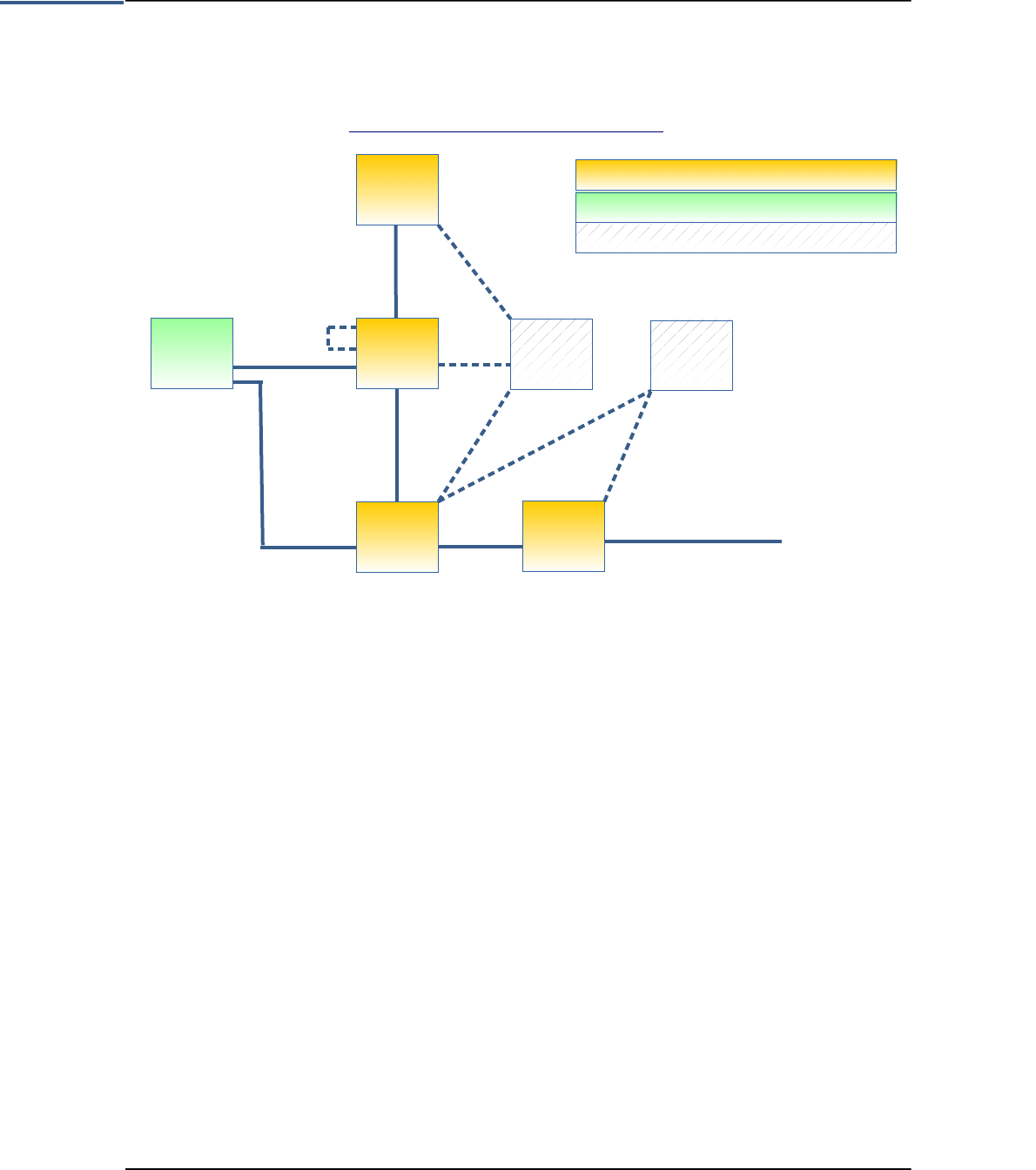
The EURECOM EPC is a bundle of software components that provides the MME, S+P-GW, HSS functions of
the LTE core EPC architecture (http://www.3gpp.org/DynaReport/23002.htm).
Figure 1 EURECOM core network entities overview
The link to other network entities such as a SGSN, PCRF is actually studied.
1.2 Deployment scenario
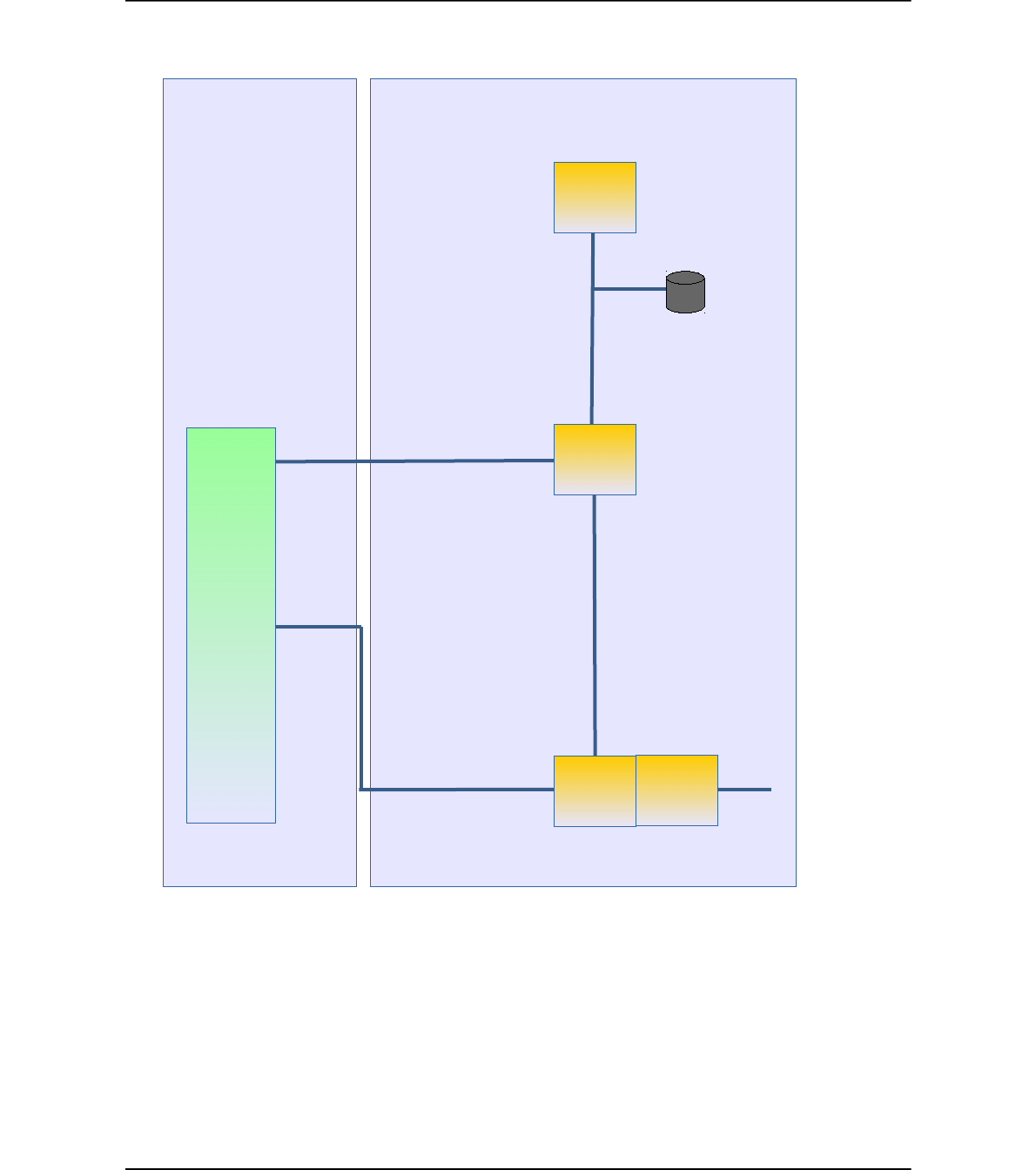
One deployment scenario is considered with the EURECOM EPC.
Actually the SGW and the PGW are merged together, there is no S5/S8 interfaces between the two functional
entities.
The MME is a network entity that can be deployed on its own host or can be co-located with any other LTE
network entity (SPGW, HSS). Even if it works we do not recommand the deployment of the MME on a eNB.
The SPGW is a network entity that can be deployed on its own host or can be co-located with the MME or/and
with the HSS.
Page 8 of (40) ©
!"#$%$&'(&$%$'$% $
&'(&$%$'$% %$ ")
%&'(&$*$%$ "
+
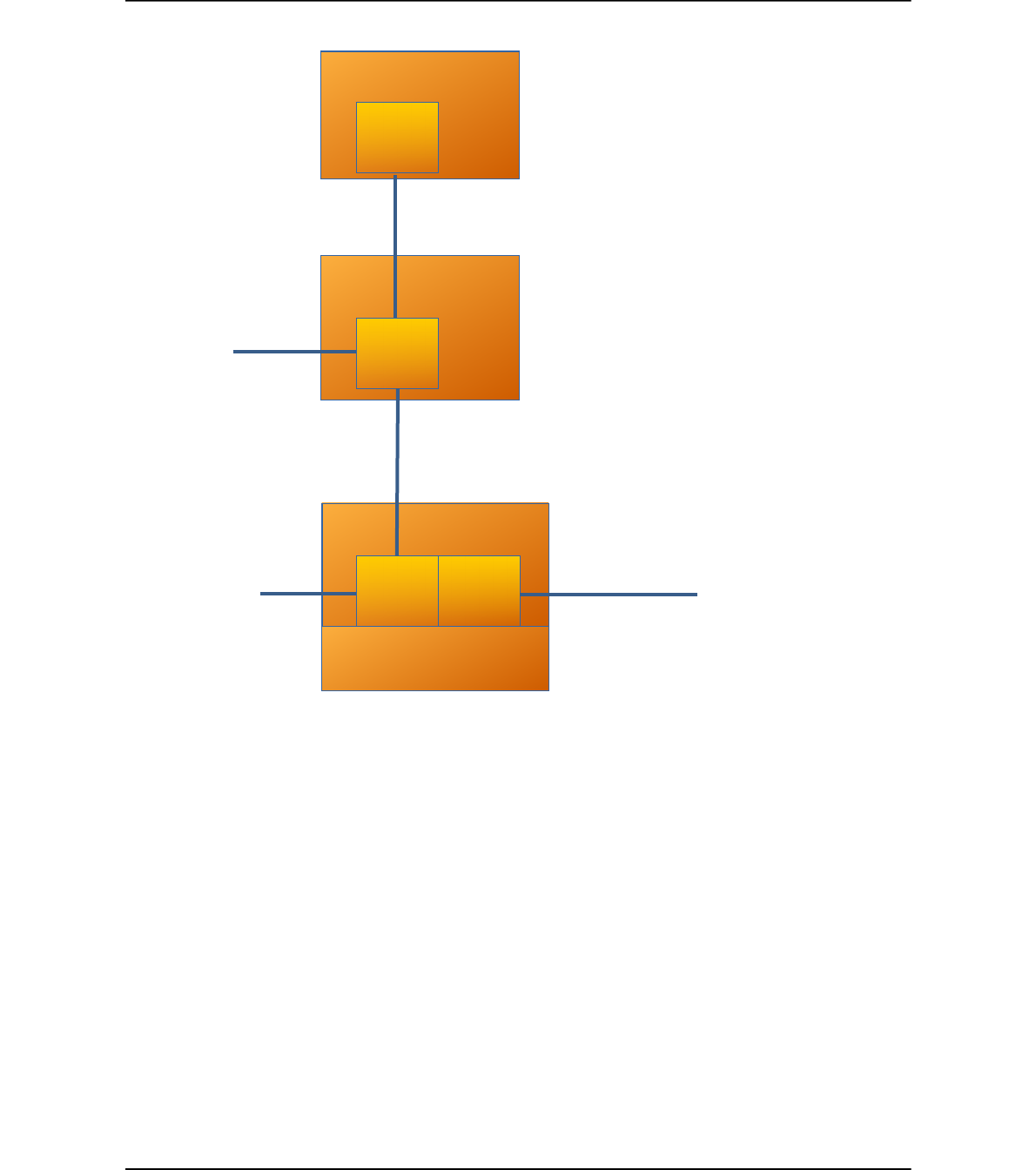
Figure 2 EPC Deployment view
Page 9 of (40) ©
,! $(&#(
-')#.(
-')&$
&&#.(
&&&$
/--#.(
/--&$

2 EPC Installation
2.1 Operating system
The EPC software has only been tested on UBUNTU 14.04x64 LINUX distribution on Intel x86 64 bits
platforms. Actually on the host running the SP-GW, the GTPv1-U implementation requires that your host run a
kernel version greater or equal to 4.7 (we use 4.7-rc7).
2.2 EPC source code
Important!
In this document OPENAIRCN_DIR is the path to the EPC source code top directory (i.e. openair-cn
working directory).
It is assumed that you are logged onto your machine(s) as a non root user and you configured your system
to be a sudoer user.
The EPC software can be obtained from our git server. You will need a git client to get the sources.
If git is not installed on your computer, execute in a shell the following command (Ubuntu):
user@host:~ sudo apt-get install git
Configure git with your name/email address (only important if you are developer and want to checkin code to
Git):
git config --global user.name "Your Name"
git config --global user.email "Your email address"
Add a certificate from gitlab.eurecom.fr to your Ubuntu 14.04 installation (you need to be root user):
root@host:~# echo -n | openssl s_client -showcerts -connect gitlab.eurecom.fr:443 2>/dev/null |
sed -ne '/-BEGIN CERTIFICATE-/,/-END CERTIFICATE-/p' >> /etc/ssl/certs/ca-certificates.crt
Important!
In this document OPENAIRCN_DIR is the path to the EPC source code top directory (i.e. openair-cn working
directory).
2.2.1 Get the code without login
In order to checkout the Git repository (for OAI Users without login to gitlab server)
user@host:~ git clone https://gitlab.eurecom.fr/oai/openair-cn.git
2.2.2 Get the code with login (contributors)
In order to check out the Git repository (for OAI Developers/admins with login to gitlab server)
Please send an email to openair_tech@eurecom.fr to be added to the repository as a developer (only important
for users who want to commit code to the repository). If you do not have an account on gitlab.eurecom.fr, please
register yourself to gitlab.eurecom.fr.
Checkout with using ssh keys:
Page 10 of (40) ©

You will need to put your ssh keys in https://gitlab.eurecom.fr/profile/keys to access to the git repo. Once that is
done, checkout the git repository using:
git clone git@gitlab.eurecom.fr:oai/openair-cn.git
Checkout with user name/password prompt:
git clone https://YOUR_USERNAME@gitlab.eurecom.fr/oai/openair-cn.git
2.3 Additional software
Some software installations have to be done prior to build the core network entities.
Please find for information, bellow a summary of third party software included in source tree or that must be
installed prior to EPC components compilation.
Installed software MME entity S/P-GW entity HSS entity Licence
UBUNTU packages Removed packages:
libgnutls-dev
'libgnutlsxx2?' nettle-dev
nettle-bin.
build/dev/debug tools:
autoconf automake bison
build-essential cmake
cmake-curses-gui
doxygen doxygen-gui
flex gccxml gdb git pkg-
config subversion
valgrind Kcachegrind.
Network tools:
ethtool iperf iproute vlan
tshark
Libraries:
guile-2.0-dev libconfig8-
dev libgcrypt11-dev
libgmp-dev libhogweed2
libgtk-3-dev libidn2-0-
dev libidn11-dev
libpthread-stubs0-dev
libsctp1 libsctp-dev
libssl-dev libtool libxml2
libxml2-dev mscgen
openssl python.
Others:
check phpmyadmin
python-dev python-
pexpect unzip
build/dev/debug tools:
autoconf, automake, bison,
build-essential, cmake,
cmake-curses-gui, doxygen,
doxygen-gui, flex, gccxml,
gdb, git, pkg-config,
subversion.
Removed packages:
libgnutls-dev 'libgnutlsxx2?'
nettle-dev nettle-bin.
Removed packages:
libgnutls-dev
'libgnutlsxx2?' nettle-
dev nettle-bin.
build/dev/debug tools:
autoconf automake
bison build-essential
cmake cmake-curses-
gui doxygen doxygen-
gui flex gdb pkg-config.
git subversion.
Libraries:
libconfig8-dev
libgcrypt11-dev libidn2-
0-dev libidn11-dev
libmysqlclient-dev
libpthread-stubs0-dev
libsctp1 libsctp-dev
libssl-dev libtool mysql-
client mysql-server
openssl.
Others:
phpmyadmin python-
pexpect
...
Nettle
(ftp://ftp.lysator.liu.se
/pub/security/lsh/nettl
e-2.5.tar.gz)
Yes
Dependancy:
autoconf automake build-
essential libgmp-dev.
No Yes LGPL
Gnutls
( ftp://ftp.gnutls.org/g
crypt/gnutls/v3.1/gnu
tls-3.1.23.tar.xz )
Yes
Dependancy:
autoconf automake build-
essential
libtasn1-6-dev libtasn1-6-
dbg libp11-kit-dev
libp11-kit0-dbg libtspi-
dev libtspi1 libidn2-0-dev
libidn11-dev
No Yes LGPLv2.1+
Page 11 of (40) ©

Installed software MME entity S/P-GW entity HSS entity Licence
FreeDiameter
(http://www.freediam
eter.net/hg/freeDiame
ter/archive/1.2.0.tar.g
z)
Yes
Dependancy:
autoconf automake bison
build-essential cmake
cmake-curses-gui
debhelper flex g++ gcc
gdb libgcrypt-dev
libidn11-dev
libmysqlclient-dev libpq-
dev libsctp1 libsctp-dev
libxml2-dev mercurial
python-dev ssl-cert swig
No Yes BSD 3 clause
license. Check
subdirs for
copyright
informations:
extensions/dict_sip
/*
extensions/app_sip
/*
extensions/app_rad
gw/rgwx_sip.c
extensions/app_dia
meap/*
extensions/dict_mip
6a/*
extensions/dict_mi
p6i/*
extensions/dict_na
s_mipv6/*
extensions/dict_rfc
5777/*
Asn1c
(https://github.com/vl
m/asn1c/trunk
revision 1516)
Yes
Dependancy:
autoconf automake bison
build-essential flex gcc
libtool
No No BSD 2-Clause
Licence
SRC/UTILS/tree.h Yes Yes No BSD 2-Clause
Licence
SRC/UTILS/queue.h Yes Yes No BSD 3-Clause
Licence
SRC/UTILS/LFDS/li
blfds6.1.1.
(http://liblfds.org/)
Yes Yes No No license
SRC/GTPV2-
C/nwgtpv2c-0.11
Yes Yes No Free licence
xtables_addons
patched for OAI
(https://gitlab.eureco
m.fr/oai/xtables-
addons-oai.git)
No Yes
Dependancy:
autoconf automake build-
essential dkms iptables
iptables-dev linux-headers.
Run a kernel version equal
to 3.19 (we use 3.19.0-28)
No GPLv2
The Better String
Library
(http://bstring.sourcef
orge.net/)
Yes Yes No BSD 3-Clause
Licence
Libgtpnl
(http://git.osmocom.o
rg/libgtpnl/)
No Yes No GNU
LESSER
GENERAL
PUBLIC
LICENSE
Version 2.1
Table 1: 3rd party software
Page 12 of (40) ©
These softwares will mostly be installed by helper scripts, this will be described in following sections.
2.4 HSS
2.4.1 HSS pre-installation
In OPENAIRCN_DIR/SCRIPTS directory, execute the following command:
user@hss-host:~/openair-cn/SCRIPTS$ ./build_hss -i
This command will install the required softwares on your host.
Find bellow some hints for some interactive software installations (mysql-server, phpmyadmin).
2.4.1.1 Mysql server installation
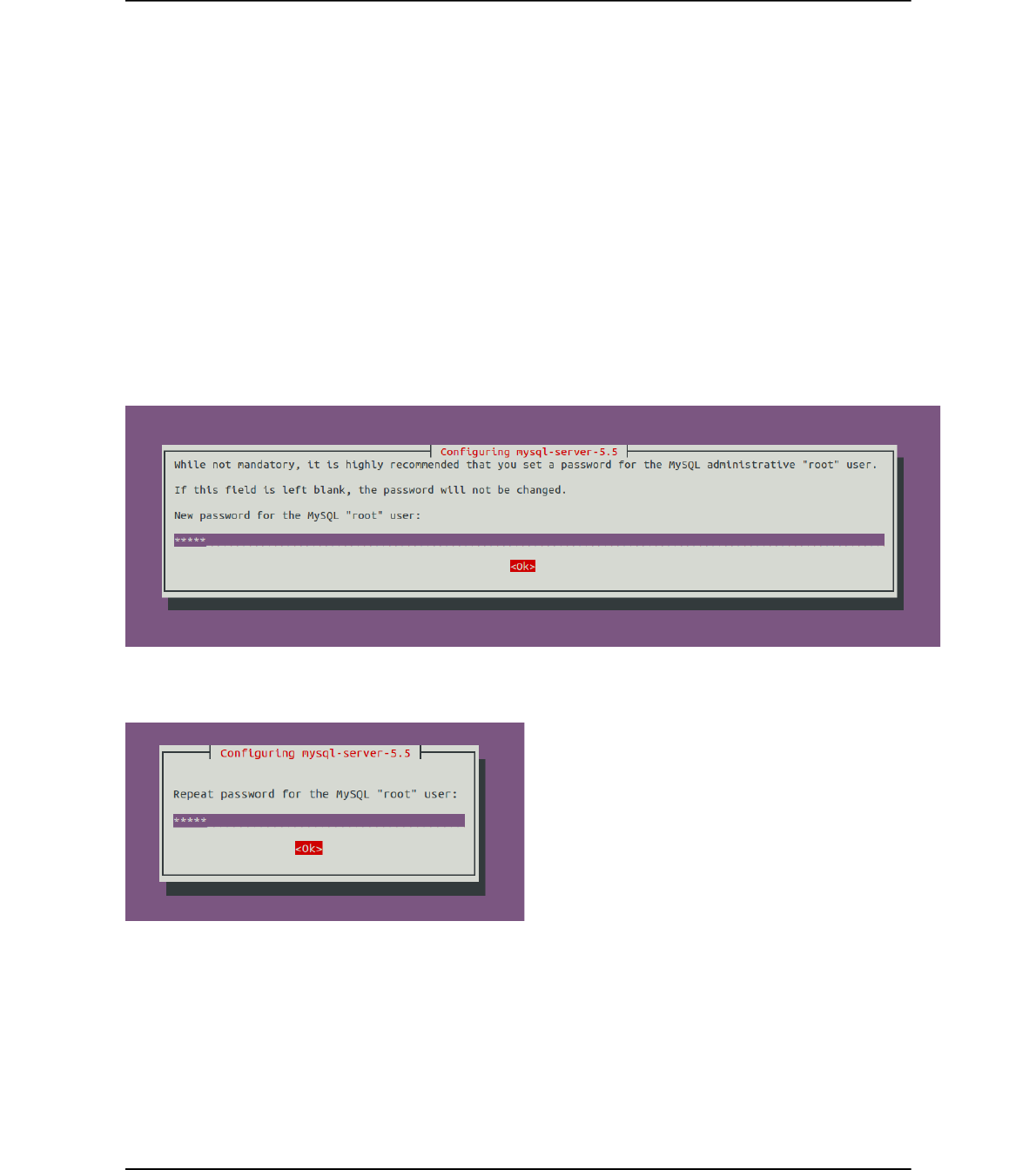
Enter here a password for root user, lets call it MS_PW_ROOT.
Figure 3 Mysql installation root password
Figure 4 Mysql installation root password repeat
The mysql-server installation process ends here.
2.4.1.2 Phpmyadmin installation details
You should prefer the easiest way
Page 13 of (40) ©
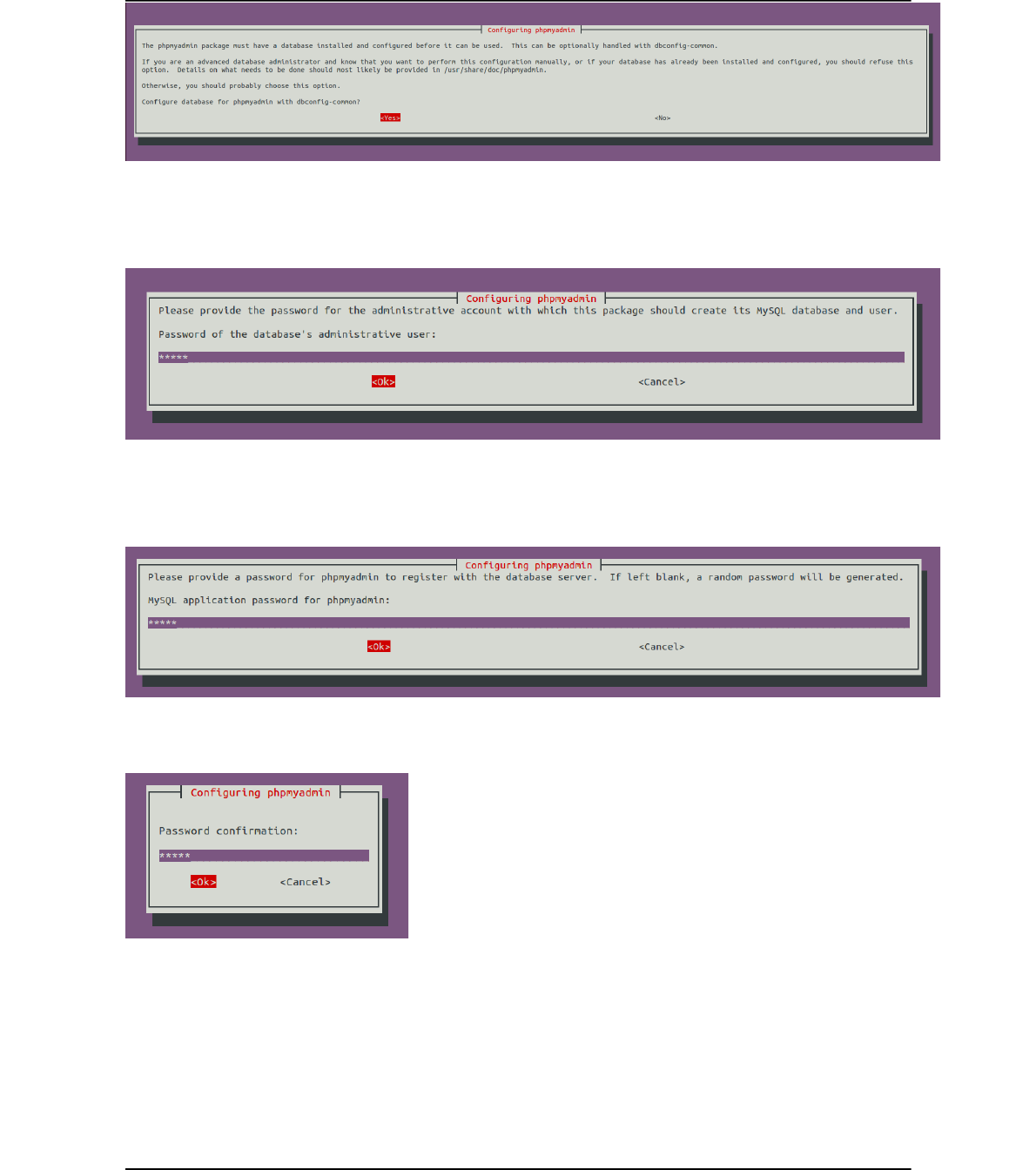
Figure 5 Phpmyadmin installation conf DB
Enter here the MS_PW_ROOT.:
Figure 6 Phpmyadmin installation DB admin password
Please, enter here what will be the phpmyadmin application password, lets call it MS_PW_PHP:
Figure 7 Phpmyadmin installation application password
Figure 8 Phpmyadmin installation application password confirmation
Choose the web server that has to be configured: Apache.
Page 14 of (40) ©

Figure 9 Phpmyadmin installation web server selection
2.4.2 HSS configuration
In this section is describd the step by step configuration of the HSS, any parameter can be customized upon your
need (mysql server address, mySQL user name, mySQL password, HSS OP key, location of freeDiameter
configuration file, realm).
A template of the HSS configuration file can be found at OPENAIRCN_DIR/ETC/hss.conf. This configuration
file follows the libconfig file syntax (http://www.hyperrealm.com/libconfig).
Content of OPENAIRCN_DIR/ETC/hss.conf:
HSS :
{
## MySQL mandatory options
MYSQL_server = "127.0.0.1";
MYSQL_user = "@MYSQL_user@";
MYSQL_pass = "@MYSQL_pass@";
MYSQL_db = "oai_db";
## HSS options
OPERATOR_key = "1006020f0a478bf6b699f15c062e42b3"; # OP key for oai_db.sql
RANDOM = "true";
## Freediameter options
FD_conf = "/usr/local/etc/oai/freeDiameter/hss_fd.conf";
};
2.4.2.1 Step 1
Copy the file OPENAIRCN_DIR/ETC/hss.conf in /usr/local/etc/oai directory:
user@ hss- host:~/openair-cn/SCRIPTS$ sudo mkdir -p /usr/local/etc/oai/freeDiameter
user@ hss- host:~/openair-cn/SCRIPTS$ sudo cp $OPENAIRCN_DIR/ETC/hss.conf \
/usr/local/etc/oai
Please take care of the permissions of your hss.conf file.
Then customize your copied HSS configuration file:
Parameter Type
MYSQL_server String IP address of the MySQL server instance where the HSS DB is stored.
MYSQL_user String, user login HSS administrator login, could be “hssadmin”.
Page 15 of (40) ©

MYSQL_pass String, password HSS administrator password, should be MS_PW_PHP.
MYSQL_db String, database name Database name, default is oai_db for EURECOM subscribers.
OPERATOR_key String Operator key in plain text.
RANDOM String, allowed values
“yes”, “no”.
Default value is “true”. Set false when you want to capture or replay S1-C scenarios.
FD_conf String Path to HSS freeDiameter configuration file.
Table 2: HSS configuration fields
2.4.2.2 Step 2
Copy the files OPENAIRCN_DIR/ETC/hss_fd.conf, OPENAIRCN_DIR/ETC/acl.conf in
/usr/local/etc/oai/freeDiameter directory:
user@ hss- host:~/openair-cn/SCRIPTS$ sudo cp $OPENAIRCN_DIR/ETC/acl.conf
$OPENAIRCN_DIR/ETC/hss_fd.conf /usr/local/etc/oai/freeDiameter
Please take care of the permissions of your configuration files.
Then customize your copied hss_fd.conf, acl.conf configuration files if necessary, if you follow this document,
it should not be necessary, otherwise please refer to freeDiameter documentation.
2.4.2.3 Step 3
A FQDN has to be set for the HSS (see hss_fd.conf). An easy way to do that is to fill this FQDN in the /etc/hosts
file:
For example on a host with hostname 'yang':
yang@yang:$ cat /etc/hosts
127.0.0.1 localhost
127.0.1.1 yang.openair4G.eur yang #Your hostname here
127.0.1.1 hss.openair4G.eur hss
2.4.2.4 Step 4
Generate HSS certificates:
user@ hss- host:~/openair-cn/SCRIPTS$
./check_hss_s6a_certificate /usr/local/etc/oai/freeDiameter hss.openair4G.eur
2.4.3 HSS build
HSS can be built in two different ways: an executable that can run in a controlling terminal, or a daemon that
run in the background.
In OPENAIRCN_DIR/SCRIPTS directory, depending on the chosen target execute the following command:
user@hss-host:~/openair-cn/SCRIPTS$ ./build_hss --clean --debug
or
user@hss-host:~/openair-cn/SCRIPTS$ ./build_hss --clean --debug --daemon
This command will compile the right target oai_hss or oai_hssd.
Page 16 of (40) ©

2.4.4 HSS run
In OPENAIRCN_DIR/SCRIPTS directory, a helper script called run_hss is provided for running the HSS.
Here are the run_hss options:
./run_hss -h
Usage: run_hss [OPTION]...
Run the HSS executable (experimental).
Options:
Mandatory arguments to long options are mandatory for short options too.
-c, --config-file filename Config file to be used by HSS if you don't want to use the
default one: /usr/local/etc/oai/hss.conf
-e, --export-db filename Export current database to a SQL file, file prefix is
$OPENAIRCN_DIR/SRC/OAI_HSS/db. (useful for replaying test scenarios)
-D, --daemon Run the daemon.
-i, --import-db filename Import SQL file to current database, file prefix is
$OPENAIRCN_DIR/SRC/OAI_HSS/db. (useful for replaying test scenarios or restoring original
database content)
-I, --install-hss-files Install HSS config files.
-g, --gdb Run with GDB.
-h, --help Print this help.
-k, --kill Kill the running local HSS.
2.4.4.1 First run
2.4.4.1.1 Customize HSS database content
SQL operations (display, update, export, etc) can be done easily with the help of phpMyAdmin, you have to
open the following URL with your browser: http://yourhsshost/phpmyadmin.
Otherwise you can use any other MySQL tool, script compatible with MySQL.
The steps for adding a subscriber are the following:
- Add your MME(s) in table mmeidentity
- Add subscriber(s) in table users
user.imsi=IMSI of your USIM.
user.msisdn= MSISDN of your USIM (unused).
users.imei=NULL
users.imei_sv=NULL
users.ms_ps_status=’PURGED’
users.rau_tau_timer=120
users.ue_ambr_ul=50000000
users.ue_ambr_dl=100000000
users.access_restriction=47
users.mme_cap=0
Page 17 of (40) ©

users.mmeidentity_idmmeidentity=’your MME key’
users.RFSP-Index=1
users.urrp_mme=0
users.sqn=’your USIM programmed SQN’
users.rand=0
users.OPc=’the OPc key’ (will be computed by the oai_hss executable)
- Add subscriber(s) in table pdn.
Table mmeidentity:
Structure:
Field Type Null Key Default Extra
idmmeidentity int(11) NO PRI NULL auto_increment
mmehost varchar(255) YES NULL
mmerealm varchar(200) YES NULL
UE-Reachability tinyint(1) NO NULL
Table 3: SQL Table structure mmeidentity
Column idmmeIdentity is the primary key of a MME.
Column mmehost contains the FQDN of a MME.
Column mmerealm contains the realm of a MME.
Example of content:
+---------------+------------------------+---------------+-----------------+
| idmmeidentity | mmehost | mmerealm | UE-Reachability |
+---------------+------------------------+---------------+-----------------+
| 2 | yang.openair4G.eur | openair4G.eur | 0 |
| 1 | ng40-erc.openair4G.eur | openair4G.eur | 0 |
| 3 | ABEILLE.openair4G.eur | openair4G.eur | 0 |
+---------------+------------------------+---------------+-----------------+
Table pdn:
This table contains mainly the association between a subscriber (users_imsi) and a APN (apn), and its QOS
parameters.
Structure:
Field Type Null Key Default Extra
id int(11) NO PRI NULL auto_increment
apn varchar(60) NO NULL
pdn_type enum('IPv4','IPv6','IPv4v6','IPv4_or_IPv6') NO NULL
pdn_ipv4 varchar(15) YES NULL 0.0.0.0
pdn_ipv6 varchar(45) YES NULL 0:0:0:0:0:0:0:0
aggregate_ambr_ul int(10) unsigned YES 50000000
aggregate_ambr_dl int(10) unsigned YES 100000000
Page 18 of (40) ©

pgw_id int(11) NO PRI NULL
users_imsi varchar(15) NO PRI
qci tinyint(3) unsigned NO 9
priority_level tinyint(3) unsigned NO 15
pre_emp_cap enum('ENABLED','DISABLED') YES DISABLED
pre_emp_vul enum('ENABLED','DISABLED') YES DISABLED
LIPA-Permissions enum('LIPA-prohibited','LIPA-only','LIPA-
conditional')
YES LIPA-only
Table 4: SQL Table structure pdn
Column id is the primary key of a pdn entry.
Column pdn_type contains the type of PDN, actually only IPv4 is supported.
Column pdn_ipv4 contains the IPv4 address of the PDN (unused).
Column pdn_ipv6 contains the IPv6 address of the PDN (unused).
Column aggregate_ambr_ul TODO
Column aggregate_ambr_dl TODO
Column pgw_id TODO
Column users_imsi TODO
Column qci TODO
Column priority_level TODO
Column pre_emp_capability TODO
Column pre_emp_vulnerability TODO
Column LIPA_Permissions TODO
Table users
This table contains mainly the informations about a subscriber: its IMSI, IMEI, key LTE K, SQN, operator key
OP, QOS parameters, the last known MME identity where the subscriber registered.
Structure:
Field Type Null Key Default Extra
imsi varchar(15) NO PRI NULL
msisdn varchar(46) YES NULL
imei varchar(15) YES NULL
imei_sv varchar(2) YES NULL
ms_ps_status enum('PURGED','NOT_PURGED') YES PURGED
rau_tau_timer int(10) unsigned YES 120
ue_ambr_ul bigint(20) unsigned YES 50000000
ue_ambr_dl bigint(20) unsigned YES 100000000
access_restriction int(10) unsigned YES 60
mme_cap int(10) unsigned zerofill YES NULL
mmeidentity_idmmeidentity int(11) NO PRI 0
key varbinary(16) NO 0
RFSP-Index smallint(5) unsigned NO 1
Page 19 of (40) ©

urrp_mme tinyint(1) NO 0
sqn bigint(20) unsigned zerofill NO NULL
rand varbinary(16) NO NULL
OPc varbinary(16) YES NULL
Table 5: SQL Table structure users
TODO column description.
2.4.4.2 Later runs
By default (otherwise you know what you are doing) for all following runs of the HSS, use:
user@hss-host:~/openair-cn/SCRIPTS$ ./run_hss
or
user@hss-host:~/openair-cn/SCRIPTS$ ./run_hss --daemon
Page 20 of (40) ©

2.5 MME
2.5.1 MME pre-installation
In OPENAIRCN_DIR/SCRIPTS directory, execute the following command:
user@mme-host:~/openair-cn/SCRIPTS$ ./build_mme -i
This command will install the required softwares on your host.
2.5.2 MME configuration
A template of the MME configuration file can be found at OPENAIRCN_DIR/ETC/mme.conf. This
configuration file follows the libconfig file syntax (http://www.hyperrealm.com/libconfig).
2.5.2.1 Step 1
Copy the file OPENAIRCN_DIR/ETC/mme.conf in /usr/local/etc/oai directory:
user@mme- host:~/openair-cn/SCRIPTS$ sudo mkdir -p /usr/local/etc/oai/freeDiameter
user@mme- host:~/openair-cn/SCRIPTS$ sudo cp $OPENAIRCN_DIR/ETC/mme.conf
/usr/local/etc/oai
Please take care of the permissions of your mme.conf file.
Then customize your copied MME configuration file:
2.5.2.2 MME section
Parameter Type
RUN_MODE String Allowed values: “OTHER”, “TEST”. Set “OTHER” for normal operations,
set “TEST” for S1C scenario player.
REALM String Diameter realm of the MME, default is openair4G.eur.
MAXENB Num/Integer Maximum number of eNB that can connect to MME.
MAXUE Num/Integer For debug purpose, used to restrict the number of served UEs the MME can
handle.
RELATIVE_CAPACITY Num/Integer Even though this parameter is not used by the MME for controlling the
MME load balancing within a pool (at least for now), the parameter has to
be forwarded to the eNB during association procedure. Values going from 0
to 255, (Default value is 15)
MME_STATISTIC_TIMER Num/Integer Displayed statistic period in logs.
EMERGENCY_ATTACH_SUPPORTED String Actually only “no” is supported
UNAUTHENTICATED_IMSI_SUPPORTED String Actually only “no” is supported
EPS_NETWORK_FEATURE_SUPPORT_IMS_V
OICE_OVER_PS_SESSION_IN_S1
String Actually only “no” is supported
EPS_NETWORK_FEATURE_SUPPORT_EMER
GENCY_BEARER_SERVICES_IN_S1_MODE
String Actually only “no” is supported
EPS_NETWORK_FEATURE_SUPPORT_LOCA
TION_SERVICES_VIA_EPC
String Actually only “no” is supported
Page 21 of (40) ©

EPS_NETWORK_FEATURE_SUPPORT_EXTE
NDED_SERVICE_REQUEST
String Actually only “no” is supported
IP_CAPABILITY String Actually only IPV4 is supported, (Choice between IPV4, IPV4V6,
IPV4ORV6)
Table 6: MME configuration main section
2.5.2.2.1 INTERTASK_INTERFACE subsection
Parameter Type
ITTI_QUEUE_SIZE Num/Integer Upper bound for the message queue size expressed in bytes (all messages exchanged by tasks have the
same size). Restrict the number of messages in queues or detect a possible MME overload.
Table 7: MME configuration subsection ITTI
2.5.2.2.2 S6A subsection
Parameter Type
S6A_CONF String FreeDiameter MME config file path, default value is
“/usr/local/etc/oai/freeDiameter/mme_fd.conf”.
HSS_HOSTNAME String HSS hostname, default value is “hss”.
Table 8: MME configuration subsection S6a
2.5.2.2.3 SCTP subsection
Parameter Type
SCTP_INSTREAMS Num/Integer Maximum number of SCTP input streams allowed for a S1-C connection.
SCTP_OUTSTREAMS Num/Integer Maximum number of SCTP output streams allowed for a S1-C connection.
Table 9: MME configuration subsection SCTP
2.5.2.2.4 S1AP subsection
Parameter Type
S1AP_OUTCOME_TIMER Num/Integer Once an outcome is sent from MME to eNB, the MME locally starts a timer to abort the
procedure and release UE context if the expected answer to this outcome is not received at the
expiry of this timer. This timer is expressed in seconds. (Default value = 5 seconds)
Table 10: MME configuration subsection S1AP
2.5.2.2.5 GUMMEI LIST subsection
This section contains the GUMMEIs of the MME, actually only one GUMMEI is supported.
Parameter Type
{MCC, MNC,
MME_GID,
MME_CODE}
String/String/String/String Mobile country code of GUMMEI, Mobile network code of GUMMEI, MME group ID
of GUMMEI, MME code of GUMMEI
Table 11: MME configuration subsection GUMMEI
Page 22 of (40) ©

2.5.2.2.6 TAI LIST subsection
The content of this section should be consistent with content of GUMMEI LIST section (MCC/MNC)
Parameter Type
{MCC/MNC/TAC} String/String/String Each entry of the list is a triplet of a MCC, MNC and TAC. There can be up to 16
tracking areas identity set in this list. Actually we do not support shared networks, so
the MCC/MNC field should all be equal among the list
Table 12: MME configuration subsection TAI LIST
2.5.2.2.7 NAS subsection
Parameter Type
ORDERED_SUPPORTED_INTEGRITY_ALGORITHM_LIST Array of String Preference list in decreasing order of supported integrity
algorithms, actually supported integrity algorithms are
EIA0, EIA1, EIA2
ORDERED_SUPPORTED_CIPHERING_ALGORITHM_LIST Array of String Preference list in decreasing order of supported integrity
algorithms, actually supported integrity algorithms are
EEA0, EEA1, EEA2
T3402 Integer EMM timer, duration in minutes.
T3412 Integer EMM timer, duration in minutes.
T3485 Integer ESM timer, duration in seconds, unused (TODO).
T3486 Integer ESM timer, duration in seconds, unused (TODO).
T3489 Integer ESM timer, duration in seconds, unused (TODO).
T3495 Integer ESM timer, duration in seconds, unused (TODO).
Table 13: MME configuration subsection NAS
2.5.2.2.8 Network interfaces subsection
Parameter Type
MME_INTERFACE_NAME_FOR_S1_MME String Interface name for S1-MME (S1-C), this interface name can
be a real ethernet interface or a virtual ethernet interface. The
script run_mme can configure it and bring it up if you
provide the -i/--set-nw-interfaces option.
MME_IPV4_ADDRESS_FOR_S1_MME String, CIDR Binded address for S1-MME
MME_INTERFACE_NAME_FOR_S11_MME String Interface name for S11, this interface name can be a real
ethernet interface or a virtual ethernet interface. The script
run_mme can configure it and bring it up if you provide the
-i/--set-nw-interfaces option.
MME_IPV4_ADDRESS_FOR_S11_MME String, CIDR Binded address for S11.
Table 14: MME configuration subsection Network Interfaces
2.5.2.2.9 Logging subsection
Parameter Type
OUTPUT String choice in { "CONSOLE", "UNBUFFERED_CONSOLE", "`path to file`",
"`IPv4@`:`TCP port num`"}.
Choise "CONSOLE" means that logs go to STDOUT, STDERR in a manner
that even if multiple concurrent threads dump a lot of logs, traces cannot
Page 23 of (40) ©

overlap (the cost here is that we need buffering).
Choice "UNBUFFERED_CONSOLE" means that logs go directly to
STDOUT, STDERR, traces may overlap.
Choice "`path to file`", for example “/tmp/mme.log” is a file receiving the
dump of logs without overlaping traces.
Choice "`IPv4@`:`TCP port num`" (for example “192.168.12.17:6789”)
dump the logs towards a TCP server. The logs cat be easily displayed or
dumped into a file with netcat (nc -kl 6789).
COLOR String Choice in { "yes", "no" } means use of ANSI styling codes or no. TODO
SCTP_LOG_LEVEL String Log level choice in { "EMERGENCY", "ALERT", "CRITICAL", "ERROR",
"WARNING", "NOTICE", "INFO", "DEBUG", "TRACE"}
S1AP_LOG_LEVEL String Idem as above
NAS_LOG_LEVEL String Idem as above
MME_APP_LOG_LEVEL String Idem as above
S6A_LOG_LEVEL String Idem as above
UTIL_LOG_LEVEL String Idem as above
MSC_LOG_LEVEL String Idem as above
ITTI_LOG_LEVEL String Idem as above
ASN1_VERBOSITY String Choice in {“none”, “info”, “annoying”}
Table 15: MME configuration subsection Network Interfaces
2.5.2.3 SGW section
The PGW, SGW selections are not implemented yet, so we need a mechanism that replace these selection: yet,
we only support one PDN, one PGW, one SGW.
2.5.2.3.1 Network interfaces subsection
Parameter Type
SGW_IPV4_ADDRESS_FOR_S11 String, CIDR Binded SGW address for S11.
Table 16: MME configuration section SGW
2.5.2.4 Step 2
Copy the file OPENAIRCN_DIR/ETC/mme_fd.conf in /usr/local/etc/oai/freeDiameter directory:
user@ hss- host:~/openair-cn/SCRIPTS$ sudo mkdir -p /usr/local/etc/oai/freeDiameter
user@ hss- host:~/openair-cn/SCRIPTS$ sudo cp $OPENAIRCN_DIR/ETC/mme_fd.conf
/usr/local/etc/oai/freeDiameter
Please take care of the permissions of your configuration files.
Then customize your copied mme_fd.conf configuration files (Identity value, realm), please refer to
freeDiameter documentation.
2.5.2.5 Step 3
A FQDN has to be set for the MME (see mme_fd.conf). An easy way to do that is to set this FQDN in the
/etc/hosts file:
For example on a host with hostname 'yang':
yang@yang:$ cat /etc/hosts
Page 24 of (40) ©

127.0.0.1 localhost
127.0.1.1 yang.openair4G.eur yang # MME host
127.0.1.1 hss.openair4G.eur hss # HSS located on MME host
2.5.3 MME build
MME can be built in two different ways: an executable that can run in a controlling terminal, or a daemon that
run in the background.
In OPENAIRCN_DIR/SCRIPTS directory, depending on the chosen target execute the following command:
user@mme-host:~/openair-cn/SCRIPTS$ ./build_mme --clean
or
user@mme-host:~/openair-cn/SCRIPTS$ ./build_mme --clean --daemon
This command will compile the right target oai_mme or oai_mmed.
2.5.4 Before MME first run
Prior the first run of the MME, you will have to generate certificates:
user@hss-host:~/openair-cn/SCRIPTS$./check_mme_s6a_certificate
/usr/local/etc/oai/freeDiameter yang.openair4G.eur
2.5.5 MME run
In OPENAIRCN_DIR/SCRIPTS directory, a helper script called run_mme is provided for running the MME.
user@hss-host:~/openair-cn/SCRIPTS$ ./run_mme
or
user@hss-host:~/openair-cn/SCRIPTS$ ./run_mme --daemon
Page 25 of (40) ©

2.6 SP_GW
2.6.1 SP-GW pre-installation
First install a 4.7 linux kernel, even from source from kernel.org, then select gtp to be compiled as a module,
and install the kernel and modules and boot on the 4.7 kernel
For example only
in your linux 4.7+ source tree:
make oldconfig
in .config, check that gtp is built as a module : CONFIG_GTP=m
make -jX
make modules_install
make install
Install libgtpnl from http://git.osmocom.org/libgtpnl/ and any software dependancy.
In OPENAIRCN_DIR/SCRIPTS directory, execute the following command:
user@mme-host:~/openair-cn/SCRIPTS$ ./build_spgw -i
This command will install the required softwares on your host.
2.6.2 SP-GW configuration
A template of the SP-GW configuration file can be found at OPENAIRCN_DIR/ETC/spgw.conf. This
configuration file follows the libconfig file syntax (http://www.hyperrealm.com/libconfig).
2.6.2.1 Step 1
Copy the file OPENAIRCN_DIR/ETC/mme.conf in /usr/local/etc/oai directory:
user@mme- host:~/openair-cn/SCRIPTS$ sudo mkdir -p /usr/local/etc/oai
user@mme- host:~/openair-cn/SCRIPTS$ sudo cp $OPENAIRCN_DIR/ETC/spgw.conf
/usr/local/etc/oai
Please take care of the permissions of your spgw.conf file.
Then customize your copied SP-GW configuration file:
2.6.2.2 SGW section
2.6.3 Network interfaces section
Parameter Type
SGW_INTERFACE_NAME_FOR_S11 String Interface name for S11.
SGW_IPV4_ADDRESS_FOR_S11 String, CIDR notation Binded address for S11.
SGW_INTERFACE_NAME_FOR_S1U_S12_S4_UP String Interface name for S1-U, this interface name can be a real
Page 26 of (40) ©

ethernet interface or a virtual ethernet interface. The script
run_spgw can configure it and bring it up if you provide the
-i/--set-nw-interfaces option.
SGW_IPV4_ADDRESS_FOR_S1U_S12_S4_UP String, CIDR notation Binded address for S1-U
SGW_IPV4_PORT_FOR_S1U_S12_S4_UP Num/Integer Port number for S1-U (IANA), Should be 2152
SGW_INTERFACE_NAME_FOR_S5_S8_UP String, Interface name for S5 or S8, set to “none” because unused
SGW_IPV4_ADDRESS_FOR_S5_S8_UP String, CIDR notation Binded address for S5 or S8, set to 0.0.0.0/xx because
unused
Table 17: S-GW configuration subsection Network Interfaces
2.6.3.1.1 INTERTASK_INTERFACE subsection
Parameter Type
ITTI_QUEUE_SIZE Num/Integer Upper bound for the message queue size expressed in bytes (all messages exchanged by tasks have the
same size). Restrict the number of messages in queues or detect a possible overload.
Table 18: MME configuration subsection ITTI
2.6.3.1.2 Logging subsection
Parameter Type
OUTPUT String choice in { "CONSOLE", "SYSLOG", "`path to file`", "`IPv4@`:`TCP port
num`"}.
Choise "CONSOLE" means that logs go to STDOUT, STDERR.
Choice "`path to file`", for example “/tmp/spgw.log” is a file receiving the
dump of logs.
Choice "`IPv4@`:`TCP port num`" (for example “192.168.12.18:6789”)
dump the logs towards a TCP server. The logs cat be easily displayed or
dumped into a file with netcat (nc -kl 6789).
THREAD_SAFE String Choice in { "yes", "no" }, yes means that logs cannot overlaps on output.
COLOR String Choice in { "yes", "no" } means use of ANSI styling codes or no. TODO
UDP_LOG_LEVEL String Log level choice in { "EMERGENCY", "ALERT", "CRITICAL", "ERROR",
"WARNING", "NOTICE", "INFO", "DEBUG", "TRACE"}
GTPV1U_LOG_LEVEL String Idem as above
GTPV2C_LOG_LEVEL String Idem as above
SPGW_APP_LOG_LEVEL String Idem as above
S11_LOG_LEVEL String Idem as above
Table 19: MME configuration subsection Network Interfaces
2.6.3.2 PGW section
2.6.3.2.1 Main section
Parameter Type
DEFAULT_DNS_IPV4_ADDRESS String, IPv4 dot decimal IPv4 address of primary default DNS that can be queried by UEs
DEFAULT_DNS_SEC_IPV4_ADDRE
SS
String, IPv4 dot decimal IPv4 address of secondary default DNS that can be queried by UEs
FORCE_PUSH_PROTOCOL_CONFI String Non standard feature, normally should be set to "no", but you may need to
Page 27 of (40) ©

GURATION_OPTIONS set to yes for UE that do not explicitly request a PDN address through NAS
signalling, MTU, DNS are also pushed even if not requested.
UE_MTU Integer UE MTU to be pushed in protocol configuration options if option
“FORCE_PUSH_PROTOCOL_CONFIGURATION_OPTIONS”is set
to “yes”
Table 20: P-GW configuration main section
2.6.3.2.2 Network interfaces section
Parameter Type
PGW_INTERFACE_NAME_FOR_S5_S8 String Interface name for S5 or S8, “none” because unused
PGW_INTERFACE_NAME_FOR_SGI String Interface name for SGi
PGW_MASQUERADE_SGI String Should outgoing UE IPv4 traffic be masqueraded (source NAT), “yes” or
“no”.
UE_TCP_MSS_CLAMPING String Choice in { "yes", "no" }, “yes” should be choose if you are unable to set
the MTU on the S1U path to a value greater or equal to 1536.
If set to “yes”, then PGW_INTERFACE_NAME_FOR_S5_S8 should be
set to the same value as SGW_IPV4_PORT_FOR_S1U_S12_S4_UP.
Table 21: P-GW configuration subsection Network Interfaces
2.6.3.2.3 IP Address Pool section
Parameter Type
IPV4_LIST String, CIDR notation List of IPv4 netmasks that designate a list of available IPv4 addresses for Ues.
Actually only one pool of IP addresses is supported.
Table 22: P-GW configuration subsection IP Address Pool Selection
2.6.4 SPGW run
In OPENAIRCN_DIR/SCRIPTS directory, a helper script called run_spgw is provided for running the SPGW.
user@hss-host:~/openair-cn/SCRIPTS$ ./run_spgw -r
or
user@hss-host:~/openair-cn/SCRIPTS$ ./run_spgw -r --daemon
Page 28 of (40) ©

3 Supported scenarios in EPC
3.1 E-UTRAN Initial attach
3.1.1 Attach with IMSI
TODO Add MSCGEN SEQ diagram
3.1.2 Attach with GUTI
TODO Add MSCGEN SEQ diagram
3.2 Tracking Area Update procedures
TODO Add MSCGEN SEQ diagram
3.3 Routing Area Update procedures
Not supported yet.
3.4 Service Request procedures
3.4.1 UE triggered Service Request
TODO Add MSCGEN SEQ diagram
3.4.2 Network triggered Service Request
Not supported yet.
3.5 S1 Release procedure
TODO Add MSCGEN SEQ diagram
3.6 GUTI Reallocation procedure
Not supported yet.
3.7 Detach procedure
3.7.1 UE-Initiated Detach procedure for E-UTRAN
TODO Add MSCGEN SEQ diagram
3.7.2 MME-Initiated Detach procedure for E-UTRAN
3.7.3 HSS-Initiated Detach procedure for E-UTRAN
Not supported.
3.8 HSS User Profile management function procedure
Not supported.
Page 29 of (40) ©

3.9 Bearer deactivation
3.9.1 PDN GW initiated bearer deactivation
Not supported
3.9.2 MME initiated Dedicated Bearer Deactivation
Not supported yet
3.10 Intra E-UTRAN handover
Not supported yet
Page 30 of (40) ©

4 Annex A: Tools for observing, debugging.
4.1 Wireshark/tshark
You can launch wireshark instances on S1 (filter s1ap, gtpu), S6A (filter diameter, if TCP is the undelying
protocol, you can select a TCP packet relative to the DIAMETER exchange and the select decode as
DIAMETER).
4.2 Mscgen
Extract from http://www.mcternan.me.uk/mscgen/: “Mscgen is a small program that parses Message Sequence
Chart descriptions and produces PNG, SVG, EPS or server side image maps (ismaps) as the output. Message
Sequence Charts (MSCs) are a way of representing entities and interactions over some time period”…” Mscgen
aims to provide a simple text language that is clear to create, edit and understand, which can also be transformed
into common image formats for display or printing.”…
Openair use mscgen to offer another view of events (SDUs, timers, etc) that happens inside an executable and
also (still under development) PDUs exchanged between protocol entities.
Openair HSS don't have the msgen feature.
Important:
Check that mscgen traces are configured for being generated (CFLAG MESSAGE_CHART_GENERATOR set
to true in OPENAIRCN_DIR/BUILD/MME/CMakeLists.template)
You have to instruct the mme executable to dump the ITTI messages to a file with the argument -m
path_to_directory. The mscgen files will be located under the specified directory, in a directory containing the
time of the generated traces (text and png files).
Example:
Page 31 of (40) ©
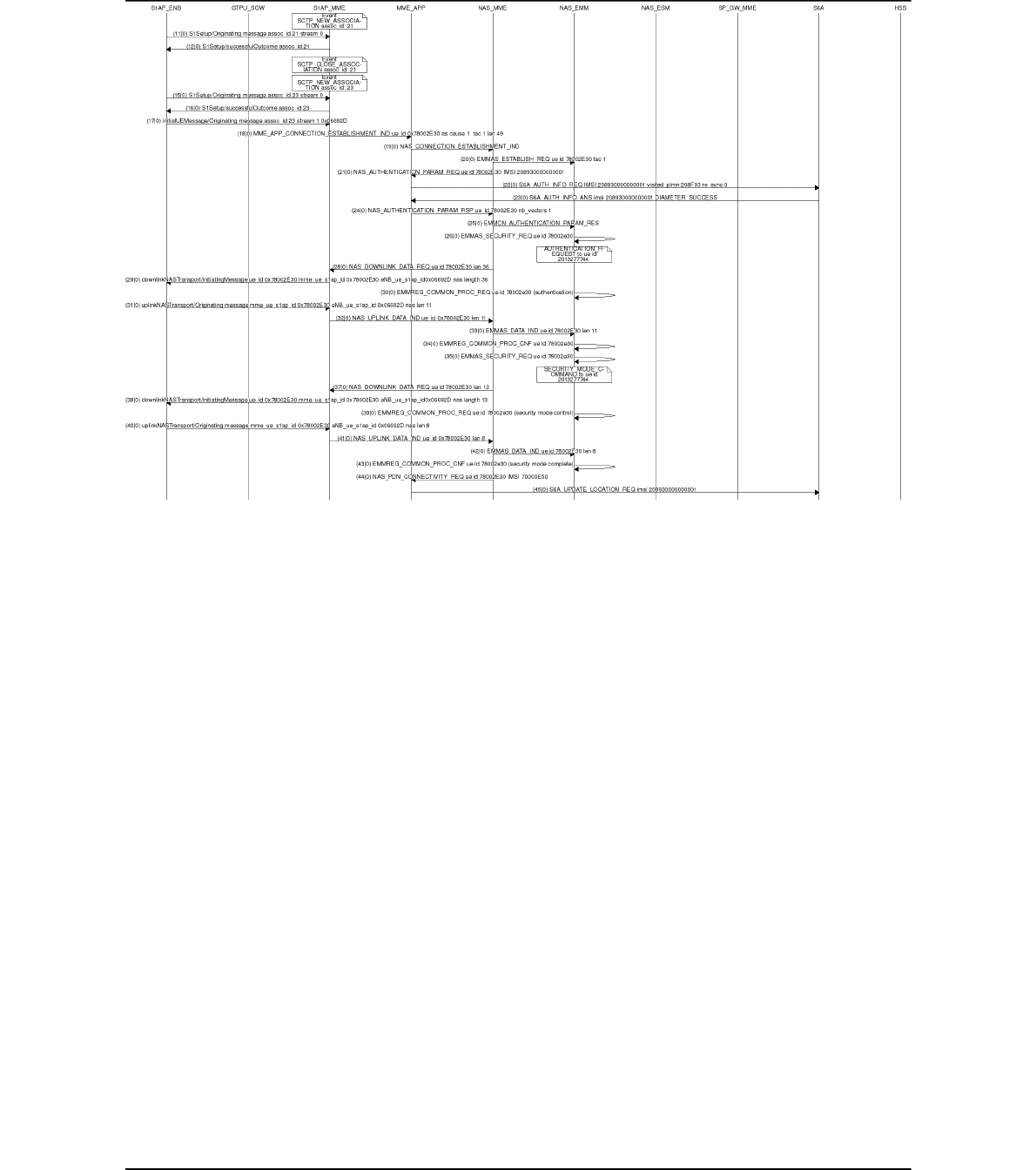
Figure 9 Mscgen output example
Page 32 of (40) ©
'#
-$ %$
$ !
#%(
)$ %
-$ %
'(0
-$ %
$ %
-#
1(-
4.3 S1AP scenario replay
The aim of this tool is helping for MME bug reports, MME development, non-regression test, debug
purpose, it allows to replay without the help of any eNB(s) or UE(s) a S1AP scenario previously
captured as a pcap dumped file.
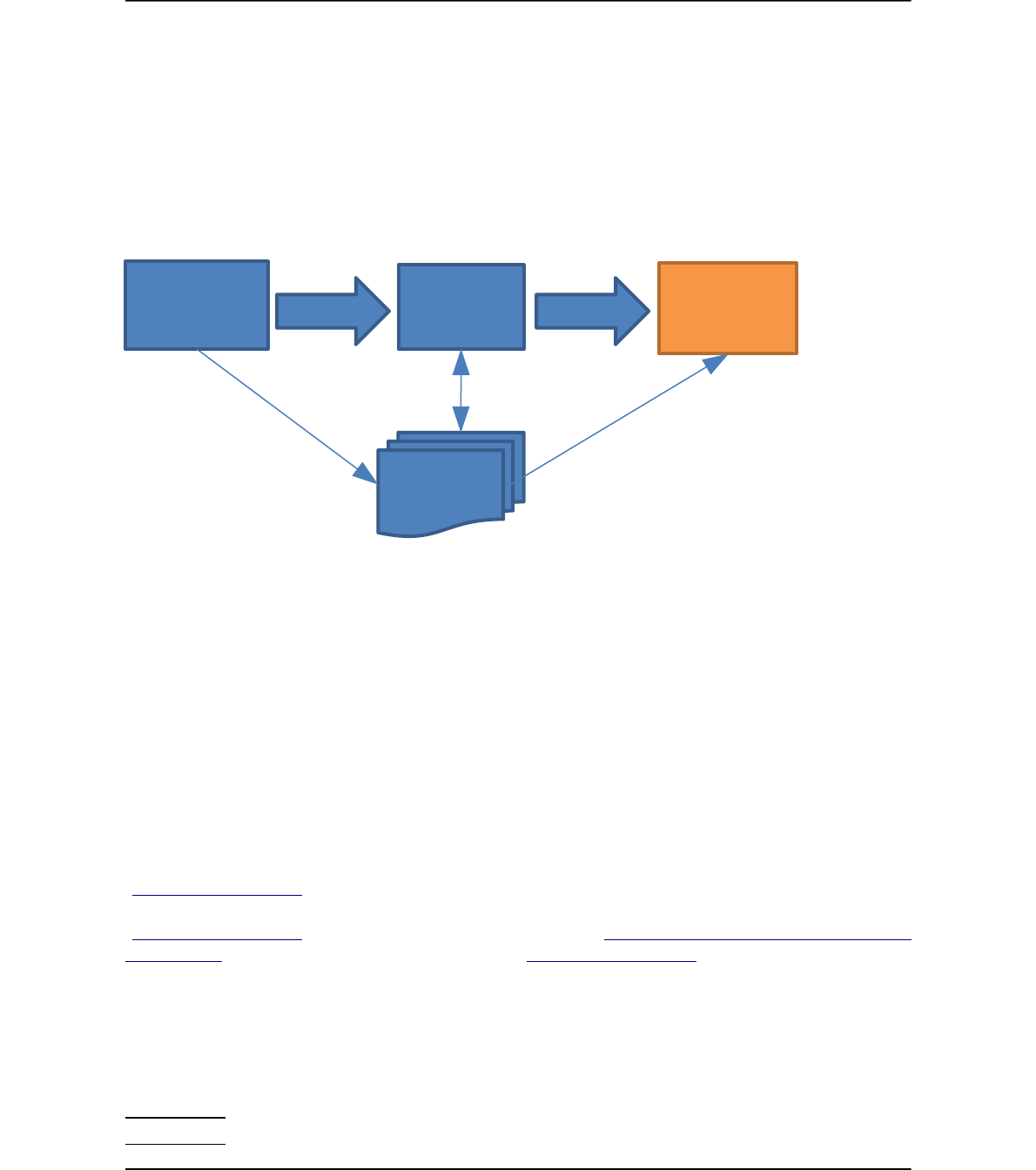
4.3.1 Overall process
Figure 10 Workflow of scenario replay
In order to replay a scenario, a scenario has to be played/captured (step 1), then the captured artefacts
have to processed in order to generate a generic scenario (step 2) ready to be replayed on any other
testbed (step 3).
4.3.2 Step0: Install required software on the “scenario replay”testbed
Note: If your “scenario replay” testbed and the “scenario capture testbed are the same” then step into
section 4.3.2.1“openairinterface5g installation” only.
For the ease of all operations, the targeted testbed is only one host called here “testbed”.
On the host “testbed”, clone all 3 git repositories : openairinterface5g
(git@gitlab.eurecom.fr:oai/openairinterface5g.git or
https://gitlab.eurecom.fr/oai/openairinterface5g.git), openair-cn-scenarios
(git@gitlab.eurecom.fr:oai/openair-cn-scenarios.git or https://gitlab.eurecom.fr/oai/openair-cn-
scenarios.git) and openair-cn (git@gitlab.eurecom.fr:oai/openair-cn.git or
https://gitlab.eurecom.fr/oai/openair-cn.git).
4.3.2.1 openairinterface5g installation
In the directory openairinterface5g:
user@ testbed:~/openairinterface5g$ source .oaienv
user@ testbed:~/openairinterface5g$ cd cmake_targets
Page 33 of (40) ©

user@ testbed:~/cmake_targets$ ./build_oai -I --install-optional-packages
user@ testbed:~/cmake_targets$ cd tools
user@ testbed:~/tools$ ./build_test_epc_tools --clean --debug
4.3.2.2 openair-cn installation
In openair-cn directory:
user@ testbed:~/openair-cn/SCRIPTS$ cd SCRIPTS
user@ testbed:~/openair-cn/SCRIPTS$ ./build_hss --check-installed-software
user@ testbed:~/openair-cn/SCRIPTS$ ./build_mme –check-installed-software
user@ testbed:~/openair-cn/SCRIPTS$ ./build_mme --install-gtpu-kernel-module
user@ testbed:~/openair-cn/SCRIPTS$ ./build_spgw –check-installed-software
user@ testbed:~/openair-cn/SCRIPTS$ ./build_mme --clean --daemon
user@ testbed:~/openair-cn/SCRIPTS$ ./build_spgw --clean --daemon
user@ testbed:~/openair-cn/SCRIPTS$ ./build_hss --clean --daemon
4.3.2.3 openair-cn-scenarios installation
You should set an environment variable OPENAIRCN_DIR pointing to openair-cn directory,
otherwise you will be later prompted for openair-cn directory location.
For example:
user@ testbed:~$ echo 'export OPENAIRCN_DIR=/home/user/openair-cn' >> ~/.bashrc
4.3.3 Step1: Flowchart of network capture on S1-C
The goal of this step is to capture a SCTP/S1AP trace that we want to be able to replay.
Step a: Run HSS
The HSS database has first to be configured for not generating randoms in security algorithms,
otherwise we will not be able to replay trace coming from UE(s).
In the HSS configuration file /usr/local/etc/oai/hss.conf, set RANDOM to false:
RANDOM = "false";
In order to be able to replay the scenario in the same conditions, the initial content of the database has
to be saved.
The extra argument that has to be passed in addition to other arguments to the run_hss script is:
--export-db /tmp/hss_db.sql
Step b: run MME
No change here compared to standard case.
Step c: run SP-GW
No change here compared to standard case.
Step d: start a pcap-ng capture on S1-C
Page 34 of (40) ©

This step is not automated, you have to start on your own a tool to capture the network traffic on the
S1-C network. (you can use wireshark).
VERY IMPORTANT 1: PLEASE filter the packets with the following filter string:
“s1ap or sctp.chunk_type == INIT or sctp.chunk_type == INIT_ACK or sctp.chunk_type ==
COOKIE_ECHO or sctp.chunk_type == COOKIE_ACK”.
VERY IMPORTANT 2: We need the scenario from the beginning, that means the we need to have the
SCTP INIT and SCTP INIT_ACK messages captured, so you must start the capture before lauching
the eNB(s).
Step e: start the eNB(s)
The eNB config files will be used later to make a scenario independent of IP addresses.
Step f: run your scenario
Step g: save the captured scenario
At the end of this process please save in a created subdirectory of openair-cn-
scenarios/SCENARIOS/S1 whose name reflects the test case success or failure:
- The eNB(s) config file(s) with the name “enb.conf”
- The MME config file with the name “mme.conf”
- The MME freeDiameter config file with the name “mme_fd.conf”
- The SPGW config file with the name “spgw.conf”
- The exported database SQL file with the name “hss_db.sql”.
- The pcap-ng file containing all SCTP and S1AP traffic (filtered with “s1ap or sctp.chunk_type
== INIT or sctp.chunk_type == INIT_ACK or sctp.chunk_type == COOKIE_ECHO or
sctp.chunk_type == COOKIE_ACK”) occurred on S1-C network with the name “s1.pcapng”.
- The HSS and mySQL security parameters in a file named hss_credentials.txt:
OPERATOR_KEY="youroperatorkey"
MYSQL_USER="yourdbuser"
MYSQL_PASSWORD="yourdbpassword"
Page 35 of (40) ©
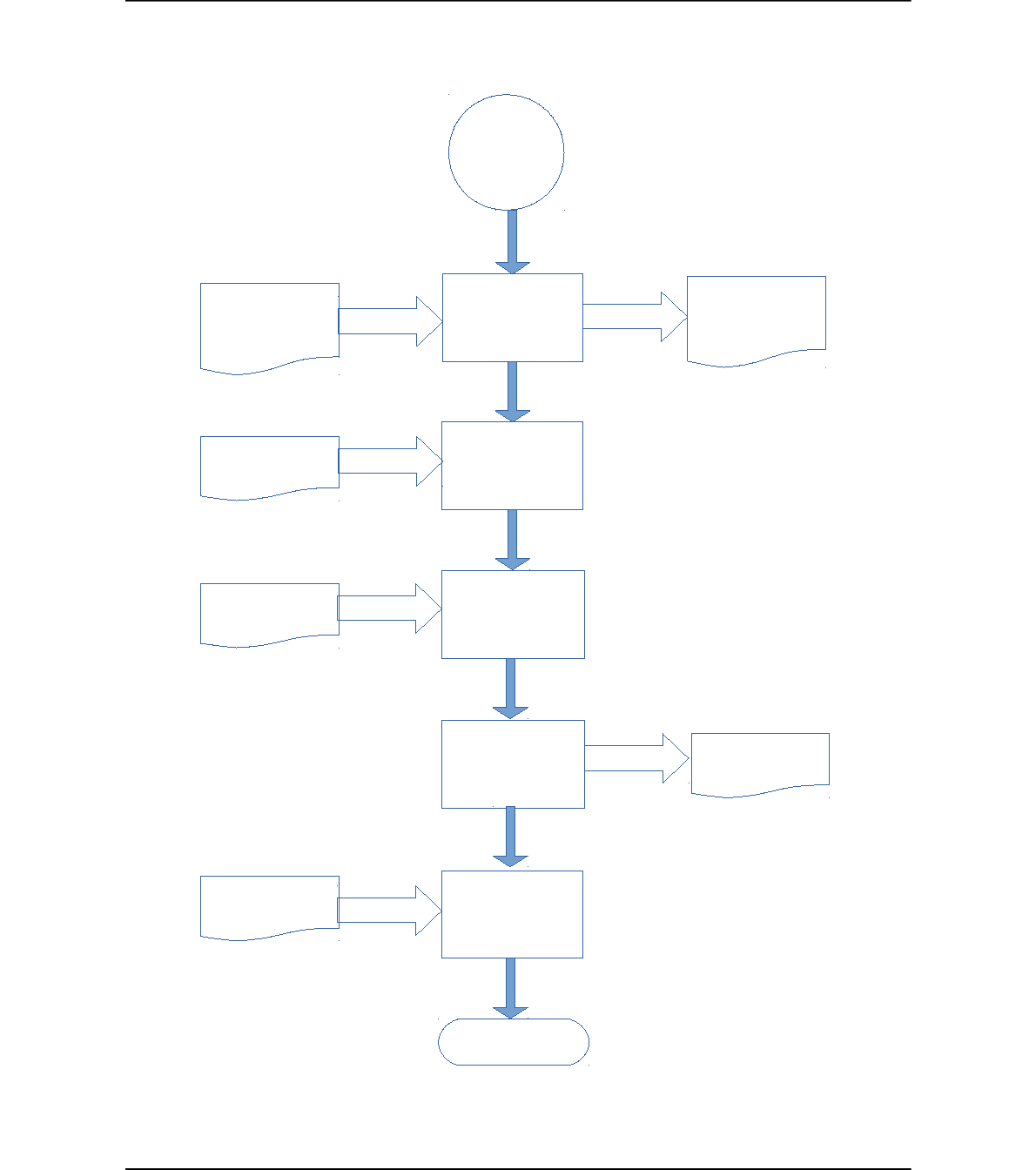
Figure 11 Workflow of scenario capture
Page 36 of (40) ©
2
)%$
/--3$"
/--4"3$"
(3$"
$'#
5'#
$
&&3$"
&&4"3$"
-')3$"
$.3$"
-3''$)
/--4.3-6(
$'#
$'#
$'#
'#
'
The files listed in the flowchart figure are part of the “scenario resource files”, that means that if you
want to replay the captured S1-C scenario, they will have to be saved in a created subdirectory of
openair-cn-scenarios/SCENARIOS/S1 (on your personal git branch for most cases).
4.3.4 Step2: Generate a generic scenario
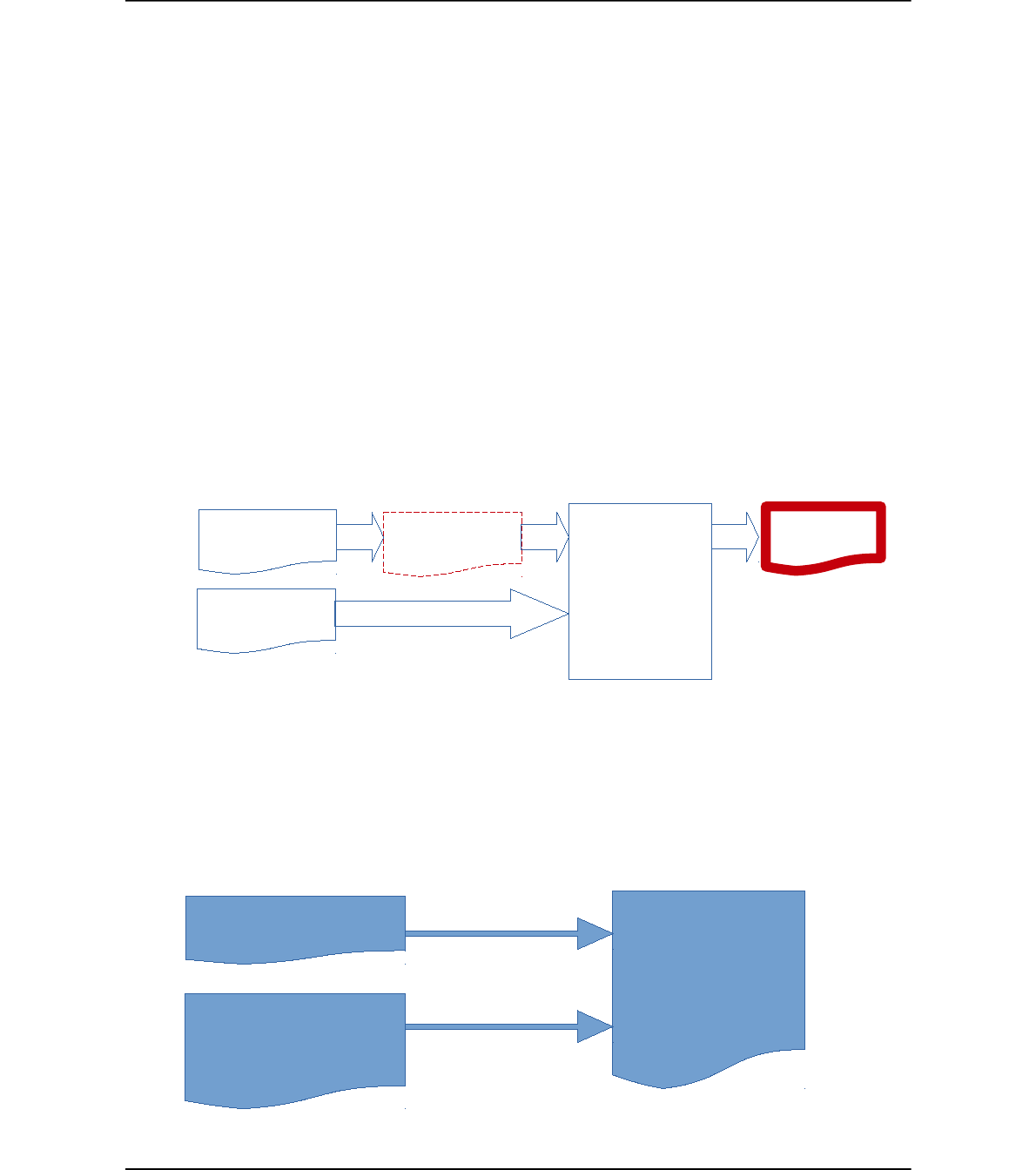
The scenario captured as a pcap file now have to be transformed in a XML file with abstracted IP
addresses.
In openair-cn-scenarios/SCRIPTS, run the following command:
user@testbed:~/openair-cn-scenarios/SCRIPTS$ ./s1_prepare_test_scenarios
This command generates a copy of the S1-C pcap scenario, but with abstract IP addresses, for
example:
...
<ip.src value="enb0_s1c"/>
<ip.dst value="mme0_s1c_0"/>
...
Figure 12 Captured scenario to generic scenario
4.3.5 Step3: Create configuration files for the “scenario replay” testbed
You have to create the network plan for the “scenario replay” testbed. The configuration files of the
LTE network entities (eNB, MME, SPGW, HSS) will be a merge of the “scenario capture” testbed
configuration files and the “scenario replay” network plan.
Figure 13 Scenario replay configuration files
Page 37 of (40) ©
'(-
$-
---
%/)$ %
---
$.3$"
-3''$) -3'&( -3&(
7$ %'# 8
$1)# %$1(-
7$ % '(08
-.$ !'($
9$1)# :2-
;*<
7$ % '(08
$1)# %$1(-
=,' & -
;,5-*=-*<
---*
%$ "-*:2-
Here is the network plan used by EURECOM for replaying scenarios.
Figure 14 Proposed “replay network plan”
Page 38 of (40) ©
2"#($ !$&-' !$&-'
enb-test
$ %
(0
(>?3+3+3
(>?3+3+3
-$.
@>3?33>
-#$.
@>3?3+3>
-&&
@>3?33>
--)
@>3?33>>
-&&
@>3?33>>
-#-)
@>3?3+3>>
$
+3+3+3+
2- A

After the creation of the 3 configuration files for the 3 network entities, the content of the scenario
directory should look like this example:
user@ testbed:~/EURECOM/openair-cn-scenarios/SCENARIOS/S1/NR_TESTS/PON_POFF$ ls -1
enb.conf
enb.replay.conf
enb.replay.run_options.txt
hss_credentials.txt
hss_db.replay.sql
hss_db.sql
hss_fd.conf
mme.conf
mme_fd.conf
mme.replay.conf
s1.html
s1.pcapng
s1.pdml
s1.xml
spgw.conf
spgw.replay.conf
test_epc_generate_scenario.history
4.3.6 Replay a S1AP generic scenario
For replaying a scenario open a terminal and go into directory openair-cn-scenarios/SCRIPTS and
run the following command:
user@ testbed:~/EURECOM/openair-cn-scenarios/SCRIPTS$ ./s1_run_test_scenario -S
/home/eurecom/EURECOM/openair-cn-scenarios/SCENARIOS/S1/NR_TESTS/PON_POFF
Page 39 of (40) ©
5 Annex B: GTP fragmentation.
In order to avoid GTP fragmentation on the S1-U link, we strongly suggest to increase the MTU of
S1-U network interfaces to at least 1536 (1536 + 8*x x in [0..N]).
Justification:
- IP fragmentation has an extra cost in network bandwidth, time and CPU.
- 3GPP TS 36.300 section 4.5 IP fragmentation:
Fragmentation function in IP layer on S1 and X2 shall be supported.
Configuration of S1-U (X2-U) link MTU in the eNB according to the MTU of the network
domain the node belongs to shall be considered as a choice at network deployment. The
network may employ various methods to handle IP fragmentation, but the specific methods to
use are implementation dependant.
Here is an example of a testbed successfully tested at EURECOM:
UE is Nexus 5.
Page 40 of (40) ©
B5
B5
B5
B5
B,
5,
,C333@>++
5 BD
*E
,+E@>333>
*E
,E@>333?
,C++
%E
,+E@>333?
,E@>333?
,=
' --)%).%/ $$ ((
;,&C@>++<
2=D2++
/ $' *
B() 0'!)&(-
.#$#3+3
D $(3@3+>(($04
%??+F3>+/G
H%???+
.#$#3+3
D $(3? ?4
:# %?@+F3+?G
2-!'
5,$1)#
B,(&'%$)
5,$1)#
#%$)- IE
?>33+3+>A%@>333?A/
