G326 0265 10_IBM_Info Window_II_3486:3488:3489_Marketing_Reference_Guide_Jul1998 10 IBM Info Window II 3486:3488:3489 Marketing Reference Guide Jul1998
User Manual: Pdf G326-0265-10_IBM_InfoWindow_II_3486:3488:3489_Marketing_Reference_Guide_Jul1998
Open the PDF directly: View PDF  .
.
Page Count: 27

IBM InfoWindow II 3486/3488/3489
Marketing Reference Guide
G326-0265-10

IBM InfoWindow II 3486/3488/3489
Marketing Reference Guide
G326-0265-10
IBML

Tenth Edition (United States Version), July 1998
The following paragraph does not apply to the United Kingdom or any country were such provisions are incon-
sistent with local law: International Business Machines Corporation provides this publication "as is" without war-
ranty of any kind either expressed or implied, including, but not limited to, the implied warranties of
merchantability or fitness for a particular purpose. Some states do not allow disclaimer of express or implied
warranties in certain transactions, therefore, this statement may not apply to you.
This publication could include technical inaccuracies or typographical errors. Changes are periodically made to
the information herein; these changes will be incorporated in new editions of the publication. IBM may make
improvements and/or changes in the products(s) and/or programs(s) described in this publication at any time.
IBM reserves the right to alter specifications and other product information without prior notice.
This publication was produced for products and services offered in the United States. IBM may not offer the pro-
ducts, services, or features discussed in this document in other countries, and information is subject to change
without notice. Consult your local IBM Representative for information on the products, services and features
available in your area.
Purpose:
This guide provides:
•3486/3488/3489 Features/Function Information
•3486/3488/3489 Feature Comparison Information
•3486/3488/3489 Ordering Information
•3486/3488/3489 Limited Warranty/Service Information
•3486/3488/3489 Technical Specifications Information
•3488/3489-IBM PC Monitor attachment Information
This guide is intended for IBM Representatives, IBM Business Partners and IBM customers located in the United
States as a reference document only.
For complete descriptions of the 3486/3488/3489, refer to:
•3486/3487 Introduction and Planning Guide, GA18-7096
•3486 User's Guide, GA18-7097
•3488-V Modular Display Station User's Guide, GA18-7646
•3489-V Modular Display Station User's Guide, GA18-7492
IBM PSG Fax Systems and IBM Fax Service
To obtain a copy of this document, refer to “3486/3488/3489 Marketing Resources, Manuals,” on page 21.
Trademark Information:
The following terms, denoted by an asterisk (*) in this publication, are trademarks of the IBM Corporation in the
United States or other countries or both:
IBM; InfoWindow; Proprinter; Quickwriter; Quietwriter; ExecJet; InkJet; AS/400; OS/400; Facsimile Support/400
The following terms, denoted by a double asterisk (**) in this publication, are trademarks of other companies as
follows:
HEWLETT-PACKARD (Hewlett-Packard Company)
LaserJet (Hewlett-Packard Company)
ThinkJet (Hewlett-Packard Company)
PC/TV (TECMAR Multimedia)
Other trademarks and registered trademarks are the properties of their respective owners.
ii IBM 3486/3488/3489 Marketing Reference Guide

Contents
What is an InfoWindow* II Display? .................................. 1
Family of Display Terminals for the AS/400* ........................... 1
3486/3488/3489 Function Highlights ................................ 1
3486/3488/3489 Functions ........................................ 2
Host Display+Printer Sessions .................................. 2
Physical Screen Formats ...................................... 2
Variable Vertical/Horizontal Split Screen ............................. 2
Enhanced User Interface ...................................... 2
Image/Fax-View and Print (3489) .................................. 3
Shared-Addressing (3488/3489) .................................. 3
PC/TV** Attachment, 5250 Video Delivery (3489) ........................ 3
IBM Mouse .............................................. 4
Lightpen (3488/3489) ......................................... 4
Record-Play-Pause .......................................... 4
Vital Product Data .......................................... 4
Address Lock-out (3488/3489) ................................... 4
Calculator ............................................... 4
262,000 Color Palette (3488/3489) ................................. 5
Foreground/Background Color Selection (3488/3489) ..................... 5
Extended Foreground Colors (3488/3489) ............................. 5
Reverse Image ............................................ 5
Auto Dim ................................................ 5
Advanced Power Management (3486) ............................... 5
Advanced Power Management (3488/3489) ........................... 5
Security Lock ............................................. 6
Extended Character Buffer (ECB) ................................. 6
Local/Host Print ............................................ 6
Printer Definition Table (PDT) Download ............................. 6
ASCII Transparency Mode ..................................... 6
Code Update Table .......................................... 6
AS/400, S/36 System Attachment ................................... 7
Programming Support (3486) .................................... 7
Programming Support (3488) .................................... 7
Programming Support (3489) .................................... 7
5250: Advanced Functions ....................................... 8
Description ............................................... 8
System Prerequisites: ........................................ 8
3486/3488/3489 Parallel Printer Port: Printer Attachment ..................... 9
Local Print ............................................... 9
Host Print ............................................... 9
3486/3488/3489 Keyboards ...................................... 10
122-Key Typewriter Keyboard .................................. 10
102-Key IBM Enhanced Keyboard ................................ 10
International Standards, Guidelines and Programs ....................... 11
ISO Standard 9241 Part 3 ..................................... 11
MPR-II Guidelines ......................................... 11
US EPA "Energy Star" Program ................................. 11
3486/3488/3489 Warranty, Maintenance, Service (US only) ................... 11
Limited Warranty .......................................... 11
Maintenance ............................................. 11
Service ................................................ 11
Contents iii

3486/3488/3489 Feature Comparison Table ............................ 12
3486/3488/3489 Ordering: Machine-Model-Feature (via AAS) ................. 13
3486/3488/3489 Ordering: Part Number (via GEMS) ....................... 13
3486/3488/3489 What Is Provided .................................. 14
3486 Model BG ........................................... 14
3488 Model V ............................................ 14
3489 Model V ............................................ 14
3486/3488/3489 Common ..................................... 14
3486/3488/3489 Element Part Numbers ............................... 14
3486 Technical Specifications .................................... 15
Physical ............................................... 15
Format, Resolution, Viewable Image Size ........................... 15
Environmental ............................................ 15
Electrical ............................................... 15
3488/3489 Technical Specifications ................................. 16
Physical ............................................... 16
Screen Formats, Resolution ................................... 16
Environmental (Modular Logic Unit Only) ........................... 16
Electrical (Modular Logic Unit Only) ............................... 16
IBM PC Monitor Attachment Support: 3488/3489 ......................... 17
General ................................................ 17
Resolution Override Option .................................... 19
3486/3488/3489 Marketing Resources, Manuals, ......................... 21
IBM PSG Fax System (1-800-IBM-3395) ............................. 21
IBM Fax Service (1-800-IBM-4FAX) ............................... 21
Manuals ............................................... 21
iv IBM 3486/3488/3489 Marketing Reference Guide

What is an InfoWindow* II Display?
Family of Display Terminals for the AS/400*
•IBM's easy to install, easy to use, low-cost AS/400 workstation.
•A choice of integrated (3486) or modular (3488/3489) design.
•3488/3489 modular design supports attachments of IBM's newest PC monitors, including:
- G42: 14" Conventional CRT with a 13.2" viewable image size.
- G51: 15" FST CRT with a 13.6" viewable image size.
- G54: 15" FST CRT with a 13.7" viewable image size.
- G74: 17" FST CRT with a 15.9" viewable image size.
- G94: 19" FST CRT with a 17.8" viewable image size.
•Meets many international workplace standards and guidelines, such as ISO Standard
9241 Part 3, and MPR-II Guidelines.
•Meets the US Environmental Protection Agency (EPA) "Energy Star" program. Note:
EPA, as a matter of policy, does not endorse any particular company or product.
3486/3488/3489 Function Highlights
•3489 Unique:
- View and locally print single-page monochrome image and facsimile
- PC/TV** attachment, 5250 Video Delivery
•3488/3489 Unique:
- Modular Design: Modular Logic Unit (desk or wall mount) and Keyboard. Requires
attachment of an IBM PC color monitor.
- Shared-Addressing
- Four-Display+Printer (DDD+P) host sessions
- Foreground and Background Color Selection
- 262,000 color palette
- Light Pen for mouse emulation
- Screen Formats: 24 by 80, 32 by 80, 43 by 80, 49 by 80 and 27 by 132 (PC Monitor
dependent)
•3486 Unique:
- Integrated Design: Green Monochrome Monitor, keyboard and Tilt/Swivel Stand
- Screen Formats: 24 by 80
•3486/3488/3489 Common:
- Enhanced User Interface
- IBM Mouse
- Variable Vertical or Horizontal Split Screen
- 3812-SCS Printer Emulation
- Support of IBM and non-IBM printers, including: IBM LaserPrinter*, ExecJet*, InkJet*
and HEWLETT-PACKARD LaserJet** III
- Calculator
- Advanced Power Management, Expansion Cartridge
1

3486/3488/3489 Functions
Host Display+Printer Sessions
•Allows the user to configure the display to have multiple display and printer host ses-
sions. 3486 supports a maximum of Two-display+printer (DDP) sessions, and the
3488/3489 supports a maximum Four-display+printer (DDDDP) sessions.
Physical Screen Formats
•Allows the user to configure the display in the following physical screen formats:
- 24 rows by 80 columns (Mode 2)
- 32 rows by 80 columns (Mode 3)
- 43 rows by 80 columns (Mode 4)
- 27 rows by 132 columns (Mode 5)
- 49 rows by 80 columns (Mode 6 - Twin Screen Mode)
•Physical Screen Format support is monitor dependent, refer to “3486/3488/3489 Feature
Comparison Table” on page 12 or to “IBM PC Monitor Attachment Support: 3488/3489”
on page 17.
•Twin Screen Mode, combined with two or more configured display sessions, allows the
user to view two full display (Mode 2) sessions in a top-bottom combination.
Variable Vertical/Horizontal Split Screen
•Combined with two or more configured host display sessions, allows the user to view
two simultaneous displays session in physical screen format modes 2-5 either in a top-
bottom or side-by-side combination.
•The user can dynamically move
Split Line
up/down or left/right using the Alt-F2 or Alt-F3
keys. The user can
swap
the display sessions using the Alt-F8 key. These actions can
also be done by using the IBM mouse or light-pen.
Enhanced User Interface
•The Enhanced User Interface improves the user interface of AS/400 applications that
display items, such as: menu bars/pull-downs, pop-up windows, selection fields,
selection lists, pushbuttons, using the following special symbols: scroll bars, check
boxes, radio buttons and window frames.
•Users can use the mouse or light pen for menu bar selections, pushbutton and scroll bar
operations which enhances user productivity.
•For programming information on the Enhanced User Interface, refer to the following pub-
lications:
-
"Data Description Specification Reference V2.3"
SC41-9620
-
"Data Description Specification Reference V3.1"
SC41-3712
-
"Guide to Programming Applications and Help Displays"
SC41-0011
-
"5494 Remote Control Unit Functions Reference"
SC30-3533
2IBM 3486/3488/3489 Marketing Reference Guide

Image/Fax-View and Print (3489)
•The 3489 can display and locally print a single-page monochrome image or facsimile.
•Designed for AS/400 applications that support image or facsimile. For example; IBM's
Facsimile Support/400* (V2 R3, V3 R0.5 or V3 R1) and IBM's ImagePlus* Workfolder
Application Facility/400 (V2 R4).
•The 3489 supports IOCA, PCX and TIFF image formats. The 3489 supports scrolling,
reverse image, rotation and scaling image viewing manipulations. All image manipu-
lations are performed within the 3489.
•The AS/400 application displays a pop-up Image/Fax Viewport. The AS/400 application
determines the size and location of the Image/Fax Viewport.
•Using the IBM mouse or lightpen, the user can locally scroll the image in any direction.
The image moves at the same rate and direction as the IBM mouse moves. Using the
Local Control Scale Up feature, the user can define a magnify area in the Image/Fax
Viewport. The magnify area is scaled to the size of the Image/Fax Viewport. Through
the AS/400 application, the user can rotate the image 0, 90, 180 or 270 degrees. Also
through the AS/400 application, the user can scale up/down the image. The 3489 sup-
ports a scaling range of 3% to 400%.
•An image, either displayed or non-displayed, in the 3489 can be printed on the following
3489 locally attached printers: IBM's LaserPrinter* (4019, 4029, 4039), IBM's ExecJet* II
(4076) or HEWLETT-PACKARD LaserJet** III. Note: Depending on the resolution of the
image/fax and the orientation of the image printing (landscape or portrait), additional
memory for the printers may be required.
•For programming information on Image/Fax, refer to
"5494 Remote Control Unit Func-
tions Reference"
SC30-3533
Shared-Addressing (3488/3489)
•Allows up to four display sessions use, in other words, share a single workstation
address. Shared Addressing increases the total number of possible display sessions per
twinaxial workstation controller port from 7 to 28, which increases the total number of
possible display sessions that can be supported by the workstation controller. Shared
Addressing reduces workstation controller and cabling costs when two, three, or four
display sessions is required.
•For 3488 support of Shared-Addressing, PTF MF10166 or later is required.
PC/TV** Attachment, 5250 Video Delivery (3489)
•Supports attachment of TECMAR Multimedia PC/TV** which provides end users the
capability to display and control audio as well as full-motion color analog video using an
antenna, cable, or external video source, in a movable, sizable pop-up window. Control
of audio and full-motion color analog video is possible through local 3489 keyboard
control and/or through an AS/400 application with the capability of OS/400 5250 Video
Delivery.
•Potential applications include: education/training, closed circuit monitoring for medical,
banking, or warehouse/distribution operations.
•Requires the following attachment cables: RJ(Male) to Mini-Din(Female) Cable, part
number 66G8046, and RJ(Female) to Mini-Din(Male) Cable, part number 66G8047.
•For programming information on 5250 Video Delivery, refer to
"5494 Remote Control Unit
Functions Reference"
SC30-3533.
3

IBM Mouse
•An IBM mouse can be attached to enhance keyboard operation of advanced host and
local functions. Designed for use with:
- Advanced Host Functions:
- Enhanced User Interface
- AS/400 Simple Hot Spots
- Automatic Cursor Position
- Copy/Paste
- Reset Operator Error
- Advanced Local Functions:
- Moving the image in the Image/Fax Viewport (3489)
- Locally scale up the image in the Image/Fax Viewport (3489)
- Moving the vertical/horizontal split line when in split screen mode
- Jumping between sessions
- Scrolling the session window
- Changing the split screen format between vertical and horizontal
- Calculation using the calculator help screen
- Selecting display and printer setup parameters in the setup menus
- Sizing of the trim frame for local print or calculator box summation
Lightpen (3488/3489)
•A FTG Data Systems, PXL-780 light pen can be attached to the mouse port for mouse
emulation of left button, right button, and double click for use with host and local func-
tions. Note: The IBM mouse can be used with the light-pen concurrently.
Record-Play-Pause
•Enables the user to store 1,500 (3486) or 6,000 (3488/3489) frequently used keystroke
sequences for later playback, thereby increasing productivity. 3488/3489 also supports
record/play of local (print, calculator) function keys.
Vital Product Data
•Sends display information to the AS/400 for centralized asset management. Display infor-
mation includes: Machine Type, Model and Serial Number.
Address Lock-out (3488/3489)
•The 3488/3489 automatically senses already active addresses so a customer does not
select an occupied address which result in device errors.
Calculator
•Allows the user to perform calculations locally without the need for host application
support. Provides for storing and retrieving of numeric data, as well as frequently used
mathematical expressions.
•Calculation operations occur in the Operator Information Area keeping the session
totally viewable, and a help screen is available to assist the user when required.
•The user can import data from an application to perform a calculation. Calculator Export
provides export capability of data from OIA area to the AS/400 application.
•3488/3489 provides box summation capability.
4IBM 3486/3488/3489 Marketing Reference Guide

262,000 Color Palette (3488/3489)
•Allows the user to change the displayed color of: foreground colors, background colors
for each display session, ruler/bar cursor, window frame/pushbutton frame, mouse
pointer, vertical/horizontal display session divider line, image foreground/background
colors.
Foreground/Background Color Selection (3488/3489)
•3488/3489 allows the user to select the foreground and a background color from a
262,000 color palette. Background colors provide for quick host display session identifica-
tion when multiple sessions are configured.
•Foreground/Background color can be specified for the image/fax displayed in the
Image/Fax Viewport (3489). The user can change the black-on-white image/fax to what-
ever combination of two preferred colors.
Extended Foreground Colors (3488/3489)
•Extended Foreground Colors increases the number of AS/400 application displayed
colors from 7 to 14, enhancing the appearance of color applications.
•For programming information on Extended Foreground Colors, refer to
"5494 Remote
Control Unit Functions Reference"
SC30-3533.
Reverse Image
•Allows the host to reverse the screen image, display dark characters on light back-
ground or light characters on dark background.
•Supported on the 3486 monochrome models or 3488/3489 with an attached Black-on-
White capable monitor.
Auto Dim
•Blanks the display screen after a period of inactivity thereby preserving the screen
phosphor. See also “Advanced Power Management (3486).” and “Advanced Power
Management (3488/3489).”
Advanced Power Management (3486)
•Turns off components not used during periods of inactivity which reduces power con-
sumption up to 66%.
•Stages of power management are: Standby, and Inactive Standby.
•Meets the US EPA "Energy Star" program.
Advanced Power Management (3488/3489)
•Supports power management to US EPA Energy Star levels for selected IBM PC moni-
tors. For a list of supported monitors, refer to “IBM PC Monitor Attachment Support:
3488/3489” on page 17.
5

Security Lock
•Allows the user to lock the display preventing its unauthorized use.
- 3486 - A removable physical key is used to lock the display.
- 3488/3489 - A software password is used to lock the display.
Extended Character Buffer (ECB)
•Displays the attributes in hexadecimal format.
•Presentation Space (PS), Primary ECB (ECB1), Secondary ECB (ECB2) and Foreground
Color ECB (ECB3) are supported.
Local/Host Print
•The parallel printer port can be used for local printing, or for host directed printing. For a
description of Local and Host Print, refer to “3486/3488/3489 Parallel Printer Port: Printer
Attachment” on page 9.
Printer Definition Table (PDT) Download
•Allows the user to customize their printer environment; to support printers not listed in
“3486/3488/3489 Parallel Printer Port: Printer Attachment” on page 9, or to enable addi-
tional functions (color support, font mapping, EBCDIC to ASCII translation, or multiple bin
support) on printers by downloading a PDT from the AS/400.
•For programming information on the Printer Definition Table Download, refer to
"AS/400
OS/400 Workstation Customization Guide Version 2.2"
SC41-0056.
ASCII Transparency Mode
•Enables the display to "pass through" ASCII Hex data to the attached device (printer) to
the parallel port. This could be used to control printer special features, such as, color
printing, bar code printing, and enhanced laser printer features.
•For programming information on ASCII Transparency Mode, refer to
"AS/400 Printing
II"
GG24-3704.
Code Update Table
•Enables support personnel to update the software code in the 3486, 3488 or 3489 from
the AS/400 without requiring display hardware to be changed. This allows for IBM to
provide functional enhancements based on unique customer requirements, or correct
possible field reported problems.
6IBM 3486/3488/3489 Marketing Reference Guide
AS/400, S/36 System Attachment
Programming Support (3486)
IBM System Configuration 3486 as
AS/400 with OS/400 V2 R2.0 or later 3486
AS/400 with OS/400 V1 R2.0 to V2 R1.1 3476
AS/400 with OS/400 V1 R1.0 or R1.1 3196
5494 R1.1 on AS/400 with OS/400 V2 R2.0 or later 3486
5494 R1.0 on AS/400 with OS/400 V2 R1.1 or later 3476
5394 R2.0 on AS/400 with OS/400 V1 R2.0 or later 3476
5394 R1.0 on AS/400 with OS/400 V1 R1.0 or later 3196
S/36, or 5394 on S/36, or 5259, or 5294 3196
Programming Support (3488)
Group IBM PC Monitor
180-column capable IBM PC color monitors
2132-column capable IBM PC color monitors
Note: For more information, including information on the viewable image size, refer to “IBM
PC Monitor Attachment Support: 3488/3489” on page 17.
IBM System Configuration Group 1 Group 2
AS/400 with OS/400 V2 R2.0 or later 3487 HC 3487 HC
AS/400 with OS/400 V1 R2.0 to V2 R1.1 3197 C 3477 FC
AS/400 with OS/400 V1 R1.0 or R1.1 3197 C 3197 C
5494 R1.1 on AS/400 with OS/400 V2 R2.0 or later 3487 HC 3487 HC
5494 R1.0 on AS/400 with OS/400 V2 R1.1 or later 3197 C 3477 FC
5394 R2.0 on AS/400 with OS/400 V1 R2.0 or later 3197 C 3477 FC
5394 R1.0 on AS/400 with OS/400 V1 R1.0 or later 3197 C 3197 C
S/36, or 5394 on S/36, or 5259, or 5294 3197 C 3197 C
Programming Support (3489)
Group IBM PC Monitor
180-column capable IBM PC color monitors
2132-column capable IBM PC color monitors
Note: For more information, including information on the viewable image size, refer to “IBM
PC Monitor Attachment Support: 3488/3489” on page 17.
IBM System Configuration Group 1 Group 2
AS/400 with OS/400 V2 R2.0 or later 3487 HC 3487 HC
5494 R1.1 on AS/400 with OS/400 V2 R2.0 or later 3487 HC 3487 HC
5394 R2.0 on AS/400 with OS/400 V1 R2.0 or later 3197 C 3477 FC
7
5250: Advanced Functions
Description
Enhanced User Interface,Image/Fax,Shared Addressing,Extended Foreground Colors,5250
Video Delivery,Calculator Export and PDT Download, is described in “3486/3488/3489
Functions” on page 2.
Copy/Paste: Allows the user to copy and paste characters within the same display session
or between two separate display sessions. Two modes are supported: Linear (sequential
string marked by starting and ending positions) and Block (rectangular area). Linear copy
requires shift key, followed by primary button press, dragging, and then releasing. Block
copy requires the shift key, followed by primary button press/release/press (within user-
specified double click interval), dragging, and then releasing. Paste operations occur by
pressing shift key, followed by secondary button press. The same data can be pasted unlim-
ited times, until display is powered off, or another copy is performed.
AS/400 Simple Hotspots: AS/400 Menu Hotspots allows navigation through AS/400 (or simi-
larly constructed) menus without keyboard interaction by placing the mouse pointer on a
menu item and clicking the primary mouse button. AS/400 Menu Hotspots have the fol-
lowing form: "xxn.yzzzzz" where x is a blank, null, or display attribute; n is a one to two
digit number; y is a blank or null; zzzzz is text. Command Key Hotspots allows the user to
place the mouse pointer on the command (F1-F24) keys and press the primary mouse button.
Command Key Hotspots have the following form: "Fn=", where n is a one or two digit
number between 1 and 24. The user can scroll a file by pressing the primary mouse button
on "+", "-", "More...", or "Bottom" characters. Pressing the secondary mouse button on
"More..." will scroll backward in a file. Double clicking the primary mouse button simulates
the pressing of the Enter key.
System Prerequisites:
Advanced 5250 Function OS/400 Prerequisite Local Twinax
Controller 5494 Remote
Controller
Image/Fax V3 R1 with PTF MF09310 later
V3 R0.5 with PTF MF08864 or later
V2 R3 with PTF MF08863 or later
New R3.0 or later
Shared Addressing V3 R1 or later New R3.0 or later
5250 Video Delivery V3 R1 with PTF MF09310 or later
V3 R0.5 with PTF MF08864 or later
V2 R3 with PTF MF08863 or later
New R3.1 or later
Extended Foreground Colors V2 R3 or later Any R2.0 or later
Enhanced User Interface V2 R2 or later New R1.1 or later
Calculator Export,
Copy/Paste, Hot Spots
V2 R2 or later New R2.0 or later
PDT Download V2 R2 or later Any R2.0 or later
Keyboard Customization,
Code Update Table
V2 R2 or later Any R1.1 or later
Note: New: Refers to new (V2 R2 or later) local twinax controllers: #2661, #6050, #915A type controller.
Note: Any: Refers to new (V2 R2.0 or later) local twinax controllers: #2661, #6050, #915A type controller and
older (before V2 R2) local twinax controllers: #2638, #6040, #6140.
8IBM 3486/3488/3489 Marketing Reference Guide
3486/3488/3489 Parallel Printer Port: Printer Attachment
•The parallel printer port can be used for local printing, or for host directed printing when
the display is configured for a printer session.
Local Print
•Screen Print: All screen data is printed.
•Trim Print: All the data defined by the
trim area
(rectangle) on the screen is printed.
•Image Print (3489): The image in the 3489 can be printed on the IBM 4019, 4029, 4039,
4076 and HEWLETT-PACKARD LaserJet** III printers.
Host Print
•The display emulates IBM 5256, IBM 4214, or IBM 3812-SCS printers. The following table
lists the supported printers. For other printers not listed, refer to “Printer Definition Table
(PDT) Download” on page 6
•IBM 3812-SCS Printer includes support for Computer-Output Reduction (COR) function.
COR, along with Automatic Page Orientation, provides automatic adjustment of print
output on selected page printers. Automatic adjustment includes: page orientation (rota-
tion), font selection, lines per inch, and top/left margins. COR allows printer output to be
modified automatically without changing paper settings.
Printer 5256 4214 3812-SCS
IBM Proprinter* I (4201-1) Yes Yes ---
IBM Proprinter II (4201-2) Yes Yes ---
IBM Proprinter III (4201-3) Yes Yes ---
IBM Proprinter XL (4202-1,2) Yes Yes ---
IBM Proprinter XL III (4202-3) Yes Yes ---
IBM Proprinter X24E (4207-2) Yes Yes Yes
IBM Proprinter XL24E (4208-2) Yes Yes Yes
IBM Quietwriter* Printer (5201-1) Yes --- ---
IBM Quietwriter II Printer (5201-2) Yes --- ---
IBM Quietwriter III Printer (5202) Yes Yes Yes
IBM Quickwriter Printer (5204) Yes Yes Yes
IBM Personal Page Printer (4216-10) Yes Yes Yes
IBM Proprinter 24P (IBM 4212) Yes Yes Yes
IBM LaserPrinter (4019-001, E01) Yes Yes Yes-COR
IBM LaserPrinter (4029) 1Yes Yes Yes-COR
IBM LaserPrinter (4039) Yes Yes Yes-COR
IBM Personal Printer Series II (2380/2381) Yes Yes ---
IBM Personal Printer Series II (2390/2391) Yes Yes Yes
IBM InkJet* (IBM 4070) Yes Yes Yes
IBM ExecJet* (IBM 4072) Yes Yes Yes
IBM ExecJet* (IBM 4076) Yes Yes Yes
IBM 4226 Printer Model 302 Yes Yes ---
HEWLETT-PACKARD** ThinkJet** Yes Yes ---
HEWLETT-PACKARD LaserJet** III Yes Yes Yes-COR
Notes:
The IBM LaserPrinter 4039 is supported by the 3489 only.
9
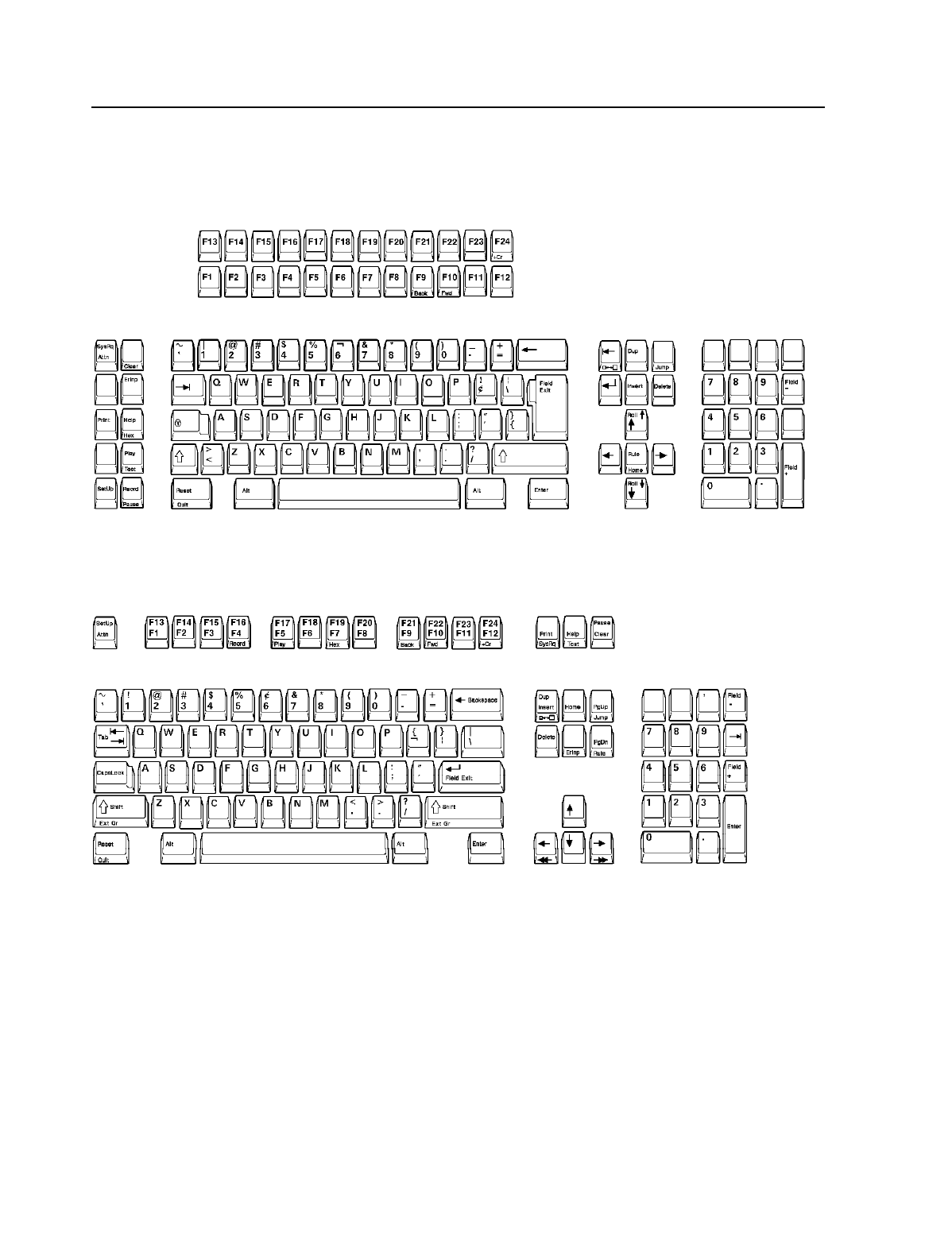
3486/3488/3489 Keyboards
122-Key Typewriter Keyboard
102-Key IBM Enhanced Keyboard
10 IBM 3486/3488/3489 Marketing Reference Guide

International Standards, Guidelines and Programs
ISO Standard 9241 Part 3
This standard, developed by the ISO (International Organization for Standardization),
addresses the following aspects of the monitor's operation:
•Character size, spacing, shape and clarity
•Screen linearity, "squareness", image stability -flicker and jitter
•Reflections and glare
•User controls - brightness and contrast
MPR-II Guidelines
This guideline, developed by the SWEDAC (Swedish Board for Technical Accreditation),
recommends the limits for electric, magnetic, and electrostatic fields from workstations.
US EPA "Energy Star" Program
A voluntary US EPA program for facilitating energy efficient office technology products.
The 3486 all models, and the 3488/3489 with selected IBM monitors meets the EPA "Energy
Star" Program. For a list of supported monitors for attachment to the 3488/3489 refer to
“IBM PC Monitor Attachment Support: 3488/3489” on page 17.
3486/3488/3489 Warranty, Maintenance, Service (US only)
Limited Warranty
•3486 includes a one-year or a three-year IBM On-Site Repair (IOR) limited warranty for
the entire warranty period.
•3488/3489 includes a one-year or a three-year limited warranty. First year of warranty is
IBM On-site Repair (IOR). The second and third year of warranty is Customer Carry-In
Repair (CCR) via mail-in. Note: Customers can upgrade to IOR for the second and third
year of warranty.
•For information regarding the terms and conditions of IBM's statement of limited war-
ranty, please call 1-800-772-2227 in the U.S. or 1-800-465-7999 in Canada. In other coun-
tries, contact your IBM representative. Copies of IBM's statement of limited warranty are
available upon request.
Maintenance
•Following the warranty period, optional IBM On-Site Repair (IOR) maintenance, for a fee,
is available.
Service
•To obtain service, contact your reseller or call IBM at 1-800-IBM-SERV (426-7378). Note:
Proof of purchase may be required.
11
3486/3488/3489 Feature Comparison Table
Feature 3486-BG 3488-V 3489-V
Design Integrated Modular Modular
CRT Monitor 14" Mono Selectable Selectable
Viewable Image Size 11.3" Note 1 Note 1
Refresh Rate (hz) 75 Note 1 Note 1
Brightness Control Yes Yes1Yes1
Contrast Control Yes Yes1Yes1
Tilt/Swivel Stand Yes Yes1Yes1
Desk/Floor/Wall Mount --- Yes Yes
24 x 80 (Mode 2) Screen Format Yes Yes Yes
32 x 80 (Mode 3) Screen Format --- Yes Yes
43 x 80 (Mode 4) Screen Format --- Yes1Yes1
27 x 132 (Mode 5) Screen Format --- Yes1Yes1
49 x 80 (Twin) Screen Format --- Yes1Yes1
Maximum Host Sessions DDP DDDDP DDDDP
Shared Addressing --- Yes Yes
Image/Fax --- --- Yes
PC/TV** Attachment --- --- Yes
5250 Video Delivery --- --- Yes
Variable Split Screen Yes Yes Yes
Enhanced User Interface Yes Yes Yes
IBM Mouse Yes Yes Yes
Light Pen --- Yes Yes
Color Palette (colors) --- 262,000 262,000
Background Color Selection --- Yes1Yes1
Foreground Color Selection --- Yes1Yes1
Extended Foreground Colors --- Yes1Yes1
Reverse Image Yes Yes1Yes1
Record/Play/Pause (keystrokes) 1,500 6,000 6,000
Address Lock-out --- Yes Yes
Vital Product Data Yes Yes Yes
Extended Character Buffer Yes Yes Yes
Calculator Yes Yes Yes
Parallel Printer Port Yes Yes Yes
Host, Local Screen-Trim Print Yes Yes Yes
Local Image Print --- --- Yes
5256/4214/3812 Printer Emulations Yes Yes Yes
Printer Definition Table Download Yes Yes Yes
ASCII Transparency Mode Yes Yes Yes
Code Update Table Yes Yes Yes
Auto Dim Yes Yes Yes
Advanced Power Management Yes Yes1Yes1
Security Lock Key Password Password
MPR-II Guidelines Yes Yes1Yes1
ISO Standard 9241 Part 3 Yes Yes1Yes1
US EPA "Energy Star" Program Yes Yes1Yes1
One or three-year Limited Warranty Yes Yes Yes
Notes:
1Function is monitor dependent
12 IBM 3486/3488/3489 Marketing Reference Guide
3486/3488/3489 Ordering: Machine-Model-Feature (via AAS)
Machine-Model
Feature Code Description
3486-BG1 Green video element, 1-year limited warranty 4
3486-BG3 Green video element, 3-year limited warranty 4
3486-BGZ AS/400 Total System Package (TSP) model 3486-BG3 3
3488-V11 3488 Modular Logic Unit only (no IBM PC monitor), 1-year limited warranty 4
3488-V13 3488 Modular Logic Unit only (no IBM PC monitor), 3-year limited warranty 4
3488-V1Z AS/400 Total System Package (TSP) model 3488-V13 3,5
3489-V11 3489 Modular Logic Unit only (no IBM PC monitor), 1-year limited warranty 4
3489-V13 3489 Modular Logic Unit only (no IBM PC monitor), 3-year limited warranty 4
3489-V1Z AS/400 Total System Package (TSP) model 3489-V13 3,5
FC5000 AS/400 Total Systems Package Specify (TSP only, required)
FC5900 AS/400 Total Systems Package Twinax 20-ft cable (TSP only 1)
FC9122 3486/3488/3489 122-key Typewriter Keyboard
FC9131 3486/3488/3489 102-key IBM Enhanced Keyboard
FC9201 3486 Tilt/Swivel Stand
FC9986 3486/3488/3489 Power cord 6 foot for Chicago, IL.
FC5182 IBM Mouse 2
Notes:
1Orderable for up to two TSP models per AS/400.
2Not available on TSP models.
3Available only with AS/400 Total System Package (TSP) system orders.
4For more information, refer to “3486/3488/3489 Warranty, Maintenance, Service (US only)” on page 11.
5IBM offers a 6546-0AZ (G54 TSP) PC Monitor.
3486/3488/3489 Ordering: Part Number (via GEMS)
Part Number Machine-Model Monitor 1Limited Warranty 2Keyboard Stand
49G2461 3486-BG1 Green Video 1 year 122-Typewriter Tilt-Swivel
49G2462 3486-BG1 Green Video 1 year 102-Enhanced Tilt-Swivel
49G2473 3486-BG3 Green Video 3 year 122-Typewriter Tilt-Swivel
49G2474 3486-BG3 Green Video 3 year 102-Enhanced Tilt-Swivel
66G1845 3488-V11 Not Included 1 year 122-Typewriter -----
66G1847 3488-V11 Not Included 1 year 102-Enhanced -----
66G1860 3488-V13 Not Included 3 year 122-Typewriter -----
66G1862 3488-V13 Not Included 3 year 102-Enhanced -----
66G7725 3489-V11 Not Included 1 year 122-Typewriter -----
66G7727 3489-V11 Not Included 1 year 102-Enhanced -----
66G7740 3489-V13 Not Included 3 year 122-Typewriter -----
66G7742 3489-V13 Not Included 3 year 102-Enhanced -----
Notes:
1For more information on IBM PC Monitor attachment to the 3488/3489, refer to “IBM PC Monitor Attach-
ment Support: 3488/3489” on page 17.
2For more information, refer to “3486/3488/3489 Warranty, Maintenance, Service (US only)” on page 11.
13
3486/3488/3489 What Is Provided
3486 Model BG
•14" FST (11.3" Viewable Image Size) Green Monochrome CRT Video Element.
•Tilt/Swivel (T/S) Stand
•Connecting the IBM 3486 to System/36 or AS/400 manual
3488 Model V
•3488 Modular Logic Unit without an IBM monitor. Note: For more information about IBM
monitors, refer to “IBM PC Monitor Attachment Support: 3488/3489” on page 17.
3489 Model V
•3489 Modular Logic Unit without an IBM PC monitor. Note: For more information about
IBM PC monitors, refer to “IBM PC Monitor Attachment Support: 3488/3489” on page 17.
3486/3488/3489 Common
•Keyboard:
- 122-key Typewriter or
- 102-key IBM Enhanced
•Power Cord - 9 foot or 6 foot (Chicago only)
•Auto Termination Unit
•User's Guide
•1-year or 3-year limited warranty. For warranty information, refer to “3486/3488/3489 War-
ranty, Maintenance, Service (US only)” on page 11.
3486/3488/3489 Element Part Numbers
Item Manufactured
Part Number Ordering Part
Number
3486-BG Green Video 06G6331 06G6330
3486 Tilt/Swivel (T/S) Stand 09F4221 23F1841
3486 User's Guide Ship Group 06G9677 06G9669
3488-V Modular Logic Unit 66G1721 66G1721
3488 User's Guide Ship Group 66G1733 66G1764
3489-V Modular Logic Unit 66G7665 66G7665
3489-V User's Guide Ship Group 66G7671 66G7687
122-key Typewriter Keyboard 1394167 1394167
102-key IBM Enhanced Keyboard 1394193 1394193
Power Cord 9 ft. 6952300 6952300
Power Cord 6 ft. (Chicago) 6952301 6952301
Auto Termination Unit 23F3794 23F3794
RJ (Male) to Mini-Din (Female) Converter Cable 66G8046 66G8046
RJ (Female) to Mini-Din (Male) Converter Cable 66G8047 66G8047
14 IBM 3486/3488/3489 Marketing Reference Guide
3486 Technical Specifications
Physical
Element Width Depth Height Weight
Video with tilt/swivel
stand
334 mm (13.1 in.) 328 mm (12.9 in.) 344 mm (13.5 in.) 9.1 kg (20.0 lb)
122-key Typewriter
Keyboard
533 mm (21.0 in.) 215 mm (8.5 in.) 64 mm (2.5 in.) 2.5 kg (5.5 lb)
102-key IBM Enhanced
Keyboard
488 mm (19.2 in.) 210 mm (8.3 in.) 40 mm (1.6 in.) 2.3 kg (5.1 lb)
Element Tilt Swivel
Tilt/Swivel Stand +15 °to -5 °+/- 90 °
Format, Resolution, Viewable Image Size
Format Resolution Viewable Image Size
80 columns by 24 rows (Mode 2) 720 pels by 404 pels 235 mm by 166 mm
Notes:
Resolution and Viewable Image Size includes the divider and Operator Information Area (OIA).
Environmental
Environment Temperature Relative Humidity Wet Bulb
Operating 10.0 - 40.0°C (50 - 105°F) 8 - 80% 27.0°C (80°F)
Non-Operating 10.0 - 52.0°C (50 - 125°F) 8 - 80% 27.0°C (80°F)
Electrical
Voltage Power Consumption Heat Output
100 - 250 V ac, 50/60 Hz, Single Phase 0.06 kV A, 0.3 - 0.6 A 30 watts (Avg.) 102 BTU/hr
15
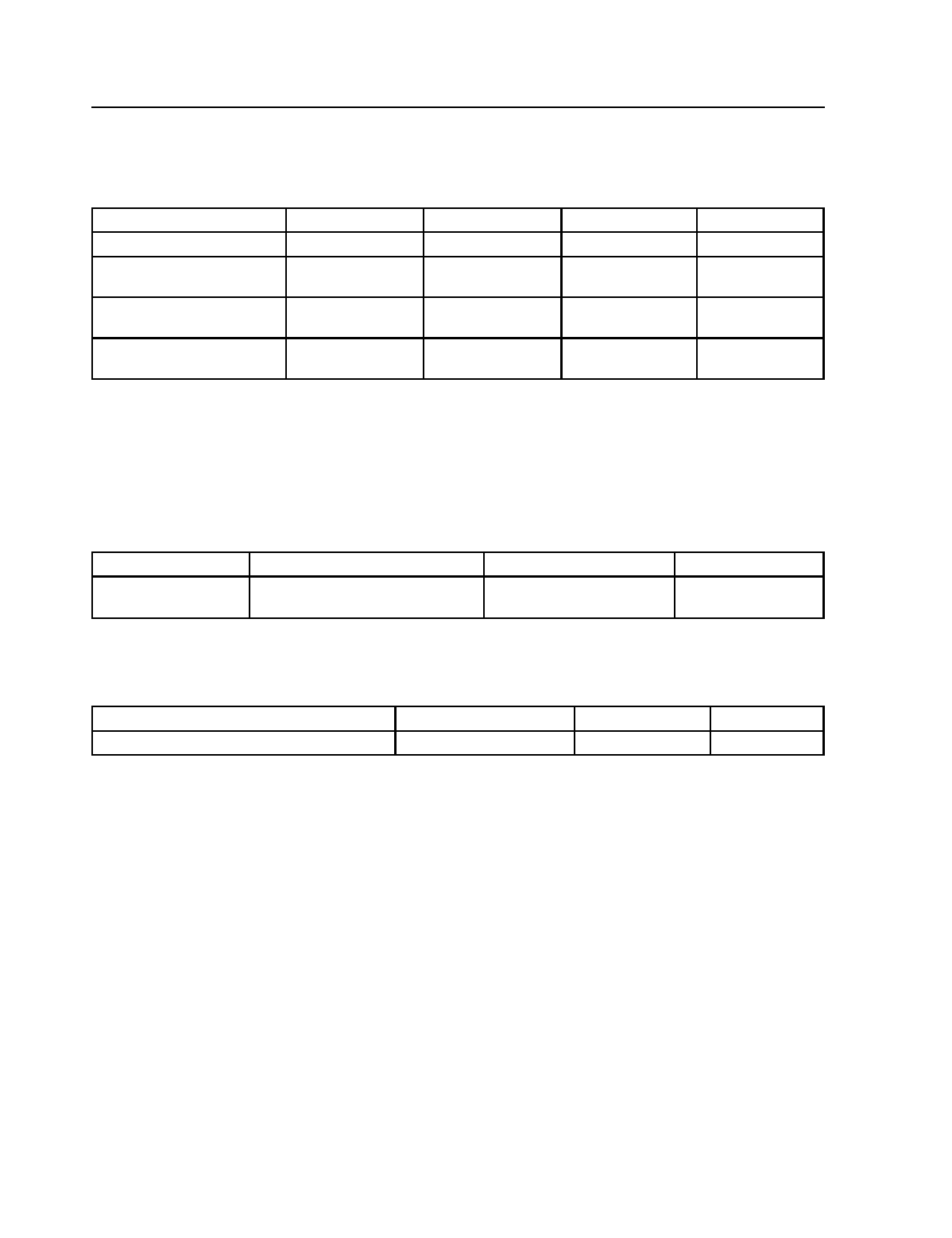
3488/3489 Technical Specifications
Physical
Element Width Depth Height Weight
Modular Logic Unit 322 mm (12.7 in.) 322 mm (12.7 in.) 60 mm (2.4 in.) 2.6 kg (5.7 lb)
Modular Logic Unit
Floor mount
322 mm (12.7 in.) 60 mm (2.4 in.) 360 mm (14.2 in.) 3.2 kg (7.1 lb)
122-key Typewriter
Keyboard
533 mm (21.0 in.) 215 mm (8.5 in.) 64 mm (2.4 in.) 2.5 kg (5.5 lb)
102-key IBM Enhanced
Keyboard
488 mm (19.2 in.) 210 mm (8.3 in.) 40 mm (1.6 in.) 2.3 kg (5.1 lb)
Screen Formats, Resolution
Supported screen formats and screen resolution is monitor dependent. For a list, refer to
“IBM PC Monitor Attachment Support: 3488/3489” on page 17.
Environmental (Modular Logic Unit Only)
Environment Temperature Relative Humidity Wet Bulb
Operating 10.0 - 40.0°C (50 - 104°F) 8 - 80% 27.0°C (81°F)
Non-Operating 10.0 - 60.0°C (34 - 140°F) 5 - 80% 29.0°C (84°F)
Electrical (Modular Logic Unit Only)
Voltage Power Consumption Heat Output
100 - 250 V ac, 50/60 Hz, Single Phase 0.020 kVA, 0.2 A 11 watts (Avg.) 37 BTU/hr
16 IBM 3486/3488/3489 Marketing Reference Guide
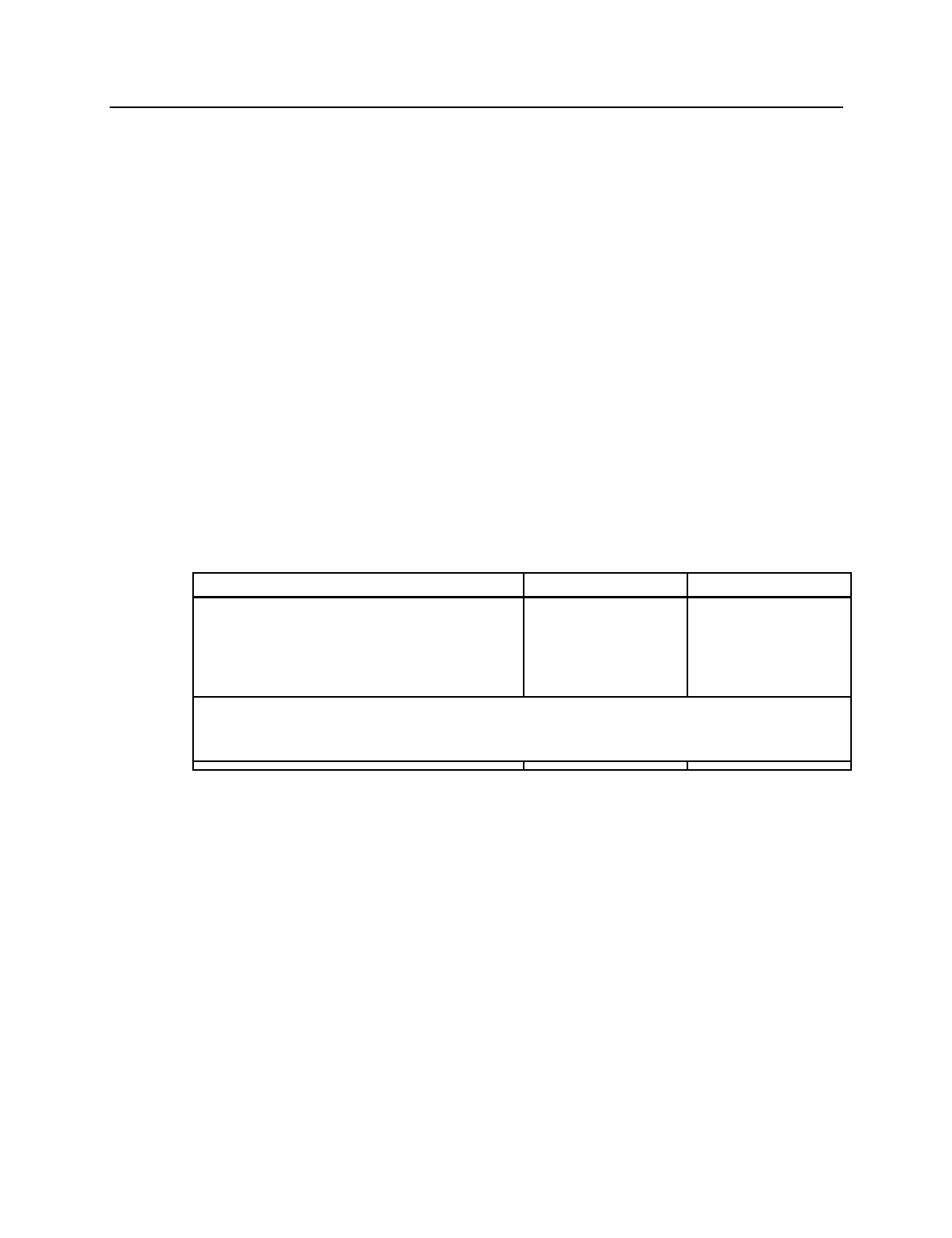
IBM PC Monitor Attachment Support: 3488/3489
General
The following table lists the supported IBM monitors:
•Monitor: Lists the Machine Type-Model. Optional monitor Brand Name is listed in paren-
thesis. Not all monitors are available in every geography.
•Tube Size and Type: Tube Size is the CRT diagonal dimension and the Tube Type is the
CRT technology.
•Viewable Image Size: Lists the monitor's viewable image size.
•Notes: List any notes that may apply to a monitor.
•M2 (Mode 2): Supports 24 rows by 80 columns (Mode 2) screen format.
Italics/Underscore indicate ISO 9241 Part 3 compliant.
•M3 (Mode 3): Supports 32 rows by 80 columns (Mode 3) screen format.
Italics/Underscore indicate ISO 9241 Part 3 compliant.
•M4 (Mode 2): Supports 43 rows by 80 columns (Mode 4) screen format.
Italics/Underscore indicate ISO 9241 Part 3 compliant.
•M5 (Mode 5): Supports 27 rows by 132 columns (Mode 5) screen format.
Italics/Underscore indicate ISO 9241 Part 3 compliant.
•M6 (Mode 6): Supports 49 rows by 80 columns twin screen (Mode 6) format.
•RR (Refresh Rate): Lists the monitor's operating refresh rate.
•Group: Defines the screen resolution (Group A or Group B) when operating in M2, M3,
M4, M5 or M6.
•Monitor Adapter: The monitor adapter part number required. IBM includes an adapter
with every 3488 or 3489. If the adapter is not used, monitor operates as follows:
- M2, M3, M4 is supported, M5 or M6 is not supported.
- Power Management to US EPA Energy Star levels are not supported.
- Monitors operate in 60 hz refresh rate.
- Monitors operate in Group B screen resolution (ergonomic character font is not sup-
ported).
Screen Formats Resolution - Group A Resolution - Group B
80 columns by 24 rows (M2/Mode 2) 960 pels by 529 pels 720 pels by 479 pels
80 columns by 32 rows (M3/Mode 3) 960 pels by 499 pels 720 pels by 466 pels
80 columns by 43 rows (M4/Mode 4) 960 pels by 664 pels 720 pels by 444 pels
132 columns by 27 rows (M5/Mode 5) 1188 pels by 508 pels 1188 pels by 480 pels
80 columns by 49 rows (M6/Twin Screen) 960 pels by 654 pels Not Supported
Notes:
Resolution - Group A allows the monitor the capability to display characters using an
ergonomic character font.
17
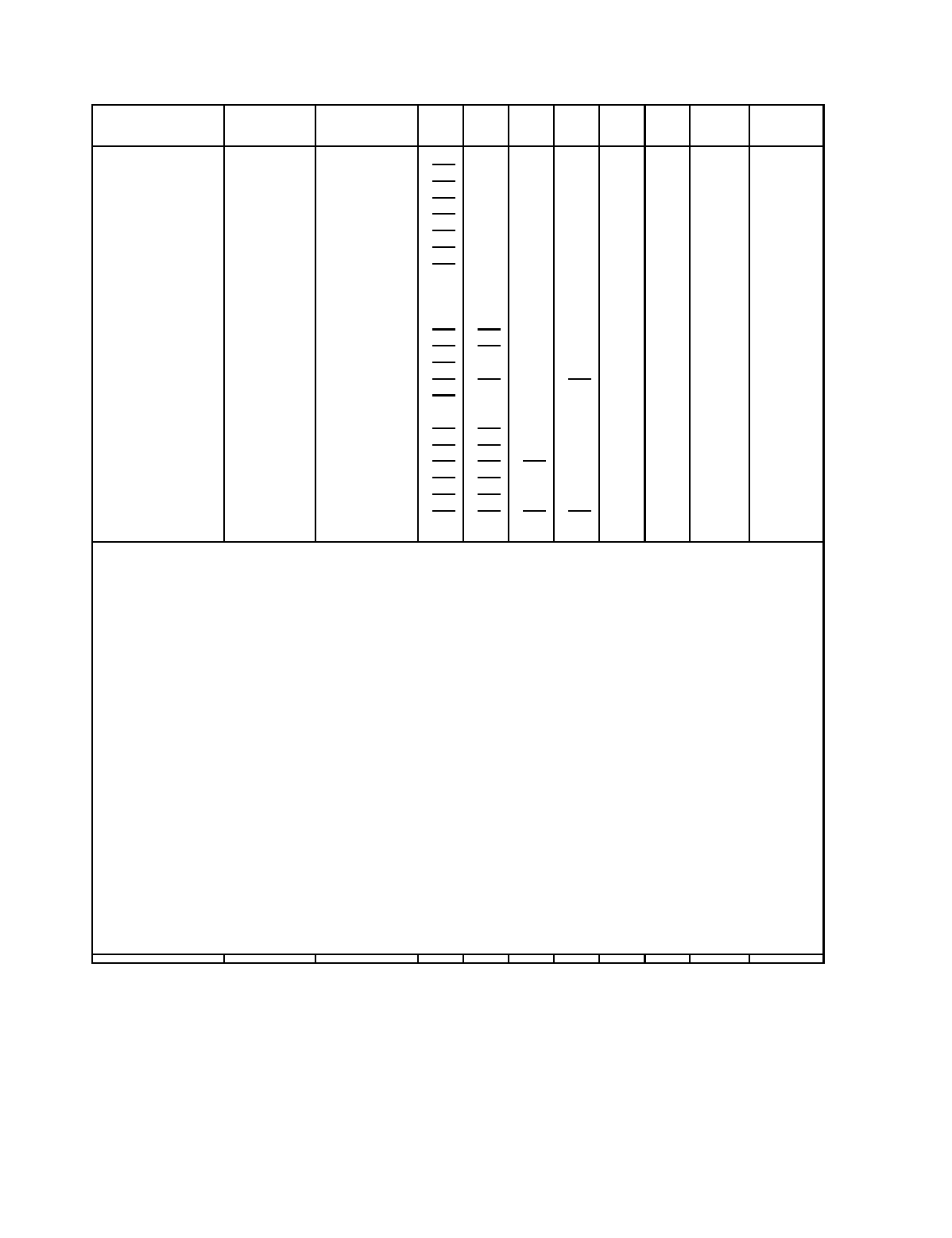
Monitor Tube and
Size Type Viewable
Image Size M2 M3 M4 M5 M6 RR Group Monitor
Adapter
6540(G42) 14" Conv. 13.2"
Yes
Yes --- Yes --- 75 A 96G1999
6540(G42) 414" Conv. 13.2"
Yes
Yes Yes Yes --- 75 B ---
6541(G51) 15" FST 13.6"
Yes
Yes --- Yes --- 75 A 96G1999
6541(G51) 415" FST 13.6"
Yes
Yes Yes Yes --- 75 B ---
6546-xAx(G54) 15" FST 13.7"
Yes
Yes Yes Yes Yes 75 A 96G1999
6547-xAx(G74) 17" FST 15.9"
Yes
Yes Yes Yes Yes 75 A 96G1999
6549-x0x(G94) 19" FST 17.8"
Yes
Yes Yes Yes Yes 75 A 96G1999
6542-1xx(G40) 14" Conv. 12.3" Yes Yes Yes --- --- 60 B ---
6542-1xx(G40) 1,214" Conv. 12.3" Yes Yes Yes Yes --- 72 B ---
6542-3xx(G41) 14" Conv. 13.0"
Yes Yes
Yes Yes Yes 75 A 96G1999
6543-3xx(G50) 15" FST 13.4"
Yes Yes
Yes Yes Yes 75 A 96G1999
6546-x0x(G52) 15" FST 13.6"
Yes
Yes Yes Yes Yes 75 A 96G1999
6544-xxx(G70) 317" FST 15.7"
Yes Yes
Yes
Yes
Yes 75 A 96G1999
6547-x0x(G72) 17" FST 15.7"
Yes
Yes Yes Yes Yes 75 A 96G1999
6545-xxx(G200) 20" Conv. 18.4" Yes Yes Yes Yes Yes 75 A 96G1999
6324(14V) 14" Conv. 13.0"
Yes Yes
Yes Yes Yes 75 A ---
6325(15V) 15" FST 13.7"
Yes Yes
Yes Yes Yes 75 A ---
6327(17V) 17" FST 15.6"
Yes Yes Yes
Yes Yes 75 A ---
9524(14P) 14" Conv. 13.0"
Yes Yes
Yes Yes Yes 75 A ---
9525(15P) 15" FST 13.7"
Yes Yes
Yes Yes Yes 75 A ---
9527(17P) 317" Conv. 15.4"
Yes Yes Yes Yes
Yes 75 A ---
6527 9" Conv. 8.0" Yes Yes Yes --- --- 60 B ---
Notes:
1By default, the 6542-1xx operates at M2, M3, M4 at 60Hz Refresh Rate. The 6542-1xx is capable of oper-
ating in M2, M3, M4, M5 at 72Hz Refresh Rate. Function must be manually selected by:
•To enable M2, M3, M4, M5 at 72Hz Refresh Rate, using '3488/3489 Resolution Override Option: From
the 3488/3489, press 'ALT-F20' from 'Test Workstation' menu, press 'F3' to change the indicator on
status line to "M2", then press 'Enter' to save.
2The 6542-1xx supports power saver to US EPA Energy Star Levels. Function must be manually selected by:
•To enable Power Management: From the 3488/3489, press 'ALT-F18' from 'Test Workstation' menu,
press 'F2' to change the indicator on status line to "S1", then press 'Enter' to save.
3The 6544, 9527 are capable of ISO compliance in M2. Function must be manually selected by:
•To enable ISO compliant Alternate Font type, using '3488/3489 Resolution Override Option: From the
3488/3489, press 'ALT-F20' from 'Test Workstation' menu, press 'F7' to change the indicator on status
line to "M6", then press 'Enter' to save.
4The 6540, 6541 is capable of operating in M2, M3, M4, M5 at 75Hz Refresh Rate, Group 'B' Screen Resol-
ution, and Power Management. Function must be manually selected by:
•Remove the Monitor adapter.
•To enable Power Management: From the 3488/3489, press 'ALT-F18' from 'Test Workstation' menu,
press 'F2' to change the indicator on status line to "S1", then press 'Enter' to save
•To enable M2, M3, M4, M5 at 75Hz Refresh Rate, using '3488/3489 Resolution Override Option: From
the 3488/3489, press 'ALT-F20' from 'Test Workstation' menu, press 'F5' to change the indicator on
status line to "M4", then press 'Enter' to save.
18 IBM 3486/3488/3489 Marketing Reference Guide

Resolution Override Option
This sections describes the 3488/3489 Resolution Override option. This option overrides the
default resolution and refresh rate, of the monitor attached, with one of Resolution Override
Modes shown in the table below. The following may be used for the monitor to display
Mode 5 (27 rows by 132 columns) or Mode 6 Twin Screen (49 rows by 80 columns) if the
monitor has the capability.
Note: If you do override with a resolution which does not meet, or exceeds, the capability of
the monitor attached, unpredictable results can occur.
3488/3489
Resolution Override
Mode
Resolution (Screen Format) Monitor's
Operating
Refresh Rate
Monitor's
Operating
Horizontal
Line Rate
M0 .
(Monitor Default Mode)
Based on IBM Monitor 1
attached
Based on IBM
Monitor 1
attached
Based on IBM
Monitor 1
attached
M1 .720 by 479 (Mode 2/M2)
720 by 466 (Mode 3/M2)
720 by 444 (Mode 4/M4)
60
60
60
31.5 KHz
31.5 KHz
31.5 KHz
M2 720 by 479 (Mode 2/M2)
720 by 466 (Mode 3/M3))
720 by 444 (Mode 4/M4)
1188 by 480 (Mode 5/M5)
72
72
72
72
37.8 KHz
37.8 KHz
37.8 KHz
37.8 KHz
M3 720 by 479 (Mode 2/M2)
720 by 466 (Mode 3/M3)
720 by 444 (Mode 4/M4)
75
75
75
39.5 KHz
39.5 KHz
39.5 KHz
M4 720 by 479 (Mode 2/M2)
720 by 466 (Mode 3/M3)
720 by 444 (Mode 4/M4)
1188 by 480 (Mode 5/M5)
75
75
75
75
39.5 KHz
39.5 KHz
39.5 KHz
39.5 KHz
M5 960 by 529 (Mode 2/M2)
960 by 499 (Mode 3/M3)
960 by 664 (Mode 4/M4)
1188 by 508 (Mode 5/M5)
960 by 654 (Mode 6/M6)
75
75
75
75
75
41.7 KHz
41.7 KHz
55.3 KHz
46.6 KHz
55.3 KHz
M6 960 by 529 (Model 2/M2) 2
960 by 499 (Mode 3/M3)
960 by 664 (Mode 4/M4)
1188 by 508 (Mode 5/M5)
960 by 654 (Mode 6/M6)
75
75
75
75
75
41.7 KHz
41.7 KHz
55.3 KHz
46.6 KHz
55.3 KHz
Notes:
1The monitor attached, operates at the: default screen resolution/screen format, and default
refresh rate as listed in the previous table.
2The character font displayed meets the ISO Standard 9241 Part 3
19

The following steps can be followed for Resolution Override.
1. Enter 3488/3489 'Off-line Setup' by press and holding the spacebar while the 3488/3489 is
powered on.
2. In 'Off-line Setup' select 'Test Workstation'.
3. Display current resolution mode by pressing and holding the Alt key, then press the F20
key. One of the following symbols appears in the Operator Information Area which indi-
cate the current mode, resolution and refresh rate:
M0 The resolution, refresh rate are set in the default mode of the monitor attached.
M1 The resolution, refresh rate are set in Resolution Override Mode 1.
M2 The resolution, refresh rate are set in Resolution Override Mode 2.
M3 The resolution, refresh rate are set in Resolution Override Mode 3.
M4 The resolution, refresh rate are set in Resolution Override Mode 4.
M5 The resolution, refresh rate are set in Resolution Override Mode 5.
M6 The resolution, refresh rate are set in Resolution Override Mode 6.
4. Select desired Resolution Override Mode by pressing one of the following function keys
to change the mode of the resolution and refresh rate.
F1 :Set the resolution, refresh rate to the default mode.
F2 :Set the resolution, refresh rate to Resolution Override Mode 1.
F3 :Set the resolution, refresh rate to Resolution Override Mode 2.
F4 :Set the resolution, refresh rate to Resolution Override Mode 3.
F5 :Set the resolution, refresh rate to Resolution Override Mode 4.
F6 :Set the resolution, refresh rate to Resolution Override Mode 5.
F7 :Set the resolution, refresh rate to Resolution Override Mode 6.
5. Save the new Resolution Override Mode by pressing the Enter key.
To cancel and not change the current Resolution Mode, press the Reset key.
Note: In off-line mode the screen panel is displayed with the default resolution. The
resolution override is not activated until you exit to on-line operation.
20 IBM 3486/3488/3489 Marketing Reference Guide
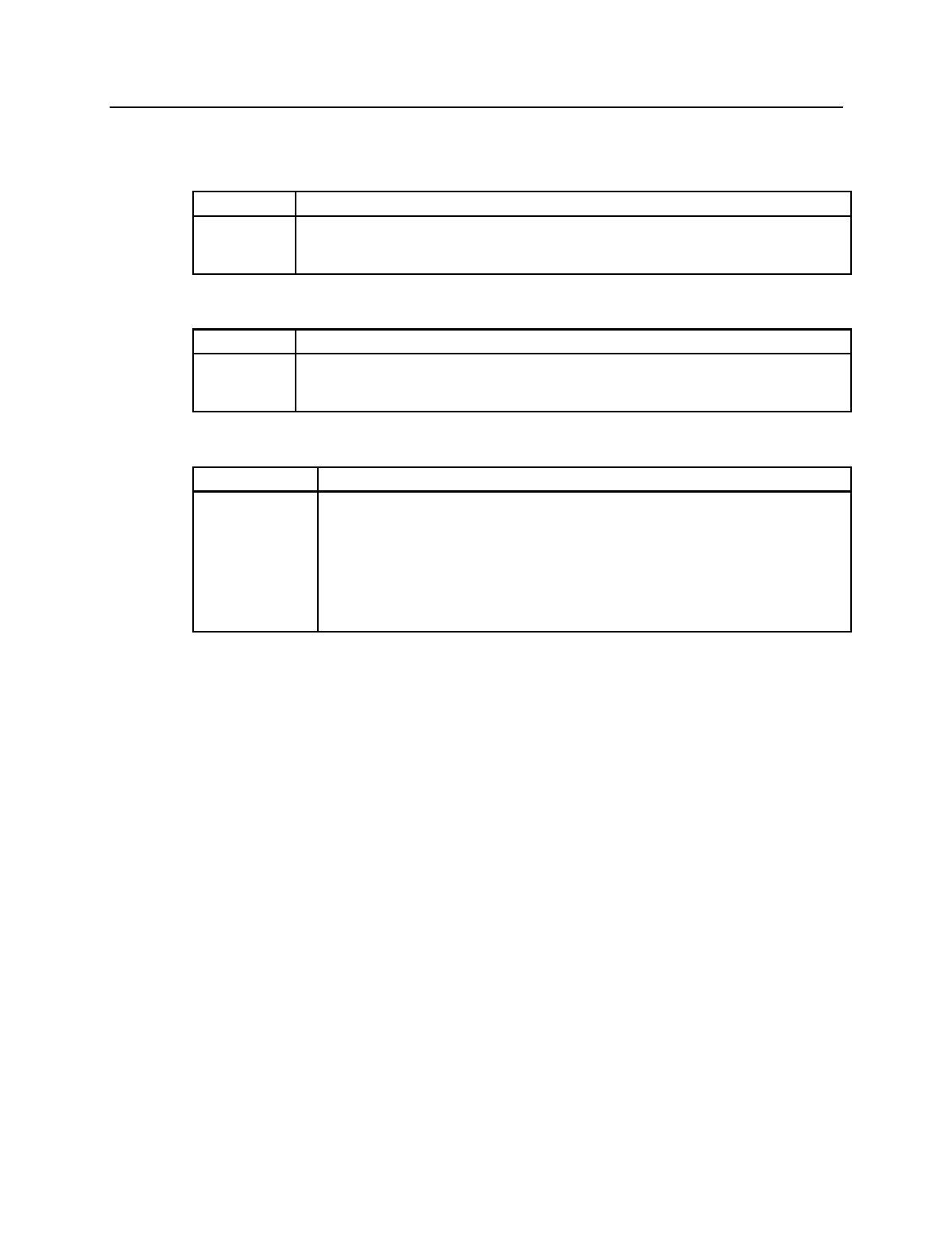
3486/3488/3489 Marketing Resources, Manuals,
IBM PSG Fax System (1-800-IBM-3395)
Fax Doc# Item
10015 InfoWindow II 3486/3488/3489 - Marketing Reference Guide
11103 General Purpose Monitors (G42,G51,G54,G74,G94) - Specification Sheet
11152 Monitors (G42,G51,G54,G74,G94,P72,P92,P202,9514,9516) Product Reference Guide
IBM Fax Service (1-800-IBM-4FAX)
Fax Doc# Item
1712 InfoWindow II 3486/3488/3489 - Marketing Reference Guide
4261 General Purpose Monitors (G42,G51,G54,G74,G94) - Specification Sheet
4262 Monitors (G42,G51,G54,G74,G94,P72,P92,P202,9514,9516) Product Reference Guide
Manuals
Form Number Item
GA18-7096 InfoWindow II 3486/3487 Introduction and Installation Planning Guide
GA18-7097 InfoWindow II 3486 User's Guide
GA18-7646 InfoWindow II 3488-V User's Guide
GA18-7492 InfoWindow II 3489-V User's Guide
GA18-7099 Connecting the InfoWindow II 3486 to System/36 or AS/400
SY18-2335 InfoWindow II 3481 and 3486 Maintenance Information
SY18-2338 InfoWindow II 3483-V and 3488-V Maintenance Information
SY18-2345 InfoWindow II 3489-V Maintenance Information
21

IBML
Printed in U.S.A.
G326-0265-10
