Guide To CMus Music Player For Your Terminal Tux Arena Debian Ubuntu
User Manual: Pdf
Open the PDF directly: View PDF  .
.
Page Count: 4
3/3/2016 Guide to CMus - Music Player for Your Terminal | TuxArena Debian/Ubuntu
Debian/Ubuntu
ThestaticsideofTuxArena
Navigation
Home
TuxArena
TuxArenaBlog
NeonView
Forum
FeaturedTutorial
HowtoCompileC/C++inUbuntufor
EducationalPurposes
Guides
HowtoCompileC/C++inUbuntufor
EducationalPurposes
CompleteGuidetoFirefoxinUbuntu
CompleteStepbyStepGuidetoMakeISO
ImagesinUbuntu
GuidetoCMusMusicPlayerforYourTerminal
CommandLineGuidetoAudioFilesinUbuntu
IntroductiontoLinuxCommandLinefor
Beginners
AGuidetoWineonUbuntuforBeginners
Tutorials
2WaystoInstalltheLatestFlashPlayerin
Ubuntu11.04
HowTo:CreateISOImagesfromCommand
Line
HowTo:EnableSyntaxHighlightinginNano
Editor
OnlineReaders
DebianRecommendedLinks
http://www.debian.org/
http://forums.debian.net/
UbuntuRecommendedLinks
http://www.ubuntu.com/
http://ubuntuforums.org/
https://help.ubuntu.com/
https://wiki.ubuntu.com/
http://planet.ubuntu.com/
http://fridge.ubuntu.com/
http://ubuntunews.org/
http://www.psychocats.net/
http://www.markshuttleworth.com/
LinuxRecommendedLinks
http://www.fsdaily.com/
http://lxer.com/
http://www.raiden.net/
http://www.linuxtoday.com/
http://www.ubuntuhq.com/
http://www.reddit.com/
http://www.tuxmachines.org/
GuidetoCMusMusicPlayerforYourTerminal
CMusisafree,powerful,terminalbasedmusicplayerusingthencursestoolkit.CMussupportsvariousaudio
formats,includingOggVorbis,FLAC,MP3,WAV,Musepack,WavPack,WMA,AACandMP4.Although
CMusisnottheonlygoodplayerfortheshell(alternativeslikeMOC,Herrieormp3blasterarealsoavailable),I
preferitduetoitsuniquekeyboardshortcutsandfeaturecompleteness.Thisguideisdividedintothefollowing
sections(clickonanytojumpdirectlytoit):
CMusFeatures
UsingCMus
EnablingLast.fmorLibre.fmSongSubmissioninCMus
HowTo:CompileandInstallCMusinDebian5.0Lenny
CMusFeatures
HerearethemainfeaturesofCMus:
Gaplessplayback
ReplayGainsupport
MP3andOggstreamingfromSHOUTcastorIcecast
Playlistsupportandpowerfulplaylistfilters
Playqueue
Filebrowser
Last.fmorLibre.fmsongsubmissionsupport(viascripts)
Sevendifferentviewmodes
Colorthemes
Vilikekeyboardshortcuts
UsingCMus
Firstofall,wewilladdseveralsongstothemedialibrary.CMususesVistylecommands,soallthecommands
willstartwith:followedbyacertaincommand.Forexample,toaddalltheaudiofilesinsidethe~/music
directory,wewoulduse:
:add ~/music
ToquitCMusatanytime,usethe:qcommand(orpressQfollowedbyY).
CMusofferssevendifferentviews,whichcanbeaccessedusingthe17keys.Heretheyare:
1Library,thedefaultviewmode,includingtwotabs(artists/albumsandsongsincurrentlyselected
album)
2SortedLibrary,whichprovidesaplaylistviewallowingtojumptospecifictracks(thisviewcanbe
customizedinviewmode6
3Playlist,editableplaylist
4PlayQueue,whichdisplaysthetrackqueue
5FileBrowser
6Filters,alistofuserdefinedfiltersforthelibrary
7Settings,whichdisplayskeybindingsandcommands
Libraryviewmode
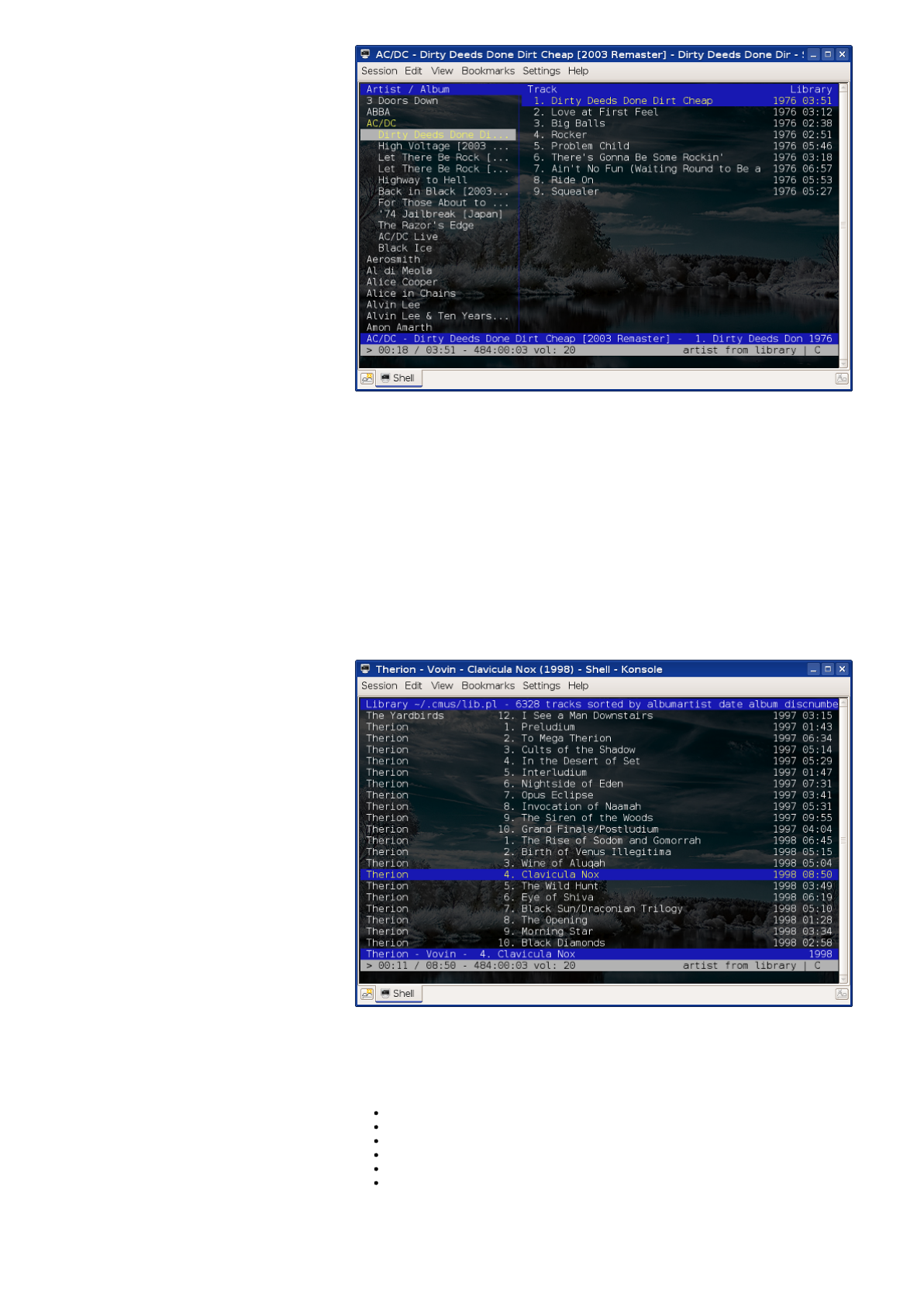
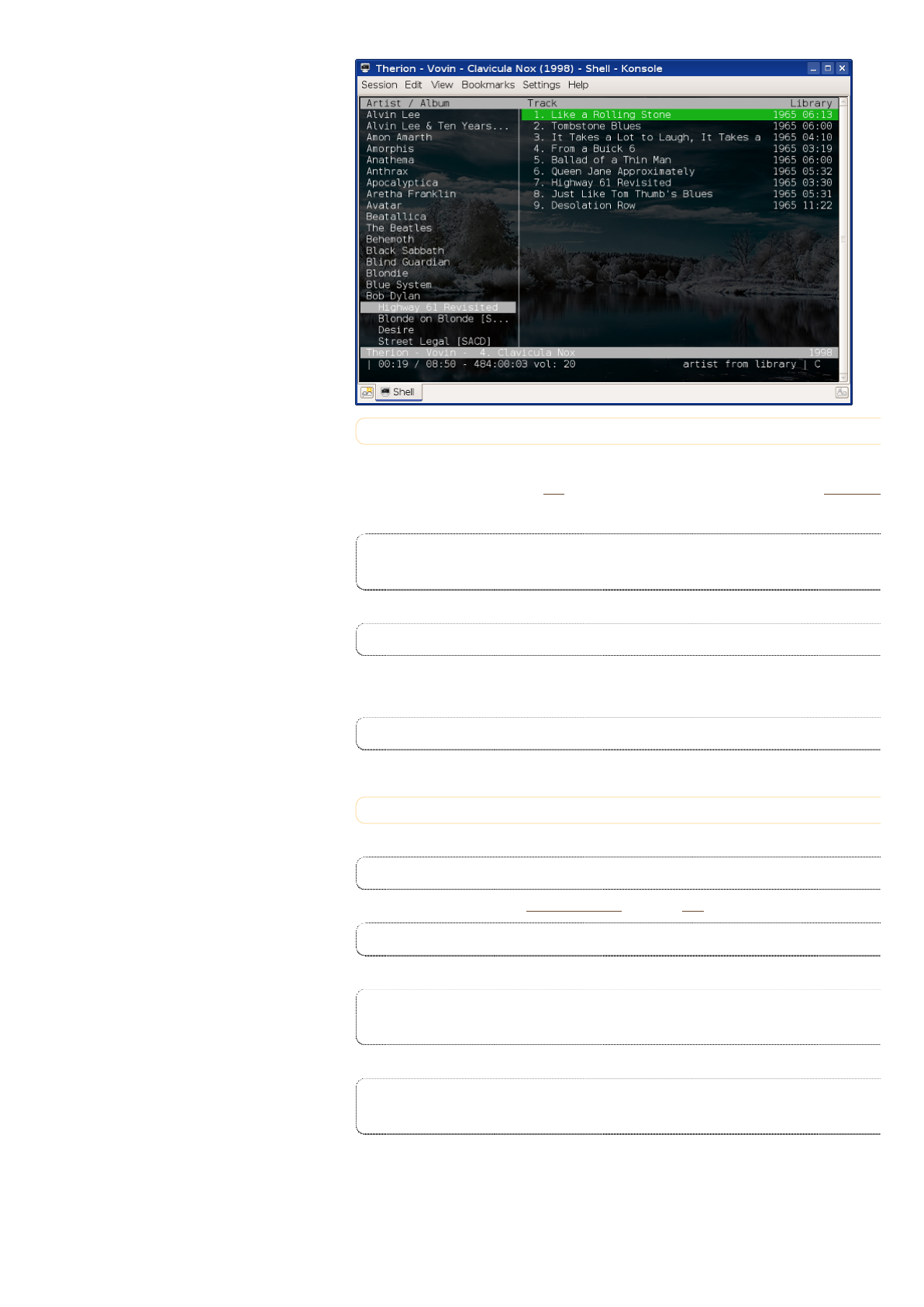
Thetwoviewswhichyouwillusuallyusearethefirstandthesecondone.Let'shavealookatthefirstone:
3/3/2016 Guide to CMus - Music Player for Your Terminal | TuxArena Debian/Ubuntu
Thelefttabcontainstheartistsandtheiralbums.TonavigatethroughthoseusetheUp/Downarrowkeysor
andK,andpressSpacetoexpandthetreeview.Wheneveryouselectanalbumthetrackswillappearinthetab
totherightside,soyoucanusetheTABkeytoswitchbetweenthetwotabsandEntertostartplayingthe
currentlyselectedsong.Hereareseveralusefulkeyboardshortcuts:
TABtoswitchbetweenthetwotabs
Xtostartplaying
Vtostopplaying
Ctopauseplaying
todecreasevolumeby10%
+toincreasevolumeby10%
SortedLibraryviewmode
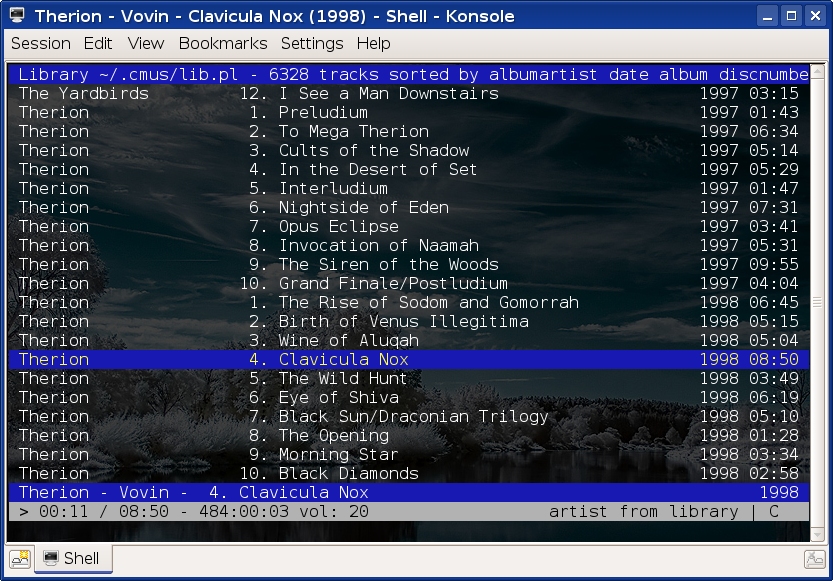
Thesecondviewmode(SortedLibrary)allowsyoutoquicklyjumptoasongbyusingthe/(slashcharacter),and
thentypewordsfromthesongyouwantinanyorder.PressEntertwicetoplaythesongorNtosearchforthe
nextoccurence.
CMuscommandsandkeyboardshortcuts
UsingVistylekeyboardshortcuts,CMusallowsyoutousecommandswhichareprependedby:anditsupports
autocompletionusingTAB.Hereareseveralusefulcommands(acompletelistisavailableinviewmode7orin
themanualpage):
:setsoftvol=trueenablesoftwarevolumecontrol
:add/path/to/music/dirwilladdalltheaudiofilesfrom/path/to/music/dirtothelibrary
:clearwillcleartheplaylist
:saveplaylist.plswillsavethecurrentplaylist
:loadplaylist.plswillloadplaylist.pls
:setstatusdisplayprogram=/path/to/scrobblerwillsetthescripttouseforLast.fmsongsubmission
Usingthemes(colorschemes)
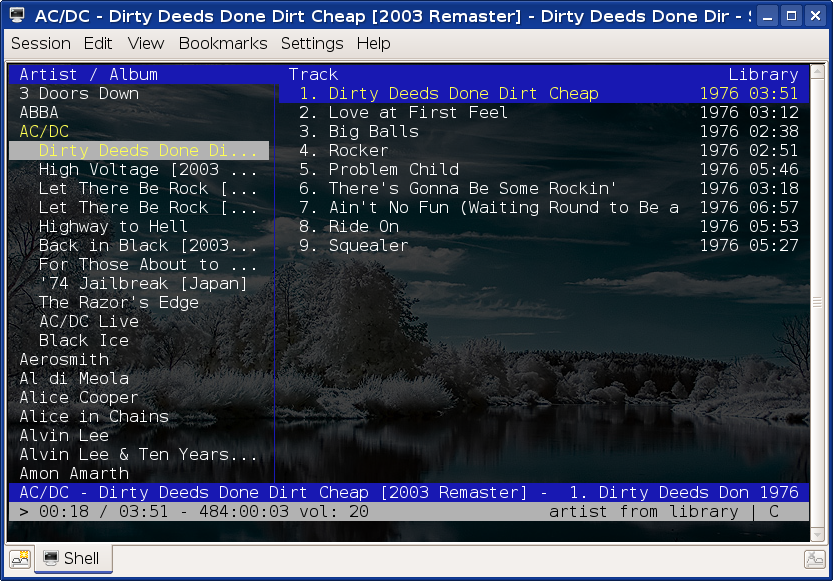
CMussupportsseveralcolorschemesusingthe:colorschemecommand.Forexample,:colorschemexterm
whitelookslikethis:
3/3/2016 Guide to CMus - Music Player for Your Terminal | TuxArena Debian/Ubuntu
EnablingLast.fmandLibre.fmSongSubmission
AlthoughCMusdoesn'tcomeswithanintegratedLast.fmsongsubmissionfeaturebydefault,theofficialwebsite
providesseveralscriptswhichcandoit,andactivatinganyoneofthemisquiteeasy.Forourexamplewewill
usethePerlscript,whichisavailablehereunderthenamepostfm.Firstcopythescriptfromthisaddress
preferablyinsideyour~/.cmusdirectory,andthenedititwithatexteditortofillinyourLast.fmusernameand
password.Replaceyourloginandyourpasswordwiththeirappropriatevalues:
our %rc = (
login => "your-login",
password => "your-password",
Next,makethescriptexecutable,e.g.:
chmod 755 ~/.cmus/post-fm
Nowlet'senablethescript.ThenewestversionofCMuscomeswiththe:setstatusdisplayprogramcommand
whichallowsyoutosetwhichscriptyouwanttouseforscrobblingtracks.Sotoenableit,usethefollowing
command:
:set status-display-program=~/.cmus/post-fm
Yourtracksubmissionshouldbeenablednow.NoticethatforLibre.fmyoucanuncommentthelinewhichreads
#host=>'turtle.libre.fm',,justunderwhereyoufilledintheusernameandpasswordfields.
HowTo:CompileandInstallCMusinDebian5.0Lenny
First,fetchtheneededdependencies:
apt-get build-dep cmus
Downloadthesourcetarballfromtheofficialwebsite(directlinkhere)anduncompressit:
tar -xjf cmus-v2.3.3.tar.bz2
Tocompileandinstallissue:
./configure
make
make install
Thelastoneasroot.Alternatelyyoucanspecifyadifferentinstallationprefixandinstallasnormaluser,e.g.:
./configure --prefix=/home/USER/usr
make
make install
Inwhichcaseyoushouldmakesure/home/USER/usr/binisinyour$PATH.


3/3/2016 Guide to CMus - Music Player for Your Terminal | TuxArena Debian/Ubuntu
Ifyouhavesuggestionsorcorrectionstothesetutorials,pleasecontactmeatcraciun.dan@tuxarena.comorleaveacommentontheTuxArenawebsite.
Copyright(C)CraciunDan2010underthetermsofCreativeCommonsAttributionShareAlike3.0UnportedLicense.
