Instructions
Instructions
User Manual: Pdf
Open the PDF directly: View PDF  .
.
Page Count: 39
11/17/2017 Ethereum Pet Shop -- Your First Dapp | Truffle Suite
http://truffleframework.com/tutorials/pet-shop 1/39
This series of tutorials will take you through building your rst dapp—an
adoption tracking system for a pet shop!
This tutorial is meant for those with a basic knowledge of Ethereum and
smart contracts, who have some knowledge of HTML and JavaScript, but
who are new to dapps.
Note: For Ethereum basics, please read the True Ethereum Overview
(/tutorials/ethereum-overview) tutorial before proceeding.
ETHEREUM PET SHOP

11/17/2017 Ethereum Pet Shop -- Your First Dapp | Truffle Suite
http://truffleframework.com/tutorials/pet-shop 2/39
In this tutorial we will be covering:
Setting up the development environment
Creating a True project using a True Box
Writing the smart contract
Compiling and migrating the smart contract
Testing the smart contract
Creating a user interface to interact with the smart contract
Interacting with the dapp in a browser
Pete Scandlon of Pete's Pet Shop is interested in using Ethereum as an
ecient way to handle their pet adoptions. The store has space for 16 pets
at a given time, and they already have a database of pets. As an initial proof
of concept, Pete wants to see a dapp which associates an Ethereum
address with a pet to be adopted.
The website structure and styling will be supplied. Our job is to write the
smart contract and front-end logic for its usage.
There are a few technical requirements before we start. Please install the
following:
Node.js v6+ LTS and npm (comes with Node) (https://nodejs.org/en/)
Git (https://git-scm.com/)
Once we have those installed, we only need one command to install True:
Background
Setting up the development environment

11/17/2017 Ethereum Pet Shop -- Your First Dapp | Truffle Suite
http://truffleframework.com/tutorials/pet-shop 3/39
To verify that True is installed properly, type truffle version on a
terminal. If you see an error, make sure that your npm modules are added
to your path.
1. True initializes in the current directory, so rst create a directory in your
development folder of choice and then moving inside it.
2. We've created a special True Box (/boxes) just for this tutorial called
pet-shop , which includes the basic project structure as well as code for
the user interface. Use the truffle unbox command to unpack this
True Box.
npm install -g truffle
Creating a True project using a True Box
mkdir pet-shop-tutorial
cd pet-shop-tutorial
truffle unbox pet-shop
11/17/2017 Ethereum Pet Shop -- Your First Dapp | Truffle Suite
http://truffleframework.com/tutorials/pet-shop 4/39
Note: True can be initialized a few dierent ways. Another useful
initialization command is truffle init , which creates an empty
True project with no example contracts included. For more
information, please see the documentation on Creating a project
(/docs/getting_started/project).
The default True directory structure contains the following:
contracts/ : Contains the Solidity (https://solidity.readthedocs.io/)
source les for our smart contracts. There is an important contract in
here called Migrations.sol , which we'll talk about later.
migrations/ : True uses a migration system to handle smart contract
deployments. A migration is an additional special smart contract that
keeps track of changes.
test/ : Contains both JavaScript and Solidity tests for our smart contracts
truffle.js : True conguration le
The pet-shop True Box has extra les and folders in it, but we won't
worry about those just yet.
We'll start our dapp by writing the smart contract that acts as the back-end
logic and storage.
1. Create a new le named Adoption.sol in the contracts/ directory.
2. Add the following content to the le:
Directory structure
Writing the smart contract

11/17/2017 Ethereum Pet Shop -- Your First Dapp | Truffle Suite
http://truffleframework.com/tutorials/pet-shop 5/39
Things to notice:
The minimum version of Solidity required is noted at the top of the
contract: pragma solidity ^0.4.4; . The pragma command means
"
additional information that only the compiler cares about
", while the
caret symbol (^) means "
the version indicated or higher
".
Like JavaScript or PHP, statements are terminated with semicolons.
Solidity is a statically-typed language, meaning data types like strings,
integers, and arrays must be dened. Solidity has a unique type called an
address. Addresses are Ethereum addresses, stored as 20 byte values.
Every account and smart contract on the Ethereum blockchain has an
address and can send and receive Ether to and from this address.
1. Add the following variable on the next line after contract Adoption { .
Things to notice:
pragma solidity ^0.4.4;
contract Adoption {
}
Variable setup
address[16] public adopters;
11/17/2017 Ethereum Pet Shop -- Your First Dapp | Truffle Suite
http://truffleframework.com/tutorials/pet-shop 6/39
We've dened a single variable: adopters . This is an array of Ethereum
addresses. Arrays contain one type and can have a xed or variable
length. In this case the type is address and the length is 16 .
You'll also notice adopters is public. Public variables have automatic
getter methods, but in the case of arrays a key is required and will only
return a single value. Later, we'll write a function to return the whole
array for use in our UI.
Let's allow users to make adoption requests.
1. Add the following function to the smart contract after the variable
declaration we set up above.
Things to notice:
In Solidity the types of both the function parameters and output must be
specied. In this case we'll be taking in a petId (integer) and returning
an integer.
Your rst function: Adopting a pet
// Adopting a pet
function adopt(uint petId) public returns (uint) {
require(petId >= 0 && petId <= 15);
adopters[petId] = msg.sender;
return petId;
}
11/17/2017 Ethereum Pet Shop -- Your First Dapp | Truffle Suite
http://truffleframework.com/tutorials/pet-shop 7/39
We are checking to make sure petId is in range of our adopters array.
Arrays in Solidity are indexed from 0, so the ID value will need to be
between 0 and 15. We use the require() statement to ensure the the ID
is within range.
If the ID is in range, we then add the address that made the call to our
adopters array. The address of the person or smart contract who
called this function is denoted by msg.sender .
Finally, we return the petId provided as a conrmation.
As mentioned above, array getters return only a single value from a given
key. Our UI needs to update all pet adoption statuses, but making 16 API
calls is not ideal. So our next step is to write a function to return the entire
array.
1. Add the following getAdopters() function to the smart contract, after
the adopt() function we added above:
Since adopters is already declared, we can simply return it. Be sure to
specify the return type (in this case, the type for adopters ) as
address[16] .
Your second function: Retrieving the adopters
// Retrieving the adopters
function getAdopters() public returns (address[16]) {
return adopters;
}
Compiling and migrating the smart contract

11/17/2017 Ethereum Pet Shop -- Your First Dapp | Truffle Suite
http://truffleframework.com/tutorials/pet-shop 8/39
Now that we have written our smart contract, the next steps are to compile
and migrate it.
True has a built-in developer console, which we call True Develop, which
generates a development blockchain that we can use to test deploy
contracts. It also has the ability to run True commands directly from the
console. We will use True Develop to perform most of the actions on our
contract in this tutorial.
Solidity is a compiled language, meaning we need to compile our Solidity to
bytecode for the Ethereum Virtual Machine (EVM) to execute. Think of it as
translating our human-readable Solidity into something the EVM
understands.
1. Launch True Develop. Make sure you are in the directory that contains
the dapp.
You will see a prompt that shows that you are now in True Develop. All
commands will be run from this console unless otherwise stated.
Compilation
truffle develop
truffle(develop)>
11/17/2017 Ethereum Pet Shop -- Your First Dapp | Truffle Suite
http://truffleframework.com/tutorials/pet-shop 9/39
Note: If you're on Windows and encountering problems running this
command, please see the documentation on resolving naming
conicts on Windows (/docs/advanced/conguration#resolving-
naming-conicts-on-windows).
2. Compile the dapp:
You should see output similar to the following:
Note: If you're not using True Develop, these commands can be
used on your terminal by prexing them with truffle . As in, to
compile, run truffle compile on a terminal.
However, if you're not using True Develop, you'll have to use
another test blockchain such as the TestRPC
(https://github.com/ethereumjs/testrpc).
compile
Compiling ./contracts/Migrations.sol...
Compiling ./contracts/Adoption.sol...
Writing artifacts to ./build/contracts
Migration
11/17/2017 Ethereum Pet Shop -- Your First Dapp | Truffle Suite
http://truffleframework.com/tutorials/pet-shop 10/39
Now that we've successfully compiled our contracts, it's time to migrate
them to the blockchain!
A migration is a deployment script meant to alter the state of your
application's contracts, moving it from one state to the next. For the rst
migration, you might just be deploying new code, but over time, other
migrations might move data around or replace a contract with a new one.
Note: Read more about migrations (docs/getting_started/migrations) in
the True documentation.
You'll see one JavaScript le already in the migrations/ directory:
1_initial_migration.js . This handles deploying the Migrations.sol
contract to observe subsequent smart contract migrations, and ensures we
don't double-migrate unchanged contracts in the future.
Now we are ready to create our own migration script.
1. Create a new le named 2_deploy_contracts.js in the migrations/
directory.
2. Add the following content to the 2_deploy_contracts.js le:
3. Back in our console, migrate the contract to the blockchain.
var Adoption = artifacts.require("Adoption");
module.exports = function(deployer) {
deployer.deploy(Adoption);
};

11/17/2017 Ethereum Pet Shop -- Your First Dapp | Truffle Suite
http://truffleframework.com/tutorials/pet-shop 11/39
You should see output similar to the following:
You can see the migrations being executed in order, followed by the
blockchain address of each deployed contract. (Your addresses will dier.)
You've now written your rst smart contract and deployed it to a locally
running test blockchain. It's time to interact with our smart contract now to
make sure it does what we want.
True is very exible when it comes to smart contract testing, in that tests
can be written either in JavaScript or Solidity. In this tutorial, we'll be writing
our tests in Solidity.
migrate
Using network 'develop'.
Running migration: 1_initial_migration.js
Deploying Migrations...
Migrations: 0x75175eb116b36ff5fef15ebd15cbab01b50b50d1
Saving successful migration to network...
Saving artifacts...
Running migration: 2_deploy_contracts.js
Deploying Adoption...
Adoption: 0xb9f485451a945e65e48d9dd7fc5d759af0a89e21
Saving successful migration to network...
Saving artifacts...
Testing the smart contract

11/17/2017 Ethereum Pet Shop -- Your First Dapp | Truffle Suite
http://truffleframework.com/tutorials/pet-shop 12/39
1. Create a new le named TestAdoption.sol in the test/ directory.
2. Add the following content to the TestAdoption.sol le:
We start the contract o with 3 imports:
Assert.sol : Gives us various assertions to use in our tests. In testing, an
assertion checks for things like equality, inequality or emptiness to
return a pass/fail from our test. Here's a full list of the assertions
included with True (https://github.com/truesuite/true-
core/blob/master/lib/testing/Assert.sol).
DeployedAddresses.sol : When running tests, True will deploy a fresh
instance of the contract being tested to the TestRPC. This smart contract
gets the address of the deployed contract.
Adoption.sol : The smart contract we want to test.
Note: The rst two imports are referring to global True les, not a
truffle directory. You should not see a truffle directory inside your
test/ directory.
pragma solidity ^0.4.11;
import "truffle/Assert.sol";
import "truffle/DeployedAddresses.sol";
import "../contracts/Adoption.sol";
contract TestAdoption {
Adoption adoption = Adoption(DeployedAddresses.Adoption());
}
11/17/2017 Ethereum Pet Shop -- Your First Dapp | Truffle Suite
http://truffleframework.com/tutorials/pet-shop 13/39
Then we dene a contract-wide variable containing the smart contract to be
tested, calling the DeployedAddresses smart contract to get its address.
To test the adopt() function, recall that upon success it returns the given
petId . We can ensure an ID was returned and that it's correct by
comparing the return value of adopt() to the ID we passed in.
1. Add the following function within the TestAdoption.sol smart contract,
after the declaration of Adoption :
Things to notice:
We call the smart contract we declared earlier with the ID of 8.
We then declare an expected value of 8 as well.
Finally, we pass the actual value, the expected value and a failure
message (which gets printed to the console if the test does not pass) to
Assert.equal() .
Testing the adopt() function
// Testing the adopt() function
function testUserCanAdoptPet() {
uint returnedId = adoption.adopt(8);
uint expected = 8;
Assert.equal(returnedId, expected, "Adoption of pet ID 8 should be
}
Testing retrieval of a single pet's owner

11/17/2017 Ethereum Pet Shop -- Your First Dapp | Truffle Suite
http://truffleframework.com/tutorials/pet-shop 14/39
Remembering from above that public variables have automatic getter
methods, we can retrieve the address stored by our adoption test above.
Stored data will persist for the duration of our tests, so our adoption of pet
8 above can be retrieved by other tests.
1. Add this function below the previously added function in
TestAdoption.sol .
Since the TestAdoption contract will be sending the transaction, we set the
expected value to this, a contract-wide variable that gets the current
contract's address. From there we assert equality as we did above.
Since arrays can only return a single value given a single key, we create our
own getter for the entire array.
1. Add this function below the previously added function in
TestAdoption.sol .
// Testing retrieval of a single pet's owner
function testGetAdopterAddressByPetId() {
// Expected owner is this contract
address expected = this;
address adopter = adoption.adopters(8);
Assert.equal(adopter, expected, "Owner of pet ID 8 should be record
}
Testing retrieval of all pet owners

11/17/2017 Ethereum Pet Shop -- Your First Dapp | Truffle Suite
http://truffleframework.com/tutorials/pet-shop 15/39
Note the memory attribute on adopters . The memory attribute tells
Solidity to temporarily store the value in memory, rather than saving it to
the contract's storage. Since adopters is an array, and we know from the
rst adoption test that we adopted pet 8, we compare the testing contracts
address with location 8 in the array.
1. Back in True Develop, run the tests:
2. If all the tests pass, you'll see console output similar to this:
// Testing retrieval of all pet owners
function testGetAdopterAddressByPetIdInArray() {
// Expected owner is this contract
address expected = this;
// Store adopters in memory rather than contract's storage
address[16] memory adopters = adoption.getAdopters();
Assert.equal(adopters[8], expected, "Owner of pet ID 8 should be re
}
Running the tests
test

11/17/2017 Ethereum Pet Shop -- Your First Dapp | Truffle Suite
http://truffleframework.com/tutorials/pet-shop 16/39
Now that we've created the smart contract, deployed it to our local test
blockchain and conrmed we can interact with it via the console, it's time to
create a UI so that Pete has something to use for his pet shop!
Included with the pet-shop True Box was code for the app's front-end.
That code exists within the src/ directory.
The front-end doesn't use a build system (webpack, grunt, etc.) to be as easy
as possible to get started. The structure of the app is already there; we'll be
lling in the functions which are unique to Ethereum. This way, you can take
this knowledge and apply it to your own front-end development.
1. Open /src/js/app.js in a text editor.
Using network 'develop'.
Compiling ./contracts/Adoption.sol...
Compiling ./test/TestAdoption.sol...
Compiling truffle/Assert.sol...
Compiling truffle/DeployedAddresses.sol...
TestAdoption
✓ testUserCanAdoptPet (91ms)
✓ testGetAdopterAddressByPetId (70ms)
✓ testGetAdopterAddressByPetIdInArray (89ms)
3 passing (670ms)
Creating a user interface to interact with the
smart contract
Instantiating web3

11/17/2017 Ethereum Pet Shop -- Your First Dapp | Truffle Suite
http://truffleframework.com/tutorials/pet-shop 17/39
2. Examine the le. Note that there is a global App object to manage our
application, load in the pet data in init() and then call the function
initWeb3() . The web3 JavaScript library
(https://github.com/ethereum/web3.js/) interacts with the Ethereum
blockchain. It can retrieve user accounts, send transactions, interact with
smart contracts, and more.
3. Remove the multi-line comment from within initWeb3 and replace it
with the following:
Things to notice:
First, we check if there's a web3 instance already active. (Ethereum
browsers like Mist (https://github.com/ethereum/mist) or Chrome with
the MetaMask (https://metamask.io/) extension will inject their own web3
instances.) If an injected web3 instance is present, we get its provider and
use it to create our web3 object.
If no injected web3 instance is present, we create our web3 object based
on our local provider. (This fallback is ne for development environments,
but insecure and not suitable for production.)
// Is there is an injected web3 instance?
if (typeof web3 !== 'undefined') {
App.web3Provider = web3.currentProvider;
} else {
// If no injected web3 instance is detected, fallback to the TestRP
App.web3Provider = new Web3.providers.HttpProvider('http://localhos
}
web3 = new Web3(App.web3Provider);
Instantiating the contract
11/17/2017 Ethereum Pet Shop -- Your First Dapp | Truffle Suite
http://truffleframework.com/tutorials/pet-shop 18/39
Now that we can interact with Ethereum via web3, we need to instantiate
our smart contract so web3 knows where to nd it and how it works. True
has a library to help with this called truffle-contract . It keeps
information about the contract in sync with migrations, so you don't need to
change the contract's deployed address manually.
1. Still in /src/js/app.js , remove the multi-line comment from within
initContract and replace it with the following:
Things to notice:
We rst retrieve the artifact le for our smart contract. Artifacts are
information about our contract such as its deployed address and
Application Binary Interface (ABI). The ABI is a JavaScript object
dening how to interact with the contract including its variables,
functions and their parameters.
Once we have the artifacts in our callback, we pass them to
TruffleContract() . This creates an instance of the contract we can
interact with.
$.getJSON('Adoption.json', function(data) {
// Get the necessary contract artifact file and instantiate it with
var AdoptionArtifact = data;
App.contracts.Adoption = TruffleContract(AdoptionArtifact);
// Set the provider for our contract
App.contracts.Adoption.setProvider(App.web3Provider);
// Use our contract to retrieve and mark the adopted pets
return App.markAdopted();
});
11/17/2017 Ethereum Pet Shop -- Your First Dapp | Truffle Suite
http://truffleframework.com/tutorials/pet-shop 19/39
With our contract instantiated, we set its web3 provider using the
App.web3Provider value we stored earlier when setting up web3.
We then call the app's markAdopted() function in case any pets are
already adopted from a previous visit. We've encapsulated this in a
separate function since we'll need to update the UI any time we make a
change to the smart contract's data.
1. Still in /src/js/app.js , remove the multi-line comment from
markAdopted and replace it with the following:
Things to notice:
We access the deployed Adoption contract, then call getAdopters() on
that instance.
Getting The Adopted Pets and Updating The UI
var adoptionInstance;
App.contracts.Adoption.deployed().then(function(instance) {
adoptionInstance = instance;
return adoptionInstance.getAdopters.call();
}).then(function(adopters) {
for (i = 0; i < adopters.length; i++) {
if (adopters[i] !== '0x0000000000000000000000000000000000000000')
$('.panel-pet').eq(i).find('button').text('Success').attr('disa
}
}
}).catch(function(err) {
console.log(err.message);
});
11/17/2017 Ethereum Pet Shop -- Your First Dapp | Truffle Suite
http://truffleframework.com/tutorials/pet-shop 20/39
We rst declare the variable adoptionInstance outside of the smart
contract calls so we can access the instance after initially retrieving it.
Using call() allows us to read data from the blockchain without having to
send a full transaction, meaning we won't have to spend any ether.
After calling getAdopters() , we then loop through all of them, checking
to see if an address is stored for each pet. Since the array contains
address types, Ethereum initializes the array with 16 empty addresses.
This is why we check for an empty address string rather than null or other
falsey value.
Once a petId with a corresponding address is found, we disable its
adopt button and change the button text to "Success", so the user gets
some feedback.
Any errors are logged to the console.
1. Still in /src/js/app.js , remove the multi-line comment from
handleAdopt and replace it with the following:
Handling the adopt() Function
11/17/2017 Ethereum Pet Shop -- Your First Dapp | Truffle Suite
http://truffleframework.com/tutorials/pet-shop 21/39
Things to notice:
We use web3 to get the user's accounts. In the callback after an error
check, we then select the rst account.
From there, we get the deployed contract as we did above and store the
instance in adoptionInstance . This time though, we're going to send a
transaction instead of a call. Transactions require a "from" address and
have an associated cost. This cost, paid in ether, is called gas. The gas
cost is the fee for performing computation and/or storing data in a smart
contract. We send the transaction by executing the adopt() function
with both the pet's ID and an object containing the account address,
which we stored earlier in account .
var adoptionInstance;
web3.eth.getAccounts(function(error, accounts) {
if (error) {
console.log(error);
}
var account = accounts[0];
App.contracts.Adoption.deployed().then(function(instance) {
adoptionInstance = instance;
// Execute adopt as a transaction by sending account
return adoptionInstance.adopt(petId, {from: account});
}).then(function(result) {
return App.markAdopted();
}).catch(function(err) {
console.log(err.message);
});
});

11/17/2017 Ethereum Pet Shop -- Your First Dapp | Truffle Suite
http://truffleframework.com/tutorials/pet-shop 22/39
The result of sending a transaction is the transaction object. If there are
no errors, we proceed to call our markAdopted() function to sync the UI
with our newly stored data.
Now we're ready to use our dapp!
The easiest way to interact with our dapp in a browser is through MetaMask
(https://metamask.io/), an extension for Chrome.
1. Install MetaMask in your browser.
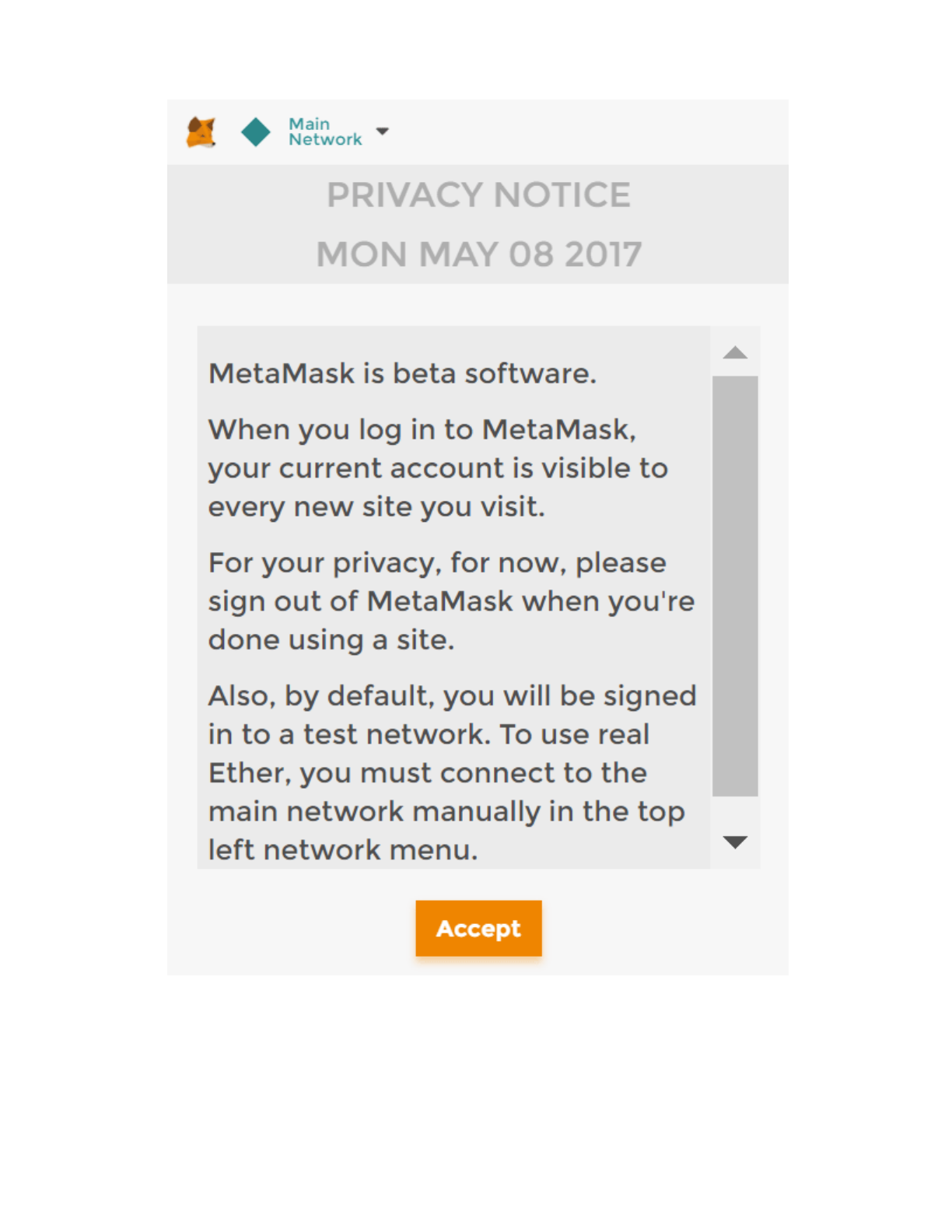
2. Once installed, you'll see the MetaMask fox icon next to your address bar.
Click the icon and you'll see this screen appear:
Interacting with the dapp in a browser
Installing and conguring MetaMask
11/17/2017 Ethereum Pet Shop -- Your First Dapp | Truffle Suite
http://truffleframework.com/tutorials/pet-shop 23/39
Privacy Notice
3. Click Accept to accept the Privacy Notice.
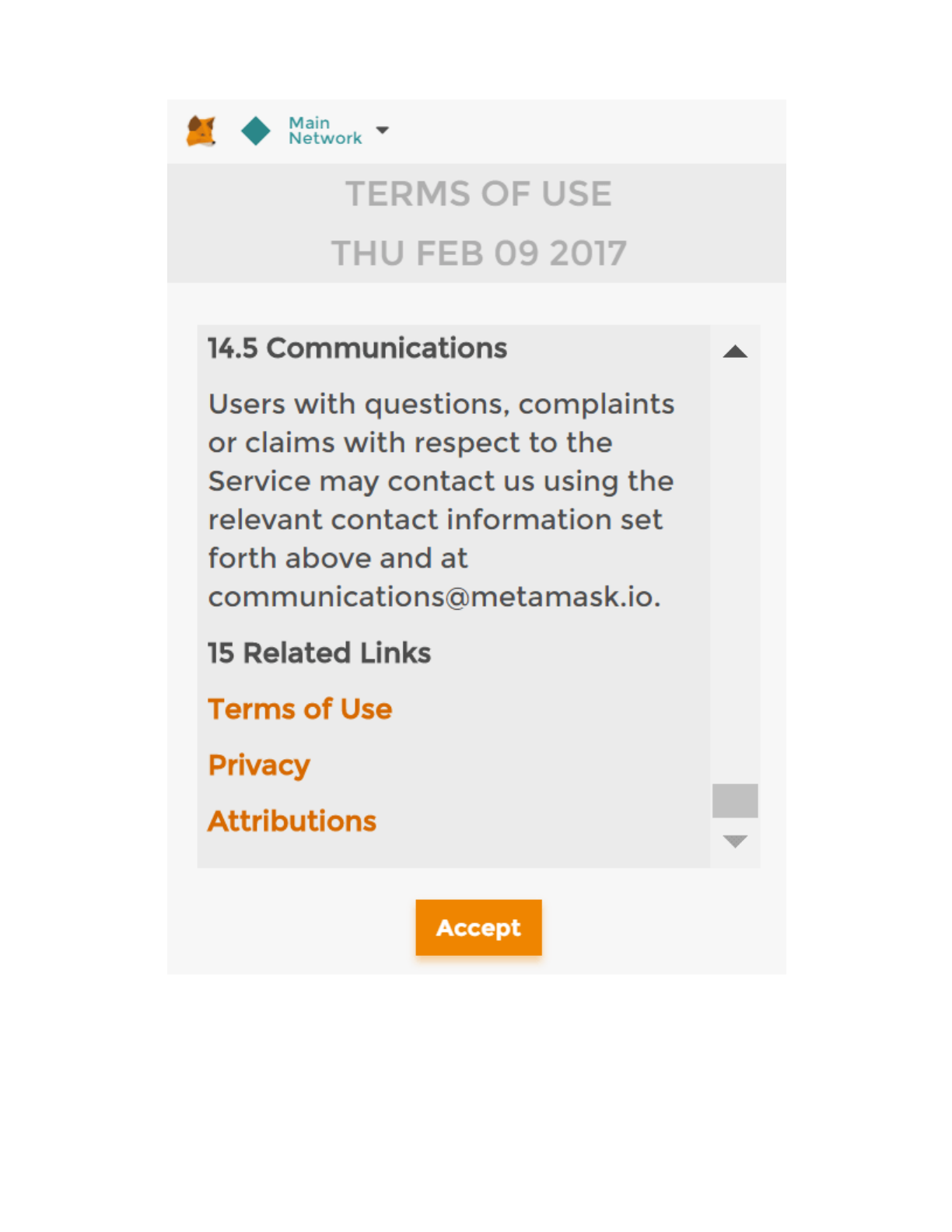
4. Then you'll see the Terms of Use. Read them, scrolling to the bottom, and
then click Accept there too.
11/17/2017 Ethereum Pet Shop -- Your First Dapp | Truffle Suite
http://truffleframework.com/tutorials/pet-shop 24/39
Terms of Use
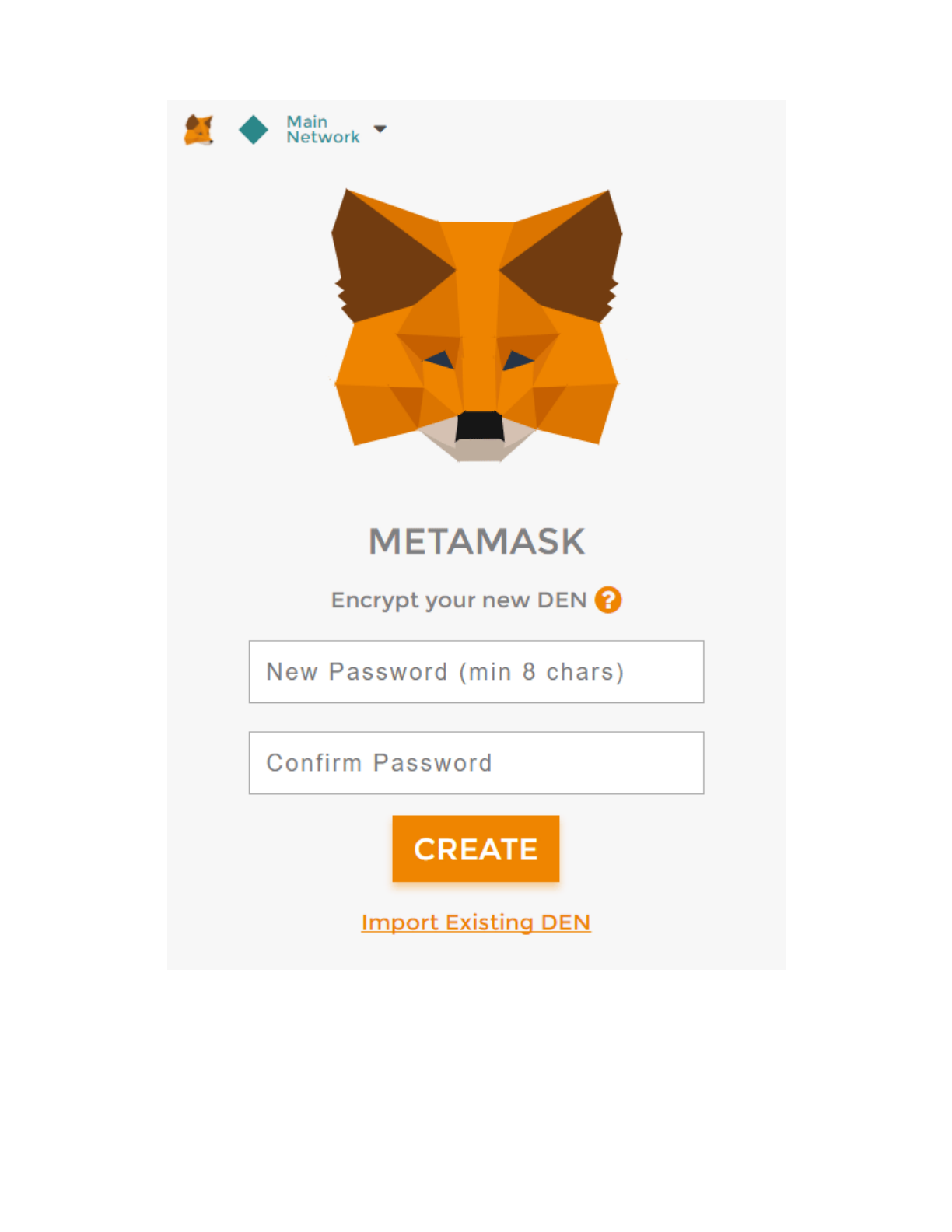
5. Now you'll see the initial MetaMask screen. Click Import Existing DEN.
11/17/2017 Ethereum Pet Shop -- Your First Dapp | Truffle Suite
http://truffleframework.com/tutorials/pet-shop 25/39
MetaMask initial screen
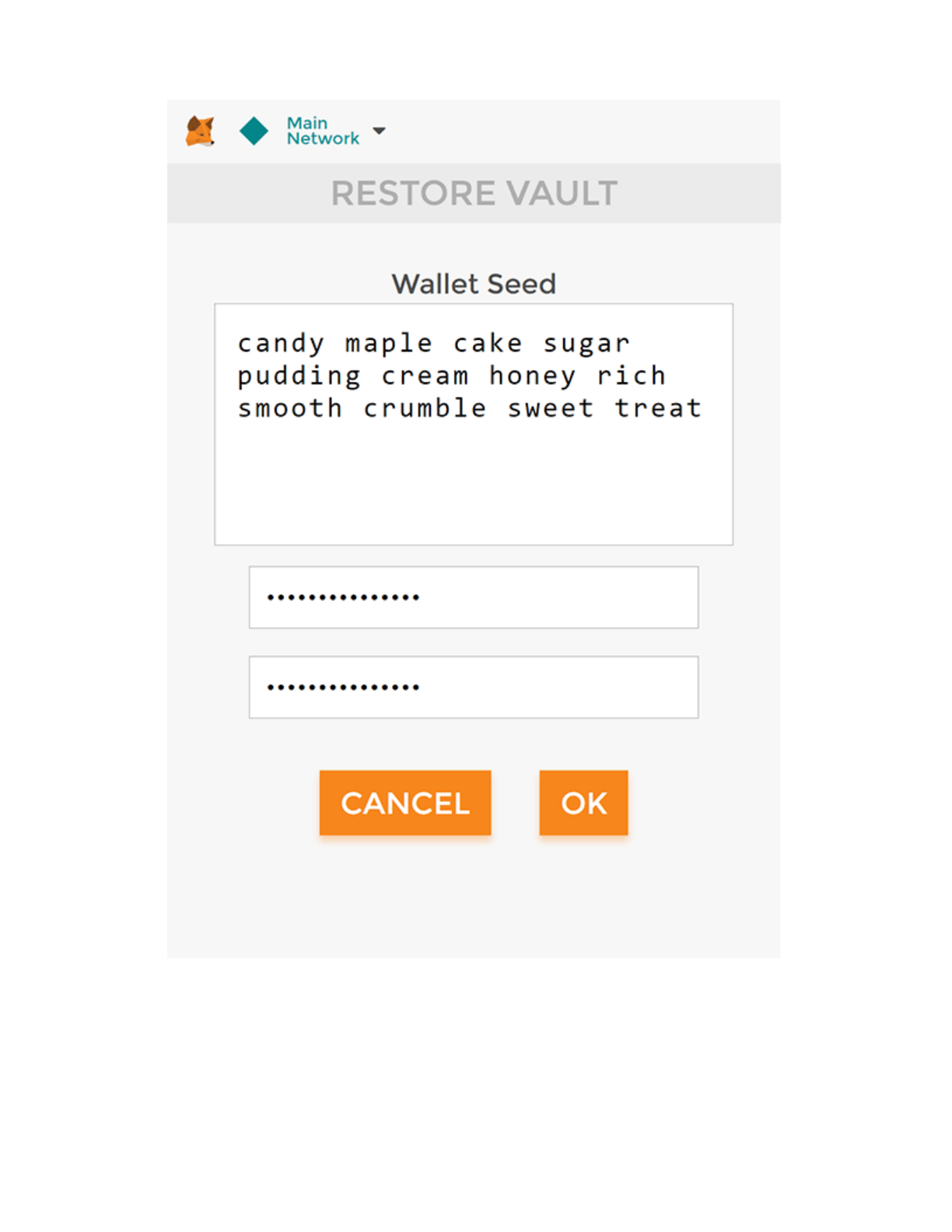
6. In the box marked Wallet Seed, enter the mnemonic that was displayed
when launching True Develop:

11/17/2017 Ethereum Pet Shop -- Your First Dapp | Truffle Suite
http://truffleframework.com/tutorials/pet-shop 26/39
Enter a password below that and click OK.
candy maple cake sugar pudding cream honey rich smooth crumble sweet
11/17/2017 Ethereum Pet Shop -- Your First Dapp | Truffle Suite
http://truffleframework.com/tutorials/pet-shop 27/39
MetaMask seed phrase
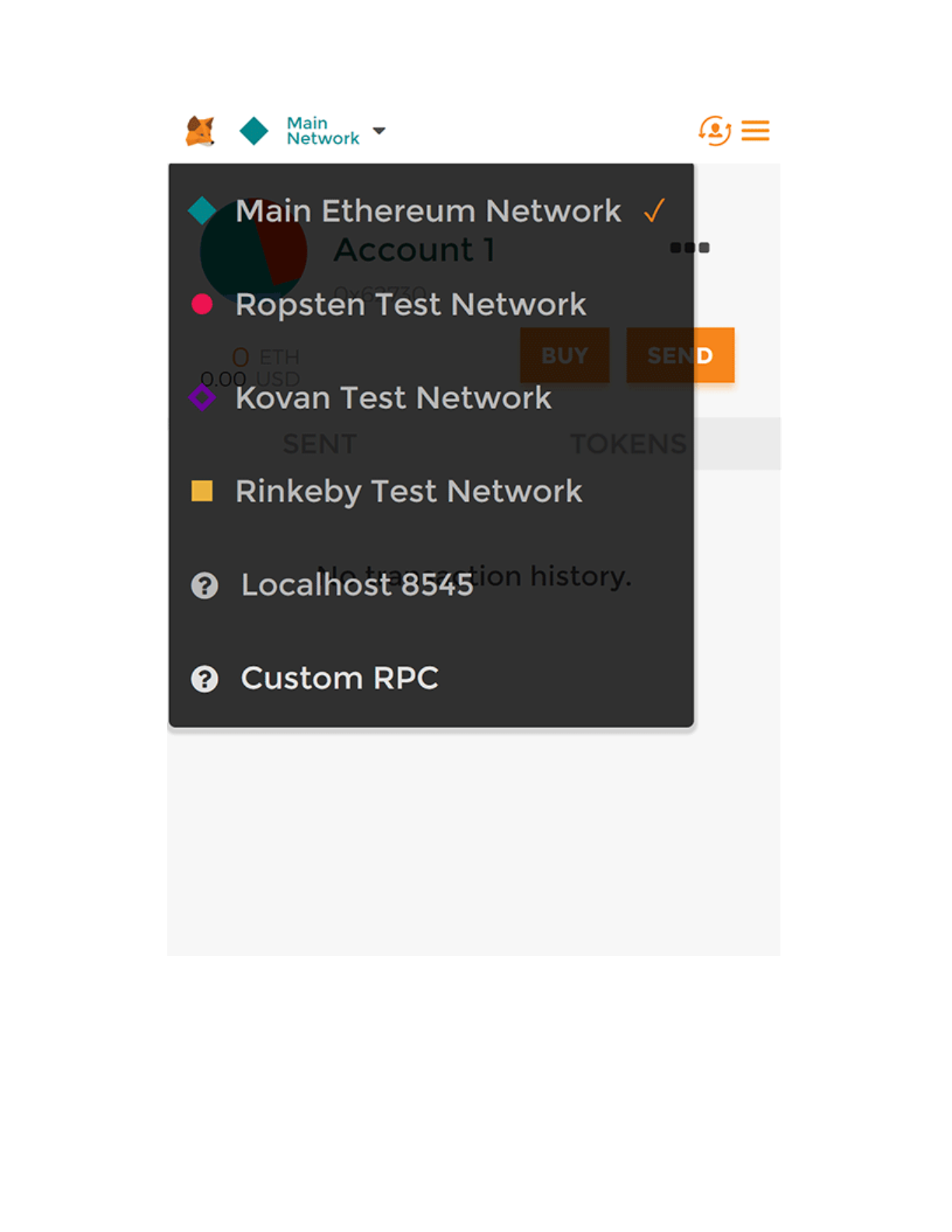
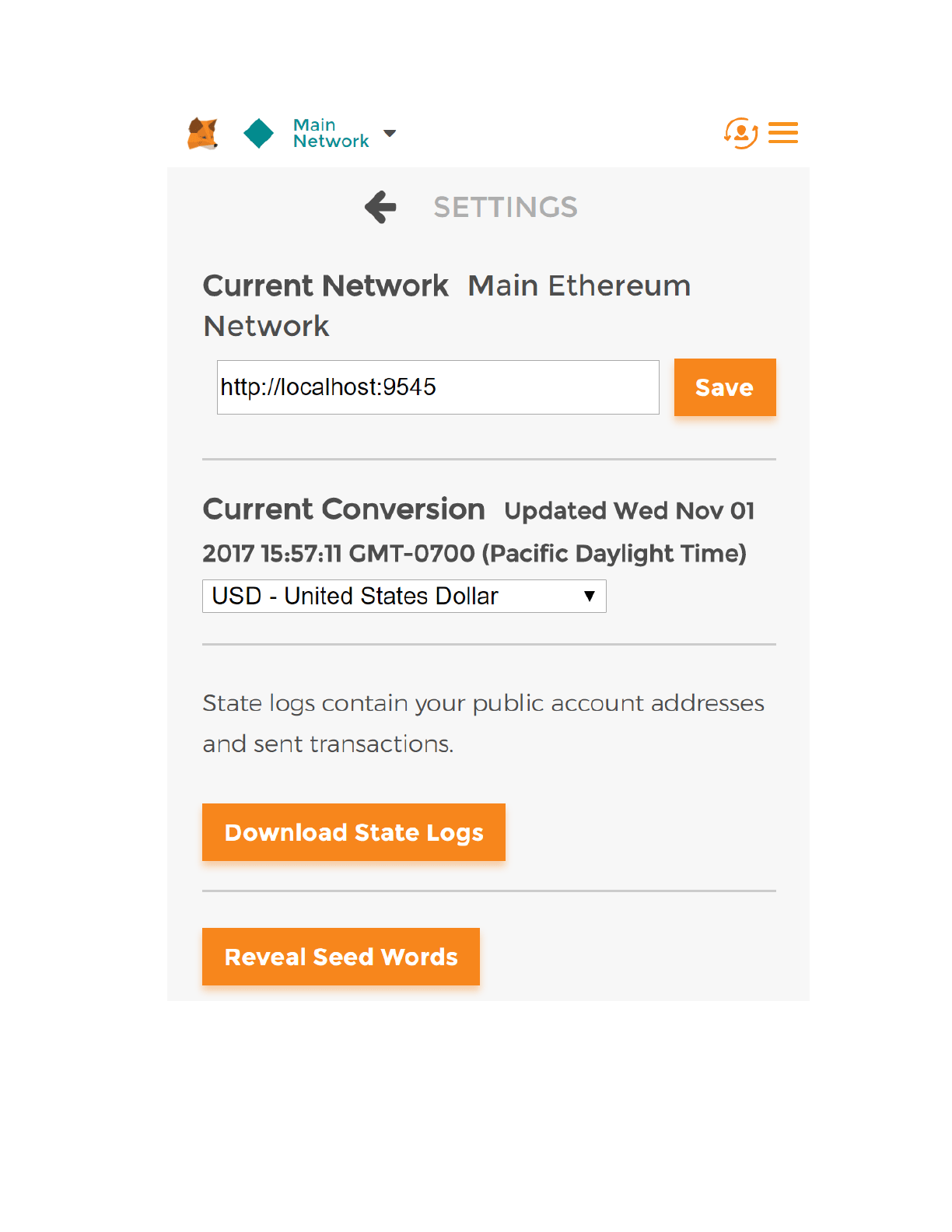
7. Now we need to connect MetaMask to the blockchain created by True
Develop. Click the menu that shows "Main Network" and select Custom
RPC.
11/17/2017 Ethereum Pet Shop -- Your First Dapp | Truffle Suite
http://truffleframework.com/tutorials/pet-shop 28/39
MetaMask network menu
8. In the box titled "New RPC URL" enter http://localhost:9545 and click
Save.
11/17/2017 Ethereum Pet Shop -- Your First Dapp | Truffle Suite
http://truffleframework.com/tutorials/pet-shop 29/39
MetaMask Custom RPC
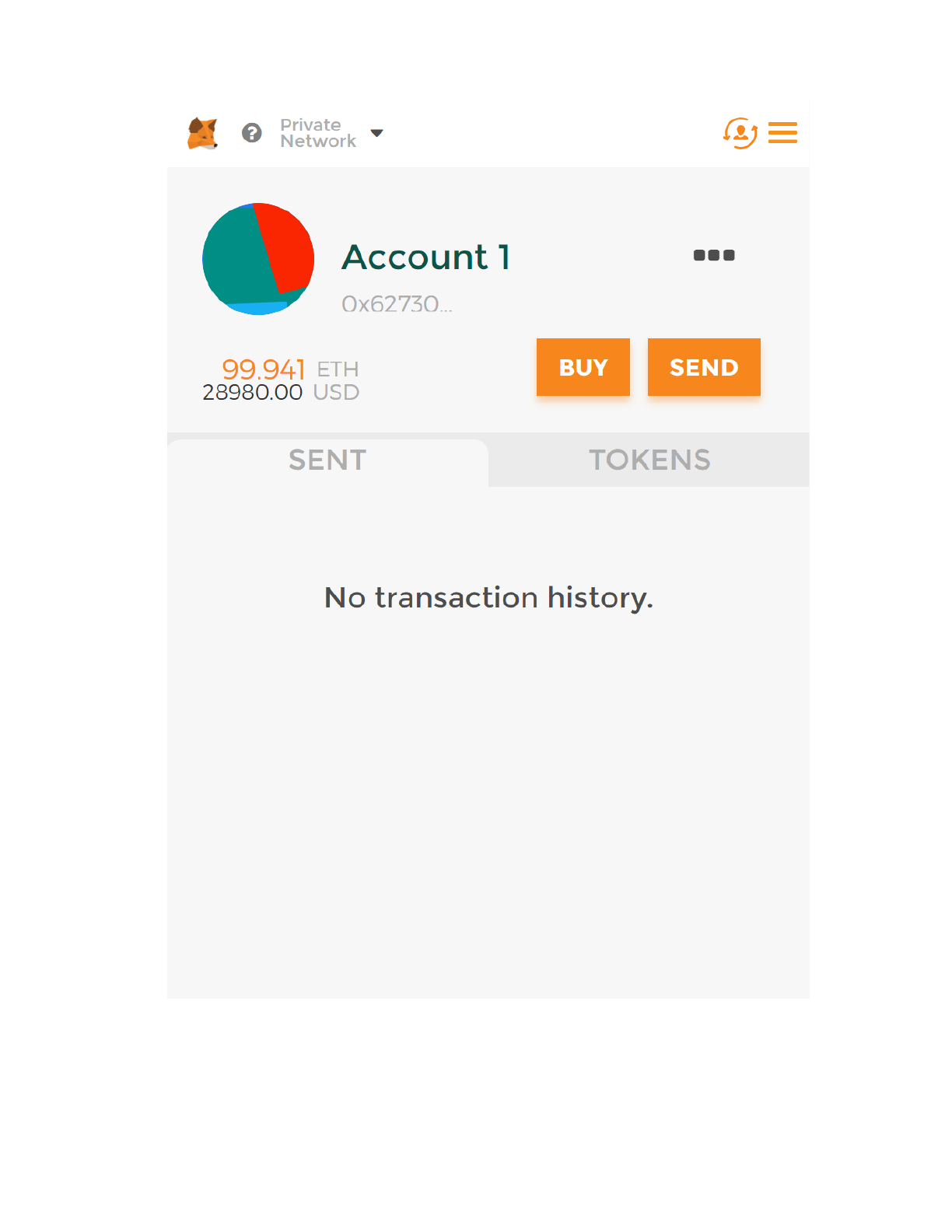
The network name at the top will switch to say "Private Network".

11/17/2017 Ethereum Pet Shop -- Your First Dapp | Truffle Suite
http://truffleframework.com/tutorials/pet-shop 30/39
9. Click the left-pointing arrow next to "Settings" to close out of the page
and return to the Accounts page.
Each account created by True Develop is given 100 ether. You'll notice
it's slightly less on the rst account because some gas was used when the
contract itself was deployed.
11/17/2017 Ethereum Pet Shop -- Your First Dapp | Truffle Suite
http://truffleframework.com/tutorials/pet-shop 31/39
MetaMask account congured
Conguration is now complete.

11/17/2017 Ethereum Pet Shop -- Your First Dapp | Truffle Suite
http://truffleframework.com/tutorials/pet-shop 32/39
We can now start a local web server and use the dapp. We're using the
lite-server library to serve our static les. This shipped with the pet-
shop True Box, but let's take a look at how it works.
1. Open bs-config.json in a text editor (in the project's root directory)
and examine the contents:
This tells lite-server which les to include in our base directory. We
add the ./src directory for our website les and ./build/contracts
directory for the contract artifacts.
We've also added a dev command to the scripts object in the
package.json le in the project's root directory. The scripts object
allows us to alias console commands to a single npm command. In this
case we're just doing a single command, but it's possible to have more
complex congurations. Here's what yours should look like:
Installing and conguring lite-server
{
"server": {
"baseDir": ["./src", "./build/contracts"]
}
}
"scripts": {
"dev": "lite-server",
"test": "echo \"Error: no test specified\" && exit 1"
},
11/17/2017 Ethereum Pet Shop -- Your First Dapp | Truffle Suite
http://truffleframework.com/tutorials/pet-shop 33/39
This tells npm to run our local install of lite-server when we execute
npm run dev from the console.
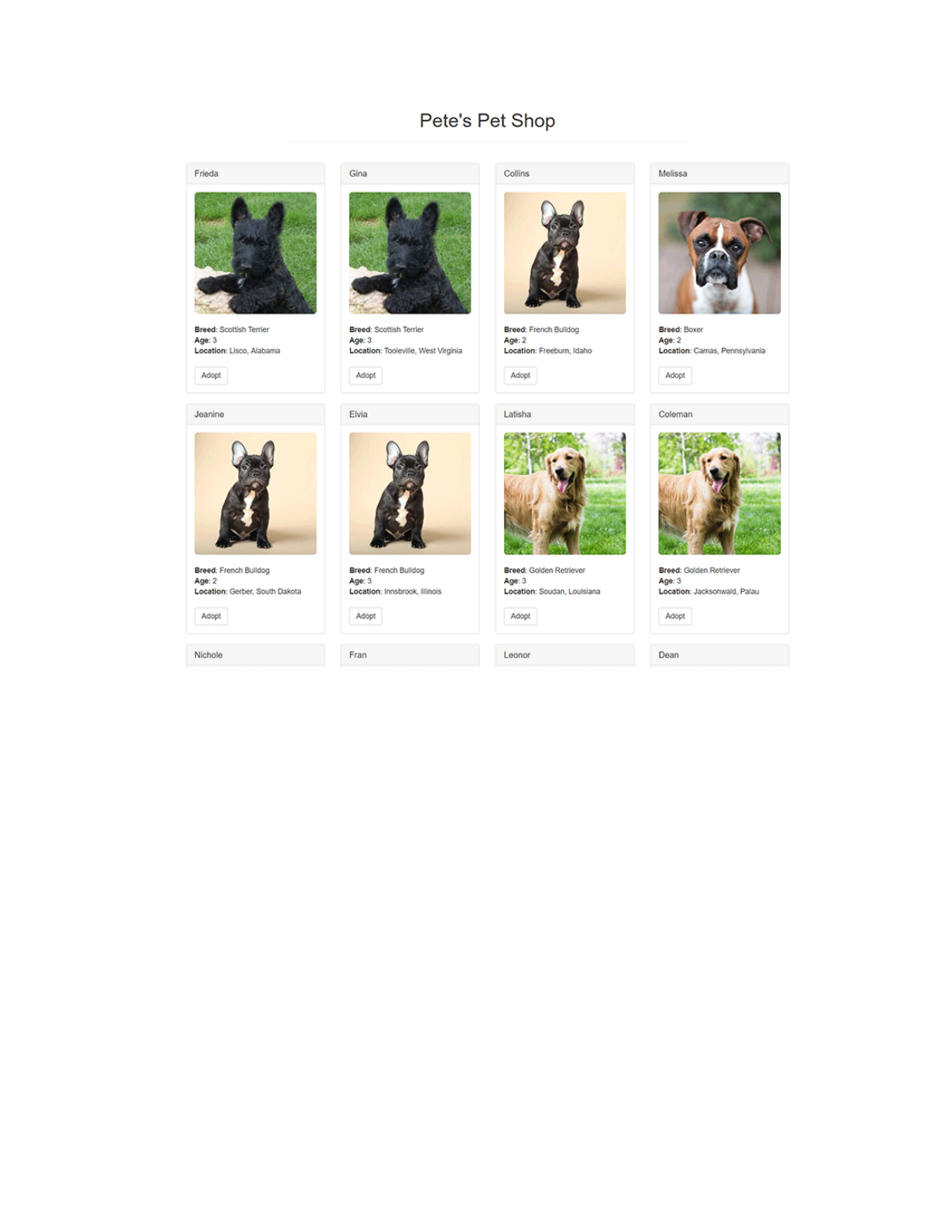
1. Start the local web server:
The dev server will launch and automatically open a new browser tab
containing your dapp.
Using the dapp
npm run dev
11/17/2017 Ethereum Pet Shop -- Your First Dapp | Truffle Suite
http://truffleframework.com/tutorials/pet-shop 34/39
Pete's Pet Shop
2. To use the dapp, click the Adopt button on the pet of your choice.
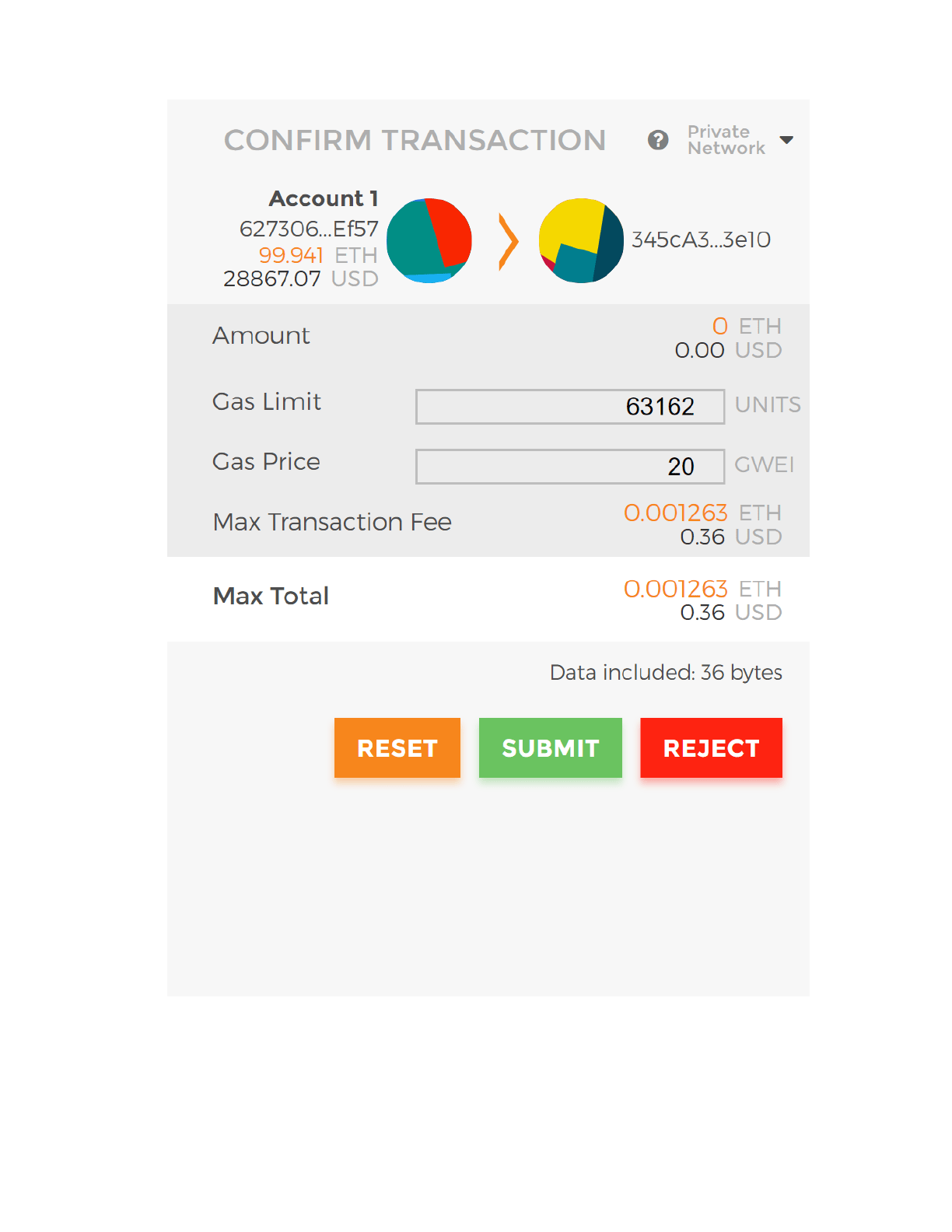
3. You'll be automatically prompted to approve the transaction by
MetaMask. Click Submit to approve the transaction.
11/17/2017 Ethereum Pet Shop -- Your First Dapp | Truffle Suite
http://truffleframework.com/tutorials/pet-shop 35/39
Adoption transaction review
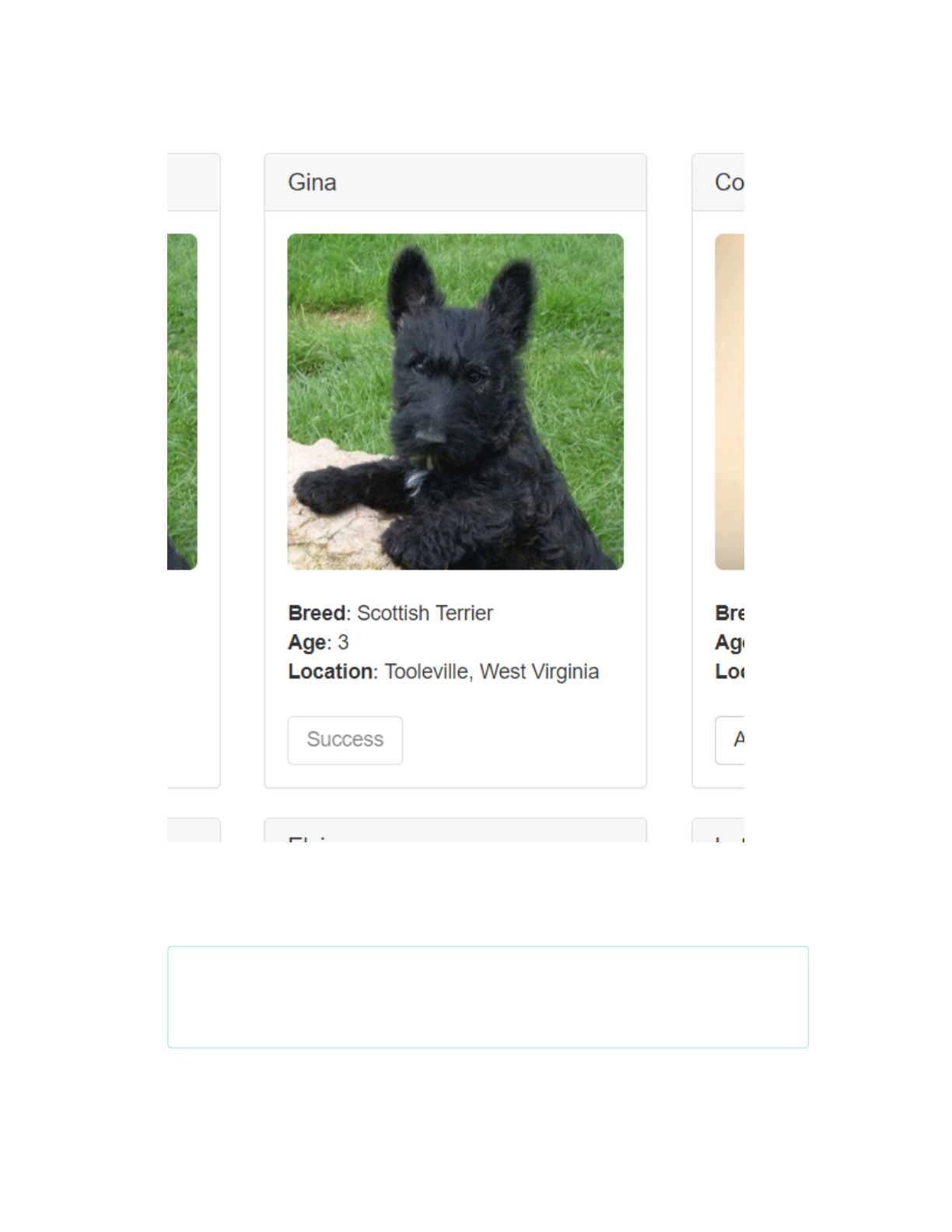
4. You'll see the button next to the adopted pet change to say "Success" and
become disabled, just as we specied, because the pet has now been
adopted.
11/17/2017 Ethereum Pet Shop -- Your First Dapp | Truffle Suite
http://truffleframework.com/tutorials/pet-shop 36/39
Adoption success
Note: If the button doesn't automatically change to say "Success",
refreshing the app in the browser should trigger it.
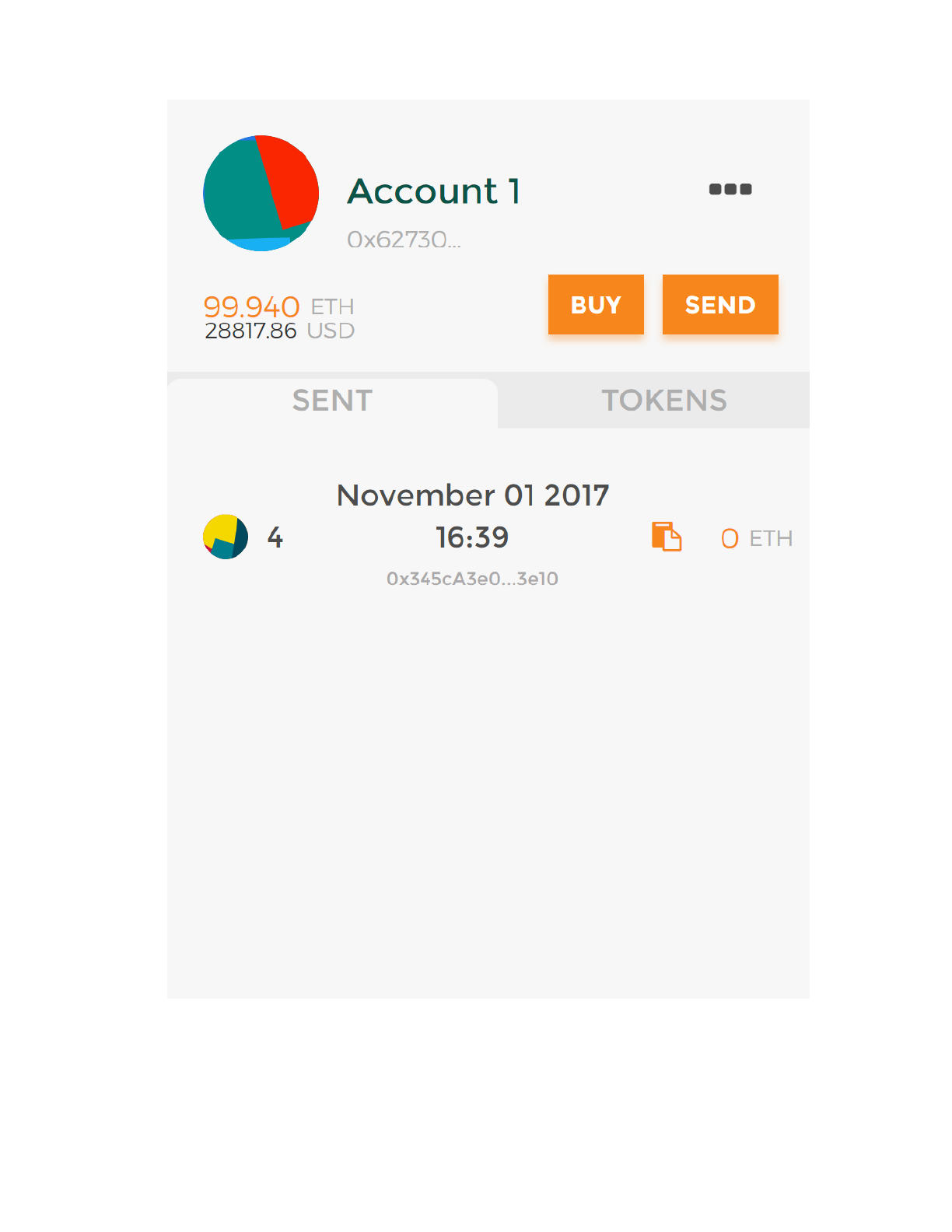
And in MetaMask, you'll see the transaction listed:
11/17/2017 Ethereum Pet Shop -- Your First Dapp | Truffle Suite
http://truffleframework.com/tutorials/pet-shop 37/39
MetaMask transaction
11/17/2017 Ethereum Pet Shop -- Your First Dapp | Truffle Suite
http://truffleframework.com/tutorials/pet-shop 38/39
Congratulations! You have taken a huge step to becoming a full-edged
dapp developer. For developing locally, you have all the tools you need to
start making more advanced dapps. If you'd like to make your dapp live for
others to use, stay tuned for our future tutorial on deploying to the Ropsten
testnet.
See a way to make this page better?
Edit here → (https://github.com/truesuite/truesuite.com/edit/master/public/tutorials/pet-
shop.md)
HOME (/)
DOCUMENTATION (/DOCS)
BOXES (/BOXES)
BLOG (/BLOG)
TUTORIALS (/TUTORIALS)
SUPPORT (/SUPPORT)
COMMUNITY (/COMMUNITY)
DASHBOARD (/DASHBOARD)
GITHUB (HTTPS://GITHUB.COM/TRUFFLESUITE)
TWITTER (HTTPS://TWITTER.COM/TRUFFLESUITE)

11/17/2017 Ethereum Pet Shop -- Your First Dapp | Truffle Suite
http://truffleframework.com/tutorials/pet-shop 39/39
© CONSENSYS 2017
SIGN UP FOR THE TRUFFLE MAILING LIST
SUBSCRIBE
FIRST NAME
YOUR EMAIL ADDRESS
