MSR606 MSR605 Programmer's Manual
MSR605%20Programmer's%20Manual
User Manual: Pdf
Open the PDF directly: View PDF  .
.
Page Count: 26
MSR605
MSR605
MSR605
MSR605
Magnetic Stripe Card Reader/Writer
(High & Low Coercivity)
Programmer
Programmer
Programmer
Programmer ’
’
’
’ s
s
s
s Manual
Manual
Manual
Manual
Revision
Revision
Revision
Revision B
B
B
B
2009-06-
2009-06-
2009-06-
2009-06- 01
01
01
01

MSR606 Programmer ’ s Manual Rev. A
2
Table
Table
Table
Table of
of
of
of Contents
Contents
Contents
Contents
SECTION
SECTION
SECTION
SECTION 1
1
1
1 INTRODUCTION
INTRODUCTION
INTRODUCTION
INTRODUCTION
...........................................................................
...........................................................................
...........................................................................
...........................................................................
3
�
�
�
�Accessories
Accessories
Accessories
Accessories of
of
of
of MSR605
MSR605
MSR605
MSR605 ...............................................................................
...............................................................................
...............................................................................
............................................................................... 3
�
�
�
�Warranty
Warranty
Warranty
Warranty .....................................................................................................
.....................................................................................................
.....................................................................................................
..................................................................................................... 3
SECTION
SECTION
SECTION
SECTION 2
2
2
2 GENERAL
GENERAL
GENERAL
GENERAL DESCRIPTION
DESCRIPTION
DESCRIPTION
DESCRIPTION ............................................................
............................................................
............................................................
............................................................ 4
4
4
4
SECTION
SECTION
SECTION
SECTION 3
3
3
3 TECHNICAL
TECHNICAL
TECHNICAL
TECHNICAL SPECIFICATIONS
SPECIFICATIONS
SPECIFICATIONS
SPECIFICATIONS
..................................................
..................................................
..................................................
..................................................
2
2
2
2
SECTION
SECTION
SECTION
SECTION 4
4
4
4 SETUP
SETUP
SETUP
SETUP
.............................................................................................
.............................................................................................
.............................................................................................
.............................................................................................
4
4
4
4
SECTION
SECTION
SECTION
SECTION 5
5
5
5 UTILITIES
UTILITIES
UTILITIES
UTILITIES TEST
TEST
TEST
TEST PROGRAM
PROGRAM
PROGRAM
PROGRAM
.......................................................
.......................................................
.......................................................
.......................................................
5
5
5
5
�
�
�
�
System
System
System
System Requirement
Requirement
Requirement
Requirement .....................................................................................
.....................................................................................
.....................................................................................
..................................................................................... 5
5
5
5
�
�
�
�
Test
Test
Test
Test Program
Program
Program
Program Installation
Installation
Installation
Installation .............................................................................
.............................................................................
.............................................................................
............................................................................. 5
5
5
5
SECTION
SECTION
SECTION
SECTION 6
6
6
6 COMMAND
COMMAND
COMMAND
COMMAND AND
AND
AND
AND RESPONSE
RESPONSE
RESPONSE
RESPONSE .....................................................
.....................................................
.....................................................
..................................................... 6
6
6
6
SECTION
SECTION
SECTION
SECTION 7
7
7
7
DATA
DATA
DATA
DATA
FORMAT
FORMAT
FORMAT
FORMAT .............................................................................
.............................................................................
.............................................................................
............................................................................. 11
11
11
11
SECTION
SECTION
SECTION
SECTION 8
8
8
8 COMMUNICATION
COMMUNICATION
COMMUNICATION
COMMUNICATION SEQUENCE
SEQUENCE
SEQUENCE
SEQUENCE ................................................
................................................
................................................
................................................ 13
13
13
13
�
�
�
�MSR
MSR
MSR
MSR 606
606
606
606 INITIALIZATION
INITIALIZATION
INITIALIZATION
INITIALIZATION .....................................................................
.....................................................................
.....................................................................
..................................................................... 13
13
13
13
�
�
�
�Write
Write
Write
Write Data
Data
Data
Data to
to
to
to MSR
MSR
MSR
MSR 606
606
606
606 ..............................................................................
..............................................................................
..............................................................................
.............................................................................. 13
13
13
13
�
�
�
�Read
Read
Read
Read Data
Data
Data
Data to
to
to
to MSR605
MSR605
MSR605
MSR605 ................................................................................
................................................................................
................................................................................
................................................................................ 14
14
14
14
SECTION
SECTION
SECTION
SECTION 9
9
9
9 ADDENDUM
ADDENDUM
ADDENDUM
ADDENDUM .................................................................................
.................................................................................
.................................................................................
................................................................................. 15
15
15
15
�
�
�
�Write
Write
Write
Write Data
Data
Data
Data to
to
to
to Magnetic
Magnetic
Magnetic
Magnetic Card
Card
Card
Card ....................................................................
....................................................................
....................................................................
.................................................................... 15
15
15
15
�
�
�
�Write
Write
Write
Write Raw
Raw
Raw
Raw Data
Data
Data
Data to
to
to
to Magnetic
Magnetic
Magnetic
Magnetic Card
Card
Card
Card ............................................................
............................................................
............................................................
............................................................ 16
16
16
16

MSR606 Programmer ’ s Manual Rev. A
3
Section
Section
Section
Section 1
1
1
1 Introduction
Introduction
Introduction
Introduction
Thank you for purchasing the MSR605 Manual Swipe Magnetic Card Reader/Writer. It is ideal for access control,
time keeping, banking, ID recognition & credit verification and related applications. In fact, wherever a magnetic
stripe ID or transaction card is used, one can find a related use for the versatile, user-friendly MSR605 reader/writer.
The MSR605 is designed to offer a reading and writing solution of high and/or low coercivity cards that will
attractively complement an existing system.
�Accessories
Accessories
Accessories
Accessories of
of
of
of MSR605
MSR605
MSR605
MSR605
Make
Make
Make
Make sure
sure
sure
sure all
all
all
all the
the
the
the following
following
following
following accessories
accessories
accessories
accessories are
are
are
are contained
contained
contained
contained in
in
in
in your
your
your
your package:
package:
package:
package:
1. Switch power Supply, AC 110~240V in / DC 9V, 2 ~3 A out.
2. Power cord.
3. Signal cable (USB).
4. Utility disk (A/P S/W).
5. Programmer ’ s manual.
�Warranty
Warranty
Warranty
Warranty
One year after purchase of MSR605 , any alteration and/or erasure or modification of the MSR605 will void the
warranty.

MSR606 Programmer ’ s Manual Rev. A
4
Section
Section
Section
Section 2
2
2
2 General
General
General
General Description
Description
Description
Description
The MSR605 series is designed to read and/or write high or low coercivity magnetic cards. It can encode and verify
up to 3 tracks of data simultaneously. It communicates with a host computer or other terminal using a usb interface.

MSR606 Programmer ’ s Manual Rev. A
2
Section
Section
Section
Section 3
3
3
3 Technical
Technical
Technical
Technical Specifications
Specifications
Specifications
Specifications
ITEM SPECIFICATION
Standard ISO7811
Electrical
Electrical
Electrical
Electrical
Consumption
Current/operating Typical 350mA Max
600mA plus for each writing track
Communication Standard RS232 signal voltage levels. Default, 9600 Baud, None Parity, 8 bits
Power supply External switching Power 9V/2A regulated
Interconnection
Interconnection
Interconnection
Interconnection
Cable USB
Pin Assignment
USB
1, VBUS
2. D-
3.D+
4 . GND
Mechanical
Mechanical
Mechanical
Mechanical
Body ABS 94V-0 / Metal housing optional
Swipe Manual, single direction
Outline 21 2 Lx6 4 Wx6 3 H mm
Weight 1. 4 Kg approx.
Environment
Environment
Environment
Environment
Operation -10 º C to 60 º C
10 to 85% humidity, non condensing
Storage -30 º C to 70 º C
10 to 90% humidity, non condensing
Performance
Performance
Performance
Performance
Read Circuit
Track 1&3 210bpi
Track 2,75 or 210 bpi
Bit per Char 5-7 bit per char.
Media Speed
Read, 5-50 ips (read speed 5-40 ips for track 2 at 210bpi)
Write, 5-30
Media Coercivity
Read 300-4000 Oe Mag. Card
W rite 300-4000 Oe Mag. Card
Media Thickness 0.76-1.2mm
Jitter Card
Read bit to bit interval <+/-15% card
Write bit to bit interval <+/-10%,Sub interval<+/-12% at 30ips

MSR606 Programmer ’ s Manual Rev. A
3
Low amplitude Card Read 60% for both 75& 210bpi
Error Rate Read < 0.5%
Write < 0.8%
Media Swipe Head life 1,000,000 passes for both read & write head
Configuration
Available Model
Model Read/Write Track Hi-C Lo-C
MSR605 1&2&3 R/W R/W

MSR606 Programmer ’ s Manual Rev. A
4
Section
Section
Section
Section 4
4
4
4 Setup
Setup
Setup
Setup
1. Power o n your system (PC).
2 . Setup the usb driver(for windows xp or vista) and Setup the driver for MSR605,all driver in the cd.
3. Connect USB of the MSR605 signal cable to a free serial port .
4. Connect Power-in cable to Power supply and AC receptacle (110V~240V).
5 . Now you can use the MSR605 like MSR206.

MSR606 Programmer ’ s Manual Rev. A
5
Section
Section
Section
Section 5
5
5
5 Utilities
Utilities
Utilities
Utilities Test
Test
Test
Test Program
Program
Program
Program
Every MSR605 comes with a utilities test program disk that includes a Windows version. This program is to verify
and demonstrate the functionality of the MSR605 . In some cases, it can be used as a card reading and writing
program.
�
�
�
�
System
System
System
System Requirement
Requirement
Requirement
Requirement
1. 80286 PC/AT compatibles or later model with color display.
2. Either the following operating systems: Windows 95,98,2000 ,XP,VISTA
3. 256K available conventional memory.
4. A free serial port (Com 1 or Com 2) with DB9 male connector.
�
�
�
�Test
Test
Test
Test Program
Program
Program
Program Installation
Installation
Installation
Installation
User shall follow the steps below in order to install test program.
A. Connect MSR605 to USB port, and power on it.
B. Execute test program from the subdirectory of ‘ Demo AP ’ (e.g. MSR605 .exe)
D . When the test program is first opened, a password dialog box will ask whether you wish a first time
password.
D The test program will auto-detect communication port. If there is any errors occurred, it ’ ll appear in the
information dialog box after opening the program. User can close the AP by pressing OK button.
E . If “ Not
Not
Not
Not Find
Find
Find
Find Reader/Writer!
Reader/Writer!
Reader/Writer!
Reader/Writer! ”
”
”
”appears in the information dialog box after opening the program, check to
see that the USB connector is plugged into the correct USB port and the power cord/connector is also
attached to USB thus lighting the green LED on the MSR605 .
F . When the test program is opened, you ’ ll see the main window of the READER/WRITER UTILITY
PROGRAM.
From this main window you can activate all functions by clicking the appropriate buttons and following the
on screen instructions.

MSR606 Programmer ’ s Manual Rev. A
6
Section
Section
Section
Section 6
6
6
6 Command
Command
Command
Command and
and
and
and Response
Response
Response
Response
This section gives detailed description of commands to the MSR605 and the corresponding responses from MSR605 .
Notional Conventions:
<ESC> Control character named
[[[[ [sname]
Special string named sname, meaning can be found in section 7.
ie.[Data Block] [Status Byte] [Select Byte] etc.
X Standard ANSI character
Command Description:
1. Command: RESET
RESET
RESET
RESET
Command code: <ESC> a
Hex code: 1B 61
Response: none
Description: This command reset the MSR605 to initial state.
2. Command: READ (ISO format only)
Command code: <ESC> r
Hex code: 1B 72
Response: [Data Block] <ESC> [Status Byte]
Description: This command request MSR605 to read a card swiped and respond with the data read.
3. Command: WRITE (ISO format only)
Command code: <ESC> w [Data Block]
Hex code: 1B 77 [Data Block]
Response: <ESC> [Status Byte]
Description: This command request MSR605 to write the Data Block into the card swiped.
4. Command: Communication test
Command code: <ESC> e
Hex code: 1B 65
Response: <ESC> y [1B] [79]
Description: This command is used to verify that the communication link between computer and MSR605 is up
and good.
5. Command: All LED off
Command code: <ESC> <81>
Hex code: 1B 81
Response: none

MSR606 Programmer ’ s Manual Rev. A
7
Description: This command is used to turn off all the LEDs.
6. Command: All LED on
Command code: <ESC> <82>
Hex code: 1B 82
Response: none
Description: This command is used to turn on all the LEDs.
7. Command: GREEN LED on
Command code: <ESC> <83>
Hex code: 1B 83
Response: none
Description: This command is used to turn on the Green LED.
8. Command: YELLOW LED on
Command code: <ESC> <84>
Hex code: 1B 84
Response: none
Description: This command is used to turn on the Yellow LED.
9. Command: RED LED on
Command code: <ESC> <85>
Hex code: 1B 85
Response: none
Description: This command is used to turn on the Red LED.
10. Command: Sensor test
Command code: <ESC> <86>
Hex code: 1B 86
Response: <ESC> 0 (1B 30) if test ok
Description: This command is used to verify that the card sensing circuit of MSR605 is working properly.
MSR605 will not response until a card is sensed or receive a RESET command.
11. Command: Ram test
Command code: <ESC> <87>
Hex code: 1B 87
Response: <ESC> 0 (1B 30) ram test ok; <ESC> A (1B 41) ram test fail
Description: This command is used to request MSR605 to perform a test on its on board RAM.

MSR606 Programmer ’ s Manual Rev. A
8
12. Command: Set leading zero
Command code: <ESC> z [leading zero of track 1 & 3] [leading zero of track 2]
Hex code: 1B 7A [00~ff] [00~ff]
Response: <ESC> 0 (1B 30) set ok
<ESC> A (1B 41) set fail
Description: This command is used to set how many leading zeros will be written before the card data starts, and
the space should calculated as [leading zero] X25.4 / BPI (75or210) =mm
Default setting of leading zero: [3D] [16]
TK1 & TK3: [3D] means leading zero=61
TK2: [16] means leading zero=22
13. Command: Check leading zero
Command code: <ESC> l
Hex code: 1B 6C
Response: 1B [00~ff] [00~ff]
Description: This command is used to ask MSR605 the present setting number of leading zeros.
14. Command: Erase card
Command code: <ESC> c [Select Byte]
Hex code: 1B 63 [Select Byte]
Response: <ESC> 0 [1B] [30] command Select Byte ok
<ESC> A [1B] [41] command Select Byte fail
Description: This command is used to erase the card data when card swipe.
*[Select Byte] format:
00000000: Track 1 only
00000010: Track 2 only
00000100: Track 3 only
00000011: Track 1 & 2
00000101: Track 1 & 3
00000110: Track 2 & 3
00000111: Track 1, 2 & 3
15. Command: Select BPI
Command code: <ESC> b [Density]
Hex code:
track2 :1B 62 [D2 or 4B] // [D2]: 210bpi, [4B]: 75bpi
track1 :1B 62 [A1 or A0] // [A1]: 210bpi, [A0]: 75bpi
track3 :1B 62 [C1 or C0] // [C1]:210bpi, [C0]: 75bpi
Response: <ESC> 0 [1B] [30] select ok
<ESC> A [1B] [41] select fail

MSR606 Programmer ’ s Manual Rev. A
9
Description: This command is used to select the density
16. Command: Read raw data
Command code: <ESC> m
Hex code: 1B 6D
Response: [Raw Data Block] <ESC> [Status Byte]
Description: This command requests MSR605 to read a card swipe but send without ASCII decode.
Refer to [Raw Data Block] & [Raw Data] format.
17. Command: Write raw data
Command code: <ESC> n [Raw Data Block]
Hex code: 1B 6E [Raw Data Block]
Response: <ESC> [Status Byte]
Description: This command requests MSR605 to write raw Data Block into the card swiped.
Refer to [Raw Data Block] & [Raw Data] format.
18. Command: Get device model
Command code: <ESC> t
Hex code: 1B 74
Response: <ESC> [Model] S
Description: This command is used to get the model of MSR605 .
19. Command: Get firmware version
Command code: <ESC> v
Hex code: <ESC> 76
Response: <ESC> [version]
Description: This command can get the firmware version of MSR605 .
20. Command: Set BPC
Command code: <ESC> o [tk1bit][tk2bit][tk3bit]
Hex code: <ESC> 6F [05-08][05-08][05-08]
Response: <ESC> 30 [tk1bit][tk2bit][tk3bit]
Description: This command is used to set the bit per character of every track.
21. Command: Set Hi-Co
Command code: <ESC> x
Hex code: 1B 78
Response: <ESC> 0
Description: This command is used to set MSR605 status to write Hi-Co card.

MSR606 Programmer ’ s Manual Rev. A
10
22. Command: Set Low-Co
Command code: <ESC> y
Hex code: 1B 79
Response: <ESC> 0
Description: This command is used to set MSR605 status to write Low-Co card.
23. Command: Get Hi-Co or Low-Co status
Command code: <ESC> d
Hex code: 1B 64
Response: <ESC> H -------to write Hi-Co
: <ESC> L ------- to write Low-Co
Description: This command is to get MSR605 write status.
MSR606 Programmer ’ s Manual Rev. A
11
Section
Section
Section
Section 7
7
7
7 Data
Data
Data
Data Format
Format
Format
Format
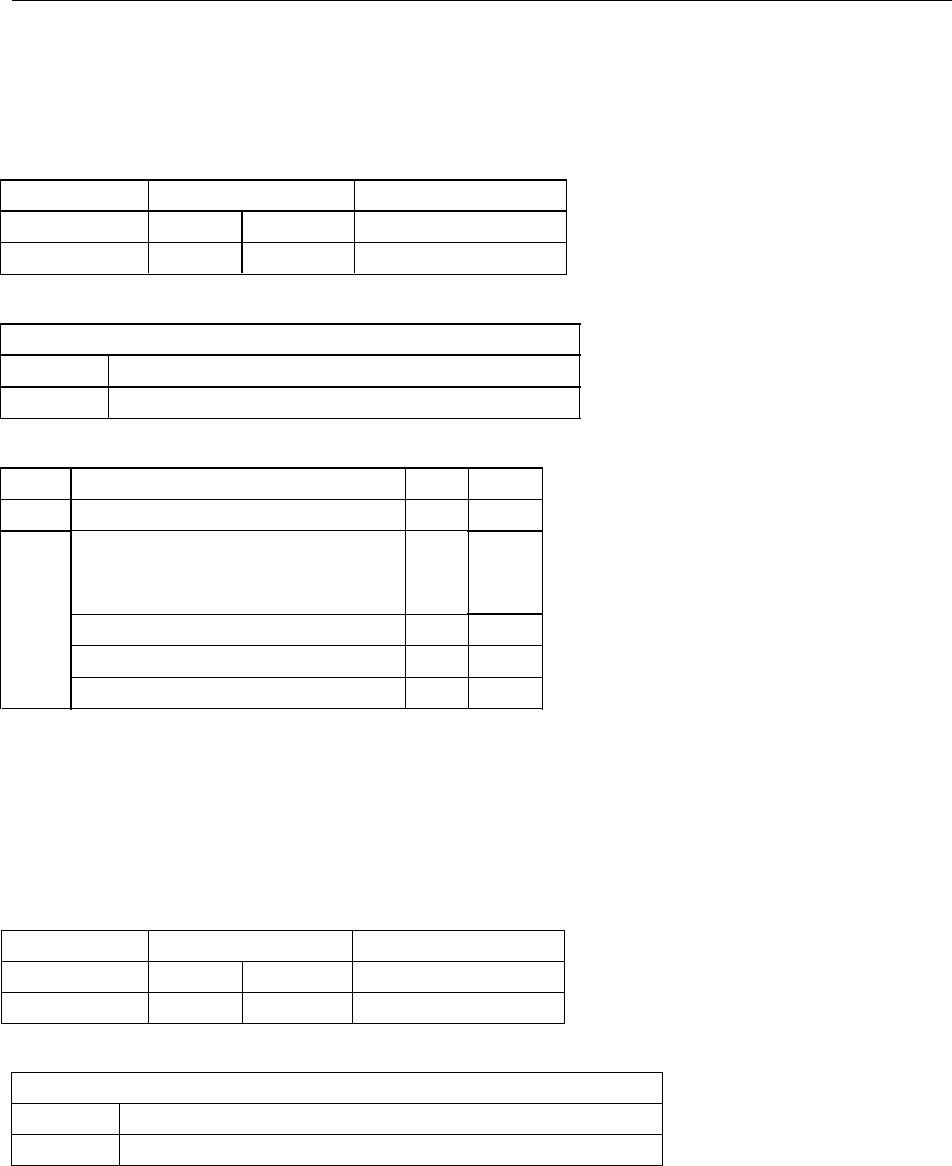
* [Data Block] format:
Start Field R/W Data Field Ending Field
Command code <ESC> s [Card data] ? <FS> <ESC> [Status]
Hex code 1B 73 [Card data] 3F 1C 1B [Status]
* [Card data] format:
Card Data
Char Code <ESC> 1[string1] <ESC> 2 [string2] <ESC> 3 [string3]
Hex Code 1B 01 [string1] 1B 02 [string2] 1B 03 [string3]
* [Status Byte] format:
Status description HEX ASCII
Ok If read, write or command ok 30h 0
Error
Write or read error 31h 1
Command format error 32h 2
Invalid command 34h 4
Invalid card swipe when in write mode 39h 9
* Note:
1. When [Status Byte] equal 39h means card moving error.
2. None available and none data tracks will not be transmitted when swipe of card.
For example, when read card with data encoded on track 2 only for MSR605 , it will transmit data like 1B
1B
1B
1B 73
73
73
73 1B
1B
1B
1B 01
01
01
01
1B
1B
1B
1B 02
02
02
02 [string
[string
[string
[string ]3F
3F
3F
3F 1C
1C
1C
1C , for no data on track 1 so it shown 1B 01 only.
* [Raw Data Block] format:
Start Field R/W Data Field Ending Field
Command code <ESC> s [Raw data] ? <FS> <ESC> [Status]
Hex code 1B 73 [Raw data] 3F 1C 1B [Status]
* [Raw Data] format:
Raw Data
Char Code <ESC>1[L1][string1]<ESC>2[L2][string2]<ESC>3[L3][string3]
Hex Code 1B 01[L1][string1]1B 02[L2][string2]1B 03[L3][string3]
Note:
1. [L1], [L2], [L3] is the length of [string1],[string2],and [string3]
2. None available and none data tracks will not output when swipe of card.
For example, when read card (encoded data on track 2 only) on MSR605 , it will transmit data like 1B
1B
1B
1B 73
73
73
73 1B
1B
1B
1B 01
01
01
01 00
00
00
00
1B
1B
1B
1B 02
02
02
02 [L2]
[L2]
[L2]
[L2] [string]
[string]
[string]
[string] 3F
3F
3F
3F 1C
1C
1C
1C .
MSR606 Programmer ’ s Manual Rev. A
12
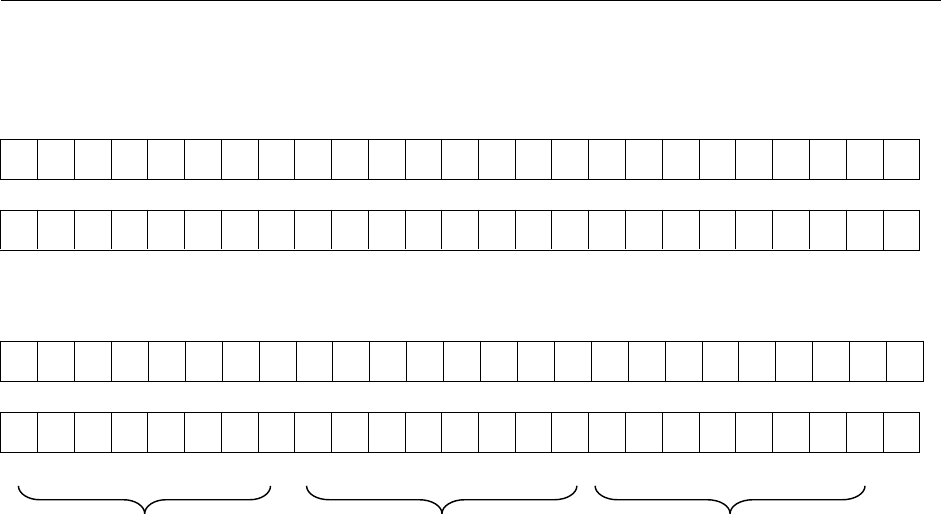
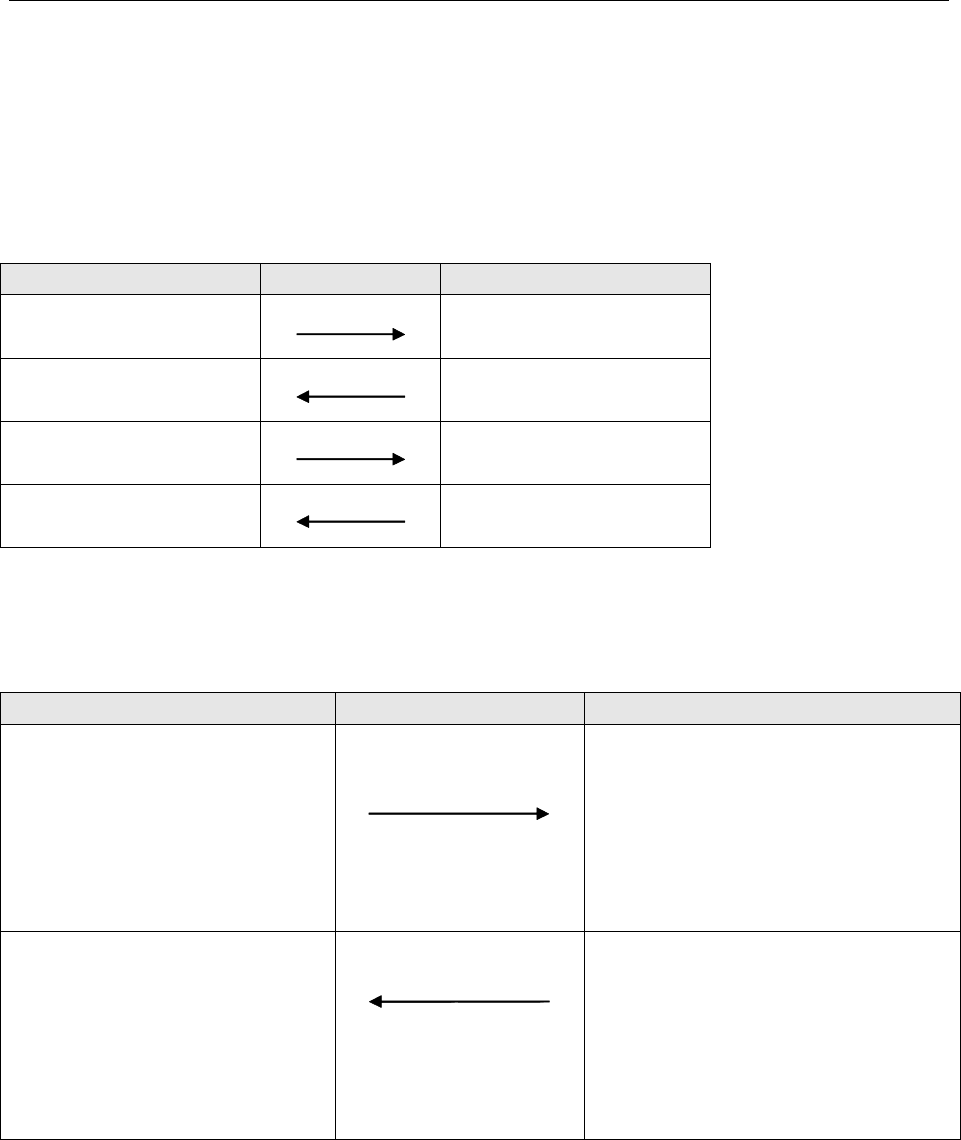
* [Raw Data] bit orientation:
Track 1 for 8 BPC
Read
1
B
0
1
B
1
1
B
2
1
B
3
1
B
4
1
B
5
1
B
6
2
B
0
2
B
1
2
B
2
2
B
3
2
B
4
2
B
5
2
B
6
3
B
0
3
B
1
3
B
2
3
B
3
3
B
4
3
B
5
3
B
6
4
B
0
4
B
1
4
B
2
…
Write
2
B
0
1
B
6
1
B
5
1
B
4
1
B
3
1
B
2
1
B
1
1
B
0
3
B
1
3
B
0
2
B
6
2
B
5
2
B
4
2
B
3
2
B
2
2
B
1
4
B
2
4
B
1
4
B
0
3
B
6
3
B
5
3
B
4
3
B
3
3
B
2
…
Track 2 & 3 for 8 BPC
Read
1
B
0
1
B
1
1
B
2
1
B
3
1
B
4
2
B
0
2
B
1
2
B
2
2
B
3
2
B
4
3
B
0
3
B
1
3
B
2
3
B
3
3
B
4
4
B
0
4
B
1
4
B
2
4
B
3
4
B
4
5
B
0
5
B
1
5
B
2
5
B
3
…
Write
2
B
2
2
B
1
2
B
0
1
B
4
1
B
3
1
B
2
1
B
1
1
B
0
4
B
0
3
B
4
3
B
3
3
B
2
3
B
1
3
B
0
2
B
4
2
B
3
5
B
3
5
B
2
5
B
1
5
B
0
4
B
4
4
B
3
4
B
2
4
B
1
…
MSB LSB MSB LSB MSB LSB
1
st
byte 2
nd
byte 3
rd
byte
*Refer to Section 9 ADDENDUM.
MSR606 Programmer ’ s Manual Rev. A
13
Section
Section
Section
Section 8
8
8
8 Communication
Communication
Communication
Communication Sequence
Sequence
Sequence
Sequence
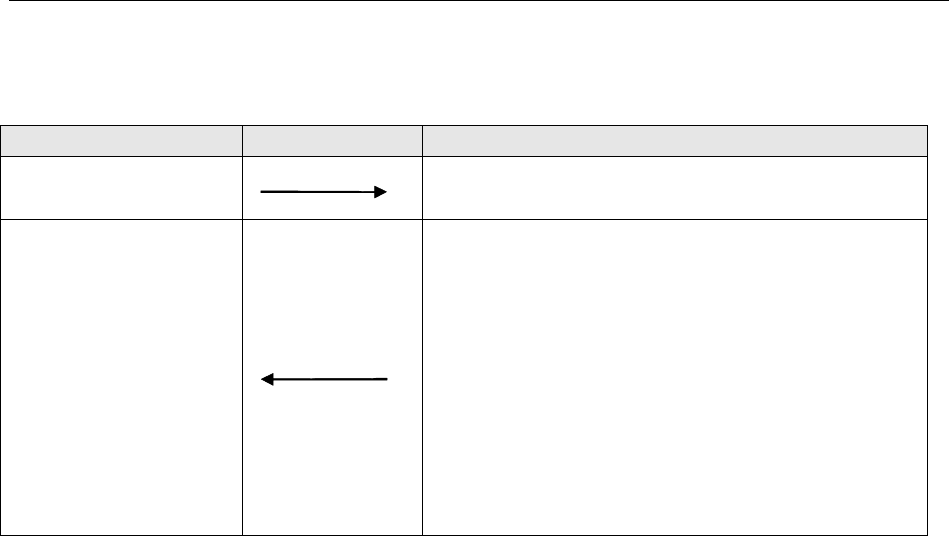
The examples below assumes data on track1, 2 & 3 to be 01, 23, 45 respectively.
�
�
�
�MSR605
MSR605
MSR605
MSR605 INITIALIZATION
INITIALIZATION
INITIALIZATION
INITIALIZATION
HOST Direction MSR605
Command code: <ESC>a
HEX code: [1B][61]
(Reset)
Command code: <ESC>e
HEX code: [1B][65]
(Serial port test)
Command test ACK: <ESC> y
HEX code: [1B][79]
Command code: <ESC>a
HEX code: [1B][61]
(Reset)
�
�
�
�Write
Write
Write
Write Data
Data
Data
Data to
to
to
to MSR605
MSR605
MSR605
MSR605
HOST Direction MSR605
Command code:
<ESC>w<ESC>s<ESC>[01]01
<ESC>[02]23<ESC>[03]45?<FS>
HEX code:
[1B][77][1B][73][1B][01][30][31][1B]
[02][32][33][1B][03][34][35][3F][1C]
(write command)
(status ACK)
(Wait until swipe card)
Command ACK: <ESC> <status>
HEX code: [1B][status]
Status =[30] no error
Status =[31]~[3F] if error
MSR606 Programmer ’ s Manual Rev. A
14
�
�
�
�Read
Read
Read
Read Data
Data
Data
Data to
to
to
to MSR605
MSR605
MSR605
MSR605
HOST Direction
Direction
Direction
Direction MSR605
MSR605
MSR605
MSR605
Command code: <ESC> r
HEX code: [1B][72]
(read command)
(status ACK)
(Wait until swipe card)
Command ACK:
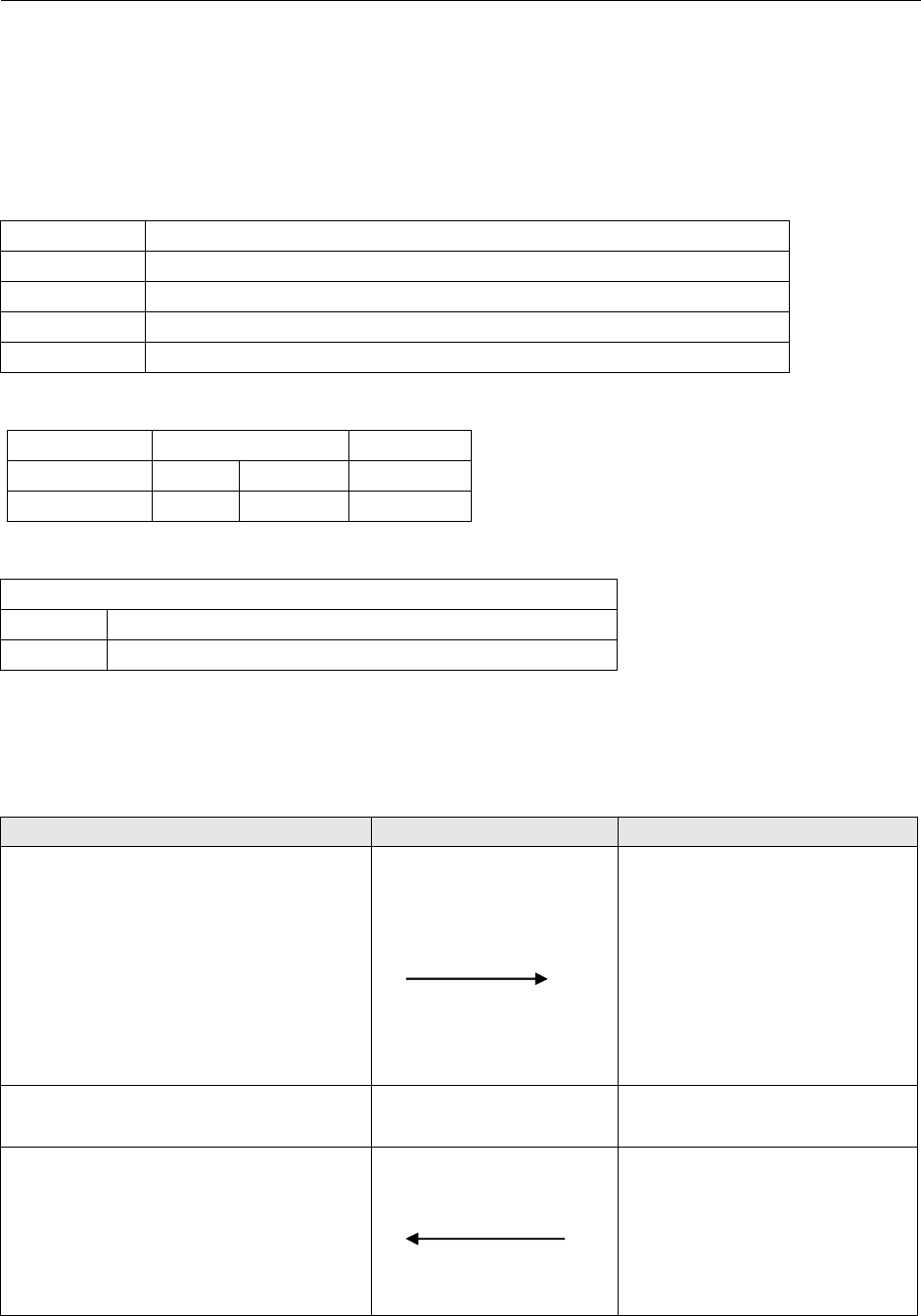
<ESC>s<ESC>[01]%01?<ESC>[02];23?<ESC>[03];45??<
FS><ESC><status>
HEX code:
[1B][73][1B][01][25][30][31][3F][1B][02][3B][32][33][3F]
[1B][03][3B][34][35][3F][3F][1C][1B][status]
Status=[30] ok
Status=[31]~[3F] if error
* [XX] = HEX Code XX
MSR606 Programmer ’ s Manual Rev. A
15
Section
Section
Section
Section 9
9
9
9 Addendum
Addendum
Addendum
Addendum
�Write
Write
Write
Write Data
Data
Data
Data to
to
to
to Magnetic
Magnetic
Magnetic
Magnetic Card
Card
Card
Card
The
The
The
The WRITE
WRITE
WRITE
WRITE command
command
command
command :
Command WRITE
Command code <ESC> w [Data
[Data
[Data
[Data Block]
Block]
Block]
Block]
Hex code 1B 77 [Data
[Data
[Data
[Data Block]
Block]
Block]
Block]
Response <ESC> [Status Byte]
Description This command request MSR605 to write the Data Block into the card swiped.
[
[
[
[
Data
Data
Data
Data Block
Block
Block
Block
]
]
]
] format:
format:
format:
format:
Start Field R/W Data Field Ending Field
Command code <ESC>s [
card data
] ?<FS>
HEX code 1B 73 [
card data
] 3F 1C
[
[
[
[
card
card
card
card data
data
data
data
]
]
]
] format:
format:
format:
format:
card data
Char. code <ESC>[01] [string] <ESC> [02] [string] <ESC> [03] [string3]
HEX code 1B 01 [string1] 1B 02 [string2] 1B 03 [string3]
As an example the following information will be written to the card:
Track1: %ABC123?
Track2: ;12345?
Track3: ;12345?
HOST DIRECTION MSR605
Command code:
<esc>w<ESC>s<ESC>[01]ABC123<ESC>
[02]12345<ESC>[03]12345?<FS>
HEX code:
[1B][77][1B][73][1B][01][41][42][43][31][
32][33][1B][02][31][32][33][34][35][1B][0
3][31][32][33][34][35][3F][1C]
(write command)
After send command to MSR605
Yellow LED on, then swipe
card
write data to the magnetic card
(status ACK)
(wait until swipe card)
Command ACK: <ESC><status>
HEX code: [1B][status]
Status = [30] no error
Status = [31] ~ [3F] if error

MSR606 Programmer ’ s Manual Rev. A
16
�Write
Write
Write
Write Raw
Raw
Raw
Raw Data
Data
Data
Data to
to
to
to Magnetic
Magnetic
Magnetic
Magnetic Card
Card
Card
Card
Converting Card Data Information to Hexadecimal for the Binary Write Function
Converting
Converting
Converting
Converting track
track
track
track one
one
one
one ASCll
ASCll
ASCll
ASCll information
information
information
information into
into
into
into HEX
HEX
HEX
HEX
B5 0 0 1 1
B3 B2 B1 B0 B4 0 1 0 1
0 0 0 0 0 (sp) 0 @ P
1 0 0 0 1 ! 1 A Q
2 0 0 1 0 “ 2 B R
3 0 0 1 1 # 3 C S
4 0 1 0 0 $ 4 D T
5 0 1 0 1 % 5 E U
6 0 1 1 0 & 6 F V
7 0 1 1 1 ‘ 7 G W
8 1 0 0 0 ( 8 H X
9 1 0 0 1 ) 9 I Y
A 1 0 1 0 * : J Z
B 1 0 1 1 + ; K [
C 1 1 0 0 ` < L
\
D 1 1 0 1 , = M ]
E 1 1 1 0 . > N ^
F 1 1 1 1 / ? O _
Converting
Converting
Converting
Converting track
track
track
track two
two
two
two and
and
and
and three
three
three
three ASCll
ASCll
ASCll
ASCll information
information
information
information into
into
into
into HEX
HEX
HEX
HEX
Data p B3 B2 B1 B0
0 1 0 0 0 0
1 0 0 0 0 1
2 0 0 0 1 0
3 1 0 0 1 1
4 0 0 1 0 0
5 1 0 1 0 1
6 1 0 1 1 0
7 0 0 1 1 1
8 0 1 0 0 0
9 1 1 0 0 1
: 1 1 0 1 0
; (*) 0 1 0 1 1
< 1 1 1 0 0
= 0 1 1 0 1
> 0 1 1 1 0
? (*) 1 1 1 1 1

MSR606 Programmer ’ s Manual Rev. A
17
* Note: The “ ; ” is start sentinel and “ ? ” is end sentinel of tk2 & 3 of ISO format.
As an example the following information will be written to the card:
Track1: %ABC123?
Track2: ;12345?
Track3: ;12345?
We use three different data bits to write raw data on the cards. The procedures are listed as below:
08,
08,
08,
08, 08,
08,
08,
08, 08
08
08
08 BITS
BITS
BITS
BITS
Set each track as 08.
First of all, set BPC command:
1B, 6F, 08, 08, 08
Present the information to the card encoder, as follows:
Start Field 1B6E1B73
Track1 header 1B01
Length 08
Track1 data C5B07814954E3E2A
Track header 1B02
Length 05
Track2 data 2B8849EAAF
Track3 header 1B03
Length 05
Track3 data 2B8849EAAF
Ending Field 3F1C
Transfer the track1 data to HEX under 08 bits:
B0 B1 B2 B3 B4 B5 P
% 1 0 1 0 0 0 1
A 1 0 0 0 0 1 1
B 0 1 0 0 0 1 1
C 1 1 0 0 0 1 0
11000101
20100101
31100100
? 1 1 1 1 1 0 0
LRC 0 1 0 1 0 1 0
Calculate Odd Parity (P column)
If there is an Even Number of 1 ’ s in the row of data for each character, put a 1 in the P column. Other wise, put a 0 in

MSR606 Programmer ’ s Manual Rev. A
18
the column.
LRC: If there is an Even Number of 1 ’ s in the column of data for each character, put a 0 in the LRC row. Other wise,
put a 0 in the row. The last LRC will be considered as the parity rule of this row.
B0 B1 B2 B3 B4 B5 B6 B7
10100011
00001101
00011110
00101000
10101001
01110010
01111100
01010100
B7 B6 B5 B4 B3 B2 B1 B0 HEX
1 1 0 0 0 1 0 1 C5
1 0 1 1 0 0 0 0 B0
0 1 1 1 1 0 0 0 78
0 0 0 1 0 1 0 0 14
1 0 0 1 0 1 0 1 95
0 1 0 0 1 1 1 0 4E
0 0 1 1 1 1 1 0 3E
0 0 1 0 1 0 1 0 2A
Transfer track 2 (track 3) data to HEX under 08 bits:
B0 B1 B2 B3 P
; 1 1 0 1 0
1 1 0 0 0 0
2 0 1 0 0 0
3 1 1 0 0 1
4 0 0 1 0 0
5 1 0 1 0 1
? 1 1 1 1 1
LRC 1 0 1 0 1
B0 B1 B2 B3 B4 B5 B6 B7
11010100
00010001
10010010

MSR606 Programmer ’ s Manual Rev. A
19
01010111
11110101
B7 B6 B5 B4 B3 B2 B1 B0 HEX
001010112B
1000100088
0100100149
11101010EA
10101111AF
07,
07,
07,
07, 05,
05,
05,
05, 05
05
05
05 BITS
BITS
BITS
BITS
Set TK1, TK2 & TK3 as 07, 05, 05
1 B , 6F, 07, 05, 05
First of all, set BPI command:
Present the information to the card encoder, as follows:
Start Field 1B6E1B73
Track1 header 1B01
Length 09
Track1 data 456162235152131F2A
Track2 header 1B02
Length 08
Track2 data 0B01021304151F15
Track3 header 1B03
Length 08
Track3 data 0B01021304151F15
Ending Field 3F1C
Transfer the track1 data to HEX under 07 bits:
B0 B1 B2 B3 B4 B5 P
% 1 0 1 0 0 0 1
A 1 0 0 0 0 1 1
B 0 1 0 0 0 1 1
C 1 1 0 0 0 1 0
11000101
20100101
31100100
? 1 1 1 1 1 0 0
LRC 0 1 0 1 0 1 0

MSR606 Programmer ’ s Manual Rev. A
20
Calculate Odd Parity (P column)
If there is an Even Number of 1 ’ s in the row of data for each character, put a 1 in the P column. Other wise, put a 0 in
the column.
Add P B5 B4 B3 B2 B1 B0 HEX
% 0100010145
A 0110000161
B 0110001062
C 0010001123
10101000151
20101001052
30001001113
?000111111F
LRC 0 0 1 0 1 0 1 0 2A
HEX
B3 B2 B1 B0
00000
10001
20010
30011
40100
50101
60110
70111
81000
91001
A 1 0 1 0
B 1 0 1 1
C 1 1 0 0
D 1 1 0 1
E 1 1 1 0
F 1 1 1 1
Transfer track 2 (track 3) data to HEX under 05 bits:
B0 B1 B2 B3 P
; 1 1 0 1 0
110000
201000
311001
400100
510101
? 1 1 1 1 1

MSR606 Programmer ’ s Manual Rev. A
21
LRC 1 0 1 0 1
Add 0 Add 0 Add 0 P B3 B2 B1 B0 HEX
; 0 0 0 0 1 0 1 1 0B
1 0 0 0 0 0 0 0 1 01
2 0 0 0 0 0 0 1 0 02
3 0 0 0 1 0 0 1 1 13
4 0 0 0 0 0 1 0 0 04
5 0 0 0 1 0 1 0 1 15
? 0 0 0 1 1 1 1 1 1F
LRC 0 0 0 1 0 1 0 1 15
06,
06,
06,
06, 05,
05,
05,
05, 06
06
06
06 BITS
BITS
BITS
BITS
Set TK1, TK2 & TK3 as 06, 05, 06
First of all, set BPI command:
1b, 6F, 06, 05, 06
Present the information to the card encoder, as follows:
Start Field 1B6E1B73
Track1 header 1B01
Length 09
Track1 data 052122231112131F2A
Track2 header 1B02
Length 08
Track2 data 0B01021304151F15
Track3 header 1B03
Length 08
Track3 data 0101020304051F1F
Ending Field 3F1C
Transfer track1 data to HEX under 06 bits:
B0 B1 B2 B3 B4 B5
% 1 0 1 0 0 0
A 1 0 0 0 0 1
B 0 1 0 0 0 1
C 1 1 0 0 0 1
1100010
2010010
3110010
? 1 1 1 1 1 0
LRC 0 1 0 1 0 1

MSR606 Programmer ’ s Manual Rev. A
22
Add 0 Add 0 B5 B4 B3 B2 B1 B0 HEX
% 0 0 0 0 0 1 0 1 05
A 0 0 1 0 0 0 0 1 21
B 0 0 1 0 0 0 1 0 22
C 0 0 1 0 0 0 1 1 23
1 0 0 0 1 0 0 0 1 11
2 0 0 0 1 0 0 1 0 12
3 0 0 0 1 0 0 1 1 13
? 0 0 0 1 1 1 1 1 1F
LRC 0 0 1 0 1 0 1 0 2A
Transfer track 2 data to HEX under 05 bits:
B0 B1 B2 B3 P
; 1 1 0 1 0
110000
201000
311001
400100
510101
? 1 1 1 1 1
LRC 1 0 1 0 1
Add 0 Add 0 Add 0 P B3 B2 B1 B0 HEX
; 0 0 0 0 1 0 1 1 0B
1 0 0 0 0 0 0 0 1 01
2 0 0 0 0 0 0 1 0 02
3 0 0 0 1 0 0 1 1 13
4 0 0 0 0 0 1 0 0 04
5 0 0 0 1 0 1 0 1 15
? 0 0 0 1 1 1 1 1 1F
LRC 0 0 0 1 0 1 0 1 15

MSR606 Programmer ’ s Manual Rev. A
23
Transfer track 3 data to HEX under 06 bits:
B0 B1 B2 B3 B4 B5
! 1 0 0 0 0 0
1100000
2010000
3110000
4001000
5101000
? 1 1 1 1 1 0
LRC 1 1 1 1 1 0
Add 0 Add 0 B5 B4 B3 B2 B1 B0 HEX
! 0 0 0 0 0 0 0 1 01
1 0 0 0 0 0 0 0 1 01
2 0 0 0 0 0 0 1 0 02
3 0 0 0 0 0 0 1 1 03
4 0 0 0 0 0 1 0 0 04
5 0 0 0 0 0 1 0 1 05
? 0 0 0 1 1 1 1 1 1F
LRC 0 0 0 1 1 1 1 1 1F
