USER’S MANUAL PIP MK 3k
User Manual: Pdf PIP-MK 3k manual
Open the PDF directly: View PDF  .
.
Page Count: 39

3KW/5KW
INVERTER / CHARGER
Version: 1.0
User Manual
PIP-MK SERIES
Table Of Contents
ABOUT THIS MANUAL ...................................................................................................................................... 1
Purpose ............................................................................................................................................................ 1
Scope ............................................................................................................................................................... 1
SAFETY INSTRUCTIONS ................................................................................................................................... 1
INTRODUCTION ................................................................................................................................................. 2
Features ........................................................................................................................................................... 2
Basic System Architecture ............................................................................................................................... 2
Product Overview ............................................................................................................................................. 3
INSTALLATION ................................................................................................................................................... 4
Unpacking and Inspection................................................................................................................................ 4
Preparation ...................................................................................................................................................... 4
Mounting the Unit ............................................................................................................................................. 4
Battery Connection .......................................................................................................................................... 5
AC Input/Output Connection ............................................................................................................................ 6
PV Connection ................................................................................................................................................. 7
Final Assembly ................................................................................................................................................. 8
Remote Display Panel Installation ................................................................................................................... 9
Communication Connection ........................................................................................................................... 10
Dry Contact Signal ......................................................................................................................................... 10
OPERATION ...................................................................................................................................................... 11
Power ON/OFF .............................................................................................................................................. 11
Operation and Display Panel ......................................................................................................................... 11
LCD Display Icons ......................................................................................................................................... 12
LCD Setting .................................................................................................................................................... 14
Display Setting ............................................................................................................................................... 22
Operating Mode Description .......................................................................................................................... 27
Fault Reference Code .................................................................................................................................... 29
Warning Indicator ........................................................................................................................................... 29
Battery Equalization ....................................................................................................................................... 30
SPECIFICATIONS ............................................................................................................................................. 32
Table 1 Line Mode Specifications ................................................................................................................... 32
Table 2 Battery Mode Specifications .............................................................................................................. 33
Table 3 Charge Mode Specifications .............................................................................................................. 34
Table 4 ECO/Bypass Mode Specifications ....................................................................................................... 35
TROUBLE SHOOTING ..................................................................................................................................... 36
Appendix I: Approximate Back-up Time Table ............................................................................................. 37

1
ABOUT THIS MANUAL
Purpose
This manual describes the assembly, installation, operation and troubleshooting of this unit. Please read
this manual carefully before installations and operations. Keep this manual for future reference.
Scope
This manual provides safety and installation guidelines as well as information on tools and wiring.
SAFETY INSTRUCTIONS
WARNING: This chapter contains important safety and operating instructions. Read and
keep this manual for future reference.
1. Before using the unit, read all instructions and cautionary markings on the unit, the batteries and all
appropriate sections of this manual.
2. CAUTION --To reduce risk of injury, charge only deep-cycle lead acid type rechargeable batteries.
Other types of batteries may burst, causing personal injury and damage.
3. Do not disassemble the unit. Take it to a qualified service center when service or repair is required.
Incorrect re-assembly may result in a risk of electric shock or fire.
4. To reduce risk of electric shock, disconnect all wirings before attempting any maintenance or cleaning.
Turning off the unit will not reduce this risk.
5. CAUTION – Only qualified personnel can install this device with battery.
6. NEVER charge a frozen battery.
7. For optimum operation of this inverter/charger, please follow required spec to select appropriate cable
size. It’s very important to correctly operate this inverter/charger.
8. Be very cautious when working with metal tools on or around batteries. A potential risk exists to drop
a tool to spark or short circuit batteries or other electrical parts and could cause an explosion.
9. Please strictly follow installation procedure when you want to disconnect AC or DC terminals. Please
refer to INSTALLATION section of this manual for the details.
10. Fuses are provided as over-current protection for the battery supply.
11. GROUNDING INSTRUCTIONS -This inverter/charger should be connected to a permanent grounded
wiring system. Be sure to comply with local requirements and regulation to install this inverter.
12. NEVER cause AC output and DC input short circuited. Do NOT connect to the mains when DC input
short circuits.
13. Warning!! Only qualified service persons are able to service this device. If errors still persist after
following troubleshooting table, please send this inverter/charger back to local dealer or service center
for maintenance.
2
INTRODUCTION
This is a multi-function inverter/charger, combining functions of inverter, MPPT solar charger and battery
charger to offer uninterruptible power support with portable size. Its comprehensive LCD display offers
user-configurable and easy-accessible button operation such as battery charging current, AC/solar charger
priority, and acceptable input voltage based on different applications.
Features
Pure sine wave inverter
Built-in MPPT solar charge controller
Configurable input voltage range for home appliances and personal computers via LCD setting
Configurable battery charging current based on applications via LCD setting
Configurable AC/Solar Charger priority via LCD setting
Compatible to mains voltage or generator power
Auto restart while AC is recovering
Overload/ Over temperature/ short circuit protection
Smart battery charger design for optimized battery performance
Cold start function
Zero-transfer Time
Basic System Architecture
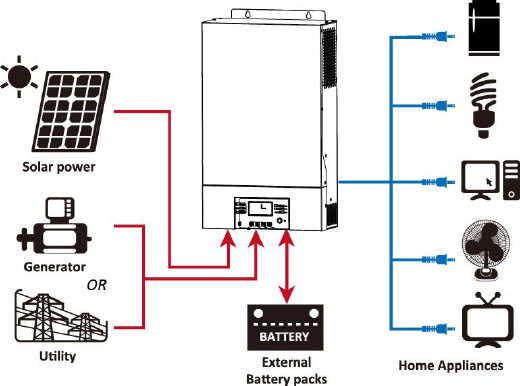
The following illustration shows basic application for this inverter/charger. It also includes following devices to
have a complete running system:
Generator or Utility.
PV modules
Consult with your system integrator for other possible system architectures depending on your requirements.
This inverter can power all kinds of appliances in home or office environment, including motor-type appliances
such as tube light, fan, refrigerator and air conditioner.
Figure 1 Hybrid Power System
3
Product Overview
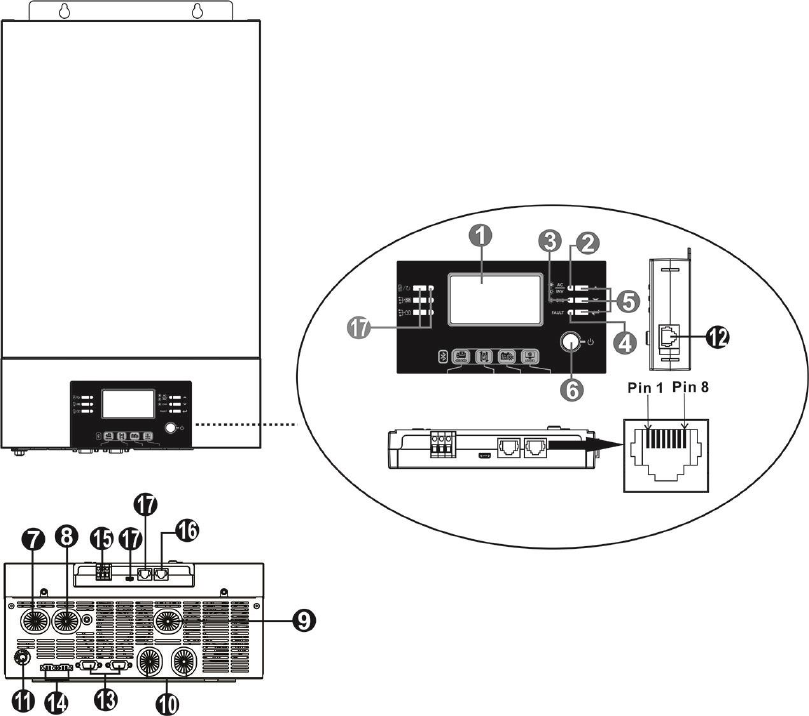
1. LCD display
2. Status indicator
3. Charging indicator
4. Fault indicator
5. Function keys (Please refer to operation chapter for the detailed operation)
6. Power on/off switch
7. AC input
8. AC output
9. PV input
10. Battery input
11. Circuit breaker
12. Remote LCD panel communication port
13. Parallel communication cable (only for parallel model)
14. Current sharing cable (only for parallel model)
15. Dry contact
16. RS-232 communication port
17. Reserved for future use
NOTE: For parallel model installation and operation, please check separate parallel installation guide for the
details.
4
INSTALLATION
Unpacking and Inspection
Before installation, please inspect the unit. Be sure that nothing inside the package is damaged. You should
have received the following items inside of package:
The unit x 1
User manual x 1
Communication cable x 1
Software CD x 1
Preparation
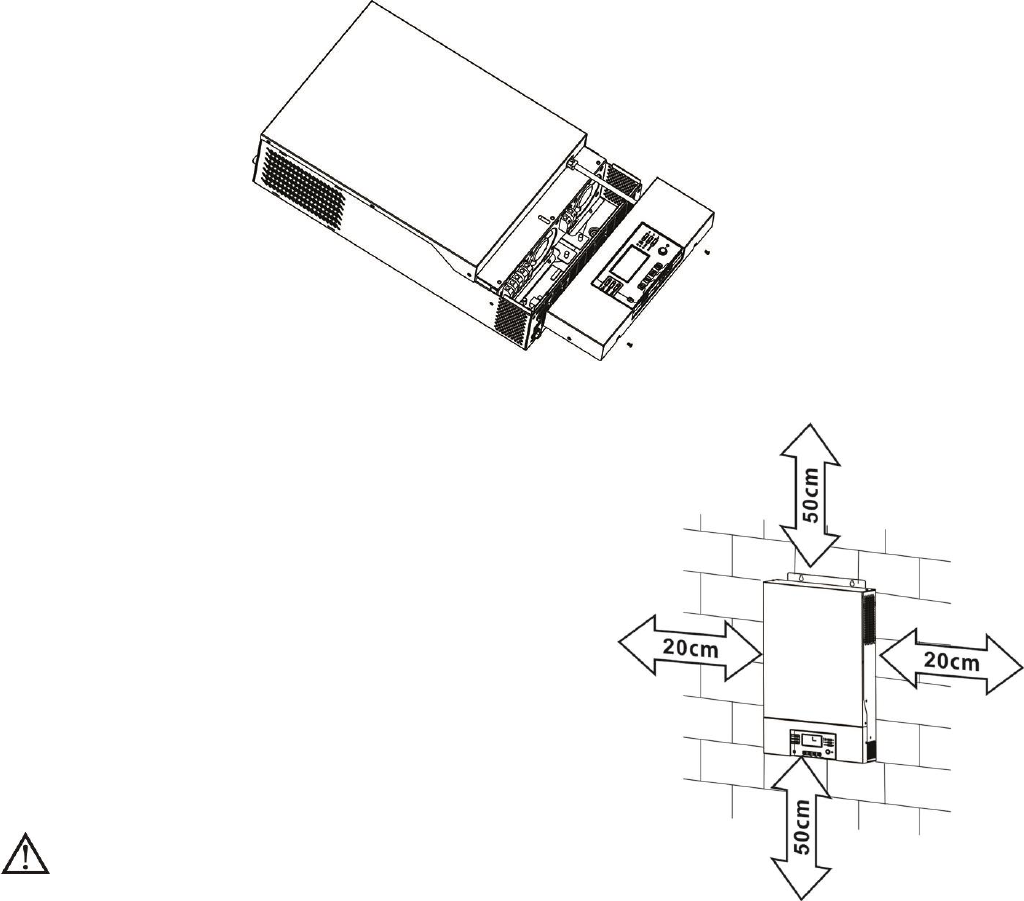
Before connecting all wirings, please take off bottom cover by removing two screws as shown below.
Mounting the Unit
Consider the following points before selecting where to install:
- Do not mount the inverter on flammable construction materials.
- Mount on a solid surface
- Install this inverter at eye level in order to allow the LCD display
to be read at all times.
- The ambient temperature should be between 0°C and 55°C to
ensure optimal operation.
- The recommended installation position is to be adhered to the
wall vertically.
- Be sure to keep other objects and surfaces as shown in the
right diagram to guarantee sufficient heat dissipation and to
have enough space for removing wires.
SUITABLE FOR MOUNTING ON CONCRETE OR
OTHER NON-COMBUSTIBLE SURFACE ONLY.
5
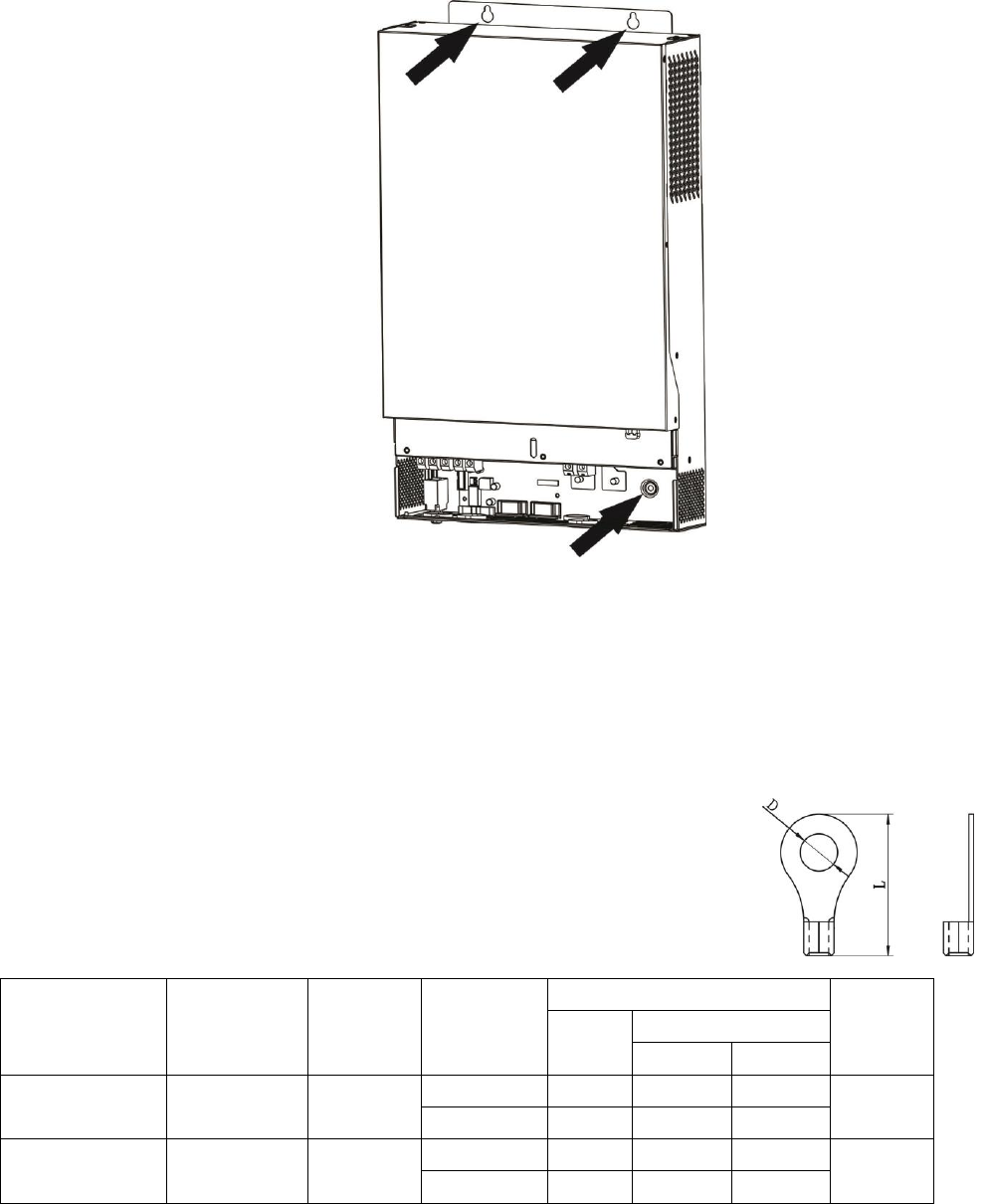
Install the unit by screwing three screws. It’s recommended to use M4 or M5 screws.
Battery Connection
CAUTION: For safety operation and regulation compliance, it’s requested to install a separate DC over-current
protector or disconnect device between battery and inverter. It may not be requested to have a disconnect
device in some applications, however, it’s still requested to have over-current protection installed. Please refer
to typical amperage in below table as required fuse or breaker size.
WARNING! All wiring must be performed by a qualified personnel.
WARNING! It's very important for system safety and efficient operation to use
appropriate cable for battery connection. To reduce risk of injury, please use the
proper recommended cable and terminal size as below.
Recommended battery cable and terminal size:
Model
Typical
Amperage
Battery
Capacity
Wire Size
Ring Terminal
Torque
Value
Cable
mm2
Dimensions
D (mm)
L (mm)
3KW
200A
200AH
1*1/0AWG
60
6.4
49.7
2~3 Nm
2*4AWG
44
6.4
49.7
5KW
200A
200AH
1*1/0AWG
60
6.4
49.7
2~3 Nm
2*4AWG
44
6.4
49.7
Please follow below steps to implement battery connection:
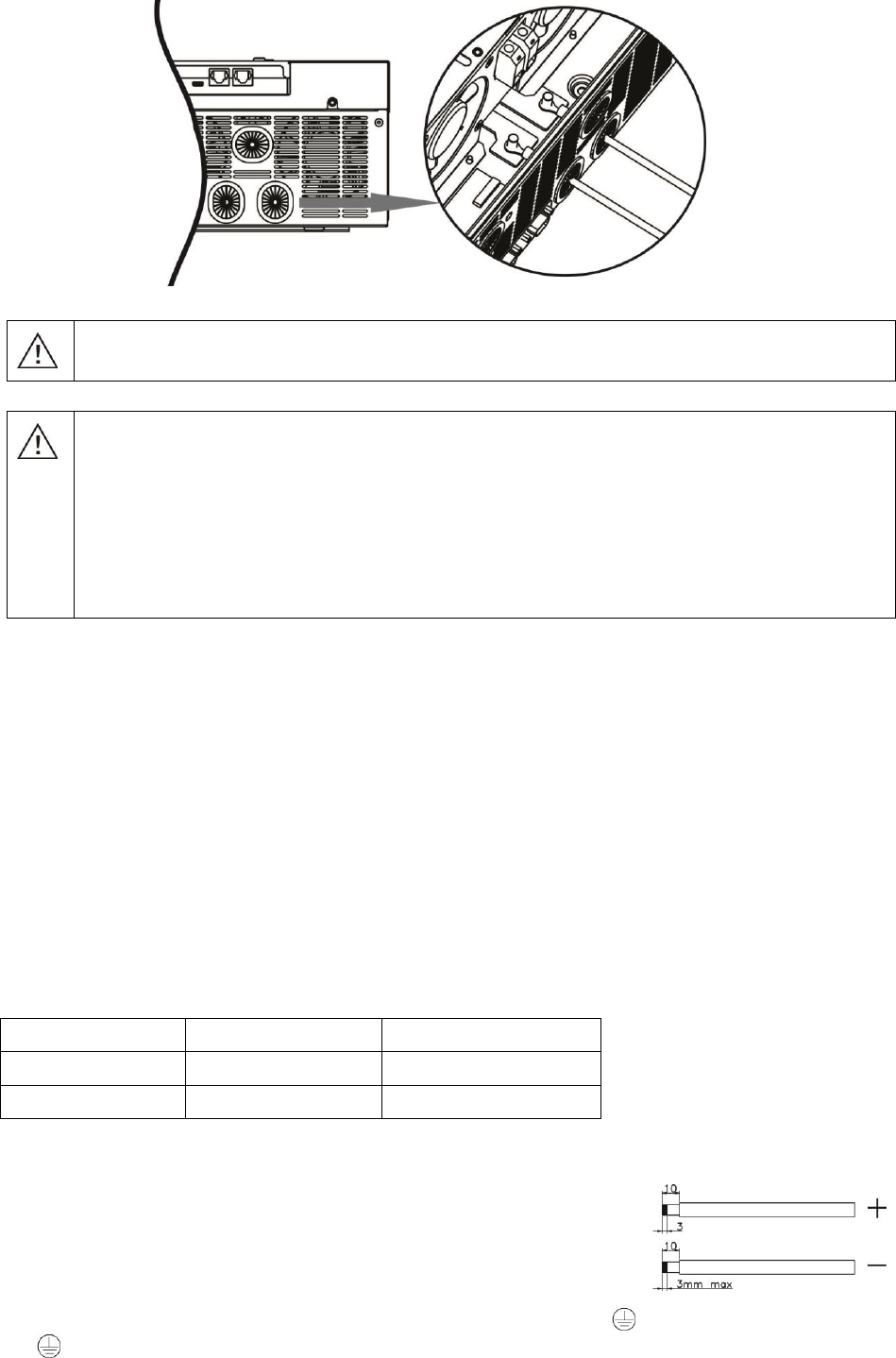
1. Assemble battery ring terminal based on recommended battery cable and terminal size.
2. Connect all battery packs as units requires. It’s suggested to connect at least 200Ah capacity battery for
3KW model and at least 200Ah capacity battery for 5KW model.
3. Insert the ring terminal of battery cable flatly into battery connector of inverter and make sure the bolts are
tightened with torque of 2-3 Nm. Make sure polarity at both the battery and the inverter/charge is correctly
connected and ring terminals are tightly screwed to the battery terminals.
Ring terminal:
6
WARNING: Shock Hazard
Installation must be performed with care due to high battery voltage in series.
CAUTION!! Do not place anything between the flat part of the inverter terminal and the ring
terminal. Otherwise, overheating may occur.
CAUTION!! Do not apply anti-oxidant substance on the terminals before terminals are
connected tightly.
CAUTION!! Before making the final DC connection or closing DC breaker/disconnector, be sure
positive (+) must be connected to positive (+) and negative (-) must be connected to negative
(-).
AC Input/Output Connection
CAUTION!! Before connecting to AC input power source, please install a separate AC breaker between
inverter and AC input power source. This will ensure the inverter can be securely disconnected during
maintenance and fully protected from over current of AC input. The recommended spec of AC breaker is 30A
for 3KW, 50A for 5KW.
CAUTION!! There are two terminal blocks with “IN” and “OUT” markings. Please do NOT mis-connect input
and output connectors.
WARNING! All wiring must be performed by a qualified personnel.
WARNING! It’s very important for system safety and efficient operation to use appropriate cable for AC input
connection. To reduce risk of injury, please use the proper recommended cable size as below.
Suggested cable requirement for AC wires
Model
Gauge
Torque Value
3KW
10 AWG
1.2~ 1.6 Nm
5KW
8 AWG
1.4~ 1.6Nm
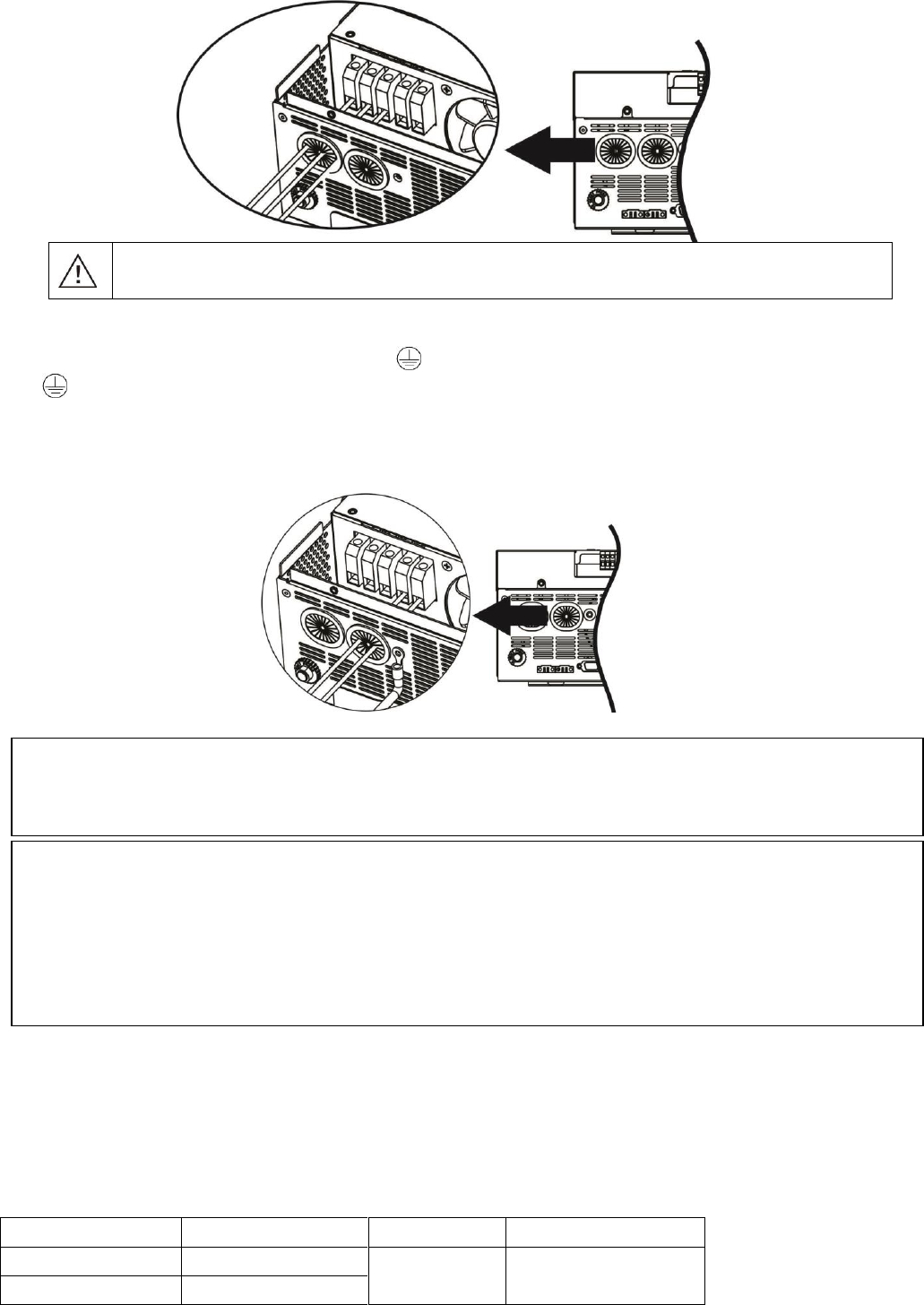
Please follow below steps to implement AC input/output connection:
1. Before making AC input/output connection, be sure to open DC protector or
disconnector first.
2. Remove insulation sleeve 10mm for six conductors. And shorten phase L and
neutral conductor N 3 mm.
3. Insert AC input wires according to polarities indicated on terminal block and
tighten the terminal screws. Be sure to connect PE protective conductor ( ) first.
→Ground (yellow-green)
L→LINE (brown or black)
N→Neutral (blue)
7
WARNING:
Be sure that AC power source is disconnected before attempting to hardwire it to the unit.
4. Then, insert AC output wires according to polarities indicated on terminal block and tighten terminal screws.
Be sure to connect PE protective conductor ( ) first.
→Ground (yellow-green)
L→LINE (brown or black)
N→Neutral (blue)
5. Make sure the wires are securely connected.
PV Connection
CAUTION: Before connecting to PV modules, please install separately a DC circuit breaker between inverter
and PV modules.
WARNING! All wiring must be performed by a qualified personnel.
WARNING! It'’ very important for system safety and efficient operation to use appropriate cable for PV module
connection. To reduce risk of injury, please use the proper recommended cable size as below.
Model
Typical Amperage
Cable Size
Torque
3KW
60A
6 AWG
1.2~1.6 Nm
5KW
80A
CAUTION: Important
Be sure to connect AC wires with correct polarity. If L and N wires are connected reversely, it may cause
utility short-circuited when these inverters are worked in parallel operation.
CAUTION: Appliances such as air conditioner are required at least 2~3 minutes to restart because it’s required
to have enough time to balance refrigerant gas inside of circuits. If a power shortage occurs and recovers in a
short time, it will cause damage to your connected appliances. To prevent this kind of damage, please check
manufacturer of air conditioner if it’s equipped with time-delay function before installation. Otherwise, this
inverter/charger will trig overload fault and cut off output to protect your appliance but sometimes it still causes
internal damage to the air conditioner.
8
PV Module Selection:
When selecting proper PV modules, please be sure to consider below parameters:
1. Open circuit Voltage (Voc) of PV modules not exceeds max. PV array open circuit voltage of inverter.
2. Open circuit Voltage (Voc) of PV modules should be higher than min. battery voltage.
Solar Charging Mode
INVERTER MODEL
3KW
5KW
Max. PV Array Open Circuit Voltage
145Vdc
PV Array MPPT Voltage Range
30~115Vdc
60~115Vdc
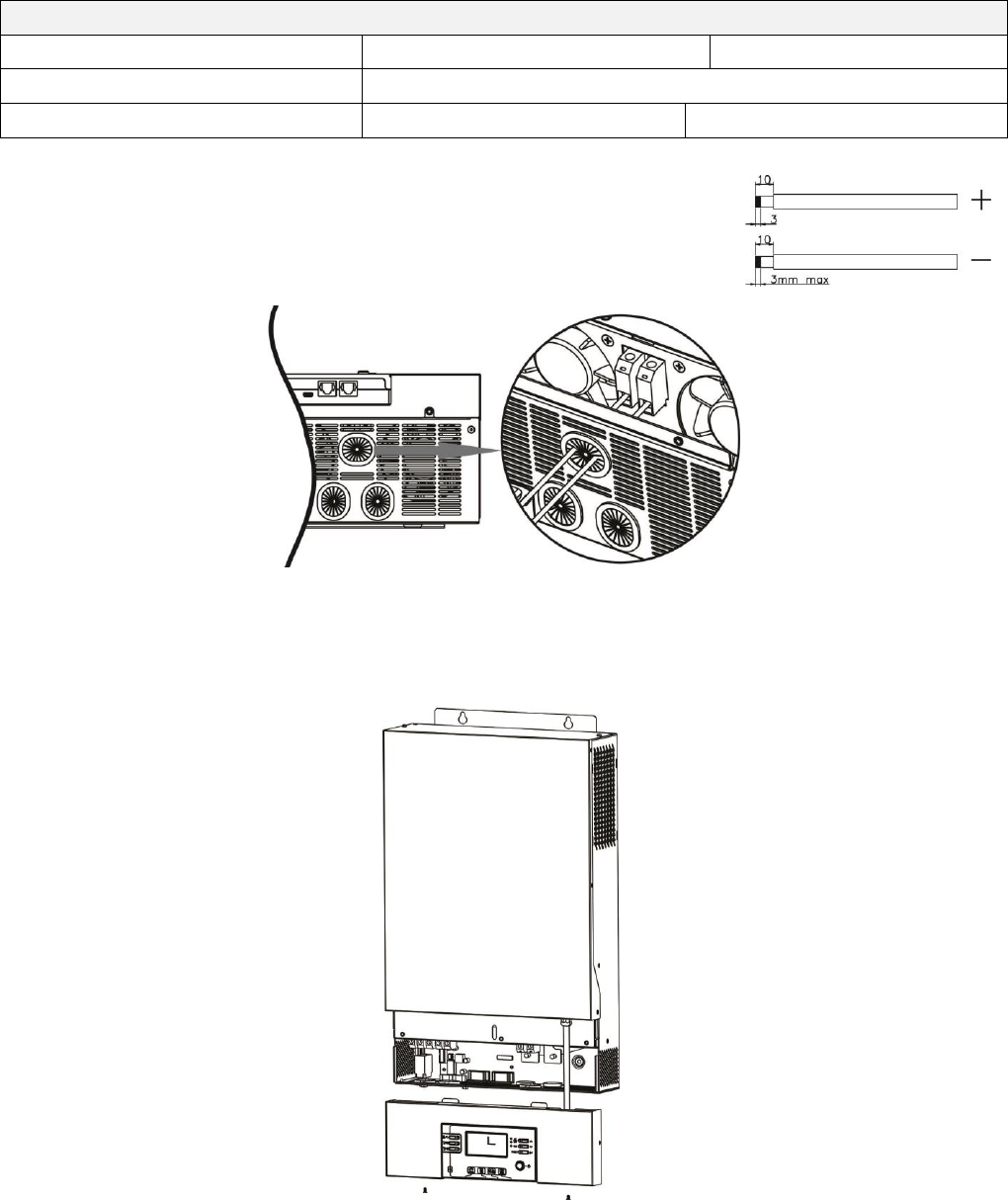
Please follow below steps to implement PV module connection:
1. Remove insulation sleeve 10 mm for positive and negative conductors.
2. Check correct polarity of connection cable from PV modules and PV input
connectors. Then, connect positive pole (+) of connection cable to positive
pole (+) of PV input connector. Connect negative pole (-) of connection
cable to negative pole (-) of PV input connector.
3. Make sure the wires are securely connected.
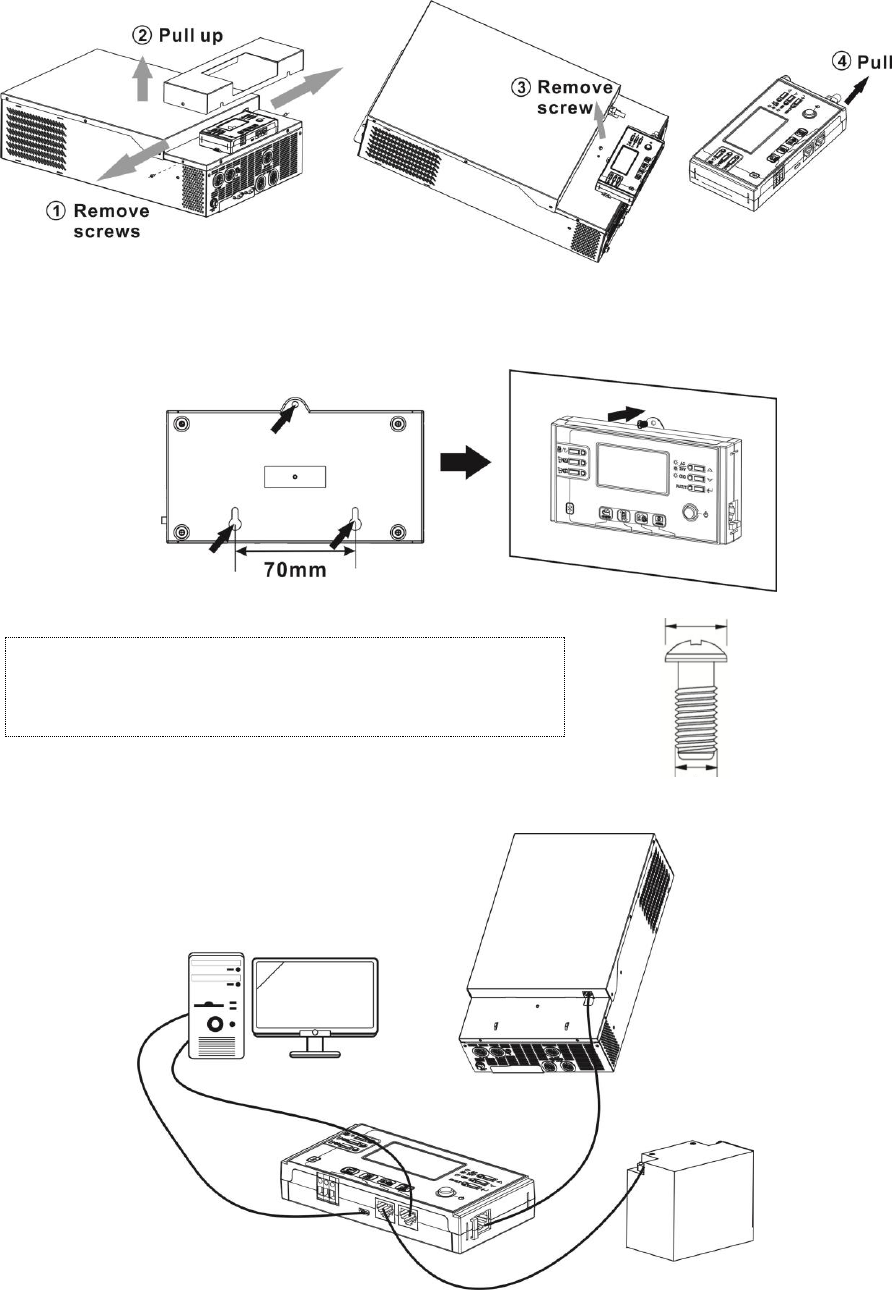
Final Assembly
After connecting all wirings, please put bottom cover back by screwing two screws as shown on the right chart.
9
Remote Display Panel Installation
The LCD panel can be removable and installed in a remote site with an optional communication cable. Please
follow below steps to implement this remote panel installation.
Step 1. Loosen the screw on the two sides of bottom case and push up the case cover. Then, remove screw on
the top of the display panel. Now, the display can be removed from the bottom case. Then, pull out the cable
from the remote communication port.
Step 2. Drill two holes in the marked locations with two screws as shown below chart. Place the panel on the
surface and align the mounting holes with the two screws. Then, use one more screw on the top to fix the panel
to the wall and check if the remote panel is firmly secured.
Note: Installation to the wall should be implemented with
the proper screws. Refer chart for recommended spec of
screws.
Step 3. Connect LCD panel to the inverter with an optional RJ45 communication cable as below chart.
M3
Ø 5-Ø 9
10
Communication Connection
Serial Connection
Please use supplied communication cable to connect to inverter and PC. Insert bundled CD into a computer and
follow on-screen instruction to install the monitoring software. For the detailed software operation, please
check user manual of software inside of CD.
Bluetooth Connection
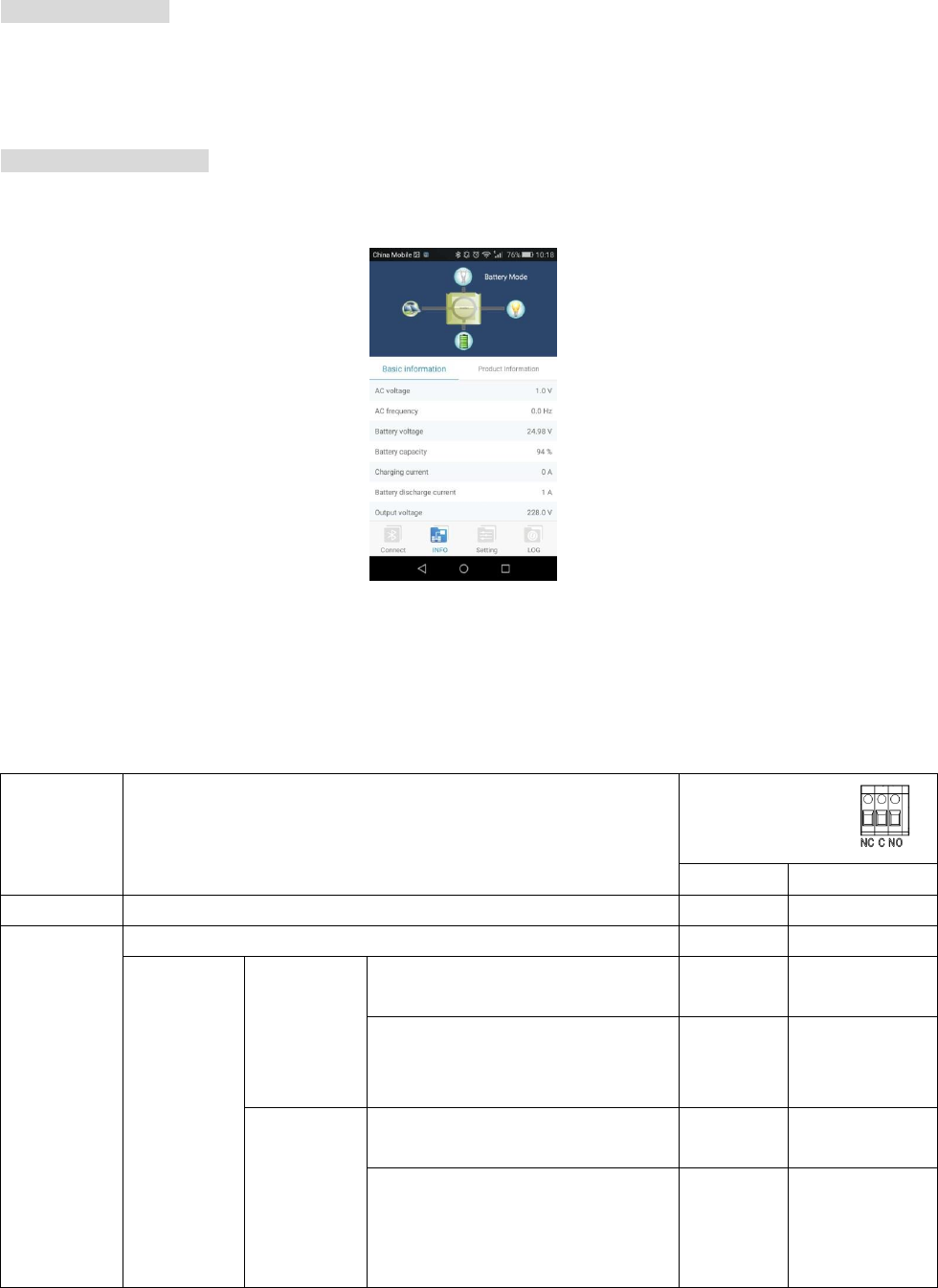
This series is built in Bluetooth technology. You may simply go to google play to install “WatchPower”. It allows
wireless communication up to 6~7m in an open space.
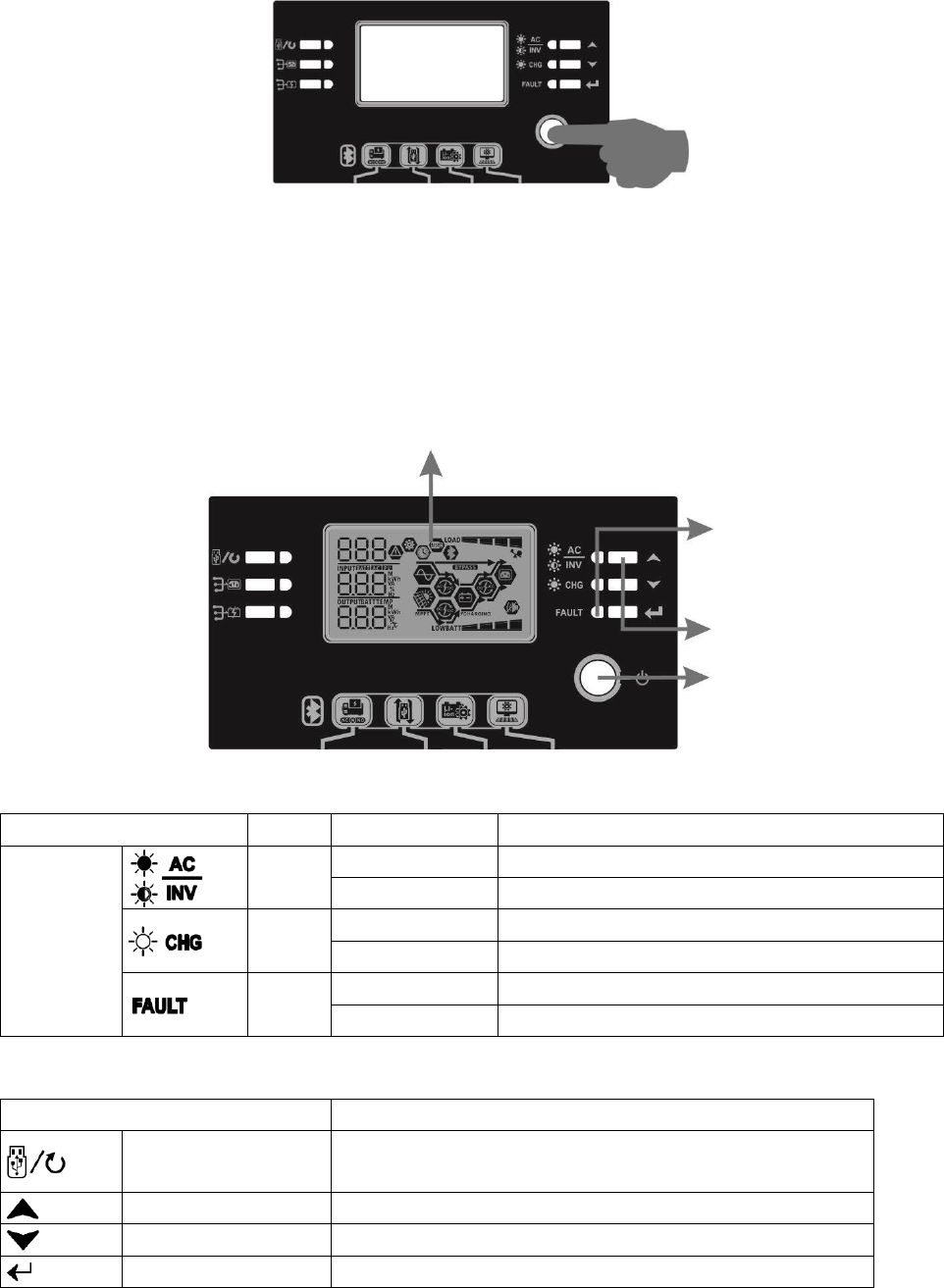
Dry Contact Signal
There is one dry contact (3A/250VAC) available on the rear panel. It could be used to deliver signal to external
device when battery voltage reaches warning level.
Unit Status
Condition
Dry contact port:
NC & C
NO & C
Power Off
Unit is off and no output is powered.
Close
Open
Power On
Output is powered from Utility.
Close
Open
Output is
powered
from
Battery
power or
Solar
energy.
Program 01
set as USB
(utility first)
Battery voltage < Low DC warning
voltage
Open
Close
Battery voltage > Setting value in
Program 13 or battery charging
reaches floating stage
Close
Open
Program 01
is set as
SBU (SBU
priority) or
SUB (solar
first)
Battery voltage < Setting value in
Program 12
Open
Close
Battery voltage > Setting value in
Program 13 or battery charging
reaches floating stage
Close
Open
11
OPERATION
Power ON/OFF
Once the unit has been properly installed and the batteries are connected well, simply press On/Off switch
(located on the button of the case) to turn on the unit.
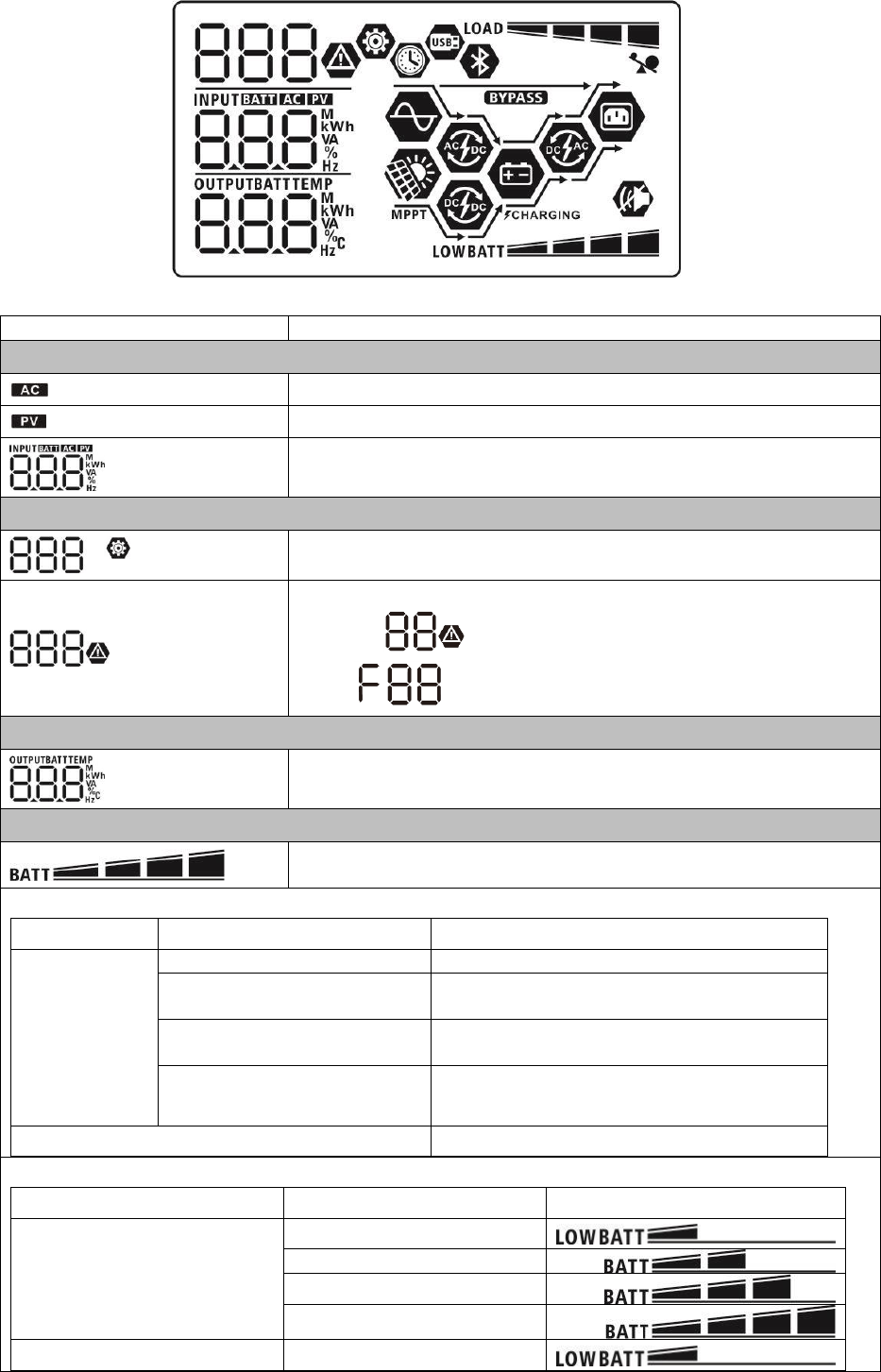
Operation and Display Panel
The operation and display panel, shown in below chart, is on the front panel of the inverter. It includes
three indicators, four function keys and a LCD display, indicating the operating status and input/output
power information.
LCD display
Indicators
LED Indicator
Color
Solid/Flashing
Messages
Status
indicators
Green
Solid On
Output is available in bypass mode
Flashing
Output is powered by battery in inverter mode
Green
Solid On
Battery is fully charged
Flashing
Battery is charging.
Red
Solid On
Fault mode
Flashing
Warning mode
Function Keys
Function Key
Description
ESC
Exit the setting
Up
To last selection
Down
To next selection
Enter
To confirm/enter the selection in setting mode
Status
indicators
Function keys
On/off switch
12
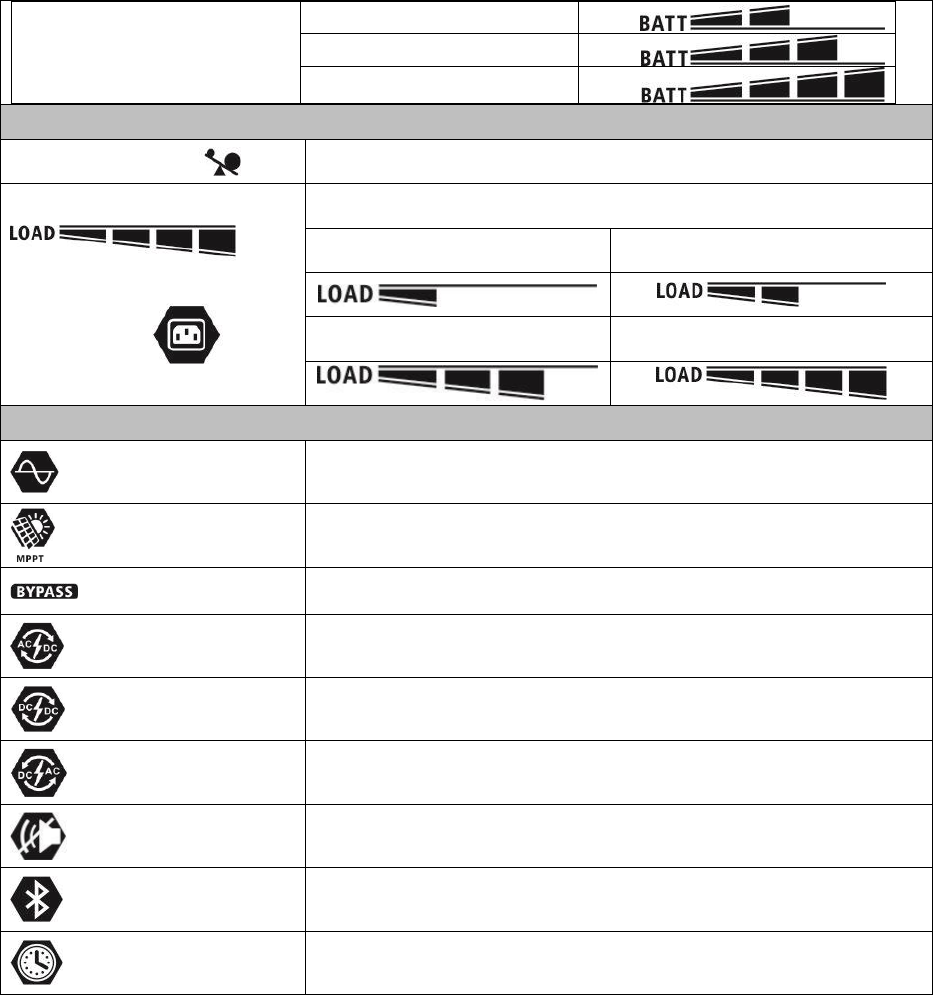
LCD Display Icons
Icon
Function description
Input Source Information
Indicates the AC input.
Indicates the PV input
Indicate input voltage, input frequency, PV voltage, charger current,
charger power, battery voltage.
Configuration Program and Fault Information
Indicates the setting programs.
Indicates the warning and fault codes.
Warning: flashing with warning code.
Fault: lighting with fault code
Output Information
Indicate output voltage, output frequency, load percent, load in VA,
load in Watt and discharging current.
Battery Information
Indicates battery level by 0-24%, 25-49%, 50-74% and 75-100% in
battery mode and charging status in line mode.
In AC mode, it will present battery charging status.
Status
Battery voltage
LCD Display
Constant
Current mode /
Constant
Voltage mode
<2V/cell
4 bars will flash in turns.
2 ~ 2.083V/cell
Bottom bar will be on and the other three
bars will flash in turns.
2.083 ~ 2.167V/cell
Bottom two bars will be on and the other two
bars will flash in turns.
> 2.167 V/cell
Bottom three bars will be on and the top bar
will flash.
Floating mode. Batteries are fully charged.
4 bars will be on.
In battery mode, it will present battery capacity.
Load Percentage
Battery Voltage
LCD Display
Load >50%
< 1.85V/cell
1.85V/cell ~ 1.933V/cell
1.933V/cell ~ 2.017V/cell
> 2.017V/cell
Load < 50%
< 1.892V/cell
13
1.892V/cell ~ 1.975V/cell
1.975V/cell ~ 2.058V/cell
> 2.058V/cell
Load Information
Indicates overload.
Indicates the load level by 0-24%, 25-49%, 50-74% and 75-100%.
0%~24%
25%~49%
50%~74%
75%~100%
Mode Operation Information
Indicates unit connects to the mains.
Indicates unit connects to the PV panel.
Indicates load is supplied by utility power.
Indicates the utility charger circuit is working.
Indicates the solar charger circuit is working.
Indicates the DC/AC inverter circuit is working.
Indicates unit alarm is disabled.
Indicates Bluetooth is connected.
Time display page
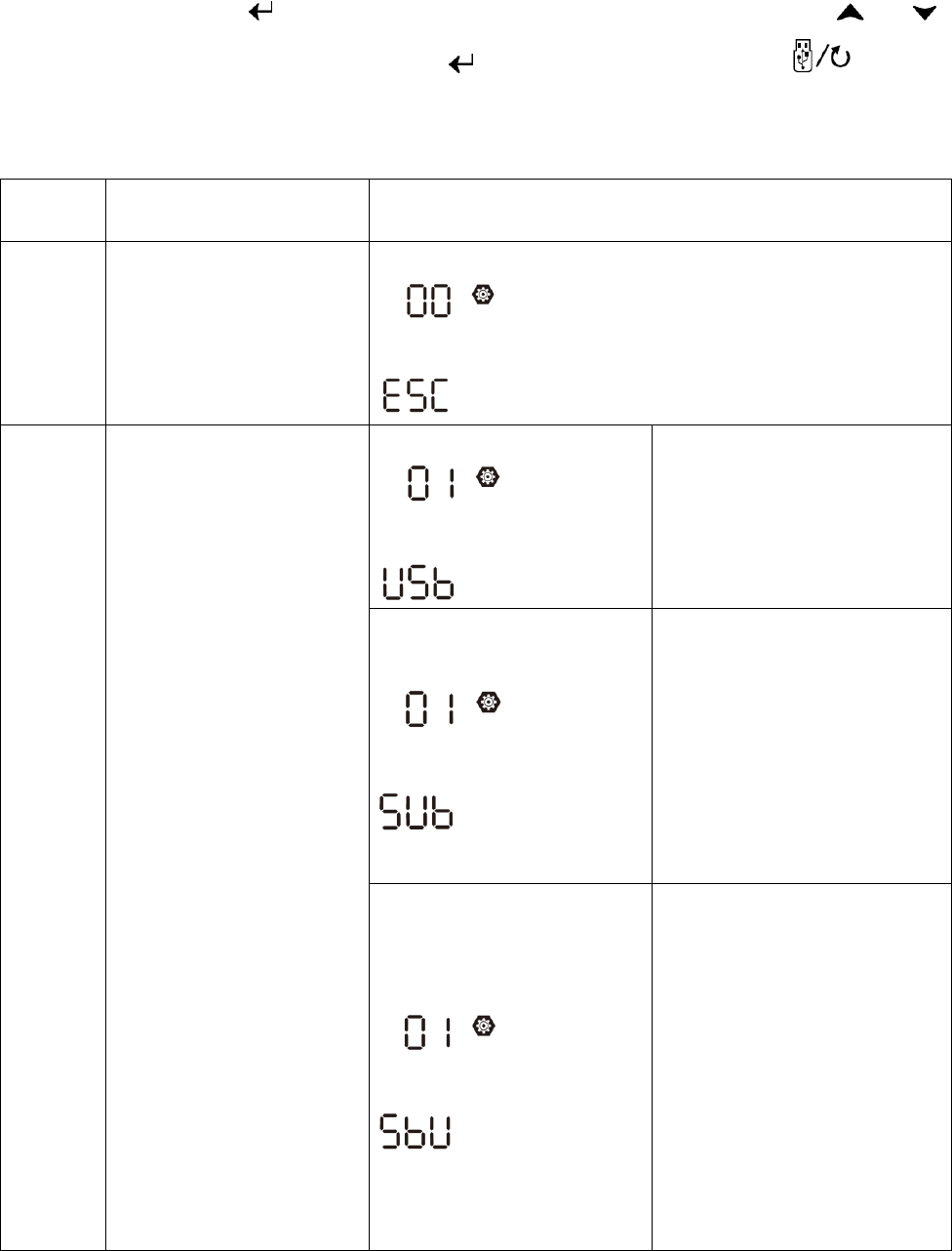
14
LCD Setting
After pressing and holding “” button for 3 seconds, the unit will enter setting mode. Press “ ” or “ ”
button to select setting programs. And then, press “ ” button to confirm the selection or “ ” button to
exit.
Setting Programs:
Progra
m
Description
Selectable option
00
Exit setting mode
Escape
01
Output source priority:
To configure load power
source priority
USB : Utility first (default)
Utility will provide power to the
loads as first priority.
If Utility energy is unavailable,
solar energy and battery
provides power the loads.
SUB: Solar first
Solar energy provides power to
the loads as first priority.
If solar energy is not sufficient
to power all connected loads,
utility energy will supply power
to the loads at the same time.
Battery provides power to the
loads only when solar and utility
is not sufficient.
SBU priority
Solar energy provides power to
the loads as first priority.
If solar energy is not sufficient
to power all connected loads,
battery energy will supply power
to the loads at the same time.
Utility provides power to the
loads only when battery voltage
drops to either low-level
warning voltage or the setting
point in program 12 or solar and
battery is not sufficient.
15
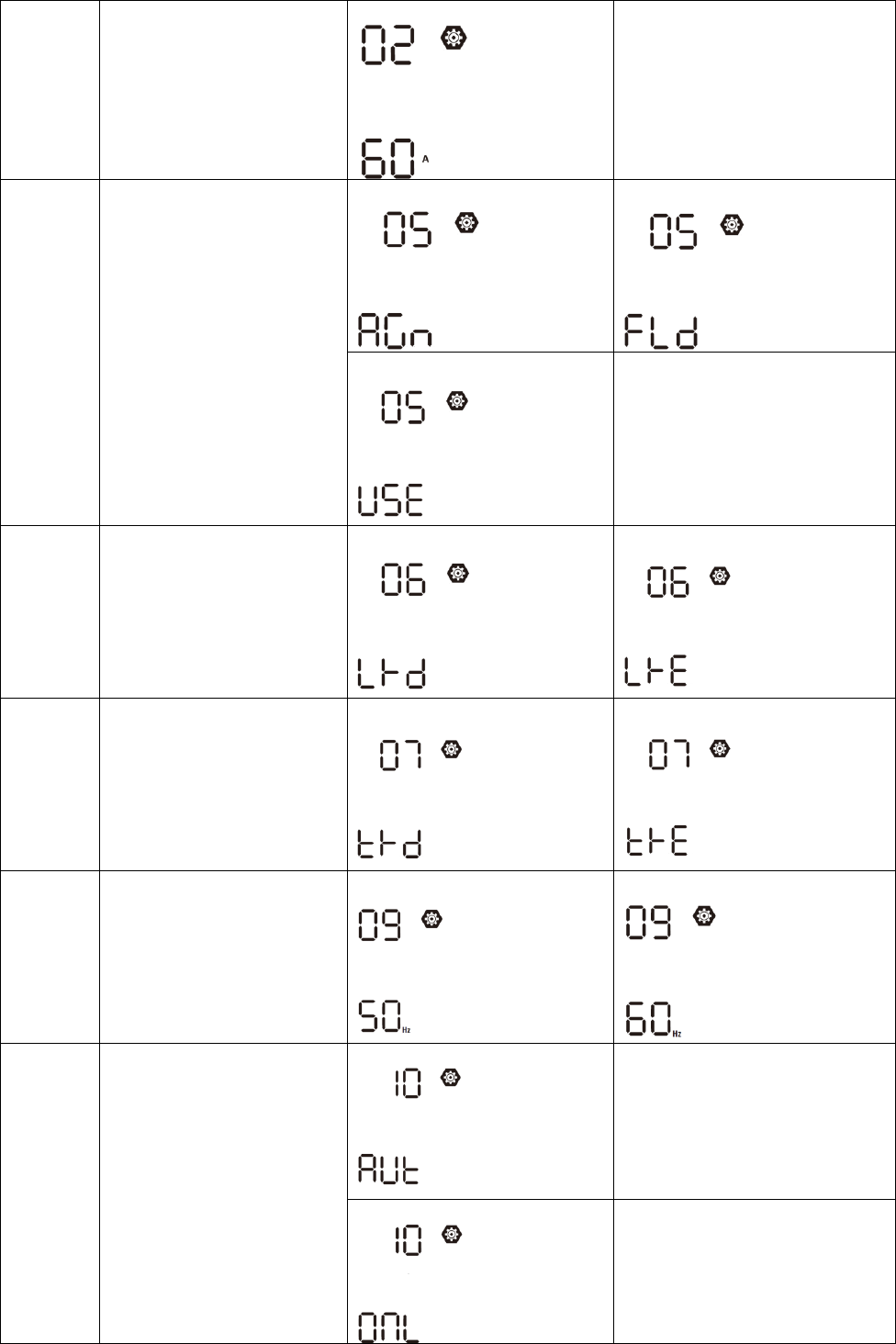
02
Maximum charging current:
To configure total charging
current for solar and utility
chargers.
(Max. charging current =
utility charging current +
solar charging current)
60A (default)
3KW model setting range is from
10A to 120A and increment of
each click is 10A.
5KW model setting range is from
10A to 140A and increment of
each click is 10A.
05
Battery type
AGM (default)
Flooded
User-Defined
If “User-Defined” is selected,
battery charge voltage and low
DC cut-off voltage can be set up
in program 26, 27 and 29.
06
Auto restart when overload
occurs
Restart disable (default)
Restart enable
07
Auto restart when over
temperature occurs
Restart disable (default)
Restart enable
09
Output frequency
50Hz (default)
60Hz
10
Operation Logic
Automatically (default)
If selected and utility is
available, inverter will work in
line mode. Once utility
frequency is unstable, inverter
will work in bypass mode if
bypass function is not forbidden
in program 23.
Online mode
If selected, inverter will work in
line mode when utility is
available.
16
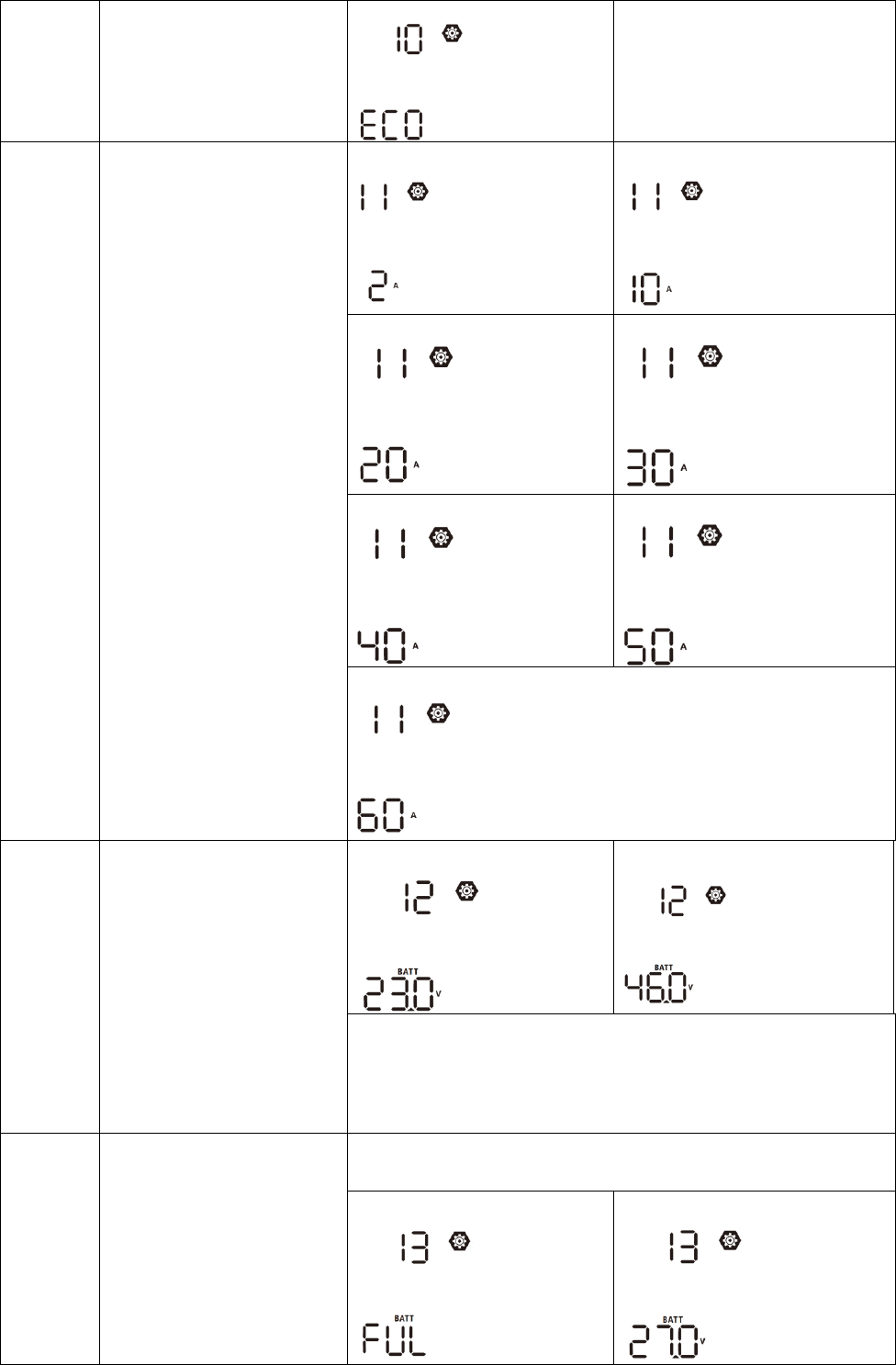
ECO Mode
If selected and bypass is not
forbidden in program 23,
inverter will work in ECO mode
when utility is available.
11
Maximum utility charging
current
Note: If setting value in
program 02 is smaller than
that in program in 11, the
inverter will apply charging
current from program 02 for
utility charger.
2A
10A
20A
30A (default)
40A
50A
60A
12
Setting voltage point back
to utility source when
selecting “SBU” (SBU
priority) or “SUB” (Solar
first) in program 01
3KW default setting: 23.0V
5KW default setting: 46.0V
3KW model setting range is from 22.0V to 28.5V and increment of
each click is 0.5V.
5KW model setting range is from 44.0V to 57.0V and increment of
each click is 1.0V.
13
Setting voltage point back
to battery mode when
selecting “SBU” (SBU
priority) or “SUB” (Solar
first) in program 01
3KW model: The setting range is from 24.0V to 32.0V and
increment of each click is 0.5V.
Battery fully charged
27.0V (default)
17
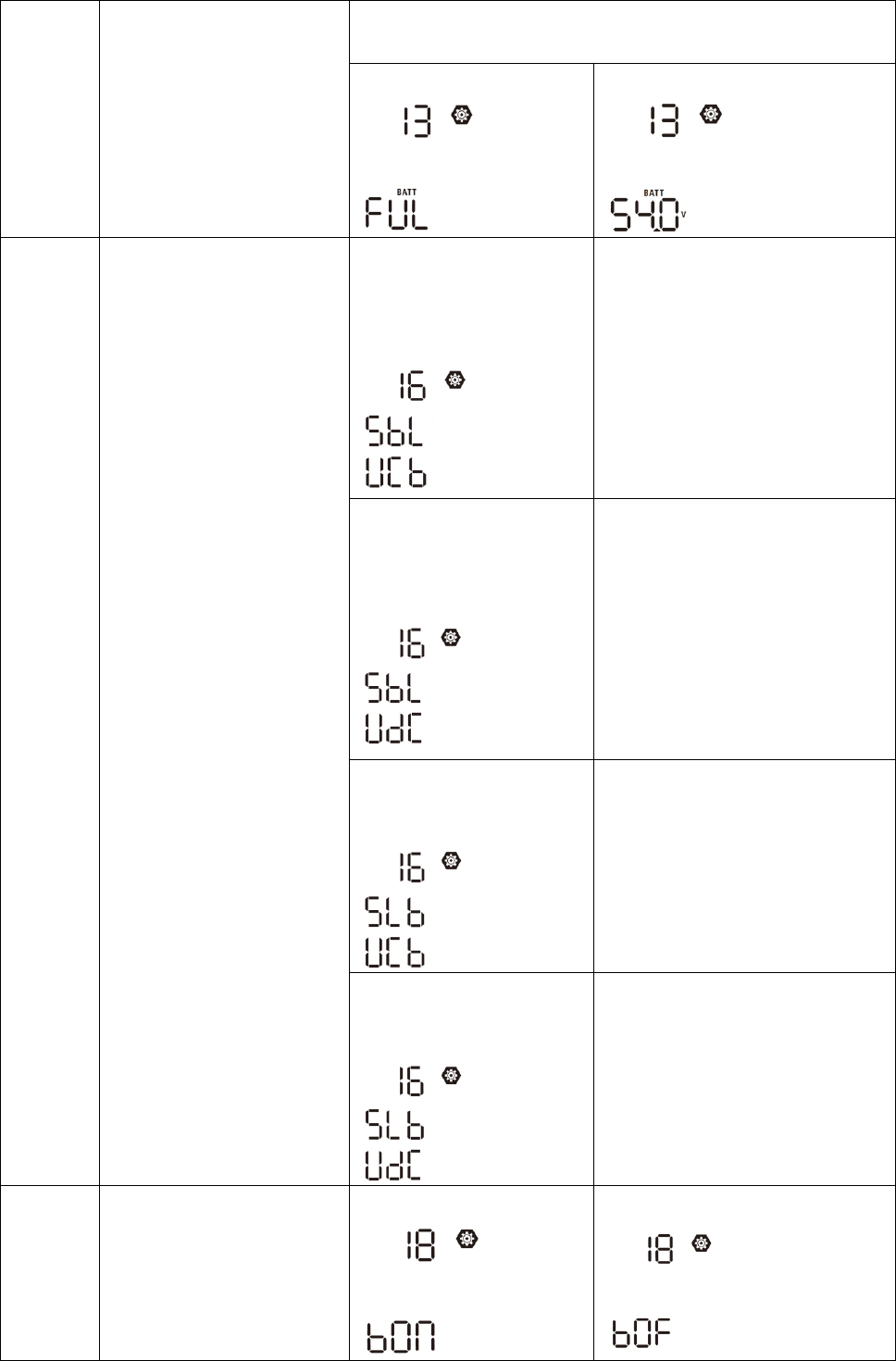
13
Setting voltage point back
to battery mode when
selecting “SBU” (SBU
priority) or “SUB” (Solar
first) in program 01
5KW model: The setting range is from 48.0V to 64.0V and
increment of each click is 1.0V.
Battery fully charged
54.0V (default)
16
Solar energy priority:
To configure solar energy
priority for battery and load
SbL: Solar energy for
battery first
UCB: Allow utility to charge
battery (Default)
Solar energy charges battery first
and allow the utility to charge
battery.
SbL: Solar energy for
battery first
UdC: Disallow utility to
charge battery
Solar energy charge battery first
and disallow the utility to charge
battery.
SLb: Solar energy for load
first
UCb: Allow utility to charge
battery
Solar energy provides power to the
load first and also allow the utility
to charge battery.
SLb: Solar energy for load
first
UdC: Disallow utility to
charge battery
Solar energy provides power to the
load first and disallow the utility to
charge battery.
18
Alarm control
Alarm on (default)
Alarm off
18
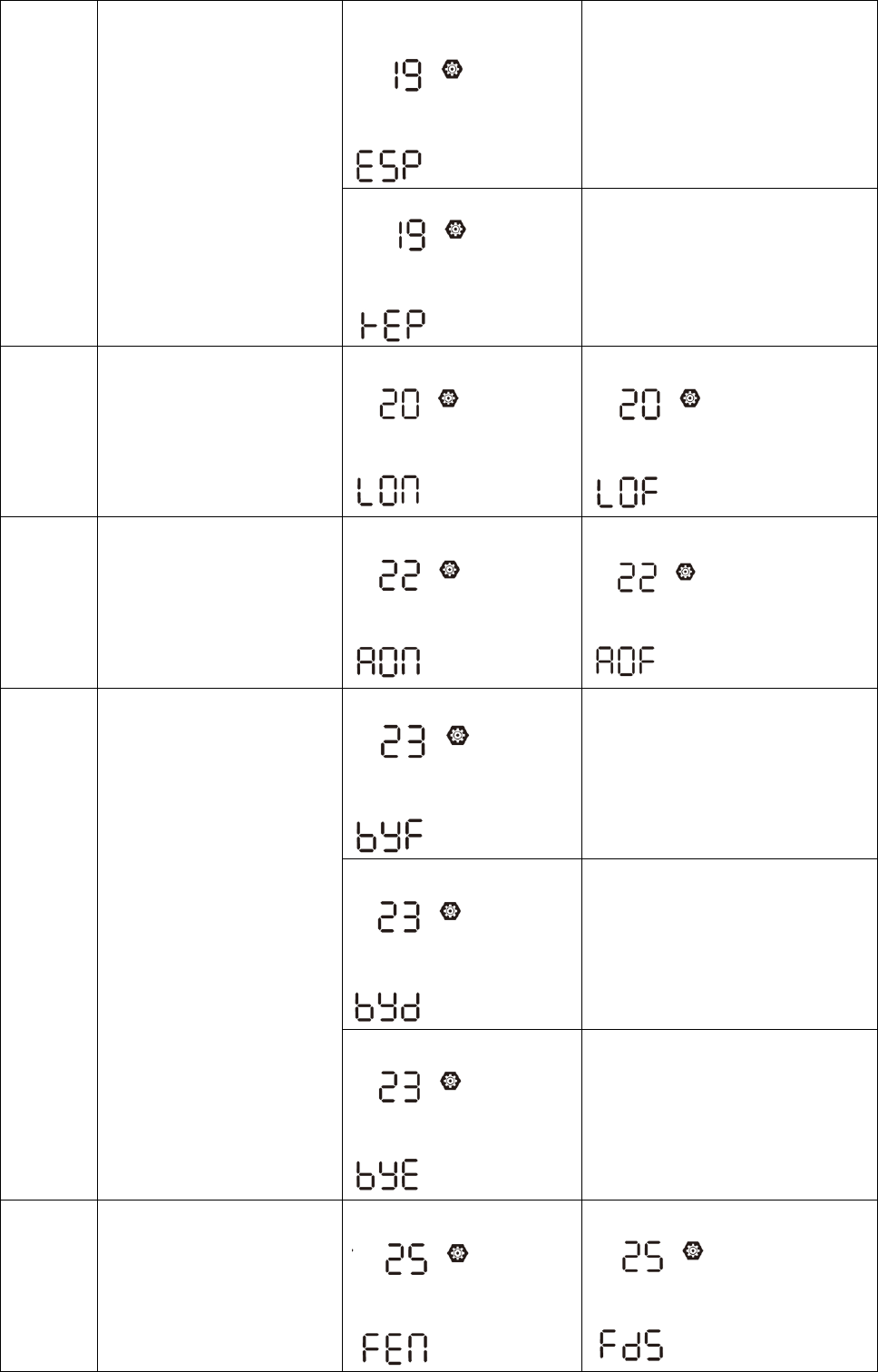
19
Auto return to default
display screen
Return to default display
screen (default)
If selected, no matter how users
switch display screen, it will
automatically return to default
display screen (Input voltage
/output voltage) after no button is
pressed for 1 minute.
Stay at latest screen
If selected, the display screen will
stay at latest screen user finally
switches.
20
Backlight control
Backlight on (default)
Backlight off
22
Beeps while primary source
is interrupted
Alarm on (default)
Alarm off
23
Bypass function:
Bypass Forbidden
If selected, inverter won’t work in
bypass/ECO modes.
Bypass disable
If selected and power ON button is
pressed on, inverter can work in
bypass/ECO mode only if utility is
available.
Bypass enable (default)
If selected and no matter power
ON button is pressed on or not,
inverter can work in bypass mode
if utility is available.
25
Record Fault code
Record enable
Record disable (default)
19
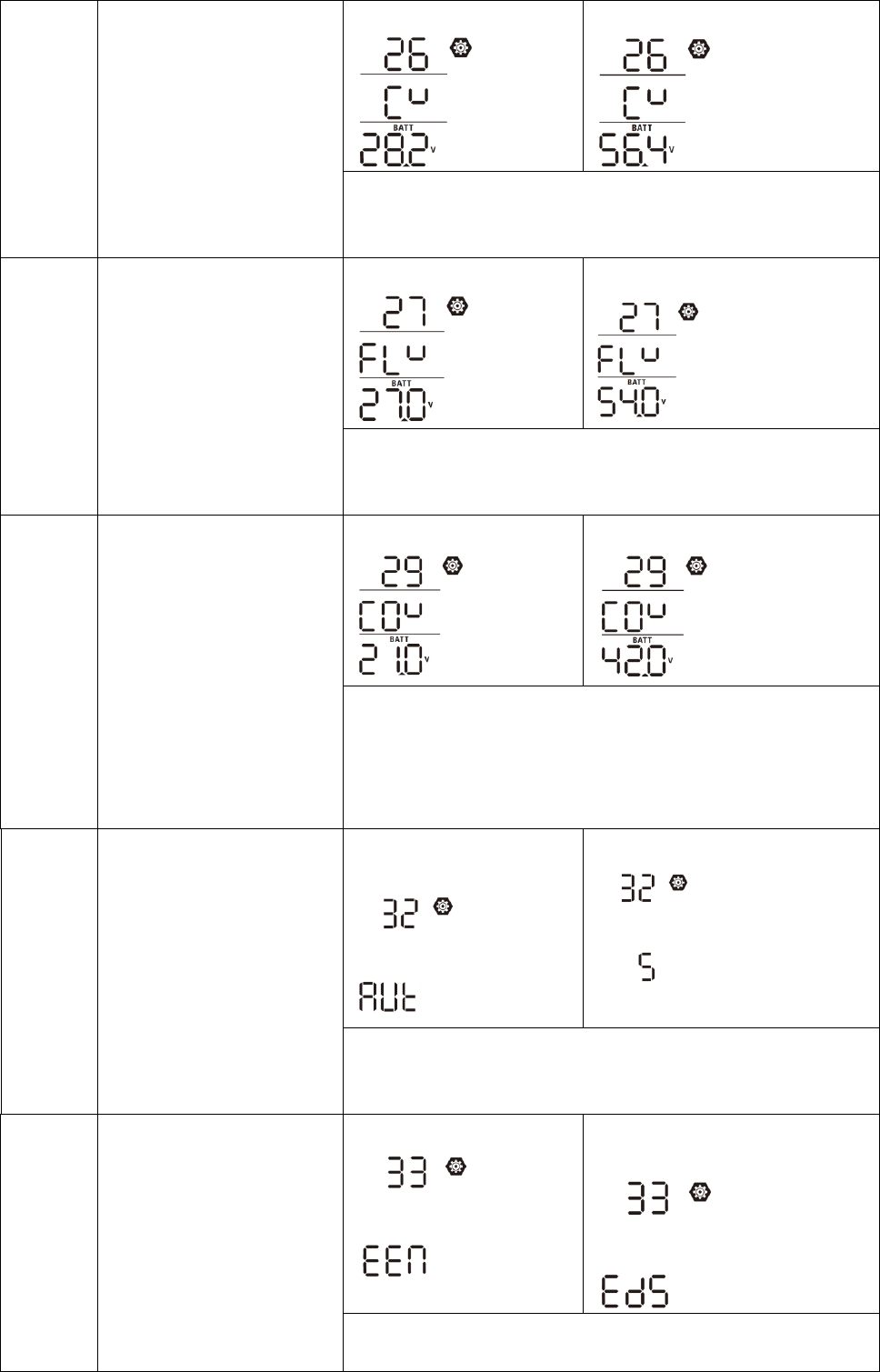
26
Bulk charging voltage
(C.V voltage)
3KW default setting: 28.2V
5KW default setting: 56.4V
If self-defined is selected in program 5, this program can be set
up. Setting range is from 24.0V to 32.0V for 3KW model and
48.0V to 64.0V for 5KW model. Increment of each click is 0.1V.
27
Floating charging voltage
3KW default setting: 27.0V
5KW default setting: 54.0V
If self-defined is selected in program 5, this program can be set
up. Setting range is from 24.0V to 32.0V for 3KW model and
48.0V to 64.0V for 5KW model. Increment of each click is 0.1V.
29
Low DC cut-off voltage
3KW default setting: 21.0V
5KW default setting: 42.0V
If self-defined is selected in program 5, this program can be set
up. Setting range is from 20.0V to 27.0V for 3KW model and
40.0V to 54.0V for 5KW model. Increment of each click is 0.1V.
Low DC cut-off voltage will be fixed to setting value no matter
what percentage of load is connected.
32
Bulk charging time
auto-charging time
(default)
5min
If “User-Defined” is selected in program 05, this program can be
set up. Setting range is from 5min to 900min. Increment of each
click is 5min. Otherwise, Keeping auto-charging time.
33
Battery equalization
Battery equalization enable
Battery equalization disable
(default)
If “Flooded” or “User-Defined” is selected in program 05, this
program can be set up.
20
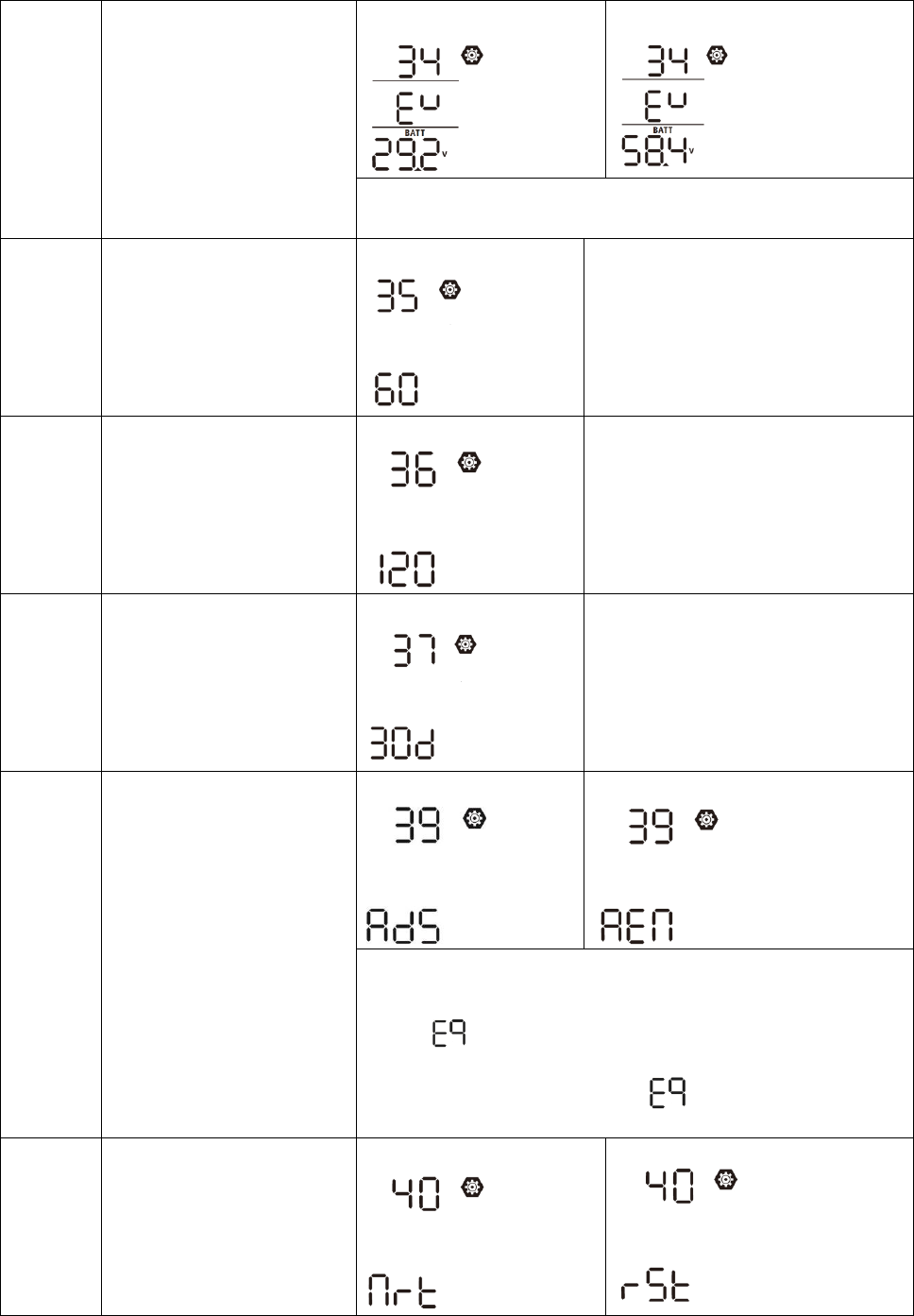
34
Battery equalization voltage
3KW default setting: 29.2V
5KW default setting: 58.4V
Setting range is from 24.0V to 32.0V for 3KW model and 48.0V to
64.0V for 5KW model. Increment of each click is 0.1V.
35
Battery equalized time
60min (default)
Setting range is from 5min to
900min. Increment of each click is
5min.
36
Battery equalized timeout
120min (default)
Setting range is from 5min to 900
min. Increment of each click is 5 min.
37
Equalization interval
30days (default)
Setting range is from 0 to 90 days.
Increment of each click is 1 day
39
Equalization activated
immediately
Disable (default)
Enable
If equalization function is enabled in program 33, this program
can be set up. If “Enable” is selected in this program, it’s to
activate battery equalization immediately and LCD main page will
shows “ ”. If “Disable” is selected, it will cancel equalization
function until next activated equalization time arrives based on
program 37 setting. At this time, “ ” will not be shown in LCD
main page.
40
Reset PV and Load energy
storage
Not reset(Default)
Reset
21
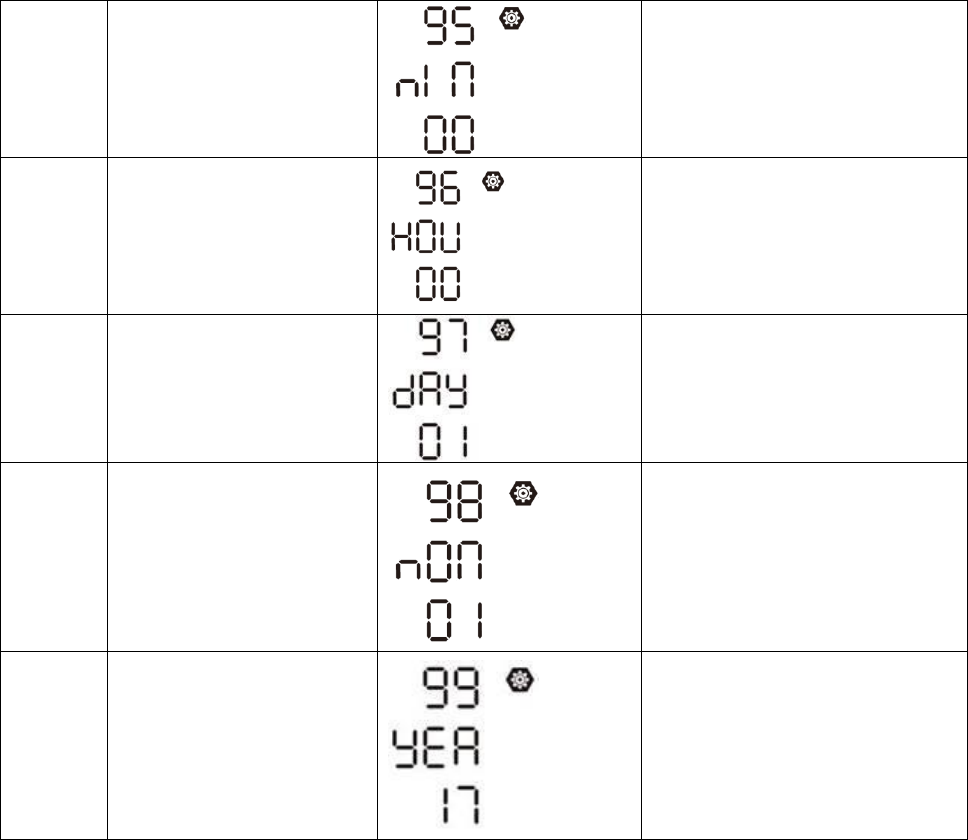
95
Time setting – Minute
For minute setting, the range is
from 00 to 59.
96
Time setting – Hour
For hour setting, the range is from
00 to 23.
97
Time setting– Day
For day setting, the range is from
00 to 31.
98
Time setting– Month
For month setting, the range is
from 01 to 12.
99
Time setting – Year
For year setting, the range is from
17 to 99.
22
Display Setting
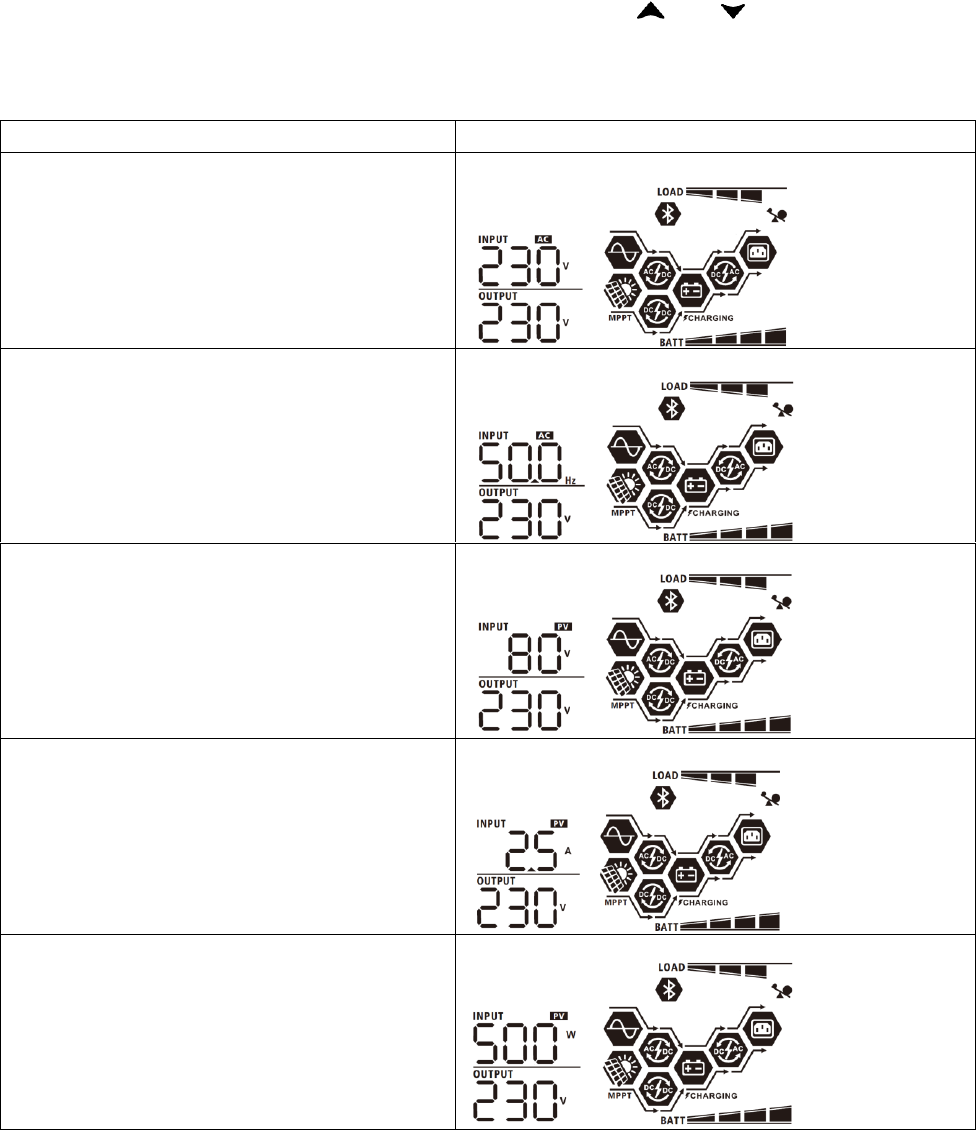
The LCD display information will be switched in turns by pressing “ ” or “ ” button. The selectable
information is switched as below order: input voltage, input frequency, PV voltage, charging current, charging
power, battery voltage, output voltage, output frequency, load percentage, load in Watt, load in VA, load in
Watt, DC discharging current, main CPU Version.
Selectable information
LCD display
Input voltage/Output voltage
(Default Display Screen)
Input Voltage=230V, output voltage=230V
Input frequency
Input frequency=50Hz
PV voltage
PV voltage=80V
PV current
PV current = 2.5A
PV power
PV power = 500W
23
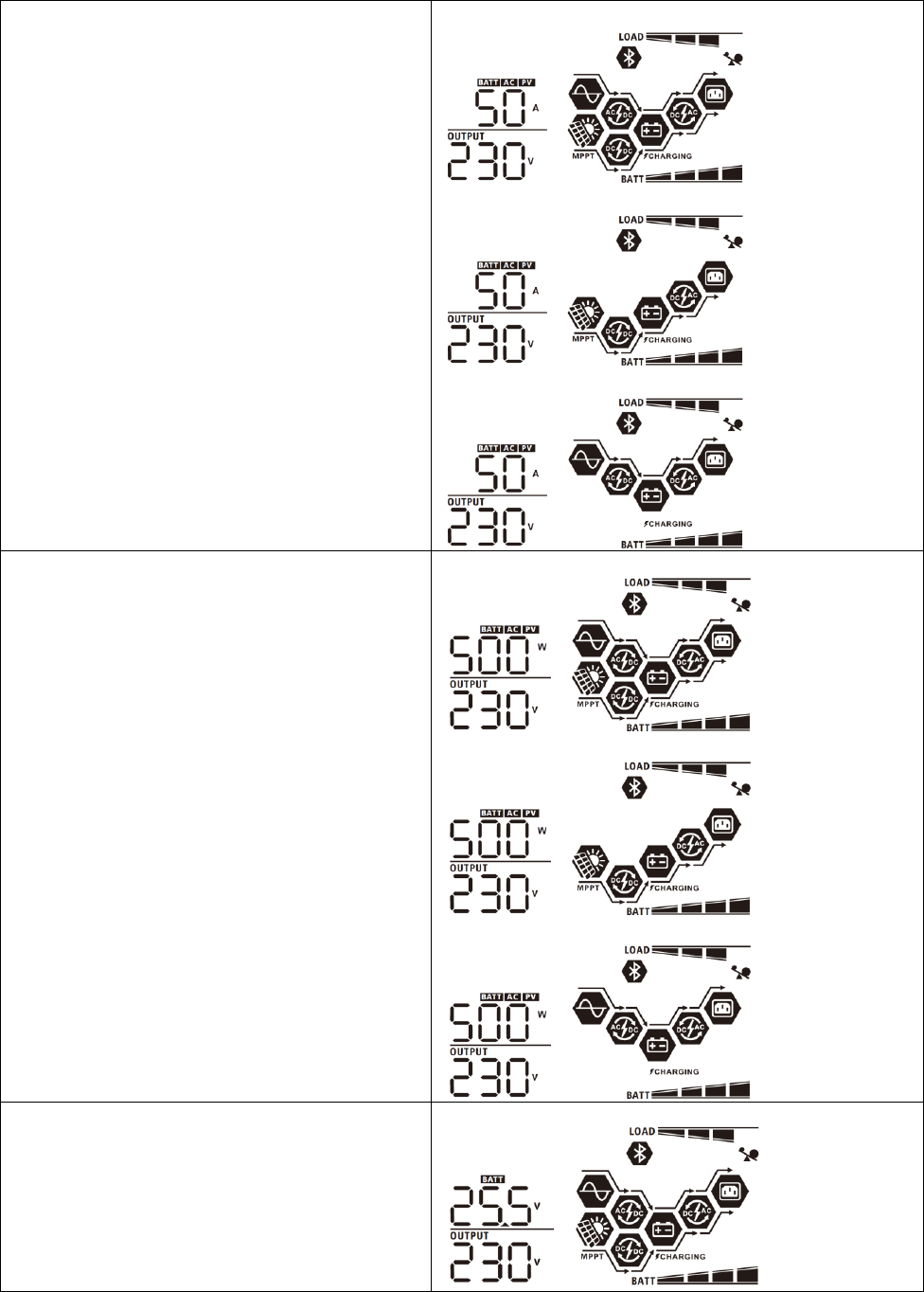
Charging current
AC and PV charging current=50A
PV charging current=50A
AC charging current=50A
Charging power
AC and PV charging power=500W
PV charging power=500W
AC charging power=500W
Battery voltage and output voltage
Battery voltage=25.5V, output voltage=230V
24
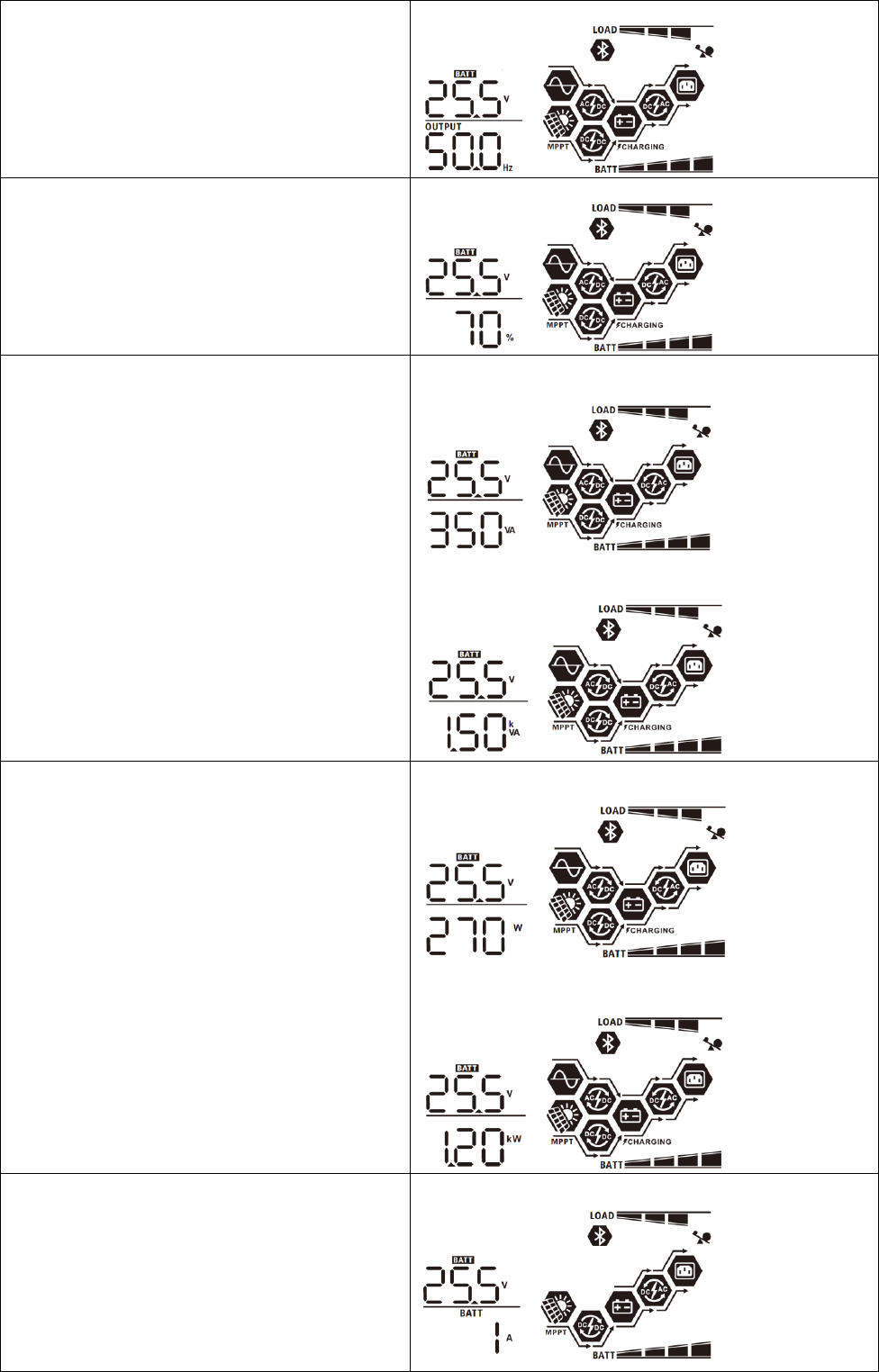
Output frequency
Output frequency=50Hz
Load percentage
Load percent=70%
Load in VA
When connected load is lower than 1kVA, load in VA will
present xxxVA like below chart.
When load is larger than 1kVA (≧1KVA), load in VA will
present x.xkVA like below chart.
Load in Watt
When load is lower than 1kW, load in W will present
xxxW like below chart.
When load is larger than 1kW (≧1KW), load in W will
present x.xkW like below chart.
Battery voltage/DC discharging current
Battery voltage=25.5V, discharging current=1A
25
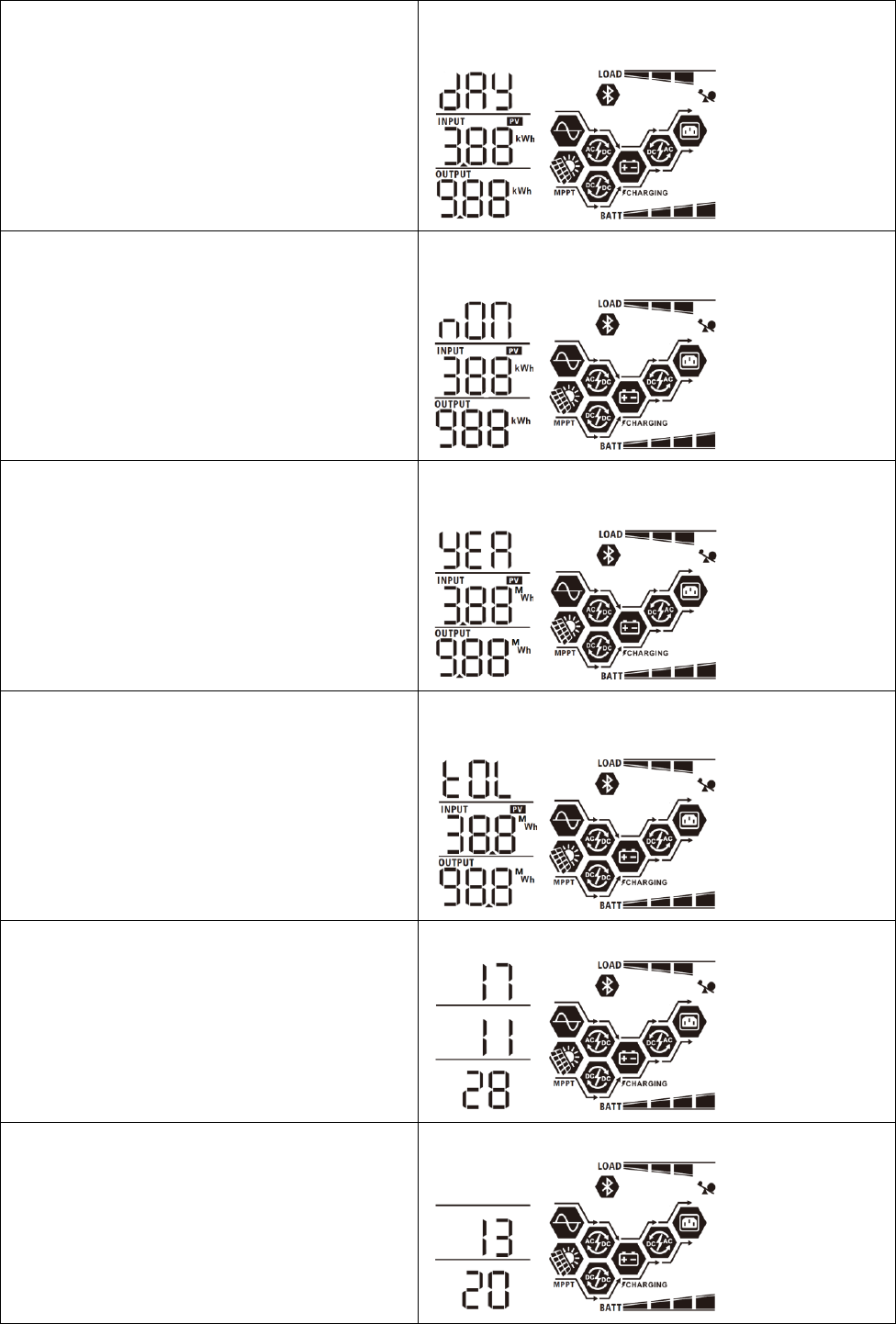
PV energy generated today and Load output
energy today
PV energy generated Today = 3.88kWh, Load output
energy Today = 9.88kWh.
PV energy generated this month and Load output
energy this month.
PV energy generated this month = 388kWh, Load output
energy this month = 988kWh.
PV energy generated this year and Load output
energy this year.
PV energy generated this year energy = 3.88MWh, Load
output energy this year = 9.88MWh.
PV energy generated totally and Load output
total energy.
Total PV energy until now= 38.8MWh, Total load output
energy until now= 98.8MWh.
Real date.
Real date Nov 28, 2017.
Real time.
Real time 13:20.
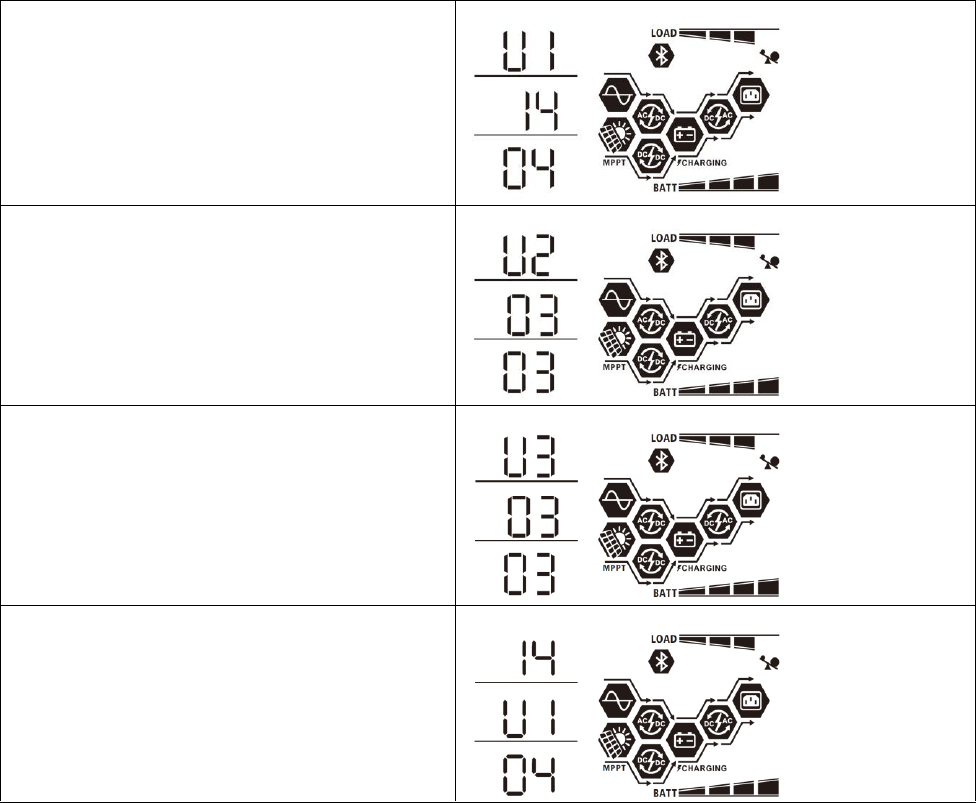
26
Main CPU version checking.
Main CPU version 00014.04.
Secondary CPU version checking.
Secondary CPU version 00003.03.
Bluetooth version checking.
Bluetooth version 00003.03.
SCC version checking
SCC version 00003.03.
27
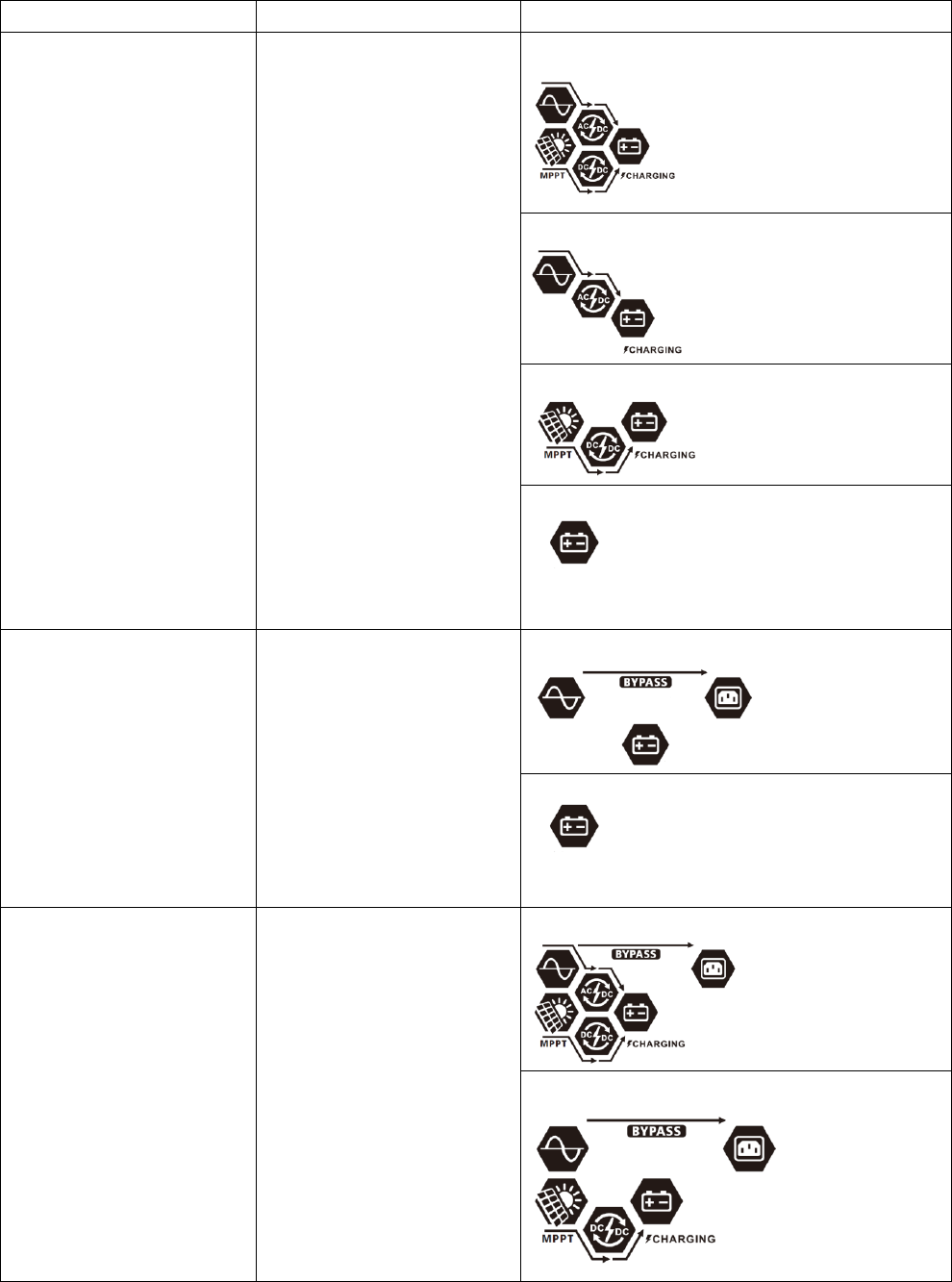
Operating Mode Description
Operation mode
Description
LCD display
Standby mode
Note:
*Standby mode: The inverter
is not turned on yet but at this
time, the inverter can charge
battery without AC output.
No output is supplied by the
unit but it still can charge
batteries.
Charging by utility and PV energy.
Charging by utility.
Charging by PV energy.
No charging.
Fault mode
Note:
*Fault mode: Errors are
caused by inside circuit error
or external reasons such as
over temperature, output short
circuited and so on.
Utility can bypass.
No charging and Bypass
No charging
Bypass/ECO Mode
The unit will provide output
power from the utility. PV
energy and utility can charge
batteries.
Charging by utility and PV energy.
Charging by PV
28
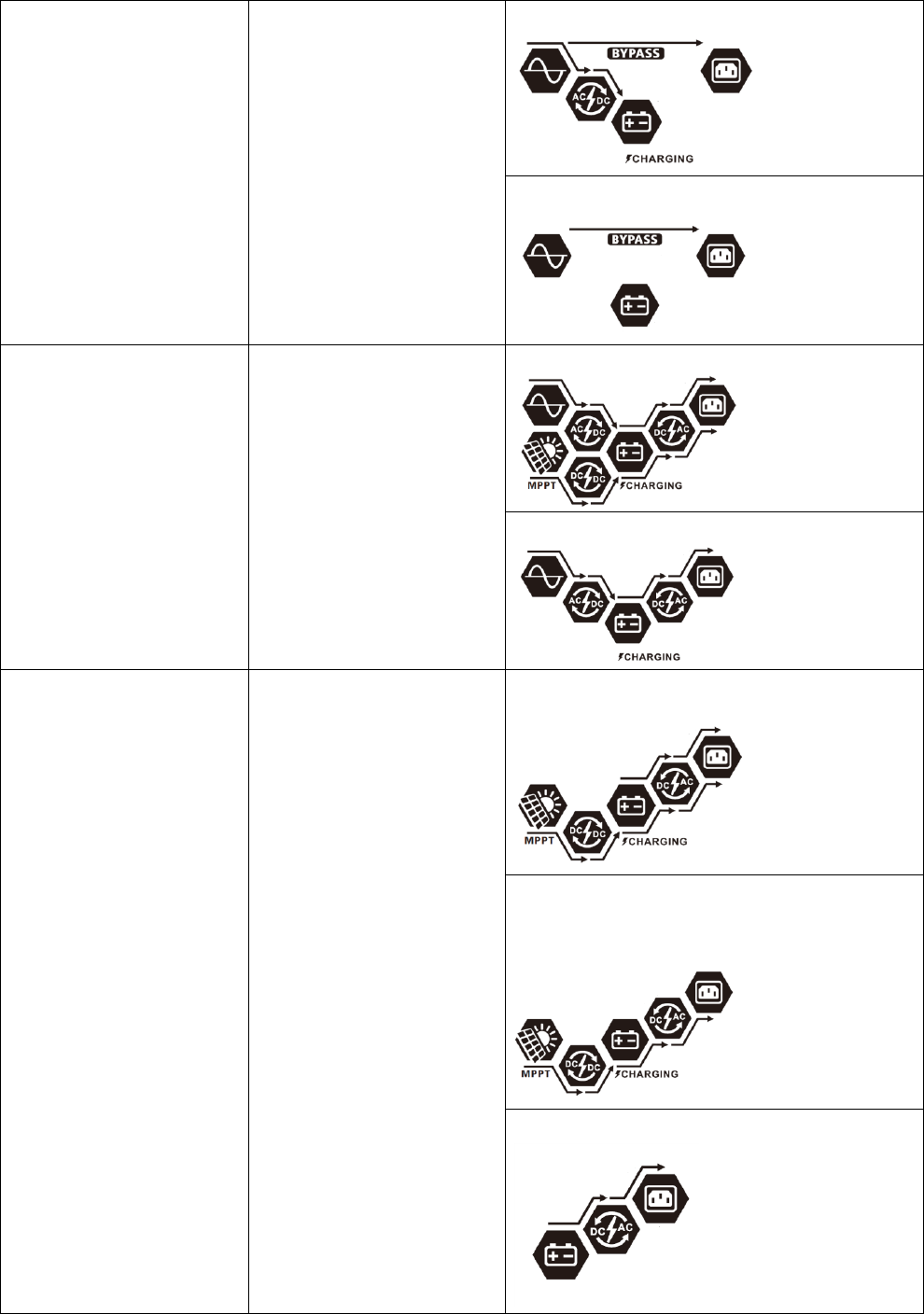
Bypass/ECO Mode
The unit will provide output
power from the utility. PV
energy and utility can charge
batteries.
Charging by utility
No charging
Line Mode
The unit will provide output
power from the mains. It will
also charge the battery at
line mode.
Charging by utility and PV energy.
Charging by utility.
Battery Mode
The unit will provide output
power from battery and PV
power.
Power from battery and PV energy.
PV energy will supply power to the loads and
charge battery at the same time.
Power from battery only.
29
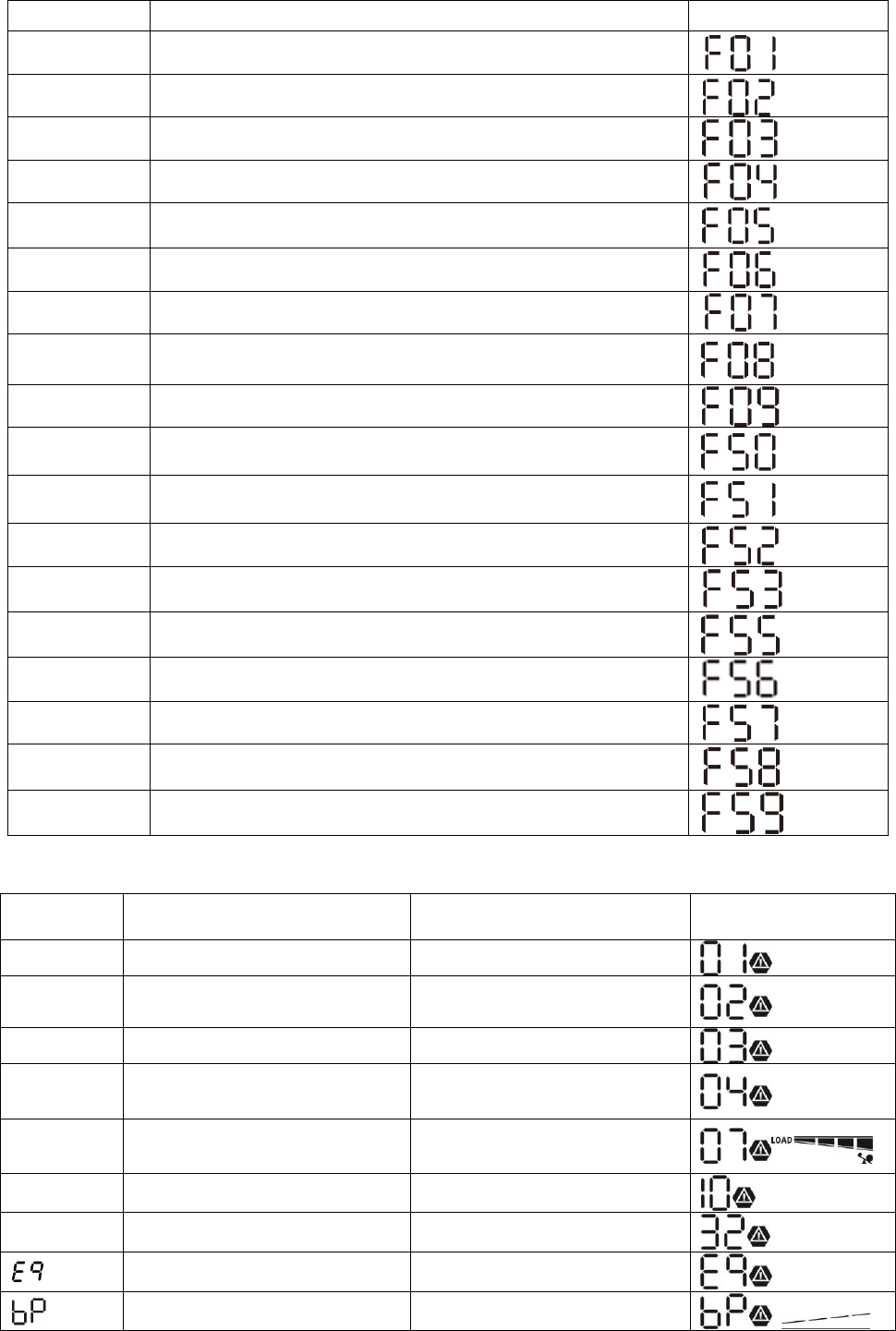
Fault Reference Code
Fault Code
Fault Event
Icon on
01
Fan is locked when inverter is off.
02
Over temperature
03
Battery voltage is too high
04
Battery voltage is too low
05
Output short circuited or over temperature is detected by
internal converter components.
06
Output voltage is too high.
07
Overload time out
08
Bus voltage is too high
09
Bus soft start failed
50
PFC over current
51
OP over current
52
Bus voltage is too low
53
Inverter soft start failed
55
Over DC voltage in AC output
56
Battery is not connected
57
Current sensor failed
58
Output voltage is too low
59
PV voltage is over limitation
Warning Indicator
Warning
Code
Warning Event
Audible Alarm
Icon flashing
01
Fan is locked when inverter is on.
Beep three times every second
02
Over temperature
None
03
Battery is over-charged
Beep once every second
04
Low battery
Beep once every second
07
Overload
Beep once every 0.5 second
10
Output power derating
Beep twice every 3 seconds
32
Communication interrupted
None
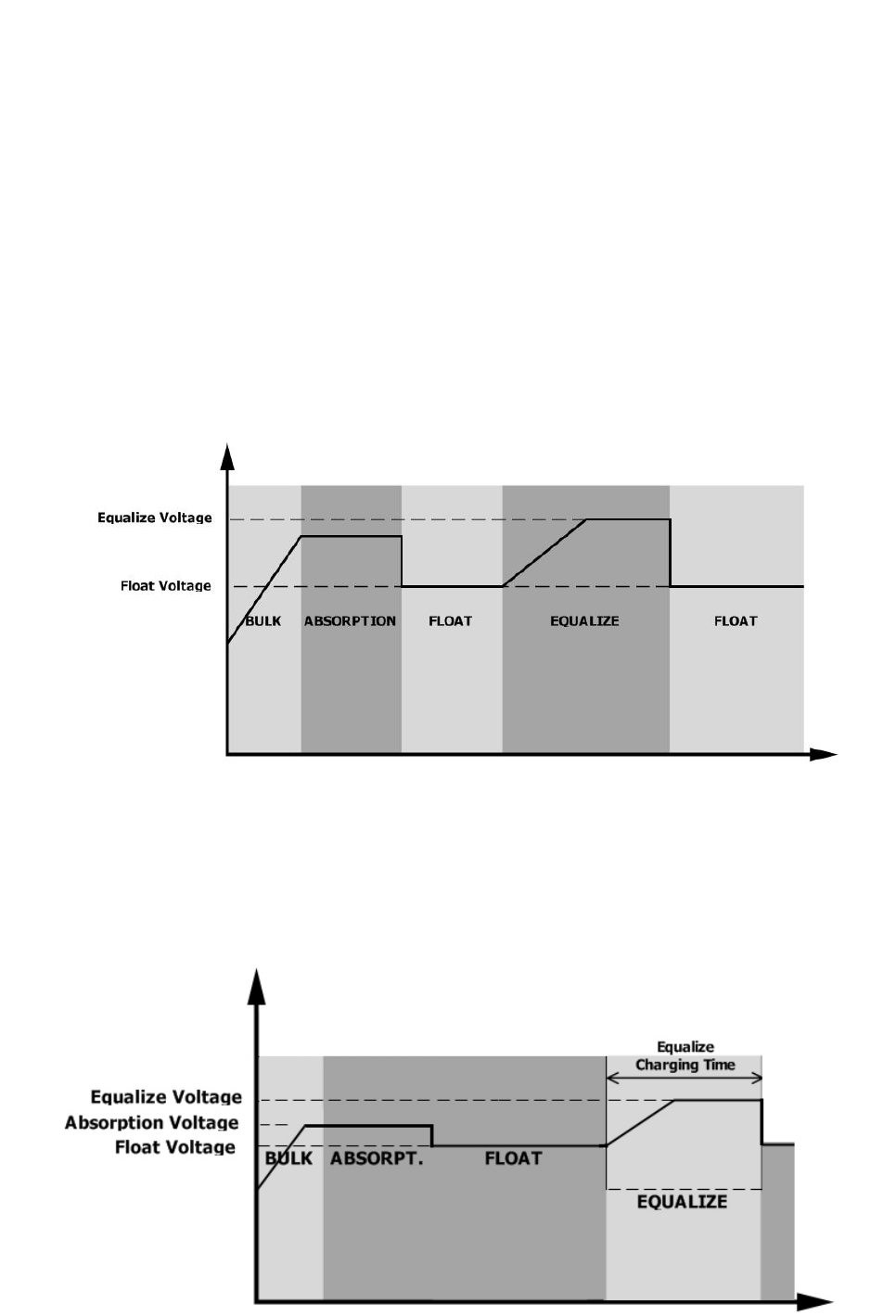
Battery equalization
None
Battery is not connected
None
30
Battery Equalization
Equalization function is added into charge controller. It reverses the buildup of negative chemical effects like
stratification, a condition where acid concentration is greater at the bottom of the battery than at the top.
Equalization also helps to remove sulfate crystals that might have built up on the plates. If left unchecked, this
condition, called sulfation, will reduce the overall capacity of the battery. Therefore, it’s recommended to
equalize battery periodically.
- How to Apply Equalization Function
You must enable battery equalization function in monitoring LCD setting program 33 first. Then, you may apply
this function in device by either one of following methods:
1. Setting equalization interval in program 37.
2. Active equalization immediately in program 39.
- When to Equalize
In float stage, when the setting equalization interval (battery equalization cycle) is arrived, or equalization is
active immediately, the controller will start to enter Equalize stage.
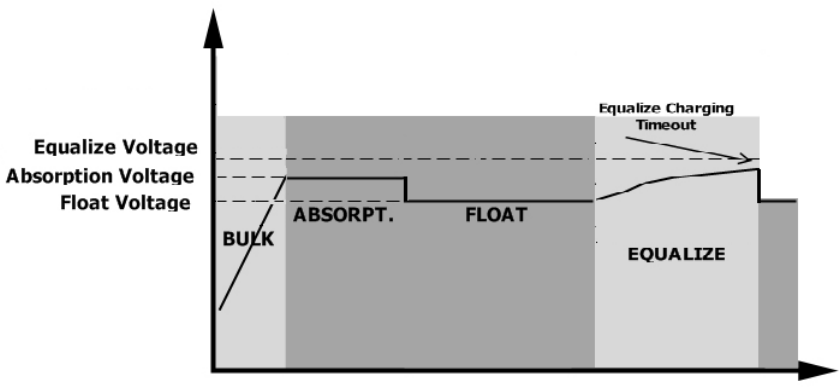
- Equalize charging time and timeout
In Equalize stage, the controller will supply power to charge battery as much as possible until battery voltage
raises to battery equalization voltage. Then, constant-voltage regulation is applied to maintain battery voltage
at the battery equalization voltage. The battery will remain in the Equalize stage until setting battery equalized
time is arrived.
31
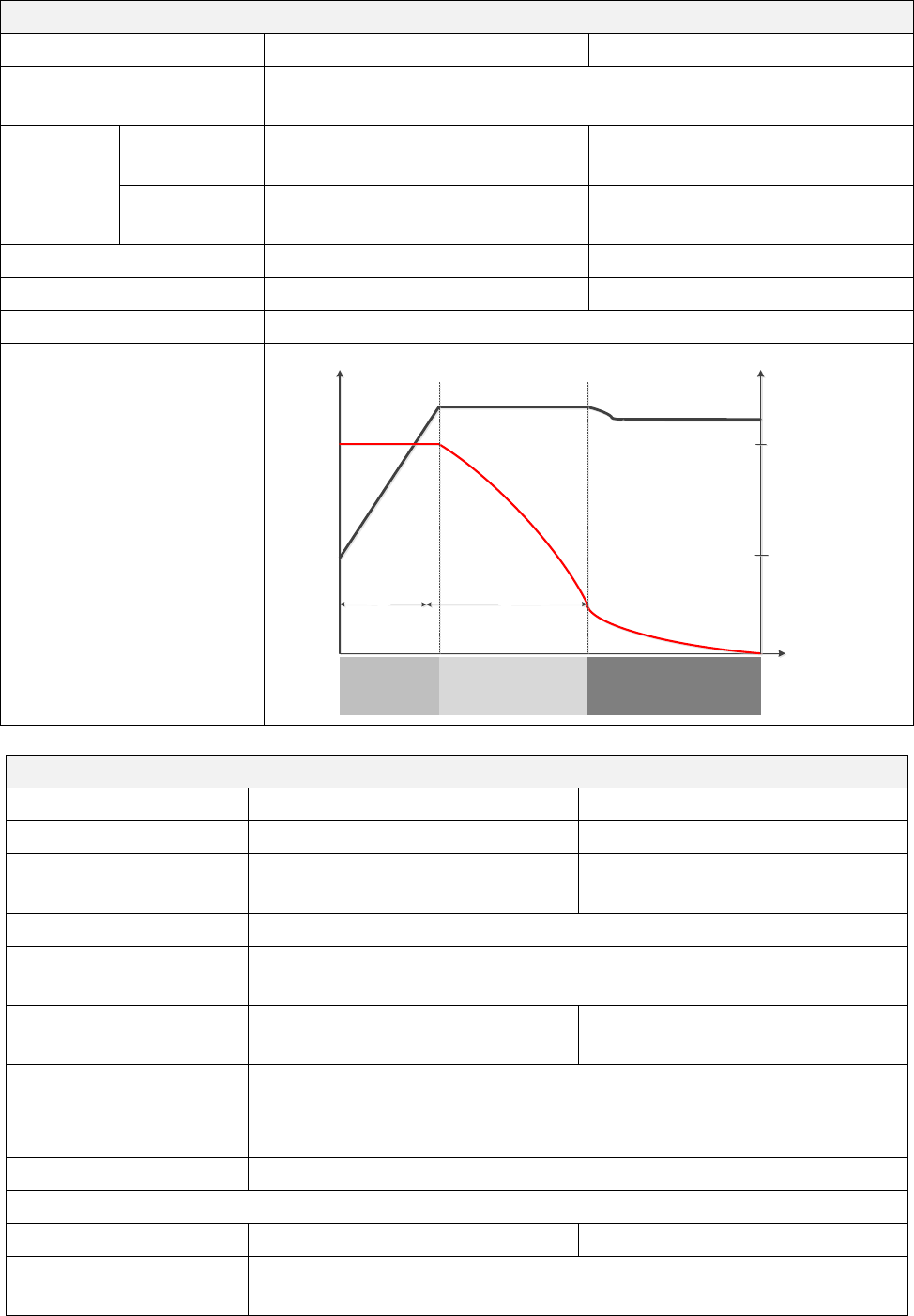
However, in Equalize stage, when battery equalized time is expired and battery voltage doesn’t rise to battery
equalization voltage point, the charge controller will extend the battery equalized time until battery voltage
achieves battery equalization voltage. If battery voltage is still lower than battery equalization voltage when
battery equalized timeout setting is over, the charge controller will stop equalization and return to float stage.

32
SPECIFICATIONS
Table 1 Line Mode Specifications
INVERTER MODEL
3KW
5KW
Input Voltage Waveform
Sinusoidal (utility or generator)
Nominal Input Voltage
230Vac
Low Loss Voltage
110Vac±7V
Low Loss Return Voltage
120Vac±7V
High Loss Voltage
280Vac± 7V
High Loss Return Voltage
270Vac± 7V
Max AC Input Voltage
300Vac
Nominal Input Frequency
50Hz / 60Hz (Auto detection)
Low Loss Frequency
46(56)± 1Hz
Low Loss Return Frequency
46.5(57)± 1Hz
High Loss Frequency
54(64)± 1Hz
High Loss Return Frequency
53(63)± 1Hz
Power Factor
>0.98
Output Short Circuit Protection
Line mode: Circuit Breaker
Battery mode: Electronic Circuits
Efficiency (Line Mode)
93% (Peak Efficiency)
Transfer Time
Line modeBattery mode 0ms
InverterBypass 4ms

33
Table 2 Battery Mode Specifications
INVERTER MODEL
3KW
5KW
Rated Output Power
3KVA/3KW
5KVA/5KW
Output Voltage Waveform
Pure Sine Wave
Output Voltage Regulation
230Vac± 5%
Output Frequency
50Hz or 60Hz
Peak Efficiency
90%
Overload Protection
5s@≥150% load; 10s@105%~150% load
Surge Capacity
2* rated power for 5 seconds
Nominal DC Input Voltage
24Vdc
48Vdc
Operating Range
20Vdc -34Vdc
40Vdc -66Vdc
Cold Start Voltage
23Vdc
46Vdc
Low DC Warning Voltage
22.5Vdc
22.0Vdc
45.0Vdc
44.0Vdc
@ load < 50%
@ load ≥ 50%
Low DC Warning Return Voltage
23.5Vdc
23.0Vdc
47.0Vdc
46.0Vdc
@ load < 50%
@ load ≥ 50%
Low DC Cut-off Voltage
21.5Vdc
21.0Vdc
43.0Vdc
42.0Vdc
@ load < 50%
@ load ≥ 50%
High DC Recovery Voltage
32Vdc
64Vdc
High DC Cut-off Voltage
34Vdc
66Vdc
No Load Power Consumption
<75W
<75W
34
Table 3 Charge Mode Specifications
Utility Charging Mode
INVERTER MODEL
3KW
5KW
Charging Current
@ Nominal Input Voltage
Default: 30A, max: 60A
Bulk
Charging
Voltage
Flooded
Battery
29.2Vdc
58.4Vdc
AGM / Gel
Battery
28.2Vdc
56.4Vdc
Floating Charging Voltage
27Vdc
54Vdc
Overcharge Protection
34Vdc
66Vdc
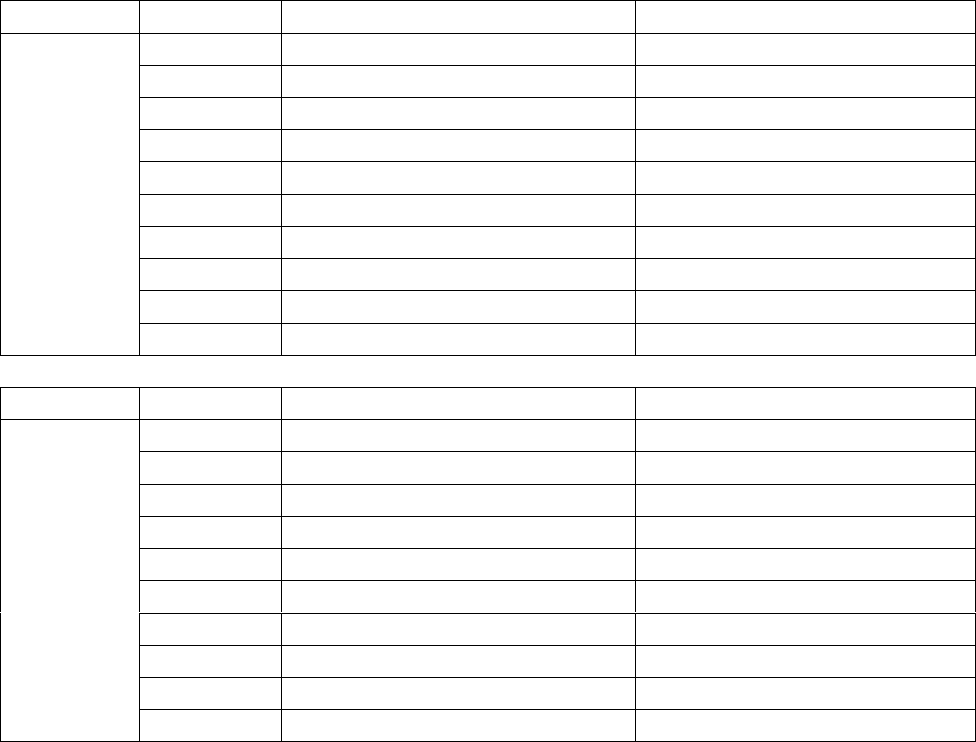
Charging Algorithm
3-Step
Charging Curve
Time
Battery Voltage, per cell Charging Current, %
100%
50%
Bulk
(Constant Current)
Absorption
(Constant Voltage)
Maintenance
(Floating)
Current
Voltage
T1
T1 = 10* T0, minimum 10mins, maximum 8hrs
T0
2.43Vdc (2.35Vdc)
2.25Vdc
Solar Charging Mode (MPPT type)
INVERTER MODEL
3KW
5KW
Rated Power
1500W
4000W
Maximum charging
current
60A
80A
Efficiency
98.0% max.
Max. PV Array Open
Circuit Voltage
145Vdc
PV Array MPPT Voltage
Range
30~115Vdc
60~115Vdc
Battery Voltage
Accuracy
+/-0.3%
PV Voltage Accuracy
+/-2V
Charging Algorithm
3-Step
Joint Utility and Solar Charging
Max Charging Current
120A
140A
Default Charging
Current
60A

35
Table 4 ECO/Bypass Mode Specifications
Bypass Mode
INVERTER MODEL
3KW
5KW
Input Voltage Waveform
Sinusoidal (utility or generator)
Low Loss Voltage
176Vac± 7V
Low Loss Return Voltage
186Vac± 7V
High Loss Voltage
280Vac± 7V
High Loss Return Voltage
270Vac± 7V
Nominal Input Frequency
50Hz / 60Hz (Auto detection)
Low Loss Frequency
46(56)± 1Hz
Low Loss Return Frequency
46.5(57)± 1Hz
High Loss Frequency
54(64)± 1Hz
High Loss Return Frequency
53(63)± 1Hz
Table 5 General Specifications
INVERTER MODEL
3KW
5KW
SCC type
MPPT
Parallel-able
YES
Communication
RS232 and Bluetooth
Safety Certification
CE
Operating Temperature
Range
0°C to 55°C
Storage temperature
-15°C~ 60°C
Humidity
5% to 95% Relative Humidity (Non-condensing)
Dimension
(D*W*H), mm
140 x 303 x 525
Net Weight, kg
13.0
13.5

36
TROUBLE SHOOTING
Problem
LCD/LED/Buzzer
Explanation / Possible cause
What to do
Unit shuts down
automatically
during startup
process.
LCD/LEDs and buzzer
will be active for 3
seconds and then
complete off.
The battery voltage is too low
(<1.91V/Cell)
1. Re-charge battery.
2. Replace battery.
No response after
power on.
No indication.
1. The battery voltage is far too
low. (<1.4V/Cell)
2. Battery polarity is connected
reversed.
1. Check if batteries and the
wiring are connected well.
2. Re-charge battery.
3. Replace battery.
Mains exist but the
unit works in
battery mode.
Input voltage is
displayed as 0 on the
LCD and green LED is
flashing.
Input protector is tripped
Check if AC breaker is tripped
and AC wiring is connected
well.
Green LED is flashing.
Insufficient quality of AC power.
(Shore or Generator)
1. Check if AC wires are too
thin and/or too long.
2. Check if generator (if
applied) is working well or if
input voltage range setting is
correct. (UPSAppliance)
Green LED is flashing.
Set “Solar First” as the priority of
output source.
Change output source priority
to Utility first.
When the unit is
turned on, internal
relay is switched on
and off repeatedly.
LCD display and LEDs
are flashing
Battery is disconnected.
Check if battery wires are
connected well.
Buzzer beeps
continuously and
red LED is on.
Fault code 07
Overload error. The inverter is
overload 110% and time is up.
Reduce the connected load by
switching off some
equipment.
Fault code 05
Output short circuited.
Check if wiring is connected
well and remove abnormal
load.
Fault code 02
Internal temperature of inverter
component is over 100°C.
Check whether the air flow of
the unit is blocked or whether
the ambient temperature is
too high.
Fault code 03
Battery is over-charged.
Return to repair center.
The battery voltage is too high.
Check if spec and quantity of
batteries are meet
requirements.
Fault code 01
Fan fault
Replace the fan.
Fault code 06/58
Output abnormal (Inverter voltage
below than 190Vac or is higher
than 260Vac)
1. Reduce the connected
load.
2. Return to repair center
Fault code
08/09/53/57
Internal components failed.
Return to repair center.
Fault code 50
PFC over current or surge.
Restart the unit, if the error
happens again, please return
to repair center.
Fault code 51
OP over current or surge.
Fault code 52
Bus voltage is too low.
Fault code 55
Output voltage is unbalanced.
Fault code 56
Battery is not connected well or
fuse is burnt.
If the battery is connected
well, please return to repair
center.
37
Appendix I: Approximate Back-up Time Table
Model
Load (VA)
Backup Time @24Vdc 200Ah (min)
Backup Time @24Vdc 400Ah (min)
3KW
300
898
2200
600
444
1050
900
249
606
1200
190
454
1500
136
328
1800
112
252
2100
96
216
2400
70
188
2700
62
148
3000
56
134
Model
Load (VA)
Backup Time @ 48Vdc 200Ah (min)
Backup Time @ 48Vdc 400Ah (min)
5KW
500
1226
2576
1000
536
1226
1500
316
804
2000
222
542
2500
180
430
3000
152
364
3500
130
282
4000
100
224
4500
88
200
5000
80
180
Note: Backup time depends on the quality of the battery, age of battery and type of battery.
Specifications of batteries may vary depending on different manufacturers.
