Quectel Android GPS Driver User Guide V1.1
User Manual: Pdf
Open the PDF directly: View PDF  .
.
Page Count: 10

Android GPS Driver
User Guide
Rev. Android_GPS_Driver_User_Guide_V1.1
Date: 2015-04-11
www.quectel.com

Android GPS Driver User Guide
Android_GPS_Driver_User_Guide Confidential / Released 1 / 9
Our aim is to provide customers with timely and comprehensive service. For any
assistance, please contact our company headquarters:
Quectel Wireless Solutions Co., Ltd.
Office 501, Building 13, No.99, Tianzhou Road, Shanghai, China, 200233
Tel: +86 21 5108 6236
Mail: info@quectel.com
Or our local office, for more information, please visit:
http://www.quectel.com/support/salesupport.aspx
For technical support, to report documentation errors, please visit:
http://www.quectel.com/support/techsupport.aspx
Or Email: Support@quectel.com
GENERAL NOTES
QUECTEL OFFERS THIS INFORMATION AS A SERVICE TO ITS CUSTOMERS. THE INFORMATION
PROVIDED IS BASED UPON CUSTOMERS’ REQUIREMENTS. QUECTEL MAKES EVERY EFFORT
TO ENSURE THE QUALITY OF THE INFORMATION IT MAKES AVAILABLE. QUECTEL DOES NOT
MAKE ANY WARRANTY AS TO THE INFORMATION CONTAINED HEREIN, AND DOES NOT ACCEPT
ANY LIABILITY FOR ANY INJURY, LOSS OR DAMAGE OF ANY KIND INCURRED BY USE OF OR
RELIANCE UPON THE INFORMATION. ALL INFORMATION SUPPLIED HEREIN IS SUBJECT TO
CHANGE WITHOUT PRIOR NOTICE.
COPYRIGHT
THIS INFORMATION CONTAINED HERE IS PROPRIETARY TECHNICAL INFORMATION OF
QUECTEL CO., LTD. TRANSMITTABLE, REPRODUCTION, DISSEMINATION AND EDITING OF THIS
DOCUMENT AS WELL AS UTILIZATION OF THIS CONTENTS ARE FORBIDDEN WITHOUT
PERMISSION. OFFENDERS WILL BE HELD LIABLE FOR PAYMENT OF DAMAGES. ALL RIGHTS
ARE RESERVED IN THE EVENT OF A PATENT GRANT OR REGISTRATION OF A UTILITY MODEL
OR DESIGN.
Copyright © Quectel Wireless Solutions Co., Ltd. 2015. All rights reserved.
Quectel
Confidential

Android GPS Driver User Guide
Android_GPS_Driver_User_Guide Confidential / Released 2 / 9
About the Document
History
Revision
Date
Author
Description
1.0
2014-05-06
Joe WANG
Initial
1.1
2015-04-11
Kent XU
Added applicable modules
Quectel
Confidential

Android GPS Driver User Guide
Android_GPS_Driver_User_Guide Confidential / Released 3 / 9
Contents
About the Document ................................................................................................................................... 2
Contents ....................................................................................................................................................... 3
1 Introduction .......................................................................................................................................... 4
2 System Integration ............................................................................................................................... 5
2.1. The Structure of Android GPS Driver ........................................................................................ 5
2.2. Compile Driver ........................................................................................................................... 6
2.2.1. Copy Source Code Directory of GPS Driver .................................................................... 6
2.2.2. Modify Android Makefile ................................................................................................... 6
2.2.3. Compile Android Source File ........................................................................................... 6
2.3. Load GPS Driver ....................................................................................................................... 6
3 Supplementary Note ............................................................................................................................ 7
3.1. Modify GPS Configuration File .................................................................................................. 7
3.2. Modify GPS Log Mode (Optional) ............................................................................................. 7
3.3. Modify Log Level (Optional) ...................................................................................................... 8
3.4. Delete Other “gps.*.so” File ....................................................................................................... 8
3.5. Fail to Get GPS Data................................................................................................................. 8
4 Appendix A Reference ......................................................................................................................... 9
Quectel
Confidential

Android GPS Driver User Guide
Android_GPS_Driver_User_Guide Confidential / Released 4 / 9
1 Introduction
This document mainly introduces how to integrate the GPS driver into Android OS for Quectel GPS
module.
This document is applicable to Quectel GPS series modules and UC20 module.
Quectel
Confidential
Android GPS Driver User Guide
Android_GPS_Driver_User_Guide Confidential / Released 5 / 9
2 System Integration
This chapter describes the structure of Android GPS driver and explains how to integrate the GPS driver
into Android OS of Quectel GPS module.
2.1. The Structure of Android GPS Driver
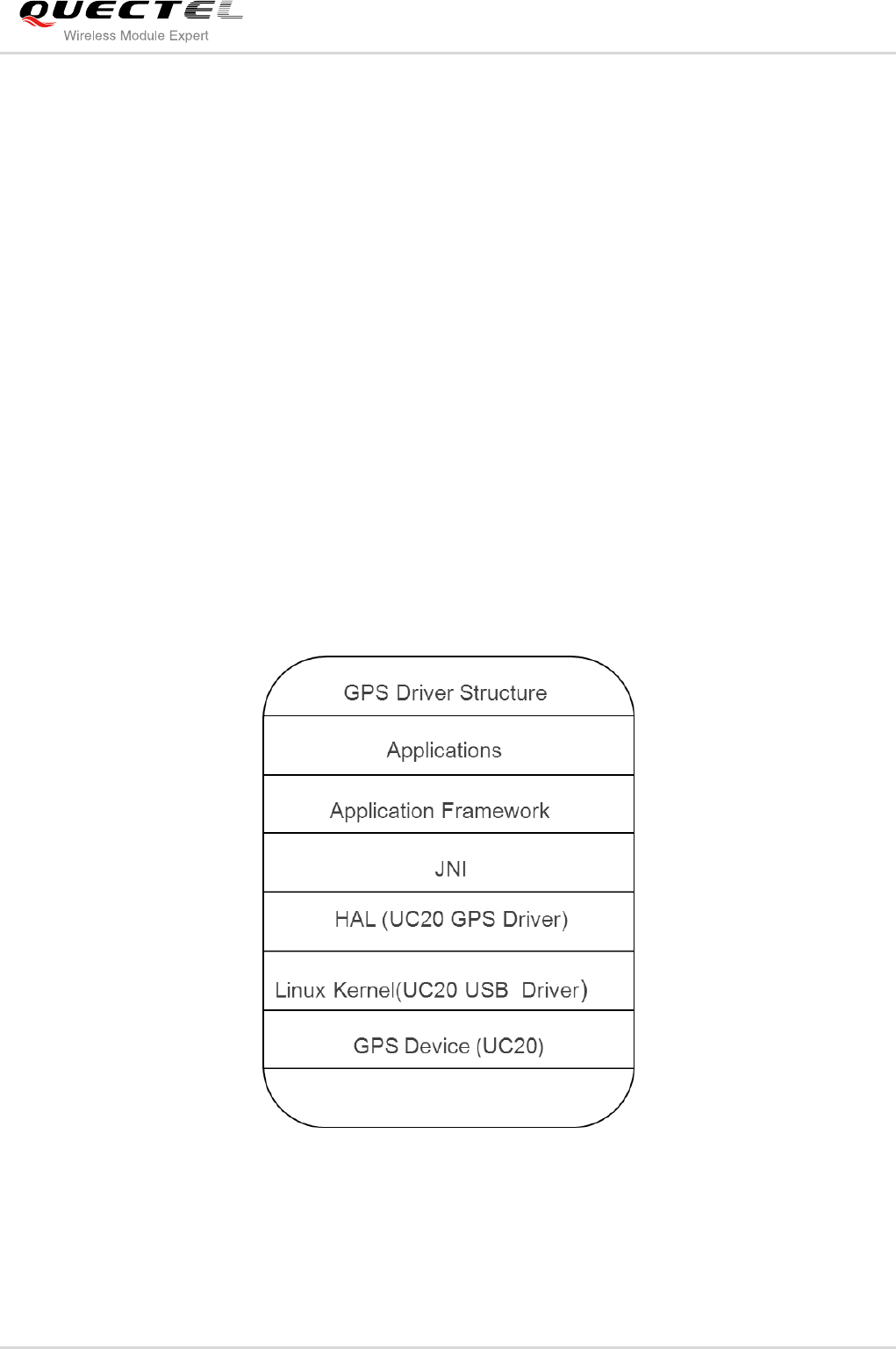
GPS is a kind of hierarchical structure. GPS devices transmit the GPS data to Android GPS applications
through GPS hardware driver. Then GPS HAL driver transmits the received GPS data to GPS applications
through JNI and Framework. The following figure illustrates the structure of GPS driver.
Quectel GPS driver works in HAL, and it will be compiled as “gps.default.so” file.
Figure 1: GPS Driver Structure (Take UC20 for Example)
Quectel
Confidential

Android GPS Driver User Guide
Android_GPS_Driver_User_Guide Confidential / Released 6 / 9
2.2. Compile Driver
If your platform is developed based on Android OS, you must retrieve the Android source code files and
install an appropriate cross compiler first. Then compile the Android source file to generate an image file
and download the image file into the target machine. The detailed steps are shown as below.
2.2.1. Copy Source Code Directory of GPS Driver
Copy the “gps/” from source code directory of Quectel GPS driver to “(_$AndroidSourceRoot)/hardware
/libhardware /modules”.
2.2.2. Modify Android Makefile
Modify the “Android.mk” file under the “(_$AndroidSourceRoot)/hardware/libhardware/modules” directory
as below:
hardware_modules := gralloc hwcomposer audio nfc gps
include $(call all-named-subdir-makefiles,$(hardware_modules))
2.2.3. Compile Android Source File
In this step, you can build your Android source code project and create a new image file for target device.
When the image file is created, please download it to your target board and test it with Quectel GPS
module.
2.3. Load GPS Driver
When Quectel GPS module is connected with the Android system mentioned above, the system will
recognize Quectel GPS module first and load the GPS driver. After the GPS driver has been loaded, you
can use GPS Application to test.
Quectel
Confidential

Android GPS Driver User Guide
Android_GPS_Driver_User_Guide Confidential / Released 7 / 9
3 Supplementary Note
When you use Quectel GPS driver, you may encounter some problems or you want to modify it, here are
some instructions that may help you.
.
3.1. Modify GPS Configuration File
Quectel GPS driver has a configuration file named “gps_cfg.inf”, you should copy it to “/system/etc” on
your board, and modify the file to adapt your requirement as below:
1. Modify GPS module type (take UC20 for example):
MODULE_TYPE=UC20
2. Modify NMEA port path (take UC20 for example):
NMEA_PORT_PATH=/dev/ttyUSB1
3. Modify baud rate (take UC20 for example):
BAUD_RATE=115200
3.2. Modify GPS Log Mode (Optional)
The default GPS log mode is system mode, you can get log by following command:
logcat -s gps_ql
If you need to redirect GPS log to other log file, you can modify following code in “gps_ql.c”:
#define QL_GPS_LOG
The default GPS log file is “/mnt/ql_gps_log”. If you need to change it, you can modify the following code
in “ql-log.c”:
#define QL_GPS_LOG_PATH "/mnt/ql_gps_log"
Quectel
Confidential

Android GPS Driver User Guide
Android_GPS_Driver_User_Guide Confidential / Released 8 / 9
3.3. Modify Log Level (Optional)
The default GPS log level is “LOG_INFO”. If you need to modify it, you can modify the following code in
“gps_ql.c”:
# define LOG_LVL LOG_INFO
3.4. Delete Other “gps.*.so” File
If there are other “gps.*.so” files in the directory of “/system/lib/hw”, you should delete them except for
“gps.default.so”, to ensure that the system can recognize the correct GPS driver.
3.5. Fail to Get GPS Data
If your GPS application fails to get GPS data, you should check the following aspects:
- Move your GPS antenna out of your window, make sure it can receive GPS signal.
- Ensure the directory of “/system/lib/hw” only has “gps.default.so”.
- Ensure you have modify “gps_cfg.inf” correctly.
- Ensure “gps_cfg.inf” is in the right directory on your board.
- Ensure the GPS in Android system setting has been enabled.
- Check GPS log to ensure the GPS driver has been loaded.
- If you have checked all the aspects above, and the problem cannot be solved yet, please modify the
GPS log level to “LOG_DEBUG”. After obtaining GPS log file, please send the file to Quectel
technical support, we will solve your problem as soon as possible.
Quectel
Confidential

Android GPS Driver User Guide
Android_GPS_Driver_User_Guide Confidential / Released 9 / 9
4 Appendix A Reference
Table 1: Terms and Abbreviations
Abbreviation
Description
GPS
Global Position System
HAL
Hardware Abstraction Layer
OS
Operating System
Quectel
Confidential
