Quectel GSM AT Commands Manual V1.3
Quectel_GSM__AT_Commands_Manual_V1.3
User Manual: Pdf
Open the PDF directly: View PDF  .
.
Page Count: 15
GSM
Quectel Cellular Engine
HTTP Service
AT Commands
GSM_HTTP_ATC_V1.3
HTTP Service AT Commands
GSM_HTTP_ATC_V1.3 - 1 -
Document Title
HTTP Service AT Commands
Version
1.3
Date
2015-12-29
Status
Release
Document Control ID
GSM_HTTP_ATC_V1.3
General Notes
Quectel offers this information as a service to its customers, to support application and
engineering efforts that use the products designed by Quectel. The information provided is
based upon requirements specifically provided to Quectel by the customers. Quectel has not
undertaken any independent search for additional relevant information, including any
information that may be in the customer’s possession. Furthermore, system validation of this
product designed by Quectel within a larger electronic system remains the responsibility of
the customer or the customer’s system integrator. All specifications supplied herein are
subject to change.
Copyright
This document contains proprietary technical information which is the property of Quectel
Limited., copying of this document and giving it to others and the using or communication of
the contents thereof, are forbidden without express authority. Offenders are liable to the
payment of damages. All rights reserved in the event of grant of a patent or the registration of
a utility model or design. All specification supplied herein are subject to change without
notice at any time.
Copyright © Shanghai Quectel Wireless Solutions Co., Ltd. 2015
Quectel
Confidential

HTTP Service AT Commands
GSM_HTTP_ATC_V1.3 - 2 -
Contents
Contents ............................................................................................................................................ 2
0. Revision History ........................................................................................................................... 3
1. Introduction ................................................................................................................................... 4
1.1. Reference ........................................................................................................................... 4
2. AT Commands for HTTP Service ................................................................................................. 5
2.1. Overview of AT Commands for HTTP Service ................................................................. 5
2.2. Detailed Description of AT Commands for HTTP Service ............................................... 5
2.2.1. AT+QHTTPURL Set HTTP Server URL ....................................................... 5
2.2.2. AT+QHTTPGET Send HTTP GET Request .................................................. 6
2.2.3. AT+QHTTPREAD Read HTTP Server Response ......................................... 6
2.2.4. AT+QHTTPPOST Send HTTP POST Request .............................................. 7
2.2.5. AT+QHTTPDL Download file from HTTP server......................................... 8
3. Supported Unsolicited Result Codes ............................................................................................. 9
3.1. Summary of CME ERROR Codes ..................................................................................... 9
4. Examples ..................................................................................................................................... 11
4.1. Send HTTP GET Request ................................................................................................ 11
4.2. Send HTTP POST Request .............................................................................................. 12
4.3. Download File from HTTP Server ................................................................................... 13
Quectel
Confidential
HTTP Service AT Commands
GSM_HTTP_ATC_V1.3 - 3 -
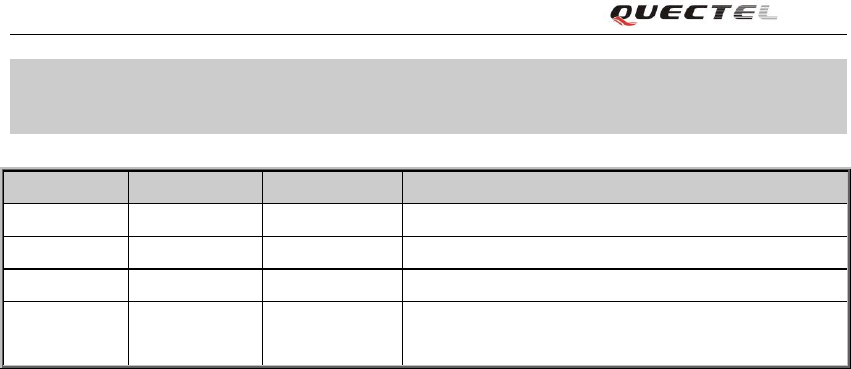
0. Revision History
Revision
Date
Author
Description of change
1.0
2009-07-06
Jay XIN
Initial
1.1
2012-06-04
Will SHAO
Added Command AT+QHTTPDL
1.2
2015-04-13
Will SHAO
Added applicable modules
1.3
2015-12-29
Jelly WANG
Modified the problem that some AT commands
are displayed incompletely.
Quectel
Confidential
HTTP Service AT Commands
GSM_HTTP_ATC_V1.3 - 4 -
1. Introduction
Quectel Module has an internal TCP/IP stack that is driven by AT commands and enables the host
application to easily access the Internet service. It includes TCP service, UDP service, FTP service
and HTTP service, etc. This document is a reference guide to all the AT commands and responses
defined for HTTP Service. The advantage of this solution is that it eliminates the need for the
application manufacturer to implement own HTTP protocol, thus minimizing cost and time to
integrate Internet connectivity into a new or existing host application.
This document is applicable to all Quectel GSM modules.
1.1. Reference
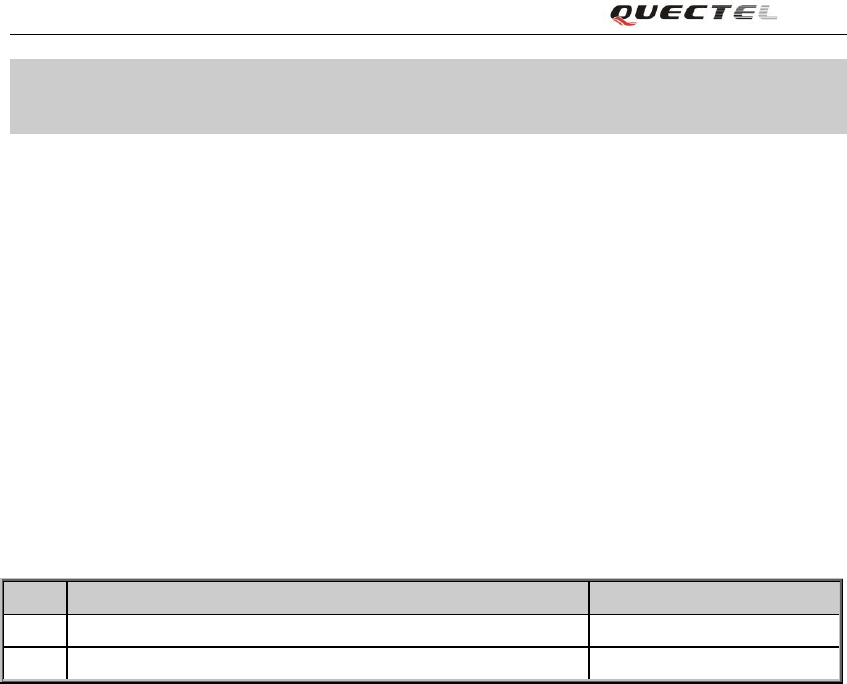
Table 1: Reference
SN
Document name
Remark
[1]
GSM_TCPIP_AN.pdf
TCPIP Application Notes
[2]
RFC 2616
Quectel
Confidential
HTTP Service AT Commands
GSM_HTTP_ATC_V1.3 - 5 -
2. AT Commands for HTTP Service
2.1. Overview of AT Commands for HTTP Service
Command
Description
AT+QHTTPURL
Set HTTP Server URL
AT+QHTTPGET
Send HTTP GET Request
AT+QHTTPREAD
Read HTTP Server Response
AT+QHTTPPOST
Send HTTP POST Request
AT+QHTTPDL
Download file from http server
Execution of above HTTP related AT commands will switch to data mode. To switch back to AT
mode, you can input “+++” and this will terminate the current HTTP AT command. The interval
time between the first “+” and the character before the first “+” MUST NOT be less than 500 ms
and the interval time between the last “+” and the character next to the last “+” MUST NOT be
less than 500 ms and the interval time between each “+” MUST be less than 1000 ms.
2.2. Detailed Description of AT Commands for HTTP Service
2.2.1. AT+QHTTPURL Set HTTP Server URL
AT+QHTTPURL Set HTTP Server URL
Test Command
AT+QHTTPURL=?
Response
+QHTTPURL: (1-450),(1-65535)
OK
Parameter
See Write Command
Write Command
AT+QHTTPURL=<url_le
n>,<input_time>
Response
CONNECT
If error is related to ME functionality:
ERROR
+CME ERROR: <err>
Parameter
<url_len> The length in bytes of the URL.
<input_time> Maximum time in seconds to input URL.
Reference
If sending HTTP GET Request, for example, input URL path:
http://api.efxnow.com/DEMOWebServices2.8/Service.asmx/Echo?
Message=helloquectel
Quectel
Confidential

HTTP Service AT Commands
GSM_HTTP_ATC_V1.3 - 6 -
If sending HTTP POST Request, for example, input URL path:
http://api.efxnow.com/DEMOWebServices2.8/Service.asmx/Echo
Server address must be provided as IP address in standard
dot-format (e.g. “192.168.1.1”) or as server address names
resolvable by a DNS server (e.g. “api.efxnow.xom”).
2.2.2. AT+QHTTPGET Send HTTP GET Request
AT+QHTTPGET Send HTTP GET Request
Test Command
AT+QHTTPGET=?
Response
+QHTTPGET: (1-65535)
OK
Parameter
See Write Command
Write Command
AT+QHTTPGET=<to_rea
d_time>
Response
OK
If error is related to ME functionality:
ERROR
+CME ERROR: <err>
Parameter
<to_read_time> Time in seconds. AT+QHTTPREAD will be
invalid if the idle time after AT+QHTTPGET is
longer than the time of <to_read_time>.
Reference
2.2.3. AT+QHTTPREAD Read HTTP Server Response
AT+QHTTPREAD Read HTTP Server Response
Test Command
AT+QHTTPREAD=?
Response
+QHTTPREAD: (1-65535)
OK
Parameter
See Write Command
Write Command
AT+QHTTPREAD=<wait
_time>
Response
CONNECT
<data>
OK
If error is related to ME functionality:
Quectel
Confidential

HTTP Service AT Commands
GSM_HTTP_ATC_V1.3 - 7 -
ERROR
+CME ERROR: <err>
Parameter
<wait_time> Time in seconds. It will close http session when
timeout.
<data> The data of HTTP server responds.
Reference
2.2.4. AT+QHTTPPOST Send HTTP POST Request
AT+QHTTPPOST Send HTTP POST Request
Test Command
AT+QHTTPPOST=?
Response
+QHTTPPOST: (1-29696),(1-65535),(1-65535)
OK
Parameter
See Write Command
Write Command
AT+QHTTPPOST=<body_s
ize>,<input_time>,<to_read
_time>
Response
CONNECT
<body_data>
OK
If error is related to ME functionality:
ERROR
+CME ERROR: <err>
Parameter
<body_size> Size in bytes of the body data to POST.
<input_time> Maximum time in seconds to input the body
data.
<to_read_time> Time in seconds. AT+QHTTPREAD will be
invalid if the idle time after
AT+QHTTPGET is longer than the time of
<to_read_time>
<body_data> Input the body data to POST from UART.
Reference
Quectel
Confidential

HTTP Service AT Commands
GSM_HTTP_ATC_V1.3 - 8 -
2.2.5. AT+QHTTPDL Download file from HTTP server
AT+QHTTPDL Download file from HTTP server
Test Command
AT+QHTTPDL=?
Response
+QHTTPDL:"filename"[,<length>[,(1-65535)]]
OK
Parameter
See Write Command
Write Command
AT+QHTTPDL=
“<filename>”[,<length>
[,< wait_time>]]
Response
OK
Finally, if download the file successfully, response
+ QHTTPDL:<dl size>,<content-length>,<errcode>
If error is related to ME functionality:
ERROR
+CME ERROR: <err>
Parameter
<filename> The path of the file to be stored, such as
“RAM:1.txt”
<length> The maximum size of the file to be
download. Default is 10240. Unit: byte. It is
only used for RAM file.
<wait_time> Time in seconds. It will close HTTP
session when timeout.
<dl size> The length of data has been download
<content-length> The content length. If the content-length is
unknown, then set it to -1.
<errcode> If all data has been downloaded, the
<errcode> is 0, else it is a numeric to
indicate the type of error, please refer to the
chapter 3.
<err> A numeric to indicate the type of error,
please refer to the chapter 3.
Reference
Quectel
Confidential
HTTP Service AT Commands
GSM_HTTP_ATC_V1.3 - 9 -
3. Supported Unsolicited Result Codes
3.1. Summary of CME ERROR Codes
Final result code +CME ERROR: <err> indicates an error related to mobile equipment or network.
The operation is similar to ERROR result code. None of the following commands in the same
Command line is executed. Neither ERROR nor OK result code shall be returned. The following
<err> is just the new <err> code for HTTP. About other <err> codes, please refer to [1].
<err> values used by common messaging commands:
Code of <err>
Meaning
3801
HTTP time out
3802
HTTP busy
3803
HTTP UART busy
3804
HTTP get no request
3805
HTTP network busy
3806
HTTP network open failed
3807
HTTP network no config
3808
HTTP network deactive
3809
HTTP network error
3810
HTTP url error
3811
HTTP empty url
3812
HTTP ip addr error
3813
HTTP DNS error
3814
HTTP socket create error
3815
HTTP socket connect error
3816
HTTP socket read error
3817
HTTP socket write error
3818
HTTP socket close
3819
HTTP data encode error
3820
HTTP data decode error
3821
HTTP to read timeout
3822
HTTP response failed
3823
incoming call busy
3824
voice call busy
3825
input timeout
3826
wait data timeout
3827
wait http response timeout
3828
alloc memory fail
Quectel
Confidential
HTTP Service AT Commands
GSM_HTTP_ATC_V1.3 - 10 -
3829
HTTP need relocation
4000
Exceed max length
4001
Open file fail
4002
Write file fail
4003
Get size fail
4004
Read fail
4005
List file fail
4006
Delete file fail
4007
Get Disk info fail
4008
No space
4009
Time out
4010
File not found
4011
File too large
4012
File already exist
4013
Invalid parameter
4014
Driver error
4015
Create fail
4016
Access denied
4017
File too large
Quectel
Confidential

HTTP Service AT Commands
GSM_HTTP_ATC_V1.3 - 11 -
4. Examples
4.1. Send HTTP GET Request
AT+QIFGCNT=0
OK
AT+QICSGP=1,"CMNET" //Set APN
OK
AT+QIREGAPP //Optional
OK
AT+QIACT //Optional
OK
AT+QHTTPURL=79,30 //Set the URL
CONNECT
….
//for example, input 79 bytes:
http://api.efxnow.com/DEMOWebServices2.8/Service.asmx/Echo?Message=helloquectel
OK
AT+QHTTPGET=60 //Send HTTP GET Request
OK
AT+QHTTPREAD=30 //Read the response of HTTP server.
CONNECT
…. //Output the response data of HTTP server to UART.
//for example, UART outputs:
<?xml version="1.0" encoding="utf-8"?>
<string xmlns="https://api.efxnow.com/webservices2.3">Message='helloquectel' ASCII:104 101
108 108 111 113 117 101 99 116 101 108 </string>
OK
AT+QIDEACT //Deactivate GPRS PDP connect.
DEACT OK
Quectel
Confidential

HTTP Service AT Commands
GSM_HTTP_ATC_V1.3 - 12 -
4.2. Send HTTP POST Request
AT+QIFGCNT=0
OK
AT+QICSGP=1,"CMNET" //Set APN
OK
AT+QIREGAPP //Optional
OK
AT+QIACT //Optional
OK
AT+QHTTPURL=58,30 //Set the URL
CONNECT
….
//for example, input 58 bytes:
http://api.efxnow.com/DEMOWebServices2.8/Service.asmx/Echo
OK
AT+QHTTPPOST=18,50,10
//POST the data whose size is 18 Bytes and the maximum
latency time for inputting is 50 s. It is recommended to set
the latency time as long as enough to download all the data
in the latency time.
CONNECT
//This means it is ready to receive data from UART. And DCD
has been set to low. Receive data from UART and not echo.
//for example, input 18 bytes: Message=helloworld
OK
//This means all data has been received over, and DCD is set to high.
AT+QHTTPREAD=30 //Read the response of HTTP server.
CONNECT
…. //Output the response data of HTTP server to UART
//for example, UART outputs:
<?xml version="1.0" encoding="utf-8"?>
<string xmlns="https://api.efxnow.com/webservices2.3">Message='helloworld' ASCII:104 101
108 108 111 119 111 114 108 100 </string>
Quectel
Confidential

HTTP Service AT Commands
GSM_HTTP_ATC_V1.3 - 13 -
OK
AT+QIDEACT //Deactivate GPRS PDP connect.
DEACT OK
4.3. Download File from HTTP Server
AT+QIFGCNT=0
OK
AT+QICSGP=1,"CMNET" //Set APN
OK
AT+QIREGAPP //Optional
OK
AT+QIACT //Optional
OK
AT+QHTTPURL=29,30 //Set the URL
CONNECT
….
//for example, input 29 bytes:
http://api.efxnow.com/1.TXT
OK
AT+QHTTPGET=60 //Send HTTP GET Request
OK
AT+QHTTPDL=“RAM:1.TXT”,1024 //Download the file to“RAM:1.TXT”, max size is
1024 bytes
+ QHTTPDL:100,100 ,0
OK
Quectel
Confidential