Quectel UMTS<E EVB User Guide V2.0
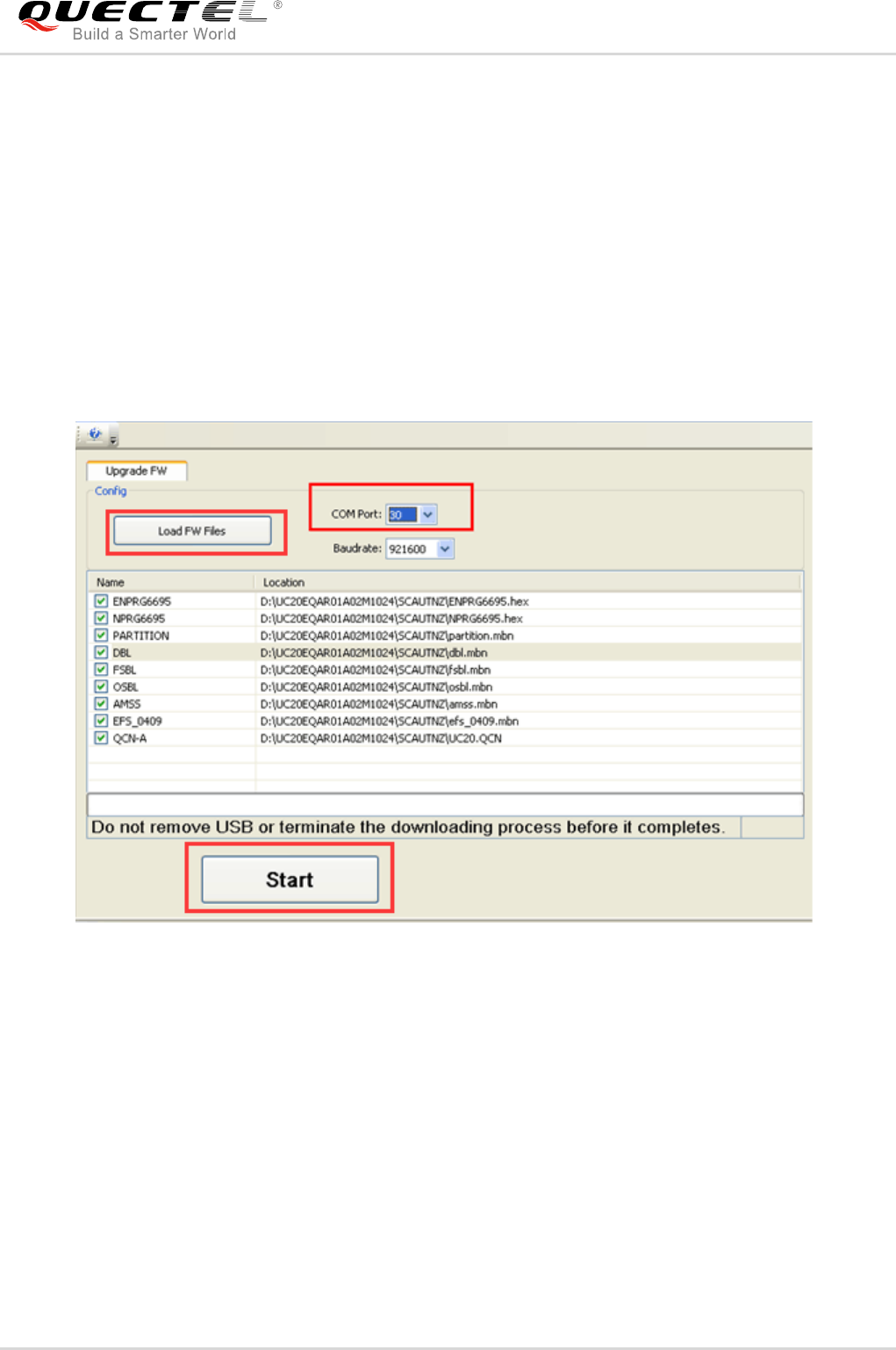
User Manual: Pdf
Open the PDF directly: View PDF  .
.
Page Count: 45
- About the Document
- Contents
- Table Index
- Figure Index
- 1 Introduction
- 2 General Overview
- 3 EVB Kit Accessories Assembly
- 4 Interface Application
- 4.1. Power Interface (J201/J801)
- 4.2. UMTS<E TE-A Interface
- 4.3. Wi-Fi & Ethernet TE-A Interface
- 4.4. USB Interface (J801)
- 4.5. Audio Interfaces
- 4.6. USIM Card Interface (J702)
- 4.7. SD Card Interface (J701)
- 4.8. UART Interfaces (J401/J402)
- 4.9. Switches and Buttons
- 4.10. Status Indication LEDs
- 4.11. Test Points
- 5 Operation Procedures Illustration
- 6 Appendix A References


UMTS/HSPA/LTE Module Series
UMTS<E EVB User Guide
UMTS<E_EVB_User_Guide Confidential / Released 1 / 44
Our aim is to provide customers with timely and comprehensive service. For any
assistance, please contact our company headquarters:
Quectel Wireless Solutions Co., Ltd.
Office 501, Building 13, No.99, Tianzhou Road, Shanghai, China, 200233
Tel: +86 21 5108 6236
Email: info@Quectel.com
Or our local office. For more information, please visit:
http://www.Quectel.com/support/salesupport.aspx
For technical support, or to report documentation errors, please visit:
http://www.Quectel.com/support/techsupport.aspx
Or email to: Support@Quectel.com
GENERAL NOTES
QUECTEL OFFERS THE INFORMATION AS A SERVICE TO ITS CUSTOMERS. THE INFORMATION
PROVIDED IS BASED UPON CUSTOMERS‟ REQUIREMENTS. QUECTEL MAKES EVERY EFFORT
TO ENSURE THE QUALITY OF THE INFORMATION IT MAKES AVAILABLE. QUECTEL DOES NOT
MAKE ANY WARRANTY AS TO THE INFORMATION CONTAINED HEREIN, AND DOES NOT ACCEPT
ANY LIABILITY FOR ANY INJURY, LOSS OR DAMAGE OF ANY KIND INCURRED BY USE OF OR
RELIANCE UPON THE INFORMATION. ALL INFORMATION SUPPLIED HEREIN IS SUBJECT TO
CHANGE WITHOUT PRIOR NOTICE.
COPYRIGHT
THE INFORMATION CONTAINED HERE IS PROPRIETARY TECHNICAL INFORMATION OF
QUECTEL CO., LTD. TRANSMITTING, REPRODUCTION, DISSEMINATION AND EDITING OF THIS
DOCUMENT AS WELL AS UTILIZATION OF THE CONTENT ARE FORBIDDEN WITHOUT
PERMISSION. OFFENDERS WILL BE HELD LIABLE FOR PAYMENT OF DAMAGES. ALL RIGHTS
ARE RESERVED IN THE EVENT OF A PATENT GRANT OR REGISTRATION OF A UTILITY MODEL
OR DESIGN.
Copyright © Quectel Wireless Solutions Co., Ltd. 2017. All rights reserved.
Quectel
Confidential

UMTS/HSPA/LTE Module Series
UMTS<E EVB User Guide
UMTS<E_EVB_User_Guide Confidential / Released 2 / 44
About the Document
History
Revision
Date
Author
Description
1.0
2015-03-03
Huik LI
Initial
1.1
2015-06-10
Radom XIANG
Deleted +5V adapter parts in EVB accessories
2.0
2017-01-12
Allen WANG
1. Added applicable modules of the EVB:
EC25, EC21, EC20 R2.0, FC20 series and
EG95
2. Added the description of UMTS<E TE-A
interface (Chapter 4.2)
3. Added the description of Wi-Fi & Ethernet
TE-A interface (Chapter 4.3)
4. Added the description of digital audio codec
board interface (Chapter 4.5.1)
5. Added the description of SD card interface
(Chapter 4.7)
6. Added a Wi-Fi antenna and two codec boards
into EVB accessories
7. Added procedures for power on/off Wi-Fi
modules in Chapter 5
Quectel
Confidential

UMTS/HSPA/LTE Module Series
UMTS<E EVB User Guide
UMTS<E_EVB_User_Guide Confidential / Released 3 / 44
Contents
About the Document ................................................................................................................................ 2
Contents .................................................................................................................................................... 3
Table Index ............................................................................................................................................... 5
Figure Index .............................................................................................................................................. 6
1 Introduction ....................................................................................................................................... 7
1.1. Safety Information ................................................................................................................. 7
2 General Overview .............................................................................................................................. 9
2.1. Applicable Modules ............................................................................................................... 9
2.2. Key Features ........................................................................................................................ 9
2.3. Interface Overview ...............................................................................................................11
2.4. Top View of EVB ................................................................................................................. 13
2.5. EVB Kit Accessories ........................................................................................................... 14
3 EVB Kit Accessories Assembly ..................................................................................................... 16
4 Interface Application ....................................................................................................................... 17
4.1. Power Interface (J201/J801) ............................................................................................... 17
4.2. UMTS<E TE-A Interface ................................................................................................. 18
4.3. Wi-Fi & Ethernet TE-A Interface .......................................................................................... 19
4.4. USB Interface (J801) .......................................................................................................... 21
4.5. Audio Interfaces .................................................................................................................. 22
4.5.1. Digital Audio Codec Board Interface (J501) ................................................................. 22
4.5.2. Analog Audio Interfaces (J603/J601/J602) .................................................................. 23
4.5.2.1. Loud Speaker Interface (J603) ........................................................................... 23
4.5.2.2. Earphone Interface (J601) .................................................................................. 24
4.5.2.3. Handset Interface (J602) .................................................................................... 25
4.6. USIM Card Interface (J702) ................................................................................................ 27
4.7. SD Card Interface (J701) .................................................................................................... 29
4.8. UART Interfaces (J401/J402) .............................................................................................. 30
4.9. Switches and Buttons ......................................................................................................... 32
4.10. Status Indication LEDs ........................................................................................................ 33
4.11. Test Points .......................................................................................................................... 34
5 Operation Procedures Illustration ................................................................................................. 38
5.1. Power on UMTS<E and Wi-Fi Modules .......................................................................... 38
5.2. Communication Via USB or UART Interface ....................................................................... 39
5.2.1. Communication via USB Interface ............................................................................... 39
5.2.2. Communication via UART Interface ............................................................................. 40
5.3. Firmware Upgrade .............................................................................................................. 41
5.4. Reset UMTS<E Modules ................................................................................................ 41
5.5. Power off UMTS<E and Wi-Fi Modules .......................................................................... 42
Quectel
Confidential


UMTS/HSPA/LTE Module Series
UMTS<E EVB User Guide
UMTS<E_EVB_User_Guide Confidential / Released 5 / 44
Table Index
TABLE 1: KEY FEATURES ................................................................................................................................. 9
TABLE 2: INTERFACES OF UMTS<E EVB ................................................................................................... 11
TABLE 3: ACCESSORIES LIST ........................................................................................................................ 14
TABLE 4: PIN DEFINITION OF J801 ................................................................................................................ 21
TABLE 5: PIN DEFINITION OF J601 ................................................................................................................ 25
TABLE 6: PIN DEFINITION OF J602 ................................................................................................................ 27
TABLE 7: PIN DEFINITION OF J702 ................................................................................................................ 28
TABLE 8: PIN DEFINITION OF J401 ................................................................................................................ 31
TABLE 9: PIN DEFINITION OF J402 ................................................................................................................ 31
TABLE 10: DESCRIPTION OF SWITCHES AND BUTTONS ........................................................................... 32
TABLE 11: DESCRIPTION OF STATUS INDICATION LEDS ........................................................................... 33
TABLE 12: PIN DEFINITION OF J803, J804, J805 AND J806 ......................................................................... 35
TABLE 13: INDICATION OF D206 AND D208 .................................................................................................. 39
TABLE 14: RELATED DOCUMENTS ................................................................................................................ 43
TABLE 15: TERMS AND ABBREVIATIONS ...................................................................................................... 43
Quectel
Confidential

UMTS/HSPA/LTE Module Series
UMTS<E EVB User Guide
UMTS<E_EVB_User_Guide Confidential / Released 6 / 44
Figure Index
FIGURE 1: UMTS<E EVB INTERFACE OVERVIEW (UNIT: MM) ................................................................. 11
FIGURE 2: UMTS<E EVB TOP VIEW .......................................................................................................... 13
FIGURE 3: EVB KIT ACCESSORIES ............................................................................................................... 14
FIGURE 4: UMTS<E EVB KIT ACCESSORIES ASSEMBLY ....................................................................... 16
FIGURE 5: POWER SUPPLY FOR UMTS<E EVB ....................................................................................... 17
FIGURE 6: POWER INTERFACE ..................................................................................................................... 18
FIGURE 7: POWER PLUG DESIGN ................................................................................................................. 18
FIGURE 8: CONNECTION BETWEEN UMTS<E TE-A AND EVB ............................................................... 19
FIGURE 9: SIMPLIFIED FC20 TE-A INTERFACE SCHEMATIC ...................................................................... 20
FIGURE 10: CONNECTION BETWEEN FC20 TE-A AND EVB ....................................................................... 20
FIGURE 11: REFERENCE CIRCUIT DESIGN FOR USB DEVICE INTERFACE ............................................. 21
FIGURE 12: DIGITAL AUDIO CODEC CIRCUIT .............................................................................................. 22
FIGURE 13: CONNECTION BETWEEN CODEC BOARD AND EVB .............................................................. 23
FIGURE 14: REFERENCE CIRCUIT DESIGN FOR LOUD SPEAKER INTERFACE J603 ............................. 23
FIGURE 15: REFERENCE CIRCUIT DESIGN FOR EARPHONE INTERFACE J601 ..................................... 24
FIGURE 16: PIN ASSIGNMENTS OF J601 ...................................................................................................... 24
FIGURE 17: SKETCH OF AUDIO PLUG .......................................................................................................... 25
FIGURE 18: REFERENCE CIRCUIT DESIGN FOR HANDSET INTERFACE J602 ........................................ 26
FIGURE 19: PIN ASSIGNMENTS OF J602 ...................................................................................................... 26
FIGURE 20: SIMPLIFIED INTERFACE SCHEMATIC FOR USIM CARD CONNECTOR J702 ........................ 27
FIGURE 21: PIN ASSIGNMENTS OF J702 ...................................................................................................... 28
FIGURE 22: SIMPLIFIED INTERFACE SCHEMATIC FOR SD CARD INTERFACE J701............................... 29
FIGURE 23: PIN ASSIGNMENTS OF J701 ...................................................................................................... 29
FIGURE 24: UART BLOCK DIAGRAM ............................................................................................................. 30
FIGURE 25: PIN ASSIGNMENTS OF J401 ...................................................................................................... 30
FIGURE 26: PIN ASSIGNMENTS OF J402 ...................................................................................................... 31
FIGURE 27: S901 SWITCH .............................................................................................................................. 32
FIGURE 28: S201 SWITCH AND S301/S302/S303 BUTTONS ....................................................................... 32
FIGURE 29: STATUS INDICATION LEDS ........................................................................................................ 33
FIGURE 30: TEST POINTS J803, J805 AND J806 ........................................................................................... 34
FIGURE 31: TEST POINT J804 ........................................................................................................................ 35
FIGURE 32: USB PORTS ................................................................................................................................. 39
FIGURE 33: QCOM WINDOW CONFIGURATION WHEN CONNECTING USB PORT .................................. 40
FIGURE 34: USB SERIAL PORT ...................................................................................................................... 40
FIGURE 35: QCOM WINDOW CONFIGURATION WHEN CONNECTING USB SERIAL PORT .................... 40
FIGURE 36: CONFIGURATIONS FOR FIRMWARE UPGRADE ..................................................................... 41
Quectel
Confidential
UMTS/HSPA/LTE Module Series
UMTS<E EVB User Guide
UMTS<E_EVB_User_Guide Confidential / Released 7 / 44
1 Introduction
This document describes how to use the evaluation board of UMTS<E modules and Wi-Fi modules. It
is an assistant tool for engineers to develop and test Quectel UMTS, LTE and Wi-Fi modules.
1.1. Safety Information
The following safety precautions must be observed during all phases of the operation, such as usage,
service or repair of any cellular terminal or mobile incorporating UMTS<E and Wi-Fi modules.
Manufacturers of the cellular terminal should send the following safety information to users and operating
personnel, and incorporate these guidelines into all manuals supplied with the product. If not so, Quectel
assumes no liability for the customer‟s failure to comply with these precautions.
Full attention must be given to driving at all times in order to reduce the risk of an
accident. Using a mobile while driving (even with a handsfree kit) causes
distraction and can lead to an accident. You must comply with laws and regulations
restricting the use of wireless devices while driving.
Switch off the cellular terminal or mobile before boarding an aircraft. Make sure it is
switched off. The operation of wireless appliances in an aircraft is forbidden, so as
to prevent interference with communication systems. Consult the airline staff about
the use of wireless devices on boarding the aircraft, if your device offers an
Airplane Mode which must be enabled prior to boarding an aircraft.
Switch off your wireless device when in hospitals, clinics or other health care
facilities. These requests are designed to prevent possible interference with
sensitive medical equipment.
Cellular terminals or mobiles operating over radio frequency signal and cellular
network cannot be guaranteed to connect in all conditions, for example no mobile
fee or with an invalid USIM/SIM card. While you are in this condition and need
emergent help, please remember using emergency call. In order to make or
receive a call, the cellular terminal or mobile must be switched on and in a service
area with adequate cellular signal strength.
Quectel
Confidential

UMTS/HSPA/LTE Module Series
UMTS<E EVB User Guide
UMTS<E_EVB_User_Guide Confidential / Released 8 / 44
Your cellular terminal or mobile contains a transmitter and receiver. When it is ON,
it receives and transmits radio frequency energy. RF interference can occur if it is
used close to TV set, radio, computer or other electric equipment.
In locations with potentially explosive atmospheres, obey all posted signs to turn
off wireless devices such as your phone or other cellular terminals. Areas with
potentially explosive atmospheres include fuelling areas, below decks on boats,
fuel or chemical transfer or storage facilities, areas where the air contains
chemicals or particles such as grain, dust or metal powders, etc.
Quectel
Confidential
UMTS/HSPA/LTE Module Series
UMTS<E EVB User Guide
UMTS<E_EVB_User_Guide Confidential / Released 9 / 44
2 General Overview
Quectel supplies UMTS<E EVB for designers to develop applications based on Quectel UMTS<E
modules and Wi-Fi modules. This EVB can test basic functionalities of these modules.
2.1. Applicable Modules
UMTS<E EVB is applicable to the following module models.
- UC20
- UGxx 1)
- EC2x 2)
- FC20 series 3)
- EG95
1. 1) UGxx contains UG35, UG95 and UG96.
2. 2) EC2x contains EC25, EC21, EC20 and EC20 R2.0.
3. 3) FC20 series (hereinafter FC20 simply) includes both FC20 and FC20-N.
2.2. Key Features
The following table describes the detailed features of UMTS<E EVB.
Table 1: Key Features
Features
Implementation
Power Supply
DC supply: 4.5~5.5V, typically: 5V
VBAT: 3.8V for J103
UMTS<E TE-A Interface
Support Quectel UMTS<E modules: UC20/UGxx/EC2x/EG95
NOTES
Quectel
Confidential

UMTS/HSPA/LTE Module Series
UMTS<E EVB User Guide
UMTS<E_EVB_User_Guide Confidential / Released 10 / 44
Wi-Fi & Ethernet TE-A
Interface
Support Quectel Wi-Fi modules: FC20
SD Interface
Support SD card
USIM Card Interface
Support USIM/SIM card insertion detection
Support USIM/SIM card: 3.0V and 1.8V
Audio Interfaces
- One digital audio codec board interface
Support Realteck ALC5616 and TI Codec TLV320AIC3104
- Three analog interfaces used for loud speaker, earphone and
handset
UART Interfaces
Two UART interfaces:
- COM1: serial interface for data communication
Max baud rate: 460,800bps;
- COM2: serial interface for debug purpose
Max baud rate: 3Mbps
USB Interface
USB 2.0
Signal Indication
5 LEDs are available for signal indication
KEY Interfaces
Power Switch (S201), PWRKEY (S302), RESET (S303), PWRDWN_N
(S301), BT Function Switch (S901)
Physical Characteristics
Size: 146.4mm × 115.0mm
Quectel
Confidential
UMTS/HSPA/LTE Module Series
UMTS<E EVB User Guide
UMTS<E_EVB_User_Guide Confidential / Released 11 / 44
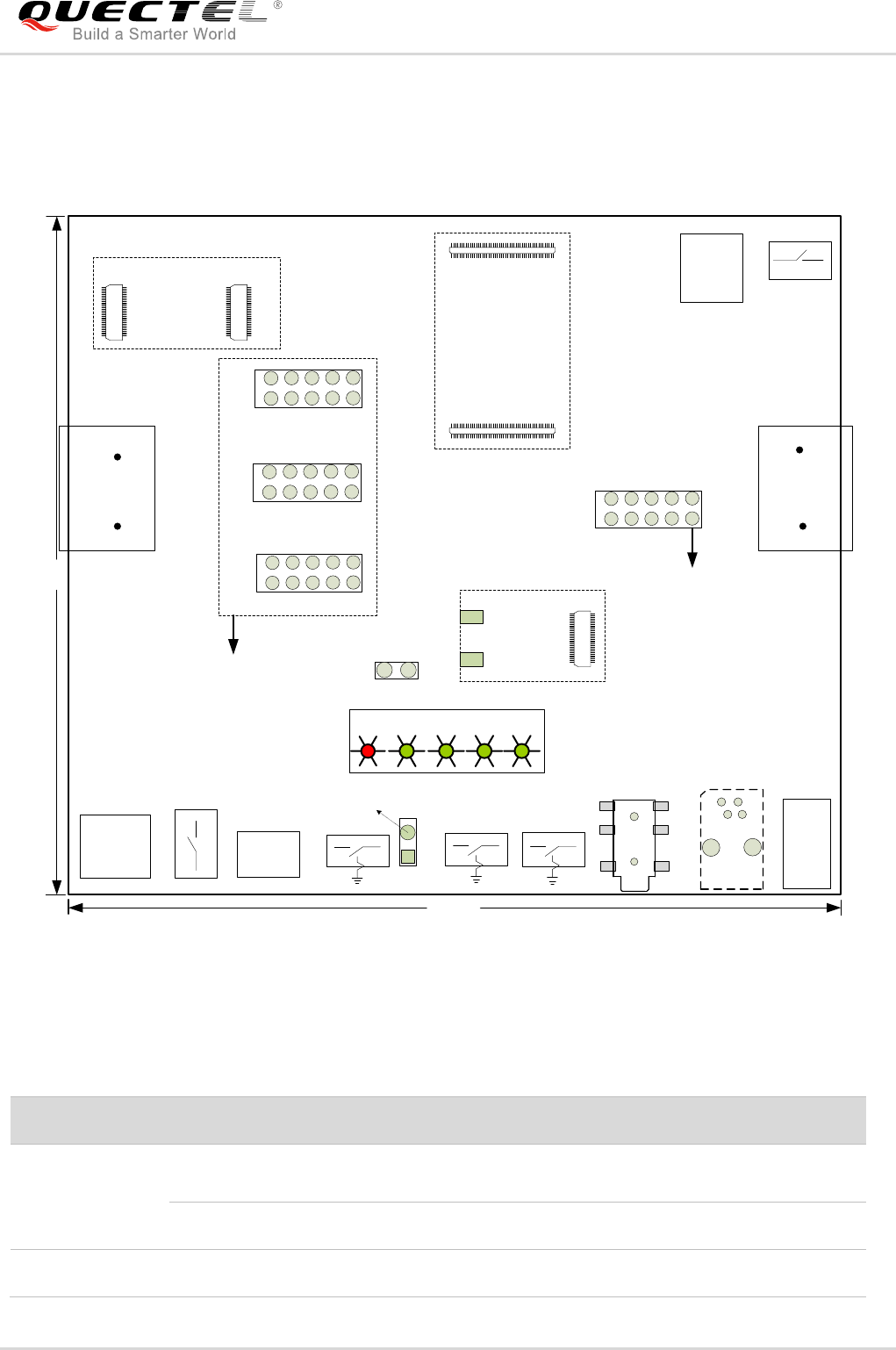
2.3. Interface Overview
COM1 (MAIN)
J201 J801
S201
S303
Micro USB
interface
J702
Power
supply
Power
switch
RESET
D209
J401
S302
PWRKEY
D205 D207 D208 D206
FC20 TE-A
EC2x TE-A
SD card
GND
J302
J103
USIM/SIM
card
connector
J402
COM2 (DBG)
VBAT
J805
J902 J901
60Pin 60Pin
J102
J101
100Pin
100Pin
J701
J806
J804
S901
S301
PWRDWN_N
J501
60Pin
J803
J601
Earphone
Test Points
UGxx TE-A
EG95 TE-A
UC20 TE-A
Codec board
interface
Handset
J602
Test Point
146.4
115
Figure 1: UMTS<E EVB Interface Overview (Unit: mm)
Table 2: Interfaces of UMTS<E EVB
Interface
Reference No.
Description
Power Supply 1)
J201
(bottom side)
The power jack on the EVB. Supply voltage typically: +5V
J801
USB_VBUS supplies voltage typically: +5V
Power Switch
S201
Control power supply VBAT ON/OFF
Quectel
Confidential

UMTS/HSPA/LTE Module Series
UMTS<E EVB User Guide
UMTS<E_EVB_User_Guide Confidential / Released 12 / 44
PWRKEY
S302
Power key (push button)
Used to turn on/off the UMTS<E module
J302
Jumper is used to connect PWRKEY to GND
PWRDWN_N
S301
Used to turn off the UMTS<E module 2)
RESET
S303
Reset button (push button). It is used to reset the UMTS<E
module
BT Function
Switch
S901
Switched to the left: connect FC20's BT interface (UART,
PCM) to EC2x modules, for testing the BT function of FC20.
Switched to the right: connect the main UART and codec
board interfaces on EVB to UMTS<E module, for testing
the module's main UART functions, and the codec„s PCM
function.
Micro USB
J801
USB device interface
Audio
J501
Codec board interface
J603
Used for loud speaker
Used to test the analog audio function of UMTS<E module
J601
Used for earphone
Used to test the analog audio function of UMTS<E module
J602
(bottom side)
Used for handset
Used to test the analog audio function of UMTS<E module
USIM
J702
USIM card connector
COM1
J401
(bottom side)
Main UART port
COM2
J402
(bottom side)
Debug UART port
Status Indication
LEDs
D209, D205,
D207, D208, D206
D209 is VBAT ON/OFF indicator.
D205 is used for indicating whether the UMTS<E module is
powered on.
D207 is used for indicating whether UMTS<E module is in
sleep mode.
D208 and D206 are used for indicating the network status of
UMTS<E module.
UMTS<E
TE-A Interface
J101, J102
Connectors of UMTS<E TE-A
Wi-Fi & Ethernet
TE-A Interface
J901, J902
Connectors of Wi-Fi & Ethernet TE-A
SD Card
J701
SD card connector
VBAT
J103
Jumper used for VBAT voltage test
Quectel
Confidential
UMTS/HSPA/LTE Module Series
UMTS<E EVB User Guide
UMTS<E_EVB_User_Guide Confidential / Released 13 / 44
1. 1) The power supply information in above table is for UMTS<E modules. For the detailed
information of power supply for Wi-Fi modules, please refer to Chapter 4.1 and Chapter 4.3.
2. 2) This function is only supported by UG35, UG95 and UG96 modules.
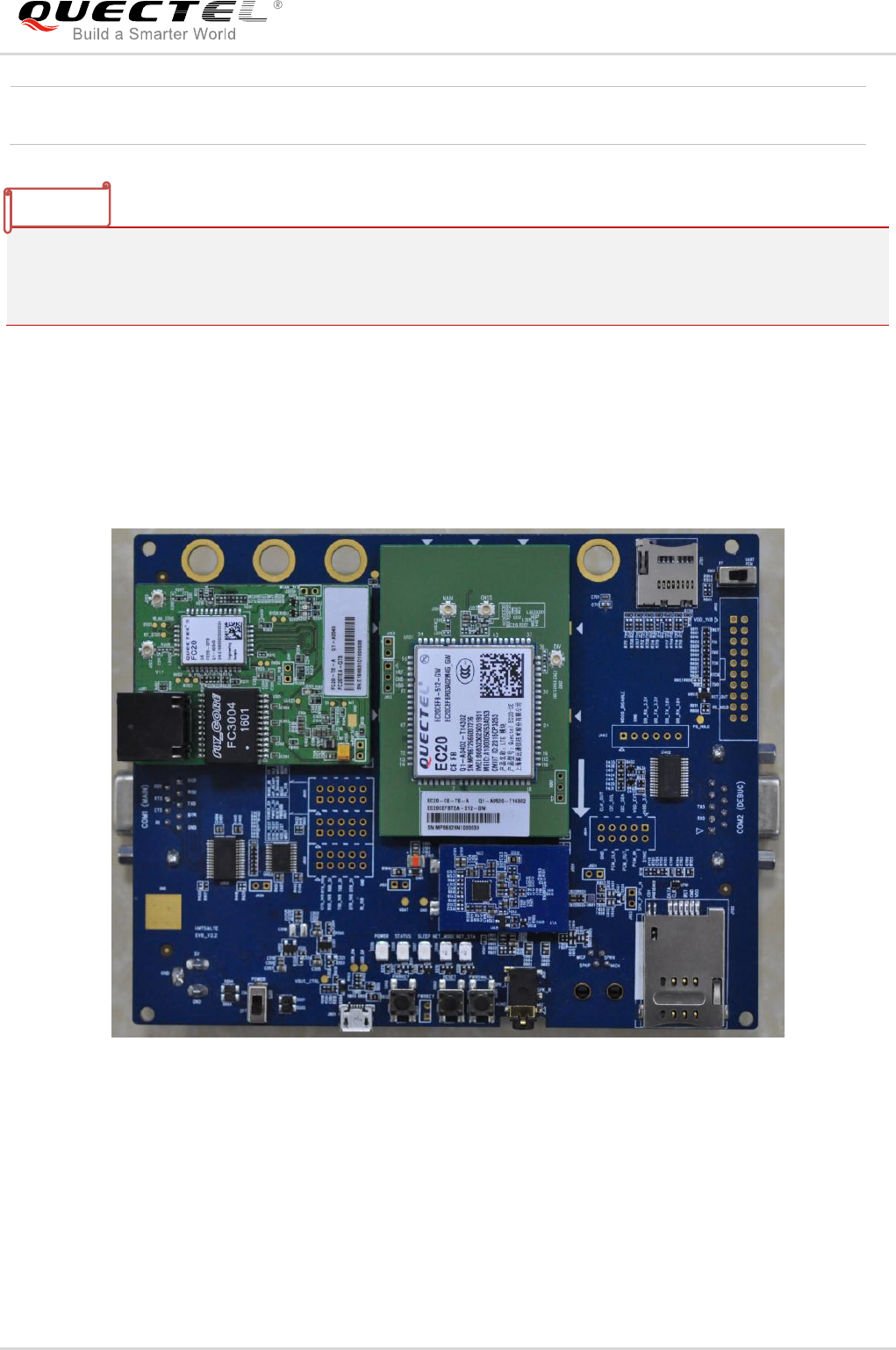
2.4. Top View of EVB
The top view of the UMTS<E EVB is shown as following figure.
Figure 2: UMTS<E EVB Top View
Test Points
J803, J804, J805,
J806
Test pins
NOTES
Quectel
Confidential
UMTS/HSPA/LTE Module Series
UMTS<E EVB User Guide
UMTS<E_EVB_User_Guide Confidential / Released 14 / 44
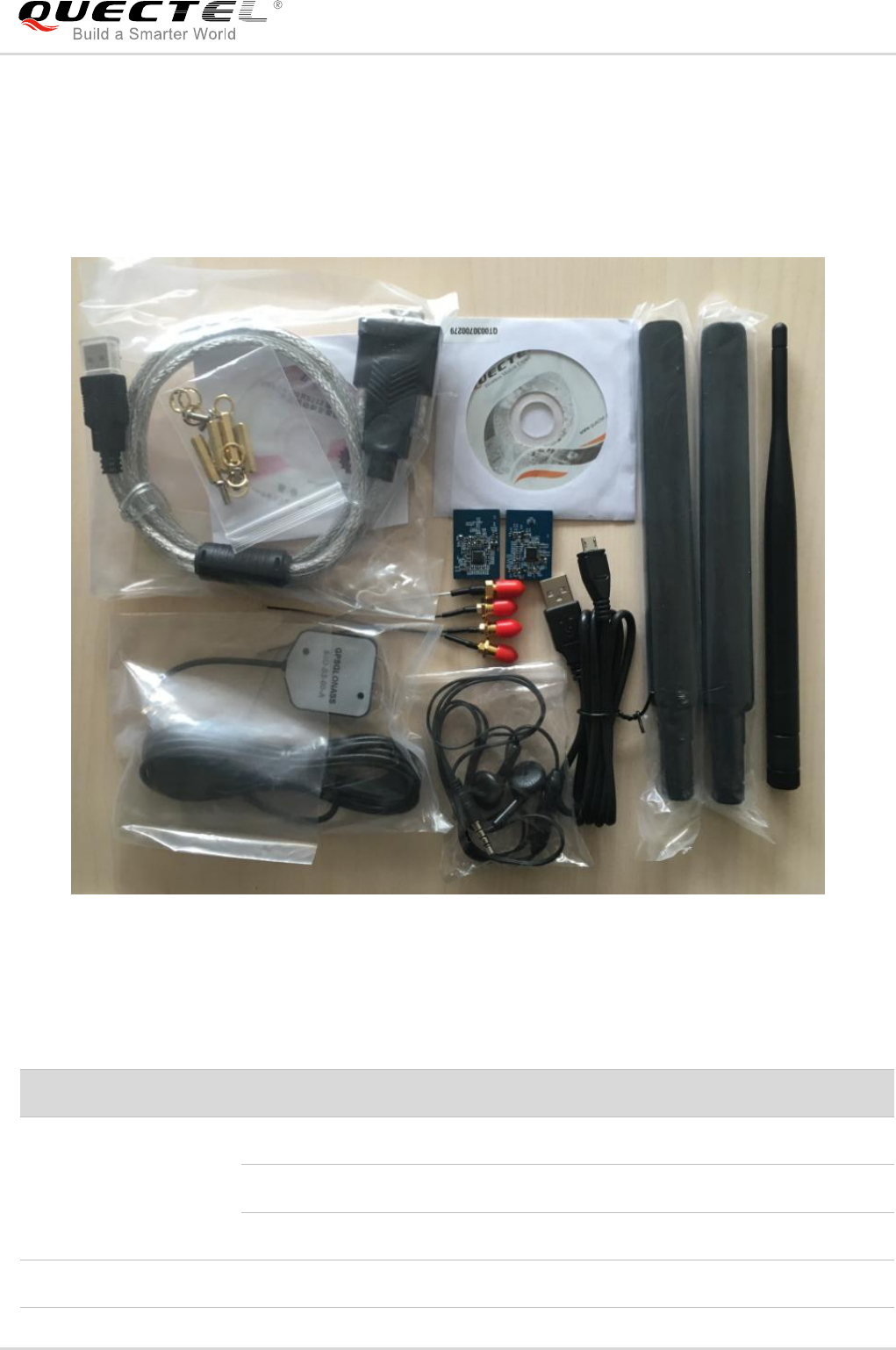
2.5. EVB Kit Accessories
All accessories of the UMTS<E EVB kit are listed as below.
USB to UART converter cable
Bolts and
nuts
Driver disk
RF cables
Codec boards
USB cable
Earphone
GNSS
Antenna
Main
Antennas
Wi-Fi
Antenna
Figure 3: EVB Kit Accessories
Table 3: Accessories List
Items
Description
Quantity
Cables
USB to UART converter cable
1
USB cable
1
RF cables
4
Antennas
Main Antennas
2
Quectel
Confidential
UMTS/HSPA/LTE Module Series
UMTS<E EVB User Guide
UMTS<E_EVB_User_Guide Confidential / Released 15 / 44
The main antenna can also be used for diversity reception.
GNSS Antenna (passive)
1
Wi-Fi Antenna
1
Audio
Earphone
1
Disk
USB 2.0 to RS232 driver and USB driver disk
1
Codec Boards
ALC5616 and TLV320AIC3104 codec boards
2
Others
Bolts and nuts for fixing EVB
1
Instruction Sheet
A sheet of paper giving instructions for EVB
connection, details of EVB accessories, etc.
1
NOTE
Quectel
Confidential
UMTS/HSPA/LTE Module Series
UMTS<E EVB User Guide
UMTS<E_EVB_User_Guide Confidential / Released 16 / 44
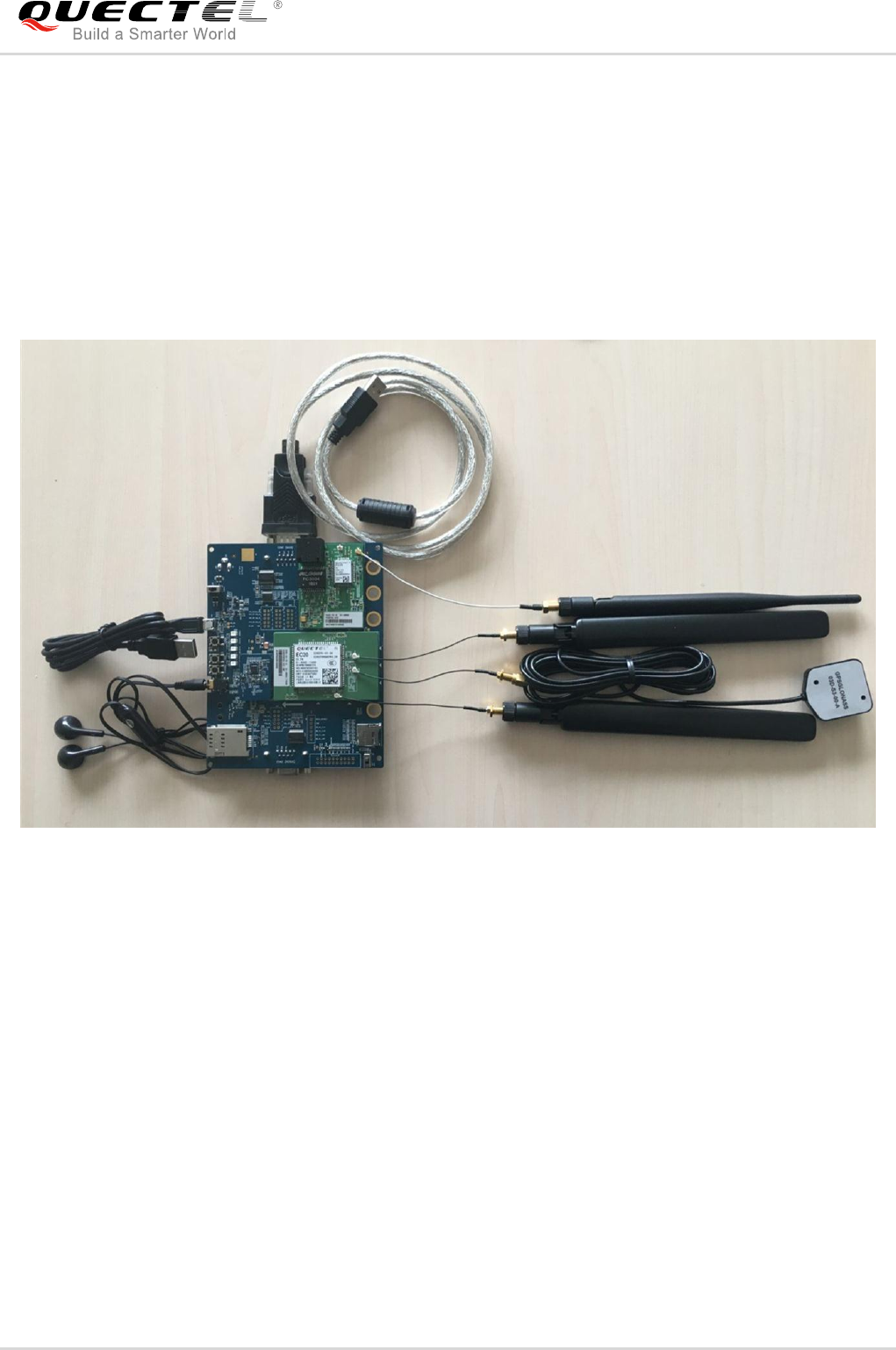
3 EVB Kit Accessories Assembly
The following figure shows the EVB Kit accessories assembly.
Figure 4: UMTS<E EVB Kit Accessories Assembly
Quectel
Confidential
UMTS/HSPA/LTE Module Series
UMTS<E EVB User Guide
UMTS<E_EVB_User_Guide Confidential / Released 17 / 44
4 Interface Application
This chapter describes the hardware interfaces of UMTS<E EVB, shown as follows:
- Power interface
- UMTS<E TE-A interface
- Wi-Fi & Ethernet TE-A interface
- USB interface
- Audio interfaces
- USIM card interface
- SD card interface
- UART interfaces
It also provides information about the buttons, switch, status indication LEDs and test points to help
customers use the UMTS<E EVB.
4.1. Power Interface (J201/J801)
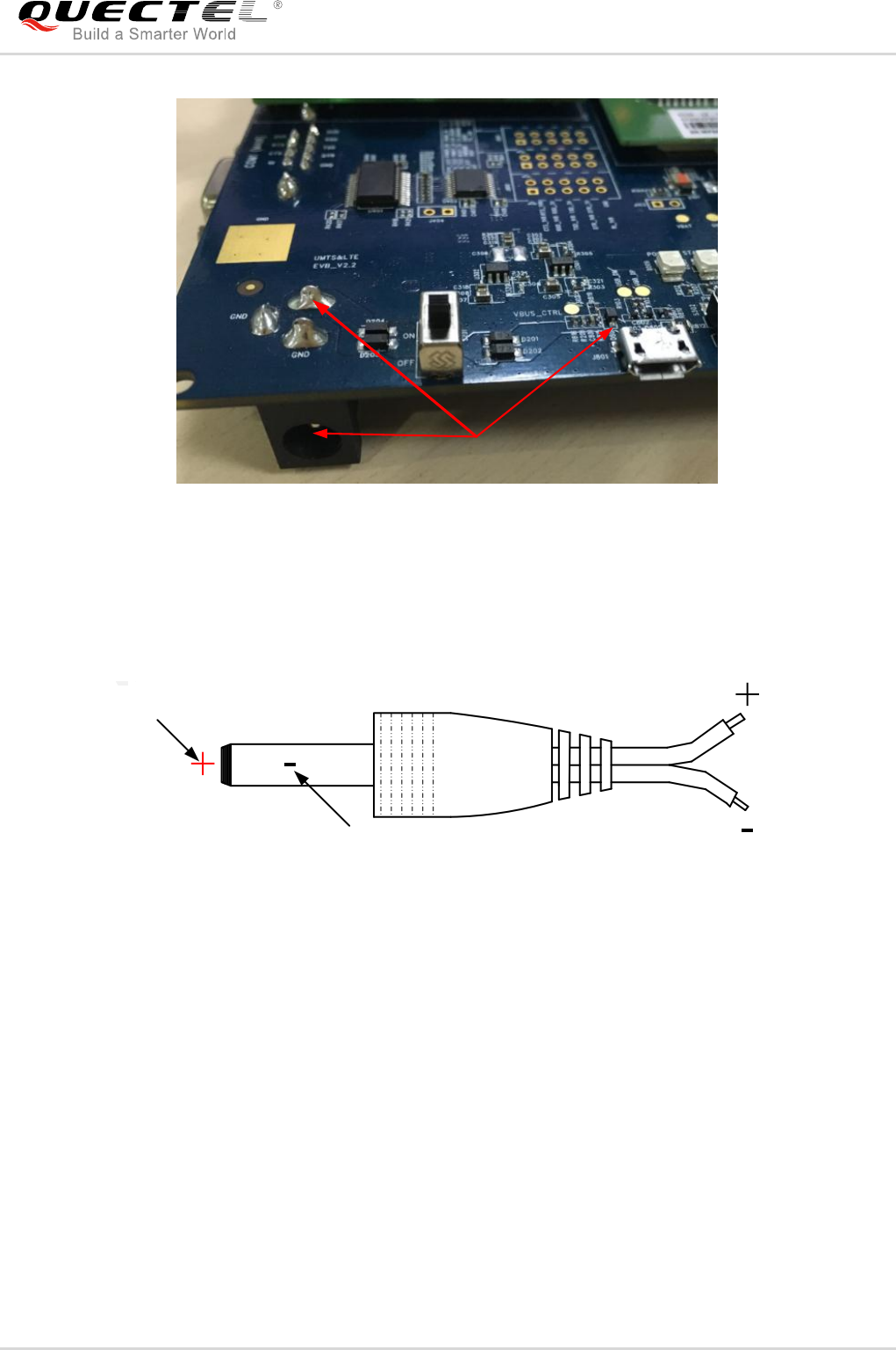
The UMTS<E EVB can be powered by an external power adapter through connecting with the power
jack (J201) or USB receptacle (J801) on the EVB. The power adapter connects to a step-down converter
which can provide the supply voltage (VBAT) required for operating the EVB and the module.
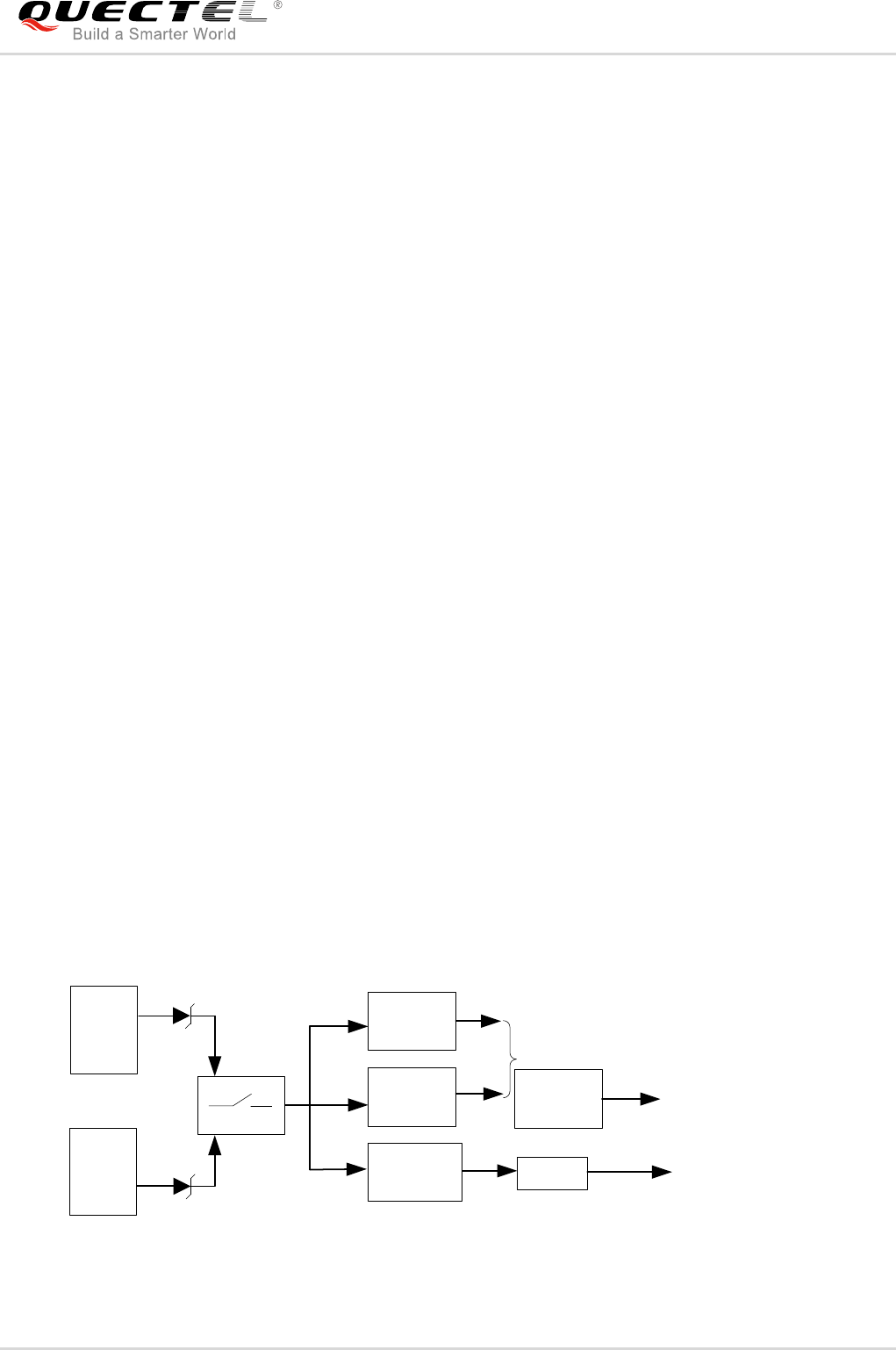
The following two figures show the simplified power supply schematic and the power interface of Quectel
UMTS<E EVB.
J201
S201
Power
supply
Power
switch
Step-down converter
U201
TPS54319 J103
VBAT
Power supply for
UMTS<E module
1.8V
3.3V
U301
LDO
U303
LDO
J801
USB
interface
2.85V
U302
LDO
Power supply for
Wi-Fi module
Power supply for
SD Card
Figure 5: Power Supply for UMTS<E EVB
Quectel
Confidential
UMTS/HSPA/LTE Module Series
UMTS<E EVB User Guide
UMTS<E_EVB_User_Guide Confidential / Released 18 / 44
5V DC power supply
Figure 6: Power Interface
Before connecting the power supply, customers have to select a proper DC power adapter to supply
power for the UMTS<E EVB, and the power plug design of the adapter is shown as below.
Inner contact
Outer contact
Figure 7: Power Plug Design
4.2. UMTS<E TE-A Interface
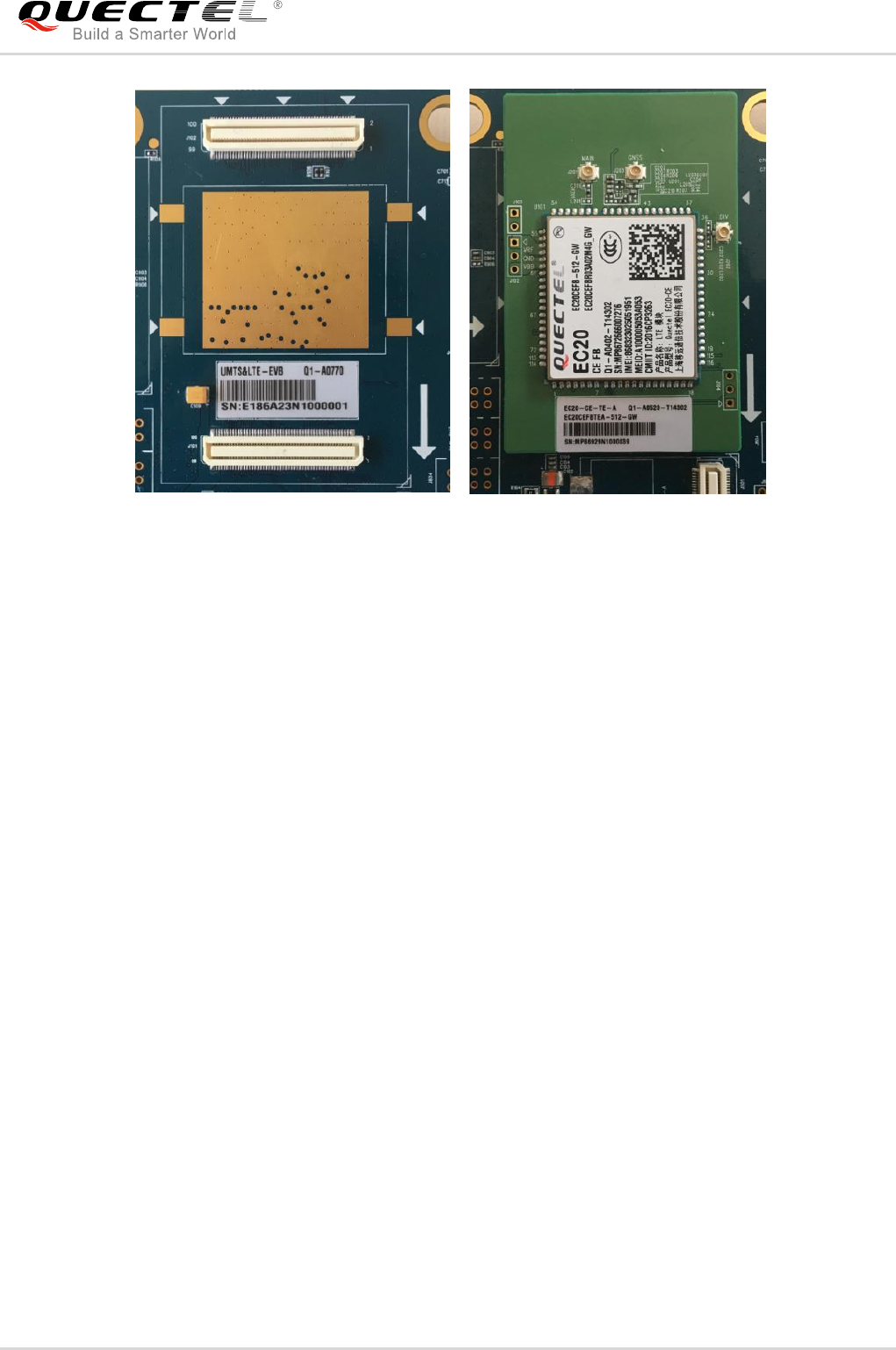
The UMTS<E TE-A interface supports UC20/UGxx/EC2x/EG95 modules, and includes two BTB
connectors named J101 and J102, respectively. UMTS<E TE-A is connected to the EVB via the two
connectors. With UMTS<E modules, customers can easily design wireless communication products.
The following figure shows the connection between UMTS<E TE-A and EVB.
Quectel
Confidential
UMTS/HSPA/LTE Module Series
UMTS<E EVB User Guide
UMTS<E_EVB_User_Guide Confidential / Released 19 / 44
J101
J102
Figure 8: Connection between UMTS<E TE-A and EVB
4.3. Wi-Fi & Ethernet TE-A Interface
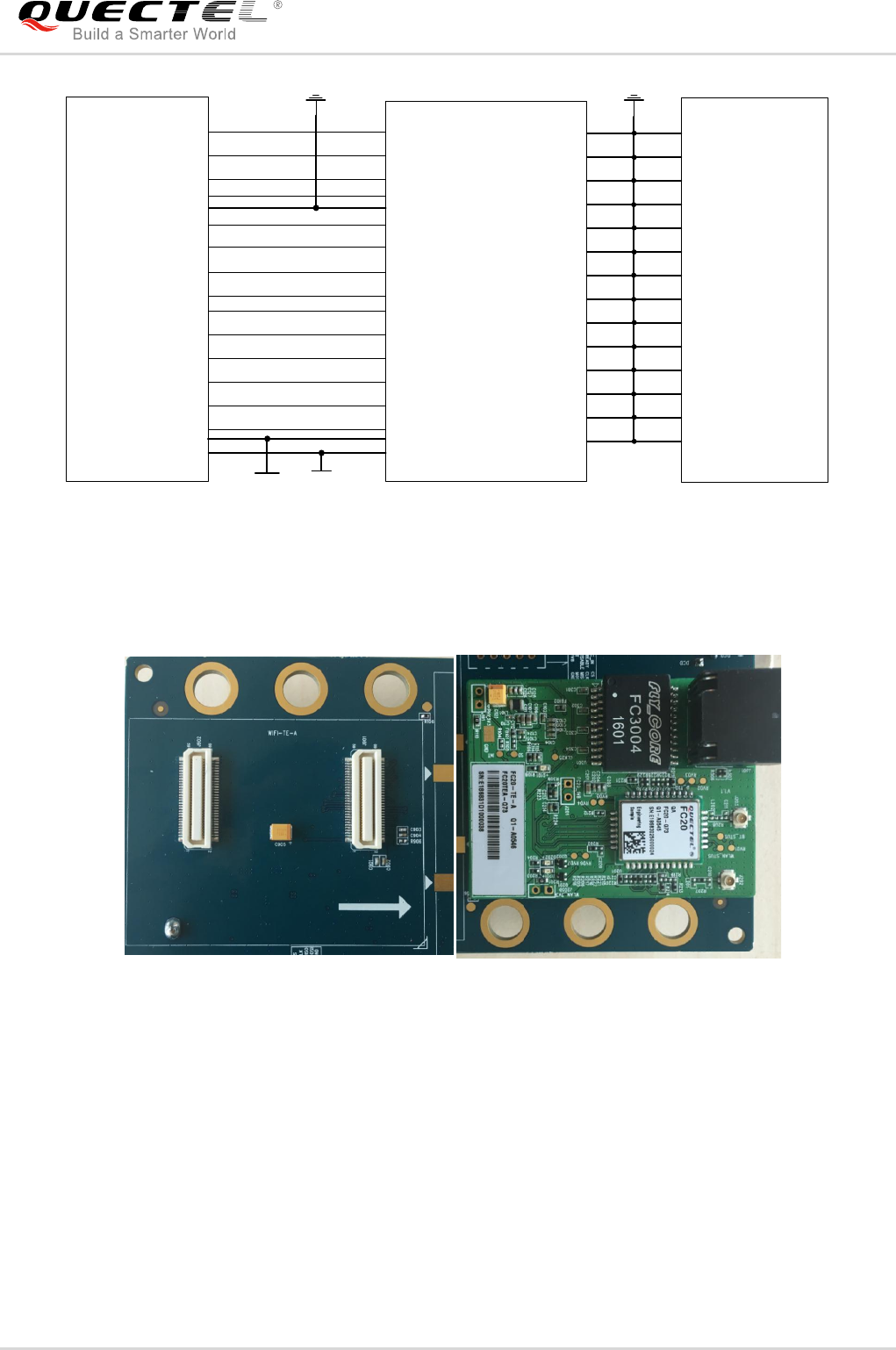
The Wi-Fi & Ethernet TE-A interface supports FC20 modules, and includes two BTB connectors named
J901 and J902, respectively. Wi-Fi & Ethernet TE-A (FC20 TE-A) is connected to the EVB via the two
connectors. The interface allows customers to easily test the Wi-Fi function of EC2x modules or to
develop applications with Wi-Fi function.
The following two figures show the connection between FC20 TE-A and EVB.
Quectel
Confidential
UMTS/HSPA/LTE Module Series
UMTS<E EVB User Guide
UMTS<E_EVB_User_Guide Confidential / Released 20 / 44
J901 FC20 TE-A
16
18
24
22
SGMII_RX_M
SGMII_RX_P
SGMII_TX_M
16
18
22
GND
28
32
38
36
SGMII_TX_P
SGMII_INT_N
SGMII_RST_N
28
36
38
VDD_1V8
SGMII_MDIO_DAT
SGMII_MDIO_CLK
SGMII_RX_M
SGMII_RX_P
SGMII_TX_M
SGMII_TX_P
SGMII_INT_N
SGMII_RST_N
SGMII_MDIO_DAT
SGMII_MDIO_CLK
VDD_3V3_FC20
24
32
SDIO_CMD
SDIO_CLK
SDIO_D0
SDIO_D1
SDIO_D2
SDIO_D3
42
46
50
52
54
56
46
50
52
54
56
42 SDIO_CMD
SDIO_CLK
SDIO_D0
SDIO_D1
SDIO_D2
SDIO_D3
GND
GND
GND
GND
GND
GND
GND
GND
GND
GND
GND
GND
GND
GND
GND
GND
GND
GND
GND
GND
GND
GND
GND
GND
GND
GND
GND
GND
J902
1
2
3
4
27
28
29
30
43
44
57
58
59
60
1
2
3
4
27
28
29
30
43
44
57
58
59
60
GND
Figure 9: Simplified FC20 TE-A Interface Schematic
J902 J901
Figure 10: Connection Between FC20 TE-A and EVB
Quectel
Confidential
UMTS/HSPA/LTE Module Series
UMTS<E EVB User Guide
UMTS<E_EVB_User_Guide Confidential / Released 21 / 44
4.4. USB Interface (J801)
Quectel UMTS<E module provides a USB interface which complies with USB 2.0 standard for
high-speed (480Mbps), full-speed (12Mbps) and low-speed (1.5Mbps) functions. The interface is used for
AT command communication, data transmission, firmware upgrade and GNSS NEMA output.
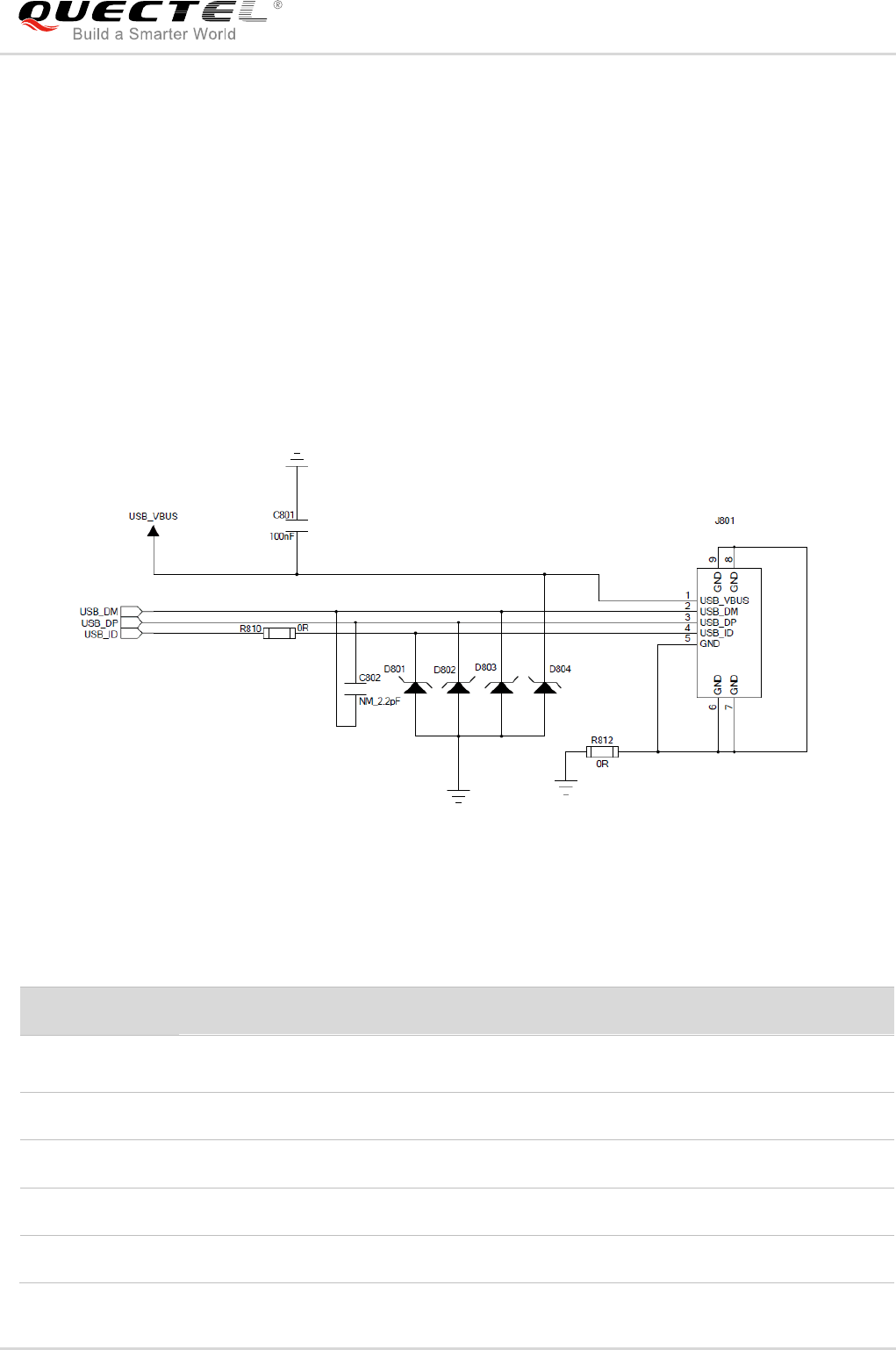
The UMTS<E EVB provides a Micro-USB interface J801 for connection with a host device. The USB
data lines USB_DP and USB_DM are connected directly to the UMTS<E module. The USB_VBUS line
can be used for USB connection detection and EVB power supply.
The following figure is a reference circuit design for the USB device interface.
Figure 11: Reference Circuit Design for USB Device Interface
Table 4: Pin Definition of J801
Pin No.
Pin Name
Function
1
USB_VBUS
Used for USB connection detection and power supply for
EVB
2
USB_DM
USB serial differential bus (minus)
3
USB_DP
USB serial differential bus (positive)
4
USB_ID
USB ID bus for host or device
5
GND
GND for USB interface
Quectel
Confidential
UMTS/HSPA/LTE Module Series
UMTS<E EVB User Guide
UMTS<E_EVB_User_Guide Confidential / Released 22 / 44
4.5. Audio Interfaces
Quectel UMTS<E EVB provides one digital audio codec board interface (PCM) J501 and three analog
audio interfaces J601, J602 and J603. This chapter gives a detailed introduction on these audio
interfaces.
4.5.1. Digital Audio Codec Board Interface (J501)
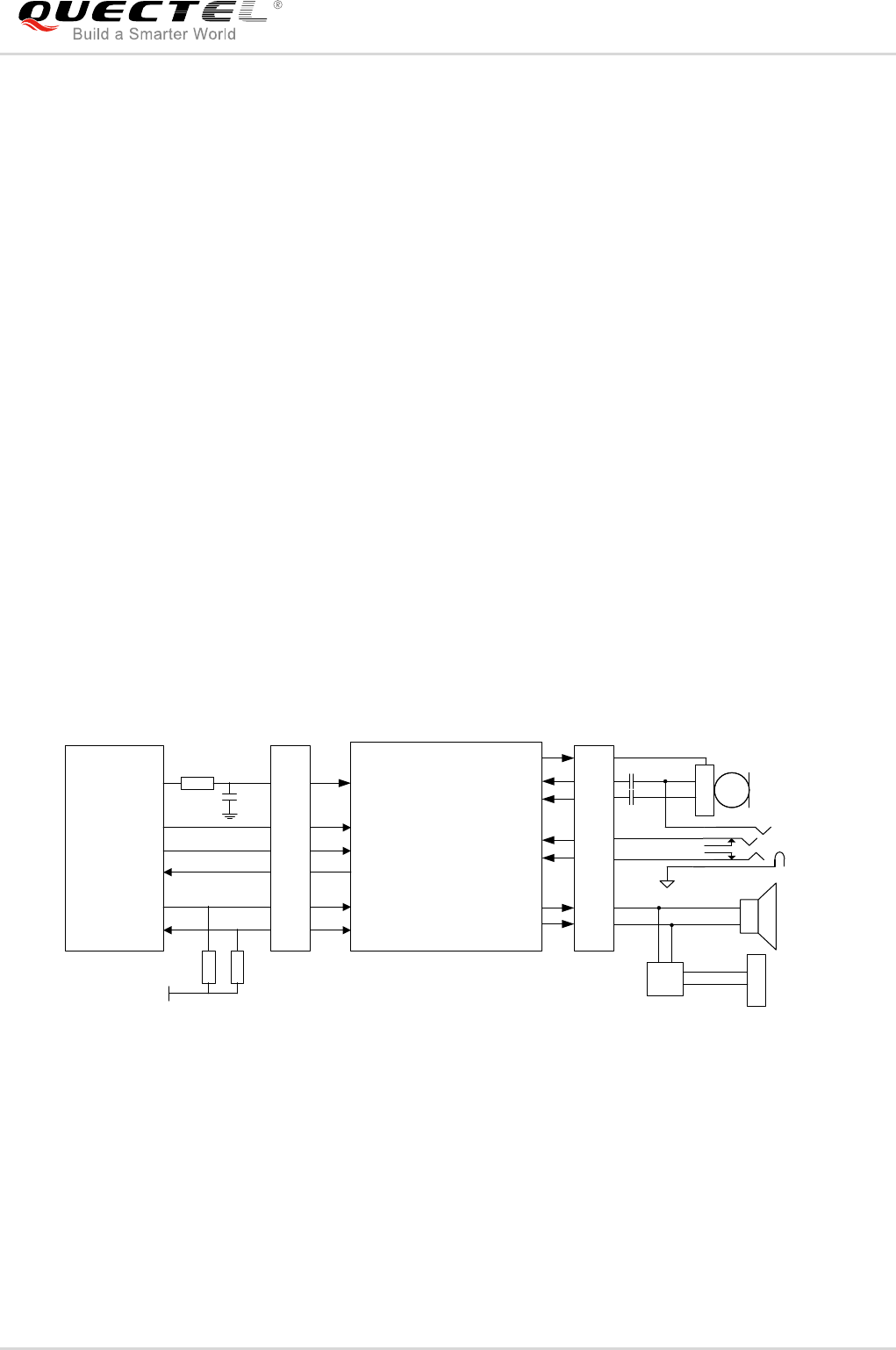
The UMTS<E EVB supports two different kinds of external digital audio codecs named ALC5616 and
TLV320AIC3104. The codec circuit is assembled on an independent small board which can be
interconnected with EVB by the BTB connector J501.
Customers can select different codecs according to their own application demands, and also can use AT
command to switch between codecs. For example, AT+QDAI=3 is used to switch codec from
TLV320AIC3104 to ALC5616, and AT+QDAI=5 is used to switch codec from ALC5616 to
TLV320AIC3104. For more details about the AT commands, please refer to document [4] and
document [5].
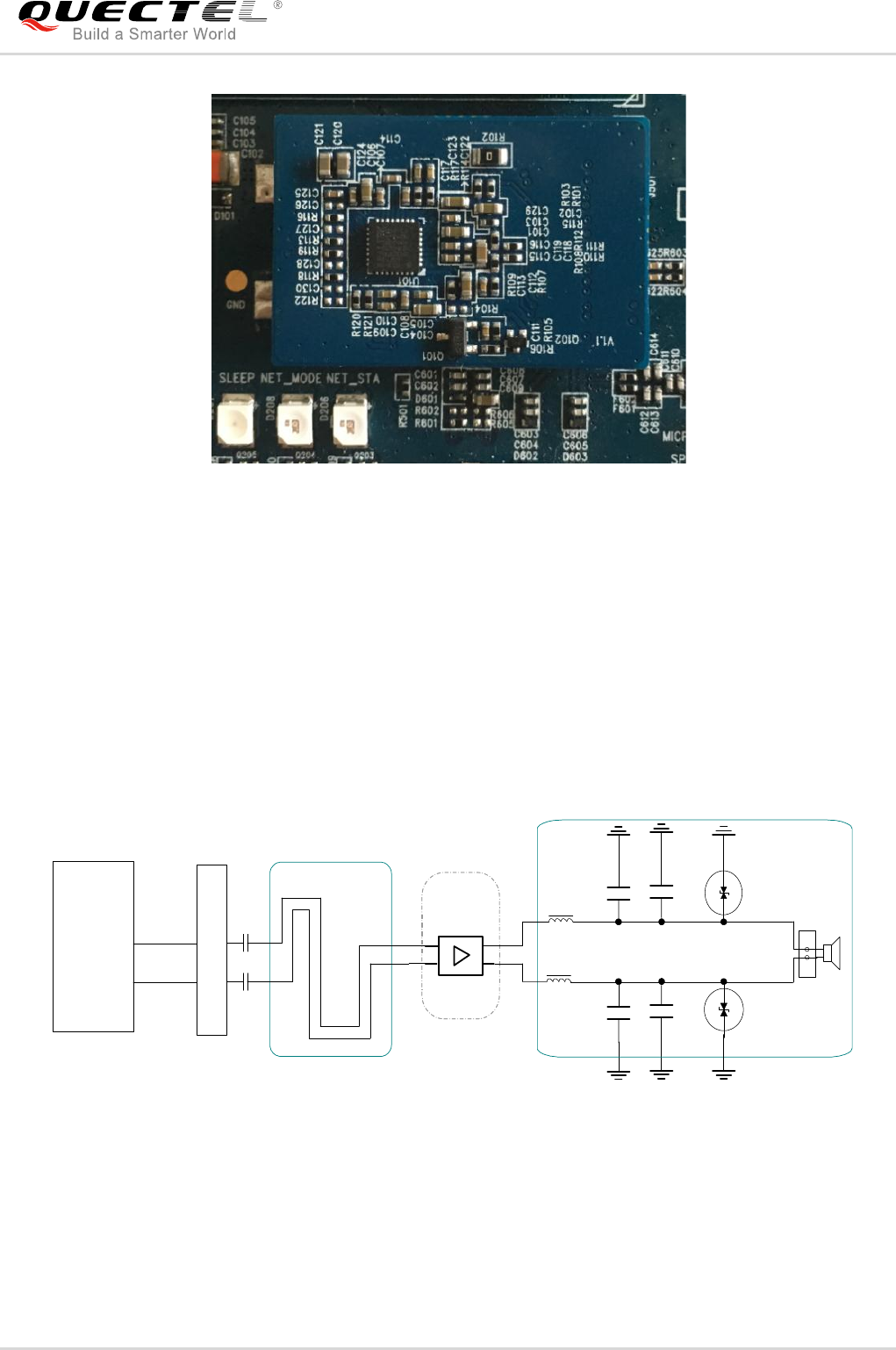
The following figure shows a reference circuit design for digital audio codecs, and Figure 13 shows the
connection between codec board and EVB.
PCM_IN
PCM_OUT
PCM_SYNC
PCM_CLK
I2C_SCL
I2C_SDA
U101
ALC5616/TLV3104
UMTS<E Module
VDD_EXT
4.7K
4.7K
BCLK
LRCK
DACDAT1
ADCDAT1
SCL
SDA
MIC_BIAS
MIC_BIAS
IN2P
IN2N
LOUDL/P
LOUDR/N
R
C
HPO_R
HPO_L J601
J602
speaker
J603
NCP2823
2
4
5
3
1
6
J602 MIC
BTB CON BTB CON
J501 J501
Figure 12: Digital Audio Codec Circuit
Quectel
Confidential
UMTS/HSPA/LTE Module Series
UMTS<E EVB User Guide
UMTS<E_EVB_User_Guide Confidential / Released 23 / 44
Codec board
EVB
Figure 13: Connection between Codec Board and EVB
4.5.2. Analog Audio Interfaces (J603/J601/J602)
4.5.2.1. Loud Speaker Interface (J603)
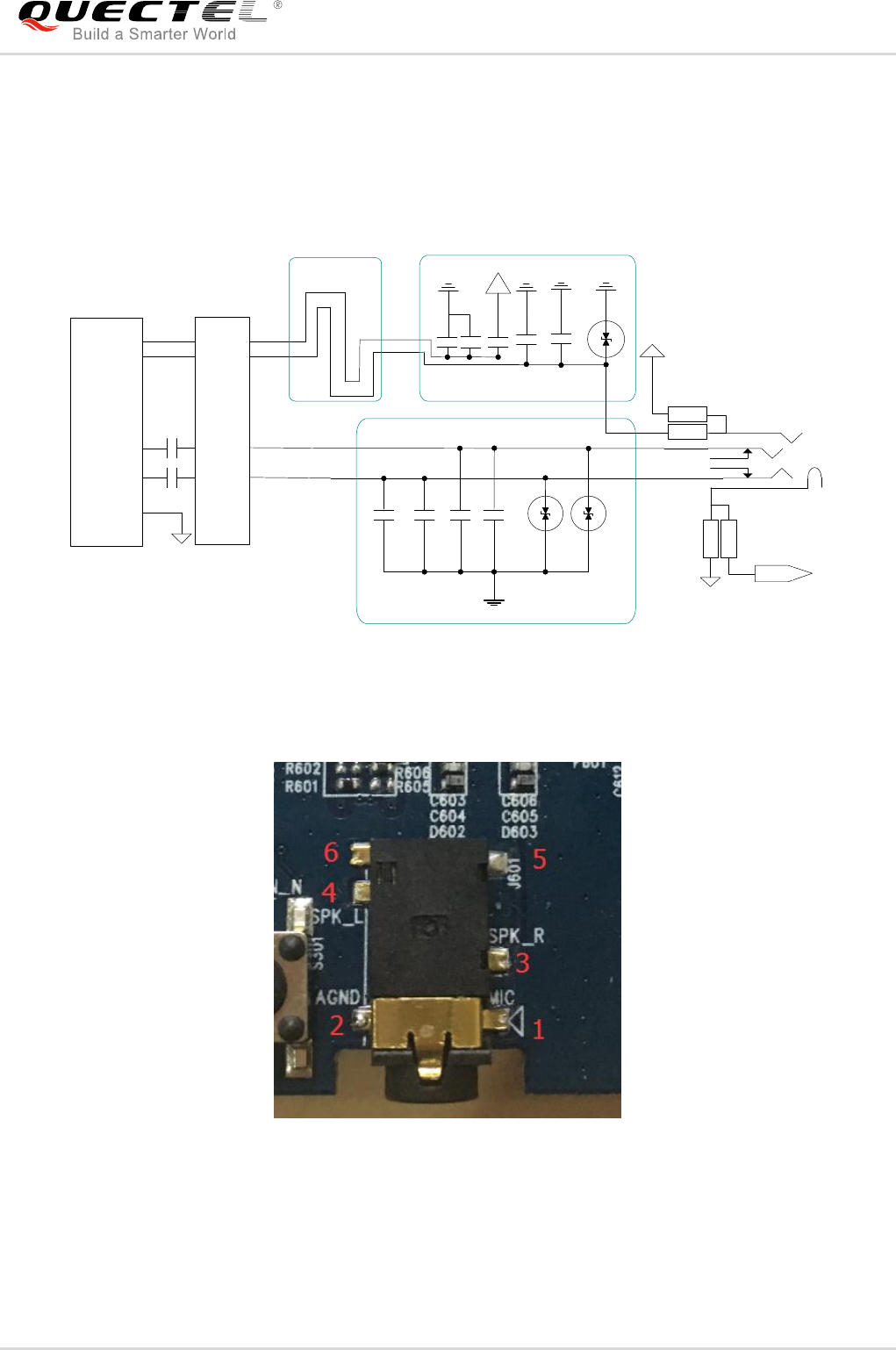
Audio interface J603 is designed for loud speaker and the following figure shows a reference design of
loud speaker with an external Class-D audio amplifier.
LOUDL/P
LOUDR/N
Differential layout
Amplifier
circuit
10pF
10pF 33pF
33pF
Close to speaker
GND
GND
ESD
ESD
Codec
FB
FB
C1
C2
J603
U101
ALC5616/T
LV3104
NCP2823
BTB CON
J501
Figure 14: Reference Circuit Design for Loud Speaker Interface J603
Quectel
Confidential
UMTS/HSPA/LTE Module Series
UMTS<E EVB User Guide
UMTS<E_EVB_User_Guide Confidential / Released 24 / 44
4.5.2.2. Earphone Interface (J601)
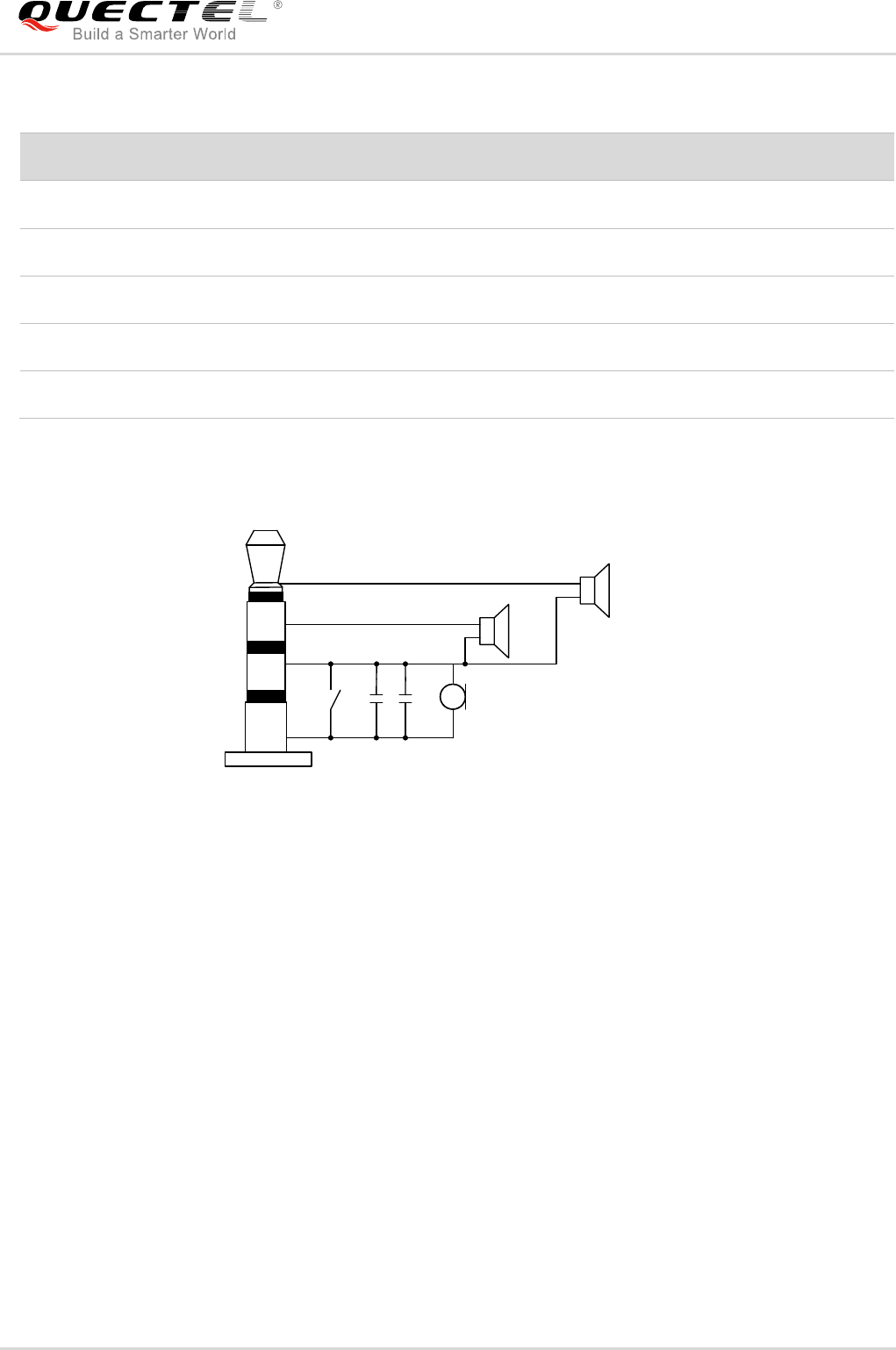
Audio interface J601 is designed for earphones. The names of corresponding pins on EVB are shown in
Figure 16. A reference circuit designs for earphone interfaces J601 is shown as following figure.
SPK_L
MIC_N
MIC_P
75pF
GND GND
AGND
Close to Socket
Differential layout
15pF
10pF 33pF
GND
GND
AGND
Codec
ALC5616
TLV3104 Close to Socket
AGND
ESD
ESD
Audio Jack
22uF
U101
J601
1
4
5
3
2
SPK_R
10pF 33pF
22uF
6
MIC_P
0R
NM_0R
33pF
GND
AGND
0R
NM_0R
10pF 4.7uF
BTB CON
J501
Figure 15: Reference Circuit Design for Earphone Interface J601
Figure 16: Pin Assignments of J601
Quectel
Confidential
UMTS/HSPA/LTE Module Series
UMTS<E EVB User Guide
UMTS<E_EVB_User_Guide Confidential / Released 25 / 44
Table 5: Pin Definition of J601
The following figure shows the sketch design of audio plug which suits for the audio jack on UMTS<E
EVB.
2
1
MIC
GND
SW
SPK_R
SPK_L
3
4
32Ω
32Ω
Figure 17: Sketch of Audio Plug
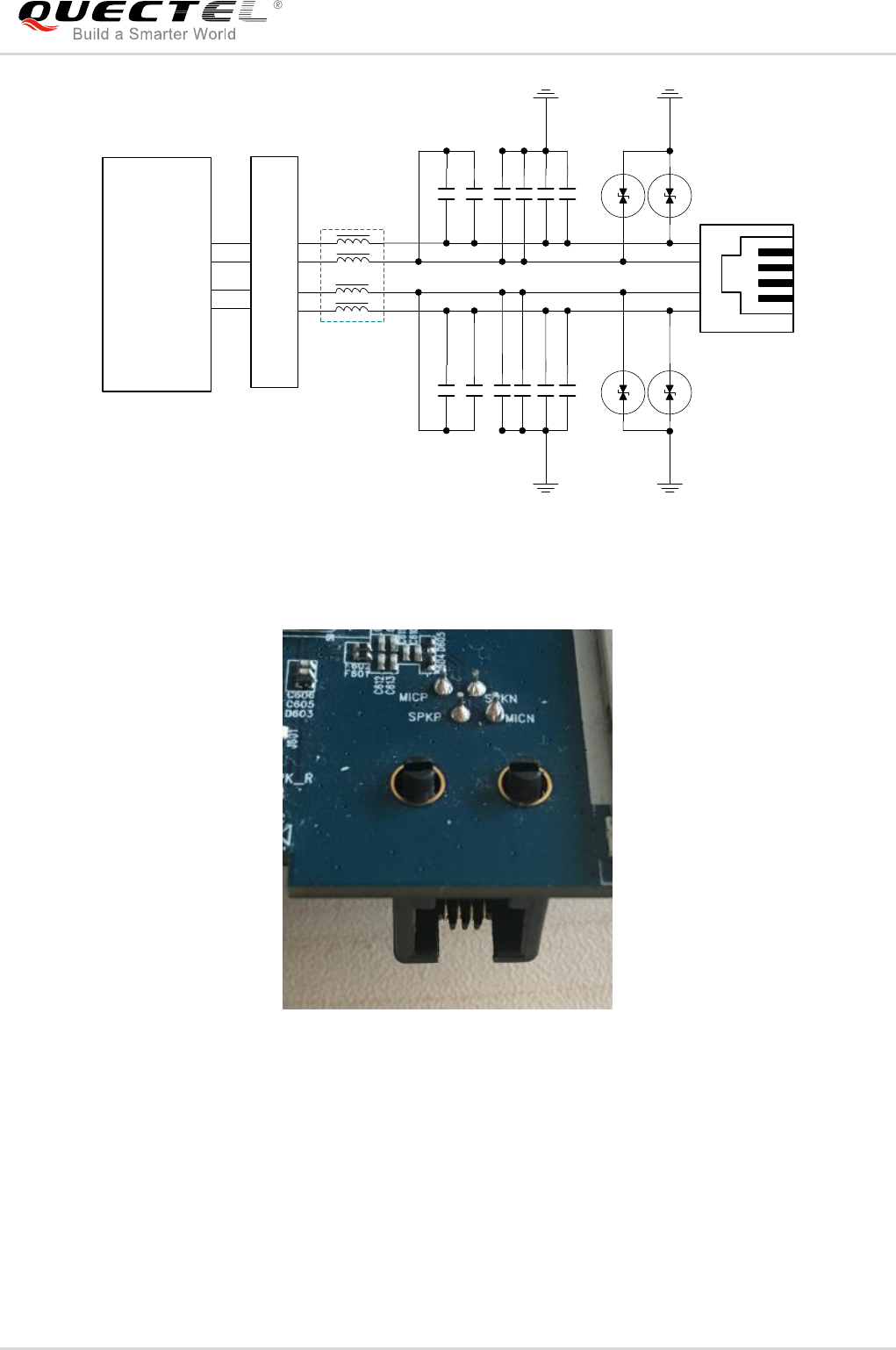
4.5.2.3. Handset Interface (J602)
Audio interface J602 is designed for handsets. The names of corresponding pins on EVB are shown in
Figure 19. A reference circuit design for handset interfaces J602 is shown below.
Pin No.
Pin Name
Description
1
MIC
Microphone input
2
AGND
Dedicated GND for audio
3
SPK_R
Right channel of stereo audio output
4
SPK_L
Left channel of stereo audio output
5, 6
NC
Not connected
Quectel
Confidential
UMTS/HSPA/LTE Module Series
UMTS<E EVB User Guide
UMTS<E_EVB_User_Guide Confidential / Released 26 / 44
ESD
33pF
ESD
ESD ESD
33pF33pF
33pF33pF33pF
10pF10pF10pF
10pF 10pF 10pF
IN2P
IN2N
LOUDL/P
LOUDR/N
FB J602
U101
Codec
ALC5616
TLV3104
4
1
3
2
BTB CON
J501
Figure 18: Reference Circuit Design for Handset Interface J602
1
2
3
4
Figure 19: Pin Assignments of J602
Quectel
Confidential
UMTS/HSPA/LTE Module Series
UMTS<E EVB User Guide
UMTS<E_EVB_User_Guide Confidential / Released 27 / 44
Table 6: Pin Definition of J602
4.6. USIM Card Interface (J702)
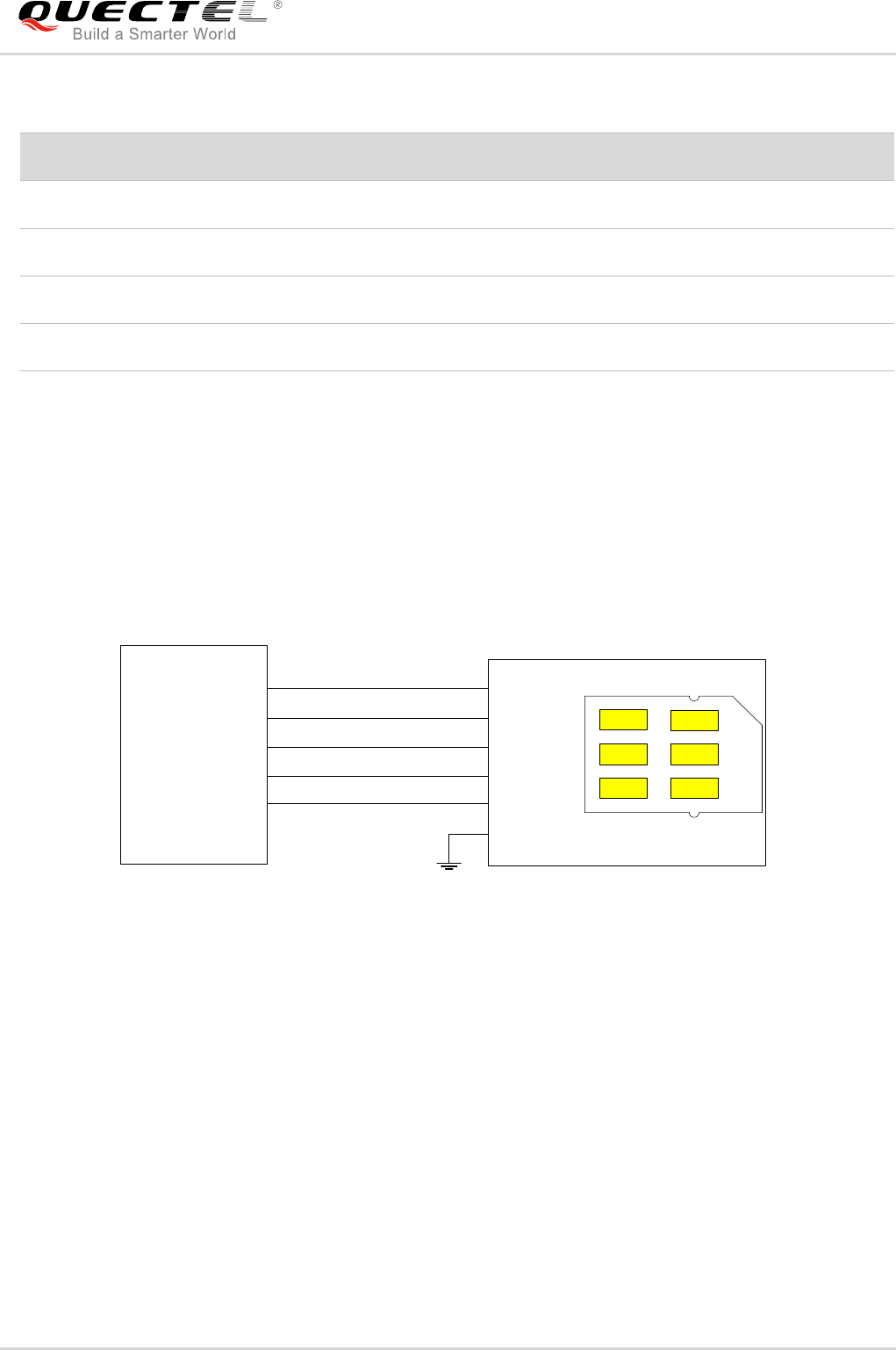
The UMTS<E EVB has a 6-pin push-push type USIM card (3V or 1.8V) connector J702. The following
figure shows the simplified interface schematic for J702.
USIM card connector
USIM_VDD
USIM_CLK
USIM_DATA
USIM_RST
USIM_GND
J101 J702
C1
C7
C2
C3
Push-Push
USIM_VDD
USIM_DATA
USIM_RST
USIM_CLK
12
10
8
6
USIM_PRE.
GND
USIM_PRESENCE 14 CD2
CD1
Figure 20: Simplified Interface Schematic for USIM Card Connector J702
Pin No.
Pin Name
Function
1
MICN
Negative microphone input
2
SPKN
Negative loud speaker output
3
SPKP
Positive loud speaker output
4
MICP
Positive microphone input
Quectel
Confidential
UMTS/HSPA/LTE Module Series
UMTS<E EVB User Guide
UMTS<E_EVB_User_Guide Confidential / Released 28 / 44
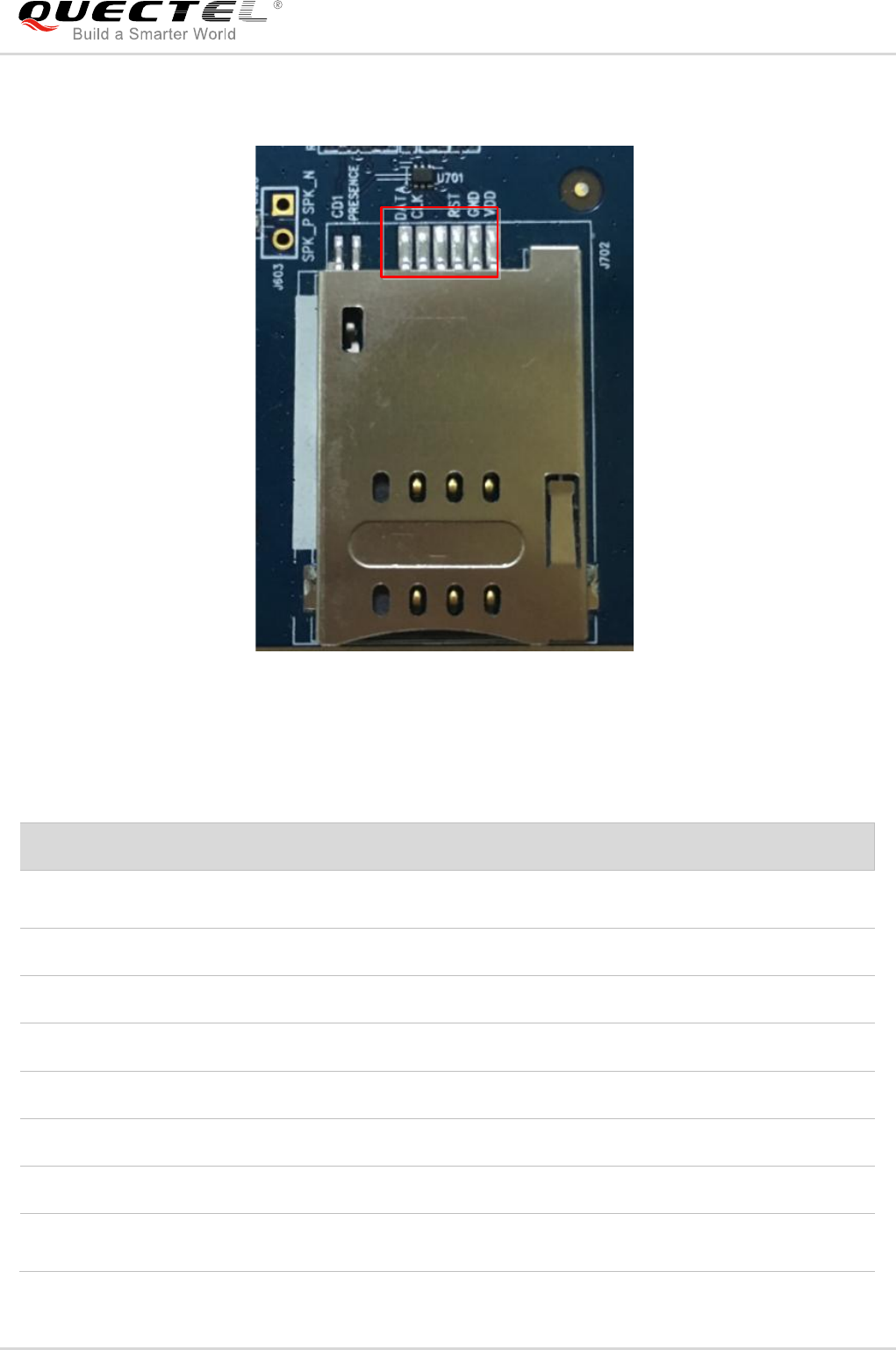
The following figure shows the pin assignments of J702.
C1C2C3 C5C6C7
C1C2C3
C5C6C7
CD2CD1
Figure 21: Pin Assignments of J702
Table 7: Pin Definition of J702
Pin No.
Signal Name
I/O
Function
C1
USIM_VDD
PO
USIM card power supply, provided by
UMTS<E EVB
C2
USIM_RST
DO
USIM card reset
C3
USIM_CLK
DO
USIM card clock
C5
GND
/
Ground
C6
VPP
/
Not connected
C7
USIM_DATA
I/O
Data line, bi-directional
CD1
GND
GND
USIM card insertion detection
CD2
USIM_PRESENCE
I
USIM card insertion detection.
Support low level detection.
Quectel
Confidential
UMTS/HSPA/LTE Module Series
UMTS<E EVB User Guide
UMTS<E_EVB_User_Guide Confidential / Released 29 / 44
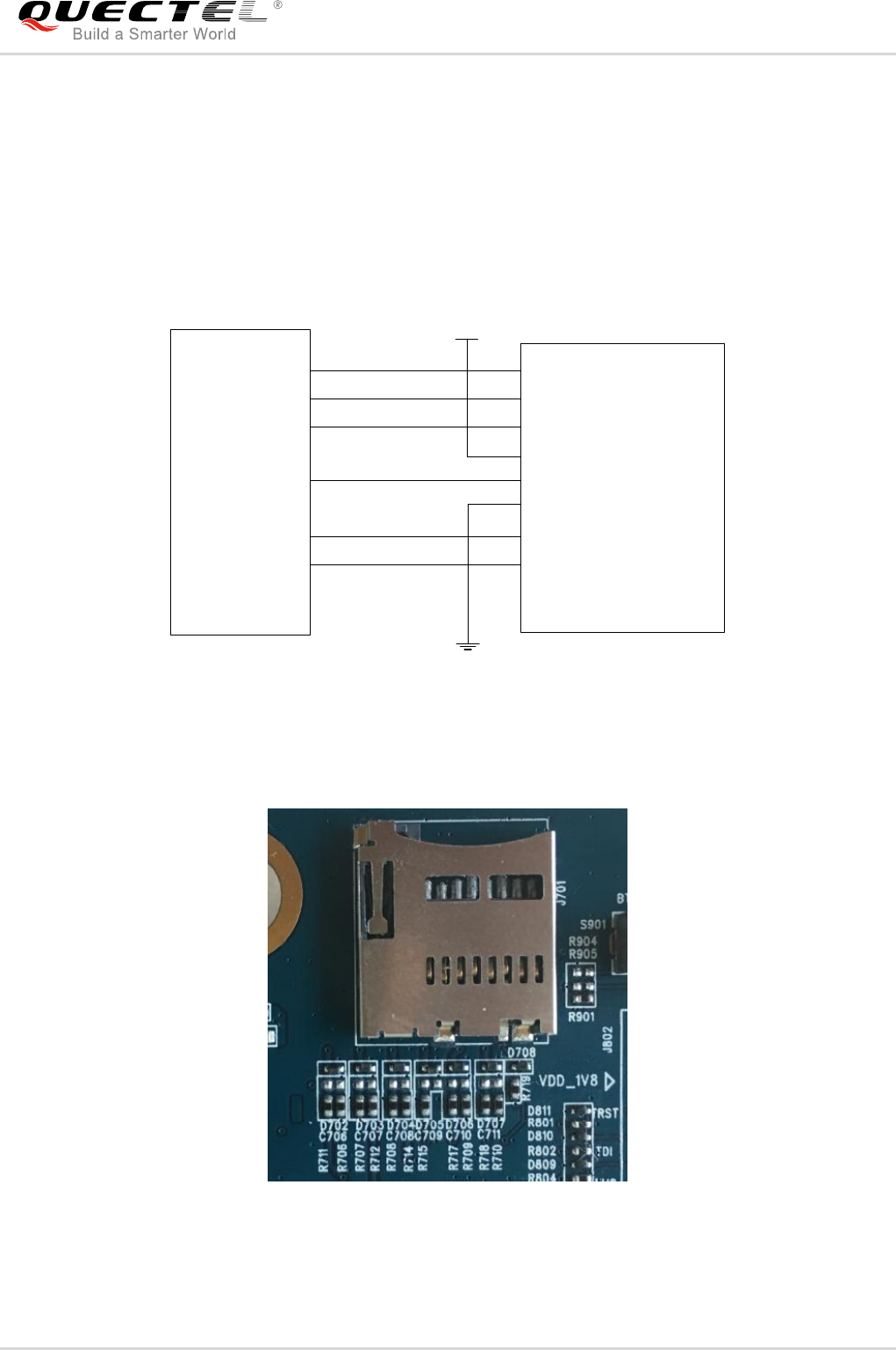
4.7. SD Card Interface (J701)
The UMTS<E EVB provides an SD card interface that supports maximally 32GB micro SD card. With
the SD card interface, customers can easily enhance the memory capacity of modules.
The following figure shows the simplified interface schematic for J701.
SD card
connector
DAT2
CMD
CD/DAT3
VDD
J101 J701
1
2
4
3
SD1_DATA2
SD1_DATA3
SD1_CMD
29
28
33
GND
CLK
DAT0
DAT1
5
6
8
7
SD1_CLK
SD1_DATA1
SD1_DATA0
32
31
30
VSS
VDD_3V3
Figure 22: Simplified Interface Schematic for SD Card Interface J701
1 2 3 4 5 6 7 8
Figure 23: Pin Assignments of J701
Quectel
Confidential
UMTS/HSPA/LTE Module Series
UMTS<E EVB User Guide
UMTS<E_EVB_User_Guide Confidential / Released 30 / 44
4.8. UART Interfaces (J401/J402)
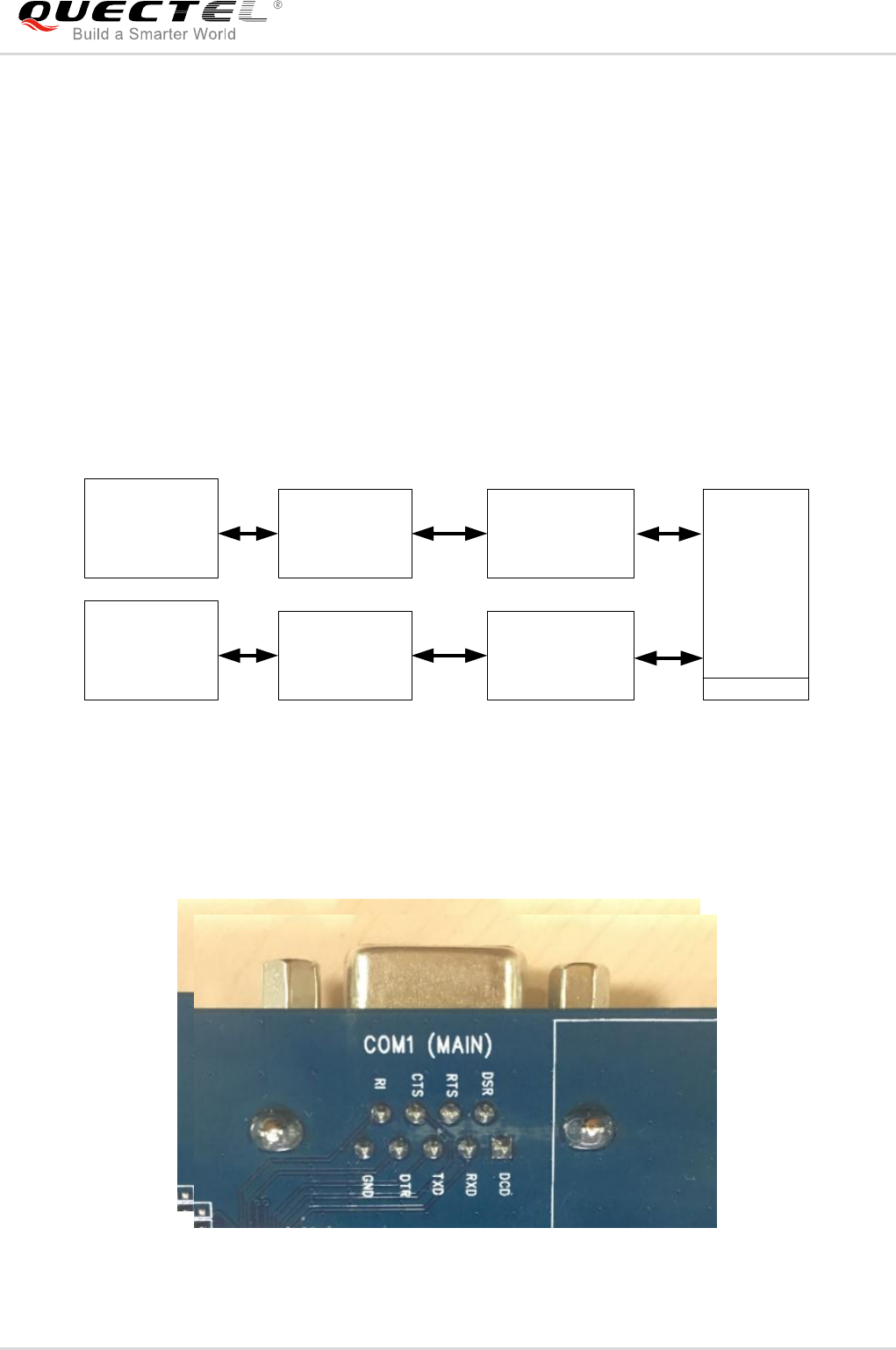
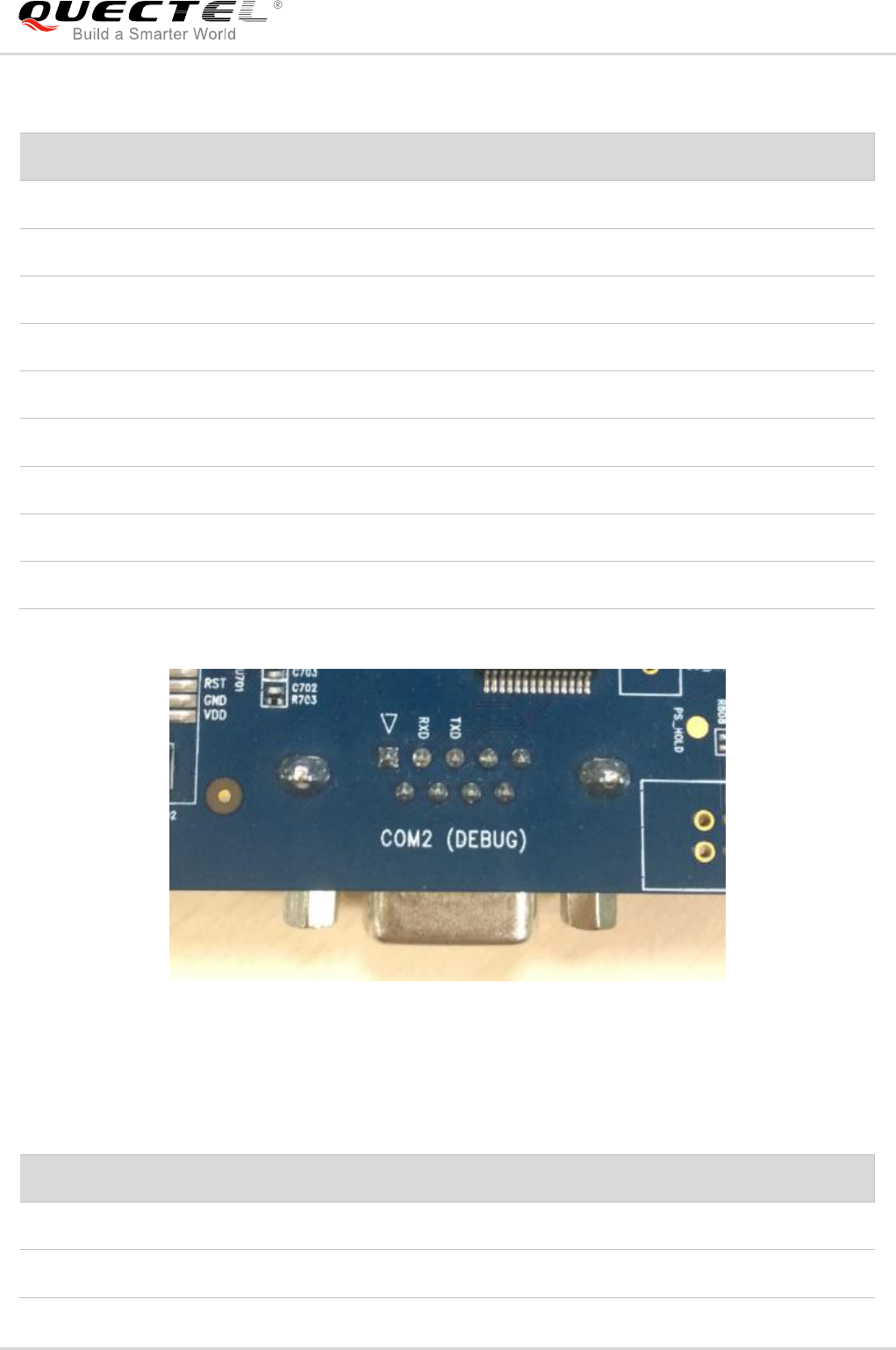
The UMTS<E EVB offers two UART interfaces: COM1 (Main UART port J401 and J402) and COM2
(Debug UART port).
COM1 of UMTS<E EVB is intended for the communication between the module and the host
application. It can be used for data transmission and AT command communication.
COM2 supports 115,200bps baud rate. It can be used for Linux console and log output.
The following figure shows the block diagram of UART on UMTS<E EVB.
J101
UMTS<E
Module
RS232
Level Match
3.0V/1.8V
Level Translator
COM1
DB9
J401
RS232 3.0V
1.8V
U403
U401
RS232
Level Match
3.0V/1.8V
Transistor Level
Translator
COM2
DB9
J402
RS232 3.0V
U402
1.8V
Figure 24: UART Block Diagram
The following two figures show the pin assignments of J401 and J402.
1
2345 12345
67
89
Figure 25: Pin Assignments of J401
Quectel
Confidential
UMTS/HSPA/LTE Module Series
UMTS<E EVB User Guide
UMTS<E_EVB_User_Guide Confidential / Released 31 / 44
Table 8: Pin Definition of J401
1 2 3 4 5
6 7 8 9
Figure 26: Pin Assignments of J402
Table 9: Pin Definition of J402
Pin No.
Signal Name
I/O
Description
1
RS232_DCD
DO
Data carrier detection
2
RS232_RXD
DI
Receive data
3
RS232_TXD
DO
Transmit data
4
RS232_DTR
DI
Data terminal ready
5
RS232_GND
/
GND
6
NC
/
Not connected
7
RS232_RTS
DI
Request to send
8
RS232_CTS
DO
Clear to send
9
RS232_RI
DO
Ring indicator
Pin No.
Signal Name
I/O
Description
2
RS232_RXD
DI
Receive Data
3
RS232_TXD
DO
Transmit data
Quectel
Confidential
UMTS/HSPA/LTE Module Series
UMTS<E EVB User Guide
UMTS<E_EVB_User_Guide Confidential / Released 32 / 44
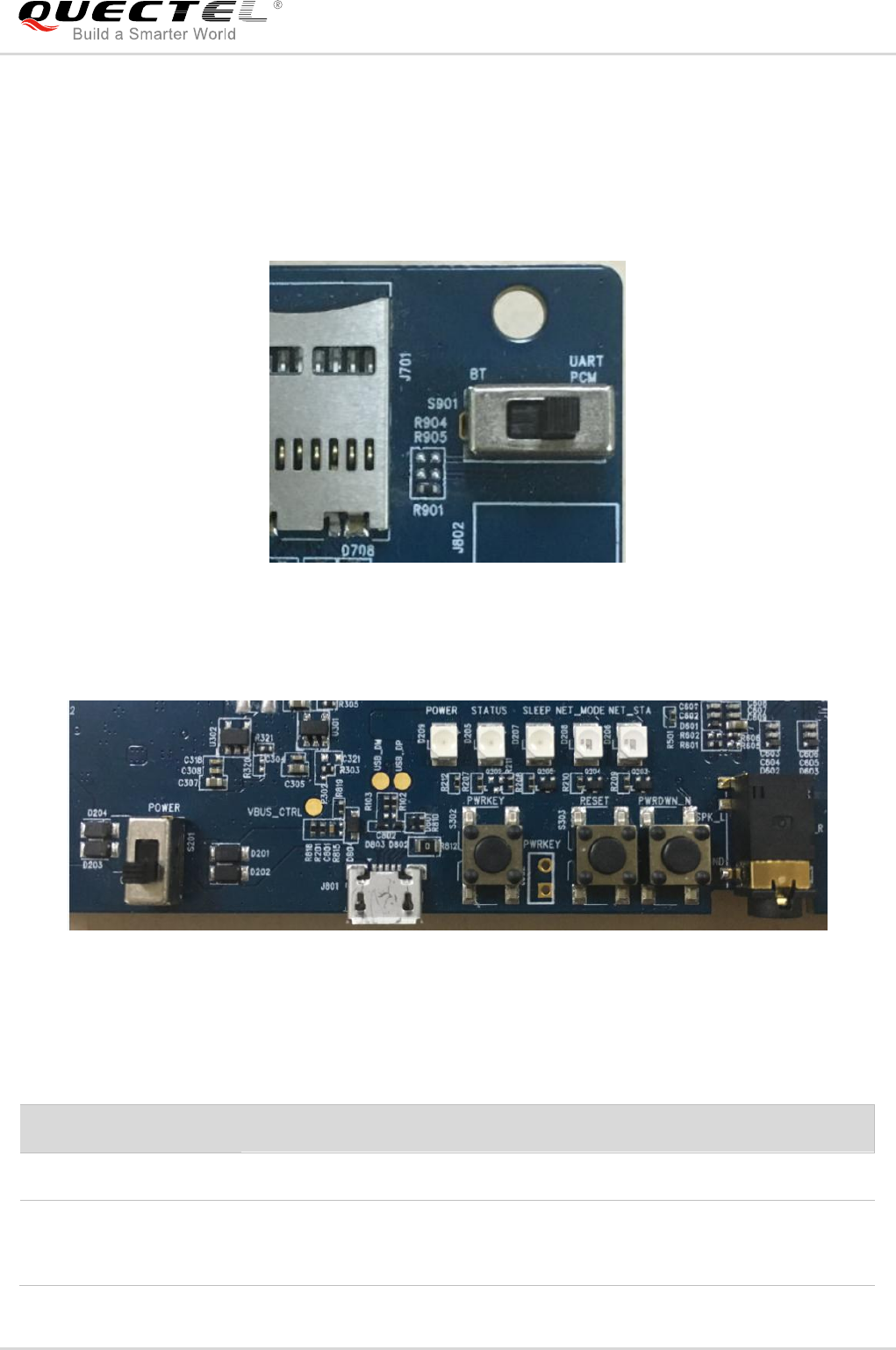
4.9. Switches and Buttons
The UMTS<E EVB includes two switches (S201 and S901) and three buttons (S301, S302 and S303),
as shown in the following figures.
S901
Figure 27: S901 Switch
S201 S302 S303 S301
Figure 28: S201 Switch and S301/S302/S303 Buttons
Table 10: Description of Switches and Buttons
Reference No.
Description
S201
Control power supply VBAT ON/OFF
S901
Switched to the left: connect FC20's BT interface (UART, PCM) to EC2x
modules, for testing the BT function of FC20.
Switched to the right: connect the main UART and codec board interfaces
Quectel
Confidential
UMTS/HSPA/LTE Module Series
UMTS<E EVB User Guide
UMTS<E_EVB_User_Guide Confidential / Released 33 / 44
1) This function is only supported by UG35, UG95 and UG96 modules.
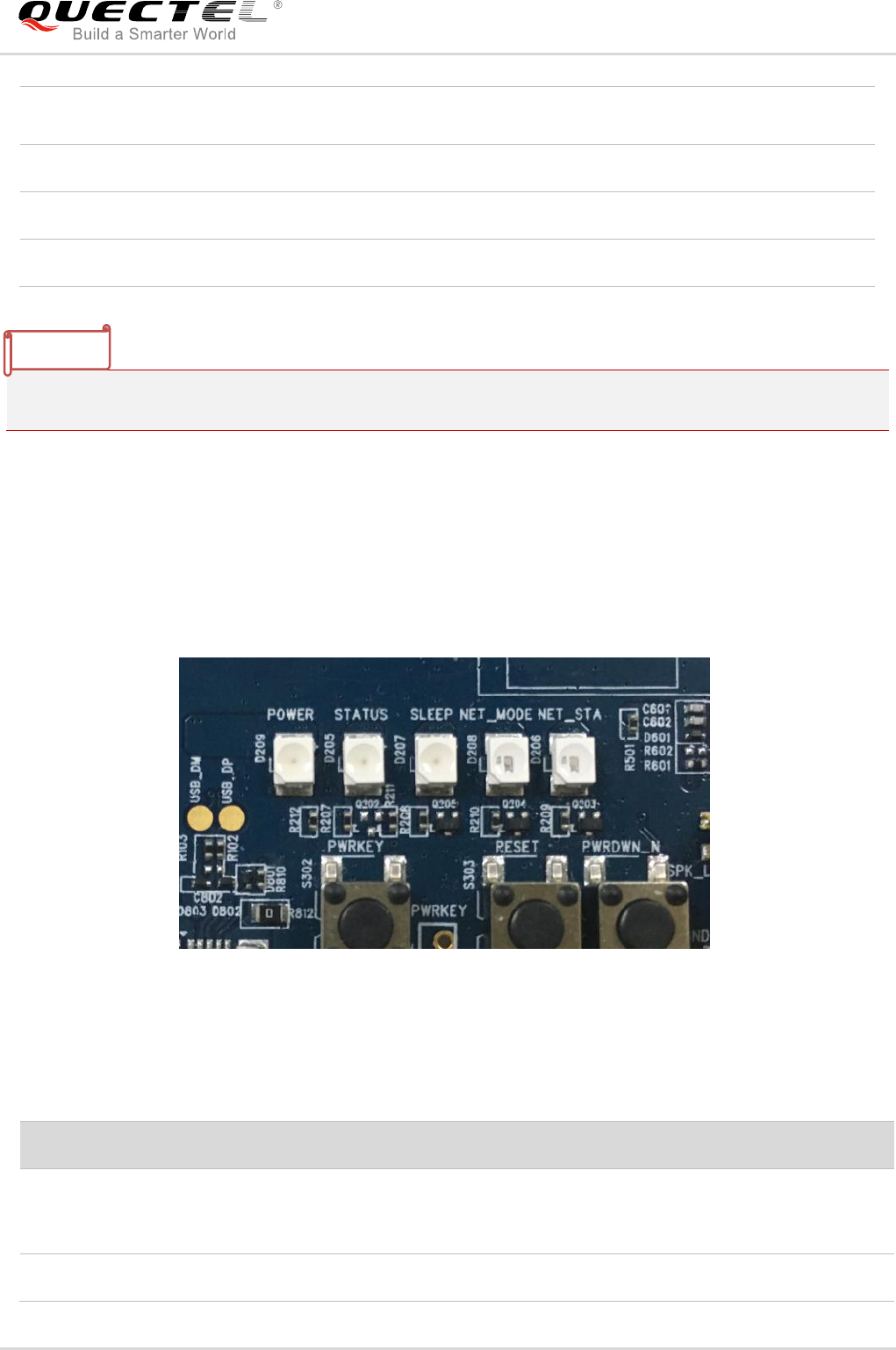
4.10. Status Indication LEDs
The UMTS<E EVB comprises five status indication LEDs (D209, D205, D207, D208 and D206). The
following figure shows the positions of these LEDs.
D209 D205 D207 D208 D206
Figure 29: Status Indication LEDs
Table 11: Description of Status Indication LEDs
on EVB to UMTS<E module, for testing the module's main UART
functions, and the codec„s PCM function.
S302
Used to turn on/off the UMTS<E module
S303
Used to reset the UMTS<E module
S301
Used to turn off the UMTS<E module 1)
Reference No.
Description
D209
Indicates the power supply for UMTS<E module is ready
Bright: VBAT ON
Extinct: VBAT OFF
D205
Indicates the operation status of UMTS<E module
NOTE
Quectel
Confidential
UMTS/HSPA/LTE Module Series
UMTS<E EVB User Guide
UMTS<E_EVB_User_Guide Confidential / Released 34 / 44
4.11. Test Points
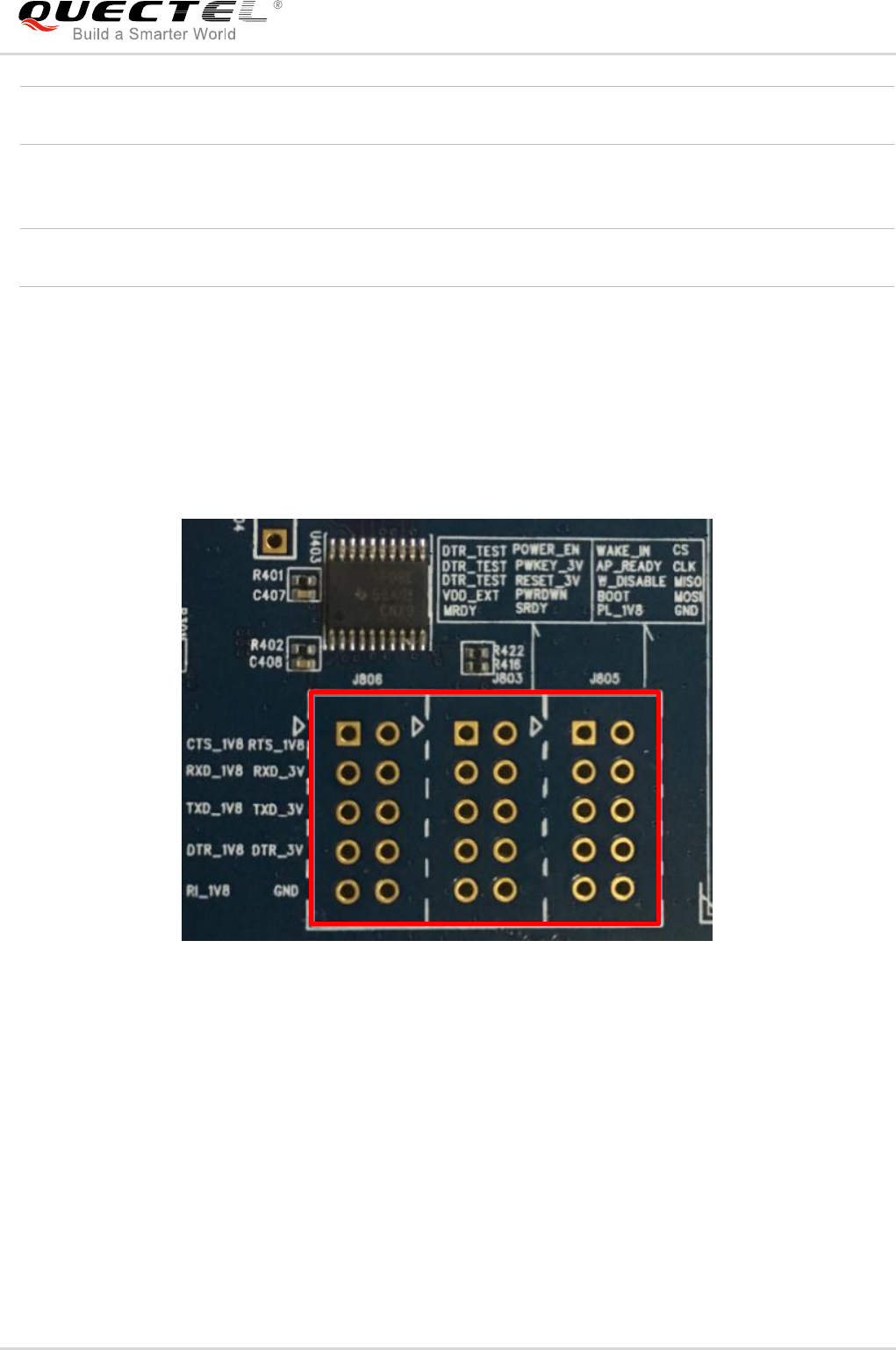
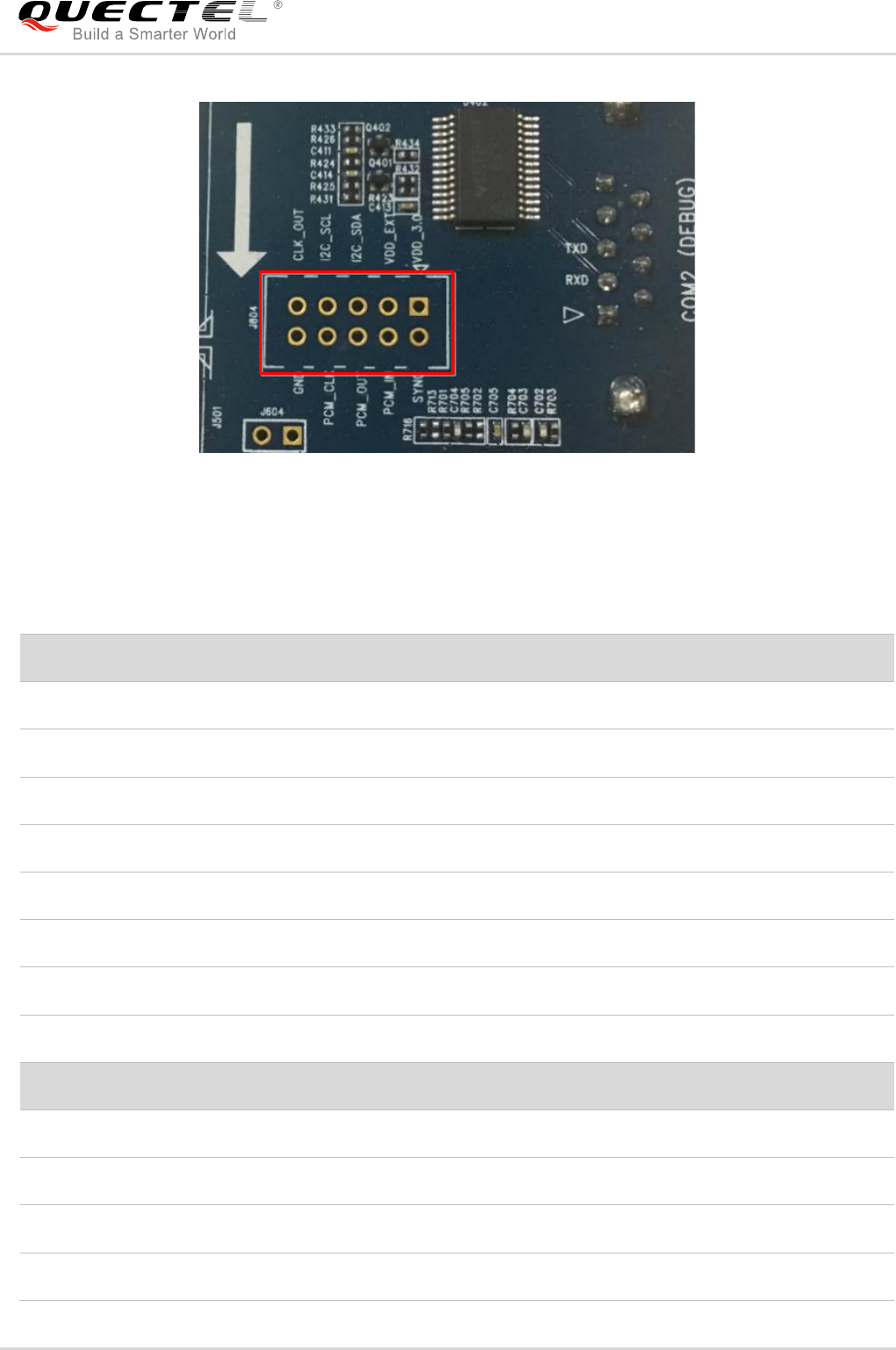
The UMTS<E EVB provides a series of test points for some signals. They can help customers to obtain
the corresponding waveform. The following two figures show test points J803, J804, J805 and J806.
J806 J803 J805
12
3 4
56
78
910
12
3 4
56
78
910
12
3 4
56
78
910
Figure 30: Test Points J803, J805 and J806
Bright: the module is powered on
Extinct: the module is powered down
D207
Indicate the sleep status of UMTS<E module
Bright: the module is in sleep mode
Extinct: the module is not in sleep mode
D208, D206
Indicate the network status of UMTS<E module, for detailed information please refer
to document [2].
Quectel
Confidential
UMTS/HSPA/LTE Module Series
UMTS<E EVB User Guide
UMTS<E_EVB_User_Guide Confidential / Released 35 / 44
J804
1
2
3
4
5
6
7
8
9
10
Figure 31: Test Point J804
Table 12: Pin Definition of J803, J804, J805 and J806
J803 Pin No.
Pin Name
Description
1,3,5
DTR_TEST
Data terminal ready test pins
2
POWER_EN
VBAT enable pin
4
PWRKEY_3.0V
PWRKEY_3.0V test pin
6
RESET_3.0V
RESET_3.0V test pin
7
VDD_EXT
Connected directly to VDD_EXT of UMTS<E module
8
POWER_OFF_3.0V
Used to power off UGxx modules
9
SPI_MRDY
RESERVED
10
SPI_SRDY
RESERVED
J804 Pin No.
Pin Name
Description
1
VDD_3.0V
3.0V power supply from U302
2
PCM_SYNC
Connected directly to PCM_SYNC of UMTS<E module
3
VDD_1V8
1.8V power supply from U301
4
PCM_IN
Connected directly to PCM_IN of UMTS<E module
Quectel
Confidential
UMTS/HSPA/LTE Module Series
UMTS<E EVB User Guide
UMTS<E_EVB_User_Guide Confidential / Released 36 / 44
5
I2C_SDA
Connected directly to I2C_SDA of UMTS<E module
6
PCM_OUT
Connected directly to PCM_OUT of UMTS<E module
7
I2C_SCL
Connected directly to I2C_SCL of UMTS<E module
8
PCM_CLK
Connected directly to PCM_CLK of UMTS<E module
9
CLK_OUT
RESERVED
10
GND
Ground
J805 Pin No.
Pin Name
Description
1
WAKE_IN
Connected directly to WAKE_IN of UMTS<E module
2
SPI_CS_N
Connected directly to SPI_CS_N of UMTS<E module
3
AP_READY
Connected directly to AP_READY of UMTS<E module
4
SPI_CLK
Connected directly to SPI_CLK of UMTS<E module
5
W_DISABLE_N
Connected directly to W_DISABLE# of UMTS<E module
6
SPI_MISO
Connected directly to SPI_MISO of UMTS<E module
7
USB_BOOT
Connected directly to USB_BOOT of UMTS<E module
8
SPI_MOSI
Connected directly to SPI_MOSI of UMTS<E module
9
VDD_1.8V
Connected to VDD_1.8V via a resistor
10
GND
Ground
J806 Pin No.
Pin Name
Description
1
CTS_1.8V_UART
Connected directly to voltage translator
2
RTS_1.8V_UART
Connected directly to voltage translator
3
RXD_1.8V_UART
Connected directly to voltage translator
4
RXD_3.0V
Connected directly to voltage translator
5
TXD_1.8V_UART
Connected directly to voltage translator
6
TXD_3.0
Connected directly to voltage translator
7
DTR_1.8V
Connected directly to DTR of UMTS<E module
Quectel
Confidential

UMTS/HSPA/LTE Module Series
UMTS<E EVB User Guide
UMTS<E_EVB_User_Guide Confidential / Released 37 / 44
8
DTR_3.0V
Connected directly to voltage translator
9
RI_1.8V
Connected directly to RI of UMTS<E module
10
GND
Ground
Quectel
Confidential

UMTS/HSPA/LTE Module Series
UMTS<E EVB User Guide
UMTS<E_EVB_User_Guide Confidential / Released 38 / 44
5 Operation Procedures Illustration
This chapter introduces how to use the UMTS<E EVB for testing and evaluation of Quectel
UMTS<E modules and Wi-Fi modules.
5.1. Power on UMTS<E and Wi-Fi Modules
- Power on UMTS<E module
1. Connect the UMTS<E TE-A to the connectors (J101 and J102) on EVB.
2. Insert a USIM card into the USIM card connector on EVB, and connect the antennas to UMTS<E
TE-A.
3. Connect the EVB to a 5V power adapter, or connect the EVB to PC via USB cable.
4. Switch S201 to ON state, then D209 will be light. Press the S302 (PWRKEY) for at least 100ms, then
the UMTS<E module will be powered on and D205 (STATUS) will be light.
- Power on Wi-Fi module
1. Make sure the EC2x module is powered on, if there is a need to test the Wi-Fi function of EC2x
modules.
2. Connect the FC20 TE-A to the connectors (J901 and J902) on EVB, and connect the Wi-Fi antenna
to FC20 TE-A.
3. Connect the FC20 TE-A to PC via Ethernet cable.
4. Send AT+QWIFI=1 command to EC2x module to enable power supply for FC20 module. For more
details, please refer to document [3]. Before sending the command, please make sure the EVB has
been connected to PC via USB cable.
The following table shows the UMTS<E module‟s network status which can be judged by D206 and
D208.
Quectel
Confidential
UMTS/HSPA/LTE Module Series
UMTS<E EVB User Guide
UMTS<E_EVB_User_Guide Confidential / Released 39 / 44
Table 13: Indication of D206 and D208
5.2. Communication Via USB or UART Interface
5.2.1. Communication via USB Interface
1. Power on the UMTS<E module according to the procedures mentioned in Chapter 5.1.
2. Connect the EVB and the PC with USB cable through USB interface, and then run the driver disk on
PC to install the USB driver. For details about USB driver installation, please refer to document [1].
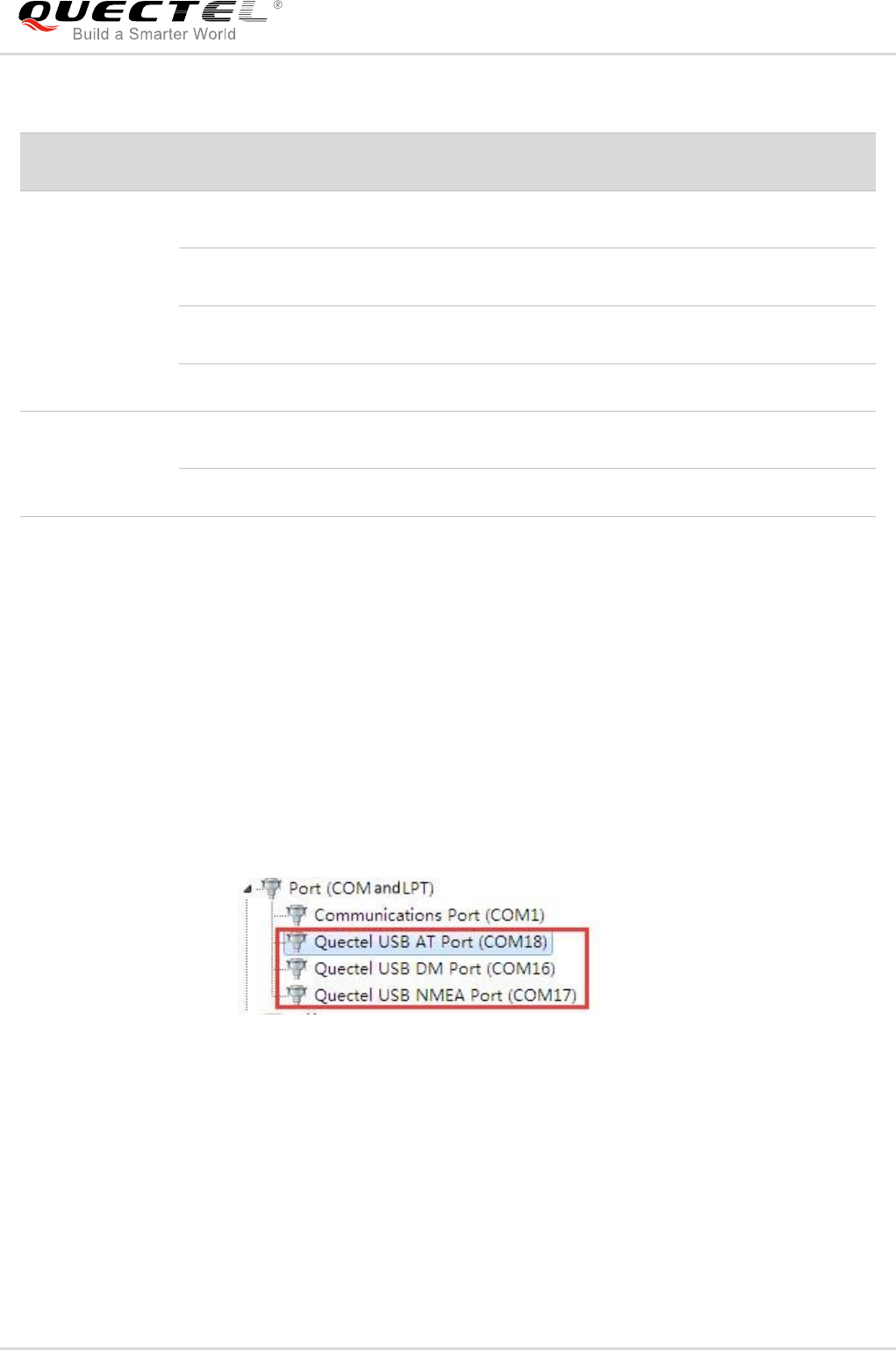
The USB port numbers can be viewed through the PC Device Manager, shown as following figure.
Figure 32: USB Ports
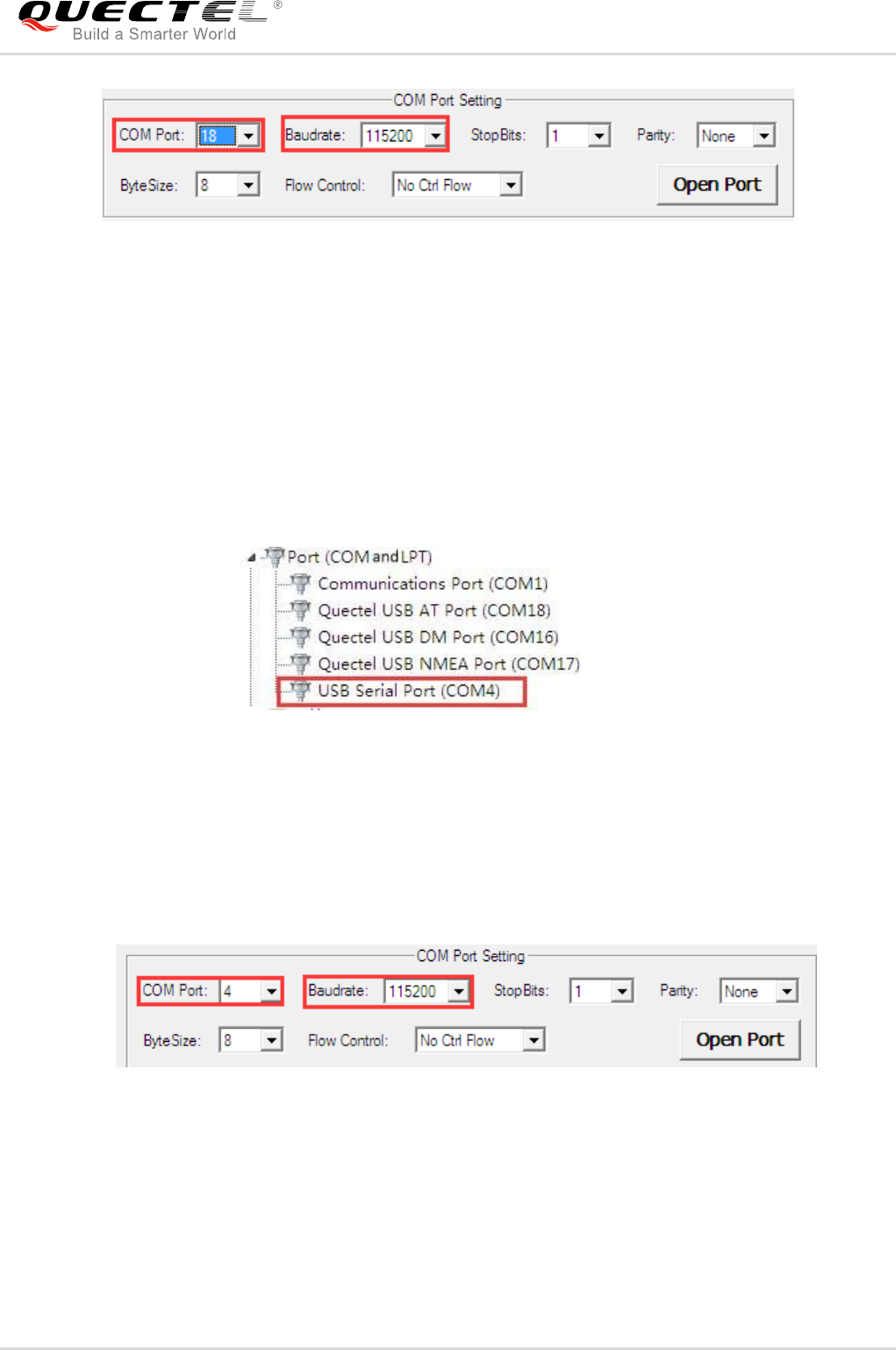
3. Install and then use the QCOM tool provided by Quectel to realize the communication between the
UMTS<E module and the PC. The following figure shows the QCOM window configuration: select
correct “COM port” (USB AT Port which is shown in above figure) and set correct “Baudrate” (such
as 115,200bps). For more details about QCOM tool usage and configuration, please refer to
document [6].
Status
Indication LEDs
State
Network Status
D206
NET_STATUS
Flicker slowly
(200ms ON/1800ms OFF)
Network searching
Flicker slowly
(1800ms ON/200ms OFF)
Idle mode
Flicker slowly
(125ms ON/125ms OFF)
Data is being transferred over 2G/3G/4G networks
Always ON
Voice calling
D208
NET_MODE
Always ON
Registered on 3G network successfully (UC20/UGxx)
Registered on 4G network successfully (EC2x/EG95)
Always OFF
Others
Quectel
Confidential
UMTS/HSPA/LTE Module Series
UMTS<E EVB User Guide
UMTS<E_EVB_User_Guide Confidential / Released 40 / 44
Figure 33: QCOM Window Configuration When Connecting USB Port
5.2.2. Communication via UART Interface
1. Run the driver disk on PC to install the USB-to-RS232 driver.
2. Connect the Main UART interface to PC with the USB-to-UART converter cable (USB-to-RS232
cable), and the USB serial port number can be viewed through the PC Device Manager, shown as
the following figure.
Figure 34: USB Serial Port
3. Install and then use the QCOM tool provided by Quectel to realize the communication between the
UMTS<E module and the PC. The following figure shows the QCOM window configuration: select
correct “COM port” (USB Serial Port) and set correct “Baudrate” (such as 115,200bps). For more
details about QCOM tool usage and configuration, please refer to document [6].
Figure 35: QCOM Window Configuration When Connecting USB Serial Port
Quectel
Confidential
UMTS/HSPA/LTE Module Series
UMTS<E EVB User Guide
UMTS<E_EVB_User_Guide Confidential / Released 41 / 44
5.3. Firmware Upgrade
Quectel UMTS<E module upgrades firmware via USB port by default, please follow the procedures
below to upgrade firmware.
1. Install and open the firmware upgrade tool QFlash on PC and then power on the UMTS<E module
according to the procedures mentioned in Chapter 5.1.
2. Click the “COM Port” dropdown list and select the USB DM port.
3. Click the “Load FW Files” button to choose the firmware package.
4. Click the “Start” button to upgrade the firmware.
Figure 36: Configurations for Firmware Upgrade
5.4. Reset UMTS<E Modules
The emergency reset option is only used in case of emergency. For example, the software does not
respond for more than 5s due to some serious problems.
Press the button S303 for more than 150ms then release it to reset UMTS<E module. However, this
may causes the loss of information stored in the memory as the reset module has been initialized.
Quectel
Confidential

UMTS/HSPA/LTE Module Series
UMTS<E EVB User Guide
UMTS<E_EVB_User_Guide Confidential / Released 42 / 44
5.5. Power off UMTS<E and Wi-Fi Modules
- Power off UMTS<E module
There are two ways to power off UMTS<E module.
One way is to execute AT command AT+QPOWD. This is the best and the safest way. The module will log
off from the network and save data before shutdown, but it will be powered on again after shutdown. For
more details about the AT command, please refer to document [4] and document [5].
The other way is to press down S302 for at least 0.6s, the UMTS<E module will be shut down.
- Power off Wi-Fi module
AT+QWIFI=0 command can be used to power off FC20 modules. For more details, please refer to
document [3].
Quectel
Confidential
UMTS/HSPA/LTE Module Series
UMTS<E EVB User Guide
UMTS<E_EVB_User_Guide Confidential / Released 43 / 44
6 Appendix A References
Table 14: Related Documents
Table 15: Terms and Abbreviations
SN
Document Name
Remark
[1]
Quectel_UC20&UC15&EC25&EC21&EC20_Windows_
USB_Drivers_Installation_Guide
Windows USB drivers installation guide
for UC20, EC25, EC21 and EC20;
Install USB drivers of these modules in
Windows XP/Vista 7/8
[2]
Quectel_xx_Hardware_Design
Hardware design for UC20, UG95,
UG96, EC25, EC21, EC20 and EC20
R2.0
[3]
Quectel_FC20_Series_Hardware_Design
FC20 series hardware design
[4]
Quectel_WCDMA_UGxx_AT_Commands_Manual
AT commands manual for Quectel
WCDMA UGxx modules
[5]
Quectel_xx_AT_Commands_Manual
AT commands manual for UC20, EC25,
EC21, EC20 and EC20 R2.0
[6]
Quectel_QCOM_User_Guide
User guide for QCOM tool
Abbreviation
Description
AGND
Analogue Ground
COM
Cluster Communication Port
BTB
Board to Board
DC
Direct Current
DI
Digital Input
DO
Digital Output
EVB
Evaluation Board
Quectel
Confidential

UMTS/HSPA/LTE Module Series
UMTS<E EVB User Guide
UMTS<E_EVB_User_Guide Confidential / Released 44 / 44
GND
Ground
GNSS
Global Navigation Satellite System
I/O
Input/Output
LED
Light Emitting Diode
LTE
Long Term Evolution
MIC
Microphone
NC
Not Connected
PC
Private Computer
PCB
Printed Circuit Board
PCM
Pulse Code Modulation
PO
Power Output
RF
Radio Frequency
SD
Secure Digital
SIM
Subscriber Identity Module
UART
Universal Asynchronous Receiver & Transmitter
UMTS
Universal Mobile Telecommunications System
USB
Universal Serial Bus
USIM
Universal Subscriber Identity Module
VBAT
Voltage of Battery
Quectel
Confidential
