Quick Start Guide For WOW
User Manual: Pdf
Open the PDF directly: View PDF  .
.
Page Count: 4

1
Quick Guide for Wake on WLAN
Date: 2015/05/04
Version: 0.3
2
Quick
Start
Guide
for
Wake on Lan
(1) Support list:
.) USB interface: 8188EU, 8188CU, 8192DU, 8192EU, 8723BU, 8812AU.
.) SDIO interface: 8189ES, 8723BS, 8192ES
(2) Requirements of wakeup via in-band and out-band methods:
.) In-band requirements:
SDIO Interface:
SDIO host MUST support remote wakeup feature.
SDIO data1 MUST be wakeup source in the host platform.
The platform MUST keep power to WiFi chip in suspend state.
The platform MSUT work fine between suspend and resume.
USB Interface:
USB host MUST support remote wakeup feature.
The platform MUST keep power to WiFi chip in suspend state.
The platform MSUT work fine between suspend and resume.
.) Out-band requirements:
The GPIOof the PLATFORM MUST be wakeup source.
The platform MUST keep power to WiFi chip in suspend state.
The platform MSUT work fine between suspend and resume.
The WIFI module MUST have the GPIO wakeup pin.
(3) Driver Configuration for Wake on Lan:
.) In-band configuration:
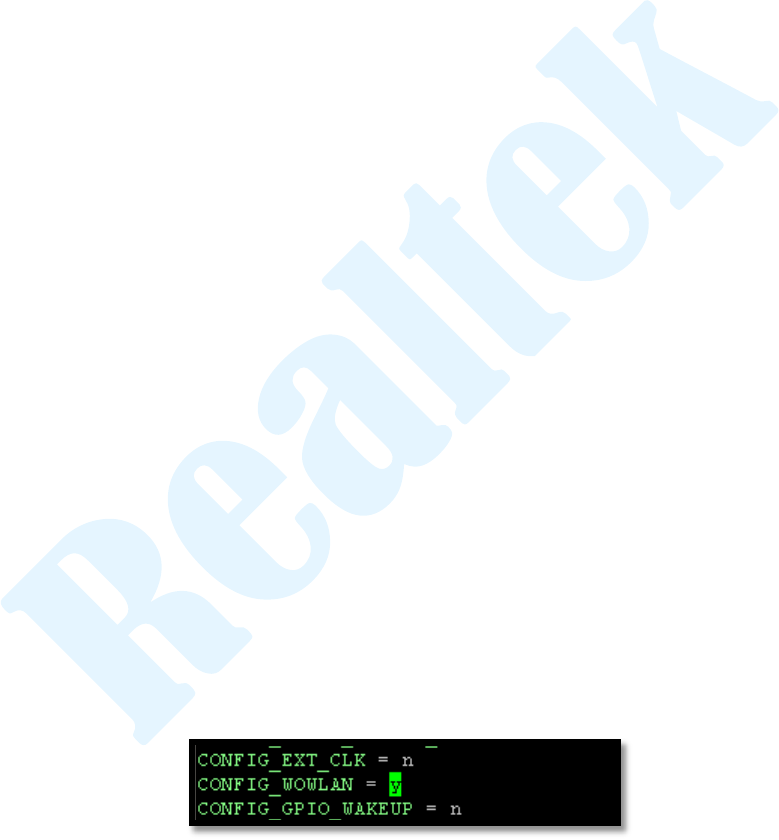
If using SDIO DATA1 pin or USB protocol D+/D- toggle in-band method
to wakeup the host, driver need to do is only switch CONFIG_WOWLAN
from “n” to “y” in Makefile as figure 1.
(figure 1)

3
.) Out-band configuration:
If using out-band method, driver need to do is modify Makefile and config
GPIO. The detail is as following:
Makefile Configuration:
Switch CONFIG_WOWLAN and CONFIG_GPIO_WAKEUP from “n”
to “y” as figure 2.
(figure 2)
GPIO Configuration:
Please contact with RTK technical support team.
.) Set up the specific wake up pattern:
iw:
iw phyX wowlan enable patterns <pattern>
iwpriv:
iwpriv wlanX wow_set_pattern pattern=<pattern>
Patter Format:
IP filter This pattern if for a frame containing a ip packet:
AA:AA:AA:AA:AA:AA:BB:BB:BB:BB:BB:BB:CC:CC:DD:-:-:-:-:-:-:-:-:EE:-:-:
FF:FF:FF:FF:GG:GG:GG:GG:HH:HH:II:II
A: Ethernet destination address
B: Ethernet source address
C: Ethernet protocol type
D: IP header VER+Hlen, use: 0x45 ( 4 ??is for ver 4, 5 is for len 20)
E: IP protocol
F: IP source address ( 192.168.0.4: C0:A8:00:2C )
G: IP destination address ( 192.168.0.4: C0:A8:00:2C )
H: Source port (1024: 04:00)
I: Destination port (1024: 04:00)
Examples
Wake up on any packet sent to MAC 00:E0:4C:01:F0:EE
1. iw phyX wowlan enable patterns 00:E0:4C:01:F0:EE
2. iwpriv wlanX wow_set_pattern pattern=00:E0:4C:01:F0:EE

4
Wake up on any ICMP packet sent to MAC 00:E0:4C:01:F0:EE IP
192.168.11.4
1. iw phyX wowlan enable patterns
00:E0:4C:01:F0:EE:-:-:-:-:-:-:08:00:45:-:-:-:-:-:-:-:-:01:-:-:-:-:-:-:c0:
a8:0b:04:-:-:-:-
2. iwpriv wlanX wow_set_pattern
pattern=00:E0:4C:01:F0:EE:-:-:-:-:-:-:08:00:45:-:-:-:-:-:-:-:-:01:-:-:
-:-:-:-:c0:a8:0b:04:-:-:-:-
(4) The wake yo reasib table:
The DUT could be waked up by the WIFI chip with the following reasons:
Reason Value
Description
Note
0x01
Receive pairwise key change packet.
0x02
Receive group key change packet.
GTK offload support list: 8723BS/BU,
8192ES/EU, 8812AU
0x04
Receive disassociate packet.
0x08
Receive de-auth. Packet.
0x10
AP power off, or could not receive
AP’s beacon in a period time
0x21
Receive magic packet.
0x22
Receive unicast packet.
The unicast packet included IP level.
0x23
Pattern Match
The device could be waked up by
specific pattern.
