Ralink RT3883 Concurrent AP User Guide
User Manual: Pdf
Open the PDF directly: View PDF  .
.
Page Count: 12

RALINKRT3883ConcurrentAPUSER'SGUIDE
1/12
RALINKTECHNOLOGY,CORP.
RALINKRT3883ConcurrentiNIC
NOTES&USER'SGUIDE
Copyright©2009RalinkTechnology,Corp.
AllRightsReserved.
ThisdocumentispropertyofRalinkTechnologyCorporationTransmittal,receipt,orpossessionof
thisdocumentdoesnotexpress,license,orimplyanyrightstouse,sell,design,ormanufacture
fromthisinformationorthesoftwaredocumentedherein.Noreproduction,publication,or
disclosureofthisinformation,inwholeorinpart,shallbeallowed,unlessthepriorwritten
consentofRalinkTechnologyCorporationisobtained.
Note:THISDOCUMENTCONTAINSSENSITIVEINFORMATIONANDHASRESTRICTEDDISTRIBUTION.
Ralink Website document
for stevej@cradlepoint.com
And Company Use Only

RALINKRT3883ConcurrentAPUSER'SGUIDE
2/12
ProprietaryNoticeandLiabilityDisclaimer
TheconfidentialInformation,technologyoranyIntellectualPropertyembodiedtherein,includingwithout
limitation,specifications,productfeatures,data,sourcecode,objectcode,computerprograms,drawings,
schematics,know‐how,notes,models,reports,contracts,schedulesandsamples,constitutetheProprietary
InformationofRalink(hereinafter"ProprietaryInformation")
AlltheProprietaryInformationisprovided"ASIS".NoWarrantyofanykind,whetherexpressorimplied,is
givenhereunderwithregardstoanyProprietaryInformationortheuse,performanceorfunctionthereof.
Ralinkherebydisclaimsanywarranties,includingbutnotlimitedwarrantiesofnon‐infringement,
merchantability,completeness,accuracy,fitnessforanyparticularpurpose,functionalityandanywarranty
relatedtocourseofperformanceordealingofProprietaryInformation.InnoeventshallRalinkbeliablefor
anyspecial,indirectorconsequentialdamagesassociatedwithorarisingfromuseoftheProprietary
Informationinanyway,includinganylossofuse,dataorprofits.
Ralinkretainsallright,titleorinterestinanyProprietaryInformationoranyIntellectualPropertyembodied
therein.TheProprietaryInformationshallnotinwholeorinpartbereversed,decompiledordisassembled,
norreproducedorsublicensedordisclosedtoanythirdpartywithoutRalink'spriorwrittenconsent.
Ralinkreservestheright,atitsowndiscretion,toupdateorrevisetheProprietaryInformationfromtimeto
time,ofwhichRalinkisnotobligatedtoinformorsendnotice.Pleasecheckbackifyouhaveanyquestion.
Informationoritemsmarkedas"notyetsupported"shallnotbereliedon,nortakenasanywarranty
orpermissionofuse.
RalinkTechnologyCorporation(Taiwan)
5F,No.5,Tai‐Yuen1stStreet,
ChuPeiCity
HsinChuHsien302,Taiwan,ROC
Tel+886‐3‐560‐0868
Fax+886‐3‐560‐0818
SalesTaiwan:Sales@ralinktech.com.tw
TechnicalSupportTaiwan:FAE@ralinktech.com.tw
http://www.ralinktech.com/
Ralink Website document
for stevej@cradlepoint.com
And Company Use Only

RALINKRT3883ConcurrentAPUSER'SGUIDE
3/12
Content
1.Introduction..................................................4
2.Setup.............................................................5
2.1CompileConfiguration....................................5
2.2Checkcriticalsettings......................................8
3.Usage..........................................................12
Ralink Website document
for stevej@cradlepoint.com
And Company Use Only

RALINKRT3883ConcurrentAPUSER'SGUIDE
4/12
1. Introduction
TheRT3883SOChasthecapabilityofworkingRT3883andRT309x/RT539xwirelessinterfaces
concurrently.
A. Theinterface1(ra0):RT3883(5G)
B. Theinterface2(rai0):RT3090/RT5392(2.4G)
StationcanassociateandexecuteWPSconnectionforanywirelessinterface.Moreover,usercan
configurethesettingsofanywirelessinterfacebyWebGUI.
YoucanrefertoRalink_AP_SDK_User's_ManualfortheDetailinformation.
Ralink Website document
for stevej@cradlepoint.com
And Company Use Only

RALINKRT3883ConcurrentAPUSER'SGUIDE
5/12
2. Setup
2.1Install
IfyourSDKdoesnotincludeRT309x/RT539xsupport,pleasereferthefollowingstepstoinstallit.
Requirement:
z RT288x_SDK
z RT3090/RT5392WiFidriver
z RT3090/RT5392EEPROMbinaryfiles
Procedure:
Step1.
PleasecopyRT309x/RT539xWiFidrivertoRT288x_SDK/linux‐2.6.xx.x/drivers/net/wireless
ex:
$cpRT3090_apRT288x_SDK/linux‐2.6.xx.x/drivers/net/wireless
$cpRT5392_apRT288x_SDK/linux‐2.6.xx.x/drivers/net/wireless
Step2.
PleasemodifyRT288x_SDK/linux‐2.6.xx.x/drivers/net/wireless/Makefile
ex:
…
ifneq($(CONFIG_RT2860V2_AP),)
obj‐$(CONFIG_RT2860V2_AP)+=rt2860v2_ap/
endif
ifneq($(CONFIG_RT2860V2_STA),)
obj‐$(CONFIG_RT2860V2_STA)+=rt2860v2_sta/
endif
ifneq($(CONFIG_RT3090_AP),)
obj‐$(CONFIG_RT3090_AP)+=RT3090_ap/
endif
ifneq($(CONFIG_RT5392_AP),)
obj‐$(CONFIG_RT5392_AP)+=RT5392_ap/
endif
…
Step3.
PleasemodifyRT288x_SDK/linux‐2.6.xx.x/ralink/Kconfig
ex:
…
source"drivers/net/wireless/rt2860v2_ap/Kconfig"
source"drivers/net/wireless/rt2860v2_sta/Kconfig"
Ralink Website document
for stevej@cradlepoint.com
And Company Use Only

RALINKRT3883ConcurrentAPUSER'SGUIDE
6/12
configRA_CLASSIFIER
tristate"RalinkFlowClassifier"
dependsonRT2860V2_AP_VIDEO_TURBINE||RT2860V2_STA_VIDEO_TURBINE
defaultn
#source"drivers/net/wireless/rt2860v2_apsta/Kconfig"
source"drivers/net/wireless/RT3090_ap/Kconfig"
source"drivers/net/wireless/RT5392_ap/Kconfig"
…
configRTDEV_PCI
bool
defaultyifRT2880v2_INIC_PCI||RT3090_AP||RT5392_AP
…
Step4.
PleasecopyEEPROMbinaryfiletoRT288x_SDK/source/vendors/Ralink/RT3883
ex:
$cpRT3092_PCIe_LNA_2T2R_ALC_V1_2.binRT288x_SDK/source/vendors/Ralink/RT3883
$cpRT5392_PCIe_2T2R_ALC_V1_2.binRT288x_SDK/source/vendors/Ralink/RT3883
Step5.
PleasemodifyRT288x_SDK/source/vendors/Ralink/RT3883Makefile
ex:
…
$(ROMFSINST)‐eCONFIG_RALINK_RT3883_3T3RRT2860_default_novlan_3s/etc_ro/Wireless/RT2860AP/RT2860_default_novlan
$(ROMFSINST)‐eCONFIG_RALINK_RT3883_3T3RRT2860_default_vlan_3s/etc_ro/Wireless/RT2860AP/RT2860_default_vlan
$(ROMFSINST)‐eCONFIG_RALINK_RT3662_2T2R/etc_ro/Wireless/RT2860AP/RT2860_default_novlan
$(ROMFSINST)‐eCONFIG_RALINK_RT3662_2T2R/etc_ro/Wireless/RT2860AP/RT2860_default_vlan
$(ROMFSINST)‐eCONFIG_RT3090_AP/etc_ro/Wireless/iNIC/RT2860AP.dat
$(ROMFSINST)‐eCONFIG_RT3090_AP/etc_ro/Wireless/RT2860AP/RT3092_PCIe_LNA_2T2R_ALC_V1_2.bin
$(ROMFSINST)‐eCONFIG_RT3090_AP/etc_ro/Wireless/iNIC/RT2860AP.dat
$(ROMFSINST)‐eCONFIG_RT5392_AP/etc_ro/Wireless/RT2860AP/RT5392_PCIe_2T2R_ALC_V1_2.bin
…
Step6.
PleasemodifyRT288x_SDK/source/user/rt2880_app/scripts/internet.sh
ex:
…
#RTDEV_PCIesupport
Ralink Website document
for stevej@cradlepoint.com
And Company Use Only

RALINKRT3883ConcurrentAPUSER'SGUIDE
7/12
if["$CONFIG_RTDEV_PCI"!=""];then
ralink_initmake_wireless_configrtdev
if["$RT2880v2_INIC_PCI"!=""];then
rmmodiNIC_pci
insmod‐qiNIC_pci
elif["$CONFIG_RT3090_AP"!=""];then
rmmodRT3090_ap_net
rmmodRT3090_ap
rmmodRT3090_ap_util
insmod‐qRT3090_ap_util
insmod‐qRT3090_ap
insmod‐qRT3090_ap_net
elif["$CONFIG_RT5392_AP"!=""];then
rmmodRT5392_ap
insmod‐qRT5392_ap
fi
#RTDEV_USBsupport
elif["$CONFIG_RTDEV_USB"!=""];then
…
Ralink Website document
for stevej@cradlepoint.com
And Company Use Only
RALINKRT3883ConcurrentAPUSER'SGUIDE
8/12
2.2CompileConfiguration
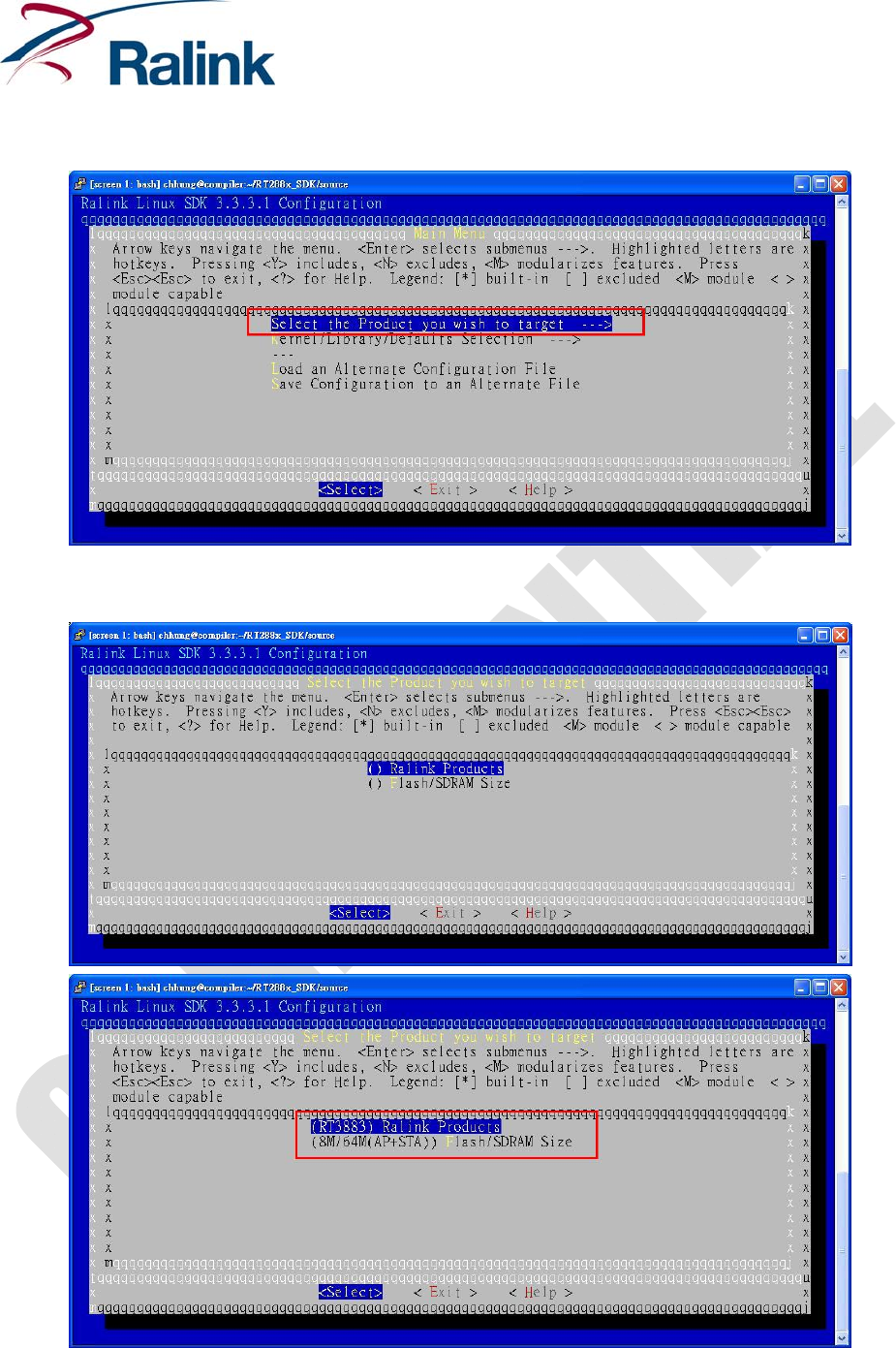
YoumustswitchdirectorytoRT2888x_SDK/sourceandexecute“makemenuconfig,”likebelow:
Pleasechoose“SelecttheProductyouwishtotarget”optiontoconfigurethemainsettingsofyourtarget
platform.
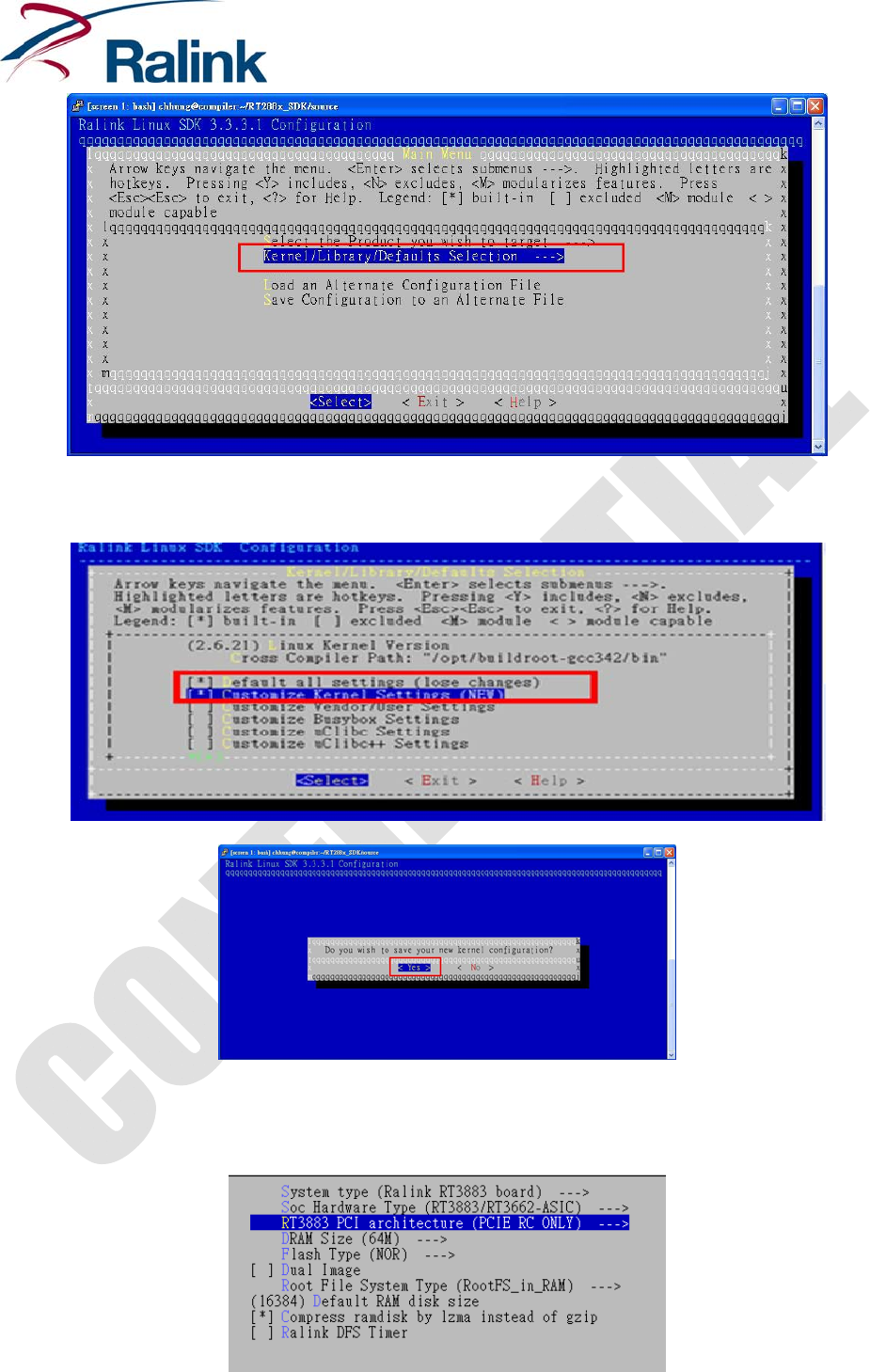
Andthen,pleaseexit“SelecttheProductyouwishtotarget”optionandenter“Kernel/Library/Defaults
Selection”option.
Ralink Website document
for stevej@cradlepoint.com
And Company Use Only
RALINKRT3883ConcurrentAPUSER'SGUIDE
9/12
Youmustselect“Defaultallsettings”optiontoloaddefaultconfigurationfirstandselect“Customize
KernelSettings”optionstoturnon2ndinterface.
Afterloaddefault,youcanenterkernelconfiguredmainmenu.
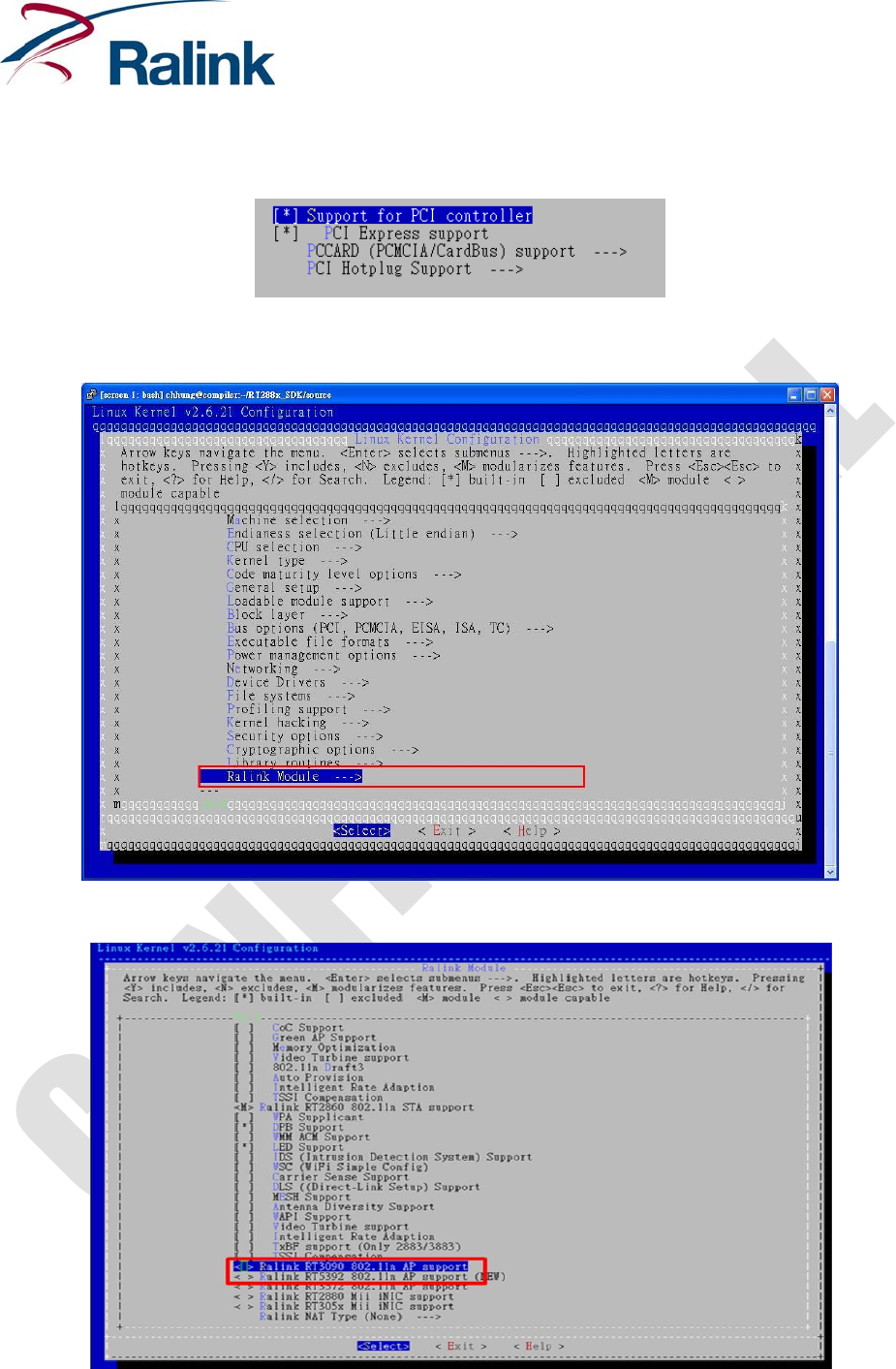
Pleaseenter“Machineselection”andchoice”RT3883PCIarchitecture”to“PCIERCONLY”mode.
Ralink Website document
for stevej@cradlepoint.com
And Company Use Only
RALINKRT3883ConcurrentAPUSER'SGUIDE
10/12
Leave“Machineselection”option.
Pleaseenter“Busoptions(PCI,PCMCIA,EISA,ISA,TC)”optionandcheckwhetherPCI/PCIEsupportornot,
likebelow:
Leave“Busoptions(PCI,PCMCIA,EISA,ISA,TC)”option.
Pleaseenter“RalinkModule”option
YoucanselectRT3090orRT5392moduletoact2ndWiFiinterface,butoneofthemcouldbeselected.
Leave“RalinkModule”optionandthenexit“LinuxKernelConfiguration”.
Ralink Website document
for stevej@cradlepoint.com
And Company Use Only

RALINKRT3883ConcurrentAPUSER'SGUIDE
11/12
Final,youcanexecute“makedep”and“make”tobuildimageundertheRT288x_SDK/source.
$makedep
$make
Ralink Website document
for stevej@cradlepoint.com
And Company Use Only

RALINKRT3883ConcurrentAPUSER'SGUIDE
12/12
3. Usage
Ifthefirmwareisbuiltsuccessfully,youcanupgradeitintoyourRT3883referenceboardbyTFTPServer
orWebGUI.
Afterfirmwareupgrade,youcanuse“lsmod”and“ifconfig”commandstocheckifRT3090_apis
successfullyinsertedandbroughtupornot.
2ndWiFiinterfacemodule:RT3090_ap/RT5392_ap
RT3883interfacename:ra0
RT3090/RT5392interfacename:rai0
RT3883profileislocatedon/etc/Wireless/RT2860/RT2860.datandRT3090/RT5392profileislocatedon
/etc/Wireless/iNIC/iNIC_ap.dat.TochangeRT309xwirelesssettings,youcanedititsprofileandre‐bring
upit,likeRT3883.
Certainly,RT3883andRT3090/RT5392areshowntheirdetailinformationorconfiguredsettingsbyiwpriv
command,forexample:
RT3883:
#iwprivera0setSSID=RT3883AP
#iwprivera0stat
…
RT3092:
#iwpriverai0setSSID=RTDEV_AP
#iwpriverai0stat
…
Ralink Website document
for stevej@cradlepoint.com
And Company Use Only
