Tableau Desktop QA Exam Guide
DesktopQA_ExamGuide
DesktopQA_ExamGuide
DesktopQA_ExamGuide
User Manual: Pdf
Open the PDF directly: View PDF  .
.
Page Count: 16

Desktop Qualied Associate
Exam Guide

Exam Details
This document provides information on the structure of the exam, along with the knowledge and skills
being measured. This document is not intended to build product knowledge.
Awarded Credentials
Upon successful completion of this exam, you will be awarded the title of Tableau Desktop Qualied
Associate. This title is active for two years from the date achieved.
Target Audience
This exam is for those who have a comprehensive understanding of functionality in Tableau Desktop and at
least ve months of applying this learning in the product.
Prerequisites
There are no prerequisites for this exam.
System Preparation
For a successful exam experience, ensure your computer, network, and the physical environment are
properly congured. This includes running a system tech-check before the exam. Review our Required:
Exam Setup document for complete details.
Learning Resources
The best preparation is experience and time with the product. During the exam, you will have access to
public, online resources aside from sites or applications allowing for communication. We also encourage you
to complete the Desktop I: Fundamentals and Desktop II: Intermediate classroom courses. Information on
these courses can be found here.
Exam Format
Time Limit: 2 hours (Please plan for extra time for online exam setup)
Passing Score: 75%
Number of Questions: 36
Scoring: Automatically scored; point value varies per question type with hands-on worth more
Question Format: Multiple choice, multiple response, true/false, hands-on
Language(s) Oered: English, Japanese, Simplied Chinese, German, French, Brazilian Portuguese,
International Spanish
Delivery Platform: Windows Virtual Machine containing Tableau Desktop
For questions, email certication@tableau.com or visit tableau.com/certication.
Desktop Qualied Associate Exam Guide January 2018

Skills Measured
Data Connections - 23%
• Understand how to connect to Tableau Server
• Understand Performance Optimization
• Parallel query
• Data engine vectorization
• Parallel aggregation
• External query caching
• Query fusion
• Understand how to use Automatic & Custom Split
• Understand how to join tables from single and
multiple databases
• Understand how to use Data Preparation
• Blending
• Metadata Grid
• Pivot
• Union
• Data Interpreter
• Understand connection options
• Understand how to connect to dierent le types
• Understand data extract capabilities
• Understand Shadow extracts
Organizing & Simplifying Data - 10%
• Understand how to:
• Filter data
• Sort data
• Build groups
• Build hierarchies
• Build sets
Field & Chart Types - 15%
• Understand discrete v. continuous
• Understand measure names and measure values
• Understand generated elds
• Understand how and when to build:
• Histograms
• Heat maps
• Tree maps
• Bullet graphs
• Combined Axis Charts
• Dual Axis Charts
• Scatter Plots
• Data Highlighter
• Cross tabs
• Motion charts
• Bar in bar charts
• Box plots
• Gantt Bar Charts
• Paretos
• Sparklines
• Understand how to eectively use titles, captions
and tooltips
• Understand how to edit axes
• Understand mark labels and annotations
Calculations - 17%
• Understand how to:
• Manipulate string and date calculations
• Create quick table calculations
• Use LOD calculations; types of LOD
calculations
• Use Ad-hoc calculations
• Work with aggregation options
• Build logic statements
• Build arithmetic calculations
• Build grand totals and sub-totals
• Use calculations in join clauses
Desktop Qualied Associate Exam Guide January 2018

Skills Measured
Mapping - 9%
• Understand how to use:
• Pan & Zoom
• Filtering
• Map layering
• Custom territories
• Lasso & Radial selection
• Understand how to modify locations within
Tableau
• Understand how to import and manage custom
geocoding
• Understand how to use a background image map
• Understand how to use Geographic search
• Understand how to connect to spatial les
Analytics - 15%
• Understand how to use:
• Reference Lines
• Reference Bands
• Trend Lines
• Trend Model
• Forecasting
• Drag & Drop Analytics
• Box Plot
• Reference distributions
• Statistical summary card
• Instant Analytics
Dashboards - 11%
• Understand publishing & sharing options
• Understand how to build dashboards
• Understand dashboard actions
• Understand Device Designer
• Understand how to create a drill down report
• Understand how to utilize visual best practices
for dashboard design
Timeliness
Completing a task eectively and eciently has
become a standard that organizations expect from
employees. This exam is timed because we view time
as a critical competency needed to be successful.
Desktop Qualied Associate Exam Guide January 2018

Sample Questions
The questions below are examples intended to give you a sense of how questions will look on the exam. It is
not a learning resource for the Desktop product, nor does it provide the experience needed to successfully
pass the exam. Sample questions are not indicative of exam diculty. A solution section follows.
You are encouraged to work through your own solutions rst before looking at the solutions provided.
1. To connect to multiple tables in a single data source at one time, what must be specied?
a. A blend
b. A calculation
c. A join
d. A hierarchy
2. Tableau can create worksheet-specic lters.
a. True
b. False
3. What does the box in a box plot represent?
a. Maximum extent of the data
b. The range of the middle half of the data points
c. The median of the middle half of the data points
d. The outliers of the data
The following questions use the dataset Sample-Superstore Subset (Excel), which can be downloaded here. If
you are unable to download the le, try accessing it from another internet browser.
4. What is the percent of total Sales for the ‘Home Oce’ Customer Segment in July of 2012?
a. 23.50%
b. 23.97%
c. 20.14%
d. 32.56%
5. Find the top 10 Product Names by Sales within each region. Which product is ranked #2 in both the Central
& West regions in 2011?
a. Riverside Palais Royal Lawyers Bookcase
b. Bush Mission Pointe Library
c. Sharp AL-1530CS Digital Copier
d. Global Troy Executive Leather Low Back Tilter
Desktop Qualied Associate Exam Guide January 2018

6. In the Technology Product Category, which unprotable state is surrounded by only protable states?
a. Colorado
b. Missouri
c. Wyoming
d. Utah
7. If 2013 Sales numbers were expected to increase by 50% in the following year, what would be the total
estimated sales for the Consumer Segment in 2014?
a. $4,278,540
b. $816,999
c. $2,752,823
d. $802,365
8. In which Region do all Product Categories fall beneath the overall average prot?
a. All Regions
b. Central
c. East
d. South
e. West
9. Which Product Sub-Category has a Shipping Cost to Sales ratio of above 3%?
a. Tables
b. Chairs & Chairmats
c. Paper
d. Binders and Binder Accessories
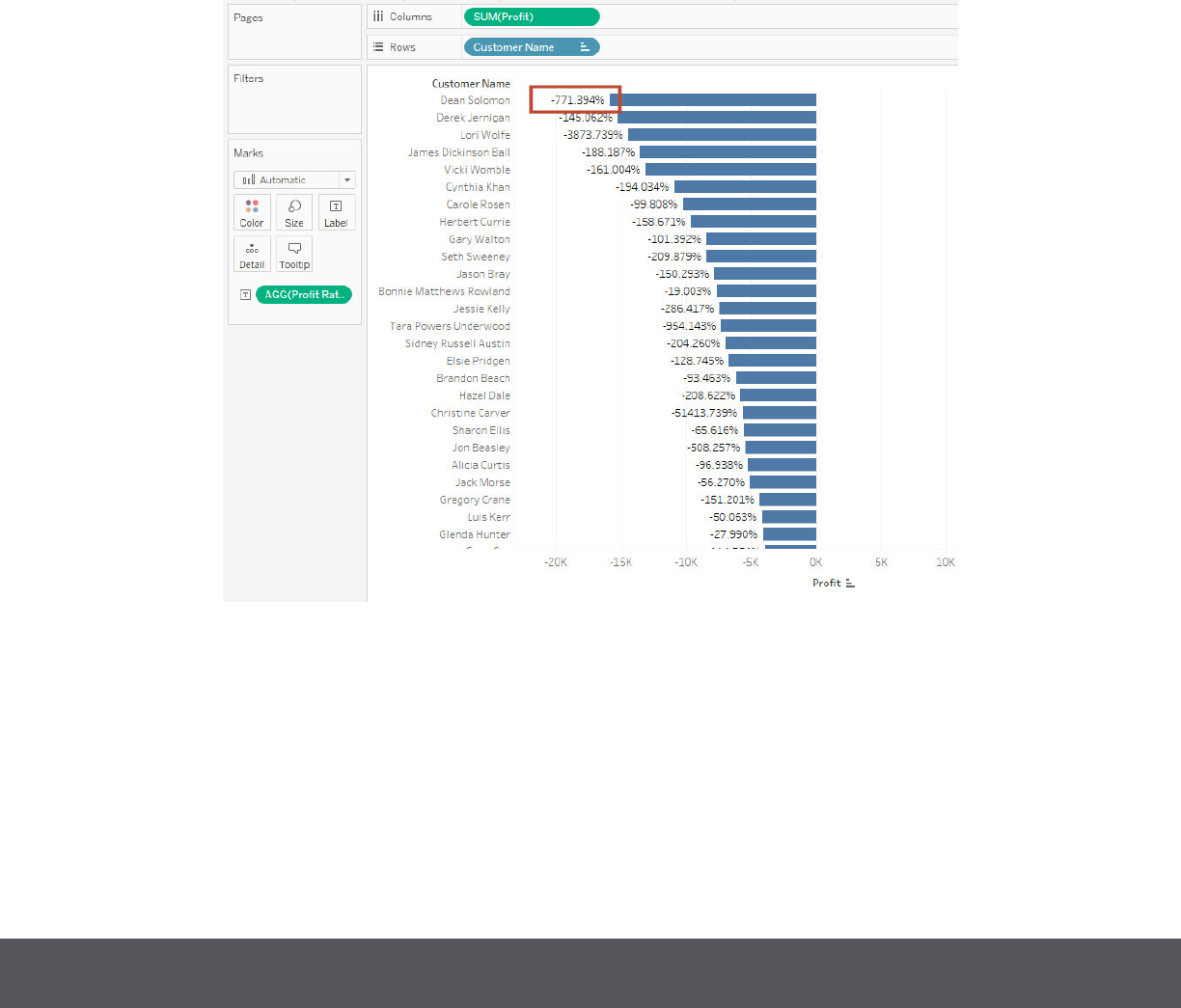
10. Find the customer with the lowest overall prot. What is his/her prot ratio?
a. 2.35%
b. 1%
c. -17.54%
d. -771.39%
11. Determine which State in the Central Region has the highest distribution of prots using interquartile
ranges.
a. South Dakota
b. North Dakota
c. Minnesota
d. Iowa
Desktop Qualied Associate Exam Guide January 2018

12. Look at the sum of prots for each Product Sub-Category. Which sub-category is $31,069 below the
average prot across all categories?
a. Appliances
b. Bookcases
c. Envelopes
d. Paper
13. What percent of the total prot do the top 10 customers by Sales represent?
a. 3.50%
b. 5.03%
c. 17.54%
d. None of the Above
14. What was the Moving Average of Sales in June of 2012, including six months prior and six months after?
a. $101,752
b. $180,036
c. $188,552
d. $286,170
15. Create a histogram showing the number of Sales using Sales Bins of $1,000. Which bins have prot ratios
(prot as a percentage of sales) of more than 25%? (Select all that apply)
a. 1,000
b. 3,000
c. 7,000
d. 8,000
e. 10,000
f. 11,000
g. 18,000
Desktop Qualied Associate Exam Guide January 2018

Solutions
1. To connect to multiple tables in a single data source at one time, what must be specied?
c. A join
2. Tableau can create worksheet-specic lters.
a. True
3. What does the blox in a box plot represent?
b. The range of the middle half of the data points
4. What is the percent of total Sales for the ‘Home Oce’ Customer Segment in July of 2012?
b. 23.97%
5. Find the top 10 Product Names by Sales within each region. Which product is ranked #2 in both the Central
& West regions in 2011?
c. Sharp AL-1530CS Digital Copier
6. In the Technology Product Category, which unprotable state is surrounded by only protable states?
a. Colorado
7. If 2013 Sales numbers were expected to increase by 50% in the following year, what would be the total
estimated sales for the Consumer Segment in 2014?
b. $816,999
8. In which Region do all Product Categories fall beneath the overall average prot?
d. South
9. Which Product Sub-Category has a Shipping Cost to Sales ratio of above 3%?
c. Paper
Desktop Qualied Associate Exam January 2018
Additional Guidance
Below there is additional guidance on a suggested method of nding the answer. You may nd there are
other ways determine the correct answer. The focus for this exam is the destination (i.e. accuracy), rather
than the journey.
10. Find the customer with the lowest overall prot. What is his/her prot ratio?
The answer to this question can be found by looking at prots by customer and sort ascending by prot.
Once you identify your customer contributing the least to your prots, add a prot ratio calculation
(Sum([Prot])/Sum([Sales])) to the label or tooltip.
Desktop Qualied Associate Exam January 2018
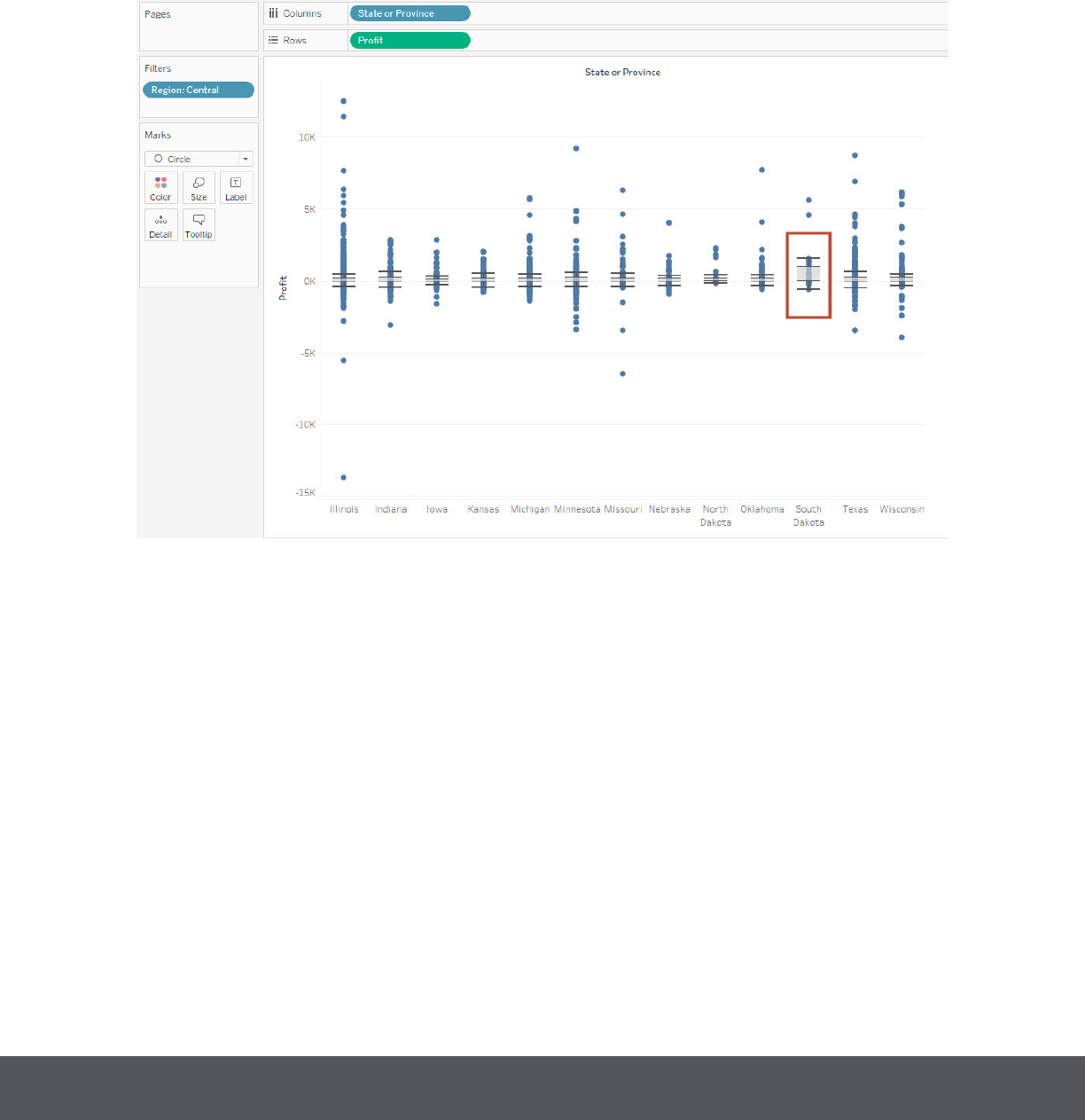
11. Determine which State in the Central Region has the highest distribution of prots using interquartile
ranges.
The answer to this question can be found by showing Prot by State or Province, disaggregating your
measures, and showing distribution. You can use the available box plot option, or choose distribution –
quartiles – 4, to show quartiles.
Desktop Qualied Associate Exam January 2018
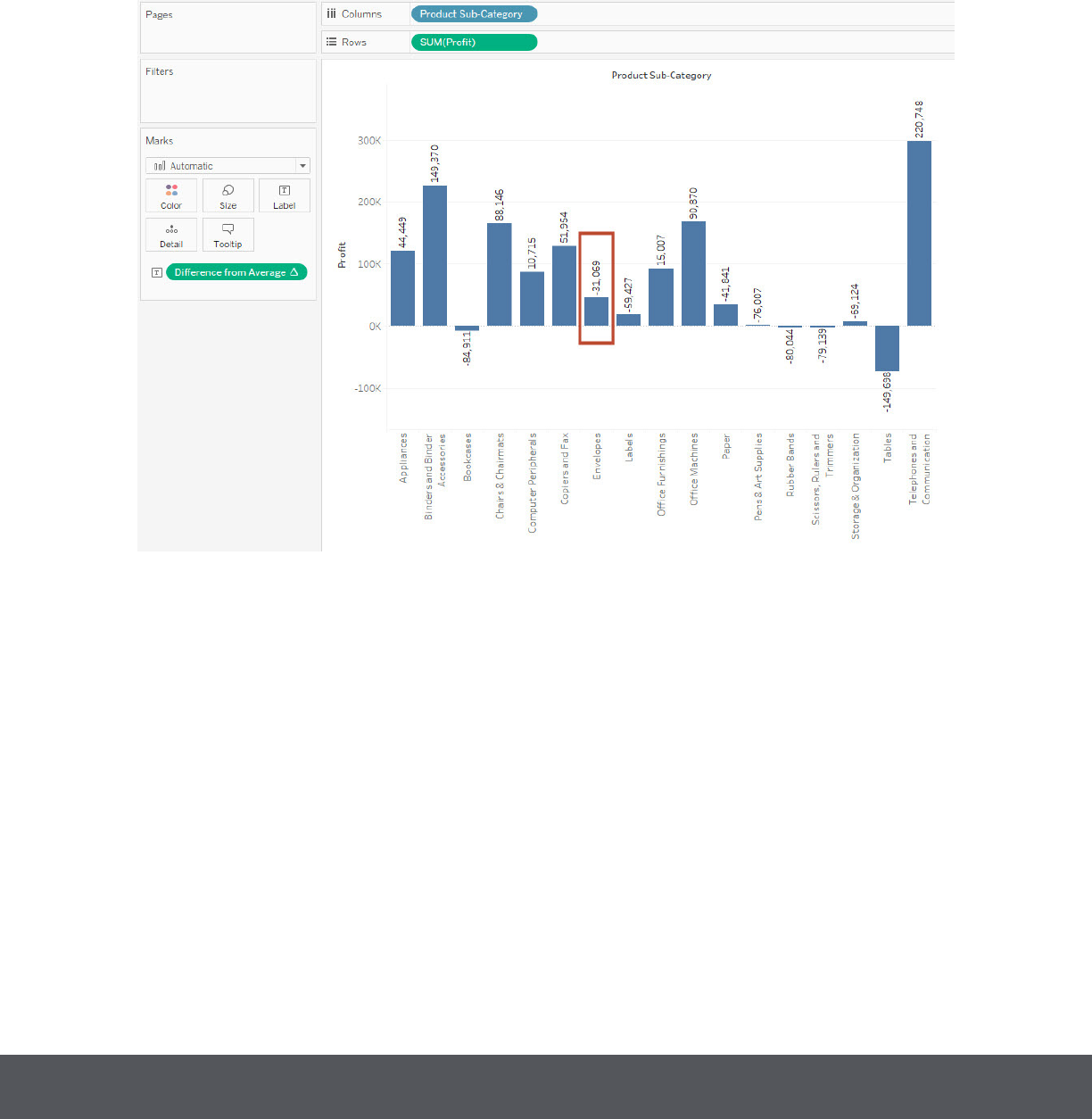
12. Look at the sum of prots for each Product Sub-Category. Which sub-category is $31,069 below the
average prot across all categories?
The answer to this question can be found by creating a table calculation looking at the sum of prot
and subtracting from the window average (SUM([Prot]) –WINDOW_AVG(SUM([Prot]))). Using the
calculation in your view and applying the label will reveal the dierence from average for each sub-
category.
Desktop Qualied Associate Exam January 2018
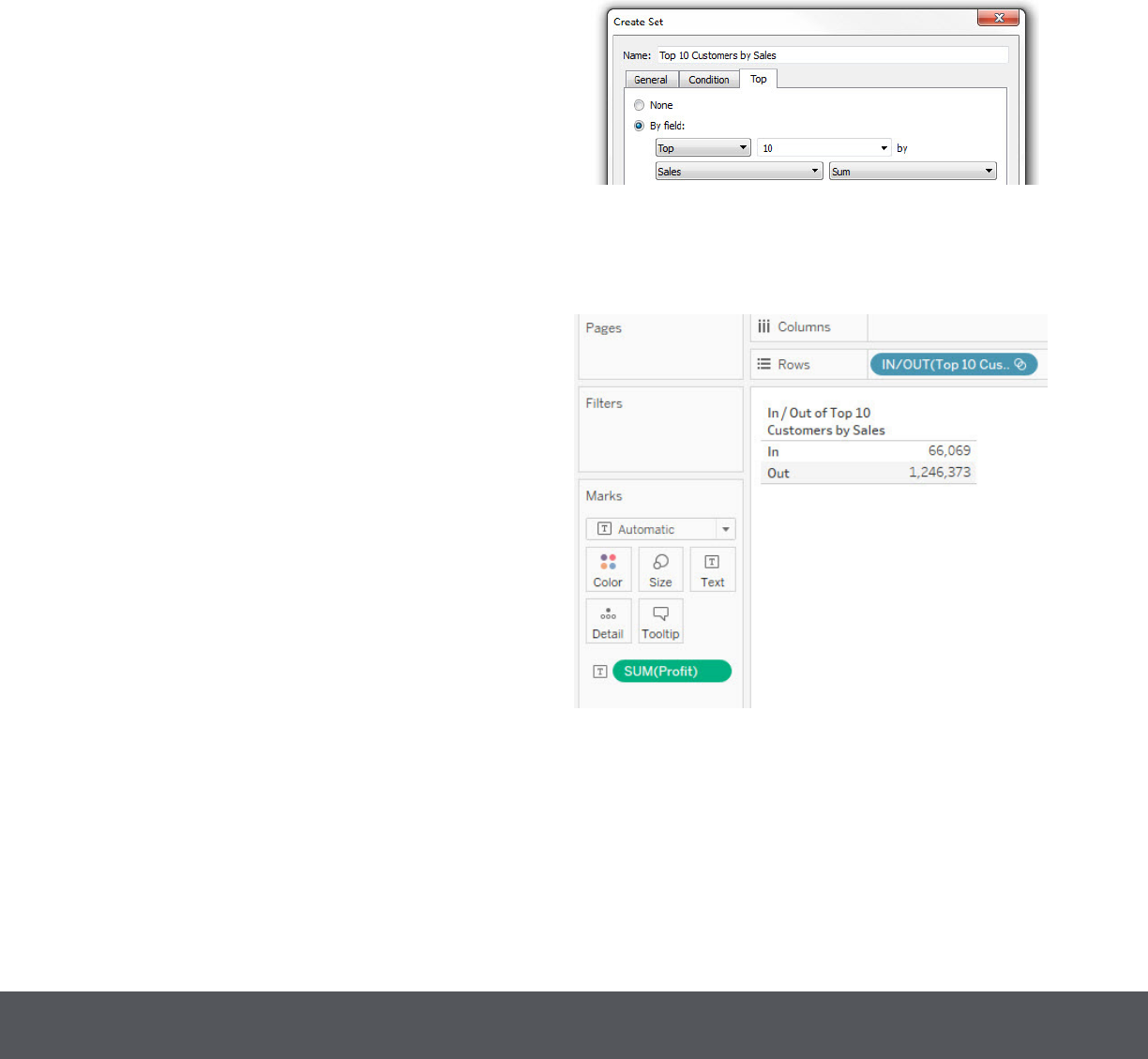
a. Build a Set from Customer Name with the Top 1o
by Sum of Sales.
b. Include that Set in your view to display IN/OUT,
along with Prot as the measure.
Desktop Qualied Associate Exam January 2018
Step-by-Step
Below are step-by-step solutions for a suggested method of nding the answer. You may nd there are other
ways to determine the correct answer for each question.
13. What percent of the total prot do the top 10 customers by Sales represent?
The answer to this question can be found by building a set for the top 10 Customers by Sales, then using
that set in a view that uses the table calculation “percent of total.”
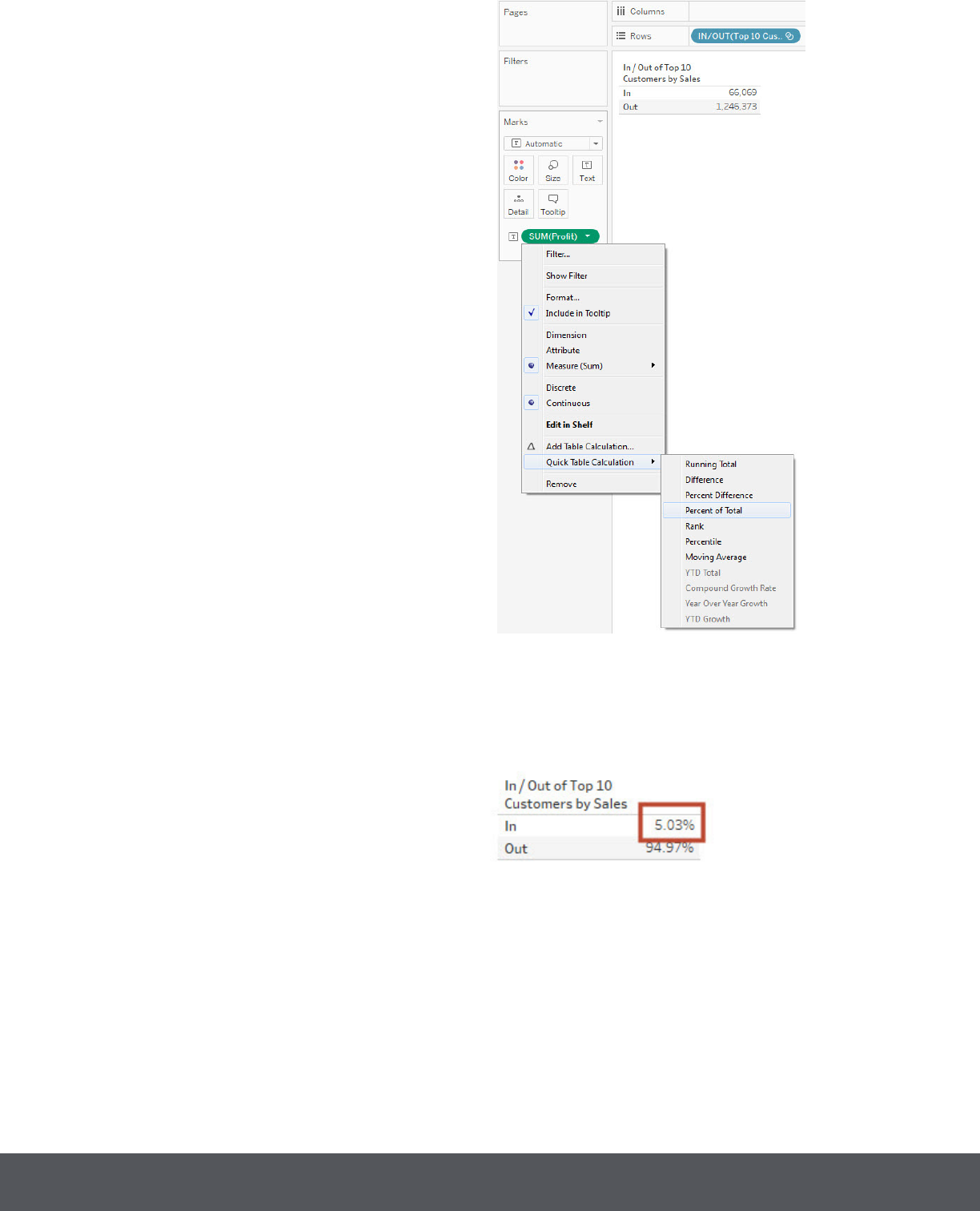
c. Convert Prot to a Table Calculation for Percent
of Total.
Final Response:
Answer: b) 5.03%
Desktop Qualied Associate Exam January 2018
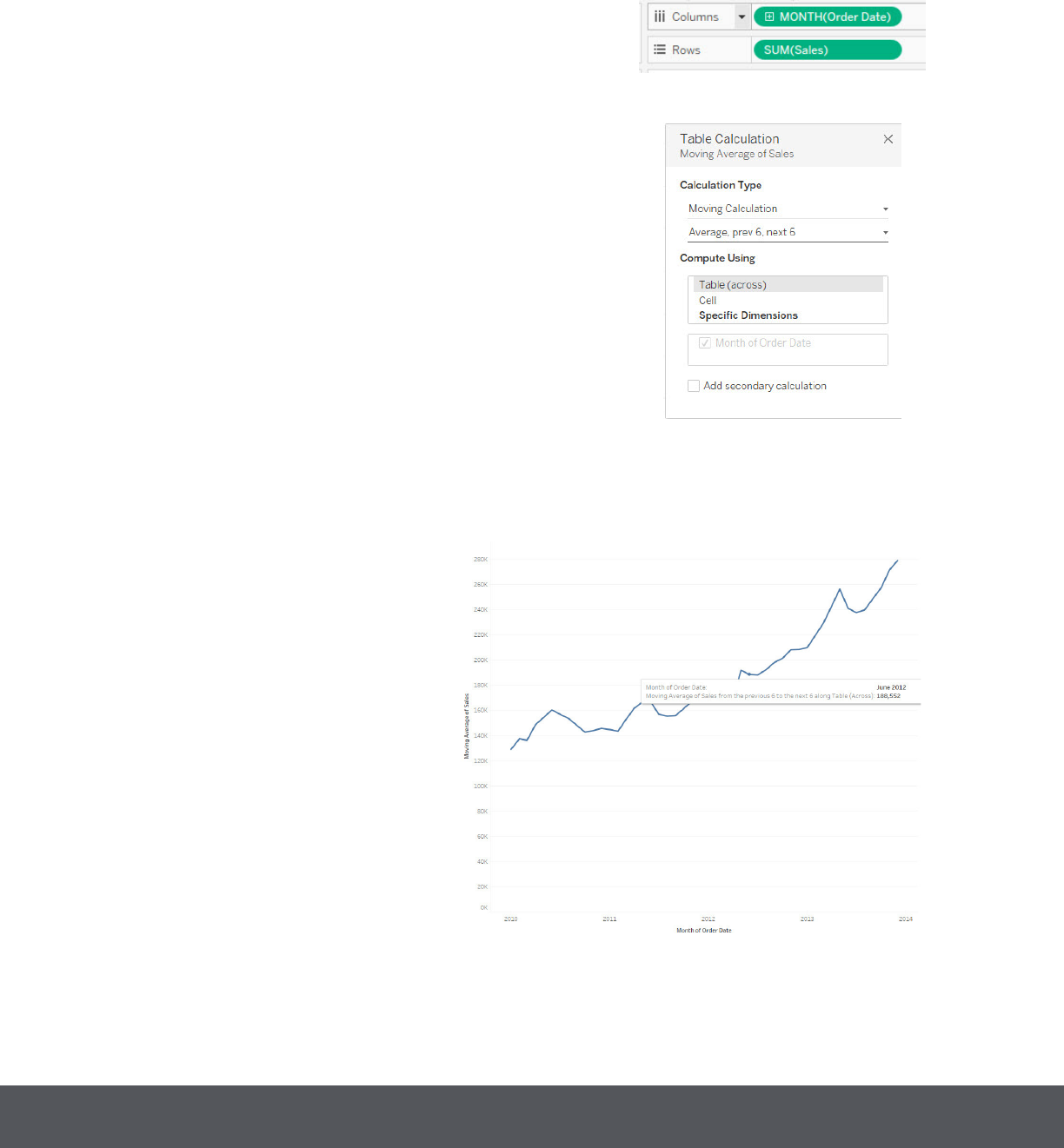
a. Build a view with continous Month and Sum of
Sales.
b. Right-click on Sum(Sales) and choose Add
Table Calculation. Select a Moving Average with
Previous 6 Values and Next 6 Values, moving
Across the table.
c. Once complete, hover over June 2012 and the
tooltip will give the specic answer.
Answer: c)$188,552
Desktop Qualied Associate Exam January 2018
14. What was the Moving Average of Sales in June of 2012, including six months prior and six months after?
The answer to this question can be found by creating a view with Sales by continuous Month, then using
a table calculation to present a moving average.
15. Create a histogram showing the number of Sales using Sales Bins of $1,000. Which bins have prot ratios
(prot as a percentage of sales) of more than 25%? (Select all that apply)
Creating this solution involves creating the bin of 1,000 each from Sales, including it in a view along
with Sales shown as a Count, creating the Prot Margin calculated eld, and ltering the view by Prot
Margin greater than 25%.
Desktop Qualied Associate Exam January 2018
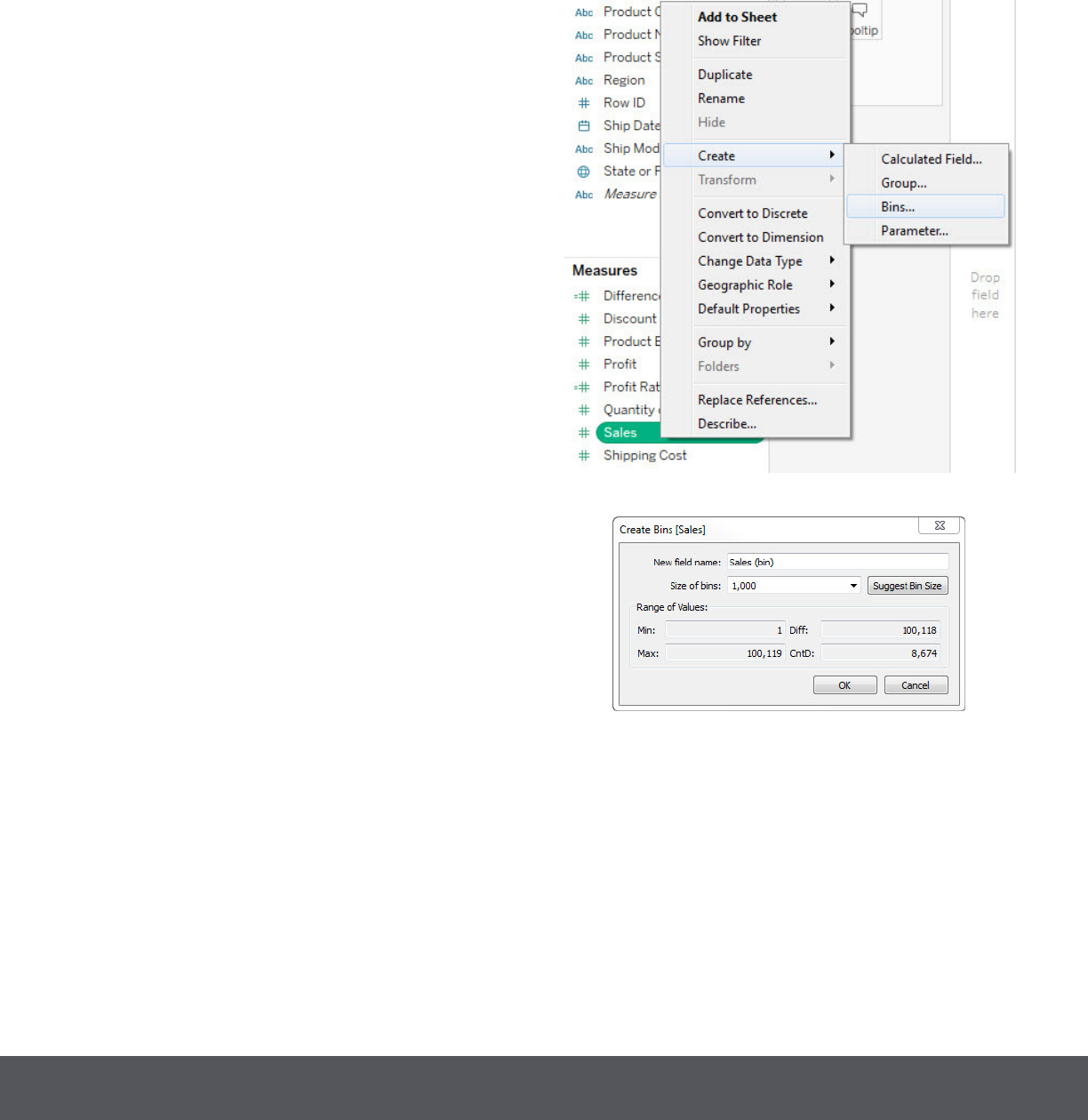
a. Right-click on Sales in the Measures pane and
choose “Create” and “Bins”. Then change the bin
size to 1000.
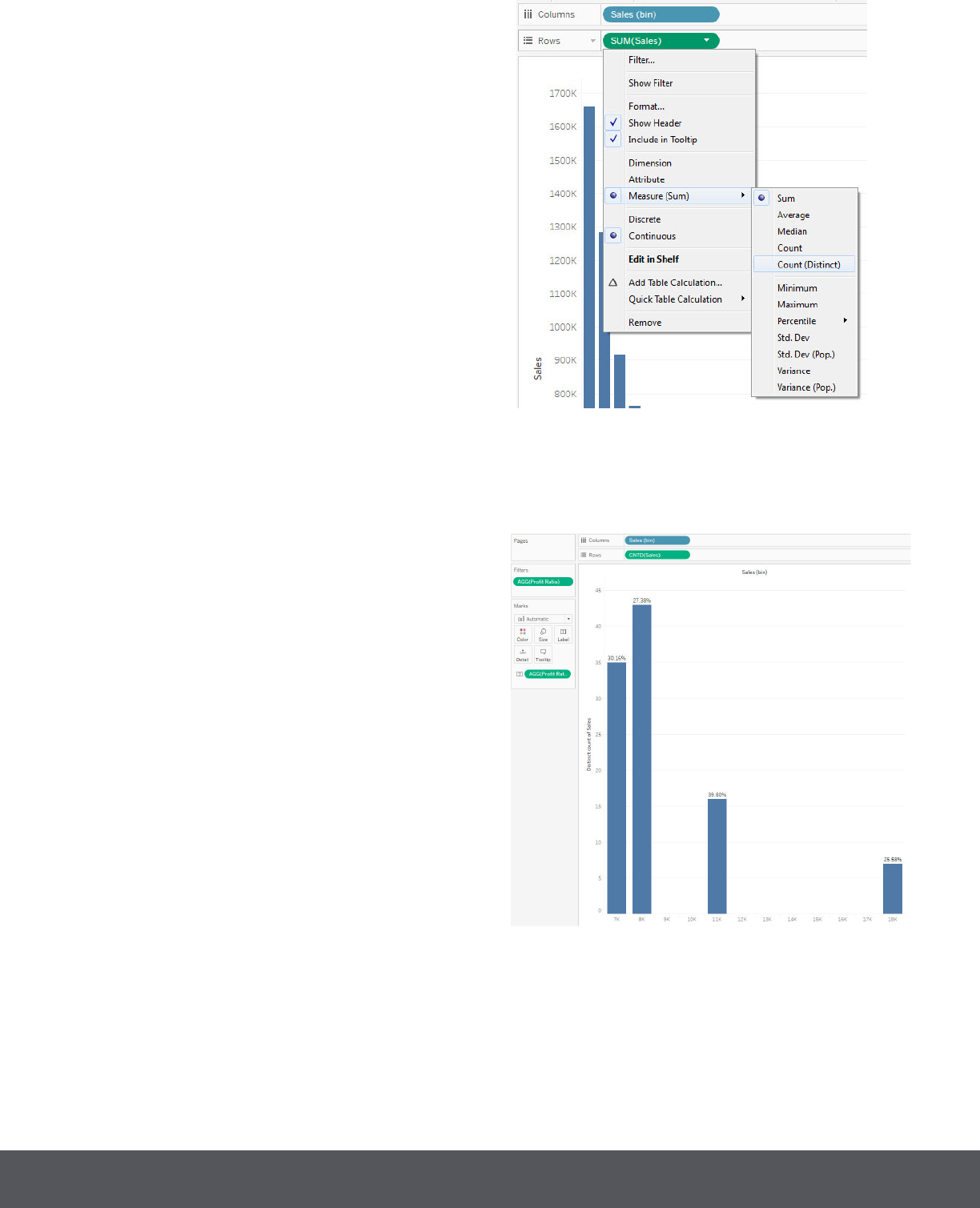
b. Once the bin is created, build a view with Sales
(bin) on Columns and Sales on Rows. Then
change Sales (on the Rows shelf) to the Count
function.
c. Create the Prot Margin calculated eld and
include it as a label.
• Use the formula SUM([Prot])/SUM([Sales]).
• Format the eld as a percentage.
• Drag the Prot Margin to the shelf label.
d. Filter the view to only show bins with a Prot
Margin of greater than 25%.
• Drag Prot Margin to lter.
• Choose “At Least” and the value “.25”.
Final Answer: c) 7,000, d) 8,000, f) 11,000, g) 18,000
Desktop Qualied Associate Exam January 2018
