Embedded Firmware Library VN100 Manual
User Manual: Pdf
Open the PDF directly: View PDF  .
.
Page Count: 121 [warning: Documents this large are best viewed by clicking the View PDF Link!]
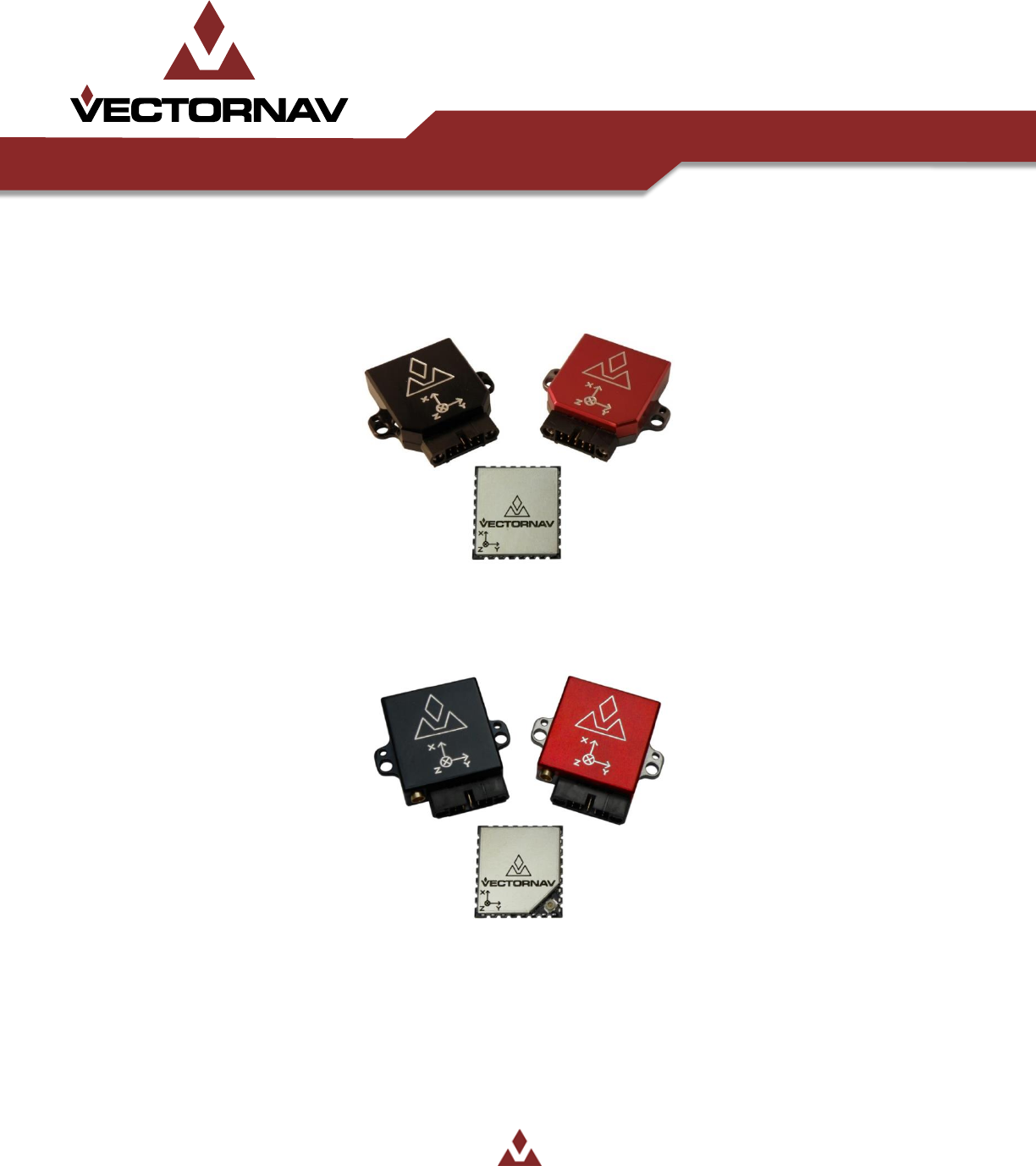
VectorNav Technologies
Contact Info
10501 Markison Road
Phone
+1 512 772 3615
Dallas, Texas 75238
Email
support@vectornav.com
United States of America
Website
www.vectornav.com
Embedded Firmware Library
Embedded Navigation Solutions

Embedded Firmware Library UM003
Embedded Firmware Library 2/121
Document Information
Title
Embedded Firmware Library
Subtitle
User Manual for Embedded Firmware Library
Document Type
User Manual
Document Number
UM003
Document Status
Released
Embedded Firmware Library UM003
Embedded Firmware Library 3/121
VectorNav Technical Documentation
In addition to our product-specific technical data sheets, the following manuals are available to assist
VectorNav customers in product design and development.
VN-100 User Manual: The user manual provides a high-level overview of product specific
information for each of our inertial sensors. Further detailed information regarding hardware
integration and application specific use can be found in the separate documentation listed
below.
Hardware Integration Manual: This manual provides hardware design instructions and
recommendations on how to integrate our inertial sensors into your product.
Application Notes: This set of documents provides a more detailed overview of how to utilize
many different features and capabilities offered by our products, designed to enhance
performance and usability in a wide range of application-specific scenarios.
Document Symbols
The following symbols are used to highlight important information within the manual:
The information symbol points to important information within the manual.
The warning symbol points to crucial information or actions that should be followed to avoid
reduced performance or damage to the navigation module.
Technical Support
Our website provides a large repository of technical information regarding our navigation sensors. A list
of the available documents can be found at the following address:
http://www.vectornav.com/support
If you have technical problems or cannot find the information that you need in the provided documents,
please contact our support team by email or phone. Our engineering team is committed to providing
the required support necessary to ensure that you are successful with the design, integration, and
operation of our embedded navigation sensors.
Technical Support Contact Info
Email: support@vectornav.com
Phone: +1.512.772.3615
Embedded Firmware Library UM003
Embedded Firmware Library 4/121
Table of Contents
1 Introduction 8
2 Document and Library Rules 9
ACRONYMS 9
NAMING CONVENTIONS 10
3 Firmware Library 11
PACKAGE DESCRIPTION 11
Examples folder 11
Library folder 11
Project folder 12
Description of firmware library files 12
LIBRARY INITIALIZATION AND CONFIGURATION 15
4 Device firmware overview 16
5 User Configuration Files 17
DEVICE SELECTION 17
USER FUNCTIONS 17
VN_SPI_SetSS 18
VN_SPI_SendReceive 19
VN_Delay 20
6 VN-100 Orientation Sensor 21
DATA STRUCTURES 21
Registers 21
Command IDs 21
Error IDs 22
ADOR Type 22
ADOF Type 23
Baud Type 23
AccelGainType 23
SPI Response Packet 24
VN-100 LIBRARY FUNCTIONS 25
VN100_SPI_ReadRegister 28
VN100_SPI_WriteRegister 29
VN100_SPI_GetModel 30
Embedded Firmware Library UM003
Embedded Firmware Library 5/121
VN100_SPI_GetHWRev 31
VN100_SPI_GetSerial 32
VN100_SPI_GetFWVer 33
VN100_SPI_GetBaudRate 34
VN100_SPI_SetBaudRate 35
VN100_SPI_GetADOR 36
VN100_SPI_SetADOR 37
VN100_SPI_GetADOF 38
VN100_SPI_SetADOF 39
VN100_SPI_GetYPR 40
VN100_SPI_GetQuat 41
VN100_SPI_GetQuatMag 42
VN100_SPI_GetQuatAcc 43
VN100_SPI_GetQuatRates 44
VN100_SPI_GetQuatMagAcc 45
VN100_SPI_GetQuatAccRates 46
VN100_SPI_GetQuatMagAccRates 47
VN100_SPI_GetYPRMagAccRates 48
VN100_SPI_GetDCM 49
VN100_SPI_GetMag 50
VN100_SPI_GetAcc 51
VN100_SPI_GetRates 52
VN100_SPI_GetMagAccRates 53
VN100_SPI_GetMagAccRef 54
VN100_SPI_SetMagAccRef 55
VN100_SPI_GetFiltMeasVar 56
VN100_SPI_SetFiltMeasVar 57
VN100_SPI_GetHardSoftIronComp 58
VN100_SPI_SetHardSoftIronComp 59
VN100_SPI_GetFiltActTuning 60
VN100_SPI_SetFiltActTuning 61
VN100_SPI_GetAccComp 62
VN100_SPI_SetAccComp 63
VN100_SPI_GetRefFrameRot 64
Embedded Firmware Library UM003
Embedded Firmware Library 6/121
VN100_SPI_SetRefFrameRot 65
VN100_SPI_GetAccGain 66
VN100_SPI_SetAccGain 67
VN100_SPI_RestoreFactorySettings 68
VN100_SPI_Tare 69
VN100_SPI_Reset 70
VN100_SPI_GetAccInertial 71
VN100_SPI_GetMagInertial 72
7 Math Library 73
DATA STRUCTURES 73
MATH LIBRARY FUNCTIONS 73
VN_DotP 76
VN_CrossP 77
VN_VecAdd 78
VN_VecSub 79
VN_VecMultT 80
VN_Diagonal 81
VN_MatAdd 82
VN_MatSub 83
VN_MatMult 84
VN_MatMultMMT 85
VN_MatMultMTM 86
VN_MatScalarMult 87
VN_MatVecMult 88
VN_MatTVecMult 89
VN_MatCopy 90
VN_MatInv 91
VN_SkewMatrix 92
VN_Transpose 93
VN_Norm 94
VN_Normalize 95
VN_Quat2DCM 96
VN_YPR2DCM 97
VN_MatZeros 98
Embedded Firmware Library UM003
Embedded Firmware Library 7/121
VN_Quat2Euler121 99
VN_Quat2Euler123 100
VN_Quat2Euler131 101
VN_Quat2Euler132 102
VN_Quat2Euler212 103
VN_Quat2Euler213 104
VN_Quat2Euler231 105
VN_Quat2Euler232 106
VN_Quat2Euler312 107
VN_Quat2Euler313 108
VN_Quat2Euler321 109
VN_Quat2Euler323 110
VN_Quat2Gibbs 111
VN_Quat2MRP 112
VN_Quat2PRV 113
VN_AddQuat 114
VN_SubQuat 115
VN_QuatKinematicDiffEq 116
VN_YPRKinematicDiffEq 117
VN_Body2Inertial 118
VN_Inertial2Body 119
8 Revision history 120

Embedded Firmware Library UM003
Embedded Firmware Library 8/121
1 Introduction
This document describes the VectorNav embedded firmware library.
The firmware library consists of a collection of routines, data structures, and macros that provide the
user with high level control over the functionality of the entire line of VectorNav embedded sensors.
This library effectively serves two purposes. The first and foremost purpose is to create a set of device
drivers for each of the VectorNav embedded sensors that help developers spend more time focusing on
utilizing the rich features and capabilities of the sensors, and less time worrying about the low-level
details of the communication protocols. The second purpose is to provide a rich embedded software
library that will assists users in capturing the full capabilities provided by the line of VectorNav products.
There are some applications that only require the measurements taken directly from the sensor. For
these applications, the firmware library will help you get up and running with the data you need,
without having to deal with the inter-workings of the device. When working with inertial and
orientation sensors in particular, most users require some form of data post-processing in order to fulfill
their project requirements. This post-processing may be in the form of mathematical coordinate
transformations, or possibly selecting a different form of attitude representation. Performing many of
these mathematical transformations in an embedded environment is not a trivial task to say the least.
In order to help developers overcome this potential hurdle, VectorNav provides an extensive set of math
routines integrated into the firmware library. This library consists of a wide variety of attitude and
inertial guidance related functions that will assist developers in making use of the rich set of
measurements provided by the VectorNav line of inertial sensors.
The driver source code is developed in ‘Strict ANSI-C’. Providing the library in ‘Strict ANSI-C’ makes it
independent from the software toolchain.
Note that since the firmware is generic and covers all device functionalities, the size and/or execution
speed of the application code will not likely be optimized for your application. For many task, the library
may be used as is. However for applications that have very strict requirements on code size or
execution speed, the library should be used as a reference on how to interface with the sensors. In this
case, the code may need to be tailored to meet your specific application requirements.
The firmware library user manual is structured as follows:
Definitions, document conventions, and firmware library rules.
Overview of the firmware library, and examples on how to make use of the library.
Detailed description of the firmware library including all data structures and software functions for each
of the VectorNav embedded sensors, and related peripheral library files.
Embedded Firmware Library UM003
Embedded Firmware Library 9/121
2 Document and Library Rules
Acronyms
Table 1 describes the acronyms used in the firmware and documentation.
Table 1. List of abbreviations
Acronym
Definition
ACC
Accelerometer
ADOF
Asynchronous Data Output Frequency
ADOR
Asynchronous Data Output Register
DCM
Directional Cosine Matrix
GYR
Gyro (angular rates)
HSI
Hard / Soft Iron
MAG
Magnetometer
MAT
Matrix
QUAT
Quaternion
REG
Register
SPI
Serial peripheral interface
SS
Slave select
VEC
Vector
VN
VectorNav
YPR
Yaw, pitch, roll
Embedded Firmware Library UM003
Embedded Firmware Library 10/121
Naming conventions
The firmware library uses the following naming conventions:
All functions, constants, variables, and macros start with VN_.
System and source/header file names are preceded by ‘VN_’, for example VN_lib.h.
Registers for individual products are considered as constants. Their names are in upper case.
The name of the registers is preceded by the product name followed by the register name. The
register name is the same as in the product user manual. For example the ADOR register on the
VN100 has the name VN100_ADOR.
The name for all functions, constants, and variables that are specific to a given product are
preceded by the product name. The first letter in each word is in upper case. For example
VN100_SPI_WriteRegister.
Embedded Firmware Library UM003
Embedded Firmware Library 11/121
3 Firmware Library
Package description
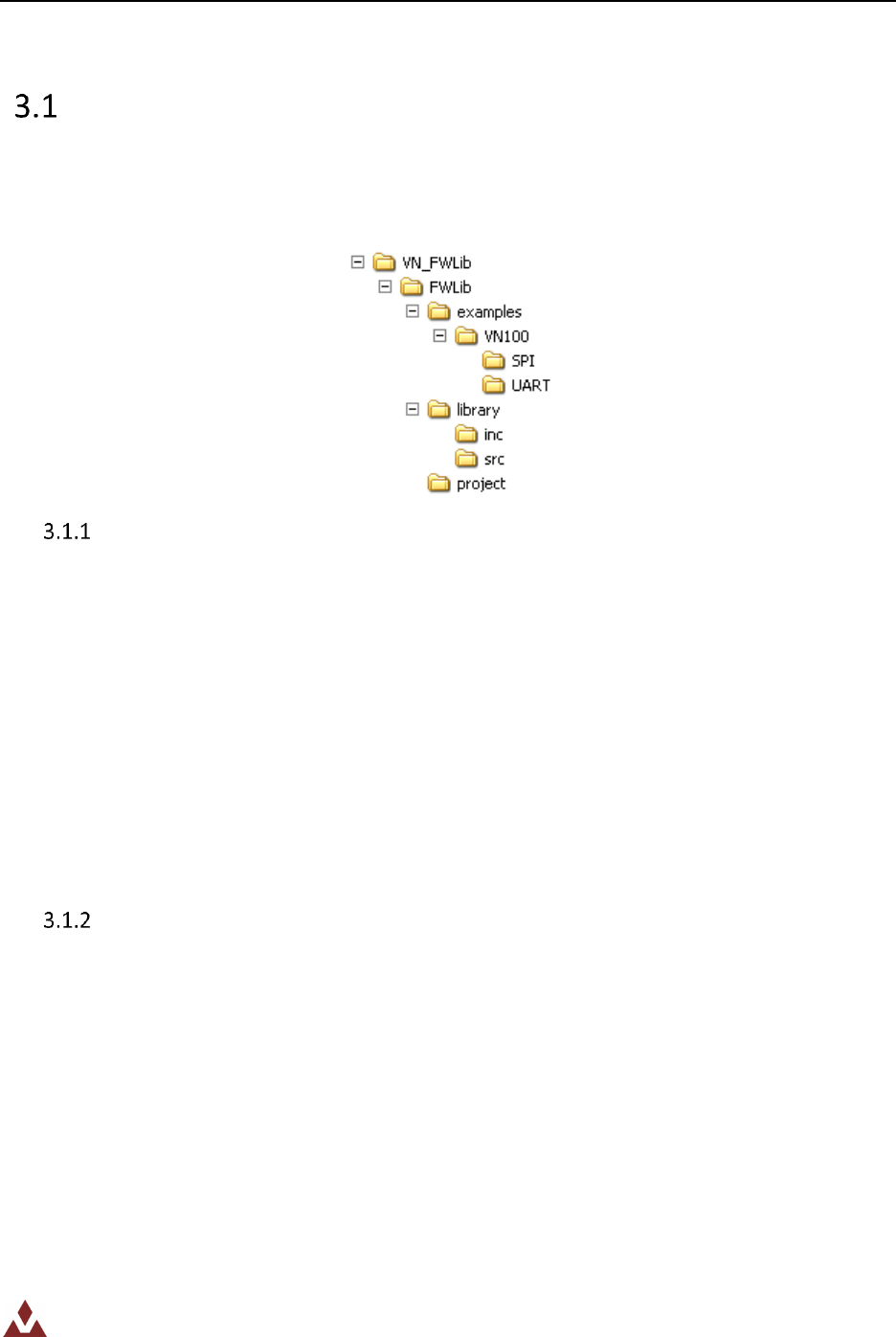
The firmware library is provided in one single zip file. After extracting this zip file you should have one
folder VN_FWLib that contains the following subfolders:
Table 2. Firmware library folder structure
Examples folder
This Examples folder contains, for each product, examples for how to use each of the provided
interfaces. Each example will contain the minimum number of files required to run a typical example
listed below:
Readme.txt – brief text file describing the example and how to make it work
VN_user.h – header file allowing the user to configure which products should be included in the
library.
VN_user.c – source file containing the platform specific routines that need to be modified by the
user for the example to work.
main.c – main example code
All of the examples provided are independent of the software toolchain.
Library folder
The Library folder contains all the subdirectories and files that make up the core of the library:
inc sub-folder contains the firmware library header files. They do not need to be modified by
the user:
VN_type.h: common data types and enumeration used in all other files,
VN_lib.h: main header file that includes all other header files,
VN_math.h: math library header file,
VN100.h: header file for the VN-100 specific code.
src sub-folder contains the firmware library source files. They do not need to be modified by
the user:
Embedded Firmware Library UM003
Embedded Firmware Library 12/121
VN_lib.c: main library source file. Includes routines that are shared between all
VectorNav products,
VN_math.c: math library source file,
VN100.c: source file for the VN-100 specific code.
All library files are coded in Strict ANSI-C and are independent from the software toolchain.
Project folder
The Project folder contains a standard template project program that compiles all library files plus all the
user-modifiable files that are necessary to create a new project:
VN_user.h: header file for user-modifiable code and settings. Use this file to set which
code will compile,
VN_user.c: source file for the user-modifiable code. This file needs to be modified by
the user to handle platform specific features,
main.c: main program body.
Description of firmware library files
Table 2 lists and describes the different files used by the firmware library.
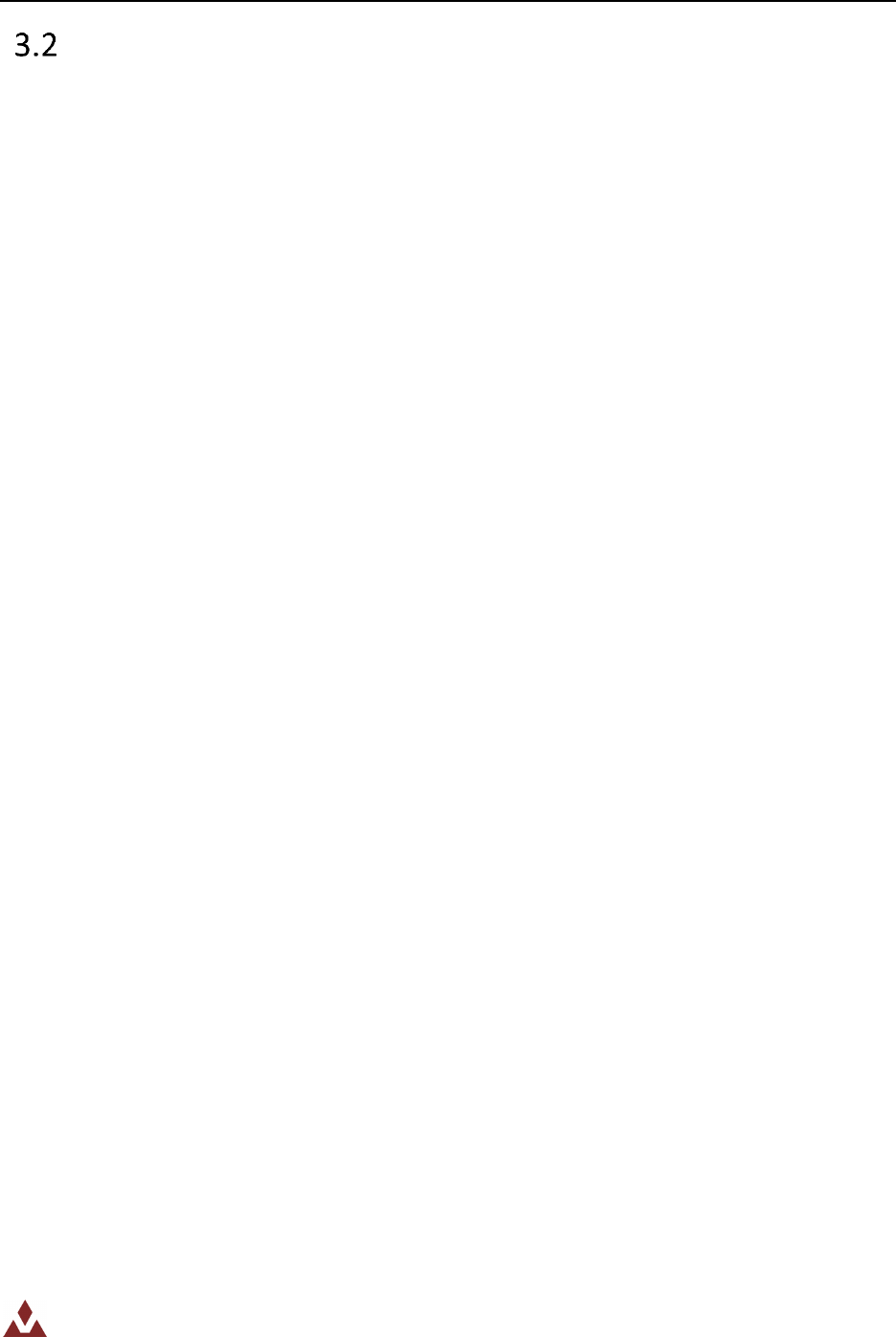
The firmware library layout design and file relationships are shown in Figure 2. Each product has both a
source and header file.
The header file VN_lib.h includes all the product header files. This is the only file that needs to be
included in the user application to interface with the library.
VN_user.h and VN_user.c are the only files that need to be modified by the user. The VN_user.h file is
used to determine which products will be included in the compiled version of the library.

Embedded Firmware Library UM003
Embedded Firmware Library 13/121
Table 3. Firmware library files
Filename
Description
VN_lib.h
Header file including all other header files.
VN_lib.c
Source file that includes all code that is shared in
between all of the VectorNav products.
VN_type.h
Header file that includes all data types that are
shared by all other files in the library
VN_math.h
Header file for the VectorNav math library
VN_math.c
Source file for the VectorNav math library.
This library is included to assist the user in
performing attitude transformations and other
matrix/vector mathematics.
VN_user.h
Header file for the user configuration file.
This file is used to set which products in the library
are included when compiled. For instance if you
want to include the code necessary to interface
with the VN100 then you need to uncomment the
following line in this file:
#define _VN100
VN_user.c
Source file for the user-modifiable code
VN100.h
Header file for the VN100.
This file is compiled if the _VN100 is define in the
VN_user.h file.
VN100.c
Source file for VN-100 specific functions.
This file is compiled if the _VN100 is defined in the
VN_user.h file. All functions specific to the VN-100
product are contained in this file.
main.c
Main example program body.
Embedded Firmware Library UM003
Embedded Firmware Library 14/121
Application Layer
API Layer
Hardware Layer
application.c
VN_lib.h
VN_user.h
VN_type.h
VN_math.h
VN_math.c
VN_lib.c
VN_user.c
VN100.h
VN100.c
Figure 1. Firmware library file architecture
Embedded Firmware Library UM003
Embedded Firmware Library 15/121
Library initialization and configuration
This section describes how to initialize and setup the VectorNav embedded library.
1. In the main application file, include the VN_lib.h, for example:
#include “VN_lib.h”
2. In the VN_user.h header file uncomment the lines necessary to include the functions for the
product(s) that you are interested in. For example, if you want to interface with the VN-100
then you will need to uncomment the following line:
#define _VN100
3. If you are using the SPI interface then you will need to modify the following functions found in
the VN_config.c file:
a. VN_SPI_SetSS: Place your hardware specific code here that is required to set/reset the
SPI slave slect lines for the given sensor.
b. VN_SPI_SendReceive: Place your hardware specific code here that is required to send
and receive 4 bytes over the SPI bus.
c. VN_Delay: Place your hardware specific code here that is required to delay the
processor by the given number of microseconds.
Embedded Firmware Library UM003
Embedded Firmware Library 16/121
4 Device firmware overview
This section describes in detail the firmware library provided for each device. The related functions are
fully described, along with an example of how to use them.
The functions are described in the following format:
Table 4. Function description format
Function Name
The name of the device function
Function prototype
Prototype declaration
Behavior description
Brief explanation of how the function is executed
Input parameter {x}
Description of the input parameters
Output parameter {x}
Description of the output parameters
Return value
Value returned by the function
Required preconditions
Requirements before calling the function
Called functions
Other library functions called
Embedded Firmware Library UM003
Embedded Firmware Library 17/121
5 User Configuration Files
The VectorNav embedded firmware library is platform independent. In order for this library to be used
on a specific hardware platform, the user will need to modify two files to enable hardware specific
functionality. All of the necessary user configurable parameters and functions are located in the
VN_user.h and VN_user.c source files.
Device Selection
The user needs to select which devices they want to control using the embedded firmware library. In
the VN_user.h file you will find a set of constants, one for each device provided by VectorNav. The code
for each device provided by the embedded library is conditionally compiled if the corresponding name
of the device is defined as a constant in the VN_user.h header file.
For instance if you are working on a project using the VN-100 orientation sensor, then in the VN_user.h
file you will want to make sure that the following line is NOT commented out.
/********************************* VN-100 *********************************/
#define _VN100
If the _VN100 constant is defined during compilation, then the code in the VN100.c file will be compiled
in the user’s program. If for instance you wanted to provide your own functions for the control of the
VN-100 and you only wanted to use the math library provided by the firmware library then you could
comment out the _VN100 line in order to keep the VN-100 drivers from being included in the final code.
/********************************* VN-100 *********************************/
/* #define _VN100 */
User Functions
There are three functions that need to be implemented by the user for the correct operation of the
VectorNav embedded firmware library. These functions are found in the VN_user.c source file.
Embedded Firmware Library UM003
Embedded Firmware Library 18/121
VN_SPI_SetSS
Table 5 describes the VN_SPI_SetSS function.
Table 5. _SPI_SetSS
Function Name
VN_SPI_SetSS
Function prototype
VN100_SPI_Packet* _SPI_SetSS (unsigned char sensorID, unsigned char
regID, unsigned char regWidth);
Behavior description
This is a generic function that will set the SPI slave select line for the given
sensor. This function needs to be added by the user with the logic specific
to their hardware to perform the necessary actions to either raise or lower
the slave select line for the given sensor. If a multiplexer is used then the
logic/communications necessary to perform the actions should be placed
here.
Input parameter 1
sensorID -> The sensor to set the slave select line for. This parameter
allows the user to communicate with multiple orientation sensors.
Input parameter 2
state - -> The state to set the slave select to. Two possibilities are
allowed, either VN_PIN_LOW or VN_PIN_HIGH.
Output parameter
None
Return value
None
Required preconditions
None
Called functions
Determined by user code.
Example:
/* Example code for an STM32F103 ARM7 MCU */
void VN_SPI_SetSS(unsigned char sensorID, VN_PinState state){
/* User code to set SPI SS lines goes here. */
switch(sensorID){
case 0:
if(state == VN_PIN_LOW){
/* Start SPI Transaction - Pull SPI CS line low */
GPIO_ResetBits(GPIOA, GPIO_Pin_0);
}else{
/* End SPI transaction - Pull SPI CS line high */
GPIO_SetBits(GPIOA, GPIO_Pin_0);
}
break;
}
}
Embedded Firmware Library UM003
Embedded Firmware Library 19/121
VN_SPI_SendReceive
Table 6 describes the VN_SPI_SendReceive function.
Table 6. VN_SPI_SendReceive
Function Name
VN_SPI_SendReceive
Function prototype
VN_SPI_SendReceive(unsigned long data);
Behavior description
Transmits the given 32-bit word on the SPI bus. The user needs to place
their hardware specific logic here to send 4 bytes out the SPI bus. The
slave select line is controlled by the function VN_SPI_SetSS given above, so
the user only needs to deal with sending the data out the SPI bus with this
function.
Input parameter 1
data -> The 32-bit data to send over the SPI bus
Output parameter
None
Return value
None
Required preconditions
None
Called functions
Determined by user code.
Example:
/* Example code for an STM32F103 ARM7 MCU */
unsigned long VN_SPI_SendReceive(unsigned long data){
/* User code to send out 4 bytes over SPI goes here */
unsigned long i;
unsigned long ret = 0;
for(i=0;i<4;i++){
/* Wait for SPI1 Tx buffer empty */
while (SPI_I2S_GetFlagStatus(SPI1, SPI_I2S_FLAG_TXE) == RESET);
/* Send SPI1 requests */
SPI_I2S_SendData(SPI1, VN_BYTE(data, i));
/* Wait for response from VN-100 */
while (SPI_I2S_GetFlagStatus(SPI1, SPI_I2S_FLAG_RXNE) == RESET);
/* Save received data in buffer */
ret |= ((unsigned long)SPI_I2S_ReceiveData(SPI1) << (8*i));
}
return ret;
}
Embedded Firmware Library UM003
Embedded Firmware Library 20/121
VN_Delay
Table 7 describes the VN_Delay function.
Table 7. VN_Delay
Function Name
VN_Delay
Function prototype
VN_SPI_Delay(unsigned long delay_uS);
Behavior description
Delay the processor for deltaT time in microseconds. The user needs to
place the hardware specific code here necessary to delay the processor for
the time span given by delay_uS measured in micro seconds. This function
doesn't need to be ultra precise. The only requirement on this function is
that the processor is delayed a time NO LESS THAN 90% of the time given
by the variable delay_uS in microseconds. The minimum time span that is
used by the VectorNav library code is 100uS so the function call shouldn't
affect the timing accuracy much. If you decide to modify this library or
wish to have more precision on this delay function then you can comment
out this function and replace it with an optimized macro instead. Many
compilers have their own delay routines or macros so make sure you check
your compiler documentation before attempting to write your own.
Input parameter 1
delay_uS -> Time to delay the processor in microseconds
Output parameter
None
Return value
None
Required preconditions
None
Called functions
Determined by user code.
Example:
/* Example code for an STM32F103 ARM7 MCU */
void VN_Delay(unsigned long delay_uS){
unsigned long i;
for(i=delay_uS*10; i--; );
}
Embedded Firmware Library UM003
Embedded Firmware Library 21/121
6 VN-100 Orientation Sensor
The data structures used in the VN-100 firmware library are described in Section 6.1, while Section 6.2
describes the firmware library functions.
Data Structures
The data structures used by the VN-100 firmware library are defined here. More information on the
registers can be found in the VN-100 User Manual.
Registers
The registers present on the VN-100 are represented by as constants in the firmware as shown below:
/* VN-100 Registers */
#define VN100_REG_MODEL 1
#define VN100_REG_HWREV 2
#define VN100_REG_SN 3
#define VN100_REG_FWVER 4
#define VN100_REG_SBAUD 5
#define VN100_REG_ADOR 6
#define VN100_REG_ADOF 7
#define VN100_REG_YPR 8
#define VN100_REG_QTN 9
#define VN100_REG_QTM 10
#define VN100_REG_QTA 11
#define VN100_REG_QTR 12
#define VN100_REG_QMA 13
#define VN100_REG_QAR 14
#define VN100_REG_QMR 15
#define VN100_REG_DCM 16
#define VN100_REG_MAG 17
#define VN100_REG_ACC 18
#define VN100_REG_GYR 19
#define VN100_REG_MAR 20
#define VN100_REG_REF 21
#define VN100_REG_SIG 22
#define VN100_REG_HSI 23
#define VN100_REG_ATP 24
#define VN100_REG_ACT 25
#define VN100_REG_RFR 26
#define VN100_REG_YMR 27
#define VN100_REG_ACG 28
More information on each of these register can be found in Section 6 of the VN-100 User Manual.
Command IDs
The available commands for the VN-100 are presented by the following data structure:
/* Command IDs */
typedef enum VN100_CmdID
{
VN100_CmdID_ReadRegister = 0x01,
Embedded Firmware Library UM003
Embedded Firmware Library 22/121
VN100_CmdID_WriteRegister = 0x02,
VN100_CmdID_WriteSettings = 0x03,
VN100_CmdID_RestoreFactorySettings = 0x04,
VN100_CmdID_Tare = 0x05,
VN100_CmdID_Reset = 0x06,
} VN100_CmdID;
The commands are described in more detail in Section 5.2 of the VN-100 User Manual.
Error IDs
The error codes for the VN-100 are represented by the following data structure:
/* System Error */
typedef enum VN100_Error
{
VN100_Error_None = 0,
VN100_Error_ErrorListOverflow = 255,
VN100_Error_HardFaultException = 1,
VN100_Error_InputBufferOverflow = 2,
VN100_Error_InvalidChecksum = 3,
VN100_Error_InvalidCommand = 4,
VN100_Error_NotEnoughParameters = 5,
VN100_Error_TooManyParameters = 6,
VN100_Error_InvalidParameter = 7,
VN100_Error_InvalidRegister = 8,
VN100_Error_UnauthorizedAccess = 9,
VN100_Error_WatchdogReset = 10,
VN100_Error_OutputBufferOverflow = 11,
VN100_Error_InsufficientBandwidth = 12,
VN100_Error_ErrorListOverflow = 255
} VN100_Error;
The error codes are described in more detail in Section 5.3 of the VN-100 User Manual.
ADOR Type
The ADOR register values are represented by the following data structure:
/* Asynchronous Data Output Register */
typedef enum VN100_ADORType
{
VN100_ADOR_OFF = 0,
VN100_ADOR_YPR = 1,
VN100_ADOR_QTN = 2,
VN100_ADOR_QTM = 3,
VN100_ADOR_QTA = 4,
VN100_ADOR_QTR = 5,
VN100_ADOR_QMA = 6,
VN100_ADOR_QAR = 7,
VN100_ADOR_QMR = 8,
VN100_ADOR_DCM = 9,
VN100_ADOR_MAG = 10,
VN100_ADOR_ACC = 11,
Embedded Firmware Library UM003
Embedded Firmware Library 23/121
VN100_ADOR_GYR = 12,
VN100_ADOR_MAR = 13,
VN100_ADOR_YMR = 14,
} VN100_ADORType;
The ADOR register is described in more detail in Section 6.6 of the VN-100 User Manual.
ADOF Type
The ADOF register values are represented by the following data structure:
/* Asynchronous Data Ouput Rate Register */
typedef enum VN100_ADOFType {
VN100_ADOF_1HZ = 1,
VN100_ADOF_2HZ = 2,
VN100_ADOF_4HZ = 4,
VN100_ADOF_5HZ = 5,
VN100_ADOF_10HZ = 10,
VN100_ADOF_20HZ = 20,
VN100_ADOF_25HZ = 25,
VN100_ADOF_40HZ = 40,
VN100_ADOF_50HZ = 50,
VN100_ADOF_100HZ = 100,
VN100_ADOF_200HZ = 200
} VN100_ADOFType;
The ADOF register is described in more detail in Section 6.7 of the VN-100 User Manual.
Baud Type
The baud rate register is represented by the following data structure:
/* Serial Baud Rate Register */
typedef enum VN100_BaudType {
VN100_Baud_9600 = 9600,
VN100_Baud_19200 = 19200,
VN100_Baud_38400 = 38400,
VN100_Baud_57600 = 57600,
VN100_Baud_115200 = 115200,
VN100_Baud_128000 = 128000,
VN100_Baud_230400 = 230400,
VN100_Baud_460800 = 460800,
VN100_Baud_921600 = 921600
} VN100_BaudType;
The baud rate register is described in more detail in Section 6.5 of the VN-100 User Manual.
AccelGainType
The accelerometer gain register is represented by the following data structure:
/* Accelerometer Gain Type */
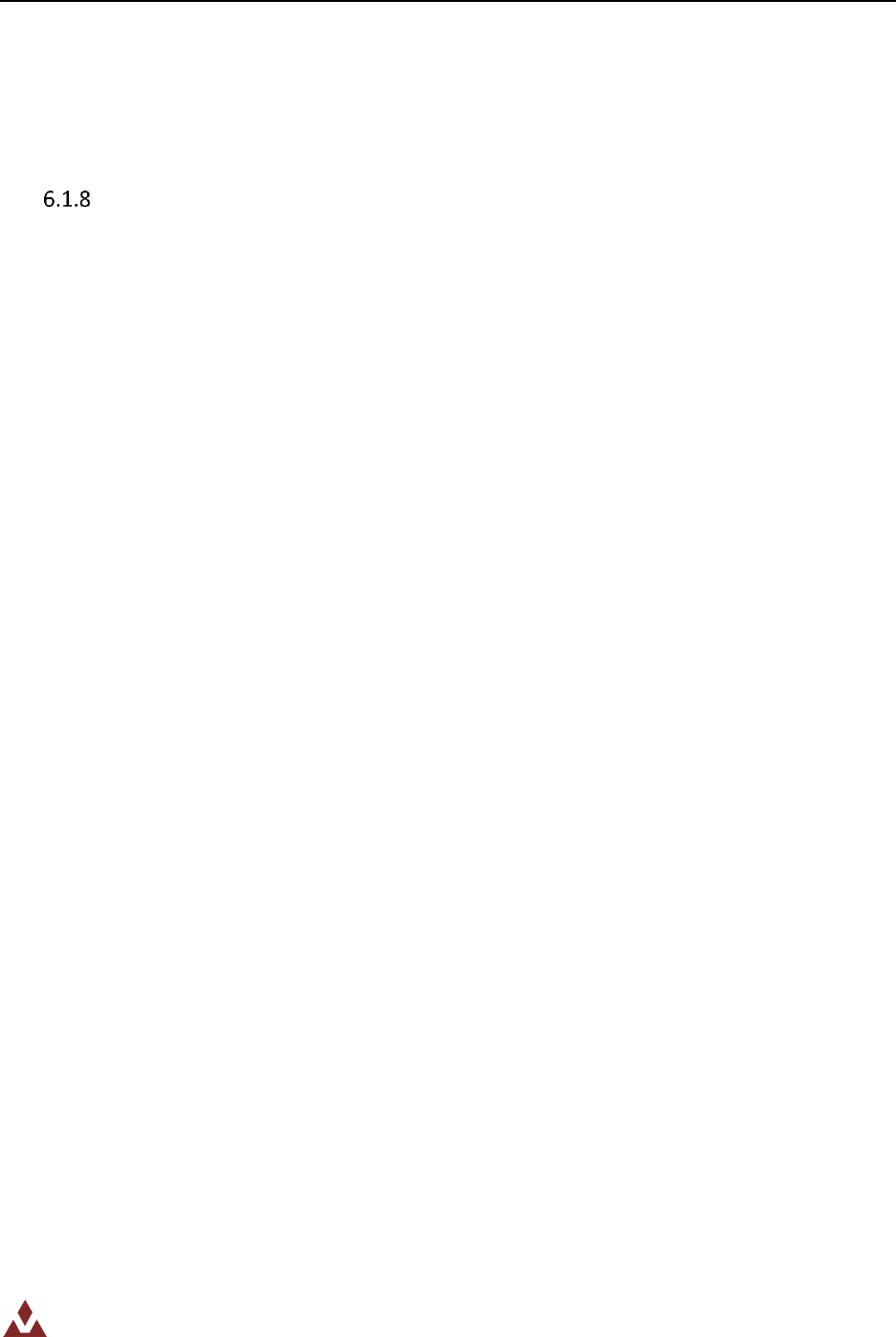
typedef enum VN100_AccGainType {
Embedded Firmware Library UM003
Embedded Firmware Library 24/121
VN100_AccGain_2G = 0,
VN100_AccGain_6G = 1
} VN100_AccGainType;
The accelerometer gain register is described in more detail in Section 6.28 of the VN-100 User Manual.
SPI Response Packet
The SPI response packet is a data structure that is used to organize the SPI response data packets. Each
time a command is sent to the VN-100 and a response is received, it is placed in a response packet
structure. This allows for easy access to the various components of the response packet. The data
structure used is given below:
/* 32-bit Parameter Type */
typedef union {
unsigned long UInt;
float Float;
} VN100_Param;
/* SPI Response Packet */
typedef struct {
unsigned char ZeroByte;
unsigned char CmdID;
unsigned char RegID;
unsigned char ErrID;
VN100_Param Data[VN100_SPI_BUFFER_SIZE];
} VN100_SPI_Packet;
The first four bytes of the packet are accessible via the CmdID, RegID, and ErrID members of the above
structure. The actual data that is passed back to the user from the VN-100 will either take the form of a
32-bit unsigned integer or a 32-bit floating point number.
The following example code shows how the data in the SPI response packet is accessed as a 32-bit
unsigned integer.
VN100_SPI_Packet *ReturnPacket;
VN100_BaudType baudRate = VN100_Baud_115200;
/* Set the baud rate to 115200 */
ReturnPacket = VN100_SPI_SetBaudRate(0, VN100_Baud_115200);
/* Check to see if the baud rate was set correctly */
if((VN100_BaudType)ReturnPacket->Data[0].UInt == VN100_Baud_115200){
/* The baud rate was set successfully */
}else{
/* Check the error code */
}
The next example shows how you can access the data in the SPI response packet as a floating point
value.
VN100_SPI_Packet *ReturnPacket;
float fp[4] = {1.0, 1.0, 0.99, 0.99};
Embedded Firmware Library UM003
Embedded Firmware Library 25/121
/* Set the baud rate to 115200 */
ReturnPacket = VN100_SPI_SetFiltActTuning(0,&fp[0],&fp[1],&fp[2],&fp[3]);
/* Check to see if the second tuning parameter was set correctly */
if(fabs(ReturnPacket->Data[1].Float - fp[1]) <= 0.0001f){
/* The parameter was set successfully */
}else{
/* Check the error code */
}
VN-100 library functions
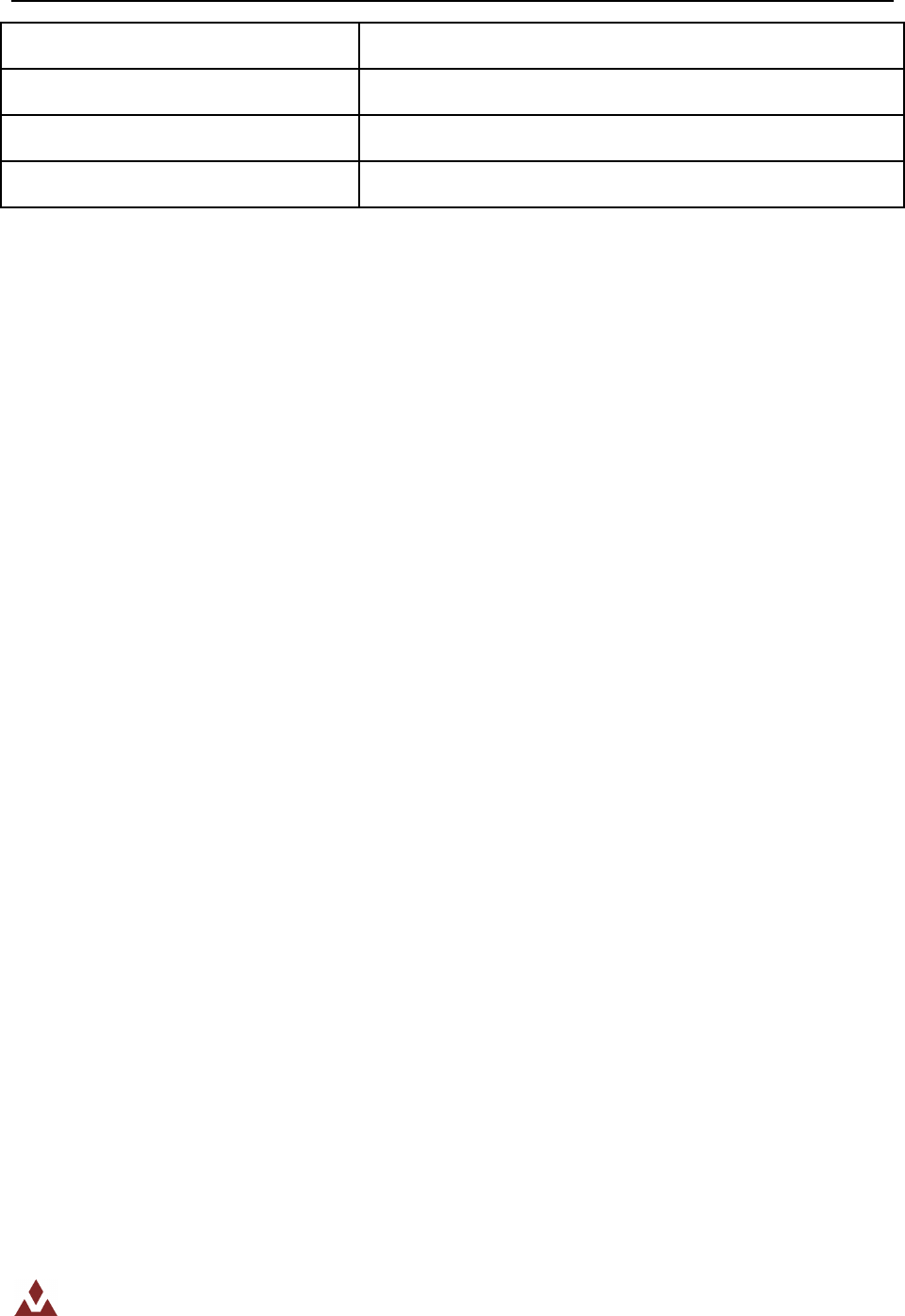
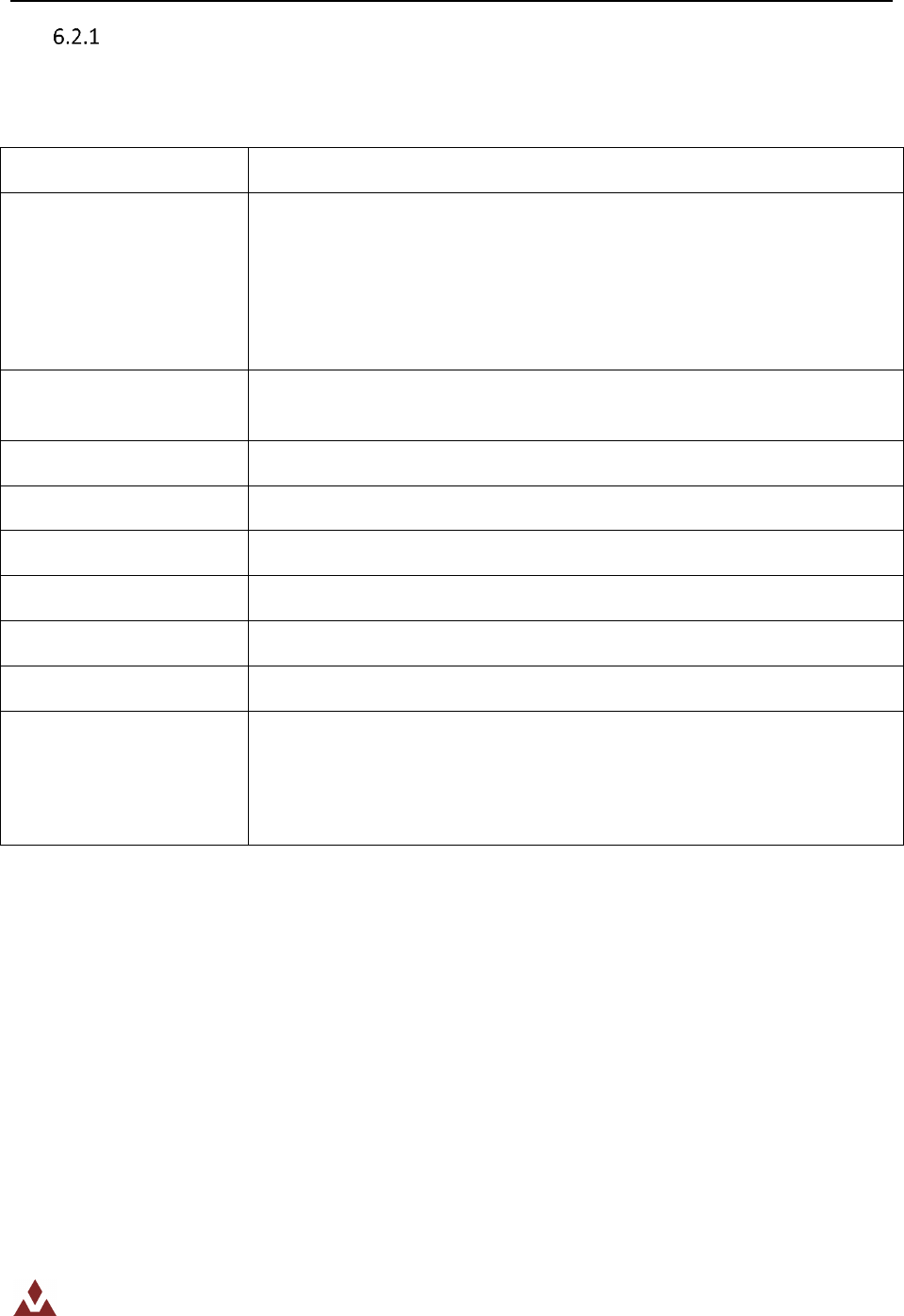
Table 8 lists the various functions of the VN-100 firmware library.
Table 8. VN-100 library functions
Function Name
Description
VN100_SPI_ReadRegister
Read a register on the sensor using SPI
VN100_SPI_WriteRegister
Write to a register on the sensor using SPI
VN100_SPI_GetModel
Get the model number
VN100_SPI_GetHWRev
Get the hardware revision
VN100_SPI_GetSerial
Get the serial number
VN100_SPI_GetFWVer
Get the firmware version
VN100_SPI_GetBaudRate
Get the serial baud rate
VN100_SPI_SetBaudRate
Set the serial baud rate
VN100_SPI_GetADOR
Get the Async Data Output Register Type
VN100_SPI_SetADOR
Set the Async Data Output Register Type
VN100_SPI_GetADOF
Get the Async Data Output Frequency
VN100_SPI_SetADOF
Set the Async Data Output Frequency
VN100_SPI_GetYPR
Get the yaw, pitch, and roll
VN100_SPI_GetQuat
Get the quaternion attitude
VN100_SPI_GetQuatMag
Get the quaternion and magnetic
VN100_SPI_GetQuatAcc
Get the quaternion and acceleration

Embedded Firmware Library UM003
Embedded Firmware Library 26/121
VN100_SPI_GetQuatRates
Get the quaternion, magnetic, and acceleration
VN100_SPI_GetQuatMagAccel
Get the quaternion, magnetic, and angular rates
VN100_SPI_GetQuatAccRates
Get the quaternion, acceleration, and angular rates
VN100_SPI_GetQuatMagAccRates
Get the quaternion, magnetic, acceleration, and angular rates
VN100_SPI_GetYPRMagAccRates
Get the yaw, pitch, roll, magnetic, acceleration, and angular
rates
VN100_SPI_GetDCM
Get the directional cosine matrix
VN100_SPI_GetMag
Get the magnetic measurements
VN100_SPI_GetAcc
Get the acceleration measurements
VN100_SPI_GetRates
Get the angular rate measurements
VN100_SPI_GetMagAccRates
Get the magnetic, acceleration, and angular rates
VN100_SPI_GetMagAccRef
Get the magnetic and acceleration reference vectors
VN100_SPI_SetMagAccRef
Set the magnetic and acceleration reference vectors
VN100_SPI_GetFiltMeasVar
Get the filter measurement variance parameters
VN100_SPI_SetFiltMeasVar
Set the filter measurement variance parameters
VN100_SPI_GetHardSoftIronComp
Get the magnetic hard/soft iron compensation parameters
VN100_SPI_SetHardSoftIronComp
Set the magnetic hard/soft iron compensation parameters
VN100_SPI_GetFiltActTuning
Get the filter active tuning parameters
VN100_SPI_SetFiltActTuning
Set the filter active tuning parameters
VN100_SPI_GetAccComp
Get the accelerometer compensation parameters
VN100_SPI_SetAccComp
Set the accelerometer compensation parameters
VN100_SPI_GetRefFrameRot
Get the reference frame rotation
VN100_SPI_SetRefFrameRot
Set the reference frame rotation
VN100_SPI_GetAccGain
Get the accelerometer gain
VN100_SPI_SetAccGain
Set the accelerometer gain
VN100_SPI_RestoreFactorySettings
Restore sensor to factory default settings
Embedded Firmware Library UM003
Embedded Firmware Library 27/121
VN100_SPI_Tare
Zero out the current attitude
VN100_SPI_Reset
Reset the VN-100 sensor
VN100_SPI_GetAccInertial
Get the measured inertial acceleration
VN100_SPI_GetMagInertial
Get the measured inertial magnetic
Embedded Firmware Library UM003
Embedded Firmware Library 28/121
VN100_SPI_ReadRegister
Table 9 describes the VN100_SPI_ReadRegister function.
Table 9. VN100_SPI_ReadRegister
Function Name
VN100_SPI_ReadRegister
Function prototype
VN100_SPI_Packet* VN100_SPI_ReadRegister(
unsigned char sensorID,
unsigned char regID,
unsigned char regWidth);
Behavior description
Read the register with the ID regID on a VN-100 sensor using the SPI
interface.
Input parameter 1
sensorID: The sensor to get the requested data from
Input parameter 2
regID: The requested register ID number
Input parameter 3
regWidth: The width of the requested register in 32-bit words
Output parameter
None
Return value
Pointer to SPI packet returned by the sensor
Required preconditions
None
Called functions
VN_SPI_SetSS()
VN_SPI_SendReceive()
VN_Delay()
Example:
/* Read model number register */
VN100_SPI_Packet *packet;
packet = VN100_SPI_ReadRegister(0, VN100_REG_MODEL, 3);
Embedded Firmware Library UM003
Embedded Firmware Library 29/121
VN100_SPI_WriteRegister
Table 10 describes the VN100_SPI_WriteRegister function.
Table 10. VN100_SPI_WriteRegister
Function Name
VN100_SPI_WriteRegister
Function prototype
VN100_SPI_Packet* VN100_SPI_WriteRegister(
unsigned char sensorID,
unsigned char regID,
unsigned char regWidth,
unsigned long* ptrWriteValues);
Behavior description
Read the register with the ID regID on a VN-100 sensor using the SPI
interface.
Input parameter 1
sensorID: The sensor to write the requested data to
Input parameter 2
regID: The register ID number
Input parameter 3
regWidth: The width of the register in 32-bit words
Output parameter
ptrWriteValues: The data to write to the requested register.
Return value
Pointer to SPI packet returned by the sensor
Required preconditions
None
Called functions
VN_SPI_SetSS()
VN_SPI_SendReceive()
VN_Delay()
Example:
/* Write to baud rate register */
VN100_SPI_Packet *packet;
unsigned long newBaud = 115200;
packet = VN100_SPI_WriteRegister(0, VN100_REG_SBAUD, 1, &newBaud);
Embedded Firmware Library UM003
Embedded Firmware Library 30/121
VN100_SPI_GetModel
Table 11 describes the VN100_SPI_GetModel function.
Table 11. VN100_SPI_GetModel
Function Name
VN100_SPI_GetModel
Function prototype
VN100_SPI_GetModel(
unsigned char sensorID,
char* model);
Behavior description
Read the model number from the sensor.
Input parameter
sensorID: The sensor to get the model number from
Output parameter
model: Pointer to a character array where the requested model number is
placed. This needs to be a character array that is 12 characters in size.
Return value
Pointer to SPI packet returned by the sensor
Required preconditions
None
Called functions
VN100_SPI_ReadRegister()
Example:
/* Get the sensor model */
VN100_SPI_Packet *packet;
char model[12];
packet = VN100_SPI_GetModel(0, model);
Embedded Firmware Library UM003
Embedded Firmware Library 31/121
VN100_SPI_GetHWRev
Table 12 describes the VN100_SPI_GetHWRev function.
Table 12. VN100_SPI_GetHWRev
Function Name
VN100_SPI_GetHWRev
Function prototype
VN100_SPI_GetHWRev(
unsigned char sensorID,
unsigned long* revision);
Behavior description
Get the hardware revision for the sensor
Input parameter
sensorID: The sensor to get the requested data from
Output parameter
revision: The hardware revision requested
Return value
Pointer to SPI packet returned by the sensor
Required preconditions
None
Called functions
VN100_SPI_ReadRegister()
Example:
/* Get the hardware revision */
VN100_SPI_Packet *packet;
unsigned long revision;
packet = VN100_SPI_GetHWRev(0, &revision);
Embedded Firmware Library UM003
Embedded Firmware Library 32/121
VN100_SPI_GetSerial
Table 13 describes the VN100_SPI_GetSerial function.
Table 13. VN100_SPI_GetSerial
Function Name
VN100_SPI_GetSerial
Function prototype
VN100_SPI_GetSerial(
unsigned char sensorID,
unsigned long* serialNumber);
Behavior description
Get the serial number from the requested sensor
Input parameter
sensorID: The sensor to get the requested data from
Output parameter
serialNumber: The serial number returned by the sensor
Return value
Pointer to SPI packet returned by the sensor
Required preconditions
None
Called functions
VN100_SPI_ReadRegister()
Example:
/* Get the serial number */
VN100_SPI_Packet *packet;
unsigned long SN[3];
packet = VN100_SPI_GetSerial(0, SN);
Embedded Firmware Library UM003
Embedded Firmware Library 33/121
VN100_SPI_GetFWVer
Table 14 describes the VN100_SPI_GetFWVer function.
Table 14. VN100_SPI_GetFWVer
Function Name
VN100_SPI_GetFWVer
Function prototype
VN100_SPI_GetFWVer (
unsigned char sensorID,
unsigned long* firmwareVersion);
Behavior description
Get the firmware version from the requested sensor
Input parameter
sensorID: The sensor to get the requested data from
Output parameter
firmwareVersion: The firmware version returned
Return value
Pointer to SPI packet returned by the sensor
Required preconditions
None
Called functions
VN100_SPI_ReadRegister()
Example:
/* Get the firmware version */
VN100_SPI_Packet *packet;
unsigned long version;
packet = VN100_SPI_ GetFWVer(0, &version);
Embedded Firmware Library UM003
Embedded Firmware Library 34/121
VN100_SPI_GetBaudRate
Table 15 describes the VN100_SPI_GetBaudRate function.
Table 15. VN100_SPI_GetBaudRate
Function Name
VN100_SPI_GetBaudRate
Function prototype
VN100_SPI_GetBaudRate (
unsigned char sensorID,
VN100_BaudType* baudRate);
Behavior description
Get the serial baud rate from the requested sensor
Input parameter
sensorID: The sensor to get the requested data from
Output parameter
baudRate: The baud rate returned by the sensor
Return value
Pointer to SPI packet returned by the sensor
Required preconditions
None
Called functions
VN100_SPI_ReadRegister()
Example:
/* Get the baud rate */
VN100_SPI_Packet *packet;
VN100_BaudType baud;
packet = VN100_SPI_ GetBaudRate(0, &baud);
Embedded Firmware Library UM003
Embedded Firmware Library 35/121
VN100_SPI_SetBaudRate
Table 16 describes the VN100_SPI_SetBaudRate function.
Table 16. VN100_SPI_SetBaudRate
Function Name
VN100_SPI_SetBaudRate
Function prototype
VN100_SPI_SetBaudRate(
unsigned char sensorID,
VN100_BaudType baudRate);
Behavior description
Set the serial baud rate for the requested sensor
Input parameter
sensorID: The sensor to get the requested data from
Output parameter
baudRate : The baud rate to set on the sensor
Return value
Pointer to SPI packet returned by the sensor
Required preconditions
None
Called functions
VN100_SPI_WriteRegister ()
Example:
/* Set the serial baud rate to 115200 */
VN100_SPI_Packet *packet;
packet = VN100_SPI_SetBaudRate(0, VN100_Baud_115200);
Embedded Firmware Library UM003
Embedded Firmware Library 36/121
VN100_SPI_GetADOR
Table 17 describes the VN100_SPI_GetADOR function.
Table 17. VN100_SPI_GetADOR
Function Name
VN100_SPI_GetADOR
Function prototype
VN100_SPI_GetADOR (
unsigned char sensorID,
VN100_ADORType* ADOR);
Behavior description
Get the ADOR register value from the requested sensor
Input parameter
sensorID: The sensor to get the requested data from
Output parameter
ADOR : The value returned for the ADOR register
Return value
Pointer to SPI packet returned by the sensor
Required preconditions
None
Called functions
VN100_SPI_ReadRegister()
Example:
/* Get the ADOR */
VN100_SPI_Packet *packet;
VN100_ADORType ador;
packet = VN100_SPI_GetADOR(0, &ador);
Embedded Firmware Library UM003
Embedded Firmware Library 37/121
VN100_SPI_SetADOR
Table 18 describes the VN100_SPI_SetADOR function.
Table 18. VN100_SPI_SetADOR
Function Name
VN100_SPI_SetADOR
Function prototype
VN100_SPI_SetADOR (
unsigned char sensorID,
VN100_ADORType ADOR);
Behavior description
Set the ADOR register value from the requested sensor
Input parameter
sensorID: The sensor to get the requested data from
Output parameter
ADOR : The value to set the ADOR register to
Return value
Pointer to SPI packet returned by the sensor
Required preconditions
None
Called functions
VN100_SPI_WriteRegister ()
Example:
/* Set the ADOR to output angular rates*/
VN100_SPI_Packet *packet;
packet = VN100_SPI_SetADOR(0, VN100_ADOR_GYR);
Embedded Firmware Library UM003
Embedded Firmware Library 38/121
VN100_SPI_GetADOF
Table 19 describes the VN100_SPI_GetADOF function.
Table 19. VN100_SPI_GetADOF
Function Name
VN100_SPI_GetADOF
Function prototype
VN100_SPI_GetADOF (
unsigned char sensorID,
VN100_ADOFType* ADOF);
Behavior description
Get the async data output frequency
Input parameter
sensorID: The sensor to get the requested data from
Output parameter
ADOR : The frequency returned for the ADOF register
Return value
Pointer to SPI packet returned by the sensor
Required preconditions
None
Called functions
VN100_SPI_ReadRegister()
Example:
/* Get the ADOF */
VN100_SPI_Packet *packet;
VN100_ADOFType adof;
packet = VN100_SPI_GetADOF(0, &adof);
Embedded Firmware Library UM003
Embedded Firmware Library 39/121
VN100_SPI_SetADOF
Table 20 describes the VN100_SPI_SetADOF function.
Table 20. VN100_SPI_SetADOF
Function Name
VN100_SPI_SetADOF
Function prototype
VN100_SPI_SetADOF (
unsigned char sensorID,
VN100_ADOFType ADOF);
Behavior description
Set the async data output frequency
Input parameter
sensorID: The sensor to get the requested data from
Output parameter
ADOR : The desired frequency of the async data output
Return value
Pointer to SPI packet returned by the sensor
Required preconditions
None
Called functions
VN100_SPI_WriteRegister ()
Example:
/* Set the ADOF to 200 Hz */
VN100_SPI_Packet *packet;
packet = VN100_SPI_SetADOF(0, VN100_ADOF_200HZ);
Embedded Firmware Library UM003
Embedded Firmware Library 40/121
VN100_SPI_GetYPR
Table 21 Table 13describes the VN100_SPI_GetYPR function.
Table 21. VN100_SPI_GetYPR
Function Name
VN100_SPI_GetYPR
Function prototype
VN100_SPI_GetYPR(
unsigned char sensorID,
float* yaw,
float* pitch,
float* roll);
Behavior description
Get the measured yaw, pitch, roll orientation angles
Input parameter
sensorID: The sensor to get the requested data from
Output parameter 1
yaw : The yaw angle measured in degrees
Output parameter 2
pitch : The pitch angle measured in degrees
Output parameter 3
roll : The roll angle measured in degrees
Return value
Pointer to SPI packet returned by the sensor
Required preconditions
None
Called functions
VN100_SPI_ReadRegister()
Example:
/* Get the yaw, pitch, and roll*/
VN100_SPI_Packet *packet;
float yaw, pitch, roll;
packet = VN100_SPI_GetYPR(0, &yaw, &pitch, &roll);
Embedded Firmware Library UM003
Embedded Firmware Library 41/121
VN100_SPI_GetQuat
Table 22 describes the VN100_SPI_GetQuat function.
Table 22. VN100_SPI_GetQuat
Function Name
VN100_SPI_GetQuat
Function prototype
VN100_SPI_GetQuat
Behavior description
Get the measured attitude quaternion. The quaternion is a 4x1 vector unit
vector with the fourth term q[3] as the scalar term.
Input parameter
sensorID: The sensor to get the requested data from
Output parameter
q : The address of the location to write the returned measured quaternion
(4x1).
Return value
Pointer to SPI packet returned by the sensor
Required preconditions
None
Called functions
VN100_SPI_ReadRegister()
Example:
/* Get the quaternion */
VN100_SPI_Packet *packet;
float quat[4];
packet = VN100_SPI_GetQuat(0, quat);
Embedded Firmware Library UM003
Embedded Firmware Library 42/121
VN100_SPI_GetQuatMag
Table 23 describes the VN100_SPI_GetQuatMag function.
Table 23. VN100_SPI_GetQuatMag
Function Name
VN100_SPI_GetQuatMag
Function prototype
VN100_SPI_GetQuatMag(
unsigned char sensorID,
float* q,
float* mag);
Behavior description
Get the measured attitude quaternion and magnetic vector. The
quaternion is a 4x1 unit vector with the fourth term q[3] as the scalar term.
The magnetic is a 3x1 vector. The measured magnetic vector does not
have any usable units. The magnetic vector is calibrated at the factory to
have a magnitude of one on the XY plane.
Input parameter
sensorID: The sensor to get the requested data from
Output parameter 1
q : The address of the location to write the returned measured quaternion
(4x1).
Output parameter 2
mag : The magnetic measured vector (3x1)
Return value
Pointer to SPI packet returned by the sensor
Required preconditions
None
Called functions
VN100_SPI_ReadRegister()
Example:
/* Get the quaternion and magnetic */
VN100_SPI_Packet *packet;
float quat[4];
float mag[3];
packet = VN100_SPI_GetQuatMag(0, quat, mag);
Embedded Firmware Library UM003
Embedded Firmware Library 43/121
VN100_SPI_GetQuatAcc
Table 24 describes the VN100_SPI_GetQuatAcc function.
Table 24. VN100_SPI_GetQuatAcc
Function Name
VN100_SPI_GetQuatAcc
Function prototype
VN100_SPI_GetQuatAcc (
unsigned char sensorID,
float* q,
float* acc);
Behavior description
The quaternion is a 4x1 unit vector with the fourth term q[3] as the scalar
term.
Input parameter
sensorID: The sensor to get the requested data from
Output parameter 1
q : Measured quaternion (4x1)
Output parameter 2
acc : Measured acceleration (3x1) in m/s^2
Return value
Pointer to SPI packet returned by the sensor
Required preconditions
None
Called functions
VN100_SPI_ReadRegister()
Example:
/* Get the quaternion and acceleration */
VN100_SPI_Packet *packet;
float quat[4];
float acc[3];
packet = VN100_SPI_GetQuatAcc(0, quat, acc);
Embedded Firmware Library UM003
Embedded Firmware Library 44/121
VN100_SPI_GetQuatRates
Table 25 describes the VN100_SPI_GetQuatRates function.
Table 25. VN100_SPI_GetQuatRates
Function Name
VN100_SPI_GetQuatRates(
unsigned char sensorID,
float* q,
float* rates);
Function prototype
VN100_SPI_GetQuatRates
Behavior description
Get the measured attitude quaternion and angular rates
Input parameter
sensorID: The sensor to get the requested data from
Output parameter 1
q : Measured quaternion (4x1)
Output parameter 2
rates : Measured angular rates (3x1) in rad/s
Return value
Pointer to SPI packet returned by the sensor
Required preconditions
None
Called functions
VN100_SPI_ReadRegister()
Example:
/* Get the quaternion and angular rates*/
VN100_SPI_Packet *packet;
float quat[4];
float rates[3];
packet = VN100_SPI_GetQuatRates(0, quat, rates);
Embedded Firmware Library UM003
Embedded Firmware Library 45/121
VN100_SPI_GetQuatMagAcc
Table 26 describes the VN100_SPI_GetQuatMagAcc function.
Table 26. VN100_SPI_GetQuatMagAcc
Function Name
VN100_SPI_GetQuatMagAcc
Function prototype
VN100_SPI_GetQuatMagAcc(
unsigned char sensorID,
float* q,
float* mag,
float* acc);
Behavior description
Get the measured attitude quaternion, magnetic and acceleration
Input parameter
sensorID: The sensor to get the requested data from
Output parameter 1
q : Measured quaternion (4x1)
Output parameter 2
mag : The magnetic measured vector (3x1)
Output parameter 3
acc : Measured acceleration (3x1) in m/s^2
Return value
Pointer to SPI packet returned by the sensor
Required preconditions
None
Called functions
VN100_SPI_ReadRegister()
Example:
/* Get the quaternion, magnetic, and acceleration */
VN100_SPI_Packet *packet;
float quat[4];
float mag[3];
float acc[3];
packet = VN100_SPI_GetQuatMagAcc(0, quat, mag, acc);
Embedded Firmware Library UM003
Embedded Firmware Library 46/121
VN100_SPI_GetQuatAccRates
Table 27 describes the VN100_SPI_GetQuatAccRates function.
Table 27. VN100_SPI_GetQuatAccRates
Function Name
VN100_SPI_GetQuatAccRates
Function prototype
VN100_SPI_GetQuatAccRates(
unsigned char sensorID,
float* q,
float* acc,
float* rates);
Behavior description
Get the measured attitude quaternion, acceleration, and angular rates
Input parameter
sensorID: The sensor to get the requested data from
Output parameter 1
q : Measured quaternion (4x1)
Output parameter 2
acc : Measured acceleration (3x1) in m/s^2
Output parameter 3
rates : Measured angular rates (3x1) in rad/s
Return value
Pointer to SPI packet returned by the sensor
Required preconditions
None
Called functions
VN100_SPI_ReadRegister()
Example:
/* Get the quaternion, acceleration, and angular rates */
VN100_SPI_Packet *packet;
float quat[4];
float acc[3];
float rates[3];
packet = VN100_SPI_GetQuatAccRates(0, quat, acc, rates);
Embedded Firmware Library UM003
Embedded Firmware Library 47/121
VN100_SPI_GetQuatMagAccRates
Table 28 describes the VN100_SPI_GetQuatMagAccRates function.
Table 28. VN100_SPI_GetQuatMagAccRates
Function Name
VN100_SPI_GetQuatMagAccRates
Function prototype
VN100_SPI_GetQuatMagAccRates(
unsigned char sensorID,
float* q,
float* mag,
float* acc,
float* rates);
Behavior description
Get the measured attitude quaternion, magnetic, acceleration, and angular
rates
Input parameter
sensorID: The sensor to get the requested data from
Output parameter 1
q : Measured quaternion (4x1)
Output parameter 2
mag : The magnetic measured vector (3x1)
Output parameter 3
acc : Measured acceleration (3x1) in m/s^2
Output parameter 4
rates : Measured angular rates (3x1) in rad/s
Return value
Pointer to SPI packet returned by the sensor
Required preconditions
None
Called functions
VN100_SPI_ReadRegister()
Example:
/* Get the quaternion, magnetic, acceleration, and angular rates */
VN100_SPI_Packet *packet;
float quat[4];
float mag[3];
float acc[3];
float rates[3];
packet = VN100_SPI_GetQuatMagAccRates(0, quat, mag, acc, rates);
Embedded Firmware Library UM003
Embedded Firmware Library 48/121
VN100_SPI_GetYPRMagAccRates
Table 29 describes the VN100_SPI_GetYPRMagAccRates function.
Table 29. VN100_SPI_GetYPRMagAccRates
Function Name
VN100_SPI_GetYPRMagAccRates
Function prototype
VN100_SPI_GetYPRMagAccRates(
unsigned char sensorID,
float* YPR,
float* mag,
float* acc,
float* rates);
Behavior description
Get the yaw, pitch, roll, magnetic, acceleration, and angular rates
Input parameter
sensorID: The sensor to get the requested data from
Output parameter 1
YPR : Euler angles (Yaw, Pitch, Roll) in deg
Output parameter 2
mag : The magnetic measured vector (3x1)
Output parameter 3
acc : Measured acceleration (3x1) in m/s^2
Output parameter 4
rates : Measured angular rates (3x1) in rad/s
Return value
Pointer to SPI packet returned by the sensor
Required preconditions
None
Called functions
VN100_SPI_ReadRegister()
Example:
/* Get the yaw, pitch, roll, magnetic, acceleration, and angular rates*/
VN100_SPI_Packet *packet;
float ypr[3];
float mag[3];
float acc[3];
float rates[3];
packet = VN100_SPI_GetYPRMagAccRates(0, ypr, mag, acc, rates);
Embedded Firmware Library UM003
Embedded Firmware Library 49/121
VN100_SPI_GetDCM
Table 30 describes the VN100_SPI_GetDCM function.
Table 30. VN100_SPI_GetDCM
Function Name
VN100_SPI_GetDCM
Function prototype
VN100_SPI_GetDCM(
unsigned char sensorID,
float* DCM);
Behavior description
Get the measured attitude as a directional cosine matrix
Input parameter
sensorID: The sensor to get the requested data from
Output parameter
DCM : Directional Cosine Matrix (9x1). The order of the terms in the matrix
is {first row, second row, third row}
Return value
Pointer to SPI packet returned by the sensor
Required preconditions
None
Called functions
VN100_SPI_ReadRegister()
Example:
/* Get the directional cosine matrix */
VN100_SPI_Packet *packet;
float dcm_data[9] = {0};
float *dcm_ptr = {&dcm_data[0], &dcm_data[3], &dcm_data[6]};
float **dcm = dcm_ptr;
packet = VN100_SPI_GetDCM(0, dcm);
Embedded Firmware Library UM003
Embedded Firmware Library 50/121
VN100_SPI_GetMag
Table 31 describes the VN100_SPI_GetMag function.
Table 31. VN100_SPI_GetMag
Function Name
VN100_SPI_GetMag
Function prototype
VN100_SPI_GetMag(
unsigned char sensorID,
float* mag);
Behavior description
Get the measured magnetic field. The measured magnetic field does not
have any usable units. The magnetic vector is calibrated at the factory to
have a magnitude of one on the XY plane.
Input parameter
sensorID: The sensor to get the requested data from
Output parameter
mag : The magnetic measured vector (3x1)
Return value
Pointer to SPI packet returned by the sensor
Required preconditions
None
Called functions
VN100_SPI_ReadRegister()
Example:
/* Get the magnetic measurements */
VN100_SPI_Packet *packet;
float mag[3];
packet = VN100_SPI_GetMag(0, mag);
Embedded Firmware Library UM003
Embedded Firmware Library 51/121
VN100_SPI_GetAcc
Table 32 describes the VN100_SPI_GetAcc function.
Table 32. VN100_SPI_GetAcc
Function Name
VN100_SPI_GetAcc
Function prototype
VN100_SPI_GetAcc(
unsigned char sensorID,
float* Acc);
Behavior description
Get the measured acceleration. The measured acceleration has the units
of m/s^2 and its range is dependent upon the gain set by the
VN100_SPI_SetAccGain() function.
Input parameter
sensorID: The sensor to get the requested data from
Output parameter
Acc : The measured acceleration (3x1) in m/s^2
Return value
Pointer to SPI packet returned by the sensor
Required preconditions
None
Called functions
VN100_SPI_ReadRegister()
Example:
/* Get the acceleration measurements */
VN100_SPI_Packet *packet;
float acc[3];
packet = VN100_SPI_GetAcc(0, acc);
Embedded Firmware Library UM003
Embedded Firmware Library 52/121
VN100_SPI_GetRates
Table 33 describes the VN100_SPI_GetRates function.
Table 33. VN100_SPI_GetRates
Function Name
VN100_SPI_GetRates
Function prototype
VN100_SPI_GetRates
Behavior description
Get the measured angular rates. The measured angular rates have the
units of rad/s. This is the filtered angular rate and is compensated by the
onboard Kalman filter to account for gyro bias drift.
Input parameter
sensorID: The sensor to get the requested data from
Output parameter
rates : The measured angular rates (3x1) in rad/s
Return value
Pointer to SPI packet returned by the sensor
Required preconditions
None
Called functions
VN100_SPI_ReadRegister()
Example:
/* Get the angular rate measurements */
VN100_SPI_Packet *packet;
float rates[3];
packet = VN100_SPI_GetRates(0, rates);
Embedded Firmware Library UM003
Embedded Firmware Library 53/121
VN100_SPI_GetMagAccRates
Table 34 describes the VN100_SPI_GetMagAccRates function.
Table 34. VN100_SPI_GetMagAccRates
Function Name
VN100_SPI_GetMagAccRates
Function prototype
VN100_SPI_GetMagAccRates(
unsigned char sensorID,
float* mag,
float* acc,
float* rates);
Behavior description
Get the measured magnetic, acceleration, and angular rates. The
measurements are taken in the body reference frame.
Input parameter
sensorID: The sensor to get the requested data from
Output parameter 1
mag : Measured magnetic field (3x1) [Non-dimensional]
Output parameter 2
Acc : Measured acceleration (3x1) [m/s^2]
Output parameter 3
rates : Measured angular rates (3x1) [rad/s]
Return value
Pointer to SPI packet returned by the sensor
Required preconditions
None
Called functions
VN100_SPI_ReadRegister()
Example:
/* Get the magnetic, acceleration, and angular rate measurements */
VN100_SPI_Packet *packet;
float mag[3];
float acc[3];
float rates[3];
packet = VN100_SPI_GetMagAccRates(0, mag, acc, rates);
Embedded Firmware Library UM003
Embedded Firmware Library 54/121
VN100_SPI_GetMagAccRef
Table 35 describes the VN100_SPI_GetMagAccRef function.
Table 35. VN100_SPI_GetMagAccRef
Function Name
VN100_SPI_GetMagAccRef
Function prototype
VN100_SPI_GetMagAccRef(
unsigned char sensorID,
float* refMag,
float* refAcc);
Behavior description
Get the magnetic and acceleration reference vectors. The reference
vectors are the vectors measured by the magnetometer and
accelerometer respectively in the inertial reference frame. The inertial
reference frame is NED (North, East, Down).
Input parameter
sensorID: The sensor to get the requested data from
Output parameter 1
refMag : The reference vector for the magnetic field
Output parameter 2
refAcc : The reference vector for the Accerometer (gravity)
Return value
Pointer to SPI packet returned by the sensor
Required preconditions
None
Called functions
VN100_SPI_ReadRegister()
Example:
/* Get the magnetic and acceleration reference vectors */
VN100_SPI_Packet *packet;
float magRef[3];
float accRef[3];
packet = VN100_SPI_GetMagAccRef(0, magRef, accRef);
Embedded Firmware Library UM003
Embedded Firmware Library 55/121
VN100_SPI_SetMagAccRef
Table 36 describes the VN100_SPI_SetMagAccRef function.
Table 36. VN100_SPI_SetMagAccRef
Function Name
VN100_SPI_SetMagAccRef
Function prototype
VN100_SPI_SetMagAccRef(
unsigned char sensorID,
float* refMag,
float* refAcc)
Behavior description
Set the magnetic and acceleration reference vectors. The reference
vectors are the vectors measured by the magnetometer and
accelerometer respectively in the inertial reference frame. The inertial
reference frame is NED (North, East, Down).
Input parameter
sensorID: The sensor to get the requested data from
Output parameter 1
refMag : The reference vector for the magnetic field
Output parameter 2
refAcc : The reference vector for the Accelerometer (gravity)
Return value
Pointer to SPI packet returned by the sensor
Required preconditions
None
Called functions
VN100_SPI_WriteRegister ()
Example:
/* Set the magnetic and acceleration reference vectors */
VN100_SPI_Packet *packet;
float magRef[3] = {1.0, 0.0, 1.73};
float accRef[3] = {0.0, 0.0, 1.0};
packet = VN100_SPI_GetMagAccRef(0, magRef, accRef);
Embedded Firmware Library UM003
Embedded Firmware Library 56/121
VN100_SPI_GetFiltMeasVar
Table 37 describes the VN100_SPI_GetFiltMeasVar function.
Table 37. VN100_SPI_GetFiltMeasVar
Function Name
VN100_SPI_GetFiltMeasVar
Function prototype
VN100_SPI_GetFiltMeasVar(
unsigned char sensorID,
float* measVar);
Behavior description
Get the Kalman filter measurement variance parameters. This is discussed
in the User Manual in Section 6.22. The measurement variance
parameters controls how much weight the Kalman filter will place on each
measurement. See application note A001 for more details on how to set
these values for your specific application.
Input parameter
sensorID: The sensor to get the requested data from
Output parameter
measVar : The variance on the measured inputs to the filter. This is a
(10x1) vector.
Return value
Pointer to SPI packet returned by the sensor
Required preconditions
None
Called functions
VN100_SPI_ReadRegister()
Example:
/* Get the filter measurement variance parameters */
VN100_SPI_Packet *packet;
float measVar[10];
packet = VN100_SPI_GetFiltMeasVar(0, measVar);
Embedded Firmware Library UM003
Embedded Firmware Library 57/121
VN100_SPI_SetFiltMeasVar
Table 38 describes the VN100_SPI_SetFiltMeasVar function.
Table 38. VN100_SPI_SetFiltMeasVar
Function Name
VN100_SPI_SetFiltMeasVar
Function prototype
VN100_SPI_SetFiltMeasVar(
unsigned char sensorID,
float* measVar);
Behavior description
Set the Kalman filter measurement variance parameters. This is discussed
in the User Manual in Section 6.22. The measurement variance
parameters controls how much weight the Kalman filter will place on each
measurement. See application note A001 for more details on how to set
these values for your specific application.
Input parameter
sensorID: The sensor to get the requested data from
Output parameter
measVar : The variance on the measured inputs to the filter. This is a
(10x1) vector
Return value
Pointer to SPI packet returned by the sensor
Required preconditions
None
Called functions
VN100_SPI_WriteRegister ()
Example:
/* Set the filter measurement variance parameters */
VN100_SPI_Packet *packet;
float measVar[10] = {1e-9,1e-9,1e-9,1e-9,1e-6,1e-6,1e-6,1e-6,1e-6,1e-6};
packet = VN100_SPI_SetFiltMeasVar(0, measVar);
Embedded Firmware Library UM003
Embedded Firmware Library 58/121
VN100_SPI_GetHardSoftIronComp
Table 39 describes the VN100_SPI_GetHardSoftIronComp function.
Table 39. VN100_SPI_GetHardSoftIronComp
Function Name
VN100_SPI_GetHardSoftIronComp
Function prototype
VN100_SPI_GetHardSoftIronComp(
unsigned char sensorID,
float* HSI);
Behavior description
Get the magnetic hard/soft iron compensation parameters. These values
allow the magnetometer to compensate for distortions in the local
magnetic field due to ferromagnetic materials in the vicinity of the sensor.
More information on the parameters can be found in the User Manual in
Section 6.23.
Input parameter
sensorID: The sensor to get the requested data from
Output parameter
HSI : magnetic hard/soft iron paramteters (12x1)
Return value
Pointer to SPI packet returned by the sensor
Required preconditions
None
Called functions
VN100_SPI_ReadRegister()
Example:
/* Get the magnetic hard/soft iron compensation parameters */
VN100_SPI_Packet *packet;
float HSI[12];
packet = VN100_SPI_GetHardSoftIronComp(0, HSI);
Embedded Firmware Library UM003
Embedded Firmware Library 59/121
VN100_SPI_SetHardSoftIronComp
Table 40 describes the VN100_SPI_SetHardSoftIronComp function.
Table 40. VN100_SPI_SetHardSoftIronComp
Function Name
VN100_SPI_SetHardSoftIronComp
Function prototype
VN100_SPI_SetHardSoftIronComp(
unsigned char sensorID,
float* HSI);
Behavior description
Set the magnetic hard/soft iron compensation parameters. These values
allow the magnetometer to compensate for distortions in the local
magnetic field due to ferromagnetic materials in the vicinity of the sensor.
More information on the parameters can be found in the User Manual in
Section 6.23.
Input parameter
sensorID: The sensor to get the requested data from
Output parameter
HSI : magnetic hard/soft iron parameters (12x1)
Return value
Pointer to SPI packet returned by the sensor
Required preconditions
None
Called functions
VN100_SPI_WriteRegister ()
Example:
/* Set the magnetic hard/soft iron compensation parameters */
VN100_SPI_Packet *packet;
float HSI[12] = {1,0,0,0,1,0,0,0,1,0,0,0};
packet = VN100_SPI_SetHardSoftIronComp(0, HSI);
Embedded Firmware Library UM003
Embedded Firmware Library 60/121
VN100_SPI_GetFiltActTuning
Table 41 describes the VN100_SPI_GetFiltActTuning function.
Table 41. VN100_SPI_GetFiltActTuning
Function Name
VN100_SPI_GetFiltActTuning
Function prototype
VN100_SPI_GetFiltActTuning(
unsigned char sensorID,
float gainM,
float gainA,
float memM,
float memA);
Behavior description
Get the filter active tuning parameters. The active tuning parameters
control how the filter handles dynamic disturbances in both magnetic and
acceleration. These values are not needed for normal operation. More on
these parameters can be found in the User Manual in Section 6.24.
Input parameter
sensorID: The sensor to get the requested data from
Output parameter 1
gainM : Magnetic Disturbance Gain
Output parameter 2
gainA : Acceleration Disturbance Gain
Output parameter 3
memM : Magnetic Disturbance Memory
Output parameter 4
memA : Acceleration Disturbance Gain
Return value
Pointer to SPI packet returned by the sensor
Required preconditions
None
Called functions
VN100_SPI_ReadRegister()
Example:
/* Get the filter active tuning parameters */
VN100_SPI_Packet *packet;
float atp1, atp2, atp3, atp4;
packet = VN100_SPI_GetFiltActTuning(0, &atp1, &atp2, &atp3, &atp4);
Embedded Firmware Library UM003
Embedded Firmware Library 61/121
VN100_SPI_SetFiltActTuning
Table 42 describes the VN100_SPI_SetFiltActTuning function.
Table 42. VN100_SPI_SetFiltActTuning
Function Name
VN100_SPI_SetFiltActTuning
Function prototype
VN100_SPI_SetFiltActTuning(
unsigned char sensorID,
float gainM,
float gainA,
float memM,
float memA);
Behavior description
Set the filter active tuning parameters. The active tuning parameters
control how the filter handles dynamic disturbances in both magnetic and
acceleration. These values are not needed for normal operation. More on
these parameters can be found in the User Manual in Section 6.24.
Input parameter
sensorID: The sensor to get the requested data from
Output parameter
gainM : Magnetic Disturbance Gain
gainA : Acceleration Disturbance Gain
memM : Magnetic Disturbance Memory
memA : Acceleration Disturbance Gain
Return value
Pointer to SPI packet returned by the sensor
Required preconditions
None
Called functions
VN100_SPI_WriteRegister ()
Example:
/* Set the filter active tuning parameters */
VN100_SPI_Packet *packet;
float atp[4] = {1.0, 1.0, 0.99, 0.99};
packet = VN100_SPI_SetFiltActTuning(0, &atp[0], &atp[1], &atp[2], &atp[3]);
Embedded Firmware Library UM003
Embedded Firmware Library 62/121
VN100_SPI_GetAccComp
Table 43 describes the VN100_SPI_GetAccComp function.
Table 43. VN100_SPI_GetAccComp
Function Name
VN100_SPI_GetAccComp
Function prototype
VN100_SPI_GetAccComp(
unsigned char sensorID,
float* AccComp);
Behavior description
Get the accelerometer compensation parameters. The purpose of these
parameters is explained in Section 6.25 of the User Manual. These
parameters are not required for normal operation.
Input parameter
sensorID: The sensor to get the requested data from
Output parameter
AccComp : Acceleration compensation register values
Return value
Pointer to SPI packet returned by the sensor
Required preconditions
None
Called functions
VN100_SPI_ReadRegister()
Example:
/* Get the accelerometer compensation parameters */
VN100_SPI_Packet *packet;
float act[12];
packet = VN100_SPI_GetAccComp(0, act);
Embedded Firmware Library UM003
Embedded Firmware Library 63/121
VN100_SPI_SetAccComp
Table 44 describes the VN100_SPI_SetAccComp function.
Table 44. VN100_SPI_SetAccComp
Function Name
VN100_SPI_SetAccComp
Function prototype
VN100_SPI_SetAccComp(
unsigned char sensorID,
float* AccComp);
Behavior description
Set the accelerometer compensation parameters. The purpose of these
parameters is explained in Section 6.25 of the User Manual. These
parameters are not required for normal operation.
Input parameter
sensorID: The sensor to get the requested data from
Input parameter
AccComp : Acceleration compensation register values
Output parameter
None
Return value
Pointer to SPI packet returned by the sensor
Required preconditions
None
Called functions
VN100_SPI_WriteRegister ()
Example:
/* Set the accelerometer compensation parameters */
VN100_SPI_Packet *packet;
float act[12] = {1,0,0,0,1,0,0,0,1,0,0,0};
packet = VN100_SPI_SetAccComp(0, act);
Embedded Firmware Library UM003
Embedded Firmware Library 64/121
VN100_SPI_GetRefFrameRot
Table 45 describes the VN100_SPI_GetRefFrameRot function.
Table 45. VN100_SPI_GetRefFrameRot
Function Name
VN100_SPI_GetRefFrameRot
Function prototype
VN100_SPI_GetRefFrameRot(
unsigned char sensorID,
float* refFrameRot);
Behavior description
Get the reference frame rotation matrix. This matrix allows the user to
transform all measured vectors from the body reference frame of the VN-
100, to any other rigidly attached coordinate frame. The effect of this
transformation is that the computed attitude solution and measured
measurement vectors will now be measured in the chosen coordinate
system of the user and not the VN-100 coordinate system. This is further
explained in Section 6.26 of the User Manual.
Input parameter
sensorID: The sensor to get the requested data from
Output parameter
refFrameRot : Reference frame rotation matrix (9x1)
Return value
Pointer to SPI packet returned by the sensor
Required preconditions
None
Called functions
VN100_SPI_ReadRegister()
Example:
/* Get the reference frame rotation parameters */
VN100_SPI_Packet *packet;
float rfr[9];
packet = VN100_SPI_GetRefFrameRot(0, rfr);
Embedded Firmware Library UM003
Embedded Firmware Library 65/121
VN100_SPI_SetRefFrameRot
Table 46 describes the VN100_SPI_SetRefFrameRot function.
Table 46. VN100_SPI_SetRefFrameRot
Function Name
VN100_SPI_SetRefFrameRot
Function prototype
VN100_SPI_SetRefFrameRot(
unsigned char sensorID,
float* refFrameRot);
Behavior description
Set the reference frame rotation matrix. This matrix allows the user to
transform all measured vectors from the body reference frame of the VN-
100, to any other rigidly attached coordinate frame. The effect of this
transformation is that the computed attitude solution and measured
measurement vectors will now be measured in the chosen coordinate
system of the user and not the VN-100 coordinate system. This is further
explained in Section 6.26 of the User Manual.
Input parameter 1
sensorID: The sensor to get the requested data from
Input parameter 2
refFrameRot : Reference frame rotation matrix (9x1)
Output parameter
None
Return value
Pointer to SPI packet returned by the sensor
Required preconditions
None
Called functions
VN100_SPI_WriteRegister ()
Example:
/* Set the reference frame rotation parameters */
VN100_SPI_Packet *packet;
float rfr[9] = {1,0,0,0,1,0,0,0,1};
packet = VN100_SPI_SetRefFrameRot(0, rfr);
Embedded Firmware Library UM003
Embedded Firmware Library 66/121
VN100_SPI_GetAccGain
Table 47 describes the VN100_SPI_GetAccGain function.
Table 47. VN100_SPI_GetAccGain
Function Name
VN100_SPI_GetAccGain
Function prototype
VN100_SPI_GetAccGain(
unsigned char sensorID,
VN100_AccGainType gain);
Behavior description
Get the current accelerometer gain setting. The accelerometer on the VN-
100 can be set to either a +/- 2g or +/- 6g gain setting.
Input parameter
sensorID: The sensor to get the requested data from
Output parameter
gain : The current accelerometer gain setting
Return value
Pointer to SPI packet returned by the sensor
Required preconditions
None
Called functions
VN100_SPI_ReadRegister()
Example:
/* Get the accelerometer gain */
VN100_SPI_Packet *packet;
VN100_AccGainType gain;
packet = VN100_SPI_GetAccGain(0, &gain);
Embedded Firmware Library UM003
Embedded Firmware Library 67/121
VN100_SPI_SetAccGain
Table 48 describes the VN100_SPI_SetAccGain function.
Table 48. VN100_SPI_SetAccGain
Function Name
VN100_SPI_SetAccGain
Function prototype
VN100_SPI_SetAccGain(
unsigned char sensorID,
VN100_AccGainType gain);
Behavior description
Set the current accelerometer gain setting. The accelerometer on the VN-
100 can be set to either a +/- 2g or +/- 6g gain setting.
Input parameter 1
sensorID: The sensor to get the requested data from
Input parameter 2
gain : The current accelerometer gain setting
Output parameter
None
Return value
Pointer to SPI packet returned by the sensor
Required preconditions
None
Called functions
VN100_SPI_WriteRegister ()
Example:
/* Set the accelerometer gain */
VN100_SPI_Packet *packet;
packet = VN100_SPI_SetAccGain(0, VN100_AccGain_6G);
Embedded Firmware Library UM003
Embedded Firmware Library 68/121
VN100_SPI_RestoreFactorySettings
Table 49 describes the VN100_SPI_RestoreFactorySettings function.
Table 49. VN100_SPI_RestoreFactorySettings
Function Name
VN100_SPI_RestoreFactorySettings
Function prototype
VN100_SPI_RestoreFactorySettings(
unsigned char sensorID);
Behavior description
Restore the selected sensor to factory default state. The values for factory
default state for each register can be found in Section 7 of the User
Manual.
Input parameter
sensorID: The sensor to get the requested data from
Output parameter
None
Return value
Pointer to SPI packet returned by the sensor
Required preconditions
None
Called functions
VN100_SPI_ReadRegister()
Example:
/* Restore sensor to factory default settings */
VN100_SPI_Packet *packet;
packet = VN100_SPI_RestoreFactorySettings(0);
Embedded Firmware Library UM003
Embedded Firmware Library 69/121
VN100_SPI_Tare
Table 50 describes the VN100_SPI_Tare function.
Table 50. VN100_SPI_Tare
Function Name
VN100_SPI_Tare
Function prototype
VN100_SPI_Tare(unsigned char sensorID);
Behavior description
Send a tare command to the selected VN-100. The tare command will zero
out the current sensor orientation. The attitude of the sensor will be
measured form this point onwards with respect to the attitude present
when the tare command was issued. It is important with v4 of the
firmware to keep the device still for at least 3 seconds after performing a
tare command. The tare command will also set the reference vectors in
the inertial frame to the vectors currently measured in the body frame.
Input parameter
sensorID: The sensor to get the requested data from
Output parameter
None
Return value
Pointer to SPI packet returned by the sensor
Required preconditions
None
Called functions
VN100_SPI_ReadRegister()
Example:
/* Zero out current attitude */
VN100_SPI_Packet *packet;
packet = VN100_SPI_Tare(0);
Embedded Firmware Library UM003
Embedded Firmware Library 70/121
VN100_SPI_Reset
Table 51 describes the VN100_SPI_Reset function.
Table 51. VN100_SPI_Reset
Function Name
VN100_SPI_Reset
Function prototype
VN100_SPI_Reset(
unsigned char sensorID);
Behavior description
Command the given sensor to perform a device hardware reset. This is
equivalent to pulling the NRST pin low on the VN-100. Any changes to any
of the registers on the VN-100 that were made since last issuing a Write
Settings commands will be lost.
Input parameter
sensorID: The sensor to get the requested data from
Output parameter
None
Return value
Pointer to SPI packet returned by the sensor
Required preconditions
None
Called functions
VN100_SPI_ReadRegister()
Example:
/* Reset the sensor */
VN100_SPI_Packet *packet;
packet = VN100_SPI_Reset(0);
Embedded Firmware Library UM003
Embedded Firmware Library 71/121
VN100_SPI_GetAccInertial
Table 52 describes the VN100_SPI_GetAccInertial function.
Table 52. VN100_SPI_GetAccInertial
Function Name
VN100_SPI_GetAccInertial
Function prototype
VN100_SPI_GetAccInertial(
unsigned char sensorID,
float *AccI);
Behavior description
Request the inertial acceleration from the VN-100. This function will
internally request both the measured acceleration and attitude from the
sensor, then compute the inertial acceleration. If you want to integrate
your acceleration to find velocity or position, then this is the acceleration
that you want to measure. It is measured in a fixed NED (North, East,
Down) coordinate frame.
Input parameter
sensorID: The sensor to get the requested data from
Output parameter
AccI : The inertial acceleration measured by the device.
Return value
Pointer to SPI packet returned by the sensor
Required preconditions
None
Called functions
VN100_SPI_ReadRegister()
Example:
/* Get the inertial acceleration measurement */
VN100_SPI_Packet *packet;
float accI[3];
packet = VN100_SPI_AccInertial(0, accI);
Embedded Firmware Library UM003
Embedded Firmware Library 72/121
VN100_SPI_GetMagInertial
Table 53 describes the VN100_SPI_GetMagInertial function.
Table 53. VN100_SPI_GetMagInertial
Function Name
VN100_SPI_GetMagInertial
Function prototype
VN100_SPI_GetMagInertial(
unsigned char sensorID,
float *MagI);
Behavior description
Request the inertial magnetic measurement from the VN-100. This
function will internally request both the measured magnetic and attitude
from the sensor, then compute the inertial magnetic measurement. It is
measured in a fixed NED (North, East, Down) coordinate frame.
Input parameter
sensorID: The sensor to get the requested data from
Output parameter
MagI : The inertial magnetic measurement measured by the device.
Return value
Pointer to SPI packet returned by the sensor
Required preconditions
None
Called functions
VN100_SPI_ReadRegister()
Example:
/* Get the inertial magnetic measurement */
VN100_SPI_Packet *packet;
float magI[3];
packet = VN100_SPI_MagInertial(0, magI);
Embedded Firmware Library UM003
Embedded Firmware Library 73/121
7 Math Library
The data structures used in the math library are described in Section 7.1, while Section 7.2 describes the
firmware library functions.
Data Structures
Math library functions
Table 54 lists the various functions of the math firmware library.
Table 54. Math library functions
Function Name
Description
VN_DotP
Compute the dot product of vector A with vector B.
VN_CrossP
Compute the cross product of vector A with vector B.
VN_VecAdd
Compute the addition of vector A with vector B.
VN_VecSub
Compute the subtraction of vector A with vector B.
VN_VecMultT
Compute the multiplication of a vector with the transpose of
another vector.
VN_Diagonal
Create a zero matrix with the diagonal elements equal to the
magnitude of a scalar.
VN_MatAdd
Compute the addition of matrix A and B.
VN_MatSub
Compute the subtraction of matrix A and B.
VN_MatMult
Compute the multiplication of matrix A and B.
VN_MatMultMMT
Compute the multiplication of matrix A with the transpose of
matrix B.
VN_MatMultMTM
Compute the multiplication of the transpose of matrix A with
matrix B.
VN_MatScalarMult
Compute the multiplication of a scalar times a matrix.
VN_MatVecMult
Compute the multiplication of matrix A with vector B.
VN_MatTVecMult
Multiply the transpose of the matrix A by the vector B.
VN_MatCopy
Copy the values from one matrix to another.
VN_MatInv
Compute the matrix inverse of A.

Embedded Firmware Library UM003
Embedded Firmware Library 74/121
VN_SkewMatrix
Compute the matrix cross product of vector V. This operation
converts a vector into a matrix that when multiplied by
another vector would give the result of a cross product
operation between the two vectors.
VN_Transpose
Calculate the transpose of matrix A.
VN_Norm
Compute the length of the given vector with size m x 1.
VN_Normalize
Compute the unit normal vector with the direction given by
vector V1.
VN_Quat2DCM
Convert a quaternion into to a directional cosine matrix.
VN_YPR2DCM
Convert the given yaw, pitch, and roll into a directional cosine
matrix.
VN_MatZeros
Sets all elements of matrix A equal to zero.
VN_Quat2Euler121
Convert a quaternion attitude representation to an Euler
angle 1,2,1 set.
VN_Quat2Euler123
Convert a quaternion attitude representation to an Euler
angle 1,2,3 set.
VN_Quat2Euler131
Convert a quaternion attitude representation to an Euler
angle 1,3,1 set.
VN_Quat2Euler132
Convert a quaternion attitude representation to an Euler
angle 1,3,2 set.
VN_Quat2Euler212
Convert a quaternion attitude representation to an Euler
angle 2,1,2 set.
VN_Quat2Euler213
Convert a quaternion attitude representation to an Euler
angle 2,1,3 set.
VN_Quat2Euler231
Convert a quaternion attitude representation to an Euler
angle 2,3,1 set.
VN_Quat2Euler232
Convert a quaternion attitude representation to an Euler
angle 2,3,2 set.
VN_Quat2Euler312
Convert a quaternion attitude representation to an Euler
angle 3,1,2 set.
VN_Quat2Euler313
Convert a quaternion attitude representation to an Euler
angle 3,1,3 set.
VN_Quat2Euler321
Convert a quaternion attitude representation to an Euler
Embedded Firmware Library UM003
Embedded Firmware Library 75/121
angle 3,2,1 set.
VN_Quat2Euler323
Convert a quaternion attitude representation to an Euler
angle 3,2,3 set.
VN_Quat2Gibbs
Convert a quaternion attitude representation to the Gibbs
angle representation.
VN_Quat2MRP
Convert a quaternion attitude representation to an Modified
Rodrigues Parameters representation.
VN_Quat2PRV
Convert a quaternion attitude representation to the principal
rotation vector.
VN_AddQuat
VN_AddQuat provides the quaternion which corresponds to
performing two successive rotations from q1 and q2.
VN_SubQuat
VN_SubQuat provides the quaternion which corresponds to
the relative rotation from q2 to q1.
VN_QuatKinematicDiffEq
Computes the time rate of change of the quaternion
parameters as a function of the angular rates.
VN_YPRKinematicDiffEq
Computes the time rate of change of the 321 Euler angles
(yaw, pitch, roll) as a function of the angular rates.
VN_Body2Inertial
Converts a vector measured in the body frame into the
inertial reference frame.
VN_Inertial2Body
Convert a vector measured in the inertial frame into the body
reference frame.
Embedded Firmware Library UM003
Embedded Firmware Library 76/121
VN_DotP
Table 55 describes the VN_DotP function.
Table 55. VN_DotP
Function Name
VN_DotP
Function prototype
float VN_DotP(float *A, float *B);
Behavior description
Compute the cross product of vector A with vector B.
Matlab equation
C = dot(A, B)
Input parameter 1
A : 3x1 vector
Input parameter 2
B : 3x1 vector
Output parameter
None
Return value
Result of dot product between two vectors.
Required preconditions
None
Called functions
None
Example:
/* Compute the dot product of A and B */
float A[3];
float B[3];
float C;
C = VN_DotP(A, B);
Embedded Firmware Library UM003
Embedded Firmware Library 77/121
VN_CrossP
Table 56 describes the VN_CrossP function.
Table 56. VN_CrossP
Function Name
VN_CrossP
Function prototype
void VN_CrossP(float *A, float *B, float *C);
Behavior description
Compute the cross product of vector A with vector B.
Matlab equation
C = cross(A, B)
Input parameter 1
A : 3x1 vector
Input parameter 2
B : 3x1 vector
Input parameter 3
C : 3x1 vector
Output parameter
None
Return value
None
Required preconditions
None
Called functions
None
Example:
/* Compute the cross product of A and B */
float A[3];
float B[3];
float C[3];
VN_CrossP(A, B, C);
Embedded Firmware Library UM003
Embedded Firmware Library 78/121
VN_VecAdd
Table 57 describes the VN_VecAdd function.
Table 57. VN_VecAdd
Function Name
VN_VecAdd
Function prototype
void VN_VecAdd(
float *A,
float *B,
unsigned long rows,
float *C);
Behavior description
Compute the addition of vector A with vector B.
Matlab equation
C = A + B
Input parameter 1
A : vector with length given by rows
Input parameter 2
B : vector with length given by rows
Input parameter 3
rows : length of vector A, B, and C
Output parameter
C : result of vector addition
Return value
None
Required preconditions
None
Called functions
None
Example:
/* Add vector A and B */
float A[3];
float B[3];
float C[3];
VN_VecAdd(A, B, 3, C);
Embedded Firmware Library UM003
Embedded Firmware Library 79/121
VN_VecSub
Table 58 describes the VN_VecSub function.
Table 58. VN_VecSub
Function Name
VN_VecSub
Function prototype
void VN_VecSub(
float *A,
float *B,
unsigned long rows,
float *C)
Behavior description
Compute the subtraction of vector A with vector B.
Matlab equation
C = A - B
Input parameter 1
A : vector with length given by rows
Input parameter 2
B : vector with length given by rows
Input parameter 3
rows : length of vector A, B, and C
Output parameter
C : result of vector subtraction
Return value
None
Required preconditions
None
Called functions
None
Example:
/* Subtract vector A and B */
float A[3];
float B[3];
float C[3];
VN_VecSub(A, B, 3, C);
Embedded Firmware Library UM003
Embedded Firmware Library 80/121
VN_VecMultT
Table 59 describes the VN_VecMultT function.
Table 59. VN_VecMultT
Function Name
VN_VecMultT
Function prototype
void VN_VecMultT(
float *A,
float *BT,
unsigned long rows,
float **C)
Behavior description
Compute the multiplication of a vector with the transpose of another
vector. The result will be a square matrix with the size of nxn where
n=rows.
Matlab equation
C = A * transpose(B)
Input parameter 1
A : vector with length given by rows
Input parameter 2
BT : vector with length given by rows
Input parameter 3
rows : length of vector A and B
Output parameter
C : result of multiplication of A with the transpose of B
Return value
None
Required preconditions
None
Called functions
None
Example:
/* Multiply vector A with transpose of vector B */
float A[3];
float B[3];
VN_CreateMatrix(C, 3, 3, {0});
VN_VecMultT(A, B, 3, C);
Embedded Firmware Library UM003
Embedded Firmware Library 81/121
VN_Diagonal
Table 60 describes the VN_Diagonal function.
Table 60. VN_Diagonal
Function Name
VN_Diagonal
Function prototype
void VN_Diagonal(
float scalar,
unsigned long Arows,
unsigned long Acols,
float *A)
Behavior description
Create a diagonal matrix with the diagonal terms equal to scalar and the
non-diagonal elements equal to zero.
Matlab equation
A = scalar * eye(Arows, Acols)
Input parameter 1
scalar : desired magnitude of diagonal terms
Input parameter 2
Arows : number of rows for the resulting matrix A
Input parameter 3
Acols : number of columns for the resulting matrix A
Output parameter
A : resulting diagonal matrix
Return value
None
Required preconditions
None
Called functions
None
Example:
/* Create 5x5 identity matrix */
VN_CreateMatrix(A, 5, 5, {0});
VN_Diagonal(1.0f, 5, 5, A);
Embedded Firmware Library UM003
Embedded Firmware Library 82/121
VN_MatAdd
Table 61 describes the VN_MatAdd function.
Table 61. VN_MatAdd
Function Name
VN_MatAdd
Function prototype
void VN_MatAdd(
float **A,
float **B,
unsigned long Arows,
unsigned long Acols,
float **C)
Behavior description
Compute the addition of matrix A and B.
Matlab equation
C = A + B
Input parameter 1
A : Matrix A with size of Arows x Acols.
Input parameter 2
B : Matrix B with size of Arows x Acols.
Input parameter 3
Arows : Number of rows in matrix A and B.
Input parameter 4
Acols : Number of cols in matrix A and B.
Output parameter
C : Result of matrix addition with size of Arows x Acols.
Return value
None
Required preconditions
None
Called functions
None
Example:
/* Add matrix A and B to get C */
VN_CreateMatrix(A, 3, 3, {0});
VN_CreateMatrix(B, 3, 3, {0});
VN_CreateMatrix(C, 3, 3, {0});
VN_MatAdd(A, B, 3, 3, C);
Embedded Firmware Library UM003
Embedded Firmware Library 83/121
VN_MatSub
Table 62 describes the VN_MatSub function.
Table 62. VN_MatSub
Function Name
VN_MatSub
Function prototype
void VN_MatSub(
float **A,
float **B,
unsigned long Arows,
unsigned long Acols,
float **C)
Behavior description
Compute the subtraction of matrix A and B.
Matlab equation
C = A - B
Input parameter 1
A : Matrix A with size of Arows x Acols.
Input parameter 2
B : Matrix B with size of Arows x Acols.
Input parameter 3
Arows : Number of rows in matrix A and B.
Input parameter 4
Acols : Number of cols in matrix A and B.
Output parameter
C : Result of matrix subtraction with size of Arows x Acols.
Return value
None
Required preconditions
None
Called functions
None
Example:
/* Subtract matrix A and B to get C */
VN_CreateMatrix(A, 3, 3, {0});
VN_CreateMatrix(B, 3, 3, {0});
VN_CreateMatrix(C, 3, 3, {0});
VN_MatSub(A, B, 3, 3, C);
Embedded Firmware Library UM003
Embedded Firmware Library 84/121
VN_MatMult
Table 63 describes the VN_MatMult function.
Table 63. VN_MatMult
Function Name
VN_MatMult
Function prototype
void VN_MatMult(
float **A,
float **B,
unsigned long Arows,
unsigned long Acols,
unsigned long Bcols,
float **C)
Behavior description
Compute the multiplication of matrix A and B.
Matlab equation
C = A * B
Input parameter 1
A : Matrix A with size of Arows x Acols
Input parameter 2
B : Matrix B with size of Acols x Bcols
Input parameter 3
Arows : Number of rows in matrix A
Input parameter 4
Acols : Number of columns in matrix A
Input parameter 5
Bcols : Number of columns in matrix B
Output parameter
C : Result of the matrix multiplication with size Arows x Bcols
Return value
None
Required preconditions
None
Called functions
None
Example:
/* Multiply matrix A and B to get C */
VN_CreateMatrix(A, 3, 3, {0});
VN_CreateMatrix(B, 3, 3, {0});
VN_CreateMatrix(C, 3, 3, {0});
VN_MatMult(A, B, 3, 3, 3, C);
Embedded Firmware Library UM003
Embedded Firmware Library 85/121
VN_MatMultMMT
Table 64 describes the VN_MatMultMMT function.
Table 64. VN_MatMultMMT
Function Name
VN_MatMultMMT
Function prototype
void VN_MatMultMMT(
float **A,
float **BT,
unsigned long Arows,
unsigned long Acols,
unsigned long Brows,
float **C)
Behavior description
Compute the multiplication of matrix A with the transpose of matrix B.
Matlab equation
C = A * transpose(B)
Input parameter 1
A : Matrix A with size of Arows x Acols
Input parameter 2
B : Matrix B with size of Acols x Bcols
Input parameter 3
Arows : Number of rows in matrix A
Input parameter 4
Acols : Number of columns in matrix A
Input parameter 5
Brows : Number of rows in matrix B
Output parameter
C : Result of the matrix multplication with size Arows x Brows
Return value
None
Required preconditions
None
Called functions
None
Example:
/* Multiply matrix A and transpose of B to get C */
VN_CreateMatrix(A, 5, 3, {0});
VN_CreateMatrix(B, 7, 3, {0});
VN_CreateMatrix(C, 5, 7, {0});
VN_MatMultMMT(A, B, 5, 3, 7, C);
Embedded Firmware Library UM003
Embedded Firmware Library 86/121
VN_MatMultMTM
Table 65 describes the VN_MatMultMTM function.
Table 65. VN_MatMultMTM
Function Name
VN_MatMultMTM
Function prototype
void VN_MatMultMTM(
float **A,
float **BT,
unsigned long Arows,
unsigned long Acols,
unsigned long Bcols,
float **C)
Behavior description
Compute the multiplication of matrix A with the transpose of matrix B.
Matlab equation
C = A * transpose(B)
Input parameter 1
A : Matrix A with size of Arows x Acols
Input parameter 2
B : Matrix B with size of Arows x Bcols
Input parameter 3
Arows : Number of rows in matrix A
Input parameter 4
Acols : Number of columns in matrix A
Input parameter 5
Bcols : Number of columns in matrix B
Output parameter
C : Result of the matrix multiplication with size Acols x Bcols
Return value
None
Required preconditions
None
Called functions
None
Example:
/* Multiply the transpose of matrix A and B to get C */
VN_CreateMatrix(A, 3, 5, {0});
VN_CreateMatrix(B, 3, 7, {0});
VN_CreateMatrix(C, 5, 7, {0});
VN_MatMultMTM(A, B, 3, 5, 7, C);
Embedded Firmware Library UM003
Embedded Firmware Library 87/121
VN_MatScalarMult
Table 66 describes the VN_MatScalarMult function.
Table 66. VN_MatScalarMult
Function Name
VN_MatScalarMult
Function prototype
void VN_MatScalarMult(
double **A,
double scalar,
unsigned long Arows,
unsigned long Acols,
double **C)
Behavior description
Compute the multiplication of a scalar times a matrix.
Matlab equation
C = scalar * A
Input parameter 1
scalar : The scalar term
Input parameter 2
A : The matrix with the size Arows x Acols
Input parameter 3
Arows : The number of rows in the matrix A
Input parameter 4
Acols : The number of columns in the matrix B
Output parameter
C : The result of the operation scalar * A
Return value
None
Required preconditions
None
Called functions
None
Example:
/* Multiply all the terms in matrix A by 10 */
VN_CreateMatrix(A, 3, 5, {0});
VN_CreateMatrix(B, 3, 5, {0});
VN_MatMultMTM(A, 10.0f, 3, 5, B);
Embedded Firmware Library UM003
Embedded Firmware Library 88/121
VN_MatVecMult
Table 67 describes the VN_MatVecMult function.
Table 67. VN_MatVecMult
Function Name
VN_MatVecMult
Function prototype
void VN_MatVecMult(
float **A,
float *B,
unsigned long Arows,
unsigned long Acols,
float *C)
Behavior description
Compute the multiplication of matrix A with vector B.
Matlab equation
C = A * B
Input parameter 1
A : Matrix with size Arows x Acols
Input parameter 2
B : Column vector with size Acols x 1
Input parameter 3
Arows : Number of rows in matrix A
Input parameter 4
Acols : Number of columns in matrix A
Output parameter
C : Matrix result with size Arows x Acols
Return value
None
Required preconditions
None
Called functions
None
Example:
/* Multiply matrix A by vector B */
VN_CreateMatrix(A, 3, 3, {0});
float B[3];
float C[3];
VN_MatVecMult(A, B, 3, 3, C);
Embedded Firmware Library UM003
Embedded Firmware Library 89/121
VN_MatTVecMult
Table 68 describes the VN_MatTVecMult function.
Table 68. VN_MatTVecMult
Function Name
VN_MatTVecMult
Function prototype
void VN_MatTVecMult(
float **A,
float *B,
unsigned long Arows,
unsigned long Acols,
float *C)
Behavior description
Multiply the transpose of the matrix A by the vector B.
Matlab equation
C = transpose(A) * B
Input parameter 1
A : Matrix with size Arows x Acols
Input parameter 2
B : Column vector with size Arows x 1
Input parameter 3
Arows : Number of rows in matrix A
Input parameter 4
Acols : Number of columns in matrix A
Output parameter
C : Matrix result with size Acols x Arows
Return value
None
Required preconditions
None
Called functions
None
Example:
/* Multiply transpose of matrix A by vector B */
VN_CreateMatrix(A, 3, 3, {0});
float B[3];
float C[3];
VN_MatTVecMult(A, B, 3, 3, C);
Embedded Firmware Library UM003
Embedded Firmware Library 90/121
VN_MatCopy
Table 69 describes the VN_MatCopy function.
Table 69. VN_MatCopy
Function Name
VN_MatCopy
Function prototype
void VN_MatCopy(
float **A,
unsigned long nrows,
unsigned long ncols,
float **B)
Behavior description
Copy the values from one matrix to another.
Matlab equation
B = A
Input parameter 1
A : Matrix with size nrows x ncols
Input parameter 2
nrows : number of rows in matrix A
Input parameter 3
ncols : number of columns in matrix A
Output parameter
B : Resulting matrix with size nrows x ncols
Return value
None
Required preconditions
None
Called functions
None
Example:
/* Copy matrix A into matrix B */
VN_CreateMatrix(A, 3, 3, {1,0,0,0,1,0,0,0,1}); /* Identity matrix */
VN_CreateMatrix(B, 3, 3, {0});
VN_MatCopy(A, 3, 3, B); /* B will now be equal to A */
Embedded Firmware Library UM003
Embedded Firmware Library 91/121
VN_MatInv
Table 70 describes the VN_MatInv function.
Table 70. VN_MatInv
Function Name
VN_MatInv
Function prototype
void VN_MatInv(
float **A,
s32 n,
float **B)
Behavior description
Compute the matrix inverse of A.
Matlab equation
B = inv(A)
Input parameter 1
A : Matrix with size n x n
Input parameter 2
n : Number of rows or columns in matrix A
Output parameter
B : Matrix result with size n x n
Return value
None
Required preconditions
None
Called functions
None
Example:
/* Calculate inverse of A */
VN_CreateMatrix(A, 3, 3, {1,0,0,0,1,0,0,0,1}); /* Identity matrix */
VN_CreateMatrix(B, 3, 3, {0});
VN_MatInv(A, 3, B); /* B will now be equal to inverse of A */
Embedded Firmware Library UM003
Embedded Firmware Library 92/121
VN_SkewMatrix
Table 71 describes the VN_SkewMatrix function.
Table 71. VN_SkewMatrix
Function Name
VN_SkewMatrix
Function prototype
void VN_SkewMatrix(
float *V,
float **A)
Behavior description
Compute the matrix cross product of vector V. This operation
converts a vector into a matrix that when multiplied by another vector
would give the result of a cross product operation between the two
vectors.
Matlab equation
A = skew(V) where A*b = cross(V,b) if b is a vector same size as V.
Input parameter 1
V : Vector of size 3x1 to perform operation on.
Output parameter
A : Resulting matrix with size 3x3.
Return value
None
Required preconditions
None
Called functions
None
Example:
/* Calculate skew matrix of A */
float A[3] = {1, 0, 0};
float B[3] = {0, 1, 0};
VN_CreateMatrix(C, 3, 3, {0});
float D[3];
VN_SkewMatrix(A, C); /* C will now equal skew matrix of A */
D = VN_MatVecMult(C, B, 3, 3, D); /* D = VN_crossP(A, B) = {0, 0, -1} */
Embedded Firmware Library UM003
Embedded Firmware Library 93/121
VN_Transpose
Table 72 describes the VN_Transpose function.
Table 72. VN_Transpose
Function Name
VN_Transpose
Function prototype
void VN_Transpose(
float **A,
unsigned long Arows,
unsigned long Acols,
float **B)
Behavior description
Calculate the transpose of matrix A.
Matlab equation
B = transpose(A)
Input parameter 1
A : Matrix with size Arows x Acols
Input parameter 2
Arows : Number of rows in matrix A
Input parameter 3
Acols : Number of columns in matrix A
Output parameter
B : Resulting matrix with size Acols x Arows
Return value
None
Required preconditions
None
Called functions
None
Example:
/* Calculate transpose of A */
VN_CreateMatrix(A, 3, 3, {1,2,3,4,5,6,7,8,9});
VN_CreateMatrix(B, 3, 3, {0});
VN_Transpose(A, 3, 3, B); /* B = {1,4,7,2,5,8,3,6,9} */
Embedded Firmware Library UM003
Embedded Firmware Library 94/121
VN_Norm
Table 73 describes the VN_Norm function.
Table 73. VN_Norm
Function Name
VN_Norm
Function prototype
float VN_Norm(
float *A,
unsigned long m)
Behavior description
Compute the length of the given vector with size m x 1.
Matlab equation
norm(A)
Input parameter 1
A : Vector to compute the length of with size m x 1
Input parameter 2
m : Number of terms in the vector A.
Output parameter
None
Return value
The computed length of the vector.
Required preconditions
None
Called functions
None
Example:
/* Calculate length of vector A */
float A[3] = {1, 2, 3};
float len;
len = VN_Norm(A, 3); /* len = sqrt(1*1 + 2*2 + 3*3) */
Embedded Firmware Library UM003
Embedded Firmware Library 95/121
VN_Normalize
Table 74 describes the VN_Normalize function.
Table 74. VN_Normalize
Function Name
VN_Normalize
Function prototype
void VN_Normalize(
float *V1,
unsigned long m,
float *V2)
Behavior description
Compute the unit normal vector with the direction given by vector V1.
Matlab equation
V2 = V1 ./ norm(V1)
Input parameter 1
V1 : Vector with size m x 1
Input parameter 2
m : Number of terms in the vector V1
Output parameter
V2 : Unit vector with the size of m x 1
Return value
None
Required preconditions
None
Called functions
None
Example:
/* Normalize vector A */
float A[3] = {3, 0, 0};
float B[3];
VN_Normalize(A, 3, B); /* B = {1, 0, 0} */
Embedded Firmware Library UM003
Embedded Firmware Library 96/121
VN_Quat2DCM
Table 75 describes the VN_Quat2DCM function.
Table 75. VN_Quat2DCM
Function Name
VN_Quat2DCM
Function prototype
void VN_quat2DCM(
float *q,
float **A)
Behavior description
Convert a quaternion into to a directional cosine matrix.
Matlab equation
A = quat2dcm(q)
Input parameter 1
q : Quaternion attitude
Output parameter
A : Directional cosine matrix (3x3)
Return value
None
Required preconditions
None
Called functions
None
Example:
/* Convert the quaternion into a directional cosine matrix */
float q[4];
VN_CreateMatrix(DCM, 3, 3, {0});
VN100_SPI_GetQuat(0, q); /* Get quaternion from device */
VN100_Quat2DCM(q, DCM); /* Compute the DCM */
Embedded Firmware Library UM003
Embedded Firmware Library 97/121
VN_YPR2DCM
Table 76 describes the VN_YPR2DCM function.
Table 76. VN_YPR2DCM
Function Name
VN_YPR2DCM
Function prototype
void VN_YPR2DCM(
float *YPR,
float **A)
Behavior description
Convert the given yaw, pitch, and roll into a directional cosine matrix.
Matlab equation
A = ANGLE2DCM(YPR[0], YPR[1], YPR[2], 'ZYX')
Input parameter 1
YPR : Yaw, pitch, roll as a 3x1 vector
Output parameter
A : Directional cosine matrix
Return value
None
Required preconditions
None
Called functions
None
Example:
/* Convert the yaw, pitch, roll into a directional cosine matrix */
float ypr[3];
VN_CreateMatrix(DCM, 3, 3, {0});
VN100_SPI_GetYPR(0, &ypr[0], &ypr[1], &ypr[2]); /* Get YPR from device */
VN100_YPR2DCM(q, DCM); /* Compute the DCM */
Embedded Firmware Library UM003
Embedded Firmware Library 98/121
VN_MatZeros
Table 77 describes the VN_MatZeros function.
Table 77. VN_MatZeros
Function Name
VN_MatZeros
Function prototype
void VN_MatZeros(
float **A,
unsigned long Arows,
unsigned long Acols)
Behavior description
Sets all elements of matrix A equal to zero.
Matlab equation
A = zeros(Arows, Acols)
Input parameter 1
A : Matrix with size of Arows x Acols
Input parameter 2
Arows : Number of rows in matrix A
Input parameter 3
Acols : Number of columns in matrix A
Output parameter
Matrix A with all elements set to zero
Return value
None
Required preconditions
None
Called functions
None
Example:
/* Zero out matrix A */
VN_CreateMatrix(A, 3, 3, {1, 0, 0, 0, 1, 0, 0, 0, 0}); /* Identity matrix */
VN_MatZeros(A, 3, 3); /* Zero out matrix A */
Embedded Firmware Library UM003
Embedded Firmware Library 99/121
VN_Quat2Euler121
Table 78 describes the VN_Quat2Euler121 function.
Table 78. VN_Quat2Euler121
Function Name
VN_Quat2Euler121
Function prototype
void VN_Quat2Euler121(
float *q,
float *Euler121)
Behavior description
Convert a quaternion attitude representation to an Euler angle 1,2,1 set.
Matlab equation
Euler121 = quat2angle(q, 'XYX')
Input parameter 1
q : Quaternion 4x1 vector
Output parameter
Euler angles
Return value
None
Required preconditions
None
Called functions
None
Example:
/* Convert the quaternion into a Euler 121 angles */
float q[4];
float Euler121[3];
VN100_SPI_GetQuat(0, q); /* Get quaternion from device */
VN100_Quat2Euler121(q, Euler121); /* Compute the Euler 121 angles */
Embedded Firmware Library UM003
Embedded Firmware Library 100/121
VN_Quat2Euler123
Table 79 describes the VN_Quat2Euler123 function.
Table 79. VN_Quat2Euler123
Function Name
VN_Quat2Euler123
Function prototype
void VN_Quat2Euler123(
float *q,
float *Euler123)
Behavior description
Convert a quaternion attitude representation to an Euler angle 1,2,3 set.
Matlab equation
Euler123 = quat2angle(q, 'XYZ')
Input parameter 1
q : Quaternion 4x1 vector
Output parameter
Euler angles
Return value
None
Required preconditions
None
Called functions
None
Example:
/* Convert the quaternion into a Euler 123 angles */
float q[4];
float Euler123[3];
VN100_SPI_GetQuat(0, q); /* Get quaternion from device */
VN100_Quat2Euler123(q, Euler123); /* Compute the Euler 123 angles */
Embedded Firmware Library UM003
Embedded Firmware Library 101/121
VN_Quat2Euler131
Table 80 describes the VN_Quat2Euler131 function.
Table 80. VN_Quat2Euler131
Function Name
VN_Quat2Euler131
Function prototype
void VN_Quat2Euler131(
float *q,
float *Euler131)
Behavior description
Convert a quaternion attitude representation to an Euler angle 1,3,1 set.
Matlab equation
Euler131 = quat2angle(q, 'XZX')
Input parameter 1
q : Quaternion 4x1 vector
Output parameter
Euler angles
Return value
None
Required preconditions
None
Called functions
None
Example:
/* Convert the quaternion into a Euler 131 angles */
float q[4];
float Euler131[3];
VN100_SPI_GetQuat(0, q); /* Get quaternion from device */
VN100_Quat2Euler131(q, Euler131); /* Compute the Euler 131 angles */
Embedded Firmware Library UM003
Embedded Firmware Library 102/121
VN_Quat2Euler132
Table 81 describes the VN_Quat2Euler132 function.
Table 81. VN_Quat2Euler132
Function Name
VN_Quat2Euler132
Function prototype
void VN_Quat2Euler132(
float *q,
float *Euler132)
Behavior description
Convert a quaternion attitude representation to an Euler angle 1,3,2 set.
Matlab equation
Euler132 = quat2angle(q, 'XZY')
Input parameter 1
q : Quaternion 4x1 vector
Output parameter
Euler angles
Return value
None
Required preconditions
None
Called functions
None
Example:
/* Convert the quaternion into a Euler 132 angles */
float q[4];
float Euler132[3];
VN100_SPI_GetQuat(0, q); /* Get quaternion from device */
VN100_Quat2Euler132(q, Euler132); /* Compute the Euler 132 angles */
Embedded Firmware Library UM003
Embedded Firmware Library 103/121
VN_Quat2Euler212
Table 82 describes the VN_Quat2Euler212 function.
Table 82. VN_Quat2Euler212
Function Name
VN_Quat2Euler212
Function prototype
void VN_Quat2Euler212(float *q, float *Euler212)
Behavior description
Convert a quaternion attitude representation to an Euler angle 2,1,2 set.
Matlab equation
Euler212 = quat2angle(q, 'YXY')
Input parameter 1
q : Quaternion 4x1 vector
Output parameter
Euler angles
Return value
None
Required preconditions
None
Called functions
None
Example:
/* Convert the quaternion into a Euler 212 angles */
float q[4];
float Euler212[3];
VN100_SPI_GetQuat(0, q); /* Get quaternion from device */
VN100_Quat2Euler212(q, Euler212); /* Compute the Euler 212 angles */
Embedded Firmware Library UM003
Embedded Firmware Library 104/121
VN_Quat2Euler213
Table 83 describes the VN_Quat2Euler213 function.
Table 83. VN_Quat2Euler213
Function Name
VN_Quat2Euler213
Function prototype
void VN_Quat2Euler213(
float *q,
float *Euler213)
Behavior description
Convert a quaternion attitude representation to an Euler angle 2,1,3 set.
Matlab equation
Euler213 = quat2angle(q, 'YXZ')
Input parameter 1
q : Quaternion 4x1 vector
Output parameter
Euler angles
Return value
None
Required preconditions
None
Called functions
None
Example:
/* Convert the quaternion into a Euler 213 angles */
float q[4];
float Euler213[3];
VN100_SPI_GetQuat(0, q); /* Get quaternion from device */
VN100_Quat2Euler213(q, Euler213); /* Compute the Euler 213 angles */
Embedded Firmware Library UM003
Embedded Firmware Library 105/121
VN_Quat2Euler231
Table 84 describes the VN_Quat2Euler231 function.
Table 84. VN_Quat2Euler231
Function Name
VN_Quat2Euler231
Function prototype
void VN_Quat2Euler231(float *q, float *Euler231)
Behavior description
Convert a quaternion attitude representation to an Euler angle 2,3,1 set.
Matlab equation
Euler231 = quat2angle(q, 'YZX')
Input parameter 1
q : Quaternion 4x1 vector
Output parameter
Euler angles
Return value
None
Required preconditions
None
Called functions
None
Example:
/* Convert the quaternion into a Euler 231 angles */
float q[4];
float Euler231[3];
VN100_SPI_GetQuat(0, q); /* Get quaternion from device */
VN100_Quat2Euler231(q, Euler231); /* Compute the Euler 231 angles */
Embedded Firmware Library UM003
Embedded Firmware Library 106/121
VN_Quat2Euler232
Table 85 describes the VN_Quat2Euler232 function.
Table 85. VN_Quat2Euler232
Function Name
VN_Quat2Euler232
Function prototype
void VN_Quat2Euler232(
float *q,
float *Euler232)
Behavior description
Convert a quaternion attitude representation to an Euler angle 2,3,2 set.
Matlab equation
Euler232 = quat2angle(q, 'YZY')
Input parameter 1
q : Quaternion 4x1 vector
Output parameter
Euler angles
Return value
None
Required preconditions
None
Called functions
None
Example:
/* Convert the quaternion into a Euler 232 angles */
float q[4];
float Euler232[3];
VN100_SPI_GetQuat(0, q); /* Get quaternion from device */
VN100_Quat2Euler232(q, Euler232); /* Compute the Euler 232 angles */
Embedded Firmware Library UM003
Embedded Firmware Library 107/121
VN_Quat2Euler312
Table 86 describes the VN_Quat2Euler312 function.
Table 86. VN_Quat2Euler312
Function Name
VN_Quat2Euler312
Function prototype
void VN_Quat2Euler312(
float *q,
float *Euler312)
Behavior description
Convert a quaternion attitude representation to an Euler angle 3,1,2 set.
Matlab equation
Euler312 = quat2angle(q, 'ZXY')
Input parameter 1
q : Quaternion 4x1 vector
Output parameter
Euler angles
Return value
None
Required preconditions
None
Called functions
None
Example:
/* Convert the quaternion into a Euler 312 angles */
float q[4];
float Euler312[3];
VN100_SPI_GetQuat(0, q); /* Get quaternion from device */
VN100_Quat2Euler312(q, Euler312); /* Compute the Euler 312 angles */
Embedded Firmware Library UM003
Embedded Firmware Library 108/121
VN_Quat2Euler313
Table 87 describes the VN_Quat2Euler313 function.
Table 87. VN_Quat2Euler313
Function Name
VN_Quat2Euler313
Function prototype
void VN_Quat2Euler313(
float *q,
float *Euler313)
Behavior description
Convert a quaternion attitude representation to an Euler angle 3,1,3 set.
Matlab equation
Euler313 = quat2angle(q, 'ZXZ')
Input parameter 1
q : Quaternion 4x1 vector
Output parameter
Euler angles
Return value
None
Required preconditions
None
Called functions
None
Example:
/* Convert the quaternion into a Euler 313 angles */
float q[4];
float Euler313[3];
VN100_SPI_GetQuat(0, q); /* Get quaternion from device */
VN100_Quat2Euler313(q, Euler313); /* Compute the Euler 313 angles */
Embedded Firmware Library UM003
Embedded Firmware Library 109/121
VN_Quat2Euler321
Table 88 describes the VN_Quat2Euler321 function.
Table 88. VN_Quat2Euler321
Function Name
VN_Quat2Euler321
Function prototype
void VN_Quat2Euler321(
float *q,
float *Euler321)
Behavior description
Convert a quaternion attitude representation to an Euler angle 3,2,1 set.
Matlab equation
Euler321 = quat2angle(q, 'ZYX')
Input parameter 1
q : Quaternion 4x1 vector
Output parameter
Euler angles
Return value
None
Required preconditions
None
Called functions
None
Example:
/* Convert the quaternion into a Euler 321 angles */
float q[4];
float Euler321[3];
VN100_SPI_GetQuat(0, q); /* Get quaternion from device */
VN100_Quat2Euler321(q, Euler321); /* Compute the Euler 321 angles */
Embedded Firmware Library UM003
Embedded Firmware Library 110/121
VN_Quat2Euler323
Table 89 describes the VN_Quat2Euler323 function.
Table 89. VN_Quat2Euler323
Function Name
VN_Quat2Euler323
Function prototype
void VN_Quat2Euler323(
float *q,
float *Euler323)
Behavior description
Convert a quaternion attitude representation to an Euler angle 3,2,3 set.
Matlab equation
Euler323 = quat2angle(q, 'ZYZ')
Input parameter 1
q : Quaternion 4x1 vector
Output parameter
Euler angles
Return value
None
Required preconditions
None
Called functions
None
Example:
/* Convert the quaternion into a Euler 323 angles */
float q[4];
float Euler323[3];
VN100_SPI_GetQuat(0, q); /* Get quaternion from device */
VN100_Quat2Euler323(q, Euler323); /* Compute the Euler 323 angles */
Embedded Firmware Library UM003
Embedded Firmware Library 111/121
VN_Quat2Gibbs
Table 90 describes the VN_Quat2Gibbs function.
Table 90. VN_Quat2Gibbs
Function Name
VN_Quat2Gibbs
Function prototype
void VN_Quat2Gibbs(float *q, float *Gibb)
Behavior description
Convert a quaternion attitude representation to the Gibbs angle
representation.
Matlab equation
N/A
Input parameter 1
q : Quaternion 4x1 vector
Output parameter
Gibb : Gibbs vector
Return value
None
Required preconditions
None
Called functions
None
Example:
/* Convert the quaternion into a Gibbs vector */
float q[4];
float Gibbs[3];
VN100_SPI_GetQuat(0, q); /* Get quaternion from device */
VN100_Quat2Gibbs(q, Gibbs); /* Compute the Gibbs vector */
Embedded Firmware Library UM003
Embedded Firmware Library 112/121
VN_Quat2MRP
Table 91 describes the VN_Quat2MRP function.
Table 91. VN_Quat2MRP
Function Name
VN_Quat2MRP
Function prototype
void VN_Quat2MRP(
float *q,
float *MRP)
Behavior description
Convert a quaternion attitude representation to an Modified Rodrigues
Parameters representation.
Matlab equation
N/A
Input parameter 1
q : Quaternion 4x1 vector
Output parameter
MRP : Modified Rodrigues Parameters
Return value
None
Required preconditions
None
Called functions
None
Example:
/* Convert the quaternion into a Modified Rodrigues Parameters */
float q[4];
float MRP[3];
VN100_SPI_GetQuat(0, q); /* Get quaternion from device */
VN100_Quat2MRP(q, MRP); /* Compute the Modified Rodrigues Parameters */
Embedded Firmware Library UM003
Embedded Firmware Library 113/121
VN_Quat2PRV
Table 92 describes the VN_Quat2PRV function.
Table 92. VN_Quat2PRV
Function Name
VN_Quat2PRV
Function prototype
void VN_Quat2PRV(
float *q,
float *PRV)
Behavior description
Convert a quaternion attitude representation to the principal rotation
vector.
Matlab equation
N/A
Input parameter 1
q : Quaternion 4x1 vector
Output parameter
PRV : Principal rotation vector
Return value
None
Required preconditions
None
Called functions
None
Example:
/* Convert the quaternion into a principal rotation vector */
float q[4];
float PRV[3];
VN100_SPI_GetQuat(0, q); /* Get quaternion from device */
VN100_Quat2PRV(q, PRV); /* Compute the principal rotation vector */
Embedded Firmware Library UM003
Embedded Firmware Library 114/121
VN_AddQuat
Table 93 describes the VN_AddQuat function.
Table 93. VN_AddQuat
Function Name
VN_AddQuat
Function prototype
void VN_AddQuat(
float *q1,
float *q2,
float *q3)
Behavior description
VN_AddQuat provides the quaternion which corresponds to performing
two successive rotations from q1 and q2.
Matlab equation
N/A
Input parameter 1
q1 : First quaternion
Input parameter 2
q2 : Second quaternion
Output parameter
q3 : Combined sucessive rotation of q1 and q2
Return value
None
Required preconditions
None
Called functions
None
Example:
/* Create a combined rotation of quaternion 1 and 2 */
float q1[4];
float q2[4];
float q3[4];
VN100_AddQuat(q1, q2, q3);
Embedded Firmware Library UM003
Embedded Firmware Library 115/121
VN_SubQuat
Table 94 describes the VN_SubQuat function.
Table 94. VN_SubQuat
Function Name
VN_SubQuat
Function prototype
void VN_SubQuat(
float *q1,
float *q2,
float *q3)
Behavior description
VN_SubQuat provides the quaternion which corresponds to the relative
rotation from q2 to q1.
Matlab equation
N/A
Input parameter 1
q1 : First quaternion
Input parameter 2
q2 : Second quaternion
Output parameter
q3 : Relative rotation from q2 to q1
Return value
None
Required preconditions
None
Called functions
None
Example:
/* Create a relative rotation from q2 to q1 */
float q1[4];
float q2[4];
float q3[4];
VN100_SubQuat(q1, q2, q3);
Embedded Firmware Library UM003
Embedded Firmware Library 116/121
VN_QuatKinematicDiffEq
Table 95 describes the VN_QuatKinematicDiffEq function.
Table 95. VN_QuatKinematicDiffEq
Function Name
VN_QuatKinematicDiffEq
Function prototype
void VN_QuatKinematicDiffEq(
float *q,
float *rates,
float *q_dot)
Behavior description
Computes the time rate of change of the quaternion parameters as a
function of the angular rates. You can use this function if you need to
determine how the quaternion parameters are instantaneously changing
as a function of time.
Matlab equation
N/A
Input parameter 1
q : Current attitude quaternion
Input parameter 2
rates : angular rates [rad/s]
Output parameter
q_dot : derivative of q
Return value
None
Required preconditions
None
Called functions
None
Example:
/* Compute the instantaneous time derivative of the quaternion parameters */
float q[4];
float angular_rates[3];
float q_dot[4];
VN100_SPI_GetQuatRates(0, q, angular_rates); /* Get quat and angular rates */
VN_QuatKinematicDiffEq(q,angular_rates,q_dot); /* Derivative of quaternion */
Embedded Firmware Library UM003
Embedded Firmware Library 117/121
VN_YPRKinematicDiffEq
Table 96 describes the VN_YPRKinematicDiffEq function.
Table 96. VN_YPRKinematicDiffEq
Function Name
VN_YPRKinematicDiffEq
Function prototype
void VN_YPRKinematicDiffEq(
float *YPR,
float *rates,
float *YPR_dot)
Behavior description
Computes the time rate of change of the 321 Euler angles (yaw, pitch, roll)
as a function of the angular rates. You can use this function if you need to
determine how the Euler angles are instantaneously changing as a function
of time.
Matlab equation
N/A
Input parameter 1
YPR : Yaw, Pitch, Roll angles [rad]
Input parameter 2
rates : angular rates [rad/s]
Output parameter
YPR_dot : rate of change of yaw, pitch, roll [rad/s]
Return value
None
Required preconditions
None
Called functions
None
Example:
/* Compute the instantaneous time derivative of the Euler angles */
float q[4];
float ypr[3];
float angular_rates[3];
float ypr_dot[3];
VN100_SPI_GetQuatRates(0, q, angular_rates); /* Get quat and angular rates */
VN_Quat2Euler321(q, ypr); /* Convert quaternion into yaw, pitch, and roll */
VN_QuatKinematicDiffEq(q,angular_rates,ypr_dot); /* Get ypr_dot */
/* ypr_dot = {yaw_dot, pitch_dot, roll_dot} where dot is derivative */
Embedded Firmware Library UM003
Embedded Firmware Library 118/121
VN_Body2Inertial
Table 97 describes the VN_Body2Inertial function.
Table 97. VN_Body2Inertial
Function Name
VN_Body2Inertial
Function prototype
void VN_Body2Inertial(float *v1, float *q, float *v2)
Behavior description
Converts a vector measured in the body frame into the inertial reference
frame.
Matlab equation
N/A
Input parameter 1
V1 : vector measured in the body reference frame.
Input parameter 2
q : quaternion attitude of body with respect to the inertial reference
frame. Input in the quaternion here that you receive from the attitude
sensor.
Output parameter
V2 : vector measured in the inertial reference frame.
Return value
None
Required preconditions
None
Called functions
None
Example:
/* Compute the inertial acceleration */
float accel_body[3];
float accel_inertial[3];
float q[4]; /* quaternion */
VN100_SPI_GetQuatAcc(0, q, accel_body); /* Get body acceleration */
VN_Body2Inertial(accel_body, q, accel_inertial); /* Convert to inertial
measured acceleration */
accel_inertial[2] += VN_G; /* Remove gravity in inertial frame */
/* Now accel_inertial is the actual acceleration measured in the body frame.
It can be integrated once to find inertial velocity, and twice to find
inertial acceleration. */
Embedded Firmware Library UM003
Embedded Firmware Library 119/121
VN_Inertial2Body
Table 98 describes the VN_Inertial2Body function.
Table 98. VN_Inertial2Body
Function Name
VN_Inertial2Body
Function prototype
void VN_Inertial2Body(float *v1, float *q, float *v2)
Behavior description
Convert a vector measured in the inertial frame into the body reference
frame.
Matlab equation
N/A
Input parameter 1
V1 : vector measured in the inertial reference frame.
Input parameter 2
q : quaternion attitude of body with respect to the inertial reference
frame. Input in the quaternion here that you receive from the attitude
sensor.
Output parameter
V2 : vector measured in the body reference frame.
Return value
None
Required preconditions
None
Called functions
None
Example:
/* Compute the body acceleration without gravity */
float accel_body[3]; /* Accel in body frame */
float gravityB[3]; /* Gravity in body frame */
float q[4]; /* Quaternion */
float gravityI[3] = {0,0,-VN_G}; /* Gravity acceleration in inertial frame */
VN100_SPI_GetQuatAcc(0, q, accel_body); /* Get quat and measured accel in
body reference frame */
VN_Inertial2Body(gravity, q, gravityB); /* Convert gravity into body frame */
VN_vecSub(accel_body, gravityB, 3, accel_body); /* Remove gravity in body
frame */
/* Now accel_body is the actual acceleration measured in the body reference
frame. The acceleration measured by the accelerometers is the actual
acceleration plus the “measured” acceleration due to gravity. */
Embedded Firmware Library UM003
Embedded Firmware Library 120/121
8 Revision history
Table 99. Revision history
Date
Revision
Changes
Oct-06-2009
1
Initial release.
Jun-16-2014
1.1
Updated document formatting.

Embedded Firmware Library UM003
Embedded Firmware Library 121/121
Please Read Carefully:
Information in this document is provided solely in connection with VectorNav products. VectorNav Technologies
(VN) reserves the right to make changes, corrections, modifications, or improvements to this document, and the
products and services described herein at any time, without notice.
All VN products are sold pursuant of VN’s terms and conditions of sale.
No license to any intellectual property, expressed or implied, is granted under this document. If any part of this
document refers to any third party products or services it shall not be deemed a license grant by VN for the use of
such third party products or services, or any intellectual property contained therein or considered as a warranty
covering the use in any manner whatsoever of such third party products or services or any intellectual property
contained therein.
Information in this document supersedes and replaces all information previously supplied.
The VectorNav logo is a registered trademark of VectorNav Technologies. All other names are the property of their
respective owners.
© 2009 VectorNav Technologies – All rights reserved
