StrideLinx Industrial VPN Router User Manual Appendix E Appxe
User Manual: Pdf Appendix E StrideLinx Series Industrial VPN Router - AutomationDirect
Open the PDF directly: View PDF  .
.
Page Count: 8

Appendix
Appendix
Appendix
E
E
E
StrideLinx network
Security
In this Appendix...
Introduction: Intended Audience ...............................................................................E-2
Solution explained ......................................................................................................E-2
StrideLinx Router ....................................................................................................... E-2
StrideLinx Platform ....................................................................................................E-2
StrideLinx Client ........................................................................................................E-2
Overview ................................................................................................................... E-2
Controls Network Security .........................................................................................E-4
Remote access ........................................................................................................... E-4
Local access ...............................................................................................................E-4
Company Network Security .......................................................................................E-5
Connectivity ..............................................................................................................E-5
Remote access ........................................................................................................... E-6
Local access ...............................................................................................................E-6
StrideLinx Platform Security.......................................................................................E-6
Servers ......................................................................................................................E-6
StrideLinx platform .................................................................................................... E-6
VPN Client Security ....................................................................................................E-7

StrideLinx™ Industrial VPN Routers User Manual 1st Edition, Rev. C
E-2
E
2
3
4
5
6
7
8
9
10
11
12
13
14
A
B
C
D
Appendix E: StrideLinx Network Security
Linx
Introduction: Intended Audience
The StrideLinx Remote Access Solution is designed to offer safe and secure remote access
to industrial equipment worldwide for efficient remote troubleshooting, programming and
monitoring. As a result, it significantly reduces service costs and machine downtime. The
intended audience of this document is personnel responsible for the administration and security
of the network environment in which the StrideLinx product will reside (i.e., IT dept., network
admins, etc.). The router will generate outbound traffic to create an internet connection;
therefore, the network administrator of your network should be consulted.
The StrideLinx platform and router provide a secure method to access your control devices
remotely, but it is important to note that it is just one part of an overall security strategy.
It is important to evaluate and re-evaluate over time, the conditions of your particular
network. A list of helpful resources is available at http://support.automationdirect.com/docs/
securityconsiderations.pdf.
Solution explained
The StrideLinx Remote Access Solution comprises the StrideLinx router, web-based platform,
and VPN client.
StrideLinx Router
The StrideLinx router can easily be connected to the hardware on your machine, allowing you
to access your machine remotely for monitoring, troubleshooting and service purposes. ADC
will offer the router in 3 variants: Ethernet wired, 4G LTE (America – AT&T) and WiFi
(802.11b/g/n). The 4G LTE & WiFi models can also be configured as wired by using the
RJ45 WAN port.
StrideLinx Platform
The StrideLinx platform is a secure web-based platform made up of a worldwide network of
scalable servers. It is focused on delivering and enhancing innovative secure remote access.
The StrideLinx router connects your hardware to the StrideLinx platform via a secure VPN
connection.
StrideLinx Client
The VPN client is a light-weight application that runs in the background on your laptop or PC.
A VPN connection is established when you use the StrideLinx platform to remotely connect to
your devices.
Overview
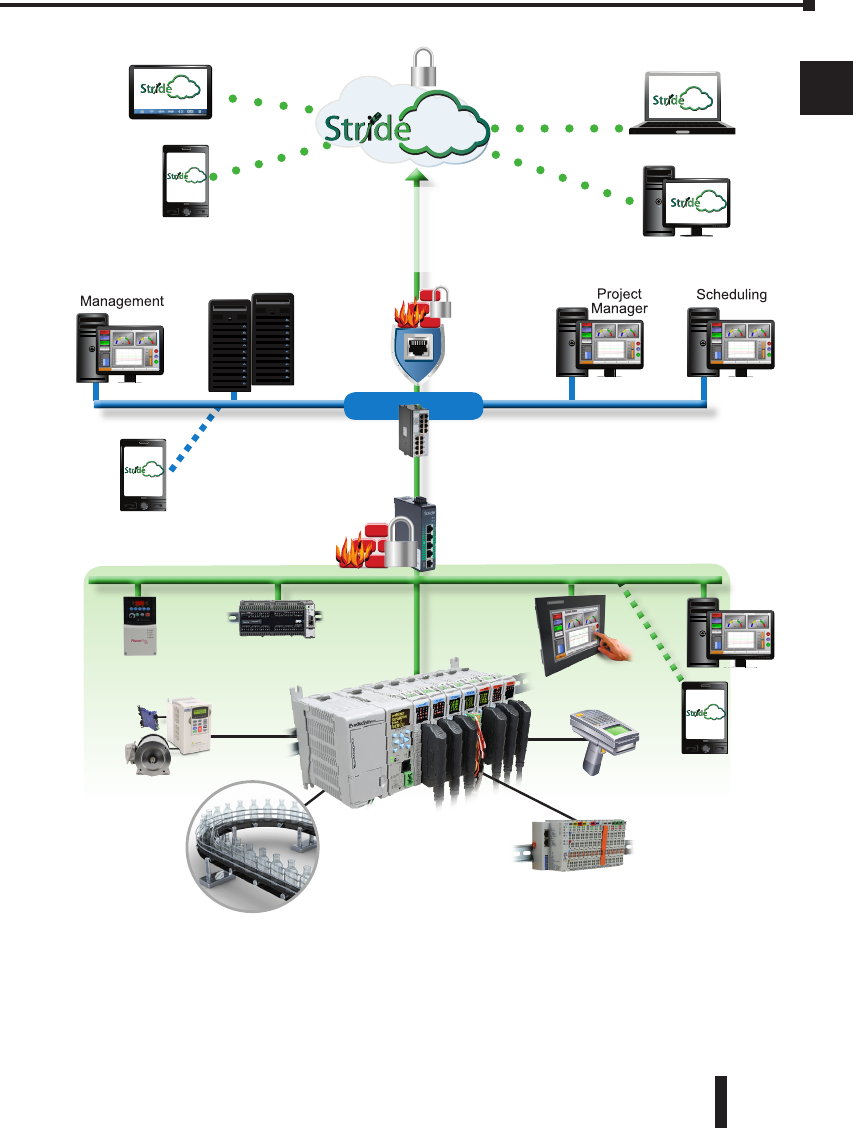
The remote access solution is made up of two connections – the client to platform (cloud
servers) and the platform (cloud servers) to the router. This first connection is made when the
local VPN router makes a VPN connection to the cloud server immediately upon startup. This
ensures that all traffic between the router and platform is securely encrypted through the VPN
tunnel. Communication for this link is initiated by the local router to the cloud-based server via
an outbound connection through standard ports that are typically open, such as HTTPS. This
usually requires no changes to the corporate IT firewall, thus satisfying IT security concerns.
StrideLinx™ Industrial VPN Routers User Manual 1st Edition, Rev. C E-3
Appendix E: StrideLinx Network Security
E
2
3
4
5
6
7
8
9
10
11
12
13
14
A
B
C
D
Field I/O
PLC
Application
Hand-held
Scanner
Ethernet
Outgoing
Connection
HMI
EtherNet/IP
Devices
PLC
VFD/Motor
VPN Connection
Linx
Linx
Linx
Plant/Controls Network
Internal
Fire Wall
Company Network
Linx
HTTPS Connection
Corporate
Servers
Corporate
Fire
Wall
VPN router
Linx Company
WiFi
Linx
Plant
WiFi
Linx
With the router and server connected, the remote user is given two options for the second
connection between them and the cloud servers. The first option is to connect by HTTPS
by simply connecting the mobile device or PC/laptop to the platform using a web browser
(clientless access). No VPN client is required for this mode and allows the user flexibility in
connecting to the platform from any mobile device or PC with a web browser. Capabilities in

StrideLinx™ Industrial VPN Routers User Manual 1st Edition, Rev. C
E-4
E
2
3
4
5
6
7
8
9
10
11
12
13
14
A
B
C
D
Appendix E: StrideLinx Network Security
Linx
this mode include all standard platform functionality except VPN connection. The user has
access to the router, but not to the LAN devices behind the router. So, programming software
and other tools that require being on the local area network will not work in this mode. Two
features that are supported in clientless access mode are VNC server & web server access by
creating a shortcut on the Info tab of the router. This shortcut creates a secure port forward
from the LAN port to the VPN tunnel. The shortcut allows users to access all of the features
included on the LAN devices’ VNC or web servers in a secure manner. Clientless access mode
is protected by TLS1.2, but does not pass through the VPN tunnel from the cloud server to the
remote user.
The second option for users to connect is by PC/laptop to the platform by VPN, allowing
full local area network access. This method requires users log in to the platform through a
web browser and have the VPN client installed on their PC. Upon a verified request from the
remote user, the VPN client connects to the cloud server, providing a full VPN connection
from remote user (PC) to the router. Once both connections have been made, all data passing
through this VPN tunnel is secure.
Controls Network Security
Remote access
The StrideLinx router is equipped with a built-in firewall that completely separates the WAN
port (company network) from the LAN ports (controls network). The firewall blocks all
communication except for authorized and encrypted data verified by a valid certificate. This
means that only authorized users can access the controls network via our StrideLinx platform.
Local access
Default settings allow for zero communication from the company network to the controls
network (and vice versa). The StrideLinx router is configurable to allow communication from
the controls network to the company network, to the internet, or both. Authorization under
this scenario is by means of the firewall section of the Configuration in the StrideLinx platform.
There are three types of port forwarding supported in the StrideLinx router: LAN→WAN,
WAN→LAN, VPN→LAN.
• LAN→WAN options allow access from the LAN to the corporate network or the internet.
This option is needed if you are accessing an FTP or mail server on the corporate network
or cloud. This option maintains good security practice if the corporate router is in place
with strong security measures.
• WAN→LAN options allow access by port forwarding to incoming traffic.
WARNING: This is usually not recommended as it opens specific ports to anyone on the
internet and could make the control network unsecure.
• VPN→LAN port forwarding provides a secure port forward inside the encrypted VPN
tunnel so that StrideLinx users can access the HTTP server or VNC server of their control
network devices by shortcut services in the StrideLinx platform. This feature allows the
clientless access mode for mobile & PC users as described in the “Solutions Explained”
section above.

StrideLinx™ Industrial VPN Routers User Manual 1st Edition, Rev. C E-5
Appendix E: StrideLinx Network Security
E
2
3
4
5
6
7
8
9
10
11
12
13
14
A
B
C
D
Company Network Security
Connectivity
The StrideLinx router uses an outgoing port to establish a secure connection to our StrideLinx
platform. This means there is no need to open any incoming ports in your firewall. Via this
outgoing port, the StrideLinx router connects to different servers: REST API, MQTT and
OpenVPN servers. The IP addresses of these servers, as well as the number of servers, may
change over time and are thus not pre-defined. What is pre-defined is the domain of these
servers. This is why the StrideLinx router needs to be able to perform DNS requests; otherwise,
the StrideLinx router can’t connect to our servers.
Below is an overview of the outgoing ports and protocols that the StrideLinx router utilizes.
Outgoing Ports and Protocols
Port Protocol Application
443 TCP HTTPS, MQTT/TSL, OpenVPN
53 TCP & UDP DNS
Port 443 is a port that is normally open and also used by other services to set up a secure
connection (i.e. internet banking).
If necessary, the local (plant) IT department can choose to allow internet access based on the
MAC address or IP address of the StrideLinx router. The router WAN IP address can be set to
a static IP address on the wired router configuration; the WiFi router is set to default. However,
by default the WAN IP address is set to be obtained automatically via DHCP.
To communicate with the StrideLinx platform, the StrideLinx router firmware uses the proven
encryption standard SSL / TLS. The required TLS key exchange, crucial for security, is done
in accordance with the industry standard 2048-bit RSA with SHA-256. During the RSA
handshake the public server keys are shared and with built-in Certificate Authorities the server’s
identity is verified. The StrideLinx agent does not use 3rd party Certificate Authorities which
guarantees an up-to-date security for embedded devices. When setting up a VPN tunnel, the
necessary security licenses are downloaded and the Blowfish/AES encrypted VPN tunnel is
set up. Attacks like Man-in-the-middle, spoofing ARP and DNS hijacking will be detected
immediately.
The StrideLinx router remains permanently connected to the platform and sends out ‘keep-alive
heartbeats’ on a regular interval. The remote connection between the StrideLinx router and
StrideLinx platform can be managed by the local operator. A digital input allows the user to
enable/disable the VPN connection at the flick of a switch, literally. For instance, this input can
be used by plant personnel to manage access to the router by outside personnel on an as-needed
basis. Alternatively, the connection can be terminated by powering off the StrideLinx router.
Once it is powered again, the StrideLinx router automatically re-establishes the connection with
the StrideLinx platform.

StrideLinx™ Industrial VPN Routers User Manual 1st Edition, Rev. C
E-6
E
2
3
4
5
6
7
8
9
10
11
12
13
14
A
B
C
D
Appendix E: StrideLinx Network Security
Linx
If the local (plant) IT department does not allow any form of internet connection to third party
hardware, the StrideLinx router with 4G LTE may be used to isolate the controls network from
the corporate IT network. LTE 4G access requires a standard SIM card (standard size, 2FF) for
cellular internet access.
Remote access
The StrideLinx router is equipped with a built-in firewall that completely separates the WAN
port (company network) from the LAN ports (controls network). The firewall blocks all
communication except for authorized and encrypted data verified by a valid certificate. This
means that only authorized users can access the controls network via our StrideLinx platform.
Local access
Default settings allow for zero communication from the company network to the controls
network (and vice versa). The StrideLinx router is configurable to allow communication from
the controls network to the company network, to the internet, or both. Authorization under
this scenario is by means of the firewall section of the Configuration in the StrideLinx platform.
There are three types of port forwarding supported in the StrideLinx router: LAN→WAN,
WAN→LAN, VPN→LAN.
• LAN→WAN options allow access from the LAN to the corporate network or the internet.
This option is needed if you are accessing a FTP or mail server on the corporate network
or cloud. This option maintains good security practice if the corporate router is in place
with strong security measures.
• WAN→LAN options allow access by port forwarding to incoming traffic.
WARNING: This is usually not recommended as it opens specific ports to anyone on the
internet and could make the control network unsecure.
• VPN→LAN port forwarding provides a secure port forward inside the encrypted VPN
tunnel so that StrideLinx users can access the HTTP server or VNC server of their controls
network devices by shortcut services in the StrideLinx platform. This feature allows the
clientless access mode for mobile & PC users as described in the “Solution Explained”
section above.
StrideLinx Platform Security
Servers
Our servers are hosted at one of the world’s largest cloud providers. All servers are certified by
national and international safety standards.
StrideLinx platform
A crucial link within the complete StrideLinx solution is the StrideLinx platform, which acts as
a secure proxy for the data between the StrideLinx router and StrideLinx client. The browser
always checks for the valid SSL certificate on the StrideLinx platform. As a result, the StrideLinx
platform is protected against so called man-in-the-middle attacks.

StrideLinx™ Industrial VPN Routers User Manual 1st Edition, Rev. C E-7
Appendix E: StrideLinx Network Security
E
2
3
4
5
6
7
8
9
10
11
12
13
14
A
B
C
D
Only authorized users can access the controls network via our StrideLinx platform. This requires
you to have an account (login information) as well as having received an invite to the particular
company and being granted access and permission to the registered StrideLinx router(s).
The StrideLinx platform checks for login attempts forced by software to identify a username
and password combination (so called Brute Force Attacks). Such attempts are detected and
blocked by the StrideLinx platform. As an additional safety measure it is possible to set up
2-factor authentication for your account.
All login sessions, connections with the StrideLinx router, changes made to the details or
configuration and reboots of the StrideLinx router are being logged with a timestamp and
designated user (if applicable). All these logs can be viewed on the StrideLinx platform under
“Latest events”: when navigating to “Devices” and selecting a specific StrideLinx router, or
when navigating to “Users” and selecting a specific user.
The StrideLinx platform is the only component in the complete StrideLinx solution in which
ports are exposed to the Internet. However, only VPN connections which carry a valid x.509
certificate receive access. The certificate is downloaded automatically once the user is successfully
logged in and presses “connect” to connect to a specific StrideLinx router.
VPN Client Security
StrideLinx client is a light-weight application that runs in the background on your PC. It creates
a virtual Ethernet port on your PC and handles all communication between your PC and the
StrideLinx platform.
The StrideLinx client uses the proven encryption standard SSL / TLS. The required TLS key
exchange, crucial for security, is done in accordance with the industry standard 2048-bit RSA
with SHA-256. During the RSA handshake the public server keys are shared, with built-in
Certificate Authorities the server’s identity is verified. The StrideLinx client does not use 3rd
party Certificate Authorities which guarantees an up-to-date security. When setting up a VPN
tunnel, the necessary security licenses are downloaded and the Blowfish/AES encrypted VPN
tunnel is set up. Attacks like man-in-the-middle, spoofing ARP and DNS hijacking will be
detected immediately.

StrideLinx™ Industrial VPN Routers User Manual 1st Edition, Rev. C
E-8
E
2
3
4
5
6
7
8
9
10
11
12
13
14
A
B
C
D
Appendix E: StrideLinx Network Security
Linx
