Manual
User Manual: Pdf
Open the PDF directly: View PDF  .
.
Page Count: 145 [warning: Documents this large are best viewed by clicking the View PDF Link!]
Qizx Manual
Axyana Software, XMLmind <qizx-support@xmlmind.com>

Qizx Manual
by Axyana Software
Version 4.1p1
Published December 1, 2010
Copyright © 2010 Axyana Software, XMLmind

Foreword .................................................................................................................................... vii
I. Installation ................................................................................................................................. 1
1. Requirements ..................................................................................................................... 2
2. Installation ........................................................................................................................ 3
1. Install on Linux .......................................................................................................... 3
2. Manual install on Windows ........................................................................................... 3
3. Installation of Qizx Server ............................................................................................ 4
3. Content of the distribution .................................................................................................... 5
II. User's Guide .............................................................................................................................. 7
4. Getting started .................................................................................................................... 8
1. Introduction ............................................................................................................... 8
1.1. About the data samples used in this tutorial ........................................................... 8
2. Creating an XML Library ............................................................................................. 9
2.1. Creating a Library using Qizx Studio .................................................................. 10
2.2. Creating a Library using the qizx command-line tool ............................................. 12
3. Populating a Library with Collections and Documents ...................................................... 12
3.1. Importing XML Documents using Qizx Studio ..................................................... 12
3.2. Importing XML Documents using the qizx tool .................................................... 14
4. Exporting Documents from an XML Library .................................................................. 15
4.1. Using Qizx Studio .......................................................................................... 15
4.2. Using the qizx command-line tool ...................................................................... 16
5. Querying a Library .................................................................................................... 16
5.1. Writing and running queries with Qizx Studio ...................................................... 16
5.2. Running queries with the qizx command line tool ................................................. 17
6. Copying, Renaming, Deleting Documents and Collections ................................................ 18
6.1. Using Qizx Studio .......................................................................................... 18
6.2. Using the qizx command-line tool ...................................................................... 18
7. Updating XML Documents ......................................................................................... 18
8. Using Metadata Properties .......................................................................................... 19
8.1. Properties in Qizx Studio ................................................................................. 20
8.2. Properties in the qizx command-line tool ............................................................. 21
8.3. Extension functions for Property handling ........................................................... 21
8.4. Using property queries to restrict the search domain of a standard query ................... 21
8.5. Custom indexes .............................................................................................. 22
5. Installing and Using Qizx Server .......................................................................................... 23
1. Architecture ............................................................................................................. 23
1.1. Protocol ........................................................................................................ 24
1.2. Server-side Implementation .............................................................................. 25
1.3. Client-side Implementation ............................................................................... 25
2. Installation ............................................................................................................... 25
2.1. Requirements ................................................................................................. 25
2.2. Deployment of the standalone server with a configuration wizard ............................ 25
2.3. Manual Installation Procedure ........................................................................... 27
2.3.1. Troubleshooting ................................................................................... 30
2.4. Testing the server ............................................................................................ 30
2.5. What to do next .............................................................................................. 32
3. Access Control ......................................................................................................... 32
3.1. How ACL work in Qizx Server .......................................................................... 33
3.2. Setting ACL in Qizx Server .............................................................................. 34
4. Developer Documentation .......................................................................................... 34
4.1. API service .................................................................................................... 34
4.2. XQuery services ............................................................................................. 35
4.2.1. Protocol ............................................................................................. 35
4.2.2. Creating services .................................................................................. 35
4.2.3. Description of available services ............................................................. 35
4.2.4. Parameters .......................................................................................... 36
4.2.5. Result type and output options ................................................................ 37
4.2.6. Documentation of services ..................................................................... 37
iii

6. Support of standard XQuery Update ..................................................................................... 38
7. Support of standard XQuery Full-Text ................................................................................... 39
1. Tutorial Introduction to the standard XQuery Full-Text ..................................................... 39
2. Support of the XQuery Full-Text facilities in Qizx ........................................................... 39
2.1. Supported Features ......................................................................................... 39
2.2. Unsupported Features ...................................................................................... 40
2.3. Scoring ......................................................................................................... 41
2.4. Tokenization .................................................................................................. 41
2.5. Other pluggable functionalities .......................................................................... 42
3. Migration Guide from former Full-Text implementation ................................................... 42
8. Configuring the indexing process ......................................................................................... 44
1. Introduction ............................................................................................................. 44
2. Indexing in Qizx ....................................................................................................... 45
2.1. Indexes ......................................................................................................... 45
2.2. Indexing Specifications .................................................................................... 46
2.2.1. General structure of an Indexing Specification ........................................... 46
2.2.2. Global properties ................................................................................. 46
2.2.3. Conversion rules .................................................................................. 47
2.2.4. Rules for the conversion of simple element contents ................................... 47
2.2.5. Rules for the conversion of attribute values ............................................... 49
2.3. Default Indexing Specification .......................................................................... 49
3. Configuring Indexing ................................................................................................. 50
3.1. Writing a new Indexing Specification ................................................................. 50
3.2. Changing the Indexing Specification of a Library ................................................. 50
3.3. Writing custom Sieves ..................................................................................... 51
III. Developer's Guide ................................................................................................................... 53
9. Programming with the Qizx API .......................................................................................... 54
1. What you'll learn ....................................................................................................... 54
1.1. About the data samples used in this tutorial .......................................................... 54
1.2. Compiling and running the code samples ............................................................ 55
2. Creating a Library and populating it with Collections and Documents ................................. 55
2.1. Creating a LibraryManager ............................................................................... 57
2.2. Creating a Library .......................................................................................... 57
2.3. Creating Collections and importing Documents .................................................... 58
2.4. The dual nature of the Library object: both a database and a transactional session ....... 60
2.5. Compiling and running the code of this lesson ...................................................... 64
3. Retrieving Documents stored in a database ..................................................................... 64
3.1. Compiling and running the code of this lesson ...................................................... 67
4. Querying a database .................................................................................................. 67
4.1. Compiling and running the code of this lesson ...................................................... 69
5. Deleting Documents and Collections ............................................................................ 70
5.1. Compiling and running the code of this lesson ...................................................... 70
6. Modifying a Document stored in a database ................................................................... 71
6.1. Updating a Document using XQuery Update ........................................................ 71
6.1.1. Compiling and running the code of this lesson ........................................... 72
6.2. Updating a Document using the Java API and DOM .............................................. 72
6.2.1. Compiling and running the code of this lesson ........................................... 74
7. Customizing the indexing of XML content ..................................................................... 74
7.1. Re-indexing a Library ...................................................................................... 74
7.2. Writing a custom Indexing.NumberSieve ............................................................ 75
7.3. Compiling and running the code of this lesson ...................................................... 76
8. Adding metadata to Documents ................................................................................... 77
8.1. Compiling and running the code of this lesson ...................................................... 78
9. Convenience and utility classes provided by the API ........................................................ 78
9.1. Package com.qizx.api.util ................................................................................. 78
9.2. Package com.qizx.api.util.fulltext ...................................................................... 79
9.3. Package com.qizx.api.util.accesscontrol .............................................................. 79
10. Writing efficient queries ................................................................................................... 80
iv
Qizx Manual

1. The problem ............................................................................................................. 80
1.1. An example ................................................................................................... 80
2. Performance Guidelines ............................................................................................. 81
2.1. Text search .................................................................................................... 81
2.2. Path Expressions ............................................................................................ 82
2.2.1. Indexable features of Path expressions ..................................................... 82
2.2.2. Inefficient functions or expressions .......................................................... 84
2.3. Planned enhancements ..................................................................................... 85
IV. Reference ............................................................................................................................... 86
11. General XQuery extension functions ................................................................................... 87
1. Serialization ............................................................................................................. 87
2. XSL Transformation .................................................................................................. 88
3. Dynamic evaluation ................................................................................................... 90
4. Pattern-matching ....................................................................................................... 90
5. Date and Time .......................................................................................................... 91
5.1. Differences with W3C specifications .................................................................. 91
5.2. Cast Extensions .............................................................................................. 91
5.3. Additional constructors .................................................................................... 92
5.4. Additional accessors ........................................................................................ 92
6. Error handling .......................................................................................................... 93
7. Miscellaneous .......................................................................................................... 94
12. Full-text XQuery extension functions .................................................................................. 96
1. Simplified full-text search ........................................................................................... 96
1.1. Definition of the simple full-text syntax .............................................................. 96
1.2. Search function .............................................................................................. 97
2. Other full-text extension functions ................................................................................ 98
3. Examples ............................................................................................................... 101
13. XML Library extension functions ..................................................................................... 104
1. Predefined properties ............................................................................................... 110
14. Java™ Binding .............................................................................................................. 111
V. Tools .................................................................................................................................... 114
qizx .................................................................................................................................. 115
Qizx Studio Help ................................................................................................................ 122
1. Starting Qizx Studio ................................................................................................. 122
2. The 'XML Libraries' tab ............................................................................................ 123
2.1. Library browser ............................................................................................ 124
2.2. Metadata Properties view ............................................................................... 125
2.3. Document display ......................................................................................... 126
2.3.1. Export document to file ....................................................................... 126
2.3.2. View mode ........................................................................................ 126
3. The 'XQuery' tab ..................................................................................................... 126
3.1. XQuery Editor .............................................................................................. 127
3.1.1. Query Execution ................................................................................ 128
3.1.2. Stopping Query execution .................................................................... 128
3.1.3. Clear editor text ................................................................................. 128
3.2. Result View ................................................................................................. 128
3.2.1. Move forward and backward in result sequence ........................................ 129
3.2.2. Export result sequence to a file .............................................................. 129
3.2.3. Change the display style of results ......................................................... 129
3.3. Message View .............................................................................................. 129
4. Dialogs .................................................................................................................. 130
4.1. Open local Library Group dialog ...................................................................... 130
4.2. Connect to Server dialog ................................................................................ 130
4.3. 'XML Catalogs' dialog ................................................................................... 131
4.4. 'Create Collection' dialog ................................................................................ 131
4.5. 'Import Documents' dialog .............................................................................. 133
4.6. 'Import non-XML Documents' dialog ................................................................ 133
4.7. 'Export Document' dialog ............................................................................... 135
v
Qizx Manual

4.8. Metadata Property Editor dialog ...................................................................... 135
4.9. 'Change Indexing Specification' dialog .............................................................. 135
4.9.1. Reindexing Dialog .............................................................................. 135
4.9.2. Optimize Library Dialog ...................................................................... 135
4.10. 'Backup Library' dialog ................................................................................ 136
4.11. 'Error Log' dialog ........................................................................................ 136
Glossary ................................................................................................................................... 137
vi
Qizx Manual

Foreword
The manual of Qizx aims at being as complete and accurate as possible. Please feel free to report
any mistake or inaccuracy you could find here.
Users of Qizx/open will find an appendix that summarizes the manual specifically for Qizx/open.
Notice that this appendix contains references to the full version of Qizx, and to the rest of its
documentation, which you are kindly encouraged to read.
vii

Part I. Installation

Chapter 1. Requirements
Hardware
Qizx is designed for running on any standard computer supporting a Java™ Runtime Environment.
The memory size required is widely dependent on applications:
•It is quite possible to perform queries even on large databases with the default memory size (64 Mb).
•Performing large transactions (tens of thousands of documents and collections or more) or handling very
large documents can require more memory.
It is in general reasonable to allow for 128 Mb or more. In the case of a server supporting many concurrent
queries, it can be worth specifying a large memory size (e.g 512 Mb or more) to benefit from large caches
(Qizx adapts the size of caches to the available memory).
Java Virtual Machine (JVM)
Starting from version 4.0, Qizx requires a JVM version 1.5 or more.
Operating System
Qizx is supported on the following OS:
•Microsoft Windows XP, Vista and Seven.
•Linux 2.6+.
•Mac OS X 10.5+.
•In general, any OS derived from Unix, where a Sun™ Hotspot JVM version 1.5 is supported, should be
able to run Qizx. However no support can be provided for these platforms.
Additional libraries
No additional library is required.
The distribution includes the following utility jars:
•resolver.jar, the XML entity resolver for XML parsing.
•jhall.jar, the Java Help engine for Qizx Studio.
2

Chapter 2. Installation
Installation of Qizx simply consists in unpacking the zipped distribution:
1. Install on Linux
1. Check that the requirements of the previous chapter are met by your platform. In particular, you need a Java
Runtime Environment (JRE) version 1.5+. For example:
$ java -version
java version "1.5.0_11"
Java(TM) 2 Runtime Environment, Standard Edition (build 1.5.0_11-b03)
Java HotSpot(TM) Client VM (build 1.5.0_11-b03, mixed mode, sharing)
2. Unzip the qizx.zip package. This will create a qizx-VVV directory where VVV is the version of Qizx.
For example:
$ cd /usr/share
$ unzip -l /tmp/qizx-4.1.zip
$ ls qizx-4.1
bin config docs legal lib server src.zip
You can directly run the qizx or qizxstudio shell scripts from any location by giving the proper path:
$ qizx-4.1/bin/qizxstudio &
3. You may want to add the directory QIZX_HOME/bin to your PATH environment variable.
2. Manual install on Windows
1. Check that the requirements of the previous chapter are met by your platform. In particular, you need a Java
Runtime Environment (JRE) version 1.5+. For example:
C:\Program Files> java -version
java version "1.5.0_11"
Java(TM) 2 Runtime Environment, Standard Edition (build 1.5.0_11-b03)
Java HotSpot(TM) Client VM (build 1.5.0_11-b03, mixed mode, sharing)
2. Unzip the qizx.zip package. This will create a qizx-VVV directory where VVV is the version of Qizx.
For example:
C:\Program Files> unzip -l \temp\qizx-4.1.zip
C:\Program Files> dir qizx-4.1
... <DIR> bin
... <DIR> config
... <DIR> docs
... <DIR> legal
... <DIR> lib
... <DIR> server
... <DIR> src.zip
You can directly run the qizx.bat or qizxstudio.bat batch files from any location by giving the proper path:
C:\Program Files> qizx-4.1\bin\qizxstudio
3. You may want to add the directory QIZX_ROOT\bin to your PATH environment variable.
3

3. Installation of Qizx Server
Please see the chapter "Qizx Server".
4
Installation

Chapter 3. Content of the distribution
After installation, the following directories should be found in the installed Qizx directory:
docs/
Root of the documentation and samples.
index.html
Dispatches to the different parts of the documentation.
release-notes.html
change list, similar to the one in Qizx web site.
manual.pdf
Qizx manual in PDF form.
manual/
Qizx manual in browsable HTML form.
javadoc/
Java documentation of the API and utility classes.
samples/
Examples (documents, queries, Java code, DTD and catalogs) used by the chapters "Getting started" [8]
and "Programming with the Qizx API" [54] of the manual.
bin/
Contains executable scripts:
qizx, qizx.bat
Scripts for running the command-line tool, respectively on Unix-like platforms (Linux, Mac OS X, others),
and MS Windows.
qizxstudio, qizxstudio.bat
Scripts for running the graphic interface Qizx Studio, respectively on Unix-like platforms (Linux, Mac
OS X, others), and MS Windows.
qizx-xl*, qizxstudio-xl*
(Not in Qizx Free Engine): equivalent scripts for running the "XL" version (using jars lib/qizxxl.jar and
lib/qizxxlstudio.jar). This experimental version is capable of managing XML documents of size larger
than 2 Gb.
lib/
Contains the run-time jars used by Qizx:
qizx.jar
Core Qizx engine.
qizxstudio.jar, qizxstudio_help.jar
Qizx Studio application.
qizxxl.jar, qizxxlstudio.jar
(Not in Qizx Free Engine): build of Qizx capable of managing XML documents of size larger than 2 Gb.
resolver.jar
Apache XML Catalogs resolver for catalog-based entity resolution.
jhall.jar
Standard Java Help engine.
5

legal/
Contains licenses and information for Qizx/db and third-party components used in Qizx.
server/
Material for creating a Qizx Server, inside a J2EE application server, or as a standalone server.
qizx
Template J2EE Web Application for Qizx Server. Also used by the standalone server (see below).
root
Template server configuration.
standalone
standalone server with a control application to configure, start and stop Qizx Server. Uses the previous
two directories as templates..
src.zip
Source code provided with the distribution.
This source code is provided as example and for documentation purpose only. Only applications, utilities and
API are included here.
Included packages:
com.qizx.api
Source code of the API interfaces and classes.
com.qizx.api.util
Utility classes such as XMLSerializer.
com.qizx.api.util.accesscontrol
Sample implementation of AccessControl.
com.qizx.api.util.text
Base implementations of Sieves for indexing.
com.qizx.apps
Implementation of the command line tool.
com.qizx.apps.studio
Implementation of Qizx Studio.
Rebuilding the Qizx Studio application should be possible using this source code and qizx.jar. However,
no support is provided for modified applications.
6
Content of the distribution

Part II. User's Guide

Chapter 4. Getting started
1. Introduction
Qizx is a XML Query database engine designed to be embedded in a Java™ application — typically a Servlet. As
such, it is primarily used as a class library (see the chapter Programming with the Qizx API [54] for an introduction).
To help experimenting with XML Query and XML databases and developing, Qizx also comes with two tools
which make it easy to build a database, populate it with XML documents, and perform queries on this database,
without programming — except of course in XML Query:
Qizx Studio [122]
A graphic tool featuring an explorer view for browsing the contents of a group of XML Libraries, plus a simple
XML Query workbench with which you can write and execute XML Query scripts, and view the results.
qizx [115]
A command-line tool which can be used to create and maintain XML Libraries, or simply execute XML Query
script files.
In this chapter you'll learn in 6 lessons how these two tools can be used to achieve the most common tasks:
1. Lesson 1: [9] how to create a database (called XML Library)
2. Lesson 2 [12]: how to populate a database with Collections and Documents.
3. Lesson 3: [15] how to extract copies of Documents stored in a database.
4. Lesson 4: [16] how to query a database.
5. Lesson 5: [18] how to delete a Document, a Collection or a whole Library.
6. Lesson 6: [19] how to use metadata (properties) on Documents or Collections.
The target audience of this chapter are programmers or experienced users having a good knowledge of XML and
at least a basic knowledge of XQuery.
1.1. About the data samples used in this tutorial
The directory docs/samples/book_data/ contains several kinds of XML documents. These short, simple XML
documents (a few dozens) serve no other purpose than teaching how to use Qizx API. In real life, Qizx can be
expected to store and query hundreds of thousands XML documents of multiple sizes, ranging from a few hundreds
of bytes to several hundred megabytes.
Books/
Each document found in this directory contains the description of a Science-Fiction book: its title, authors,
editions, etc. Example docs/samples/book_data/Books/The_Robots_of_Dawn.xml:
<book xmlns="http://www.qizx.com/namespace/Tutorial">
<title>The Robots of Dawn</title>
<author>Isaac Asimov</author>
<publicationDate>MCMLXXXIII</publicationDate>
<editions>
<edition>
<ISBN>0553299492</ISBN>
<publisher>Doubleday</publisher>
<language>English</language>
<year>1983</year>
</edition>
</editions>
</book>
Publishers/
Each document found in this directory contains the description of a publisher: its name, address, etc. Example
docs/samples/book_data/Publishers/Doubleday.xml:
8

<publisher xmlns="http://www.qizx.com/namespace/Tutorial">
<trademark>Doubleday</trademark>
<company>Random House, Inc.</company>
<address xml:space="preserve">1540 Broadway
New York, NY 10036
US</address>
</publisher>
Authors/
Each document found in this directory contains the description of a Science-Fiction author: her/his name,
pseudonyms, birth date, etc. Example docs/samples/book_data/Authors/iasimov.xml:
<author xmlns="http://www.qizx.com/namespace/Tutorial"
nationality="US" gender="male">
<fullName>Isaac Asimov</fullName>
<pseudonyms>
<pseudonym>Paul French</pseudonym>
<pseudonym>George E. Dale</pseudonym>
</pseudonyms>
<birthDate>January 2, 1920</birthDate>
<birthPlace>
<city>Petrovichi</city><country>Russian SFSR</country>
</birthPlace>
<blurb location="../Author%20Blurbs/Isaac_Asimov.xhtml"/>
</author>
Author Blurbs/qizx
Each document found in this directory is an XHTML page which is a copy of a Wikipedia article describing
a Science-Fiction author. Example docs/samples/book_data/Author Blurbs/Isaac_Asimov.xhtml:
<!DOCTYPE html PUBLIC "-//W3C//DTD XHTML 1.0 Transitional//EN"
"http://www.w3.org/TR/xhtml1/DTD/xhtml1-transitional.dtd">
<html xmlns="http://www.w3.org/1999/xhtml" xml:lang="en" dir="ltr"
lang="en">
<head>
...
<title>Isaac Asimov - Wikipedia, the free encyclopedia</title>
...
</body>
</html>
The XHTML DTD and the corresponding XML Catalog are found in docs/samples/xhtml_dtd/.
2. Creating an XML Library
in Qizx, a database is called an XML Library. Physically, a Library is stored in a directory on a disk. There is no
limit to the number of Libraries that can be created with Qizx.
A Qizx engine can actually handle several Libraries at the same time. This allows a better sharing of resources in
case an application needs to handle several Libraries.
A Library Group is simply a bundle of Libraries grouped together inside a parent directory. A Library group can
be opened or created in a single operation by a Qizx engine.
A Library is normally part of a Library Group. This not a hard and fast rule, a Library can be opened independently
and can even belong to several groups1.
In practice, you will likely use a single Library at a time. It is rarely useful to create two or more Libraries, unless
to really want to have separate sets of data for your applications; indexing issues can be a reason too (see the
chapter Configuring the indexing process [44] for more details).
1This is a more advanced topic, not yet fully documented.
9
Getting started
2.1. Creating a Library using Qizx Studio
Starting Qizx Studio
•On Windows, the directory bin inside the Qizx distribution contains an executable qizxstudio.exe (or qizxstu-
dio.bat), that can be started directly by a double-click,
•On Linux or Mac OS X or other Unix, a shell script bin/qizxstudio can be started from a console window or
from a graphic explorer.
Note that when started from a console, Qizx Studio accepts command-line arguments, for example to directly
open a Library group or load a XML Query script in the editor. See the reference documentation [122].
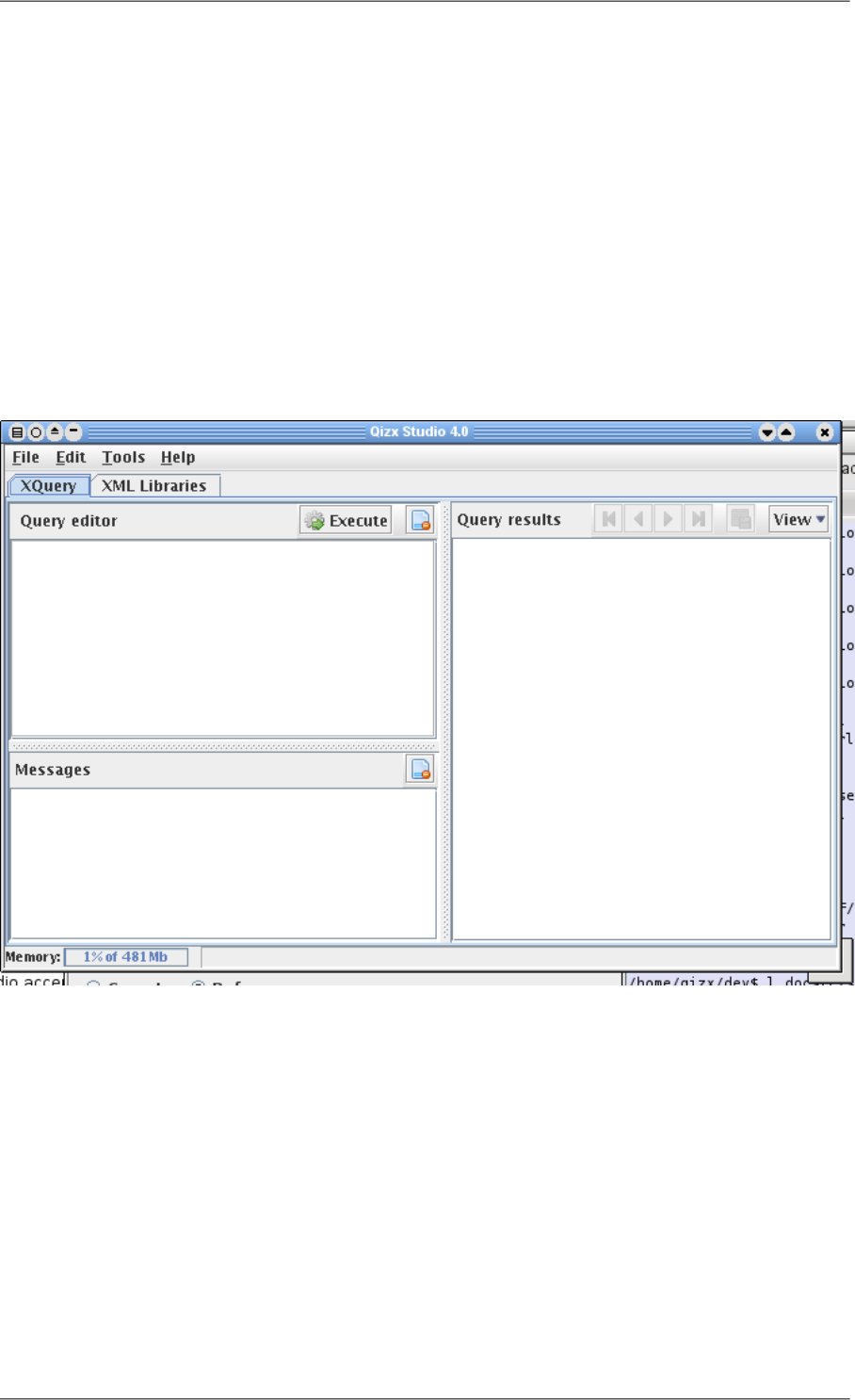
You should then see a window looking like this:
Figure 4.1. Qizx Studio first launch
•There are two tabs in Qizx Studio: "XQuery" for entering and running queries, "XML Libraries" for browsing
and modifying XML Libraries.
•The header [No XML Libraries] means that Qizx Studio has not yet opened any Library group. Still, it is possible
to execute XQuery scripts but without access to a library.
10
Getting started
Creation of the Library
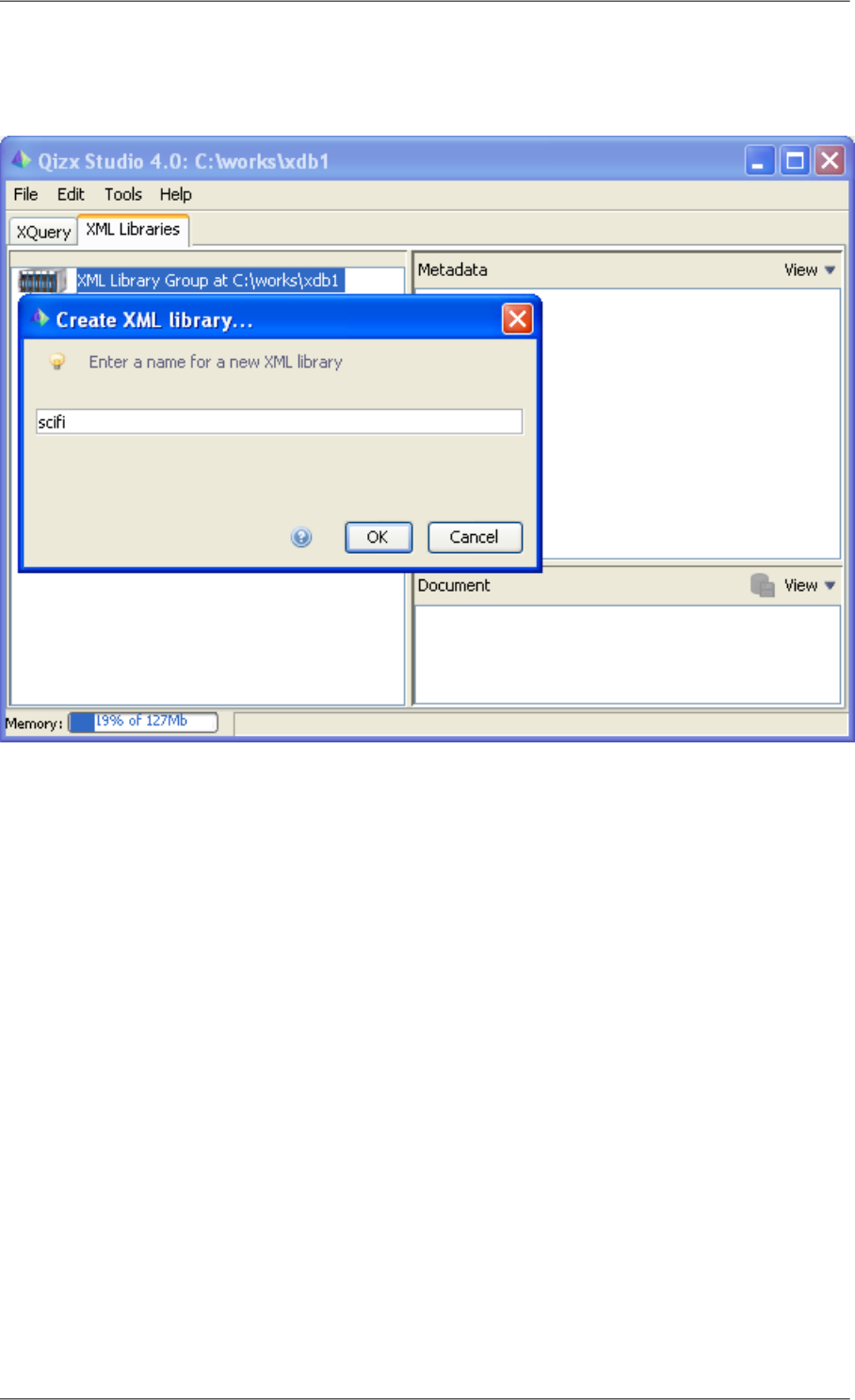
Figure 4.2. Creating an XML Library
1. Right-clicking on the icon of the library group icon and choosing "Create Library Group" brings a directory
selection dialog with which you select a directory (new or empty), assumed here to be "C:\works\xdb1" (of
course it can be whatever you choose).
2. Then the dialog above asks for the name of the first Library within the group. We assume in the following that
the name "scifi" is chosen.
3. When the Library is created, it contains the root collection, whose path is "/". By clicking on the root collection,
you should see its default Metadata properties appear on the right side.
4. It is possible to create more Libraries with the right-click menu on the icon of the Library Group.
5. Opening an existing Library Group is achieved by using the menu item "Open XML Library Group" and
choosing its directory.
You can also directly choose the directory of a Library (instead of a group), but in that case you can manage
only this single library.
Note that a Library can be opened by only one instance of a Qizx engine at a time: if you attempt to open it
several times you will get an error message complaining that the Library is locked.
Creation of a Collection
1. Right-clicking on the icon of the root collection, and choosing "Create sub-collection", you are prompted for
the name of a Collection (the name must not contain slashes). The collection is created as direct child of the
root collection. If your chose the name "books", the path of the collection is "/books".
11
Getting started

2.2. Creating a Library using the qizx command-line tool
The shell script qizx (qizx.bat on Windows) is also located in the bin/ directory in the Qizx distribution. In the
following we assume that this bin/ directory is in the PATH environment variable.
In a terminal window, type the following command (on Windows):
qizx -group c:\works\xdb1 1 -library scifi 2 -create 3
1The option -group (or -g for short) specifies the path of the Library group (here c:\works\xdb1)
2The option -library (or -l for short) specifies the name of the working Library (here scifi).
3The option -create tells the tool to create what is necessary:
•If the group does not exist yet, then it is created
•If the library scifi does not exist yet, then it is created
•If both already exist, the -create option has no effect.
If you explore the directory c:\works\xdb1, you will find a sub-directory corresponding to the Library scifi.
The internal structure of a Library needs not be known, and should never be altered manually, except for the dir-
ectories logs which contain log files.
3. Populating a Library with Collections and Documents
In this section we use the sample documents provided in docs/samples/book_data/ inside the distribution.
3.1. Importing XML Documents using Qizx Studio
Assuming we have created a Library named 'scifi' as explained above:
1. Right-click on the icon of the root collection (path '/') and choose Import Documents. A dialog appears.
2. The import operation is performed in two steps:
a. Files and directories are selected in an import list, using the Add File/Folder button.
The Filter combo-box allows filtering the file extension of interest (generally .xml).
Here we select the whole directory docs\samples\book_data or docs/samples/book_data inside the
Qizx distribution. Because we use the filter *.xml, only the files ending with the .xml extension will be se-
lected. After selection the number of selected documents and their total size in bytes are displayed in the
table.
This selection operation can be repeated on directories, or on single XML files. The auxiliary buttons Remove
and Clear all allow editing the list.
b. Pushing the button Start Import actually starts the import transaction.
After completion, the dialog can be closed with the Close button at bottom.
Parsing errors are displayed in the message window of the dialog. The import speed can reach up to 2
Megabytes per second on a 3 GHz processor for large documents, but a large number of small documents
can proportionally slow down this process.
3. Once the import finished, you should see something like:
12
Getting started
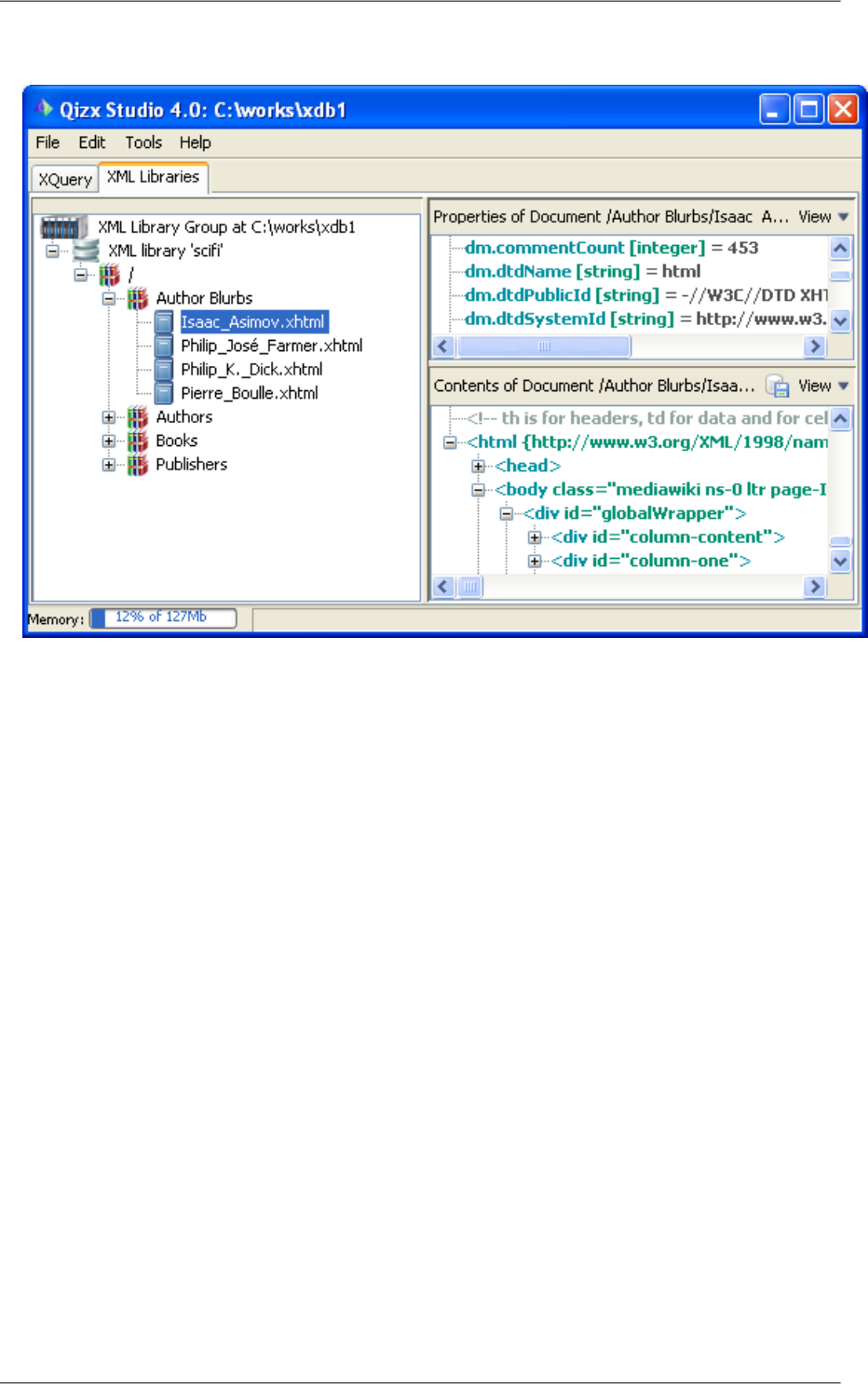
Figure 4.3. Library browser after importing documents
Remark
When selecting a directory in the import dialog, the contents of the directory are imported into the current
collection. The sub-directory structure of the source is replicated, but the original directory name is not
used.
13
Getting started
XML catalogs
XML documents conforming to a DTD start with a <!DOCTYPE> looking like this:
<!DOCTYPE html PUBLIC "-//W3C//DTD XHTML 1.0 Transitional//EN"
"http://www.w3.org/TR/xhtml1/DTD/xhtml1-transitional.dtd">
Qizx needs to parse a document in order to be able to import it in a database. The first step of parsing consists
in downloading and parsing the DTD itself. If this first step fails, the whole import process fails too.
In the above example, the DTD, http://www.w3.org/TR/xhtml1/DTD/xhtml1-transitional.dtd, is
found on a remote server. Downloading the DTD from this server works fine, but could make the import
process very slow.
The solution to this problem is to use an XML catalog. To make it simple, an XML catalog is a file, using
a very simple XML vocabulary, which associates the public ID of a DTD to the path of a local copy of this
DTD:
<catalog xmlns="urn:oasis:names:tc:entity:xmlns:xml:catalog"
prefer="public">
...
<public publicId="-//W3C//DTD XHTML 1.0 Transitional//EN" 1
uri="xhtml1-transitional.dtd"/> 2
...
</catalog>
1The public ID of the DTD is "-//W3C//DTD XHTML 1.0 Transitional//EN".
2The local copy is found in "xhtml1-transitional.dtd" (a relative URI is relative to the URI of the
XML catalog file).
Of course, Qizx is XML Catalog-enabled. It is bundled with resolver.jar, the XML catalog resolver of
the Apache XML Commons project. Therefore suffice to specify one or more XML catalogs and to let the
XML catalog resolver know about them. Advanced issues are well explained in the article "XML Entity and
URI Resolvers" by Norman Walsh.
Using XML Catalogs
The sample data also contains some XHTML files which refer to a DTD. If we import them in the same way (first,
set the filter to "*.xhtml"), we notice that it takes a significant time (several seconds) while the total size is only
a few hundreds kilobytes (alternately there might be a parse error if you have no access to the network). As explained
in the "XML catalogs" sidebar [14], this is because the DTD public identifier refers to an HTTP location, so the
DTD is downloaded from the network.
To avoid this, a suitable catalog can be found in the sample data: docs/samples/xhtml_dtd/catalog.xml. There
are two possibilities for enabling the catalog:
•Define an environment variable XML_CATALOG_FILES, whose value is a list of paths (or URLs) of catalogs,
separated by semicolons. This method works in any context (Qizx Studio, qizx, or application).
•in Qizx Studio, there is a dialog to define the list of catalogs more conveniently: Tools → XML Catalogs. Atten-
tion, the environment variable has priority over this mechanism.
3.2. Importing XML Documents using the qizx tool
If you use this command:
qizx -g c:\work\xdb1 -l scifi -include .xml -include .xhtml 1 \
-import / docs\samples\book_data 2
all files ending with .xml will be imported from directory docs\samples, in the same way as in Qizx Studio.
14
Getting started
1The option -include followed by an extension acts as a file filter. It is somewhat equivalent to the filters in
Qizx Studio. It is possible to have several -include options in a row. There is also a converse -exclude
option.
2The option -import specifies the target collection. This collection is created automatically if necessary.
The option can be followed by any number of paths of directories or XML documents, or even HTTP locations
(URL).
Using XML Catalogs
Using the qizx tool, a catalog file can be defined with the environment variable XML_CATALOG_FILES, as explained
above.
4. Exporting Documents from an XML Library
4.1. Using Qizx Studio
•Exporting a document: using the the XML Library browser, select the document. Then right-clicking the document
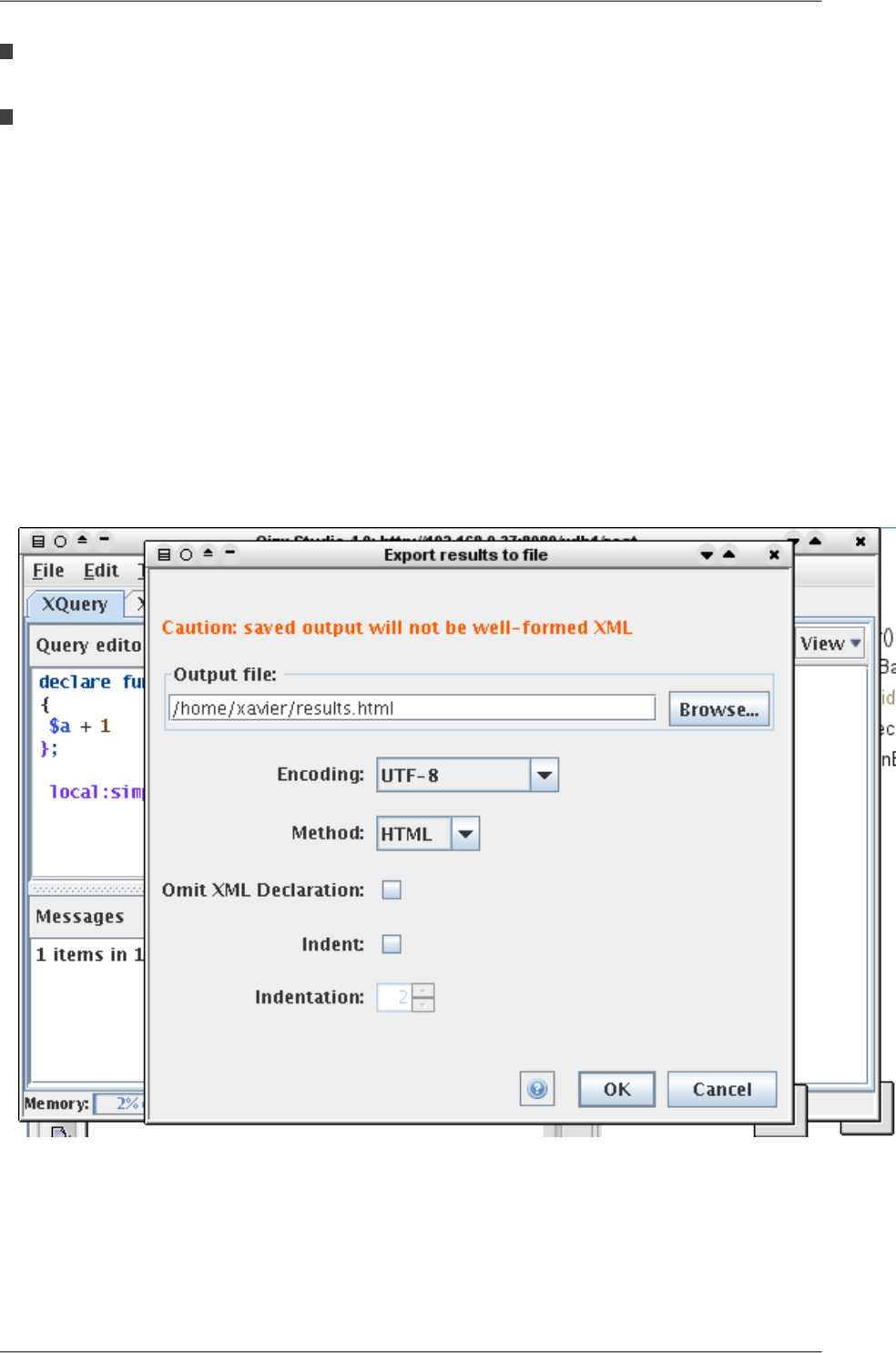
icon, or using the button in the document view ("Contents of Document", down right), brings an export dialog:
Figure 4.4. Exporting a Document from an XML Library
From the dialog, you can choose several export, or serialization, options:
•Encoding
•Method: XML (standard), HTML or XHTML (meaningful only if the document contents are HTML), and
Text (all tags are stripped, may be useful to generate code or data using the XML Query language).
15
Getting started

•Omit XML Declaration: strips the <?xml header.
•Indentation: makes the output prettier by adding whitespace.
•Note that not all standard serialization options are available, only the most common ones. The command-line
tool allows for all options implemented by Qizx.
•Exporting a whole Collection is not available currently in Qizx Studio, but it is in the qizx tool.
4.2. Using the qizx command-line tool
There are two option switches to control export of documents and collections:
•Option -out file defines the export destination: it is a plain file if a Document is exported, it should be a dir-
ectory if a Collection is exported. If it exists, it is overwritten, else it is created.
This option must come before the -export option.
•Option -export member selects a Document or Collection to export.
This option should come after -out and serialization options.
•Serialization options are introduced by the switch -X immediately followed by an option name, then if applicable
the value after a '=' sign. Example: -Xmethod=XHTML -Xencoding=UTF-8 .
Serialization options are described in detail here [88].
Example:
qizx -g c:\work\xdb1 -l scifi -out myexporteddata -Xmethod=Html \
-export "/sample/book_data/Authors Blurbs"
5. Querying a Library
In this section we are going to run queries on the database we have just created.
This section assume you have at least a basic knowledge of the XML Query language.
Note that the directory docs/samples/book_queries/ contains the queries needed to illustrate this lesson.
5.1.Writing and running queries with Qizx Studio
Qizx Studio currently provides a basic environment for editing and running XML Query queries. Later releases
will likely offer debugging facilities.
•Let us try this query (which is the contents of the file docs/samples/book_queries/4.xq):
(: Find all books written by French authors. :)
declare namespace t = "http://www.qizx.com/namespace/Tutorial";
for $a in collection("/Authors")//t:author[@nationality = "France"]
for $b in collection("/Books")//t:book[.//t:author = $a/t:fullName]
return
$b/t:title
•In Qizx Studio, switch to the XQuery tab, then use the menu File → Open XQuery to load the file mentioned
above.
Note that you can also save to a file a query that you have entered or edited in Qizx Studio.
16
Getting started
There is an history that allows running again former queries, so it is not necessary to save intermediary experi-
ments.
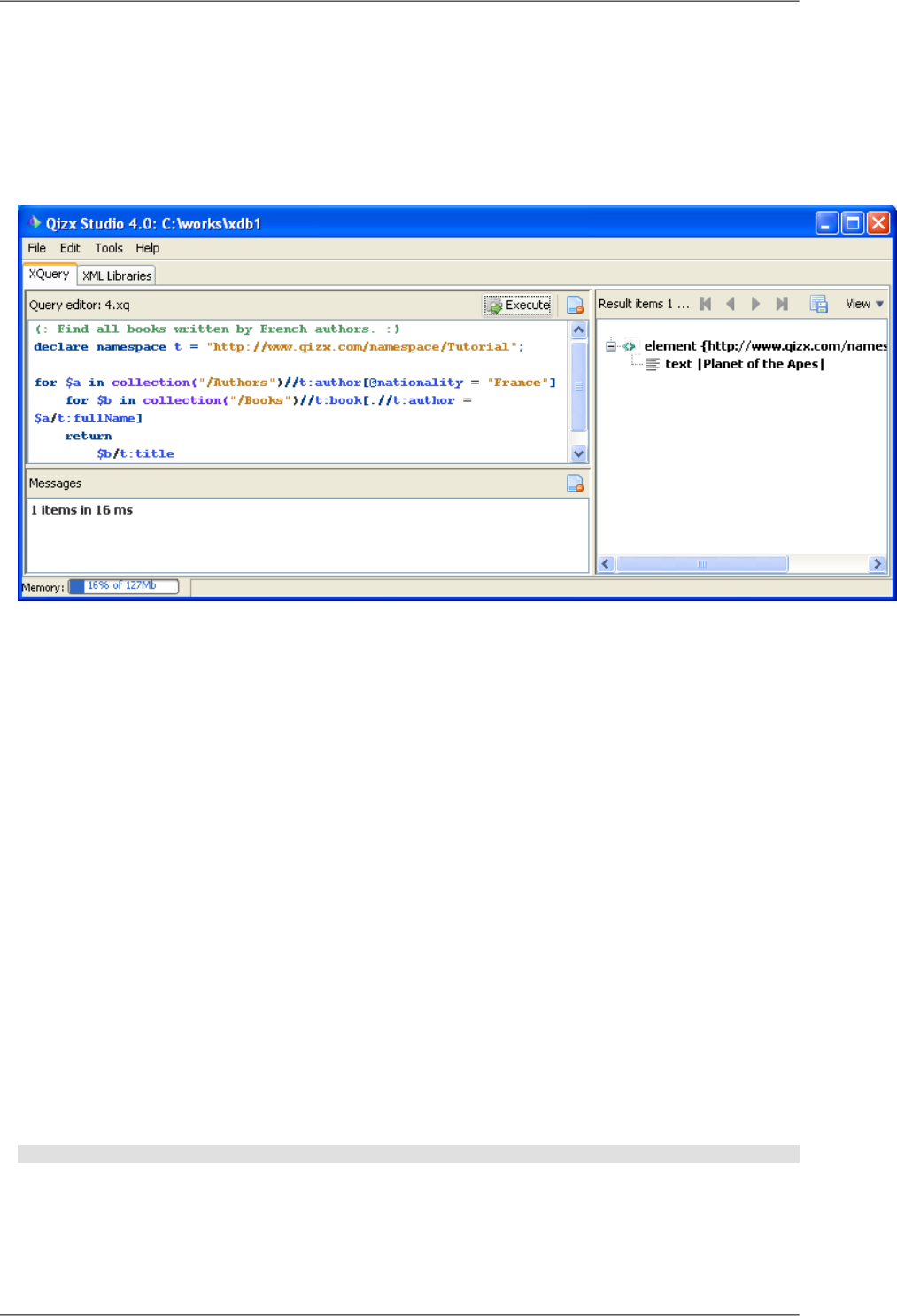
•Then, if you have created the XML Library as indicated in the previous sections, you can use the button Execute
to run the query. After execution, we should obtain something similar to this:
Figure 4.5. Result of a query
•Notice that in the picture above the display mode of the right-side view has been changed to "Data Model", using
the View combo-box. This makes it easier to see the Data Model structure.
The result sequence contains one item, which is a element t:title whose string value is "Planet of the
Apes".
We can for example change the value "France" to "US" in the query, and get a sequence of 8 items.
In the same location, there are a few other queries that you can also try.
•The result items in the right-side view can be exported into a file using a button in the header. Notice that the
resulting file will not in general be a well-formed XML document.
•Diagnostic view, the view at bottom left contains messages, which can be simple information (execution times)
or possible execution errors.
Compilation and execution errors have generally a link to the location in the source code. By clicking the link,
the location of the error is displayed in the editor view.
•For more information about the editor and the query history, please see the documentation of Qizx Studio [122].
5.2. Running queries with the qizx command line tool
•To run queries on a particular Library, it is sufficient to specify a XQuery source file on the command-line:
qizx -g c:\work\xdb1 -l scifi 4.xq -out results.xml
Of course, like before, we specify the Library with -g and -l (or -group and -library) switches.
•Results are displayed on the console (or standard output). Retrieving results into a file works like export, by
using -out and serialization options.
17
Getting started

6. Copying, Renaming, Deleting Documents and Collec-
tions
In this short section, we will see how to perform the basic tasks of copying, renaming and deleting Documents
and Collections.
6.1. Using Qizx Studio
•In Qizx Studio, these tasks are fairly easy to perform: just right-click on the library member to copy, rename or
delete, and select the proper menu item.
•For copy and rename, you are prompted for a destination path: this path should be inside an existing collection,
and should not point to an existing object.
6.2. Using the qizx command-line tool
•The -delete option switch can be used to delete any Library member given its path (Collection or Document):
qizx -g c:\work\xdb1 -l scifi -delete /Authors
•There are no option switches for renaming and copying. You can resort to a script (let us put it in a file named
rename.xq):
declare variable $src-member external;
declare variable $dst-member external;
try {
xlib:rename-member($src-member, $dst-member),
xlib:commit()
}
catch($err) {
element error { $err }
}
Caution
It is highly recommended to wrap the operation within a try-catch, because the functions xlib:rename-
member() and xlib:commit() have side effects. The try-catch extension guarantees that its body (the
try clause) is evaluated only once and in the order specified.
It is highly recommended to wrap the operation within a try/catch, because otherwise the execution would be
performed twice (for the sake of display) and an error would happen (the second rename cannot work).
To run the script, use the -D option switch to bind a value with the variables $src-member and $dst-member:
qizx -g c:\work\xdb1 -l scifi rename.xq -Dsrc-member=/Authors/iasimov.xml \
-Ddst-member=/Authors/IsaacAsimov.xml
Of course, the copy operation can be performed in the same way using the extension function xlib:copy-member.
7. Updating XML Documents
As of version 2.1, Qizx supports the XQuery Update extension. This extension is a powerful mechanism well in-
tegrated with the base XQuery language thats allows modifications at Node level.
To understand the basics of XQuery Update, we recommend reading our tutorial "XQuery Update for the impatient".
Using XQuery Update in Qizx is straightforward: since XQuery Update is an extension of XQuery, executing an
updating script is the same as running any other query. This is very much like in SQL, using a SELECT ... UPDATE
instruction instead of a simple SELECT.
18
Getting started

Warning
Qizx is designed for performing fast queries, not fast updates. Its design has deliberately sacrificed the
capability to perform fast local updates inside large documents, in order to achieve greater querying speed.
So we advise against updating documents larger than about one megabyte. Small documents can be updated
as quickly as in any other XML database.
Example 4.1. Delete a Node
Still using the same example data as before, let us suppose we want to remove the third pseudonym of the author
Jack Vance:
declare namespace t = "http://www.qizx.com/namespace/Tutorial";
let $a := collection("/Authors")//t:author[t:fullName = "Jack Vance"]
return delete node $a//t:pseudonym[3]
This returns an empty sequence, because updating expressions like delete node, insert node etc always return
an empty sequence.
In Qizx Studio, a commit is performed automatically, so we only have to check the document /Authors/jvance.xml
to see the result. It should now contain 4 pseudonyms instead of 5, the element <pseudonym>Peter
Held</pseudonym> should have disappeared.
Example 4.2. insert the Spanish edition of "Planet of the Apes".
declare default element namespace "http://www.qizx.com/namespace/Tutorial";
let $book := collection("/Books")//book[title ="Planet of the Apes"]
let $e := <edition>
<ISBN>9788466303736</ISBN>
<publisher>Suma de Letras</publisher>
<language>Castellano</language>
<year>2001</year>
</edition>
return insert node $e into $book/editions
Notice that here we use "declare default element namespace" so that the inserted nodes <edition>... have the
proper namespace.
8. Using Metadata Properties
In this lesson, we will see what are Properties and how they can be useful.
Collections and Documents can hold any number of named properties. Some properties are created automatically
by the database engine (we call them system properties), but it is also possible to add properties at will (user
properties).
An important aspect is that Properties can be queried: it is possible to run a special type of queries that return a
sequence of documents or collections whose properties match the query. This is a very powerful mechanism as
we will see below.
A property has a name (a simple name without namespace) and a value. The possible types of a property value
are:
•Boolean.
•Long integer (corresponds to XQuery type xs:integer).
•Double.
19
Getting started
•String.
•java.util.Date, a date/time with millisecond precision.
•Node, a single node of the XQuery data model, likely an element. This allows a property to contain rich structured
information. Furthermore this XML value can be queried much in the same way as normal document content.
•Any serializable Java object: this can be used through the Java API, but also in XQuery through the Java Binding
mechanism [111], which allows handling arbitrary Java objects in XQuery.
Two system properties common to Collections and Documents are:
nature
The nature of the Library member: "collection" or "document".
pathThe absolute path of the Library member. Example: "/Author Blurbs/Philip_Jose_Farmer.xhtml".
Properties are sometimes called metadata: this means properties can be used as metadata, that is, data describing
data. For example, when specified, the public and system ids of the DTD of the document are stored as system
properties. For documents, some statistics are computed automatically and added as properties. The source path
or URI of a document and the date of import are also stored as properties.
Note
Predefined properties are described in reference documentation [110].
So Properties can be used as user-defined metadata: they provide an easy way to associate information with docu-
ments without altering the contents of the documents.
8.1. Properties in Qizx Studio
•Let's select a document in the Library, say /Authors/iasimov.xml.
•In the view Metadata Properties, you should see a list of properties of the document.
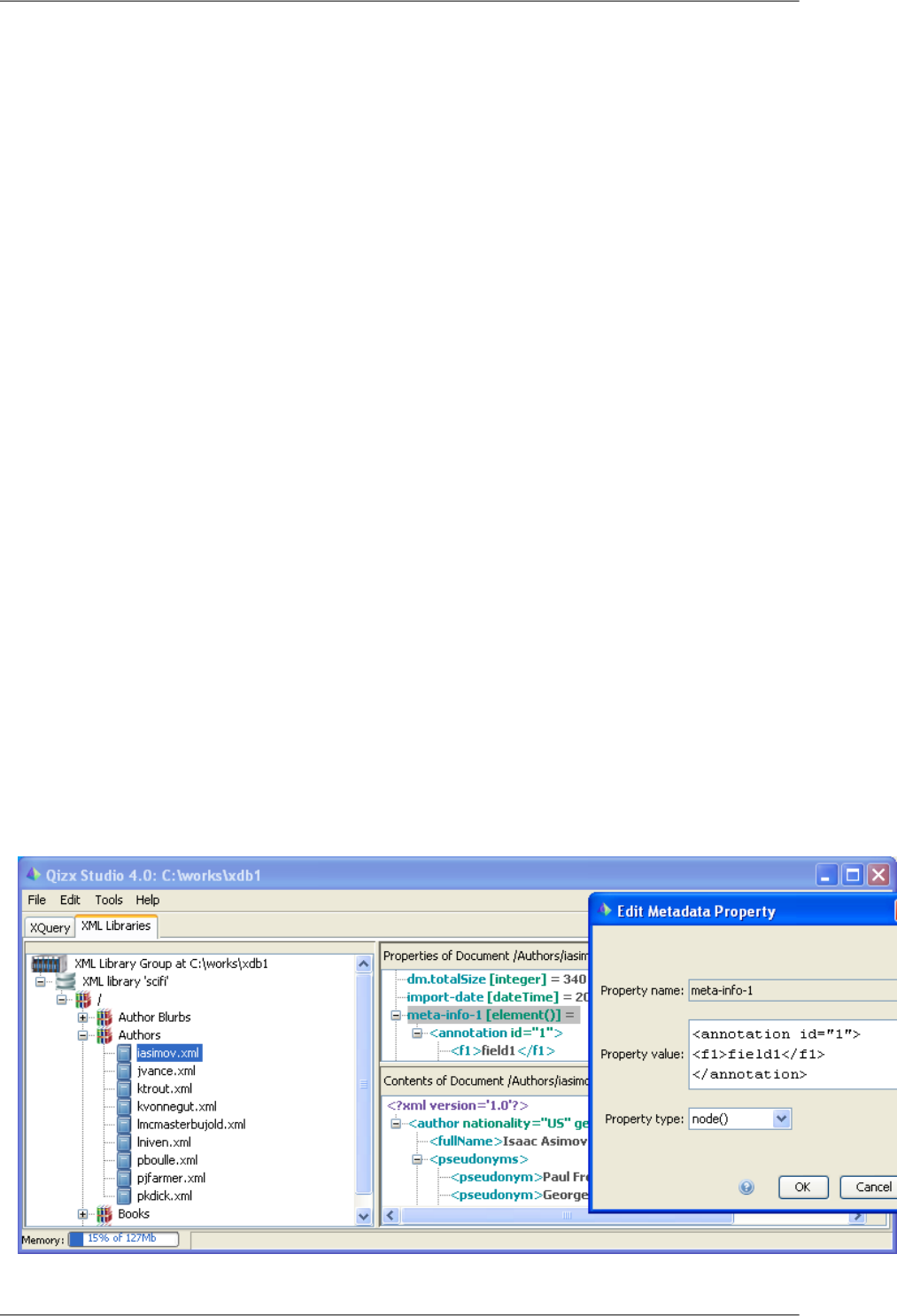
•By right-clicking on one of the properties, and choosing "Add Property", a dialog should appear:
Figure 4.6. Adding a new property 'meta-info-1'
20
Getting started

•Thanks to this dialog, you can enter the name of a new property (here meta-info-1), choose its type (here
Node), and enter a fragment of XML as a value.
•After clicking OK, the property should be visible in the property view.
Using properties in a query
Suppose you want to find all documents which have a meta-info-1 property: go to the XQuery tab and enter this
expression in the query editor, then run it.
xlib:query-properties("/Authors", nature="document" and meta-info-1)
You should obtain one item which is document("/Authors/iasimov.xml").
Remarks:
•xlib:query-properties is an extension function which returns a list of those library members which are
contained within the collection passed as first argument, and match the boolean expression passed as second
argument.
•The boolean expression as second argument is standard XQuery, where properties are used as if they were XML
elements.
Thus nature="document" should be read as a library member whose property 'nature' is equal to 'document',
while meta-info-1 should be read as a member which has a property named meta-info-1.
It is even possible to do a full-text search on a property: for example use meta-info-1[ft:contains('field1')]
or equivalently: ft:contains('field1', meta-info-1).
8.2. Properties in the qizx command-line tool
There are no option switches to handle metadata properties in qizx. You have to resort to XQuery scripts using
the extension functions described in the next section.
8.3. Extension functions for Property handling
In addition to xlib:query-properties, there are several functions in the xlib: namespace to handle properties:
see their description in Chapter 13, XML Library extension functions [104].
In these functions, the $member parameter can be either a path (String) or a wrapped LibraryMember object obtained
for example through the functions xlib:collection() or xlib:document(). .
xlib:property-names ($member)
return a list of the names of properties owned by the object
xlib:get-property ($member, $name)
returns the value of the property.
xlib:set-property ($member, $name, $value)
Sets the value, creates the property if necessary. If the value is empty sequence, removes the property.
A call to this function should be committed with the function xlib:commit.
8.4. Using property queries to restrict the search domain of a
standard query
Suppose you want to perform a XQuery query, but only in those documents which are marked with a boolean
property latest-version equal to true (this would be a primitive way of doing versioning).
21
Getting started

Let us assume the query to perform is //section[ft:contains('prevention AND hazard')] (find a section
containing the word hazard and the word prevention).
Then you can write a query like this:
xlib:query-properties("/", latest-version=true())//section[ft:contains('prevention AND hazard')]
Remarks:
•The expression above is treated in a slightly special way by Qizx: normally the root of a Path Expression is a
sequence of nodes, while here it is a sequence of library members. But Qizx performs an automatic expansion
into a set of document nodes.
•This mechanism is a powerful way to define a search domain for a query, according to criteria of arbitrary
complexity. We will see in the next section a possible use of this capability.
8.5. Custom indexes
An application of the technique presented in the previous section is the management of custom indexes.
An example: suppose you have documents which contain invoices. You would like to find the invoices where the
average item price is greater than a certain value. Let's suppose the average price is computed as follows:
declare function local:average-item-price($invoice) {
sum(for $item in $invoice/item return $item/price * $item/quantity)
div sum($invoice/item/quantity)
}
There are several possibilities:
1. Perform directly the query using this function:
collection("/invoices")/invoice[ local:average-item-price(.) >= 1000 ]
This can be very slow if there are many items.
2. Store the average price inside the document: this is not satisfactory, we do not want to pollute our data just for
the sake of queries.
3. The finest solution is to use a user property named for example average-item-price which contains this value.
The property is initialized when the document is created or updated. Then the query can be written like as follows,
and should be quite fast:
xlib:query-properties("/invoices", average-item-price >= 1000)/invoice
Generally speaking, a custom index is simply a property containing a value that is expensive to compute. This
value is initialized once when creating or updating the document. Then it can be used to perform fast queries.
22
Getting started
Chapter 5. Installing and Using Qizx
Server
1. Architecture
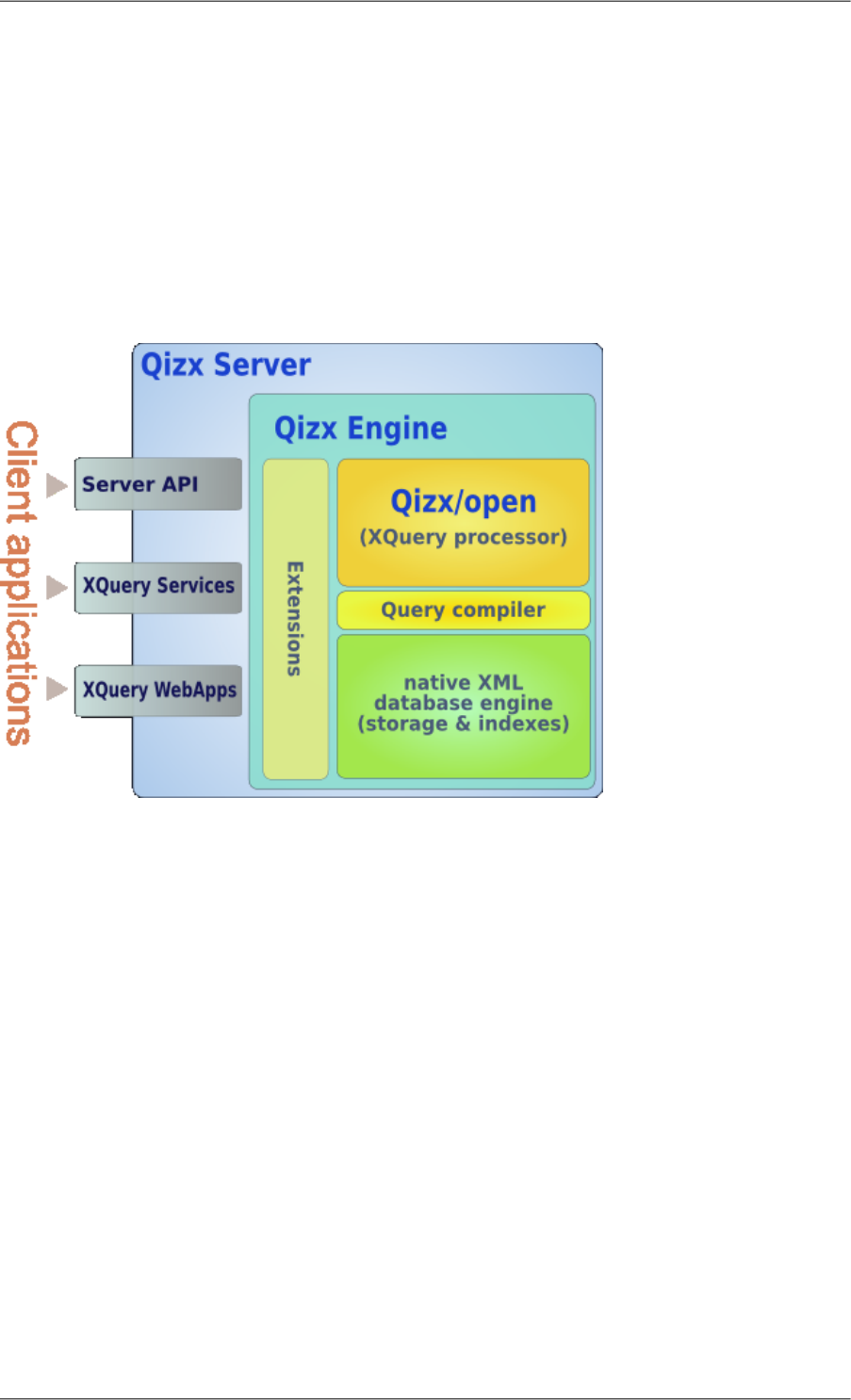
Qizx Server is a modular system that provides several interfaces (called services) which can be used in different
types of applications:
Figure 5.1. Qizx Server Architecture
1.
Qizx API Service
Qizx API Service offers nearly the same services as the embeddable Qizx engine, but can be accessed by remote
clients, allowing Qizx to be used as a back-end XML server.
The API Service can be used both for applications and administration:
•A client can be a web application running in a different server, using classical environments such as PHP,
ASP, JSP etc.
It relates to Qizx Server by sending XQuery scripts and receiving XML fragments that can be included in
their own responses. This is similar to the way many simple web applications use a Relational DBMS by
sending SQL queries.
•A client can be a heavy client implemented for example in Java or on top of the .NET platform.
As a particular case, the command-line tool qizx and the graphic interface QizxStudio coming with Qizx are
able to use this API service. They can be used for administration tasks.
2.
XQuery Services
This interface provides a functionality similar to Web Services, but much simpler:
•Clients call named services, passing parameters, and retrieving results (generally as XML).
23

•Services are implemented directly as XQuery scripts, stored on the server.
•Services are self-describing: a list of possible calls and a description of each service call can be requested.
This allows generic binding on the client side, like in classical web services.
•Such services can also seamlessly respond to XForms submissions.
Alternately, this service can be regarded as a way of implementing middle-tier business logic on top of a XML
database.
Whatever the use, this approach offers the means of encapsulating the core logic of an application, by publishing
an API for the application and hiding the internals of the database. This seems a great advantage in terms of
elegance and maintainability over the other solution, using the API service [23] and passing scripts.
Note that this service is somewhat experimental and likely to undergo significant changes. We are working in
concert with other vendors and with consultants to progress towards a standard for such services.
3.
XQuery WebApps (aka XQuery Server Pages)
Not yet available in 4.1, planned in a future version of Qizx.
This service allows implementing Web Applications using XQuery as a dynamic page template language.
XQuery WebApps is a service similar to many web application environments such as JSP, ASP, PHP etc. It
will also support XForms.
4.
Delayed indexing service
Not yet available in 4.1, planned in a future version of Qizx.
This service can be used when a feed of information provides a continuous flow of XML documents, and it is
not critical that incoming XML data be immediately visible to applications. Example: logging of transactions,
mails etc.
The service indexes incoming documents at regular intervals (for example one minute) and ensures data safety
through journaling.
The purpose of this service is to help developments by a greater simplicity, safety and efficacy of such an oper-
ation.
1.1. Protocol
All these services are based on HTTP, with simple REST-style interfaces using only GET and POST.
There are good reasons for not using a proprietary protocol:
•Applications can be implemented in any language or platform that supports client HTTP requests: Java, .NET,
PHP etc.
Using only GET and POST is required because many HTTP client libraries have limited HTTP support.
•In many companies, security constraints (firewalls and proxies) make it difficult to use anything but HTTP and
GET/POST.
•HTTP protocols are well known, simple to understand and can be tested through web browsers.
24
Installing and Using Qizx Server

1.2. Server-side Implementation
All these services are implemented as Java Servlets. Thus a server can be hosted by any web application server
that supports servlets.
Services can coexist inside a Servlet Container or a Web Application. Any combination of services is possible
through simple configuration.
1.3. Client-side Implementation
It is important to note that no client-side libraries are provided with Qizx Server so far.
The main reason for that is the large variety of potential clients: it is simply no possible to provide a client layer
for all existing environments. We also do not want to impose particular third-party software implementing such
client layers.
On the other hand, the protocols used in Qizx Server are simple enough to be easily implemented with the generic
client libraries available in many platforms like PHP, .NET.
A client library will be provided in a next version for at least:
•The Java platform
•The .NET platform
•Possibly also PHP
Automatic binding to XQuery Services on these platforms is also a planned feature.
2. Installation
In the current version, Qizx Server is a Web Application hosted by any J2EE Servlet Container.
The installation can be achieved in two different ways:
•Standalone server configured with a wizard-style tool. This should allow to deploy Qizx Server in a few clicks.
•Manual installation using standard Java Servlet techniques.
2.1. Requirements
•Java runtime environment version 5+ (version 6 recommended).
2.2. Deployment of the standalone server with a configuration wizard
From version 4.1, a wizard-style tool allows running Qizx Server inside a bundled server (Jetty 7):
•Installation and configuration are very easy thanks to the tool. This tool can also work in console mode.
With this tool, you can configure the location of the Qizx server configuration (including XML databases), the
protocol (http or https), the http port, the authentication mode (basic or digest), the users.
•The tool is also used for starting and stopping the server.
•The server can be reconfigured as easily using the same tool.
Procedure:
1. Run the wizard tool:
25
Installing and Using Qizx Server
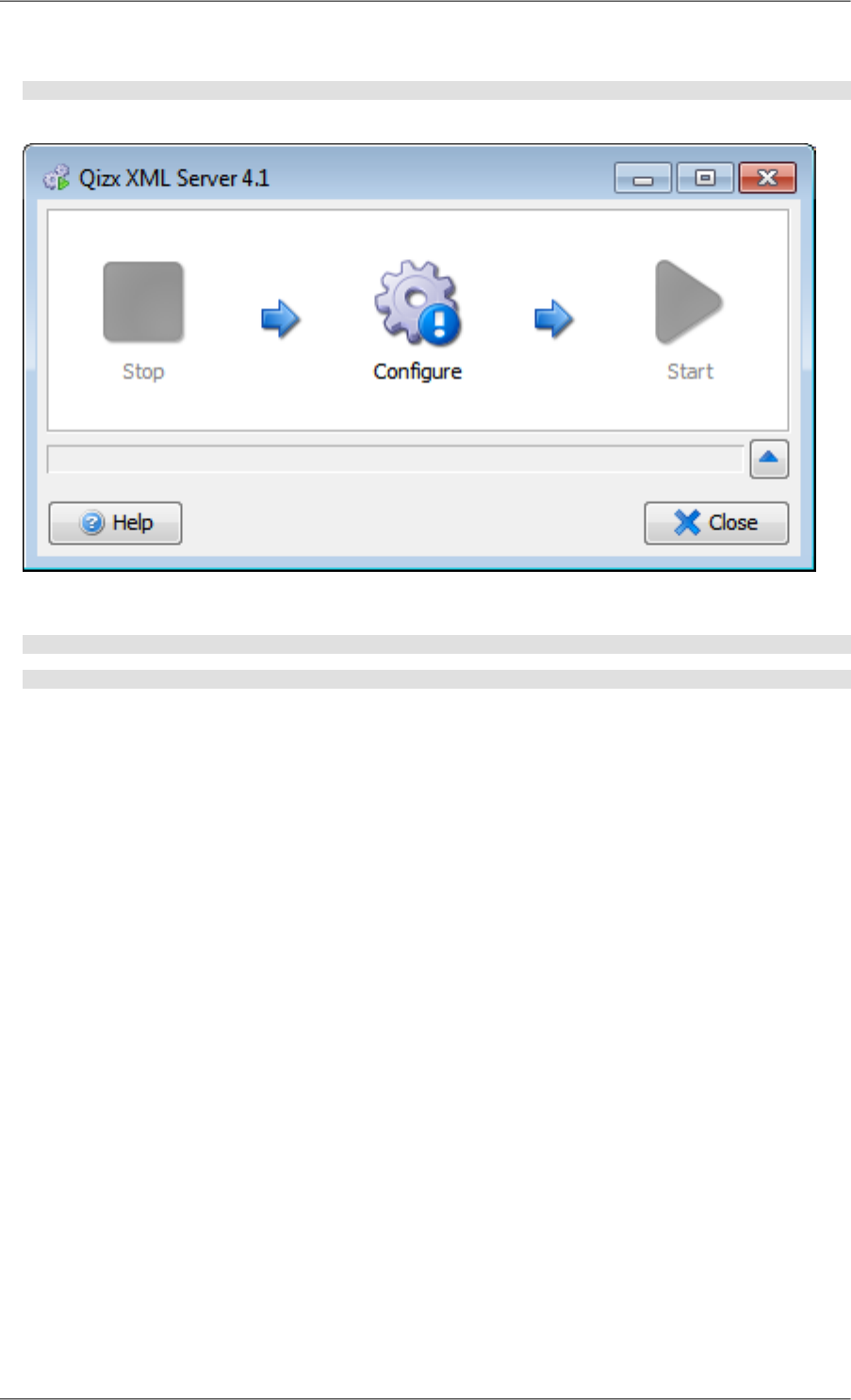
On Windows, double click on QIZX_DISTRIB/server/standalone/bin/qizxserver.bat .
Unix> QIZX_DISTRIB/server/standalone/bin/qizxserver
You should see this window appear:
2. In console mode on Windows or Unix, use the -c option:
Windows> QIZX_DISTRIB\server\standalone\bin\qizxserver.bat -c
Unix> QIZX_DISTRIB/server/standalone/bin/qizxserver -c
3. Click on the Configure icon, and fill the fields.
Use the Help button (bottom left) for more instructions about about each configuration step.
4. The first step is to choose the server storage directory: decide the place where you want your server data to
reside. This directory contains configuration files and data files. It is deliberately not contained inside the Web
Application to ensure that data will not be lost accidentally.
Make sure you have enough free disk space (e.g. several gigabytes) to handle the amount of data that will be
stored there. A Qizx Library with all indexes is roughly the size of the source XML it contains, but indexing
or reindexing uses temporary files that can reach up to 2 times this size.
5. When configuring is finished, start the server with the Start icon:
the tool indicates the URL to use in your browser (click on 'Copy' to copy the link in the clipboard).
26
Installing and Using Qizx Server
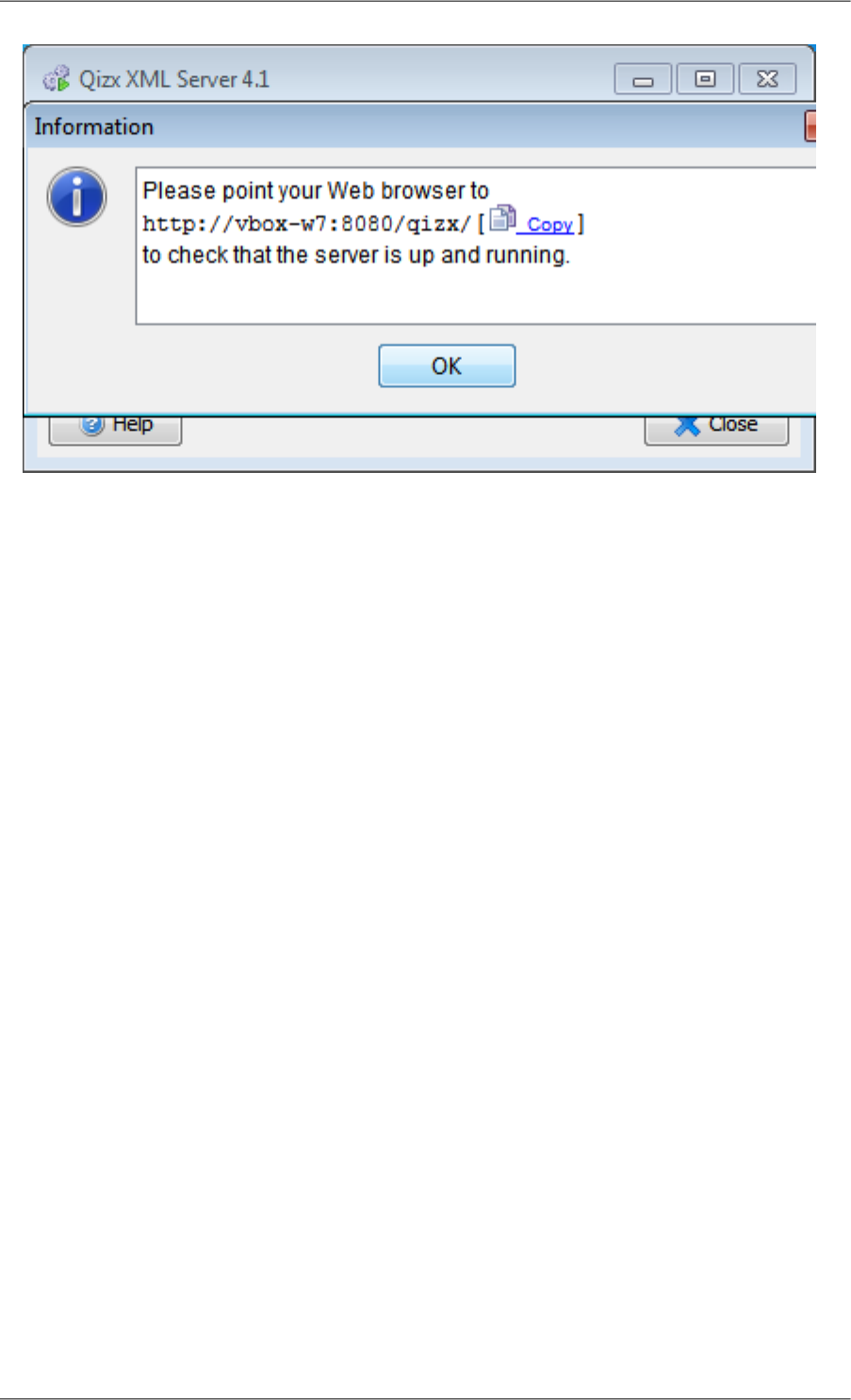
6. Once the server is started, it is possible to quit the wizard tool. The server will keep running. To stop it, rerun
the tool and click on Stop.
2.3. Manual Installation Procedure
This installation procedure should be suitable for any compliant Servlet Container.
By following the following procedure step by step, a member of your IT staff should be able to easily deploy Qizx
Server on a Servlet container. This procedure involves:
1. Creating the storage directory of the server: this is kept separate from the Servlet container to avoid accidentally
destroying precious data.
This directory contains the configuration, the XML database(s) (called Library) and optionally XQuery modules
and stored XQuery scripts.
2. Completing and deploying the Qizx Server WebApp on your Servlet Container,
3. Specifying how user authentication is to be performed, and making sure at least one user has administrator
privilege.
User authentication can depend on your Servlet Container and on the desired type of authentication.
Requirements:
•Java runtime environment version 5+ (version 6 recommended).
•A Servlet Container that supports at least Servlets version 2.4, for example Apache Tomcat 5.5.
Note: to date the server has been tested with Tomcat 5.5 and 6, Jetty 7, and Caucho Resin 3.1.
The installation uses commands in a terminal window:
1. Choose the server storage directory: decide the place where you want your server data to reside. This directory,
referred to as Qizx_Server_Root all over this documentation, contains configuration files and data files. It is
deliberately not contained inside the Web Application to ensure that data will not be lost accidentally.
27
Installing and Using Qizx Server

Make sure you have enough free disk space (e.g. several gigabytes) to handle the amount of data that will be
stored there. A Qizx Library with all indexes is roughly the size of the source XML it contains, but indexing
or reindexing uses temporary files that can reach up to 2 times this size.
2. Copy the template server root from the Qizx distribution:
A model of a server root is found in QIZX_DISTRIB/server/root.
Unix> cp -r QIZX_DISTRIB/server/root Qizx_Server_Root
On Windows, you can use the Explorer to perform the copy.
In the server storage directory Qizx_Server_Root, you should now have the following contents:
•qizx-server.conf : contains the configuration of the server. It is self-documented and allows modifying
parameters like maximum memory sizes, XML catalogs, administrator credentials.
It is advisable to review this file. In particular it contains the name of administrator users or role. This is ex-
plained in section "user authentication" below.
If you modify this configuration while the Qizx engine in running, you have to restart the engine by using
the "-server reload" command in qizx tool (see its documentation).
•xlibraries: a directory that can contain one or several databases (also called XML Libraries). For the moment
it contains one empty XML Library called xlib. You can change this name if you wish.
•modules: a directory where XQuery modules can be stored.
•xqs: a directory where XQuery scripts can be stored, to implement XQuery Services.
•Note that the above names: xlibraries, modules and xqs are not hard-coded: they are defined in qizx-
server.conf and can be changed.
3. Choose the name of the Web App in which the server will run.
The name qizx is used in this documentation, but this can be changed at will. Attention: examples coming with
Qizx Server will not work if this name is not qizx.
This name is important for determining the address (URL) that applications will use to connect to the server.
For example, if you choose qizx, and if your host name is myhost and the port 8080, the URL of the Qizx
server will be http://myhost:8080/qizx/api .
Technical note: in this address, qizx is the name of the Web App, and api is a mapping of the API service of
Qizx Server. This mapping can also be changed by editing the web.xml configuration file of the Web App. We
will get back at this later.
4. Prepare to create the Web App:
a. Stop the Servlet Container.
This is not mandatory but recommended, as the new Web App will perhaps require some adjustments before
running.
b. open a terminal and change current directory to the directory in your Servlet Container installation that
contains web applications, generally called webapps.
For example if you have Tomcat installed in /opt/tomcat:
> cd /opt/tomcat/webapps
Or if you have Caucho Resin installed in c:\works\resin4.0.6 :
28
Installing and Using Qizx Server

C:\> cd works\resin4.0.6\webapps
5. Actual creation: copy the template 'qizx' found in QIZX_DISTRIB/server/qizx.
Unix> cp -r QIZX_DISTRIB/server/qizx qizx
6. In the WebApp directory (here qizx), you should find the following contents:
•WEB-INF/web.xml, the webapp configuration file. It contains the definition of servlets that implement the
services, and the mapping of these servlets to URLs.
The servlets have one initialization parameter which must point to Qizx_Server_Root: you need to edit web.xml
to replace the value of the parameter (caution: several occurrences).
<servlet>
<description>This servlet implements the REST-style API Service.</description>
<servlet-name>qizx-api</servlet-name>
<servlet-class>com.qizx.server.api.RESTAPIServlet</servlet-class>
<init-param>
<description>Location of the Qizx Server root.</description>
<param-name>qizx-server-root</param-name>
<param-value>Qizx_Server_Root</param-value>
</init-param>
Caution: it is recommended to use an absolute path for Qizx_Server_Root.
•index.html : points to the examples hereafter.
•apidemo: a directory containing HTML files that are both a documentation and a demonstration of the API
requests. Once the server will be online, you can use this demonstration to discover and understand the API.
•xqsdemo: a directory containing a simple demonstration of the XQuery Services.
7. User authentication: this step depends on your Servlet Container and on the desired type of authentication.
We give examples for two containers, Tomcat and Caucho Resin.
I. Concepts:
a. Qizx Server has a notion of administrator privilege: operations of administration type can only be achieved
by privileged user. This can be granted on user names or through a role defined in the servlet container.
b. A privileged user name can be specified explicitly in the configuration file qizx-server.conf, in the
property admin_users. By default, the name 'qizx-admin' is defined there.
c. A privileged role can be defined through property admin_role.
Any user having this role has administrator privilege in Qizx Server. By default the value is 'manager'.
d. If both admin_role and admin_users are empty or undefined, then there is no restriction on privileged
operations: for security this is not recommended.
II. Examples using BASIC authentication:
In this example, both qizx-admin and john will be able to perform privileged operations on Qizx Server:
a. With Tomcat:
Edit the file conf/tomcat-users.xml in your Tomcat installation and add:
<tomcat-users>
<role rolename="manager"/>
<user username="qizx-admin" password="changeit!" roles="manager"/>
29
Installing and Using Qizx Server

<user username="john" password="changeit!" roles="manager"/>
...
b. With Caucho Resin:
Add a file resin-web.xml into directory WEB-INF of the web app, and edit it to define user qizx-admin
and add role manager to user john:
<resin:XmlAuthenticator password-digest="none">
<resin:user name="qizx-admin" password="changeit!" roles="manager"/>
<resin:user name="john" password="changeit!" roles="manager"/>
...
Note: these examples assume that you keep the user and role defined by default in Qizx_Server_Root/qizx-
server.conf. You can also change these properties and keep your own users already defined in your servlet
container.
III. Other types of authentication depend much on the actual servlet container.
Please note that the default WEB-INF/web.xml in Qizx web app uses BASIC authentication in the <login-
config> item.
8. The servlet container can now be restarted.
Before restarting:
•Check that the account running the servlet container has rights for reading and writing on the Qizx_Server_Root.
•Check that firewalls, if any, are allowing HTTP connections on the desired port.
2.3.1.Troubleshooting
If you cannot connect to the Qizx server either with your browser or with QizxStudio, look at the logs of your
servlet container: there is likely a message indicating a cause of error.
"access denied"
You could see a message looking like:
java.security.AccessControlException: access denied (java.io.FilePermission /path/to/qizxserver read)
First check that the the process running the Servlet container actually has file access rights (read and write)
to the Qizx server root.
Otherwise this can be due to the security policy of the Servlet container: the issue has been especially en-
countered on Ubuntu with the prepackaged Tomcat server, but it might also happen with any Servlet containers
with a tight security policy.
A possible solution is to disable the security manager. Another solution is to define additional rules:
grant codeBase "file:${catalina.base}/webapps/qizx/-" {
permission java.io.FilePermission "/path/to/qizxserver", "read,write";
permission java.io.FilePermission "/path/to/qizxserver/*", "read,write";
}
See the documentation of your Servlet container for more details.
2.4.Testing the server
1. Test that Qizx Server is working by using a web browser and entering the address
http://myhost:8080/qizx
30
Installing and Using Qizx Server
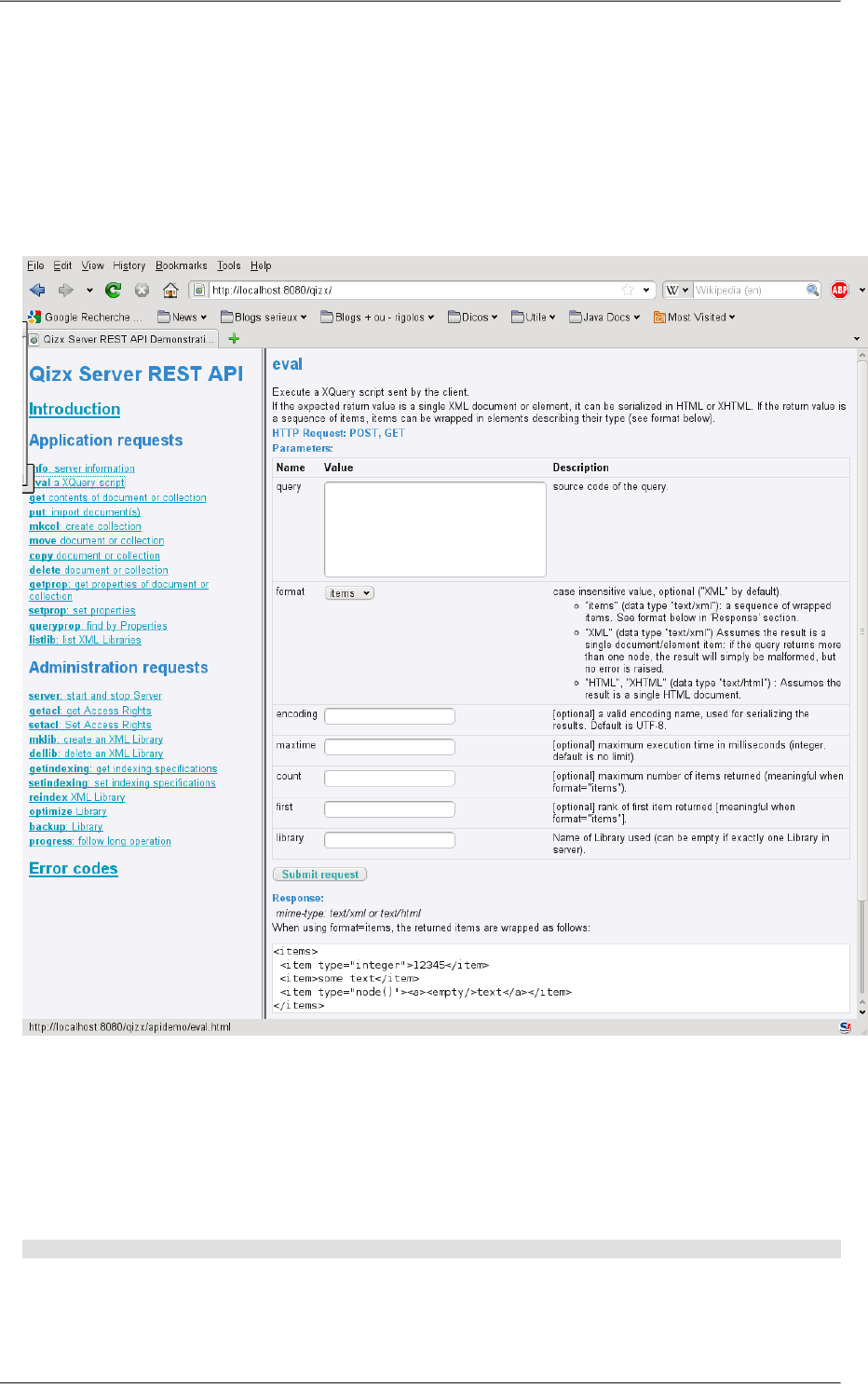
(assuming that the server host is myhost and the server is listening on port 8080, and that you chose qizx as
web app name).
You should see a page pointing the documentation/demonstrations of the server's APIs.
Before that, you will be asked a login and password by your browser: enter the name and password of an admin-
istrator user.
Figure 5.2. API demonstration and test pages
2. You can also use Qizx Studio or the command-line tool qizx.
In that case, you have to use a slightly different address:
http://myhost:8080/qizx/api
For example:
qizxstudio -g http://myhost:8080/qizx/api
Or using the menu Tools | Connect to Server in Qizx Studio, enter this same address.
Note that the http: prefix is required for distinguishing a remote server from a local Library group.
31
Installing and Using Qizx Server

You will likely be asked a login and password (unless you have deactivated user authentication in the web app
configuration). You can also specify credentials on the command line (not very secure):
qizxstudio -g http://myhost:8080/qizx/api -login me:mypassword
or in a file (see documentation of tools):
qizxstudio -g http://myhost:8080/qizx/api -auth credentials
2.5.What to do next
After starting Qizx Server, you might want to:
1. Create an XML Library (database):
•With QizxStudio, right-click on the server icon in the Library view and choose Create a Library.
•With the demo in your web browser, click on 'mklib: create an XML Library' on the left, and enter the name
of your Library, then submit request.
•With command-line tool qizx, type a command similar to the following one:
qizx -g http://myhost:8080/qizx/api -auth credentials -library mylib -create
2. Populate the XML Library with documents:
This is similar to using a local XML Library group, and explained in chapter Chapter 4, Getting started [8].
3. Define Access Control rules: this is useful if your applications have several classes of users, and you want to
restrict the access of some users to certain parts of your database. By default all users can read, query and update
all documents and collections.
See dedicated chapter Section 3, “Access Control” [32].
3. Access Control
Access Control is the mechanism that controls whether a User (already authenticated) may read, query or modify
a Document or a Collection inside an XML Library.
•By default all users can read, query and update all documents and collections.
•Restricting access is useful if an application of Qizx Server involves diverse kinds of users, some less trusted
that others, and you want to prevent some users of doing some operations.
If all users are trusted, or if there is only one generic user, this feature is perhaps not useful.
In Qizx, Access Control is clearly separated from user authentication and user management (which are not part of
Qizx core, and delegated to the servlet container in Qizx Server).
•User names and Role names are defined externally: in Qizx Server, they are defined by the Servlet container
configuration.
Access Control in Qizx Server is by default based on ACL (Access Control Lists). This allows a powerful control
with negligible performance impact.
It is possible to change the AccessControl implementation by plugging a different class, but that is advanced cus-
tomization, unlikely to be necessary.
32
Installing and Using Qizx Server

3.1. How ACL work in Qizx Server
•Basically, Access Control Lists are lists of elementary grant and deny entries.
•Each Access Control Entry (ACE) defines
•access rights (permissions),
•for a set of users,
•on an object (in Qizx: a Collection or a Document).
For example (in informal syntax): "grant user john permission read,write on collection /users/john"
or "deny all users permission write on collection /system".
•ACL are inherited. This means that access rights defined on a Collection are applicable on all documents and
sub-collections contained within the collection (unless they have their own rules).
This is a powerful mechanism, since a few rules (ACE) are sufficient for controlling access to an entire hierarchy
of documents, without need to define rules on each and every document or collection.
Typically, with a few ACL is it possible to specify for example that:
•The whole database is read-only for users
•Except specific collections /A and /B and their children which can be read and queried only by privileged
users U1 and U2.
•Collection /C can be modified only by certain users which have the role 'manager'.
•The order of ACE is important: an ACE can be superseded by a following ACE.
Example (still in informal syntax): here the second ACE supersedes the first one, so admin has the permission
to write.
deny all users permission write on collection /system
grant user admin permission write on collection /system
•User names and Role names are defined externally by the Servlet container configuration.
•In Qizx, ACL are defined using an XML syntax. Example:
<accesscontrol>
<member path='/'>
<deny user='*' permissions='Write'/>
<grant user='*' permissions='Read'/>
<grant role='manager' permissions='SetContent'/>
</member>
<member path='/users/john'>
<deny user='*' permissions='Read Write'/> <!-- forbidden to anybody -->
<grant user='john' permissions='All'/>
<grant user='jane jim' permissions='Read'/> <!-- allow friends to read -->
</member>
</accesscontrol>
•Root element is accesscontrol.
•It contains a list of member elements
•Each member element contains a list of ACE for a particular collection (or document but this is not encouraged).
The attribute path must be present.
33
Installing and Using Qizx Server

•An ACE can be grant or deny.
•It has a mandatory attribute permissions. The value of this attribute is a list of permission names separated
by spaces or commas. See table of permissions hereafter.
•A grant/deny must have either a user attribute or a role attribute.
•Value of attribute user can be a list of user names: e.g user='jane jim' .
•Value of attribute user can also be '*': all users.
•Value of role can be a list of role names.
Table 5.1. Permissions
PermissionSymbol
Read the content of a document, list children of a collectionGetContent
Replace content of a document, insert/delete/replace children of a collection.SetContent
Read and query properties of document or collection.GetProperty
Add/modify/delete properties of document or collection.SetProperty
short name for GetContent + SetContentContent
short name for GetProperty + SetPropertyProperties
short name for GetContent + GetPropertyRead
short name for SetContent + SetPropertyWrite
short name for all permissionsAll
3.2. Setting ACL in Qizx Server
Setting ACL in a Qizx Server is an administrator operation. It cannot be performed by ordinary users.
In QizxStudio
right-click on a collection and select "Modify Access Rights". A dialog appears and allows modifying the
XML representation of access rights for the collection.
In Qizx Server API demo
Use link setacl: Set Access Rights and enter the XML representation of access-rights.
In command-line qizx
Prepare a file containing the ACL in XML. Use option switch -set-acl file to upload the ACL to the
server.
A more user-friendly interface should be provided in later versions.
4. Developer Documentation
4.1. API service
The REST API is documented through the demo pages.
Using a web browser, enter the URL: http://myhost:8080/qizx/apidemo/
(assuming that the servlet container is on that host and port, and that you have named the webapp 'qizx', like in
the examples above).
Each request is documented by a page describing it and allowing to execute it:
34
Installing and Using Qizx Server

•Purpose of the request
•Format of results
•Possible errors. The format of errors is described in a dedicated page.
•Arguments: each argument corresponds with a form field.
A Submit button can be used to run the request with the provided arguments and see the results.
4.2. XQuery services
XQuery Services is a simple mechanism allowing to call XQuery scripts stored in the server.
Such scripts need only to follow a few conventions and be placed in the appropriate location inside the server
storage.
The mapping to an URL is straightforward. Request parameters are automatically bound to XQuery variables with
conversion to the declared type.
4.2.1. Protocol
Like other services in Qizx Server, this service uses HTTP.
Supported request formats:
•GET with parameters in the URL
•POST with form-urlencoded content type.
•POST with multipart/form-data content type.
Parameters are retrieved transparently and bound to XQuery variables (see Parameters [36] section).
Restrictions:
•anonymous file fields are not supported.
•several parameters with same name yield undefined results.
•Binary file fields (e.g images) are not supported currently.
4.2.2. Creating services
1. An elementary service is defined by simply depositing a XQuery script within the xqs directory of a
Qizx_Server_Root.
For example, a script named search.xqs is placed in sub-directory client of Qizx_Server_Root/xqs. It can
be invoked with the following URL (still using the same example host, port, and webapp as before):
http://myhost:8080/qizx/xqs/client/search.xqs
2. This xqs directory can be structured in packages. By convention, a package should represent a set of related
services.
For example the package client would contain several services on clients like search, retrieve, create, update,
delete.
4.2.3. Description of available services
A description of available services in a particular package can be obtained by a GET at the URL of that package.
35
Installing and Using Qizx Server

This will return a XML description of services available in this package.
Example:
http://myhost:8080/qizx/xqs/client/
returning:
<services package="/client">
<service name="create" result-type="xs:string">
<parameter name="client-name" type="xs:string"/>
<output-option name="method">text</output-option>
<documentation>Create a new client and return the id.</documentation>
</service>
...
</services>
•The XML description is straightforward: basically it is a list of service elements wrapped in a top element
services.
Example:
<services package="/client">
<service name="create" result-type="xs:string">
<parameter name="client-name" type="xs:string"/>
<output-option name="method">text</output-option>
<documentation>Create a new client and return an id.</documentation>
</service>
...
</services>
•Each service has a name and type attribute (type is inferred from the expression).
•Then come parameters with their name (without prefix) and type.
•Then output options with name and value (as content).
•Then the documentation comment if any.
4.2.4. Parameters
Parameters for each elementary request are specified through global XQuery variables:
declare variable $param:client-name as xs:string external;
declare variable $param:year as xs:integer external;
...
1. The name of a parameter must use the predefined namespace prefix param.
2. A parameter may have a default value:
declare variable $param:year as xs:integer := 2010;
A parameter with a default value needs not be specified in the request.
An execution error happens on use of a parameter without default value and not specified in the request.
3. A parameter may have a type declaration. If not defined, the actual type is xs:string.
If the type is specified, the value of the parameter can be converted from the string representation to the specified
type.
Special case: if type node() or element() is specified, the value is considered XML and parsed into a node. In
practice, only XML types node(), element() and document-node() can be passed this way (because of parsing):
attribute, comment, processing-instruction, text nodes are not supported.
36
Installing and Using Qizx Server

4. If a parameter has no type:
if it is not a multipart File (i.e using GET or POST form-urlencoded), then the value is converted to String
(xs:string).
Otherwise (multipart File) no conversion happens, the parameter is not bound. This is reserved for future use
(explicit conversions in XQuery).
4.2.5. Result type and output options
To define the way results are formatted in the response, XQS uses XQuery options in the declaration part of each
query.
Example:
declare option output:encoding "UTF-8";
Available options:
These are the common serialization options (see section Serialization [?]), preceded by the output: prefix. This
prefix is predefined (this is actually a XQuery 1.1 feature).
Most important options are:
1. method: standard values "XML", "XHTML", "HTML" and "TEXT".
2. encoding: values like "UTF-8", "ISO-8859-15".
3. content-type: allows fine control on the mime type of the request response (header Content-Type).
Normally this value is deduced from the output method: for example text/xml if method="XML", etc. but in
some circumstances you may want to use application-specific values like image/svg+xml.
4.2.6. Documentation of services
Each request can be documented by a special comment beginning with a tilde character:
Example:
(:~
: Create a new client and return an id.
:)
declare variable $param:client-name as xs:string external;
...
Note: no particular structure is defined yet for these comments.
37
Installing and Using Qizx Server

Chapter 6. Support of standard XQuery
Update
Qizx fully supports XQuery Update Facility 1.0 as specified in the W3C's Working Draft dated 28 August 2007.
This extension allows updating XML documents using four primitive operations insert, delete, replace and rename.
It also defines a copy/modify/return instruction which allows transforming an XML tree by first copying it, then
updating the copy using the four primitive operations. For a more detailed introduction, please read the XQuery
Update tutorial available on the Qizx web site.
Specifics of XQuery Update in Qizx
The XQuery Update specifications leave some room for implementation-specific features. Here are the specifics
in Qizx:
•When an XQuery expression is updating (as defined in the specifications), corresponding updates are automat-
ically performed at the end of the execution of the expression.
•Transactions: by default commit() is performed for each XQuery expression execution that updates one document
(or several documents) in an XML Library. This auto-commit can be disabled and re-enabled through an API
method Library.setAutoCommitting(). When auto-commit is disabled, the commit() method has to be called
explicitly.
•Working on parsed documents1 in memory is possible, but updates are not saved, because source documents
can be specified as any URL (for example HTTP), and it is hardly feasible or even desirable to actually perform
such changes.
To update a document stored in a file, we recommend using the copy/modify/return instruction, then the serial-
ization function x:serialize on the result. Thus the user has full control on how the document is written back to
the source.
•The standard function fn:put() is equivalent to xlib:write-document (though with a different argument order).
It can only write to a document of an XML Library. The node must be a document-node or an element.
•Deleting a parentless node raises an error err:XUDY0020.
•External functions cannot perform updates (i.e return update lists).
1"parsed documents" are documents which are not stored in an XML Library, but loaded into memory by XML parsing a file or from an URL.
38

Chapter 7. Support of standard XQuery
Full-Text
Starting from version 3.0, Qizx supports most of the new XQuery Full-Text candidate standard.
Caution
The full-text facility existing in former versions is completely deprecated, and is no more available. A
Migration guide [42] can be found at the end of this chapter.
The first section is an introduction to the Standard Full-Text (XQFT). Since there is currently little literature about
this new standard, except the specifications, we hope you will find this tutorial useful.
Support of the XQuery Full-Text facilities in Qizx is detailed in the second section.
1.Tutorial Introduction to the standard XQuery Full-Text
This tutorial (http://www.xmlmind.com/_tutorials/XQueryFullText), after a short presentation of main concepts,
simply introduces main features through concrete examples.
2. Support of the XQuery Full-Text facilities in Qizx
Qizx 3.0 supports a large part of mandatory and optional XQuery Full-Text features.
The two following chapters detail supported and unsupported features. To understand this section, it is recommended
to have some acquaintance with XQFT, through W3C specifications or by reading our tutorial.
Qizx now supports many full-text features, but some capabilities - namely stemming and thesaurus - are highly
language-specific and can only be supported by specialized extensions.
To offer the best language support, Qizx full-text can be extended through the Java API. It is possible to plug objects
supporting:
•Text Tokenization (see below).
•Stemming (but no implementation is available by default).
•Thesaurus lookup (no implementation is available by default).
•Scoring: score computation can be redefined by plugging another Scorer.
2.1. Supported Features
•Scoring: see dedicated section below.
•Operator not in: supported.
•Operator ftnot: fully supported.
•Order (keyword ordered): fully supported.
•Cardinality (occurs ... times): fully supported.
•Proximity (keywords window and distance): support of the "words" unit.
•Ignore (keyword without content) is supported, except some corner cases.
39

•Language:
The language if specified is used for finding a Text Tokenizer (see below), for stemming and in Thesaurus
lookup.
In the API, the related methods of the class FullTextFactory have a language argument.
•Case sensitivity (option 'case sensitive').
Note: queries using this feature can be significantly slower, especially if a large number of documents are
searched.
•Diacritic characters sensitivity (option 'diacritics sensitive').
Note: queries using this feature can be significantly slower, especially if a large number of documents are
searched.
•Wildcards (option 'with wildcards').
Note: looking up indexes for matches of a wildcard is normally quite fast (depending on the size of indexes of
course). A wildcard character in first position (e.g ".*tion") can induce a measurable overhead (typically a few
tens of milliseconds).
•Stemming: (option 'with stemming')
Supported, but no stemmer is available by default. Stemmers can be plugged through the API (see below)
Mixing Stemming and Case Sensitivity is not guaranteed to return proper results, as stemmers can fold the case.
•Thesaurus (option 'with thesaurus').
Supported, but no Thesaurus available by default. Thesaurus drivers can be plugged through the API (see below).
Caution
Some combinations of operators and options have unspecified or unclear meanings, therefore no guaranty
can be given about the results returned.
Examples:
•("yellow" ftor "red") distance at least 3 words
Does not make sense since the distance cannot be computed if only one of the two words is present.
•"York" ftand ftnot "New" window 2 words
Could be interpreted as an occurrence of "York" without "New" around. This is however questionable
in terms of semantics and has to be clarified in the specifications.
2.2. Unsupported Features
•Window and Distance "big units" ("sentence" and "paragraph"). Might be supported in the future.
•Scope ("same sentence", "different paragraph" etc). Might be supported in the future.
•Stop-words:
We regard stop-words as a feature from the past, only useful when it was important to reduce the size of indexes.
40
Support of standard XQuery Full-Text

2.3. Scoring
Scoring in Qizx is document-based. This means that all matched nodes belonging to a given document get the
same score.
Note
Computing scores on a node basis is a new concept, not yet well understood. In addition, that would
probably be costly in terms of computation time. It is possible that future versions of Qizx optionally offer
node-based scoring.
Score computation for a document relies on two values associated with each term (word) of a query:
•Relative term frequency in a document: the frequency of the word in the document divided by the average fre-
quency in all documents. So if a term is more frequent in the considered document than the average, the score
will be higher for that document.
•Inverse Document Frequency: the total number of documents divided by the number of documents that contain
the term. When a term is present in a smaller number of documents, it is considered more relevant and gets a
higher score.
The exact formulas used for computing the score are defined by a pluggable object, implementing the interface
com.qizx.api.fulltext.Scorer.
Built-in scoring:
•The default scorer is implemented by class com.qizx.api.util.fulltext.DefaultScorer.
•The default scorer no longer supports document ranking through a metadata property "ft-weight" set on a
Document.
This feature has been disabled in 3.1 because it makes scoring too slow. Future versions will provide a faster
mechanism, plus features for fast heuristic scoring on very large document sets.
2.4.Tokenization
Tokenization is the process of chunking text into "words", here called "tokens". It is in general very language-
specific.
•Tokenizers can be plugged through the API. See package com.qizx.api.fulltext .
•The Qizx distribution contains a generic Tokenizer that works with most Western languages, without taking
into account linguistic particularities.
•Overlapping tokens ares not supported.
Overlapping tokens would happen for example with a composed word like "new-born", if one insists indexing
both the whole word new-born and each of the two words new and born.
The recommended practice is to always separate composed words into simple words, for example to treat the
dash as a whitespace. This will work correctly both in indexing and queries. In some languages, like German
for example, this might be a difficult task and requires using a dictionary.
•A token is not allowed to span element boundaries.
A situation where a word is split by an element boundary seems very unusual, the only example we can think
of is an element used to mark a "drop cap" or initial letter in a paragraph, like in:
<p><big>O</big>nce upon a time...</p>
41
Support of standard XQuery Full-Text

but that is definitely not a good idea.
2.5. Other pluggable functionalities
Qizx full-text can be extended through the Java API. This allows plugging language-specific functionalities such
as Stemming and Thesaurus (for tokenization, please previous section).
•The Java package com.qizx.api.fulltext contains several interfaces defining extension points. The package
com.qizx.api.util.fulltext contains basic implementations.
For more information please read the javadocumentation of these interfaces and classes.
•Plugging is performed through interface com.qizx.api.fulltext.FullTextFactory, which creates other
objects like tokenizers, Scorers, Stemmers, Thesaurus drivers.
A new implementation of FullTextFactory can be set on each Library or XQuerySession interface. Notice that
an implementation set for querying has to be consistent with the FullTextFactory used for indexing documents,
in order to get meaningful results, in particular the same Tokenizer should be used (i.e created by the factory).
•Stemming: supported through an implementation of interface com.qizx.api.fulltext.Stemmer .
No stemmer is officially supported in the distribution. A sample implementation of a Stemmer based on the
snowball package is available in the API samples.
Mixing Stemming and Case Sensitivity is not guaranteed to return proper results, as stemmers can fold the case.
•Thesaurus: supported through an implementation of interface com.qizx.api.fulltext.Thesaurus.
No Thesaurus is officially supported in the distribution. A very simple implementation of a Thesaurus is available
in the API samples.
3. Migration Guide from former Full-Text implementation
When introducing the standard XQuery Full-Text in Qizx 3.0, we have discarded the former full-text facilities
based on the extension function ft:contains (also accessible by the name x:fulltext). A radical decision, motivated
by the wish to keep Qizx clean and avoid unnecessary legacy.
To help migrating queries written with the former function ft:contains, a correspondence table is provided here.
To help understand this section, it is recommended that you have knowledge of the standard full-text syntax and
capabilities. A tutorial [39] is provided above.
42
Support of standard XQuery Full-Text

Table 7.1. Correspondence from former full-text
Standard full-textFormer full-textDescription
//LINE[ . ftcontains "Juliet" ]//LINE[ ft:contains("Juliet") ]
Simple term
//SPEECH[ SPEAKER
ftcontains "Juliet" ]
//SPEECH[ ft:contains("Juliet",
SPEAKER)]
Specify a sub-context
//LINE[ . ftcontains
"Juliet romeo" all words]
//LINE[ . ftcontains
"Juliet" ftand "romeo" ]
//LINE[ft:contains("Juliet AND romeo")]
//LINE[ft:contains("Juliet romeo")]
All words
declare variable $w := ("Juliet", "romeo");
//SPEECH[ . ftcontains { $w } all words]
declare variable $w := ("Juliet", "romeo");
//SPEECH[ ft:all-words($w) ]
All words (from a
computed string se-
quence)
//LINE[ . ftcontains
"Juliet romeo" any word]
//LINE[ . ftcontains
"Juliet" ftor "romeo" ]
//LINE[ft:contains(
"Juliet OR romeo")]
Any word in a list
declare variable $w := ("Juliet", "romeo");
//LINE[ . ftcontains { $w } any word ]
declare variable $w := ("Juliet", "romeo");
//LINE[ ft:any-word($w) ]
Any word (from a
computed string se-
quence)
//LINE[ . ftcontains "Juliet"
ftand ftnot "romeo" ]
//LINE[ft:contains(
"Juliet AND NOT romeo")]
or
//LINE[ft:contains("Juliet -Romeo")]
Exclude a word
//LINE[ . ftcontains
"to be or not to be" ]
//LINE[ft:contains(
"'to be or not to be'")]
Phrase
declare variable $ph :=
("to be", "or not", "to be");
//SPEECH[ . ftcontains { $ph } phrase ]
declare variable $ph :=
("to be", "or not", "to be");
//SPEECH[ ft:phrase($ph) ]
Phrase (from a com-
puted string sequence)
//LINE[ . ftcontains
"to be the question"
window 10 words ]
//LINE[ft:contains(
"'to be the question'~10")]
Phrase with window
//SPEECH[ . ftcontains "to be"
ftand "to die, to sleep"]
//SPEECH[ft:contains(
"'to be' AND 'to die, to sleep'")]
And of Phrases
//SPEECH[ . ftcontains "to be"
ftor "to die, to sleep"]
//SPEECH[ft:contains(
"'to be' OR 'to die, to sleep'")]
Or of Phrases
//SPEECH[ . ftcontains "to be"
ftand ftnot "to die" ]
//SPEECH[ft:contains(
" 'to be' NOT 'to die' ")]
Phrase1 but not
phrase2
//LINE[ . ftcontains "H.*let"
with wildcards ]
//LINE[ . ftcontains "H.mlet"
with wildcards ]
//LINE[ ft:contains("H%let") ]
//LINE[ ft:contains("H_mlet") ]
Term with wildcard
43
Support of standard XQuery Full-Text

Chapter 8. Configuring the indexing
process
1. Introduction
Qizx uses indexes to greatly increase the speed of queries over XML Libraries.
By default, Qizx indexes most of the information available in XML documents: elements, attributes, other nodes,
and full-text. This is done automatically, therefore in most cases there is no need for the database administrator
to explicitly specify indexes.
Note
In most other XML database engines, if you want to obtain an optimal or simply decent querying speed,
you have to spend time defining specific indexes manually. Moreover when such a system is in production
phase, if you need to optimize new queries, then you need to add new indexes, which means reindexing
the whole database. Needless to say, this is problem-prone, time-consuming and costly.
You need to read this chapter only if you want to enhance or customize the indexing used by default in Qizx.
Qizx supports customization through an Indexing Specification associated with an XML Library. An Indexing
Specification allows to:
1. Modify or extend the conversions performed on the values of attributes and simple elements.
Qizx automatically recognizes and converts numeric and date values in attributes and simple elements, so that
queries using those data types can be boosted by indexes, for example:
//item[ weight = 10 ]
//event[ @date >= xs:date("2007-12-31") ]
Note
•This mechanism actually extends the XQuery language, since it allows number and date comparison
even if the values in documents do not conform to the syntax of XML Schema types. For example,
with a suitable indexing, the queries above could respectively match:
<item><weight>10.0Kg</weight>...</item>
and:
<event date="12/31/2007">...</event>
•The default conversions are compatible with the standard XQuery semantics.
•This extension can currently be used only on documents stored in an XML Library. It is therefore
not available in Qizx/open.
The default conversions can be tuned or extended or suppressed, specific conversions can be added for specific
contexts, custom converters can be plugged in Qizx.
2. Suppress full-text indexing where it is not needed.
Note
From v3.0, other full-text customization is achieved through the API.
44

3. Tune miscellaneous parameters, e.g the maximum length of indexed element values.
The next section explains indexing in Qizx with more details, the following section explains how to configure this
indexing.
2. Indexing in Qizx
This section explains how indexing works in Qizx: what indexes are built, what are the default rules and conversions,
what is an Indexing Specification.
2.1. Indexes
Qizx creates and exploits the following indexes:
Element index
Given an element name, this index returns all XML elements in all documents of a Library that bear this name.
It also contains information about structural relationships (child/descendant).
Attribute indexes
Given an attribute name and a value, this index returns all elements that have an attribute with this name and
value.
There are three types of attribute indexes, according to the type of the attribute value: text, numeric and
date/time.
When indexing, Qizx attempts to convert attribute textual values into numeric or date values by using success-
ively converters called "Sieves". These objects are pluggable and can be redefined, as explained in the following
sections.
•By default, all attributes values are indexed as raw strings.
•If the value can be converted to a double number, then it is added to the numeric attribute index.
•If it can be converted to a date or date-time value, then it is added to the date/time attribute index.
For example in an element instance like <elem num="12.0" date="12/31/2004"/>, the attribute num is added
to the numeric index and the attribute date is added to the date/time index. The element elem can thus be
found by a query like elem[@num=12] or elem[@date=xs:date("2004-12-31")] (notice the non-string
values in the queries).
Simple content indexes
Given an element name and a value, this index returns all elements that have a simple content corresponding
to this value.
Note: "simple content" is a sequence of characters which appears as the only contents of an element (by contrast
with "mixed-content"). For example <e>1234</e> is an element with a simple content.
By default, such a content is indexed if it is recognized as a "token", i.e some text without whitespace. For
example the content of <e>1234</e> is indexed as simple content but the content of <p>this is a para-
graph</p> is not (nevertheless the words inside element p are put into the full-text index).
When recognized as a token, a simple content is indexed much in the same way as an attribute: numeric or
date/time values are detected and added respectively to the simple-content numeric index and the simple-
content date/time index. The default date pattern is the same as for attributes.
Full-text index
Given a word, this index returns all the text nodes that contain an occurrence of this word.
Words are extracted from element contents using a "Word Sieve", which in addition normalizes the words
(for example remove accents and converts the word to lowercase).
45
Configuring the indexing process

The Word Sieve is also used when parsing full-text queries. Consequently there can be only one word sieve
per Library.
2.2. Indexing Specifications
An Indexing Specification is associated with a XML Library. It applies to all documents of the XML Library.
Note
as a consequence, if two documents have incompatible indexing requirements, they have to be stored in
two different Libraries. However this is unlikely because Indexing Specifications allow fairly fine tuning.
Generally speaking, an Indexing Specification can contain:
•Values of general parameters.
•Specifications for full-text indexing.
•Rules for recognizing numeric and date values in element content and attributes.
2.2.1. General structure of an Indexing Specification
•An indexing specification is an XML document.
•The root element has the name indexing.
•The indexing element bears attributes defining global properties.
•It contains a list of rules applicable to elements or to attributes.
Example:
<indexing
word-min='1'
word-max='30'
string-max='50'
xmlns:my="http://www.acme.com/ns/my" >
<!-- Rules for all elements. -->
<element as="numeric+string" />
<element as="date" sieve="FormatDateSieve" format="yyyy-MM-dd" />
<element as="string" />
<!-- A specific rule for element NumData: disable full-text
indexing inside this element. -->
<element name="NumData" full-text="false" />
<!-- Rules for all attributes. -->
<attribute />
<attribute as="numeric+string" />
<attribute as="date+string" />
<attribute as="string" />
<!-- A specific rule for attribute my:Date of element my:Invoice:
its format is a localized date. -->
<attribute name="my:Date" context="my:Invoice"
as="date" sieve="FormatDateSieve" format="MM/dd/yyyy" />
</indexing>
2.2.2. Global properties
These properties apply globally to a specification. They appear as attributes of the top element indexing:
46
Configuring the indexing process

string-max
An integer value specifying the maximum length of a String key (default is 50). An element content or attribute
value longer than this value is not indexed.
The purpose is to avoid cluttering the indexes with useless long values (like a complete paragraph).
word-max
An integer value specifying the maximum length of a word in the full-text index (default is 30).
The purpose is to prevent long strings without whitespace to be treated like words if they are never to be
searched in full-text mode.
word-min
An integer value specifying the minimum length of a word in the full-text index (default is 2).
This is a simple way of supporting "stop words".
word-sieve
Deprecated. From version 3.0, Text Tokenizers replace word sieves and are plugged through the Java API
only. See section "Custom Sieves [?]".
2.2.3. Conversion rules
How rules work:
•Each rule defines a conversion method from a text value (contained in a simple element, or in an attribute) to
data types like number (double floating-point) and date.
•For each text value to convert, rules are applied in sequence (from the most specific to the least specific).
•When a rule succeeds (i.e its conversion method works on the text value considered), the converted value is
stored in the indexes specified in the rule, and the conversion process for this text value finishes.
A rule has different properties:
•Whether it applies to element content or to attribute values: the tag <element/> or <attribute/> is used re-
spectively.
•A name and/or a context (optional) to restrict the applicability of the rule to specific element/attribute names
in a particular context of ancestor elements. Default rules — no name and no context — apply to all elements
or attributes.
•What are the target indexes: date, numeric, string or a combination.
•The conversion method: this is called a Sieve, it is implemented by a Java class, and can be passed parameters.
2.2.4. Rules for the conversion of simple element contents
Element rules generally serve to define how simple element content is indexed. They can also enable or disable
full-text indexing through their attribute "full-text".
Element rules are specified in the indexing specification by an empty element named element. Its properties are
defined by attributes:
name
When specified, the name indicates that the rule applies only to elements which have this name. The name
can of course have a namespace prefix.
If the name is absent, the rule is a default rule applicable to all elements of documents to be indexed.
47
Configuring the indexing process

context
It is a specification of ancestors of the element to which the rule applies.
•The element names are separated by a space or a slash. Names can have a namespace prefix.
•A name can also be the wildcard '*' matching any element.
•The rightmost name matches the parent, the leftmost matches the "oldest" ancestor, like in a XSLT pattern.
Example: this rule applies to an element named birth-date, child of customer itself grand-child of invoice:
<element name="birth-date" context="invoice/*/customer"
as="date" sieve="FormatDateSieve" format="MM/dd/yyyy" />
as
Specifies the target indexes. Possible values are:
•date: if the conversion to a date is possible (using a DateSieve, as explained hereafter), then the content
is indexed as a date (Date Simple Content index), else this rule fails.
•date+string : same as date, but the contents is indexed both as a date and as a string value (Simple Content
index).
•number : if the numeric conversion is possible (using a NumberSieve, as explained hereafter), then the
content is indexed as a numeric value (Numeric Simple Content index), else this rule fails.
•number+string : same as number, but also index as string value.
•string : index as string value. This will never fail, so it must be the last applicable rule in a particular
context.
sieve
Specifies an analyzer which performs conversion from string to number or date.
A rule where as is date or date+string must specify a DateSieve; a rule where as is number or num-
ber+string must specify a NumberSieve.
A predefined Sieve can be selected here, or it is possible to specify a custom Java class (See section "Custom
Sieves [?]".)
Parameters for sieves (predefined or custom) are specified as additional attributes of the rule.
Predefined Sieve classes.
•sieve="FormatNumberSieve" is the default when attribute as specifies a numeric conversion.
Parameters:
•Optional parameter format (as specified by java.text.DecimalFormat).
By default the format corresponds to double literals in the XQuery language, or to the xs:double type in
XML Schema..
•Optional parameter locale specifies the locale for the format. Values accepted are similar to the values
accepted by java.util.Locale, for example en-US or de.
<element name="amount" context="invoice" as="numeric" format="000.0#" />
•sieve="ISODateSieve" is the default when attribute as specifies a date. This sieve accepts a type date or
dateTime in ISO601 format, for example 2006-05-05 or 2006-05-05T12:30:00Z.
There is no additional parameter.
48
Configuring the indexing process

•sieve="FormatDateSieve" specifies a date conversion with a format similar to patterns accepted by
java.text.SimpleDateFormat.
Parameters:
•Optional parameter format (as specified by java.text.SimpleDateFormat). By default the local ``short
format'' is used (for example MM/DD/YYYY in US locale), and the time-zone is the default time-zone of
the Java Runtime.
•Optional parameter timezone specifies the default time-zone for the sieve. Values accepted are similar
to the values accepted by java.util.TimeZone.
Attention:
•Optional parameter locale specifies the locale for the format. Values accepted are similar to the values
accepted by java.util.Locale, for example en-US or de.
•Optional parameter lenient accepts a boolean value (true or false). By default the sieve is not lenient:
it accepts only values strictly matching the format.
Example:
<element name="edit-date" as="date"
sieve="FormatDateSieve" format="yyyy-MM-dd" timezone="GMT-5" />
full-text
Value is yes or no.
Full-text indexing is enabled by default for elements.
Setting no disables full-text indexing inside the applicable element, that is, also for descendant elements (unless
explicitly re-enabled).
Full-text can be re-enabled on descendant elements with a rule with full-text="yes".
2.2.5. Rules for the conversion of attribute values
Attribute rules are very similar to element rules.
The main difference is about full-text indexing:
•The full-text yes/no attribute is applicable only to the considered attribute.
•Full-text indexing is not enabled for attributes by default.
•Actually, full-text search in attribute values is not yet supported in the current version of Qizx.
2.3. Default Indexing Specification
The default indexing specification is set when creating a new XML Library. It can be written as follows:
<indexing>
<element as="numeric+string"/>
<element as="date+string" />
<element as="string" />
<attribute as="numeric+string" />
<attribute as="date+string" />
<attribute as="string" />
</indexing>
Interpretation:
49
Configuring the indexing process

1. if a simple element content can be converted by the default numeric sieve [first element rule], then it is indexed
both as a number and as a string,
2. else if its value can be converted by the default date sieve [second element rule], then it is indexed both as a
date and as a string,
3. else it is indexed as a string if its length is less than the string-max parameter.
The same for attributes.
Full-text indexing is enabled by default, and uses the default TextTokenizer.
Warning
the default rules are not implicitly used when you write a new Indexing Specification (see below). That
means that you have to explicitly copy these rules into your Indexing Specification if you want to use
them.
3. Configuring Indexing
3.1.Writing a new Indexing Specification
In the current version of Qizx, simple Indexing Specifications can be edited using Qizx Studio. See below for more
details.
In the general case, indexing specifications have to be written as an XML file and then stored into an XML Library
(and then indexes should be rebuilt if necessary).
The recommended practice is to start from the default specification as provided above and add rules and/or modify
default rules.
The following important points should be remembered:
•The default rules are not implicit. That is, you have to copy these rules into your Indexing Specification if you
want to use them. The reason is that you may want to not use some of these rules.
•When performing queries on an XML Library, Qizx relies on the actual indexes of the Library. This means that
if some information is not indexed, then the corresponding queries would return no result.
Note: it would be unmanageable to use indexes in some parts of a Library, and a "fallback" strategy in some
other parts.
For example if your Indexing Specification blocks indexing of numeric values, then a query like
//good[@weight > 100] will not work (because it relies on the numeric value of attribute 'weight').
Similarly, if your Indexing Specification blocks full-text indexing in some parts of documents, then a full-text
query will find no result in those parts.
3.2. Changing the Indexing Specification of a Library
The specification is stored in the Library. It is initialized when creating the library, then used automatically when
documents are added.
Using the graphic interface Qizx Studio
Select the concerned Library.
Right-click and select "Indexing" in the menu, then "Indexing Specification" in the sub-menu.
50
Configuring the indexing process

This brings a dialog that allows you selecting the file containing the Indexing Specification. You can also use
the button "Restore Default" to select the default rules.
When you push the button "Change", the specification is parsed and stored if valid.
Then you are suggested to rebuild the indexes entirely. This is highly recommended since the indexing rules
have changed. If the Library is empty this is of course not necessary.
Using the command-line tool qizx
Command line options for creating a new Library in a Library group with a custom Indexing Specification:
qizx -group groupLocation -library libName -indexing specification -create
Here 'groupLocation' is the directory that contains the group of Libraries, 'libName' is the name of the Library
to create and 'specification' is the path of a XML file that contains the specification.
Command line options for changing the Indexing Specification of an existing Library:
qizx -group groupLocation -library libName -indexing specification -reindex
It is necessary to use the option -reindex to rebuild the indexes, unless the Library contains no document.
Through the API
See Section 7, “Customizing the indexing of XML content” [74].
3.3.Writing custom Sieves
When is it necessary to write a custom Sieve?
A custom Sieve is necessary if you want to index in numeric or date/time form some content, and the default Sieves
provided with Qizx are not suitable:
•Numeric value: the value cannot be parsed by the Java class java.text.DecimalFormat.
•Date/time value: the value cannot be parsed by java.text.SimpleDateFormat and is not an ISO date.
•Full-text: you want more capabilities than provided by the default TextTokenizer (for example to handle a
specific language). Full-text customization has changed in 3.0 and is achieved through the Java API: see the
package com.qizx.api.fulltext and its plug-in interface FullTextFactory.
Implementation information:
As seen above, a custom sieve is specified by a sieve attribute in an element or attribute rule. The value of the
sieve attribute is a fully qualified name of a Java class.
Custom Sieve Java classes must of course be accessible through the CLASSPATH of your application (or more exactly
by its class loader) .
For more details, refer to the Java documentation of interfaces below and to the source code of default implement-
ations (provided in the distribution).
Number Sieve
Must implement the interface com.qizx.api.Indexing.NumberSieve.
The default implementation is com.qizx.util.text.FormatNumberSieve.
Date Sieve
Must implement the interface com.qizx.api.Indexing.DateSieve.
The default implementation is com.qizx.util.text.ISODateSieve.
51
Configuring the indexing process

Another predefined implementation is com.qizx.util.text.FormatDateSieve which is based on
Java SimpleDateFormat.
Example:
<indexing word-sieve="com.mybusiness.xmlapp.WordSieve">
<element as="number" sieve="com.mybusiness.xmlapp.NumberSieve"/>
<element as="date" sieve="com.mybusiness.xmlapp.DateSieve" param1="..." param2="..."/>
<element as="token" />
<attribute as="number" sieve="com.mybusiness.xmlapp.NumberSieve"/>
<attribute as="date" sieve="com.mybusiness.xmlapp.DateSieve"/>
<attribute as="token" />
</indexing>
52
Configuring the indexing process

Part III. Developer's Guide

Chapter 9. Programming with the Qizx
API
1.What you'll learn
This edition of Qizx does not include a stand-alone server program. It is designed to be embedded in a Java™ ap-
plication, typically a Servlet. You'll learn in this chapter everything needed to implement a basic application using
Qizx. For an introduction to using Qizx, please see the chapter Getting started [8].
The target audience of this chapter are experienced Java programmers, having a good knowledge of XML and at
least a basic knowledge of XQuery.
This chapter is organized in 7 lessons:
1. First lesson: [55] how to create a database (Library) and populate it with data (Collections and Documents).
This lesson is by far the largest one because it contains a refresher about the concepts (LibraryManager, Library,
Collection, etc) involved in programming Qizx and also, sidebars about the XML catalog resolver, multi-
threading and authorization, which can be skipped on a first reading.
2. Second lesson: [64] how to make local copies of Documents stored in a database.
3. Third lesson: [67] how to query a database.
4. Fourth lesson: [70] how to delete a Document, a Collection or a whole Library.
5. Fifth lesson: [71] how to modify a Document stored in a database.
6. Sixth lesson: [74] how to customize the indexing of the XML content and how to re-index a database
7. Seventh lesson: [77] how to add metadata (properties) to a Document.
1.1. About the data samples used in this tutorial
The directory docs/samples/book_data/ contains several kinds of XML documents. These short, simple XML
documents (a few dozens) serve no other purpose than teaching how to program with the Qizx API. In real life,
Qizx can be expected to store and query hundreds of thousands XML documents of multiple sizes, ranging from
a few hundreds of bytes to several hundred megabytes.
Books/
Each document found in this directory contains the description of a Science-Fiction book: its title, authors,
editions, etc. Example docs/samples/book_data/Books/The_Robots_of_Dawn.xml:
<book xmlns="http://www.qizx.com/namespace/Tutorial">
<title>The Robots of Dawn</title>
<author>Isaac Asimov</author>
<publicationDate>MCMLXXXIII</publicationDate>
<editions>
<edition>
<ISBN>0553299492</ISBN>
<publisher>Doubleday</publisher>
<language>English</language>
<year>1983</year>
</edition>
</editions>
</book>
Publishers/
Each document found in this directory contains the description of a publisher: its name, address, etc. Example
docs/samples/book_data/Publishers/Doubleday.xml:
<publisher xmlns="http://www.qizx.com/namespace/Tutorial">
<trademark>Doubleday</trademark>
<company>Random House, Inc.</company>
<address xml:space="preserve">1540 Broadway
54

New York, NY 10036
US</address>
</publisher>
Authors/
Each document found in this directory contains the description of a Science-Fiction author: her/his name,
pseudonyms, birth date, etc. Example docs/samples/book_data/Authors/iasimov.xml:
<author xmlns="http://www.qizx.com/namespace/Tutorial"
nationality="US" gender="male">
<fullName>Isaac Asimov</fullName>
<pseudonyms>
<pseudonym>Paul French</pseudonym>
<pseudonym>George E. Dale</pseudonym>
</pseudonyms>
<birthDate>January 2, 1920</birthDate>
<birthPlace>
<city>Petrovichi</city><country>Russian SFSR</country>
</birthPlace>
<blurb location="../Author%20Blurbs/Isaac_Asimov.xhtml"/>
</author>
Author Blurbs/
Each document found in this directory is an XHTML page which is a copy of a Wikipedia article describing
a Science-Fiction author. Example docs/samples/book_data/Author Blurbs/Isaac_Asimov.xhtml:
<!DOCTYPE html PUBLIC "-//W3C//DTD XHTML 1.0 Transitional//EN"
"http://www.w3.org/TR/xhtml1/DTD/xhtml1-transitional.dtd">
<html xmlns="http://www.w3.org/1999/xhtml" xml:lang="en" dir="ltr"
lang="en">
<head>
...
<title>Isaac Asimov - Wikipedia, the free encyclopedia</title>
...
</body>
</html>
The XHTML DTD and the corresponding XML Catalog are found in docs/samples/xhtml_dtd/.
1.2. Compiling and running the code samples
All the code samples used to illustrate this chapter are found in the docs/samples/programming/ directory. Files
containing XQuery scripts are found in the docs/samples/book_queries/ directory.
You'll need a recent version of ant, a Java-based build tool1 to compile and run the codes samples.
2. Creating a Library and populating it with Collections
and Documents
The Put class implements a command-line tool allowing to create a Library and populate it with Collections
and Documents. More precisely, it allows to copy one or more source files or directories to a single destination
Collection or Document. If multiple sources are specified, the destination must be an existing Collection.
Moreover the Put class allows to filter what's being copied by the means of a simple java.io.FileFilter.
The outline of this program is (excerpts of Put.java):
LibraryManager libManager = getLibraryManager(storageDir); 1
Library lib = getLibrary(libManager, libName); 2
LibraryMember dst = lib.getMember(dstPath);
boolean dstIsCollection = (dst != null && dst.isCollection());
1“In theory, it is kind of like Make, without Make's wrinkles” say its authors.
55
Programming with the Qizx API

if (args.length > l+4 && !dstIsCollection) {
shutdown(lib, libManager);
usage("'" + dstPath + "', does not exist or is a document");
}
try {
for (int i = l+2; i < last; ++i) {
File srcFile = new File(args[i]);
String dstPath2 = dstPath;
if (dstIsCollection) {
dstPath2 = joinPath(dstPath, srcFile.getName());
}
put(lib, srcFile, filter, dstPath2); 3
}
verbose("Committing changes...");
lib.commit(); 4
} finally {
shutdown(lib, libManager); 5
}
1Get a LibraryManager. ``Create it'' if it does not exist.
2Get a Library from the LibraryManager. Create it if it does not exist.
3For each source directory, create the corresponding Collection in the Library. Assume that each source
file is a well-formed XML document and import it in the Library.
4Commit changes made to the Library.
5Close the Library. ``Close'' the LibraryManager.
Objects involved:
LibraryManager
A LibraryManager is similar to a database manager. It allows to open or create Libraries.
Library
A Library is similar to a database. If we use the filesystem analogy, a Library is similar to a disk drive.
A Library has a name2. A Library always contains a root Collection, named "/", which cannot be deleted.
Collection
If we use the filesystem analogy, a Collection is similar to a directory. It can contain Documents and/or
Collections.
Note that nothing forces you to create a hierarchy of Collections. If you prefer, you can import all your
Documents in the root Collection.
Document
If we use the filesystem analogy, a Document is similar to a file. Unlike plain files, the content of a Document
is always well-formed XML.
LibraryMember
A common term (super-interface) for both Collection and Document.
Like its filesystem counterpart, a LibraryMember has a path. Path components are separated by a slash char-
acter "/". The last component is the name of the LibraryMember. The other path components are the names
of the ancestor Collections of the LibraryMember, up to the root Collection "/".
Example: "/foo/bar/gee". The name of this LibraryMember is "gee". Its ancestor Collections are, from
direct parent to the root: "bar", "foo", "/".
There is no concept of current working Collection, therefore relative paths are not useful.
2The name of the Library used in this tutorial is "Tutorial".
56
Programming with the Qizx API
Note that the name of LibraryMember may contain any character supported by Java™ (including whitespace),
except the slash character "/".
Unlike its filesystem counterpart, a LibraryMember may have any number of user-defined properties (meta-
data) in addition to its content (that is, XML content for a Document, members for a Collection). More on
properties in lesson 7 [77].
2.1. Creating a LibraryManager
private static LibraryManager getLibraryManager(File storageDir)
throws IOException, QizxException {
LibraryManagerFactory factory = LibraryManagerFactory.getInstance();
if (storageDir.exists()) { 1
return factory.openLibraryGroup(storageDir); 2
} else {
if (!storageDir.mkdirs()) { 3
throw new IOException("cannot create directory '" +
storageDir + "'");
}
verbose("Creating library group in '" + storageDir + "'...");
return factory.createLibraryGroup(storageDir); 4
}
}
3 1 A LibraryManager stores all its data (XML content, indexes, etc) in a single directory of the filesystem.
Creating LibraryManager automatically creates this directory if it does not already exist. In the above code,
we have preferred to create the storage directory ``by hand'', before invoking createLibraryGroup. See also
How to delete a LibraryManager [70].
4 2 A LibraryManager is obtained by using the openLibraryGroup or createLibraryGroup methods of a
LibraryManagerFactory. The LibraryManagerFactory is itself obtained using LibraryManagerFact-
ory.getInstance.
2.2. Creating a Library
private static Library getLibrary(LibraryManager libManager,
String libName)
throws QizxException {
Library lib = libManager.openLibrary(libName); 1
if (lib == null) {
verbose("Creating library '" + libName + "'...");
libManager.createLibrary(libName); 2
lib = libManager.openLibrary(libName);
}
return lib;
}
1openLibrary returns the Library having the specified name. It returns null if such Library does not exist.
2createLibrary creates the Library having the specified name.
57
Programming with the Qizx API

Access Control
In this tutorial, we never care to control which user is modifying or querying the "Tutorial" Library:
Library lib = libManager.openLibrary(libName);
For some applications, this is fine, but some applications really need to be able to control who is accessing
Collections and Documents. This is called access control.
Qizx Server has a default access control mechanism based on ACL (Access Control Lists).
The core Qizx has no built-in authorization mechanism but lets you define one if you need to:
1. Implement interface com.qizx.api.User.
This object models the user of a Library. (Remember that a Library is at the same time a database and
the transactional session used to modify and/or query this database.)
Qizx itself is not much concerned by the implementation of the User object. For Qizx, a User is an opaque
object associated to a session and passed to an AccessControl object to check whether an operation is
allowed.
2. Implement interface com.qizx.api.AccessControl.
This object is used to check whether a given User is allowed to perform a operation (read properties,
write properties, read content or write content) on a given Collection or Document.
Your implementation must be fast because the following methods are invoked very often:
boolean mayReadContent(User user, LibraryMember member);
boolean mayReadProperty(User user, LibraryMember member, String propertyName);
Tip
The API packages contain a base implementation com.qizx.server.util.accesscontrol.Ac-
cessControlBase which can be extended, and an actual implementation com.qizx.serv-
er.util.accesscontrol.ACLAccessControl.
Permissions (e.g. group "Authors" is allowed to add Documents to Collection "/Submissions") can
typically be stored as properties of a LibraryMember (that is, a Collection or Document). See Librar-
yMember.setProperty.
3. As of version 4.0, User and AccessControl are defined when opening a Library session:
Library lib = libManager.openLibrary(libName, user, accessControl);
Whether the accessControl instance is specific to the session, or shared by sessions, is up to your imple-
mentation. If shared, the implementation must be thread-safe.
4. A valid User must be passed when you open a Library.
Obtaining a User from valid credentials is a process called Authentication. Authentication is orthogonal
to authorization. Qizx being an embedded database engine, it is not concerned about authentication.
2.3. Creating Collections and importing Documents
private static void put(Library lib,File srcFile, FileFilter filter,
String dstPath)
throws IOException, QizxException {
if (srcFile.isDirectory()) {
Collection collection = lib.getCollection(dstPath); 1
58
Programming with the Qizx API

if (collection == null) {
verbose("Creating collection '" + dstPath + "'...");
collection = lib.createCollection(dstPath); 2
}
File[] files = srcFile.listFiles(filter);
if (files == null) {
throw new IOException("cannot list directory '" +
srcFile + "'");
}
for (int i = 0; i < files.length; ++i) {
File file = files[i];
put(lib, file, filter, joinPath(dstPath, file.getName()));
}
} else {
verbose("Importing '" + srcFile + "' as document '" +
dstPath + "'...");
lib.importDocument(dstPath, srcFile); 3
}
}
1Library has several methods returning a LibraryMember: getCollection, getDocument, getMember. All
these methods must be passed absolute paths.
2A Collection is created by invoking createCollection.
3A Document is created by invoking one of the several importDocument methods. These methods differ by
the types of their source arguments: java.io.File, java.net.URL, org.xml.sax.InputSource, etc. In all
cases, the source must contain well-formed XML.
Note that if a Document already exists, importDocument allows to change its content.
Now what if your XML source is not a file? May be your XML source is a W3C DOM Document or a JDOM
Document. Or may be you want to dynamically create a Document. In such case, you'll need to use the be-
ginImportDocument and endImportDocument low-level methods.
Example: dynamically create a Document containing "<hello xmlns="ht-
tp://www.acme.com/ns/test">Hello world!</hello>":
XMLPushStream out = lib.beginImportDocument(docPath);
out.putDocumentStart();
QName helloName = lib.getQName("hello", "http://www.acme.com/ns/test");
out.putElementStart(helloName);
out.putText("Hello world!");
out.putElementElement(helloName);
out.putDocumentEnd();
Document doc = lib.endImportDocument();
The XMLPushStream interface returned by beginImportDocument allows to ``push XML content'' into a
Document. This is a pretty low-level interface, similar to SAX. Fortunately, Qizx comes with two handy ad-
apters:
com.qizx.api.util.DOMToPushStream
Copies a W3C DOM document or element to an XMLPushStream. This utility class is used in lesson
5 [71].
com.qizx.api.util.SAXToPushStream
Implements org.xml.sax.ContentHandler, org.xml.sax.ext.LexicalHandler, etc, to convert SAX
events to invocations of the corresponding methods in an XMLPushStream.
59
Programming with the Qizx API
Using the XML catalog resolver
XML documents conforming to a DTD start with a <!DOCTYPE> looking like this:
<!DOCTYPE html PUBLIC "-//W3C//DTD XHTML 1.0 Transitional//EN"
"http://www.w3.org/TR/xhtml1/DTD/xhtml1-transitional.dtd">
Qizx needs to parse a document in order to be able to import it in a database. The first step of parsing consists
in downloading and parsing the DTD itself. If this first step fails, the whole import process fails too.
In the above example, the DTD, http://www.w3.org/TR/xhtml1/DTD/xhtml1-transitional.dtd, is
found on a remote server. Downloading the DTD from this server could fail if there is no network access,
moreover it could make the import process very slow.
The solution to this problem is to use an XML catalog. To make it simple, an XML catalog is a file, using
a very simple XML vocabulary, which associates the public ID of a DTD to a local copy of this DTD:
<catalog xmlns="urn:oasis:names:tc:entity:xmlns:xml:catalog"
prefer="public">
...
<public publicId="-//W3C//DTD XHTML 1.0 Transitional//EN" 1
uri="xhtml1-transitional.dtd"/> 2
...
</catalog>
1The public ID of the DTD is "-//W3C//DTD XHTML 1.0 Transitional//EN".
2The local copy is found in "xhtml1-transitional.dtd" (a relative URI is relative to the URI of the
XML catalog file).
Qizx is bundled with resolver.jar, the XML catalog resolver which is part of the Apache XML Commons
project. Methods such as Library.importDocument are, of course, XML-catalog enabled. Therefore suffice
to specify one or more XML catalogs and to let the XML catalog resolver know about them. Doing so is
straightforward and is well explained in the "XML Entity and URI Resolvers" article by Norman Walsh.
In this tutorial, we have chosen the most lightweight method for configuring the XML catalog resolver: using
system properties. Excerpts of docs/samples/programming/put/build.xml:
<target name="run" depends="compile">
<java classpathref="cp" fork="yes" classname="Put">
<sysproperty key="xml.catalog.files"
value="${basedir}/../../xhtml_dtd/catalog.xml" />
<sysproperty key="xml.catalog.prefer" value="public" />
<sysproperty key="xml.catalog.verbosity" value="0" />
...
</java>
</target>
An alternative method would be to add a CatalogManager.properties properties file to the CLASSPATH.
2.4.The dual nature of the Library object: both a database and a
transactional session
A Library is both a database (or a disk drive, if we use the filesystem analogy) and a transactional session allowing
to modify and/or query this database. As such, a sequence of changes made to a Library must end with commit
or rollback.
...
verbose("Committing changes...");
lib.commit(); 1
} finally {
shutdown(lib, libManager);
}
...
60
Programming with the Qizx API

private static void shutdown(Library lib, LibraryManager libManager)
throws QizxException {
if (lib.isModified()) { 2
lib.rollback();
}
lib.close(); 3
libManager.closeAllLibraries(10000 /*ms*/); 4
}
1The commit method is invoked to commit the changes made to the Library.
2The shutdown helper is invoked even when the program crashes before committing the changes made to the
Library. The isModified method may be used to test this case, becausem a successful commit clears the
modified flag. When this error case happens, you need to invoke the rollback method to restore the state
of the Library before the changes.
3Note that the close method raises a QizxException if the database has been modified and commit or
rollback have not been invoked.
4A LibraryManager has no close method. However, you really need to invoke its closeAllLibraries
method to stop worker threads. If you don't do that, your application may not be able to exit.
61
Programming with the Qizx API

Concurrency and multi-threading
Qizx has been designed from the ground up to be embedded in multi-threaded applications, where a number
of threads may concurrently perform queries and updates on the same XML Library.
In this respect there are some fundamental points to be remembered:
1. Objects (LibraryManagerFactory, LibraryManager) used to get a Library are thread-safe.
2. A Library and all objects obtained directly or indirectly from a Library (Collection, Document, etc)
are not designed to be shared across different threads. That is, each thread must act upon its own, private,
Library3.
3. A Library (as session) provides isolation4. This means that a session has a stable view of a database and
does not see updates made by other sessions, unless certain operations like commit, rollback and refresh
are performed explicitly. This is a useful feature when performing complex queries and transformations,
because its provides a consistent environment, but it implies some constraints as we will see hereafter.
Let us consider what happens when several client sessions (interface Library), each associated with its
thread, are doing concurrent queries and updates:
•Due to isolation, it is perfectly possible for a session to see, read, and query documents which have in
fact already been deleted or replaced by another session.
•For this reason, before starting an update operation a session must ensure it has got the latest state of the
database.
•And of course we have a classical problem of concurrent updates: a synchronization mechanism is needed
to ensure that a transaction does not spoil the work of another transaction, so that the final result is what
was intended.
In order to illustrate this problem in a more concrete way, let us consider an example of what we could call
a long-lived session. Note that the programming style of this example is not very good, it only serves for
explanation purpose:
Library lib = libManager.openLibrary("MyLib"); // AS=121,SS=121 1
Thread.sleep(10);
//AS=121,SS=121
Expression expr = lib.compileExpression(query1); 2
ItemSequence results = expr.evaluate();
Thread.sleep(10000);
//AS=123,SS=121
expr = lib.compileExpression(query1); 3
ItemSequence results = expr.evaluate();
//AS=123,SS=121
lib.importDocument(file1, "/maps/Germany.xml");
lib.commit(); //AS=124,SS=124 4
Thread.sleep(10000);
//AS=130,SS=124
Document doc = lib.getDocument("/maps/Germany.xml");
doc.setProperty("lastModified", new Date()); 5
lib.commit(); //AS=131,SS=131
3Remember that a Library is at the same time a database and the transactional session used to modify and/or query this database.
4Qizx has the ACID capabilities of a transactional database: Atomicity, Consistency, Isolation, Durability.
62
Programming with the Qizx API

lib.close();
AS denotes the actual data state of Library "MyLib". SS denotes the data state as seen by the above session.
1Just after opening Library "MyLib", its internal data state is #121.
2Query query1 is performed on data state #121.
Because no concurrent thread has modified Library "MyLib" between the time the Library was
opened and the query is performed, the results of this query reflect the reality of the database.
3Query query1 is still performed on data state #121, due to the Isolation feature of Qizx. Therefore this
query will give exactly the same results as the previous one.
However it happens that a number of concurrent threads have modified the Library since last query
(the actual data state is #123, and not #121 as seen by the session), thus the results of this query do
not reflect the reality of the database.
4Methods commit and rollback automatically ``refresh the data state of a session''. Therefore from
now, the data state as seen by the session is #124.
5A number of concurrent threads have modified the database, and now its actual data state is #130.
Among the changes, Document "/maps/Germany.xml" has been deleted. Due to Isolation feature of
Qizx, our session is still able to add a property to this Document!
The term long-lived session means that the session is used for several operations, whether read-only queries
or updates. When you program long-lived sessions, you should systematically:
•before a query or a data extraction, use Library.refresh to ensure that your session sees the latest state
of the database.
•before updates, lock the Document or Collection which is to be modified by using Library.lockDocu-
ment or Library.lockCollection. Then, finish the sequence of updates by invoking Library.commit
or Library.rollback.
About the lock methods:
•A lock method, as the name says, ensures exclusive access to one or several library members. If one
library member is already locked by another session, it is possible to wait for a certain amount of time
until it is unlocked.
•The lock methods, like commit and rollback, automatically ``refresh the view of Library''.
•There is no unlock method. Methods commit and rollback automatically remove the current lock if
any.
•It is not possible to make several calls to a lock method without invoking commit or rollback before
each new lock (in other terms, only one lock is allowed per commit).
If you need to modify several LibraryMembers within the same transaction, you can either lock their
common ancestor5 using method Library.lockCollection or, better, use method Library.lock,
which locks several objects atomically.
The above example may now be rewritten as:
5At worst, lock the root Collection.
63
Programming with the Qizx API

Library lib = libManager.openLibrary("MyLib");
Thread.sleep(10);
lib.refresh();
Expression expr = lib.compileExpression(query1);
ItemSequence results = expr.evaluate();
Thread.sleep(10000);
lib.refresh();
expr = lib.compileExpression(query1);
ItemSequence results = expr.evaluate();
// this lock will wait as long as necessary:
Collection maps = lib.lockCollection("/maps", -1);
if (maps != null) { // null means deleted
lib.importDocument(file1, "/maps/Germany.xml");
lib.commit();
}
Thread.sleep(10000);
Document doc = lib.lockDocument("/maps/Germany.xml", -1);
if (doc != null) {
doc.setProperty("lastModified", new Date());
lib.commit();
}
lib.close();
This being said, the recommended programming style is to use short-lived sessions, and not long-lived ses-
sions. That is, we recommend that a thread opens a Library6 and then closes it, each time it needs to access
or modify this Library. In a nutshell:
•If you need to perform a query, simply open the Library, perform your query, then close the Library.
No need to use refresh.
•If you need to modify a Library, simply open the Library, lock the ancestor Collection of all the
LibraryMembers to be modified, perform your changes, commit them, then close the Library.
2.5. Compiling and running the code of this lesson
•Compile class Put by executing ant (see build.xml) in the docs/samples/programming/put/ directory.
•Create the "Tutorial" library and populate it with all the documents found in docs/samples/book_data/ by
running ant run in the docs/samples/programming/put/ directory.
3. Retrieving Documents stored in a database
The Get class implements a command-line tool allowing to make local copies of Collections and Documents
stored in a Library. This tool can match the names of the Collections and Documents to be copied against a
wildcard. For example, it can be used to make local copies all Documents whose names end with ".xhtml" found
in the "/Author Blurbs" Collection (corresponding command-line argument is "/Author Blurbs/*.xhtml").
Warning
For queries to work properly, document imports and updates should first be completed with a commit.
Some operations would work even before the commit (like getting the contents of a just imported docu-
ment), but many operations rely on indexing, and indexing is completed at the time of the commit.
6Libraries are relatively lightweight objects. Opening a Library is cheap in terms of memory and CPU usage.
64
Programming with the Qizx API
Excerpts of Get.java:
...
LibraryMember libMember = lib.getMember(path); 1
if (libMember == null) {
error("dont't find '" + path + "'");
return;
}
get(libMember, dstFile);
...
private static void get(LibraryMember libMember, File dstFile)
throws IOException, QizxException {
File dstFile2;
if (dstFile.isDirectory()) {
String baseName = libMember.getName();
if ("/".equals(baseName))
baseName = "root";
dstFile2 = new File(dstFile, baseName);
} else {
dstFile2 = dstFile;
}
if (libMember.isCollection()) { 2
getCollection((Collection) libMember, dstFile2);
} else {
getDocument((Document) libMember, dstFile2);
}
}
1Library.getMember returns the LibraryMember (if any) corresponding to specified absolute path.
2LibraryMember.isCollection may be used to test if this member is a Collection or a Document. You'll
also find a LibraryMember.isDocument method.
A local copy of a Document is created as follows:
private static void getDocument(Document doc, File dstFile)
throws IOException, QizxException {
verbose("Copying document '" + doc.getPath() +
"' to file '" + dstFile + "'...");
FileOutputStream out = new FileOutputStream(dstFile);
try {
doc.export(new XMLSerializer(out, "UTF-8")); 1
} finally {
out.close();
}
}
1The Document.export method used in the above code sample has a XMLPushStream parameter. That is, to
export itself, a Document ``pushes its XML content'' (element tags, attributes, text, etc) to an object imple-
menting the XMLPushStream interface.
Qizx comes with a number of useful implementations of the XMLPushStream interface:
com.qizx.api.util.XMLSerializer
Most useful implementation. It allows to save XML content to a java.io.OutputStream and thus, to
a File or a String.
com.qizx.api.util.PushStreamToDOM
With this implementation of XMLPushStream, converting a Qizx Document to org.w3c.dom.Document
is as simple as:
65
Programming with the Qizx API

PushStreamToDOM toDOM = new PushStreamToDOM();
doc.export(toDOM);
org.w3c.dom.Document w3cDOMDoc = toDOM.getResultDocument();
com.qizx.api.util.PushStreamToSAX
With this implementation of XMLPushStream, feeding a Qizx Document into a SAX org.xml.sax.Con-
tentHandler is as simple as:
PushStreamToSAX toSAX = new PushStreamToSAX(handler);
doc.export(toSAX);
The above export method is useful when you want to save, or simply traverse, a Document stored in a Library.
There is another Document.export method, this time having no parameters, which is useful when you want
to parse a Document stored in a Library. This alternate export method returns an XMLPullStream, that is,
a pull parser7, similar to a StAX parser.
A local copy of a Collection is created as follows:
private static void getCollection(Collection col, File dstFile)
throws IOException, QizxException {
verbose("Copying collection '" + col.getPath() +
"' to directory '" + dstFile + "'...");
if (!dstFile.isDirectory()) {
verbose("Creating directory '" + dstFile + "'...");
if (!dstFile.mkdirs()) {
throw new IOException("Cannot create directory '" +
dstFile + "'");
}
}
LibraryMemberIterator iter = col.getChildren(); 1
while (iter.moveToNextMember()) {
LibraryMember libMember = iter.getCurrentMember();
File dstFile2 = new File(dstFile, libMember.getName());
if (libMember.isCollection()) {
getCollection((Collection) libMember, dstFile2);
} else {
getDocument((Document) libMember, dstFile2);
}
}
}
1Collection.getChildren returns an iterator which iterates over the Collections and Documents directly
contained in a Collection.
You'll also find a variant of the getChildren method which has a LibraryMemberFilter parameter.
com.qizx.api.util.GlobFilter is a ready-to-use implementation of LibraryMemberFilter which matches
the name (not the full path, just the name) of a LibraryMember against a glob-style (Unix shell) pattern.
About Qizx iterators
The Qizx API contains a number of iterators which work differently from java.util.Iterator (e.g.
hasNext, next).
In the Qizx API, an iterator always has a moveToNextXXX method which moves the position of the cursor
by one item and a getCurrentXXX which returns the item found at current cursor position.
7"An Introduction to StAX" by Elliotte Rusty Harold. Recommended StAX implementation: Woodstox.
66
Programming with the Qizx API
Invoking getCurrentXXX several times, without invoking moveToNextXXX, is indeed possible and will
always return the same item. However initially the cursor is one position before the first item (if any),
therefore you need to invoke moveToNextXXX at least once before invoking getCurrentXXX.
3.1. Compiling and running the code of this lesson
•Compile class Get by executing ant (see build.xml) in the docs/samples/programming/get/ directory.
•Run ant run in the docs/samples/programming/get/ directory to make local copies of
•Document "/Authors/pjfarmer.xml",
•Documents "/Author Blurbs/Philip*",
•Documents "/Books/The*.xml",
•Collection "/Publishers".
in docs/samples/programming/get/tests/out/.
4. Querying a database
Querying a database (that is, a Library) is fairly easy:
Expression expr = lib.compileExpression(script); 1
ItemSequence results = expr.evaluate(); 2
while (results.moveToNextItem()) { 3
Item result = results.getCurrentItem();
/*Do something with result.*/
}
1First compile an XQuery expression using Library.compileExpression. If no compilation errors (Compil-
ationException) are found, this returns an Expression object.
2Then evaluate the expression using Expression.evaluate. If no evaluation errors (EvaluationException)
are found, this returns the results of the evaluation in the form of an ItemSequence.
3An ItemSequence allows to iterate over a sequence of Items (see About Qizx iterators [66]). A Item is
either an atomic value or an XML Node.
Example (1.xq):
(: Compute and return 2 + 3 :)
2 + 3
evaluates to an ItemSequence containing a single atomic value (5).
Example (3.xq):
(: List all books by their titles. :)
declare namespace t = "http://www.qizx.com/namespace/Tutorial";
collection("/Books")//t:book/t:title
evaluates to an ItemSequence containing several t:title element Nodes.
Warning
For queries to work properly, document imports and updates should first be completed with a commit.
Some operations would work even before the commit (like getting the contents of a just imported docu-
ment), but many operations rely on indexing, and indexing is completed at the time of the commit.
67
Programming with the Qizx API
The Query class, which implements a command-line tool allowing to query a Library, is more complicated than
the above code sample because it supports somewhat advanced options.
Excerpts of Query.java:
private static Expression compileExpression(Library lib,
String script,
LibraryMember queryRoot,
QName[] varNames,
String[] varValues)
throws IOException, QizxException {
Expression expr;
try {
expr = lib.compileExpression(script);
} catch (CompilationException e) {
Message[] messages = e.getMessages();
for (int i = 0; i < messages.length; ++i) {
error(messages[i].toString());
}
throw e;
}
if (queryRoot != null)
expr.bindImplicitCollection(queryRoot); 1
if (varNames != null) {
for (int i = 0; i < varNames.length; ++i) {
expr.bindVariable(varNames[i], varValues[i], /*type*/ null); 2
}
}
return expr;
}
1Expression.bindImplicitCollection allows to write queries containing paths which are not prefixed
with collection("XXX") or doc("YYY").
Example (100.xq), using bindImplicitCollection to bind the expression to collection("/Books"), allows
to write:
(: List all books by their titles. :)
declare namespace t = "http://www.qizx.com/namespace/Tutorial";
//t:book/t:title
instead of (3.xq):
(: List all books by their titles. :)
declare namespace t = "http://www.qizx.com/namespace/Tutorial";
collection("/Books")//t:book/t:title
2An XQuery expression can be further parametrized by the use of variables. Example (101.xq):
(: List all books containing the value of variable $searched
in their titles. :)
declare namespace t = "http://www.qizx.com/namespace/Tutorial";
declare variable $searched external;
collection("/Books")//t:book/t:title[contains(., $searched)]
Expression.bindVariable allows to give a variable its value, prior to evaluating the expression.
Some queries may return thousands of results. Therefore, displaying just a range of results (e.g. from result #100
to result #199 inclusive) is a very common need.
68
Programming with the Qizx API

private static void evaluateExpression(Expression expr,
int from, int limit)
throws QizxException {
ItemSequence results = expr.evaluate();
if (from > 0) {
results.skip(from); 1
}
XMLSerializer serializer = new XMLSerializer();
serializer.setIndent(2);
int count = 0;
while (results.moveToNextItem()) {
Item result = results.getCurrentItem();
System.out.print("[" + (from+1+count) + "] ");
showResult(serializer, result);
System.out.println();
++count;
if (count >= limit) 2
break;
}
System.out.flush();
}
1ItemSequence.skip allows to quickly skip the specified number of Items.
2This being done, you still need to limit the number of Items you are going to display.
In this lesson, we'll just show how to print the string representation of an Item. In lesson 5 [71], we'll go further
and explore the data model of Qizx.
private static void showResult(XMLSerializer serializer,
Item result)
throws QizxException {
if (!result.isNode()) { 1
System.out.println(result.getString()); 2
return;
}
Node node = result.getNode(); 3
serializer.reset();
String xmlForm = serializer.serializeToString(node); 4
System.out.println(xmlForm);
}
1 3 Item.isNode returns true for a Node and false for an atomic value. Similarly, Item.getNode returns a
Node when the Item actually is a Node and null when the Item is an atomic value.
2Item.getString returns the string value of an Item (whether Node or atomic value). What precisely is the
string value of an Item is specified in the XQuery standard.
4The XMLSerializer.serializeToString convenience method is used to obtain the string representation
of a Node.
4.1. Compiling and running the code of this lesson
•Compile class Query by executing ant (see build.xml) in the docs/samples/programming/query/ directory.
•Run ant run in the docs/samples/programming/query/ directory to perform this query:
(: Find all books written by French authors. :)
declare namespace t = "http://www.qizx.com/namespace/Tutorial";
for $a in collection("/Authors")//t:author[@nationality = "France"]
for $b in collection("/Books")//t:book[.//t:author = $a/t:fullName]
return
$b/t:title
69
Programming with the Qizx API
Note that directory docs/samples/book_queries/ contains all the queries needed to illustrate this lesson and
also the following ones. You can execute all these queries by running ant run_all in docs/samples/program-
ming/query/.
5. Deleting Documents and Collections
Class Delete implements a command-line tool allowing to delete one or more Documents or Collections. If no
Document or Collection paths are specified as command-line arguments, the tool deletes the whole Library.
Excerpts of Delete.java:
if (args.length == 2) {
verbose("Deleting library '" + libName + "'...");
if (!libManager.deleteLibrary(libName)) { 1
warning("Library '" + libName + "' not found");
}
libManager.closeAllLibraries(10000 /*ms*/);
} else {
Library lib = libManager.openLibrary(libName);
try {
for (int i = 2; i < args.length; ++i) {
String path = args[i];
verbose("Deleting member '" + path + "' of library '" +
libName + "'...");
if (!lib.deleteMember(path)) { 2
warning("Member '" + path + "' of library '" +
libName + "' not found");
}
}
verbose("Committing changes...");
lib.commit();
} finally {
shutdown(lib, libManager);
}
}
1LibraryManager.deleteLibrary is used to delete a Library. Note that the commit method is not invoked
in this case.
2Library.deleteMember is used to delete a LibraryMember (Document or Collection). Collections are
recursively deleted.
How to delete a LibraryManager
Because there is no LibraryManager.delete method, the only way to physically destroy a LibraryMan-
ager is, first to ``close'' it using LibraryManager.closeAllLibraries, and then, to delete its storage
directory (obtained using LibraryManager.getStorageDirectory).
5.1. Compiling and running the code of this lesson
•Compile class Delete by executing ant (see build.xml) in the docs/samples/programming/delete/ directory.
•Run ant run in the docs/samples/programming/delete/ directory to delete Document "/Au-
thors/ktrout.xml"8.
8Kilgore Trout is not an actual author. This is the pseudonym used by Philip José Farmer to write the "Venus on the Half-Shell" Science-Fiction
novel.
70
Programming with the Qizx API

6. Modifying a Document stored in a database
Since Qizx 2.1, there are two methods for updating a document:
1. Use XQuery Update, an extension to XQuery that allows insertions, deletions and updates on selected nodes.
This is in general by far the easiest method.
A tutorial is available here for a quick yet comprehensive introduction to XQuery Update.
2. Extract the document to update as a W3C DOM Document, then update the DOM form, then write back the
DOM onto the document. This was the only method available in Qizx 2.0. It can still be useful in specific cases.
Whatever method is used, please remember that any update operation on a document basically implies replacing
the document in its entirety. This corresponds with a deliberate design choice allowing faster queries.
In the next sections, the two methods are explained. The example described consists of adding a pseudonym to an
existing author specified by his/her full name.
6.1. Updating a Document using XQuery Update
XQuery Update is an extension of XQuery which provides additional instructions for updating documents. The
updating primitives are insert, delete, replace and rename.
Using XQuery Update simply consists of executing a script containing XQuery Update primitives. Such a script
is called an updating query.
An "updating query" is executed in a special way by the XQuery engine:
• first a "pending update list" is created by executing the query (which returns no value)
•then the update list is applied at once.
This means that changes are not visible during the execution of the script, but only after completion. This can be
surprising, as noted in the example hereafter. The XQuery Update tutorial addresses such issues with more detail.
Here is the XQuery Update script used:
declare default element namespace 'http://www.qizx.com/namespace/Tutorial';
declare variable $ERR := qName('http://www.w3.org/2005/xqt-errors', 'ERR00001');
declare variable $authorName external;
declare variable $pseudo external;
let $auth := /author[fullName = $authorName]
return
if (empty($auth))
then error($ERR, 'no such author')
else if ($auth/pseudonyms[pseudonym = $pseudo]) 1
then error($ERR, 'pseudonym already defined')
else if ($auth/pseudonyms)
then insert node <pseudonym>{ $pseudo }</pseudonym> 2
into $auth/pseudonyms
else insert node <pseudonyms><pseudonym>{ $pseudo }</pseudonym></pseudonyms> 3
into $auth
1Preliminary tests: check that the author exists and that the pseudonym is not yet defined.
2If the enclosing element pseudonyms exists, then we can directly insert the new pseudonym element into it.
3If the element pseudonyms does not exist yet, then create one with the new pseudonym element inside it.
Please notice that due to the way XQuery Update works, it not possible to create the element pseudonyms
first, then to insert the new pseudonym element inside it. This is because the element pseudonyms is not visible
until completion, therefore it cannot be used by an expression insert node ... into.
71
Programming with the Qizx API

The corresponding Java program is XUpdate.java.
6.1.1. Compiling and running the code of this lesson
•Compile class XUpdate by executing ant (see build.xml) in the docs/samples/programming/edit/ directory.
•Run ant xurun in the docs/samples/programming/edit/ directory to add pseudonym "Kilgore Trout" to
author "Philip José Farmer" 8.
6.2. Updating a Document using the Java API and DOM
The strategy we'll use is the following:
1. Find the Document to be modified by performing a query.
2. Convert the document found to a W3C DOM Document. This step is needed because the DOM9 of Qizx is
immutable. For example, you'll find a Node.getAttribute method, but no Node.setAttribute method.
3. Modify the W3C DOM Document.
4. Replace the content of the Document stored in the Library by the content of the W3C DOM Document.
Unlike the Put, Get, Delete classes which implement generic command-line tools, the Edit class is specific to
the dataset used to illustrate this tutorial. The Edit class allows to add a pseudonym to an author. The author is
found by her/his full name, and not by the path of the Document containing her/his record.
Excerpts of Edit.java:
Node author = findAuthor(lib, collectionPath, authorName); 1
if (author == null)
return;
if (hasPseudonym(author, pseudonym)) { 2
warning("'" + authorName + "' already has pseudonym '" +
pseudonym + "'");
return;
}
org.w3c.dom.Document doc =
(org.w3c.dom.Document) author.getDocumentNode() 3.getObject(); 4
if (!doAddPseudo(doc, pseudonym)) 5
return;
XMLPushStream out =
lib.beginImportDocument(author.getLibraryDocument() 6.getPath()); 7
DOMToPushStream helper = new DOMToPushStream(lib, out); 8
helper.putDocument(doc);
lib.endImportDocument();
1The findAuthor method allows to find an t:author element by the content of its t:fullName child element.
Lesson 3 [67] explained how to query a database, so there is nothing new here:
private static Node findAuthor(Library lib, String collectionPath,
String authorName)
throws QizxException {
Collection collection = lib.getCollection(collectionPath);
if (collection == null) {
error("'" + collectionPath + "' is not a collection");
return null;
}
String script =
9Document Object Model. Actually the term used in the XML Query literature is XQuery/XPath2 Data Model or DM for short.
72
Programming with the Qizx API
"declare namespace t = '" + TUTORIAL_NS_URI + "';\n" +
"declare variable $name external;\n" +
"/t:author[t:fullName = $name]";
Expression expr = lib.compileExpression(script);
expr.bindImplicitCollection(collection);
expr.bindVariable(lib.getQName("name"), authorName, /*type*/ null);
ItemSequence items = expr.evaluate();
if (!items.moveToNextItem()) {
error("Don't find author '" + authorName + "'");
return null;
}
Item item = items.getCurrentItem();
return item.getNode();
}
2The hasPseudonym method is detailed below [73].
3Method Node.getDocumentNode is used to access the document Node containing the t:author element Node
previously found by the findAuthor method.
4Method Item.getObject converts an Item to an equivalent Java™Object. In the case of a
com.qizx.api.Node, this equivalent is a org.w3c.dom.Node.
5The doAddPseudo method adds a t:pseudonym descendant to the t:author element using the org.w3c.dom
API, which is standard Java™ since version 1.4.
6We now need to access the Document, that is, the LibraryMember, containing the t:author element Node.
Method Node.getLibraryDocument returns this information. Not to be confused with Node.getDocument-
Node, which returns the outermost ancestor Node of a Node.
7 8 Library.beginImportDocument, Library.endImportDocument and the
com.qizx.api.util.DOMToPushStream helper class allows to import a W3C DOM Document into a Library.
This has already been explained in lesson 1 [59].
The hasPseudonym method is a simple example of using the Qizx DOM. It searches its pseudonym argument inside
an t:author/t:pseudonyms/t:pseudonym element (author having multiple pseudonyms) or inside a t:au-
thor/t:pseudonym element (author having a single pseudonym):
private static boolean hasPseudonym(Node element, String pseudonym)
throws QizxException {
Node child = element.getFirstChild(); 1
while (child != null) {
if (child.isElement()) { 2
String childName = child.getNodeName().getLocalPart(); 3
if ("pseudonyms".equals(childName)) {
return hasPseudonym(child, pseudonym);
} else if ("pseudonym".equals(childName)) {
if (pseudonym.equals(child.getStringValue())) {
return true;
}
}
}
child = child.getNextSibling(); 4
}
return false;
}
1 4 The Node.getFirstChild and Node.getNextSibling methods allow to iterate over the children of an element
or document Node.
Attributes are represented by Nodes too, but are not considered to be children of element Nodes. Attributes
are accessed using the Node.getAttribute, Node.getAttributeCount, Node.getAttributes methods.
2Nodes are not typed. That is, there are no Element, Attribute, Comment, etc, objects. The same Node object
is used to represent an element, an attribute, a comment, a processing instruction, a text node or a document.
73
Programming with the Qizx API

Method Node.getNodeNature returns the kind of a Node. Node.isElement is just a convenience method.
Methods such as Node.getName, Node.getAttribute, etc, return values depending on the kind of the subject
Node. For example, Node.getAttribute returns null for all kinds of Nodes, except for element Nodes.
3An element Node has a name which is returned by the Node.getName method. In Qizx, an XML name is
represented by a com.qizx.api.QName10 object, and not by a String or a pair of Strings like in the W3C
DOM.
A new QName object is obtained using ItemFactory.getQName. A Library extends the ItemFactory interface.
Therefore, a QName is generally obtained from a Library.
6.2.1. Compiling and running the code of this lesson
•Compile class Edit by executing ant (see build.xml) in the docs/samples/programming/edit/ directory.
•Run ant run in the docs/samples/programming/edit/ directory to add pseudonym "Kilgore Trout" to author
"Philip José Farmer" 8.
Note that if you have already run the example using XQuery Update, you will get an error since the Edit class
does not accept duplicate pseudonyms.
7. Customizing the indexing of XML content
7.1. Re-indexing a Library
Query 20.xq:
(: Find all authors born after 1945 (e.g. Lois McMaster Bujold). :)
declare namespace t = "http://www.qizx.com/namespace/Tutorial";
collection("/")//t:author[t:birthDate > xs:date("1945-01-01Z")]/t:fullName
gives no result because the t:birthDate element is not indexed as a xs:date11. The cause of this problem is that
the element contains a date in local format (example: November 2, 1949) rather than a standard format (example:
1949-11-02).
This is a case where we need to specify a custom indexing: on the t:birthDate element, a specific string-to-date
converter based on the predefined class com.qizx.api.util.text.FormatDateSieve has to be used.
In Qizx, custom indexing is defined through an "Indexing Specification" which is in XML format. The syntax and
semantics of indexing specifications are described in great details in Chapter 8, Configuring the indexing pro-
cess [44].
The indexing specification we will use is in the file indexing.xml:
<indexing xmlns:t="http://www.qizx.com/namespace/Tutorial">
<!-- Default rules --> 1
<element as="numeric+string"/>
<element as="date+string" />
<element as="string" />
<attribute as="numeric+string" />
<attribute as="date+string" />
<attribute as="string" />
<!-- Custom rules -->
<element name="t:birthDate" context="t:author"
as="date" sieve="com.qizx.api.util.text.FormatDateSieve"
10Not a javax.xml.namespace.QName as found in the Java™ runtime, starting from version 1.5.
11Run ant run2 in the docs/samples/programming/query/ directory to check that.
74
Programming with the Qizx API
format="MMMM d, yyyy" locale="en-US" timezone="GMT" /> 2
<element name="t:publicationDate" context="t:book"
as="numeric" sieve="RomanNumberSieve" /> 3
</indexing>
1Including the default rules before your custom rules is mandatory. If you don't do that, the Library is re-indexed
with just the custom rules, which means that many queries will not work.
2This custom rule specifies that a FormatDateSieve with a US "MMMM d, yyyy" format is to be used to index
the content of t:author/t:birthDate elements.
3More about this other custom rule in Section 7.2, “Writing a custom Indexing.NumberSieve” [75].
The ReIndex class implements a command-line tool allowing to change the indexing specification of a Library
and then to re-index this Library.
Library lib = libManager.openLibrary(libName);
try {
verbose("Loading indexing specifications from '" +
indexingFile + "'...");
Indexing indexing = loadIndexing(indexingFile); 1
lib.setIndexing(indexing); 2
verbose ("Re-indexing library '" + libName + "'...");
lib.reIndex(); 3
} finally {
shutdown(lib, libManager);
}
1The Indexing specification is simply loaded from an XML file by using the Indexing.parse method:
private static Indexing loadIndexing(File file)
throws IOException, SAXException, QizxException {
Indexing indexing = new Indexing();
String systemId = file.toURI().toASCIIString();
indexing.parse(new InputSource(systemId));
return indexing;
}
Alternatively, it is possible to programmatically create an Indexing object by invoking methods such as
Indexing.addAttributeRule, Indexing.addElementRule, etc.
2Library.setIndexing changes the indexing specifications of a Library, but does not automatically re-index
the Library.
3Library.reIndex re-indexes a Library. This may take from a few seconds to several hours depending on
the size of the Library.
Note that there is no need to invoke Library.commit after reIndex.
7.2.Writing a custom Indexing.NumberSieve
This time, query 21.xq
(: Find all books published before 1960 (e.g. The Caves of Steel). :)
declare namespace t = "http://www.qizx.com/namespace/Tutorial";
collection("/")//t:book[t:publicationDate < 1960]/t:title
gives no result because the t:publicationDate element is not indexed as a number11. The reason of this problem
is that the element contains a Roman numeral year date (example: "MCMLIV" = 1954).
The predefined string-to-number converter, com.qizx.api.util.text.FormatNumberSieve, is very flexible but
not to the point of converting Roman numeral year dates to numbers. Therefore the only way to solve the problem
is:
75
Programming with the Qizx API

1. To write a custom string-to-number converter (called a sieve in Qizx parlance), that is, to implement interface
Indexing.NumberSieve.
2. To properly declare this custom sieve in indexing.xml, our custom indexing specification.
<element name="t:publicationDate" context="t:book"
as="numeric" sieve="RomanNumberSieve" />
3. To make sure that the code of our custom sieve is referenced in the CLASSPATH.
Excerpts of RomanNumberSieve.java:
public final class RomanNumberSieve implements Indexing.NumberSieve {
...
public double convert(String text) { 1
double converted = 0;
char[] chars = text.trim().toUpperCase().toCharArray();
int maxSymbolValue = -1;
for (int j = chars.length-1; j >= 0; --j) {
char c = chars[j];
Symbol symbol = null;
for (int i = 0; i < SYMBOLS.length; ++i) {
if (SYMBOLS[i].symbol == c) {
symbol = SYMBOLS[i];
break;
}
}
if (symbol == null) {
return Double.NaN;
}
if (symbol.value >= maxSymbolValue) {
// Example: second "M" in "MCMXC" (1990).
maxSymbolValue = symbol.value;
converted += maxSymbolValue;
} else {
// Example: first "C" in "MCMXC" (1990).
converted -= symbol.value;
}
}
return converted;
}
public void setParameters(String[] parameters) {} 2
public String[] getParameters() { return null; }
...
}
1A Indexing.NumberSieve basically converts a String to a double. It should return Double.NaN when the
conversion fails.
2Like all Indexing.Sieves, an Indexing.NumberSieve can be parametrized. This feature is not useful in
the case of RomanNumberSieve.
7.3. Compiling and running the code of this lesson
•Compile class ReIndex by executing ant (see build.xml) in the docs/samples/programming/reindex/ dir-
ectory.
•Run ant run in the docs/samples/programming/reindex/ directory to re-index the "Tutorial" Library
using indexing.xml, our customized indexing specification.
76
Programming with the Qizx API

•Run ant run2 in the docs/samples/programming/query/ directory to check that the 20.xq and 21.xq queries
now return the expected results.
8. Adding metadata to Documents
A LibraryMember, Collection or Document, has not only a content, but also properties. Properties are also ex-
plained in the chapter Getting Started [19].
A property has a name (String) and a value (any Object implementing java.io.Serializable).
Qizx automatically adds a few system properties to all LibraryMembers. The most useful system properties are:
nature
The nature of the LibraryMember: "collection" or "document".
pathThe absolute path of the LibraryMember. Example: "/Author Blurbs/Philip_Jose_Farmer.xhtml".
But the real benefit of supporting properties is to allow an application to attach private information to a Library-
Member.
The AddMeta class implements a very specific command-line tool which allows to add metadata12 to Documents
stored in the "/Author Blurbs" Collection. Remember that the Documents stored in that Collection are copies
of articles found on Wikipedia. The AddMeta class allows to annotate a Document with the following metadata:
copyDate
The date of the Wikipedia article. A java.util.Date object.
copiedURL
The location of the Wikipedia article. A java.net.URL object.
license
The license13 attached to the Wikipedia article. A String.
Excerpts of AddMeta.java:
...
Collection collection = lib.getCollection(collectionPath);
if (collection == null) {
error("'" + collectionPath + "' is not a collection");
return;
}
LibraryMemberIterator iter = collection.getChildren();
while (iter.moveToNextMember()) { 1
LibraryMember m = iter.getCurrentMember();
if (m.isDocument()) {
String name = trimExtension(m.getName());
Info info = (Info) nameToInfo.get(name); 2
if (info == null) {
warning("No meta-data about '" + m.getPath() + "'...");
} else {
verbose("Adding meta-data to '" + m.getPath() + "'...");
m.setProperty("copyDate", info.copyDate); 3
m.setProperty("copiedURL", info.copiedURL);
m.setProperty("license", license);
}
}
12Data about data.
13GNU Free Documentation License.
77
Programming with the Qizx API

}
...
1Iterate over the members of Collection "/Author Blurbs".
2If an entry having the same name as current LibraryMember m is found in HashMap nameToInfo, add the
"copyDate", "copiedURL" and "license" properties to LibraryMember m.
HashMap nameToInfo maps Strings (LibraryMember names) to Info objects.
private static final class Info {
public final Date copyDate;
public final URL copiedURL;
public Info(Date copyDate, URL copiedURL) {
this.copyDate = copyDate;
this.copiedURL = copiedURL;
}
}
The content of HashMap nameToInfo is parsed from LocalCopyInfo.txt. The value of String license is
loaded from License.txt.
3Method LibraryMember.setProperty can be used to add a new property or to replace the value of an existing
one.
8.1. Compiling and running the code of this lesson
•Compile class AddMeta by executing ant (see build.xml) in the docs/samples/programming/addmeta/ dir-
ectory.
•Run ant run in the docs/samples/programming/addmeta/ directory to add the metadata found in LocalCopy-
Info.txt to the corresponding Documents of Collection "/Author Blurbs".
•Run ant run3 in the docs/samples/programming/query/ directory to execute 30.xq, a query making use of
some of the properties we have just added:
(: List the original, Wikipedia, URLs of author blurbs containing
word "Russian" and copied locally after September 15, 2007. :)
declare namespace html = "http://www.w3.org/1999/xhtml";
for $doc in xlib:query-properties("/Author Blurbs/*.xhtml",
copyDate ge xs:date("2007-09-15"))
where $doc/*[ft:contains("Russian")]
return xlib:get-property($doc, "copiedURL")
xlib:query-properties and xlib:get-property are XQuery extension functions, specific to Qizx, documented
in Chapter 13, XML Library extension functions [104].
9. Convenience and utility classes provided by the API
In addition to the main packages com.qizx.api and com.qizx.api.fulltext, the Java API of Qizx provides packages
containing miscellaneous utilities: their root is com.qizx.api.util, and there are specialized sub-packages.
This section is a short presentation of main functionalities of these packages. For more details, please consult the
Javadocumentation.
9.1. Package com.qizx.api.util
The main package contains implementations of API interfaces and some useful adapters.
78
Programming with the Qizx API

Default Implementations
•DefaultModuleResolver is the default implementation of ModuleResolver. By plugging a subclass of Default-
ModuleResolver in a LibraryManager or a XQuerySessionManager, it is possible to change the way modules
are accessed.
Implementations of XMLPushStream
XMLPushStream is a generic interface which is roughly equivalent to SAX2. Qizx uses it rather than using SAX2
because SAX2 is not well adapted to the XQuery Data Model. Adapters to and from SAX2 are provided.
XMLPushStream allows transferring XML content in a "push" style. It is typically used to export a Node item,
but it can also be used to compute and store a Document into an XML Library.
•The most useful implementation is XMLSerializer. It allows transforming XML content to a character stream.
•Adapter to SAX: PushStreamToSAX converts to a flow of SAX2 events.
•Adapter to DOM: PushStreamToDOM builds a DOM document.
•Builder of internal XML Data Model: CorePushBuilder allows creating a representation of the internal Data
Model that can be accessed through the com.qizx.api.Node interface.
There is also SAXToPushStream, a reverse adapter from SAX to XMLPushStream which is internally used for
loading XML documents into a database using the standard JAXP interface.
Adapters for JAXP transformations
NodeSource is a subclass of javax.xml.transform.sax.SAXSource. It can be used to pass a Qizx Node as a source
to any XSLT engine supporting JAXP (namely Saxon and Xalan).
Conversely, PushStreamResult is a subclass of class javax.xml.transform.sax.SAXResult, wrapping any XMLPush-
Stream. Its typical use is with Library.beginImportDocument: it allows directly reimporting the result of an XSLT
transformation into a Document of a database (XML Library).
9.2. Package com.qizx.api.util.fulltext
Default Implementations
Implementations of full-text interfaces:
•DefaultFullTextFactory
•DefaultTextTokenizer
•DefaultScorer
Utilities
•FullTextHighlighter is an iterator extending XMLPullStream, it distinguishes terms of a full-text query. It is
basically used for implementing the ft:highlight extension function.
•FullTextSnippetExtractor extracts a snippet from a document or a XML Node, attempting to show most of the
terms of a full-text query within N words (by default 20). It is also an iterator extending XMLPullStream. It is
used for implementing the ft:snippet extension function.
9.3. Package com.qizx.api.util.accesscontrol
Contains a simple Unix-like implementation of interface AccessControl.
79
Programming with the Qizx API

Chapter 10.Writing efficient queries
1.The problem
Qizx is a XML database engine designed for query speed. This is made possible by the underlying technology,
and by a non-naive query compiler that takes advantage of indexes automatically. The result is that Qizx is really
one the very fastest XML query engines available today, with nearly no need for intervention of the administrators
or developers.
Nevertheless, it would be illusory to believe that the way queries are written has no influence on their execution
speed. In general, however smart a compiler is, it cannot always compensate for unadapted or poorly written pro-
grams. This remark is relevant for classical programming languages like C or Java, so it is probably even more
true for XQuery, which is a new and complex language and whose execution — like for any database language
— is dependent on the actual data being queried.
Simply put, this chapter aims at helping you to answer this question: does my query contain some constructs that
prevent Qizx from optimizing it?
Please note the following points::
•A fairly good knowledge of XML Query is desirable to fully understand the ideas exposed here.
•These indications are applicable to Qizx. No representations are made about other XQuery implementations.
However some suggestions simply represent common sense.
•The query optimizer in Qizx will certainly be improved in the course of time, therefore some recommendations
can become obsolete. It is recommended to read the updated version of this document coming with a new release.
1.1. An example
To illustrate what has been told above, let's take a simple example:
The following query produces a simple report about tests performed by a particular agent named John.
for $t in collection("/tests")/test[ agent = "John" ]
return <test id="{ $t/id }">{ $t/date }</test>
•The collection named /tests contains a large number of documents describing individual tests performed on
some device. It is part of a XML Library built and indexed by Qizx.
•The main element of each document is named test. Each test element has
•a sub-element agent which contains the name of the person who conducted the test
•a sub-element id which uniquely identifies the test
•a sub-element date giving the date of the test, etc.
Written as such, this query can be executed at optimal speed by Qizx.
Here are alternate ways of producing the same results, with variable efficacy:
1. Use a where clause:
for $t in collection("/tests")/test
where $t/agent = "John"
return <test id="{$t/id}">{ $t/date }</test>
This is equivalent to the first optimal query, because in fact the where clause $t/agent = "John" is automat-
ically transformed into a predicate [ ./agent = "John" ].
2. Iterate on documents:
80

let $docs as node() := collection("/tests")
for $doc in $docs
where $doc/test/agent = "John"
return <test id="{$doc/test/id}">{ $doc/test/date }</test>
This is very inefficient, because collection("/tests") has to be first expanded into a sequence of document
nodes, then a separate query must be performed on each document. If the documents are small, this results in
a dumb traversal taking no advantage of indexes. This example might look a bit contrived, but in practice such
a situation can happen fairly easily.
3. Iterate on agent:
(: iterate on 'agent' instead of 'test' :)
for $t in collection("/tests")/test/agent
where $t = "John"
return <test id="{$t/../id}">{ $t/../date }</test>
Almost equivalent to the first optimal query, but the expressions $t/../id and $t/../date are a bit slower
and unlikely to be optimized in future versions.
4. An example where the name of an element is provided as a parameter:
for $t in collection("/tests")/*[ name() = $name and ./agent = "John" ]
return <test id="{ $t/id }">{ $t/date }</test>
Assuming that $name contains the QName "test", this query is equivalent to the preceding ones. However here
the compiler is not able to find the optimization, so this query will execute much more slowly than the others.
By the way, in this case dynamic evaluation can solve the problem efficiently. Let's build the query as a string,
then evaluate it with the function x:eval (an extension function) :
for $t in x:eval(concat('collection("/tests")/', $name, '[ $t/agent = "John" ]'))
return <test id="{$t/id}">{ $t/date }</test>
2. Performance Guidelines
This section surveys the most important categories of expressions: Path expressions and text search.
2.1.Text search
Main advice: avoid using the function contains() if possible.
The contains() function is used to search any string. Using contains on a document or an element node means
that the text contents of the node has to be "flattened" first (in other words, all the pieces of text contained anywhere
inside the node have to be concatenated) before performing a linear text search. This can be extremely slow on a
large document or collection of documents.
Recommended practices:
•Use full-text functions/expressions when possible. Instead of searching any string, you generally want to look
for words. The full-text functions rely on indexes and are very efficient.
•If you definitely need to use contains() — you look for specific characters — try to reduce the domain where
the string is searched. For example instead of //CHAPTER[contains(. 'x^2')] that searches for 'x^2' in the
whole CHAPTER element, you would use //CHAPTER[contains(.//FORMULA, 'x^2')] because you know the
searched string can appear only inside a FORMULA element contained within the chapter.
•To search for a full-text expression wherever inside documents, use something like:
/*[ . ftcontains full_text_expression ]
81
Writing efficient queries

But by all means not //*[. ftcontains ...] with a double-slash. This would be utterly inefficient and can
even end up with a OutOfMemory exception. In the same way avoid something like /elem/*[. ftcontains ...]
or /elem//*[. ftcontains ...]
2.2. Path Expressions
What is a Path Expression?
Path Expressions are XQuery/XPath expressions that use the '/' separator and return a sequence of nodes.
They start from a root and produce nodes through one or several steps. Returned nodes appear only once
and are in document order. Examples:
collection("...")/test/agent[ name = "John" ]
$t/name
A relative Path has no explicit root like collection() or doc() or variable name. It starts from the context
node, often noted by '.' (single dot). The context node, as the name says, is defined by the context, either
the system initial conditions, or if inside a predicate, the node to which the predicate applies like in //item[
./name = 'John'] where '.' points out the 'item' current element.
A special case is a single step like "CHAPTER"or "node()", where the slash operator does not appear but
which is equivalent to ./CHAPTER or ./node() respectively.
Qizx generally does a good job with Path Expressions. It detects the parts of a path expression that can be optimized
using indexes, compiles this parts into a fast-executing query, and evaluates the (possible) non-indexable remainder
of the expression as a filter on the indexed query.
2.2.1. Indexable features of Path expressions
•All XML elements are indexed, so using for example //CHAPTER on a large collection is very efficient (no need
to scan the entire collection).
This also applies to leaf nodes like comment(), processing-instruction() and text().
•Element with simple contents matching a value.
For example in the predicate [ agent="John" ].
The match can be of several kinds:
•simple equality: = eq
•order comparison: < <= > >= lt le gt ge
•pattern matching functions on text fn:matches(), x:like() and x:ulike().
•Note that the non-equal operator != or ne cannot be indexed properly.
The value of the element can be indexed in different types: string, number or date. So the test can involve nu-
meric or date/dateTime values. See the chapter Configuring the indexing process [44] for more details about
data conversions.
Notice that only simple element contents are indexed: <operator>Jo<br/>hn</operator> would not be matched
by operator = "John".
Examples of predicates that use indexes in a path expression:
[id = "id234"]
[./date > xs:date("2003-01-01")]
82
Writing efficient queries

[.//weight > 10.5]
[x:like(name, "Al%")]
[matches(name, "Al[a-z]+")]
•Attributes matching a given value: similar to Element with simple contents.
Examples:
test[ @id = "id234" ]
test[ @date > xs:date("2003-01-01") ]
test[ @width > 10 and @width < 100 ]
test[ x:like(@name, "Al%") ]
Note
inequality comparisons (> >= < <= gt ge lt le) can take significantly more time than equality.
Note
A range comparison like @width > 10 and @width < 100 is not recognized as such, it is preferable to
use the x:in-range function which is likely to be more efficient.
Note
A predicate like x:like(., pattern) cannot be optimized if the first argument is '.' (current element). But
this use is unlikely.
•Full-text predicates:
//SPEECH[ . ftcontains "romeo juliet" all words ]
//SPEECH[ . ftcontains "to be or not to be" ]
See the Full-text extensions [96] for more information.
•A combination of indexable steps using the axes child::, descendant:: and descendant-or-self:: , or the
abbreviations '/' and '//'.
For example collection("/tests")/test[ agent = "John" ] is fully indexed thus does not require to ac-
tually access the documents to be executed.
Note that descendant is as efficient as child, so specifying intermediate steps in a path will no make the query
faster (rather the opposite!).
Examples:
$root/x[@x = 1]//y/z[@y <= 2]
$root/X//Z[ .//agent = "John" ]
$root(...)//X[ creation/@date > xs:date("2003-01-01")]/Y[props/weight > 10]
$root//test[ x:like(operator[@level > 5], "Al%") ]
83
Writing efficient queries

Note
Here the expression $root stands for any expression that can be used as the root of a path-expression,
such as collection() or doc().
•A wildcard element name like in child::* can be optimized, but only if it is followed by an indexable step:
$root/*[@x = 1]
$root/*/operator
Therefore the following queries are not indexable:
$root/*/*
$root//*
•An explicit path like /elem1/elem2/elem3 is not more efficient than //elem3. In fact it can be slightly less
efficient.
Similarly, it is not useful to avoid using // by writing something like /*/*/elem3 : the expression //elem3 is
quite as fast.
•The and connector in predicates is properly optimized.
Limitation
A range test like [ 10 < @width and @width < 100 ] is currently not recognized as such, so it will
evaluate much more slowly than if it were properly optimized. Therefore it is highly recommended to
use the extension function x:in-range($item, $lower-bound, $upper-bound). In this example:
[ x:in-range(@width, 10, 100) ].
Notice that the predicate [ 10 < child and child < 100 ] is not strictly equivalent to [ x:in-
range(child, 10, 100) ] when there are several children child elements, so it cannot in principle
be replaced automatically.
•The or connector in predicates is also optimized.
•A Path Expression used as a predicate is optimized. For example here is a query for a device element that
contains at least one fault element at any depth:
$root/device[.//fault]
•The not() and empty() functions used in predicates are now optimized (as of version 3.0), when their argument
can be indexed. Examples:
$root/device[ not(empty(./fault)) ]
$root/device[ empty(fault) ]
•Similarly, predicates comparing count() on a sub-path are optimized (as of version 3.0):
$root/device[ count(./fault) >= 3 ]
$root/device[ count(./fault) = 0 ] (: similar to empty() :)
2.2.2. Inefficient functions or expressions
Many language features that cannot be compiled to use indexes. Qizx tries to use indexes as much as possible, and
leaves the non-indexable features to the plain XQuery interpreter.
84
Writing efficient queries

Non-indexable features:
•In general, any expression, used as a predicate, which is not mentioned above is non-indexable.
•Predicates containing position() or last(), explicitly or implicitly, like in child[2] which is a short form
for child[position() = 2].
Since the semantics of these functions are dependent on the evaluation context, it is nearly impossible to index
their values.
Function last() can be a performance killer. Use with care.
•Axes ancestor::, ancestor-or-self::, parent:: or '..', preceding::, preceding-sibling::, following::,
following-sibling::.
•Node tests like node() or prefix:*.
•As suggested above, the '*' node test (meaning any element) cannot always be optimized. It is preferable to
avoid using this wildcard when possible.
2.3. Planned enhancements
Expressions not currently optimized but which are likely to be optimized in next versions:
•Recognition of range test like 10 < @width and @width < 100.
•Quantified expressions some...in...satisfies... and every...in...satisfies... used as predicate or
where clause.
•Predicates which are implicitly a join, like:
for $t in collection("/invoices")/invoice,
$c in collection("/clients")/client[ @id = $t/client-id ]
return ...
This is equivalent to the following query, which is more obviously an equi-join:
for $t in collection("/invoices")/invoice,
$c in collection("/clients")/client
where $c/@id = $t/client-id
return ...
85
Writing efficient queries

Part IV. Reference

Chapter 11. General XQuery extension
functions
These general purpose functions belong to the namespace denoted by the predefined "x:" prefix. The x: prefix
refers to namespace "com.qizx.functions.ext".
1. Serialization
Serialization — the process of converting XML nodes into a stream of characters — is defined in the W3C spe-
cifications, however there is no standard function for performing serialization.
x:serialize can output a document or a node into XML, HTML, XHTML or plain text, to a file or to the default
output stream.
x:serialize( $node as node(), $options as element(option) )
as xs:string?
Description: Serializes the element and all its content into text. The output can be a file (see options below).
Parameter $tree: a XML tree to be serialized to text.
Parameter $options: an element bearing options in the form of attributes: see below.
Returned value: The path of the output file if specified, otherwise the serialized result.
The options argument (which may be absent) has the form of an element of name "options" whose attributes
are used to specify different options. For example:
x:serialize( $doc,
<options output="out\doc.xml"
encoding="ISO-8859-1" indent="yes"/>)
This mechanism is similar to XSLT's xsl:output specification and is very convenient since the options can be
computed or extracted from a XML document.
87

Table 11.1. Implemented serialization options
descriptionvaluesoption name
output methodXML (default) XHTML,
HTML, or TEXT
method
output file. If this option is not specified, the
generated text is returned as a string.
a file pathoutput / file
version generated in the XML declaration. No
validity check.
default "1.0"version
No check is performed."yes" or "no".standalone
The name supplied is generated in the XML
declaration. If different than UTF-8, it forces
the output of the XML declaration.
must be the name of an encod-
ing supported by the JRE.
encoding
output indented."yes" or "no" (default "no").indent
specifies the number of space characters used
for indentation.
integer valueindent-value (extension)
controls the output of a XML declaration."yes" or "no" (default "no").omit-xml-declaration
for XHTML and HTML methods, if the value
is "yes", a META element specifying the con-
tent type is added at the beginning of element
HEAD.
"yes" or "no" (default "no").include-content-type
for XHTML and HTML methods, escapes URI
attributes (i.e specific HTML attributes whose
value is an URI).
"yes" or "no" (default "yes").escape-uri-attributes
Triggers the output of the DOCTYPE declara-
tion. Must be used together with the doctype-
system option.
the public ID in the DOCTYPE
declaration.
doctype-public
Triggers the output of the DOCTYPE declara-
tion.
the system ID in the DOC-
TYPE declaration.
doctype-system
If the node is a document node and if this
document has DTD information, then output
a DOCTYPE declaration.
"yes" or "no" (default "yes").auto-dtd (extension)
•A Document stored in an XML Library may
have properties storing this information (dtd-
system-id and dtd-public-id) initially set by
import.
•a parsed document gets DTD information
from the XML parser.
•a constructed node has no DTD information.
2. XSL Transformation
The x:transform function invokes a XSLT style-sheet on a node and can retrieve the results of the transformation
as a tree, or let the style-sheet output the results.
This is a useful feature when one wants to transform a document (for example extracted from the XML Libraries)
or a computed fragment of XML into different output formats like HTML, XSL-FO etc.
88
General XQuery extension functions

This example generates the transformed document $doc into a file out\doc.xml:
x:transform( $doc, "ssheet1.xsl",
<parameters param1="one" param2="two"/>,
<options output-file="out\doc.xml" indent="yes"/>)
The next example returns a new document tree. Suppose we have this very simple stylesheet which renames the
element "doc" into "newdoc":
<xsl:stylesheet xmlns:xsl="http://www.w3.org/1999/XSL/Transform"
version ="1.0" >
<xsl:template match="doc">
<newdoc><xsl:apply-templates/></newdoc>
</xsl:template>
</xsl:stylesheet>
The following XQuery expression:
x:transform( <doc>text</doc>, "ssheet1.xsl", <parameters/> )
returns:
<newdoc>text</newdoc>
x:transform( $source as node(),
$stylesheet-URI as xs:string,
$xslt-parameters as element(parameters)
[, $options as element(options)] )
as node()?
Transforms the source tree through a XSLT stylesheet. If no output file is explicitly specified in the options,
the function returns a new tree.
Parameter $source: a XML tree to be transformed. It does not need to be a complete document.
Parameter $stylesheet-URI: the URI of a XSLT stylesheet. Stylesheets are cached and reused for con-
secutive transformations.
Parameter $xslt-parameters: an element holding parameter values to pass to the XSLT engine. The
parameters are specified in the form of attributes. The name of an attribute matches the name of a xsl:param
declaration in the stylesheet (namespaces can be used). The value of the attribute is passed to the XSLT
transformer.
Parameter $options: [optional argument] an element holding options in the form of attributes: see below.
Returned value: if the path of an output file is not specified in the options, the function returns a new
document tree which is the result of the transformation of the source tree. Otherwise, it returns the empty se-
quence.
89
General XQuery extension functions

Table 11.2. XSLT transform options
descriptionvaluesoption name
Output file. If this option is not specified, the
generated tree is returned by the function, other-
wise the function returns an empty sequence.
An absolute file path.output-file
These options are used by the style-sheet for
outputting the transformed document. They are
ignored if no output-file option is specified.
XSLT output properties (instruction
xsl:output): version, standalone,
encoding, indent, omit-xml-declar-
ation etc.
An invalid option may cause an error.Specific options of the XSLT en-
gine (Saxon or default XSLT en-
gine)
About the efficiency of the connection with XSLT
The connection with an XSLT engine uses generic JAXP interfaces, and thus must copy XML trees passed
in both directions. This is not as efficient as it could be and can even cause memory problems if the size
of processed documents is larger then a few dozen megabytes, depending on the available memory size.
3. Dynamic evaluation
The following functions allow dynamically compiling and executing XQuery expressions.
function x:eval( $expression as xs:string )
as xs:any
Compiles and evaluates a simple expression provided as a string.
The expression is executed in the context of the current query: it can use global variables, functions and
namespaces of the current static context. It can also use the current item '.' if defined in the evaluation context.
However there is no access to the local context (for example if x:eval is invoked inside a function, the argu-
ments or the local variables of the function are not visible.)
Parameter $expression: a simple expression (cannot contain prologue declarations).
Returned value: evaluated value of the expression.
Example:
declare variable $x := 1;
declare function local:fun($p as xs:integer) { $p * 2 };
let $expr := "1 + $x, local:fun(3)"
return x:eval($expr)
This should return the sequence (2, 6).
4. Pattern-matching
The following functions match the string-value of nodes (elements and attributes) with a pattern.
Example 1: this expression returns true if the value of the attribute @lang matches the SQL-style pattern:
x:like( "en%", $node/@lang )
Example 2: this expression returns true if the content of the element 'NAME' matches the pattern:
90
General XQuery extension functions

$p/NAME[ x:like( "Theo%" ) ]
function x:like( $pattern as xs:string [, $context-nodes as node()* ])
as xs:boolean
Returns true if the pattern matches the string-value of at least one node in the node sequence argument.
Parameter $pattern: a SQL-style pattern: the wildcard '_' matches any single character, the wildcard '%'
matches any sequence of characters.
Parameter $context-nodes: optional sequence of nodes. The function checks sequentially the string-value
of each node against the pattern. If absent, the argument default to '.', the current item. This makes sense inside
a predicate, like in the example 2 above.
Returned value: a boolean.
function x:ulike( $pattern as xs:string [, $context-nodes as node()* ])
as xs:boolean
This function is very similar to x:like, except that the pattern has syntax à la Unix ("glob pattern"). The
character '?' is used instead of '_' (single character match), and '*' instead of '%' (multi-character match).
Note: these functions — as well as the standard fn:matches function, and the full-text functions — are automat-
ically recognized by the query optimizer which uses library indexes to boost their execution whenever possible.
5. Date and Time
5.1. Differences with W3C specifications
Qizx is compliant with the W3C Recommendation. The only differences at present are extensions of the cast oper-
ation: Qizx can directly cast date, time, dateTime and durations to and from double values representing seconds,
and keeps the extended "constructors" that build date, dateTime, etc, from numeric components like days, hours,
minutes, etc.
5.2. Cast Extensions
In order to make computations easier, Qizx can:
•Cast xdt:yearMonthDuration to numeric values: this yields the number of months. The following expression
returns 13:
xdt:yearMonthDuration("P1Y1M") cast as xs:integer
•Conversely, cast numeric value representing months to xdt:yearMonthDuration. The following expression
holds true:
xdt:yearMonthDuration(13) = xdt:yearMonthDuration("P1Y1M")
•Cast xdt:daytimeDuration to double: this yields the number of seconds. The following expression returns
7201:
xdt:dayTimeDuration("PT2H1S") cast as xs:double
•Conversely, cast a numeric value representing seconds to xdt:daytimeDuration.
•Cast xs:dateTime to double. This returns the number of seconds elapsed since ``the Epoch'', i.e. 1970-01-
01T00:00:00Z. If the timezone is not specified, it is considered to be UTC (GMT).
91
General XQuery extension functions

•Conversely, cast a numeric value representing seconds from the origin to a dateTime with GMT timezone.
•cast from/to the xs:date type in a similar way (like a dateTime with time equal to 00:00:00).
xdt:date("1970-01-02") cast as xs:double = 86400
•cast from/to the xs:time type in a similar way (seconds from 00:00:00).
xdt:time("01:00:00") cast as xs:double = 3600
5.3. Additional constructors
These constructors allow date, time, dateTime objects to be built from numeric components (this is quite useful
in practice).
function xs:date( $year as xs:integer,
$month as xs:integer,
$day as xs:integer )
as xs:date
Builds a xs:date from a year, a month, and a day in integer form. The implicit timezone is used.
For example xs:date(1999, 12, 31) returns the same value as xs:date("1999-12-31").
function xs:time( $hour as xs:integer,
$minute as xs:integer,
$second as xs:double )
as xs:time
Builds a xs:time from an hour, a minute as integer, and seconds as double. The implicit timezone is used.
function xs:dateTime( $year as xs:integer, $month as xs:integer, $day as xs:integer,
$hour as xs:integer, $minute as xs:integer, $second as xs:double
[, $timezone as xs:double] )
as xs:dateTime
Builds a xs:dateTime from the six components that constitute date and time.
A timezone can be specified: it is expressed as a signed number of hours (ranging from -14 to 14), otherwise
the implicit timezone is used.
5.4. Additional accessors
These functions are kept for compatibility. They are slightly different than the standard functions:
•they accept several date/time and durations types for the argument (so for example we have get-minutes instead
of get-minutes-from-time, get-minutes-from-dateTime etc.),
•but they do not accept untypedAtomic (node contents): such an argument should be cast to the proper type before
being used. So the standard function might be as convenient here.
function get-seconds( $moment )
as xs:double?
Returns the "second" component from a xs:time, xs:dateTime, and xs:duration.
Can replace fn:seconds-from-dateTime, fn:seconds-from-time, fn:seconds-from-duration, except that the returned
type is double instead of decimal, and an argument of type xdt:untypedAtomic is not valid.
92
General XQuery extension functions

function get-all-seconds( $duration )
as xs:double?
Returns the total number of seconds from a xs:duration. This does not take into account months and years, as
explained above.
For example get-all-seconds(xs:duration("P1YT1H")) returns 3600.
function get-minutes( $moment )
as xs:integer?
Returns the "minute" component from a xs:time, xs:dateTime, and xs:duration.
function get-hours( $moment )
as xs:integer?
Returns the "hour" component from a xs:time, xs:dateTime, and xs:duration.
function get-days( $moment )
as xs:integer?
Returns the "day" component from a xs:date, xs:dateTime, xs:day, xs:monthDay and xs:duration.
function get-months( $moment )
as xs:integer?
Returns the "month" component from a xs:date, xs:dateTime, xs:yearMonth, xs:month, xs:monthDay
and xs:duration.
function get-years( $moment )
as xs:integer?
Returns the "year" component from a xs:date, xs:dateTime, xs:year, xs:yearMonth and xs:duration.
function get-timezone( $moment )
as xs:duration?
Returns the "timezone" component from any date/time type and xs:duration.
The returned value is like timezone-from-* except that the returned type is xs:duration, not xdt:dayTimeD-
uration.
6. Error handling
XQuery has currently no mechanism to handle run-time errors.
Actually the language is such that an error handling is not absolutely mandatory: many errors need not be recovered
(for example type errors); the doc() function which, can generate a dynamic error, is now protected by a new
function doc-available().
However, extensions (namely the Java binding mechanism) can generate errors. It is not possible to provide a
protection auxiliary like doc-available() for every functionality.
Qizx provides a try/catch construct, which is a syntax extension. This construct has several purposes.
try { expr } catch($error) { fallback-expr }
The try/catch extended language construct first evaluates the body expr. If no error occurs, then the result of
the try/catch is the return value of this expression.
93
General XQuery extension functions

If an error occurs, the local variable $error receives a string value which is the error message, and fallback-
expr is evaluated (with possible access to the error message). The resulting value of the try/catch is in this
case the value of this fallback expression. An error in the evaluation of the fallback-expression is not caught.
The type of this expression is the type that encompasses the types of both arguments.
Important
The body (first expression) is guaranteed to be evaluated completely before exiting the try/catch -
unless an error occurs. In other terms, lazy evaluation, which is used in most Qizx expressions, does
not apply here.
This is specially important when functions with side-effects are called in the body. If such functions
generate errors, these errors are caught by the try/catch, as one can expect. Otherwise lazy evaluation
could produce strange effects.
Example: tries to open a document, returns an element error with an attribute msg containing the error message
if the document cannot be opened.
try {
doc("unreachable.xml")
}
catch($err) {
<error msg="{$err}"/>
}
7. Miscellaneous
function x:parse($xml-text)
as node()?
Parses a string representing an XML document and returns a node built from that parsing. This can be useful
for converting to a node a string from any origin.
Note that function x:eval could be used too (and it is more powerful, since any kind of node can be built with
it), but there are some syntax differences: for example in x:eval, the curly braces { and } have to be escaped
by duplicating them.
Parameter $xml-text: A well-formed XML document as a string.
Returned value: A node of the Data Model if the string could be correctly parsed; the empty sequence if
the argument was the empty sequence. An error is raised if there is a parsing error.
function x:in-range( $value, $low-bound as item(), $high-bound as item() )
as xs:boolean
function x:in-range( $value, $low-bound as item(), $high-bound as item(),
$low-included as xs:boolean,
$high-included as xs:boolean )
as xs:boolean
Returns true if at least one item from the sequence $value belongs to the range defined by other parameters.
This function is used typically to optimize a predicate in a Library query, for example //object[ x:in-
range(@weight, 1, 10) ] which is equivalent to //object[@weight >= 1 and @weight <= 10].
The reason for this function is that the query optimizer is not able to detect such a double test in all situations.
The function could become useless in later versions of Qizx, after improvement of the query optimizer.
94
General XQuery extension functions

Parameter $value: Any sequence of items. Items must be comparable to the bounds, otherwise a type error
is raised.
Parameters $low-bound, $high-bound: Lower and upper bounds of the range. They must be of compatible
types.
Parameters $low-included: If $low-included is equal to true(), the comparison used is $low-
bound <= $value, otherwise $low-bound < $value. If absent, <= is assumed.
Parameters $high-included: If $high-included is equal to true(), the comparison used is
$value <= $high-bound, otherwise $value < $high-bound. If absent, <= is assumed.
Returned value: True if at least one item from the sequence $value belongs to the range defined by $low-
bound, $high-bound.
95
General XQuery extension functions

Chapter 12. Full-text XQuery extension
functions
Starting from version 3.0, Qizx implements the standard XQuery Full-Text from the W3C (abbreviated XQFT
hereafter).
Please see chapter Chapter 7, Support of standard XQuery Full-Text [39] for more information about standard
full-text support. That chapter contains a section [42] explaining how to migrate your Qizx 2.2 applications from
the former full-text functionalities.
This current chapter introduces new full-text extension functions from version 3.1:
•A simplified search function that uses a simpler and more usual query syntax than the XQuery Full-Text
standard.
Note: it is actually similar to the former full-text function (in Qizx 2.2 and before), but beware that the syntax
is somewhat different.
•Utility functions for highlighting full-text terms, generating summary snippets, looking up indexes and finding
spell-checking suggestions.
1. Simplified full-text search
The justification for a simplified full-text search facility is the following:
•A standard XQFT query is not an object than can be manipulated by an XQuery script. This makes it more dif-
ficult for an XQuery application to synthesize a full-text query and then execute it, unless one resorts to a dy-
namic evaluation function like Qizx x:eval() [?].
•The standard XQuery Full-Text from the W3C is not yet a completely stable specification (in July 2009, it
reached the stage of Candidate Recommendation, and it can take up to one year before it becomes a definitive
standard).
•The standard W3C full-text syntax is a bit complex and unusual, even for advanced users (those users who
would otherwise have no difficulty with a query like: title:product +"beta quality" -alpha ).
1.1. Definition of the simple full-text syntax
This syntax is very simple and resembles the one found in most full-text engines. Notice that there is no notion of
Fields, since XQuery itself provides all the means of searching specific parts of XML documents.
RemarksExamplesSearch Capability
Tokenized according to the language
and configuration. Note than a com-
HelloSimple word (without quotes)
posed word like never-ending can ac-
tually be tokenized into 2 words,
equivalent to phrase "never ending".
Can be used in place of a simple word
inside a phrase.
?ello
*ell*
Wildcard
Tokenized according to the language
and configuration.
"Hello world"
'Hello, world!'
Phrase (single or double quotes)
96

RemarksExamplesSearch Capability
Same meaning as in "window 3
words" of the standard syntax:
"hello world"~3Phrase with proximity
matches "hello new world", but not
"hello brand new world".
Acts like a ftand, while plain terms act
like a ftor.
+world
+'Hello world'
Required term
Such terms must not be found in the
searched document or fragment.
-hello
-"old world"
Negated term
Terms without + are ORed. Terms
with + are ANDed.
hello "brave new world" +me -youJuxtaposition
The example on the left is equivalent
to: "me" ftand ("hello" ftor
"brave new world") ftand ftnot
"you"
1.2. Search function
function ft:contains ($query, [$options])
function ft:contains ($query, $context, $options)
returns true if the search context matches the full-text query.
Note: this function is similar to the former ft:contains function of Qizx up to version 2.2, but beware that the
query syntax is not quite the same.
This function is typically used as a predicate in a Path Expression. Examples:
//SPEECH[ ft:contains("+romeo +juliet") ],
//SPEECH[ ft:contains(" 'to be or not to be' ", LINE, <options/>) ]
Returned value: true if the context matches the query, false otherwise.
Parameter $query: A query using the simple full-text syntax.
Parameter $context (optional): A node, or sequence of nodes, inside which the full-text expression is
searched for. Note: this is the equivalent of a Field in classical full-text engines.
When context parameter is not specified, the current context node '.' is used implicitly like in the example
above. Note that when the function is called with 2 arguments, the last argument represents the options, not
the context.
When context parameter is present, it specifies a smaller search domain (in general inside to the current
context node) . The 2nd example above finds SPEECH elements which contain at least one LINE element
which in turn contains the phrase 'to be or not to be'.
Parameter $options (optional): An element (conventionally named "options") bearing attributes:
•attribute case: value is "sensitive" or "insensitive" (using only first characters, e.g "sens", is allowed)
•attribute diacritics: value is "sensitive" or "insensitive"
•attribute language: value is a legal language name, used for tokenizing words and phrases, and stemming.
This option must precede stemming and thesaurus options if used (see below).
97
Full-text XQuery extension functions

•attribute stemming: value is a boolean "true" or "false". Assumes that the application provides a Stemmer
implementation (see the Java API documentation).
•attribute thesaurus: value is a thesaurus URI. Assumes that the application provides a Thesaurus imple-
mentation (see the API documentation).
Example:
<options language="fr" diacritics="sensitive"/>
2. Other full-text extension functions
function ft:score ($sequence, [$length], [$start])
returns the sequence sorted by decreasing full-text score. Optionally, the result sequence can be 'sliced' in
pages by specifying the first element and the length of a page.
The input sequence is typically a full-text search expression using either ft:contains() or the standard op-
erator 'contains text'.
The purpose of this function is to simplify the use of scoring, but also to make it more efficient than the `for
score ... order by $score descending' pattern of XQFT standard. Further versions of Qizx could enhance
this function to make it even more efficient by allowing fast heuristic scoring strategies.
When $length and $start are used, this function is an optimized equivalent of:
fn:subsequence( for $hit score $score in $sequence
order by $score descending
return $hit,
$start, $length )
Example:
ft:score( //SPEECH[ ft:contains("hello +world") ], 10 )
Returned value: The input sequence ordered by descending score, possibly sliced.
Parameter $sequence: A query using the simple full-text syntax (function ft:contains), or the standard
'contains text' operator.
Parameter $length (optional): Number of results to be returned. Used for slicing results. If not specified,
the value is 10.
Parameter $start (optional): rank of the first hit to be returned. Used for slicing results.
function ft:highlight ($node, $query, [$options]) as node()
Transforms an XML fragment (document or node) by replacing each occurrence of the words of a full-text
query by a XML template that contains the word. This is called highlighting because typically it can be used
with a formatting language (HTML) to render the word with some styling, using for example CSS.
Words within a ftnot clause are not highlighted.
Word occurrences are highlighted individually. For example if the query specifies a phrase, all occurrences
of the words of this phrase will be highlighted, whether they belong to an occurrence of the phrase or not.
Example:
let $doc := <P>this is some text searched by a query.</P>
return ft:highlight( $doc, "query text", <options word-wrap="B"/> )
returns:
98
Full-text XQuery extension functions

<P>this is some <B>text</B> searched by a <B>query</B>.</P>
Returned value: A copy of the node in which all occurrences of the full-text query words are replaced by
the specified pattern.
Parameter $node: an XML fragment (document or node) to be highlighted.
Parameter $query: An expression which is either of:
•The operator contains text. Example:
ft:highlight($node, . contains text "hello world" any word)
Note: the expression must be exactly 'contains text', a boolean combination is not allowed. The context
part (here '.') is ignored. Full-text options following contains text are taken into account.
•the function ft:contains(). The optional context argument is ignored. Full-text options are taken into account.
ft:highlight($node, ft:contains(" 'hello world' "))
Note: in this example, although the query requires a phrase, all individual occurrences of the words 'hello'
and 'world' will be highlighted, not the phrase only.
•a string (using the simple full-text syntax). In that case it is not possible to specify options.
ft:highlight($node, "hello world")
Parameter $options (optional): An element (conventionally named "options") with attributes containing
the options. There are two ways of specifying how a word is "highlighted":
The first way uses a simple element bearing an attribute, similar to the SPAN element of HTML with a class
attribute:
•attribute word-wrap: its value is the name of an element used to wrap the word. Default is "B".
•optional attribute word-style: value is the name of an attribute placed on the word-wrapper element. It is
not present by default.
•optional attribute word-pattern: value is a pattern that is used to give a value to attribute word-style. If
it contains the character %, this character is replaced by the rank of the word in the query.
Example:
let $doc := <P>this is some text searched by a query.</P>
return ft:highlight( $doc, "xquery +text",
<options word-wrap="SPAN" word-style="class"
word-pattern="hilite%"/> )
produces:
<P>this is some <SPAN class="hilite1">text</SPAN
> returned by a <SPAN class="hilite0">XQuery</SPAN> expression.</P>
The second way uses a function called by name (XQuery cannot pass a function as a parameter of another
function):
•attribute word-function: value is the name of a function that is called for each occurrence of a word to
highlight. The value returned must be a Node which replaces the word.
The called function must be compatible with this signature:
function($word as xs:string, $word-rank as xs:int, $node as text()):
99
Full-text XQuery extension functions

•$word receives a string which receives the value of the word
•$word-rank is an integer which receives the rank of the word in the query.
•$node is the text node that contains the word. This allows to test arbitrarily complex conditions.
Example that highlights a word with bold if it is inside a TITLE, otherwise with a span/class:
declare function local:hilite($word, $word-rank, $node) {
if($node/parent::TITLE)
then <B>{$word}</B>
else <span class="hilite{$word-rank}">{$word}</span>
}
let $doc := <P>this is some text searched by a query.</P>
return ft:highlight( $doc, . contains text "query text" all words,
<options word-function="local:hilite"/> )
function ft:snippet ($node, $query, [$options]) as element()
Extracts a representative snippet from a document. words from a full-text query are "highlighted" in the same
way as the ft:highlight [98] function. This allows getting a result similar to the snippets produced by most
major web search engines.
A snippet is an element that contains text fragments and highlighted words.
Example:
for $doc in //SPEECH[ ft:contains("hello +world") ]
return ft:snippet($doc)
Returned value: An element node containing the snippet.
Parameter $node: an XML document or node to be represented.
Parameter $query: A string (simple syntax query) or an expression using contains text, for example .
contains text "hello world".
Parameter $options (optional): An element (conventionally named "options") with attributes.
Options similar to ft:highlight [98]:
•attribute word-wrap: its value is the name of an element used to wrap the word. Default is "B".
•optional attribute word-style: value is the name of an attribute placed on the word-wrapper element. It is
not present by default.
•optional attribute word-pattern: value is a pattern that is used to give a value to attribute word-style. If
it contains the character %, this character is replaced by the rank of the word in the query.
•attribute word-function: value is the name of a function that is called for each occurrence of a word to
highlight. The value returned must be a Node which replaces the word.
The called function must be compatible with this signature: function($word as xs:string, $word-rank as
xs:int, $node as text()):
Specific options:
•attribute snippet: its value is the name of an element used to wrap the snippet. Default is "snippet".
•optional attribute length: the maximum number of words in the snippet. Default value is 20.
100
Full-text XQuery extension functions

•optional attribute work-size: the maximum number of words from start examined to find the best parts of
the document. Default value is 500.
function ft:word-count($word as xs:string) as xs:integer?
returns the total count of occurrences of this word in the current XML Library.
Example:
ft:word-count("hamlet") (: counts occurrence of Hamlet, HAMLET etc. :)
Parameter $word: A string containing a single word. Character case and diacritics are not taken into account.
Returned value: An positive integer item, or the null sequence if the word is not found, or if not connected
to an XML Library.
function ft:word-doc-count($word as xs:string) as xs:integer?
returns the total count of documents in the current XML Library that contain at least one occurrence of this
word.
Parameter $word: A string containing a single word. Character case and diacritics are not taken into account.
Returned value: An positive integer item, or the null sequence if the word is not found.
function ft:word-lookup([$word-pattern as xs:string?]) as xs:string*
returns a list of words indexed in the current XML Library that match the pattern. If no pattern is passed, then
all the words indexed in the Library are returned.
Attention: words are sorted ignoring character case and diacritics, and the different forms in which a word
occurs are not returned. For example ft:word-lookup("cafe") does not return a sequence like ("CAFE",
"CAFÉ", "Cafe", "Café", "cafe", "café") even if these forms occur in the XML Library. This situation
is likely to change in later versions, which will optimize case-sensitive and diacritics-sensitive searches, but
that will require to change the representation of indexes.
Parameter $word-pattern: A string containing a wildcard pattern (standard syntax, case and diacritics
insensitive). If absent, then all the words indexed in the Library are listed.
Returned value: A sorted list of strings, or the null sequence if the word is not found. Sorting is done ig-
noring character case and diacritics.
function ft:suggest($word as xs:string) as xs:string*
returns a list of words that are "close to" the specified word, sorted by increasing distance. The distance used
is a simple Levenshtein algorithm, where differences in case or diacritics have a lesser weight than deletion
or insertions. The function also tries space insertion (e.g "myword" can yield "my word").
Note: this function is not a spell-checking facility, it can only return words that actually appear in a document
of the Library.
Parameter $word: A string containing a single word. Character case and diacritics are taken into account
for distance calculation.
Returned value: A string sequence containing at most 20 suggestions. Best effort is done for returning at
least one suggestion.
3. Examples
This section is a short tutorial showing how to use Qizx full-text functionalities.
101
Full-text XQuery extension functions

Query a collection of documents:
The most classical way of doing full-text queries is to look for whole documents matching a full-text expression
anywhere in their contents. For example, using standard XQuery Full-Text:
/*[ . contains text "printing press" ] (: uses implicit collection :)
or the same using the simplified syntax:
/*[ ft:contains(" 'printing press' ") ] (: notice the quotes :)
The 2 examples above return a sequence of the root elements of the matching documents. If you want to retrieve
the Document objects themselves, use xlib:document():
for $doc in /*[ . contains text "printing press" ]
return xlib:document($doc)
"Advanced Search" a la Google™:
The Advanced Search by Google offers the possibility to search for pages that match "all these words", "this exact
wording or phrase", "one or more of these words", but not pages that have "any of these unwanted words" (words
are specified in form fields).
This is easy to implement with XQFT and Qizx, assuming that you have the field values in 4 variables named $all,
$exact, $any, $unwanted:
/*[ . contains text
{ $all } all words ftand
{ $any } any word ftand
{ $exact } phrase ftand
ftnot { $unwanted } any word
]
Note that if all fields are empty, no error is detected but no document is returned.
Find best scoring documents:
The function ft:score is designed to make easier to finding best scoring documents and list them in pages. To display
the first 10 documents matching a query:
ft:score( /*[ . contains text "printing press" ] , 10)
To display the following 10 documents by descending score, just increment a variable $start (initialized to 0) by
10 and use it as third argument of
ft:score( /*[ . contains text "printing press" ] , 10, $start)
Display summary snippets of documents:
Popular web search engines display a short abstract of each document showing highlighted terms of the full-text
query. The function ft:snippet allows to do this easily in Qizx:
let $query := "printing press"
for $doc in /*[ . contains text { $query } ]
return ft:snippet($doc, $query)
The output of ft:snippet and ft:highlight functions can be controlled finely (see the reference documentation).
Summary: a simple "Advanced Search"
This query finds the 10 best matching documents, and for each document returns a snippet where the query terms
are in bold:
102
Full-text XQuery extension functions

for $doc in
ft:score(/*[ . contains text
{ $all } all words ftand
{ $any } any word ftand
{ $exact } phrase ftand
ftnot { $unwanted } any word ], 10)
return
<div><h4>{ xlib:document($doc) }</h4>
{ ft:snippet($doc,
. contains text { $all } all words ftand
{ $any } any word ftand
{ $exact } phrase,
<options word-wrap="b"/>)
}</div>
103
Full-text XQuery extension functions

Chapter 13. XML Library extension
functions
These XQuery functions provide an access to the XML Library API.
They give XQuery applications the capacity to browse Libraries and Collections, get and modify the metadata,
create and delete documents.
Administration functions such as creating and deleting Libraries are intentionally not available, as they are not the
responsibility of applications.
Please note the following points:
•objects returned and handled by such functions are in general foreign objects (type xdt:object) wrapping objects
Document, Collection of the Java API of Qizx.
•Yet they can be used as the origin of a path expression, in the same way as functions fn:doc or fn:collection.
This is an extension of the semantics of Path expressions. For example theses two expressions are equivalent:
fn:collection("/shakespeare/comedies")//LINE
xlib:collection("/shakespeare/comedies")//LINE
•Functions that modify a XML Library (store-document, set-property, delete) should always be wrapped inside
a try/catch construct, as they may generate errors. The try/catch also ensures that operations in a sequence are
all performed, and in the specified order. This is otherwise not guaranteed, as XQuery is a functional language
whose implementation can typically use rewriting and lazy evaluation techniques. Example:
try {
xlib:delete-member("/foo/bar.xml"),
xlib:commit()
} catch($err) {
xlib:rollback(),
element error { $err }
}
Function reference
fn:collection ($path as xs:string)
as node()*
fn:collection ($path-pattern as xs:string, $predicate)
as node()*
This is the standard collection() function of XQuery, but with extensions.
Parameter $path: This argument can have several meanings:
•path of a collection inside the current XML Library: all documents within the collection (at any level) are
part of the result.
If no such collection can be found, an error is raised.
•It can also be a list of documents paths, separated by commas or semicolons.
•A normal path (without wildcard characters) is treated as per the function fn:doc(). So it can either be
part of a XML Library, or be an external document (file or URL) parsed on the fly.
104

•If a path contains the wildcard characters * or ?, it is treated as a file pattern and expanded. Attention:
wildcard characters are currently accepted only in the file name, not in the path of the parent directory.
For example collection("/home/data1/*.xml;/home/data2/*.xml") can be expanded, while col-
lection("/home/*/*.xml;") currently cannot be expanded.
All of these documents must be reachable, or an error is raised.
Parameter $path-pattern: The (extended) second form of the function accept a path pattern with wildcard
characters "*" , "**"and "?".
•A document whose path matches the pattern is part of the result.
•If the pattern matches the path of a Collection, then all documents within the collection (at any level) are
added to the result.
•If there are not wildcard characters, but the pattern is the path of a Collection, then all documents within
the collection (at any level) are part of the result (like in the other form of the function).
The wildcard characters have the following (usual) meaning:
•Question mark "?": matches a single character.
•Star "*": matches any sequence of characters but the slash.
For example the pattern /a/b/*.xml matches the document path /a/b/doc.xml.
•Double star "**": matches any sequence of characters including the slash.
For example the pattern /**/doc.xml matches the document path /a/b/doc.xml.
Parameter $predicate: This is a logical expression on the properties of Collections and Documents in a
XML Library.
Properties can be predefined (like path and nature) or can be added by function xlib:set-property (see
below) [108].
Example: this expression returns the document nodes of all documents within the library whose property
'import-date' is more recent than the value below:
collection("/", import-date > xs:date('2006-12-31'))
Returned value: a sequence of document nodes. An error can be raised in some cases (see above).
xlib:collection ($path as xs:string)
as xdt:object[Collection]?
Finds a Collection by path.
Parameter $path: path of the collection inside the current XML Library.
Returned value: a Collection handle, or the empty sequence if the collection cannot be found.
Attention, this is not equivalent to fn:collection: here a handle to a collection is returned. It is meant for
handling metadata properties or locking. However this object can also be used as the origin of a path expression.
xlib:parent-collection ($lib-member)
as xdt:object[Collection]?
Returns the parent (enclosing) Collection of a Document or a Collection.
Parameter $lib-member: handle of a Collection or a Document, or its path as a string.
Returned value: a Collection handle, or the empty sequence if the object is the root collection.
105
XML Library extension functions

xlib:parent-collection ($node as node())
as xdt:object[Collection]?
Returns the parent (enclosing) Collection of a XML node.
Parameter $node: a node of a Document stored in a XML Library.
Returned value: a Collection handle, or the empty sequence if the node does not belong to a document of
a XML Library.
xlib:document ($path as xs:string)
as xdt:object[Document]?
Finds a document by its complete path in the XML Library. Returns a descriptor of the document, which can
be used for handling metadata, locking.
Parameter $path: path of the document inside the current XML Library.
Returned value: a Document handle, or the empty sequence if the document cannot be found.
xlib:document($collection as xdt:object[Collection], $name as xs:string)
as xdt:object[Document]?
Finds a document by its name and its parent collection. Returns a descriptor of the document, which can be
used for handling metadata, locking.
Parameter $name: simple name of the document.
Returned value: a Document handle, or the empty sequence if the document cannot be found.
xlib:document ($node as node())
as xdt:object[Document]?
Finds the XML Document that contains a given node.
Parameter $node: a node of the XQuery Data Model.
Returned value: a Document handle, or the empty sequence if the node does not belong to a XML Document
(i.e. a constructed or parsed node).
xlib:get-children ($collection as xdt:object)
as xdt:object[LibraryMember]*
Returns Library Members (Documents and Collections) directly contained in a collection.
Parameter $collection: handle of a collection.
Returned value: a sequence of documents and collections. So it is possible to write:
for $doc in xlib:get-children($collection) return ...
xlib:query-properties ($path-pattern as xs:string, $predicate)
as xdt:object[LibraryMember]*
This function searches for Documents and Collections whose properties satisfy a logical expression ($predicate).
It is similar to the extended fn:collection function [104], but it returns a sequence of Documents and Col-
lections, while fn:collection returns the root nodes of found documents.
Parameter $path-pattern: This is a path pattern with wildcard characters "*" , "**" and "?".
106
XML Library extension functions

•A document or collection whose path matches the pattern is part of the result (provided that its properties
satisfy the second argument predicate).
•If there are not wildcard characters, but the pattern is the path of a Collection, then all documents and sub-
collections within the collection (at any level) are part of the result, provided that their properties satisfy
the second argument $predicate.
The wildcard characters have the following (usual) meaning:
•Question mark "?": matches a single character.
•Star "*": matches any sequence of characters but the slash.
For example the pattern /a/b/*.xml matches the document path /a/b/doc.xml.
•Double star "**": matches any sequence of characters including the slash.
For example the pattern /**/doc.xml matches the document path /a/b/doc.xml.
Parameter $predicate: This is a logical expression that must be satisfied by the properties of Collections
and Documents which have been selected by the previous argument $path-pattern.
Properties can be predefined (like path and nature) or can be added by function xlib:set-property (see
below) [108].
Returned value: a sequence of Library members (Documents and Collections).
Example: look for documents whose property creation-date is greater than a given value and have a de-
scription property which is a XML fragment containing the words "suitable" and "purpose".
for $doc in
xlib:queryProperties ("/2005/propositions/*",
creation-date > xs:date("2003-03-03") and
x:fulltext(description, "suitable AND purpose"))
return xlib:property($doc, "path")
function xlib:property-names ($lib-member)
as xs:string*
Lists the metadata properties associated with an object in the library.
Note
Predefined properties, created by default, are described in reference documentation [110].
Parameter $lib-member: handle of a Collection or a Document, or its path as a string.
Returned value: a sequence of the property names. The value of each property can be retrieved with the
following function.
function xlib:get-property ($lib-member, $property-name as xs:string)
as item()?
Retrieves the value of a metadata property associated with an object in the library.
Note
Predefined properties, created by default, are described in reference documentation [110].
Parameter $lib-member: handle of a Collection or a Document, or its path as a string.
Parameter $property-name: name of the property.
Returned value: the current value of the property, any serializable object.
107
XML Library extension functions

function xlib:set-property ($lib-member,
$property-name as xs:string, $value as item())
Sets the value of a metadata property of an object in the library. The property is created if necessary.
This function may be called only if the object is locked by a transaction, directly or indirectly (a document is
locked if the enclosing collection is locked, or an enclosing closure collection is locked, or the whole library
is locked).
Parameter $lib-member: handle of a Collection or a Document, or its path as a string.
Parameter $property-name: name of the property. The "path" and "nature" property names are reserved
and cannot be modified.
Parameter $value: the new value of the property, any serializable object, in particular it can be a Node.
Notice that it is not recommended to store massive amounts of data in properties.
Returned value: none.
function xlib:lock ($lib-member*, $timeout as xs:integer?)
as xs:boolean
Locks an object (Collection or Document) for modification. The object will be unlocked only by a commit or
a rollback.
Attention
It is not possible to make several calls to the lock function without invoking commit or rollback before
each new lock (in other terms, only one lock is allowed per commit).
Parameter $lib-member: a sequence of Collection or a Document handles or paths.
Parameter $timeout: (optional) an integer number of milliseconds to wait if the object is already locked
by another transaction. If the object is not unlocked within this duration, the function returns false.
Returned value: If the objects could be locked, returns true. If false is returned, it can mean that one of
the objects is locked by another session, or that one object was deleted by another session, or that the library
member sequence was empty.
function xlib:commit()
Commits the current transaction and guarantees the modifications to be permanent.
All locked objects are unlocked. The changes become visible to other users (if they use refresh) and to new
connections.
Returned value: none (empty sequence).
function xlib:rollback()
Cancels the changes made in the current transaction and unlocks all locked objects.
Returned value: none (empty sequence).
108
XML Library extension functions

function xlib:write-document ($path as xs:string, $contents as node())
as xdt:object[Document]
function xlib:write-document ($collection as xdt:object[Collection],
$name as xs:string, $contents as node())
as xdt:object[Document]
Creates or overwrites a document: this function can be used to edit document contents in XQuery, for example
by transforming the contents of an existing document (using XQuery or XSLT) and storing back the result on
the same document.
Note
In Qizx a document can only be replaced as a whole: it is not possible for example to only modify a
sub-element, an attribute, or to append inside an existing document. Therefore it is not efficient to
repeatedly modify a massive document; this can however be quite acceptable if the document is rel-
atively small (say up to 100 Kb in size).
Future versions of Qizx will most likely support XQuery Update (an extension of XQuery that allows
specifying transformations). However the same principle will apply, a XQuery Update produces a
new document that replaces the former one as a whole.
Parameter $path: full path of the document inside the XML Library.
Parameter $collection: the enclosing collection. This object must be locked.
Parameter $name: name of the document, or a path relative to the collection (the enclosing collections are
created automatically if necessary).
Parameter $contents: an node (element or document-node) and its subtree which become the contents
of the stored document.
Returned value: a handle on the new document. It can be used to set metadata properties on the document.
function xlib:delete-member ($lib-member)
Deletes a document or a collection.
Parameter $lib-member: handle of a Collection or a Document, or its path as a string.
Returned value: none.
function xlib:rename-member($src-path as xs:string, $dst-path as xs:string)
Renames a document or a collection.
Parameter $src-path: original path of the Library member.
Parameter $dst-path: destination path of the Library member. Must not correspond with an existing library
member. Must point inside an existing Collection.
Returned value: none.
function xlib:copy-member($src-path as xs:string, $dst-path as xs:string)
Copies a document or a collection.
Parameter $src-path: path of the source Library member. If it is a Collection, all the documents and sub-
collections contained within are recursively copied.
109
XML Library extension functions

Parameter $dst-path: destination path of the Library member. Must not correspond with an existing library
member. Must point inside an existing Collection.
Returned value: none.
1. Predefined properties
The properties described here are created automatically when a document is stored into an XML Library.
The LibraryMemberObserver Collection interface is the API allows implementing a handler which modifies
this list (by adding other properties or deleting the predefined properties).
pathpath of the Library member. Cannot be modified.
Value type: String.
nature
Nature of the Library member.
Value type: String. Possible values are "document" and "collection".
import-date
Date at which the document was imported (created or modified).
Value type: Date (xs:dateTime).
userIf an access-control mechanism is defined, the name of the User who created or modified the document. The
User descriptor is associated with the Library session.
size Size in bytes of the document. This value represents an internal storage size. It is in general 10% to 30%
smaller than the size of a serialized representation of the document in XML.
Value type: integer (xs:integer).
element-count, attribute-count, text-count, comment-count, pi-count
statistics: number of nodes of each kind in the document.
Value type: integer (xs:integer).
dtd-name, dtd-public-id, dtd-system-id, dtd-internal-subset
When a DTD is specified in the document (DOCTYPE declaration), these properties collect respectively the
name of the DTD, its system- or public id, and if provided by the XML parser the contents of the internal
subset, if any.
Otherwise these properties are absent.
110
XML Library extension functions
Chapter 14. Java™ Binding
The Java binding feature is a powerful extensibility mechanism which allows direct calling of Java methods bound
as XQuery functions and manipulation of wrapped Java objects.
Java Binding opens a tremendous range of possibilities since nearly all the Java APIs become accessible. The im-
plementation performs many automatic conversions, including Java arrays and some Java collections.
The Java binding mechanism is widely used in several XQuery extension modules such as XML Library handling
functions and SQL Connectivity.
Qizx Java Binding is similar to the mechanism introduced by several other XQuery or XSLT engines like XT or
Saxon: a qualified function name where the namespace URI starts with "java:" is automatically treated as a call
to a Java method.
•The namespace URI must be of the form java:fullyQualifiedClassName. The designated class will be
searched for a method matching the name and arguments of the XQuery function call.
•The XQuery name of the function is modified as follows: hyphens are removed while the character following
an hyphen is upper-cased (producing 'camelCasing'). So "get-instance" becomes "getInstance".
In the following example the getInstance() method of the class java.util.Calendar is called:
declare namespace cal = "java:java.util.Calendar"
cal:get-instance() (: or cal:getInstance() :)
The mechanism is actually a bit more flexible: a namespace can also refer to a package instead of a class name.
The class name is passed as a prefix of the function name, separated by a dot. For example:
declare namespace util = "java:java.util"
util:Calendar.get-instance()
The following example invokes a constructor, gets a wrapped File in variable $f, then invokes the non-static
method mkdir():
declare namespace file = "java:java.io.File"
let $f := file:new("mynewdir")
return file:mkdir($f)
In this example we list the files of the current directory with their sizes and convert the results into XML :
declare namespace file = "java:java.io.File"
for $f in file:listFiles( file:new(".") ) (: or list-files() :)
return
<file name="{ $f }" size="{ file:length($f) }"/>
Security:
The use of Java Binding in a server environment is a potential security vulnerability. Therefore Java Binding
is not allowed by default in the API (applications Qizx Studio and command-line tool enable it).
Binding can be enabled on a class by class basis. To allow binding of a specific class, use the method enable-
JavaBinding in interface XQuerySession.
Static and instance methods:
A static Java method must be called with the exact number of parameters of its declaration.
A non-static method is treated like a static method with an additional first argument ('this'). The additional
first actual argument must of course match the class of the method.
111

Constructors:
A constructor of a class is invoked by using the special function name "new". A wrapped instance of the class
is returned and can be handled in XQuery and passed to other Java functions or to user-defined XQuery
functions. For example:
declare namespace file = "java:java.io.File";
file:new("afile.txt")
Overloading on constructors is possible in the same way as on other methods.
Wrapped Java objects
Bound Java functions can return objects of arbitrary classes which can then be passed as arguments to other
functions or stored in variables. The type of such objects is xdt:object (formerly xs:wrappedObject). It is
always possible to get the string value of such an object (invokes the Java method toString()).
Type conversions:
Parameters are automatically converted from XQuery types to Java types. Conversely, the return value is
converted from Java type to a XQuery type.
Basic Java types are converted to/from corresponding XQuery basic types.
Since the XQuery language handles sequences of items, special care is given to Java arrays which are mapped
to and from XQuery sequences. In addition, a Vector, ArrayList or Enumeration returned by a Java method
is converted to a XQuery sequence (each element is converted individually to a XQuery object).
The type conversion chart below details type conversions.
Overloading
Overloaded Java methods are partially supported:
•When two Java methods differ by the number of arguments, there is no difficulty. XQuery allows functions
with the same name and different numbers of arguments.
•When two Java methods have the same name and the same number of arguments, there is no absolute
guaranty which method will be called, because XQuery is a weakly typed language, so it is not always
possible to resolve the method based on static XQuery types (Resolution at run-time would be possible but
much more complex and possibly fairly inefficient).
However, static argument types can be used to find the best matching Java method. For example, assume
you bind the following class:
class MyClass {
String myMethod(String sarg) ...
int myMethod(double darg) ...
}
Then you can call the myMethod (or my-method) function in XQuery with arguments of known static type
and be sure which Java method is actually called:
declare namespace myc = "java:MyClass"
myc:my-method(1) (: second Java method is called :)
myc:my-method("string") (: first Java method is called :)
1. in the first call, the argument type is xs:integer for which the closest match is Java double, so the
second method is called.
2. In the second call, the argument type is xs:string which matches String perfectly, so the first method
is called.
Of course it is possible to use XQuery type declarations, or constructs like cast as or treat as to statically
specify the type of arguments:
112
Java™ Binding

declare function local:fun($s as xs:string) {
myc:my-method($s) (: first Java method is called :)
}
or:
myc:my-method($s treat as xs:string) (: first Java method is called :)
Limitations
There are still some limitations when in both methods the argument types is any non-mappable
Java class (xdt:object in XQuery):
class MyClass {
Object myMethod2(ClassA arg) ...
int myMethod2(ClassB arg) ...
}
In that case there is currently no way in Qizx to specify the static type of the actual argument, so the result
is unpredictable and may result in a run-time error.
Table 14.1. Types conversions
XML Query typeJava type
empty()void (return type)
xs:stringString
xs:booleanboolean, Boolean
xs:doubledouble, Double
xs:floatfloat, Float
xs:decimaljava.math.BigDecimal, java.math.BigInteger
xs:integerlong, Long
xs:intint, Integer
xs:shortshort, Short
xs:bytebyte, Byte
xs:integerchar, Character
node() ?com.qizx.api.Node
node() ?org.w3c.dom.Node
xs:dateTime ?java.util.Date, java.util.Calendar
xdt:object ?other class
xs:string *String[ ]
xs:double *double[ ], float[ ]
xs:integer *long[ ], int[ ], short[ ], byte[ ], char[ ]
node()*com.qizx.api.Node[ ]
xdt:object *other array
xdt:object *java.util.Enumeration, java.util.Vector, java.util.ArrayL-
ist (return value only)
113
Java™ Binding

Part V.Tools

Name
qizx — Qizx command line tool
Synopsis
qizx argument...
Description
qizx is a simple command-line interface for administrative and development use.
It provides basic operations on XML libraries, in particular:
•Creating XML Libraries, and performing administrative tasks (like re-indexing, backup).
•Importing XML documents into a Library, by parsing files or URL's.
•Executing XQuery expressions from files.
•Outputting the results of a XQuery execution to a file, with a number of options.
•Exporting a XML document or a collection from a Library.
The command-line option switches allow all these basic operations. For more complex problems, it is still possible
to benefit of the full power of the XQuery language (and of extension functions provided by Qizx) by executing
a script.
Options
Option switches always start with a minus sign. They can be followed by an argument. The letter case is generally
significant.
An argument not starting with '-' is considered a XQuery source file to be executed.
Attention: processing of options has changed in version 4.0. The order of options is no more relevant. This makes
it simpler to use, but induces some limitations: some operations (import, backup) can be performed only once in
a launch.
General
-group path, -g path
Specifies the location of a group of XML Libraries - or the address of a remote server.
•Local Library group on disk: the path points to the root directory of the Group.
•Server: the path is an HTTP URL like http://somehost:8080/qizx/api.
A default installation of a Qizx Server would end with "/qizx/api" which corresponds to the Qizx REST
API connector. But this path - of course the host and the port too - depend on the configuration of the
server. See the Server installation documentation for more details.
-library library_name, -l library_name
Specifies the name of a XML Library inside the selected group. The library must exist, unless the option
-create is used (see below), otherwise the tool will stop in error.
Most operations, like executing queries, require an XML Library.
In local group mode, the XML Library will be locked for exclusive access.
115

-login username:password
Used when connecting to a Qizx server that requires authentication. Since the password may appear on the
command-line, this is not recommended for the best security. You may want to use the following switch -auth:
-auth secret-file
Specify login credentials read from a file for better security. If authentication is required, credentials will be
read from this file. The file should contain the following values:
login=admin
password=xxxx
Of course the file should be protected from reading by other users.
Administration operations
-create
Using this option, the group specified with option -group is created if it does not exist, and the library specified
with option -library is created if it does not exist.
The option has no effect if both exist.
In client/server mode, only a Library can be created, this would not create a group since it is defined by the
server.
-import collection XML-file-or-directory...XML-file-or-directory
Import one or several XML documents into a collection (the collection is created if it does not yet exist):
documents are parsed (they must be valid), stored and automatically indexed.
Several XML file paths or directory paths can follow this option switch. Directories are scanned recursively,
plain files encountered are considered XML and tentatively stored (the -include and -exclude options below
can be used to filter files). A parsing error does not stop the load process.
The path of the collection can be a document pattern containing a character '*': this character is replaced by
an integer incremented on each document stored, providing an automatic naming mechanism for new documents.
For example:
qizx -g mygroup -l mylib -import /a/collection/doc*.xml files...
would create documents /a/collection/doc1027.xml, /a/collection/doc1028.xml, /a/collec-
tion/doc1030.xml, etc. The numbers are of course guaranteed to be unique, and always increasing, but no
other assumption can be made about their values.
-include suffix
Used together with -import: restricts the importing operation to files ending with this suffix (case insensitive).
Can be used before or after -import, but must precede the XML file list. For example -include .xml would
select only the files whose name ends with .xml or .XML or .Xml, etc.
This option can be repeated: -include .xml -include .xsd would select both files ending with .xml and
.xsd. By default all plain files are taken, unless a -exclude option is present (see below)
-exclude suffix
Used together with -import: eliminates form a storing operation files ending with this suffix (case insensitive).
Can be used before or after -import, but must precede the XML file list. For example -exclude .txt would
eliminate the files whose name ends with .txt or .TXT, etc.
This option can be repeated: -exclude .jpg -exclude .png would eliminate files ending with either .jpg
or .png.
-export member_path
Exports a member of the selected library (Collection or Document) using its path.
116
qizx

-indexing path
Defines an Indexing specification for the Library. An Indexing specification is used for customizing the way
XML documents are indexed in the Library. For more information, see Chapter 8, Configuring the indexing
process [44].
If documents were already imported with a different indexing specification, it is strongly recommended to
use the option -reindex (see below) to rebuild indexes.
-reindex
Rebuilds all the indexes from scratch, without altering documents.
-optimize
Forces the compaction of indexes, without altering the contents of the Library.
-delete-library
Using this option, a library is specified with -library will be removed from the group and physically deleted.
-delete member_path
Deletes a member of the selected library (Collection or Document) using its path.
-backup backup_group_path
complete backup of the specified Library to the location specified: this location must correspond to a directory
on a file-system, where a group will be created if necessary, and in which a XML Library with the same name
will be created (if it already exists, it is first erased).
Example:
qizx -c mygroup -library mylib -backup /backups/my-group
This creates a backup group at /backups/my-group (if necessary), then copies the Library mylib into the
backup group.
-check log_file
Performs a structural check of all the Libraries of the group and report errors to the log file. This is intended
for debugging purpose.
Note
This operation is currently not able to repair a damaged XML Library.
XQuery execution and settings
-q query-file, query-file
Executes the XQuery expression contained in that file(s). The -q option switch is optional (it has to be used
only if the file path starts with a dash, which is rarely the case). Several query files can be executed in order.
Notice that if you specify the value of XQuery variables (option -D), this applies to all scripts, whatever their
respective order.
-base-uri URI
Define the base URI for locating parsed XML documents. Unless a query redefines this base-URI, it will be
used for resolving relative document locations as in the function doc().
This option has no effect when connecting to a server.
-module-base-uri URI
Define the base URI for locating XQuery modules.
This option has no effect when connecting to a server.
117
qizx

-i collection
Defines the ``Implicit Collection'' i.e the set of documents or Nodes used as search roots when a XQuery Path
Expression has no explicit root.
For example the expression //ELEM has no explicit root, while collection("/mycollec")//ELEM has the
explicit root collection("/mycollec"), a Collection of the current XML Library.
Using this option is quite useful, as it allows writing XQuery scripts which are independent on the actual data
used as input. Furthermore it makes scripts more concise.
If the Implicit Collection is defined through this option, for example -i /mycollec , the expression //ELEM
is equivalent to collection("/mycollec")//ELEM.
Values: acceptable values for this option are the same as the argument of function fn:collection [104] (for
Qizx/open, see here):
•the path of a Document or a Collection inside an XML Library ,
•a file path or an URL: for example dir1/doc1.xml or http://foobar.com/docs/summary.xml
•a file pattern: dir/*.xml
•a semicolon-separated list of the above elements: dir1/*.xml;dir2/doc2.xsl
Note
If you want to use a single document, append a comma or semicolon after its path or URL.
Note
The function collection() without argument, or the deprecated XQuery function input() can also
be used instead of an implicit root.
-domain collection
Alias for option -i above.
-Dvariable_name=value
Defines the value of a global variable. For example if the variable is declared like this:
declare variable $output external;
then the option -Doutput=foo initializes $output with the string value "foo".
If the variable is declared with a type, an attempt to cast the string value to the declared type is made.
If the variable is declared with an initial value, this value is overridden.
-- argument ... argument
The double dash switch is used to pass command-line arguments to a XQuery script. It stores all following
command-line tokens into the predefined variable $arguments. For example:
qizx myscript.xq -- arg1 arg2 arg3
runs the script myscript.xq after putting the sequence of 3 string items ("arg1", "arg2", "arg3") into variable
$arguments.
Note
Because of this option, the scripts are always executed after interpretation of all other options.
118
qizx

-timezone duration
Defines the implicit timezone in the dynamic XQuery context. The value must be in xs:duration form, for
example -timezone -PT5H.
This option has no effect when connecting to a server.
-collation uri
Defines the default collation for string comparisons.
Collations are supported through Java collators based on a locale name, for example "en" or "fr-CH". There
is currently no support for plugging user-defined collators.
Syntax of the URI of a collation:
•Leading slash (so that the URI is absolute, otherwise it would be dereferenced relatively to the base-uri
property of the static context).
•Name of a locale following the Java conventions.
•An optional URI fragment (beginning with a '#') whose value is "primary", "secondary" or "tertiary", defining
the "strength" of the collator (see the Java documentation for more details). The value "primary" is less
specific than "tertiary".
If the strength is absent, it is in general equivalent to "tertiary".
For example, the expression contains("The next café", "CAFE", "en#primary") should return true,
because the collation with strength primary ignores case and accents.
The special URIs codepoint and "http://www.w3.org/2003/05/xpath-functions/collation/codepoint"
refer to the basic Unicode codepoint matching (or absence of collation). This is the default collation, unless
redefined in the static context.
Output options
-Xoption=value
Defines a serialization option for result output. For example -Xmethod=html produces results in HTML
markup.
For details of serialization options, see the documentation of the x:serialize() XQuery extension function.
-out file
output the result of a XQuery expression to a file (defaults to standard output).
-wrap
wraps the displayed results in description tags. For example with -wrap the expression 1, "a" would display:
Query ? 1, "a"
<?xml version='1.0' encoding='UTF-8'?>
<query-results>
<item type="xs:integer">1</item>
<item type="xs:string">a</item>
</query-results>
instead of:
Query ? 1, "a"
1 a
-> 2 item(s)
-jt
trace use of Java extension functions (for debugging).
This option has no effect when connecting to a server.
119
qizx

-tex
verbose display of run-time exceptions (for debugging).
Note
In Qizx/open, only the query execution options and output options are available
Examples
This section is an How-To for some common operations with the qizx command line tool:
Create a group with a single XML Library
qizx -group D:\xmldb\group1 -library orders -create
This creates a group in the directory D:\xmldb\group1 (which must be non-existent or empty), containing a
single XML Library named 'orders'.
Create an empty group
qizx -group D:\xmldb\group1 -create
This creates a group in the directory D:\xmldb\group1, without any XML Library inside.
Connect to a server
qizx -login me:mypassword -group http://localhost:8080/qizx/api script.xq
This connects to a Qizx server and executes the script on this server. Most other commands and options can
be used in this mode.
Authentication, if required, can be provided by option -login, or by -auth (use of a secret file), or would be
read on the console.
Import XML documents into an existing XML Library
qizx -group D:\xmldb\group1 -library orders -import /2007/june c:\data\orders\june2007\*.xml
This assumes that the group at D:\xmldb\group1 already exists and contains a Library named 'orders'. Then
the specified XML documents are stored into the Collection /2007/june. For example the document
c:\data\orders\june2007\A.xml will be stored in the library at /2007/june/A.xml.
Create a group with a single XML Library and store XML documents
qizx -group D:\xmldb\group1 -library orders -create -import /2007/june c:\data\orders\june2007\*.xml
This is a combination of the previous commands: the group and library are created and immediately after the
documents are stored into the Library 'orders'.
Import XML documents into an existing XML Library with filters
qizx -group D:\xmldb\group1 -library data -import /2007/june -include .xml -include .xsl \
c:\data\orders\june2007
Assuming that the group at D:\xmldb\group1 already exists and contains a Library named 'orders', then all
XML documents contained within directory c:\data\orders\june2007 (at any depth), and whose name
ends with .xml or .xsl are stored into the Collection /2007/june.
qizx -group D:\xmldb\group1 -library data -import /2007/june -exclude .jpg \
c:\data\orders\june2007
Assuming that the group at D:\xmldb\group1 already exists and contains a Library named 'orders', then all
XML documents contained within directory c:\data\orders\june2007 (at any depth), and whose name
does not end with .jpg are stored into the Collection /2007/june.
120
qizx

Delete an XML Library within a group
qizx -group D:\xmldb\group1 -library dataLib -delete-library
Deletes the library 'dataLib' (selected by -library dataLib) and all its contents. Beware, this operation is
irreversible.
Delete a Document or a Collection within a Library
qizx -group D:\xmldb\group1 -library dataLib -delete /2007/june
Deletes the collection /2007/june in library 'dataLib' and all its contents (documents and sub-collections).
Beware, this operation is irreversible.
qizx -group D:\xmldb\group1 -library dataLib -delete /2007/june/order1.xml
Deletes the document /2007/june/order1.xml in library 'dataLib'. Beware, this operation is irreversible.
121
qizx

Qizx Studio Help
XF, XMLmind <qizx-support@xmlmind.com>
Version 4.1p1
Copyright © 2007-2010 Axyana Software
Dec 1, 2010
Abstract
Online help of Qizx Studio, a graphic user interface for Qizx.
Qizx Studio is a graphic user interface built on top of the API provided by the Qizx XML indexing and query engine.
Qizx Studio has several purposes:
•Offer an interactive tool to edit, execute and debug XQuery queries (there is no debugger yet, but that is planned
for a future version such as 4.1 or 4.2).
•Offer an easy-to-use interface for administering XML Libraries.
•Demonstrate most of Qizx functionalities through menus and dialogs.
This documentation assumes that you have at least basic notions about XQuery and Qizx (XML Library, Collection,
Document).
1. Starting Qizx Studio
Qizx Studio can be started:
•From a graphic environment
•From the command line: it supports a few option switches similar to the command-line too qizx. Here are the
main ones:
-group path, -g path
Specifies the location of a group of XML Libraries - or the address of a remote server.
•Local Library group on disk: the path points to the root directory of the Group.
•Server: the path is an HTTP URL like http://somehost:8080/qizx/api.
A default installation of a Qizx Server would end with "/qizx/api" which corresponds to the Qizx REST
API connector. But this path - of course the host and the port too - depend on the configuration of the
server. See the Server installation documentation for more details.
-login username:password
Used when connecting to a Qizx server that requires authentication. Since the password may appear on the
command-line, this is not recommended for the best security. You may want to use the following switch -
auth:
-auth secret-file
Specify login credentials read from a file for better security. If authentication is required, credentials will
be read from this file. The file should contain the following values:
login=admin
password=xxxx
Of course the file should be protected from reading by other users.
122
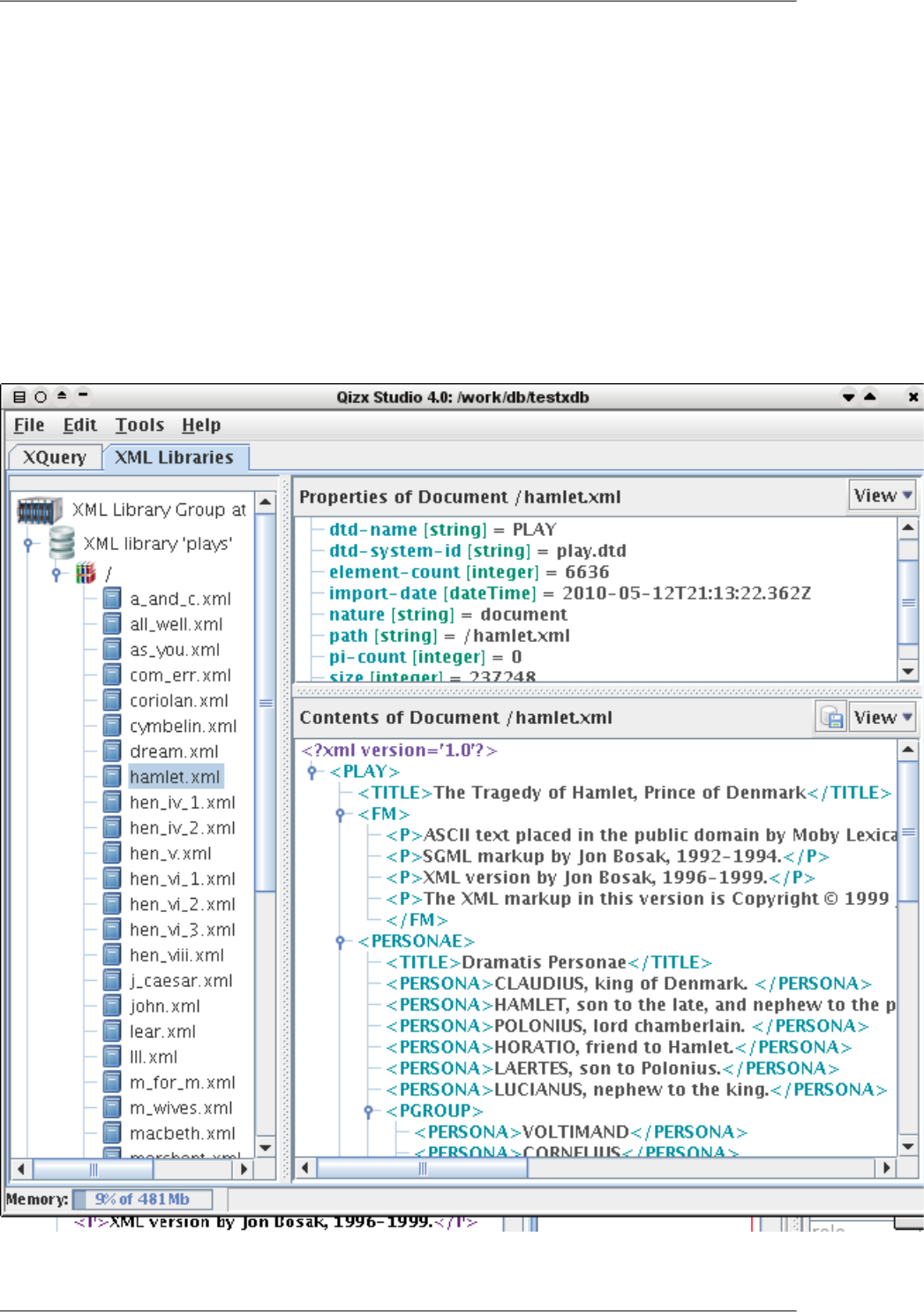
2.The 'XML Libraries' tab
This tab is used to manage XML Libraries: creation, browsing, maintenance.
Note
In Qizx/open, this tab is absent.
It is divided in three views:
1. Library Browser (left side): a tree view to browse XML Libraries and contained Collections
2. Metadata Properties view (top right): displays the properties of a selected Document or Collection
3. Contents of Document view (bottom right): displays the contents of a selected XML Document.
Figure 1. XML Libraries tab
123
Qizx Studio Help
2.1. Library browser
This view displays the contents of a XML Library Group as a tree.
The view displays the following objects:
•
XML Library Group : the currently opened group of Libraries.
•
XML Library : a library belonging to the group
•Collection : a Collection inside a Library. May contain other collections.
•Document : a well-formed XML document stored and indexed in a Collection.
Each kind of object has an associated right-click menu, which gives access to a number of operations:
•XML Library Group right-click menu:
•Open Library Group: opens a group of XML Libraries located in a directory. A file chooser appears to select
that directory.
In this mode, Qizx Studio has exclusive access to the XML Libraries. If another application or server already
has locked the Libraries, an error panel will appear.
This command also allows opening a single XML Library by selecting its root directory: It is a special case
where the Library Group has no defined location, and therefore creating other libraries is not possible.
•Connect to Server: opens a client connection to a Qizx Server.
This will likely present an authentication dialog asking for a user name and a password (depending on the
configuration of the server).
•Close Library Group: closes the current group of Libraries. If currently connected to
Passes in a mode where no Library is available. Note that it is still possible to run XQuery expressions, as
long as they don't perform queries on a Library. This is equivalent to using Qizx/open.
•Create Library Group: creates a group of Libraries in a directory. This directory is first selected by a file
chooser. It must be empty or non-existent. The Library Group is created in the directory, then a dialog asks
for the name of the first Library to be created inside the group.
•Create Library: allows creating more XML Libraries inside the current group.
•XML Library right-click menu:
•Import Documents: to store XML documents into the selected Library (in the root Collection); see the Import
Documents dialog [133].
•Use Library as Query domain: query domain means the default root of a XQuery/XPath path expression.
For example, assume that you have a Library containing the plays of Shakespeare (as marked up by Jon Bosak),
that you select the Library as the query domain, then the query //SCENE will return all SCENE elements in the
Library. Note the particular query //SCENE has no explicit root or start-point. It uses here the default query
domain.
This feature is not supported in client-server mode (because it does not make much sense).
124
Qizx Studio Help

•Indexing: a sub-menu that deals with indexing specifications.
•Indexing Specification: load a new specification written in XML. See details here [135].
•Rebuild all indexes: this operation is normally required after changing the indexing specifications.
•Optimize Library: this a compaction operation that can slightly improve the performance of queries on
the Library. It is normally performed automatically after a certain number of transactions.
•Backup Library: this command makes a backup copy of a Library to an external directory.
•Delete Library: this command physically destroys the selected Library.
•Refresh: useful in client mode to see the latest state of the Library: another client may have modified it.
Notice there is currently no notification mechanism that would allow an automatic refresh on update of an
XML Library.
•Collection right-click menu:
•Use as Query domain: query domain means the default root of a XQuery/XPath path expression (See here [124]
for more details). If a Collection is used as query domain, the query is restricted to all documents contained
within the Collection at any level.
•Import Documents: command used to store XML documents into the Collection. Invokes the Import Docu-
ments dialog [133].
•Create Sub-Collection: asks for the name of a Collection which will be child of the selected collection..
•Copy Collection: this command allows copying the selected Collection and all its contents (sub-collections
and documents) to another location in the same Library.
•Rename Collection: this command allows changing the name or the location of the collection.
•Delete Collection: this command destroys the selected Collection and all its contents (sub-collections and
documents).
•Refresh: useful in client mode to see the latest state of the Collection: another client may have modified it.
•Document right-click menu:
•Use as Query domain: query domain means the default root of a XQuery/XPath path expression (See
here [124] for more details). If a Document is used as query domain, the query is restricted to this particular
document. For example if the query domain is the document /coll/doc1.xml, the query //TITLE is equivalent
to doc("/coll/doc1.xml")//TITLE.
•Export Document: command used to extract the XML contents of the document into a local file. Invokes
the Export Document dialog [135] which allows choosing serialization options.
•Copy Document: this command allows copying the selected Document to another location in the same Library.
•Rename Document: this command allows changing the name or the location of the document.
•Delete Document: this command destroys the selected Document.
•Refresh: useful in client mode to see the latest state of the document: another client may have modified it.
2.2. Metadata Properties view
This view displays the properties (also called metadata) of the currently selected Library member, i.e Document
or Collection.
125
Qizx Studio Help

The name (in blue) and the value of the property are displayed.
Modifying properties
By right-clicking on a property, its value and type can be edited.
Note: though the 'path' property can be edited, it is in fact built-in and will not change. It can be changed through
the 'Rename' operation, by right-clicking on the corresponding Collection or Document.
2.3. Document display
This view displays the XML contents of a selected document. It should be empty if no document is selected.
2.3.1. Export document to file
With the button , you can save the document to a file. This invokes the Document Export Dialog [135].
2.3.2.View mode
This drop-down selector selects one of two display modes for a XML Data Model (i.e the contents of a document):
•Markup: this is a XML-like display
•Data Model: shows each individual node constituting the data model.
3.The 'XQuery' tab
This tab is used to edit and execute XQuery queries.
It is divided in three views:
1. Query editor (top left): a text editor with execution button and query history.
2. Messages view (bottom left): displays compilation and execution messages.
3. Query Results (right): displays the items of the result sequence.
126
Qizx Studio Help
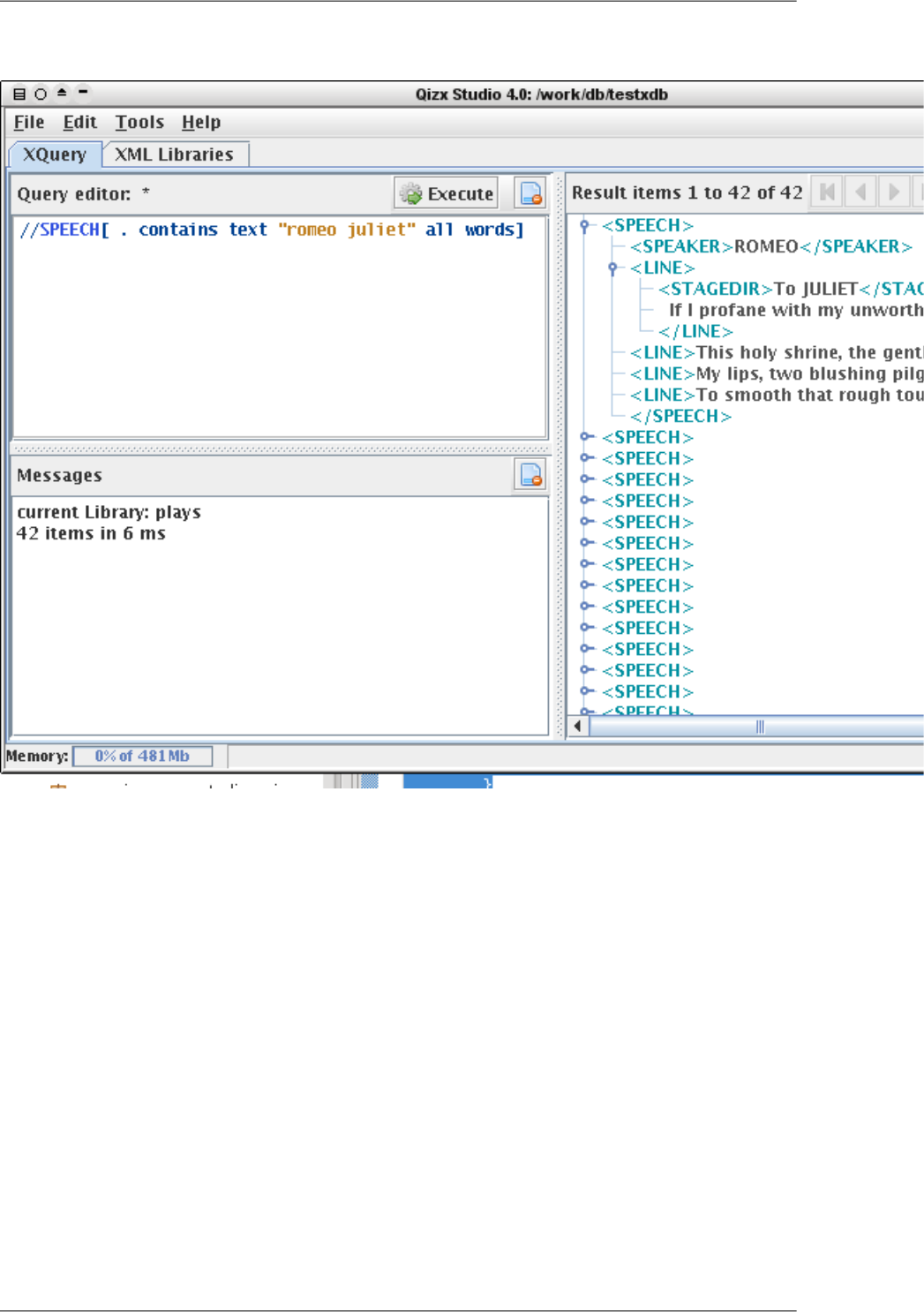
Figure 2. XQuery tab
3.1. XQuery Editor
This area is a basic text editor of XQuery source code, performing syntax coloring.
A file can be loaded in the editor through the menu File → Open XQuery, and conversely the source code can be
saved with menu File → Save XQuery.
Caution
No check is performed when saving or when exiting the application, however the query history (see below)
keeps trace of all queries entered.
Specifying the path of a XQuery source file in the command-line of Qizx Studio will automatically load the file.
This happens if the file extension (in principle .xq) has been associated with the Qizx Studio application, depending
on the Operating System used.
The editor has several buttons and controls in the tool-bar above:
127
Qizx Studio Help
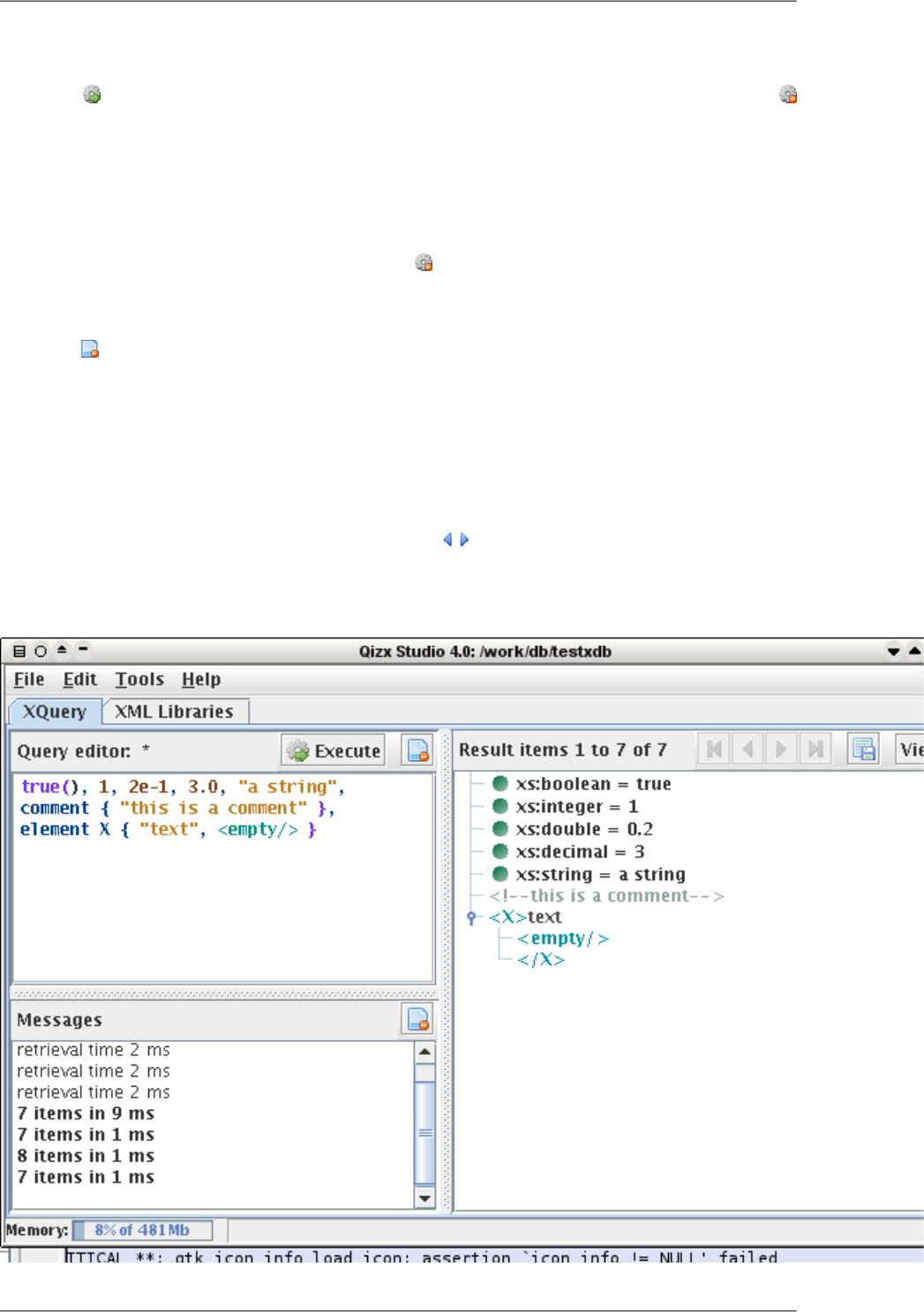
3.1.1. Query Execution
The button Execute compiles the current query and evaluates it. During execution the button changes to
Stop.
The result sequence is displayed in the Result View. A message in the Message View below tells the number of
items in the result sequence, and the time in milliseconds taken by the evaluation.
3.1.2. Stopping Query execution
A lengthy evaluation can be canceled with the button Stop . No results are displayed.
3.1.3. Clear editor text
The button clears the editor, to type a new expression.
3.2. Result View
This view displays the result sequence produced by the evaluation of a XQuery expression.
•Simple items (integer, string, etc) are displayed with their type.
•Node items are displayed either in "markup" style, looking like XML.
Results are displayed by pages of 100 items. A set of buttons can be used to traverse the result sequence if
it is long.
Figure 3. XQuery tab with miscellaneous results
128
Qizx Studio Help
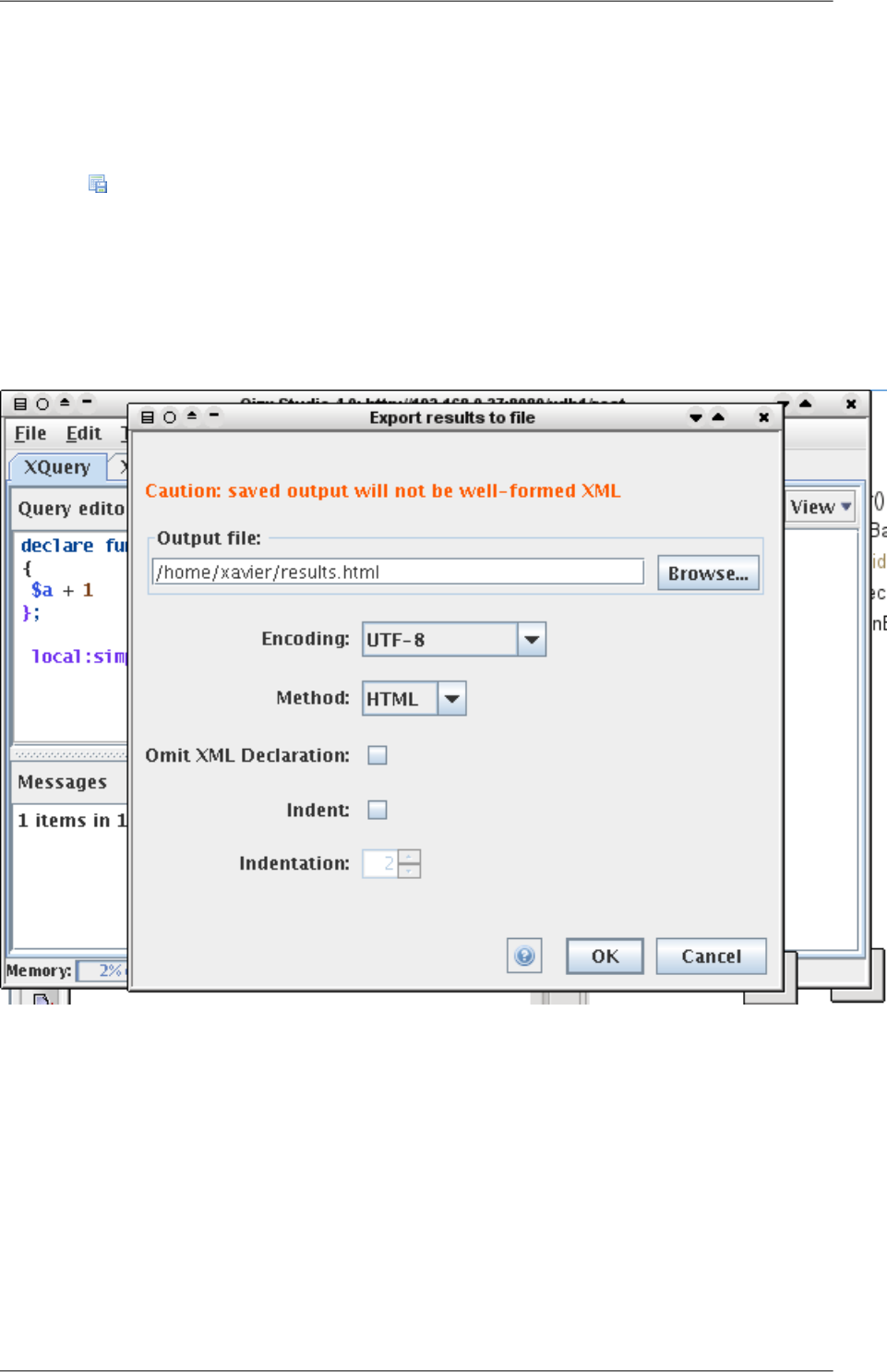
3.2.1. Move forward and backward in result sequence
The two vertical arrows move the position of the displayed page by 100 items forward or backward.
3.2.2. Export result sequence to a file
This button saves the whole result sequence onto a file.
Note that the resulting file will not in general represent a well-formed XML document, unless the result sequence
contains a single Node. A message signals when the result is not well-formed.
The invoked dialog allows choosing serialization options. Some of these options (HTML) do not always make
sense, depending on the actual results.
Figure 4. Export results dialog
3.2.3. Change the display style of results
This command changes the display style for Nodes only.
•The Markup style mimics XML markup.
•The Data Model style is a tree view of Node structures.
3.3. Message View
This view displays compilation and execution messages.
129
Qizx Studio Help
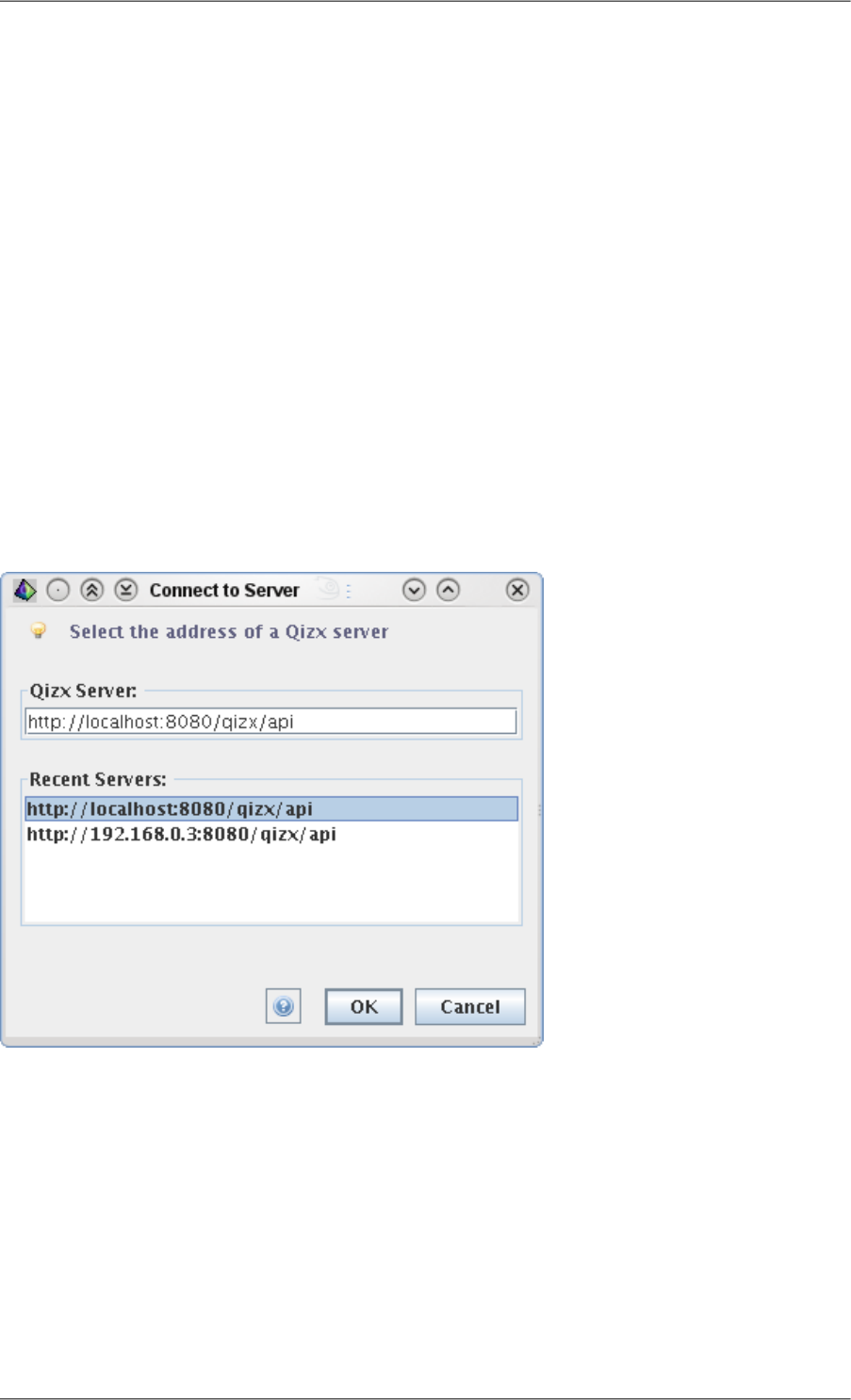
When an error is displayed, the location is underlined: by clicking on it, the cursor of the Query Editor is placed
on the error location.
4. Dialogs
Note
In Qizx/open, only the XML Catalogs and Error Log dialogs are available.
4.1. Open local Library Group dialog
Used for opening an XML Library group located on a local disk.
•File browser: selects a directory on a local file-system.
•History of recently opened groups: double clicking on this list selects the clicked entry.
4.2. Connect to Server dialog
Used for opening an XML Library group managed by a remote server.
Figure 5. Connect to Server dialog
•Field text for the URL of the server:
this URL is of the form http://host:port/webapp/api, where host, port and webapp depend on the installation.
The path 'qizx/api' is the default for the REST API of Qizx, but it can be changed in the configuration of the
server.
•History of recently opened groups: double clicking on this list selects the clicked entry.
Authentication
Generally, a server will require a login and password on connection. This is configured in the installation of the
server.
130
Qizx Studio Help
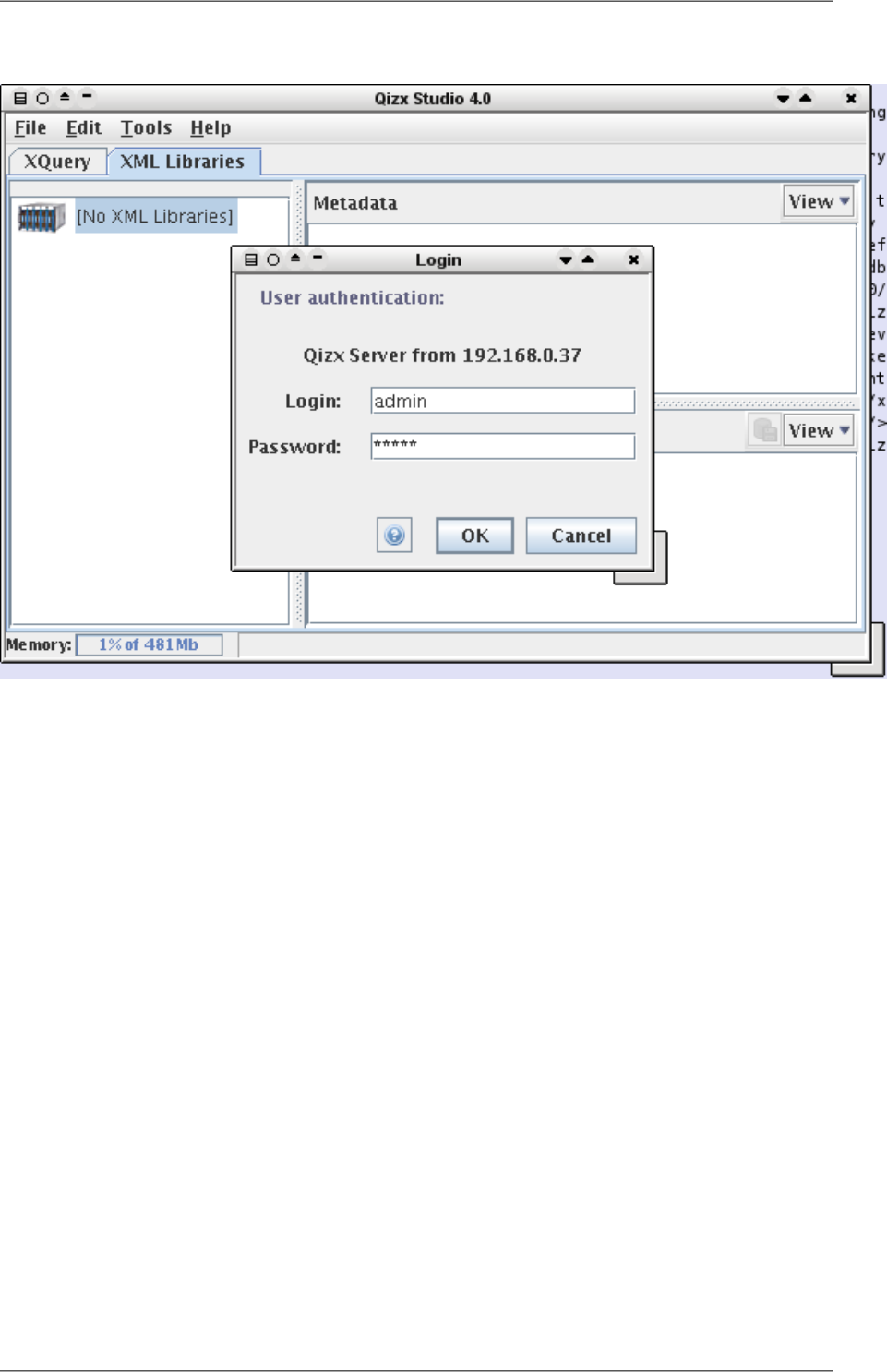
Figure 6. Connect to Server authentication dialog
4.3. 'XML Catalogs' dialog
A dialog used to define XML Catalogs used when documents are imported.
Qizx supports the OASIS XML Catalogs specifications.
The dialog edits the value of the system property "xml.catalog.files" which can contain a semicolon-separated
list of catalog files.
It is possible to add file paths and URLs to the list.
4.4. 'Create Collection' dialog
This dialog allows creating a child Collection of the selected Collection.
It simply prompts for the name of a child collection. This name must not contain the slash '/' character.
4.5. 'Import Documents' dialog
This dialog allows parsing, storing and indexing one or several XML documents into a Collection inside a XML
Library.
131
Qizx Studio Help
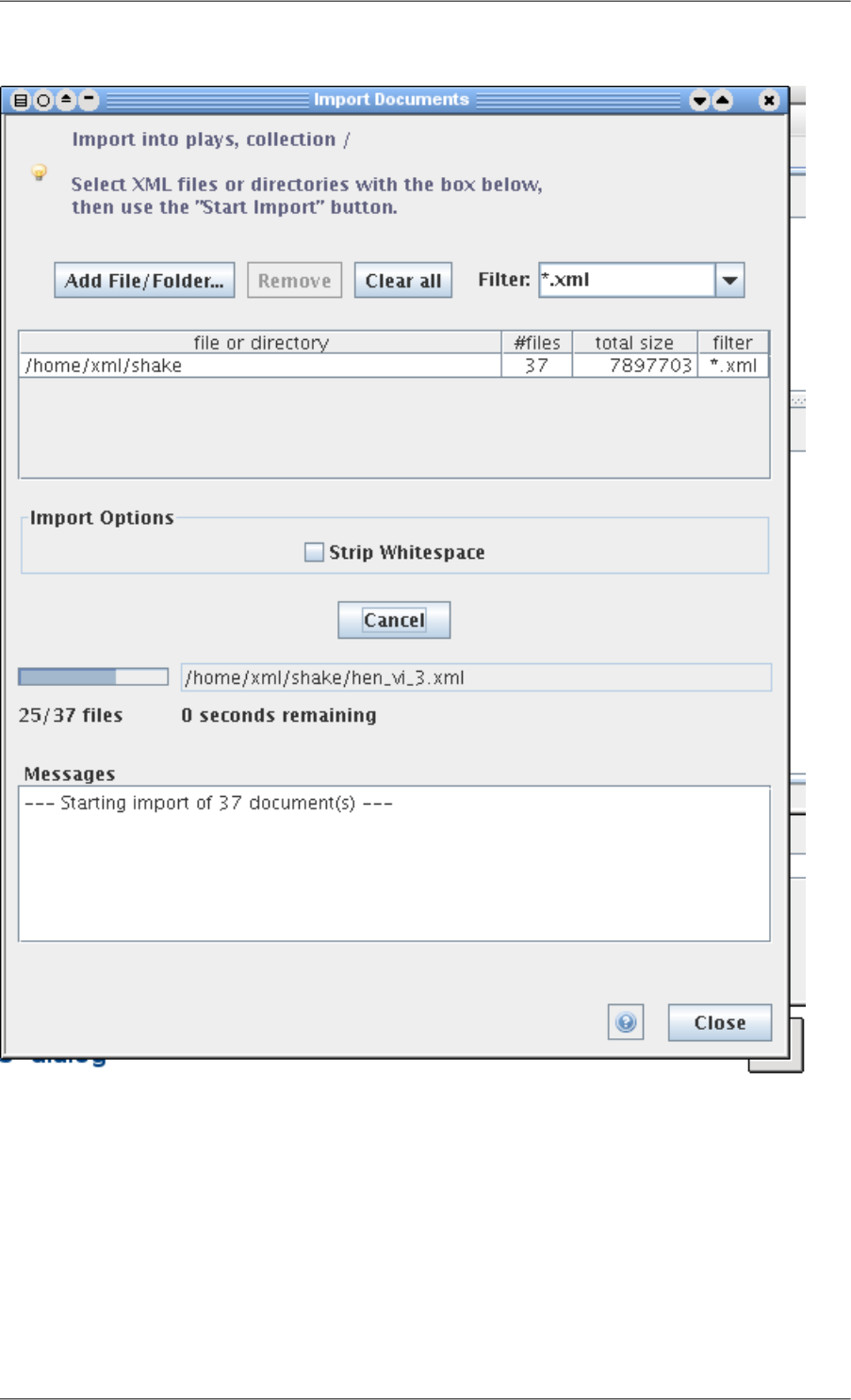
Figure 7. Import dialog
An import operation is performed in two steps:
1. Create an import list of XML files or of directories. This list displays the path, the number of files (for directories),
the total size in bytes, the filter used (for directories).
2. Push the button "Start Import".
To Add a file or directory (or several) to the list, use the button "Add File/Folder" and select the file(s) or directory.
For directories, you may first want to choose a filter for contained files. a new filter can be typed in the combo-
box.
Items can be removed from the list by selecting them and using the button Remove, or the button "Clear all".
132
Qizx Studio Help

DTD and Schema are resolved through XML catalogs. The XML Catalogs menu [131] allows editing the catalogs.
Parsing errors are reported in the Messages area at bottom.
4.6. 'Import non-XML Documents' dialog
This dialog (very similar to Import XML dialog) is used to import non-XML (ie any text or binary file) into a
Collection inside a XML Library.
Non-XML Documents are similar to "Blobs" in relational databases. They can only be written and retrieved. There
is no indexing and even text files cannot be searched by their contents.
However Non-XML Documents can have metadata properties, just like XML Documents and Collections, and
these properties can be searched.
Beware that XML files will be treated like any other file by this tool. Use the XML Document Import dialog [?]
to import XML documents.
133
Qizx Studio Help
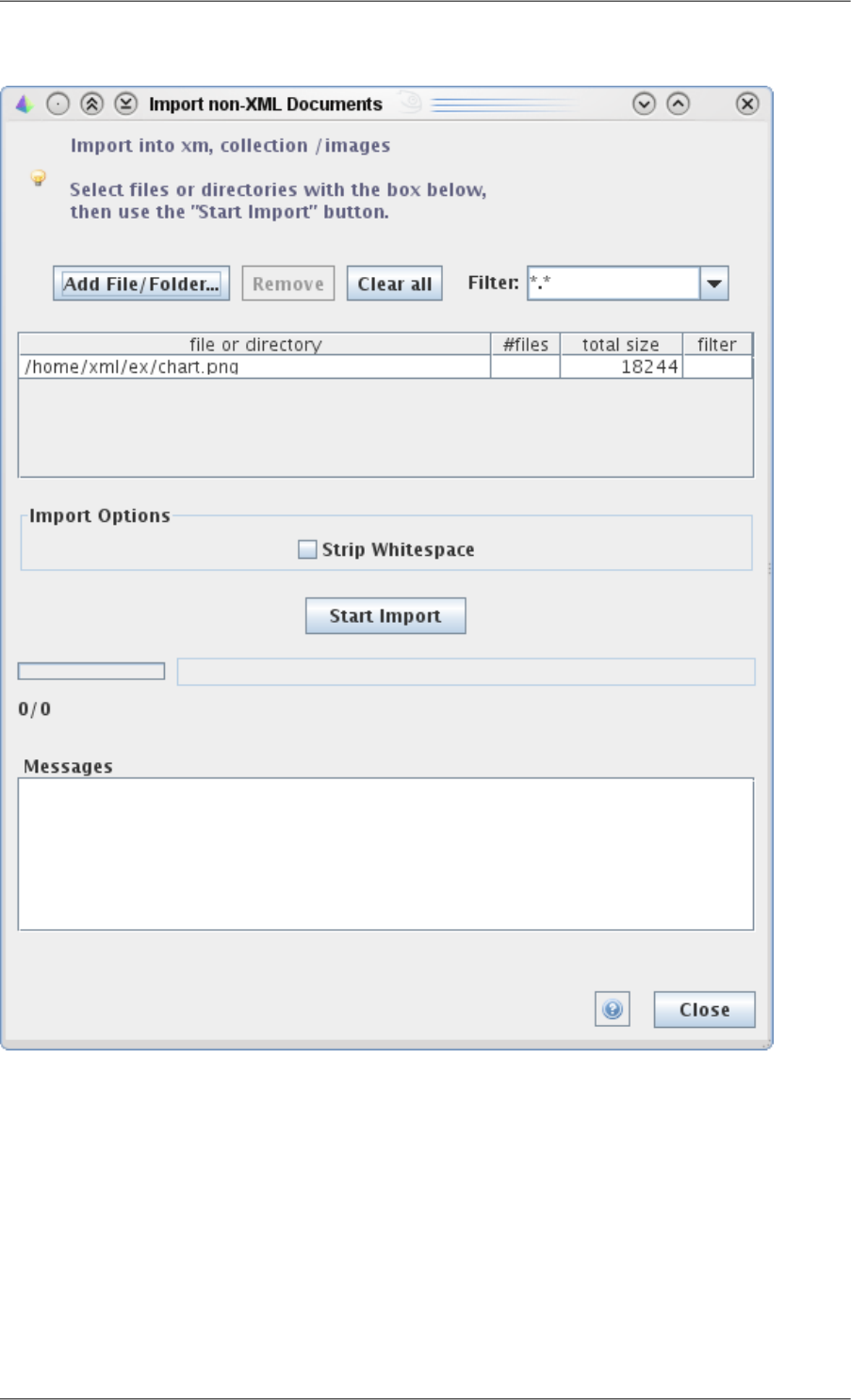
Figure 8. Import dialog
An import operation is performed in two steps:
1. Create an import list of files or of directories. This list displays the path, the number of files (for directories),
the total size in bytes, the filter used (for directories).
2. Push the button "Start Import".
To Add a file or directory (or several) to the list, use the button "Add File/Folder" and select the file(s) or directory.
For directories, you may first want to choose a filter for contained files. a new filter can be typed in the combo-
box.
Items can be removed from the list by selecting them and using the button Remove, or the button "Clear all".
134
Qizx Studio Help

As this is an import of binary files, there will be no parsing errors.
4.7. 'Export Document' dialog
This dialog is used for extracting a selected Document from a Library and write its contents back to a file.
The dialog allows choosing the file and Serialization options.
It is also used for exporting the results of a XQuery evaluation.
4.8. Metadata Property Editor dialog
This dialog allows adding a new property or editing an existing property. It is invoked by right-clicking on the
name of a property.
The value is edited in string form. The type selected with the Type combo-box is then used to parse the value ac-
cordingly.
Possible types are currently:
•String.
•long integer (xs:integer).
•double (xs:double).
•Date (java.util.Date) : a value is edited in ISO standard form, for example 2010-05-01T14:54 .
•boolean (xs:boolean).
•node(): a single node (generally an element).
•expression: any executable XQuery expression can be entered. Only the first item will stored as property value.
4.9. 'Change Indexing Specification' dialog
This dialog allows defining and changing the Indexing Specifications. See Chapter 8, Configuring the indexing
process [44] for more information about Indexing Specifications.
There are three ways of modifying the Indexing Specifications:
•Directly edit basic specifications using the simple editor presented in the dialog. This editor allows editing the
most common indexing properties, but is too limited to handle all the Indexing capabilities.
•Load a specification file (XML format described in the documentation), using the button Load From File...
•Reset Indexing specifications to the default value (button "Restore To Default").
After any change (when using the button Apply), the user is suggested to rebuild the indexes entirely. This is
strongly recommended for avoidance of inconsistencies in query results.
4.9.1. Reindexing Dialog
This is a simple dialog through which the indexes can be rebuilt entirely, using the current Indexing Specifications.
It is invoked automatically after a change in the Indexing Specification Dialog.
Please note that since Qizx 2.1, re-indexing is a synchronous operation. A progress bar is displayed by the dialog.
4.9.2. Optimize Library Dialog
This is a simple dialog through which the XML Library can be put into an "optimal" state. This operation involves
compacting the document storage and the indexes, if necessary.
Please note that since Qizx 2.1, optimizing a Library is a synchronous operation. A progress bar is displayed by
the dialog.
135
Qizx Studio Help
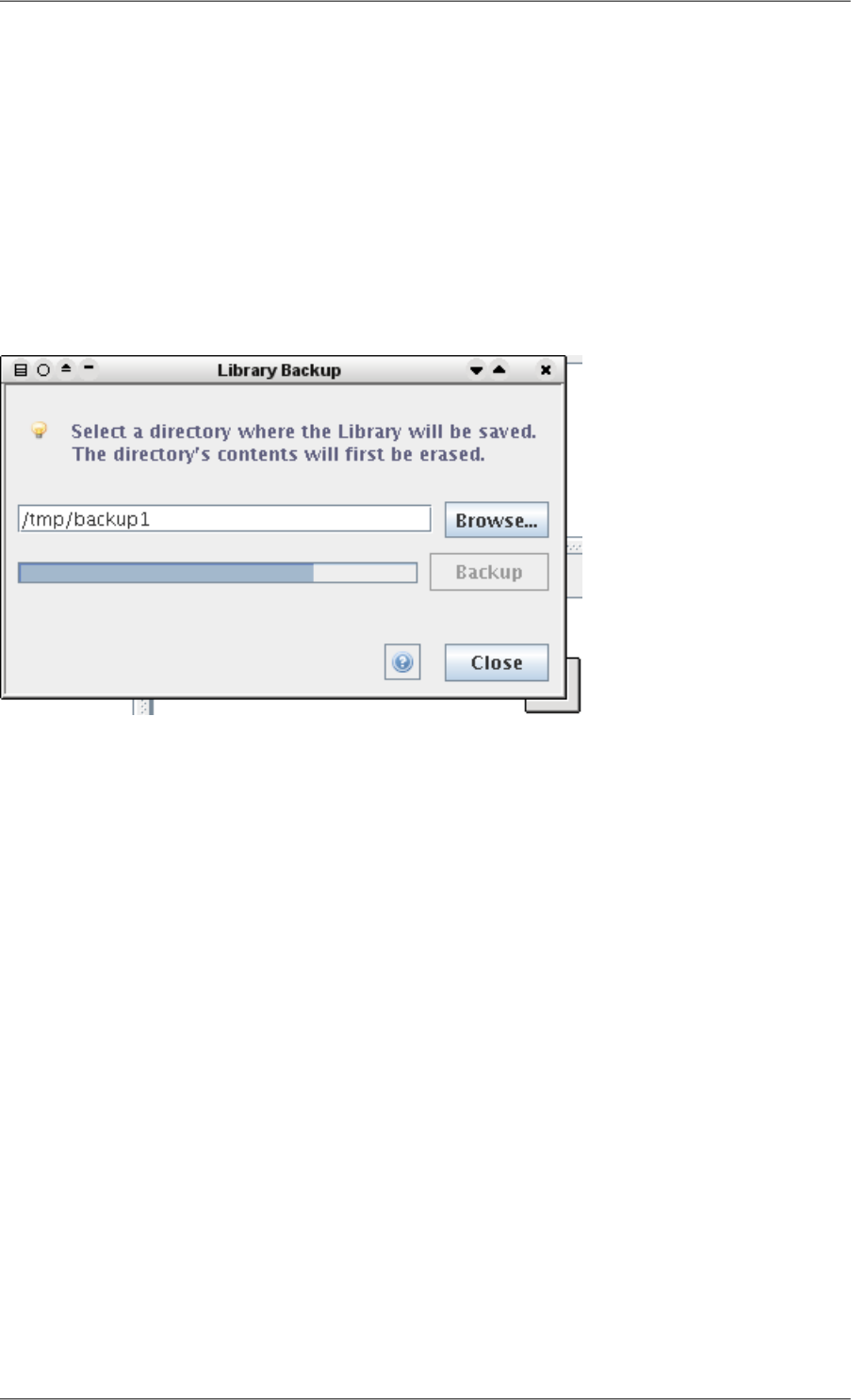
4.10. 'Backup Library' dialog
This dialog prompts you for a directory in the file system where the Library will be saved. The directory contents
will be erased before backup.
This is a ``hot backup'' which saves a snapshot of the database: any modification made by another connection
during the backup will be ignored. This is meaningful and useful in a multi-user environment, like a Web Applic-
ation running in a servlet container.
The Restore operation consists simply of moving or copying the directory of the backup Library to the place of
the original Library (see Administrator section of the manual for details).
Figure 9. Backup dialog
4.11. 'Error Log' dialog
This non-modal dialog appears when a serious error is detected by the Library manager.
Typically it appears if you try to use a XML Library that is already locked by another instance of the Qizx engine
(an instance of Qizx Studio, of the qizx command-line tool, or one of your applications).
136
Qizx Studio Help

Glossary
Collection Collection has a slightly different meaning in Qizx than in the XML Query
language specifications:
•in Qizx, a Collection is a kind of folder than can contain Documents and
other sub-collections. This is very similar to a directory on a disk. Being a
Library Member, a Collection can bear Metadata Properties.
•in XML Query. a collection is any sequence of Nodes.
Needless to say, the two notions are related: when using the path of a Qizx
Collection in the predefined function fn:collection(), it yields the se-
quence of document-nodes of all documents contained at any level within
the collection. The order of document nodes is stable and corresponds to
the order of creation or replacement.
Document A Document is the primary unit of storage in a Qizx Library. It holds both a
XML Data Model and a set of Metadata Properties. It always belongs to a
Collection.
Library (or XML Library) Library is a database of XML documents in Qizx speak.
Library Group A Library Group is basically a descriptor file (XML syntax) which describes
the names and locations of one or several XML Libraries. It is handled by a
Library Manager.
Library Manager A Library Manager is a Java object that handles a group of XML Libraries.
It manages shared resources, like caches. It is generally initialized by opening
a Library Group.
Library Member Generic term standing for both Documents and Collections contained within
a Library. Library members can hold Metadata Properties, system- or user-
defined. Library members can be searched efficiently using any of their
Properties.
Metadata Properties A Metadata Property is a pair (name, value) that can be attached to a Document
or a Collection inside a XML Library. Values can be simple items (string, in-
teger, double, boolean, Java Date, Java Object) or XML nodes. Some properties
are created automatically by the database engine, but applications can add any
number of properties.
Since Properties can be queried efficiently using XQuery, they constitute a
powerful mechanism to:
•Annotate documents with metadata, without altering the document contents
•Create custom indexes: by associating a computed property with documents
(or collections), it is possible to perform queries which would be otherwise
very inefficient.
Path Expression Path Expressions are XQuery/XPath expressions that use the '/' separator and
return a sequence of nodes. In an XML database like Qizx, they are the primary
queries.
Examples:
137

collection("...")/test/agent[ name = "John" ]
doc("/hamlet.xml")//SPEECH[ft:phrase("to be or not to be")]
$t/name
Absolute Path Expressions start from a root and produce nodes through one
or several steps. Returned nodes appear only once and are in document order.
Typical roots are collection(), doc() or a variable containing a node.
Relative Path Expressions have no explicit root like collection() or doc()
or variable name. They starts from the implicit context node, often noted by
'.' (single dot). The context node, as the name says, is defined by the context,
either the system initial conditions, or inside a predicate, as the node to which
the predicate applies, like in //item[./name = 'John'] where '.' points out
the current 'item' element.
A special case is a single step like "CHAPTER" or "node()", where the slash
operator does not appear but which is equivalent to ./CHAPTER or ./node()
respectively.
XML Data Model The XML Data Model is used by the XPath2, XML Query and XSLT2 lan-
guages, and defined by a W3C Recommendation. It describes the abstract
structure of XML documents, independently of syntactic aspects.
138
Glossary
