Ensoniq Corporation Transoniq Hacker Archive Issue #126 Th 126
User Manual: Pdf Ensoniq Corporation Transoniq Hacker Archive Issue #126 Ensoniq Corporation - Transoniq Hacker Archive - Issue #126
Open the PDF directly: View PDF  .
.
Page Count: 32
TS
Sequencing
Q
&
A
I've
been
doing
lots
of
interactive
se-
quencing
lately
between
Vision
on
my
Macintosh
and
my
TS
sequencer.
which
I
then
sync
together
with
MIDI
clocks
to
a
modular
digital
multi-track
recorder.
Coincidentally.
we've
been
getting
plenty
of
technical
questions
about
a
number
of
similar
topics.
With
that
in
mind.
this
month"s
column
is
going
to
take
the
form
of
a
Question
8:.
Answer
forum.
where
I
try
to
come
up
with
the
best
solution
for
the
particular
user’s
needs.
Here
goes:
Question
#1:
On
my
TS:
sometimes
I'll
sequence
a
drum
track
and
find
that
the
bass
drum
is
too
loud.
How
do
I
edit
the
sequence
so
that
just
that
G2
key
(bass
drum).
for
example.
is
quieter
throughout
the
sequence?
|
ISSUE
.'"~il.lhllli'=-El-if
‘I26.
$1»?
Elli
DECENIBER.
i995
I
i
-._.-I-
.----
Tony
Ferrara
I
have
tried
the
Edit
Track.
Scale.
Key
Velocity.
menu
and
it
doesn't
seem
to
do
the
trick.
Unlike
other
controllers
where
there
is
a
plus
or
minus.
on
mine.
the
range
is
simply
from
0
to
9.
Selecting
different
values
doesn't
seem
to
change
things
at
all.
Am
I
in
the
right
menu
to
do
what
I
wish
to do?
Answer:
Good
news!
I‘ve
got
some
general
suggestions
that
can
help
you
in
regard
to
quick
editing
when
se-
quencing
drum
tracks.
First
of
all.
it‘s
easiest
to
work
with
drums
by
keeping
them
on
separate
se-
quencer
tracks.
For
instance.
bass
drum
on
track
one.
snare
on
track
two.
etc.
If
you
designate
necks
1-6
to
drums.
T-12
can
then
be
used
for
your
other
instruments.
That
way.
you can
quickly
edit
the
individual
track
volume
by
changing
the
Min
setting
under
the
Track
Parameters
sections
on
your
TS
front
panel.
You
can
also
change
track
programs
and
transpositions
quickly;
using
this
method.
you
could
actually
use
drums
from
different
kits
to
create
your
own
unique
"virtual"
drum
kit.
Different
sequencer
tracks
(with
their
own
MIDI
channel
number)
will
allow
you
to
interface
with
an
ertternal
se-
quencer
much
more
easily.
and
will
enable
you
to
solo
tracks
for
isolation
In
Thlfi
Issue
ll
I
n
I
Articles:
TS
Sequencing
Q
St
A
Tony
F
errara
....................................
..
cover
Stupid
Sequencer
Tricks
Jack
Schiejjfer
..........................................
..
5
The
DPI4
and
MIDI
-
Part
ll
Steve
Bynarst
...........................................
..
T
LFO
Fundamentals
101
Dan
Ronda
...............................................
..
9
Vocoded
Vocals
Tom
Shear
..............................................
..
13
Samplin'
From
Your
‘VCR
JED.
Ryan
...............................................
..
14
Selling
Your
Services
Jefirey
Fisher
.........................................
..
15
Sampling.
Sequencing
and
Live
Performance
Torn
Shear
..............................................
..
21
F<‘ogulor
Stuff:
Hypersoniq
..............................................
..
2
Random
Notes
.........................................
.. 3
Hackerpatches
-
Mints
&
Rhoads
‘v'FX.iSIIl:
Large-Sound.
Slinkard
12
SQIKSIKT:
Tubular
Choir.
I-Iaymond
20
Hacker
Reinitialization
—
SQIKSIKT
Series
Modulation
Clark
Salisbury
...............................
.. 1?
Classifieds
.............................................
..
22
The
Interface
..........................................
..
23
Hacker
Booteeq
30
.l'
The
Independent
News
Magazine
for
Ensonlq
Users
when
auditioning
instruments
or
recording
to
tape.
Question
#2:
What
is
the
SCALE:
KEY
VELOCITY
menu
for?
Shouldrft
that
allow
me
to
control
the
volume
of
a
single
key
number
in
a
sequence
(for
example.
the
bass
drum
at
G2).
I
basically
want
to
know
if
I
understood
the
purpose
of
this
function.
Answer:
The
Scale
command
lets
you
increase
or
decrease
the
level
of
any
specific
controller
information
in
the
selected
track
by
a
specified
amount.
The
MIDI
controller
KEY-VELOCITY
pertains
to
Note-On
Velocity.
This
is
a
different
parameter
than
track
min
(volume).
The
bottom
line
is
that
it's
very
easy
to
confuse
different
types
of
MIDI
controllers.
Question
#3:
Can
you
provide
any
tips
on
taking
an
exist-
ing
TS
sequencer
track
and
breaking
it
into
separate
tracks?
I
assume
one
would
do
that
by
simply
copying
a
range
of
notes
to
separate
tracks.
Can
one
easily
“re-combine"
tracks
back
together?
In
other
words.
once
I
have
my
drum
kit
on
sis
separate
tracks.
can
I
re-combine
them
into
a
single
track
at
some
point‘?
Answer:
Your
assumption
is
correct
-—
you
can
take
an
es-
isting
track
and
break
it
into
separate
necks
by
copying
a
specific
range
of
notes
to
a
separate
track.
You
can
then
easily
re-combine
multiple
tracks
by
using
the
merge
track
function
found
on
the
second
page
under
the
“edit
track"
button.
You‘ll
also
find
the
copy
track
command
in
the
same
place.
at
which
time
you
can
set
the
specific
key
MIDI
Mark
Productions
announces
over
50
brand
spanking
new
disks
for
the
EPS.
ASR.
and
TS-Series
samplerslkeyboards.
Sample
disks
include
drums.
synths.
effects.
rap
series
and
house
kits.
Nine
disks
on
sale
now
until
December
I2.
1995
for
$52.00.
For
a
free
catalog.
contact:
MIDI
Mark
Productions.
P.O.
217.
Whittier.
CA
90608.
Phone:
(300)
301-MIDI
(6434).
Fan:
(310)
699-U864.
Email:
MIDlMARK?@aol.com
‘k
it
1'
Wavehoy
Industries
announces
the
release
of
the
Trans-
wave
Sound
Library.
Only
Ensoniq
instrtunents
can
play
Transwaves.
The
five-disk
collection
showcases
this
uni-
que
feattne
for
the
first
time.
‘What
are
Transwaves?
A
Transwave
is
a
set
of
128
wave-
range
that
you'd
like
to
copy.
Question
#4:
I-low
come
on
my
TS
the
KEY
VELOCITY
scale
menu
goes
from
0-99.
not
+99
to
-99
like
some
other
menus?
What
does
0
on
this
menu
mean
and
what
does
99
mean‘?
Answer:
in
this
contest.
0-99
are
relative;
they
don’t
represent
dB
ranges.
nor
do
they
relate
in
any
specific
way
to
dynamic
markings
found
in
traditional
music
notation.
They
represent
a
minimum
to
maximum
abstract
value.
as
opposed
to
system-common
information
like
pan
or
MIDI
controller
number
values
0-12?.
Parameters
like
track
pan
are
generally
indicated
by
a
range
from
+63
to
-64
to
sym-
boliae
hard
right
to
left.
Key
none
velocity
controller
values
range
from
0
through
12?;
therefore.
this
particular
parameter
can
be
modulated
via
MIDI.
I
hope
that
these
suggestions
are
helpful
to
you:
they've
worked
very
well
for
me.
and
have
proven
to
be
the
quick-
est
and
most
accurate
way
to
work
with
drum
track
editing
on
the
TS-Series.
If
I
haven't
covered
a
point
that
relates
to
your
specific
interests
this
month.
don’t
worryl
I'll
have
more
along
this
line
nest
time.
-
Bio
and
self-serving
plug:
Anthony
Ferraro
has
written
for
Electronic
Musician.
Recording.
and
Keyboard
magazines.
He
is
still
hard
at
work
on
some
new
“snappy
tlitties."
and
is
playing
concerts
in
the
Philadelphia
area.
Call
2l'5-?'42-
U733
for
concert
info.
forms
of
equal
siae.
A
Transwave
oscillator
can
switch
between
different
waveforms
smoothly.
while
it
is
sound-
.ing.
Wlien
the
waveforms
are
properly
chosen.
the
result-
ing
tone
is
heard
as
a
smooth.
continuously
changing
timbre.
To
date.
Transwaves
must
be
created
or
at
least
phase-adjusted
on
a
computer.
Transwave
Synthesis
is
unique
to
Ensoniq.
and
only
the
samplers
and
sample
players
(TS-l[l.t'l2.
EPS-16
PLUS.
and
ASR-10)
can
load
new
Transwaves.
Waveboy
has
generated
a
set
of
incredibly
potent.
espres-
sive
sounds
based
on
Transwaves.
The
raw
material
is
drawn
from
different
analog
and
digital
synthesis
techni-
ques.
including:
-
pulse-width
modulation.
I
resonant
filters.
RND(hw)
I
frequency
modulation.
I
hard-sync.
I
formant
extraction.
I
and
additive
synthesis.
But
these
are
not
just
samples.
The
Transwave
gives
the
player
the
ability
to
modulate
the
filter
frequency.
the
pulse-width.
the
FM
index.
and
the
harmonic
content
in
response
to
velocity.
the
wheel.
or
any
modulation
source.
So
these
sounds
feel
alive:
they
respond
to
your
playing
and
to
parameter
tweaks.
Transwaves
make
the
sampler
into
a
virtual
{if
you
can
stand
to
hear
that
word
again)
synthesizer.
where
each
different
Transwave
can
be
a
dif-
fcrcnt
synthesis
technique.
The
Waveboy
disk
set
is
both
a
source
of
raw
Transwaves
for
programmers.
and
a
collection
of
finished
sounds
as
well.
The
30
sounds
in
the
Transwave
Sound
Library
run
the
gamut
from
aggressive
(RUDE
REZ)
to
atmospheric
(LIGHTYEARS);
from
bread-and-butter
(BELL
BIP
FM)
to
sound-track
(HARMONICON);
from
plain
and
skimiy
(303
SAW)
to
luscious
and
fat
(PWM
SYNTH.)
There
are
no
pianos.
The
Transwave
Sound
Library
works
with
the
Ensoniq
ASR-10.
the
EPS-16
PLUS.
and
the
TS-l0;'l2.
(It
will
not
work
with
the
Kurzwcil
K2000
or
other
“Ensoniq
compat-
ibles.")
It
is
a
five-disk
set.
includes
30
sounds.
and
comes
with
a
user’s
manual
for
creating
new
sounds
using
Transwaves.
It
is
available
directly
from
Waveboy
for
$69.00
and
at
selected
dealers
across
the
world.
Bill
Manchly
is
both
“‘Waveboy”
and
the
creator
of
Trans-
waves
in
the
Ensoniq
product
line.
Bill
played
guitar.
Mel-
lotron.
and
guitar
synthesizer
in
art
rock
bands
during
the
’?0s.
By
1980 he
owned
a
recording
studio.
was
doing
sound
programming
for
the
Fairlight.
and
was
getting
a
degree
in
Computer
Science.
When
Ensoniq
was
founded
in
1934
he
joined
to
help
design
the
Mirage.
As
a
software
engineer
for
Ensoniq.
he
created
the
voice
and
effects
ar-
chitectures
for
the
ASR-10
and
EPS-I6
PLUS
samplers
[as
well
as
for
the
Mirage.
ESQ-1.
BPS.
VFX.
SD-1.
DPI4.
and
TS-10).
He
is
currently
heading
the
Advanced
Product
Development
Group
at
Ensoniq.
Waveboy
In-
dustries
was
started
as
an
outlet
for
effects
algorithtns
that
did
not
fit
into
Ensoniq's
product
plans.
As
the
sole
proprietor
of
Waveboy
Industries.
Bill
gets
to
develop
any
hair-brained
idea
he
likes.
For
further
information.
contact:
Waveboy
Industries.
P.O.
BOX
233.
Paoli.
PA
19301.
Phone:
(610)
251-9562.
Ensoniq
Announcements
It's
time
to
introduce
you
to
MR
Rack.
the
latest
addition
to
the
Ensoniq
family.
The
MR-Ra-clt
is
an
all-new
64
voice.
expandable
synth
rack.
It
is
based
on
a
new
voice
engine.
new
effects
chip
with
new
architecntre.
and
new
circuitry
giving
you
44.1
kl-Ix
output.
and
a
signal-to-noise
spec
of
103
dB.
Specifications
Output
I
44.1
kHz
sample
playback
rate
I
IS-bit
DIA
conversion
with
103
dB
dynamic
range
I
103
dB
signal-to-noise
ratio
I
Ground-compensated
output
circuitry
Inputslfilutputs
I
LcftfMono
and
Right
Main
outputs
(balanced
TRS)
I
Leftflvlono
and
Right
Aux
outputs
(balanced
TRS)
I
Stereo
headphone
output
I
MIDI
In.-’Dutt'ThI1.1
Dlsplayilnterface
I
40
(2
x
20}
character
LCD
display
I 2
Data
Entry
knobs.
I0
buttons
{ti
with
LEDs).
fi'ont
panel
effects
bypass.
MIDI
indicator
LED.
Volume
knob
I
SomdFinderTM
interface
-
one
knob
selects
sound
type.
another
knob
selects
specific
sound.
Sounds
can
be
searched
for
alphabetically
within
musical
instr'urnent
categories.
or
numerically
within
Bank
locations
(ROM.
RAM.
card,
-
expansion
board.
GM.
User.
Demo}
I
Audition
button
plays
musical
examples
to
preview
sounds
from
front
panel
(your
choice
of
either
a
musical
phrase
appropriate
to
the
SoundFinder
category.
arpeggiated
octaves.
or
a
major
chord}.
I
PCMCIA
ROMIRAM
card
slot
for
Sounds.t'Pcrformances
Internal
Soundt'Perforn1ance
Memory
I
393
RUM
sounds
('2
Banks
of
123.
12S
GM
sounds.
9
GMIGS
drum
kits).
hundreds
of
ROM
drum
elements
I
Up
to
128
RAM
sounds
possible
{due
to
the
dynamic
voice
sine
the
final
number
is
still
to
be
determined}
I
65
ROM
Performances
(16
parts
each)
I
32
RAM
Performances
(16
parts
each}
Card
SoundiPerforn1ance
Memory
I
ROM
cards
offer
2
Banks
of
Sounds
(up
to
123
per
Bank)
plus
2
Banks
of
Performances
(32 per
Bank)
I
RAM
cards
(PCMCIA
format}
can
be
from
512k
up
to
2
MB.
They
can
hold
the
following
data:
512k
-
4
Banks
of
Sounds
(up
to
128
per
Bank}
4
Banks
of
Performances
(32 per
Bartlt)
l
MB
-
S
Banks
of
Sotmds
(up
to
12S
per
Bank)
S
Banks
of
Performances
(32
per
Bank}
2
MB
-
16
Banks
of
Sounds
(up
to 128
per
Bank)
16
Banks
of
Performances
(32
per
Bank}
‘Wave
Memory
I
96
Megabits
(12
MB}
of
15-bit
wave
ROM
I
Over
500-ll
variations
possible
from
the
over
300
waveform
selections.
which
include:
-
2S
Megabits
(3.5
MB)
of
acoustic
piano
-
Multi-sampled
acoustic
instruments
in
Keyboard.
Synth.
String.
Brass
St
Horn.
Wind
St
Reed.
Vocal.
Bass.
Drum.
Percussion.
and
Sound
Effect
groups
-
2nd-generation
TranswavesTM
created
through
sampling.
digital
synthesis.
and
digital
rcsynthesis
technologies
-
Sustained
synth
waveforms
with
harmonic
and
inharmonic
structures
I
Modulatablc
start
point,
forward
or
backward
playback.
and
multi-sample
key
shift
(4
modes}
available
on
most
waves
I
Pitchedlnon-pitched
playback
of
all
waves
possible
Expansion
Memory
I
3
wave
expansion
board
slots.
for
a
total
of
up
to
672
Megabits
(S4
IVIB)
of
ROM
wave
data
I
A
board
holds
up
to
192
Megabits
(24
MB)
wave
data.
multiple
Banks
of
Sounds,lPerformances
(up
to
128
Sounds
and
32
Performmtces
per
Bank).
demos
I
Expansion
boards
are
user-installable
Voice.
Architecture
(accessible
via
computer)
I
S4
dynamically
assigned
voices
I
Dynamically
sized
voice
architecture
(up
to
16
Layers).
with
the
following
parameters:
-
Independent
waveform
selection
-
Programmable
layer
delay
up
to
10
secs
or
by
key-up
trigger
-
2
independent
multi-mode
dynamic
digital
filters
(low-pass.
high-pass.
variable
bandwidth
band-pass}
with
key
tracking
(33
settings.
including
manyfractional
scaling
options)
-
3
five-stage
envelope
generators
(time
and
level}
with
level
and
auack
time
modulatablc
by
velocity
(S
possible
curves).
key
scaling.
and
response
to
release
velocity
-
35
RUM
Pitch
Tables
with
a
resolution
of
256
steps
per
semitone
-
1
RAM
location
for
receiving
a
Pitch
Table
sent
from
any
device
that
supports
the
MIDI
Tuning
Dump
Standard
(Bulk
Tuning
Dump
and
Single
Note
Tuning
Change}
-
22
modulation
sotuces
-
S
modulation
destinations
-
1
LFU
with
T
waveform
choices.
sync-able
to
System
clock
(definable
in
HPM)
or
external
MIDI
clock.
with
12
rhythmic
subdivisions
-
Variable
rate
Noise
generator.
sync-able
to
System
clock
(definable
in
BPM}
or
external
MIDI
clock.
with
12
rhythmic
subdivisions
-
Volume
and
Pan
-_
Semi-tone
and
fine
timing
-
Pitch
tracking
(33
settings.
including
many
fractional
scaling
options}
-
Key
and
velocity
ranges
-
Voice
trigger
options
(key-up.
key-down.
MIDI
controller
enable)
-
Glide
mode.
glide
time
-
Mono
lpo
ly
playback
-
Pitch
Bend
onloff.
Held
Pitch
Bend
mode
-
Pitch
Bend
range
is
promammable
for
both
positive
and
negative
wheel
directions
-
Sustain
onloff
-
Key
group
assigrunent
I
Drum
Kit
architecture
offers
64
keys
(B1
-
Dir‘):
each
key
points
to
a
fully-developed
Sound
(up
to
16
Layers
per
key).
plus
effects
bus.
volume.
pan.
and
tuning
overrides.
Performances
I
A
Performance
is
a
1h-part
combination
of
Sounds.
Parts
can
be
assigned
their
own
MIDI
channel
for
multi-timbral
reception.
be
set
to
the
same
MIDI
channel
for
layer
and
split
options.
and
be
individually
muted.
I
Parts
can
be
set
to
a
global
"Stack"
channel.
which
can
then
be
defmed
as
any
channel
(1-16}.
In
this
way
layered
or
split
setups
can
be
quickly
matched
to
a
given
input
channel
by
simply
changing
the
Stack
channel
setting.
I
Each
Performance
contains
a
custom
Drum
Kit
I
Extensive
sound
"tweaking"
(global
editing)
for
each
Part
in
a
Performance.
including:
-
Volume
-
LFO
Depth.
Delay
-
Volume
Polarity
-
Amp
Envelope
-
Expression
Attack.
Decay.
Release
-
Pan
-
Filter
Cutoff
-
Effects
Bus
-
Filter
Envelope
-
Pitch
Bend
Up
Attack.
Decay.
Release
-
Pitch
Bend
Down
-
Amp
St.
Filter
-
Tuning
(Octave.
Envelope
Velocity
Coarse.
Fine}
-
Key
Range
Lo,t'Hi
-
Pitch
Table
-
Velocity
Range
Loil-li
-
Glide
Mode
-
Velocity
Mode
-
Glide
Time
-
Pressure
Mode
-
LFO.r'Noise
Tempo
Sync
-
Controller
Reception
_-
LFU
Rate
Filters
Effects
I
New
VLSI
24-bit
digital
signal
processor
(ESP-2)
with
25
MIPS
of
DSP
power.
52-bit
accumulation
I
New
UMTE
(Universal
Multi-Timbral
Effects}
architecture
with
h
stereo
busses:
—
3
stereo
busses
with
independent
send
amounts
into
global
reyerb
-
I
stereo
bus
with
a
wetldry
mix
into
global
chorus
and
a
send
amount
into
global
reverb
_
-
I
stereo
bus
with
a
wetldry
mix
into
an
irtsert
effect.
a
weiidry
mix
into
global
chorus.
and
a
send
amotmt
into
global
reverb
-
1
dedicated
stereo
dry
bus
-
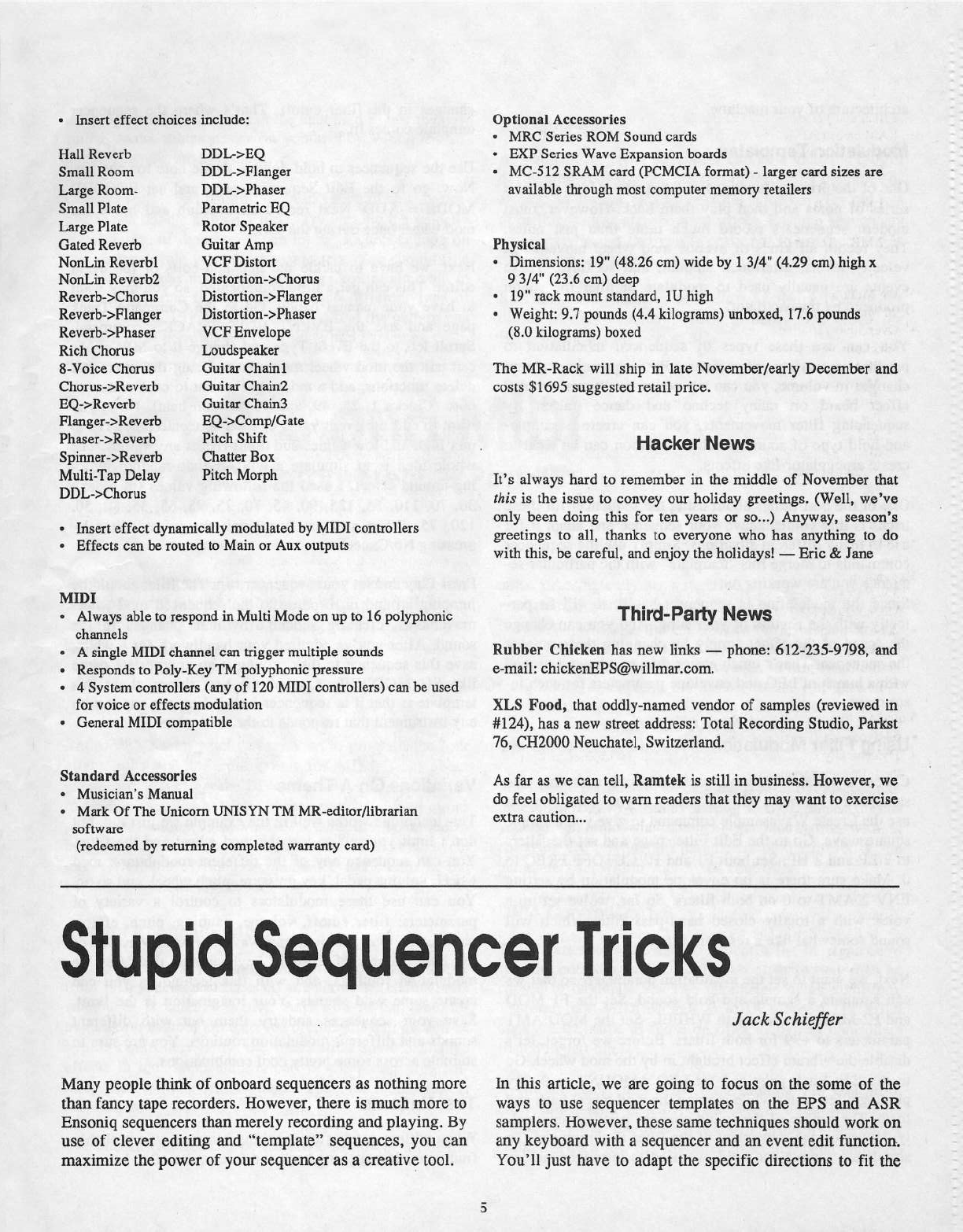
Insert
effect
choices
include:
Hall
Reverb
Small
Room
Large
Room-
Small
Plate
Large
Plate
Gated
Reverb
NonLin
Reverbl
NonLin
Reverb2
Reverb-:=-Chonts
Reverb->Flanger
Reverb-:-Phaser
Rich
Chorus
S-‘Poice
Chorus
Chorus-:>Reverb
EQ->-Reverb
Flanger->Reverb
Phaser-:=-Reverb
uuL-seq
DBL->Flanger
DDb>Phaser
Pmametric
EQ
Rotor
Speaker
Guitar
Amp
VCF
Distort
Distortion-:=-Chorus
Distortion-I:-Flanger
Distortion-:=-Phaser
VCF
Envelope
Loudspeaker
Guitar
Chainl
Guitar
Chaini
Guitar
Chain3
EQ-1:-Comp,-‘Gate
Pitch
Shift
Spinner-:>Reverb
Chatter
EDI.
Multi-Tap
Delay
Pitch
Morph
DDL->Chorus
It
Insert
effect
dynamically
modulated
by
MIDI
controllers
*
Effects
can
be
routed
to
Ivlain
or
Ans
outputs
MIDI
I
Always
able
to
respond
irt
Multi
Mode
on
up
to
16
polyphonic
channels
-
A
single
MIDI
channel
can
trigger
multiple
sounds
-
Responds
to
Poly-Key
Tlvi
polyphonic
pressure
-
4
System
controllers
{any
of
12D
MIDI
controllers}
can
be
used
for
voice
or
effects
modulation
-
General
MIDI
compatible
Standard
Accessories
-
Musician‘s
Manual
*
Mark
Of
The
Unicorn
UNISYN
TM
MR-editorflibrariatt
software
(redeemed
by
returning
completed
warranty
card}
Optional
Accessories
-
MRC
Series
RUM
Sound
cards
-
EXP
Series
Wave
Eapaiision
boards
-
MC-512
SRAM
card
[P€MCIA
format)
-
larger
card
sizes
are
available
through
most
computer
memory
retailers
Physical
-
Dimensions:
19"
(43.26
cm)
wide
by
1
3K4"
(4.29
cm)
high
I.
El
3J4"
(23.6
cm)
deep
-
19"
tacit
mount
standard,
1U
high
-
Weight:
9.’?
pounds
(4.4
kilograms}
ttnbo:-ted,
11-'.'6
pounds
(Bil
kilograms}
ho:-ted
The
MR-Rack
will
ship
in
late
Novemberfearly
December
and
costs
$1695
suggested
retail
price.
Hacker
News
It’s
always
hard
to
remember
in
the
middle
of
November
that
this
is
the
issue
to
convey
our
holiday
greetings.
(W
ell,
we’ve
only
been
doing
this
for
ten
years
or
so...)
Anyway,
season's
greetings
to
all,
thanks
to
everyone
who
has
anything
to
do
with
this,
be
careful,
and
enjoy
the
holidays!
—
Eric
8:;
Jane
Third-Party
News
Rubber
Chicken
has
new
links
—
phone:
612-235-W98,
and
e-mail:
chickenEPS@willmar.com.
XLS
Food,
that
oddly-named
vendor
of
samples
(reviewed
in
#124),
has
a
new
street
address:
Total
Recording
Studio,
Paritst
T6,
CHZDUU
Neuchatel,
Switzerland.
As
far
as
we
can
tell,
Ramtel-t
is
still
in
business.
However,
we
do
feel
obligated
to
warn
readers
that
they
may
want
to
exercise
e:-ttra
caution...
Stupid
Sequencer
Tricks
Many
people
think
of
onbuard
sequencers
as
nothing
more
than
fancy
tape
recorders.
However,
there
is
much
more
to
Ensoniq
sequencers
than
merely
recording
and
playing.
By
use
of
clever
editing
and
“template”
sequences,
you can
maximize
the
power
of
your
sequencer
as
a
creative
tool.
Jock
Schiefier
In
this
article,
we
are
going
to
focus
on
the
some
of
the
ways
to
use
sequencer
templates
on
the
EPS
and
ASR
samplers.
However,
these
same
techniques
should
work
on
any
keyboard
with
a
sequencer
and
an
event
edit
function-.
You'll
just
have
to
adapt
the
specific
directions
to
fit
the
architecture
of
your
machine.
Modulation
Templates
One
of
the
primary
functions
of
a
sequencer
is
to
record
a
series
of
notes
and
then
play
them
back.
However,
most
modem
sequencers
record
much
more
than
just
notes.
They
record
all
kinds
of
events:
mod
wheel
movements,
velocity
levels,
aftertouch
amount,
and
so
forth.
These
events
are
usually
used
to
modulate
or
alter
the
sound
produced
by
the
oscillator.
You
can
use
these
types
of
sequenced
modulation
to
produce
a
variety
of
effects.
By
sequencing
abmpt
changes
in
volume,
you
can
reproduce
the
"transforming"
effect
heard
on
many
techno
and
dance
tracks.
By
sequencing
filter
movements,
you
can
create
a
sample-
and-hold
type
of
sound.
Pitch
modulation
can
be
used
to
create
arpeggiator-like
effects.
One
of
the
best
things
about
using
the
sequencer
for
these
tricks
is
that
you
can
save
your
sequence
and adapt
it
for
use
in
many
different
situations.
Simply
use
the
sequencer
commands
to
merge
this
“template”
with
the
particular
se-
quence
you
are
working
on.
Since
the
modulation
is
sequencer-based,
it
will
fit
per-
fectly
with
the
rhythm
of
your
song.
And
you
can
change
the
speed
of
the
effect
simply
by
changing
the
tempo
of
the
sequence.
That‘s
much
easier
than
monlteying
around
with
a
bunch
of
LFO
and
envelope
parameters
for
each
in-
snument.
Using
Filter
Modulation
Choose
a
sustaining
sound,
preferably
one
with
only
one
sample
in
it
(to
make
editing
easier).
If
you
want,
you
can
use
the
Create
Wavesample
conunand
to
give
you
a
simple
square
wave.
Go
to
the
Edit
Filter
page
and
set
the
filters
to
2
LP
and
2
HP.
Set
both
F1
and
F2
CUTOFF
FREQ
to
U.
Make
sure
there
is
no
envelope
modulation
by
setting
ENE?
2
AMT
to
U
on
both
filters.
So
far,
we've
set
up
a
voice
with
a
totally
closed
band-pass
filter
which
will
sound
somewhat
like
a
resonant
filter.
N
ext,
we
want
to
set
the
modulation
parameters
so
that
we
can
simulate
a
sample-and-hold
sound.
Set
the
Fl
MOD
and
F2
MOD
parameters
to
WHEEL.
Set
the
MOD
AMT
parameters
to
+99
for
both
filters.
Before
we
forget,
let‘s
disable
the
vibrato
effect
brought
in
by
the
mod
wheel.
Go
to
the
Edit
Pitch
page
and
set
LFO
AMOUNT
to
ll. Try
playing
a
few
notes
while
moving
the
mod
wheel
back
and
forth.
The
timbre
of
the
sound
changes
pretty
dramatical-
ly.
However,
the
movement
of
the
filter
is
continuous.
To
simulate
a
sample-and-hold,
we
need
to
introduce
sudden
changes
in
the
filter
cutoff.
That’s
where
the
sequencer
template
comes
in.
Use
the
sequencer
to
hold
down
a
single
note
for
one
bar.
Now,
go
to
the
Edit
Sequencer
page
and
set
RECORD
MODE
=
ADD.
Next
record
an
overdub
and
move
the
mod
wheel
once
during
the
bar.
Next,
we
have
to
tackle
the
nuts-and-bolts
of
the
event
editor.
This
can
get
a
little
complicated,
so
you
may
want
to
have
your
manual
handy.
Go
to
the
Comtnand
Track
page
and
use
the
EVENT
EDIT
TRACKS
cotnrnand.
Scroll
left
to
the
Event
Type
and
change
it
to
MW
so
we
can
edit
the
mod
wheel
movements.
Using
the
imert
and
delete
functions,
add
a
mod
wheel
event
to
each
sixteenth
note
(Clocks
1,
25,
49,
and
T3
of
each
beat).
Now,
you
want
to
edit
the
event
value
of
each
sixteenth
note.
Try
to
mix
high
and
low
values
and
don't
repeat
any
values.
The
whole-idea
is
to
simulate
a
wild,
pseudo-random
jump-
ing-around
effect.
I
used
the
following
values
{in
order):
30,
T0,
110,
55,
125,
90,
45, 70,
25,
95,
65,
35,
80, 50,
120,
T5.
When
you
are
done,
exit
the
event
editor
by
pressing
No!Cancel.
Press
Play
and
let
your
sequencer
run.
The
filter
should
be
jumping
around
in
response
to
the
sequenced
mod
wheel
movements,
creating
sudden,
rhythmic
changes
in
the
sound.
After
you‘ve
admired
your
handiwork
for
a
while,
save
this
sequence
to
disk,
giving
it
an
appropriate
name
like
SH
MODWHL.
One
of
the
best
things
about
this
template
is
that
it
is
sequencer-based.
You
can
use
it
with
any
instrument
that
responds
to
the
mod
wheel.
Variations
On
A
Theme
This
technique
works
well
in
the
example
we
just
did,
but
don‘t
limit
yourself
to
just
the
mod
wheel
and
the
filter.
You
can
sequence
any
of
the
different
modulators:
mod
wheel,
volume
pedal,
key
pressure,
pitch
wheel,
and
so
on.
You
can
use
these
modulators
to
control
a
variety
of
parameters:
filter
cutoff,
volume,
panning,
pitch,
effects
parameters,
loop
position,
transwaves,
or
whatever.
One
of
the
best
features
of
Ensoniq
keyboards
is
their
flexible
modulation
routings,
and
with
this
techniques
you
can
create
some
wild
sounds.
Your
imagination
is
the
limit.
Save
your
sequences
and
try
them
out
with
different
sounds
and
different
modulation
routings.
You
are
sure
to
stumble
across
some
pretty
cool
combinations.
Test
Patterns
'
When
editing
patches
or
tweaking
samples,
you
probably
find
yourself
switching
back
and
forth
quite
often
between
the
programming
buttons
and
the
keyboard
to
test
the
new
sound.
Make
things
easier
on
yourself
by
letting
the
se-
quencer
handle
the
keyboard.
Create
a
simple
test
pattem;
it
doesn't
need
to
be
a
master-
piece,
just
noodle
around
a
little.
Try
varying
tltq
velocity
and
duration
of
the
notes.
Then
let
the
sequencer
loop
on
this
pattem
while
you
adjust
parameters.
You
should
find
that
editing
goes
much
more
quickly.
You
might
want
to
create
a
separate
test
pattem
for
each
different
type
of
sound:
pianos,
strings,
drums,
etc.,
so
that
the
pattem
can
repeat
typical
performance
techniques
and
phrasings.
Conclusions
As
you
can
see,
your
sequencer
can
be a
valuable
tool
in
developing
your
sounds,
not
just
in
recording
the
notes
of
a
song.
As
always,
experimentation
is
the
key.
Try
out
lots
of
different
ideas
and
see
what
works.
Ensoniq
sequencers
are
so
easy
to
use
that
you‘re
crazy
not
to
use
them
for
as
many
tasks
as
possible.
-
Bio:
Jack
Schiefier
lives
in
Dallas,
TX
which
is
okay.
He
plays
Ensoniq
samplers
which
is
better.
He
reads
the
Hacker
which
is
the
best
ofoit.
The
DP
4
and
MIDI
As
promised
last
time,
we
are
now
going
even
further
into
the
depths
of
System.Midi
Land.
Hold
on
tight!
(I
do
my
best
to
make
this
stuff
more
exciting
than
it
really
is
you
know).
Global
Parameters
Right,
we've
seen
what
can
be
done
to
program
the
four
effect
units
and
the
config
unit
for
MIDI,
what
about
parameters
that
affect
the
DPI4
as
a
whole,
irrespective
of
individual
settings?
Well,
these
can
be
found
from
parameter
number
35
onwards.
Pressing
the
System.Midi
button
repeatedly
will
get
you
there
quickly
and
then
cycle
through
groups
of
related
cormnands.
Let’s
start
at
the
beginning
--
numbers
35136.
Control
ChannelrEnabie
This
page
allows
you
to
choose
which
channel
number
from
1-16
you
want
to
function
as
a
controller
channel
and
whether
it
is
enabled
or
not.
As
I
said
in
part
one,
all
modulation
sources
are
received
on
this
channel
as
well
as
bypass
controllers.
How
the
modulation
sources
change
effects
in
individual
units
is
part
of
the
preset
program-
ming.
Here
we
just
select
which
channel
the
modulation
is
received
on.
The
chosen
channel
cart
be
the
same
as
any
or
all
of
the
Steve
Byhttrst
tmits,
or
completely
separate.
How
it
is
used
depends
on
your
nomial
working
method.
If
you
are
driving
the
DPI4
from
a
sequencer
you
may
wish
to
have
a
separate
con-
troller
track
with
associated
unique
channel
number,
keep-
ing
it
apart
from
other
data.
However,
in
most
cases
there
are
advantages
in
using
the
same
channel
you
have
allo-
cated
for
the
config
Illlli.
‘With
this
method,
as
long
as
you
don't
wish
to
control
units
A-D
separately,
all
your
MIDI
data
can
be
sent
down
one
channel.
The
Enable
paratneter
can
be
used
to
filter
out
all
modula-
tion
to
the
DPI4
by
simply
setting
it
to
"Disabled."
Thus
you
can
eliminate
the
effect
of
the
modulation
without
changing
the
modulation
parameters
of
the
preset
or
the
parameters
set
within
your
MIDI
controller.
DPI4
CtJt1il'flllBl'S
1-3
These
parameters
are
used
to
select
a
list
of
eight
DP!-4
system
controller
sources.
Any
two
of
these
may
then
be
chosen
to
modulate
any
two
parameters
of
an
algorithm.
There
are
non-MIDI
as
well
as
MIDI
sources.
The
MIDI
ones
are
the
same
as
those
on
offer
as
bypass
controllers
(listed
in
part
one).
If
you
are
really
into
MIDI
programming
you
will
prob-
ably
find
a
total
of
only
eight
system
controllers
quite
restrictive,
but
the
rest
of
us
will
probably
be
happy
enough
with
a
few
old
favorites
like
pitch
bend
and
mod
wheel.
In
fact continuous
controllers
like
these
are
the
most
useful
modulators,
but
also
try
to
include
a
switch
(like
the
patch
buttons
on
some
Ensoniq
keyboards)
because
these
can
be
very
useful
for
certain
effects.
For
instance,
if
you
have
programmed
a
restricted
modulator
range
for
an
algorithm
paratneter
you
can
instantly
switch
from
off
to
a
preset
depth
of
modulation.
Program
Change
Master
Switch
This
on
or
off
parameter
governs
whether
any
program
change
messages
will
be
recognized
irrespective
of
in-
dividual
unit
setups.
It
must
be
set
to
"On"
if
you
wish
any
of
the
units
to
receive
program
changes.
One
use
of
this
function
is
to
act
as
a
temporary
override,
stopping
the
DPJ4
from
receiving
program
change
com-
mands
without
having
to
change
the
individual
tmit
para-
meters.
Control
7
Reception
MIDI
controller
‘I
messages
are
used
to
send
volume
data.
If
this
parameter
is
set
to
"Yes"
the
DP,r'4
will
receive
this
data
and
direct
it
to
a
unit
with
a
matching
channel
num-
ber,
otherwise
it
will
be
ignored.
If
any
of
the
units
share
a
channel
number
all
of
those
units
will
be
affected
by
volume
changes
from
a
matching
channel.
For
complete
MIDI
controlled
effects
mixing
give
each
unit
a
different
channel
number
and-
each
one
can
then
receive
different
volume
changes
on
matching
chamtels.
Send
Program
ChangerControllers
The
DPI4,
as
a
multi-effects
generator,
is
geared
toward
being
a
MIDI
reception
unit.
By
using
a
computer
soft-
ware
program
or
a
workstation-type
keyboard,
it
can
be
easily
incorporated
into
a
complete
system
and
controlled
remotely
andior
automatically.
If
this
is
how
it
is
normally
used
in
your
setup
it
is
unlikely
that
you
will
want
any-
thing
coming
out
of
the
Midi
Out
socket,
so
most
of
the
time
this
parameter
will
be
set
to
"N
o."
Having
said
this,
there
may
well
be
MIDI
setups
where
you
do
want
to
send
out
data
from
the
DPJ4
and
this
parameter
caters
for
that
possibility.
Program
changes
will
be
sent
out
on
the
presct's
primary
unit
channel
and
also
any
controller
data
generated
by
a
cotmected
foot
switch
or
pedal.
Modulation
Response
Hate
When
using
controllers
to
modulate
parameters
it
is
poss-
ible
that
a
parameter
will
be
changed
either
too
quickly
or
too
slowly
when
modulation
is
applied.
This
control
sup-
plies
some
help
by
changing
how
quickly
modulation
des-
tination
values
are
altered
by
incoming
data.
The
slowest
response
of
I
has
the
highest
resolution
with
the
fastest
response
of
30
giving
a
rougher
modulation.
This
is
very
much
a
try-it-and-see
parameter.
If
the
sound
of
your
modulation
is
not
what
you
want,
try
using
this
control
to
see
if
it
can
make
an
itnprovement.
Each
effect)‘
modulator
combination
can
require
a
different
rate
but
generally
a
fine
resolution
is
more
useful,
especially
when
controlling
volume.
System
Exclusive
Dumps
Outgoing
system
exclusive
dumps
are
controlled
by
a
facility
which
is
accessed
by
pressing
the
Write.Copy
but-
ton
whilst
System.Midi
mode
is
selected.
A
screen
with
two
parameters
lets
us
send
system
dumps
from
the
DPI4
to
an
extemal
storage
device.
Combinations
of
the
two
parameters
allow
individual
preset
or
bank
dumps
of
any
1,
2, 4,
or
config
units,
as
well
as
all
preset
banks,
all
sys-
temfmidi
parameters,
or
a
complete
dump
of
all
data
in
the
DP!-4
(except
ROM
presets).
Once
a
type
of
dmnp
has
been
selected
another
press
of
the
Write.Copy
button
ac-
tually
sends
the
data.
The
screen
indicates
that
a
transfer
is
being
made
and
then
tells
you
if
it
was
okay
or
not.
lncorning
dumps
are
automatic
with
the
screen
displaying
a
message
to
say
what
kind
of
dtnnp
has
been
received
or
if
there
was
an
error.
However,
there
are
two
System.Midi
parameters
which
let
us
set
a
system
exclusive
ID
and
allow
or
disallow
reception
of
system
exclusive
messages.
The
first
only
needs
changing
if
you
are
using
multiple
DP,t4s
with
something
like
a
computer
librarian
program,
and
the
second
only
needs
to
be
set
to
"Disabled"
if
you
have
the
unlikely
problem
of
stray
MIDI
dumps
affecting
the
DPI4.
Maybe
these
parameters
cannot
be
described
as
particular-
ly
exciting,
but
given
a
bit
of
imagination
they
can
be
util-
ized
to
give
some
exciting
results.
Ta-ta
for
now.
-
Bio:
Steve
Byhnrst
is
rt
British
composer
of
electronic
music.
He
is
still
trying
to
convince
people
that
his
work
is
serious
encttgh
to
be
prtitifor.
LFO
Fundamentals
l0l
(No
Prerequisite)
(or)
Hello,
|’m
Joe's
LFO
One
of
the
mysteries
to
unravel
when
learning
to
program
your
own
sounds
is
how
to
use
an
LFO
to
your
best
ad-
vantage.
Everyone
who
has
acquired
a
synthesizer
has
experienced
the
initial
bewilderment
of
wondering
what
the
heck
all
those
buttons
anti
sliders
do.
In
my
case,
that
oc-
curred
when
I
bought
a
KS-32.
It
played
great
at
the
store,
and
I
figured
any
questions
I’d
have
when
I
took
it
home
would
be
answered
by
a
perfunctory
perusal
of
the
M'asician’s
Manuel.
(Yeah,
right.)
Actually,
learning
to
program
the
LFO
is
not
that
difficult
if
you
approach
it
in
a
step
by
step
manner.
But
first
of
all,
what
is
an
LFO?
A
Low
Frequency
Oscil-
lator
generates
frequencies
too
slow
to
hear
but
very
useful
in
making
other
sounds
more
human-like
or
interesting.
As
an
analogy,
imagine
a
bobber
floating
in
a
lake.
As
the
waves
move
faster
or
with
greater
depth,
so
does
the
bob-
ber.
An
LFO
also
creates
waves,
but
they
are
waves
of
sound
energy
that
are
much
more
precisely
generated
and
controllable
than
water
in
a
lake.
In
the
LFO’s
case,
the
bobber
is
also
where
we
attach
the
wave’s
energy
to
the
signal
of
yet
another
oscillator.
In
the
old
days,
which
in
synthesizer
time
means
less
than
20
years
ago,
connecting
oscillators
was
done
with
electric
cords
on
what
looked
like
old
telephone
switchboards.
The
word
"patch,"
in
fact,
comes
from
the
way
these
cords
seemed
to
sew
the
control
panels
together.
Today's
buttons
and
sliders
are
wonderfully
convenient,
but
ironically
they
can
make
the
connections
harder
to
visualize.
The
KS-32
uses
a
separate
LFO
for
each
of
its
three
Voices
within
a
Sound.
Its
32
Voice
polyphony
means
that
as
many
as
32
Voices
can
be
used
at
once.
and
therefore
so
can
32
LFOs.
That‘s
a
lot
of
bobbers
in
the
lake
——
and
other
Ensoniq
keyboards
have even
higher
numbers.
Each
‘Voice
can
use
its
LFO
in
up
to
three
different
ways
at
the
same
time:
to
modulate
Pitch,
Filters,
andror
Output.
Using
the
LFO
as
a
Modsource
for
Pitch
produces
a
vibrato
effect
by
varying
the
Voice's
frequency.
Using
the
LFO
as
a
Modsource
for
Filters
produces
fluctuations
in
the
“v’oice’s
treble
and
bass
qualifies.
Used
as
a
Modsource
for
Output,
the
LFO
varies
the
Voice’s
volume.
Other
uses
may
eitist,
Dan
Ronda
but
they
are
like
eating
pizza
from
the
crust
side
-—-
just
too
weird
for
this
article.
Now
let‘s
look
at
how
an
LFO
is
programmed
in
a
Voice
so
that
we
can
then
reprogram
it
to
better
meet
our
particular
needs.
Here‘s
how
to
do
it:
1.
Choose
any
Sound,
then
press
the
Edit
Sound
button.
2.
Select
Wave
(U0)
and
pick
one
of
the
three
Voices
to
view.
If
more
than
one
Voice
is
on,
solo
one
of
them
to
hear
your
changes
more
easily.
3.
Change
the
Effect
(S0)
to
any
of
the
first
four
reverbs
since
the
others,
such
as
Chorus
or
Rotary
Speaker,
also
make
changes
harder
to
hear
because
of
their
tremolo
ef-
fects.
4.
Select
LFO
(30)
to
adjust
its
parameters.
5.
Select
Pitch
{I1},
Filters
(42)
andfor
Output
(TU)
to
determine
whether
andfor
to
what
depth
LFO
is
used
as
a
Modsource.
6.
Unsolo
the
Voice
if
necessary
to
hear
how
it
sounds
with
the
other
voices.
"I.
Choose
the
effect
you
want.
3.
Save
the
reprogrammed
Sound.
No
sweat,
eh‘?
Let‘s
move
from
theory
to
practice
now
by
working
with
a
Sound
in
the
KS-32,
(your
friend
and
mine,
ladies
and
gentlemen,
let's
give
it
up
for...)
Multi
Saitl
Following
our
procedure
above,
we
select
ROM
U5
and
then
press
Edit
Sound.
Under
Wave
(U0)
we
find
that
only
Voice
2
is
on.
Let’s
change
the
Effect
(80)
to
a
reverb,
such
as
Warm
Chamber,
to
eliminate
the
Chorus.
Ne:-tt
we
select
LFO
(30)
to
find
the
parameters
Speed
and
Noise.
Speed
refers
to
how
many
waves
the
LFO
generates
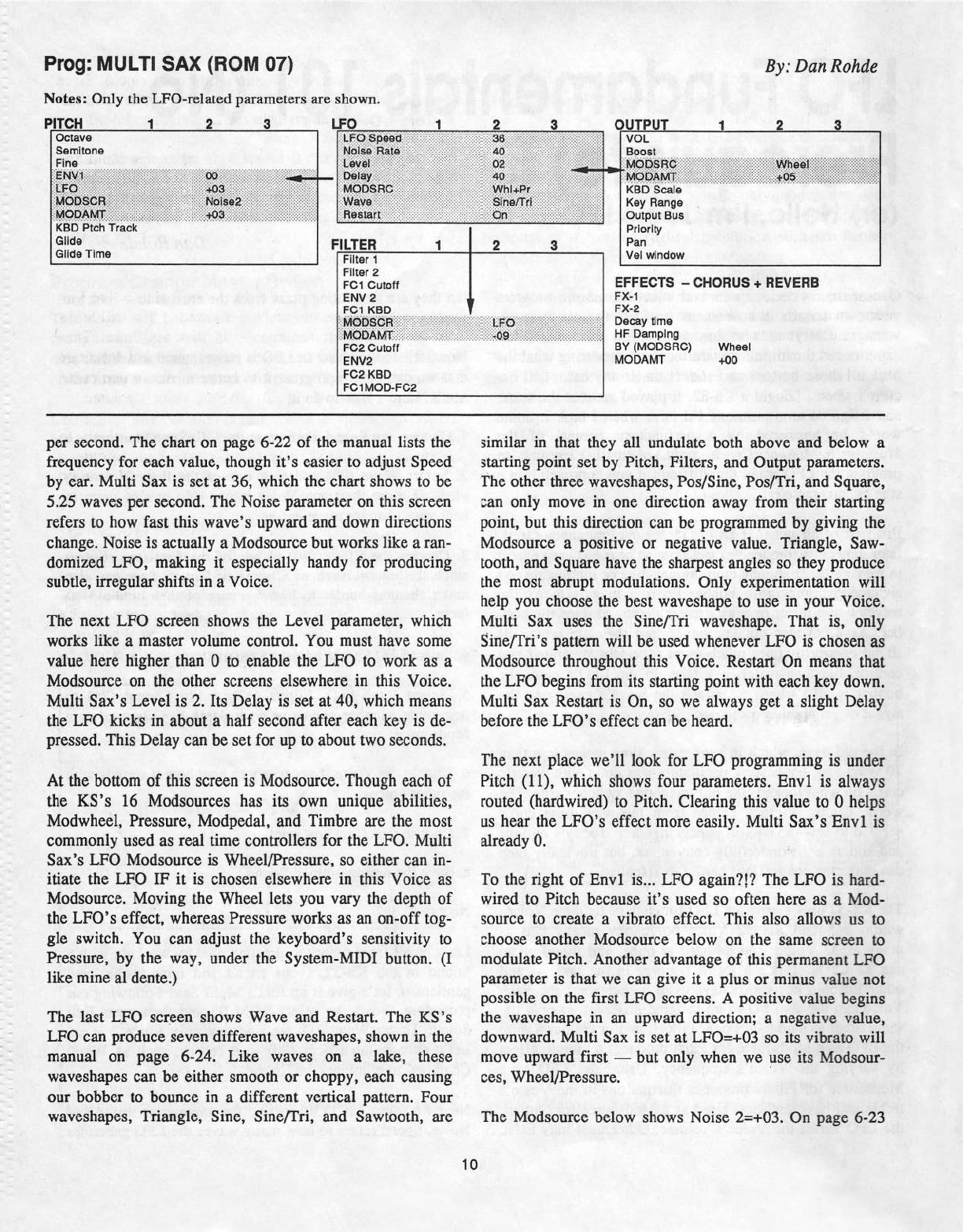
Preg:
MULTI
SAX
(ROM
U7)
Notes:
Only
the
LFO-related
parameters
are
shown.
PITCH
1
2
s
|.r=o
L
By:
Darn
Roitdc
2_
la
l
OUTPUT
1
2 a
Oetave
_
l
Fina
E
;:-:-.-:-.-
-.-:-:-:-'-'-:;
§:_t.'_tr?_t_12t'§:§:i:i5§z§2§'z§'*.'§5§5§5
__
2:-=‘;I5!-=5-iiiifiiiii-til?-1:55;5;55:i5z:§iz5z-z:z5z::1-asziziziaiziiiiié-5:..1
.2-!tli?i3'5fi.l?:§i§i§=¥5=?¥5=5¥=*=
=
.
i_l.ll'B.
‘I€I€'E;E;EIE;E;E;
‘§j§;§iii?-1§Eiii?§Eiiiiteflf-?p,§§iiiEEiiiEEE§;§§§5;5Zea5§5§5§5i5§5§§§§§§§§§;l§i
5E,Eltietart:=i1:§;1§§I§fzi=:ziz:2iz-'--*-‘=i=E=E"'-
we
hasitti.=I:E‘5EE252i.;22at52i25255E2-iZ=_EZi=Eeaten.B:-ail-i'2.iEE1a:%::=%:%:%:::-§-is
vet
as
ras...t
--
1'1.
rt:
;rvroasare:;.:.;.:,;;:;s;:s:;:;:
.
___T___,._.J..
'3
'
:.§;§;;i5§fi5§5§5§5§f
....5E5E5E
UU
LII
BUS
-..::::
::
rillEst-"i:;::?iii???-=.--.;==
""-%.y1rhtirat;j:j.§.§z§§§;§i§:§i
15:5;
I-tao
Scale
--"-Elnefirl
"
FEED
Ptch
Track
'~'i"=*s
FILTER
1
2
3
Pan
ill
Priority
Glide
Time
i
‘natal
1
Filter
2
FG1
Gutott
ENV
2
'
FD‘-1
RED
i’;-M73550H.i§i§i3i5i1'ii5:"1?
"""
"
'EEMDDAMTi§5§5§55I55§E§E55=-
-
FC-2
Cutoff
EN‘-'2
FC2
HBD
FC-1MDD-FOE
"fr"
'
.
‘vol
window
—i
_'
_L._
'_—l__‘£.
EFFECTS
-
CHDFI
US
+
HEVEHB
Ft-t-1
Fit-e
_jji_'§t;Eo
._..;z;§§§§
Davey
time
ea
.i-:5-;_'j
};.".._.,_.,§,§;§;§;§§
§§§§§l_§r§;§E§§§§§§€i§§§§
HF
Darnpina
av
trvroosnet
Wheel
rvtooatvrT
are
per
second.
The
chart
on page
6-22
of
the
manual
lists
the
frequency
for
each
value,
though
it's
easier
to
adjust
Speed
by
ear.
Multi
Sait
is
set
at
36,
which
the
chart
shows
to
be
5.25
waves
per
second.
The
Noise
parameter
on
this
screen
refers
to
how
fast
this
wave‘s
upward
and
down
directions
change.
Noise
is
actually
a
Modsource
but
works
like
a
ran-
domised
LFO,
making
it
especially
handy
for
producing
subtle,
irregular
shifts in
a
Voice.
The
neat
LFO
screen
shows
the
Level
parameter,
which
works
like
a
master
volume
control.
You
must
have
some
value
here
higher
than
0
to
enable
the
LFO
to
work
as
a
Modsource
on
the
other
screens
elsewhere
in
this
Voice.
Ivlulti
Sa:-t‘s
Level
is
2.
Its
Delay
is
set
at
40,
which
means
the
LFO
kicks
in
about
a
half
second
after
each
key
is
de-
pressed.
This
Delay
can
be
set
for
up
to
about
two
seconds.
At
the
bottom
of
this
screen
is
lvlodsource.
Though
each
of
the
I(S's
16
Modsources
has
its
own
unique
abilities,
Modwheel,
Pressure,
Modpedal,
and
Timbre
are
the
most
commonly
used
as
real
time
controllers
for
the
LFO.
Multi
Sa:-t’s
LFO
lvlodsource
is
Wheel,r'Pressure,
so
either
can
in-
itiate
the
LFO
IF
it
is
chosen
elsewhere
in
this
‘Voice
as
Iviodsource.
Moving
the
Wlieel
lets
you
vary
the
depth
of
the
LFO‘s
effect,
whereas
Pressure
works
as
an
on-off
tog-
gle
switch.
You
can
adjust
the
keyhoard’s
sensitivity
to
Pressure,
by
the
way,
under
the
System-MIDI
button.
(I
like
mine
al
dente.)
The
last
LFO
screen
shows
Wave
and
Restart.
The
KS‘s
LFO
can
produce
seven
different
waveshapes,
shown
in
the
manual
on page
6-24.
Like
waves
on
a
lake,
these
waveshapes
can
be
either
smooth
or
choppy,
each
causing
our
hobber
to
bounce
in
a
different
vertical
pattern.
Four
waveshapes,
Triangle,
Sine,
Sine.r'Tri,
and
Sawtooth,
are
similar
in
that
they
all
undulate
both
above
and
below
a
starting
point
set
by
Pitch,
Filters,
and
Output
parameters.
The
other
three
waveshapes,
Pos,!Sine,
Posr'Tri,
and
Square,
can
only
move
in
one
direction
away
from
their
starting
point,
but
this
direction
can
be
programmed
by
giving
the
Modsource
a
positive
or
negative
value.
Triangle,
Saw-
tooth,
and
Square
have
the
shmpest
angles
so
they
produce
the
most
abrupt
modulations.
Only
experimentation
will
help
you
choose
the
best
waveshape
to
use
in
your
Voice.
lvlulti
Sa:-t
uses
the
Sineffri
waveshape.
That
is,
only
SinerTri’s
pattern
will
be
used
whenever
LFO
is
chosen
as
Modsource
throughout
this
Voice.
Restart
On
means
that
the
LFO
begins
from
its
starting
point
with
each
key
down.
Ivlulti
Satt
Restart
is
On,
so
we
always
get
a
slight
Delay
before
the
LFO‘s
effect
can
be
heard.
The
nest
place
we‘ll
look
for
LFO
programming
is
under
Pitch
(11),
which
shows
four
parameters.
Envl
is
always
routed
(hardwired)
to
Pitch.
Clearing
this
value
to
U
helps
us
hear
the
LFO’s
effect
more
easily.
lvlulti
Sa.tt‘s
Envl
is
already
U.
_
To
the
right
of
Envl
is...
LFO
againill?
The
LFO
is
hard-
wired
to
Pitch
because
it's
used
so
often
here
as
a
Mod-
source
to
create
a
vibrato
effect.
This
also
allows
us
to
choose
another
lvlodsource
below
on
the
same
screen
to
modulate
Pitch.
Another
advantage
of
this
permanent
LFO
parameter
is
that
we
can
give
it
a
plus
or
minus
value
not
possible
on
the
first
LFO
screens.
A
positive
value
begins
the
waveshape
in
an
upward
direction;
a
negative
value,
downward.
Multi
Satt
is
set
at
LFO=+U3
so
its
vibrato
will
move
upward
first
—
but
only
when
we
use
its
lvlodsour-
ces,
Wheel.'Pressure.
The
Modsource
below
shows
Noise
2=+U3.
On
page
6-23
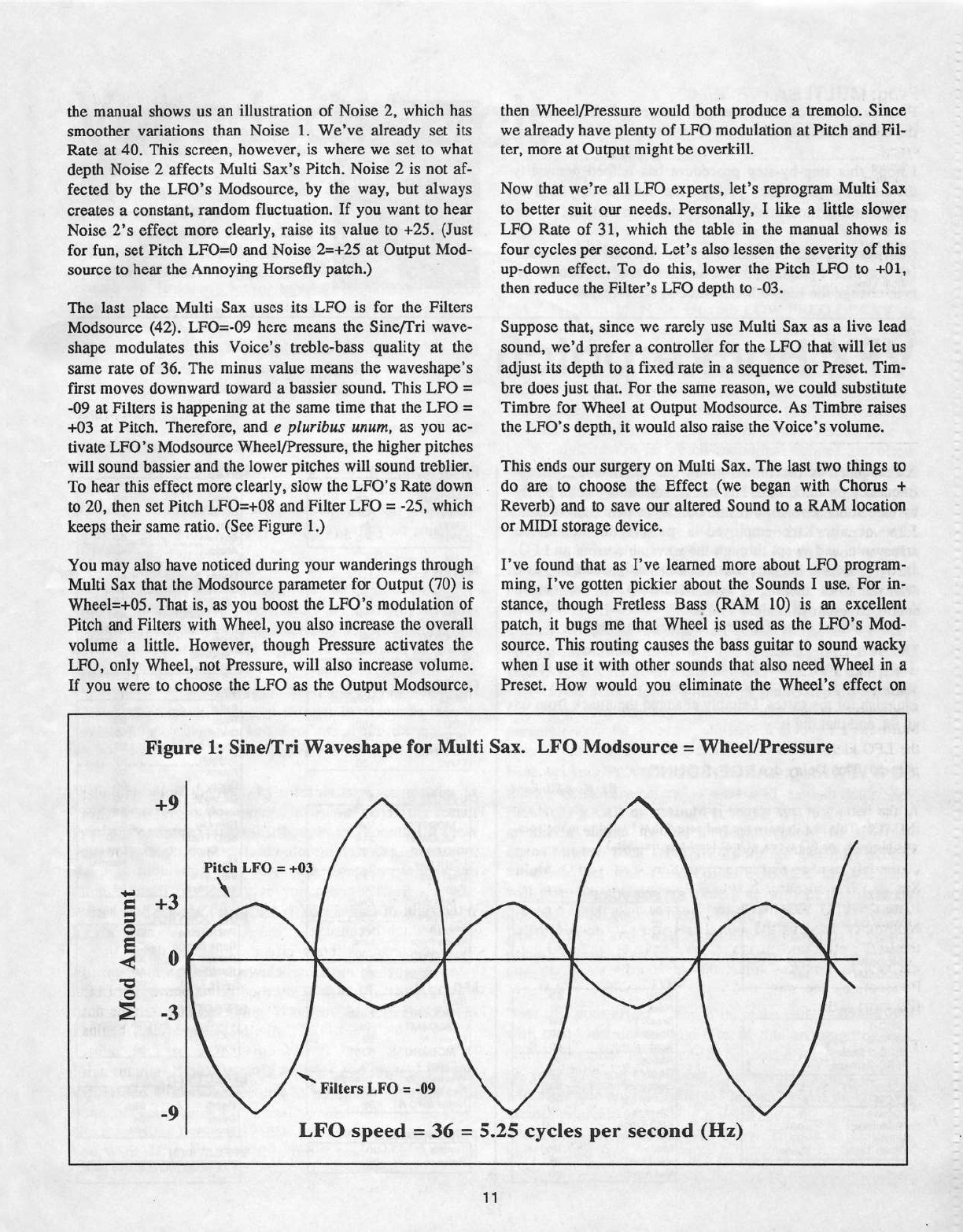
the
manual
shows
us
an
illustration
of
Noise
2,
which
has
smoother
variations
than
Noise
1.
We've
already
set
its
Rate
at
40.
This
screen,
however,
is
where
we
set
to
what
depth
Noise
2
affects
Multi
Sax‘s
Pitch.
Noise
2
is
not
af-
fected
by
the
LFO’s
Modsource,
by
the
way,
but
always
creates
a
constant,
random
fluctuation.
If
you
want
to
hear
Noise
2’s
effect
more
clearly,
raise
its
value
to
+25.
(J
ust
for
fun,
set
Pitch
LFO=U
and
Noise
2=+25
at
Output
Mod-
source
to
hear
the
Annoying
Horsefly
patch.)
The
last
place
lvlulti
Sax
uses
its
LFO
is
for
the
Filters
lvlodsource
(42).
LFO:-{J9
here
means
the
Siner'Tri
wave-
shape
modulates
this
Voice‘s
treble-bass
quality
at
the
same
rate
of
36.
The
minus
value
means
the
waveshape‘s
first
moves
downward
toward
a
bassier
sound.
This
LFO
=
-09
at
Filters
is
happening
at
the
same
time
that
the
LFO
=
+03
at
Pitch.
Therefore,
and
e
plarihns
ttnnm,
as
you
ac-
tivate
LFO's
lvlodsource
Wheelr‘Pressure,
the
higher
pitches
will
sound
bassier
and
the
lower
pitches
will
sound
treblier.
To
hear
this
effect
more
clearly,
slow
the
LFO"s
Rate
down
to
20,
then
set
Pitch
LFO=+il8
and
Filter
LFO
=
-25,
which
keeps
their
same
ratio.
(See
Figure
1.)
You
may
also
have
noticed
during
your
wanderings
through
Ivlulti
Sax
that
the
lvlodsource
parameter
for
Output
(T0)
is
‘t‘v'heel=+IIl5.
That
is,
as
you
boost
the
LFO‘s
modulation
of
Pitch
and
Filters
with
Wheel,
you
also
increase
the
overall
volume
a
little.
However,
though
Pressure
activates
the
LFO,
only
Wheel,
not
Pressure,
will
also
increase
volume.
If
you
were
to
choose
the
LFO
as
the
Output
lvlodsource,
then
Wlieel{Pressure
would
both
produce
a
tremolo.
Since
we
already
have
plenty
of
LFO
modulation
at
Pitch
and
Fil-
ter,
more
at
Output
might
he
overkill.
Now
that
welre
all
LFO
experts,
let's
reprogram
Multi
Sax
to
better
suit
our
needs.
Personally,
I
like
a
little
slower
LFO
Rate
of
31,
which
the
table
in
the
manual
shows
is
four
cycles
per
second.
Let's
also
lessen
the
severity
of
this
up-down
effect.
To
do
this,
lower
the
Pitch
LFO
to
+01,
then
reduce
the
Filter"s
LFO
depth to
-03.
Suppose
that,
since
we
rarely
use
Multi
Sax
as
a
live
lead
sound,
we'd
prefer
a
controller
for
the
LFO
that
will
let
us
adjust
its
depth to
a
fixed
rate
in
a
sequence
or
Preset.
Tim-
bre
does
just
that.
For
the
same
reason,
we
could
substitute
Timbre
for
Wheel
at
Output
Modsouree.
As
Timbre
raises
the
LFO’s
depth,
it
would
also
raise
the
'v‘oice‘s
volume.
This
ends
our
surgery
on
Multi
Sax.
The
last
two
things
to
do
are
to
choose
the
Effect
(we
began
with
Chorus
+
Reverb)
and to
save
our
altered
Sound
to
a
RAM
location
or
MIDI
storage
device.
I've
found
that
as
I’ve
learrted
more
about
LFO
program-
ming,
I've
gotten
pickier
about
the
Sounds
I
use.
For
in-
stance,
though
Fretless
Bass
(RAM
10)
is
an
excellent
patch,
it
bugs
me
that
Wheel
is
used
as
the
LFO's
Mod-
source.
This
routing
causes
the
bass
guitar
to
sound
wacky
when
I
use
it
with
other
sounds
that
also
need
Wheel
in
a
Preset.
I-low
would
you
eliminate
the
Wheel‘s
effect
on
+9
Pitch
LFO
=
+03
mount
+
tn
/’
Figure
1:
Sine/Tri
Waveshape
for
Multi
Sax.
LFO
Modsource
=
Wheel!Pressure
Mod
A
-3
‘K
Filters
LFO
=
-I19
.
A
r
V
-9
LFO
speed
=
36
=
5.25
cycles
per
second
(Hz)
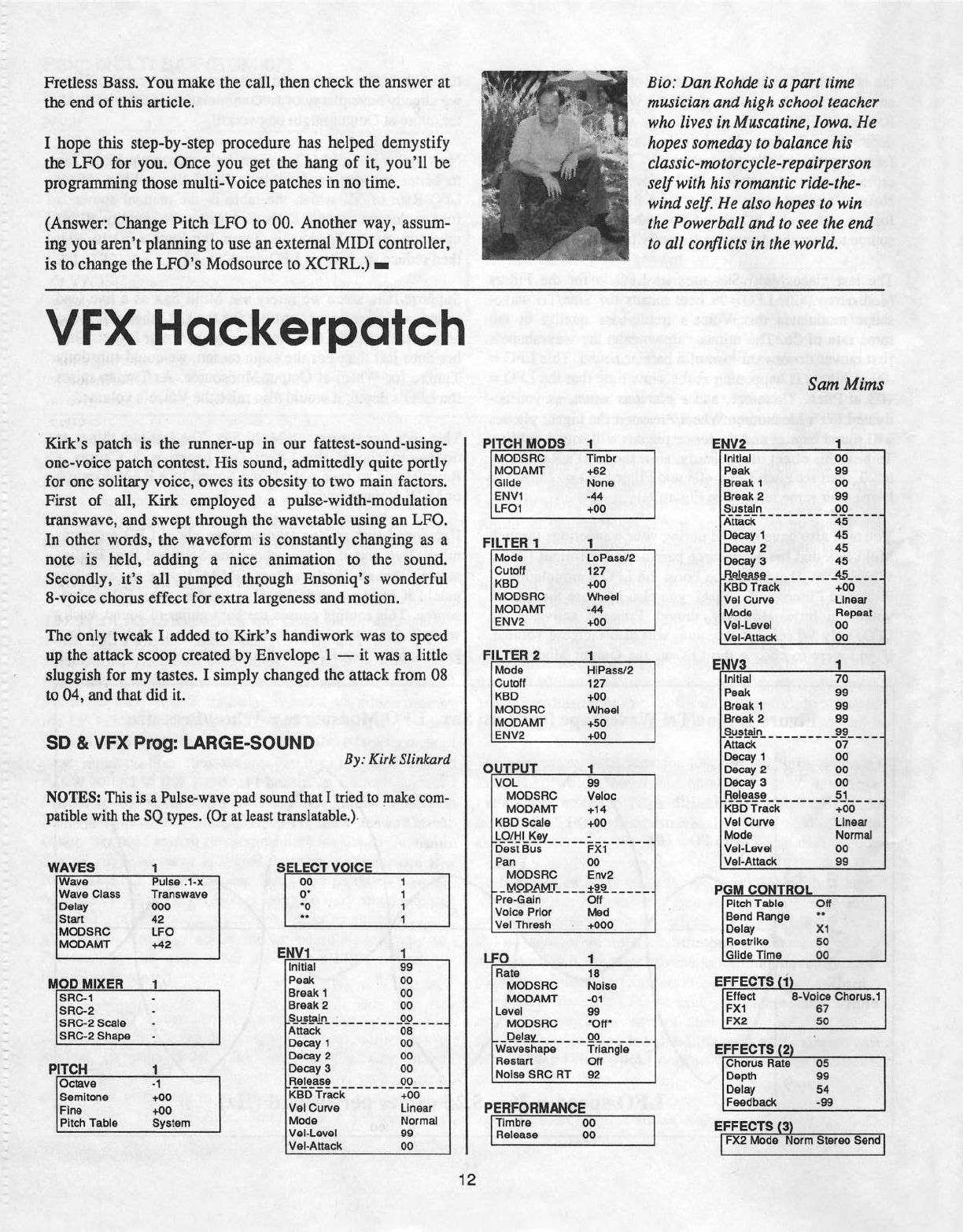
Fretless
Bass.
You
make
the
call,
then
check
the
answer
at
the
end
of
this
article.
I
hope
this
step-by-step
procedure
has
helped
demystify
the
LFO
for
you.
Once
you
get the
hang
of
it,
you‘ll
be
programming
those
multi-Voice
patches
in
no
time.
(Answer:
Change
Pitch
LFO
to
00.
Another
way,
assum-
ing
you
aren't
planning
to
use
an
extemal
MIDI
controller,
is
to
change
the
LFO’s
Modsource
to
XCTRL.)
-
Bio:
Dan
Rohrfe
is
a
part
time
musician
and
high
school
teacher
who
fives
in
Mascatine,
Iowa.
He
hopes
someday
to
balance
his
classic-motorcycle-repairperson
self
with
his
romantic
ririe-rhe-
wind
sefi
He
also
hopes
to
win
the
Powerhaii
and
to
see
the
end
to
ail
conflicts
in
the
world.
VFX
Hcrckerpcrtch
Kirk‘s
patch
is
the
runner-up
in
our
fattest-sound-using-
one-voice
patch
contest.
His
sound,
admittedly
quite
portly
for
one
solitary
voice,
owes
its
obesity
to
two
main
factors.
First
of
all,
Kirk
employed
a
pulse-width-modulation
transwave,
and
swept
through
the
wavetable
using
an
LFO.
In
other
words,
the
waveform
is
constantly
changing
as
a
note
is
held,
adding
a
nice
animation
to
the
sound.
Secondly,
it’s
all
pumped
thr_ough
Ensoniq‘s
wonderful
S-voice
chorus
effect
for
extra
largeness
and
motion.
The
only
tweak
I
added
to
Kirk’s
handiwork
was
to
speed
up
the
attack
scoop
created
by
Envelope
1
—
it
was
a
little
sluggish
for
my
tastes.
I
simply
changed
the
attack
from
08
to
04,
and
that
did
it.
so
s.
v|=x
Frog:
LARGE-SOUND
By:
Kirk
Siinfcard
FITCH
MODS
1
EHV2
MODSHO
MODAMT
Glide
Er-N1
LFD1
Timbr
+52
Hone
-44
+00
Sam
Mirns
1
FILTER
1
1
Mode
Cutoff
HBD
MODSHG
it-1CiDAiii'l'I'
EH‘-'2
LID
PB.EBf2
‘I2?
+0-0
Wheel
-44
+00
Fl
LTEH
2
1
ii.-lode
C-utoti
HBO
MODS
Fit}
MODAHIT
EH02
HiPassi'2
12?
+00
Wheel
+50
-l;"3!'?_
_
_.
initial
Peak
Break
1
B
k
rea
2
Sustain
pass?"
Decay
1
Decay
2
Decay
3
I
‘finesse
_ _
HBD
Track
vel
t':.urve
Mode
val-Level
‘iifel-Attack
'00
B9
'00
B5
___°P____
-ts
45
45
45
___4§___
_
00
+
Llneer
Ftepeat
0-0
0-0
E,!i_|§if3
,
fi_Ull?L!]L_
_
patihle
with
the
SQ
types.
(Or
at
least
i:ranslatahle.).
RED
scale
_|-§l'|;|Lil5.'Eti'_____
Dest
Bus
P
‘-'i'0‘fE_$,_.
,
,_
__1
EELEGI
‘ff-l|CE_
aigonsnc
ave
_
Puiie
.1-x
00
_
Di
Wave
0-lass
Transvrave
Del
000
Elli
'5'
Elitii
42
“
rvroosrte
r.Fo
T
E__H'tf1
MDDAMT
+42
.—I|.—l_I|—I|
HUD
HIXEFI
1
1
BBC-1
-
SEC-2
-
EHO-E
Beale
-
SRO-2
Shape
-
_5'u-Lilli".
PITCH
1
Octave
-1
Semitone
+00
Fine
+00
Pitch
Tahie
System
initial
Peak
Break
1
Break
2
Attack
Decay
1
Decay
2
Decay
El
_Iislasse
BB
00
00
00
_______
_
_i1lIi_
_ _
os
'00
'00
'00
_______
-_i1P_
_ _
ttao
Track
+crr
'v‘el
0-urve
ii.-lode
vet-Level
vet-Attack
Linear
Normal
ea
00
'1'
_
_|31Ql'pfi.|'"'LT_
_ _ _
F-‘re-Gain
Voice
Prior
'v‘el
Thresh
_____
-
._1
vol.
ea
NOTES:
This
is
a
Pulse-wave
pad
sound
that
I
tried
to
make
com-
Isl‘-3955'?
MDDAMT
ifeioc
+14
+00
Fl-ti
00
Errv2
sad
_ _
_
Dtt
Iuleci
+000
Initial
Peak
Break
1
Break
2
are
tale.
_
_
Attack
Decay
1
Decay
2
Decay
3
KBD
Track
‘vet
Gunre
Mode
val-Level
‘vet-Attack
......5.l..---_
1.
__.
re
ea
ea
ea
9§_____
or
00
00
00
+00
Linear
it-iorrnai
00
BB
P
C
Fi_i;ti.
Pitch
Table
Off
Benrt
Flange
"'
i
Delay
x1
IJFF-t
1
Fiestrike
50
Glide
Time
00
Ftate
MDDBHG
MDDAMT
@Levei
I
MDDSHG
0elav___
waveshape
H001-Elt'1
Noise
BHG
HT
1
B
Noise
-01
09
llufll
00.
_
..
_._
Triangle
Oti
B2
i
EFFECTS
in
i
52
_I
Ettect
B-voice
tJhorus.1
Fkt
er
EFFECTB
{2}
Ghfirus
Hate
05
Depth
00
Delay
st
PERFORMANCE
.F"'="“="
'9'“
T‘
u
'
foo
L“
is
an
|
er=|=Ee'rs
on
H“'“““
_.,__
__
Fxa
lihotie
Norm
Stereo
Sertril
Vocoded
Vocals
Say
what
you
will
about
your
Ensoniq
sampler.
It
only
lets
me
have
eight
instruments
at
once.
It
doesn't
have
enough
polyphony.
It
doesn't
let
me
have
all
the
memory
I
need.
Yes,
say
what
you
will,
but
there
is
no
denying
that
the
EPS-16+
and
ASR-10
have
the
industry's
best
on-board
effects
of
any
synth
or
sampler.
Hands
down.
This
will
probably
change,
but
then
again,
we
are
due
for
a
new
En-
soniq
sampler
any
time
now,
aren't
we?
The
effects
go
a
long
way
toward
making
samples
sound
really
professional,
but
not
many
people
consider
using
them
for
vocals.
Still
fewer
consider
the
vocal
processing
possibilities
other
than
some
reverb
and
a
little
chorltsing.
-However,
if
you
have
the
inclination,
you
can
twist
your
voice
around
in
some
pretty
wild
ways
on
your
trusty
ol'
16+fASR.
But
just
how
do
you
get
your
voice
to
go
through
the
ef-
fects
in
your
sampler?
Well,
there
are
two
ways.
If
you
happen
to
get
your
hands
on
Waveboy's
Audio-In
disk
{all
of
Waveboy's
products
are
highly
recommended
for
Hack-
er
types...),
you
can
simply
plug
a
mic
into
the
input
jack
on
the
back
of
yotu
sampler
and
go
crazy.
If
you
don't
have
the
Waveboy
disk,
you
can
get
the
same
results
by
sampling
your
vocals
and
feeding
them
through
the
on-board
effects.
With
that
out
of
the
way,
let's
decide
how
we're
going
to
mangle
our
voice
this
month,
shall
we?
With
the
recent
popularity
of
retro
sotmds,
I
thought
this
month
I'd
show
you
how
to
produce
a
fairly
decent
vocoder
emulation.
Keep
in
mind
this
is
a
very
basic
imitation
with
static
pitch...
this'll
basically
give
you
robotic,
Kraftwerk-like
vocals,
and
not
the
eerie
"sung"
vocals
also
made
popular
by
vocoders.
Fire
up
your
sampler
and
either
call
up
the
Flanger+Rev
algorithm
{available
on
both
the
EPS-16+
or
the
ASR-10)
or
load
the
corresponding
Waveboy
effect.
Hit
EDIT-
EFFECT
and
prepare
to
dig
in.
First,
set
your
BUS
I
REVERE
MIX
to
99.
This
is
a
100%
wet
effect,
so
that
the
result
will
be
totally
effected
with
none
of
your
voice's
"natural"
sound
coming
through.
Next,
set
your
BUS2
REVERE
MIX
to
whatever
number
you
want.
If
you
wanted
to
process
your
voice
AND
an
Torn
Shear
onboard
sound,
you'd
send
your
onboard
sound
to
BUS
2
and
set
your
reverb
mix
on
bus
2
to
taste.
Next,
give
your
reverb
a
relatively
short
decay
by
setting
REVERE
DE-
CAY
TIME
to
15.
Next,
set
your
LOW
FREQ
DECAY
to
+15.
This
parameter
lets
you
make
low
frequencies
decay
faster
or
slower
than
high
frequencies.
In
terms
of
vocal
processing,
it
can
help
to
eliminate
“boorniness"
in
ef-
fected
vocals,
a
common
problem
in
home
recording
situa-
tions.
After
this,
set
your
DIFFUSION
to
50.
Diffusion
is
basically
a
“smoothness”
control.
Lower
values
give
a
very
rough
reverb
in
which
individual
echoes
are
often
discernible,
and
higher
values
give
smoother
results,
al-
though
on
these
samplers,
there
is
often
a
little
graininess
associated
with
very
high
values,
so
a
value
of
50
is
a
good
compromise.
Next,
we'll
want
to
set
HIGH
FREQ
DAMPING
to 0,
or
no
damping
of
high
frequencies,
and
set
the
HIGH
FREQ
BANDWIDTH
to
99.
The
effect
we're
after
is
a
high
fre-
quency
effect,
so
we
want
all
those
frequencies
to
cut
through.
Continue
to
scroll
right
and
set
your
REVERE
DETUNE
RATE
to
any
number
and
your
REVERE
DE-
TUNE
AMOUNT
to
0.
With
all
of
the
reverb
parameters
set,
keep
scrolling
right
so
you
can
set
the
flanging
parameters.
First,
set
your
FLANGE
CENTER
to
20.
This
is
one
of
the
most
crucial
parameters
—
as
I
will
explain
later.
Set
FLANGE
RATE
to
20
and
FLANGE
‘WIDTH
to 0.
With
no
flange
width,
you
get
a
"static"
flange,
or
one
that
doesn't
sweep
back
and
forth
as
we
are
generally
accus-
tomed
to.
Set
your
FLANGE
FEEDBACK
to
+93.
This
will
give
your
"vocoder"
some
tone
without
totally
feed-
ing
back
and
getting
nasty.
Finally,
set
your
FLANGE
DEPTH
to
99
and
FEACK.
MODWHEEL
to
D.
If
you're
using
a
Waveboy
effect,
also
make
sure
to
set
it
up
for
ex-
ternal
input.
Now
that
your
effect
is
keyed
in,
make
stu'e
to
save
it.
As
with
many
instruments
and
effects,
this
one
requires
spe-
cial
performance
techniques
to
be
most
effective.
Basical-
ly,
you
will
want
to
whisper
your
vocals
through
it.
This
will
eliminate
any
identifiable
"human"
vocal
timbres.
So
sample
yourself
whispering
a
vocal,
or
whisper
into
your
mic
if
you're
using
the
Waveboy.
This
is
a
relatively
high-pitched
effect
and
I
like
to
layer
it
under
a
track
of
vocals
processed
in
a
different
way.
So
what
if
you
don't
like
the
pitch
of
the
effect
and
want
a
still
more
robotic
sound?
This
is
where
the
FLANGE
CENTER
parameter
comes
into
play.
This
parameter
will
basically
adjust
the
pitch
of
your
"vocoded"
vocals.
A
higher
value
will
give
you
a
lower
pitch,
and
vice
versa.
With
some
fancy
finger-
work,
you
can
adjust
this
parameter
in
real-time
using
the
data
slider
to
open up
a
variety
of
pitches
in
performance.
So
there
you
have
it.
No,
it's
not
a
real
vocoder,
and
ac-
cordingly
isn't
nearly
as
flexible,
but
it's
a
pretty
cool
ef-
fect,
and
it's
free,
so
whadayawar1t?!?
Experiment
with
the
fl
i
I
i
parameters
to
get
variations
on
this
effect,
and
try
sending
instruments
through
the
effect
as
well
as
vocals.
Drums
sound
particularly
cool
and
give
effects
that
were
utilised
by
industrialites
like
Skinny
Puppy
and
Front
Line
As-
sembly
in
their
early
days.
So
enjoy
your
new
robotic
friend,
and
by
all
means
pass
on
any
further
tips
you
dis-
cover
along
the
way.
-
Bio:
Toni
Shear
is
a
fictional
character
and
any
resernhiance
to
persons
living
or
dead
is
purely
coin-
cidence.
Samplin’
From
My
ears
are
burnirr'.
I
can
hear
the
readership
now:
"...boy
this
is
a
no-brainer...find
the
audio
out
from
your
VCR
and
run
it
into
your
sampler
input,
duh..."
Well,
okay.
But
you
may
find
though
that
this
little
treatise
may
save
you
some
time
and
perhaps
diminish
the
hassle
factor
some-
what.
Wlry
would
anyone
want
to
sample
audio
off
a
VCR?
I-low
can
I
sample
a
tape
legally?
To
the
first
question
I'll
ask
you
to
just
think
about
it...
And
here
I'll
ask
the
legal
beagles
to
please
remain
calm
and
shut
upi
In
the
interest
of
liability
correctness,
we
will
explore
this
exercise
only
in
terms
of
you
digital
devotees
extracting
audio
elements
from
your
home
videos.
Truth
is,
video
tape
is
a
rather
pristine
medium
for
analog
audio.
It's
often
used
for
mixdown
mastering,
so
why
not
freese
that
special
giggle
or
your
child's
first
"Ma
Ma...Da
Da"?
No
problem.
The
only
technical
obstacle
is
the
lack
of
a
volume
control
between
the
source
(VCR)
and
the
sampler.
Often,
you
may
be
able
to
sample
without
introducing
a
choke
of
any
kind.
Eut
if
that
"AMP"
lamp
should
flicker
even
the
eon-
sicst,
you'll
need
to
rrur
through
your
mixer.
With
all
the
volume
pots
in
the
fully
closed
position,
simply
run
the
VCR
audio
out
(which
is
a
line
level
signal)
to
an
empty
channel
on
your
mixer.
N
ow
run
your
sampler
cable
to
the
mixer
headphone
output.
Yowi
Am
I
trying
to
fry
your
ears
in
a
feedback
loop?
Trust
me,
there
is
no
danger
until
you
push
the
"yes"
button
after
you
set
up
your
sample
screens,
ready
to
go
into
record.
Plug
a
set
of
earphones
into
the
sampler
earphone
jack.
Your
VCR
.f.D.Ryan
Have
the
appropriate
operations
disk
booted
when
you
hit
"sample"
(should
your
machine
require
it)
and
run
through
the
default
screens:
sample
rate
=
44.6,
filter
cutoff
=
20.0,
pre-trigger:
I
usually
use
‘i’
MSEC,
input
level
=
LINE,
sample
time
=
22.9‘?
sec.
(Remember,
we
decided
long
ago
that
it's
much
better
to
convert
down
from
the
highest
possible
sample
rate
than
to
initially
sample
at
a
lower
rate,
hence
the
short
sample
time
on
my
expanded
EPS-16
Plus.
You
will
find
that
you'll
make
very
short
takes
when
extracting
from
video
anyway.)
Click
on
the
right
arrow
button
one
more
time
and
you
are
at
your
digi-
tal
VU
meter
—
STOP!
New
we're
ready
to que
up
the
VCR.
But
first,
our
sound
check.
Tum
on
the
tv
and
rewind
your
selected
tape
to
at
least
two
minutes
before
the
sound
byte
you
wish
to
cap-
ture.
Put
on
the
earphones
and
turn
down
the
tv's
volume
completely.
Put
the
VCR
in
"PLAY"
and
watch
the
tv
for
the
video.
Now
turn
or
slide
up
your
master
on
your
mixer
to
whatever
level
you
normally
use
(usually
about
50%).
Maire
snre
everything
else
is
turned
off
or
down
—-
espe-
cially
the
channel
that
receives
your
samplers
regular
outs.
Now
open
the
channel
receiving
the
VCR
audio
to
about
50%...
Now
slowly
open
the
headphone
volume
control
on
the
nrixer,
which
is
supplying
the
audio
to
the
meter
and
AID
converter
on
your
sampler.
That
headphone
output
is
pre-arnped
which
means
it's
hot!
Standby
at
about
20%
while
you
watch
the
meter
on
your
sampler
and
listen
to
the
soundtrack
off
your
video
cassette.
Now
turn
down
the
channel
receiving
the
VCR
on
your
mixer
and
listen...
You
shouldn't
hear
much
of
anything.
If
you
hear
a
hum
14
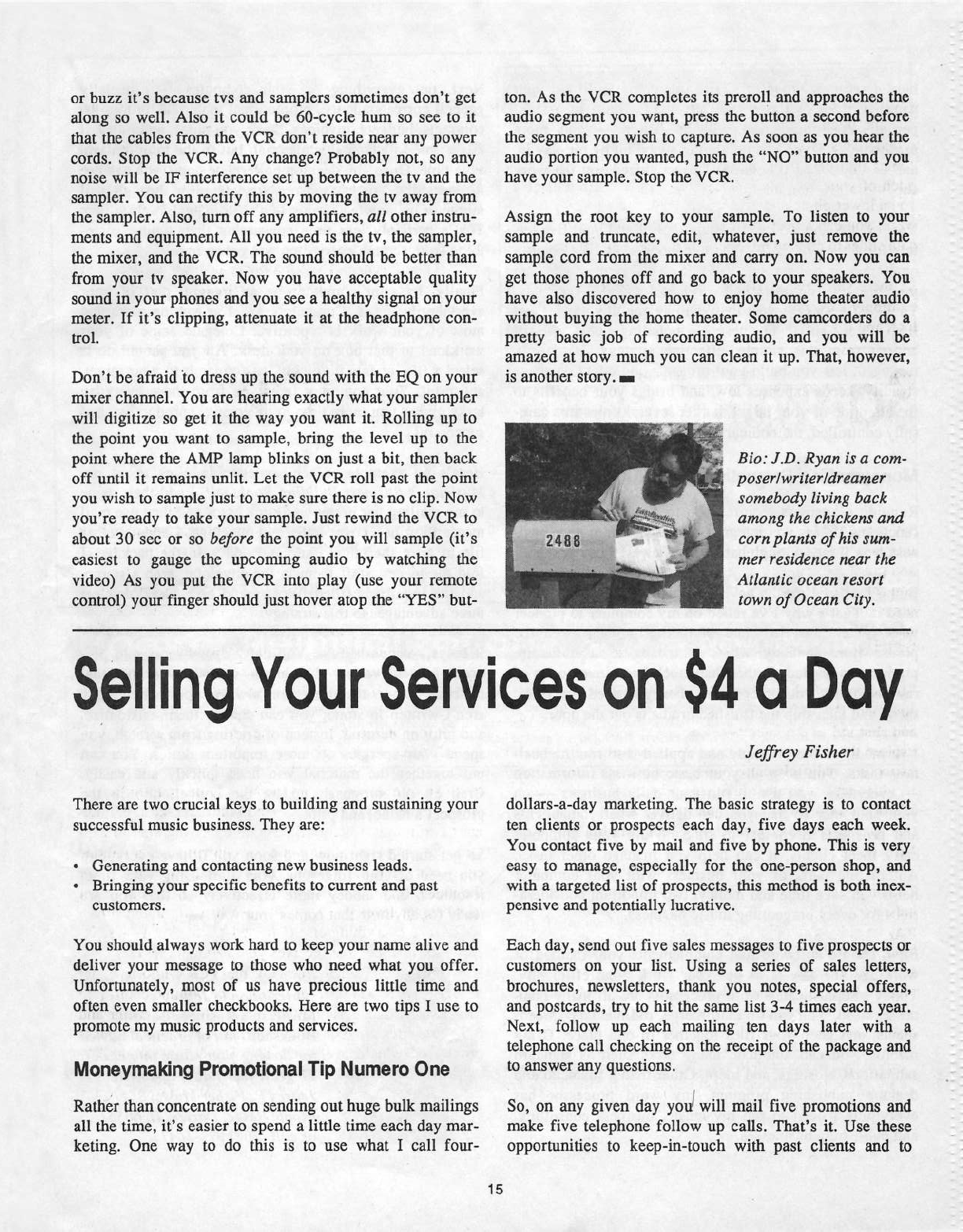
or
base
it‘s
because
tvs
ar1d
samplers
sometimes
donit
get
along
so
well.
Also
it
could
be
60-cycle
hmn
so
see
to
it
that
the
cables
from
the
VCR
don't
reside
near
any
power
cords.
Stop
the
VCR.
Any
change?
Probably
not,
so
any
noise
will
be
IF‘
interference
set
up
between
the
tv
and
the
sampler.
You
can
rectify
this
by
moving
the
tv
away
from
the
sampler.
Also,
tum
off
any
amplifiers,
all
other
instru-
ments
and
equipment.
All
you
need
is
the
tv,
the
sampler,
the
mi:-ter,
and
the
VCR.
The
sound
should
he
better
than
from
your
tv
speaker.
Now
you
have
acceptable
quality
sound
in
your
phones
and
you
see
a
healthy
signal
on
your
meter.
If
it’s
clipping,
attenuate
it
at
the
headphone
con-
trol.
Don’t
be
afraid
to
dress
up
the
sotmd
with
the
EQ
on
your
mi:-ter
channel.
You
are
hearing
eitactly
what
your
sampler
will
digitize
so
get
it
the
way
you
want
it.
Rolling
up
to
the
point
you
want
to
sample,
bring
the
level
up
to
the
point
where
the
AMP
lamp
blinks
on
just
a
bit,
then
hack
off
until
it
remains
unlit.
Let
the
‘VCR
roll
past
the
point
you
wish
to
sample
just
to
make
stue
there
is
no
clip.
Now
you’re
ready
to
take
your
sample.
Just
rewind
tl1e
VCR
to
about
30
sec
or
so
before
the
point
you
will
sample
(it‘s
easiest
to
gauge
the
upcoming
audio
by
watching
the
video)
As
you
put
the
VCR
into
play
(use
your
remote
control)
your
finger
should
just
hover
atop
the
“YES”
but-
l l
!
i
ton.
As
the
VCR
completes
its
preroll
and
approaches
the
audio
segment
you
want,
press
the
button
a
second
before
the
segment
you
wish
to
capture.
As
soon
as
you
hear
the
audio
portion
you
wanted.
push
the
“NO”
button
and
you
have
your
sample.
Stop
the
‘VCR.
Assign
the
root
key
to
your
sample.
To
listen
to
your
sample
and
truncate,
edit,
whatever,
just
remove
the
sample
cord
from
the
miner
and
carry
on.
Now
you
can
get
those
phones
off
and
go
back
to
your
speakers.
You
have
also
discovered
how
to
enjoy
home
theater
audio
without
buying
the
home
theater.
Some
camcorders
do
a
pretty
basic
job
of
recording
audio,
and
you
will
be
amazed
at
how
much
you
can
clean
it
up.
That,
however,
is
another
story.
-
"
Bio:
ID.
Ryan
is
a
com-
posertwritertdreamer
somebody
living
back
among
the
chicicens
and
corn
plants
of
his
sam-
mer
residence
near
the
Atlantic
ocean
resort
town
of
Ocean
City.
Selling
Your
Services
on
$4
0
Day
There
are
two
crucial
keys
to
building
and
sustaining
your
successful
music
business.
They
are:
-
Generating
and
contacting
new
business
leads.
-
Bringing
your
specific
benefits
to
current
and
past
customers.
You
should
always
work
hard
to
keep
your
name
alive
and
deliver
your
message
to
those
who
need
what
you
offer.
Unfortunately,
most
of
us
have
precious
little
time
and
often
even
smaller
checkbooks.
Here
are
two
tips
I
use
to
promote
my
music
products
and
services.
lltloneyrnalring
Promotional
Tip
Nurne
re
One
Rather
than
concentrate
on
sending
out
huge
bulk
mailings
all
the
time,
it's
easier
to
spend
a
little
time
each
day
mar-
keting.
One
way
to
do
this
is
to
use
what
I
call
four-
Jefirey
Fisher
dollars-a-day
marketing.
The
basic
strategy
is
to
contact
ten
clients
or
prospects
each
day,
five
days
each
week.
You
contact
five
by
mail
and
five
by
phone.
This
is
very
easy
to
manage,
especially
for
the
one-person
shop,
and
with
a
targeted
list
of
prospects,
this
method
is
both
inert-
pensive
and
potentially
lucrative.
Each
day,
send
out
five
sales
messages
to
five
prospects
or
customers
on
your
list.
Using
a
series
of
sales
letters,
brochures,
newsletters,
thank
you
notes,
special
offers,
and
postcards,
try
to
hit
the
same
list
3-4
times
each
year.
Neat,
follow
up
each
mailing
ten
days
later
with
a
telephone
call
checking
on
the
receipt
of
the
package
and
to
answer
any
questions.
So,
on
any
given
day
you}
will
mail
five
promotions
and
make
five
telephone
follow
up
calls.
That’s
it.
Use
these
opportrmities
to
keep-in-touch
with
past
clients
and
to
hunt
down
new
prospects.
With
this
plan,
you‘ll
put
your
name
i11
front
of
those
who
buy
many
times
in
a
short
period.
Your
marketing
will
be
better
—
and
more
profitable
—
if
you
keep
plugging
away,
bit
by
bit,
day
in,
and
day
out.
You'll
begin
to be
recognized
and
the
work
should
start
rolling
in.
Your
cost
is
about
52
cents
each
to
print
and
mail
five
let-
ters
for
a
total
of
$2.’l'0.
The
telephone
calls
cost
about
a
quarter
each
for
a
total
of
$1.25.
This
is
how
you
can
promote
your
products
and
services
for
$3.95
each
day.
That‘s
only
$1000
a
year
that
you
pay
one
tiny
morsel
at
a
time.
Every
single
business
—
including
yours
—
will
benefit
from
this
simple,
effective
strategy.
It's
easily
managed,
lets
you
build
your
prospect
and
client
database
steadily,
keeps
expenses
low,
and
brings
your
benefits
to
the
attention
of
your
target
market
several
times
in
a
care-
fully
controlled,
methodical
way.
Try
it!
Moneymaking
Promotional
Tip
Numeuo
Two
Running
a
business
requires
you
to
handle
many
diverse
functions.
Unless
you
integrate
a
computer
i11to
your
busi-
ness,
you'll
face
a
tough
battle
handling
all
these
details.
Being
prepared
means
having
what
you
need
before
you
need
it.
That‘s
why
I‘ve
relied
on
my
computer
to
pioneer
what
I
call
“Just
In
Time
Marketing."
I
borrowed
the
phrase
from
industry
where
it
means
to
manufacture
products
as
needed.
Rather
than
stock
huge
inventories
of
raw
materials,
you
order
d1em
when
you
need
them,
use
them,
and
then
ship
the
finished
products
out the
door.
I've
modified
the
principle
and
applied
it
to
routine
busi-
ness
tasks.
You
keep
all
your
basic
business
information
'—
everything
you
use
to
run
your
daily
business
—
on
your
computer
so
that
you
can
deliver
what
your
clients
and
prospects
need
just in
time.
While
your
computer
can‘t
meet
clients,
it
can
help
you
manage
other
tasks.
Automating
parts
of
your
business
with
your
computer
helps
you
save
time
and
money,
two
important
considera-
tions
for
every
burgeoning
music
business.
First,
choose
software
that
complements
your
method
of
working.
The
key
is
to
get
your
work
done
efficiently.
Today’s
sophisticated
word
processors
are
all
many
busi-
nesses
need.
You
can
do
mail
merge,
rudimentary
spread-
sheets,
and
keep
your
files
together
in
one
place.
Using
macros,-you
can
automate
many
tasks
such
as
standard
salutations,
closings,
and
more.
Other
than
a
financial
and
desktop
publishing
program,
my
word
processor
has
everything
I
need
to
rum
my
music,
business
consulting,
and
publishing
businesses.
Next,
put
everything
on
your
computer
—
especially
general
correspondence,
promotional
materials,
proposals,
contracts,
budgets,
invoices,
thank
you
notes,
and
more.
Ii
takes
time
to
gather
this
material,
but
in
the
long
rim
you
save
time.
Once
you
develop
boilerplate
copy,
you
can
use
it
repeatedly.
You
can
personalise
each
piece
through
mail
merge
or
by
simply
slipping
in
a
custom
paragraph
or
two.
That‘s
certainly
less
time
consuming
than
typing
some-
thing
from
scratch
every
time
you
get
an
inquiry.
Finally,
let
your
computer
be
an
integral
part
of
your
everyday
business.
Computers
excel
at
routine
tasks
and
most
of
your
work
is
repetitive.
Delegate
some
of
your
workload
to
that
box
on
your
desk.
All
you
should
do
is
select
a
file,
update
it
quickly,
customize
it
to
your
target,
and
print.
Your
computer
frees
you
from
those
everyday
tasks
giving
you
more
time
to
be
creative,
productive,
and
successful.
Here‘s
an
example:
When
someone
inquires
about
my
Mnsician’s
Business
Bniiding
Booizsneif,
I
add
their
name
to
my
mailing
list
in
my
word
processor
and
then
use
mail
merge
to
print
a
cover
letter
and
envelope.
I
open
another
file
to
print
the
latest
issue
and add
it
to
the
package.
I
fold
the
pieces,
stuff
them
in
the
envelope,
grab
a
stamp,
and
the
inquiry
is
filled.
What
could
be
easier?
You
get
three
advantages
to
this
strategy:
It
helps
your
cash
flow.
You
don't
spend
money
to
pre-
print
garden
variety
brochures
or
other
promotional
material.
Your
materials
are
always
up-to-date.
They
aren‘t
written
in
stone;
you
can
change
them,
customise,
and
print
on
demand.
Instead
of
drafting
from
scratch,
you
spend
your
energies
on
more
important
duties.
You
can
put
together
the
material
you
need
quickly
and
easily.
Grab
an
old
proposal,
update
the
budget,
slip
in
the
prospect‘s
name,
and
print.
So
get
started
right
now
and
soon
you‘ll
have
everything
you
need
at
your
fingertips.
And
start
using
your
time,
resources,
and
money
more
effectively
so
that
you
are
ready
for
any
thing
that
comes
your
way.
-
Biotplng.'
Get
a
free
one-year
subscription
to
.i'efi'rey's
Ivlusicianis
Business
Building
Bookshelf,
fail
ofpraoticai
advice
for
turning
your
mnsic
into
cash.
To
get
a
year
fuii
of
tips
write:
Jeffrey
P.
Fisher
Music,
834i
Ripple
Ridge,
Darien,
IL
60561
or
caii
(roe)
art-test.
-t,_
‘\-
1:‘-.
F-—
-\_,_‘_-
Ensoniq
Now
available
direct
from
factory
(except
in
current
dealer
areas)
our
full
line
of
ATA
cases
Category
I
and
H
Keyboards:
EPS,
BPS-16
PLUS,
VFX,
‘JFK-sd,
I
'
SQ-Bil,
SQ-1,
SQ-1+,
SQ-2
Module
rack
cases:
3-space, 4-space, 5-space,
I5-space.
(2-space
racks
available
with
surface
mount
hardware
only.)
Mention
the
1'
TH
J
code
number
839
when
inqttiring
to
receive
our
special
factory
direct
pricing.
n'_'.
-;;:__?'.
1|‘;
_-t.
_--3-.
ll
._
:-'
ll".-
.-‘FY
E
..
P-at
"t"
-":.:n
'
tr.
F._._.t
F
'!-_-
\-
-,-='.
It
"-_"-..'i'
.
'|;,
s___.__!
L_t'
-rT
-
I
-
-Ii
-II‘
r:-'\-.1‘
I-‘F
I
-E
-
r
L
.1
|!'
‘I.
Bflllamt
4:30
mCTM
F‘
Case:
for
Ell!
Shown:
4-space
rack
with
EPS-16
PLUS
module,
2-space
rack,
Eagle-I
TF1-ad
case
:
o p
,
on.
-
rt.
We
accept:
COD,
‘Visa,
Mastercard,
American
Express.
r"
Dealer
Inquiries
‘Welcome!
OPTI-CASE
-
RT.
6,
BOX
235
1-
HENDERSON,
TX
75652
-
FAX:
903-657-6030
One
of
our
most
common
requests
from
new
subscribers
{new
owners}
is
for
more
basic
tutorial
information.
We've
all
been
there.
Unfortunately,
the
Hacker
is
usually
"there"
when
a
new
instrument
first
makes
its
appearance
-—-
and
then
we
move
on.
While
back
issues
can
answer
many
questions,
not
all
are
still
available
and
they
do
represent
an
additional
expense
for
the
new
reader. Hence,
"Hacker
Reinitiaiisation"
—
yup,
old
goods
in
a
new
wrapper.
We
feel
a
little
funny
about
the
whole
reprint
thing
—
so
we're
going
to
keep
it
small.
Clark's
series
on
the
SOs
is
the
most
requested,
least
available,
and the
most
generally
applicable
{KSs
&
KTs
in
particular
—
and
he's
checking
‘em
for
freshness),
so
here
we
go...
SQ
Modulation
-—
The
Story
Unfolds
Clark
Salisbury
Welcome
back
to
"SQ-l
Programrning
Made
Painfully
Obvious,"
our
continuing
series
on
programming
the
SQ
family
of
syn-
thesizers.
Last
month
we
began
an
in-depth
look
at
modulation.
As
promised,
we'll
continue
with
modulation
this
time
out.
Each
SQ-l
sound
has
up
to
three
voices.
The
most
elemental
part
of
each
voice
is
the
wave,
which
is
routed
through
a
filter,
an
amplifier
{also
called
the
"output"
section),
and
the
digital
effects.
lvlodulators
can
be
applied
at
many
points
along
this
route.
They
can
be
applied
to
various
facets
of
the
wave,
such
as
pitch
and
start
index.
They
ca11
be
applied
to
the
filter,
to
shape
the
bar-
monic
contcnt
of
a
voice.
They
can
be
applied
to
the
amplifier,
to
shape
the
way
a
voice's
volume
changes
over
time.
And
mod-
-I‘
ulators
can
be
applied
to
the
digital
effects
to
allow
for
real-time
effeets
control,
as
well
as
to
allow
for
some
sophisticated
types
of
control
not
always
found
in
outboard
effects
devices.
All
in
all,
the
SQ-1
provides
a
total
of
15
modulation
sources,
along
with
a
few
special
purpose
modulators
(such
as
the
ramps,
which
are
applicable
only
in
certain
areas
such
as
the
digital
ef-
fects).
These
modulators
include
a
Low
Frequency
Oscillator,
or
LFO
{we've
talked
about
LFO's
a
bit
already);
three
envelope
generators
(which
we
will
begin
focusing
on
in
this
installment);
two kinds
of
noise;
velocity
and
keyboard
position;
timbre
con-
trol,
pedal
controller,
and
pitchwheel;
external
controllers;
pres-
sure;
rnodwheel;
and
the
"MAX
ON"
modulator.
Any
of
these
modulators
can
be
connected
to
the
wave,
filter,
amplifier
or
output
section,
and
many
of
them
can
be
used
to
con-
trol
a
parameter
of
your
choice
in
the
digital
effects
section.
As
a
matter
of
fact,
it's
possible
to
me
two
or
more
modulators
simul-
taneously
on
a
single
destination,
such
as
the
filter.
Because
of
the
complex
possibilities
presented,
we'll
want
to
take
our
time
mid
be
certain
that
we
have
a
solid
handle
on
modulation
before
moving
on.
We
begin
with
envelopes.
An
envelope
is
a
generic
control
signal
used
to
modulate
some
component
within
a
synthesizer.
In
the
SQ-1,
an
envelope
can
run
in
any
of
three
modes:
normal,
finish
or
repeat.
In
normal
mode,
an
envelope
is
a
one—shot
controller,
activated
by
a
key
depres-
sion.
This
means
that
once
a
key
is
played,
the
envelope
runs
once
through
its
predetermined
cycle
and
stops,
waiting
to
be
activated
again.
‘What
the
envelope
does
once
it
has
been
activated
depends
on
the
settings
its
settings
and
what
it's
routed
to
control.
This
will
be
easier
to
understand
if
we
approach
it
through
example.
Select
RUM
program
7?,
"l'vlALLETS."
Press
the
"EDIT"
button,
then
the
"WAVE"
button,
and
then
"U."
This
takes
you
to
the
select
voice
page.
it-From
here,
we
can
see
that
there
are
two
voices
active
in
this
program,
(voices
one
and
two).
For
now,
turn
off
voice
two
by
scrolling
to
select
it,
then
hitting
the
down
arrow
button.
This
leaves
us
the
basic
mallet
sound,
but
with
only
one
voice
active.
Scroll
to
select
voice
one
for
editing
—
the
word
"ON"
should
start
flashing.
Now
press
"AMP,"
then
"U"
to
access
the
amplifier
envelope;
this
is
the
envelope
that
generally
controls
overall
dynamic
contour.
You
should
find
yourself
at
the
first
page
of
the
amplifier
en-
velope
menu.
The
display
should
look
something
like
this:
LEVL
=99
99
ill}
fill
TIME
=11
SD
2?
50
The
upper
row
of
numbers
is
showing
envelope
levels
and
the
bottom
row
is
showing
envelope
times.
In
this
case,
the
envelope
levels
are
controlling
volume.
The
times
determine
how
long
it
will
take
to
go
from
one
level
to
the
next.
In
this
example,
the
en-
velope
begins
at
a
level
of
99,
(the
maximum
level
available),
then
takes
a
time
of
ll
to
move
to
the
next
level,
also
99.
From
there,
it
takes
a
time
of
50
to
move
to
the
next
level,
which
is
ll-ll,
(the
minimum
available},
and
so
on.
Let's
experiment.
Play
a
note,
and
listen
to
how
the
sound
decays
as
you
hold
down
the
key.
Now
select
time
2,
the
second
parameter
in
the
"TIME"
row
—
it's
currently
set
to
a
value
of
50.
Change
this
to
ltl
and
play
a
note.
Notice
that
the
sound
decays
much
more
abruptly.
That's
because
it
is
only
taking
a
time
of
ill
to
get
from
the
second
level,
99,
to
the
third
level,
DU.
Try
setting
the
second
time
to
a
value
of
99
and
play
a
note.
Notice
that
you
need
to
hold
the
_
T
LT
l'_
eTH
--
A
Faster,
Cheaper
Hacker
If
you
can
receive
e-mail
via
the
Internet,
you
can
take
ad-
_
vantage
of
avoiding
the
post
office
and
get
a
faster,
cheaper,
A
e-mail
version
of
the
Hacker.
The
e-mail
Tronsoaiq
Hacker
contains
all
of
the
same
information
and
advertising
as
the
printed
version,
but
it's
only
$2llfyear
---
anywhere
on
the
planet.
Plus,
if
you
convert
over
from
the
printed
version
you'll
get
extra
issues
added
to
your
sub.
Interested‘?
Just
send
a
mes-
sage
to
us
at
eTH@transoniq.com
and
we'll
e-mail
back
com-
plete
subscription
infonuation.
Let
us
know
if
you'd
like
a
free
copy
of
the
current
issue
and
we'll
send
one
along.
key
for
quite
a
while
before
the
note
completely
decays.
It's
now
taking
the
maximum
time
(99)
to
go
from
the
maximum
level
(99)
to
the
minimum
(till).
Set
time
2
back
to
its
original
value
of
fill.
Now
set
level
one
to
DU.
The
display
should
be
showing:
LEVL
=tltl
99
lltl
tl-ll
TIME
=11
SD
2’?
50
Now
when
you
play
a
note
you'll
notice
that
the
note
fades
in,
rather
than
attacking
percussively.
This
is
because
the
SQ-1
en-
velope
is
now
set
to
go
from
level
one
(fill)
to
level
two
(99)
with
a
time
of
ll.
Now
try
setting
time
one to
a
value
of
DU
—
surprise!
The
percussive
attack
is
back!
You
see,
even
though
the
envelope
is
set
to
start
at
a
level
of
DD,
it
takes
ll-ll
time
to
get
to
the
second
level,
which
is
99
(full
on).
So
you
cart
control
how
long
a
sound
takes
to
attack
by
using
level
one
to
set
the
initial
level,
level
two
to
set
the
target
level,
and
time
one to
control
how
long
it
takes
to
get
there;
it's
almost
like
a
game
of
"con-
nect-the-dots."
Level
three
and
time
three
function
in
precisely
the
same
way,
allowing
you
to
create
envelopes
that
have
more
com-
plex
attackldecay
characteristics.
Level
four
and
time
four,
however,
function
somewhat
differently.
Level
four
is
what
is
known
as
the
sustain
level
of
the
envelope.
What
happens
is
that
the
level
set
at
level
four
will
remain
con-
stant
for
as
long
as
a
key
on
the
keyboard
is
held
down
—
that
is,
once
it's
been
arrived
at
after
the
first
stages
of
the
envelope
have
run
their
course.
For
example,
set
level
four
of
the
envelope
we've
been
working
with
to
a
level
of
99,
and
hold
down
a
single
note on
the
keyboard.
Notice
that
the
note
attacks
percussively,
gradually
decays
to
silence,
but
then
swells
back
to
full
volume
a
moment
later.
If
you
continue
to
hold
a
key
down
the
note
will
continue
to
sustain.
The
envelope
we've
created
should
look
like
this:
LEVL
=U[l
99
U0
99
'I'1lvlE=115tl
2'?
Si]
As
you
can
see,
this
envelope
is
set
to
begin
at
a
level
of
DU,
then
take
a
time
of
11
to
reach
a
level
of
99,
then
take
a
time
of
fill
to
reach
a
level
of
llll,
and
then
to
take
a
time
of
2'?
to
reach
level
four
—-—
the
sustain
level
———
set
to
99.
See?
This
is
easyl
“But
what
is
time
four
for?"
you
may
well
ask
ask.
Well,
well,
it's
called
the
"release
time,"
because
it
sets
the
amount
of
time
it
takes
for
the
envelope
to
get
from
whatever
level
it's
currently
at
back
to
tltl
after
the
key
has
been
released.
To
hear
this
effect
in
action,
set
time
one to
a
value
of
U-ll,
level
three
to
99,
and
set
time
four,
(the
release
time),
to
a
value
of
llll.
The
display
should
look
like
this:
LEVL
=00
99 99
99
TIME
=illl
Sll
2?
llll
This
envelope
goes
immediately
to
a
level
of
99
(time
one
is
set
to
DU}
and
stays
there
for
as
long
as
the
key
is
held
down
(sustain
level
—
level
four
—
is
set
to
99}.
Notice
that
when
the
keys
are
released,
the
sound
decays
to
zero
rather
abruptly
—
that's
be-
cause
time
four
(release
time)
is
set
to
llil.
Try
setting
time
four
to
fill
or
so;
notice
how
the
sound
now
takes
a
while
to
decay
after
the
keys
are
released.
The
higher
you
set
the
release
time
(time
four)
the
longer
it
takes
for
the
sound
to
decay
once
the
keys
are
released.
Let's
apply
what
we've
talked
about
so
far
to
see
if
we
can't
make
a
basic
piano
sound.
First
we'll
need
to
select
an
appropriate
wave
to
use,
so
press
the
"WA"v'E"
button,
and
then
"1"
to
move
to
the
wave
page
(remember
that
we
still
have
voice
one
selected
for
editing).
As
you
can
see,
the
"MARIMBA"
wave
from
the
"Tuned
Percussion"
group
is
currently
selected.
Let's
change
this
to
one
of
the
piano
wave.
Scroll
to
select
the
words
"TUNED
PERCS"
(they
should
begin
flashing).
Now
use
the
data
slider
or
the
down
arrow
button to
cursor
down
to
the
"STRING
WAVE"
group
(the
piano
waves
are
found,
for
the
most
part,
in
the
"String
Wave"
group),
and
cursor
over
to
select
the
"STRING
ENSEMBLE"
wave.
You
can
now
scroll
up to
find
the
piano
wave
you'd
like
to
use.
I'm
going
to
use
the
"DIGITAL
PLANO,"
but
the
choice
of
waves
is
up
to
you.
Once
the
wave
has
been
selected,
we'll
need
to
retum
to
the
Amp
envelope
page.
Press
"AMP,"
and
you
should
be
there.
If
not,
press
the
"ll"
button
as
well.
-.,_
Now
let's
think
for
a
moment
about
what
the
dynamic
contour
of
a
piano
sound
is
like.
We
know
that
it's
percussive,
so
we'll
probably
want
to
start
out
at
a
high
level
with
a
short
attack
time.
Setting
level
one
of
our
amp
envelope
to
a
value
of
99
should
ac-
complish
just
this.
We
also
know
that
a
piano
decays
as
the
note
is
held,
so
we'll
need
to
set
our
sustain
level
(level
four)
to
DU
--
we
wouldn't
want
the
piano
sound
to
continue
to
sustain
while
we
hold
the
keys
or
sustain
pedal
down
—
it
might
start
to
sound
a
bit
like
an
organ.
We
also
know
that
the
piano
sound
decays
fairly
rapidly
once
the
keys
are
released.
The
sound
doesn't
die
away
instantly,
though;
the
notes
ring
on
for
a
brief
moment
after
the
keys
are
released.
This
means
that
we'll
need
to
set
our
release
time
(time
four}
to
something
appropriate.
Let's
try
a
value
of
49
for
now.
Now all
that's
left
is
to
set
how
long
it
will
take
for
the
piano
sound
to
decay
while
a
key
or
the
sustain
pedal
is
being
held.
The
envelope
we've
designed,
so
far,
should
look
like
this:
LEVL
=99
Ull
ill}
llll
TIME
=XX
llll
fill
4{l
The
wild
card
here
is
time
one,
which
controls
how
long
it
will
take
for
the
piano
sound
to
go
from
its
initial
level
of
99
to
its
subsequent
level
of
GU.
You
can
figure
out
the
setting
for
time
one
simply
by
listening
to
its
effect
on
the
sound
—--
select
it
and
ad-
just
it
while
playing
a
few
notes
on
the
keyboard.
I
find
that
a
value
of
Til
or
so
seems
to
work
UK
for
the
middle
notes
on
the
keyboard,
but
the
low
notes
and
high
notes
are
suffering.
The
high
ones
sustain
too
long,
giving
the
upper
end
of
the
piano
an
orgmt-like
quality,
while
the
lowest
notes
don't
seem
to
sustain
quite
long
enough.
What
we
need
is
a
way
to
use
the
keyboard
it-
self
to
control
the
envelope
times.
This
would
allow
us
to
have
shorter
envelope
times
for
the
high
notes
and
longer
envelope
times
on
the
lower
notes.
Fortunately,
just
such
a
parameter
exists
in
the
SQ-1,
but
there's
a
trick
—
it
only
works
with
time
two
and
time
three.
This
means
that
if
we
use
time
one to
set
the
decay
for
our
piano
envelope,
the
"keyboard
tracking"
parameter
(as
it
is
called}
will
have
no
effect.
So
what
we'll
need
to
do
is
use
either
time
two
or
time
three
for
our
decay
parameter.
Fortunately,
this
is
easily
accomplished.
First,
set
level
two
to
a
value
of
99
and
time
one
to
a
value
of
ill].
This
way,
the
envelope
still
starts
out
at
full
on,
but
it
immediate-
ly
moves
to
the
second
level
(since
time
one
is
set
to
DU,
the
mini-
mum
time
possible),
and
from
there
it
can
move
on
to
its
decay
stage.
Now
let's
set
_the
value
for
time
two
to
the
value
we
originally
roughed
in
for
time
one:
70.
Our
envelope:
LEEFL
=99
99
DU
ill}
TIME
={l[l
Tl]
{ltl
40
Now
let's
check
out
the
"keyboard
tracking"
parameter.
Press
the
"2"
button,
and
you'll
find
yourself
at
the
following
display:
Mode=NURlv1AL
l(eyboardTrk=+2S
We'll
talk
about
the
mode
parameter
in
our
next
installment.
Right
now
we're
interested
primarily
in
the
keyboard
tracking
parameter.
As
you
can
see,
it's
set
to
a
value
of
+13;
this
is
the
value
originally
prograrmned
for
the
marirnba
sound
that
we
started
with.
Try
setting
this
parameter
to
a
value
of
+93,
and
play
the
highest
and
lowest
notes
on
the
keyboard
and
hold
them.
The
effect
obtained
is
a
bit
radical
for
our
purposes,
but
it
serves
well
to
illustrate
what
keyboard
tracking
does.
Try
setting
the
tracking
parameter
to
-93,
and
play
the
high
and
low
notes again
—
the
ef-
fect
is
now
reversed,
with
the
lower
notes
decaying
quite
rapidly,
while
the
high
ones
hang on
forever.
With
keyboard
tracking
set
to
+00,
envelope
times
are
equal
for
all
areas
of
the
keyboard;
you
may
want
to
check
this
out
as
well.
At
any
rate,
my
tastes
tell
me
that
a
keyboard
tracking
value
of
+23
works
pretty
well,
but
you'll
may
want
to
play
with
this
one
to
find
out
what
sounds
best
to
your
ear.
That
about
wraps
it
up
for
this
installment,
but
it
hardly
wraps
up
the
subject
of
envelopes.
We'll
be
back
next
time,
and
by
then,
we
should
be
fairly
well
on
our
way
to
creating
some
pretty
serious
sounds
—
pushing
back
the
envelope
envelope
as
it
were.
—
Bio:
In
addition
to
composing,
techni-
cal
writing
anti
run-
ning
Virtual
Music
(a
project
studio},
Clark
Salisbury
works
with
iltfttsic
dc
Sound
Associates,
a
company
that
spe-
cialises
in
sound
design,
sequencing,
and
consultation.
1--fl|.|
lll
I
SQ,
KS,
KT
Fctmiiy
Hockerpciich
Jeffrey
Rhoocis
PTDQI
By;
Mark
Hgymgnd
Notes:
This
is
a
light
mix
of
vibes
ii:
choir
pads.
‘Voice
l,
the
vibe
sound,
cuts
tluough
with
the
attack,
and
‘Voice
2,
the
choir,
holds
on
the
sustain.
The
modwheel
will
increase
choir
filter
cutoff
and
raise
the
pitch
one
octave.
You
may
want
to
move
this
pitch
mod
to
the
modpedal.
WAKE
. .
‘I.
3
"
i
Select
Voice
Wave
Glass
Exp
iwave
vibes
Delay
Time
occ
Wave
Direction
Fwd
Start
index
oo
MDDSDH
-
MDDAMT
cc
Flestrk
Decay
so
1
2
3
LFO
Dn
DH
Elli
LFD
Speed
Exp
Noise
Hate
t'.‘-heir
Level
co
Delay
Fwd
MODS
FIG
oo
.
Wave
-
i
Ftostart
-1-
-
1-
-
I‘
-
-
.-
-
-
-
1-
99
I
39
L
FILTER
1.
2
3
.
FITCH
1
Fiher
1
2
3
Filter
2
Dctavo
"
+o
Bemitone
99
-1
FG1
outolt
99
EH9‘
2
Fine
EN'v'1
LFD
MDDSGH
NlDDniv1T
99
99
+94
+oo
+oo
Wheel
+62
FC1
HBD
MDD
BC-Fi
MGDAMT
FC-2
C-utoii
ENV2
KBD
Ptch
Traci-t
Dn
|GIide
Dff
;GjI_de
Time
-
FC-2
HBD
On
Elli
FC-1
MOD-FOE
2Lo
2Lo
D65
+?B
+oo
Kybd
+99
DEE
+99
+99
Dn
2Lo
2Hl
can
+94
+1=i~
initial
Peak
Break
Sustain
Attack
Decay
1
Decay
2
Fieiease
Vol-Level
Val-Attack
‘lie!
Curve
Mode
HBD
Track
H9
on
ac
1E
59
so
as
as
DD
Lin
Norm
+29
2 3
_
AMP
1
_____
Z
_
______
'
as
as
95
so
so
ca
co
at
so
oo
as
Lin
Norm
+oo
whBElPlE5
+9?
999
+99
+99
Dn
2
it
_‘l--
EH91
1
2
3
E_l'~ll{2
1
5
Initial
-
1
Peak
-
Break
-
'
Sustain
-
Attack
-
Decay
1
-
Decay
2
-
Helease
-
‘vial-Level
-
ital-Attack
-
'v'e|
Curve
-
Mode
-
HBD
Track
_
-
-.
1.
-
-.
-I
-
-
-
-
.-
-
as
.-
initial
'
Peak
Break
Sustain
Attack
Decay
1
Decay
2
Ftelease
Vol-Level
ilol-Attack
‘v'e|
Curve
Mode
ifiIBD
Traci-t
99
as
co
ca
co
co
co
cc
99
co
C-onv
Norm
+99
UDL
Boost
MDDSHC
NIODAMT
KBD
Scale
Key
Hangs
Dutput
Bus
fl
so
on
9'9
+oo
E1-G?
FIE
re
Dn
Wheel
-1o
+99
E
1
-G?
FJE1
2
Priority
Mod Med
39
Pan
+99
+99
'
no
'-.-‘ei
window
coo
_t_ioti
I
so
so
EFFECTS
-
CHORUS
AND
HEVEFIB
cs
Flt-1
15
Fit-2
15
24
Decay
time
42
HF
Damping
33
as
Chorus
Ftate
so
Chorus
Depth
so
as
Chorus
C-enter
so
53
Feedback
+oo
cc
I
Chorus
Level
to
Lin
_
NIDD
{Desi}
Fltl-Mix
Norm
'
BY
(MDDSHCJ
Modwheel
loo
_
i
NIDDAMT
-so
The
HHGKI
With
"Tubular
Choir"
lvlark
Hayman's
heart
is
in
the
right
place...
but
his
envelope
values...
let's
just
say
they're
a
shade
too
articulate
for
my
taste.
I
think
both
voices
fare
better
with
a
slower,
softer
attack
and
a
slightly
extended
release.
The
changes
in
Env
2
values
for
‘iloice
1
are
as
follows:
Initial
=
99,
Attack
=
99,
and
Decay
1
=
99.
The
changes
in
Amp
values
for
Voice
l
are:
Initial
=
S4,
Peak
=
95,
Sustain
=
16,
Attack
=
5?,
Decay
l
=
99, and
Release
=
65.
For
‘Voice
2 the
changes
in
Amp
values
are:
Initial
=
99,
Peak
=
99,
Attack
=
69, and
Vel-Attack
=
19.
At
the
Output,
Voice
1's
Vol
balances
to
T4.
Add
a
little
stereo;
let
the
Pan
for
Voicel
=
+42
and
for
Voice
2.
=
-42.
Both
voices
benefit
from
more
chorus
within
the
effect.
For
simp1icity's
sake,
keep
the
effect
Chorus
St
Reverb.
(Though
please
note
you
must
change
Voice
1's
Output
Bus
to
FXT.)
at
the
effect,
change
FX1
to
T5,
Chorus
Depth
to
49,
and
Feedback
to
-44.
Jejjfrey
Rlioads
Bio.‘
.l'e_fi'rey
Rlioads
has
been a
key-
boartiistlcooiposer
on
the
Philadel-
pliia
Jase
and
R
+
B
scene
for
a
period
of
time
resembling
forever.
He
has
an
interest
in
cinerna
and
has
developed
sorne
fllrn
courses.
Jeff
still
believes
in
rnagic
and
longs
for
city
lights.
_
I-it
Q
.__
,
|_'___-I
i-
Haolcerpalcli
is
intended
to
be
a
place
where
patch
vendors
can
show
their
wares
and
musicians
can
share
their
goodies
and
impress
their
friends.
Dnce
something's
published
here,
it's
free
for
all.
Please
don't
submit
patches
diat you
know
to
be
minor
tweaks
of
copyrighted
commercial
patches
unlesls
you
have
permission
from
the
copynght
owner.
All
submitted
patches
are
subject
to
consideration
for
mutilation
and
comments
by
Sam
Mims
and
Jeffrey
Rhoads
—
our
resident
patch
analysts.
If
you
send
in
a
patch,
please
include
your
phone
number.
Requests
for
particular
patches
are
also
very
welcome.
29
Sampling,
Sequencing
and
Live
Performance
We
are
living
in
the
digital
age.
It
seem
that
nowadays
there's
a
computer
chip
in just
about
everything.
While
it
has
undoubtedly
made
our
lives
easier,
on
another
level,
it
complicates
them
as
well.
Especially
for
us,
as
musicians.
Think
about
it.
We
can
store
note-perfect
performances
of
out
playing
on
a
floppy
disk,
correct
any
timing
mistakes,
even
go
in
note
by
note
and
adjust
the
velocity
iuitil
it's
perfect.
But
with
this
goes
the
standard
barrage
of
insults
and
put-downs
from
guitarists
and
other
non-electronic
musi-
cians
who
are
amused
with
these
machines
that
"play
themselves,"
never
considering
that
a
human
being
had
to
put
the
notes
in
there
in
the
first
place.
This
is
worsened
still
when
another
Milli
Vaiiilli
comes
along
and
makes
fools
out
of
not
only
themselves,
but
the
record
buyers
as
well.
And
yet
again,
electronic
music
gets
a
bad
name.
(Never
mind
that
there
are
plenty
of
guitar-based
artists
from
the
'60s
who
never
played
or
sang
on
their
own
al-
bums...).
So
this
obviously
presents
a
sticky
problem.
If
you're
an
electronically-based
performer,
how
can
you
pull
off
live
performances
that
all
the
nay-sayers
will
be
astounded
by?
Below
are
a
few
suggestions
to
get
you
started...
1)
Drum
Pads
If
you're
a
predominantly
or
totally
electronic
group,
the
easiest
way
to
bring
the
excitement
level
of
your
live
per-
formance
up
is
to
purchase
some
MIDI
drum
pads
to
play
live
rhythm
parts.
Whether
you
just
use
them
for
percus-
sive
accents,
or
for
playing
the
entire
drum
parts
of
your
songs,
this
is
guaranteed
to
be
more
interesting
to
the
audience
than
a
bunch
of
people
hunched
over
their
keyboards.
There's
something
very
exciting
about
the
physicality
of
watching
a
drummer,
especially
an
en-
thusiastic
one,
play.
and
don't
assume
this
is
for
drum
parts
only...
if
you
have
a
product
like
the
Roland
Cictapad
or
the
DrumKat,
why
not
use
them
to
play
melodic
parts
as
well‘?
Those
heavily
sequenced
parts
that
are
difficult
to
play
live
on
the
keyboard
might
be
easier
to
play
with
drumsticks,
with
a
little
practice.
Torn
Shear
2)
Sequencing
"On
the
Fly"
Having
all
your
sequenced
parts
playing
back
on
tape
might
be
convenient,
but
it
is
also
extremely
restrictive.
You're
stuck
with
the
same
arrangement,
same
song
length,
and
song
order
night
after
night.
If
it
is
feasible
for
you
to
use
a
sequencer
live
instead
of
tape,
some
new
pos-
sibilities
open
up.
I,
for
one,
almost
never
use
the
SONG
function
on
my
EPS-16+.
Instead,
I
just
keep
the
in-
dividual
sequences
by
themselves,
and
switch
them
as
needed
as
l'm
recording.
If
you've
got
a
free
hand
dtuing
performance,
this
is
a
good
way
to
give
a
more
exciting
show.
As
anyone
who
has
played
live
knows,
audience
reaction
can
really
affect
where
the
songs
goes.
If
they're
going
crazy,
it'd
be
nice
to
be
able
to
extend
that
song
a
little
bit,
and
conversely,
if
they're
throwing
bottles
at
you,
you'd
probably
like
to
cut
it
short.
Leaving
your
se-
quences
unlinked
allows
you
to
put
the
song
together
live
however
you
feel
like
it,
adjusting
for
audience
mood.
Not
having
your
sequences
on
tape
also
lets
you
perform
different
arrangements
of
yoin
songs
if
you
get the
urge.
Maybe
one
night
you
decide
that
you're
going
to
change
that
Hammond
organ
part
to
a
string
section
and
slow
it
down
by
about
29
BPM.
lf
you're
on
tape,
this
isn't
gonna
happen,
but
with
everything
in
your
sequencer,
you
could
practically
play
different
arrangements
every
time
you
played,
if
you
so
desired.
3)
Sampling
as
an
Alternative
Another
more
risky
altemative
would
be
to
sample
the
in-
dividual
parts
of
your
song
and
trigger
them
as
"loops"
in
performance,
much
as
you
might
use
a
rap
drum
loop.
While
one
band
member
triggers
these
loops,
the
others
can
fill
out
and
add
the
other
parts
that
dhange
throughout
the
song,
This
gives
you
the
same
flexibility
as
#2
above,
but
allows
you
to
go
a
little
further.
You
can
trigger
the
loops
in
a
syncopated
marmer,
creating
another
variation
on
your
riffs.
You
could
even
set
up
patch
selects
allowing
yourself
to
go
into
an
extended
8
minute
backwards
jam
on
the
song
if
you
wanted
to
really
freak
the
audience
out.
The
point
is
that
there
are
at
least
37
ways
to
make
perfor-
mances
more
exciting,
and
the
more
of
these
you
explore,
the
more
your
audience
will
thank
you
for
it.
Of
course,
with
this
new-found
flexibility
comes
risks.
You‘ll
probably
screw
up
every
now
and
then.
But
maybe
that's
what
missing
from
a
lot
of
electronic
performances.
There’s
little
room
for
error.
There's
none
of
that
adren-
aline
rush
that
comes
with
going
on
stage
wondering
how
your
performance
is
going
to
turn
out.
And
consequently,
little
chance
that
any
given
performance
is
going
to be
sig-
nificantly
better
than
all
the
rest
because
you're
out
to
prove
your-
self
to
a
skeptical
audience.
in
Bio:
Torn
Shear
has
been
replaced
by
a
computer.
HAHDWAFI
EISOFIWAHE
BPS-lb
PLUS
Rack
with
full
RAM
and
Flash
RUM
expansion
plus
SCSI,
disks,
docs
&
original
packaging.
$1200
or
best
offer.
John
Loffink
at
505-450-6193.
Pampered
EPS
with
EX
memory,
manuals,
and
20
disks.
Home
use
only
—
mint.
$6’!-'5.
Glenn
Bering,
Box
‘I053,
Ann
Arbor,
Ivil
4310?.
Phone:
(313)
995-5445.
Ensoniq
SD-1
32
Voice,
Rack
EPS
Turbo
w,t40M.BHD,
Quadraverb,
‘Vocalist
II,
Alesis
M-EQ
230,
Fostex
PB
3012,
lvlakic
1202
dz
Numark
Dlvl-1550
lvlixers.
Tascam
Port.as-
tudio
424,
2
Peavey
HKS-15
10009:’
Studio
Monitors,
PVM
5SOTN
Mic,
Sony
Pro
Head
Ph.,
Beyond
Sequencer
(Mac),
2
Upcode
MIDI
interface
16
ch,
Pedals
dz:
Footswitches,
Studio
Wall
System
—
Rack
&
lights,
Q-Loc
stand,
Mac
computer,
lots
of
cables
and
con-
verters,
many
patches,
samples,
cartridge,
manuals,
instruction
videos.
Great
condition,
never
used
on
stage
or
moved!
Must
sell
—
holding
two
jobs
and
never
use.
$6500.
Call
(206)
933-3924.
Peavey
Midi
Bass
wfcase.
Like
new.
Excel-
lent
tracking.
New
$1299,
sell
$1200.
Also,
1963
Fender
Mustang
$400.
Must
sell
due
to
disability.
Might
consider
trade
for
studio
equipment.
Benny
at
(405)
343-3523.
TS-12,
new
in
box,
home
use
only.
Stand
and
If
you’re
crazy
enough
to
be
selling
your
gear...
Please
be
sure
to
pass
along
how
absolute-
ly
vital
it
is
to
have
a
subscription
to
the
Transaaiq
Hacker.
And
—
we‘re
always
happy
to
do
a
sub
transfer.
No
charge,
and
it's
a
nice
extra
to
help
close
the
deal.
I
I
I
some
extra
disks.
All
back
issues
of
Tl-1.
$
1500.
(513)
293-303?.
ASR-10
Keyboard
Version
w,|'SCSI
option
added.
Rom
version
1.5
(latest
version).
All
systems
disks
(Sounds
and
OS)
Ensoniq
-—-
Mcsrerleg
the
AER-I
0
(‘Jideo
Tape}.
Original
Boxes
for
ASR
and
SCSI
in
like-new
shape.
Receipts
for
everything.
I
hope
I
didn't
forget
anything.
Please
make
offer!
Also
for
sale:
X-Static
Goldlvline
2
CD
set
-—-
Really
Awesome
Dance
Samples!
See
Transoniq
Hacker review.
Mackie
1202
mixer
—
Like
new.
Original
Box.
jimc@vivanet.com.
Sound
Tools
system.
Includes
Sound
Ac-
celerator,
Dat
U0,
current
software,
including
Sound
Designer
2.5.
CD
quality
audio
on
any
Nuflus
equipped
Mac.
$525.00.
503-245-
0461.
SAM
PLESI
PATCH
ESISO
UN
DS
ASR-10
samples
of
the
TS-l0.
Hi
fidelity,
fully
programmed.
$5
per
1-ID
disk,
$30
for
all
six
(35
sounds}.
Check
or
MD.
Ur
send
SASE
for
complete
docuntentation.
Iarnes
Sarrrp,
90
N.
Bell
St,
Fond
du
Lac,
WI
54935.
Phone:
(414)
922-4337.
TH‘s
Jack
Tolin
presents
SYNTH-BITS!
Classic
HR-16
drums
(2
disks;
49
sounds),
Ml
synth-textures
(5
disks;
50
sounds)
come
in
easy
to
manage
samples
that
turn
your
EPS-16+
or
ASR-10
into
a
synthesizer!
Star-Tree
SF
hlurhs
(2
disks;
20
sounds).
Unly
$4
a
disk
sfh.
Get
all
for
$30!
SF
blurbs
for
your
PC,
add
$2
with
your
order.
Jack
Tolin,
9314
Myrtle
Ave.,
it
136,
Kansas
City,
MO
E4132.
FINALLY!
A
new
set
of
16-bit
samples
from
Tom
Shear.
This time
he
tackles
the
Waldorf
Microwave!
For
only
$15
+
$3
SIH,
you
can
have
3
disks
packed
with
the
fattest
22
digilog
synth
sounds
you've
ever
heard!
Send
an
SASE
or
e-mail
(tom-
shear@AUI...com}
for
free
catalog.
Tom
Shear,
B05
5th
Avenue,
Williarnsport,
PA,
17201.
MISC
Mint
hack
issues
of
Trarrsoaiq
Hacker.
#31
—
#34,
39,
43
--
67,
T1
—
T9.
$25
for
the
lot,
plus
$4
UPS.
Glen
Bering,
Box
‘I053,
Ann
Arbor,
Ml
4310?.
Phone:
(313)
995-5445.
OUT-OF-PRINT
BACK
ISSUES
M.U.G.
will
provide
Out-of-Print
issues
for
cost
of
materials
and
postage.
M.U.G.
Hot-
line:
212-465-3430
or
write:
G-4
Produc-
tions,
PD
Box
6l5TH,
Yonkers,
l‘~l"‘r'
10203.
Attn:
TH
Back
Issues.
Phone:
(212)
465-3430.
*
* *
Folks
in
the
New
York
City
area
can
get
copies
of
unavailable
back
issues
of
the
Hacker
-
call
Jordan
Scott,
T13-
933-2400.
FREE
CLASSIFIEDS!
‘Well
—
within
limits.
We're
offering
free
classified
advertising
(up
to
40
words}
for
your
sampled
sounds
or
patches.
Additional
words,
or
ads
for
other
products
or
services,
are
$0.25!
word
per
issue
(BUILD
type:
$0.45,r‘word}.
Unless
renewed,
freebie
ads
are
removed
after
2
issues.
‘While
you're
wel-
come
to
resell
copyrighted
sounds
and
programs
that
you
no
longer
have
any
use
for.
ads
for
copies
of
copyrighted
material
will
not
be
accepted.
Sorry
-
we
can't
(we
won't!)
take
ad
dictation
over
the
phone!
Letters
for
The
Interface
may
be
rent
to
my
of
the
following
addresses:
U.S.
Mail
-
The
Interface,
Trans-oniq
Hacker,
1402
SW
Upland
De,
Portland,
UR
92221
Electronic
mail
-
Gfinie
Network:
TRANSONIQ,
Internet:
interface@trsnsoniq.com.
This
is
probably
one
of
the
most
open
forums
in
the
music
industry.
Letter
writers
are
asked
to
please
keep
the
vitriol
to
a
minimum.
Readers
are
reminded
so
take
everything
with
a
grain
of
salt.
Resident
answer-man
is
Clark
Salisbury
(CS).
Letter
publication
is
subject
to
space
considerations.
Transoniq,
Do
you
know
of
any
sites
on
the
intemet
or
www
that
has
a
list
of
downloadable
ASR
samples?
If
so,
could
you
email
me
with
a
response‘?
Any
help
would
be
ap-
preciated.
Also,
what
type
of
converter
would
I
need
to
convert
the
files
over
to
my
ASR2
Jason
Huffman
via
Internet
{TH
-
Probably
the
easiest
way
to
get
this
info
is
for
you
to
checlc
out
our
web
page
at
http:llwtvw.teleport.corrtI~trn-
soniq.
From
there
you can
go to
our
ftp
site
and
get
Gorth’s
article
covering
in-
ternet
samples
and
conversion
sofnvare
and
stujff.
You
can
also
check
out
our
"Gther
Links"
page.
It
has
a
link
to
the
Sound
Management
BBS
page
and
the
Oakland
EPS
Archive
-
both
of
which
have
samples.
I
To:
interface@transoniq.com
Subject:
Encoded
Files.
Just
a
note
regarding
the
articles
on
retrieving
files
from
the
Internet
and
decoding
them
into
a
usable
form.
The
writer
suggest
a
few
programs
for
this
purpose.
I
have,
however.
had
much
bet-
ter
success
with
a
program
(Mac)
called
Mpack,
available
on
ACIL.
It
seems
much
more
reliable
and
flexible
than
the
pro-
grams
mentioned
in
the
article,
and
is
as
easy
as
dragging
the
encoded
file
onto
the
Mpack
icon.
Tom
Shear
llia
Internet
{TH
-
Thanltsfor
the
t‘ipI_,l
To:
interface@transoniq.com
Subject:
Number
of
sequencer
tracks
on
Ensoniq
Ya
know.
I
think
it's
time
to
incorporate
a
multi-channel
mode
on
one
INSTRU-
MENT
of
the
future
Ensoniq
machines.
We
have
very
modest
computer
systems
transmitting
more
than
I
6
MIDI
chan-
nels.
It
seems
reasonable
to
be
able
to
im-
port
a
malti-track
recording
into
one
INSTRUMENT
for
transmission
to
exter-
nal
modules
and
still
be
able
to add
other
on-board
music.
It‘s
really
frustrating
to
limit
the
on-
board
musical
contribution
because
you
want
to
include
some
discreet
MIDI
channels.
Using
just
four
MIDI
channels
on
an
EPS
or
ASR
means
there
are
only
four
instruments
left
for
samples.
It
should
be
possible
to
record
MIDI
tracks
on
the
available
"hardware"
posi-
tions,
then
"bounce"
the
whole
wad
down
to
a
single
INSTRUMENT.
I
can
even
imagine
routines
for
step
editing
that
would
be
tedious,
but
do-able
in
this
scenario.
Compared
to
sound
and
effect
generation,
MIDI
is
really
a
"low
function"
job.
It
shouldn‘t
take
that
much
more
cpu
power
to
do
what
I've
described.
I'm
still
using
my
"more
portable"
‘1d+s
but
I
don't
recall
this
feature
being
available
on
any
of
the
newer
machines.
Tom
Jordan
Wired
for
Sound!
—
comptiter
music
for
kids
{CS
--
As
for
as
the
Ensoniq
stuff
goes,
you
get
one
and
only
one
MIDI
channel
per
traclc
with
any
of
their
built-in
se-
quencers,
but
I
guess
you
knew
that.
I
don’t
thinl:
many
built-in
sequencers
ofier
the
hind
of
track-merging-with-retentiom
of-MIDI-channels
feature
that
you’
re
talking
about, but
my
guess
is
it’s
only
it
matter
of
time
before
this
hind
of
thing
becomes
de-rigeur
for
any
self-respecting
audio
worI;rtotion.j'
_
Dear
Hacker
2S
I
still
don‘t
know
how
to
use
all
lb
MIDI
channels
with
my
SQ-1
and
MasterTra:-t
Pro
5.0.1
sequencer
software
(Mac).
All
I
have
is
eight
channels.
ls
it
possible
to
have
more
than
eight
channels?
I
have
read
the
manual
but
there
is
very
little
about
using
SQ-1
with
external
sequen-
cers.
Regards,
Timo
Neronen
Finland
‘ilia
Intemet
[CS
-
I’m
pretty
sure
that
eight
MIDI
channels
is
the
max
you
can
get
in
your
setup.
Bach
when
I
had
one
of
the
original
SQ
raclts,
you
could
get
it
to
do
more
than
eight
channels
by
assigning
one
MIDI
channel
to
a
sequence
track,
and
another
to
the
related
song
track.
My
experience
with
this,
though,
was
that
it
was
a
bit
flaky,
and
I
’m
not
sure
that
Ensoniq
con-
tinued
to
implement
this
function.
You
can
try
it
out, though,
and
see
if
it
does
you
any
good.
Move
to
the
MIDI
Status
page
{press
Edit
.S'equenceslParam
(Bani:
6)!’
Screen
4],
and
set
up
the
MIDI
channel
for
a
track
as
you
normally
would.
Now,
rapidly
double-
cliclt
the
track
button
for
the
current
track,
and
you
will
find
yourself
looking
at
the
song
track
(you
can
use
this
double-
clicl:
shortcut
to
toggle
between
song
and
sequence
troclcs).
Set
a
different
MIDI
channel
for
the
Song
trctciz,
then
double-
clicl:
again
to
go
bccl:
to
the
Sequence
trnclz.
If
the
Sequence
track
retains
its
original
MIDI
channel
and
the
Song
track
retains
its
new
channel,
you're
living
right
{sorry
I
couldn’t
try
this
myself;
I
no
longer
own
an
SQ-Series
instrumentl]
{Ensoniq
—
No,
you
are
using
your
SQ-I
correctly.
It
can
only
receive
on
S
MIDI
channels.
This
is
the
some
for
the
KS-32,
and
all
of
our
samplers.
The
KT
Series
receive
on
S
MIDI
channels,
expect
when
in
GM
mode,
when
they
will
receive
on
all
I6.
The
TS
series
receive
on
I2
MIDI
channels,
except
when
they
are
in
GM
mode.
Uur
newest
instrument,
the
MR-
Rack
wiii
aiways
receive
on
id
channeis,
whether
it
(he?)
is
in
GM
mode
or
not.)
Dear
People:
I
wanted
to
respond
to
Ensonitfs
reply
to
Ivlark
Snyder
in
the
November
Hacker.
They
made
an
implied
agreement
with
Mark‘s
statement
that
“the
new
Jas...
will
not
work
with
my
EPS-16+!"
Just
because
Ensoniq
doesn't
approve
something
doesn’t
mean
you
can't
make
it
work
by
using
some
assistance.
Speaking
of
both
the
ZipDrive
anti
the
Jar,
Ensoniq
does
not
approve
the
Zip,
mainly
because
it
doesn't
supply
termina-
tion
power
to
the
SCSI
bus.
If
you
hook
a
Zip
to
a
Id-Plus
directly
by
itself,
it
has
problems
working.
Ensoniq
has
told
me
that
in
their
approval
list
they
want
it
to
be
“Plug
and
Piay"
—
meaning
that
they
only
approve
devices
that
don’t
need
something
else
to
work.
However,
we
have
found
by
adding
either
a)
another
drive
to the
chain,
or
b)
adding
an
APS
SCSI
Sentry
(an
ettternally-pow-
cred
termination
power
device),
the
Zip
drive
definitely
works.
We
have
done
a
significant
amount
of
testing.
The
Jas
might
be
the
same
way
-
it
is
not
“out”
yet,
so
we
haven‘t
had
time
to
test
it,
but
I
am
sure
the
same
solutions
will
probably
apply.
Actually,
at
Rubber
Chicken
we
recom-
mend
the
EZ-135
Syquest
for
the
16-Plus
at
the
moment.
It
is
inexpensive,
the
media
is
cheap,
and
it
hooks
right
into
the
lti-Plus
without
a
problem.
It
really
is
the
best
buy.
Hope
this
helps!
Also,
we
appreciate
all
reviews
of
our
products,
and
the
latest
one
by
Steve
‘Vin-
cent
("Morpheus
Chicken“
j
is
no
encep-
tion.
We
have
revised
our
lvlorpheus
set
based
his
suggestions
in
his
review,
and
invite
all
previous
owners
to
call
us
(1-Bflfl-377-53W,
or
I512-235-9'i93)
for
a
free
upgrade.
Cine
more
thing!
Cur
e-mail
address
has
changed
—
it
is
now
chicltenEPS@will-
mar.com.
Look
for
our
new
Web
page
soon!
We
want
to
wish
all
at
the
Transoniq
Hacker
and
its
faithful,
friendly
reader-
ship
a
Happy
Christmas
season.
Garth
Hjelte
Rubber
Chicken
Software
Co.
[CS
—
Thanks
for
taking
the
time
to
write,
Garth.
I'm
sure
many
wiii
be
interested
to
find
out
there’s
a
work-around
making
it
possibie
to
use
the
I
as
drive.
j‘
,t'Ertsonio
—
We
weren’t
trying
to
misiead
anybody
by
our
"impiied
agreement"
that
the
Jae
Drive
didn't
work
with
the
EPS-16
PLUS.
We
simpiy
don't
have
the
resources
to
try
ati
new
SCSI
devices
with
our
cider
products
that
are
out
of
production
and
which
are
known
to
have
incompatibilities
with
newer
SCSI
devices.
if
someone
teiis
us
it
doesn’t
work,
we
assume
it
to
be
true,
and
if
it
truiy
doesn’t
work,
we
reaiiy
aren’t
in
a
position
to
determine
why.
We
appreciate
peopie
tike
you
who
try
things,
make
them
work
if
they
can
and
tett‘
us
their
findings.
We
have
worked
with
both
the
Zip
and
Jas
drives
with
our
current
products
and
they
work
fine.
Uur
tests
with
an
EPS-1'6
PLUS
using
the
APE
SCSI
Sentry
and
other
devices
toid
us
that
they
may
work,
but
it
is
not
guaranteed.
It
is
tikety
that
you
can
get
them
to
work,
but
we
cannot
guarantee
that,
so
our
position
remains
the
same.
,1’
Dear
TI-I:
Change
of
Address
Please
let
us
know
at
least
four
weeks
in
advance
to
avoid
missing
any
issues.
The
Post
Dfficc
really
will
NUT
reiiably
forward
this
type
of
mail.
{Believe
us,
not
them!)
We
need
as
know
bot-it
your
"
old
and
your
new
address.
{issues
missed
due
to
late
or
no
change
notification
are
your
own
dumb
fault
-
we
mailed
them!)
~
My
TS-lll,
whether
in
sound,
preset,
or
sequencer
play
mode,
is
giving
an
output
of
a
wet-only
mitt
of
an
unknown
delay
effect
algorithm.
Changing
effects
algor-
itluns
has
no
effect.
Ubviously,
the
synth
is
useless
in this
state.
Re-initialisation
has
had
no
effect.
Any
ideas
short
of
a
service
call?
Colin
Lapsley,
Hamilton,
Eintario
{CS
—
Nope.
Either
you
have
your
TS-IU
piugged
into
the
wrong
input
on
your
mixer,
or
it’s
indeed
time
for
a
service
caiij
Hi
TH.
I
have
decided
to get
a
new
computer
in-
stead
of
my
old
dear
Amiga.
Which
would
you
consider
the
best
for
using
with
my
TS-12?
A
PC
compatible
(my
guess}
or
a
MAC?
I'd
like
to
be
able
to
control
ALL
{if
it's
possible)
the
func-
tions
of
the
keyboard
directly
from
the
screen.
Am
I
dreaming
or
does
this
soft-
ware
ettist
for
any
of
the
two
kinds
of
computers’?
Hopefully
it
does.
Anyway,
I‘d
like
your
opinion
on
the
best
software
solution
for
the
TS-I2
around
right
now.
Ensoniq
and
TH
fan,
Frederik
Brons
{CS
-
Weii,
I'm
partiai
to
the
Mac,
primariiy
because
it’s
generaiiy
easier
to
use
{particuiariy
in
terms
of
its
piug-and-
piayfuiness),
and
because
there’s
better
support
for
music.
This
is
changing,
though,
with
more
professionai
music-
oriented
apps
appearing
for
the
"Wintei”
(
Windows
running
on
an
intei-based
machine
}
computers.
Aiso,
the
music
area
where
the
Mac
has
had
its
ntost
entrenched
stronghoid
has
been
in
the
reaim
of
digitai
audio
recording,
an
area
you
may
not
care
much
about.
I
i
._'L_
ii
H
—
li
Missing
or
Damaged
Issues?
Every
month
we
rn-ail
out
thousands
of
issues
and
every
month
about
a
doaen
get
"misplaced"
by
the
Post
Clfficc.
If
youire
ever
t
one
of
the
winners
of
this
lottery,
just
give
us
s
call
{SQ3-217-6343,
_
3
am
—
3
prn
Pacific
Time)
and
we‘1lbe
happy
to
mail
a
replace-
_
rnent
copy
—
no
prob.
(However,
if
you
accuse
us
of
nefarious
schemes
to
“rip
you
off,"
you
will
he
offered
a
refund
and
given
helpful
subscription
info
for
other
musician
magazines.)
24
On
the
Wintel
side,
there
seem
to
be
more
small
[and
not
so
small_}
utility
programs
designed
to
help
you
manage
data
for
your
Ensoniq
synths.
On
the
Mac
side,
though,
is
a
longer
history
with,
and
more
seamless
integration
ofl
SCSI
peripherals
than
you'll
find
in
the
Wintel
wonderland.
This may
prove
significant,
since
none
of
the
Ertsonio
products
do
IDE
{the
more
common
mass
storage
technology
in
the
WintellPC
world
j.
As
far
as
a
software
package
that
will
remotely
control
every
aspect
of
your
TS-l2,
l
don‘t
think
it
exists
[although
I
can't
swear
to
this}.
However,
it
is
poss-
ible
to
design
and
create
your
own
front-panel
emulations
in
a
couple
of
the
more
sophisticated
sequencing
packages.
Logic
[ti-om
Emagic,
available
on
both
platforms)
springs
immediately
to
mind,
and
Petjfornter
(from
Mark
of
the
Uni-
corn,
available
on
the
Mac
now
and
soon
on
the
PC)
may
allow
you
to
do
some
of
these
kinds
of
things
as
well.
As
far
as
the
"best
software
solution,"
it
depends
on
what
you
want
to
do.
My
per-
sonal
favorites?
For
sequencing,
Vision
[from
Opcode
Systems)
or
Logic
(Vision
should
be
available
on
the
PC
pretty
soon);
for
patch
editing,
Unisyn
{from
Mark
of
the
Unicorn,
available
for
both
platforms}
is
pretty
much
the
only
game
in
town.
And
for
straight
ahead
library
functions,
Galaxy
from
Opcode
{Mac
only,
l
believe)
would
be
my
choice.)
Subject:
Re:
MIDI
mapper
***
* *
Announcement
*
*
*
*
*
For
anyone
who
is
interested
in
using
the
General
MIDI
instrument
layout
with
the
Ensoniq
SQ-1l2
synthesizers,
so
you
can
play
Internet
MIDI
files
without
changes,
a
solution
is
available.
There
were
several
problems,
and
compromises
had
to
be
made,
but
a
working
system
is
functioning.
If
you
are
interested
in
the
details
or
want
a
copy
of
the
‘WlNDDWs
MIDI
mapper
file
that
made
it
all
poss-
ible,
then
visit
my
intemet
homepage
http:,ttwww2.netdoor.con1,l-rlang
for
your
free
copy.
Remember
to
make
a
backup
of
your
MIDlI\tlAP.CFCr
file
before
replacing
it
with
mine.
If
you
have
comments
on
the
sound
matchup
or
suggested
improve-
ments,
please
let
me
know
via
email.
Bob
Lang
rlang@netdoor.com.
{CS
—
Way
to
go,
Bob.
lguess
all
us
Mac
guys
will
just
have
to
eat
our
hearts
out
for
now._l
To:
Hacker
I'd
like
any
information
and
tips
avail-
able
on
the
EPS-16
Plus.
I
am
in
the
process
of
putting
together
a
home
studio
and
I
need
to
know
as
much
as
I
can
about
my
unit.
I
have
been
using
my
EPS
for
about
a
year
and
have
made
decent
progress,
but
there
are
a
lot
of
things
that
I
don't
know
—
like
how
to
have
each
in-
strument
under
a
different
effect
yet
still
under
the
same
bank
effect
[ie:
dist+wah
(inst)
and
dual
delays
{bsnk}].
Thank
you
for
your
assistance,
Darnley
Hodge
Via
Internet
,-‘CS
—
I
hate to
be
the
bearer
of
bad
tidings,
but
you
can't
use
more
than
one
e_fi'ect
algorithm
at
a
time.
The
EPS-I6
Plus
uses
a
single
signal
processing
chip,
called
the
ESP
chip.
This
chip
is
sophisti-
cated
enough
to
for
multiple
e_fi'ects
types
within
a
single
algorithm
(such
as
the
chorus
and
reverb
algorithms},
and
the
signal
routing
capabilities
found
within
the
programming
of
the
EPS
gives
you
a
variety
of
ways
to
route
sounds
-
some
could
go
to one
of
the
efiect
basses,
while
others
are
routed
through another
of
the
busses,
allowing
for
things
like
having
reverb
on
a
guitar
patch,
and
chorusing
and
reverb
on
an
electric
piano
patch,
simultaneously.
But
you
can't
use
two
ditfiierent
ejflect
algorithms
at
the
same
time.
Sorry.
Dn
the
other
hand,
l
can
bear
some
reasonably
good
tidings,
to
wit,‘
there's
been
a
lot
written
about
the
EPS,
EPS-.lb+
and
AER-Series
{most
of
the
info
is
interchangeable,
you
know),
and
it’s
easily
obtained.
Une
good
source
is
these
very
pages,
but
at
an
earlier
point
in
time.
If
time
travel
isn't
your
thing,
you
can
probably
just
get
back
issues,
25
which
should
work
almost
as
well.
Also,
Ensoniq
has
some
additional
in-
structional
stufi’
not
found
in
the
manuals.
Contact
Ensoniq
Customer
Service
at
(till?)
64?-3930
for
more
info.
Or,
you
can
virtually
drop
in
at
their
web
site:
http.'lltttww.ensonio.cotnt.]
To:
Transoniq
I
just
bought
a
used
EPS.
It
has
the
4:t
expander
and
a
40-meg
Orchard
drive.
The
first
day
I
used
it,
it
loaded
samples
with
no
problems,
and
played
them
back
with
no
problems.
However,
yesterday
it
started
going
"%*'ib#@
when
I
played
them
back
instead
of
the
sampled
sound.
The
pitch
control
of
the
samples
still
works
and
although
it
makes
a
good
in-
dusttial
sound,
this
is
not
why
I
bought
it.
Seth
lvlorth
Elia
Intemet
{CS
-
Well,
you
don't
ask
for
any
advice,
but
l’
ll
give
you
some
anyway.
Talk
to
an
Weapons
I:-l.e_ut__Re_1e_a.s_e
i_I1_T
|--..5_¥.-H
Illsjailsili
IIII
-:..;..?..-....::r-
:..:....!--t,.E£‘55!!Z'l.
s-
iii‘
:":
|||':J':
©
E
e
1
‘E
til:
pet
Q
5'
d
IE1“
-LI
I-L
...l_
as
'-
'
0
a.
.
‘
Q
'
Q
Phat
Loops
dz
Samples
Haw
York
St}-til
In
'
-
fiver
TD-Cl
phat
hlp
hop
loops.
lh-H:
dr1..|.|::ne,
freal-tyr
bite,
base
riffs,
tneio-dl-I:
lo-ops,
and
drum
samples!
53Il1Plcl|.udia'ED
$E|9.‘_'-i|'5
+s.os
sea-1
“T1'l+:tl'tl"l
nu
denying
l:E:.l:
IEII
-|:ll.:|:
ls
.1
II"l!ll
blrstlln“
-
Jim
All-tin.
Keyboard
Feb.
I35
Fl-E1!i1'¢l¢il1't1.'II'l"
H
1
I-I
this
0
as
e7
19‘:-_l
{GIt
I1
*3
F
Ever;-rho-cl}-r‘:
i,l\rh1.‘
___
up
the
props.
on
T.|.'l|I|
jclinl!
II-'1
all
‘butter...
-fiver
TDD
loops,
scratchuo.
[realty
bits,
and
clrurn
samples.
Sample
Autlla
CD
$49.95
+5.os
seer-t
Urdcr
by
phone
or
mail.
Prices
good
worldwide.
Ctvemite
tielivery
|I51i].[ll];|
available
on
prep-a,i|;l
orders,
'i"lS.A.t'lvlC.
EDD,
CHECK
DR
lvlDl*~lE‘t'
DRDER
Toll
Free
In ft:
dir
Clrcler:
1
—EElI|I'|-3
3
1-E
B41
1
-5
1+5-33
1
-B
BB4
t In
terna
tlooal}
C111
Pr::|-1111:
Productions
61
Superior
St.
_
Port
Jefferson
Station,
l‘-l"!t"
1l??fi
Ensoniq
Customer
Service.
To
the
best
of
my
knowledge,
the
EPS
should
not go
""“ib*Sb#@.j
Hi,
I
want
to
connect
a
Syquest
drive,
PC,
K2000,
and
ASR-1!]
with
SCSI
with
each
other.
Problem:
neither
the
K2000
nor
the
ASR
have
SCSI-thru.
How
can
I
connect
them
so
that
the
K2000
can
read
from
PC
and
Syquest
and
the
ASR
can
read
from
PC
and
Syquest?
I
have
a
“strange”
SCSI-cable
which
al-
lows
me
to put
another
cable
on
the
back,
but
I
then
have
three
terminators
in
the
SCSI
chain
-
so
I
will
blow
up
my
whole
setup.
(Hint:
I
will
not
connect
them
in
this
way.)
And
when
I
disable
a
ter-
minator
{don't
know
how
the
K.2k
or
the
ASR
can
do
this),
I
have
a
Star
network
-
which
I
think
SCSI
is
not
made
for.
‘Who
knows
what
to
do?
End
of
transmission.
<.click>
Angelo
van
der
Weerden
Via
Internet
{CS
-
In
my
experience,
the
ASR
does
not
like
to
share
SCSI
peripherals
{such
as
Syquest
drives}
with
other
devices,
so
your
lack
of
SCSI-thrus
may
be
the
least
of
your
worries
{although
this
probably
wouldn't
affect
the
peaceful
co-existence
of
your
instruments
and
the
PC
J.
In
actuality,
the
thru
on
most
SCSI
devices
is
simply
a
parallel
bus
-
in
ef-
fect,
a
SCSI
"Y"
cord
-
so
there's
no
real
voodoo
involved
in
the
mechanical
hook-
up.
As
far
as
termination,
you're
not
like-
ly
to
do
any
damage
by
having
three
SCSI
devices
with
termination
all
on
the
same
buss,
but
operation
may
not
be
as
reliable
as
one
might
hope.
One
solution
(and
a
good
one,
in
my
opinion}
is
to
in-
vest
in
an
active
SCSI
terminator,
such
as
the
"SCSI
S
entry”
from
APS
(
you
can
reach
them
toll-free
at
I
-S00-6??-3204).
For
around
-S0
bucks
or
so,
numerous
termination
headaches
can
be
nipped
in
the
bud, bud.
As
far
as
getting
everything
physically
hooked
up,
I
would
think
that
any
sup-
plier
of
computer
accessories
and
peripherals
should
have
some
sort
of
device
that
you
could
use
to
provide
an
additional
SCSI
out.
However,
your
"strange"
SCSI
cable
may
be
just
the
ticket
for
this,
but
I'm
not
quite
under-
standing
what
it
is
you
are
saying
about
having
a
"star"
network.
I
don't
think
there'd
be
any
problem
using
the
con-
figuration
I
think
you're
describing,
but
I'm
not
completely
sure
I
get
it.
As
for
termination,
you
should
be
able
to
remove
termination
from
any
of
the
devices
you
wish.
If
you
want
help
with
the
termination
in
your
ASH-I0,
I'd
sug-
gest
contacting
Ensoniq
Customer
Serv-
ice
at
(dill)
dd?-3930.}
,-‘Ensoniq
-
Actually,
SCSI
is
a
daisy
chain
network
so
there
is
no
need
for
a
"SCSI
Thru.”
Typically
a
SCSI
storage
device
will
have
two
connectors
on
the
back
to
allow
daisy
chaining.
Neither
the
PC,
the
ASH
or
the
K2000
offer
the
second
connector,
so
daisy
chaining
must
be
accomplished
with
a
cable
like
you
have
described,
or
preferably
by
using
a
SCSI
switcher
box.
Without
knowing
whether
your
PC
supplies
termination
or
whether
the
K2000
supplies
termination,
it
is
ditficult
to
tell
where
each
device
should
go
in
the
chain.
The
basic
idea
is
to
set
up
multiple
“hosts”
to the
inputs
of
the
switcher
(most
likely
your
K2000
and
ASH)
and
then
have
the
output
of
the
switcher
going
to
the
Syquest
and
finally
into
the
PC.
You
can
try
the
various
com-
binations
and
see
any
work.
You
are
unlikely
to
“blow
up”
your
rig.
The
most
likely
problem
is
that
it
simply
won't
work.
It
will
require
some
experimenta-
tion,
but
this
is
the
right
path
to
go
down.
Good
luckl]
Bonjour!
I
am
in
love
with
my
KS-32
for
more
than
two
years
{luckily
enough
I
bought
a
female
one),
so
we
decided
to
marry
and
have
sounds.
Although
we
have
consulted
several
sound-programming
doctors,
read
books,
and
even
watched
videos
(with
suggestive
titles
like,
"Physical
Dscilla-
tions
and
Acoustic
Results,”
or
"blew
Key
Positions
to
Achieve
Harmony”),
we
have
not
had
arty
happy
event
to
an-
26
nounce
yet.
Therefore,
we
are
now
considering
adopt-
ing
sounds
conceived
by
others.
The
problem
is
that
here
in
France
the
adop-
tion
procedure
is
long
and
expensive...
‘When
you
go
to
a
reseller
(as
shocking
as
it
may
seem,
IT
IS
LEGAL
to
sell
sounds
in
this
countryl),
they
often
don't
have
sounds
in
stock
(would
it
be
human
to
keep
them
in
a
back
room
all
the
ti1ne'?),
so
they
have
to
get
them
from
the
im-
porter
(I
don't
know
exactly,
but
I
under-
stand
it
is
a
kind
of
sound-nursery).
But
how
can
you
choose
a
sotmd
when
you
have
never
heard
the
sound?
Most
of
the
time
all
the
reseller
can
tell
you
is
the
name
of
the
sound...
But
how
do
you
make
a
choice
between
“I-larnmond"
and
"Rhodes"?
One
would
like
to
see
how
they
behave
when
they
play!
Good
sounds
are
alive,
you
know.
One
thing
that
a
reseller
with
few
morals
proposed
to
me
was
to
"try"
another
keyboard
which
already
had
sounds.
(From
a
former
programmer,
I
guess!)
As
tempting
as
it
was,
I
declined
the
offer
because
I
wish
to be
faithful
to
my
KS.
(Ur
is
it
because
I
cannot
afford
a
mistress
keyboard?)
So
far,
I
think
the
best
solution
would
be
to
meet
a
sister
KS
which
already
has
bought
some
sounds
in
order
to
hear
them
play.
It
could
even
be
possible
to
do
so
with
a
cousin
SQ!
But
when
my
KS
left
lvialvern
a
few
years
ago,
she
lost
contact
with
her
family
members,
and
although
we
are
convinced
that
some
of
them
also
made
the
trip
to
France,
we
don't
ltnow
where
they
settled.
We
keep
looking
for
them...
So,
please,
Transoniq,
could
you
publish
our
address
so
that
they
can
join
us‘?
So,
we
are
waiting.
But
I
am
also
thinking
to
myself:
Why
don't
sound
programmers
-
and
Ensoniq
—
record
demo
cassettes
of
their
sounds‘?
With
banks
of
sounds
on
cassettes,
any-
one
could
make
an
advised
choice
when
ordering
sounds.
And
I
think
it
would
be
easier
for
resellers
to
let
their
clients
hear,
discover
their
music-mate
{or
should
I
say
play-mate?)
has
much
more
physical
and
sonic
possibilities
than
they
had
imagined,
and
therefore
order
new
sounds!
When
today,
not
having
the
op-
portunity
to
hear
the
sounds,
people
like
me
just
don’t
buy
-
when
they
are
faith-
ful!
The
worst
would
be
turning
to
a
mistress-keyboard
with
fresh
young
sounds.
The
most
perverse
could
even
consider
touching
keyboards
from
another
brand!
Isn't
it
a
pity
that
all
these
sotmds
which
exist
should
stay
in
their
bank
all
their
life
not
being
played
just
because
no
one
has
had
the
opportunity
to
hear
them
before
buying?
Two
remarks
to
conclude:
A
rich
KS
owner
could
of
course
order
all
the
sounds
available,
but
this
would
be
a
sign
of
mad
love
because
it
would
cost
more
than
another
keyboard
and
since
he
would
not
use
them
all
some
would
have
to
be
tossed
aside.
Maybe
sound
conceivers
are
afraid
that
sounds
on
cassette
could
be
stolen
by
the
big
bad
sampling
guys.
The
risk
exists.
But,
in
my
opinion,
professional
sam-
ple-hackers
who
resell
their
spoils
probably
use
the
RUM
sounds
as
the
source.
My
advice
to
sound
vendors:
let
us
hear
them
-
we
will
buy
them!
Friendly
yours,
Greg
St
KS
ID
rue
lean
Bleuren
92l'l‘[l,
Vanves
France
{T
H
-
You
might
also
want
to
check
out
the
French
Ensoniq
fansine
mentioned
in
iast
month’s
Front
Panei.
1’
Philippe
LeFevre,
25
rue
des
Chenes,
82340
Dunes,
France.)
And
watch
how
you
use
that
word
"haciter.“j'
{CS
—
A
number
of
vendors
do
ofier
cas-
sette
recordings
featuring
their
offerings,
in order
to
help
you
make
an
informed,
er,
adoption
(Unfortunately,
Ensoniq
isn’t
one
of
them.
Oh
weiij.
Check
the
ads
in
the
Hacker,
as
weii
as
some
of
the
other
puitiicatiortsj
{Ensoniq
-
Clark
is
right,
we
don't
have
audio
demos
of
our
sounds.
it
is
a
huge
task,
as
we
have
ii
cards
of
sounds
each
containing
I
tit?
sounds.
So
we
wouid
have
to
create
over
Hill?
demos.
(Okay,
we
realise
we
can
gang
some
together,
hut
you
have
to
agree
it
is
a
huge
task.)
But
we
have
aii
of
our
sound
names
{and
Categories)
avaiiahie
on
our
Fa.1t-[I'n-
Demand
system.
Cali
S00-25?-I439
to
receive
a
compiete
directory,
or
asi:
for
documents
0346'
through
0850.
Since
this
number
won’t
work
overseas,
you’
ii
have
to
cat‘!
us
and
we
can
fax
you
copies.
Hope
this
hei,os.,?
Dear
Hacker
of
Great
Renown:
Just
finished
my
latest
Tl-I
—
thanks
for
all
your
efforts.
l‘m
thoroughly
enamored
of
my
ASR-Ill,
16-meg
RAM,
Bernoulli
150
setup.
Sometimes
I
just
shake
my
head
and
marvel
at
the
incredible
techni-
cal
wonder
sitting
in
front
of
me.
I
have
two
questions.
I've
been
using
0.5.
2.51
for
the
past
year,
with
no
com-
plaints
{thank
God!).
It's
a
trouble-free
US
for
the
most
part;
I
can
even
delete
a
wavesample
and
not
have
the
whole
in-
strument
disappear
(provided
Stereo
Link
is
UFF).
But
lately,
I
was
in
the
music
store
and
picked
up
US
3.53,
brought
it
home
and
tried
it
out.
(luch!
First
l
loaded
in
a
song,
then
went
to
Event
Edit
(a
supreme
test)
and
immediately
got
Error
130
Reboot‘?
(Insert
foghom
sound.)
So
I
mrned
it
off,
waited,
then
on
again,
and
then
reloaded
US
3.53
and
another
sequence.
In
the
middle
of
play-
ing
the
song,
Error
215,
Reboot?
(Insert
raspberry
sound.)
This
has
happened
each
time
I
tried
it.
What
gives?
Admittedly,
some
of
the
songs
were
created
using
OS
1.61
two
years
ago.
But
aren't
they
com-
patible‘?
I
have
no
problems
on 2.51.
So
for
now
I'm
sticking
with
2.51,
since
I
Tra
nsonicg-Net
HELP
WITH
QUE
TIONS
All
of
the
individuals listed
below
are
volunteers!
Please
-take
that
into
consideration
when
calling.
If
you
get
a
recording
and
leave
a
message,
let
‘am
know
if
it's
okay
to
call
back
collect
{this
will
greatly
increase
your
chances
of
getting
a
retum
esll}.
All
Ensoniq
Gear
-
Ensoniq
Customer
Service.
9:31}
am
to
no-on,
1:15
pm
to
6:3!)
pm
EST
Monday
to
Friday.
616-54?-393fi.
Bnsonitfs
Fan
Unllletnand
line,
{1-Bill}-257-1435*}
can
also
be
used
to
retrieve
specs,
US
info,
hard-drive
info,
and
thelilte.
All
Ensoniq
Gear
-Iflecuic
Factory
{E.nscmiq’s
Australia
distributor}.
E-mail
addrms:
elfa.@o:.email.oom.su:
their
web
site
at
http:Hwww.oaernail.com.au,"—eifa;
or
e-mail
their
resident
clinician,
Michael
Allen,
at
mal-
len@gelto.cun.au.
Phone
ealls,
Business
hours
-
‘lfictoria.
{D3}
£33-5933.
sanm
|;Geofl"
Maser-t].
VFX.
Sound
Programming
Questions
-
Dara
Jones,
Cotnpnserve:
"FlIZ+55,l11_‘.l
or
Internet:
ddjones@net-
cotn.eor.'n
or
call
214-361-D329.
lien!-3pm
EST.
Cotnpuserve:
Tlt'.'il#,l255.
‘
Ill-hr
Cmlbaclt.
'
hll
Ensoniq
Gear
-
The
Electric
Factory
in
New
Iceland,
phone
(~54)
9-443-5915,
fart
{fill}
it-ll-43-5
393,
or
e-snail
-
TS
Questions
-Pat
Esftrtg,
Internet:
ps£'eaecpc.cont,
Cornpuserve:
‘H-24tl,l5t52,
or
AOL:
‘E-SSLIP.
TS,
‘FFJK,
and
SD-1
Quutions
-
Stuart
I-locking,
stul:s@oaernsil.cos:n.ao.
MIDI
users
and
asters
Questions
-
Ariel
and
Ideiri
Dvorjetski,
Internet:
s3T6l921@tecltst{l2.technion.sc.i1,
ordvofiet@techuni.a.technion.ae.i1.
You
can
also
esll
Si.ncopatod
BBS
at
[Israel
country
code:
F72)
d~'l"'.~'t‘ifl3$,
Ed
hours,
EBJEK
Modem.
Please
Login
as:
ENSDHIQ,
Password:
It-!III.'tI.
so-t
Questions
-
Philip
lrlagoutte.
act-est--test,
4
pm
-
taaossr.
|§
SD-1,
DP.-'4,
AER-lil
Questions
-—
John
Cos,
6&9-EBB-5519,
[NJ]
Sprn
-
B
pm
EST
weekdays.
Any
time
weekends.
SQ-3l|',
‘IFFX
Questions
-
Robert
Romano,
tifl?-E93-4363.
Any
ol’
time
(within
reason}
EST.
Hard
Drives
8:
Drive
Systems,
Studies,
dz
Computers
-
Rob
Feiner,
Cinetanes.
914-EH53-SE13.
EPS,
EP5-id
PLUS,
dc
AER-Ill
Questions
-
Garth
Hjeite.
Rubber
Chicken
Software.
Call
mtyfime.
If
message,
24-hour
callback.
(5121
Z35-BT93.
Email:
ehickenEPS@willmar.eom.
ESQ-1
AND
SQ-Bil
Questions
--Torn
Ivlcfiaffrey.
ESQIIPA.
Eli-33!}
D241,
before
ll
prn
Eastern
Time.
EPSIMTRAGEIESQIEQ-EH
i's'!.U.G.
34-Hottr
I-Iotline
-
212-4
I55-343i}.
Leave
name,
number,
address.
MIIII
Users
-
E.ri.c
Baragar,
Qsnadian
lvflllll
Users
Group,
(6131
391-
62’.-EH5
during
business
hours,
Eastern
Tittle
{Torunto,
DNT}
or
call
MHJILJNE
BB5
at
{EH}
iififi-5323
24
hours.
SQ-1,
KS-32,
SD-1,
SCSI
&
hard
drive
Questions
--
Patliienigart,
3175462-E446.
3:00
am
to
llltlitl
pm
EST
i
ESQ-1,
It-tint
a
came-ems
—loe
Slater,
{toners-sss1.nsr.
2?
don't
have
a
CD-RUM
or
digital
inter-
face
yet.
Clkay,
next
I
went
back
east
for
a
two
week
vacation
and,
of
course,
since
I'm
hopelessly
addicted,
shipped
my
AER
with
me.
Road
ca.se,
hi-density
foam
packed,
the
works.
It
arrived
just
fine,
but
ever
since
some
of
the
characters
on
the
display
do
not
come
on
initially.
After
an
hour
of
warming
up,
they
flicker
back
in
and
all
is
fine.
Is this
a
cold
solder
joint
loosened
by
the
shipping?
I'm
used
to
soldering
delicate
electronic
equipment
for
a
living,
illltl
since
I'm
past
warranty
I
could
check
for
this.
Gr
is
this
an
LED
breakdown?
Have
you
at
Ensoniq
had
any
experience
with
this?
What's
more
likely?
Thanks
again
for
everything.
Sincerely,
Stephen
David
Hewitt
Los
Angeles,
Calif.
j'Ensonio
-
Regarding
the
use
of
the
dif-
ferent
Uperating
Systems,
it
sounds
like
EASY
lCGESS
—
FAST
Lfllfllllli
11m
sn|suct|nn
sci-an
manor
stat
GUARANTEE
+
$3
Sm
'
isms--.+
sass-I-=s_tam
1
.-msesasr-s
-may
.
-t
-
.i
is
=ntrs
TD
DHDEH:
E
Qg
1-800-301-‘HIGH!
i
t
FUR
BhTh1.1'.lES,
BALL:
s1otaaa-case
not;
stunts-asst
=
you
do
have
some
bod
data
in
your
se-
quences.
But
we
can't
be
sure.
It
also
sounds
like
some
of
the
solder
joints
may
have
fractured
on
either
the
display
tube
or
the
driver.
lt
is
possible
that
the
display
tube
is
damaged
internal-
ly,
but
this
is
far
less
likely.
You
should
definitely
call
Customer
Service
at
dill-
dd?-3930.
Note
to
all:
it
continually
perplexes
us
why
you
would
write
a
letter
to
the
H
ach-
er,
waitfor
it
to
be
sent
to
us,
replied
to,
printed,
and
finally
shipped
baclc
to
you
to
get
service
questions
answered.
l
t
is
so
much
quiclter
to
call
us,
fax
us,
e-mail
us
on
CompuServe
or
the
Web
to
get
faster
help.
It's
nothing
against
the
H
acher,
but
we
feel
bad
that
you
have
to
wait
so
long
to
get
a
reply.
Especially
one
that
says,
"call
us."
This
interface
is
a
great
place
for
sharing
ideas,
asking
questions,
praising,
and
yes,
griping.
But
it
is
for
from
the
most
eyffective
way
to
get
repair
issues
dealt
with
efiectively.
There,
we
just
had to
get
that
ofi’
of
our
chest{'s).,l
[TH
-
Of
course
we
always
appreciate
the
letters
and
we're
sure
that
readers
who
have
similar
problems
{and
even
those
who
don't)
learn
a
lot
from
seeing
the
answers.
Any
letter
that
makes
it
here
by
the
first
Wednesday
of
the
month
will
make
it
through
the
cycle
and
have
answers
going
out
the
door
two
and
a
half
weelcs
later
{e-mail
subs
will
get
it
that
day).
And
when
we
see
a
"rush"
type
situation,
we
usually
try
to
provide
a
quickie
answer
-
even
tfit's__iust
to
pass
on
Ensoni.-;t's
['
or
someone
else
who
may
be
able
to
help)
number
or
e-mail
ad-
dress.
I
-
Dear
Transoniq
Hacker,
Before
I
even
think
of
continuing
my
subscription
I'd
like
some
very
important
questions
answered.
In
the
past,
I've
always
bought
Ensoniq
equipment.
I
bought
a
brand
new
DP.-"4
when
it
first
came
out.
I
made
long
dis-
tance
calls
at
my
expense
before
buying
it.
Wanting
a
processor
that
has
a
good,
awesome
vocoder,
I
asked
that
most
im-
28
portant
question.
I
wanted
a
processor
that
will
get
my
voice
from
a
microphone
and
change
it
to
a
clean
electronic
robot
talking
voice
—
like
in
groups
such
as
Kraftwerk.
I
talked
with
a
Hob
Brady
(‘I’)
at
Ensoniq.
He
said
the
DPl4
would
do
the
electronic
voice.
After
many
conver-
sations
with
him
I
went
ahead
and
bought
the
DPI4.
But
after
experimenting
with
the
DP!-=t
vocoder
and
other
presets
to
get
a
robot
voice,
it
did
not
sound
right
—
not
electronic,
very
noisy,
weak.
If
I
can
ever
find
the
company
that
makes
a
device
that
does
this
that
will
be
my
wish
come
true.
Everyone
tells
me
that
Roland
use
to
put
one
out
in
the
late
"Jlls.
I
was
also
told
that
Korg
had one
at
one
time.
I've
had
the
worst
luck
searching
for
this
processor.
I've
written
letters
to
Ensoniq
and
haven't
gotten
any
explanation.
I've
tried
everything
with
my
IJPI4.
lvlaybe
you
can
help.
I've
run
out
of
formulas.
I've
been
very
frustrated
at
Ensoniq
after
their
word
meant
nothing.
In
the
past
I've
had
an
SQ-EU,
an
EPS,
a
lvlirage,
a
TS,
and
the
DPl4.
HELP!
Johnny
Guillen
Gallup,
NM
{CS
-
In
my
experience,
the
success
(or
lack
thereof)
of
most
vocoder
efiects
depends
greatly
on
several
factors,
none
of
which
are
under
direct
control
of
the
vocoder
itself.
The
two
main
factors
are
carrier
signal
and
modulator
signal.
The
modulator
is,
of
course,
your
voice
as
interpreted
through
your
microphone.
Different
combinations
of
mic
and
voice
will
produce
dififerent
results.
If
you're
using
an
el-cheapo
mic,
you
may
not
get
as
crisp
an
efiect
as
you
would
using
the
same
megubuchr
units
used
by
recording
stars.
Also,
output
level
for
the
mic
you're
using
can
be
fairly
critical.
if
you're
not
getting
enough
signal
out
of
your
mic
to
drive
the
vocoder
easily,
you
may
need
to
boost
your
mic's
output
by
running
it
through
a
spare
mixer
chan-
nel,
or
using
a
dedicated
mic
preamp.
Perhaps
even
more
important
is
the
car-
rier
signal
you
choose.
if
your
carrier
is
inching
in
harmonics
(sine
waves,
flutes,
mellow
organ
sounds,
and
the
like
come
to
rnindj
the
vocoder
won't
have
enough
sonic
material
to
shape
into
a
speech-like
sound.
It
would
sort
of
be
like
asking
a
painter
to do u
photo-realistic
painting
using
only
one
or
two
colors
--
difficult
at
best.
I
Finally,
it
is
my
experience
that
all
vocoders
have
their
own
unique
sound.
It
may
be
that
the
D_Pltl
just
won't
do
exact-
ly
the
sound
you
want.
Still,
I
think
it's
much
more
likely
that
you_,iust
haven't
yet
hit
on
the
right
combination
of
factors
to
produce
the
sound
you
wont,
but
even-
tually
you
will.
In
the
meantime,
you
might
want
to
contact
Ensoniq
Customer
Service
{did-64?-3930)
and
have
them
provide
you
with
some
more
detailed
guidance
than
I
can
give
you
here.
I'm
sure
they'd
be
more
than
happy
to...j'
{Ensoniq
-
Our
word
meant
nothing?
Them's
fighting
words...
Seriously,
it
is
entirely
possible
to
get
the
type
of
efiect
you
are
talking
about
with
the
DPt'd.
Whether
in
the
final
judgment
it
is
one
that
you
will
like
is
not
the
type
of
question
that
anyone
but
you
can
answer.
Over
the
phone,
how
can
we
guarantee
that
your
taste
and
ours
1'
meaning
the
person
on
the
other
end
of
the
phone}
match
up?
Clark
ofifers
some
good
insight.
Here's
another
tip
-
many
people
get
a
robotic
voice
sound
by
running
a
microphone
into
o
F
longer
with
high
regeneration
and
a
very
slow
sweep.
Try
experiment-
ing
with
that
as
well.
And
call
us
-
we're
glad
to
continue
to
work
with
you.
Yes,
even
Bob]
Hello,
Problem:
MIDI.
Situation:
I
own
a
TS-Ill,
VFK-sd
II,
Boss
DR-5,
a
MIDI
controller
keyboard,
and
an
old
Yamaha
keyboard.
I
also
own
a
436-SX33
PC
with
a
Pro
Audio
Spectrum
sotmd
card,
with
a
Turtle
Beach
"Maui"
daughter
board.
I
also
have
several
pieces
of
soft-
ware
for
music
production.
For
this
letter,
I'll
use
"The
Jammer"
as
my
reference.
Now
I've
got
“The
Jammer"
fired
up
and
everything
works
fine
through
the
Maui
board,
and
when
I
change
the
setup
"MIDI
Dutput
Device"
to
"Spectrum
MIDI
Out"
and
plug
into
the
old
Yamaha
it
also
runs
fine
-
using
the
Yamaha's
cheesy
sounds.
BUT
when
I
plug
into
the
VFX-sdII
the
computer
locks
up
and
has
to
be
rebooted.
So
I
play
around
with
a
few
things
on
the
computer
and
on the
IIFX,
and
BDDM
-
same
thing.
So
I
plug
into
the
TS-ll],
enter
General
MIDI
Mode
and
once
again
I
lose.
Now
I've
tried
everything,
changing
wires,
changing
the
MIDI
Mapper,
changing
the
setups
on
the
individual
software
programs,
and
still
nothing.
Now
to
confuse
me
even
more,
going
MIDI
in
to
the
computer
with
the
TS-ll]
works
beautifully,
same
with
the
VFX.
But
as
soon
as
I
try
the
MIDI
controller
keyboard
I
get
stuck
notes
or
the
com-
puter
locks
up.
So
before
I
break
out
the
old
sledgeham-
mer
and
do
some
damage,
do
you
have
any
suggestions?
P.S.
My
TS-lll
seems
not
to
recognise
the
disk
name
given
to
Gieb1er‘s
EDM
formatted
ASR-10
disks
-
like
when
it
asks
for
"Disk
605"
I
put
in
"Disk
d[l5"
and,
SHAZAAM,
it
asks
for
it
again.
Figure
that
one
out
please.
Thanks,
Eric
Beaudry
Holyoke,
Mass.
{CS
-
That's
a
lot
of
stufl’
to
troubleshoot
with
_iust
a
word
processor.
I'd
recom-
mend
you
try
contacting
Ensoniq
Cus-
tomer
Service,
or
perhaps
one
of
our
illustrious
Transoniq-Net
afiicianodos,
and
seeing
if
you
can't
narrow
it
down
a
bit]
{Ensoniq
-
It
is
ditficult
to
imagine
how
the
VFX-SD
or
TS—Ill,
when
being
used
as
it
target
for
MIDI
sequences,
could
cause
your
computer
to
crash
unless
there
is
a
MIDI
loop.
You
don't
mention
whether
the
MIDI
Gut
of
the
VFX
or
TS
is
connected
to
the
computer.
If
that
is
the
case,
than
the
VFXITS
must
be
trans-
mitting
something
that
your
computer
software
is
unable
to
handle.
Try
unplug-
ging
MIDI
In
to
the
computer
and
see
what
happens.
You
also
don't
mention
what
MIDI
con-
25
troller
you
are
using.
It
is
possible
that
it
is
sending
bad
data
into
the
computer.
We
are
also
suspicious
that
since
the
Fro
Audio
Spectrum
card
is
on
integral
link
in
the
chain
that
it
may
be
causing
the
problem.
But
your
letter
doesn't
give
enough
detail
to
really
tell.
This
is
the
type
of
problem
that
has
to
be
detailed
in
full
—
what's
connected
to
what,
what
do
you
press,
what
happens
when
you
press
it,
etc. etc. etc.
I
don't
think
you'll
get
it
solved
in
a
quick
letter
response.
Call
us._l
Hi,
Transoniq
Hacker,
Concerning
"From
Cyberspace
to
Your
Ear, Part
II."
In
this
article
written
by
Garth
Hjelte
there
was
some
new
infor-
mation
which
helped
me
a
little.
Not
only
the
EDM
program
is
mentioned,
also
a
new
thing
for
the
Mac
-
the
EPSm
writ-
ten
by
Terje
Finstad
of
Norway
in
a
for-
mat
called
a
B-ll]
and
a
program
called
scEPSi.
I
bought
the
EDM
program
from
Rubber
Chicken
and
tried
to
run
it
on
a
DDS-compatible
MacPerfonna
S200
with
a
Soft
Windows
program.
It
wouldn't
run
-
"Diskette
Controller
Error."
So
where
can
I
getlfindfbuy
these
two
programs
for
the
Mac?
Finally,
two
nice
gimmicks
I
found
on
my
TS-12
(OS
3.05).
Ensoniq
secrets
maybe.
'
1)
When
you
change
the
click
volume
to
the
maximum
of
14
dB,
the
click
behaves
very
individualistically
-
it
counts
only
the
last
beats
in
measure,
never
the
first.
In
a
414
the
metronome
counts
only
the
last
3;’-4,
in
a
3,l4
only
the
two last
3,14
will
be
audible.
It's
nice
and
brings
some
in-
spiration
while
practicing.
2}
In
the
manual
all
kinds
of
voice
clas-
ses
are
listed
and
you
have
a
perfect
survey.
Until
now.
Because
I
fotmd
a
new
category
of
sound
-
an
tmderground
voice
which
survived
all
the
changes
of
the
operating
system.
On
the
Ensoniq
TSD
3i]-ll
diskette
you
can
fmd
a
lot
of
or-
gans.
Dne
of
which
contains
the
miracle.
It's
'Jlls
Drgan.
When
you
push
Select
‘Voice,
the
fifth
voice
is
called
"*un-
known
*."
When
you
press
the
wave
but-
ton,
there
is
the
information:
""“|.u1-
knowntwunclassified,"
and
it
is
not
possible
to
copy
that
voice.
What
a
pity.
Now
I
can
sleep
better
-
even
for
such
a
great
instrtunent
there
still
remains
un-
known
sounds.
Thank
you
very
much.
Greetings
from
"iIienna,
the
city
of
music.
Sincerely,
Herbert
Lacina.
Austria
I
TH
-
We
forwarded
your
questions
regarding
the
EFSm
program
to
Garth
with
the
following
results.
j
{Garth
-
I
e-mailed
Steve
Berkley,
the
author
of
scli-'FSi,
and
Terje
F
instad,
the
author
of
EPSm,
to
give
you
details
on
how
to
obtainlpurchase
the
program.
The
shareware
thing
is
a
little
tricky,
and
I'd
rather
they
handle
it.
I
also
e-mailed
Giebler
to
respond
to
the
EDM-Mac
compatibility
question.
Thanks
for
the
opportunity
-
hope
I
could
help.
I
_
{Terje
-
EPSm
is
a
Mac
programfor
use
with
EPSIASRITS
samplers.
I
am
the
author
of
that
program.
The
program
is
US$20
shareware.
I
don't
know
what
details
you
would
want.
For
a
short
reply
one
might
say
Protective
Dust
Covers
20°/e
discount
on
all
Ensoniq
Covers
[Must
mention
ad}
For
these
St
others
call:
1-B00-228_-DUST(387B)
that
one
can
get
the
necessary
informa-
tion
by
sending
email
to
noice@
_,r§rs.uio.no.
I
don't
know
gfthis
helps,
butI
hope
so.,I
,-‘Steve
Berkley,
Berkley
Integrated
Audio
Systems
-
Dear
Transoniq
Hacker
and
Mr.
Lacina:
scEFSi,
a
utility
for
Macintosh
users
with
EFS,
EFS-Id+,
or
ASH-IUISS
samplers
is
shareware.
You
can
download
scEPSi
from
the
following
ftp
site
using
an
anonymous
connection:
ftp.crl.com
using
the
directory
path.‘
lftpl
use
rsl
rol
sb
erkl
eyl
[I
ti
I
i
ti
est’
scEF
-
SIVI-'ld.sea.hqx
scEPSi
allows
Ensoniq
sampler
owners
to
view
the
contents
of
the
SCSI
storage
device
they
use
for
storing
Ensoniq
for-
mat
files.
scEFSi
also
allows
users
to
rename
files,
effortlessly
move
files
to
other
directories,
scan
drives
for
problems,
delete
files,
savelload
files
to
the
Macintosh,
update
the
OS
on
their
drive,
save
ASR-I
U
Audio
Tracks
to
your
Macintosh
for
editing,
exchange
sequen-
ces
and
instruments
via
modem,
search
for
files,
backup
and
restore
Ensoniq
for-
matted
volumes,
and
many
other
features.
scEPSi
also
works
with
-CDMPUTER
for-
rnottedfloppy
diskettes
(available
only
on
the
ASH-I-fl)
and
CD
"
.
ope
-ROM
drtves
I
h
BOOTEE
er.
RTI
S
E
HS!
Try
an
economical
sire
ad
in
the
Hacker.
Our
I
one-lwoilth
page
ad
[tho
siso
cl
this
ad}
is
the
I
perfect
sire
for
tasting
the
waters,
moving
up
from
the
classifieds,
dropping
back
from
larger
ads,
or
just
maintaining
visibility
over
long
periods
with
minimal
expense.
2.25"
x
2.25"
Only
$30!
you
will
find
scEPSi
a
useful
utility
for
your
Ensoniq
sampler!’
Good
lucklj
Hacker:
I
own
a
TS-12.
We
just
had
an
Ensoniq
Clinic
here
at
West
Music.
The
rep
(for-
got
his
name)
said
I
could
add
a
pedal
board
to
play
pipe
organ
music
by
setting
up
MIDI
port
to
accept
a
sequence.
Have
not
tried
it
yet.
Also,
I
am
looking
for
pipe
organ
sounds
-
different
registers
rather
than
whole
organ
-lk
ambience.
Thanks,
Timothy
J.
Fees
Via
Internet
{CS
-
You
can,
indeed,
use
a
MIDI-pedalboard
with
your
TS-I2.
ris-
sign
the
sound
you
want
your
pedalboard
to
play
to
a
track
in
the
TS
sequencer,
and
then
make
sure
to
set
that
track
to
respond
to
whatever
MIDI
channel
your
pedalboard
is
transmitting
on,
and
away
you
go.,I
FREE
booklet
reveals
dozens
of
moneymaking
success
secrets.
Jeffrey
P.
Fisher
Music
B341
Ripple
Ridge
I
F35]
Sgrtyigg
a
i
||
DaI'IE|'||
_
_
‘
lg,
;
_
J
And
now
-Bootee
J
ho:
_
I
Custom
Ftt
2-25
H
X
4-6
H
{TUB}
9T1
1541
The
Lo
Cover
Company
Transoniq
Hacker
Turn
your
music
‘I223
Kingston
LHl'tE
l4iJ2
SW
Upland
Dr.,
Fenland,
DR
EFJ221
Schaumburg,
Ill.
ED193
5lJ3
-22'I-SS-=13
30
HACKER
BOOTEEQ
‘I
1
-402-233-2B76
.
PROFESSIONAL
OUALITV
.
Low-cost
sequences
for
'
The
EPS.-"EF'S-15+,
$11-ED,
ESQ-‘l,
5
VFX-sd,
SD-1,
Finland,
lBlvllDDS
.
Rock
(’5tls,
‘Ellis.
’?Els,
‘E-ltls]
5
Big
Band
-
Top
40
Country
Call
or
Write
-
Anytime,
24
Hours
Music
Magic
-
10541
EARL
AVE.
'
BENNINGTON
NE
6300?
-
I
I
L
-1-1-1-1
-1-
CD-ROMS
FOR
-
-
*=IT'ii"Ti?'“"-
We
Support
Ensoniq
-
Roland
+
$2
sih
Each
o
of
samples
for
ASFUTSI
I-Imptor
I-lnk:
500+
moo
I<—1'flflfl-‘EF'5-
amuse
la
Itttttfauiltllat
1.
STANDARD
EHSOHID:
Lla-o
to
dlred
toad
Into
your
I-In|:iier.
Hunt
have
SCSI
and
SCSI
CD-HUM
drltre.
5-so
2.
F1:
FORMAT:
Llao
your
PC‘.
to
eorlreet
nloa.
l'.‘rorr|
GD-ROM
d
thorn
to
Donnie!
‘Fe
1-tail
in
aaurrt
.
S45
Eva-i-1y
nT:o|l-To:-kyle:
pilneo-.
:y|11.ll'i:-.
-dru£rIT'l%e.pd~'::iteeo,
Pods,
on:rl'l-u-I-trli.
techno.
brass,
atrl-rigs
and
much
more.
LDI1
fill‘
IGI1
l-llfifll
and
flfiflfill-I
5
l'ItIl1'I1iI
PC‘-i'El'lS
I
on
cecinr
t
.
lll~g|IlDiFlll:CD-REltdto|'Pt2.1‘iIlover5liilli
piihlcdornoinlitltll
fromlltsttfllil
Hflulitas
no
tflasraadyhslteplaysdlii-sly
.
us
a
slrlrIrrlrouHllel.EsIrymttlit:illl3|'lo1tompo$rlojt::l:ro:kto
rl|:s1:.ttotferee:nmarc:tuusa.I-ll
gimhwdulnfimma
gtiifiutfioum
no
H
1UoIyu.re'dan
‘
'
'iilsoair%s:
tifltlirstrlnenttitlwi
VHEHLDU‘
OMAR“
,
cannon.
not
BJT
.
'
ills
iilili
Irflsil
on
cc-ltcu.
its
s1
s-rsr-ease
VISA.
l
.luliosI'|1pil
CD's.
I35
elth.
E‘.-Iilll
dwhi'lefl~in.on.e|
Accepts-dt
ENSONIO
DESKETFE
MANAGER
Use
Ensoniq
Disks
on
your
IBM-PC
Readl"llVritelFormatlGopy
and
more.
Supports
all
Ensoniq
Disk
Formats.
ENSONIO
IVIIDI
MANAGER
Send
or
Receive
Data
through
MIDI
to
your
PG
for
these
keyboards:
KS-32
VFX
SO-1
SO-2
ESQ-1
SEQUENCE
CONVERTERS
Convert
Standard
MIDI
Files
toltrom
Sequences
for
these
keyboards:
T8-1Ul'12
SQ-1
SD-1
VFJK-sd
SO-BU
EPS-16
EPS
ASH-1D
KS-32
I-(T-TEIBE
SO-2
ESO-1
SD-1
TO
TS-1iJl12
CONVERTER
for
VFX-sd
or
SD-1
sequences
&
songs.
Gall
now
to
order
or
tor
more
information
on
these
and
other
software
packages.
Giebler
Enterprises
26
Crestview
Drive
Phcenisvtlle,
PA
19460
em
933-c332
{FflJtI}933-D395
Load and
Pfay
mu)“
Sequences
LAB)
.
Sequences
fer
ire
gigging
For
the
Ensoniq
.
EFS,
16+,
ASH‘
1flr'12
and
TS-1tI-V12
All
titles
also
available
in
IBM
8
.ATARi
.
. .
GM,
GS
-
SHF
Popular
requests.
hiues,
country
and
classic
rock.
‘|l'|I"n'1'e
or
call
for
I
cotoiogf
9
s
as
Midi":
Lgiifiw
sass
2
1
Point
on-dick
# ,
,
_
.
a.
........
1.-..
seats
Eh.i2"5l*55+399'_'
f
Define
E-mall‘
support
i'd.HJ.i'I1‘3@compusai'ro.com
L.
B.
Music
Sequences
Korg
-
Yamaha
I
SMF-GSIGM
Formats
wiry
so
runny
people
love
our
seqitences
—
ond
keep
coming
fiocicfor
moreif
Music
And
Lyrics
Now
Availahleii
Toll
Free
Orderline:
I
-Still!-31.5‘-ll-i’
USIC
Visa
and
lvlastercard
Accepted
L.
B.
Music
51
Charter
Oak
Drive
Newton
Square,
PA
190'i3-3044
610-356-T255
l
Fan:
sic-ass-srsr
In
a
top-secret
underground
laboratory,
Syntaurengineers
have
been
hard
at
work
crafting
a
new
aural
arsenal
for
the
KT
synthesizers.
Now,
you
can
have
these
sounds
right
at
your
fingertips.
ED
serious
patches
tor
the
it-IT-FE:
and
KT-HE.
$39.95
$97.95
on
disk‘
PCMCIA
card
*
Available
formats:
Mac,
lfilvl.
or
Atari
disk
with
loading
softtvareptllesis
Datadisk;
5
slit:
disk
for
Ensonllz
ASH-id,
EF5-lo,
EP5,
Tirltll,
T5-l2,
SD-l,
V
if-sd.
._|
-
-
_
_
Urders
must
include
$4
sltippifllit
'l$E
for
foreign
orders].
MasterCard,
Visa,
and
Arnie:
accepted.
Write
or
call
for
free
catalog
of
sounds
for
all
Ensoniq
keyboards!
VFX,
VFXsd,
SD-1
Dwners
—
Public
Domain
Volume
3
Moog,
Classic
Keys,
Brass,
So:
Sections.
Pods,
tlrgons.
Strings
on.-:l.'
Key
Percussion.
Iii}
sounds,
Zil
presets.
Disks:
$l2.5{l.
Westheaven
Domain
VFK,
VFXsd,
SD-1
PD
Volumes
1
dc
2
t'i{Il+
sounds,
ED
presets.
Disks:
$12.56.
ESQ-1
PD
Volume
1.
273
sounds.
SQ-Ell]
PD
Volume
1.
115
sounds.
Disks:
$15.50
SQ-1
PD
Volume
l.
EU
sounds.
Disks:
$19.31.’!
Letter
Sound
Productions
1341
llliestheaven
Gt.
Tallahassee,
FL
32310-B629
{sou
s'rsssa1
Florida
resld
ents
add
sales
tar:
' '
'-‘I
|—I|
'
-
-=
--
=*-""!"'—'-
.
-
"--""""----
.a-in-mun-wiser.
Transoniq
Hacker
says,
"...well
conceived
and
executed...
programming
thet’s
thoughtful
and
accomplished...
excellent
5
i
1.
i
i
:
i
:
HE
1-.1
Ila.
I.
looping,
careful
matching
of
rnutil-sarnpies
and
r
a
full‘
use
of
the
reel
time
modulators.“
Robby
Barman,
TH
Review,
Nov.
‘Q5
gl
,_
ti-‘el"ll
rir__u--riie_i"or
FREEi:;:.i|kl!:l_‘€1-;-fl-t}‘f!ft%!rtir'Litr}
metres-earn
F.D.
Boa:
it-63235
llilt.
Clemens,
lllll
43045
isanraietosrnrertsaiusnrlursserst
ASR
+
16-PLUS
I
EFFECTS9
The
Voder
synthesizes
vocals
out
of
any
sam-
pled
sound.
It
can
sound
like
a
vocoder,
but
therc’s
never
been
an
effect
like
this
for
any
other
keyboard.
The
lowest
lti
keys
of
the
key-
board
each
trigger
a
different
vowel
or
con-
sonant.
Your
left
hand
actually
forms
words
by
"spelling"
them.
(OK,
it
takes
some
practice
to
sing
a
whole
sentence.)
Your
right
hand
eon-
trols
the
notes
and
chords
of
your
robot
choir.
And
how
long
have
you
been
waiting
to
make
a
big
fat
breatity
choir
sing
"Louie,
Louie?"
Or
maybe
it
was
a
car
crash
snare
that
you
needed
to
say
"momi"
Need
details?
The
Vcder
is
a
3-band
parametric
HQ
effect
for
the
Ensoniq
AER-ii}
and
EPS-16
PLUS.
This
EQ
cart
rapid-
ly
"morph"
between
many
different
settings.
These
different
seuings
impose
vccai
charac-
teristics
onto
any
sound
that
is
run
through
the
HQ.
lt’s
much
cooler
than
a
Morpheus.
Audio-in
is
supported.
The
Vcdcr
disk
is
$49.95
and
comes
with
sounds:
a
choir,
a
solo
voice,
a
robot
voice,
a
talking
rhythm
loop.
Drdcr
by
MCIVISA
by
calling
(stop
251-95152
or
send
check
or
money
order
to
VVAVeHClY
Industries,
PD
BOX
233,
Paoli,
PA
19301
USA
{Price
includes
shipping
but
add
$5
outside
USICANADA.
PA
residents
add
5%
tart.)
TRANSONIQ
HACKER
race
aw
UPLAND
on,
PDRTLAHD,
on
arse:
ADDRESS
CDRRECTIDN
REQUESTED
Postmaster:
Please
return
Form
354?
as
soon
as
possible
so
we
can
change
our
records.
This
is
a
monthly
publication.
Publisher:
Eric
Gelsllnger
Editrlx:.isr1e
Talisman
Dur
{somewhat
regular]
illustrious
bevy
of
writers
includes:
Craig
ltnoenon,
Robby
Barman,
Paul
Eisseli,
Steve
Byhurst,
Barry
Carson,
Mark
Clifton,
Anthony
Ferrara,
Pat
Flnnlgan,
Charles
Ft.
Fischer,
Jeffrey
Fisher,
Gary
Giehler,
Jim
Grote,
Garth
Hjelte,
Bryce
Inman,
Jett
Jetton,
Dara
Jones,
Brad
itauiman,
Johnny
ltionarls,
-John
Lolllnk,
Daniel
Mandel,
Sam
lvlims,
Jeffrey
Rhoads,
Brian
Fiosl,
Diark
Salisbury,
Tom
Shear,
Joe
Slater,
Kirk
Slinkard,
Jack
Tolin,
and
Steve
Vincent.
Copyright
1995,
Transoniq
Hacker,
tans
SW
Upland
Drive,
Portland,
DR
steer.
Phone:
[5031
22?-E343
{El
am
to
9
pm
Pacific
West
Coast
Time}.
BULK
RATE
L.l.S.
POSTAGE
PAID
PORTLAND,
OH
PERMIT
NO.
11
SUBSCRIPTION
MATERIAL
DATED
MATERIAL
-
Till
E
VALUE
ttdvenlslng
rates:
Please
sand
for
rate
card.
Rates
for
authors:
Please
send
for
writer-info
card.
Subscriptions
12
monthly
issues.
US:
$23lyear,
All
others:
$32iyear.
Payable
in
US
iu
nds.
Transoniq
Hacker
is
the
independent
user's
news
magazine
for
Ensoniq
products.
Transoniq
Hacker
is
not
affiliated
in
any
way
with
Ensoniq
Corp.
Ensoniq
and
the
names
of
their
various
products
are
registered
trademarks
of
the
Ensoniq
Corp.
Opinions
expressed
are
those
of
the
authors
and
do
not
necessarily
reflect
those
of
the
publisher
or
Ensoniq
Corp.
Printed
in
the
United
States.
i
i
i
l
i-iii
1 1
i
I"
..r--as
_,.-"*3
.j!;5j‘T--
...
|
'-_
_
,
._
._,..
,
N
r
I
I
rfé-Iizilrz
H
-
-=1-'1
;
H
.-
iiii';ii
aids
H
Hi
Isis-Ir.
and
ills
KP-50
is
-
-
liifji
e
rrned
with
a
R
iSG-speed
proces-
so
r.
'5
'
-
hgs'ais_gu
n
to
uch
that
real
fume
heads!
We
hav
e
e
~
_
._
.=
_
led
th
e
same
to
ucl1
s
nd
feel
th
e
>tP-5
-are
s.
sire.
brass
sounds,
some
_
'ejgg§-§-gg:-:-:;:-:;:1:-:-:-:-1;:-:;:;'-:§:e;g.;-;.g:_
_ _
_L
__
1
ihri3Fl
"_L'5i.,i_‘:-i‘:
---
str|a_l_se1:ir|ds
tool
L‘-o
sounds
ffi
ail.
:-:=:=:=:=:='='=*=-'"=:=.
=:T:i:=:=:=*="'
'
.-
-r-'
--
-"
eraser
H
I
"L:
8
I
Theiegac
ntinuss
with
our
new
samples
of
the
ED-1
-ii1isisn'ta
out-
of-date
dinosaur;
it's
full
ofgreat
sounds?
40
new
samples.
.
':"lt‘I-
‘in
1|
-..-f-
$49..95i'
1
dfl
These
helpful
videos
cover
basic
fu
nctio
ns as
well
as
advanced
tech-
niques.
Dali
for
availability
at
the
and
of
Dcto
oer!
fissfiriefieee
Pair!
Plucked
and
picked
versions
of
Hamcrs,
Rickenbackers,
Yamaha
Fretiess‘s,
Pedulia*s,Alembics,
and
Fenders!
[fig
figiggr
Pair!
These
are
great
guitars.
Distorted
and
clean,
funky
and
country.
blot
only
have
you
sampled
some
great
guitar
sounds
and
nuances,
we
have
also
produced
over
so
effects
for
more
guitar
ED‘s
and
effects.
$45‘.
.95.-'
$35.95!
Rubber
Chr'ckerSoftwa.ce
Bo.
~
Your
Eosonrlqr
Saorpfle
6?
A
ccessorves
Science.’
Emmammm
Analog
syntl-rs
have
resonant
filters.
The
EPS
andASR
do
not
-
until
you
get
these
samples!
iliiavefloy
makes
a
great
resonant
filter.
but
its
monophonic.
These
sounds
offer
polyphonic
sampled
filtering
to
achieve
the
linear
reso-
nant
effect
you
are
after.
Great
for
retro-so
undo,
and
just
good
stuff.
$39.95!
The
Sampleflank
is
from
Gyhereounds.
B50
megs
of
great
Ensoniq
sounds
-
analog
Bi
new
synlira,
drum
rnaolrirres,
and
rrro
re.
The
Sarnpler-Bank
is
from
3D
Sounds.
55iJrnoge
more
-
lots
of
drums, rhythm
loops,
IR-1D,
Fairiight,
Chro
ma,
S-4,
and
moral
S-E.‘
$74.55
IP51.
$98.95
i'Enstoioil;r)f
Si"-B.‘
$45.35!
EPS/ASH
for
tllrirrdows
£5
Our
Monitor
software
gives
you
the
inside
look
into
your
Ensoniq
sampler.
includes
Vliavasample
viewingiediting,
advanced
ioopingledfling
functions,
Naming
Wisard,
and
full
editing!
it-"5.s.
oer
Brass,
natural
and
synthetic,
solo
and
ensarnbie,
with
expression
like
you've
never
heard
before.
Not
just
sounm
-
includes
additional
hardware
and
an
instructional
video.
Dnrm
Methane
-DUTRAGEDUE-dmmsl
Vrleareworldng
with
the
best
of
the
acoustic
and
electrics
-
dmm
sounds
bigger
and
better
than
what
you
are
used
tot
NOW
WHERE
CAN
YOU
ET
ALL
THIS?
oypirooe
o"
far."
1'-EDD-E-PRO-EP€r,
ti-S12-235-.9298
by
orarii
P.l‘J.
Box
1013
lMi'rfrirar*,
MN
55201
%
by
ii'iif-E'r"t'i‘Ef;’
cllucl':eoEPSewiifmar:
corn
@
