Usiinfthesis Manual
usiinfthesis-manual
usiinfthesis-manual
usiinfthesis-manual
User Manual: Pdf
Open the PDF directly: View PDF  .
.
Page Count: 10

usiinfthesis Dissertation Style Documentation∗
Domenico Bianculli Jochen Wuttke
November 6, 2009
1 Overview
The usiinfthesis L
A
T
E
X class for USI-INF dissertations is based on the standard
book class, and provides additional commands, environments and default text
required for theses submitted at USI-INF. Some parts of the document structure
are mandatory, and where possible, the class file generates those parts automat-
ically. In place where this is not possible, the sample file and this documentation
provide a guide how to get things right.
In the interest of having a somewhat consistent look-and-feel to all theses
produced at USI-INF, the class file and the commands provided take care of
formatting and document structure as much as possible. You are not supposed
to change any of these commands or environments.
2 Document Structure
The minimal structure of a dissertation document is shown below:
\documentclass[]{usiinfthesis}
\title{My Dissertation - A very long title which runs \\ over two lines}
\author{Philo S. Doctor}
\Day{21}
\Month{September}
\Year{2009}
\place{Lugano}
\programDirector{The PhD program Director \emph{pro tempore}}
\begin{committee}
\advisor{Prof.}{Alonzo}{Church}
% other advisors
∗usiinf and USI-INF stand for Universit`a della Svizzera Italiana (University of Lugano) -
Faculty of Informatics.
1
\coadvisor{Prof.}{Barry}{Boehm}{University of Southern California,
USA}
% other co-advisors
\internalmember{Dr.}{Leslie}{Lamport}
% other internal members
\externalmember{Prof.}{Alan M.}{Turing}{Princeton University, USA}
% other external members
\end{committee}
\begin{document}
\maketitle
\frontmatter
\begin{abstract}
This is a very abstract abstract.
\end{abstract}
\begin{acknowledgements}
\end{acknowledgements}
\tableofcontents
\mainmatter
\chapter{Introduction}
\backmatter
\bibliographystyle{alpha}
\bibliography{biblio}
\end{document}
The commands in the preamble should be self-explanatory and are required
to complete the title page and the list of your program committee members and
such like. A good part of the document structure is encoded in the \frontmatter,
\mainmatter, and \backmatter commands. These commands must not be
omitted in your document.
2.1 The Frontmatter
The frontmatter of your document contains everything up to and including the
table of contents, and possible lists of figures and tables. For USI-INF disserta-
2
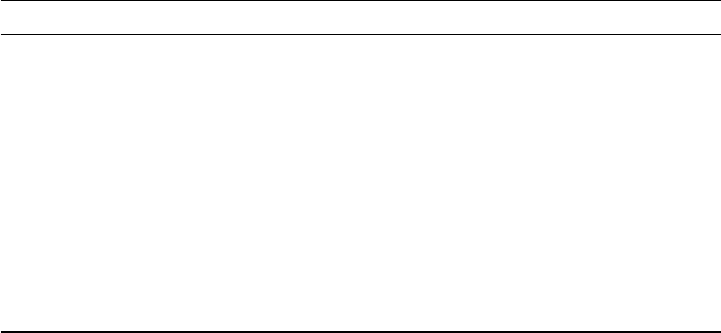
Content part created by mandatory
Titlepage \maketitle yes
Submission page \frontmatter yes
Declaration of own work \frontmatter yes
Dedication \dedication no
Epigraph \openepigraph no
Abstract \begin{abstract} \end{abstract} yes
Acknowledgements \begin{acknowledgements}
\end{acknowledgements}
?
Table of Contents \tableofcontents yes
List of Figures \listoffigures no
List of Tables \listoftables no
any other list ? no
Table 1: Parts of the frontmatter
tions the format and content of most parts of the frontmatter is rather rigidly
prescribed. The dissertation class provides commands for all these elements,
and most of the commands are processed internally by the \frontmatter com-
mand, so you don’t have to worry about those. Abstract and Acknowledgements
appear in the final document in the order you place them in the source. So
take care to write the abstract before the acknowledgements. Table 1 lists all
elements that may appear in the frontmatter, which commands create them,
and whether or not they must be present in your thesis.
Extra sections you might want or need in your thesis are a second abstract
in a language different from English (e.g., the language required by your double-
doctorate program), or additional lists of special elements in the text. If you
want for example a list of algorithms, you need to use an extra package to
produce it. You can include it as the last part of the frontmatter. For the extra
abstract, you can reuse the abstract environment with an extra parameter
giving the heading of the section (see reference documentation and example).
By default the lists of figures and tables will be included in the table of
contents if they are present in your document. Most (default) styles do not do
that automatically, so if you add a list and it should appear in the contents, you
will have to play with \addcontentsline to get what you want.
2.2 The Main Matter
The mainmatter of you thesis is the actual content you are supposed to write.
The main matter must begin with the command \mainmatter before the first
of your own chapters.
All structuring commands (from \chapter down to \subsection) can take
an optional parameter with a shorter version of the section title. This shorter
title will be used in the page header and the table of contents.
3
2.3 Appendices
If you want to have an appendix, use the command \appendix to switch the
formatting to “appendix mode” and then use the normal \chapter command
for each appendix you have.
2.4 The Backmatter
The backmatter contains your references, possibly a glossary and an index, and
must be started with the command \backmatter.
The references and index (if present) will be included in the table of contents
automatically. An index should start on a recto, that is a page with an odd page
number. The easiest way to achieve this is to precede the \theindex command
with a \cleardoublepage.
The usiinfthesis class does not provide any command or environment to pro-
duce a glossary or any other possible section that you might want to put in the
back of your thesis. As usual, chapter opened with \chapter will also appear
in the table of contents. while chapters opened with \chapter* will be ignored
for the table of contents. In both cases, backmatter chapters are not numbered.
3 Command reference
This command reference lists only commands provided by the USI-INF disser-
tation class. Commands inherited from the book class or any of the loaded
packages are not documented here, unless we made significant changes to them.
3.1 Preamble Commands and Environments
The title of the proposal. This command is mandatory and takes one argument.\title
The subtitle of the proposal. This command is optional and takes one argument.\subtitle
The author of this thesis, i.e., you. This command is mandatory and takes one\author
argument.
This environment constructs the list of your committee members. Inside thiscommittee
environment you may use the \advisor,\coadvisor,internalmember, and
\externalmember commands. This environment is mandatory. The committee
members are alphabetically sorted when the document is typeset.
The research advisor, or main advisor responsible for the student submitting the\advisor
proposal. At least one instance of this command is mandatory. This commands
takes three arguments: academic title, first and middle name, last name; an
optional argument can be given to specify an affiliation different than USI.
A co-advisor of the student. This command is optional and should only be\coadvisor
used if you have one or more official co-advisors. This command takes four
arguments: academic title, first and middle name, last name and affiliation.
4
Creates an entry for one internal member in the list of your committee. This\internalmember
commands takes three arguments: academic title, first and middle name, last
name; an optional argument can be given to specify an affiliation different than
USI (e.g., an affiliated research institute).
Creates an entry for one external member in the list of your committee. This\externalmember
commands takes four arguments: academic title, first and middle name, last
name, affiliation.
The director of the USI-INF PhD program. This is mandatory and appears on\programDirector
the submission page.
These commands form the date when the dissertation was accepted. These are\Day|Month|
Year mandatory and appear on the title page and the submission page.
Inserts an extra page with a dedication into the frontmatter. This command is\dedication
optional and takes the full text of your dedication as argument.
Inserts an opening epigraph into the frontmatter. This command is a variant of\openepigraph
the normal \epigraph command. It takes the epigraphs text as the first, and
the source as the second parameter. This command is optional.
This should be Lugano, unless you finish your thesis some place else. This is\place
mandatory and appears in your declaration of own work.
3.2 Text Body Commands and Environments
Inserts the abstract into the frontmatter. Use this environment to produce anabstract
abstract that conforms to the thesis requirements. If you need a second abstract
in another language, use the syntax \begin{abstract}[Sommario].
Inserts the acknowledgements into the frontmatter. Use this environment toacknowledgements
produce an acknowledgements section that conforms to the thesis requirements.
This command switches formatting and pagination from the main text body to\appendix
the form required for appendices. This command is optional and should only be
used if you have appendices. In that case, it must appear after the last chapter
of the main text, and before the first appendix.
This command switches formatting and pagination to the form used for the\backmatter
backmatter. This command must appear after the last chapter/appendix and
before the (optional) glossary and references.
Creates most of the frontmatter pages and initialises formatting and pagination\frontmatter
settings. This command must appear after \maketitle and before any other
commands or text.
This command must appear after all frontmatter parts and before the first\mainmatter
chapter of the main text body.
5

3.3 Class Options
The default layout produced by the class is targeted to “electronic” publishingprint
and uses margins consistent with the normal L
A
T
E
Xoneside option. This option
switches the layout and various other things to something that is more suitable
for two-sided printing and binding. Standard L
A
T
E
X options oneside or twoside
are disabled.
By default, the class loads the hyperref package with the proper options .nohyper
Since the hyperref package redefines many L
A
T
E
X commands, it may conflict
with other packages you use. This option let you disable the loading of the
package.
4 Font Size
The default font size is 11pt. You can change it either to 10pt or to 12pt, by
passing the corresponding option to the class.
5 Restrictions and Requirements
Commands and document elements listed here may not be changed or used in
producing your thesis.
6 Required Packages
The usiinfthesis class makes extensive use of a wide range of “standard”1L
A
T
E
X
packages. Table 2 lists all packages (and options) that are loaded by the class,
and thus do not need to be loaded in your thesis document.
The packages beramono and mathdesign select, respectively, the monospaced
and the math fonts. The class file also uses the Optima font package for the
sans serif fonts2.fontenc and textcomp are required to make these fonts work
properly.
7 Complete Document
The listing below shows the complete structure of your thesis with all optional
content enabled. It is important that you do not change the order of the com-
mands, parts, and sections in your own thesis.
1Standard packages are the ones available in a modern L
A
T
E
X distribution, like T
E
XLive
(http://www.tug.org/texlive) and MacT
E
X (http://www.tug.org/mactex).
2The Optima (aka URW Classico) font is not bundled with T
E
Xlive-based distributions.
However, they provide a script, getnonfreefonts, for installing extra fonts. To install Optima,
just type getnonfreefonts classico on the command line; the script requires wget to be
installed.
6
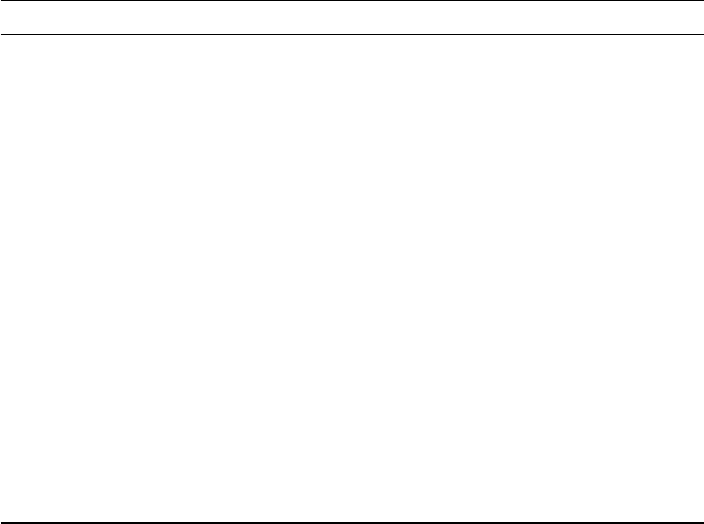
Package Options
amsmath
book (class) a4paper, 11pt, onecolumn, final, openright, titlepage
beramono scaled
booktabs
calc
caption font=sf, labelsep=period
datatool
epigraph
fancyhdr
fontenc T1
geometry a4paper
graphicx
hyperref unicode, plainpages=false, pdfpagelabels, breaklinks
hypcap all
mathdesign charter
natbib square
sectsty
textcomp
url
xifthen
Table 2: Required packages and selected options
7
\documentclass[]{usiinfthesis}
\title{The Title of my Dissertation} %compulsory
\subtitle{Subtitle: Reinventing the World} %optional
\author{Philo S. Doctor} %compulsory
\advisor{The Student’s Advisor} %compulsory
\coadvisor{Co-Advisor} %optional
\Day{Yesterday} %defaults to \today
\Month{September} %compuslory
\Year{2009} %compulsory, put only the year
\place{Lugano} %compulsory
\programDirector{The PhD program Director \emph{pro tempore}} %compulsory
\begin{committee}
\advisor[Politecnico di Milano, Italy]{Prof.}{Carlo}{Ghezzi}
\advisor{Prof.}{Mehdi}{Jazayeri}
\coadvisor{Prof.}{Peter}{Naur}{K\o benhavns Universitet, Denmark}
\coadvisor{Prof.}{M. Douglas}{McIlroy}{Dartmouth College, USA}
\internalmember[Advanced Learning and Research Institute,
Switzerland]%
{Prof. Ing.}{Luigi}{Dadda}
\internalmember{Prof.}{Walter}{Binder}
\externalmember{}{Albert}{Endres}{IBM Academy of Technology}
\externalmember{Prof.}{Bertrand}{Meyer}%
{Eidgen\"ossische Technische Hochschule Z\"urich, Switzerland}
\externalmember{Prof.}{Jeff}{Kramer}{Imperial College London, United
Kingdom}
\end{committee}
\dedication{To my beloved} %optional
\openepigraph{Someone said \dots}{Someone} %optional
\makeindex %optional, also use \theindex at the end
\begin{document}
\maketitle %generates the titlepage, this is FIXED
\frontmatter %generates the frontmatter, this is FIXED
\begin{abstract}
This is a very abstract abstract.
\end{abstract}
\begin{abstract}[Zusammenfassung]
%creates a new abstract section with "Zusammenfassung" as heading
\end{abstract}
8
\begin{acknowledgements}
\end{acknowledgements}
\tableofcontents
\listoffigures %optional
\listoftables %optional
%add any other lists here
\mainmatter
\chapter{Introduction}
\chapter{A chapter title which will run over two lines --- it’s for
testing purpose}
\section{The first section}
\section{The second, math section}
\section[third]{A very very long section, titled
‘‘The third section’’, with a rather short
text alternative (third)}
\appendix %optional, use only if you have an appendix
\chapter{Some retarded material}
\section{It’s over\dots}
\backmatter
\chapter{Glossary} %optional
%any style compatible with the natbib package
%\bibliographystyle{alpha}
\bibliographystyle{dcu}
%\bibliographystyle{plainnat}
\bibliography{biblio}
\cleardoublepage %the index starts on a recto!
\theindex %optional, use only if you have an index, must use
%\makeindex in the preamble
\end{document}
9
8 Version History
2009/11/6 v. 1.1
Implemented some design changes suggested by the new PhD director,
prof. Michele Lanza. Added support for multiple advisors and co-advisors.
New commands for defining the committee members (design and code
taken from the usiinfdocprop class).
2009/09/30 v. 1.0.8
Fixed spelling of the university name.
2009/07/05 v. 1.0.7
Fixed header capitalization problems in frontmatter. Fixed page number
issue with toc, lof, lot
2009/05/05 v. 1.0.6
Fixed compatibility issue with TikZ package. Date commands have a new
format.
2009/04/02 v. 1.0.5 (with fixes)
Typos in templated text fixed.
2009/03/27 v. 1.0.5
Changes to support SmallCaps in Sans Serif Fonts.
2009/03/17 v. 1.0.4
Cosmetic changes to templated text.
2008/07/25 v. 1.0.3
Added support for MSc theses.
2008/07/24 v. 1.0.2
Fixed documentation bug.
2008/03/18 v. 1.0.1
Fixed titleplage bug.
Fixed ToC, LoF, LoT, Bibliography and Index header formatting issues.
2008/03/17 v. 1.0 initial release
10
