Philips Healthcare Connected Sensing Venture 508PBS2KW7 Philips G5 Wearable Heart Rate Monitor Biosensor User Manual Manual

Philips Healthcare - Connected Sensing Venture Philips G5 Wearable Heart Rate Monitor Biosensor Manual

Manual

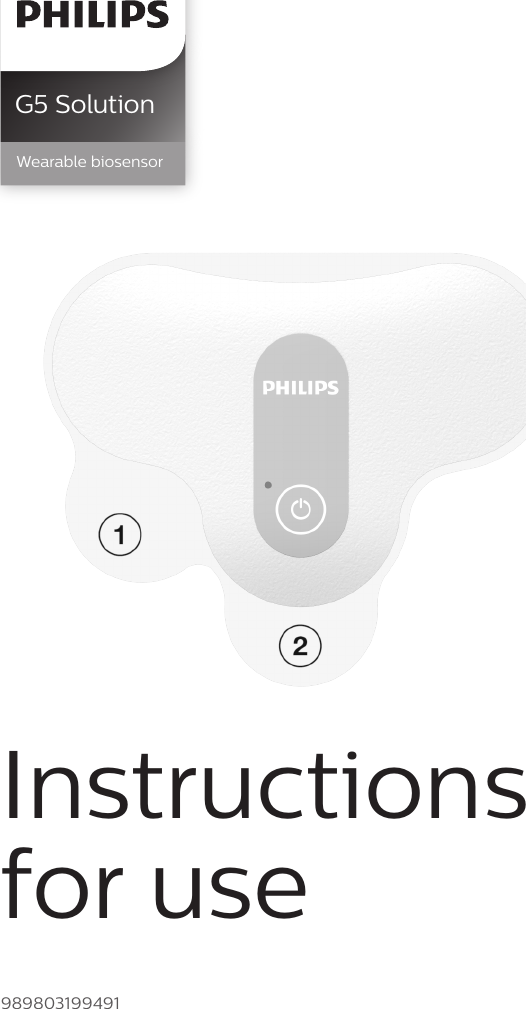
G5 SolutionWearable biosensorInstructions for use989803199491
2Introduction 3Intended use  3Product description  4General warnings  and precautions  8Warnings 8Precautions 9Use environment  9Radiofrequency  interference 10Security and privacy recommendations 10Product operation  12Product setup  12Preparing skin and  applying biosensor  12Connecting to the  G5 application  14Disconnecting the biosensor and saving patient data  16Biosensor interface  18G5 application interface  19Heart rate transmission conguration 19Notications 19Reviewing data  22Maintenance 23Cleaning and disinfection  23Storage 23Troubleshooting 24Specications 26Symbols 26Manufacturer’s  information 27Open source software  27Regulatory and safety specications 27EMC and radio regulatory compliance 28FCC compliance statement  29Safety and  performance tests  30Biosensor specications  34Software application specications 35Contents
3IntroductionIntended usePhilips wearable biosensor-G5 solution is a single-location, chest-worn heart rate monitor. The wearable biosensor-G5 solution includes a wearable biosensor-G5 and software application. The wearable biosensor-G5 is a single-use device measuring heart rate by continuously acquiring surface electrical waveforms related to cardiac excitations and measuring beat-to-beat intervals when a patient is stationary or ambulatory. The biosensor functions by capturing and then sending physiological data wirelessly to the software application. The biosensor’s frequency of data collection and transmission is congurable. The software application is a single-patient use device, intended as an accessory to the biosensor to display and store physiological and operational data. The software application receives and displays data from the biosensor providing a user interface and exportable le for retrospective review and analysis. The application allows conguring the biosensor frequency of data collection and transmission.Indications for useThe Philips wearable biosensor-G5 is indicated for single patient use whenever heart rate measurement is needed in non-critical hospital settings. The Philips wearable biosensor-G5 solution is used as a higher resolution heart rate log by nurses or physicians retroactively as an aid in making non-critical or non-life threatening therapeutic decisions. The biosensor is intended for patients who are 18 years of age or older.NoteBefore using this product to obtain heart rate, carefully read the instructions for use and the quick start guide on the G5 biosensor package.
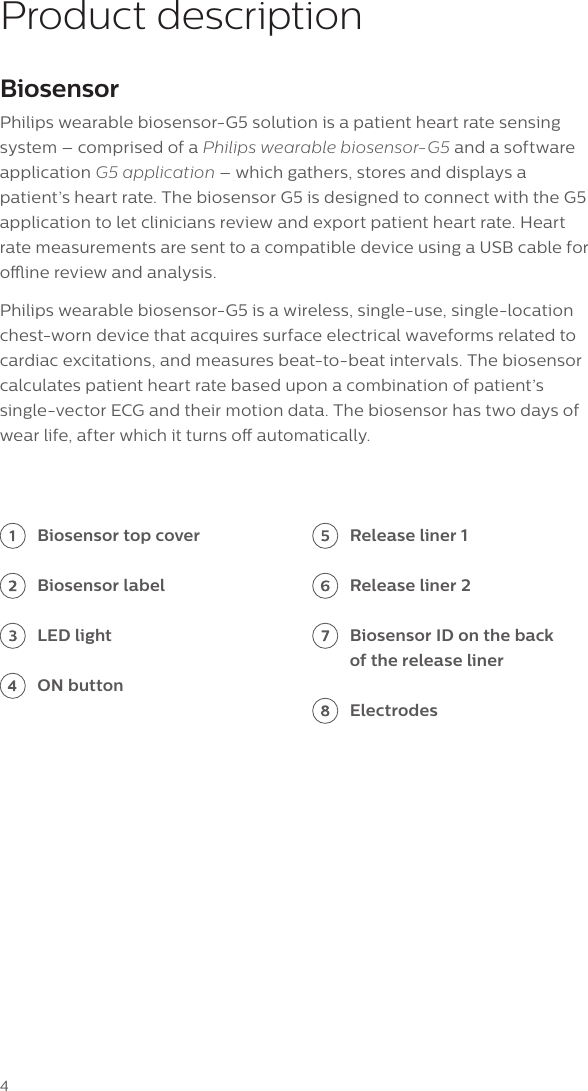
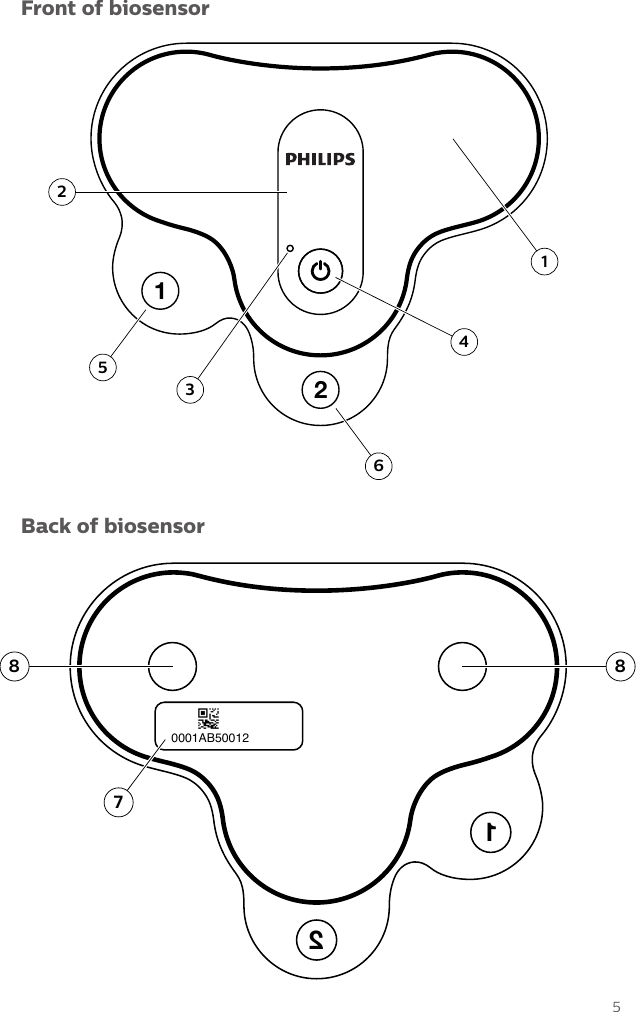
4Product descriptionBiosensorPhilips wearable biosensor-G5 solution is a patient heart rate sensing system – comprised of a Philips wearable biosensor-G5 and a software application G5 application – which gathers, stores and displays a patient’s heart rate. The biosensor G5 is designed to connect with the G5 application to let clinicians review and export patient heart rate. Heart rate measurements are sent to a compatible device using a USB cable for oine review and analysis.Philips wearable biosensor-G5 is a wireless, single-use, single-location chest-worn device that acquires surface electrical waveforms related to cardiac excitations, and measures beat-to-beat intervals. The biosensor calculates patient heart rate based upon a combination of patient’s single-vector ECG and their motion data. The biosensor has two days of wear life, after which it turns o automatically. Biosensor top coverBiosensor labelLED lightON buttonRelease liner 1Release liner 2Biosensor ID on the back of the release linerElectrodes
5Front of biosensor21243561210001AB50012887Back of biosensor
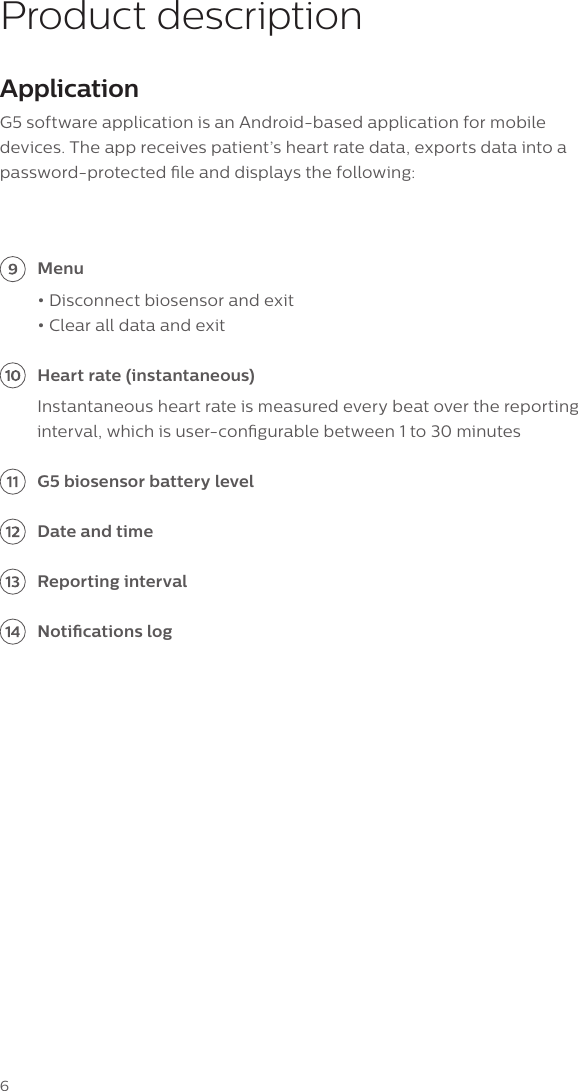
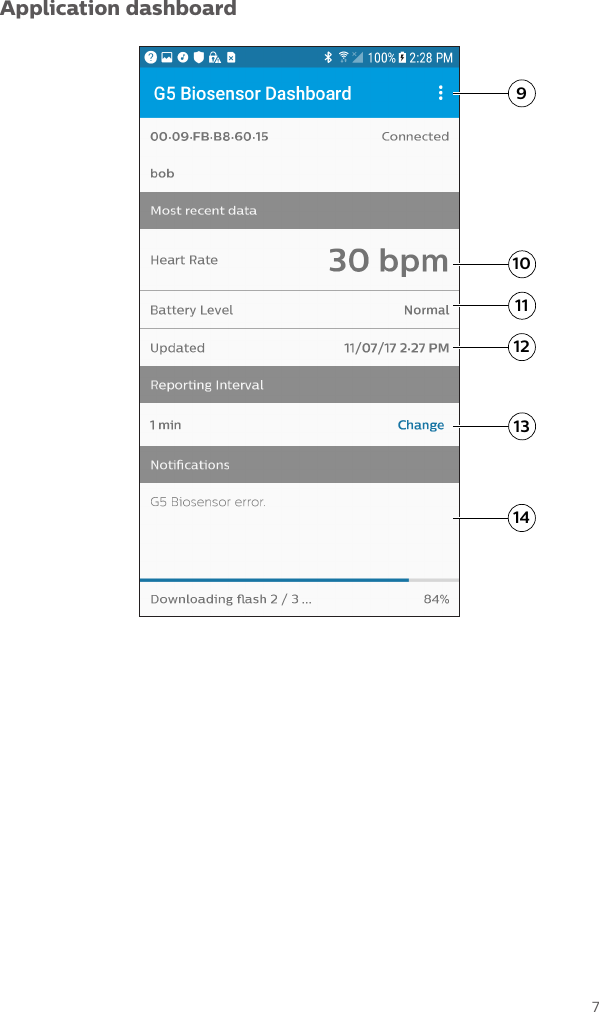
6Product descriptionApplicationG5 software application is an Android-based application for mobile devices. The app receives patient’s heart rate data, exports data into a password-protected le and displays the following: Menu• Disconnect biosensor and exit • Clear all data and exit Heart rate (instantaneous) Instantaneous heart rate is measured every beat over the reporting interval, which is user-congurable between 1 to 30 minutes G5 biosensor battery level Date and time Reporting interval Notications log
7Application dashboard12910111314
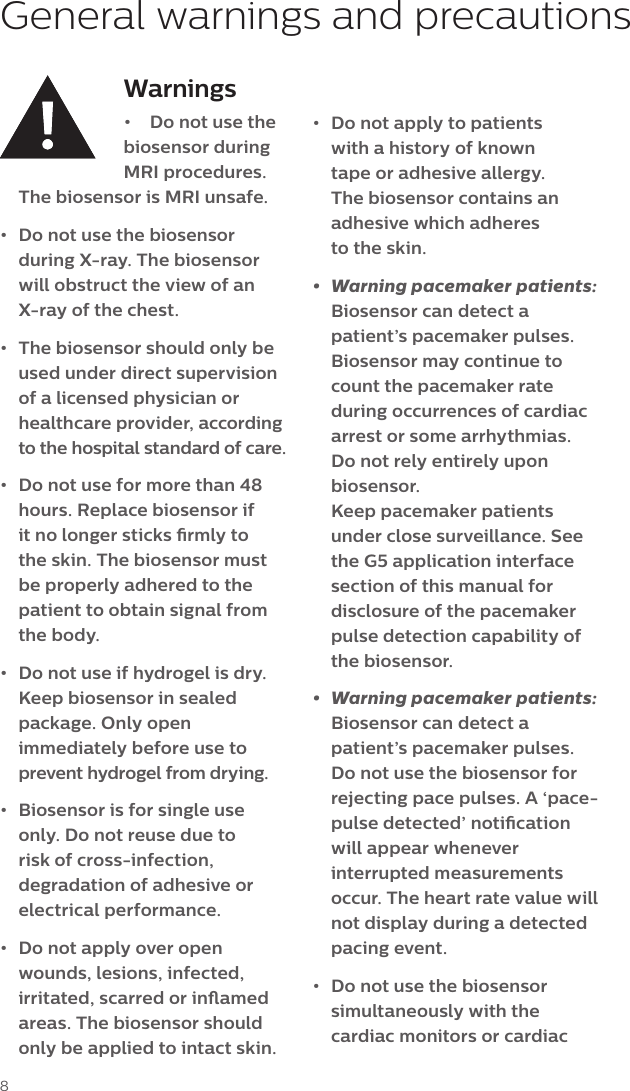
8Warnings•  Do not use the biosensor during MRI procedures. The biosensor is MRI unsafe.•  Do not use the biosensor during X-ray. The biosensor will obstruct the view of an X-ray of the chest. •  The biosensor should only be used under direct supervision of a licensed physician or healthcare provider, according to the hospital standard of care.•  Do not use for more than 48 hours. Replace biosensor if it no longer sticks rmly to the skin. The biosensor must be properly adhered to the patient to obtain signal from the body. •  Do not use if hydrogel is dry. Keep biosensor in sealed package. Only open immediately before use to prevent hydrogel from drying.•  Biosensor is for single use only. Do not reuse due to risk of cross-infection, degradation of adhesive or electrical performance.•  Do not apply over open wounds, lesions, infected, irritated, scarred or inamed areas. The biosensor should only be applied to intact skin.General warnings and precautions•  Do not apply to patients with a history of known tape or adhesive allergy. The biosensor contains an adhesive which adheres  to the skin. •  Warning pacemaker patients: Biosensor can detect a patient’s pacemaker pulses. Biosensor may continue to count the pacemaker rate during occurrences of cardiac arrest or some arrhythmias. Do not rely entirely upon biosensor.  Keep pacemaker patients under close surveillance. See the G5 application interface section of this manual for disclosure of the pacemaker pulse detection capability of the biosensor.•  Warning pacemaker patients: Biosensor can detect a patient’s pacemaker pulses. Do not use the biosensor for rejecting pace pulses. A ‘pace-pulse detected’ notication will appear whenever interrupted measurements occur. The heart rate value will not display during a detected pacing event.•  Do not use the biosensor simultaneously with the cardiac monitors or cardiac
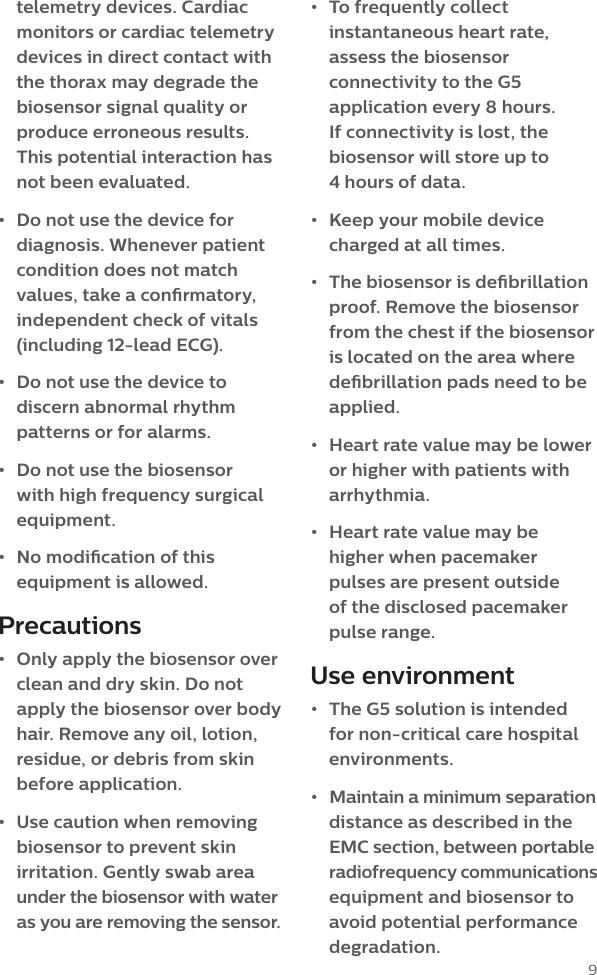
9telemetry devices. Cardiac monitors or cardiac telemetry devices in direct contact with the thorax may degrade the biosensor signal quality or produce erroneous results. This potential interaction has  not been evaluated.•  Do not use the device for diagnosis. Whenever patient condition does not match values, take a conrmatory, independent check of vitals (including 12-lead ECG).•  Do not use the device to discern abnormal rhythm patterns or for alarms.•  Do not use the biosensor with high frequency surgical equipment.•  No modication of this equipment is allowed. Precautions•  Only apply the biosensor over clean and dry skin. Do not apply the biosensor over body hair. Remove any oil, lotion, residue, or debris from skin before application.•  Use caution when removing biosensor to prevent skin irritation. Gently swab area under the biosensor with water as you are removing the sensor. •  To frequently collect instantaneous heart rate, assess the biosensor connectivity to the G5 application every 8 hours. If connectivity is lost, the biosensor will store up to  4 hours of data.•  Keep your mobile device charged at all times.•  The biosensor is debrillation proof. Remove the biosensor from the chest if the biosensor is located on the area where debrillation pads need to be applied.•  Heart rate value may be lower or higher with patients with arrhythmia.•  Heart rate value may be higher when pacemaker pulses are present outside  of the disclosed pacemaker pulse range.Use environment•  The G5 solution is intended for non-critical care hospital environments.•  Maintain a minimum separation distance as described in the EMC section, between portable  radiofrequency communications equipment and biosensor to avoid potential performance degradation.
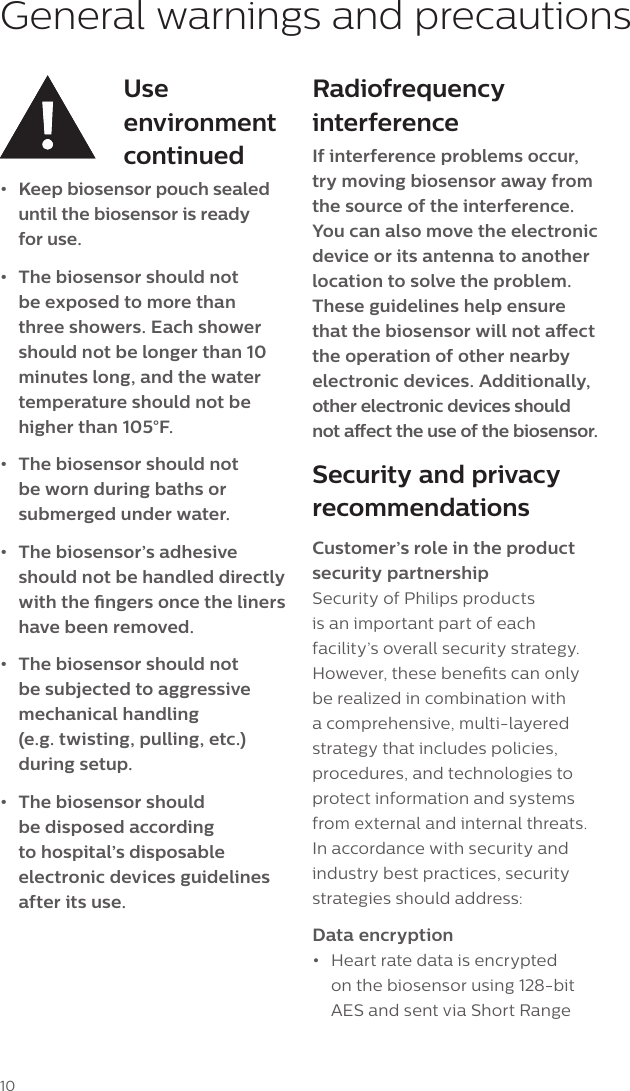
10General warnings and precautionsUse environment continued•  Keep biosensor pouch sealed until the biosensor is ready  for use. •  The biosensor should not be exposed to more than three showers. Each shower should not be longer than 10 minutes long, and the water temperature should not be higher than 105°F.•  The biosensor should not be worn during baths or submerged under water.•  The biosensor’s adhesive should not be handled directly with the ngers once the liners have been removed.•  The biosensor should not be subjected to aggressive mechanical handling  (e.g. twisting, pulling, etc.)  during setup.•  The biosensor should be disposed according to hospital’s disposable electronic devices guidelines after its use.Radiofrequency interferenceIf interference problems occur, try moving biosensor away from the source of the interference. You can also move the electronic device or its antenna to another location to solve the problem. These guidelines help ensure that the biosensor will not aect the operation of other nearby electronic devices. Additionally, other electronic devices should  not aect the use of the biosensor.Security and privacy recommendationsCustomer’s role in the product security partnershipSecurity of Philips products is an important part of each facility’s overall security strategy. However, these benets can only be realized in combination with a comprehensive, multi-layered strategy that includes policies, procedures, and technologies to protect information and systems from external and internal threats. In accordance with security and industry best practices, security strategies should address:Data encryption•  Heart rate data is encrypted on the biosensor using 128-bit AES and sent via Short Range
11Wireless to the compatible mobile device. Customer network security and importance of security policy•  Ensure there are sucient intrusion prevention and detection measures as part of the IT security policies.•  The mobile device should  not be connected to the  hospital network.•  It is recommended to have anti-virus or malware on the mobile device.•  Philips recommends operating Biosensor in secure network by turning o the Wi-Fi connectivity on the mobile device running the G5 App. Connectivity of G5 app with biosensor shall only be established on Bluetooth protocol (Version 4.2).•  If Wi-Fi cannot be disabled on the mobile device, it is advised to connect on a highly secure wireless network (e.g. WPA2) with strong password enabled.User account maintenance•  Do not share the G5 App password with any unauthorized personnel.•  Use physical security; for example, locks, cameras, keycards, sensors, and so on,  to restrict unauthorized access  of mobile device.•  Use procedural security; for example, unattended mobile device locking, no sharing of access credentials, termination checklists, risk management (that is, performing risk assessments and mitigating identied risks), and so on.•  Operational security; for example, access/authorization controls, change management, and network segmentation based on data classication.Auto-lock settings•  Philips recommends that you congure the mobile device auto-lock time to match the security policies (Permissible is between 1-9 minutes).Application•  Philips recommend that G5 application should only be used with a compatible mobile device. – Any unnecessary applications should be removed from the compatible device. •  For optimal performance, only the G5 app should be running on the device
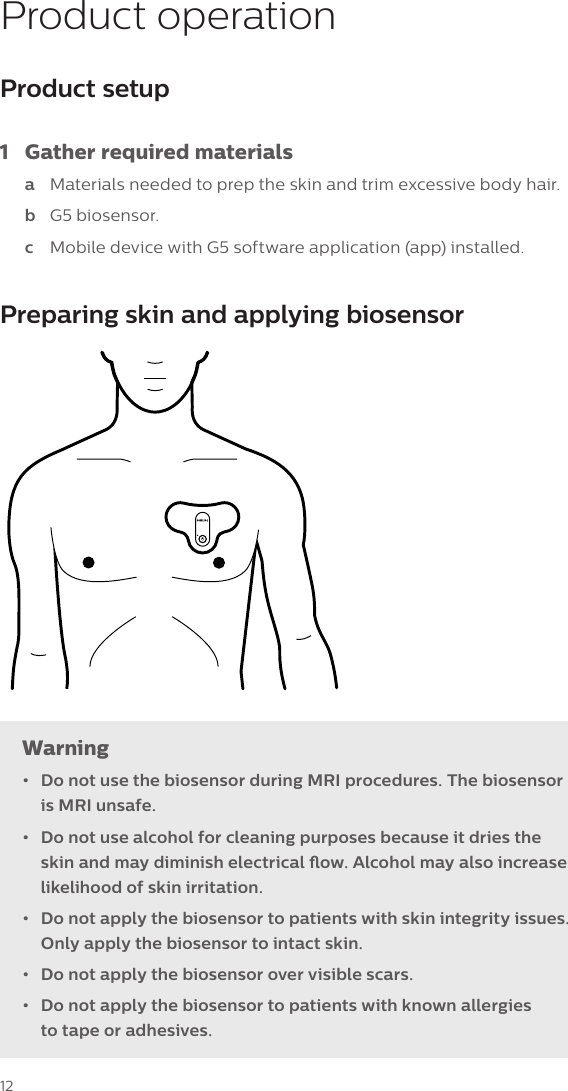
12Product operationProduct setup 1  Gather required materialsa  Materials needed to prep the skin and trim excessive body hair.b  G5 biosensor.c  Mobile device with G5 software application (app) installed.Preparing skin and applying biosensorWarning•  Do not use the biosensor during MRI procedures. The biosensor is MRI unsafe.•  Do not use alcohol for cleaning purposes because it dries the skin and may diminish electrical ow. Alcohol may also increase likelihood of skin irritation. •  Do not apply the biosensor to patients with skin integrity issues. Only apply the biosensor to intact skin.•  Do not apply the biosensor over visible scars.•  Do not apply the biosensor to patients with known allergies  to tape or adhesives.
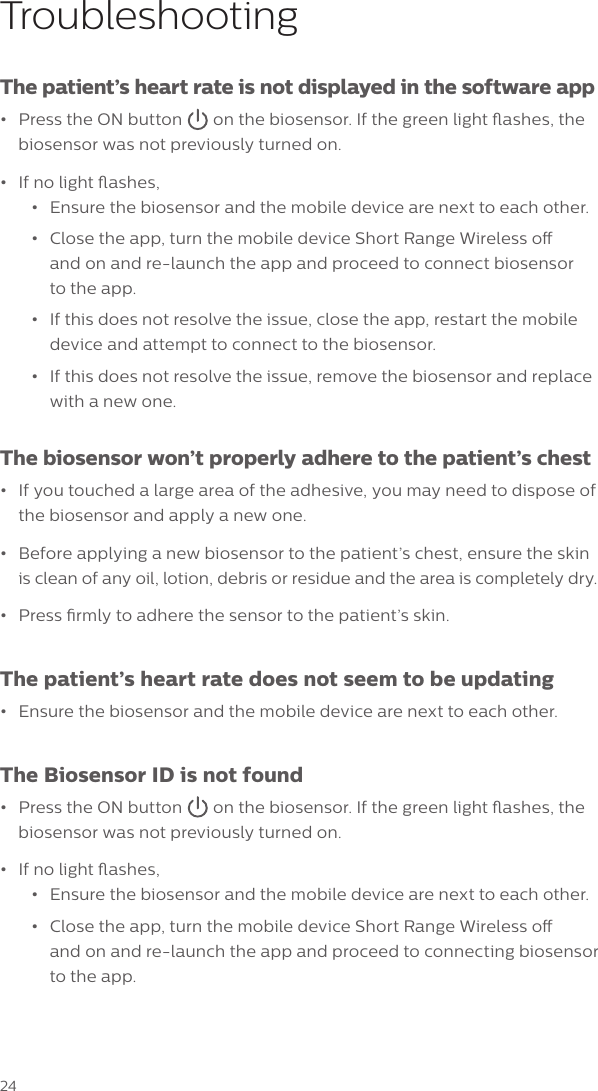
132  Prepare patient’s skina  Locate the upper left chest area (over the heart) for biosensor application.b  Shave or cut hair from electrode sites since excessive hair prevents good electrode contact.c  Clean each site thoroughly with soap and water or use an alcohol-free wipe to improve electrical ow.d  Let skin dry.Note: Thorough cleaning and drying of the skin can improve  biosensor adhesion. Note: Skin prep solution may be applied to patients with delicate skin  to make removal easier later.3  Prepare biosensora  To open the package, pull the two silver layers apart. b  Carefully remove the biosensor from the package.c  Examine biosensor for physical damage and liner integrity  before setup. Note: Discard the biosensor and use a new one if the biosensor foam is not intact, if the ON button appears damaged, or if a liner is missing.d  Turn on the biosensor by pressing the ON button .e  A green light will ash, indicating the biosensor is ready for placement on the patient. Note: If the light does not turn on, use a new biosensor and repeat the previous steps.
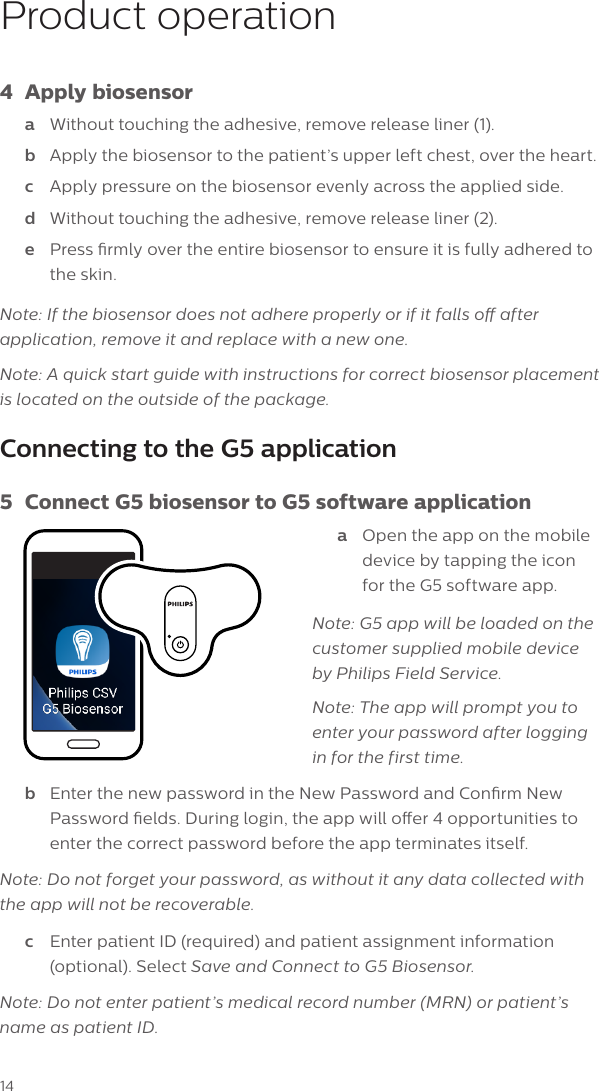
14Product operation4  Apply biosensor a  Without touching the adhesive, remove release liner (1).b  Apply the biosensor to the patient’s upper left chest, over the heart. c  Apply pressure on the biosensor evenly across the applied side.d  Without touching the adhesive, remove release liner (2).e  Press rmly over the entire biosensor to ensure it is fully adhered to the skin.Note: If the biosensor does not adhere properly or if it falls o after application, remove it and replace with a new one.Note: A quick start guide with instructions for correct biosensor placement is located on the outside of the package.Connecting to the G5 application5  Connect G5 biosensor to G5 software applicationa  Open the app on the mobile device by tapping the icon for the G5 software app.Note: G5 app will be loaded on the customer supplied mobile device by Philips Field Service. Note: The app will prompt you to enter your password after logging  in for the first time. b  Enter the new password in the New Password and Conrm New Password elds. During login, the app will oer 4 opportunities to enter the correct password before the app terminates itself. Note: Do not forget your password, as without it any data collected with the app will not be recoverable. c  Enter patient ID (required) and patient assignment information (optional). Select Save and Connect to G5 Biosensor.Note: Do not enter patient’s medical record number (MRN) or patient’s name as patient ID.
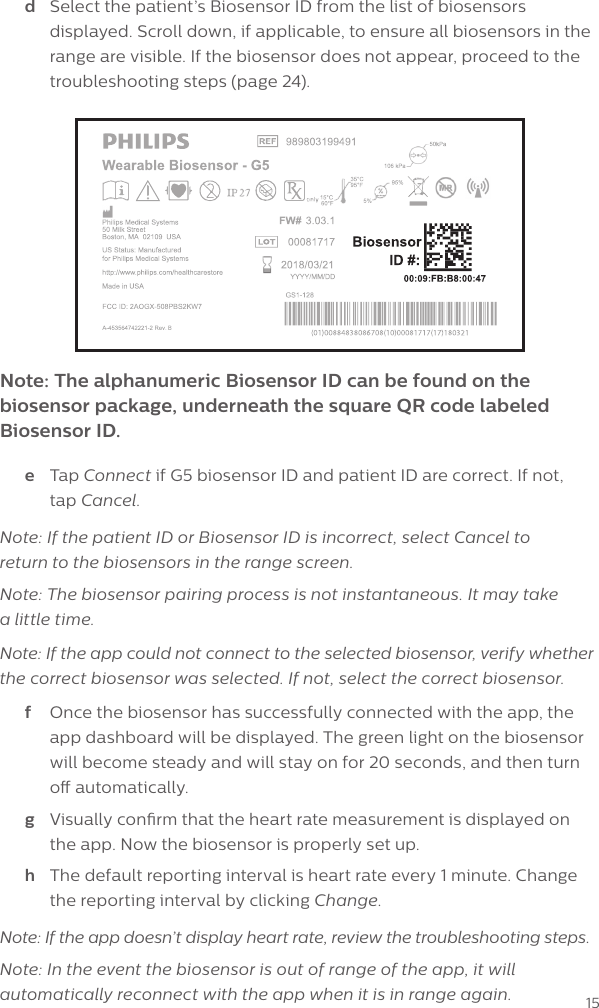
15Note: The alphanumeric Biosensor ID can be found on the biosensor package, underneath the square QR code labeled Biosensor ID.d  Select the patient’s Biosensor ID from the list of biosensors displayed. Scroll down, if applicable, to ensure all biosensors in the range are visible. If the biosensor does not appear, proceed to the troubleshooting steps (page 24).e  Tap Connect if G5 biosensor ID and patient ID are correct. If not,  tap Cancel.Note: If the patient ID or Biosensor ID is incorrect, select Cancel to  return to the biosensors in the range screen. Note: The biosensor pairing process is not instantaneous. It may take  a little time.Note: If the app could not connect to the selected biosensor, verify whether  the correct biosensor was selected. If not, select the correct biosensor.f  Once the biosensor has successfully connected with the app, the app dashboard will be displayed. The green light on the biosensor will become steady and will stay on for 20 seconds, and then turn o automatically.g  Visually conrm that the heart rate measurement is displayed on the app. Now the biosensor is properly set up. h  The default reporting interval is heart rate every 1 minute. Change the reporting interval by clicking Change.Note: If the app doesn’t display heart rate, review the troubleshooting steps.Note: In the event the biosensor is out of range of the app, it will automatically reconnect with the app when it is in range again.
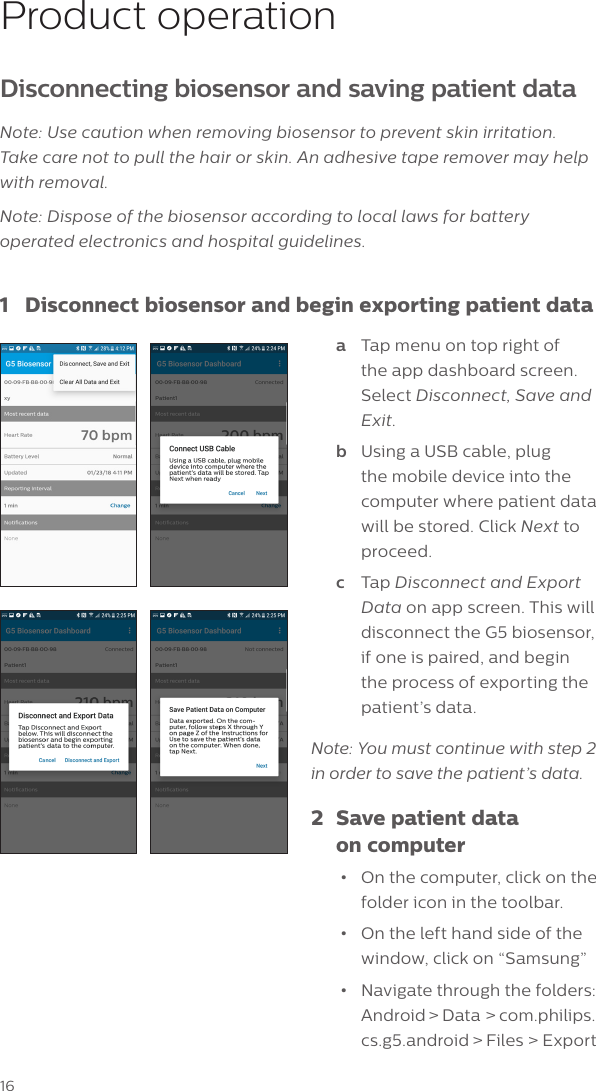
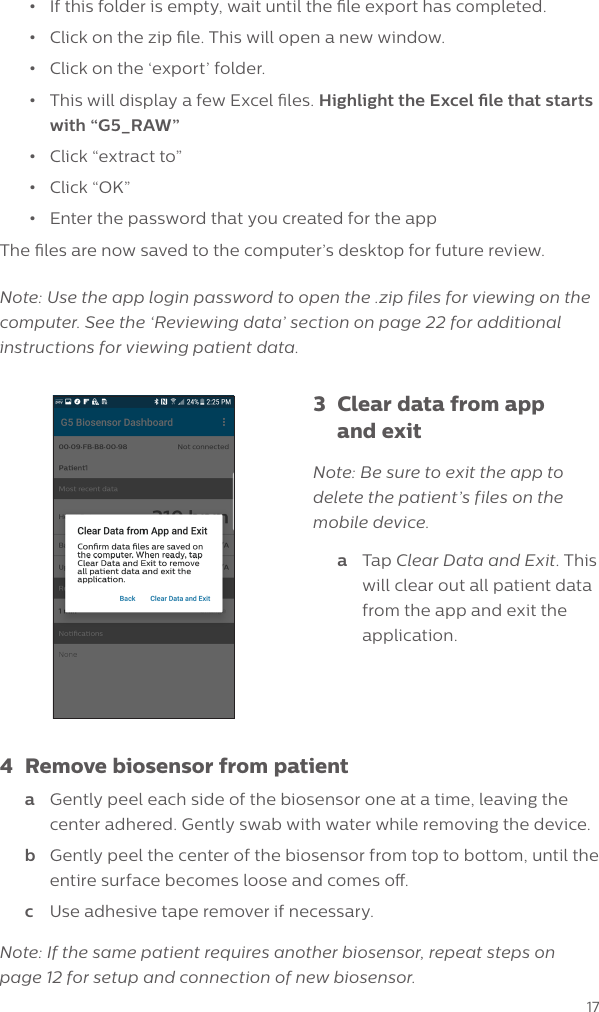
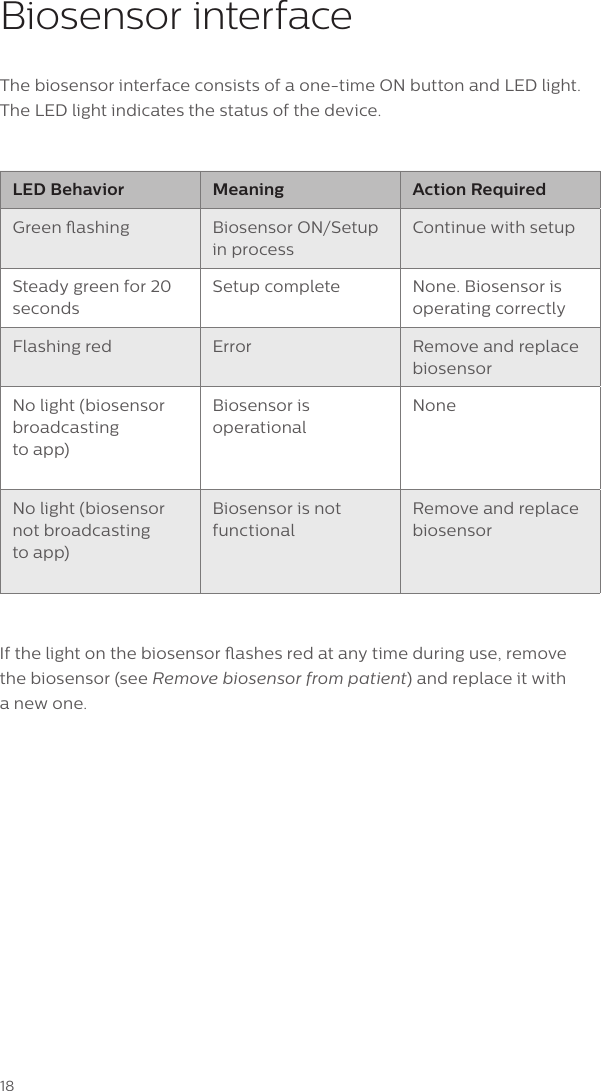
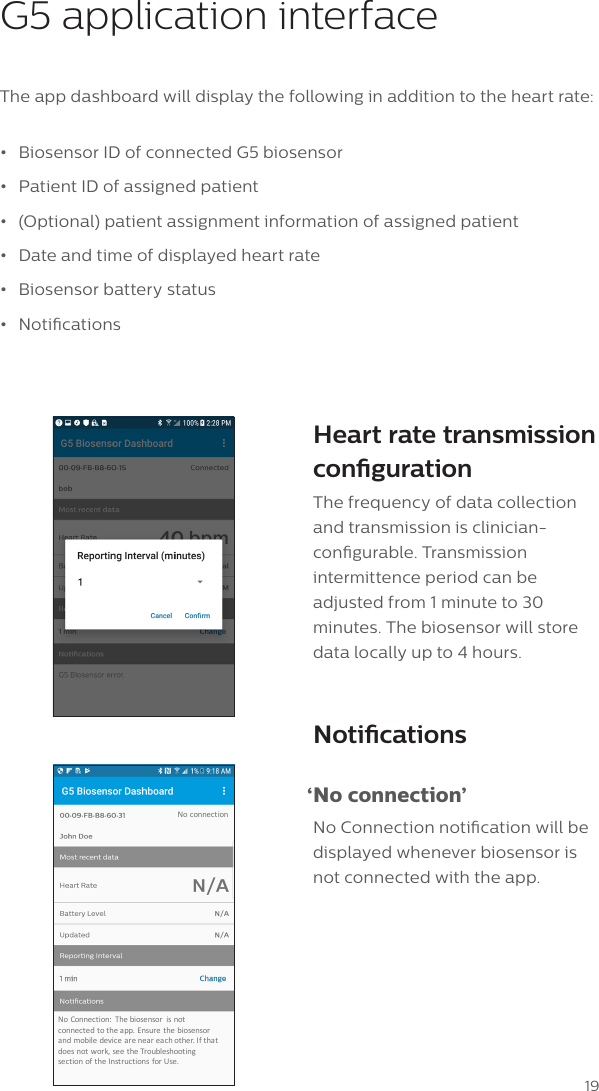
16Product operationDisconnecting biosensor and saving patient dataNote: Use caution when removing biosensor to prevent skin irritation.  Take care not to pull the hair or skin. An adhesive tape remover may help with removal.Note: Dispose of the biosensor according to local laws for battery operated electronics and hospital guidelines.1  Disconnect biosensor and begin exporting patient dataa  Tap menu on top right of the app dashboard screen. Select Disconnect, Save and Exit. b  Using a USB cable, plug the mobile device into the computer where patient data will be stored. Click Next to proceed.c  Tap Disconnect and Export Data on app screen. This will disconnect the G5 biosensor, if one is paired, and begin the process of exporting the patient’s data. Note: You must continue with step 2  in order to save the patient’s data.2  Save patient data    on computer•  On the computer, click on the folder icon in the toolbar.•  On the left hand side of the window, click on “Samsung”•  Navigate through the folders: Android > Data > com.philips.cs.g5.android > Files > Export
17•  If this folder is empty, wait until the le export has completed. •  Click on the zip le. This will open a new window.•  Click on the ‘export’ folder.•  This will display a few Excel les. Highlight the Excel le that starts with “G5_RAW”•  Click “extract to”•  Click “OK”•  Enter the password that you created for the appThe les are now saved to the computer’s desktop for future review. Note: Use the app login password to open the .zip files for viewing on the computer. See the ‘Reviewing data’ section on page 22 for additional instructions for viewing patient data.3  Clear data from app    and exitNote: Be sure to exit the app to delete the patient’s files on the mobile device.a  Tap Clear Data and Exit. This will clear out all patient data from the app and exit the application.4  Remove biosensor from patienta  Gently peel each side of the biosensor one at a time, leaving the center adhered. Gently swab with water while removing the device.b  Gently peel the center of the biosensor from top to bottom, until the entire surface becomes loose and comes o.c  Use adhesive tape remover if necessary.Note: If the same patient requires another biosensor, repeat steps on page 12 for setup and connection of new biosensor.
18Biosensor interfaceThe biosensor interface consists of a one-time ON button and LED light. The LED light indicates the status of the device.LED Behavior Meaning Action RequiredGreen ashing Biosensor ON/Setup in processContinue with setupSteady green for 20 secondsSetup complete None. Biosensor is operating correctlyFlashing red Error Remove and replace biosensorNo light (biosensor broadcasting  to app)Biosensor is operational NoneNo light (biosensor not broadcasting  to app)Biosensor is not functionalRemove and replace biosensorIf the light on the biosensor ashes red at any time during use, remove the biosensor (see Remove biosensor from patient) and replace it with  a new one.
19G5 application interfaceThe app dashboard will display the following in addition to the heart rate:•  Biosensor ID of connected G5 biosensor •  Patient ID of assigned patient•  (Optional) patient assignment information of assigned patient•  Date and time of displayed heart rate•  Biosensor battery status•  NoticationsHeart rate transmission congurationThe frequency of data collection and transmission is clinician-congurable. Transmission intermittence period can be adjusted from 1 minute to 30 minutes. The biosensor will store data locally up to 4 hours. Notications ‘No  connection’No Connection notication will be displayed whenever biosensor is not connected with the app.No Connection: Thebiosensor isnotconnected totheapp.Ensurethe biosensorand mobile device areneareachother.Ifthatdoesnotwork,seetheTroubleshootingsect ionof theI nstruct ions forUse.No connection
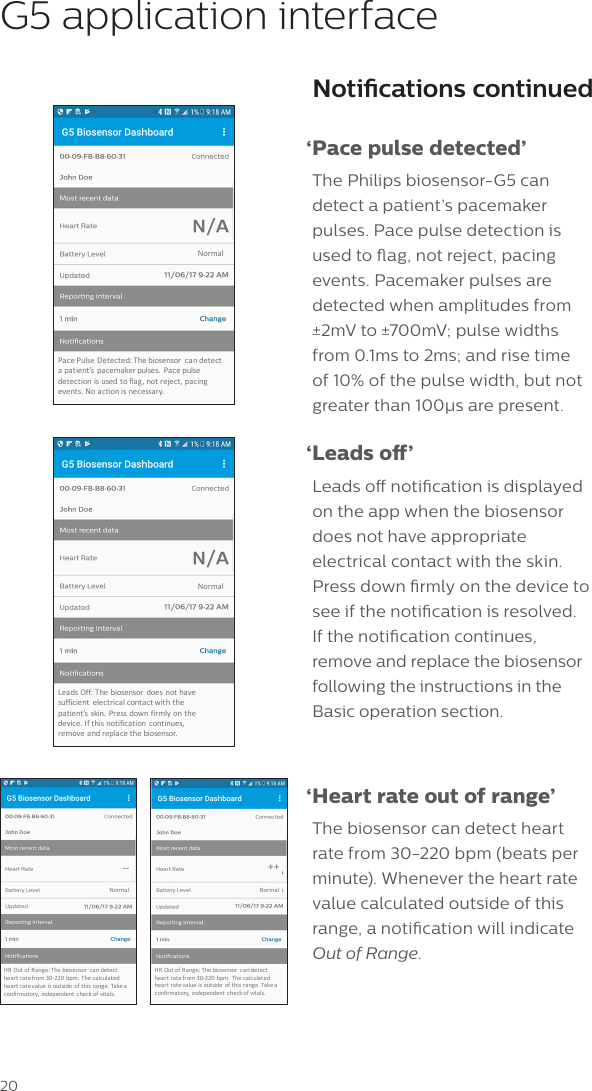
20Notications continued ‘Pace pulse detected’The Philips biosensor-G5 can detect a patient’s pacemaker pulses. Pace pulse detection is used to ag, not reject, pacing events. Pacemaker pulses are detected when amplitudes from ±2mV to ±700mV; pulse widths from 0.1ms to 2ms; and rise time of 10% of the pulse width, but not greater than 100μs are present. ‘Leads  o’Leads o notication is displayed on the app when the biosensor does not have appropriate electrical contact with the skin. Press down rmly on the device to see if the notication is resolved.  If the notication continues, remove and replace the biosensor following the instructions in the Basic operation section. ‘Heart rate out of range’The biosensor can detect heart rate from 30-220 bpm (beats per minute). Whenever the heart rate value calculated outside of this range, a notication will indicate Out of Range.G5 application interfaceNorma lHROut-of-Range++HROutofRange:Thebiosensor candetectheartratefrom30-220bpm.  Thecalcula tedhear tra tevalue isoutside of this rang e.Takeaconfir matory, independe nt check ofvita ls.Norma lHROutofRange:Thebiosensor candetectheartratefrom30-220bpm.  Thecalcula tedhear tra tevalue isoutside of this rang e.Takeaconfir matory, independe nt check ofvita ls.--NormalPacePulseDetected:Thebiosensor candetectapa tient’s pacemakerpulses. Pacepulsedetection isused toflag,notreject, pacingevents.Noact ionis necessary.NormalLeads Off:The biosensor does nothavesufficient electricalcontactwith thepatient’s skin.Pressdown firmly ont hedevice.Ifthis notifica tion continues,remove andreplace the biosensor.
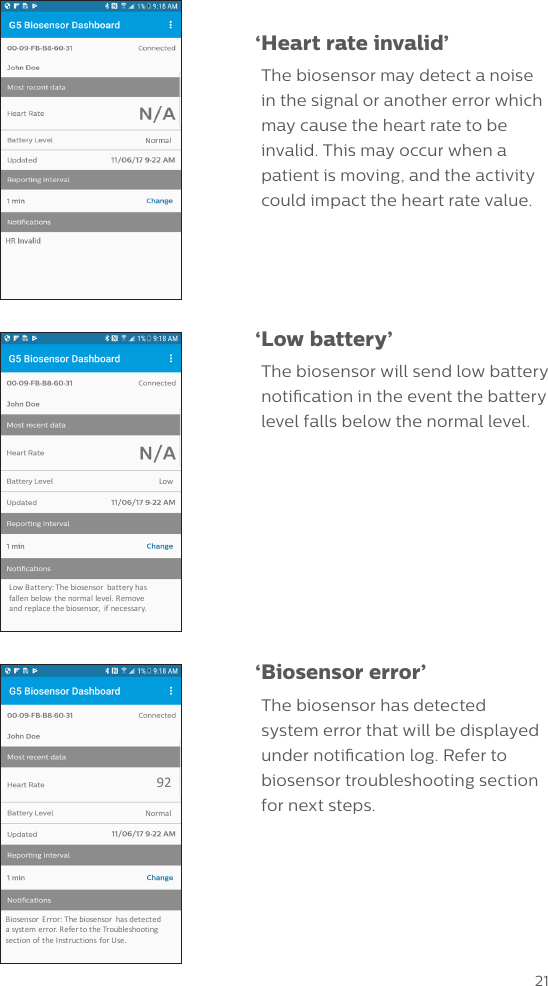
21 ‘Heart rate invalid’The biosensor may detect a noise in the signal or another error which may cause the heart rate to be invalid. This may occur when a patient is moving, and the activity could impact the heart rate value. ‘Low  battery’The biosensor will send low battery notication in the event the battery level falls below the normal level. ‘Biosensor  error’The biosensor has detected  system error that will be displayed under notication log. Refer to biosensor troubleshooting section for next steps.NormalBiosensor Error:Thebiosensor hasdetect edasystemerror.RefertotheTroubleshootingsect ionof theI nstruct ions forUse.92LowLowBattery:Thebiosensor batteryhasfallenbelow thenormallevel.Removeand replacethebiosensor, ifnecessary.
22Reviewing dataThe G5 software application provides the ability to export a le for retrospective review and analysis on a computer. The le must be unlocked (using the same password that was used on the G5 biosensor app) to review and analyze the data. Time-stamped heart rate data and notifications are listed in the file. Files are named using patient ID and date.  Use any data analysis software program to sort the data by date, as needed.
23MaintenanceCleaning and disinfectionThe biosensor is a disposable, single use device. Do not reuse the biosensor. After use, the biosensor is considered non-biohazardous waste and should be discarded according to hospital guidelines and local laws for battery operated electronics.Refer to the instructions for use for the mobile device for cleaning and disinfection procedures.StorageBiosensors must be stored in their sealed pouch. The pouch cannot be resealed after opening. The biosensor should be used immediately after opening the pouch to prevent the hydrogel from drying.Biosensors should be stored at:•Temperature between 15 and 35 °C (59 and 95°F)•Humidity between 5 and 95%Biosensors should not be stored in direct sunlight.
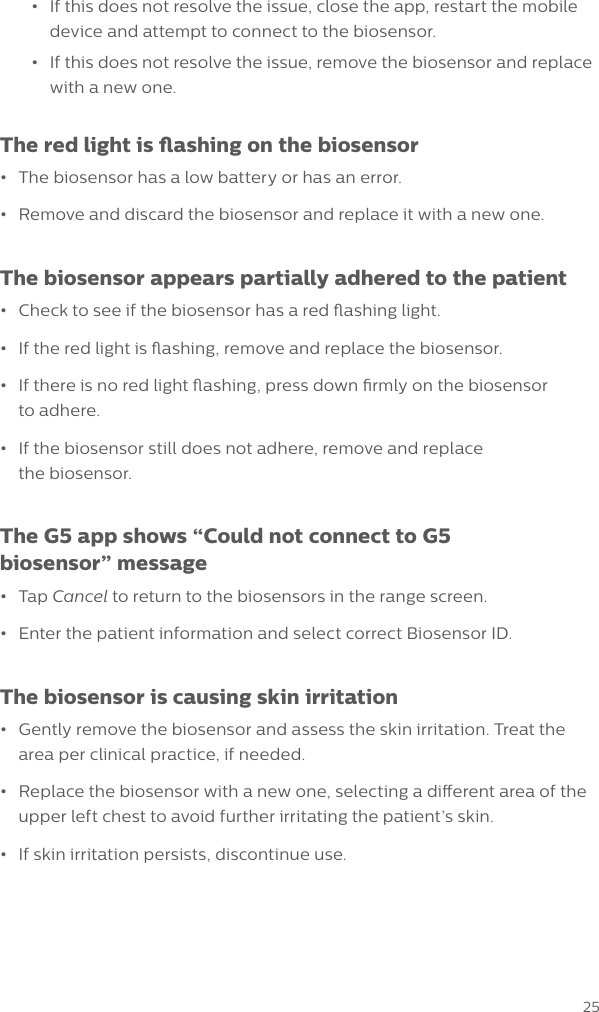
24TroubleshootingThe patient’s heart rate is not displayed in the software app•Press the ON button  on the biosensor. If the green light ashes, the biosensor was not previously turned on. •If no light ashes,•Ensure the biosensor and the mobile device are next to each other.•Close the app, turn the mobile device Short Range Wireless oand on and re-launch the app and proceed to connect biosensorto the app.•If this does not resolve the issue, close the app, restart the mobiledevice and attempt to connect to the biosensor.•If this does not resolve the issue, remove the biosensor and replacewith a new one.The biosensor won’t properly adhere to the patient’s chest•If you touched a large area of the adhesive, you may need to dispose ofthe biosensor and apply a new one.•Before applying a new biosensor to the patient’s chest, ensure the skinis clean of any oil, lotion, debris or residue and the area is completely dry.•Press rmly to adhere the sensor to the patient’s skin.The patient’s heart rate does not seem to be updating•Ensure the biosensor and the mobile device are next to each other.The Biosensor ID is not found•Press the ON button  on the biosensor. If the green light ashes, the biosensor was not previously turned on. •If no light ashes,•Ensure the biosensor and the mobile device are next to each other.•Close the app, turn the mobile device Short Range Wireless oand on and re-launch the app and proceed to connecting biosensorto the app.
25•If this does not resolve the issue, close the app, restart the mobiledevice and attempt to connect to the biosensor.•If this does not resolve the issue, remove the biosensor and replacewith a new one.The red light is ashing on the biosensor•The biosensor has a low battery or has an error.•Remove and discard the biosensor and replace it with a new one.The biosensor appears partially adhered to the patient•Check to see if the biosensor has a red ashing light.•If the red light is ashing, remove and replace the biosensor.•If there is no red light ashing, press down rmly on the biosensorto adhere.•If the biosensor still does not adhere, remove and replacethe biosensor.The G5 app shows “Could not connect to G5 biosensor” message•Tap Cancel to return to the biosensors in the range screen.•Enter the patient information and select correct Biosensor ID.The biosensor is causing skin irritation •Gently remove the biosensor and assess the skin irritation. Treat thearea per clinical practice, if needed.•Replace the biosensor with a new one, selecting a dierent area of theupper left chest to avoid further irritating the patient’s skin.•If skin irritation persists, discontinue use.
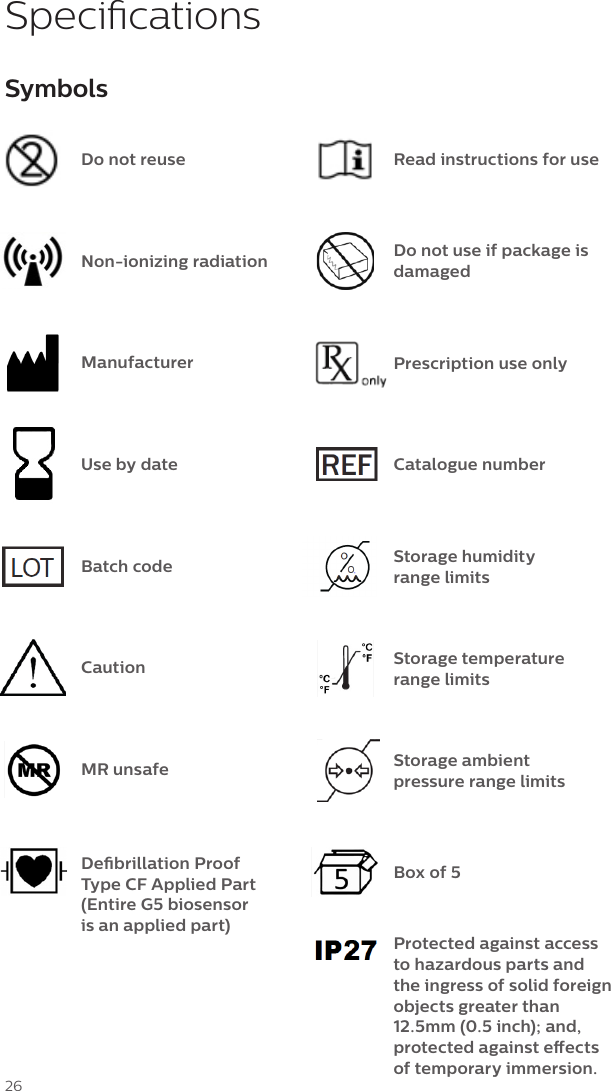
26SymbolsDo not reuseNon-ionizing radiationManufacturerUse by dateBatch codeCautionMR unsafeDebrillation Proof Type CF Applied Part (Entire G5 biosensor  is an applied part)Read instructions for useDo not use if package is damagedPrescription use onlyStorage humidity range limitsStorage temperature range limitsBox of 5Protected against access to hazardous parts and the ingress of solid foreign objects greater than 12.5mm (0.5 inch); and, protected against eects of temporary immersion.Catalogue numberSpecicationsStorage ambient pressure range limits
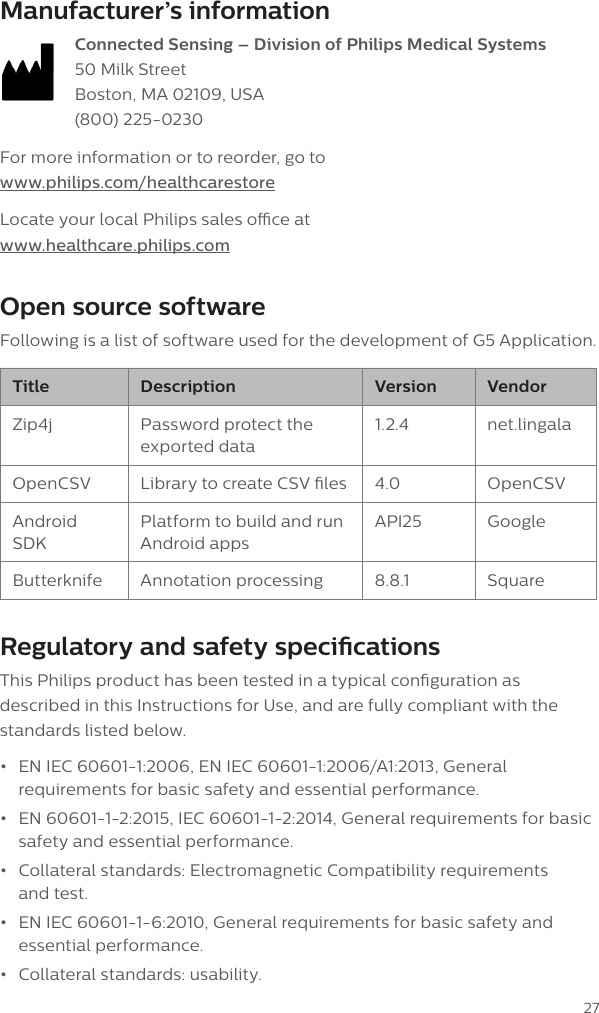
27Manufacturer’s information Connected Sensing – Division of Philips Medical Systems 50 Milk Street Boston, MA 02109, USA (800) 225-0230For more information or to reorder, go to www.philips.com/healthcarestoreLocate your local Philips sales oce at www.healthcare.philips.comOpen source softwareFollowing is a list of software used for the development of G5 Application.Title Description Version VendorZip4j Password protect the exported data1.2.4 net.lingalaOpenCSV Library to create CSV les 4.0 OpenCSVAndroid SDKPlatform to build and run Android appsAPI25 GoogleButterknife Annotation processing 8.8.1 SquareRegulatory and safety specicationsThis Philips product has been tested in a typical conguration as described in this Instructions for Use, and are fully compliant with the standards listed below. •EN IEC 60601-1:2006, EN IEC 60601-1:2006/A1:2013, Generalrequirements for basic safety and essential performance.•EN 60601-1-2:2015, IEC 60601-1-2:2014, General requirements for basicsafety and essential performance.•Collateral standards: Electromagnetic Compatibility requirementsand test.•EN IEC 60601-1-6:2010, General requirements for basic safety andessential performance.•Collateral standards: usability.
28SpecicationsRegulatory and safety specications continued•EN ISO 10993-1:2009, EN ISO 10993-1:2009/AC:2010 ISO 10993-1 andBiological Evaluation of Medical Devices•EN ISO 10993-5:2009 Biological Information of Medical Devices-Part 5:Test for cytotoxicity•ISO 10993-10:2010 Biological Information of Medical Devices-Part 10:Test for irritation and skin sensitization•ANSI/AAMI/IEC 60601-2-47:2012, EN 60601-2-47:2001 Particularrequirements for the basic safety and essential performance andambulatory electrocardiographs system.•ANSI/AAMI/IEC 60601-2-27:2011, IEC 60601-2-27 Ed 3.0 2011-03Particular requirements for the basic safety and essential performanceof Electrocardiographic Monitoring Equipment•ANSI/AAMI/ISO EC57:1998(R)2008, Testing and reporting performanceresults of cardiac rhythm and st-segment measurement algorithm.•ANSI/AAMI/ISO EC12:2000/®2010 Disposable electrodesEMC and radio regulatory complianceThis Philips product complies with relevant international and national law and standards on EMC (electromagnetic compatibility) for this type of product when used as intended. Such laws and standards dene both the permissible electromagnetic emission levels from product and its required immunity to electromagnetic interference from external sources.Other electronic products exceeding the limits dened in such EMC standards could, under unusual circumstances, aect the operation of the product.•Medical electrical products needs special precautions regardingEMC, and needs to be installed and put into service according to EMCinformation provided in this Instructions for use.•The use of accessories and cables other than those specied, mayresult in increased emission or decreased immunity levels.•The product should not be used adjacent to or stacked with otherproducts and that if adjacent or stacked use is necessary, it should beobserved to verify normal operation.
29FCC compliance statementCaution: Changes or modications not expressly approved could void your authority to use this equipment.This device complies with Part 15 of the FCC Rules. Operation is subject to the following two conditions:1  this device may not cause harmful interference and2  this device must accept any interference received, including interference that may cause undesired operation.Changes or modications not expressly approved by the party responsible for compliance could void the user’s authority to operate the equipment.This equipment has been tested and found to comply with the limits for a class B digital device, pursuant to part 15 of the FCC Rules. These limits are designed to provide reasonable protection against harmful interference in a residential installation. This equipment generates, uses and can radiate radio frequency energy and if not installed and used in accordance with the instructions, may cause harmful interference to radio communications. However, there is no guarantee that interference will not occur in a particular installation. If this equipment does cause harmful interference to radio or television reception, which can be determined by moving the equipment away and back, the user is encouraged to try to correct the interference by one or more of the following measures •Reorient or relocate the receiving antenna•Increase the separation between the equipment and receiver•Consult the dealer or an experienced radio/TV technician for help
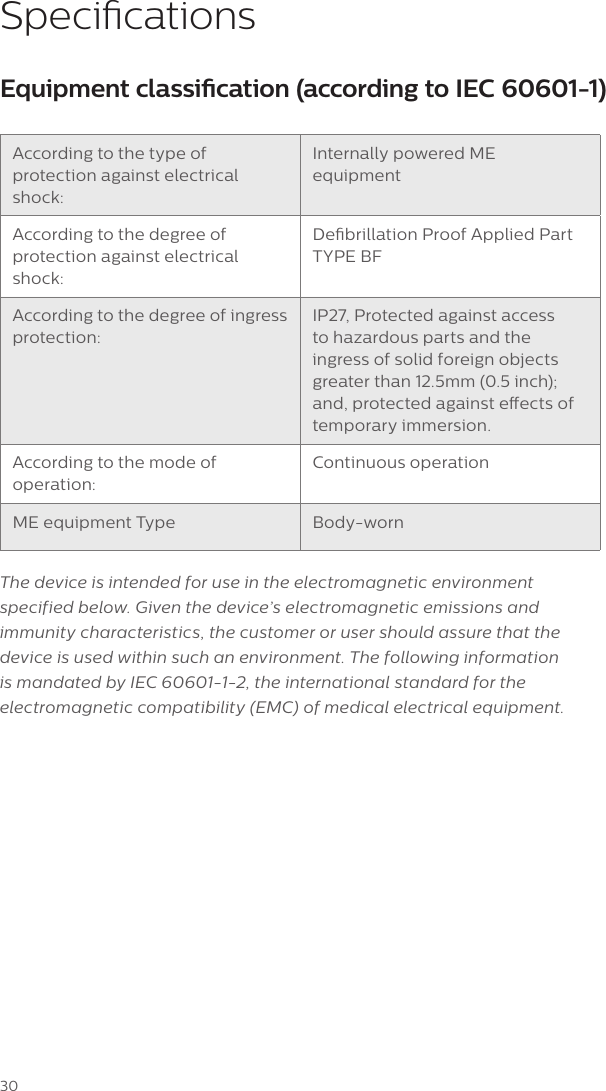
30Equipment classication (according to IEC 60601-1)According to the type of protection against electrical shock:Internally powered ME equipmentAccording to the degree of protection against electrical shock:Debrillation Proof Applied Part TYPE BFAccording to the degree of ingress protection:IP27, Protected against access to hazardous parts and the ingress of solid foreign objects greater than 12.5mm (0.5 inch); and, protected against eects of temporary immersion.According to the mode of operation:Continuous operationME equipment Type Body-wornThe device is intended for use in the electromagnetic environment  specified below. Given the device’s electromagnetic emissions and immunity characteristics, the customer or user should assure that the device is used within such an environment. The following information is mandated by IEC 60601-1-2, the international standard for the electromagnetic compatibility (EMC) of medical electrical equipment.Specications
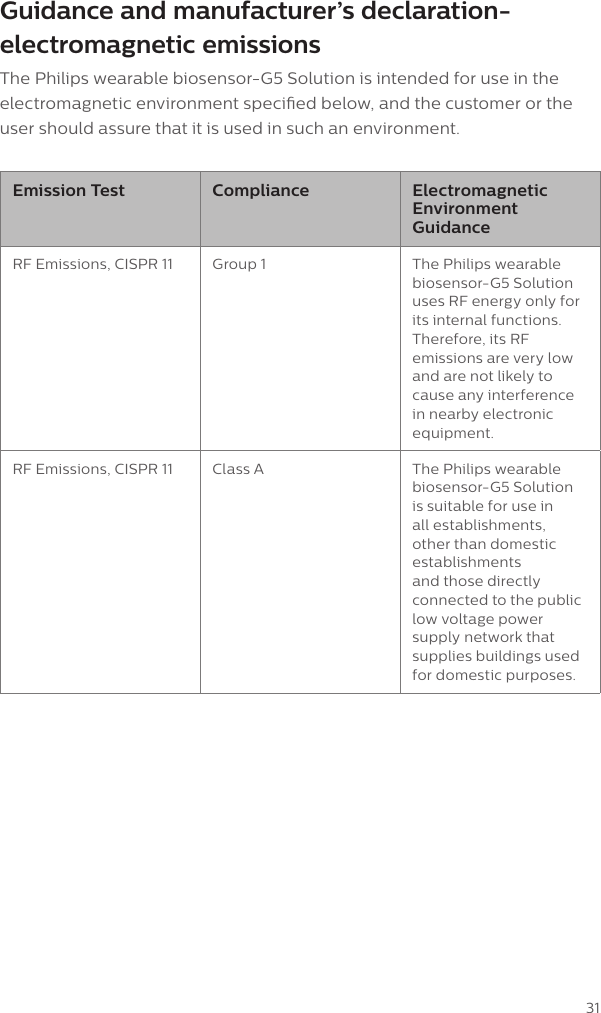
31Guidance and manufacturer’s declaration-electromagnetic emissionsThe Philips wearable biosensor-G5 Solution is intended for use in the electromagnetic environment specied below, and the customer or the user should assure that it is used in such an environment.Emission Test Compliance Electromagnetic Environment GuidanceRF Emissions, CISPR 11 Group 1 The Philips wearable biosensor-G5 Solution uses RF energy only for its internal functions. Therefore, its RF emissions are very low and are not likely to cause any interference in nearby electronic equipment.RF Emissions, CISPR 11 Class A The Philips wearable biosensor-G5 Solution is suitable for use in all establishments, other than domestic establishments and those directly connected to the public low voltage power supply network that supplies buildings used for domestic purposes.
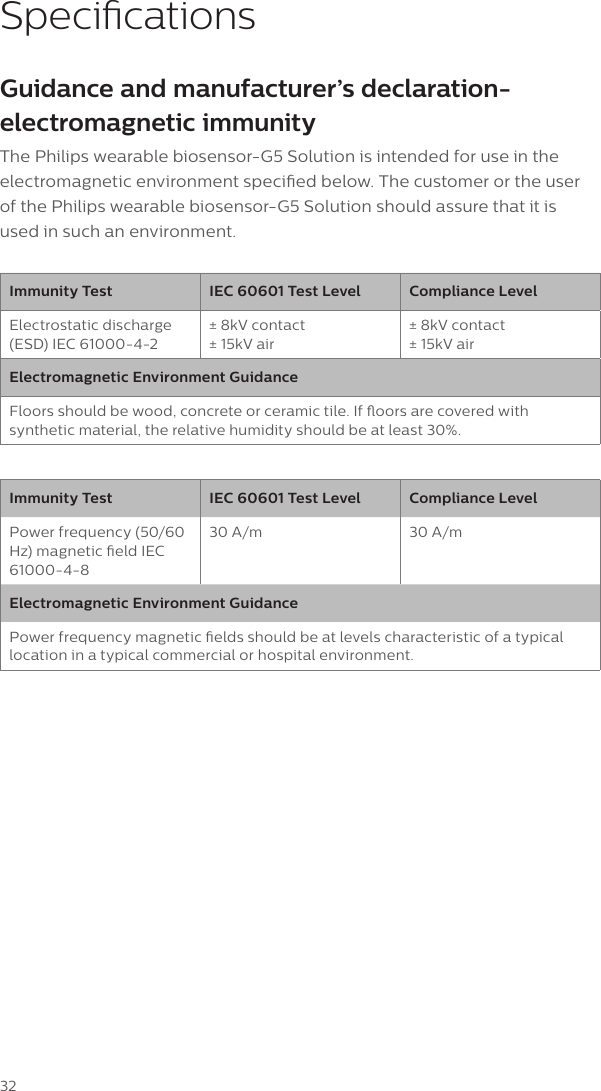
32Guidance and manufacturer’s declaration-electromagnetic immunityThe Philips wearable biosensor-G5 Solution is intended for use in the electromagnetic environment specied below. The customer or the user of the Philips wearable biosensor-G5 Solution should assure that it is used in such an environment.Immunity Test IEC 60601 Test Level Compliance LevelElectrostatic discharge (ESD) IEC 61000-4-2± 8kV contact ± 15kV air± 8kV contact ± 15kV airElectromagnetic Environment GuidanceFloors should be wood, concrete or ceramic tile. If oors are covered with synthetic material, the relative humidity should be at least 30%.Immunity Test IEC 60601 Test Level Compliance LevelPower frequency (50/60 Hz) magnetic eld IEC 61000-4-830 A/m 30 A/mElectromagnetic Environment GuidancePower frequency magnetic elds should be at levels characteristic of a typical location in a typical commercial or hospital environment.Specications
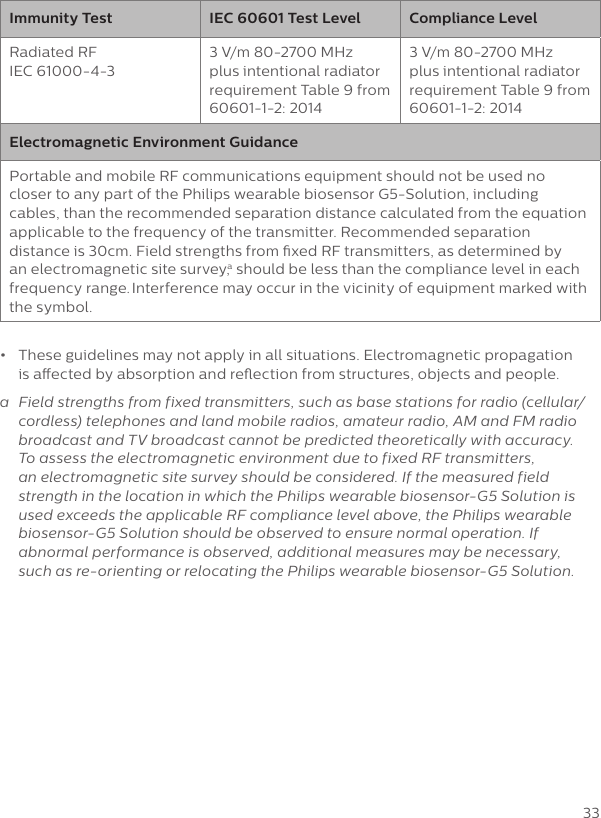
33Immunity Test IEC 60601 Test Level Compliance LevelRadiated RF IEC 61000-4-33 V/m 80-2700 MHz plus intentional radiator requirement Table 9 from 60601-1-2: 20143 V/m 80-2700 MHz plus intentional radiator requirement Table 9 from 60601-1-2: 2014Electromagnetic Environment GuidancePortable and mobile RF communications equipment should not be used no closer to any part of the Philips wearable biosensor G5-Solution, including cables, than the recommended separation distance calculated from the equation applicable to the frequency of the transmitter. Recommended separation distance is 30cm. Field strengths from xed RF transmitters, as determined by an electromagnetic site survey,a should be less than the compliance level in each frequency range. Interference may occur in the vicinity of equipment marked with the symbol.•  These guidelines may not apply in all situations. Electromagnetic propagation  is aected by absorption and reection from structures, objects and people.a   Field strengths from fixed transmitters, such as base stations for radio (cellular/cordless) telephones and land mobile radios, amateur radio, AM and FM radio broadcast and TV broadcast cannot be predicted theoretically with accuracy. To assess the electromagnetic environment due to fixed RF transmitters, an electromagnetic site survey should be considered. If the measured field strength in the location in which the Philips wearable biosensor-G5 Solution is used exceeds the applicable RF compliance level above, the Philips wearable biosensor-G5 Solution should be observed to ensure normal operation. If abnormal performance is observed, additional measures may be necessary,  such as re-orienting or relocating the Philips wearable biosensor-G5 Solution.
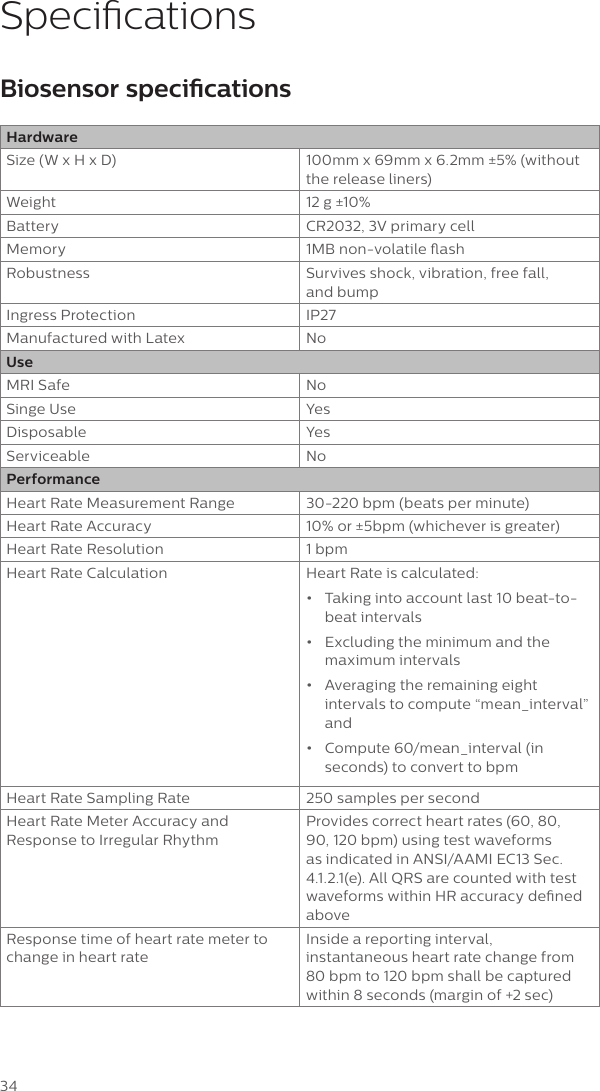
34SpecicationsBiosensor specicationsHardwareSize (W x H x D) 100mm x 69mm x 6.2mm ±5% (without the release liners)Weight 12 g ±10%Battery CR2032, 3V primary cellMemory 1MB non-volatile ashRobustness Survives shock, vibration, free fall,  and bump Ingress Protection IP27 Manufactured with Latex NoUseMRI Safe NoSinge Use YesDisposable YesServiceable NoPerformanceHeart Rate Measurement Range 30-220 bpm (beats per minute)Heart Rate Accuracy 10% or ±5bpm (whichever is greater)Heart Rate Resolution 1 bpmHeart Rate Calculation Heart Rate is calculated: •  Taking into account last 10 beat-to-beat intervals•  Excluding the minimum and the maximum intervals•  Averaging the remaining eight intervals to compute “mean_interval” and •  Compute 60/mean_interval (in seconds) to convert to bpmHeart Rate Sampling Rate 250 samples per secondHeart Rate Meter Accuracy and Response to Irregular RhythmProvides correct heart rates (60, 80, 90, 120 bpm) using test waveforms as indicated in ANSI/AAMI EC13 Sec. 4.1.2.1(e). All QRS are counted with test waveforms within HR accuracy dened aboveResponse time of heart rate meter to change in heart rateInside a reporting interval, instantaneous heart rate change from 80 bpm to 120 bpm shall be captured within 8 seconds (margin of +2 sec)
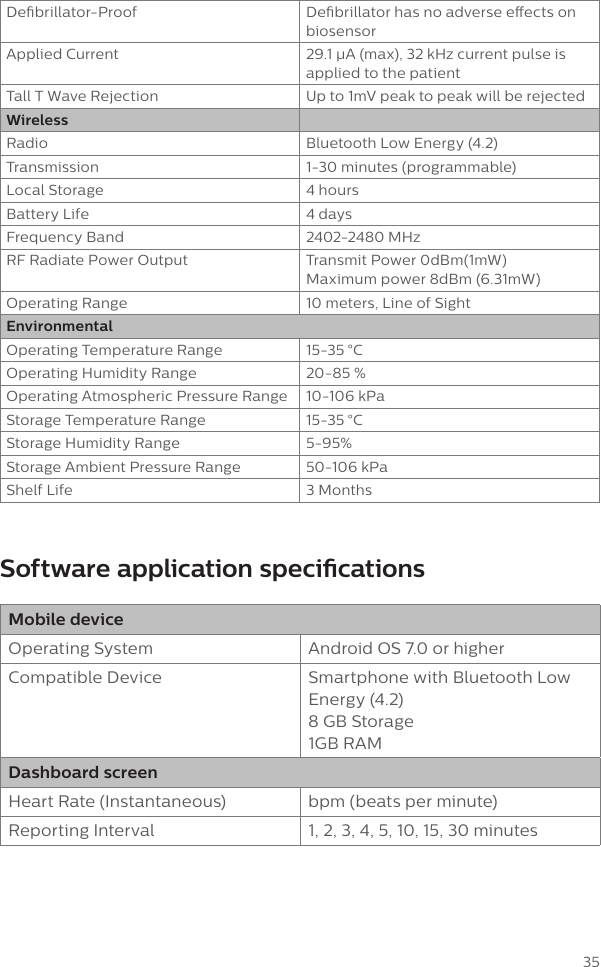
35Debrillator-Proof Debrillator has no adverse eects on biosensorApplied Current 29.1 μA (max), 32 kHz current pulse is applied to the patientTall T Wave Rejection Up to 1mV peak to peak will be rejectedWirelessRadio Bluetooth Low Energy (4.2)Transmission 1-30 minutes (programmable)Local Storage 4 hoursBattery Life 4 daysFrequency Band 2402-2480 MHzRF Radiate Power Output Transmit Power 0dBm(1mW) Maximum power 8dBm (6.31mW)Operating Range 10 meters, Line of SightEnvironmentalOperating Temperature Range 15-35 °C Operating Humidity Range 20-85 %Operating Atmospheric Pressure Range 10-106 kPaStorage Temperature Range 15-35 °CStorage Humidity Range 5-95%Storage Ambient Pressure Range 50-106 kPaShelf Life 3 Months Software application specicationsMobile deviceOperating System Android OS 7.0 or higherCompatible Device Smartphone with Bluetooth Low Energy (4.2)  8 GB Storage 1GB RAMDashboard screenHeart Rate (Instantaneous) bpm (beats per minute)Reporting Interval 1, 2, 3, 4, 5, 10, 15, 30 minutes
www.philips.com© 2018 Koninklijke Philips N.V.All rights reserved. Printed in the United States of America. First printing: January 2018Part Number: 453564741671Artwork: A-453564741671-2 Rev B

Navigation menu