Philips Dcp750 37 Quick Start Guide DCP750/850 QSG 2
Philips-Dcp750-37B-Quick-Start-Guide philips-dcp750-37b-quick-start-guide
Philips-Dcp850-37B-Quick-Start-Guide philips-dcp850-37b-quick-start-guide
Philips-Dcp850-37-Quick-Start-Guide philips-dcp850-37-quick-start-guide
DCP850/37 Quick start guide dcp850_37_qsg_aen docking entertainment system DCP850/37 | PhilipsDCP850/37
DCP850/37 Quick start guide dcp850_37_qsg_eng docking entertainment system DCP850/37 | PhilipsDCP850/37
2014-12-13
: Philips Philips-Dcp750-37-Quick-Start-Guide philips-dcp750-37-quick-start-guide philips pdf
Open the PDF directly: View PDF  .
.
Page Count: 2
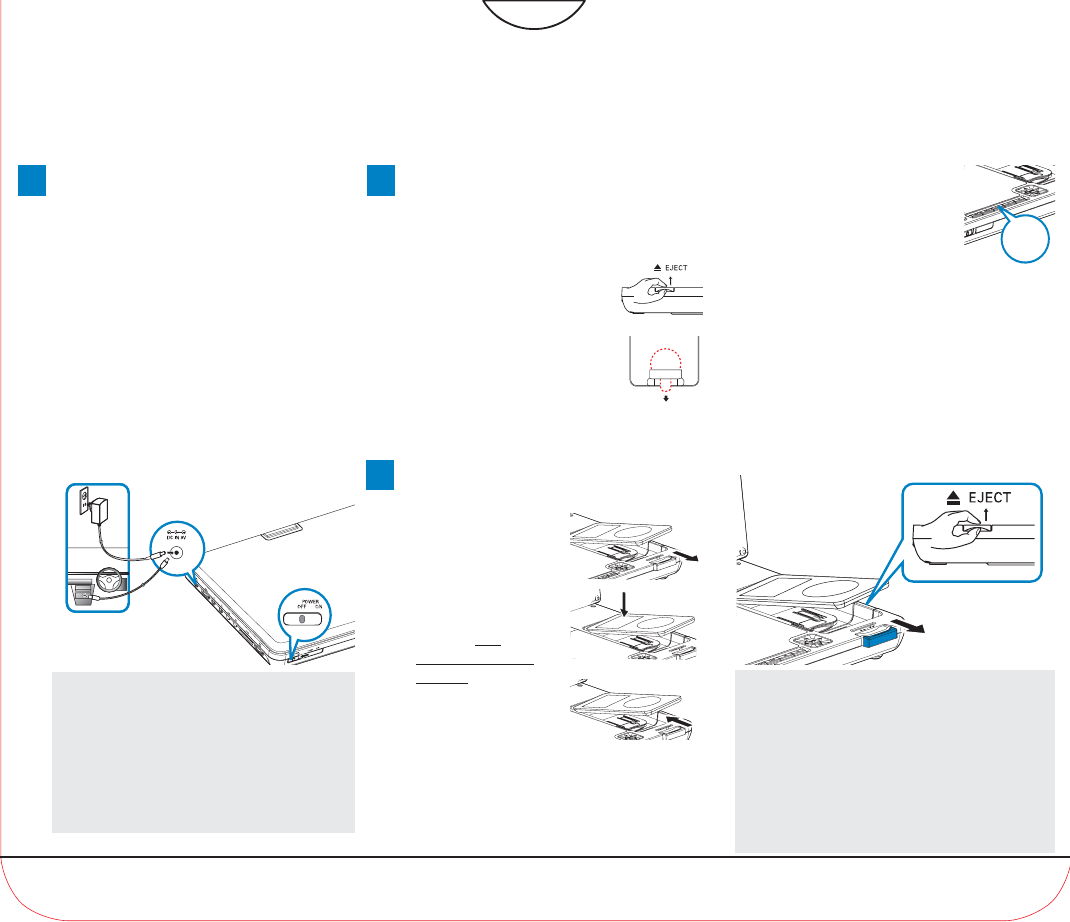
Connecting and
using your iPod
player
1Pull out the iPod
connector.
2Dock your iPod player
with the top
entering first as
shown.
3Push in the iPod
connector.
This portable DVD player is designed with
a built-in lithium battery to supply power
to the player when you are on travel.
1Slide the POWER switch to the OFF
position.
2Connect the supplied power adaptor cord
(or the car adaptor) to the player and AC
mains (or the car cigarette lighter outlet)
to start charging.
➜The CHG indicator turns on.
3Disconnect the power adaptor cord (or
the car adaptor) when the CHG indicator
turns off.
Notes:
– You can also connect the supplied power
adaptor cord (or the car adaptor) to the player
and AC mains (or the car cigarette lighter outlet)
directly wherever possible.
– Before using the DVD player for the first time,
make sure to charge the battery for 8 hours at
least.
Charge
1
Quick start guide
Docking Entertainment System
DVD Portable with dock for iPod
3OPEN HERE
DCP750/850
2,3
1
OR
1Lift up the handle marked /
EJECT to take out the
remote control.
Prepare your remote
control
2
2Remove the protective plastic
tab (first time users only).
➜Your remote control is
now ready for use.
1
SOURCE
4Switch on your iPod player to set "TV
OUT" to "ON" and select the "NTSC"
mode. (See your iPod user’s manual for
detailed operation.)
3Enjoy (iPod with video)
Notes:
– This DVD player only supports 30G, 60G and
80G iPod player with video.
– Please take out the tab marked “for 30G iPod” in
the dock if you want to dock a 60G or 80G iPod
player.
– You need to press 2; on your iPod player in
order to start photo playback through this DVD
player.
VIDEO
2
3
5Press the SOURCE key
repeatedly (or DOCK on the
remote) for dock input.
6Play files in your iPod player.
●To r echarge your iPod player:
Case 1: In the power-off mode, you just need to
connect the DVD player to AC mains or the car
cigarette lighter outlet.
Case 2: In the power-on mode, make sure the
current source of the DVD player is “DOCK”
before proceeding as described in case 1.
To r emove the iPod player
1Pull out the iPod connector.
2Lift up the handle marked / EJECT to release.
5
SOURCE
2
1
DCP750/850 QSG-2.qxd 2006.11.30 9:19 Page 1
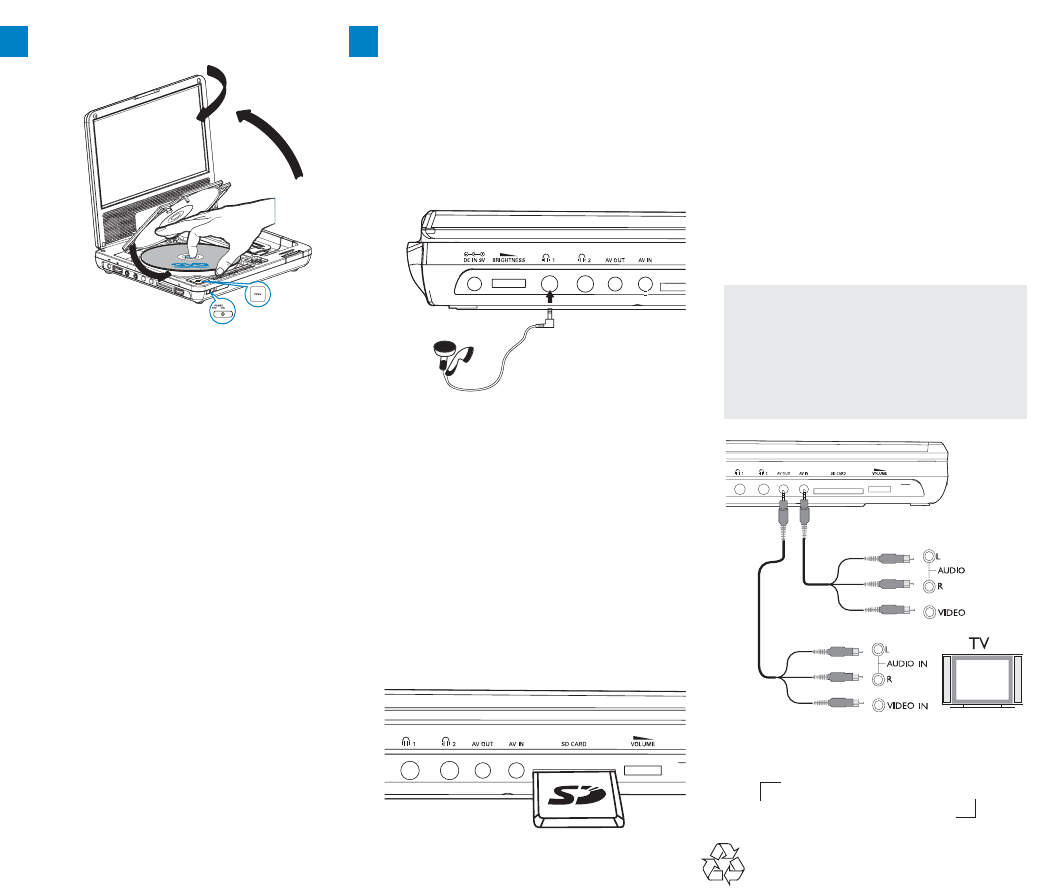
Connecting headphones (not
included)
●To enjoy your portable DVD player
without disturbing others, you can connect
one or more headphones to the n1or
(and) n2jack on the set.
Connecting an SD/MMC card
1Insert an SD/MMC card into the SD
CARD slot with the metal contact facing
down.
2On the DVD player panel, press the
source key repeatedly (or SD/MMC
CARD on the remote).
3Play video or audio files stored in the card
by selecting the desired file with 3 4 and
OK.
Connecting additional equipment
(TV for example)
1Connect the AV OUT socket on the set to
the video and audio sockets on a TV as
shown directly.
2Switch on the TV and set to the correct
video-in channel.
➜You can consult the owner's manual of
your TV. (If your TV does not have Audio
and Video inputs, you will need to
purchase a RF modulator. Please consult
your dealer.)
TIP:
– When connecting a device to the AV IN socket
on the DVD player, you need to press the source
key repeatedly on the front panel (or AV on the
remote) to select A/V IN (AUX).
White
Red
Yellow
White
Red
Yellow
OUT
OUT
AV OUT
AV IN
Headphone
SD/MMC
OR
Printed in China WK647
1
2
3
5
Max.180
0
4
1Open the lid of the player and adjust the
swivel screen clockwise to your preferred
viewing angle.
2Slide the POWER switch to ON to
switch on the DVD player.
➜The POWER indicator turns on.
3Press OPEN to open the disc door.
4Remove the protective card (if any) and
load a disc with the label side facing up.
5Close the disc door. Playback will start
automatically. If not, press 2;.
6To stop playback, press 9on the remote
control.
3Enjoy (Disc operation) 3Enjoy (Other options)
DCP750/850 QSG-2.qxd 2006.11.30 9:19 Page 2
