Phonic Ear PZO1 Wireless Doorbell User Manual Detect Door User Guide GB

Phonic Ear, Inc. Wireless Doorbell Detect Door User Guide GB

Users Manual

wireless doorbellother resources online at www.phonicear.dk© 2004 Phonic Ear A/S 921-03-010-00/Rev. A   0105 Your local representative:international: +45 3917 7101u.s.: 800.227.0735, then press 7 •  canada: 800.263.8700website: www.phonicear.dkGB user guide
DETECT DOOR function . . . . . . . . . . . . . . . . . . . . . . . . . . 1DETECT DOOR features. . . . . . . . . . . . . . . . . . . . . . . . . . . 2DETECT DOOR instructions. . . . . . . . . . . . . . . . . . . . . . . . 7Troubleshooting . . . . . . . . . . . . . . . . . . . . . . . . . . . . . . 18Test and approval . . . . . . . . . . . . . . . . . . . . . . . . . . . . . 19Safety precautions . . . . . . . . . . . . . . . . . . . . . . . . . . . . 20Warranty . . . . . . . . . . . . . . . . . . . . . . . . . . . . . . . . . . . 21table of contents
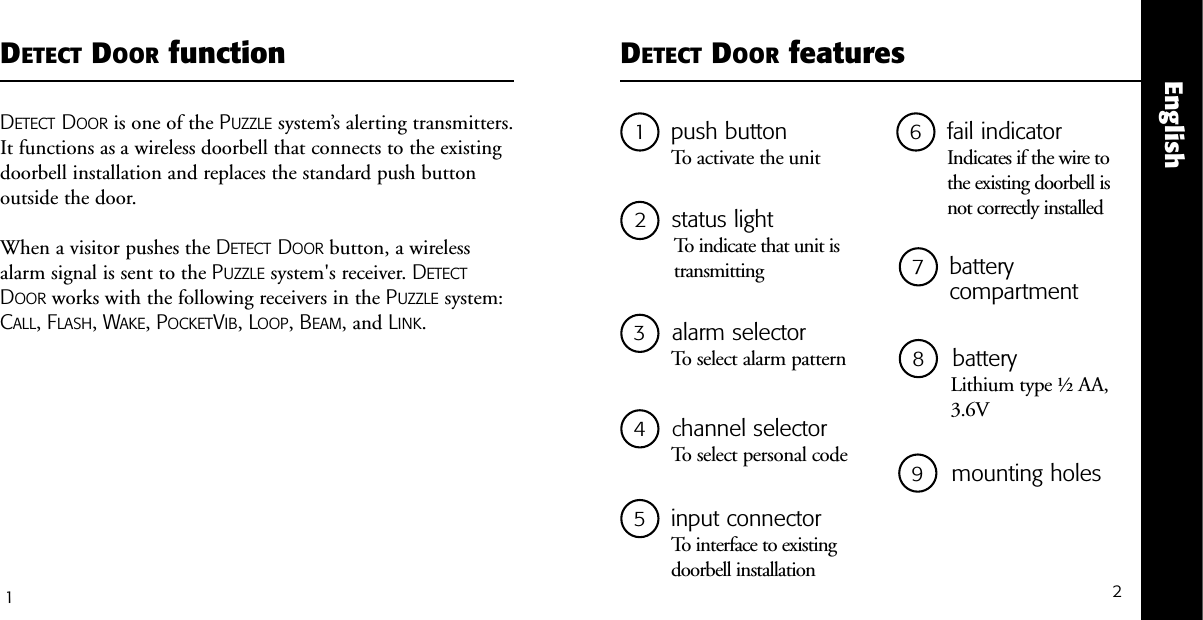
21push buttonTo activate the unit5input connectorTo interface to existing doorbell installation2status lightTo indicate that unit istransmittingDETECT DOOR featuresEnglish3alarm selector To select alarm pattern1DETECT DOOR functionDETECT DOOR is one of the PUZZLE system’s alerting transmitters.It functions as a wireless doorbell that connects to the existingdoorbell installation and replaces the standard push buttonoutside the door. When a visitor pushes the DETECT DOOR button, a wirelessalarm signal is sent to the PUZZLE system's receiver. DETECTDOOR works with the following receivers in the PUZZLE system:CALL, FLASH, WAKE, POCKETVIB, LOOP, BEAM, and LINK.6fail indicator Indicates if the wire to the existing doorbell is not correctly installed 7battery compartment 8    batteryLithium type ½ AA,3.6V 4   channel selector To select personal code  9  mounting holes
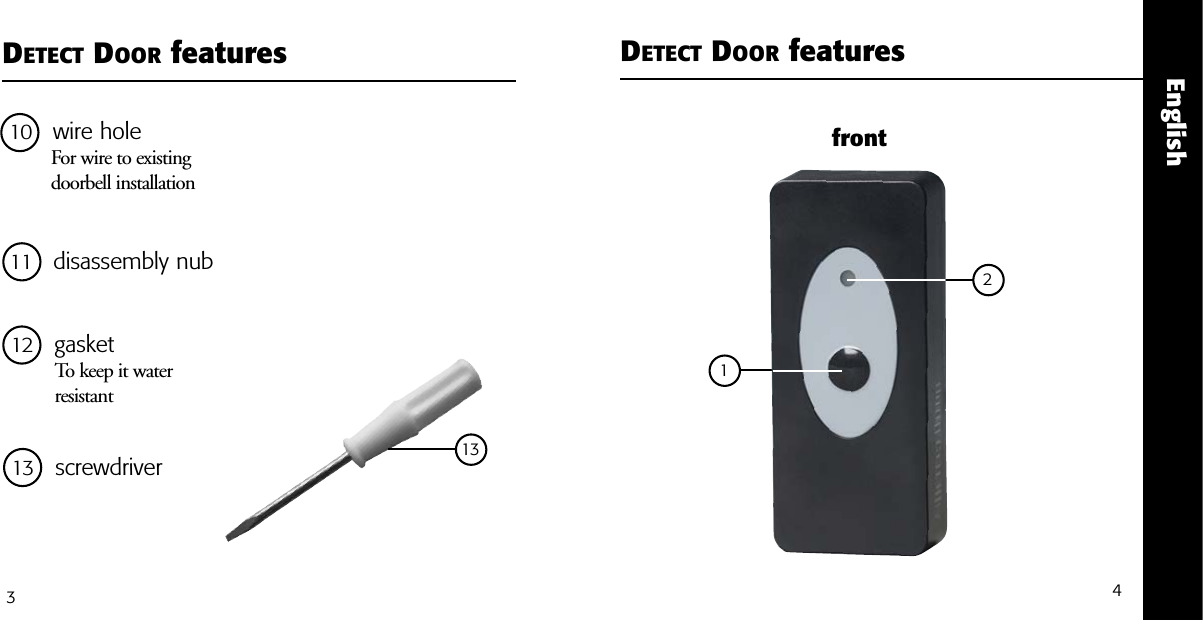
EnglishDETECT DOOR features DETECT DOOR features341front11 disassembly nub12 gasketTo keep it water resistant 21310 wire hole For wire to existing doorbell installation 13 screwdriver
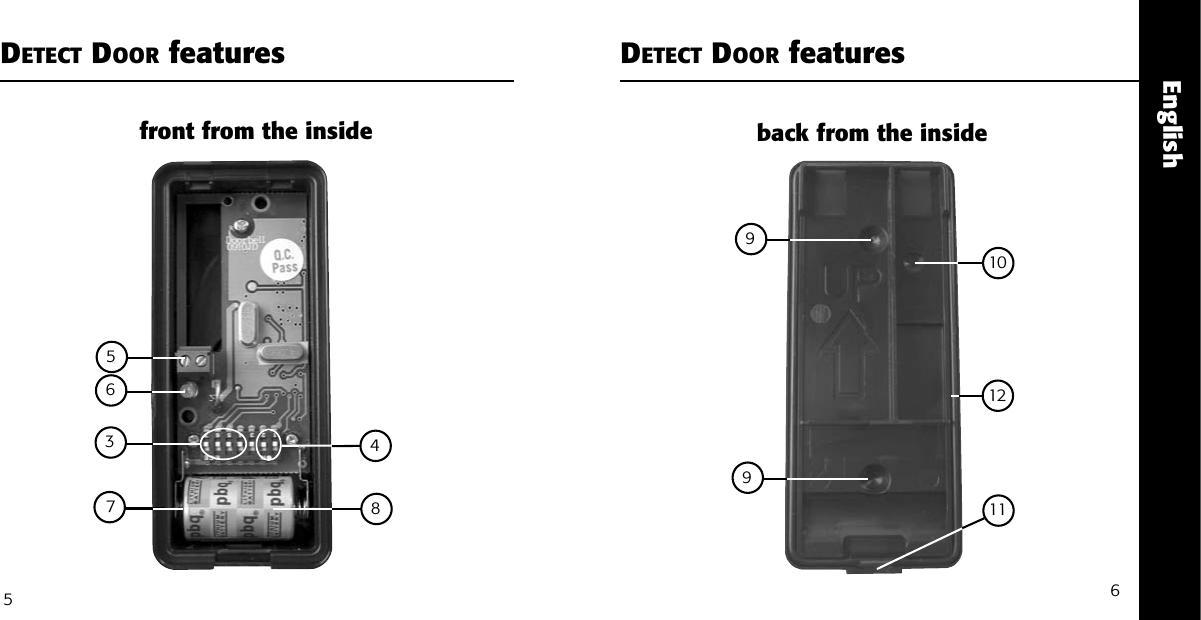
EnglishDETECT DOOR features DETECT DOOR features9610751198front from the inside back from the inside563412
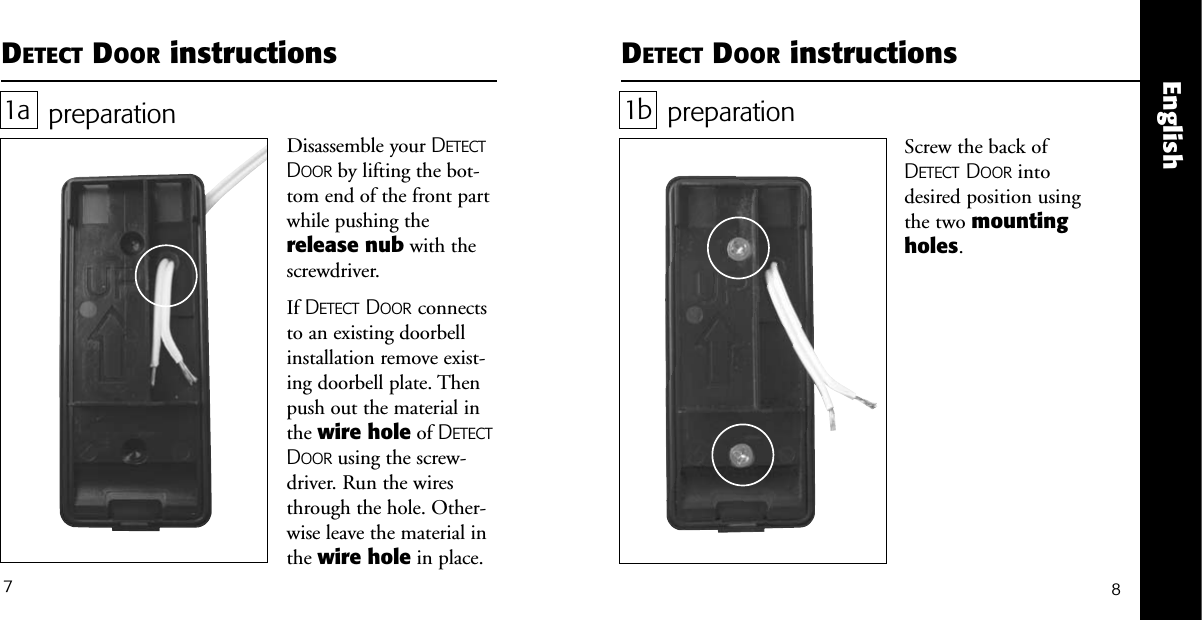
English7DETECT DOOR instructionspreparationScrew the back ofDETECT DOOR intodesired position usingthe two mountingholes. 1bDETECT DOOR instructionspreparationDisassemble your DETECTDOOR by lifting the bot-tom end of the front partwhile pushing therelease nub with thescrewdriver.If DETECT DOOR connectsto an existing doorbellinstallation remove exist-ing doorbell plate. Thenpush out the material inthe wire hole of DETECTDOOR using the screw-driver. Run the wiresthrough the hole. Other-wise leave the material inthe wire hole in place.1a8
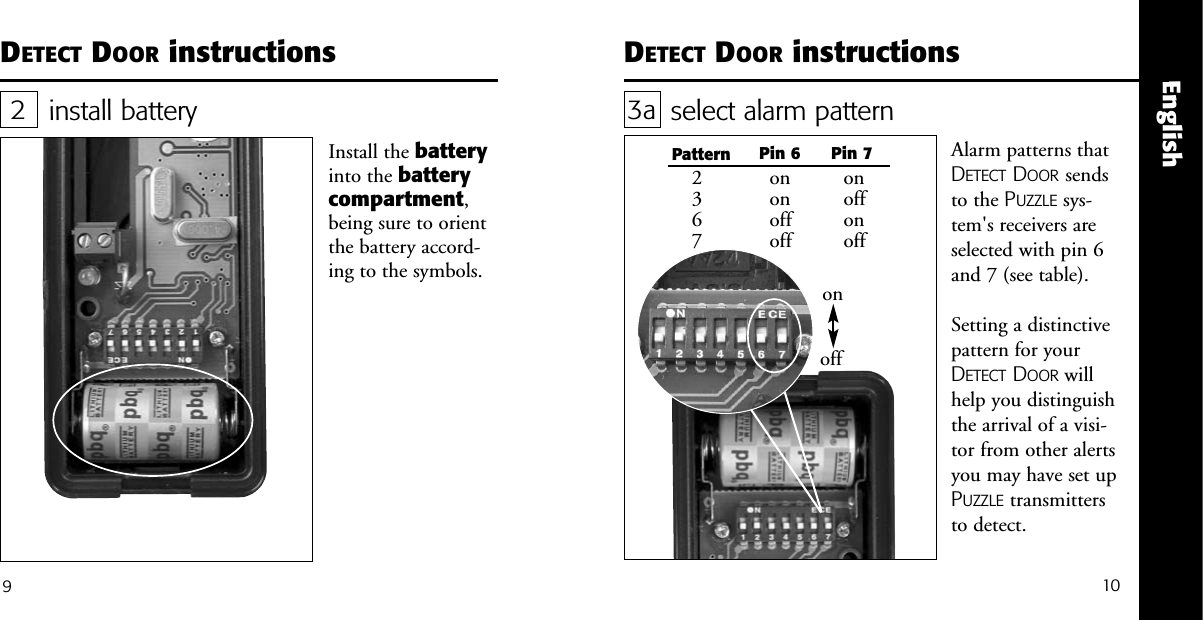
10EnglishDETECT DOOR instructionsinstall batteryInstall the batteryinto the batterycompartment,being sure to orientthe battery accord-ing to the symbols.29DETECT DOOR instructionsselect alarm pattern 3aAlarm patterns thatDETECT DOOR sendsto the PUZZLE sys-tem's receivers areselected with pin 6and 7 (see table).Setting a distinctivepattern for yourDETECT DOOR willhelp you distinguishthe arrival of a visi-tor from other alertsyou may have set upPUZZLE transmittersto detect.onoffPattern Pin 6 Pin 72367ononoffoffonoffonoff
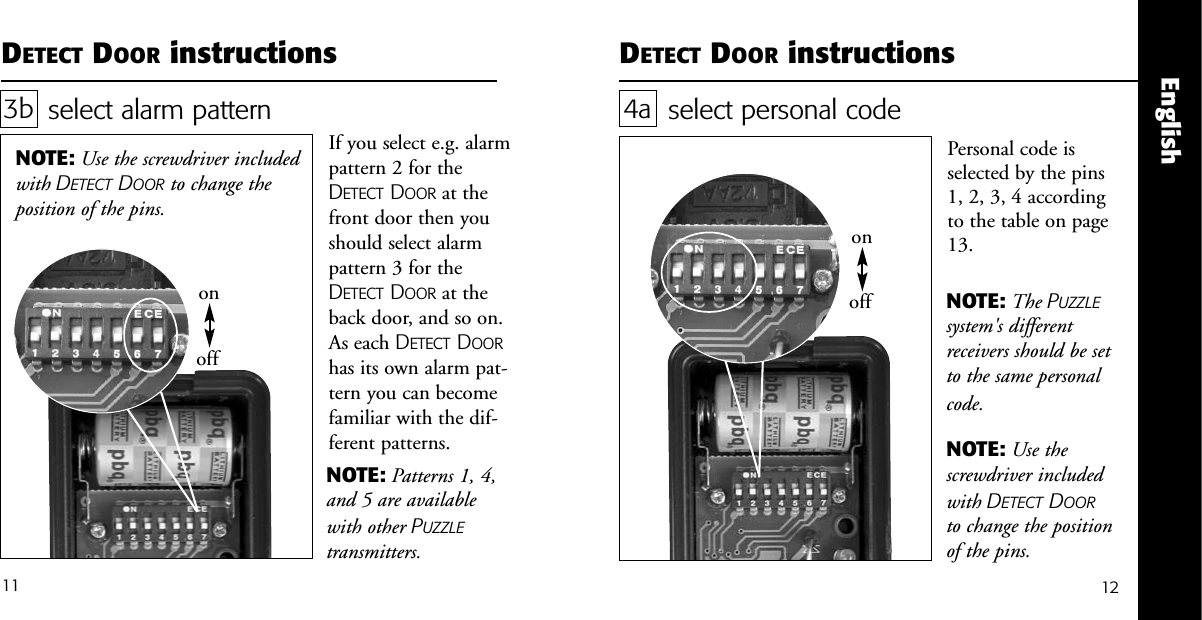
onoffEnglishDETECT DOOR instructionsselect alarm pattern 3bIf you select e.g. alarmpattern 2 for theDETECT DOOR at thefront door then youshould select alarmpattern 3 for theDETECT DOOR at theback door, and so on.As each DETECT DOORhas its own alarm pat-tern you can becomefamiliar with the dif-ferent patterns. NOTE: Use the screwdriver includedwith DETECT DOOR to change theposition of the pins.DETECT DOOR instructions1211select personal codePersonal code isselected by the pins1, 2, 3, 4 accordingto the table on page13.4aNOTE: The PUZZLEsystem's differentreceivers should be setto the same personalcode.NOTE: Use thescrewdriver includedwith DETECT DOORto change the positionof the pins.onoffNOTE: Patterns 1, 4,and 5 are availablewith other PUZZLEtransmitters.
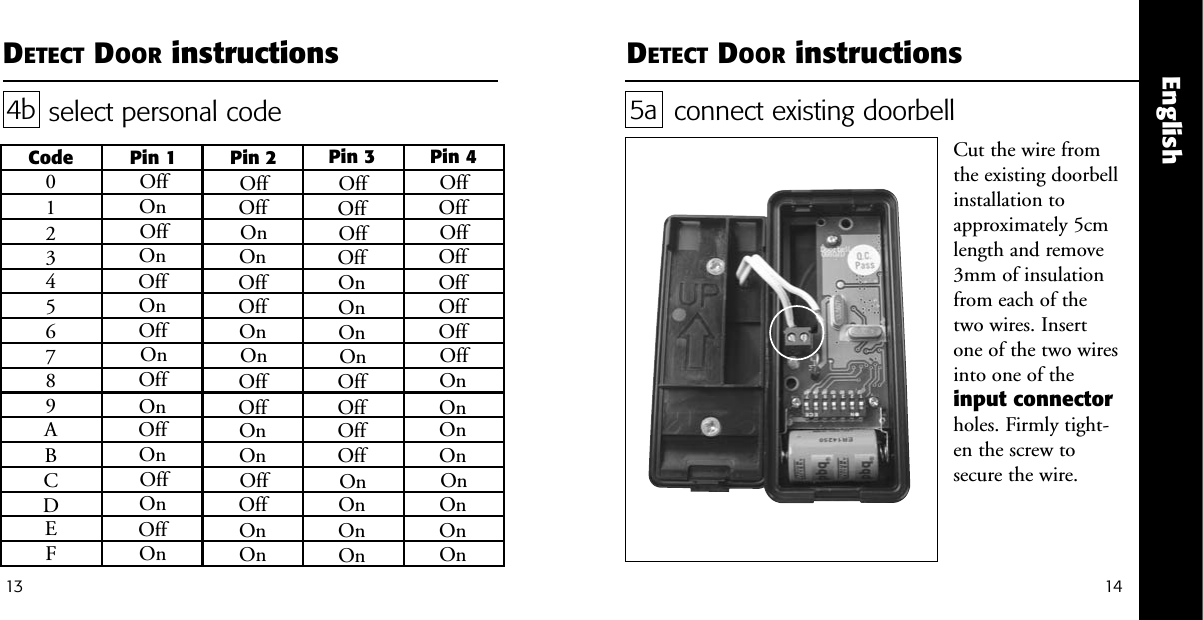
English14DETECT DOOR instructions13DETECT DOOR instructionsselect personal code4bCode Pin 1 Pin 2 Pin 3 Pin 40123456789ABCDEFOffOffOffOffOffOffOffOffOnOnOnOnOnOnOnOnOffOffOffOffOnOnOnOnOffOffOffOffOnOnOnOnOffOffOnOnOffOffOnOnOffOffOnOnOffOffOnOnOffOnOffOnOffOnOffOnOffOnOffOnOffOnOffOnconnect existing doorbellCut the wire fromthe existing doorbellinstallation toapproximately 5cmlength and remove3mm of insulationfrom each of thetwo wires. Insertone of the two wiresinto one of theinput connectorholes. Firmly tight-en the screw tosecure the wire. 5a
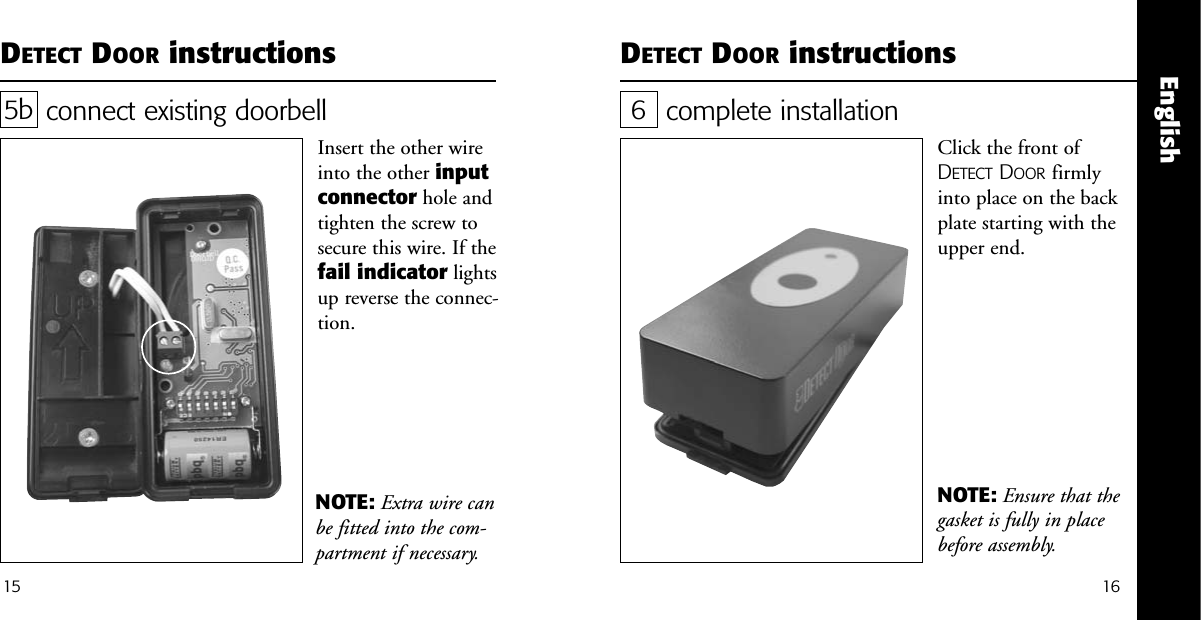
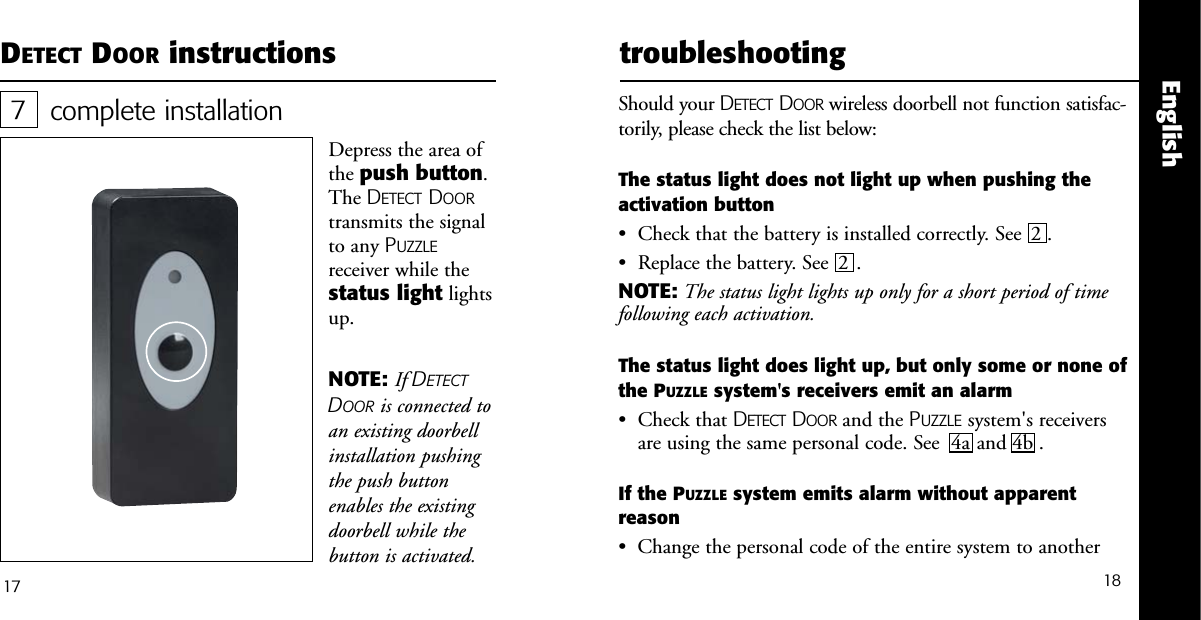
English1615DETECT DOOR instructions DETECT DOOR instructionsconnect existing doorbellInsert the other wireinto the other inputconnector hole andtighten the screw tosecure this wire. If thefail indicator lightsup reverse the connec-tion.5bNOTE: Extra wire canbe fitted into the com-partment if necessary.complete installationClick the front ofDETECT DOOR firmlyinto place on the backplate starting with theupper end. 6NOTE: Ensure that thegasket is fully in placebefore assembly.
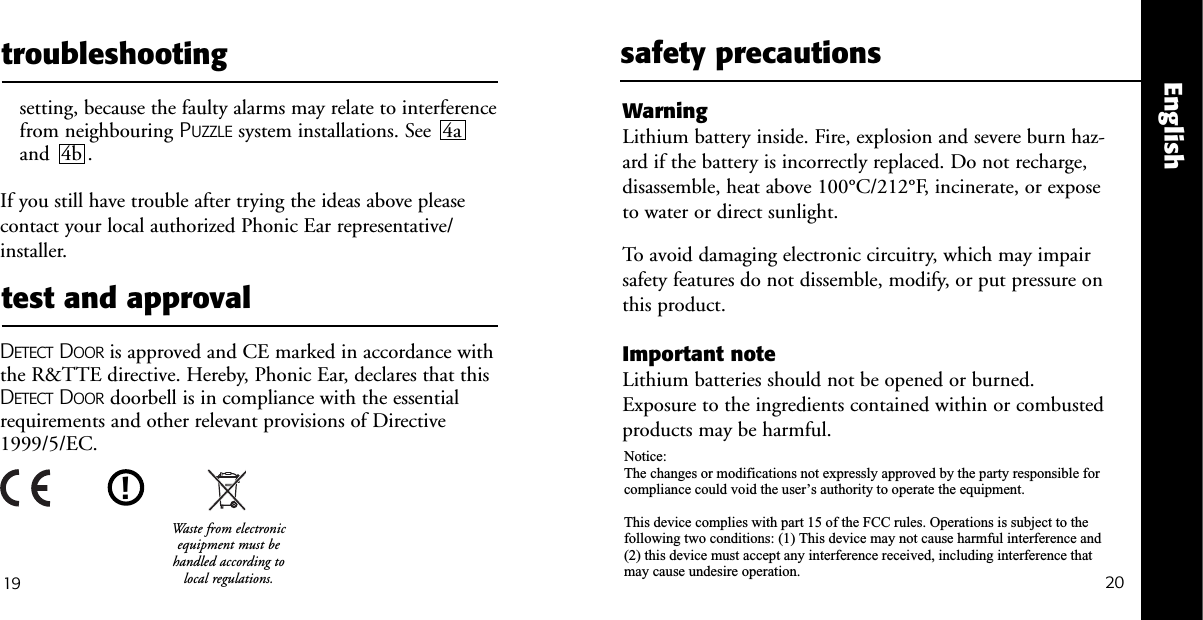
18Englishcomplete installationDepress the area ofthe push button.The DETECT DOORtransmits the signalto any PUZZLEreceiver while thestatus light lightsup.717DETECT DOOR instructionsNOTE: If DETECTDOOR is connected toan existing doorbellinstallation pushingthe push buttonenables the existingdoorbell while thebutton is activated.   troubleshootingShould your DETECT DOOR wireless doorbell not function satisfac-torily, please check the list below:The status light does not light up when pushing theactivation button•  Check that the battery is installed correctly. See  2 . •  Replace the battery. See  2 . NOTE: The status light lights up only for a short period of timefollowing each activation.The status light does light up, but only some or none ofthe PUZZLE system's receivers emit an alarm•  Check that DETECT DOOR and the PUZZLE system's receiversare using the same personal code. See  4a and 4b .If the PUZZLE system emits alarm without apparent reason•  Change the personal code of the entire system to another
20Englishtest and approval19troubleshootingsetting, because the faulty alarms may relate to interferencefrom neighbouring PUZZLE system installations. See  4aand  4b . If you still have trouble after trying the ideas above pleasecontact your local authorized Phonic Ear representative/installer.DETECT DOOR is approved and CE marked in accordance withthe R&TTE directive. Hereby, Phonic Ear, declares that thisDETECT DOOR doorbell is in compliance with the essentialrequirements and other relevant provisions of Directive1999/5/EC.safety precautionsWarning Lithium battery inside. Fire, explosion and severe burn haz-ard if the battery is incorrectly replaced. Do not recharge,disassemble, heat above 100°C/212°F, incinerate, or exposeto water or direct sunlight.To avoid damaging electronic circuitry, which may impairsafety features do not dissemble, modify, or put pressure onthis product.Important noteLithium batteries should not be opened or burned.Exposure to the ingredients contained within or combustedproducts may be harmful.!Waste from electronicequipment must behandled according tolocal regulations.Notice:The changes or modifications not expressly approved by the party responsible for compliance could void the user’s authority to operate the equipment.This device complies with part 15 of the FCC rules. Operations is subject to the following two conditions: (1) This device may not cause harmful interference and (2) this device must accept any interference received, including interference that may cause undesire operation.
2221EnglishwarrantyA one-year limited warranty is issued to the original consumer of this product(s) by Phonic Ear (two years inside the EU).time period of warrantyThis warranty will go into effect upon the date of original purchase of this equipment, andwill remain in effect for one calendar year (two years inside the EU) from that date as longas the instrument remains the property of the original consumer.what is covered by this warrantyAny electronic component which, because of workmanship, manufacturing, or designdefects, fails to function properly under normal use during the life of this warranty will be replaced or repaired at no charge for parts or labor when returned to the factory service center. Transportation in is paid by the customer. If it is determined that repairis not feasible, the entire unit may be replaced with an equivalent unit upon mutual agreement of the manufacturer and customer.what is not covered by this warranty1Malfunctions resulting from abuse, neglect, or accident.2Peripheral accessories as itemized within the product brochure, when such items arereturned after 90 days from the original purchase.3Alkaline batteries (if applicable).4Instruments connected, installed, used, or adjusted in a manner contrary to instruc-tions provided by the manufacturer.warranty (cont’d)5Consequential damages and damages resulting from delay or loss of this instru-ment. The exclusive remedy under this warranty is strictly limited to repair orreplacement as herein provided.6Products damaged in transit unless investigated by the shipper and returned to the warrantor with the investigation report.Phonic Ear reserves the right to make changes in the design or construction of any ofits instruments at any time without incurring any obligation to make any changeswhatsoever on units previously purchased. This warranty is in lieu of all otherexpressed warranties. All expressed and implied warranties will terminate upon theexpiration of this written warranty. No representative or person is authorized to repre-sent or assume for us any liability in connection with the sale or use of our productsother than as set forth above.The above warranty does not affect any legal rights that you might have under appli-cable national legislation governing sale of consumer goods. Your distributor may haveissued a warranty that goes beyond the clauses of this limited warranty. Please consultyour distributor for further information.what to do if you need serviceIf you require service under the terms of this warranty, carefully package the instru-ment to prevent damage and return it to your distributor (see information on backcover). Please provide your receipt, a detailed description of the problem, your full name,billing address, and telephone number.

Navigation menu