Pioneer CT W770 User Manual STEREO DOUBLE CASSETTE DECK Manuals And Guides 98080093
PIONEER Tape Deck Manual 98080093 PIONEER Tape Deck Owner's Manual, PIONEER Tape Deck installation guides
User Manual: Pioneer CT-W770 CT-W770 PIONEER STEREO DOUBLE CASSETTE DECK - Manuals and Guides View the owners manual for your PIONEER STEREO DOUBLE CASSETTE DECK #CTW770. Home:Electronics Parts:Pioneer Parts:Pioneer STEREO DOUBLE CASSETTE DECK Manual
Open the PDF directly: View PDF  .
.
Page Count: 16
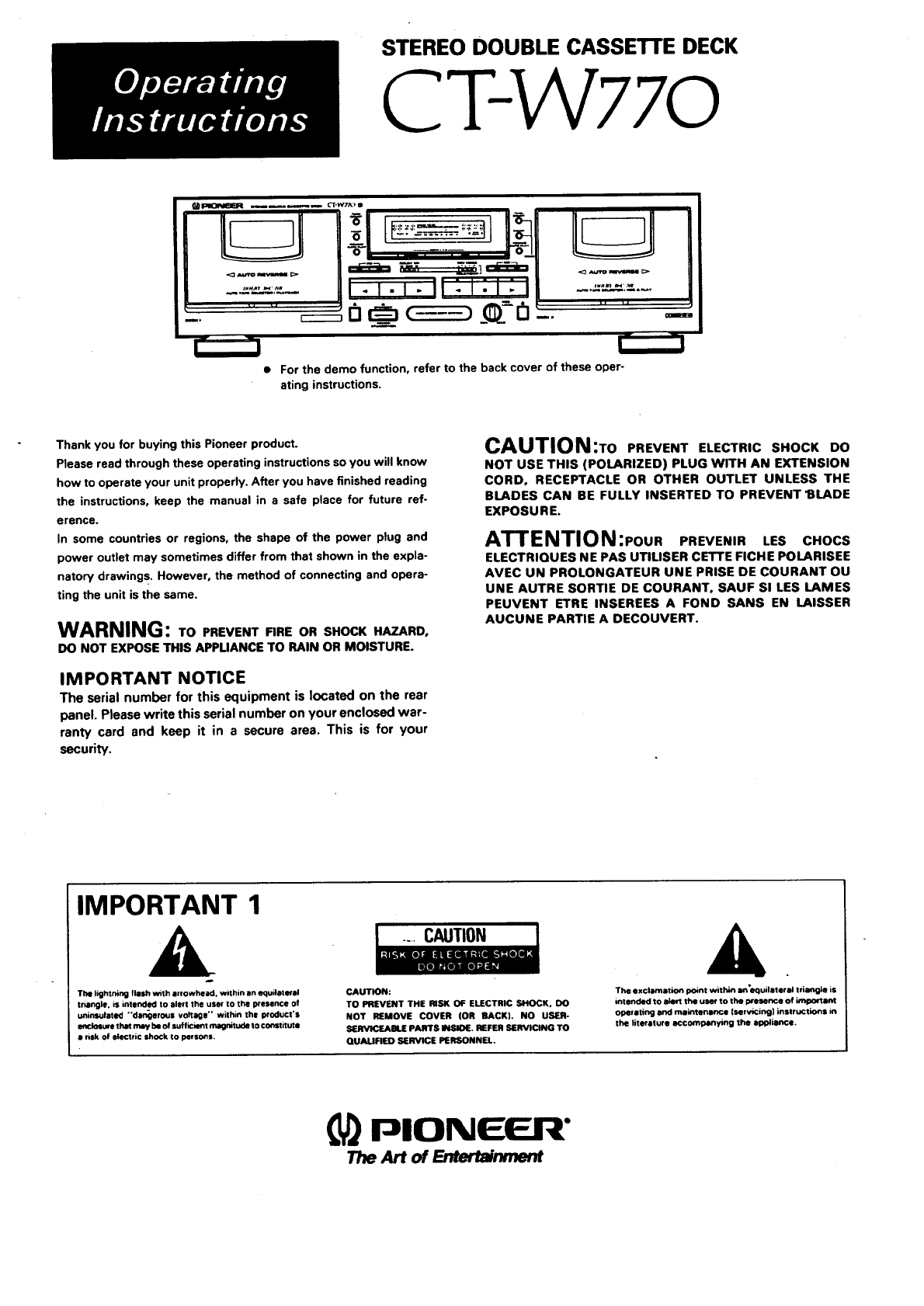
STEREO DOUBLE CASSETTE DECK
CT-W 77o
....
I . I.i. li:i:i: i| -.,-"-"-.,
_. o o= -..
i" -!
• For the demo function, refer to the back cover of these oper-
ating instructions.
Thank you for buying this Pioneer product.
Please read through these operating instructions so you will know
how to operate your unit properly. After you have finished reading
the instructions, keep the manual in a safe place for future ref-
erence.
In some countries or regions, the shape of the power plug and
power outlet may sometimes differ from that shown in the expla-
natory drawings. However, the method of connecting and opera-
ting the unit is the same.
WARNING: TO PREVENT RRE OR SHOCK HAZARD.
DO NOT EXPOSE THIS APPUANCE TO RAIN OR MOISTURE.
IMPORTANT NOTICE
The serial number for this equipment is located on the rear
panel. Please write this serial number on your enclosed war-
ranty card and keep it in a secure area. This is for your
security.
CAUTION:To PREVENT ELECTRIC SHOCK DO
NOT USE THIS (POLARIZED) PLUG WITH AN EXTENSION
CORD. RECEPTACLE OR OTHER OUTLET UNLESS THE
BLADES CAN BE FULLY INSERTED TO PREVENT 1BLADE
EXPOSURE.
/_| |IPI_I|IUN:POUR PREVENIR LES CHOCS
ELECTRIOUES NE PAS UTIUSER CETTE FICHE POLARISEE
AVEC UN PROLONGATEUR UNE PRISE DE COURANT OU
UNE AUTRE SORTIE DE COURANT, SAUF S! LES LAMES
PEUVENT ETRE INSEREES A FOND SANS EN LAISSER
AUCUNE PARTIE A DECOUVERT.
IMPORTANT 1
The lighthit1_ tklsh with erfOwhetld, within an equilateral
tr_ngle, is intended to alerl the user to the presence of
uninsulated "'der_erous voltage" within the product's
imclo_we that may be of sufficxmt magnitude In constitute
• "sk Of electric shock tO persons.
CAUTION
CAUTION:
TO PREVENT THE RISK OF ELECTRIC SHOCK, DO
NOT REMOVE COVER (OR BACK). NO USER-
SERVICEABLE PARTS INSIDE. REFER SERVICING TO
OUAMFIED SERVICE PERSONNEL.
The exclamation I:_nt within an'equilateral triangle is
intended to alert the us_ to the ;xese_e of impmlant
opiating and maintenance (servicing) instructions in
the 5teralure accompanying the alR)lionce.
PlONIEER"
7he Art of _nment
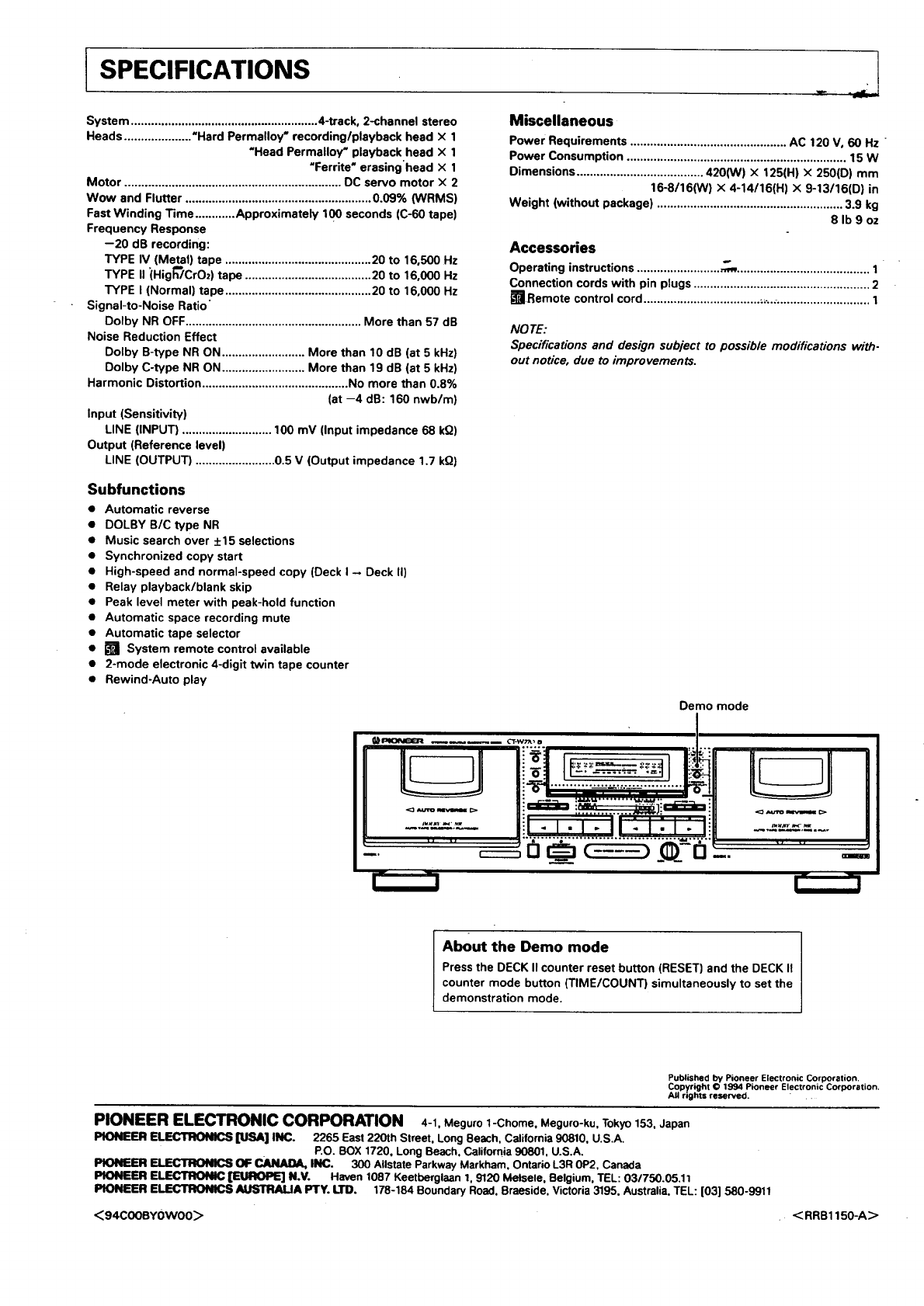
ISPECIFICATIONS .-
System ........................................................ 4-track, 2-channel stereo
Heads .................... "Hard Permalloy" recording/playback head X 1
"Head Permalloy" playback head x 1
"Ferrite" erasing'head x 1
Motor ................................................................. DC servo motor x 2
Wow and Flutter ........................................................ 0.09% (WRMS)
Fast Winding Time ............ Approximately 100 seconds (C-60 tape)
Frequency Response
--20 dB recording:
TYPE IV (Metal) tape ............................................ 20 to 16,500 Hz
TYPE II (Hig_CrOz) tape ...................................... 20 to 16,000 Hz
TYPE I (Normal) tape ............................................ 20 to 16,000 Hz
Signal-to-Noise Ratio"
Dolby NR OFF..................................................... More than 57 dB
Noise Reduction Effect
Dolby B-type NR ON ......................... More than 10 dB (at 5 kHz)
Dolby C-type NR ON ......................... More than 19 dB (at 5 kHz)
Harmonic Distortion ............................................ No more than 0.8%
(at --4 dB: 160 nwb/m)
Input (Sensitivity)
LINE (INPUT) ........................... 100 mV (Input impedance 68 kO)
Output (Reference level)
LINE (OUTPUT) ........................ 0.5 V (Output impedance 1.7 kO)
Subfunctions
• Automatic reverse
•DOLBY B/C type NR
•Music search over +15 selections
•Synchronized copy start
•High-speed and normal-speed copy (Deck I - Deck II)
•Relay playback/blank skip
• Peak level meter with peak-hold function
•Automatic space recording mute
•Automatic tape selector
• [] System remote control available
•2-mode electronic 4-digit twin tape counter
• Rewind-Auto play
Miscellaneous
Power Requirements ............................................... AC 120 V, 60 Hz
Power Consumption .................................................................. 15 W
Oimensions ...................................... 420(W) X 125(H) X250(D) mm
16-8/16(W) X 4-14/16(H) X 9-13/16(D) in
Weight (without package) ........................................................ 3.9 kg
8 Ib 9 oz
Accessories
Operating instructions ......................... _ ........................................ 1
Connection cords with pin plugs ..................................................... 2
[]Remote control cord .................................................................... 1
NOTE:
Specifications and design subject to possib/e modifications with-
out notice, due to improvements.
Demo mode
- -|
About the Demo mode
Press the OECK II counter reset button (RESET) and the DECK II
counter mode button (TIME/COUNT) simultaneously to set the
demonstration mode.
Published by Pioneer Electronic Corporation.
Copyright O1994 Pioneer Electronic Corporation.
All rights reserved. " .
PIONEER ELECTRONIC CORPORATION 4-1. Meguro 1-Chome. Meguro-ku, Tokyo 153. Japan
PIONEER ELECTRONICS [USA] INC. 2265 East 220th Slreet. Long Beach, California 90810, U.S.A.
P.O. BOX 1720. Long Beach, California 90801. U.S.A,
PIONEER ELECTRONICS OF CAJ!_U)A, INC. 300 Allstate Parkway Markham, Ontario L3R 0P2, Canada
PIONEER ELECTRONIC [EUROPE] N.V. Haven 1087 Keetberglaan 1.9120 Melsele, Belgium. TEL: 03/750.05,11
PIONEER ELECTRONICS AUSTRALIA Fry. LTD. 178-184 Boundary Road. Braeside, Victoria 3195, Australia, TEL: [03] 580-9911
<94COOBYOWO0> < RRB 1150-A>
SAFETY INSTRUCTIONS
READ INSTRUCTIONS -- All the safety end operating
|netructtons should be mad before the appliance is
operated.
RETAIN INSTRUCTIONS -- The safety and operating
inetructions should be retained for future
rofermlce.
HEEO WARNING -- All warnings on the appliance and in
the ooereting i_s should be adhered to.
FOLLOW INSTRUCTIONS -- All operating and use
instructions should be followed.
WATER AND MOISTURE - The appliance should not
be used near watur-- for example, near a bathtub,
washbowl, kitchen sink, laundry tub, in awet
basement, or near • swimming pool, etc.
LOCATION -- Th_ appliance should be installed in 8
mbie Io_,on.
WALL OR ClEIUNG MOUNTING - The appliance
should not be mounted to • wall or ceiling•
VENTILATION -- The a'ppliance should be situated so
that its location or position does not interfere with
its proper ventilation, For example, _.e appliance
should not be situated on abed, sofa, rug, or similar
surface that may block the ventilation openings; or,
placed in s built-in instsiiation, such as s bookcase
or cabinet th•t m•y impede the flow of air through
the ventilation openings.
HEAT -- The appliance should be situated away from
heat source• such as radiators, heat registers,
stoves, or other appliance• (including amplifiers)
that produce heat.
POWER SOURCES - The appliance should be
connected to I power supply only of the type
described in the operating instructions or as
marked on the appliance.
POWER-CORD PROTEC11ON - Power-supply cord•
should be routed so that they are not likely to be
walked on or pinched by items placed upon Or
against them. Pay particular attention to cords st
plug•, convenience receptacles, end the point
where they exit from the appliance.
POLARIZATION -- If your purchased product is
provided with a polarized power plug, pies•e read
the following instructions. This product is equipped
with s polarized sifemsting current line plug (• plug
having one blade wider than the other). This plug
will fit into the power outlet only one way. This is a
safety feature. If you are un•ble to insert the plug
fully into the gullet, try reversing the plug. If the
plug should still fail to fit, contact your electrician to
replace your obsolete outlet. Do not defeat the
safety purpose of the polarized plug.
CLEANING - The appliance should be cleaned only
with apolishing cloth or s soft dry cloth. Never
clean with furniture wax, benzine, insecticides or
Other volatile liquids •inca they may corrode the
cabinet.
POWER LINES - An outdoor antenna should be located
away from power lines.
NONUSE PERIDDS - Tbe power cord of the appliance
should be unplugged from the o_let when left
unused for • long period of time.
OBJECT AND LIQUID ENTRY - Care should be taken
so that objects do not fall end liquids are not spilled
into the encio_Jm through openings.
DAMAGE REQUIRING SERVICE -- The appliance
should be serviced by aPione_ authorized service
center Or qualified service personnel when:
•The power-anl_oly cord Or the plug has been
damaged.
•Objects have fallen, or liquid has been spilled into
the appliance.
•The appliance has been exposed to rain.
•The appliance does not appear to operate normally
or exhibits s marked change in performance.
•The appliance has been dropl_d or the enclosure
damaged.
SERV_ING - The user should not attempt to service
the appliance beyond that described in the
operating instructions. All other servicing should
be referred to qualified service porionnel.
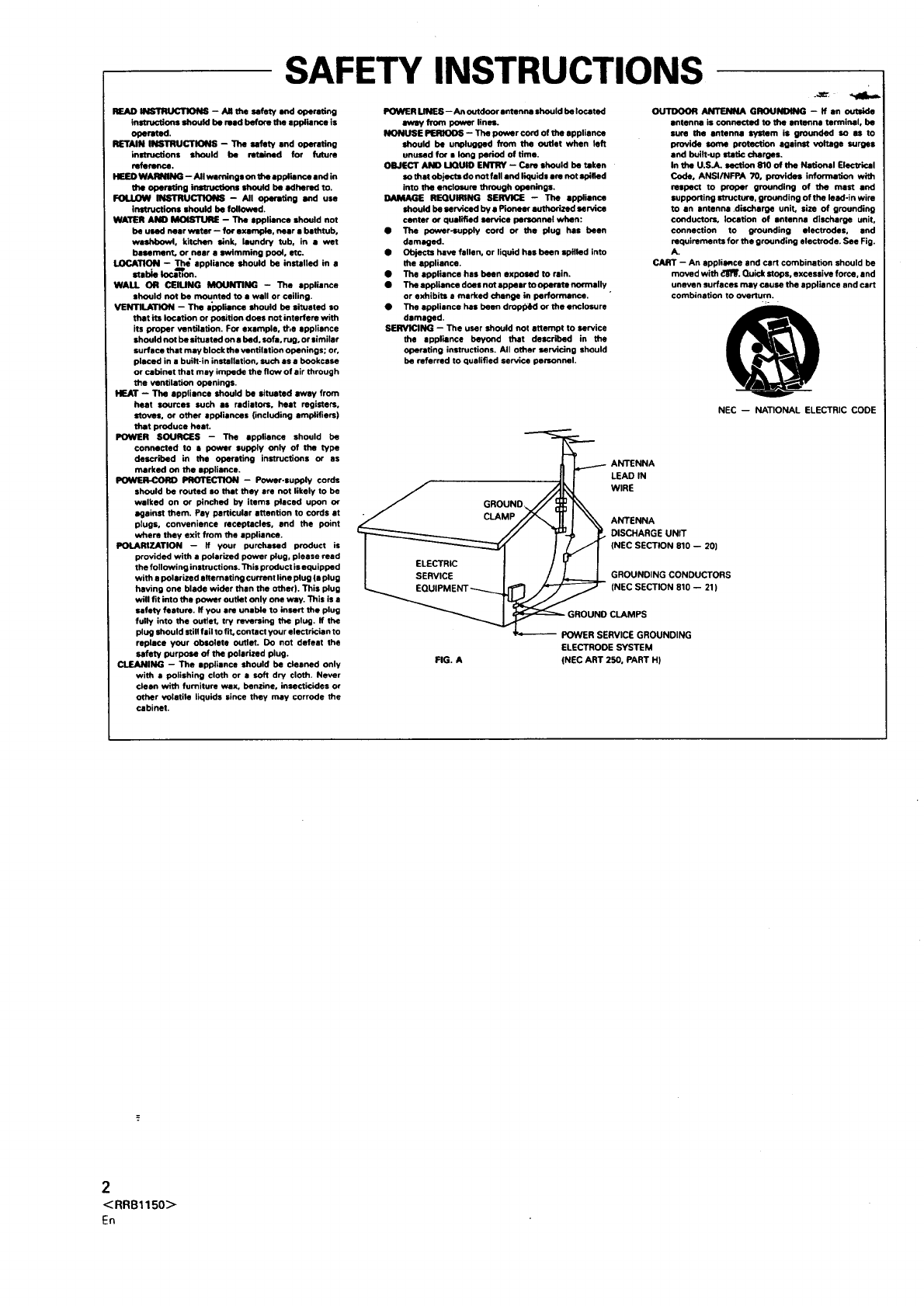
OUTDOOR ANTENNA GROUNDING - if an Outaide
antenna is connected tO the antenna terminal, be
sure the antenna system is grounded so 8s to
provide some protection against voltage surges
end built-up static charges.
In the U.S,A. section 810 of the National Electrical
Code, ANSI/NFPA 70, provides information with
relpect to proper grounding of the mast and
supporting structure, grounding of the lead-in wire
to an antenna discharge unit, size of grounding
conductors, locetion of antenna discharge unit,
connection to grounding electrodes, and
requirements for the grounding electrode. See Fig.
A.
CART - An sppliance and cart combination should be
moved with dll_. Quick stops, excessive force, and
uneven surface• may cause the appliance and cart
combination to overturn.
NEC -- NATIONAL ELECTRIC CODE
_T___- ANTENNA
"--"--J[ I LEAD IN
• J GROUND_ WIRE
"_ I\\ AmENNA
_-._ _. DISCHARGE UNIT
/_GROUNDING CONDUCTORS
POWER SERVICE GROUNDING
ELECTRODE SYSTEM
FIG. A (NEC ART 250, PART H)
2
<RRB1150>
En
ThisequipmenthasbeentestedandfoundtocomplywiththelimitsforaClassBdigitaldevice,pursuanttoPart15oftheFCCRules.These
limitsaredesignedtoprovidereasonableprotectionagainstharmfulinterferenceinaresidential installation. This equipment generates,
uses, and can radiate radio frequency energy and, if not installed and used in accordance with the instructions, may cause harmful
interference to radio communications. However, there is no guarantee that interference will not occur in a particular installation. If this
equipment does cause harmful interference to radio or television reception, which can be determined by turning the equipment off and on,
the user is encouraged to try to correct the interference by one or more of the following measures:
--Reorient or relocate the receiving antenna.
--Increase the separation between the equipment and receiver.
-Connect the equipment into an outlet on a circuit different from that to which the receiver is connected.
-Consult the dealer or an experienced radio/TV technician for help.
I Information to User I
Alteration or modifications carried out without appropriate authorization may invalidate the user's right to operate the equipment.
This digital apparatus does not exceed the Class Blimits for radio noise emissions from digital apparatus set out in the Ra-
dio Interference Regulations of the Canadian Department of Communications,
L'interftrence, radiotlectrique gtntrte par cet appareil numtrique de type B ne dtpasse pas les limites 6nonctes dans le
R_glement sur les perturbations radiotlectriques, section appareil numtrique, du Ministtre des Communications.
Selecting fine audio equipment such as the unit you've just
purchased is only the start of your musk:a] enjoymonr. Now it's
time to consider how you can maximize the fun and excitement
your equipment offers. This manufacturer and the Electronic
Industries Association's Consumer Eleetmnics Group want you
to get the most out of your equipment by playing it at a safe
level. One that lets the sound come through loud and clear
without annoying blaring or distortiou---and, most importantly,
without affecting your sensitive hearing.
Sound can be deceiving. Over time your hearing "comfort
level" adapts to higher volumes of sound. So what sounds
=normal" can actually be loud and harmful to your hearing.
Guard against this by setting your equipment at a safe level
BEFORE your hearing adapts. °-.-
To establish asafe kvd:
• Start your volume con_at a low setting.
•Slowly increase the sound until you can hear it comfortably
and clearly, and without distortion.
Once you have _acomfortable round level:
•Set the dial and leave it them.
Taking a minute to do this now will help m prevent hearing
damage or loss in the future. After all, we want you listening for
a lifetime.
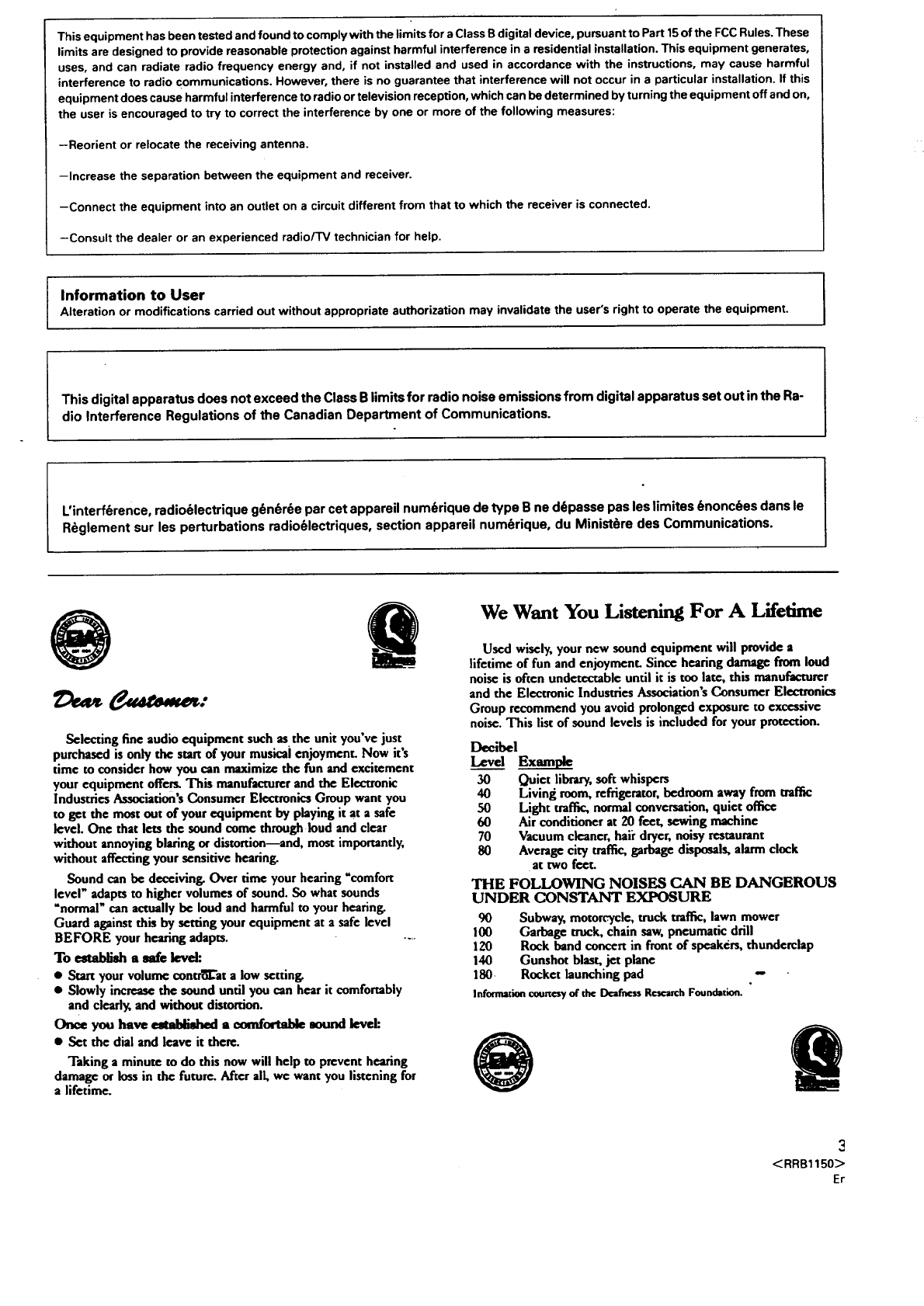
We Want You Listening For A Lifetime
Used wisely, your new sound equipment will provide a
lifetime of fun and enjoyment. Since hearing damage from loud
noise is often undetectable until it is too late, this manufacturer
and the Electronic Industries Association's Consumer Electronics
Group recommend you avoid prolonged exposure to excessive
noise. This list of sound levels is included for your protection.
Decibel
Level E_
30 Quiet library, soft whispers
40 Living room, refrigerator, bedroom away from traffic
50 Light traffic, normal conversation, quiet office
60 Air conditioner at 20 feet, sewing machine
70 Vacuumcleaner, haii dryer,noisy restaurant
80 Average city traffic, garbage disposals, alarm clock
at two feet.
THE FOLLOWING NOISES CAN BE DANGEROUS
UNDER CONSTANT EXPOSURE
90 Subway, motorcycle, truck traffic, lawn mower
100 Garbage mack, chain saw, pneumatic drill
120 Rock band concert in front of speakers, thunderclap
140 Gunshot blast, jet plane
180 Rocket launching pad
Information €ourtesy of the Deafness Research Foundation.
e
3
<RRB1150>Er
CONTENTS
INSTALLATION ................................................................................ 4
MAINTENANCE ............................................................................... 4
HANDLING CASSE'I-FE TAPES ....................................................... 5
CONNECTIONS ................................................................................ 6
FRONT PANEL FACILITIES ............................................................. 7
PLAYBACK .......................................................................................I0
SINGLE PLAYBACK ....................................................................10
BLANK SKIP ............................................................................... 10
RELAY PLAYBACK ..................................................................... 10
MUSIC SE/j,R'CH......................................................................... 11
RECORDING .....................................................................................12
RECORDING ............................................................................... 12
RECORDING MU'FE .................................................................... 12
ERASING A TAPE ....................................................................... 12
TAPE COPYING ............................................................................... 13
TROUBLESHOOTING ...................................................................... 14
SPECIFICATIONS ............................................................................. 16
INSTALLATION
When installing the deck, avoid locations with
high temperatures or humidity, and make sure
that the deck receives adequate ventilation.
•Do not install the deck in locations subject to direct sunlight, or
near a space heater or other heating device, as this may cause
damage to the finish or internal parts.
•Malfunctions may also result if the deck is installed in an ex-
cessively humid or dusty location. Avoid installing the deck
next to kitchen counters or other locations subject to oily
smoke or humidity.
•If the deck is placed directly on top of an amplifier, it may pick
up humming or other noise. Also, if the amplifier generates a
large amount of heat, the deck may malfunction.
•If the deck is located near a television set, it may pick up inter-
ference noise, which will be recorded as awhistling sound on
the tape. If this happens, move the deck further away from the
television set or turn the television set off when operating the
deck.
•Do not place a cloth over the deck, or block the ventilation slots
in any way. The ventilation slots on this deck are necessary to
keep internal parts cool. If they are blocked, the deck may mal-
function.
CONDENSATION
When the deck is moved from a cold location to a warm location,
or when the temperature of the room changes suddenly, conden-
sation may form on the mechanical parts. This can adversely af-
fect the performance of the deck. If condensation forms, wait for
about one hour to allow the deck to adjust to the room tempera-
ture. To prevent condensation when heating a room, raise the
temperature slowly.
THE POWER SWITCH IS SECONDARY CONNECTED AND
THEREFORE DOES NOT SEPARATE THE UNIT FROM MAINS
POWER IN STANDBY POSITION.
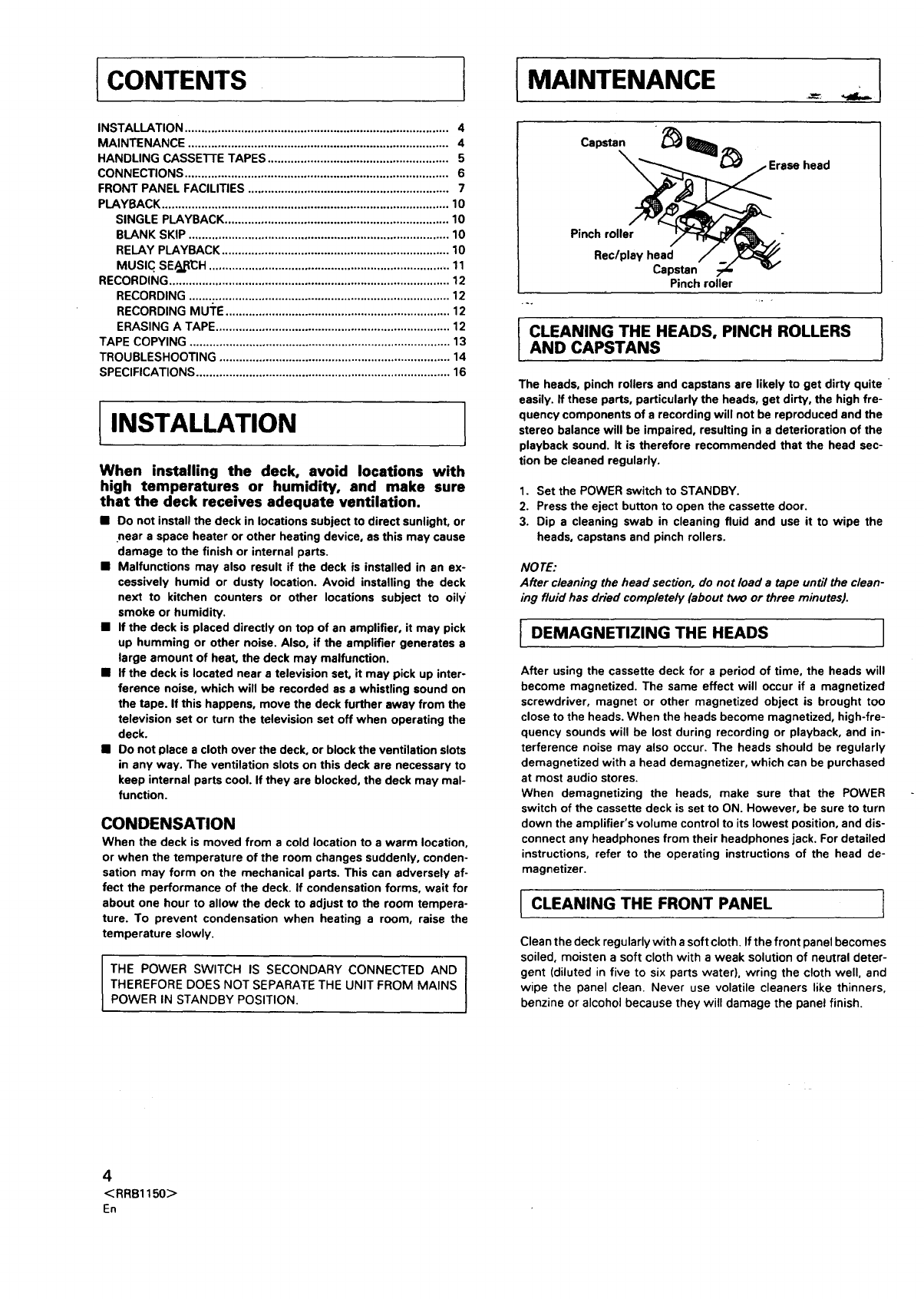
MAINTENANCE
head
Pinch roller
Rec/play head
Capstan
Pinch roller
._. _
1CLEAN|NG THE HEADS" PINCH ROLLERSlAND CAPSTANS
The heads, pinch rollers and capstans are likely to get dirty quite
easily. If these parts, particularly the heads, get dirty, the high fre-
quency components of a recording will not be reproduced and the
stereo balance will be impaired, resulting in a deterioration of the
playback sound. It is therefore recommended that the head sec-
tion be cleaned regularly.
1. Set the POWER switch to STANDBY.
2. Press the eject button to open the cassette door.
3. Dip a cleaning swab in cleaning fluid and use it to wipe the
heads, capstans and pinch rollers.
NO TE:
After cleaning the head secdon, do not load a tape until the clean-
ing fluid has dried completely (about two or three minutes).
IDEMAGNETIZING THE HEADS ]
After using the cassette deck for a period of time, the heads will
become magnetized. The same effect will occur if a magnetized
screwdriver, magnet or other magnetized object is brought too
close to the heads. When the heads become magnetized, high-fre-
quency sounds will be lost during recording or playback, and in-
terference noise may also occur. The heads should be regularly
demagnetized with a head demagnetizer, which can be purchased
at most audio stores.
When demagnetizing the heads, make sure that the POWER
switch of the cassette deck is set to ON. However, be sure to turn
down the amplifier's volume control to its lowest position, and dis-
connect any headphones from their headphones jack. For detailed
instructions, refer to the operating instructions of the head de-
magnetizer.
CLEANING THE FRONT PANEL ]
Clean the deck regularly with a soft cloth. Ifthe front panel becomes
soiled, moisten a soft cloth with a weak solution of neutral deter-
gent (diluted in five to six parts water), wring the cloth well, and
wipe the panel clean. Never use volatile cleaners like thinners,
benzine or alcohol because they will damage the panel finish.
4
<RRB1150>
En
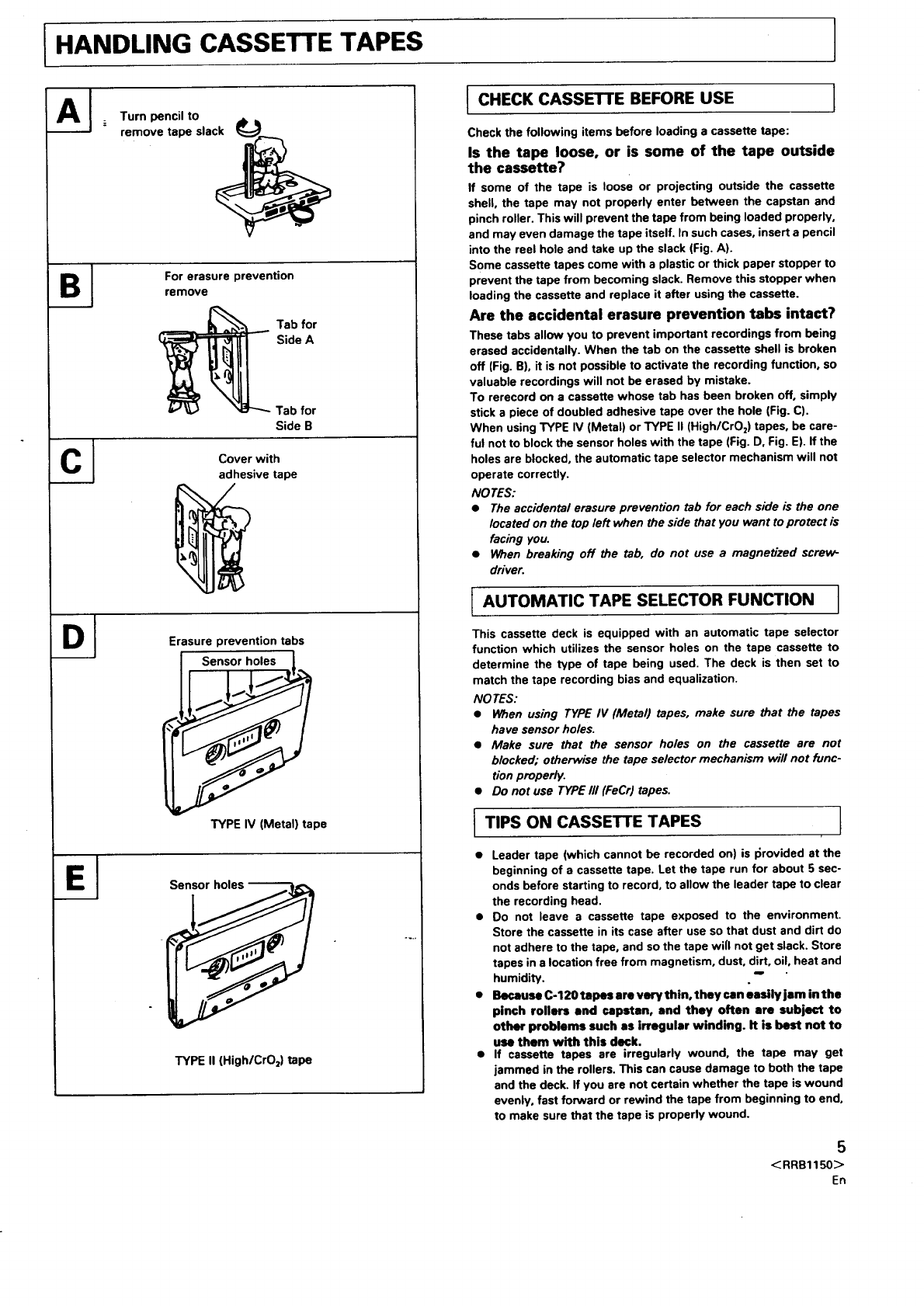
IHANDLING CASSETTE TAPES
Turn pencil to
remove tape slac_
For erasure prevention
remove
Tab for
Side A
Tab for
Side B
C_ Cover with
adhesive tape
Erasure prevention tabs
Sensor holes
ITYPE IV (Metal) tape
Sensor holes
TYPE II (High/CrO 2) tape
ICHECK CASSETTE BEFORE USE ]
IAUTOMATIC TAPE SELECTOR FUNCTION I
This cassette deck is equipped with an automatic tape selector
function which utilizes the sensor holes on the tape cassette to
determine the type of tape being used. The deck is then set to
match the tape recording bias and equalization.
NO TES :
•When using TYPE IV (Metal) tapes, make sure that the tapes
have sensor holes.
•Make sure that the sensor holes on the cassette are not
blocked; otherwise the tape selector mechanism will not func-
tion properly.
•Do not use TYPE III (FeCr) tapes.
•Leader tape (which cannot be recorded on) is I_rovided at the
beginning of a cassette tape. Let the tape run for about 5 sec-
onds before starting to record, to allow the leader tape to clear
the recording head.
•Do not leave a cassette tape exposed to the environment.
Store the cassette in its case after use so that dust and dirt do
not adhere to the tape, and so the tape will not get slack. Store
tapes in a location free from magnetism, dust, dirt, oil, heat and
humidity.. "
•Because C-120 tapes are verythin, they can easily jam in the
pinch rollers and capstan, and they often are subject to
other problems such as irregular winding. It is best not to
use them with this deck.
•If cassette tapes are irregularly wound, the tape may get
jammed in the rollers. This can cause damage to both the tape
and the deck. If you are not certain whether the tape is wound
evenly, fast forward or rewind the tape from beginning to end.
to make sure that the tape is properly wound.
5
< RRB1150>
En
Check the following items before loading acassette tape:
Is the tape loose, or is some of the tape outside
the cassette?
If some of the tape is loose or projecting outside the cassette
shell, the tape may not properly enter between the capstan and
pinch roller. This will prevent the tape from being loaded properly,
and may even damage the tape itself, In such cases, insert a pencil
into the reel hole and take up the slack (Fig. A).
Some cassette tapes come with a plastic or thick paper stopper to
prevent the tape from becoming slack. Remove this stopper when
loading the cassette and replace it after using the cassette.
Are the accidental erasure prevention tabs intact?
These tabs allow you to prevent important recordings from being
erased accidentally. When the tab on the cassette shell is broken
off (Fig. B), it is not possible to activate the recording function, so
valuable recordings will not be erased by mistake.
To rerecord on a cassette whose tab has been broken off, simply
stick a piece of doubled adhesive tape over the hole (Fig. C).
When using TYPE IV (Metal) or TYPE II (High/CrO z) tapes, be care-
ful not to block the sensor holes with the tape (Fig. D, Fig. E). If the
holes are blocked, the automatic tape selector mechanism will not
operate correctly.
NO TES:
•The accidental erasure prevention tab for each side is the one
located on the top left when the side that you want to protect is
facing you.
•When breaking off the tab, do not use a magne_'zed screw-
driver.
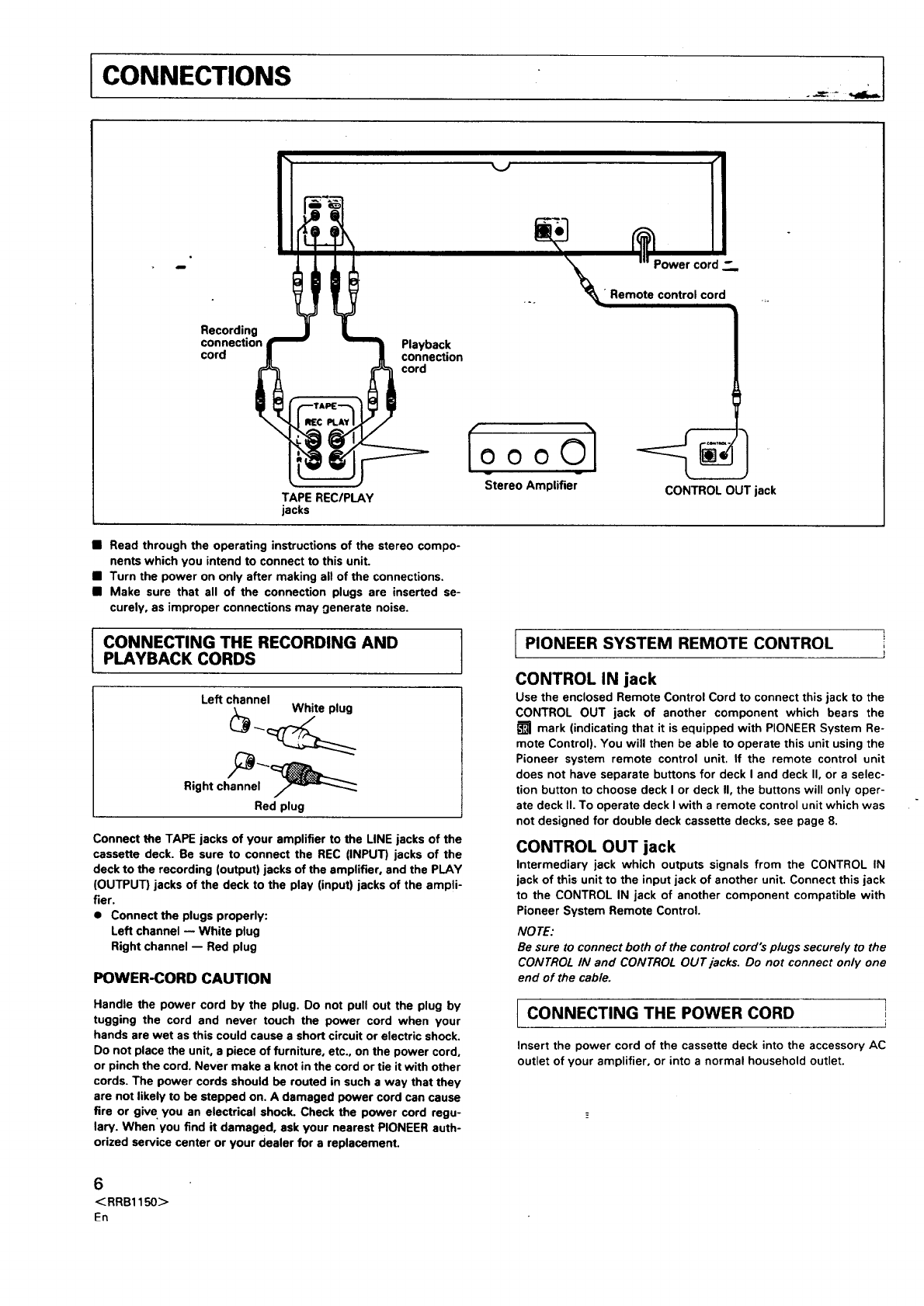
CONNECTIONS I
._i ._ __=
Recording
connection
cord Playback
connexion
cord
Power cord Z.,
•Remote control cord
TAPE REC/PLAY
jacks
ooOl
Stereo Amplifier CONTROL OUT jack
•Read through the operating instructions of the stereo compo-
nents which you intend to connect to this unit.
•Turn the power on only after making all of the connections.
•Make sure that all of the connection plugs are inserted se-
curely, as improper connections may 0enerate noise.
ICONNECTING THE RECORDING ANDPLAYBACK CORDS
Left channel White plug
Right channel
Red plug
Connect the TAPE jacks of your amplifier to the LINE jacks of the
cassette deck. Be sure to connect the REC (INPUT) jacks of the
deck to the recording (output) jacks of the amplifier, and the PLAY
(OUTPUT) jacks of the deck to the play (input) jacks of the amPli-
fier.
• Connect the plugs properly:
Left channel -- White plug
Right channel -- Red plug
POWER-CORD CAUTION
Handle the power cord by the plug. Do not pull out the plug by
tugging the cord and never touch the power cord when your
hands are wet as this could cause a short circuit or electric shock.
Do not place the unit, a piece of furniture, etc., on the power cord,
or pinch the cord. Never make a knot in the cord or tie it with other
cords. The power cords should be routed in such a way that they
are not likely to be stepped on. A damaged power cord can cause
fire or give you an electrical shock. Check the power cord regu-
law. When you find it damaged, ask your nearest PIONEER auth-
orized service canter or your dealer for a replacement.
t iPIONEER SYSTEM REMOTE CONTROL i
CONTROL IN jack
Use the enclosed Remote Control Cord to connect this jack to the
CONTROL OUT jack of another component which bears the
_]_ mark (indicating that it is equipped with PIONEER System Re-
mote Control). You will then be able to operate this unit using the
Pioneer system remote control unit. If the remote control unit
does not have separate buttons for deck I and deck II, or a selec-
tion button to choose deck I or deck II, the buttons will only oper-
ate deck II. To operate deck I with a remote control unit which was
not designed for double deck cassette decks, see page 8.
CONTROL OUT jack
Intermediary jack which outputs signals from the CONTROL IN
jack of this unit to the input jack of another unit. Connect this jack
to the CONTROL IN jack of another component compatible with
Pioneer System Remote Control.
NO TE:
Be sure to connect both of the control cord's plugs securely to the
CONTROL IN and CONTROL OUT jacks. Do not connect only one
end of the cable.
CONNECTING THE POWER CORD !
J
Insert the power cord of the cassette deck into the accessory AC
outlet of your amplifier, or into a normal household outlet.
6
< RRB1150>
Fn
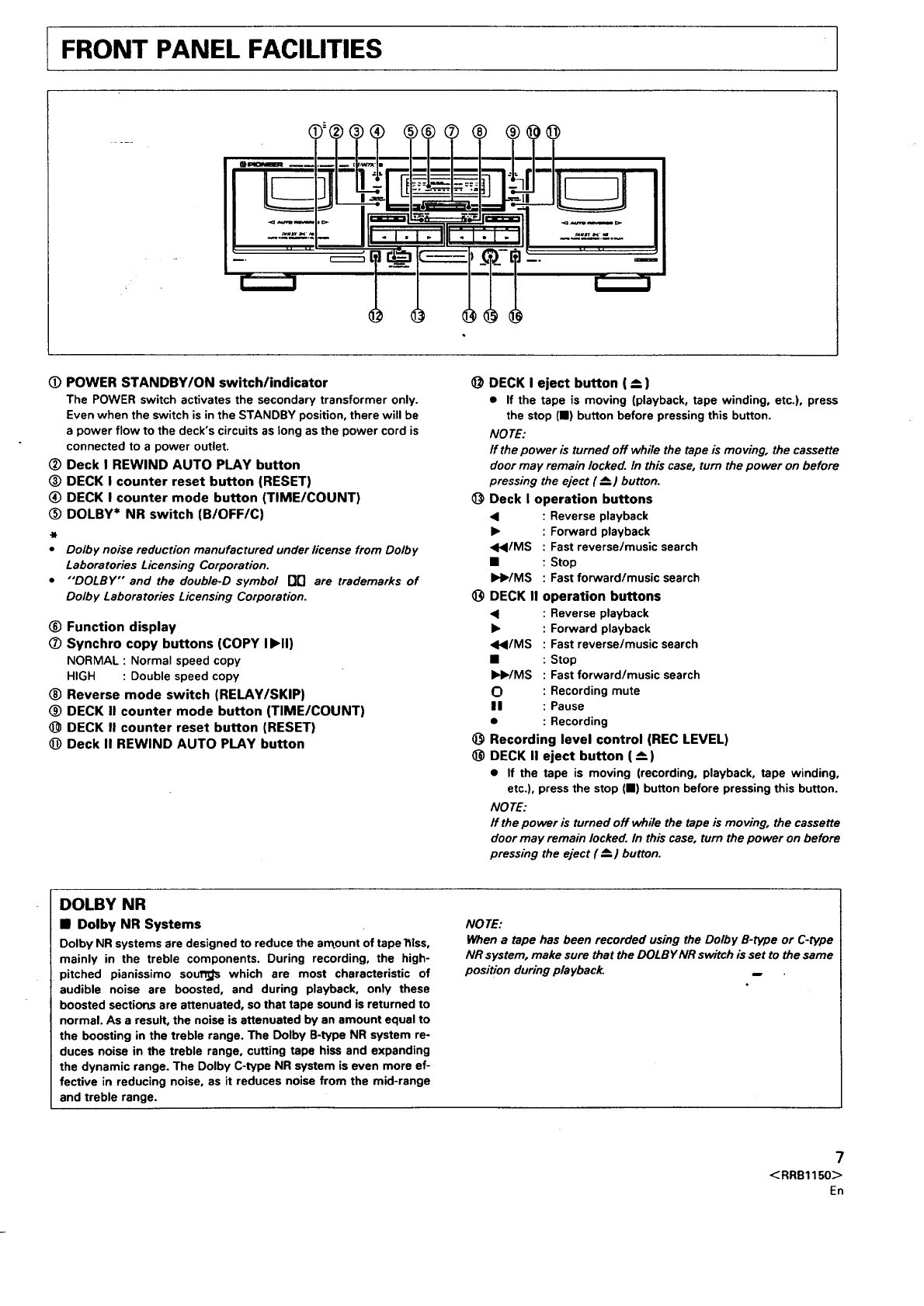
tFRONT PANEL FACILITIES
i
®® @@
(_ POWER STANDBY/ON switch/indicator
The POWER switch activates the secondary transformer only.
Even when the switch is in the STANDBY position, there will be
a power flow to the deck's circuits as long as the power cord is
connected to a power outlet.
Deck I REWIND AUTO PLAY button
(_) DECK I counter reset button (RESET)
(_) DECK I counter mode button (TIME/COUNT)
DOLBY* NR switch (B/OFF/C)
t
•Dolby noise reduction manufactured under license from Dolby
Laboratories Licensing Corporation.
•"'DOLBY'" and the double-D symbol [lO are trademarks of
Dolby Laboratories Licensing Corporation.
_) Function display
Synchro copy buttons (COPY Ib, ll)
NORMAL : Normal speed copy
HIGH : Double speed copy
®Reverse mode switch (RELAY/SKIP)
(_ DECK II counter mode button (TIME/COUNT)
DECK I! counter reset button (RESET)
@ Deck II REWIND AUTO PLAY button
@
@
O
@
@
DECK I eject button ( _)
• If the tape is moving (playback, tape winding, etc.), press
the stop (I) button before pressing this button.
NO TE:
If the power is turned off while the tape is moving, the cassette
door may remain locked. In this case, turn the power on before
pressing the eject (_--.) button.
Deck I operation buttons
•: Reverse playback
•: Forward playback
•</MS : Fast reverse/music search
•: Stop
_HWMS : Fast forward/music search
DECK II operation buttons
• : Reverse playback
•: Forward playback
<HI/MS : Fast reverse/music search
•:Stop
DHWMS : Fast forward/music search
O : Recording mute
II : Pause
•: Recording
Recording level control (REC LEVEL)
DECK II eject button (_--)
•If the tape is moving (recording, playback, tape winding,
etc.), press the stop (I) button before pressing this button.
NO TE:
ff the power is turned off while the tape is moving, the cassette
door may remain locked. In this case, turn the power on before
pressing the eject (_=_)button.
DOLBY NR
•Dolby NR Systems
Dolby NR systems are designed to reduce the amount of tape l_tss,
mainly in the treble components. During recording, the high-
pitched pianissimo sou_ which are most characteristic of
audible noise are boosted, and during playback, only these
boosted sections are attenuated, so that tape sound is returned to
normal. As a result, the noise is attenuated by an amount equal to
the boosting in the treble range. The Dolby B-type NR system re-
duces noise in the treble range, cutting tape hiss and expanding
the dynamic range. The Dolby C-type NR system is even more ef-
fective in reducing noise, as it reduces noise from the mid-range
and treble range.
NOTE:
When a tape has been recorded using the Dolby B-type or C-type
NR system, make sure that the DOLBYNR switch is set to the same
position during playback.
7
<RRB1150>
En
FRONT PANEL FACILITIES
IREVERSE MODE SWITCH (REV MODE)
There are three settings:
One way mode = position
When the switch is set to this position, playback or recording is
performed on one side of the tape only. When the tape reaches
the end of the side, it stops automatically (auto stop function).
Two way n_'de _position
When the switch is set to this position, playback or recording can
be performed on both sides of the tape. When the tape reaches
the end of the first (forward) side, its direction is automatically
reversed, and playback or recording continues on the other
(reverse) side. When it reaches the end of the reverse side, the
tape stops automatically (auto stop function), if playback or re-
cording is started from the reverse side, the tape will stop when it
reaches the end of that side.
Repeat mode _position (RELAY/SKIP)
When the switch is set to this position for playback, both sides of
the tape are played back repeatedly until the stop (11) button is
pressed, or until the tape has been repeated 15 times (16 sides). If
the pause button is pressed to pause the tape, and then playback
is restarted, the repeat mode starts over from the beginning, and
will repeat the tape 15 times (sixteen sides).
When the switch is set to this position for recording, both sides
are recorded and then the tape stops, as described above for the
two way mode.
NOTE:
If Deck I and II are loaded with tapes, each tape will be played
using relay playback.
Rewind autoplay engaged when the REWIND AUTO PLAY button
is pressed.
Playback starts automatically when the tape is rewound com-
pletely.
FUNCTION DISPLAY
OPERATION OF DECK I WITH A REMOTE
CONTROL UNIT NOT DESIGNED FOR
DOUBLE DECKS (System remote control)
Selecting DECK I
In order to operate DECK I with the remote control unit, adjust the
unit as follows: With the power off, press and hold the stop (11)
button of DECK I, and turn the power on. Continue to hold the stop
(11) button for approximately five seconds. DECK I can now be
operated using the remote control unit, but DECK II cannot.
.... -,..
Switching to DECK II
To restore remote control operation to DECK II, press the stop (11)
button of DECK II while DECK II is in stop mode. DECK II can now
be operated using the remote control unit. Remote control oper-
ation can be switched back and forth between decks by pressing
the stop button of the desired DECK while it is in stop mode.
NO TE:
Ifa power failure or a sudden change in the power supply (caused
by lightning, etc.) occurs, the unit is reset to its original state. Only
DECK II can be operated by remote control. To restore operation to
either deck, repeat the above procedure from the beginning.
,
"" ""1 o ,-.-.-.-.o-,o-.-..o+3 I .. ,,
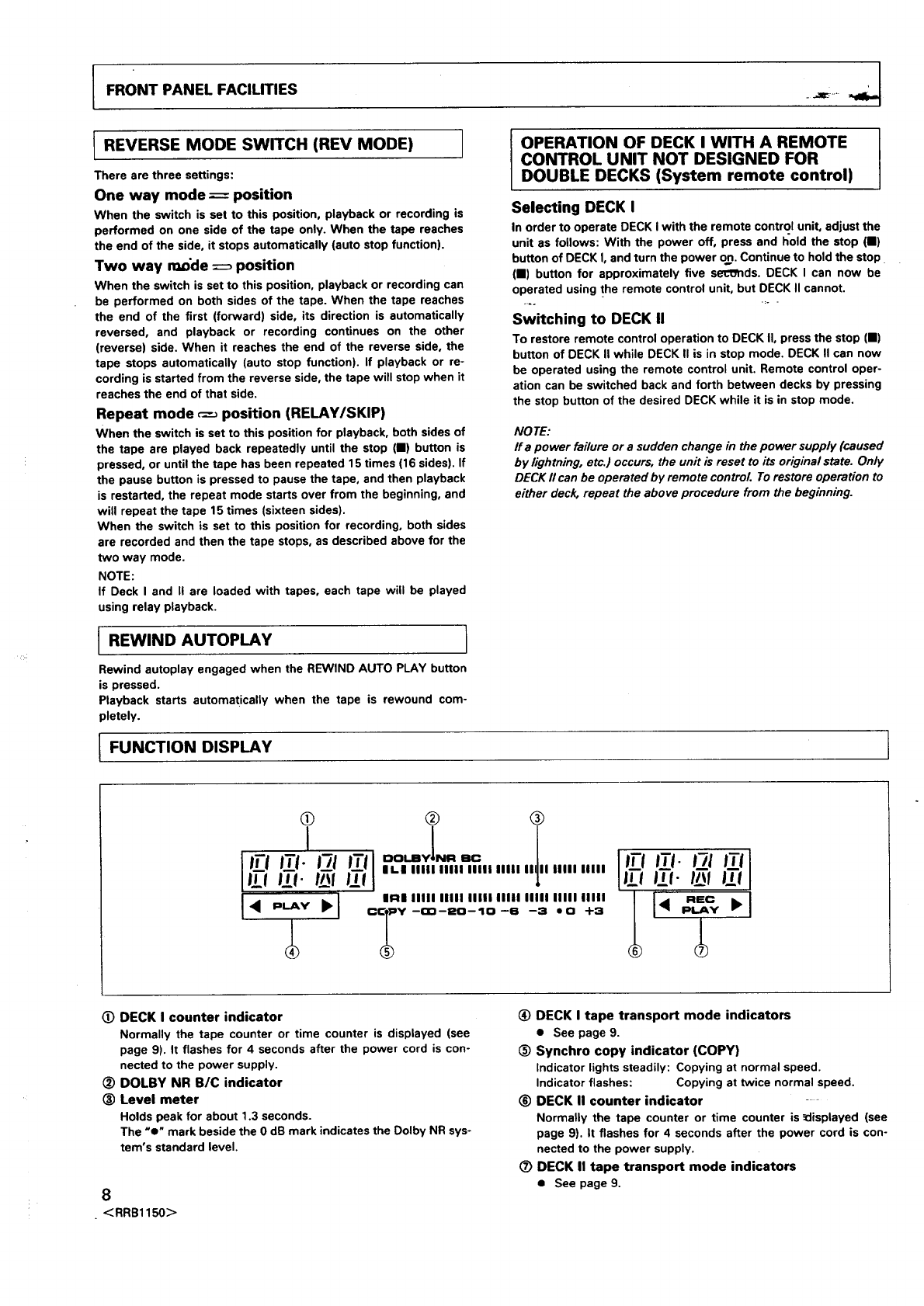
(D DECK I counter indicator
Normally the tape counter or time counter is displayed (see
page 9). It flashes for 4 seconds after the power cord is con-
nected to the power supply.
DOLBY NR B/C indicator
(_) Level meter
Holds peak for about 1.3 seconds.
The "e" mark beside the 0 dB mark indicates the Dolby NR sys-
tem's standard level.
8
• <RRB1150>
(_) DECK I tape transport mode indicators
•See page 9.
(_) Synchro copy indicator (COPY)
indicator lights steadily: Copying at normal speed.
indicator flashes: Copying at twice normal speed.
(_) DECK II counter indicator -
Normally the tape counter or time counter is _displayed (see
page 9). It flashes for 4 seconds after the power cord is con-
nected to the power supply.
(_) DECK II tape transport mode indicators
•See page 9.
FRONT PANEL FACILITIES
TAPE TRANSPORTATION MODE
INDICATORS
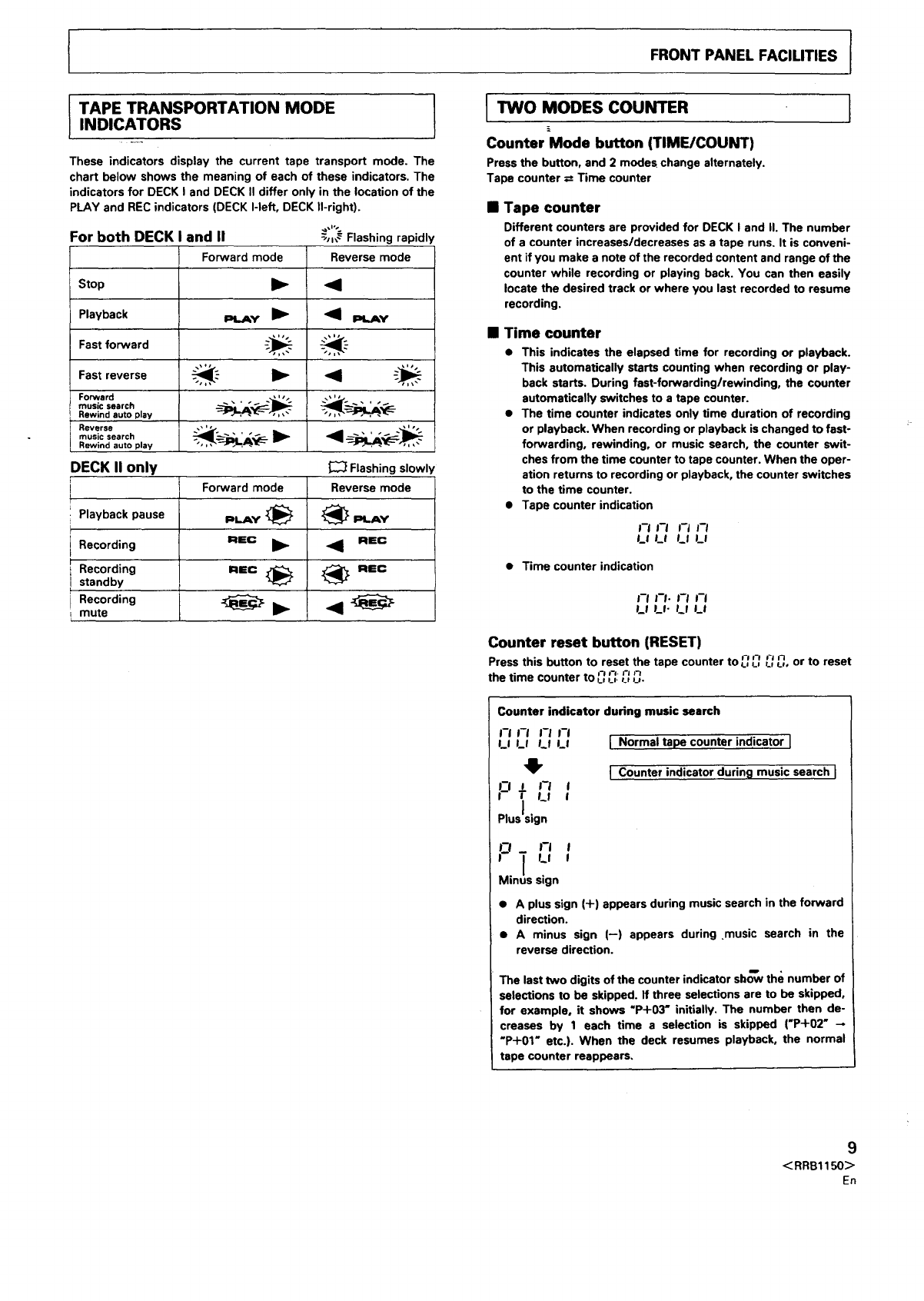
These indicators display the current tape transport mode. The
chart below shows the meaning of each of these indicators. The
indicators for DECK I and DECK II differ only in the location of the
PLAY and REC indicators (DECK I-left, DECK II-right).
-_,,_ Flashing rapidly
Reverse mode
•'41 _.Ay
For both DECK and II
Forward mode
Stop
Playback PLAY
Fast forward _ _.'-
Fast reverse _.'- I_ _ -_
music search
Rewind auto play
Reverse __E- "_ _-_-_
music search
Rewind auto play , , ,,,
DECK II only _Flashingslowly
Forward mode Reverse mode
Playback pause PlAY _ _ PlAY
Recording I=lmc ill,- 4J REC
Recording REC _ _[_ REC
standby
Recording _il_ <
mute
I TWO MODES COUNTER
Counter Mode button (TIMEICOUNT)
Press the button, and 2 modes change alternately
Tape counter =Time counter
I
•Tape counter
Different counters are provided for DECK I and II. The number
of a counter increases/decreases as a tape runs. It is conveni-
ent if you make a note of the recorded content and range of the
counter while recording or playing back. You can then easily
locate the desired track or where you last recorded to resume
recording.
•Time counter
• This indicates the elapsed time for recording or playback.
This automatically starts counting when recording or play-
back starts. During fast-forwarding/rewinding, the counter
automatically switches to a tape counter.
• The time counter indicates only time duration of recording
or playback. When recording or playback is changed to fast-
forwarding, rewinding, or music search, the counter swit-
ches from the time counter to tape counter. When the oper-
ation returns to recording or playback, the counter switches
to the time counter.
• Tape counter indication
;-I FI ;-1 I-I
LI LI Ls U
• Time counter indication
i-I I-I- I-I m-I
LI U- Lt LI
Counter reset button (RESET)
Press this button to reset the tape counter to _.__.-_'~',7LIu, or tO reset
the time n,-,.rJ ,_
counter to L' U"t, U-
Counter indicator during music search
J-I ;-I I-I J-I
u LI Lf LI
4,
_1 J I-I I
TLI
PlusJsign
INormal tape counter indicator I
ICounter indicator during music search J
p -I I
I_l I
Mins sign
• A plus sign (+) appears during music search in the forward
direction.
• A minus sign (--) appears during music search in the
reverse direction.
The last two digits of the counter indicator sbo--wthe number of
selections to be skipped. If three selections are to be skipped,
for example, it shows "P+O3" initially. The number then de-
creases by 1 each time a selection is skipped ('P+02"
"P+01" etc.). When the deck resumes playback, the normal
tape counter reappears.
9
<RRB1150>
En
PLAYBACK
SINGLE PLAYBACK
(Either DECK I or DECK II)
1 5 (5) (1)
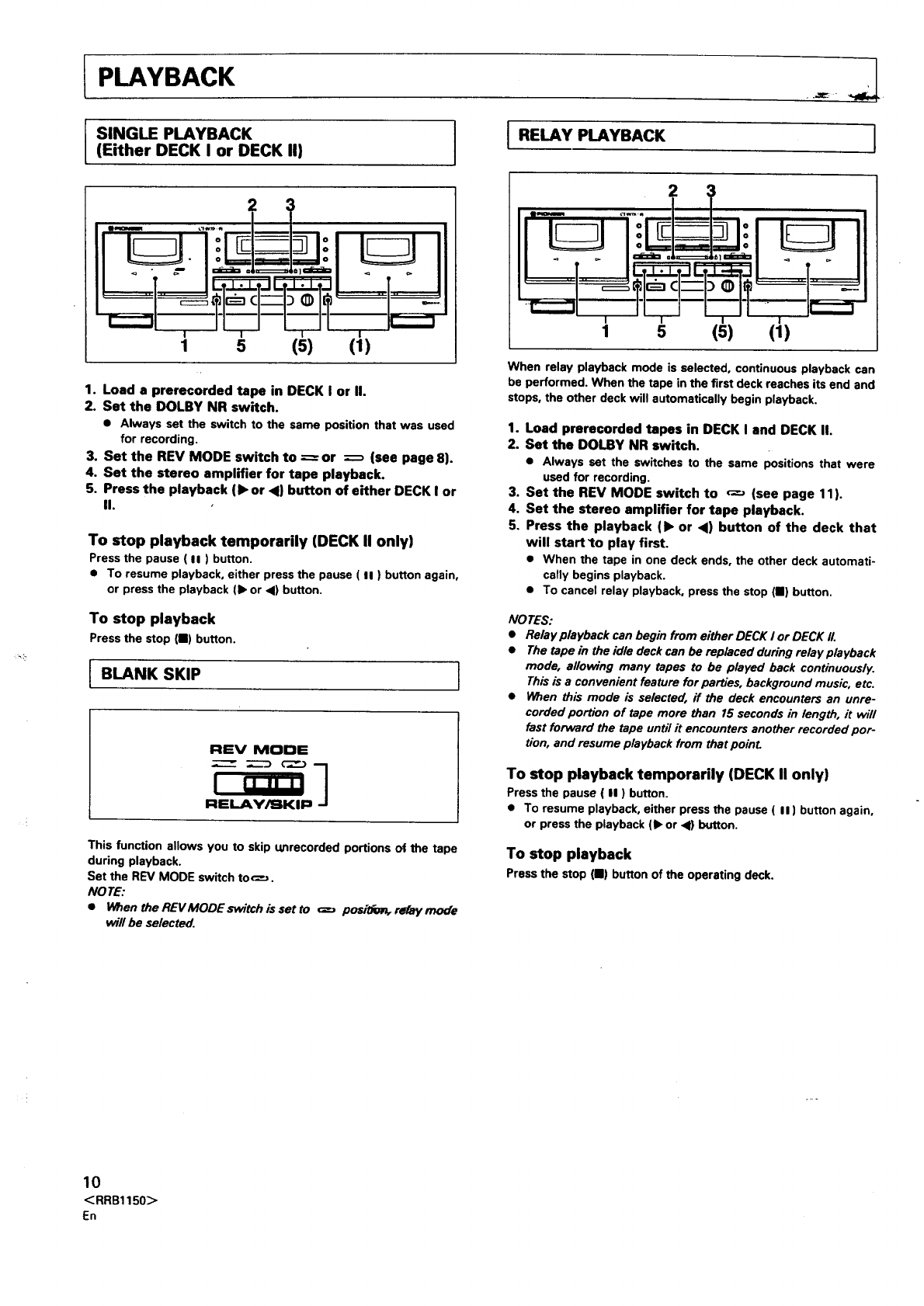
1. Load aprerecorded tape in DECK I or II.
2. Set the DOLBY NR switch.
• Always set the switch to the same position that was used
for recording.
3. Set the REV MODE switch to ----- or --_ (see page 8).
4. Set the stereo amplifier for tape playback.
5. Press the playback (• or <) button of either DECK I or
II.
To stop playback temporarily (DECK II only)
Press the pause ( II ) button.
• To resume playback, either press the pause ( II ) button again,
or press the playback (1_or _1)button.
To stop playback
Pressthe stop {11)button.
REV MODE
I RELAY PLAYBACK
I BLANK SKIP 1
This function allows you to skip unrecorded portions of the tape
during playback.
Set the REV MODE switch too.
NO TE:
•When the REVMODE switch is set to _positfz_ relay mode
will be selected.
5 (5) (1)
1
When relay playback mode is selected, continuous playback can
be performed. When the tape in the first deck reaches its end and
stops, the other deck will automatically begin playback.
1. Load prerecorded tapes in DECK I and DECK II.
2. Set the DOLBY NR switch.
•Always set the switches to the same positions that were
used for recording.
3. Set the REV MODE switch to _-_ (see page 11).
4. Set the stereo amplifier for tape playback.
5. Press the playback (• or <) button of the deck that
will start _o play first.
• When the tape in one deck ends, the other deck automati-
cally begins playback.
•To cancel relay playback, press the stop (11) button.
NO TES:
•Relay playback can begin from either DECK I or DECK II.
•The tape in the idle deck can be replaced during relay playback
mode, allowing many tapes to be played back continuously.
This is a convenient feature for parties, background music, etc.
•When this mode is selected, ff the deck encounters an unre-
corded portion of tape more than 15 seconds in length, it will
fast forward the tape until it encounters another recorded por-
tion, and resume playback from that poinL
To stop playback temporarily (DECK II only)
Press the pause ( II ) button.
•To resume playback, either press the pause ( II ) button again,
or press the playback (1_or <1)button.
To stop playback
Press the stop (11) button of the operating deck.
10
<RRB1150>
En
tPLAYBACK
PLAYBACK SEQUENCE WITH REV MODE
SWITCH SETTING
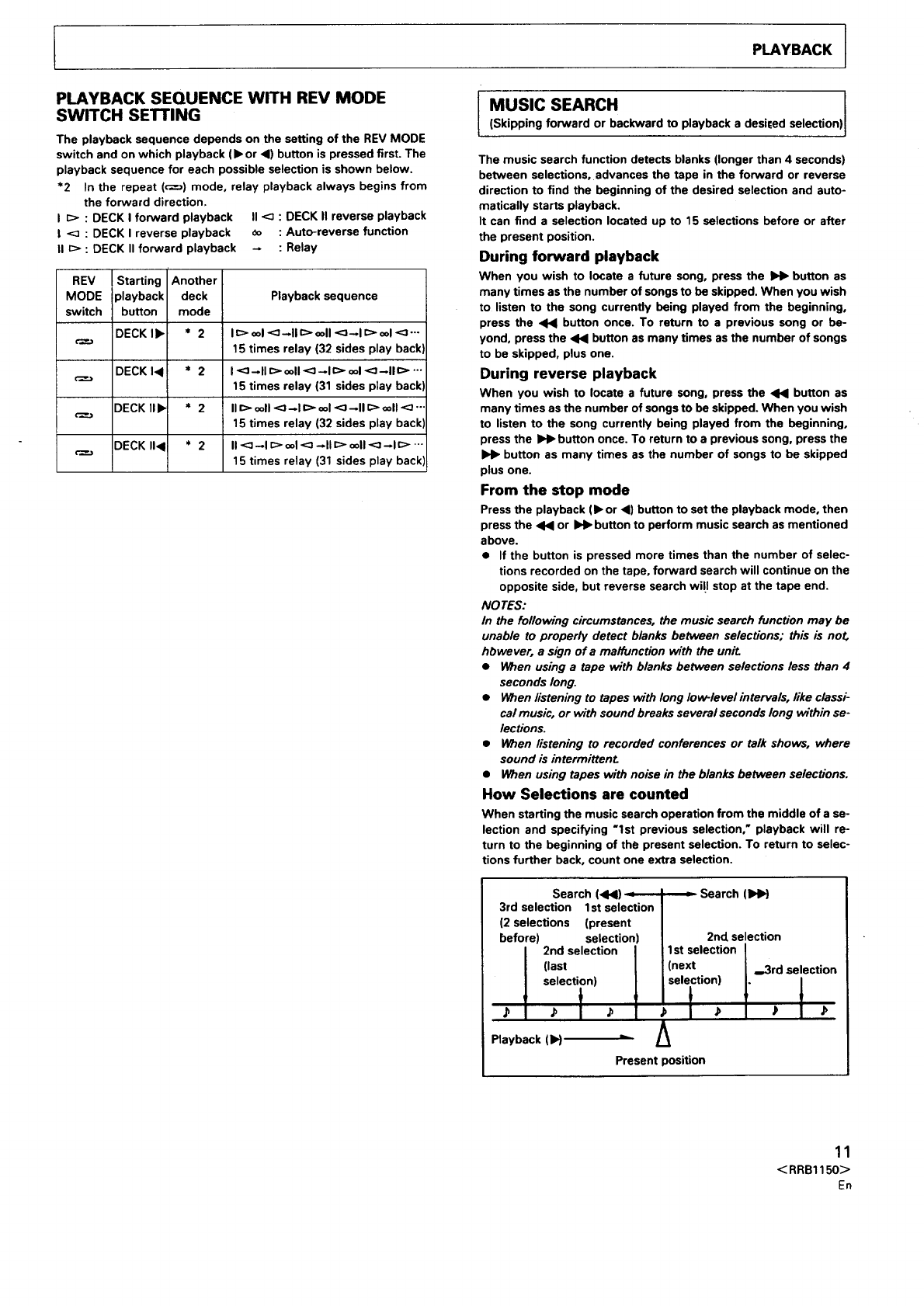
The playback sequence depends on the setting of the REV MODE
switch and on which playback (1_ or 4) button is pressed first. The
playback sequence for each possible selection is shown below.
*2 In the repeat (_) mode, relay playback always begins from
the forward direction.
I_> : DECK I forward playback II <_ : DECK II reverse playback
!<_ : DECK I reverse playback _o : Auto-reverse function
IIE:> : DECK II forward playback -: Relay
REV I Starting Another
MODE playback deck Playback sequence
switch button mode
DECK I1_ *2 I _> ool <:;--II c> ooll <:l_l _> ool <3"'"
15 times relay (32 sides play back]
DECK I_ * 2I<]-II c> ooll <:_ _1 c> ool <:]--II c> -..
15 times relay (31 sides play back]
DECK lib * 2 II c> ooll <:)--I ¢> ool <_ --II c:> ooll<_ "-
15 times relay (32 sides play backl
DECK I1< * 2 II <_ --I E> ool <: _ll C> ooll <:--I C> '"
15 times relay (31 sides play back'=
MUSIC SEARCH
(Skipping forward or backward to playback a desi[ed selection
The music search function detects blanks (longer than 4 seconds)
between selections, advances the tape in the forward or reverse
direction to find the beginning of the desired selection and auto-
matically starts playback.
It can find a selection located up to 15 selections before or after
the present position.
During forward playback
When you wish to locate a future song, press the _button as
many times as the number of songs to be skipped. When you wish
to listen to the song currently being played from the beginning,
press the _button once. To return to a previous song or be-
yond, press the _button as many times as the number of songs
to be skipped, plus one.
During reverse playback
When you wish to locate a future song, press the <1_ button as
many times as the number of songs tO be skipped. When you wish
to listen to the song currently being played from the beginning,
press the ),_ button once. To return to a previous song, press the
button as many times as the number of songs to be skipped
plus one.
From the stop mode
Press the playback (1_ or ,<) button to set the playback mode, then
press the <1_ or IH_ button to perform music search as mentioned
above.
• If the button is pressed more times than the number of selec-
tions recorded on the tape, forward search will continue on the
opposite side, but reverse search wi!l stop at the tape end.
NO TES:
In the following circumstances, the music search fonc_on may be
unable to properly detect blanks between selections; this is no_
hbwever, a sign of a malfunction with the unit
•When using a tape with blanks between selections less than 4
seconds long.
• When listening to tapes with long Iow-levelintervals, like classi-
cal music, or with sound breaks several seconds long within se-
lections.
• When listening to recorded conferences or talk shows, where
sound is intermittenL
• When using tapes with noise in the blanks between selections.
How Selections are counted
When starting the music search operation from the middle of a se-
lection and specifying "1st previous selection," playback will re-
turn to the beginning of the present selection. To return to selec-
tions further back, count one extra selection.
Search (41<1) :
3rd selection Ist selection
(2 selections (present
before) selection)
I 2nd selection J
l (last [
I selection) I
,t 0t 01
Playback (IH
Present
: Search (tHH
2nd selection
1st selection I
I
(next I ..3rd selection
selection) I. /
,I01,l,
)osition
11
<RRB1150>
En
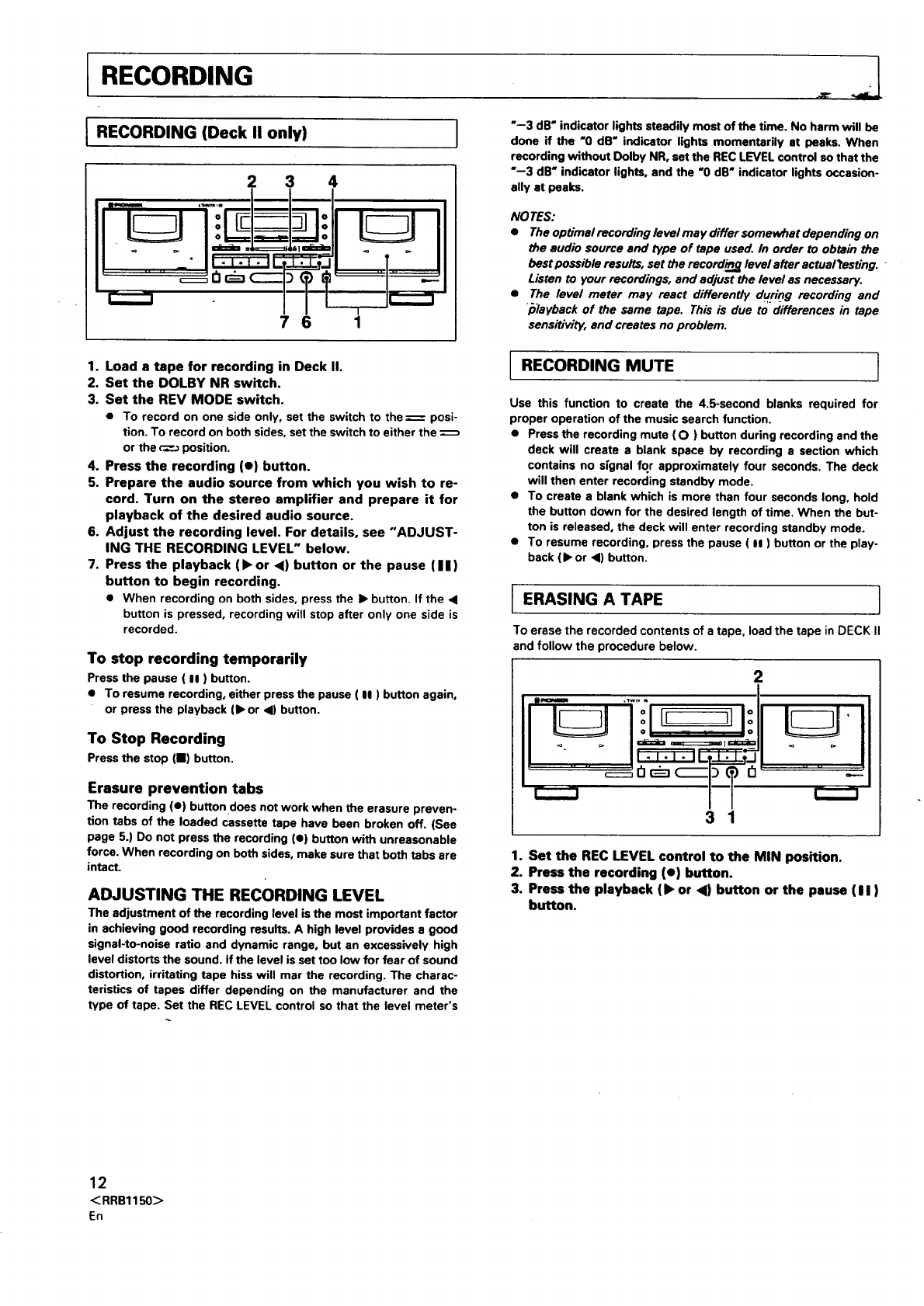
RECORDING
IRECORDING (Deck only)
II
2 3 4
I"--3 dB" indicator lights steadily most of the time. No harm will be
done if the "0 dB" indicator lights momentarily at peaks. When
recording without Dolby NR, set the REC LEVEL control so that the
"--3 dB" indicator lights, and the "O dB" indicator lights occasion-
ally at peaks.
NOTES:
•Theoptimalrecordinglevelmay differsomewhatdependingon
7 6
1. Load atape for recording in Deck II.
2. Set the DOLBY NR switch.
3. Set the REV MODE switch.
•To record on one side only, set the switch to the = posi-
tion. To record on both sides, set the switch to either the
or the _position.
4. Press the recording (e) button.
5. Prepare the audio source from which you wish to re-
cord. Turn on the stereo amplifier and prepare it for
playback of the desired audio source.
6. Adjust the recording level. For details, see "ADJUST-
ING THE RECORDING LEVEL" below.
7. Press the playback (1_ or 4) button or the pause (I I)
button to begin recording.
•When recording on both sides, press the I_ button. If the •
button is pressed, recording will stop after only one side is
recorded.
To stop recording temporarily
Press the pause ( II ) button.
• To resume recording, either press the pause ( II ) button again,
or press the playback (1_or •) button.
To Stop Recording
Press the stop (11) button.
Erasure prevention tabs
The recording (e) button does not work when the erasure preven-
tion tabs of the loaded cassette tape have been broken off. (See
page 5.) Do not press the recording (•) button with unreasonable
force. When recording on both sides, make sure that both tabs are
intact.
ADJUSTING THE RECORDING LEVEL
The adjustment of the recording level is the most important factor
in achieving good recording results. A high level provides a good
signal-to-noise ratio and dynamic range, but an excessively high
level distorts the sound. If the level is set too low for fear of sound
distortion, irritating tape hiss will mar the recording. The charac-
teristics of tapes differ depending on the manufacturer and the
type of tape. Set the REC LEVEL control so that the level meter's
I
the audio source and type of tape used. In order to obtain the
best possible results, set the recordieg level after actualtesting.
Listen to your recordings, and adjust the level as necessary.
The level meter may react differently during recording and
/ilayback of the same tape. This is due to differences in tape
sensi_vity, and creates no problem.
RECORDING MUTE I
Use this function to create the 4.5-second blanks required for
proper operation of the music search function.
•Press the recording mute (O) button during recording and the
deck will create a blank space by recording e section which
contains no signal for approximately four seconds. The deck
will then enter recording standby mode.
• To create a blank which is more than four seconds long, hold
the button down for the desired length of time. When the but-
ton is released, the deck will enter recording standby mode.
•To resume recording, press the pause ( II ) button or the play-
back (),or •) button.
I ERASING A TAPE ]
To erase the recorded contents of a tape, load the tape in DECK II
and follow the procedure below.
2
II
I.... I
3 1
1. Set the REC LEVEL control to the MIN position.
2. Press the recording (e) button.
3. Press the playback (1_ or <1) button or the pause (II)
button.
12
<RRB1150>
En
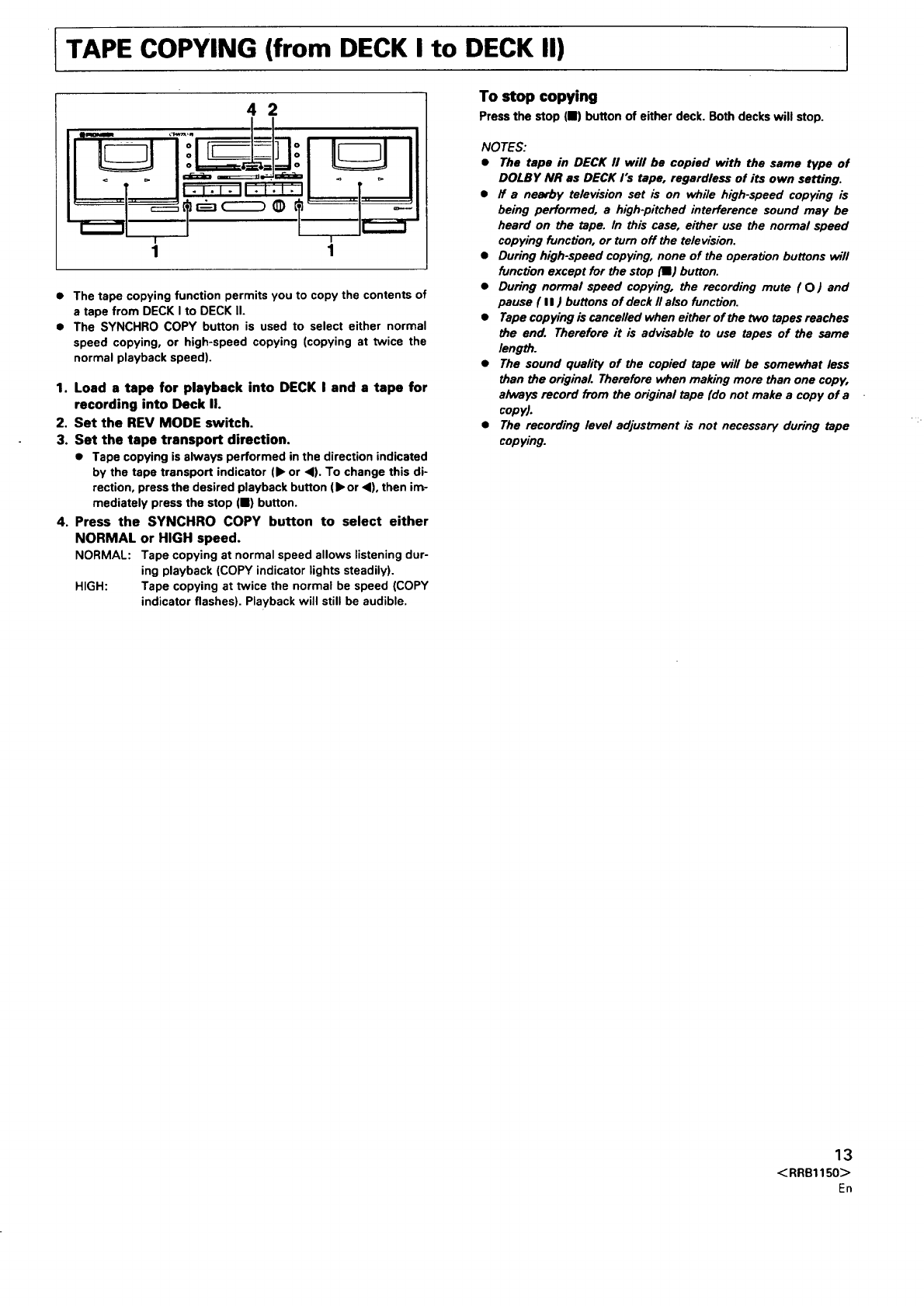
ITAPE COPYING (from DECK I to DECK II) I
42
• The tape copying function permits you to copy the contents of
a tape from DECK I to DECK 11.
•The SYNCHRO COPY button is used to select either normal
speed copying, or high-speed copying (copying at twice the
normal playback speed).
1. Load s tape for playback into DECK I and a tape for
recording into Deck II.
2. Set the REV MODE switch.
3. Set the tape transport direction.
•Tape copying is always performed in the direction indicated
by the tape transport indicator (1_or <1).To change this di-
rection, press the desired playback button (1_or <1),then im-
mediately press the stop (11) button.
4. Press the SYNCHRO COPY button to select either
NORMAL or HIGH speed.
NORMAL: Tape copying at normal speed allows listening dur-
ing playback (COPY indicator lights steadily).
HIGH: Tape copying at twice the normal be speed (COPY
indicator flashes). Playback will still be audible.
To stop copying
Press the stop (11) button of either deck. Both decks will stop.
NOTES:
•The tape in DECK II will be copied with the same type of
DOLBY NR as DECK rs tape, regardless of its own setting.
•ff a nearby television set is on whi/e high-speed copying is
being performed, a high-pitched interference sound may be
heard on the tape. In this case, either use the normal speed
copying function, or turn off the television.
•During high-speed copying, none of the opera,on buttons v_ll
function except for the stop (IE) button.
•During normal speed copying, the recording mute (O) and
pause ( II) buttons of deck II also function.
•Tape copying is cancelled when either of the two tapes reaches
the end. Therefore it is advisable to use tapes of the same
length.
•The sound quality of the copied tape will be somewhat less
than the original. Therefore when making more than one copy,
always record from the original tape (do not make a copy of a
copy).
•The recording level adjustment is not necessary during tape
copying.
13
<RRB1150>,En
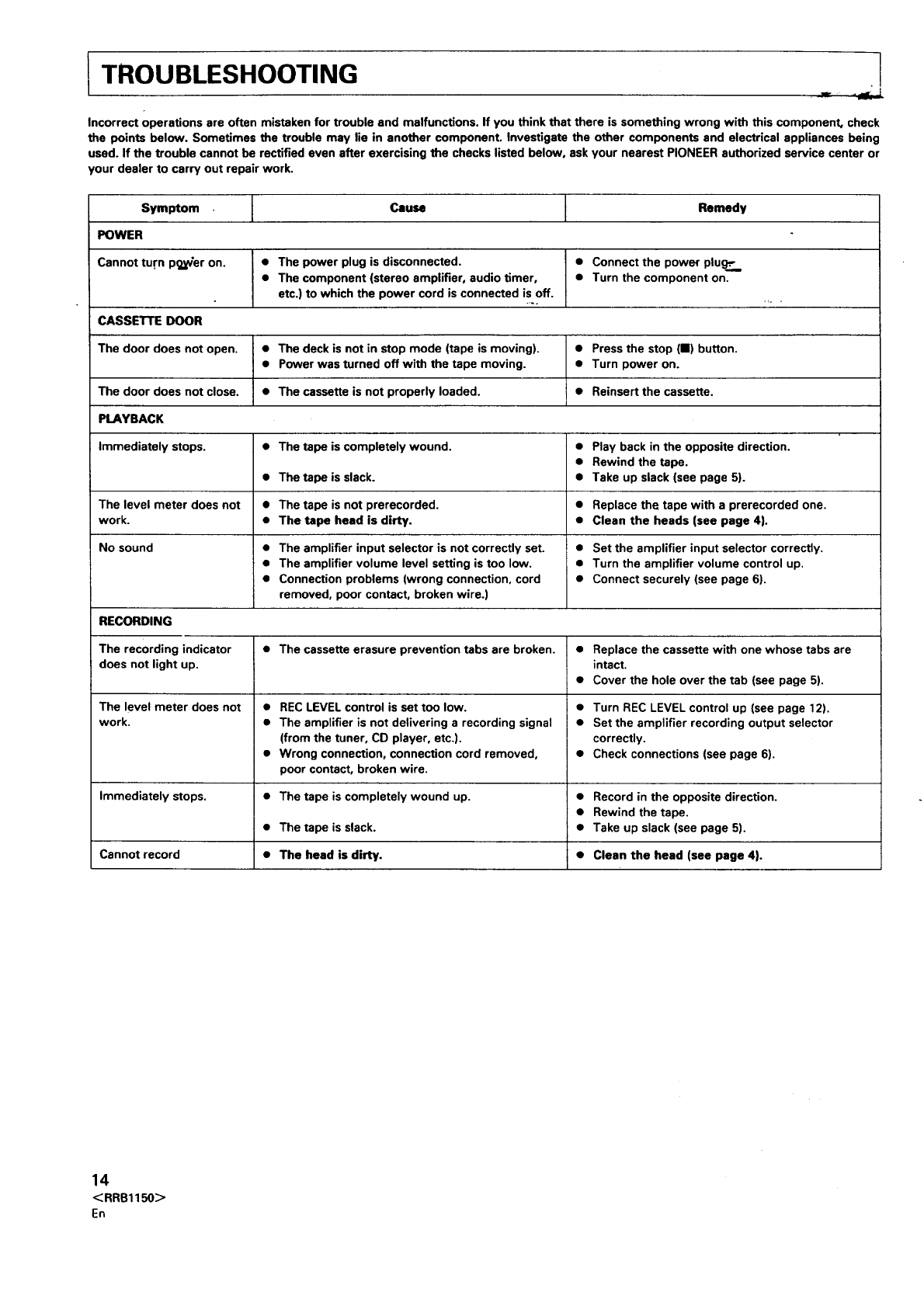
TROUBLESHOOTING
Incorrect operations are often mistaken for trouble and malfunctions. If you think that there is something wrong with this component, check
the points below. Sometimes the trouble may lie in another component. Investigate the other components and electrical appliances being
used. If the trouble cannot be rectified even after exercising the checks listed below, ask your nearest PIONEER authorized service center or
your dealer to carry out repair work.
Symptom ICause IRemedy
POWER
Cannot tu.rn p_ier on. • The power plug is disconnected. • Connect the power plu_:..
• The component (stereo amplifier, audio timer, • Turn the component on.
etc.) to which the power cord is connected is off.
CASSETTE DOOR
The door does not open. • The deck is not in stop mode (tape is moving). • Press the stop (II) button.
• Power was turned off with the tape moving. • Turn power on.
The door does not close. • The cassette is not properly loaded. • Reinsert the cassette.
PLAYBACK
Immediately stops. • The tape is completely wound. • Play back in the opposite direction.
• Rewind the tape.
• The tape is slack. •Take up slack (see page 5).
The level meter does not •The tape is not prerecorded. • Replace the tape with a prerecorded one.
work. • The tape heed is dirty. • Clean the heads (see page 4}.
No sound
RECORDING
The recording indicator
does not light up.
The level meter does not
work.
Immediately stops.
Cannot record
• The amplifier input selector is not correctly set.
• The amplifier volume level setting is too low.
• Connection problems (wrong connection, cord
removed, poor contact, broken wire.)
• Set the amplifier input selector correctly.
• Turn the amplifier volume control up.
• Connect securely (see page 6).
• The cassette erasure prevention tabs are broken.
• REC LEVEL control is set too low.
• The amplifier is not delivering a recording signal
(from the tuner, CD player, etc.).
• Wrong connection, connection cord removed,
poor contact, broken wire.
•The tape is completely wound up.
•The tape is slack.
• The head is dirty.
e
e
e
e
e
Replace the cassette with one whose tabs are
intact.
Cover the hole over the tab (see page 5).
Turn REC LEVEL control up (see page 12).
Set the amplifier recording output selector
correctly.
Check connections (see page 6).
• Record in the opposite direction.
• Rewind the tape.
• Take up slack (see page 5).
• Clean the head (see page 4}.
14
<RRB1150>
En
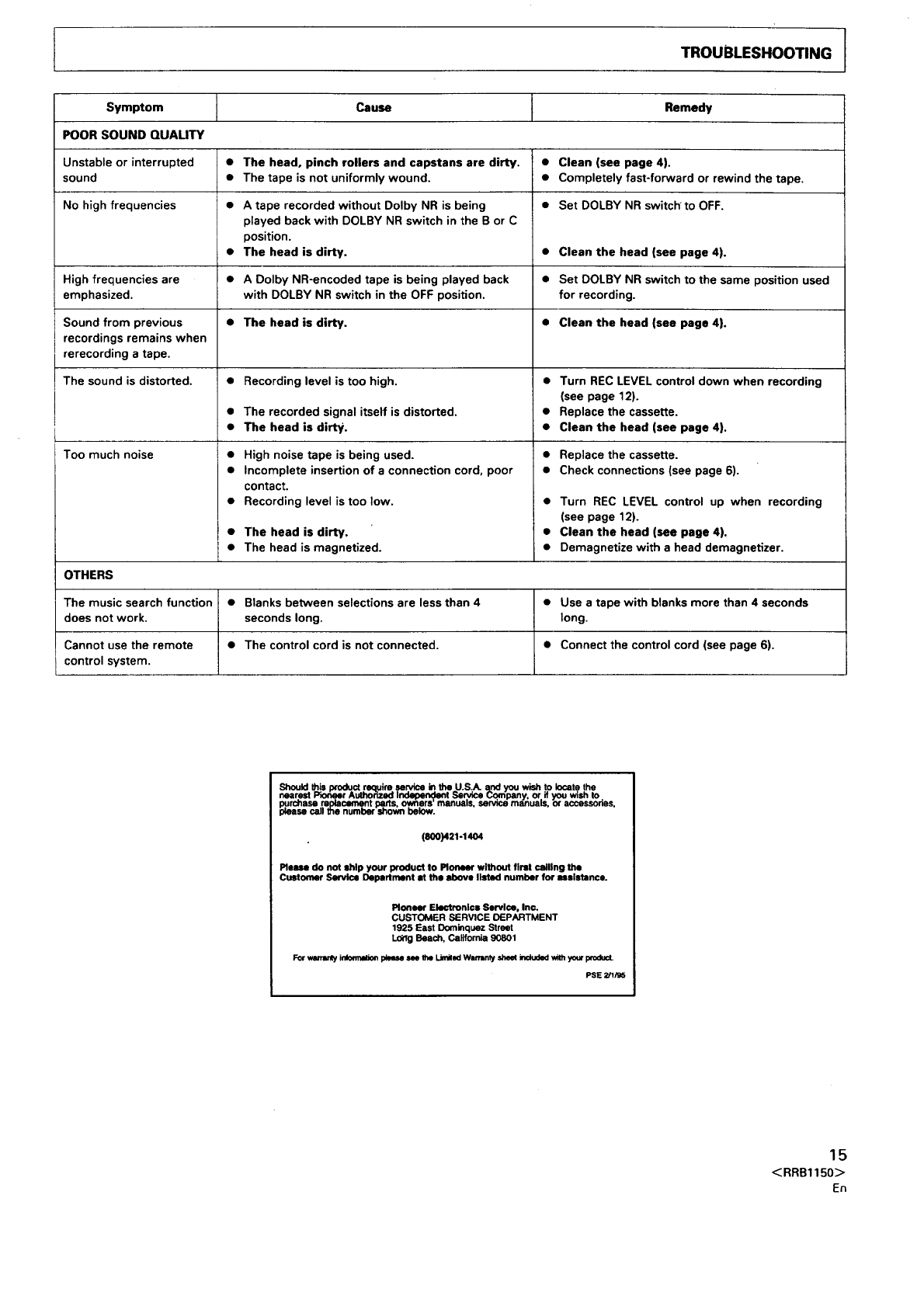
ITROUBLESHOOTING
Symptom ICause i Remedy
POOR SOUND QUAUTY
Unstable or interrupted • The head, pinch rollers and capstans are dirty. •Clean (see page 4).
sound •The tape is not uniformly wound. • Completely fast-forward or rewind the tape.
No high frequencies • A tape recorded without Dolby NR is being •Set DOLBY NR switch'to OFF.
played back with DOLBY NR switch in the B or C
position.
• The head is dirty. •Clean the head (see page 4).
High frequencies are •A Dolby NR-encoded tape is being played back •Set DOLBY NR switch to the same position used
emphasized, with DOLBY NR switch in the OFF position, for recording.
Sound from previous •The head is dirty. • Clean the head (see page 4).
recordings remains when
rerecording a tape.
The sound is distorted. Recording level is too high. •Turn REC LEVEL control down when recording
(see page 12).
•Replace the cassette.
•Clean the head (see page 4).
Too much noise
OThe recorded signal itself is distorted.
The head is dirty.
High noise tape is being used. •
Incomplete insertion of a connection cord, poor •
contact.
Recording level is too low. •
The head is dirty. •
The head is magnetized. •
Replace the cassette.
Check connections (see page 6).
Turn REC LEVEL control up when recording
(see page 12).
Clean the head (see page 4).
Demagnetize with a head demagnetizer.
OTHERS
The music search function •Blanks between selections are less than 4 •Use a tape with blanks more than 4 seconds
does not work. seconds long. long.
Cannot use the remote •The control cord is not connected. •Connect the control cord (see page 6).
control system.
Should this Ixodqct require service kt the U.S.A. and you wish .to locate the
nearest Fm_er Aulhor'lzed Ind_Ser_ce uompany, or if you wish to.
pprcnase mlXaCament pa.l_s, o_ors' manuals, service manuals, or accessones,
i0lease call the number shown below.
(soo)421-14o4
Plsm do not ship your product to Pioneer without first _llln9 the
Customer Service Department at the above listed number for mslctancs.
Pioneer Ekmtronlcs Service, Inc.
CUSTOMER SERVICE DEPARTMENT
1925 East Dominquez Street
Long Beach, California 90801
For wenanty irdomlalion plemm see the I.Jmilod Wmmnty she_ included with y_x IxoducL
PSE 2/1/95
15
<RRB1150>
En
