Poly User Guide For Explorer 220,使用者指南 220,사 용 설명 서 220 Explorer220 Ug Asia Pacific En
User Manual: Poly Explorer 220 - Setup & Support | Poly, formerly Plantronics & Polycom
Open the PDF directly: View PDF  .
.
Page Count: 20
Pl an tronics E XPlorEr™ 220
Bluetooth®
Bluetooth®耳機
Bluetooth®헤드셋
U S E R G U I D E
使 用者 指南
사용 설명 서

|
Package contents and feataures 4
Charging & powering 5
Pairing 6
Adjusting Fit 10
Using your heaset 11
Indicator lights 13
Accessories 14
Troubleshooting 14
Product specications 16
Regulatory notices 18
Warranty 19
Technical assistance 19
UK TABLE OF CONTENTS
包裝內容與外觀 4
充電與開關電源 5
配對 6
配戴調整 10
使用耳機 11
指示燈 13
配件 14
疑難排解 15
產品規格 16
法規資訊 18
保固 19
技術協助 19
TC 目錄
패키지 내용물 및 기능 4
충전 및 전원 5
페어링 6
맞춤 조정 10
헤드셋 사용 11
표시등 13
액세서리 14
문제 해결 15
제품 사양 17
규정 19
보증 19
기술 지원 19
KO 목차

|
UK
WELCOME
Thank you for purchasing a
Plantronics headset.
Let us provide you with the
best possible service and
technical support. After
reviewing this user guide, if
you need
additional assistance or
have any product questions,
please contact:
•
Please refer to the
separate Safety Instructions
booklet for important
product safety information
prior to installation or use.
REGISTER YOUR PRODUCT
ONLINE
Visit
to
register your product online
so we can provide you with
the best possible service
and technical support.
TC
歡迎使用
感謝您購買 Plantronics
耳機。
我們將為您提供最佳服務與
技術支援。在閱讀本使用者指
南之後,如果您需要更多協助
或遇到任何產品問題,請聯
絡:
•
在安裝或使用本產品前,
請參考另附的安全說明小冊,
以瞭解重要的產品安全資
訊。
線上產品註冊
請造訪
在線上註冊產品,以便為您提
供最佳服務與技術支援。
KO
시작
Plantronics 헤드셋을 구입해
주셔서 감사합니다.
제공되는 최적의 서비스와 기
술 지원을 이용하십시오. 이
사용 설명서를 읽은 후 추가
지원이 필요하거나 제품과 관
련한 문의 사항이 있는 경우
다음 연락처로 문의하십시오.
•
제품을 설치 또는 사용하
기 전에 별도 제공된 안전 지
침서를 읽고 중요한 제품 안
전 정보를 참고하십시오.
온라인으로 제품 등록
최적의 서비스 및 기술
지원을 제공할 수 있도록
을
방문하여 온라인으로 제품을
등록해 주십시오.
|
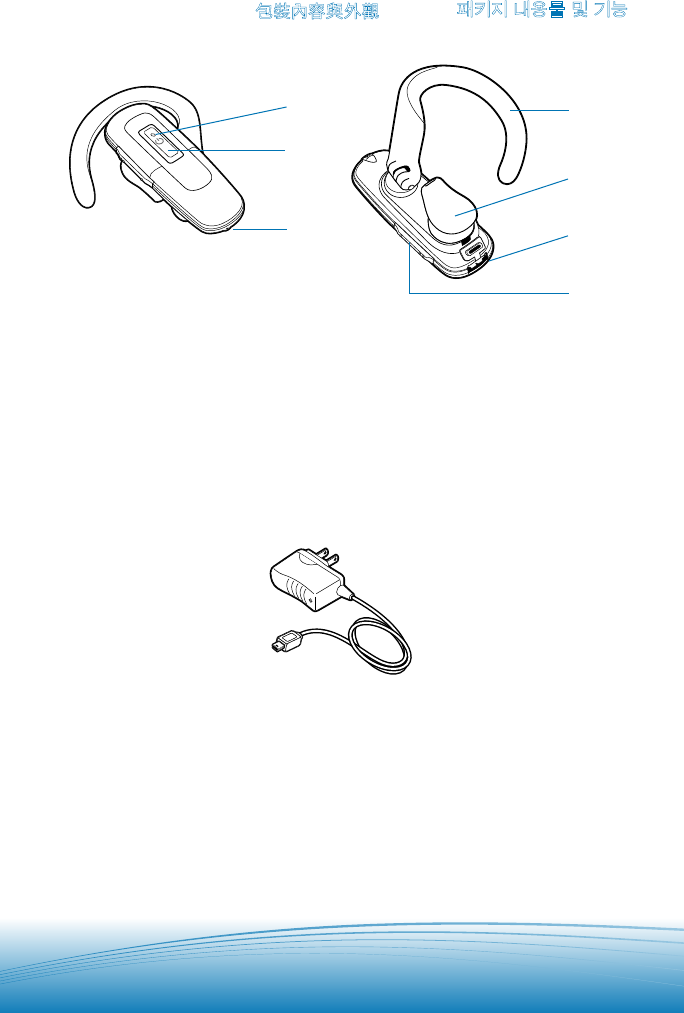
1. Indicator light
2. Call control button
3. Microphone
4. Adjustable ear loop
5. Ear tip
6. Charging jack
7. Volume control
1. 指示燈
2. 通話控制鈕
3. 麥克風
4. 可調式耳部固定器
5. 耳塞
6. 充電插孔
7. 音量控制
1. 표시등
2. 통화 컨트롤 버튼
3. 마이크
4. 조절 가능 귀걸이
5. 이어 팁
6. 충전용 잭
7. 볼륨 조절
AC power adapter 交流電變壓器 AC 전원 어댑터
UK
PACKAGE
CONTENTS &
FEATURES
TC
包裝內容與外觀
KO
패키지 내용물 및 기능
1
2
3
5
6
7
4
|
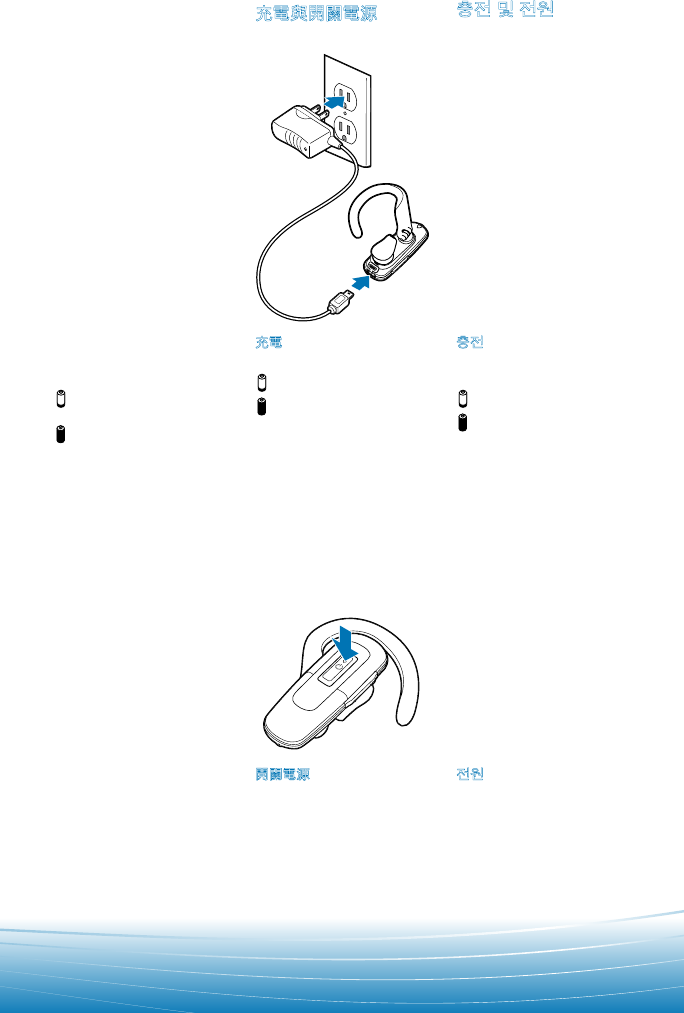
CHARGING
Before using, you must
rst charge your headset.
20 minutes = minimum
charge
2 hours = full charge
Light is solid red when
battery is charging.
For the best user
experience, keep your headset
fully charged.
Do not use headset
while charging and do not
connect the charger while
the headset is in use.
充電
使用前必須先將耳機充電。
20 分鐘 = 最低充電量
2 小時 = 完全充電
電池正在充電中時指示燈呈
紅色持續亮起。
附註:為得到最佳的使用效果,請
讓耳機經常保持足夠的電量。
注意:請勿在充電時使用耳機,耳
機正在使用時也不要接上充電器。
충전
사용하기 전에 먼저 헤드셋
을 충전해야 합니다.
20분 = 최소 충전
2시간 = 완전 충
배터리 충전 중에는 표시등
이 적색으로 켜집니다.
참고 제품을 효율적으로 사용하
려면 헤드셋을 완전 충전 상태로
유지하십시오.
주의 충전 중에 헤드셋을 사용하
거나, 헤드셋을 사용하는 도중 충
전기를 연결하지 마십시오.
2
1
POWERING
Press the control button
for 2 seconds to power on.
Press the control button
for 3 seconds to power off.
開關電源
按住控制鈕 2 秒可開啟電
源。按住控制按鈕 3 秒以關
閉電源。
전원
전원을 켜려면 컨트롤 버튼
을 2초간 누르십시오. 전원을
끄려면 컨트롤 버튼을 3초간
누르십시오.
UK
CHARGING &
POWERING
TC
充電與開關電源
KO
충전 및 전원
|
SETTING S
SETTING S
Time and Date
Phone Settings
Bluetooth
Sound Settings
Networ k Services
Security
Reset Settings
BLUE TOOTH
220Plantronics
Headset Passkey
PASSKEY
0000
BLUE TOOTH
Discover/
Search
UK
PAIRING
This headset comes with QuickPair™
technology, so pairing with your
Bluetooth phone is even easier. Follow
the instructions below to pair your phone
with your headset for the rst time.
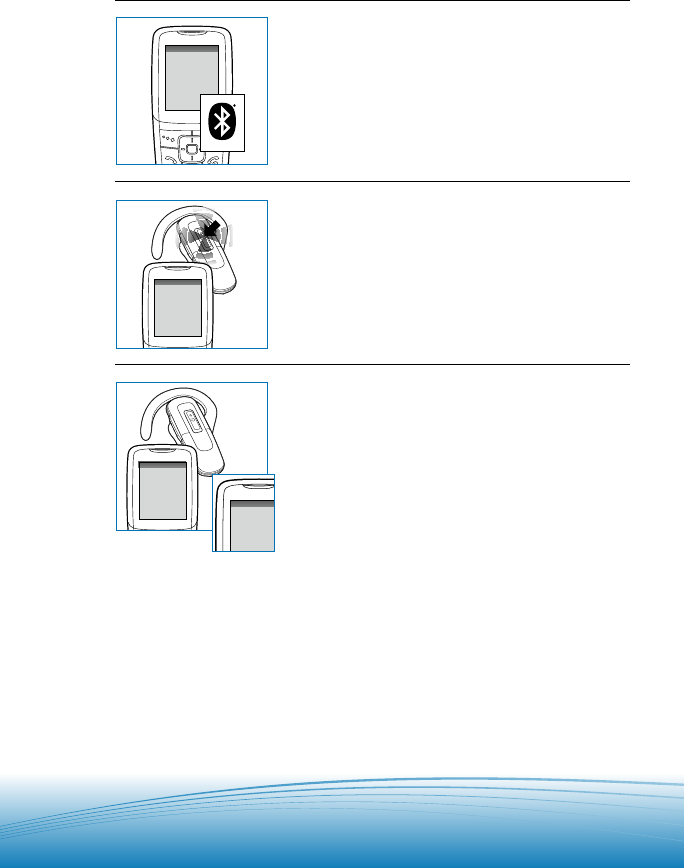
QuickPair feature instructions
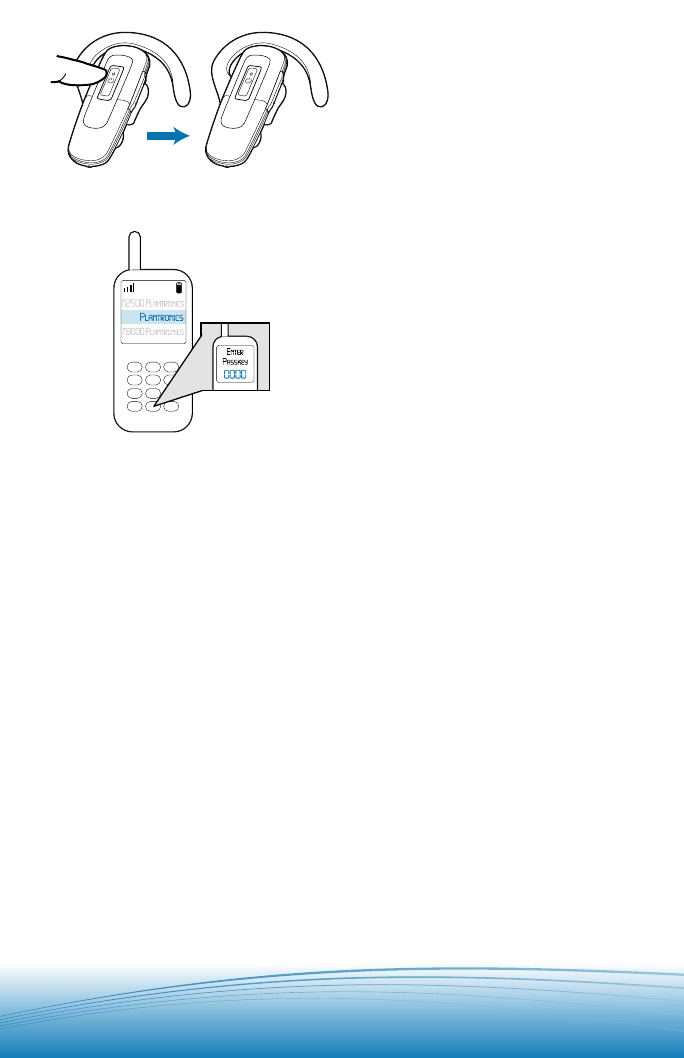
STEP ONE:
Prepare phone—Turn on Bluetooth
For most phones, go to Settings/Tools
menu and select Bluetooth or Connectivity
and select “On.” (Or see the user guide
for your phone.)
STEP TWO:
Prepare headset—Pairing mode
Begin with headset turned off. Turn
headset on (hold call control button for two
seconds until the light ashes blue) and it
will automatically go into pairing mode,
ashing red and blue.
STEP THREE:
Pairing—Add headset to phone
For most phones, go to Settings/Tools >
Bluetooth > Search or Add a Device, then
Select “220Plantronics.”
Enter 0000 as the password. Headset will
ash blue when paired successfully.
It is now powered on and ready to use.
You normally only need to pair the
headset and handset once. If headset has
been previously paired with another device,
follow pairing instructions on page 8.
|
TC
配對
這個耳機具備 QuickPair™ 技術,可以更輕鬆
地進行與 Bluetooth 手機的配對。請依照下面
的指示,為耳機與手機進行首次配對。
QuickPair 功能指示
第一步:
準備手機—開啟 Bluetooth
對大多數的手機來說,您需要進入設定/工具
功能表、選取 Bluetooth 或連線,然後選取「
開啟」。(或參閱手機的使用者指南。)
第二步:
準備耳機—配對模式
首先關閉耳機電源。開啟耳機 (按住通話控制
鈕至少两秒,直到指示燈呈藍色閃爍),
耳機會自動進入配對模式,呈現紅色與藍色
交叉閃爍。
第三步:
配對—將耳機新增到手機
對大多數的手機來說,您需要進入設定/工具
> Bluetooth > 搜尋或新增裝置,然後選取
「220Plantronics」。
通行金鑰請輸入「0000」。配對成功時,
耳機會呈藍色閃爍。耳機現在已啟動,可以開
始使用。
注意:一般來說,耳機只需要和手機配對一次。如果
耳機之前曾和其他裝置配對,請依照下一頁的配對指
示操作。
KO
페어링
이 헤드셋에는 QuickPair™ 기술이 탑재되어
있어 Bluetooth 휴대폰과 페어링이 더욱 간단
합니다. 다음 지침을 따라 처음 휴대폰과 헤
드셋을 페어링하십시오.
QuickPair 기능 사용 방법
1단계:
휴대폰 준비—Bluetooth를 켭니다.
휴대폰에서 설정/도구 메뉴를 열고 Bluetooth
또는 연결을 선택한 다음 “켬(On)”을 선택합
니다(휴대폰 사용 설명서 참조).
2단계:
헤드셋 준비—페어링 모드
헤드셋을 끈 상태에서 시작합니다. 청색 표시
등이 켜질 때까지 2초 정도 통화 컨트롤 버튼
을 눌러 헤드셋을 켜면 자동으로 페어링 모드
에 들어가고 청색, 적색 표시등이 교대로 깜
박입니다.
3단계:
페어링—휴대폰에 헤드셋 추가
휴대폰에서 설정/도구 > Bluetooth > 검색 또는
장치 추가 메뉴를 연 다음 “220Plantronics”
를 선택합니다.
암호 키는 “0000”을 입력합니다. 페어링이 완
료되면 헤드셋의 청색 표시등이 깜박입니다.
이제 전원을 켜고 사용할 수 있습니다.
참고:일반적으로 헤드셋과 휴대폰은 한 번만 페어링
하면 됩니다.이전에 헤드셋을 다른 장치와 페어링했
던 경우는 다음 페이지의 페어링 지침을 따르십시오.
|
220
2
3
1UK
PAIRING
If headset has previously been paired
with another device, please follow these
instructions for pairing a second time.
Ensure that the headset is fully charged.
For instructions on set-up and pairing
with other Bluetooth devices, please
consult your Bluetooth device user guide
or visit www.plantronics.com/easytopair,
an online, interactive pairing guide for
phones and headsets.
Begin with headset turned off.
1. Press and hold down the call
control button for 8 seconds until
the headset status indicator begins
to ash blue then red.
The headset is now in pairing mode
for the next 120 seconds.
2. While the headset is ashing, use the
phone menu to search for Bluetooth
devices and select “220Plantronics.”
3. When prompted for a password,
enter 0000. Headset will ash blue
when paired successfully.
The headset can pair to multiple
Bluetooth devices, but will only connect
to one device at a time. The headset will
automatically connect to the last device to
which it was connected.

|
TC
配對
如果耳機之前曾和其他裝置配對,請根據配
對指示再操作一次。請確定耳機已充飽電。如
需設定與配對其他 Bluetooth 裝置的說明,請
查閱該 Bluetooth 裝置使用者指南,或造訪
www.plantronics.com/easytopair,這是行
動電話與耳機的線上互動式配對指南。
首先關閉耳機電源。
1. 按住通話控制鈕 8 秒直到耳機狀態指
示燈開始呈藍色轉紅色閃爍。
接下來 120 秒,耳機進入配對模式。
2. 在耳機指示燈閃爍時,使用手機功能表
搜尋 Bluetooth 裝置,然後選取「
220Plantronics」。
3. 手機提示輸入通行金鑰時,輸入
「0000」。配對成功時,耳機會呈藍色
閃爍。
附註:耳機可以與多個 Bluetooth 裝置配對,但一次
只能連接至一個裝置。耳機會自動連接至之前連接的
最後一個裝置。
KO
페어링
이전에 헤드셋을 다른 장치와 페어링했던 경
우는 여기에 나와 있는 두 번째 페어링 지침
을 따르십시오. 헤드셋이 완전히 충전되었는
지 확인합니다. 다른 Bluetooth 장치를 설정
하고 페어링하는 방법은 Bluetooth 장치 사용
설명서를 참조하거나, www.plantronics.com/
easytopair를 방문하여 휴대폰 및 헤드셋용
대화형 페어링 설명서를 온라인으로 보십시오.
헤드셋을 끈 상태에서 시작합니다.
1. 헤드셋 상태 표시등이 청색으로 깜박이
다가 적색으로 깜박일 때까지 8초 정도
통화 컨트롤 버튼을 누르고 계십시오.
이제 헤드셋이 다음 120초 동안 페어링
모드로 들어갑니다.
2. 헤드셋이 깜박이는 동안 휴대폰 메뉴에
서 Bluetooth 장치를 검색하여
“220Plantronics”를 선택합니다.
3. 암호 키를 입력하라는 메시지가 나타나
면 “0000”을 입력합니다. 페어링이 완
료되면 헤드셋의 청색 표시등이 깜박입
니다.
참고: 헤드셋은 여러 Bluetooth 장치와 페어링할 수
있으나 한 번에 하나의 장치에만 연결됩니다. 헤드셋
은 최근 연결된 장치에 자동으로 연결됩니다.
|
2
3
1
4 5
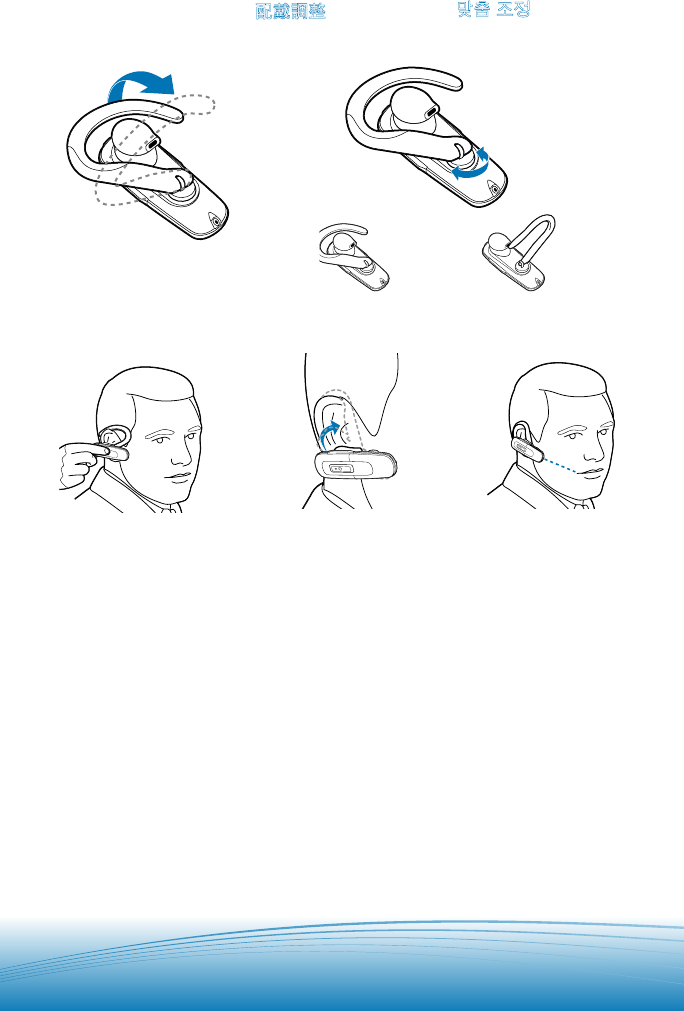
1. Lift ear loop.
2. Swivel ear loop to the
right or left for right or left
ear wearing.
3. Place ear loop behind ear.
4. Pivot headset to place
speaker into ear.
5. Position speaker and align
microphone with mouth.
1. 提起耳掛
2. 將耳掛往右旋供右耳配戴,
往左旋供左耳佩戴。
3. 將耳掛掛在耳後。
4. 轉動耳機,將喇叭放入耳內
5. 調整喇叭位置,將麥克風對
往嘴部。
1. 귀걸이를 세움
2. 귀걸이를 오른쪽이나 왼
쪽으로 돌려 착용합니다.
3. 귀걸이를 귀 뒤에 겁니다.
4. 스피커가 귀 안에 맞도록
헤드셋을 돌립니다.
5. 스피커 위치를 조정하고
마이크를 입 방향으로 정
렬합니다.
UK
ADJUSTING FIT
TC
配戴調整
KO
맞춤 조정
Right ear
右耳
오른쪽 귀
Left ear
左耳
왼쪽 귀
|
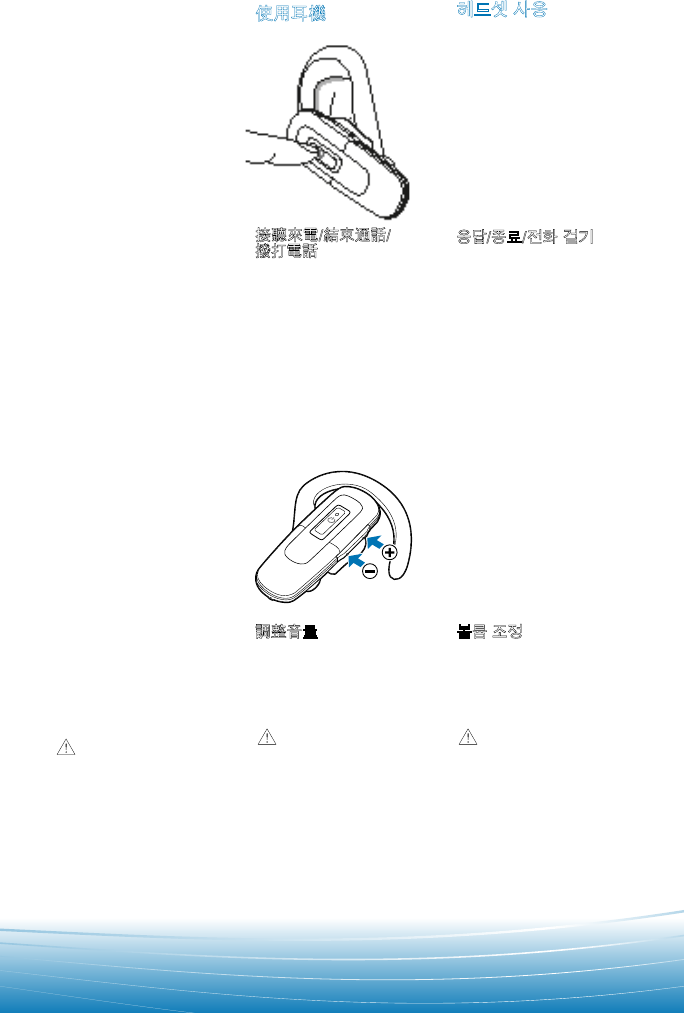
Answering/Ending/
Making calls
For best performance,
position your mobile phone
on the same side of your
body as the headset.
To answer or end a
call, briey press the call
control button.
To make a call, enter
number on your phone,
press send and the call is
automatically transferred
to headset; no need to press
the call control button.
接聽來電/結束通話/
撥打電話
為取得最佳效能,請將手機
與耳機置於身體的同一側。
若要接聽來電或結束通
話,請輕按通話控制鈕。
若要撥打電話,請用手機
撥號,按下傳送,通話會自動
傳送至耳機;無需按下通話
控制鈕。
응답/종료/전화 걸기
최고의 성능이 발휘되도록
헤드셋과 같은 방향(신체의
오른쪽 또는 왼쪽)에 휴대폰
을 두십시오.
통화에 응답하거나 통화
를 종료하려면 통화 컨트롤
버튼을 짧게 누르십시오.
전화를 걸려면 휴대폰에
번호를 입력하고 통화 버튼
을 누르십시오. 전화가 자동
으로 헤드셋에 전송되므로
통화 컨트롤 버튼을 누르지
않아도 됩니다.
UK
USING YOUR
HEADSET
TC
使用耳機
KO
헤드셋 사용
Adjusting the volume
Briey push up or down
on the volume button for
incremental volume steps.
You will hear two tones
(high tone followed by low
tone) at the volume limit.
Do not use
headphones/headsets at
high volumes for an extended
period of time. During so
can cause hearing loss.
Always listen at moderate
levels. See www.plantronics.
com/healthandsafety for
more information on headsets
and hearing.
調整音量
輕輕地向上或向下按壓音量
按鈕以逐漸改變音量大小。
達到音量極限時,您會聽到
兩次嗶聲 (先是高音,然後是
低音)。
警告:請勿長時間以高音
量使用電話/耳機。否則可能導致
聽力受損。請以適當音量收聽。如
需更多有關耳機與聽力的資訊,
請造訪 www.plantronics.com/
healthandsafety。
볼륨 조정
볼륨 버튼을 위/아래로 조금씩
밀어 볼륨을 단계적으로 조
정하십시오. 최고/최저 볼륨
한계에서 두 가지 톤(높은 톤
다음에 낮은 톤)이 들립니다.
경고 장시간 동안 높은 볼륨
에서 헤드폰/헤드셋을 사용하지
마십시오. 청력이 손실될 수 있습
니다. 항상 적절한 청취 수준을 유
지하십시오. 헤드셋 및 청력에 대
한 자세한 내용은 www.plantronics.
com/healthandsafety 을 방문하십
시오.
|
UK
ADDITIONAL
FEATURES
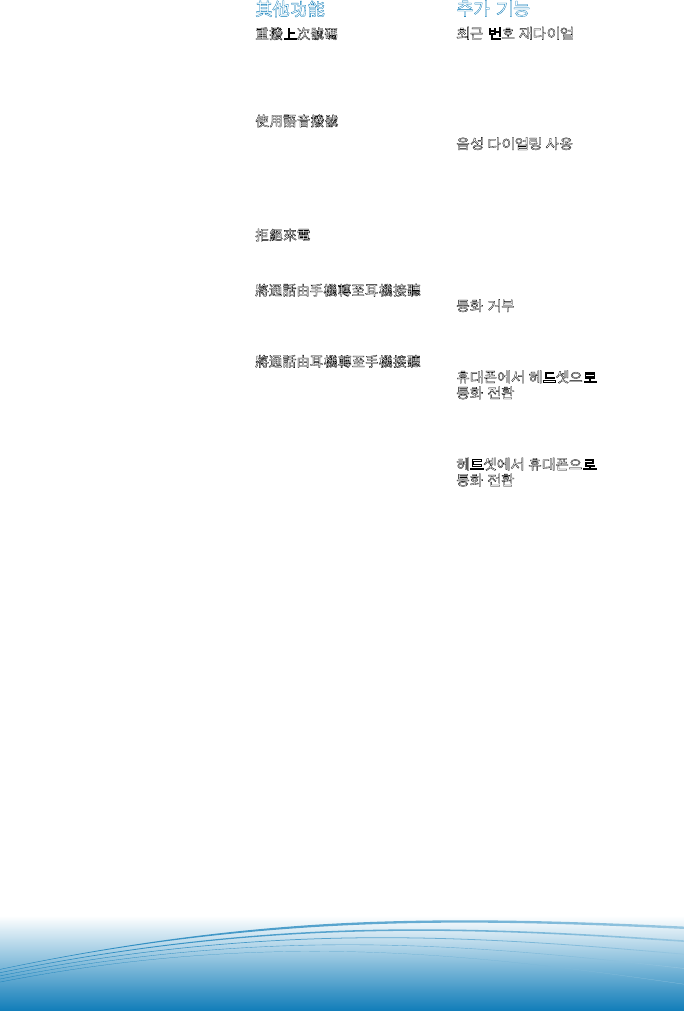
Redialing Last Number
To activate last number
redial, double press the
call control button. You
will hear a high tone after
each double key press.
Using Voice Dialing
With the headset on, press
the call control button for
2 seconds to activate the
voice dialing.
NOTE To use voice activated
dialing, the voice dialing
feature must be enabled on
your phone. See your
Bluetooth phone manual
for instructions.
Rejecting a Call
When receiving an incoming
call, press the call control
button for 2 seconds to
reject the call.
Switching a Call From
Phone to Headset
To switch an active call
from your phone to your
headset, press the
call control button for
3 seconds.
Switching a Call From
Headset to Phone
To switch an active call from
your headset to your phone,
press the call control
button for 2 seconds.
TC
其他功能
重撥上次號碼
若要啟動上次號碼的重撥,
請連按兩下通話控制鈕。
每連按兩下按鍵就會發出一
聲高音。
使用語音撥號
在耳機開啟時,按住通話控
制鈕 2 秒可啟動語音撥號。
附註:若要使用語音撥號,手機必
須啟用語音撥號功能。請參閱
Bluetooth 手機手冊以取得相
關說明。
拒絕來電
收到來電時,按住通話控制
鈕 2 秒可拒絕來電。
將通話由手機轉至耳機接聽
若要將目前通話由手機
轉至耳機接聽,按下通話控
制鈕 3 秒。
將通話由耳機轉至手機接聽
若要將進行中的通話由耳機
轉至手機接聽,請按住通話
控制鈕 2 秒。
KO
추가 기능
최근 번호 재다이얼
최근 번호 재다이얼을 작동
하려면 통화 컨트롤 버튼을
두 번 누르십시오. 키를 두 번
누를 때마다 높은 톤이 들립
니다.
음성 다이얼링 사용
헤드셋이 켜진 상태에서 음
성 다이얼링 기능을 작동하
려면 통화 컨트롤 버튼을 2초
간 누르십시오.
참고 음성 다이얼링을 사용하려면
휴대폰에서 음성 다이얼링 기능을
지원해야 합니다. 자세한 방법은
Bluetooth 휴대폰 설명서를 참조하
십시오.
통화 거부
통화를 거부하려면 통화 수
신 시 통화 컨트롤 버튼을
2초간 누르십시오.
휴대폰에서 헤드셋으로
통화 전환
휴대폰에서 헤드셋으로 통화
를 전환하려면 통화 컨트롤
버튼을 3초간 누르십시오.
헤드셋에서 휴대폰으로
통화 전환
헤드셋에서 휴대폰으로 통화
를 전환하려면 통화 컨트롤
버튼을 2초간 누르십시오.
|
UK
INDICATOR LIGHTS
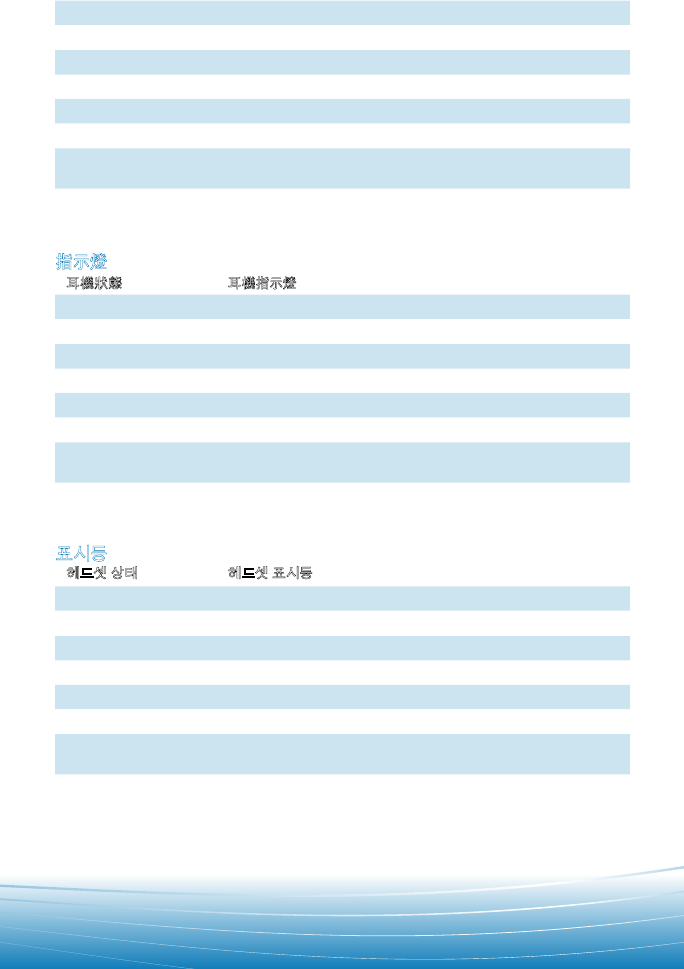
Headset status Headset indicator light
Powering on Blue ashes. Repeat.
Powering off Red appears and goes off.
Charging battery Solid red light.
Low battery Red ashes.
Pairing mode Blue/red ashes.
Missed call Purple ashes. Single press the call control button to cancel.
Ringing Purple ashes. Briey press call control button to answer the
call. Press call control button for 2 seconds to reject the call.
TC
指示燈
耳機狀態 耳機指示燈
開啟電源 呈藍色閃爍。重複閃爍。
關閉電源 呈紅色,然後熄滅。
電池充電 呈紅色持續亮起。
電池電量不足 呈紅色閃爍。
配對模式 藍色/紅色交替閃爍。
未接來電 呈紫色閃爍。按一下通話控制鈕可取消。
響鈴 呈紫色閃爍。短暫按下通話控制鈕可接聽來電。按下通話控制鈕 2
秒可拒接來電。
KO
표시등
헤드셋 상태 헤드셋 표시등
전원 켬 청색 깜박임. 반복
전원 끔 적색 켜졌다가 꺼짐
배터리 충전 중 적색 켜짐
배터리 부족 적색 깜박임
페어링 모드 청색/적색 깜박임
부재 중 전화 보라색 깜박임. 취소하려면 통화 컨트롤 버튼을 한 번 누름
벨 울림 보라색 깜박임. 통화에 응답하려면 통화 컨트롤 버튼을 짧게 누
름. 통화를 거부하려면 통화 컨트롤 버튼을 2초간 누름.
|
UK
TROUBLESHOOTING
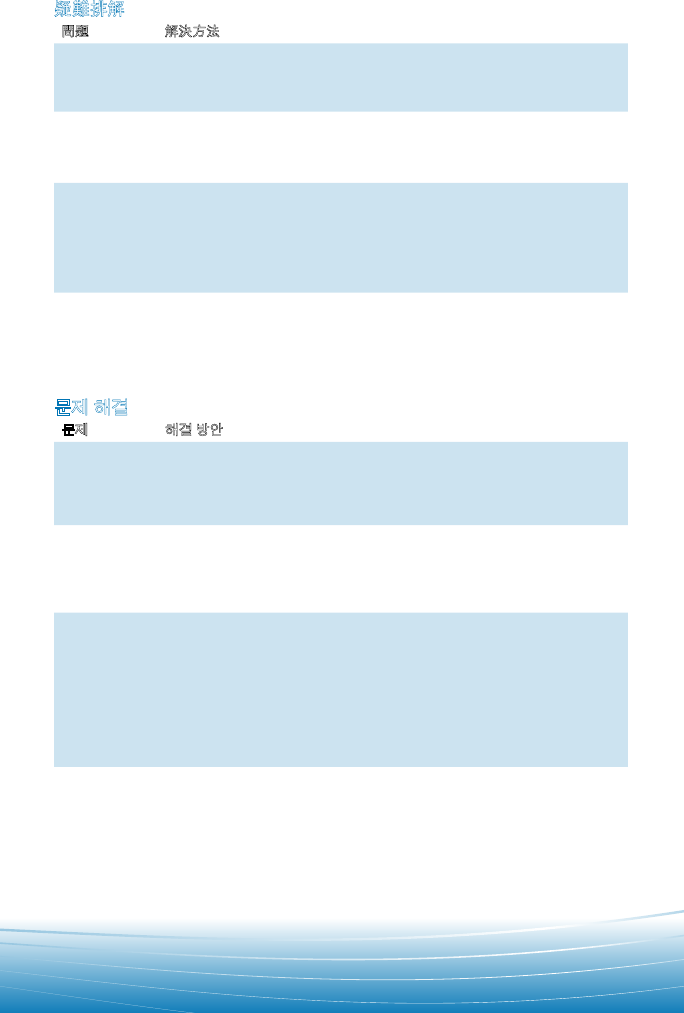
Problem Solution
My headset
does not
work with
my phone.
Headset was not in pairing mode when mobile phone menu selections
were made. See page 6 “Bluetooth Pairing.”
Incorrect menu selections were made on your mobile phone. See page 6
“Bluetooth Pairing”.
I did not enter
my passkey.
Your phone did not locate the headset.
Repeat the pairing process on page 6.
Incorrect menu selections were made on your mobile phone. Repeat
the pairing process on page 6.
Callers
cannot hear
me, or I
cannot hear
caller/dialing
tone.
The headset is not turned on. Press the call control button for 2 seconds
until you hear a beep or see the indicator light glow blue to turn headset on.
Your headset is out of range. Move the headset closer to the phone
or Bluetooth device.
Your headset battery is drained. Charge your battery using the
AC power adapter supplied.
The listening volume is too low. Press the volume key up (toward the
ear loop) to increase the sound heard in the headset.
UK
ACCESSORIES
Available for purchase
TC
配件
可供選購
KO
액세서리
별도 구입
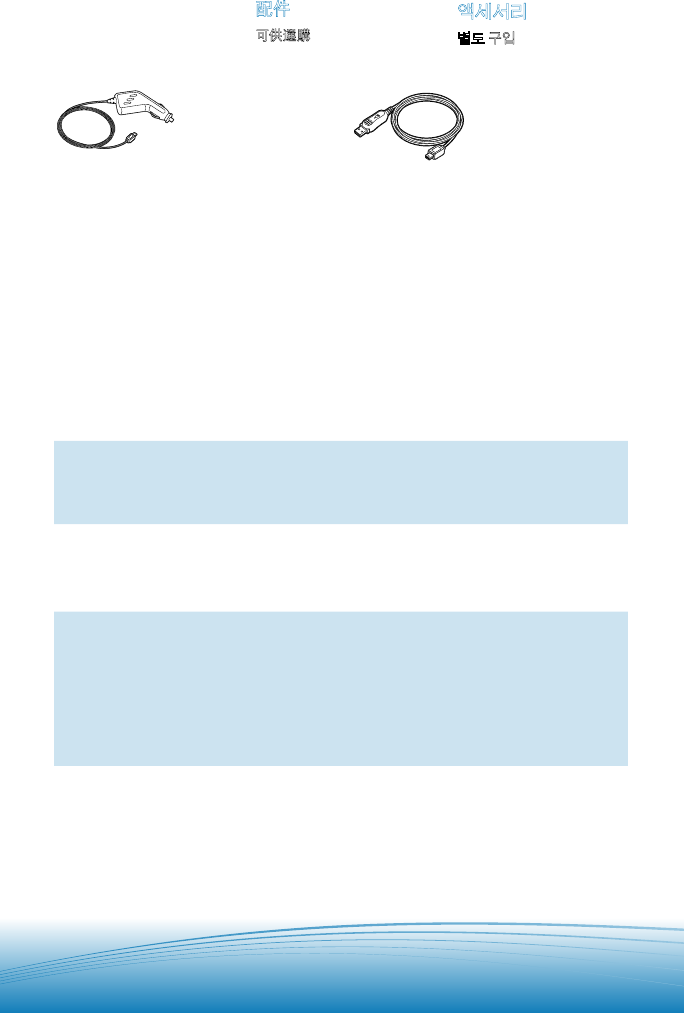
76015-01
Vehicle charging adapter
車用充電變壓器
차량용 충전 어댑터
76016-01
USB headset charger
耳機充電器 USB
USB 헤드셋 충전기
To order, please contact
your Plantronics supplier or
go to www.plantronics.com.
如需購買,請與 Plantronics
供應商聯絡或造訪
www.plantronics.com.
주문하려면 Plantronics 대리
점에 문의하거나 당사 웹 사
이트를 방문하십시오.
www.plantronics.com.
|
TC
疑難排解
問題 解決方法
耳機無法用於
手機。 設定手機功能表選項時,耳機未處於配對模式。請參閱第 7 頁「Bluetooth 配
對」。
在手機上選擇的功能表選項不正確。請參閱第 7 頁「Bluetooth 配對」。
無法輸入通行
金鑰。
手機找不到耳機。
重複第 7 頁的配對程序。
在手機上選擇的功能表選項不正確。重複第 7 頁的配對程序。
對方聽不到我
的聲音,或我
聽不到對方的
聲音/撥號音。
耳機電源未開啟。按住通話控制鈕 2 秒,直至聽到嗶聲或看到指示燈呈藍色
亮起,即表示已開啟耳機電源。
耳機超出範圍。將耳機移近手機或 Bluetooth 裝置。
耳機電池的電力已耗盡。使用所提供的交流電變壓器為電池充電。
聆聽音量太低。向上 (朝向耳掛) 按壓音量鍵,以提高耳機中聽到的音量。
KO
문제 해결
문제 해결 방안
내 헤드셋이 휴
대폰과 작동하
지 않습니다.
휴대폰에서 메뉴를 선택할 때 헤드셋이 페어링 모드에 있지 않았습니다.
7페이지의 “Bluetooth 페어링”을 참조하십시오.
휴대폰에서 메뉴를 잘못 선택했습니다. 7페이지의 “Bluetooth 페어링”을
참조하십시오.
내 암호 키를
입력하지 않았
습니다.
휴대폰에서 헤드셋을 검색하지 못했습니다.
7페이지의 페어링 절차를 반복하십시오.
휴대폰에서 메뉴를 잘못 선택했습니다. 7페이지의 페어링 절차를
반복하십시오.
발신자가 사용
자의 목소리를
들을 수 없거
나 발신자 목소
리/발신음이
사용자에게 들
리지 않습니다.
헤드셋 전원이 켜져 있지 않습니다. 헤드셋을 켜려면 경고음이 울리거나 청
색 표시등이 켜질 때까지 통화 컨트롤 버튼을 2초간 누르십시오.
헤드셋이 범위를 벗어났습니다. 헤드셋을 휴대폰 또는 Bluetooth 장치에 가깝
게 이동하십시오.
헤드셋 배터리가 소모되었습니다. 제공된 AC 전원 어댑터를 사용하여 배터
리를 충전하십시오.
청취 볼륨이 너무 작습니다. 헤드셋의 청취 볼륨을 높이려면 볼륨 키를 위쪽
(귀걸이 방향)으로 올리십시오.
|
UK
PRODUCT SPECIFICATIONS
Talk Time* Up to 6 hours
Standby Time* Approximately 200 hours
Charge Time 2 hours
Range Bluetooth standard 33 feet (10 metres)
Power Requirements 5VDC - 300 mA
Battery Type Lithium Ion Polymer
Version Bluetooth 2.0
Storage and Usage Temperature 50F–104F (10C – 40C)
Supports Bluetooth Hands-Free and Headset Profiles.
* Performance may vary by device. Headset can last up to four days without charging, based on average talk
time of 1.5 hours per day.
TC
產品規格
通話時間*最長 6 小時
待機時間*大約 200 小時
充電時間 2 小時
範圍 Bluetooth 標準 33 英呎 (10 公尺)
電源要求 5 伏特直流電 – 300 毫安培
電池類型 鋰離子高分子
版本 Bluetooth 2.0
收藏與使用 溫度 50F–104F (10C – 40C)
支援 Bluetooth 免持聽筒與耳機定義
* 效能會因裝置而異。以每天平均 1.5 小時的通話時間計算,耳機最長可持續使用 4 天而無需充電。

|
KO
제품 사양
통화 시간*최대 6시간
대기 시간*약 200시간
충전 시간 2 시간
통화 범위 Bluetooth 표준 10미터
전원 요구 사항 5VDC - 300 mA
배터리 유형 리튬 이온 폴리머
버전 Bluetooth 2.0
보관 및 사용 온도 10C – 40C
Bluetooth 핸즈프리 및 헤드셋 프로파일 지원
* 성능은 사용하는 장치에 따라 달라질 수 있습니다. 헤드셋은 매일 평균 1.5시간 통화를 기준으로 충전 없이 최
대 4일간 작동할 수 있습니다.
|
UK
REGULATORY NOTICES
FCC REQUIREMENTS PART 15
This device complies with Part 15 of the FCC
Rules. Operation is subject to the
following two conditions:
1. This device may not cause harmful
interference, and
2. This device must accept any interference
received, including interference that may
cause undesired operation.
This equipment has been tested and
found to comply with the limits for a Class B
digital device, pursuant to Part 15 of the
FCC Rules. These limits are designed to
provide reasonable protection against
harmful interference in a residential instal-
lation. This equipment generates, uses, and
can radiate radio frequency energy and, if
not installed and used in accordance with
the instructions, may cause harmful inter-
ference to radio communications.
However, there is no guarantee that in-
terference will not occur in a particular
installation. If this equipment does cause
harmful interference to radio or television
reception which can be determined by
turning the radio or television off and on,
the user is encouraged to try to correct
interference by one or more of the following
measures:
1. Reorient or relocate the receiving antenna.
2. Increase the separation between the
equipment and receiver.
3. Connect the equipment into an outlet on
another circuit.
4. Consult the dealer or an experienced
radio/TV technician for help.
EXPOSURE TO RADIO FREQUENCY
RADIATION
This device and its antenna must not be
co-located or operated in conjunction
with any other antenna or transmitter.
To comply with FCC RF exposure require-
ments, only use supplied antenna. Any
unauthorized modication to the antenna
or device could void the user’s authority to
operate this device.
TC
法規資訊
FCC
要求第
15
節
本裝置符合 FCC 規定第 15 節的內容。操作
過程符合下列情況:
1. 本裝置不會造成有害性干擾;
2. 本裝置可以承受所有接收到的干擾,包括
會妨礙裝置運作的干擾在內。
本設備已經過測試,且符合 FCC 規定第
15 節 B 級 (Class B) 數位裝置的相關限制。
這些限制的設計目的是為了在居住環境下提
供適當的保護,以避免造成有害性干擾。本設
備會產生、利用並發出射頻能量,如果未按照
指示安裝與使用,便有可能對無線電通訊產生
有害性干擾。
但即使依照指示安裝,亦不保證不會產生
干擾。如果本設備確實對無線電或電視收訊
造成有害干擾 ( 可透過關閉與開啟無線電或
電視電源來判斷 ),建議使用者嘗試下列一種
或多種方法來排除干擾:
1. 重新指向或定位接收天線。
2. 增加設備與接收器之間的距離。
3. 將設備連接到不同電路的插座中。
4. 向經銷商或資深無線電/電視技師尋求協助。
射頻輻射之暴露
本裝置及其天線不得與其他天線或傳送器放
置在相同位置或一起使用。為了符合 FCC RF
暴露規定的要求,請僅使用隨附的天線。對天
線或裝置進行任何未授權的修改可能會導致
使用者失去操作本裝置的權利。
|
UK
LIMITED WARRANTY
For warranty information, please refer to
the included product warranty card or
visit www.plantronics.com
TECHNICAL ASSISTANCE
Visit our Web site at www.plantronics.com/
support for technical support including
frequently asked questions, compatibility
and accessibility information.
TC
一般保修
有关保修信息,请参阅包装内随附的保修卡或
访问 www.plantronics.com/warranty
技術協助
請造訪我們的網站 www.plantronics.com/
support 以取得技術支援,包括常見問題、
相容性及協助工具資訊。
KO
일반 보증
보 증 정보는 패키지에 포함되어 있는 보증 카
드를 참조하거나 www.plantronics.com/
warranty 를 방문하십시오.
기술 지원
FAQ, 호환성 및 접근성 정보를 포함한 기술
정보를 보려면 www.plantronics.com/
support 웹 사이트를 방문하십시오.
KO
규정
FCC REQUIREMENTS PART 15
이 장치는 FCC 규정의 Part 15를 준수합니다.
작동은 다음 두 가지 조건의 적용을 받습니다.
1. 이 장치는 해로운 간섭을 일으키지 않으며,
2. 원치 않는 작동을 유발할 수 있는 간섭을
포함하여 수신한 모든 간섭을 수용합니다.
FCC 규정의 Part 15에 따라 이 장치는
Class B 디지털 장치에 대한 제한 사항을
준수하는 것으로 테스트 및 입증되었습니다.
이러한 제한 사항은 거주 시설에서 해로운 간
섭에 대해 합당한 보호를 제공하기 위해 만들
어졌습니다. 이 장치는 무선 주파수 에너지를
생성, 사용 및 방출할 수 있으며, 지침에 따라
설치 및 사용하지 않을 경우 무선 통신에 대해
해로운 간섭을 일으킬 수 있습니다.
그러나 특정 설치 조건에서 간섭이 발생하
지 않는다고 보장하지 않습니다. 이 장비가
무선 또는 TV 전파 수신에 해로운 간섭을 일
으키는 경우(무선 또는 TV를 껐다 켜서 확인
할 수 있음), 다음과 같은 방법을 하나 이상
사용하여 간섭을 수정해 볼 수 있습니다.
1. 수신 안테나의 방향 또는 위치를
수정합니다.
2. 장치와 수신기의 간격을 더 넓힙니다.
3. 다른 회로의 콘센트에 장치를 연결합니다.
4. 대리점이나 숙련된 무선/TV 기술자에게
도움을 요청하십시오.
무선 주파수 방출에 노출
이 장치와 안테나는 다른 안테나 또는 전송
장치와 함께 작동하거나 같이 두어서는 안됩
니다. FCC RF 노출 요구 사항에 따라 제공된
안테나만 사용하십시오. 안테나 또는 장치에
대해 승인되지 않은 수정은 장치 작동에 대한
사용자 권한을 말소시킬 수 있습니다.
|
© 2006 Plantronics, Inc. All rights reserved. Plantronics, the logo design, Plantronics
Explorer, QuickPair and Sound Innovation are trademarks or registered trademarks of
Plantronics, Inc. The Bluetooth word mark and logo are owned by Bluetooth SIG, Inc. and
any use of such marks by Plantronics, Inc. is under license. All other trademarks are the
property of their respective owners. Patents U.S. 5,210,791 and Patents Pending
© 2006 Plantronics, Inc. 版權所有。保留一切權利。Plantronics、標誌設計、Plantronics
Explorer, QuickPair 及 Sound Innovation 均為 Plantronics, Inc. 的商標或註冊商標。
Bluetooth 字符標記及商標隸屬 Bluetooth SIG, Inc. 所有,經授權由 Plantronics, Inc. 使用。
所有其他商標隸屬各自所有人擁有。美國專利 5,210,791 及專利申請中
© 2006 Plantronics, Inc. All rights reserved. Plantronics, 로고 디자인, Plantronics Explorer,
QuickPair 및 Sound Innovation은 Plantronics, Inc.의 상표 또는 등록 상표입니다. Bluetooth
워드 마크 및 로고는 Bluetooth SIG, Inc.의 소유이며, 이러한 마크는 Plantronics, Inc.에서
라이센스를 허가 받아 사용합니다. 기타 모든 상표는 해당 소유권자의 자산입니다. 특허
U.S. 5,210,791 및 특허 출원 중
72357-13 (07-07)
Plantronics Inc
345 Encinal Street
Santa Cruz, CA 95060 USA
Tel: (800) 544-4660
www.plantronics.com
