Poly Sync 40 Qsg En
User Manual: Poly Poly Sync 40 - Setup & Support | Poly, formerly Plantronics & Polycom
Open the PDF directly: View PDF  .
.
Page Count: 2
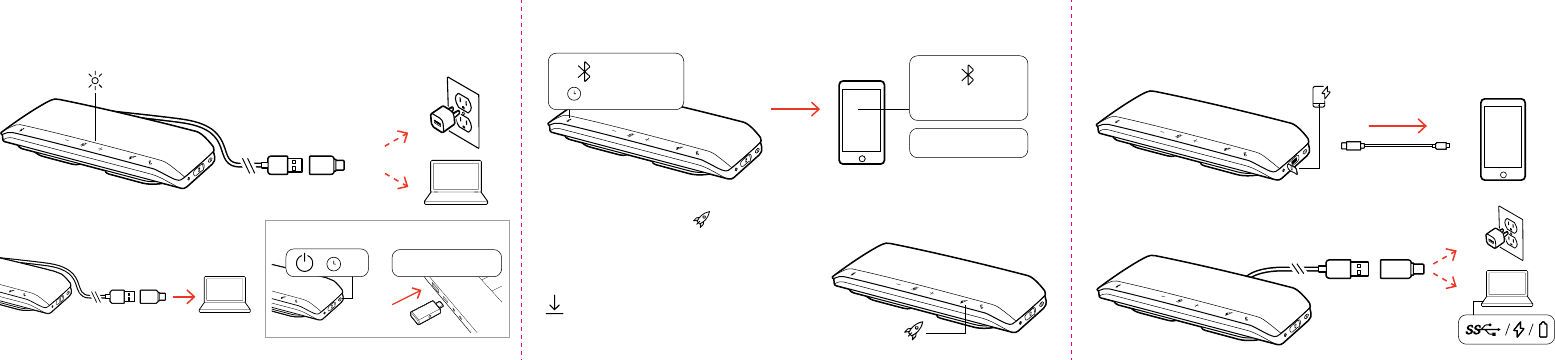
COMPUTER SETUP
MOBILE SETUP (PAIR)
Poly Sync 40
“Pairing”
CHARGE YOUR SPEAKERPHONE
CHARGE YOUR PHONE
With your speakerphone powered on, connect your phone. Connection
provides power only.
Fastest when using wall charger or computer’s
quick-charge port, if available.
Support
Settings
Plus / Minus
Check / Delete
Daisy Chain / Link Lock
General
Indicator Light
Music
ANC
Timer
Custom Button
Volume
Mic / Mic Mute
Play / Pause
Power
Device Controls
Devices
Headphones
Phone
Mobile
Computer
Camera
Headset
Charging/Battery
Blutooth
Device Status
Scaled to 45% of full size
Support
Settings
Plus / Minus
Check / Delete
Daisy Chain / Link Lock
General
Indicator Light
Music
ANC
Timer
Custom Button
Volume
Mic / Mic Mute
Play / Pause
Power
Device Controls
Devices
Headphones
Phone
Mobile
Computer
Camera
Headset
Charging/Battery
Blutooth
Device Status
Scaled to 45% of full size
Support
Settings
Plus / Minus
Check / Delete
Daisy Chain / Link Lock
General
Indicator Light
Music
ANC
Timer
Custom Button
Volume
Mic / Mic Mute
Play / Pause
Power
Device Controls
Devices
Headphones
Phone
Mobile
Computer
Camera
Headset
Charging/Battery
Blutooth
Device Status
Scaled to 45% of full size
Cable not provided
USB-A / USB-C
USB-A / USB-C
USB-A / USB-C “Phone connected”
:02
Support
Settings
Plus / Minus
Check / Delete
Daisy Chain / Link Lock
General
Indicator Light
Music
ANC
Timer
Custom Button
Volume
Mic / Mic Mute
Play / Pause
Power
Device Controls
Devices
Headphones
Phone
Mobile
Computer
Camera
Headset
Charging/Battery
Blutooth
Device Status
Scaled to 45% of full size
FIRST-TIME USE
Activate by connecting USB cable to power source until LEDs light up.
Support
Settings
Plus / Minus
Check / Delete
Daisy Chain / Link Lock
General
Indicator Light
Music
ANC
Timer
Custom Button
Volume
Mic / Mic Mute
Play / Pause
Power
Device Controls
Devices
Headphones
Phone
Mobile
Computer
Camera
Headset
Charging/Battery
Blutooth
Device Status
Scaled to 45% of full size
CUSTOMIZE
Congure your Rocket
Support
Settings
Plus / Minus
Check / Delete
Daisy Chain / Link Lock
General
Indicator Light
Music
ANC
Timer
Custom Button
Volume
Mic / Mic Mute
Play / Pause
Power
Device Controls
Devices
Headphones
Phone
Mobile
Computer
Camera
Headset
Charging/Battery
Blutooth
Device Status
Scaled to 45% of full size
button feature in Poly Lens Desktop App.
Choose from play/pause music (default),
device status check and more.
Support
Settings
Plus / Minus
Check / Delete
Daisy Chain / Link Lock
General
Indicator Light
Music
ANC
Timer
Custom Button
Volume
Mic / Mic Mute
Play / Pause
Power
Device Controls
Devices
Headphones
Phone
Mobile
Computer
Camera
Headset
Charging/Battery
Blutooth
Device Status
Scaled to 45% of full size
“PC Connected”
Support
Settings
Plus / Minus
Check / Delete
Daisy Chain / Link Lock
General
Indicator Light
Music
ANC
Timer
Custom Button
Volume
Mic / Mic Mute
Play / Pause
Power
Device Controls
Devices
Headphones
Phone
Mobile
Computer
Camera
Headset
Charging/Battery
Blutooth
Device Status
Scaled to 45% of full size
:02
Support
Settings
Plus / Minus
Check / Delete
Daisy Chain / Link Lock
General
Indicator Light
Music
ANC
Timer
Custom Button
Volume
Mic / Mic Mute
Play / Pause
Power
Device Controls
Devices
Headphones
Phone
Mobile
Computer
Camera
Headset
Charging/Battery
Blutooth
Device Status
Scaled to 45% of full size
Optional: Poly Sync 40+
poly.com/lens
QUICK START
POLY SYNC 40 SERIESPOLY SYNC 40 SERIES
© 2021 Plantronics, Inc. All rights reserved. Poly, the
propeller design, and the Poly logo are trademarks of
Plantronics, Inc. Bluetooth is a registered trademark of Bluetooth SIG, Inc.
and any use by Plantronics, Inc. is under license. All other trademarks are
the property of their respective owners. Manufactured by Plantronics, Inc.
215633-04 Rev C 04.21 Model ID: SY40/SY40-M (may be followed by /BT600)
LINK SPEAKERPHONES
“Connection successful”
:02 :02
Support
Settings
Plus / Minus
Check / Delete
Daisy Chain / Link Lock
General
Indicator Light
Music
ANC
Timer
Custom Button
Volume
Mic / Mic Mute
Play / Pause
Power
Device Controls
Devices
Headphones
Phone
Mobile
Computer
Camera
Headset
Charging/Battery
Blutooth
Device Status
Scaled to 45% of full size
Support
Settings
Plus / Minus
Check / Delete
Daisy Chain / Link Lock
General
Indicator Light
Music
ANC
Timer
Custom Button
Volume
Mic / Mic Mute
Play / Pause
Power
Device Controls
Devices
Headphones
Phone
Mobile
Computer
Camera
Headset
Charging/Battery
Blutooth
Device Status
Scaled to 45% of full size
“Connecting” “Connecting”
:02
Support
Settings
Plus / Minus
Check / Delete
Daisy Chain / Link Lock
General
Indicator Light
Music
ANC
Timer
Custom Button
Volume
Mic / Mic Mute
Play / Pause
Power
Device Controls
Devices
Headphones
Phone
Mobile
Computer
Camera
Headset
Charging/Battery
Blutooth
Device Status
Scaled to 45% of full size
Support
Settings
Plus / Minus
Check / Delete
Daisy Chain / Link Lock
General
Indicator Light
Music
ANC
Timer
Custom Button
Volume
Mic / Mic Mute
Play / Pause
Power
Device Controls
Devices
Headphones
Phone
Mobile
Computer
Camera
Headset
Charging/Battery
Blutooth
Device Status
Scaled to 45% of full size
Support
Settings
Plus / Minus
Check / Delete
Daisy Chain / Link Lock
General
Indicator Light
Music
ANC
Timer
Custom Button
Volume
Mic / Mic Mute
Play / Pause
Power
Device Controls
Devices
Headphones
Phone
Mobile
Computer
Camera
Headset
Charging/Battery
Blutooth
Device Status
Scaled to 45% of full size
Siri
Google Assistant
/
Support
Settings
Plus / Minus
Check / Delete
Daisy Chain / Link Lock
General
Indicator Light
Music
ANC
Timer
Custom Button
Volume
Mic / Mic Mute
Play / Pause
Power
Device Controls
Devices
Headphones
Phone
Mobile
Computer
Camera
Headset
Charging/Battery
Blutooth
Device Status
Scaled to 45% of full size
Support
Settings
Plus / Minus
Check / Delete
Daisy Chain / Link Lock
General
Indicator Light
Music
ANC
Timer
Custom Button
Volume
Mic / Mic Mute
Play / Pause
Power
Device Controls
Devices
Headphones
Phone
Mobile
Computer
Camera
Headset
Charging/Battery
Blutooth
Device Status
Scaled to 45% of full size
Support
Settings
Plus / Minus
Check / Delete
Daisy Chain / Link Lock
General
Indicator Light
Music
ANC
Timer
Custom Button
Volume
Mic / Mic Mute
Play / Pause
Power
Device Controls
Devices
Headphones
Phone
Mobile
Computer
Camera
Headset
Charging/Battery
Blutooth
Device Status
Scaled to 45% of full size
Support
Settings
Plus / Minus
Check / Delete
Daisy Chain / Link Lock
General
Indicator Light
Music
ANC
Timer
Custom Button
Volume
Mic / Mic Mute
Play / Pause
Power
Device Controls
Devices
Headphones
Phone
Mobile
Computer
Camera
Headset
Charging/Battery
Blutooth
Device Status
Scaled to 45% of full size
Support
Settings
Plus / Minus
Check / Delete
Daisy Chain / Link Lock
General
Indicator Light
Music
ANC
Timer
Custom Button
Volume
Mic / Mic Mute
Play / Pause
Power
Device Controls
Devices
Headphones
Phone
Mobile
Computer
Camera
Headset
Charging/Battery
Blutooth
Device Status
Scaled to 45% of full size
poly.com/support
Support
Settings
Plus / Minus
Check / Delete
Daisy Chain / Link Lock
General
Indicator Light
Music
ANC
Timer
Custom Button
Volume
Mic / Mic Mute
Play / Pause
Power
Device Controls
Devices
Headphones
Phone
Mobile
Computer
Camera
Headset
Charging/Battery
Blutooth
Device Status
Scaled to 45% of full size
Support
Settings
Plus / Minus
Check / Delete
Daisy Chain / Link Lock
General
Indicator Light
Music
ANC
Timer
Custom Button
Volume
Mic / Mic Mute
Play / Pause
Power
Device Controls
Devices
Headphones
Phone
Mobile
Computer
Camera
Headset
Charging/Battery
Blutooth
Device Status
Scaled to 45% of full size
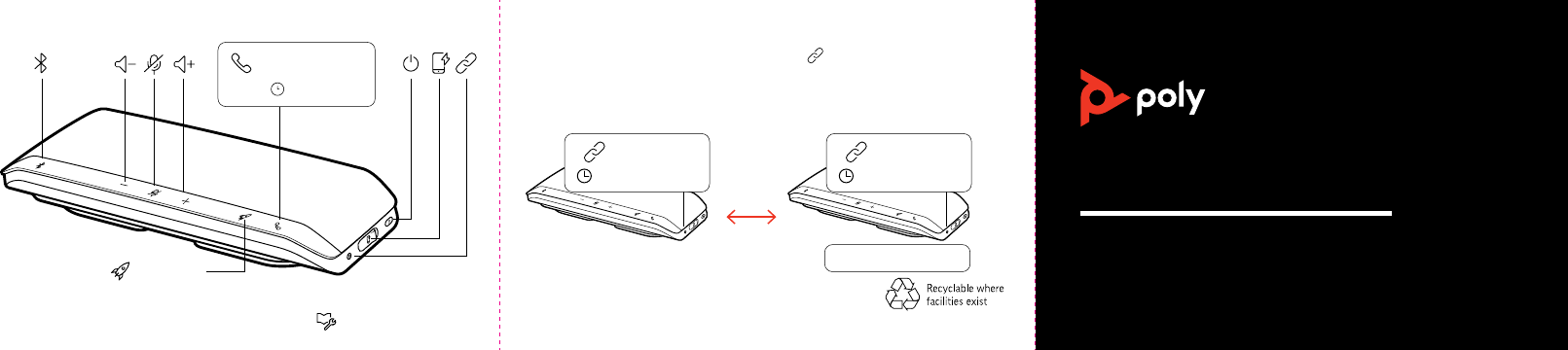
To wirelessly connect two Sync 40, press Link
Support
Settings
Plus / Minus
Check / Delete
Daisy Chain / Link Lock
General
Indicator Light
Music
ANC
Timer
Custom Button
Volume
Mic / Mic Mute
Play / Pause
Power
Device Controls
Devices
Headphones
Phone
Mobile
Computer
Camera
Headset
Charging/Battery
Blutooth
Device Status
Scaled to 45% of full size
button on both speakerphones
for 2 seconds. You hear “connection successful” when linked. Pair one
speakerphone to your idle mobile device to make calls or play media.
Note: Ensure your speakerphone USB cable is not connected to a computer.
Play/pause
(default)
Support
Settings
Plus / Minus
Check / Delete
Daisy Chain / Link Lock
General
Indicator Light
Music
ANC
Timer
Custom Button
Volume
Mic / Mic Mute
Play / Pause
Power
Device Controls
Devices
Headphones
Phone
Mobile
Computer
Camera
Headset
Charging/Battery
Blutooth
Device Status
Scaled to 45% of full size
