Porta Phone HUB2015 DUPLEX WIRELESS SYSTEMS User Manual HUBuserManual
Porta Phone Company Inc DUPLEX WIRELESS SYSTEMS HUBuserManual
Users Manual
Page 1
DUPLEX WIRELESS SYSTEMS
user manual
Introduction
Thank you for your choice of DUPLEX WIRELESS SYSTEMS.
This is a DECT (Digital Enhanced Cordless Telecommunications) duplex wireless system. To the quality of
audio and to the safety offered from the digital technology, The offers manifold and useful features including
Full duplex system, LED In use illumination, multi-headset capabilities and multi-volume select. Please read this
instruction carefully before using your new system for the first time.
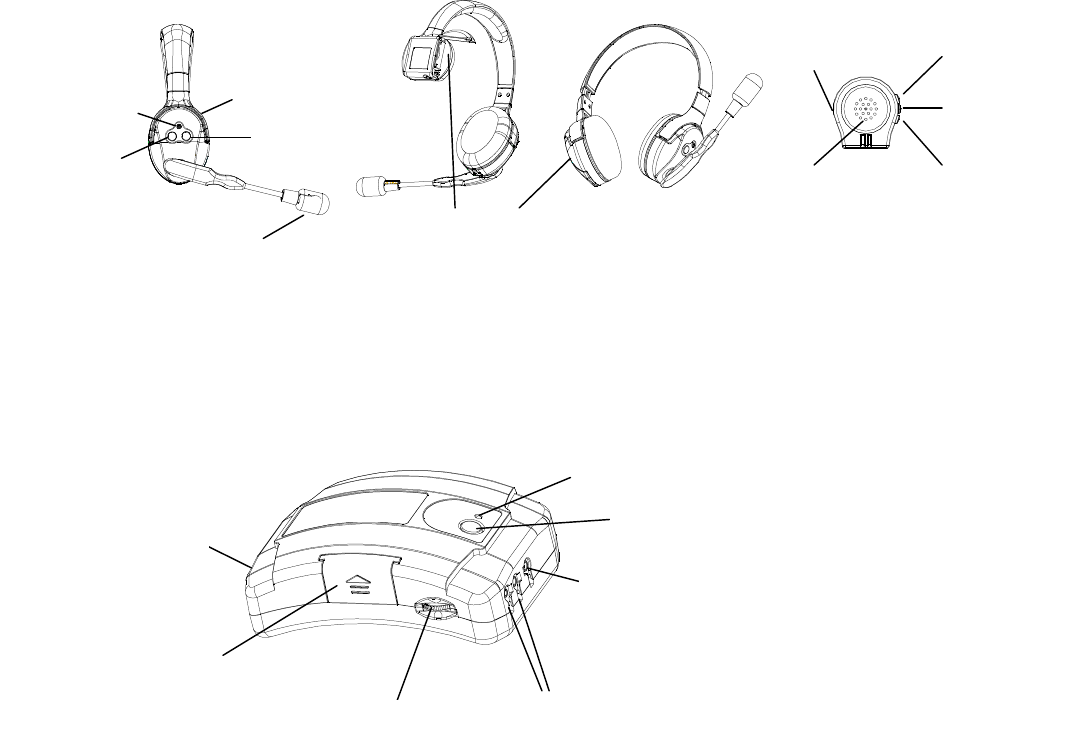
A glance guide for the headset
A glance guide for the base unit
Installation
Please checkyour package the following items(options):
-Base Unit
-Wireless Headset
battery pack
Mic
Power on/off
Vol down
Battery
Conference indicator
Connector for wire Headset 1
All Conference
Vol up
Receiver
Connector for wire Headset 2
Power switch/VOL
DC Jack 5V
Vol up
Vol down
Power on/off
EarJack
Receiver
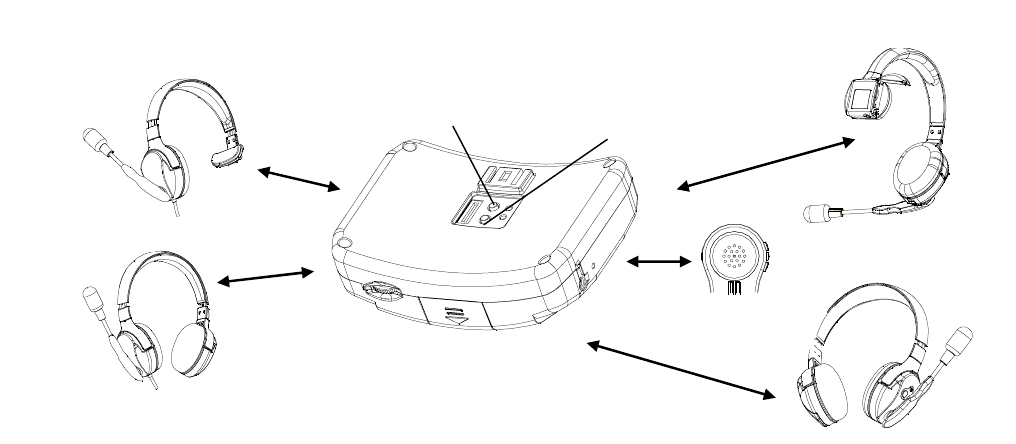
ComStar Ultralite-R(ULR2015)
ComStar Ultralite-RD(ULRD2015)
ComStar Clip(CLIP2015)
ComStar HUB(HUB2015)
( ComStar HUB(HUB2015))
( ComStar Ultralite-R(ULR2015)/ComStar Ultralite-RD(ULRD2015)/ComStar Clip(CLIP2015))
Page 2
-Wire Headset (Ultra 3G-S/ Ultra 3G-D)
-AC/DC adaptor for Base Unit(5V/1A)
- Packing batterie(800mAH/3.7V)
Choose a suitable site for the base unit, make sure it is not near to other electrical equipments.
Connect the AC adaptor socket to the Base Unit and the power socket. Turn on the power of base.
The pack rechargeable batteries come with your charger.
-Insert the rechargeable battery into the headset as the above figure indicated, matching correct polarity.
-Fit the battery compartment cover by sliding it down so that it clicks firmly into place.
NOTE: Reversing the orientation may damage the headset. Please use the battery type supplied or recommended equivalents. A
different battery could cause an explosion or damage of your headset.
Low battery indicator
Whenever you see the low battery indicator LED flash on the headset, or you have heard the low battery warning
tone during a call conversation, please:
-End the call as soon as possible.
-Change the headset battery.
To charge the battery, put the battery into the charger cradle. The charging LED on charger unit will come on to
indicated that the battery is in charging.
Basic Functions
Make a talk
-Power up the headset to search registered of base, the “In use” LED is ON.
During a talk conversation, you can adjust the talk volume (1 ~ 5 levels) by simply pressing • or ‚ key.
Mute
-During a call conversation, you can mute your voice by rise up microphone arm.
-Deactivate the mute function, go down the microphone arm again.
Wire Headset
Ultra 3G-D
Ultra 3G-S
SUB key2
SUB key1
Wireless Headset
ComStar HUB(HUB2015)
ComStar CLIP(CLIP2015)
ComStar Ultralite-R(ULR2015)
ComStar Ultralite-RD(ULRD2015)
Page 3
Headset Power On / Off
To power Off the headset
- Press and hold “power on/off” key about 3 seconds, the headset will switch off which can prolong the use
time of headset.
To power On the headset
-Press “power on/off” key
The headset will power on with the “In use” LED light, the headset to search registered of base.
Out of range indication
If your headset has registered and is in located range, the “In use” LED will blanking steadily, when your
headset goes out of range, the communication link will be lose temporarily, the “In use” LED will blink.
If you go back to the located range again, the communication link will restore, also the “In use” LED will
blanking steadily.
Note: your talk will be cut without any audible warning tone if you are in a talk and out of the located range.
Registration
The headset and base shall be factory pre-registered with the identification digital security codes, which are
stored into the non-volatile memory, so that your headset shall be ready for working after out-of-box. However,
your headset shall also has a procedure to allow you to re-do the registration operation in case of the link is lost
accidentally.
-press ‚ key 3 times, Press and hold • key for 3 seconds on the headset “In use” LED is ON, your headset
entered the registration mode
-Press and hold SUB key for 3 seconds on the base until “SUB” LED is flashlight, the base also entered the
registration mode.
Note: SUB key A1is for channel A station, B1 is for channel B station.
-About 5-10 seconds the headset “In use” LED is OFF and following to ON, that means the headset has located
the base, and the base until “SUB” LED is OFF and following to ON.
-If the headset does not locate the base, the headset “In use” LED will be blink after 15 seconds and it will
return to the non-located mode. Try again and check that you are not in the interference environment
Note: your base can register up to four headsets. Two headset register on the every subscribe key.
Unsubscribe headset registered
-At standby mode
-Press and hold SUB key enter the base’s registration mode with the “SUB” LED is flashlight
-Press SUB key 7 times again the “SUB” LED is quick flash
-All headsets registered to this part are cleared
Note: (1)SUB key A1 to unsubscribe both A1 and A2 headset.
(2)SUB key B1 to unsubscribe both B1 and B2 headset.
Conference talk
When you are in a talk on the base, you can invite another channel headset to join your conversation.
-Press the “All Conference” key on the base that you want to talk.
-At the all conference mode, 4 wireless headset and 2 cord headset can conference.
-Press the “All Conference” key on the base once again, turn off the all conference mode.
LIMITED WARRANTY
Page 4
This limited warranty only applies to the use of this device with a communications service for which it
is designed. This device alone does not provide the customer with any communications service and
requires a separate subscription to a communications service from a service provider. Altering
service provider-specific settings may void the warranty. This limited warranty does not warrant that
the device will be free of any limitations of voice quality or service caused by (1) the services provided
by the customer’s underlying communications service provider; or (2) interference from other radio
frequencies or transmissions, static electricity, and other electronic devices.
g
Page 5
(1) this device may not cause interference, and
(2) this device must accept any interference, including interference that may cause undesired operation of the
device.
Le présent appareil est conforme aux CNR d'Industrie Canada applicables aux appareils radio exempts de
licence. L'exploitation est autorisée aux deux conditions suivantes :
(1) l'appareil nedoit pas produire de brouillage, et
(2) l'utilisateur de l'appareil doit accepter tout brouillage radioélectrique subi, même si le brouillage est
susceptible d'en compromettre le fonctionnement.
The device is compliance with RF , users can obtain Canadian information on
RF exposure and compliance.
Le présent appareil est conforme .Après examen de ce matériel aux conformité ou aux limites d’intensité de
champ RF,les utilisateurs peuvent sur l’exposition aux radiofréquences et la conformité and compliance
d’acquérir.les informations correspondantes.
exposure guidelines