Power Beauty PBG-3030S Bluetooth Speaker with LED Light User Manual Instruction manul NewColorCube Speaker

Power Beauty (Dongguan) Industrial Co., Ltd Bluetooth Speaker with LED Light Instruction manul NewColorCube Speaker

Manual

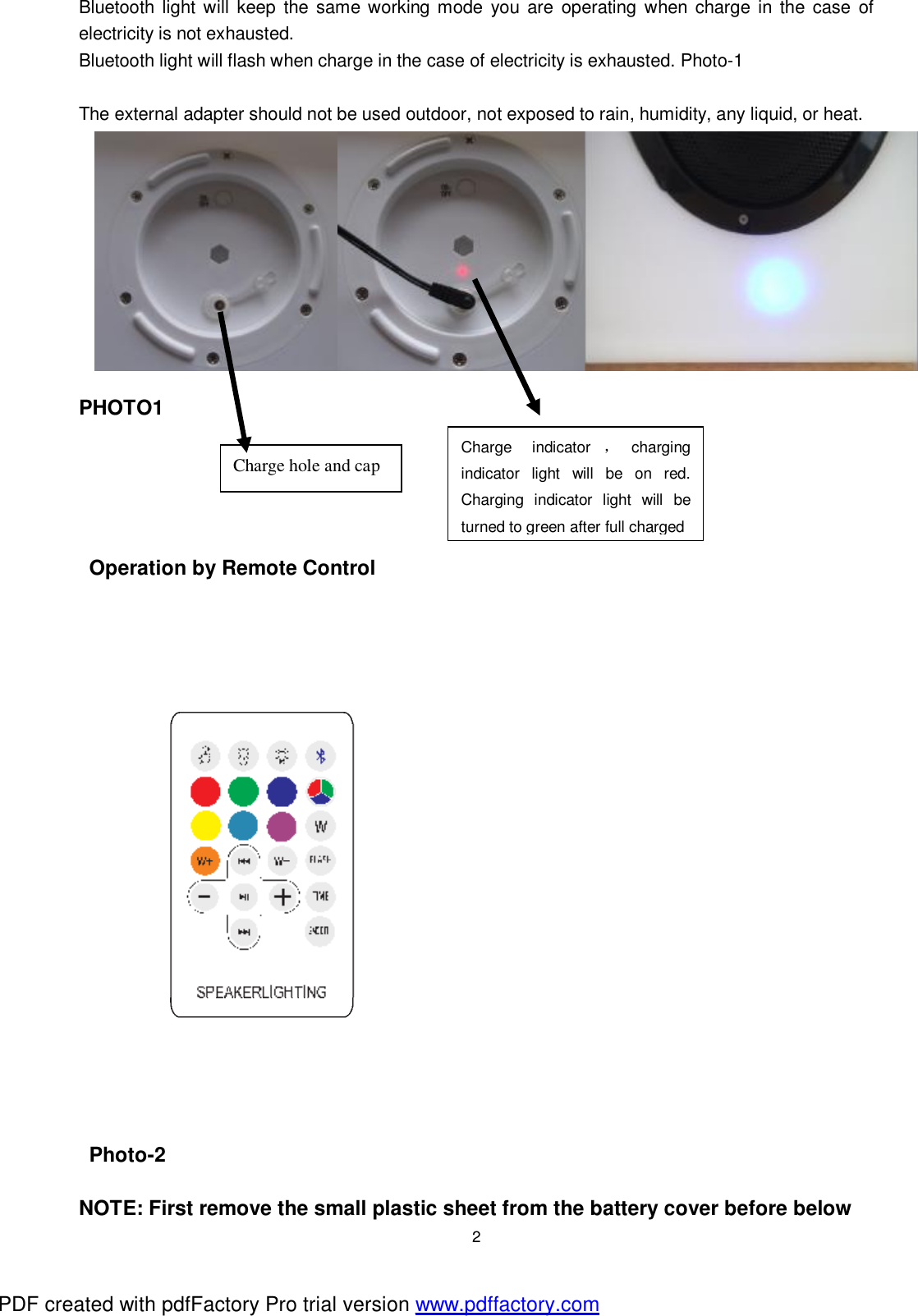
 1 INSTRUCTION MANUAL  Models: PBG-4040S,PBG-3535S,PBG-3030S,PBG-2020S,PBG-1515S Outdoor speakerlighting with Bluetooth   Specification: (1)Adapter:Input 85-240AC Output 5V/2A (2) RGB LEDS (4)Working time:After full charge, Lighting could work 4-6H     (3)Charging time:6-8H (4)Blue tooth name: Landaa (5)No need Password normally,But some mobile phone maybe need,the password is : 0000 (6)Blue tooth range 10M. receive range will be reduced as the battery voltage decrease. (7)Water resistance:IP44  CAUTION! - This is not a TOY. Keep it out of reach by children. - Keep this product away from chemical, any liquid, or heat - Do not sit on patio furniture if damage is found. - External adapter:  Never use the external adapter for purpose other than battery charging for the light(s) supplied in the same pack.  The external adapter, / socket on the light should not be used outdoor, not exposed to rain, humidity, any liquid, or heat.  Keep the external adapter and charger station out of reach of children.  Disconnect the external adapter from power when not in use.  Never attempt to open the external adapter, charger station, or light bottom. - Keep remote control away from water, any liquid, or heat.  Operation  Charge the light—First step.  WARNING! Never charge the product in a pool, water, or in rain. Charge in a dry, indoor location only. Insert the adaptor plug into the socket, Photo 1 Connect the external adapter to the electrical outlet. It will begin to charge and charging indicator light will be on red. Charging indicator light will be turn to green after full charged, Please cover the charge cap after fully charged. PDF created with pdfFactory Pro trial version www.pdffactory.com
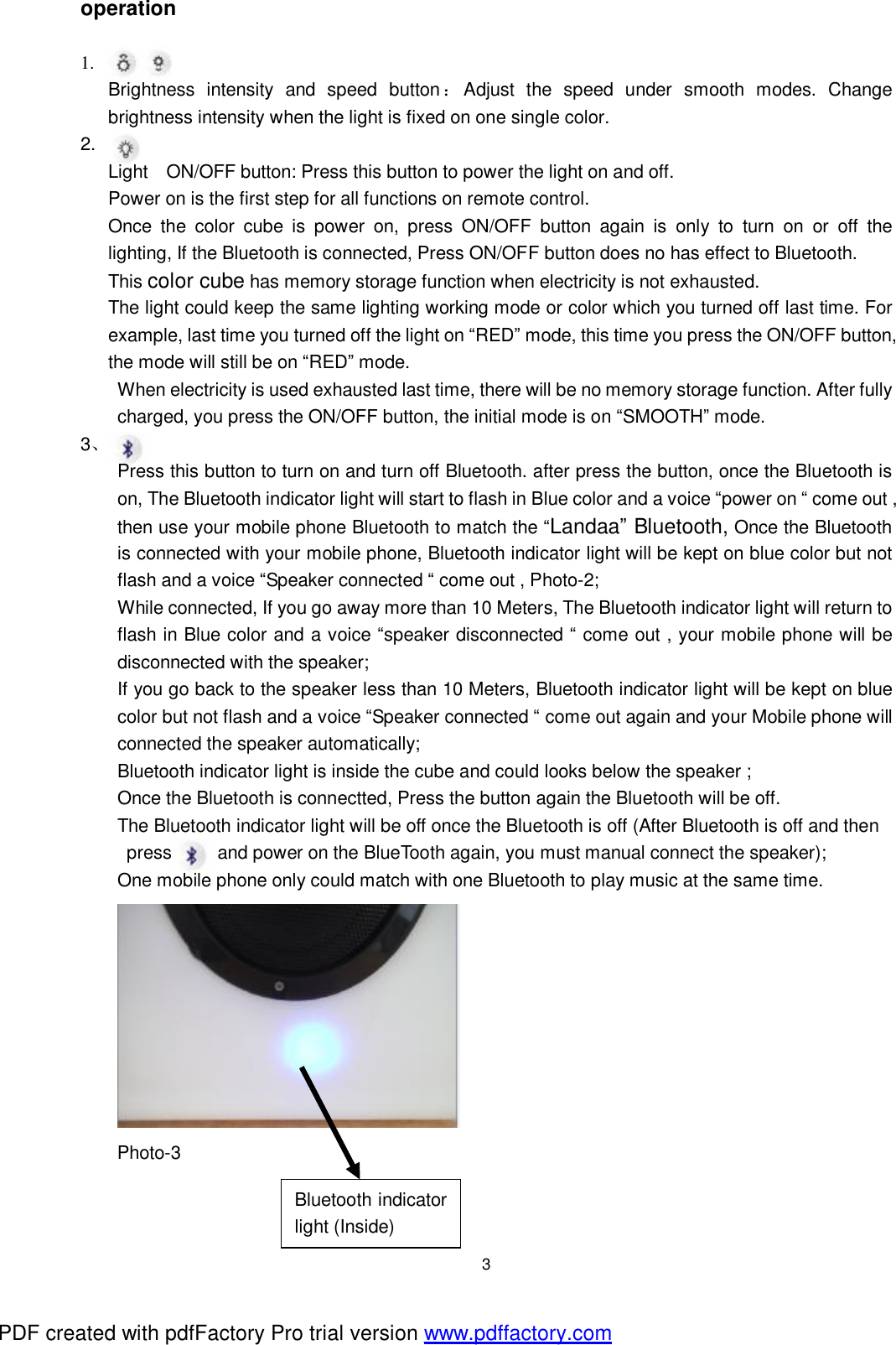
 2 Bluetooth light will keep the same working mode you are operating when charge in the case of electricity is not exhausted. Bluetooth light will flash when charge in the case of electricity is exhausted. Photo-1  The external adapter should not be used outdoor, not exposed to rain, humidity, any liquid, or heat.           PHOTO1      Operation by Remote Control  Photo-2  NOTE: First remove the small plastic sheet from the battery cover before below Charge hole and cap  Charge indicator ,charging indicator light will be on red. Charging indicator light will be turned to green after full charged PDF created with pdfFactory Pro trial version www.pdffactory.com
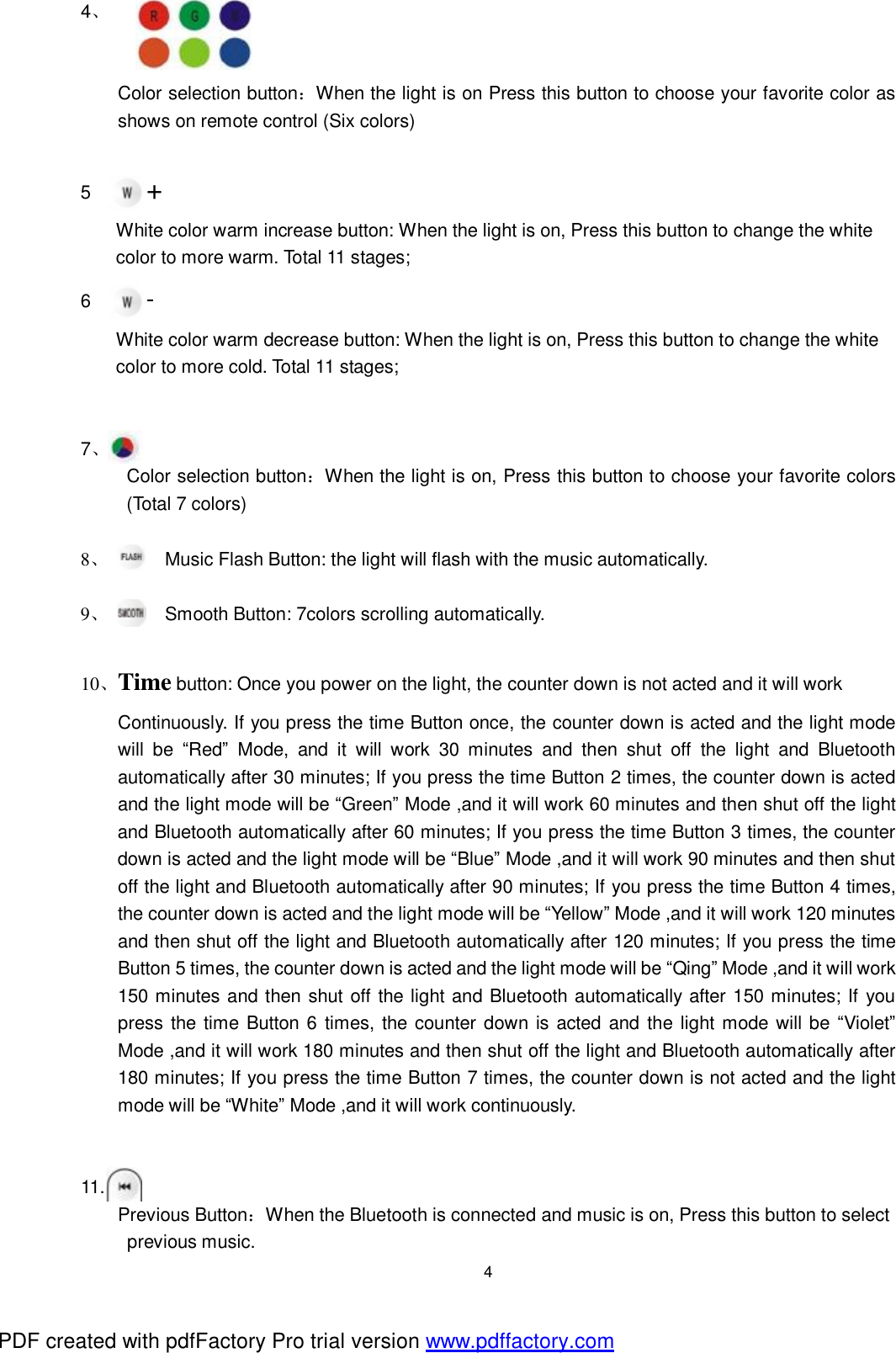
 3 operation  1. Brightness intensity and speed button:Adjust the speed under smooth modes. Change brightness intensity when the light is fixed on one single color. 2.  Light ON/OFF button: Press this button to power the light on and off.   Power on is the first step for all functions on remote control.   Once the color cube is power on, press ON/OFF button again is only to turn on or off the        lighting, If the Bluetooth is connected, Press ON/OFF button does no has effect to Bluetooth.   This color cube has memory storage function when electricity is not exhausted.    The light could keep the same lighting working mode or color which you turned off last time. For       example, last time you turned off the light on “RED” mode, this time you press the ON/OFF button,    the mode will still be on “RED” mode.  When electricity is used exhausted last time, there will be no memory storage function. After fully charged, you press the ON/OFF button, the initial mode is on “SMOOTH” mode. 3、 Press this button to turn on and turn off Bluetooth. after press the button, once the Bluetooth is on, The Bluetooth indicator light will start to flash in Blue color and a voice “power on “ come out , then use your mobile phone Bluetooth to match the “Landaa” Bluetooth, Once the Bluetooth is connected with your mobile phone, Bluetooth indicator light will be kept on blue color but not flash and a voice “Speaker connected “ come out , Photo-2; While connected, If you go away more than 10 Meters, The Bluetooth indicator light will return to flash in Blue color and a voice “speaker disconnected “ come out , your mobile phone will be disconnected with the speaker; If you go back to the speaker less than 10 Meters, Bluetooth indicator light will be kept on blue color but not flash and a voice “Speaker connected “ come out again and your Mobile phone will connected the speaker automatically; Bluetooth indicator light is inside the cube and could looks below the speaker ; Once the Bluetooth is connectted, Press the button again the Bluetooth will be off. The Bluetooth indicator light will be off once the Bluetooth is off (After Bluetooth is off and then  press     and power on the BlueTooth again, you must manual connect the speaker); One mobile phone only could match with one Bluetooth to play music at the same time.  Photo-3    Bluetooth indicator light (Inside) PDF created with pdfFactory Pro trial version www.pdffactory.com
 4 4、         Color selection button:When the light is on Press this button to choose your favorite color as shows on remote control (Six colors)       5      + White color warm increase button: When the light is on, Press this button to change the white  color to more warm. Total 11 stages; 6      - White color warm decrease button: When the light is on, Press this button to change the white  color to more cold. Total 11 stages;     7、     Color selection button:When the light is on, Press this button to choose your favorite colors (Total 7 colors)  8、 Music Flash Button: the light will flash with the music automatically.   9、 Smooth Button: 7colors scrolling automatically.  10、Time button: Once you power on the light, the counter down is not acted and it will work  Continuously. If you press the time Button once, the counter down is acted and the light mode will be  “Red” Mode, and it will work 30 minutes and then shut off the light and Bluetooth automatically after 30 minutes; If you press the time Button 2 times, the counter down is acted and the light mode will be “Green” Mode ,and it will work 60 minutes and then shut off the light and Bluetooth automatically after 60 minutes; If you press the time Button 3 times, the counter down is acted and the light mode will be “Blue” Mode ,and it will work 90 minutes and then shut off the light and Bluetooth automatically after 90 minutes; If you press the time Button 4 times, the counter down is acted and the light mode will be “Yellow” Mode ,and it will work 120 minutes and then shut off the light and Bluetooth automatically after 120 minutes; If you press the time Button 5 times, the counter down is acted and the light mode will be “Qing” Mode ,and it will work 150 minutes and then shut off the light and Bluetooth automatically after 150 minutes; If you press the time Button 6 times, the counter down is acted and the light mode will be “Violet” Mode ,and it will work 180 minutes and then shut off the light and Bluetooth automatically after 180 minutes; If you press the time Button 7 times, the counter down is not acted and the light mode will be “White” Mode ,and it will work continuously.   11. Previous Button:When the Bluetooth is connected and music is on, Press this button to select  previous music. PDF created with pdfFactory Pro trial version www.pdffactory.com
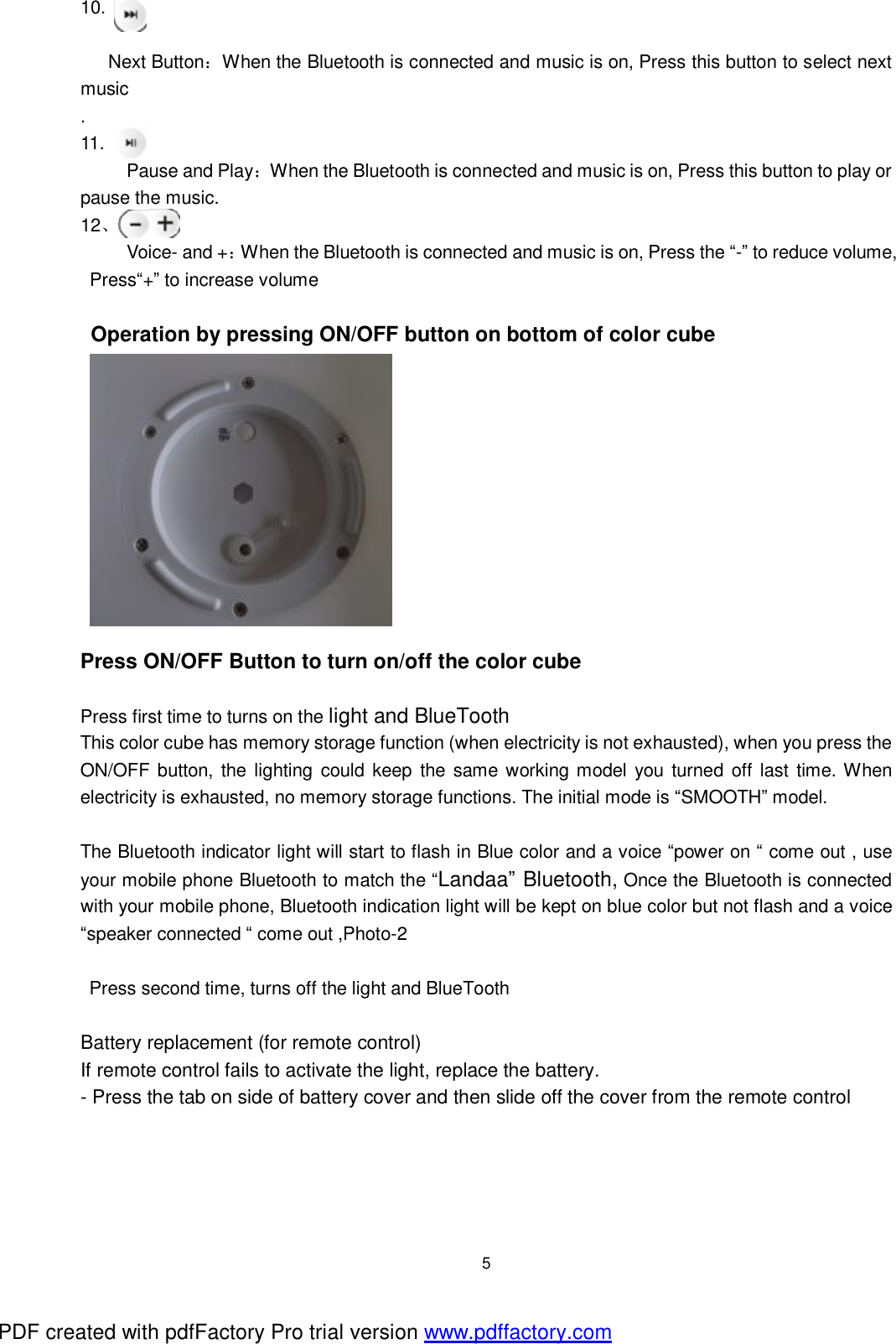
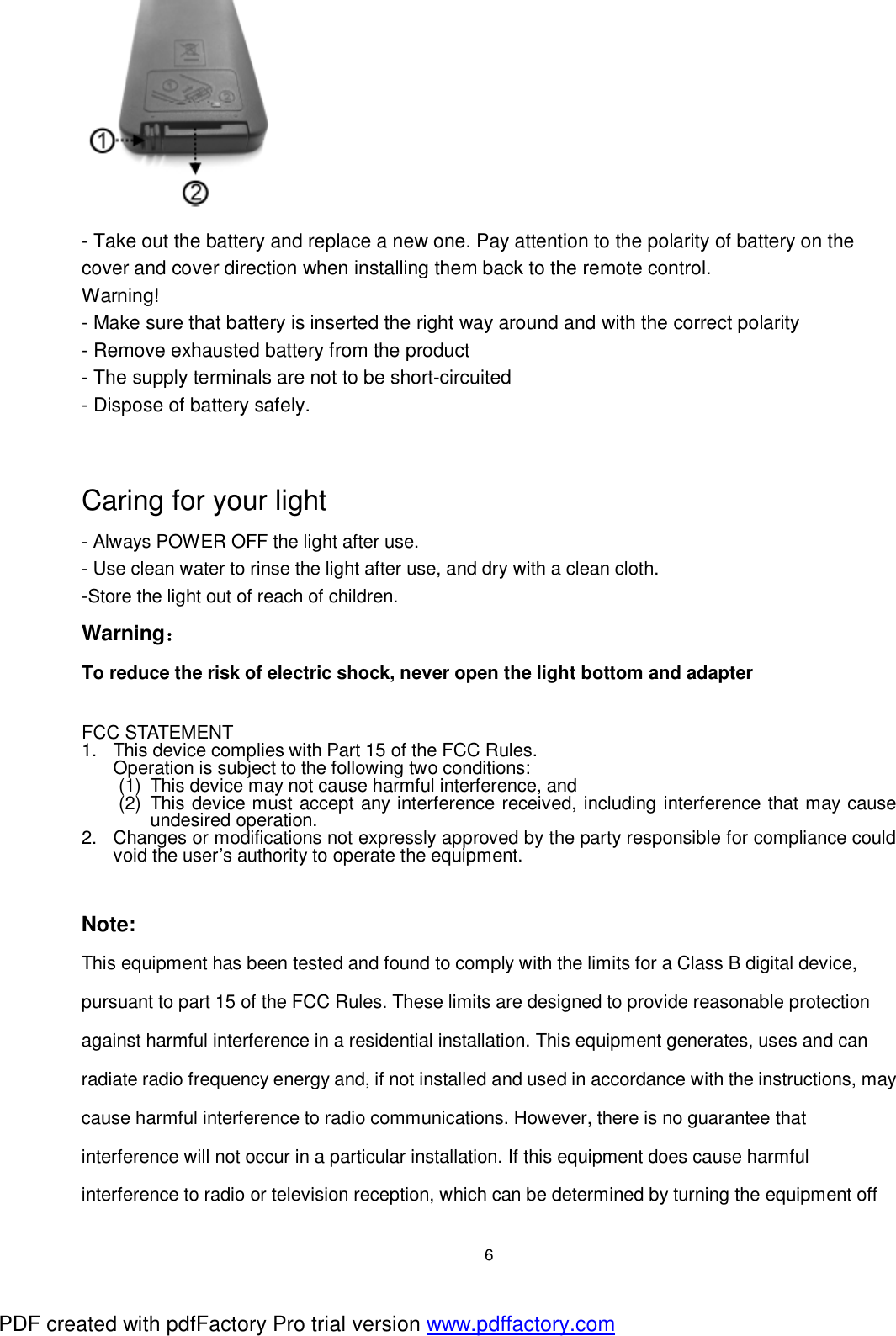
 5 10.  Next Button:When the Bluetooth is connected and music is on, Press this button to select next music .  11.      Pause and Play:When the Bluetooth is connected and music is on, Press this button to play or pause the music. 12、      Voice- and +:When the Bluetooth is connected and music is on, Press the “-” to reduce volume, Press“+” to increase volume  Operation by pressing ON/OFF button on bottom of color cube            Press ON/OFF Button to turn on/off the color cube  Press first time to turns on the light and BlueTooth This color cube has memory storage function (when electricity is not exhausted), when you press the ON/OFF button, the lighting could keep the same working model you turned off last time. When electricity is exhausted, no memory storage functions. The initial mode is “SMOOTH” model.   The Bluetooth indicator light will start to flash in Blue color and a voice “power on “ come out , use your mobile phone Bluetooth to match the “Landaa” Bluetooth, Once the Bluetooth is connected with your mobile phone, Bluetooth indication light will be kept on blue color but not flash and a voice “speaker connected “ come out ,Photo-2  Press second time, turns off the light and BlueTooth  Battery replacement (for remote control) If remote control fails to activate the light, replace the battery. - Press the tab on side of battery cover and then slide off the cover from the remote control PDF created with pdfFactory Pro trial version www.pdffactory.com
 6  - Take out the battery and replace a new one. Pay attention to the polarity of battery on the cover and cover direction when installing them back to the remote control. Warning! - Make sure that battery is inserted the right way around and with the correct polarity - Remove exhausted battery from the product - The supply terminals are not to be short-circuited - Dispose of battery safely.                 Caring for your light - Always POWER OFF the light after use. - Use clean water to rinse the light after use, and dry with a clean cloth. -Store the light out of reach of children. Warning: To reduce the risk of electric shock, never open the light bottom and adapter    FCC STATEMENT 1. This device complies with Part 15 of the FCC Rules. Operation is subject to the following two conditions: (1) This device may not cause harmful interference, and (2) This device must accept any interference received, including interference that may cause undesired operation. 2. Changes or modifications not expressly approved by the party responsible for compliance could void the user’s authority to operate the equipment.   Note:  This equipment has been tested and found to comply with the limits for a Class B digital device, pursuant to part 15 of the FCC Rules. These limits are designed to provide reasonable protection against harmful interference in a residential installation. This equipment generates, uses and can radiate radio frequency energy and, if not installed and used in accordance with the instructions, may cause harmful interference to radio communications. However, there is no guarantee that interference will not occur in a particular installation. If this equipment does cause harmful interference to radio or television reception, which can be determined by turning the equipment off PDF created with pdfFactory Pro trial version www.pdffactory.com
 7 and on, the user is encouraged to try to correct the interference by one or more of the following measures: —Reorient or relocate the receiving antenna. —Increase the separation between the equipment and receiver. —Connect the equipment into an outlet on a circuit different from that to which the receiver is connected. —Consult the dealer or an experienced radio/TV technician for help.    Power Beauty (Dongguan) Industrial Co., LTD All rights reserved. No part of this document may be reproduced or transmitted in any form or by any Means, electronic, mechanical, photocopying, recording, or otherwise, without prior written permission of powerbeauty(dongguan)in dustrial co ltd. PDF created with pdfFactory Pro trial version www.pdffactory.com

Navigation menu