Powerware Bladeups Users Manual 164201650_2 EBM Rel
to the manual 7b5da1c9-aac2-46e0-9970-27e600f632a0
2015-02-06
: Powerware Powerware-Bladeups-Users-Manual-520100 powerware-bladeups-users-manual-520100 powerware pdf
Open the PDF directly: View PDF  .
.
Page Count: 32

Powerware BladeUPS
Extended Battery Module (EBM)
User's Guide
®®

Special Symbols
The following are examples of symbols used on the UPS or accessories to alert you to important
information:
RISK OF ELECTRIC SHOCK - Indicates that a risk of electric shock is present and the
associated warning should be observed.
CAUTION: REFER TO OPERATOR'S MANUAL - Refer to your operator's manual for
additional information, such as important operating and maintenance
instructions.
This symbol indicates that you should not discard the UPS or the UPS batteries
in the trash. This product contains sealed, lead‐acid batteries and must be
disposed of properly. For more information, contact your local recycling/reuse or
hazardous waste center.
This symbol indicates that you should not discard waste electrical or electronic
equipment (WEEE) in the trash. For proper disposal, contact your local
recycling/reuse or hazardous waste center.
Eaton, Powerware, and BladeUPS are registered trademarks of Eaton Corporation or its subsidiaries and affiliates.
ECopyright 2007 Eaton Corporation, Raleigh, NC, USA. All rights reserved. No part of this document may be
reproduced in any way without the express written approval of Eaton Corporation.
EATON Powerware® BladeUPS® EBM User's Guide S 164201650 Rev 2 www.powerware.com i
Table of Contents
1 Introduction 1 . . . . . . . . . . . . . . . . . . . . . . . . . . . . . . . . . . . . . . . . . . . . . . . . . . . . . . . . .
Safety Warnings 1 . . . . . . . . . . . . . . . . . . . . . . . . . . . . . . . . . . . . . . . . . . . . . . . . . . . . . . . . . . . . . . . . . . . . .
2 Installation 13 . . . . . . . . . . . . . . . . . . . . . . . . . . . . . . . . . . . . . . . . . . . . . . . . . . . . . . . . . .
Inspecting the Equipment 13 . . . . . . . . . . . . . . . . . . . . . . . . . . . . . . . . . . . . . . . . . . . . . . . . . . . . . . . . . . . . . . .
EBM Setup 14 . . . . . . . . . . . . . . . . . . . . . . . . . . . . . . . . . . . . . . . . . . . . . . . . . . . . . . . . . . . . . . . . . . . . . . . . .
Checking the EBM Accessories 14 . . . . . . . . . . . . . . . . . . . . . . . . . . . . . . . . . . . . . . . . . . . . . . . . . . . . . . . .
Rack Setup for the EBM 15 . . . . . . . . . . . . . . . . . . . . . . . . . . . . . . . . . . . . . . . . . . . . . . . . . . . . . . . . . . . . .
EBM Installation 20 . . . . . . . . . . . . . . . . . . . . . . . . . . . . . . . . . . . . . . . . . . . . . . . . . . . . . . . . . . . . . . . . . . . . .
3 Maintenance 23 . . . . . . . . . . . . . . . . . . . . . . . . . . . . . . . . . . . . . . . . . . . . . . . . . . . . . . . .
UPS and Battery Care 23 . . . . . . . . . . . . . . . . . . . . . . . . . . . . . . . . . . . . . . . . . . . . . . . . . . . . . . . . . . . . . . . . . .
Storing the UPS and Batteries 23 . . . . . . . . . . . . . . . . . . . . . . . . . . . . . . . . . . . . . . . . . . . . . . . . . . . . . . . . . . . .
When to Replace Batteries 23 . . . . . . . . . . . . . . . . . . . . . . . . . . . . . . . . . . . . . . . . . . . . . . . . . . . . . . . . . . . . . .
How to Replace EBMs 24 . . . . . . . . . . . . . . . . . . . . . . . . . . . . . . . . . . . . . . . . . . . . . . . . . . . . . . . . . . . . . . . . .
Recycling the Used Battery or UPS 26 . . . . . . . . . . . . . . . . . . . . . . . . . . . . . . . . . . . . . . . . . . . . . . . . . . . . . . . .
4 Service and Support 27 . . . . . . . . . . . . . . . . . . . . . . . . . . . . . . . . . . . . . . . . . . . . . . . . . .
TABLE OF CONTENTS
EATON Powerware® BladeUPS® EBM User's Guide S 164201650 Rev 2 www.powerware.com
ii
EATON Powerware® BladeUPS® EBM User's Guide S 164201650 Rev 2 www.powerware.com 1
Chapter 1 Introduction
The Extended Battery Module (EBM) can be added to the
Powerware® BladeUPS® uninterruptible power system (UPS) to extend
the available battery time (see Table 1). Up to four EBMs can be installed
with the Powerware BladeUPS.
Table 1. Battery Runtimes (in Minutes)
Model UPS Internal
Batteries +1 EBM +2 EBMs +3 EBMs +4 EBMs
BladeUPS 12 4.8 12 20 27 34
BladeUPS 12i 4.8 12 20 27 34
NOTE Battery times are approximate and vary depending on the load configuration and battery charge.
Safety Warnings
IMPORTANT SAFETY INSTRUCTIONS
SAVE THESE INSTRUCTIONS
This manual contains important instructions that you should follow during installation and
maintenance of the EBM. Please read all instructions before operating the equipment and
save this manual for future reference.
WARNING
This UPS contains its own energy source (batteries). The UPS output receptacles may carry
live voltage even when the UPS is not connected to an AC supply.
CAUTION
SBatteries can present a risk of electrical shock or burn from high short-circuit current.
Observe proper precautions. Servicing should be performed by qualified service
personnel knowledgeable of batteries and required precautions. Keep unauthorized
personnel away from batteries.
SProper disposal of batteries is required. Refer to your local codes for disposal
requirements.
SNever dispose of batteries in a fire. Batteries may explode when exposed to flame.
INTRODUCTION
EATON Powerware® BladeUPS® EBM User's Guide S 164201650 Rev 2 www.powerware.com
2
Sikkerhedsanvisninger
VIGTIGE SIKKERHEDSANVISNINGER
GEM DISSE ANVISNINGER
Denne manual indeholder vigtige instruktioner, som skal følges under installation og
betjening af EBM-enheden. Læs venligst alle instruktioner inden betjening af udstyret og
gem denne manual mhp. fremtidige opslag.
ADVARSEL!
Denne UPS indeholder sin egen energikilde (batterier). Udgangsstikkene kan endog være
strømførende, når UPS'en ikke er koblet til en vekselstrømsforsyning.
ADVARSEL
SBatterierne kan give risiko for elektrisk stød eller brandsår forårsaget af høj
kortslutningsstrøm. Overhold gældende forsigtighedsregler. Servicering skal udføres af
kvalificeret servicepersonale med kendskab til batterier og gældende forsigtighedsregler.
Hold uautoriseret personale væk fra batterierne.
SKorrekt bortskaffelse af batterier er påkrævet. Overhold gældende lokale regler for
bortskaffelsesprocedurer.
SSkaf dig aldrig af med batterierne ved at brænde dem. Batterierne kan eksplodere ved
åben ild.
INTRODUCTION
EATON Powerware® BladeUPS® EBM User's Guide S 164201650 Rev 2 www.powerware.com 3
Belangrijke Veiligheidsinstructies
BELANGRIJKE VEILIGHEIDSINSTRUCTIES
BEWAAR DEZE INSTRUCTIES
Deze handleiding bevat belangrijke instructies die u dient te volgen tijdens de installatie en
het gebruik van EBM. Lees alle instructies voordat u de apparatuur in bedrijf neemt en
bewaar deze handleiding als naslagwerk.
WAARSCHUWING
Deze UPS bevat een eigen energiebron (batterijen). De uitgangscontactdoos kan onder
spanning staan, zelfs wanneer de UPS niet is aangesloten op de netspanning.
OPGELET
SBatterijen leveren gevaar op voor elektrische schokken en kunnen brandwonden
veroorzaken door een grote kortsluitstroom. Neem de juiste voorzorgsmaatregelen in
acht. Het onderhoud moet worden uitgevoerd door bevoegde onderhoudsmonteurs die
verstand hebben van accu's en op de hoogte zijn van de vereiste voorzorgsmaatregelen.
Houd onbevoegden uit de buurt van de accu's.
SDe batterijen moeten op de juiste wijze worden opgeruimd. Raadpleeg hiervoor uw
plaatselijke voorschriften.
SNooit batterijen in het vuur gooien. De batterijen kunnen ontploffen.

INTRODUCTION
EATON Powerware® BladeUPS® EBM User's Guide S 164201650 Rev 2 www.powerware.com
4
Tarkeita Turvaohjeita
TÄRKEITÄ TURVAOHJEITA - SUOMI
SÄILYTÄ NÄMÄ OHJEET
Tämä käyttöohje sisältää tärkeitä ohjeita, joita on noudatettava EBM-yksikön asennuksen ja
käytön yhteydessä. Lue kaikki ohjeet ennen laitteiston käyttöä ja säilytä ohje myöhempää
tarvetta varten.
VAROITUS
Tässä UPS-virtalähteessä on oma energianlähde (akut). Lähtövastakkeissa voi olla jännite,
vaikka UPS-virtalähdettä ei ole kytketty verkkovirtaan.
VARO
SAkut voivat aiheuttaa sähköiskun tai palovammojen vaaran johtuen suuresta
oikosulkuvirrasta. Noudata kaikkia asianmukaisia varotoimia. Laitteen saa huoltaa vain
ammattitaitoinen huoltohenkilökunta, joka tuntee akut ja niihin liittyvät varotoimet. Älä
päästä valtuuttamatonta henkilöstöä lähelle akkuja.
SAkusto täytyy hävittää säädösten mukaisella tavalla. Noudata paikallisia määräyksiä.
SÄlä koskaan heitä akkuja tuleen. Ne voivat räjähtää.

INTRODUCTION
EATON Powerware® BladeUPS® EBM User's Guide S 164201650 Rev 2 www.powerware.com 5
Consignes de Sécurité
CONSIGNES DE SÉCURITÉ IMPORTANTES
CONSERVER CES INSTRUCTIONS
Ce manuel contient des instructions importantes que vous êtes invité à suivre lors de toute
procédure d'installation et de fonctionnement de l'EBM. Veuillez consulter entièrement ces
instructions avant de faire fonctionner l'équipement et conserver ce manuel afin de pouvoir
vous y reporter ultérieurement.
AVERTISSEMENT!
Cette onduleur possède sa propre source d'alimentation (batteries). Il est possible que les
prises de sortie soient sous tension même lorsque l'onduleur n'est pas connectée à une
alimentation CA.
ATTENTION!
SLes batteries peuvent présenter un risque de choc électrique ou de brûlure provenant
d'un courant de court-circuit haute intensité. Observez les précautions appropriées.
L'entretien doit être réalisé par du personnel qualifié connaissant bien les batteries et
les précautions nécessaires. N'autorisez aucun personnel non qualifié à manipuler les
batteries.
SUne mise au rebut réglementaire des batteries est obligatoire. Consulter les règlements
en vigueur dans votre localité.
SNe jamais jeter les batteries au feu. L'exposition aux flammes risque de les faire
exploser.

INTRODUCTION
EATON Powerware® BladeUPS® EBM User's Guide S 164201650 Rev 2 www.powerware.com
6
Sicherheitswarnungen
WICHTIGE SICHERHEITSANWEISUNGEN
AUFBEWAREN
Dieses Handbuch enthält wichtige Hinweise, welche Sie bei der Installation und Wartung
des EBM beachten sollten. Bitte lesen Sie alle Anweisungen des Handbuches bevor sie mit
dem Gerät arbeiten. Bewaren Sie das Handbuch zum Nachlesen auf.
ACHTUNG
Dieses UPS (Unterbrechungsfreies Stromversorgungssystem - USV) enthält eine eigene
Energiequelle (Batterien). Die Ausgangssteckdosen können Spannung führen, auch wenn
das UPS (USV) nicht an eine Wechselstromquelle angeschlossen ist.
VORSICHT!
SBatterien können das Risiko eines elektrischen Schlags bergen oder durch hohen
Kurzschlussstrom in Brand geraten. Die richtigen Vorsichtsmaßnahmen beachten. Die
Wartung muss von qualifiziertem Wartungspersonal durchgeführt werden, das im
Umgang mit Batterien geübt ist und über gute Kenntnisse der erforderlichen
Vorsichtsmaßnahmen verfügt. Nicht autorisiertes Personal von Batterien fern halten.
SDie Batterien müssen ordnungsgemäß entsorgt werden. Hierbei sind die örtlichen
Bestimmungen zu beachten.
SBatterien niemals verbrennen, da sie explodieren können.
INTRODUCTION
EATON Powerware® BladeUPS® EBM User's Guide S 164201650 Rev 2 www.powerware.com 7
Avvisi di Sicurezza
IMPORTANTI ISTRUZIONI DI SICUREZZA
CONSERVARE QUESTE ISTRUZIONI
Il presente manuale contiene importanti istruzioni da seguire durante l'installazione e il
funzionamento di EBM. Leggere integralmente le istruzioni prima di utilizzare
l'apparecchiatura e conservare il presente manuale per futuro riferimento.
AVVERTENZA
L'UPS contiene la propria fonte di energia (batterie). Le prese d'uscita possono essere sotto
tensione anche quando l'UPS non è collegato all'alimentazione elettrica CA.
ATTENZIONE
SLe batterie possono comportare un rischio di scossa elettrica o di ustione in seguito a
un'elevata corrente di corto circuito. Osservare le dovute precauzioni. L'assistenza deve
essere eseguita da personale qualificato esperto di batterie e delle necessarie
precauzioni. Tenere il personale non autorizzato lontano dalle batterie.
SLe batterie devono essere smaltite in modo corretto. Per i requisiti di smaltimento fare
riferimento alle disposizioni locali.
SNon gettare mai le batterie nel fuoco poichè potrebbero esplodere se esposte alle
fiamme.

INTRODUCTION
EATON Powerware® BladeUPS® EBM User's Guide S 164201650 Rev 2 www.powerware.com
8
Viktig Sikkerhetsinformasion
VIKTIGE SIKKERHETSINSTRUKSJONER
GJEM DISSE INSTRUKSJONENE
Denne håndboken inneholder viktige instruksjoner som du bør overholde ved montering og
bruk av EBM. Les alle instruksjoner før utstyret tas i bruk, og gjem håndboken til fremtidig
referanse.
FARLIG
UPS-enheten inneholder sin egen energikilde (batterier). Utgangsstikkene kan være
strømførende selv når UPS-enheten ikke er koblet til et strømuttak.
FORSIKTIG
SBatterier kan utgjøre en fare for elektrisk støt eller brannsår pga. høy kortsluttingsstrøm.
Treff passende forholdsregler. Service bør utføres av kvalifisert servicepersonale med
kjennskap til batterier og nødvendige forholdsregler. Hold uautorisert personale borte fra
batteriene.
SBatterier må fjernes på korrekt måte. Se lokale forskrifter vedrørende krav om fjerning av
batterier.
SKast aldri batterier i flammer, da de kan eksplodere, hvis de utsettes for åpen ild.

INTRODUCTION
EATON Powerware® BladeUPS® EBM User's Guide S 164201650 Rev 2 www.powerware.com 9
Regulamentos de Segurança
INSTRUÇÕES DE SEGURANÇA IMPORTANTES
GUARDE ESTAS INSTRUÇÕES
Este manual contém instruções importantes que devem ser seguidas durante a instalação e
operação da EBM (Produção de energia elétrica por indução magnética). Leia todas as
instruções antes de operar o equipamento e guarde este manual para consultá-lo
futuramente.
ADVERTÊNCIA
Este no-break possui sua própria fonte de energia (baterias). As tomadas de saída podem
estar energizadas mesmo que o no-break não esteja conectado a uma fonte de energia
elétrica.
PERIGO
SAs baterias podem oferecer risco de choque elétrico ou queimadura, ocasionados por
alta tensão com possibilidade de curto-circuito. Tome as precauções adequadas. A
manutenção deve ser realizada por pessoal qualificado, com conhecimento sobre
baterias e ciente das precauções exigidas. Mantenha o pessoal não autorizado afastado
das baterias.
SSiga as instruções apropriadas ao desfazer‐se das baterias. Consulte os códigos do local
para maiores informações sobre os regulamentos de descarte de produtos.
SNunca jogue as baterias no fogo, porque há risco de explosão.

INTRODUCTION
EATON Powerware®BladeUPS®EBM User’s Guide S164201650 Rev 2 www.powerware.com
10
Предупреждения по мерам безопасности
ВАЖНЫЕ УКАЗАНИЯ ПО МЕРАМ БЕЗОПАСНОСТИ
СОХРАНИТЕ ЭТИ УКАЗАНИЯ
В данном руководстве содержатся важные инструкции по установке и
обслуживанию внешнего батарейного модуля или устройства распределения
электропитания. Перед работой с оборудованием прочтите все инструкции.
Сохраните данное руководство для дальнейшего использования.
ПРЕДУПРЕЖДЕНИЕ
В данном ИБП установлены собственные источники энергии (батареи). На
выходных розетках может быть напряжение, даже если ИБП не подключен к
сети переменного тока.
ОСТОРОЖНО
SВысокое напряжение, вызванное коротким замыканием в батарее, может
привести к поражению электрическим током или ожогу. Соблюдайте
меры предосторожности. Техническое обслуживание должно
осуществляться квалифицированным персоналом по работе с
источниками питания, знакомым с мерами предосторожности. Не
допускайте к работе с батареями посторонних.
SНеобходимо соблюдать правила утилизации аккумуляторов. Обратитесь к
местным нормативным актам за информацией о требованиях к
утилизации.
SНикогда не бросайте аккумуляторы в огонь. Аккумуляторы могут
взорваться под воздействием огня.
INTRODUCTION
EATON Powerware® BladeUPS® EBM User's Guide S 164201650 Rev 2 www.powerware.com 11
Advertencias de Seguridad
INSTRUCCIONES DE SEGURIDAD IMPORTANTES
GUARDE ESTAS INSTRUCCIONES
Este manual contiene instrucciones importantes que debe seguir durante la instalación y el
funcionamiento del EBM. Por favor, lea todas las instrucciones antes de poner en
funcionamiento el equipo y guarde este manual para referencia en el futuro.
ADVERTENCIA
Este SIE contiene su propia fuente de energía (baterías). Los receptáculos de salida pueden
transportar voltaje activo aun cuando el SIE no esté conectado con una fuente de CA.
PRECAUCIÓN
SLas baterías pueden constituir un riesgo de descarga eléctrica o quemaduras por
corriente alta de corto circuito. Adopte las precauciones debidas. Personal calificado de
servicio que conozca de baterías y esté al tanto de las precauciones requeridas debe
darle servicio al equipo. Mantenga al personal no autorizado alejado de las baterías.
SEs necesario desechar las baterías de un modo adecuado. Consulte las normas locales
para conocer los requisitos pertinentes.
SNunca deseche las baterías en el fuego. Las baterías pueden explotar si se las expone a
la llama.

INTRODUCTION
EATON Powerware® BladeUPS® EBM User's Guide S 164201650 Rev 2 www.powerware.com
12
Säkerhetsföreskrifter
VIKTIGA SÄKERHETSFÖRESKRIFTER
SPARA DESSA FÖRESKRIFTER
Den här anvisningen innehåller viktiga instruktioner som du ska följa under installation och
användning av EBM. Läs alla instruktioner innan du använder utrustningen och spara den här
anvisningen för framtida referens.
VARNING
Den här UPS-enheten innehåller sin egen energikälla (batterier). Uttagen kan vara
spänningsförande även då UPS-enheten inte är ansluten till spänningsnätet.
VIKTIGT
SBatterierna kan innebära en risk för elektrisk stöt eller brännskada från kortsluten
starkström. Iakttag lämpliga försiktighetsåtgärder. Service ska utföras av utbildad
servicepersonal med kunskap om batterierna och nödvändiga försiktighetsåtgärder. Håll
ej behörig personal borta från batterierna.
SBatterierna måste avyttras enligt anvisningarna i lokal lagstiftning.
SAnvända batterier får aldrig brännas upp. De kan explodera.

EATON Powerware® BladeUPS® EBM User's Guide S 164201650 Rev 2 www.powerware.com 13
Chapter 2 Installation
NOTE If you are installing the UPS and the Extended Battery Module (EBM) together,
follow the installation instructions in the UPS user's guide.
This section explains:
SEquipment inspection
SExtended Battery Module (EBM) setup and installation
Inspecting the Equipment
If any equipment has been damaged during shipment, keep the shipping
cartons and packing materials for the carrier or place of purchase and file
a claim for shipping damage. If you discover damage after acceptance,
file a claim for concealed damage.
To file a claim for shipping damage or concealed damage: 1) File with
the carrier within 15 days of receipt of the equipment; 2) Send a copy of
the damage claim within 15 days to your service representative.
NOTE Check the battery recharge date on the shipping carton label. If the date has expired
and the batteries were never recharged, do not use the UPS. Contact your service
representative.
INSTALLATION
EATON Powerware® BladeUPS® EBM User's Guide S 164201650 Rev 2 www.powerware.com
14
EBM Setup
The Powerware BladeUPS EBM comes with all hardware required for
installation in a standard EIA or JIS seismic rack-mount configuration
with square and round mounting holes. The rail assemblies adjust to
mount in 48-cm (19-inch) racks with front to rear rail distances from
61 to 76 cm (24 to 30 inches) deep.
Checking the EBM Accessories
Verify that the following items are included with the EBM:
SEBM front cover
SMounting brackets and fasteners (if not already installed):
- (2) mounting brackets
- (4) 6-32 flat-head screws
SRails and fasteners:
- (2) sliding rail assemblies (left and right)
- (2) rear hold-down brackets
- (12) hex-head screws
- (4) U-shaped 10-32 clip nuts
SThis user's guide
INSTALLATION
EATON Powerware® BladeUPS® EBM User's Guide S 164201650 Rev 2 www.powerware.com 15
Rack Setup for the EBM
CAUTION
The EBM is heavy [77 kg (170 lb)]. A minimum of two people are required to remove the EBM
from its carton.
NOTE Mounting rails are required for each individual cabinet.
To install the EBM rail kit:
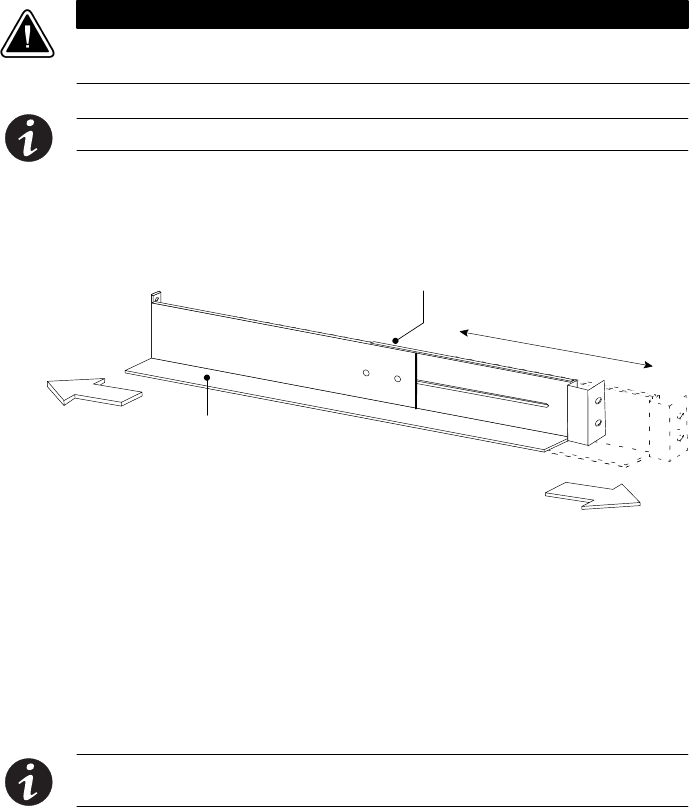
1. Loosen the assembly wing nuts on both rail assemblies and adjust
the rail size for the depth of your rack (see Figure 1).
Rear
Front Rail Assembly
Assembly Wing Nuts
Figure 1. Adjusting the Rail Depth
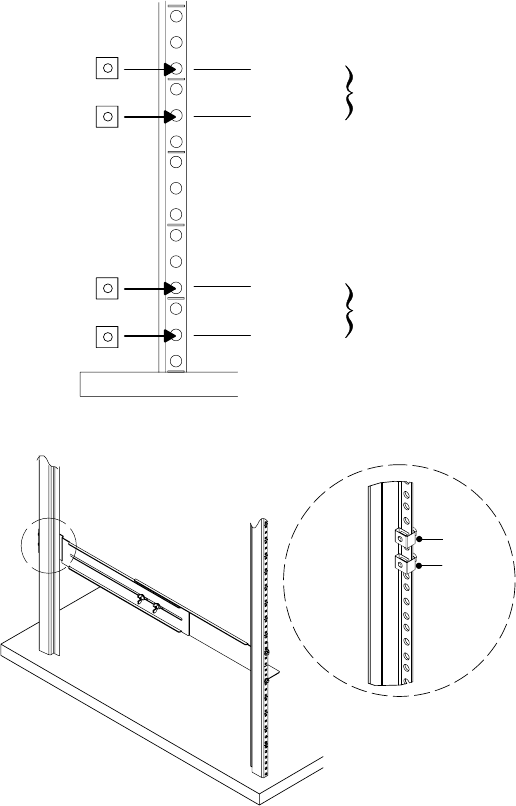
2. Select the proper holes in the rail for positioning the EBM and other
cabinets in the rack.
Place the first rail for the first EBM at the bottom, using positions 1
and 6 for the front hex-head screws. If you are installing additional
rails, place the next rail 4 holes above the last installed screw (see
Figure 2).
NOTE Verify that the hole patterns on the rails and mounting brackets align with the hole
pattern on the rack.

INSTALLATION
EATON Powerware® BladeUPS® EBM User's Guide S 164201650 Rev 2 www.powerware.com
16
Position 1
Position 6
Position 10
Position 15
First Rail
Second Rail
Figure 2. Front Rail Screw Positions for the EBM
3. Secure the rail to the front of the rack with two hex-head screws
(see Figure 3).
Front Rail Hex-Head Screws
Figure 3. Securing the Front Rail
INSTALLATION
EATON Powerware® BladeUPS® EBM User's Guide S 164201650 Rev 2 www.powerware.com 17
4. Using two clip nuts and two hex-head screws, attach the rail to the
rear of the rack (see Figure 4 and Figure 5).
The bottom rail uses positions 2 and 4 for the rear hex-head
screws. If you are installing additional rails, place the next rail
7 holes above the last installed screw.
Position 2
Position 4
Position 11
Position 13
First Rail
Second Rail
Figure 4. Rear Rail Screw Positions for the EBM
Clip Nuts
Figure 5. Securing the Rear Rail

INSTALLATION
EATON Powerware® BladeUPS® EBM User's Guide S 164201650 Rev 2 www.powerware.com
18
5. Repeat Steps 3 and 4 for the other rail.
6. Tighten the assembly wing nuts on both rail assemblies.
CAUTION
The EBM is heavy [77 kg (170 lb)]. A minimum of two people are required to move the EBM.
7. Place the EBM on a flat, stable surface with the front of the EBM
facing toward you.
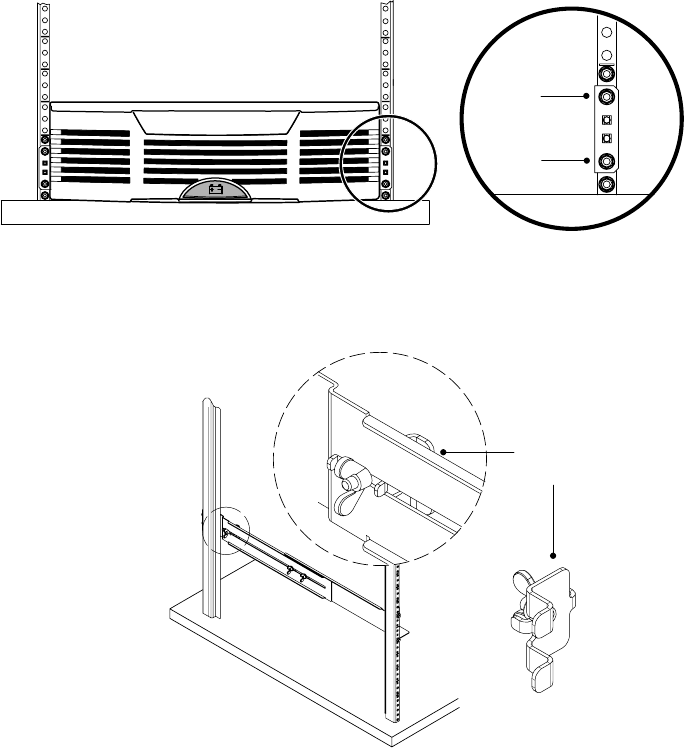
8. If the mounting brackets are not already installed, align the two
mounting brackets with the screw holes on the side of the EBM
and secure with the supplied 6-32 flat-head screws (see Figure 6).
9. Attach the EBM front cover:
Align the pins on the rear of the front cover with the openings in the
EBM. Push the cover firmly into place. See Figure 6.
Mounting
Bracket
6-32 Flat-Head
Screws
Figure 6. Installing the EBM Mounting Brackets
10. Slide the EBM into the rack.
INSTALLATION
EATON Powerware® BladeUPS® EBM User's Guide S 164201650 Rev 2 www.powerware.com 19
11. Secure the front of the EBM to the rack using two hex-head screws
in each mounting bracket as shown in Figure 7.
Hex-Head
Screws
Figure 7. Securing the EBM Mounting Brackets
12. Attach the rear hold-down brackets to the rail and slide the brackets
into the slots on the EBM rear panel (see Figure 8).
Rear Hold-Down
Bracket
Figure 8. Securing the Back of the EBM
INSTALLATION
EATON Powerware® BladeUPS® EBM User's Guide S 164201650 Rev 2 www.powerware.com
20
13. Verify that the brackets are seated firmly, then tighten the wing
nuts on the rear hold-down brackets. The EBM is now secured in
the rack.
14. If installing additional EBMs, repeat Steps 7 through 13 for each
cabinet.
15. Continue to the following section “EBM Installation.”
EBM Installation
CAUTION
A small amount of arcing may occur when connecting an EBM to the UPS. This is normal and
will not harm personnel. Insert the EBM cable into the UPS battery connector quickly and
firmly.
To install the EBM(s) for a UPS:
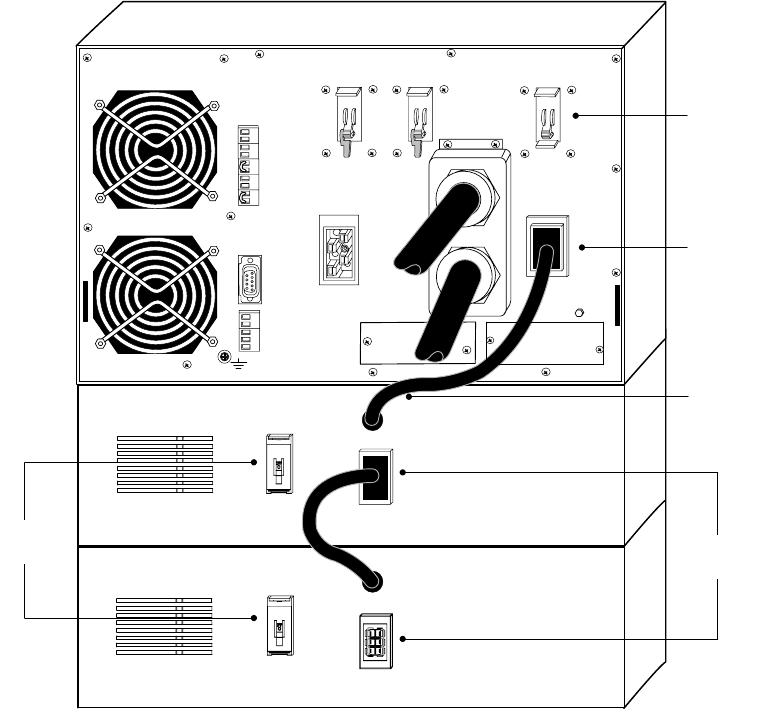
1. Verify that all battery circuit breakers are in the OFF (O) position
(see Figure 9).
2. Plug the EBM cable(s) into the battery connector(s) as shown in
Figure 9. Up to four EBMs may be connected to the UPS.
NOTE The batteries charge to 80% capacity in less than 5 hours. However, it is
recommended that the batteries charge for 48 hours after installation or long-term storage.
INSTALLATION
EATON Powerware® BladeUPS® EBM User's Guide S 164201650 Rev 2 www.powerware.com 21
Battery
Breakers EBM Battery
Connectors
EBM Cable
Battery
Breaker
UPS Battery
Connector
Figure 9. Typical EBM Installation
INSTALLATION
EATON Powerware® BladeUPS® EBM User's Guide S 164201650 Rev 2 www.powerware.com
22

EATON Powerware® BladeUPS® EBM User's Guide S 164201650 Rev 2 www.powerware.com 23
Chapter 3 Maintenance
This section explains how to
SCare for the UPS and batteries
SReplace the Extended Battery Modules (EBMs)
SRecycle used batteries or UPS
UPS and Battery Care
For the best preventive maintenance, keep the area around the UPS
clean and dust‐free. If the atmosphere is very dusty, clean the outside of
the system with a vacuum cleaner.
For full battery life, keep the UPS at an ambient temperature of
25°C (77°F).
NOTE The batteries in the UPS are rated for a 3–5 year service life. The length of service
life varies, depending on the frequency of usage and ambient temperature. Batteries used
beyond expected service life will often have severely reduced runtimes. Replace batteries at
least every 5 years to keep units running at peak efficiency.
Storing the UPS and Batteries
If you store the UPS for a long period, recharge the battery every
6 months by connecting the UPS to utility power. The batteries charge
to 80% capacity in less than 5 hours. However, it is recommended that
the batteries charge for 48 hours after long-term storage.
Check the battery recharge date on the shipping carton label. If the date
has expired and the batteries were never recharged, do not use the
UPS. Contact your service representative.
When to Replace Batteries
When the indicator flashes slowly and the audible alarm beeps
intermittently, the batteries may need replacing. Contact your service
representative to order new batteries.
MAINTENANCE
EATON Powerware® BladeUPS® EBM User's Guide S 164201650 Rev 2 www.powerware.com
24
How to Replace EBMs
NOTE DO NOT DISCONNECT the batteries while the UPS is in Battery mode.
Batteries can be replaced easily without turning the UPS off or
disconnecting the load.
If you prefer to remove input power to change the batteries, see
“Individual UPS Shutdown” in the UPS user's guide.
Consider all warnings, cautions, and notes before replacing batteries.
WARNING
SServicing should be performed by qualified service personnel knowledgeable of batteries
and required precautions. Keep unauthorized personnel away from batteries.
SBatteries can present a risk of electrical shock or burn from high short circuit current. The
following precautions should be observed: 1) Remove watches, rings, or other metal
objects; 2) Use tools with insulated handles; 3) Do not lay tools or metal parts on top of
batteries.
SWhen replacing batteries, replace with the same type and number of batteries or battery
packs. Contact your service representative to order new batteries.
SProper disposal of batteries is required. Refer to your local codes for disposal
requirements.
SNever dispose of batteries in a fire. Batteries may explode when exposed to flame.
SDo not open or mutilate the battery or batteries. Released electrolyte is harmful to the
skin and eyes and may be extremely toxic.
SDetermine if the battery is inadvertently grounded. If inadvertently grounded, remove
source from ground. Contact with any part of a grounded battery can result in electrical
shock. The likelihood of such shock can be reduced if such grounds are removed during
installation and maintenance (applicable to equipment and remote battery supplies not
having a grounded supply circuit).
SELECTRIC ENERGY HAZARD. Do not attempt to alter any battery wiring or connectors.
Attempting to alter wiring can cause injury.

MAINTENANCE
EATON Powerware® BladeUPS® EBM User's Guide S 164201650 Rev 2 www.powerware.com 25
CAUTION
The EBM is heavy [77 kg (170 lb)]. A minimum of two people are required to lift the cabinet
into the rack.
To replace the EBMs:
1. Switch all battery circuit breakers to the OFF (O) position (see
Figure 9 on page 21).
2. Unplug the EBM cable from the UPS.
If additional EBMs are installed, unplug the EBM cable from the
battery connector on each EBM.
3. If not already installed, install the supplied mounting brackets on the
new EBM.
4. Replace the EBM. See the following section, “Recycling the Used
Battery or UPS,” for proper disposal.
5. Plug the EBM cable(s) into the battery connector(s) as shown in
Figure 9 on page 21.
6. Remove the breaker tie from the circuit breaker on all EBMs.
7. Switch all battery circuit breakers to the ON ( | ) position.

MAINTENANCE
EATON Powerware® BladeUPS® EBM User's Guide S 164201650 Rev 2 www.powerware.com
26
Recycling the Used Battery or UPS
Contact your local recycling or hazardous waste center for information
on proper disposal of the used battery or UPS.
WARNING
SDo not dispose of the battery or batteries in a fire. Batteries may explode. Proper
disposal of batteries is required. Refer to your local codes for disposal requirements.
SDo not open or mutilate the battery or batteries. Released electrolyte is harmful to the
skin and eyes. It may be toxic.
CAUTION
Do not discard the UPS or the UPS batteries in the trash. This product contains sealed,
lead‐acid batteries and must be disposed of properly. For more information, contact your
local recycling/reuse or hazardous waste center.
CAUTION
Do not discard waste electrical or electronic equipment (WEEE) in the trash. For proper
disposal, contact your local recycling/reuse or hazardous waste center.

EATON Powerware® BladeUPS® EBM User's Guide S 164201650 Rev 2 www.powerware.com 27
Chapter 4 Service and Support
If you have any questions or problems with the UPS, call your Local
Distributor or the Help Desk at one of the following telephone numbers
and ask for a UPS technical representative.
United States: 1-800-843-9433 or 1-919-870-3028
Canada: 1-800-461-9166 ext 260
All other countries: Call your local service representative
Please have the following information ready when you call the Help
Desk:
SModel number
SSerial number
SVersion number (if available)
SDate of failure or problem
SSymptoms of failure or problem
SCustomer return address and contact information
If repair is required, you will be given a Returned Material Authorization
(RMA) Number. This number must appear on the outside of the package
and on the Bill Of Lading (if applicable). Use the original packaging or
request packaging from the Help Desk or distributor. Units damaged in
shipment as a result of improper packaging are not covered under
warranty. A replacement or repair unit will be shipped, freight prepaid for
all warrantied units.
NOTE For critical applications, immediate replacement may be available. Call the Help
Desk for the dealer or distributor nearest you.
*1642016502*
164201650 2
