Printworks Printer Accessories Users Manual Microsoft Presentation2
2015-02-06
: Printworks Printworks-Printer-Accessories-Users-Manual-520668 printworks-printer-accessories-users-manual-520668 printworks pdf
Open the PDF directly: View PDF  .
.
Page Count: 3
PREMIUM PHOTO PAPER: GLOSSY
To achieve optimum image results – please read instructions prior to printing
Printworks Premium Photo Paper allows you to print high quality photos from your inkjet printer. The bright,
glossy finish gives excellent contrast and produces sharp, photo quality images from digital cameras, CD’s,
scanners, the Internet and more.
PRODUCT HANDLING AND STORAGE
Always handle photo paper carefully. To avoid getting fingerprints on the printable surface, always handle the
paper by the edges.
• Keep paper away from moisture and high humidity.
• To extend the life of your prints, do not expose printed or unprinted paper to bright lights or direct sunlight
for long periods of time as ultra-violet rays have damaging effects on any photo paper.
Step 1: Capture your image
• Use a digital camera, scanner, CD or the Internet to capture an image and load into your computer.
Step 2:
• t for
s …follow instructions of your software program.
Step 3:
Select “Paper Size” you are using and “Borderless” if desired
– Select printer settings from the chart below:
Manipulate your image
e images using any software program that handles graphics. You may need to adjus
You can enhanc
color, brightness and size to achieve optimal result
Print your image
• Select “Print” and “Name” of printer being used
• Select “Properties”
•
•Printer Settings
CANON Printer Model Cartridge Color/Print/ Paper Type Print Quality Advanced (Customize) (Other)
Mode/Graphics
8200 Standard Super Photo ag slider bar Photo Paper Pro Advanced Tab - Print Quality:Dr
S300, S330 Standard ault ain Paper Def Pl
S400, S450 Standard t t Defaul Plain Paper Defaul
S500, S520, S530, S530D rd Standa Photo Glossy Photo Paper Custom Advanced>Diffusion, Image &
Photo Optimizer, Whole page
S600, S630, Pixma iP4000, Paper
iP6000D Photo High Glossy Photo High Effects>Auto, Image & Photo Optimizer
S800 Standard Photo Plain Paper Custom Manual>Intensity +10, Brightness>Light
S900, S9000 Photo Custom Plain Paper Custom Advanced>Fine, Diffusion, Color
Adjustment>Intensity +10, Effects>Image
& Photo Optimizer, Apply Whole Page
bjc-85 Standard Super Photo zer Glossy Photo Paper Custom Advanced>Fine, Image & Photo Optimi
Apply Whole Page, Effects> +10 Intensity
I900D Standard High Photo Paper Plus Glossy High
I320, S750 Standard Custom Glossy Photo Paper Custom Intensity+10, Effects>Image & Photo
Optimizer Pro, Apply Whole Page
I450, i470D Photo Optimizer Pro, Apply Whole Page
Standard Auto Glossy Photo Paper Custom Intensity+10,Brightness-Normal, Effects>Image
&
I550 Standard Custom mage & Photo Optimizer Pro, Apply Whole Page Photo Paper Plus Glossy Custom I
I850 Standard Photo Photo Paper Plus Glossy Pro, Apply Whole Page Custom Image & Photo Optimizer
I950 S Fine n Paper tandard Plai Custom
I960 Standard Photo Pap Glossy High High er Plus
MP dard Photo 730 Stan Photo Paper Pro Custom Level 1, Check Diffusion
DELL Printer Model Cartridge Paper Type Print Quality Advanced (Customize) (Other)
A940 Color Photo/Glossy Best Default
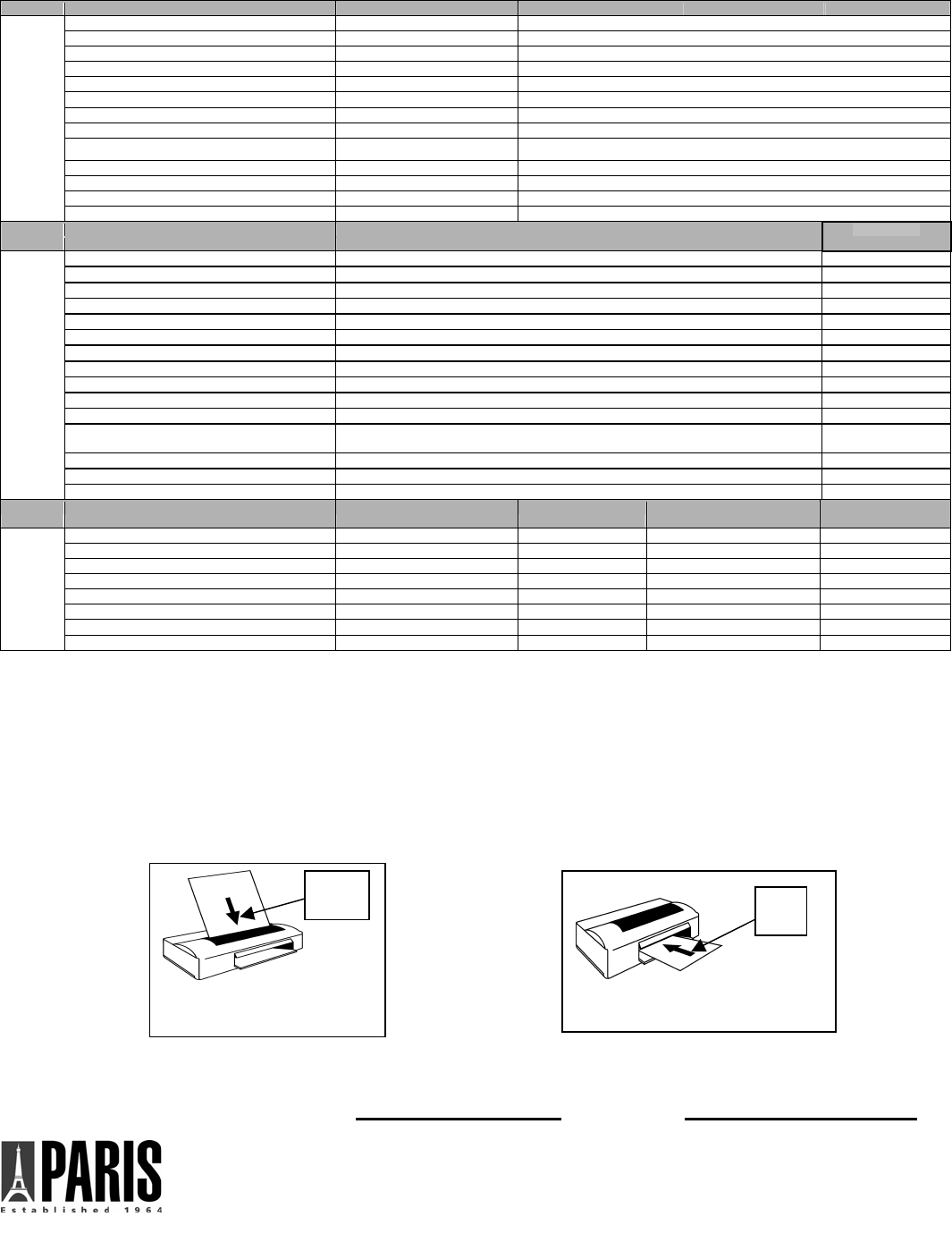
EPSON Printer Model Paper Type Mode
C60 Matte Paper – Heavy Wt. Advanced> Photo-1440 dpi, High Speed-Off, Edge Smoothing ON
C62 Premium Glossy Photo Paper Best Photo, Advanced> High Speed Off
C64, C84, CX5400, CX6400 oto Paper DURABrite Glossy Ph Best Photo, Advanced>High Speed-Off, Turn Off PhotoEnhanced
C80 Premium Glossy Photo Paper Advanced> Photo-1440 dpi
C82 Plain Paper Best Photo, Advanced> High Speed Off
R200 Glossy Photo Paper Best Photo, Advanced>High Speed-Off, Turn Off PhotoEnhanced
R800 r Premium Glossy Photo Pape Best Photo, Advanced>High Speed-Off, Turn Off PhotoEnhanced
780, 785, 890, 980, 1280, 1290 r Premium Glossy Photo Pape Best Photo, Advanced> High Speed Off, Turn Off PhotoEnhanced4
820 Photo Quality Ink Jet Paper Best Photo, Advanced> High Speed-Off, Turn Off PhotoEnhanced
825 Photo Quality Ink Jet Paper ed Best Photo, Advanced> High Speed-Off, Turn Off PhotoEnhanc
925 Plain Paper Adva ontrols> Gamma 1.5, Brightness +6, Satunced> Color C ration -2
960 Premium Glossy Photo Paper Best Photo, vanced> Photo-1440 dpi, High Speed Off, Ad
2100, 2200 Plain Paper Advanced> Photo-720 dpi, High Speed Off, PhotoEnhan ced4
Printe
r Model Paper Type Print Quality HEWLETT
PACKARD
100, 130, 145, 230, 245, D5160 HP Photo Papers Best
660 Series, 690 Series Glossy Paper Best
720 Series Deluxe Photo Paper Best
850 Series Premium Ink Jet Paper Best
870, 880, 890, 895, 2000 Premium Photo Paper Best
920c, 1315, 7260, psd2175, Psc2410, psc2510 apers Other Photo P Best
930c, 932c, 970c, 1100c, 1220c, 2200, 6127 per, Glossy HP Premium Plus Photo Pa Best
940c, 950c, 960c, 990c, 2230, cp1160 HP Premium Plus Photo Paper, Glossy Best
Photo Paper Best Psc1210, 3320, 3420, 3425, 4110
1215, 1218, 1315, 7130 HP Premium Photo Paper Best
3820, 6110, 7110 HP Premium Plus Photo Paper, Glossy Best
5550, 5650, 7150, 7350, 7960,
9300, psc2110 HP Premium Plus Photo Paper, Glossy Best
6110 HP Premium Plus Photo Paper, Glossy Best
7550, psc2210 HP Premium aper, Glossy N Plus Photo P ormal
7660, 7760, 7960 HP Premium Plus Photo Paper, Glossy Best
LEXMARK Printer Model Cartridge Paper Type HP Premium Plus Photo Paper,
Glossy Advanced Settings
5700, 5770, Z51 Standard/Photo aper 200 dpi Glossy/Photo P High 1 Default
P707, Z54 Color Photo/Glossy Best Default
X75, Z23, Z25, Z33, Z35, Z45, Z55, Z65, Z65P Color Photo/Glossy Best Default
X1150, X5150, X605 Color Photo/Glossy Best Default
Z22 Color/Photo Glossy/Photo Paper 200 dpi High 1 Default
Z42, Z43 Color/Photo Glossy/Photo Paper Maximum 2400 dpi Default
Z52, Z53 Color Glossy/Photo Paper Maximum 2400 dpi Default
Z705 Color/Photo Photo/Glossy Best Default
-for brands and models not in table, refer to your printer manual for instructions on settings for glossy photo papers or
visit our website for the most up-to-date settings: www.myprintworks.com
• Load Media – Load a single sheet of Premium Photo Paper into your printer according to your printer type (See
belo ). Imag r shiny side of the paper. Although some printers may allow stack
feeding ecommend s ding.
t dry for 15-20 minutes before handling to ensure it has dried thoroughly. Allow 24hrs. before placing in
information or assistance: www.myprintworks.com
• Test Print – We suggest first printing the image on a plain piece of paper to ensure desired size and location of
image. Note: Image quality will not be as good when printed on plain paper.
w e is to be printed on glossy o
, we r eet feeingle sh
FRONT OF
SHEET
(Glossy side
face forward)
BACK OF
SHEET
(Glossy side
face down)
Front Loading Printer
Top Loading Printer
•Let shee
frame or album.
• For additional or e-mail us at printworks@pariscorp.com
07/07 (#00467)
Paris Business Products, Inc. New Jersey, USA
Capture those special moments forever
with Printworks Premium Photo 4 x 6.
The small size is ideal for printing and
sharing your favorite photographs, and
fits in standard photo albums and
frames.
The high gloss finish creates photo rich
snapshots with vibrant colors and crisp
details. The heavyweight paper feels just
like traditional photos.
Premium Glossy Photo Paper 4x6
Instructions: For best results, read and
follow all instructions before proceeding.
Printing Your Image
Printworks Photo papers are compatible
with most color inkjet printers.
Test Print: We recommend first printing
the image on a plain piece of paper to
ensure desired size and location of
image. Note: Image quality will not be
as good when printed on plain papers.
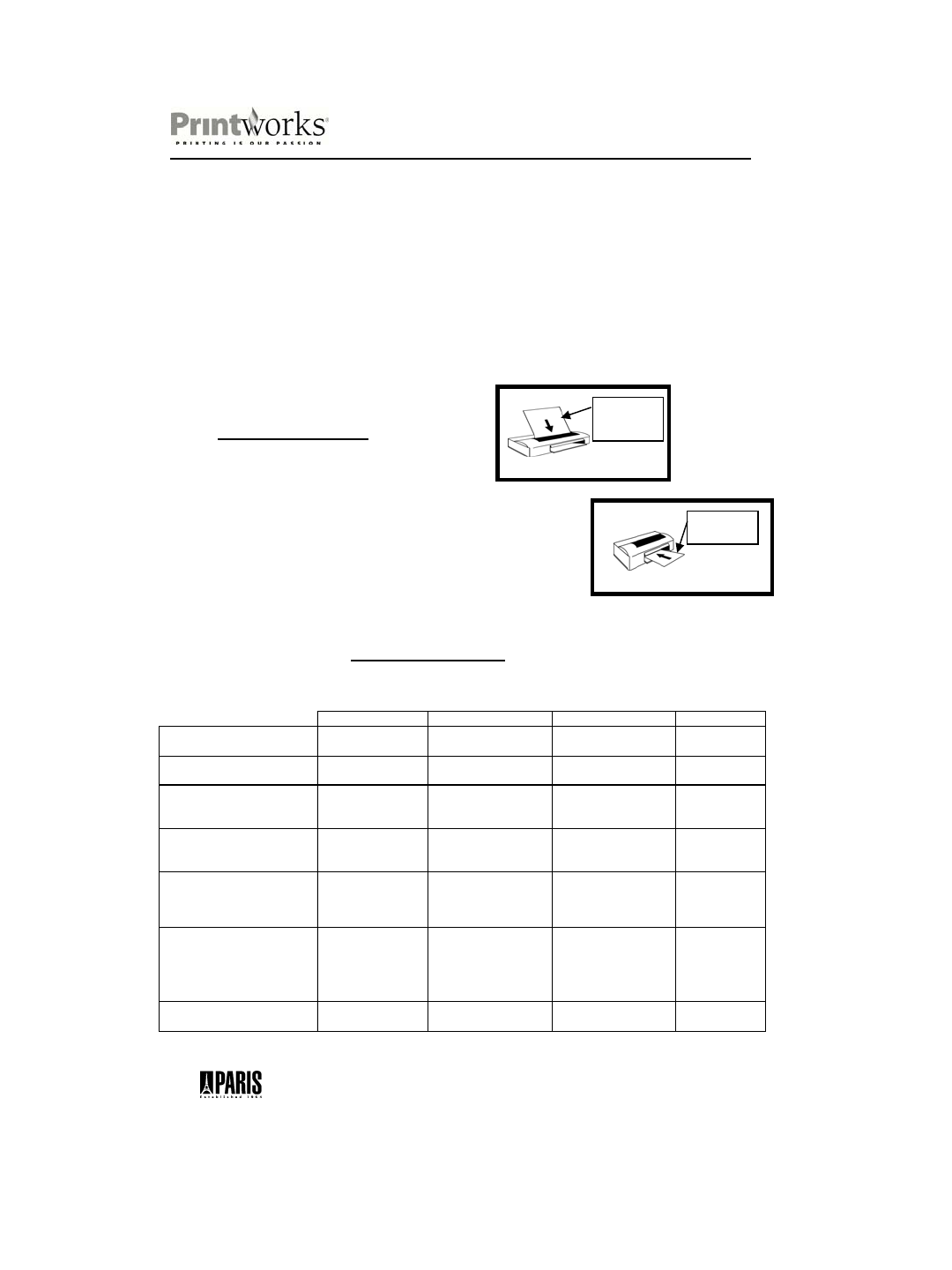
Load Media: Printworks Premium
Photo 4 x 6 has a printable and non-
printable side. Load a single sheet of
paper into your printer according to
your printer type. (Refer to below
diagrams) The image is to be printed
on the glossy or coated side of paper.
Although some printers may allow
stack feeding, we recommend
single sheet feeding.
Top Loading Printer
FRONT OF
SHEET (Glossy
side face
forward)
Front Loading Printer
BACK OF
SHEET(Glossy
side face down)
PRINTER SETTINGS
Printworks Premium Photo 4 x 6 is compatible with most inkjet printers.
Select printer settings from the chart below:
Media Type Print Quality Paper Size Other
HEWLETT PACKARD 600, 700, 800,
900, 1000, 1200, 2000 SERIES
HP Premium Photo Paper
Glossy
Best Borderless 4X6 --
HEWLETT PA CKA RD Photo Smar t
P1000, P1100, P1200, P1300 SERIES
HP Premium Photo Paper
Glossy
Best Borderless 4X6 --
CANON S200, S300, S400, S500,
S600, S800 SERIES
Photo Paper Pro Fine
(Custom: Set)
4x6
Orientation: Landscape
Check Borderless Printing
--
CANON S600, S630, Pixma IP4000,
IP6000D SERIES
Glossy Photo High 4x6
Orientation: Landscape
Check Borderless Printing
Effects> Auto,
Image & Photo
Optimizer
EPSON 400, 600, 700, 800 & 900 Premium Glossy Photo
Paper
Mode: Custom
Custom Settings: Advanced
Print Quality: Best Photo
High Speed: Off
Borderless 4X6
--
EPSON STYLUS PHOTO 700, 800,
900, 1200 & 2200, R200 & R380
SERIES
Premium Glossy Photo
Paper
Mode: Custom
Custom Settings: Advanced
Print Quality: Best Photo
Turn Off Photo Enhanced
High Speed: Off
Borderless 4X6
--
LEXMARK 5000, 7000 & Z SERIES Glossy Photo Paper High Customize: 4x6 Orientation:
Landscape
Natural
Color
-for brands and models not shown above, refer to your printer manual for instructions on settings for
glossy photo papers or visit our website for the most up-to-date settings: www.myprintworks.com
Paris Business Products, Inc. • New Jersey, USA
Visit Our Website www.myprintworks.com 07/07 (Item # 00232)
