Proform 831288283 User Manual SEARS 975S CYCLE Manuals And Guides L9120033
PROFORM Cycle Manual L9120033 PROFORM Cycle Owner's Manual, PROFORM Cycle installation guides
User Manual: Proform 831288283 831288283 PROFORM SEARS PROFORM 975S CYCLE - Manuals and Guides View the owners manual for your PROFORM SEARS PROFORM 975S CYCLE #831288283. Home:Fitness Equipment Parts:Proform Parts:Proform SEARS PROFORM 975S CYCLE Manual
Open the PDF directly: View PDF  .
.
Page Count: 16
%_L._LL------ - wnrl
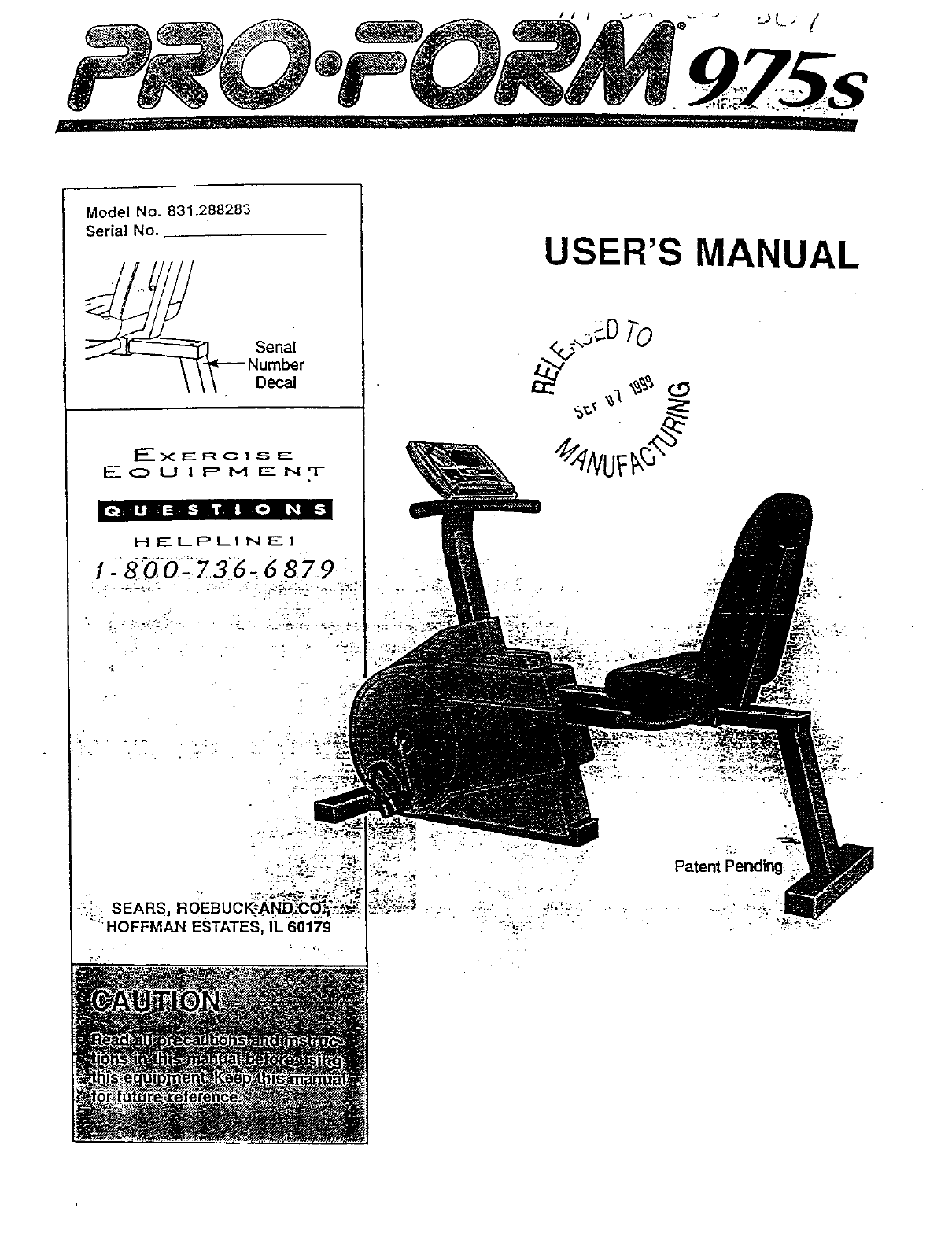
Model No. 831.288283
Serial No.
|_-i I | || i |oR _ |1
H_-LPLINEI
1- 8Q'02736-6 879
USER'S MANUAL
-?i.:
".:. SEARS,
_"HOFFMAN ESTATES, IL 60179
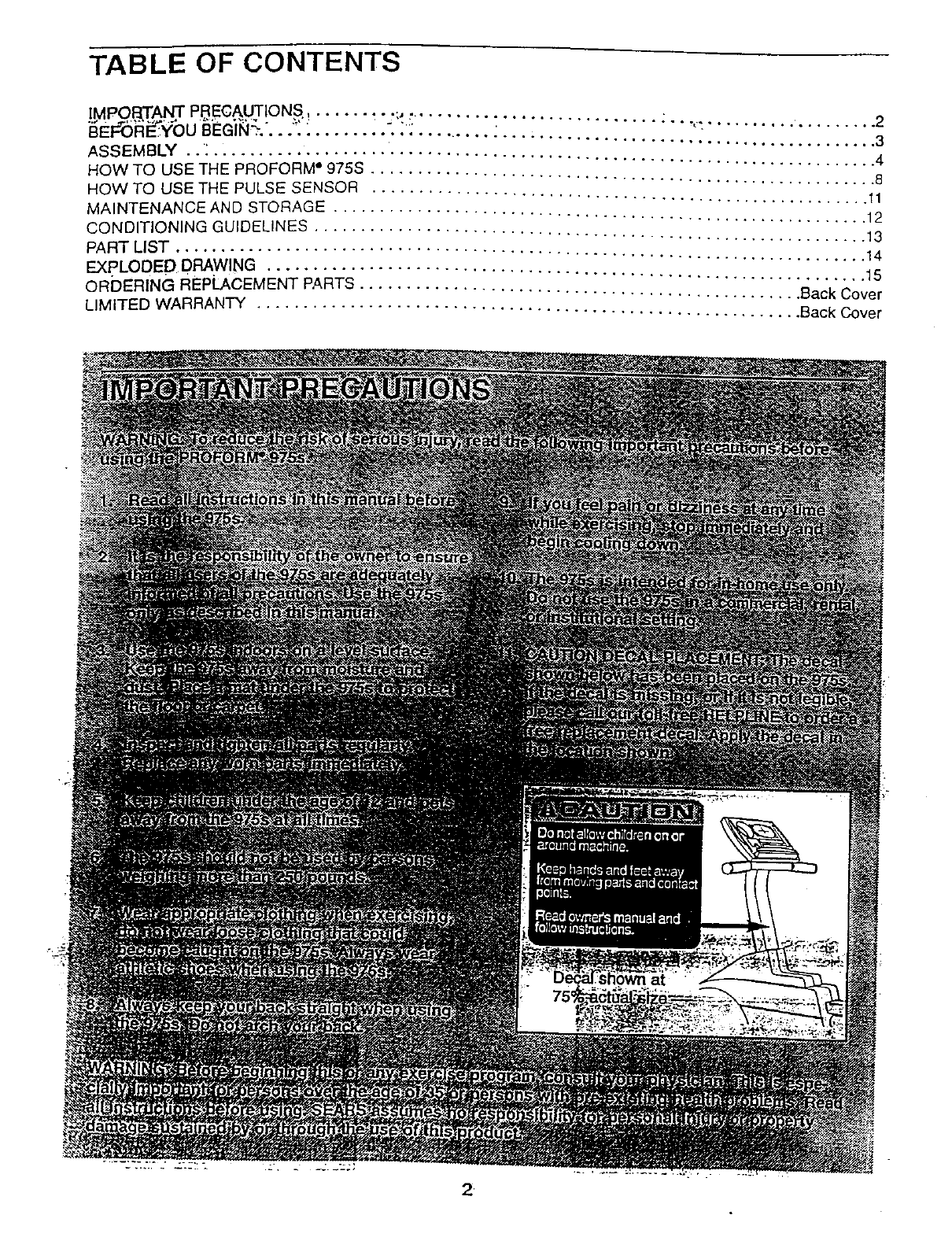
TABLE OF CONTENTS
IMPO,_T,A!4]I", PB..EC.A,.UTIONS. ...... _" ";,, ......... : ........ ...,_ .......... ......... 2
_E,_TS_i_'_0UBEGli_....7: ........ 7:: ............. . ..................................... 3
ASSEMBLY ..: ........................................................................ 4
HOW TO USE THE PROFORM ° 975S ....................................................... 8
HOW TO USE THE PULSE SENSOR ...................................................... 11
MAINTENANCE AND STORAGE .......................................................... 12
CONDITIONING GUIDELINES ............................................................ 13
PART LIST ........................................................................... 14
EXPLODED DRAWING ................................................................. 15
ORDERING REPLACEMENT PARTS ................................................ Back Cover
LIMITED WARRANTY ........................................................... Back Cover
.
BEFORE YOU BEGIN
Thank you for selecting the innovative PROFORM °
975s. The PROFORM 975s offers a unique form of
low-impact exercise that offers greater cardiovascular
benefits and increased muscle toning. And the 975s
features adjustable resistance so you can tailor your
exercise to the level that's perfect for you.
For your benefit, read this manual carefully before
you use the PROFORM 975s. If you have additional
questions, please call our toll-free HELPLINE at
1-800-736-6879, Monday through Saturday, 7 a.m.
until 7 p.m. Central Time (excluding holidays). To help
us assist you, please note the product model number
and serial number before calling. The model number
is 831,288283. The serial number can be found on a
decal attached to the 975s (see the front cover of this
manual for the location of the decal).
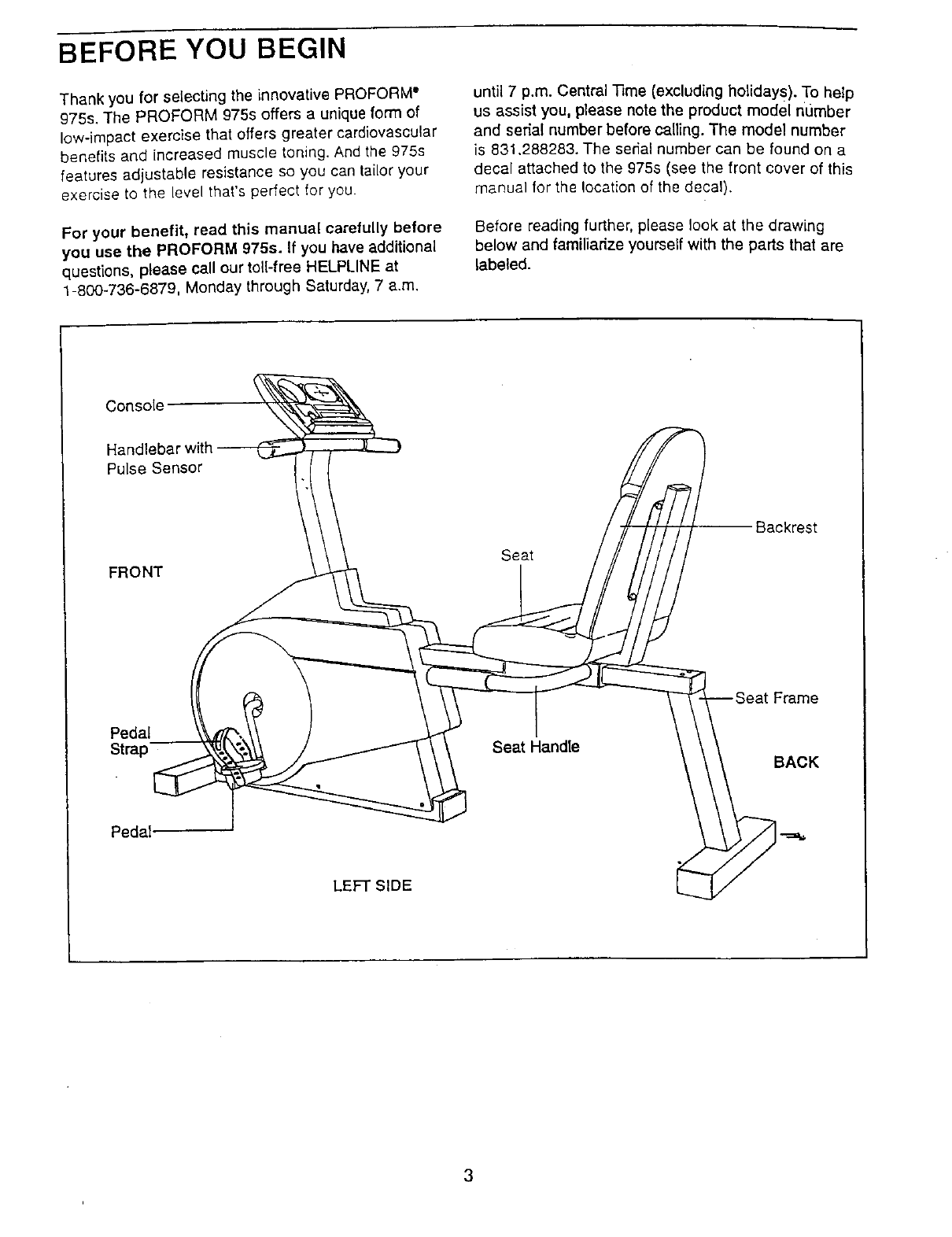
Before reading further, please look at the drawing
below and familiarize yourself with the parts that are
labeled.
Console _-_
Handlebar with _
Pulse Sensor
FRONT
Pedal
Strap --
Pedal.
LEFT SIDE
Seat
Seat Handle
;krest
Seat Frame
K
ASSEMBLY
Place all parts of the pROFORM" 975s in a cleared area and remove the packing materials. Do not dispose of
the packing materiaJs until assembly Is completed,
tools and your own adjustable wrench _ and phillips screw-
Assembly requires the included
driver _ .
PART CHART
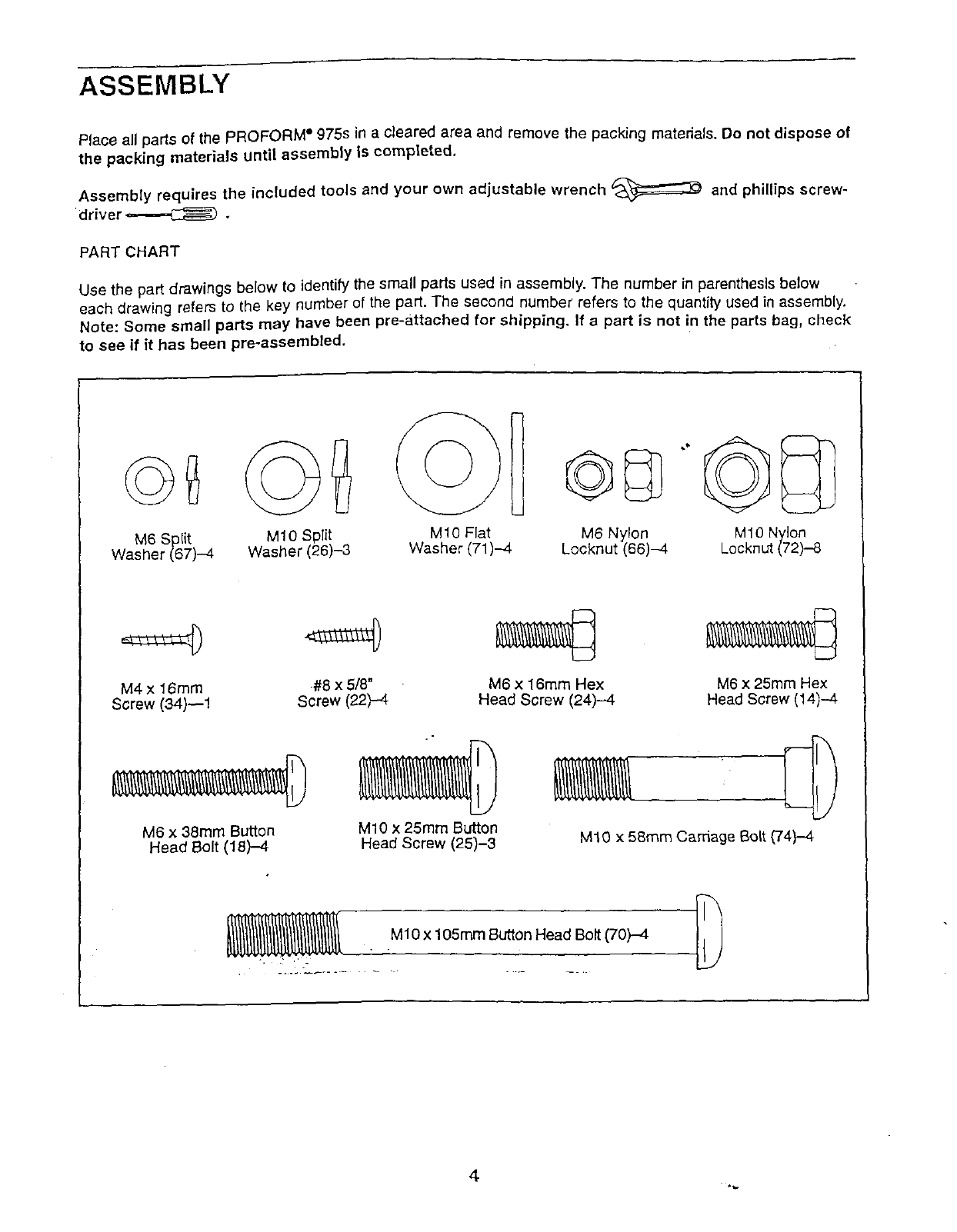
Use the part drawings below to identify the small parts used in assembly. The number in parenthesis below
each drawing refers to the key number of the part. The second number refers to the quantity used in assembly.
Note: Some small parts may have been pre-attached for shipping. If a part is not in the parts bag, check
to see if it has been pre-assembled.
M6 Split
Washer (67)-4
MIO Split
Washer (26)-3
M10 Flat
Washer (71)-4 M6 Nylon
Locknut (66)-4 M10 Nylon
Locknut (72)-8
M4 x 16mm
Screw (34)--1
M6 x 38ram Button
Head Bolt (18)-4
#8 x 5/8"
Screw (22)-4 M6 x 16mm Hex
Head Screw (24)--.4
M10 x 25mm Button
Head Screw (25)-3
M6 x 25mm Hex
Head Screw (14)-4
M10 x 58ram Carriage Bolt (74)-4-
M10 x 105mm Button Head Bolt (70)-4
4
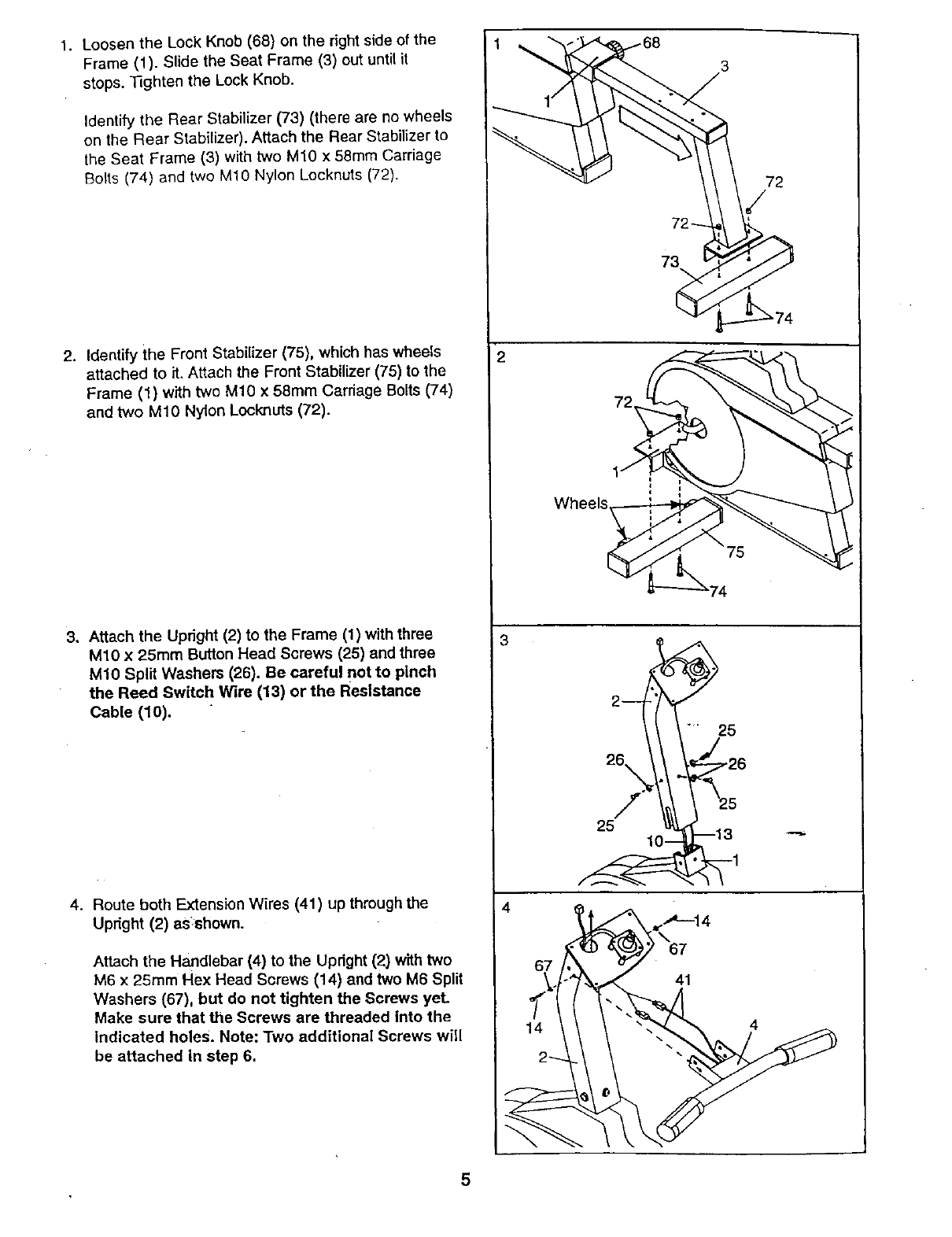
1. LoosentheLockKnob(68)ontherightsideofthe
Frame(1). SlidetheSeatFrame(3)outuntilit
stops.33ghtentheLockKnob.
IdentifytheRearStabilizer(73)(therearenowheels
ontheRearStabilizer).AttachtheRearStabilizerto
theSeatFrame(3)withtwoM1Ox 58mmCarriage
Bolts(74)andtwoM10NylonLocknuts(72).
2. IdentifytheFrontStabilizer(75),whichhaswheels
attachedto it.AttachtheFrontStabilizer(75)tothe
Frame(1)withtwoM10x 58mmCarriageBolts(74)
andtwoM10NylonLocknuts(72).
3. AttachtheUpright(2)to theFrame(1)withthree
M10x 25mmButtonHeadScrews(25)andthree
MlO Split Washers (26). Be careful not to pinch
the Reed Switch Wire (13) or the Resistance
Cable (10).
4. Route both Extension Wires (41) up through the
Uptight (2) as:shown.
Attach the Handlebar (4) to the Upright (2) with two
M6 x 25mm Hex Head Screws (14) and two M6 Split
Washers (67), but do not tighten the Screws yeL
Make sure that the Screws are threaded into the
indicated holes. Note: Two additional Screws will
be attached in step 6.
2
72
73
25
26\
/
25
4_14
67
41
4
5
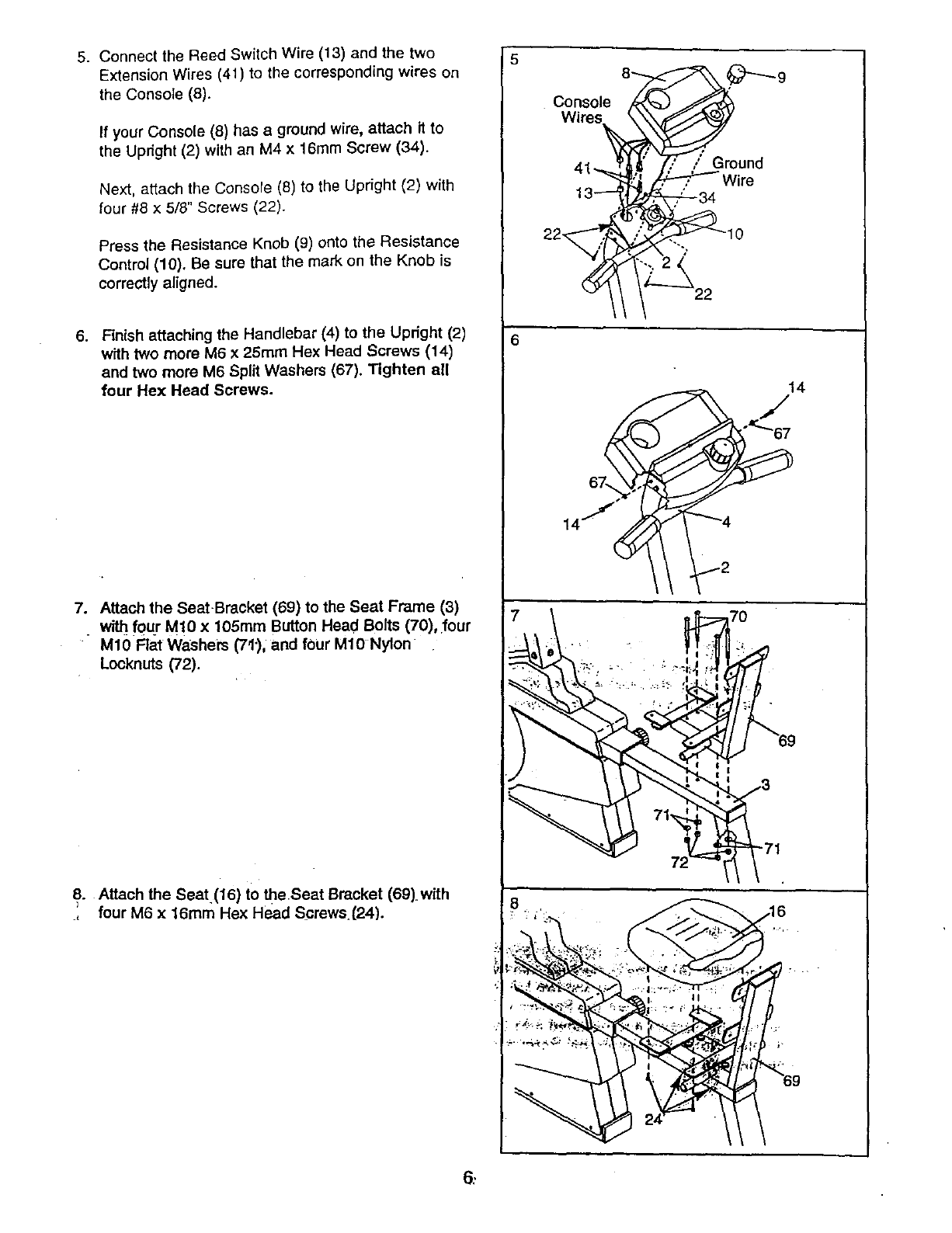
5. Connect the Reed Switch Wire (13) and the two
Extension Wires (41) to the corresponding wires on
the Console (8).
If your Console (8) has a ground wire, attach it to
the Updght (2) with an M4 x 16ram Screw (34).
Next, attach the Console (8) to the Uprfght (2) with
four #8 x 5/8" Screws (22).
Press the Resistance Knob (9) onto the Resistance
Control (10). Be sure that the mark on the Knob is
correctly aligned.
6. Finish attaching the Handlebar (4) to the Upright (2)
with two more M6 x 25ram Hex Head Screws (14)
and two more M6 Split Washers (67). Tighten ell
four Hex Head Screws.
7. Attach the SeatBracket (69) to the Seat Frame (3)
with f0ur M!0 x 105mm Button Head Bolts (70), four
M10 Flat Washem (7t'), and four M10 Nylon
Locknuts (72).
8. Attach the Seat (16) to theseat Bracket (69) with
., four M6 x 16ram Hex Head Screws.(24).
Console
ep
; Ground
.Wire
10
14
7O
6;
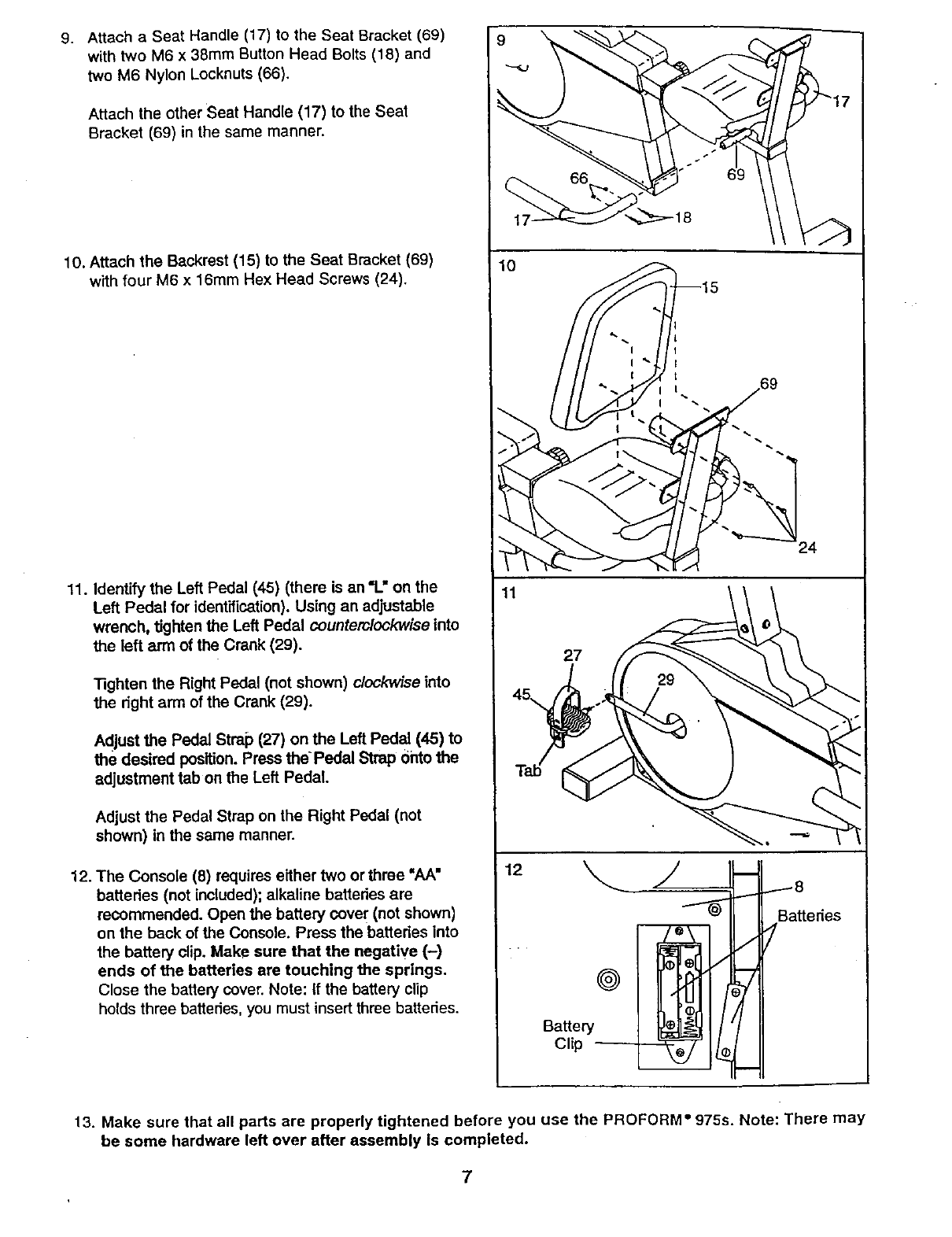
9. Attach a Seat Handle (17) to the Seat Bracket (69)
with two M6 x 38mm Button Head Bolts (18) and
two M6 Nylon Locknuts (66).
Attach the other Seat Handle (17) to the Seat
Bracket (69) in the same manner.
10. Attach the Backrest (15) to the Seat Bracket (69)
with four M6 x 16mm Hex Head Screws (24).
11. Identify the Left Pedal (45) (there is an "L" on the
Left Pedal for identification). Using an adjustable
wrench, tighten the Left Pedal counterclockwise into
the left arm of the Crank (29).
"13ghtenthe Right Pedal (not shown) clockwise into
the dght arm of the Crank (29).
Adjust the Pedal Strap (27) on the Left Pedal (45) to
the desired position. Press the Pedal Strap onto the
adjustment tab on the Left Pedal,
Adjust the Pedal Strap on the Right Pedal (not
shown) in the same manner.
12. The Console (8) requires either two or three "hA"
batteries (not included); alkaline batteries are
recommended. Open the battery cove r(not shown)
on the back of the Console. Press the batteries into
the battery clip. Make sure that the negative (-)
ends of the batteries are touching the springs.
Close the battery cover. Note: If the battery clip
holds three batteries, you must insert three batteries.
9
10
Battedes
@
Battery
Clip
13. Make sure that all parts are properly tightened before you use the PROFORM" 975s. Note: There may
be some hardware left over after assembly Is completed.
7
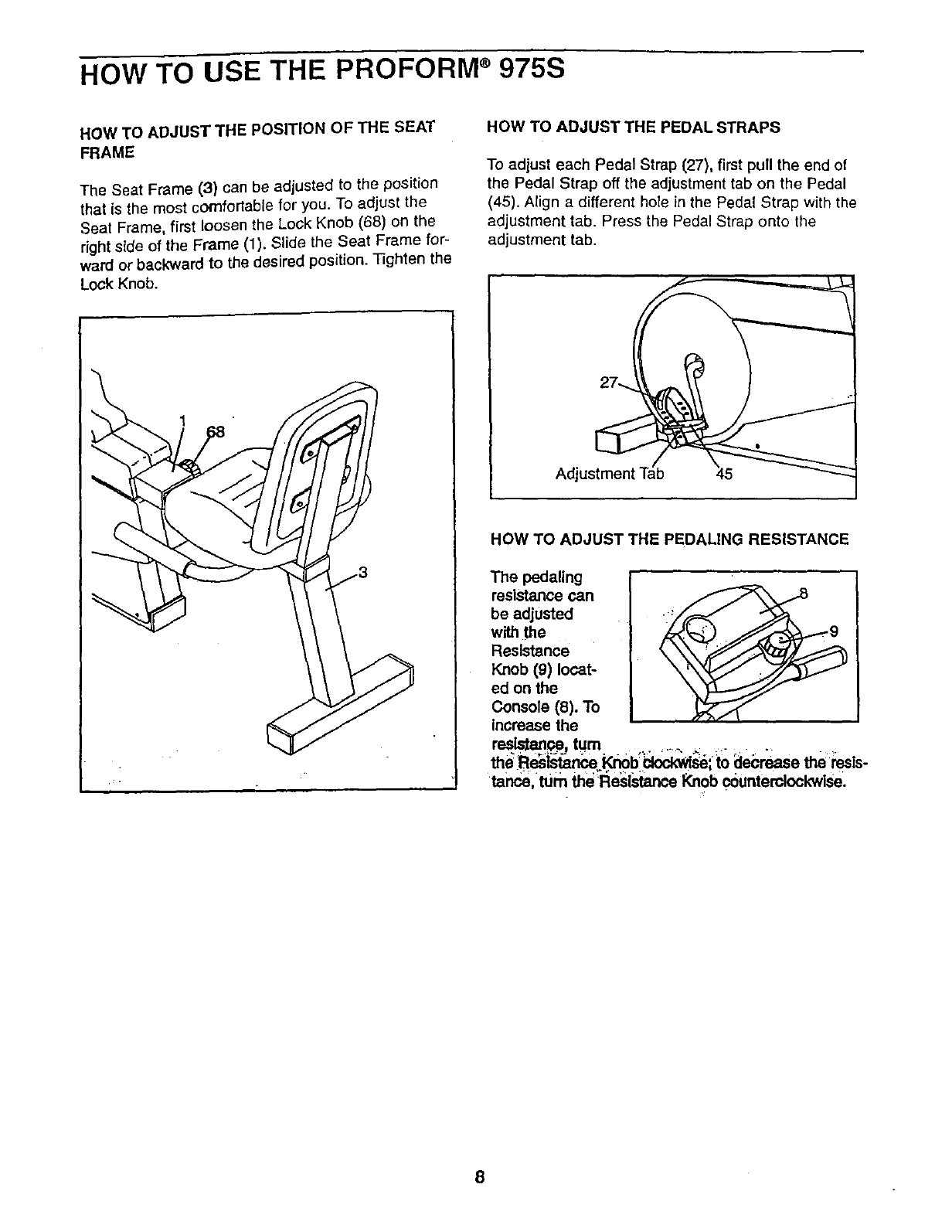
HOW TO USE THE PROFORM ®975S
HOW TO ADJUST THE POSITION OF THE SEAT
FRAME
The Seat Frame (3) can be adjusted to the position
that is the most comfortable for you. To adjust the
Seat Frame, first loosen the Lock Knob (68) on the
right side of the Frame (1). Slide the Seat Frame for-
ward or backward to the desired position. Tighten the
Lock Knob.
HOW TO ADJUST THE PEDAL STRAPS
To adjust each Pedal Strap (27), first pull the end of
the Pedal Strap off the adjustment tab on the Pedal
(45). Align a different hole in the Pedal Strap with the
adjustment tab. Press the Pedal Strap onto the
adjustment tab.
Adjustment 45
HOW TO ADJUST THE PEDALING RESISTANCE
The pedaling
resistance can
be adjusted
with the
Resistance
Knob (9) locat-
ed on the
Console (8). To
increase the
resistant, tum ,. ........ ....... ,
the "Re_si_,ance _b _;" to decrease the _i:esis-
tance turn the Resl_ance Knob counterclockwise.
8
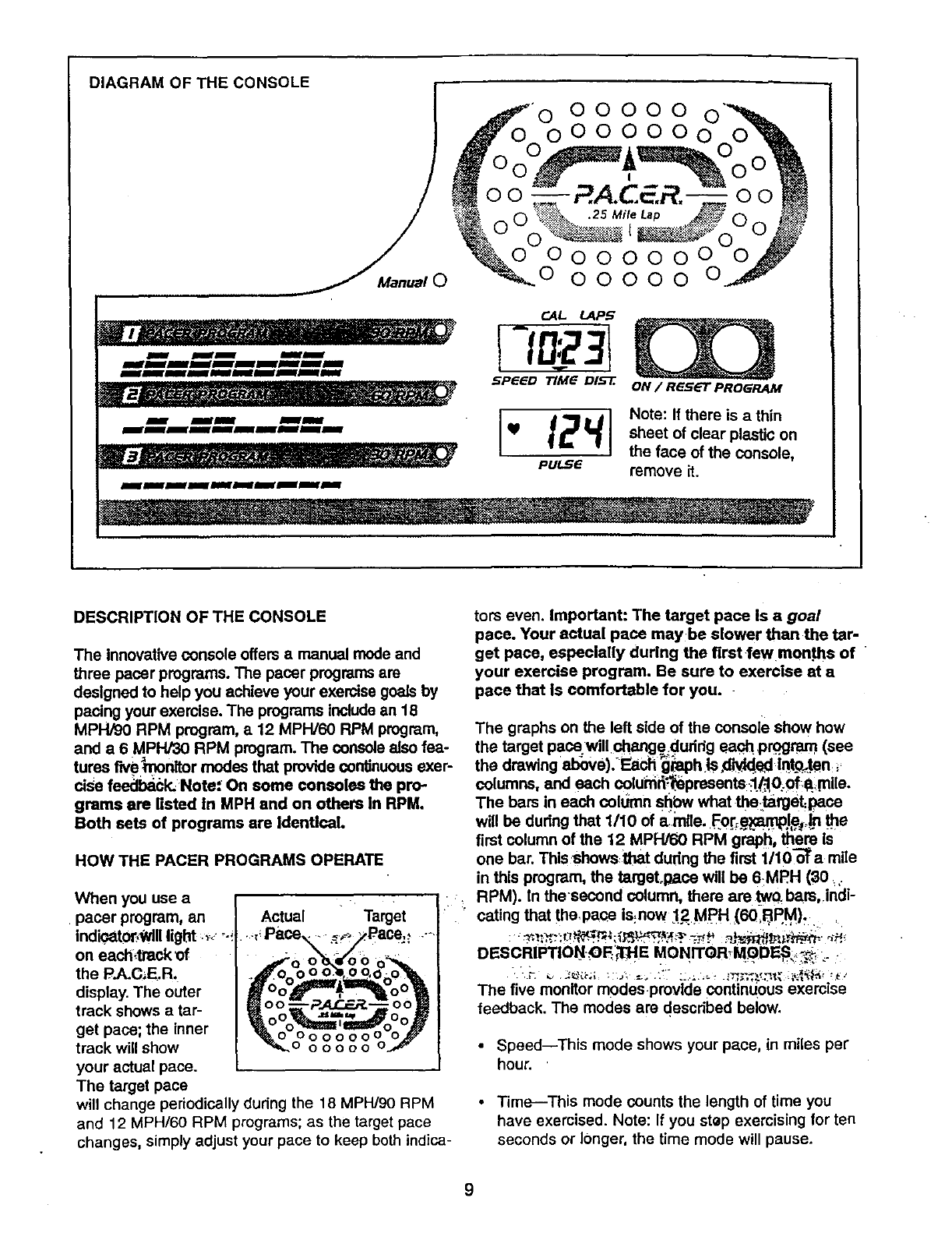
DIAGRAM OF THE CONSOLE
00000
Manual 000000
I_WmHIBJWmNNImgll_J_m
C.AL t..AP5
SPeeD TIMG DI_E. ON / R_s_r PROGRAM
Note: If there is a thin
sheet of clear plastic on
the face of the console,
remove it.
DESCRIPTION OF THE CONSOLE
The innovative console offers amanual mode and
three pacer programs. The pacer programs am
designed to help you achieve your exercise goals by
pacing your exemlse. The programs include an 18
MPH/90 RPM program, a 12 MPW60 RPM program,
and a 6 MPH/30 RPM program. The console also fea-
tures liv.e_nonltor modes that provide continuous exer-
cise feedba_-k. Note: On some consoles the pro-
grams are listed in MPH and on others in RPM.
Both sets of programs are Identical.
HOW THE PACER PROGRAMS OPERATE
When you use a • :,
pacer program, an '
indicato[,Wlll I
on each,track of
the P.A.C_E.R.
display. The outer
track shows atar-
get pace; the inner oooooo(
track will show o o o o o o
your actual pace•
The target pace
will change periodically during the 18 MPH/90 RPM
and 12 MPH/60 RPM programs; as the target pace
changes, simply adjust your pace to keep both indica-
tots even. Important: The target pace Is a goal
pace. Your actual pace maybe slower than the tar-
get pace, especially during the first few mon.ths of
your exercise program. Be sure to exercise at a
pace that is comfortable for you.
The graphs on the left side of the console show how
the target pace will change dudrig ea_! program (see
the drawing above).-Each _aph tS d_ed Iqt.o._ten:
co umns, and each co umr_-_epresents _l/.-.10;0f,a. rn e.
The ham in each colt_mn shbw what the_talge_pace
will be during that 1/10 of arnlle. F0r:e_.lp_._n _e
first column of the 12 MPH/60 RPM graph, them Is
one bar. This shows:ithat dudng the first 1/10 oo_a mile
in this program, the targetogaCe will be 6MF?H (80 :,
RPM). In thesecond column, there are tw0. bars, indi-
cating that the,pace is:now :12MI_H (60,BP.M)_.
:"=_::_:r._;_._"_./'_-7_.':-_ _' ,_._r_.'m' _'_
DESCRIPTION_OFi_E MONITOR M_DE,S_.
The five monitor modes provide continuous exercise
feedback. The modes are described below.
•Speed--This mode shows your pace, in miles per
hour.
•Time--This mode counts the length of time you
have exercised. Note: If you step exercising for ten
seconds or longer, the time mode will pause.
9
•Distance (1)lST}--This mode shows the total num-
ber of ml]es you have cycled, up to 999. The display
will then reset to zero and continue counting.
•Laps--This mode shows the number of quarter-mile
laps you have completed.
•Calories (CAL)--This mode shows the approximate
number of calories you have burned.
STEP-BY-STEP CONSOLE OPERATION
Before the con.._;otacan be operated, the batteries
must be Installed. (See assembly step 12 on page 7
for installation instructions.) Follow the steps below to
operate the conso!e.
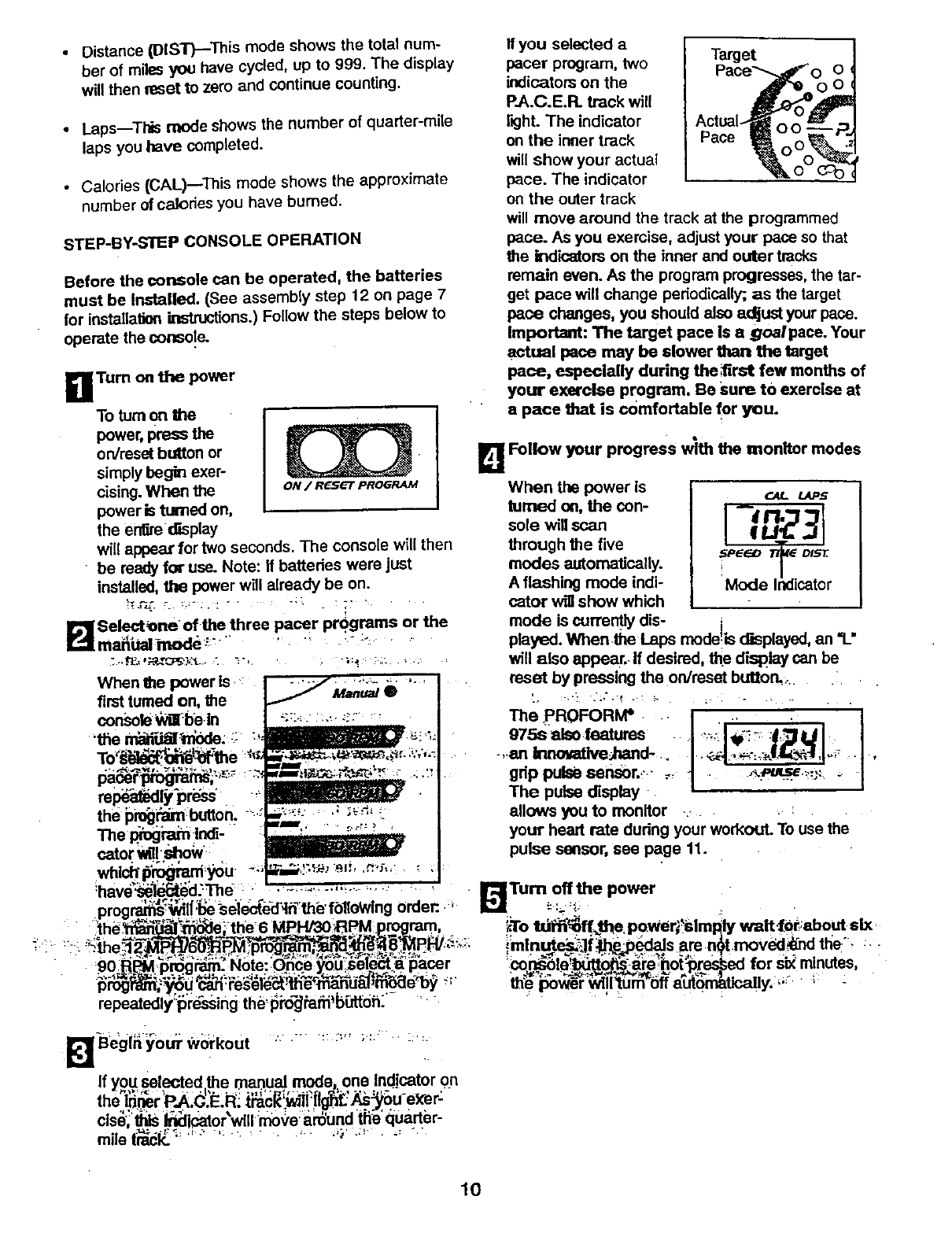
HTurn on the power
To turn on the
power, press the
on/reset button or
simply begin exer-
cising. When the oN/ Reset PROGRAM
power is _on,
the erfue _splay
will appear for two seconds. The console wit( then
• be ready for use. Note: if batteries were just
installed, the power will already be on.
B Selact_ne of the three pacer programs or the
mai_bal:inode_:" '" :" :: " "
When the power is,, j-:,;_--......... ,......... ]
first turned on, the i......._ M_uat •I
consola_i be.in I _:=-,,. ,,_•::: ::
"the__. _- :,,
relief'press"
the pi_('_m buifon. =_.
TheI_ogmm:lr_- "
cato T ! ow'-
If you selectod a
pacer program, two
indicators on the O
P.A.C.E.FL track will
rKjht. The indicator
on the irmer track
will show your actual
pace. The indicator
on the outer track
will move around the track at the programmed
pace. AS you exercise, adjust your pace so that
the indicators on the inner and outer tracks
remain even. As the program progresses, the tar-
get pace will change periodically; as the target
pace changes, you should also adjust your pace.
Important: The target pace is agoa/pace. Your
actual pace may be slower than the target
pace, especially during the ;first few months of
your exercise program. Be sure to exercise at
a pace that Is comfortable for you.
L_ Follow your progress with the monitor modes
When the power is
turned on, the con-
sole will scan
through the five
modes automatically.
A flashing mode indi-
cator wig show which
_-At. tAPS
,::,°L:
mode is currently dis-
played. When the laps mode =scEspis,yed, an "1_"
will also appear,-If desired, the d'mplay can be
reset by pressing the on/reset button, ..... i
" l d I
975s also features ..:.._;_: ,:,
-,.an lllnot_veJ1mld .... .. _-:., oi_ .,
grip pulse sensor._..- ._ J.... _.pu_'._-,._ _ [
The pulse display •
allows you to monitor :, . :
your heart rate during your workout. To use the
pulse sensor, see page 11.
ihave_3e'l_L_d..Th d• ...,,.:_._ . off the power
prog_wd!_se selected_ln the'fblloWlng order:.., ,,..= Turn
.=t e_ "_-_ the6 MPH/30_3pM program _To t0_ff,_the, power,_simp_ly waitlbt,:about six,
:,..
u__!L-_a_g_:: Note: unceyou:so,ect apacer '.co_la_o;_-_ho_re_ed for six minutes,
repeatedly_i_'r#-,;ssingthe.i_m-_Pafii'b[_tdh.- _
l_Jlhegl__Ou_-w_rkout ...-. .... :.,, ;:; . :.:.
M
If you _selected,_e manual mode, one Indicator on
ths 'PJ,:C:E,R: '-
cise,:_ _icator'will :mo_,e:ardUndt_e'quarter-
mile ti'T_ _ " "' ': . ....... _;"-:' -"' "'
10
HOW TO USE THE PULSE SENSOR
The convenient pulse sensor allows you to measure
your hear rate periodically. You can measure your
head rate before you begin exercising, during your
workout, and again when you finish.
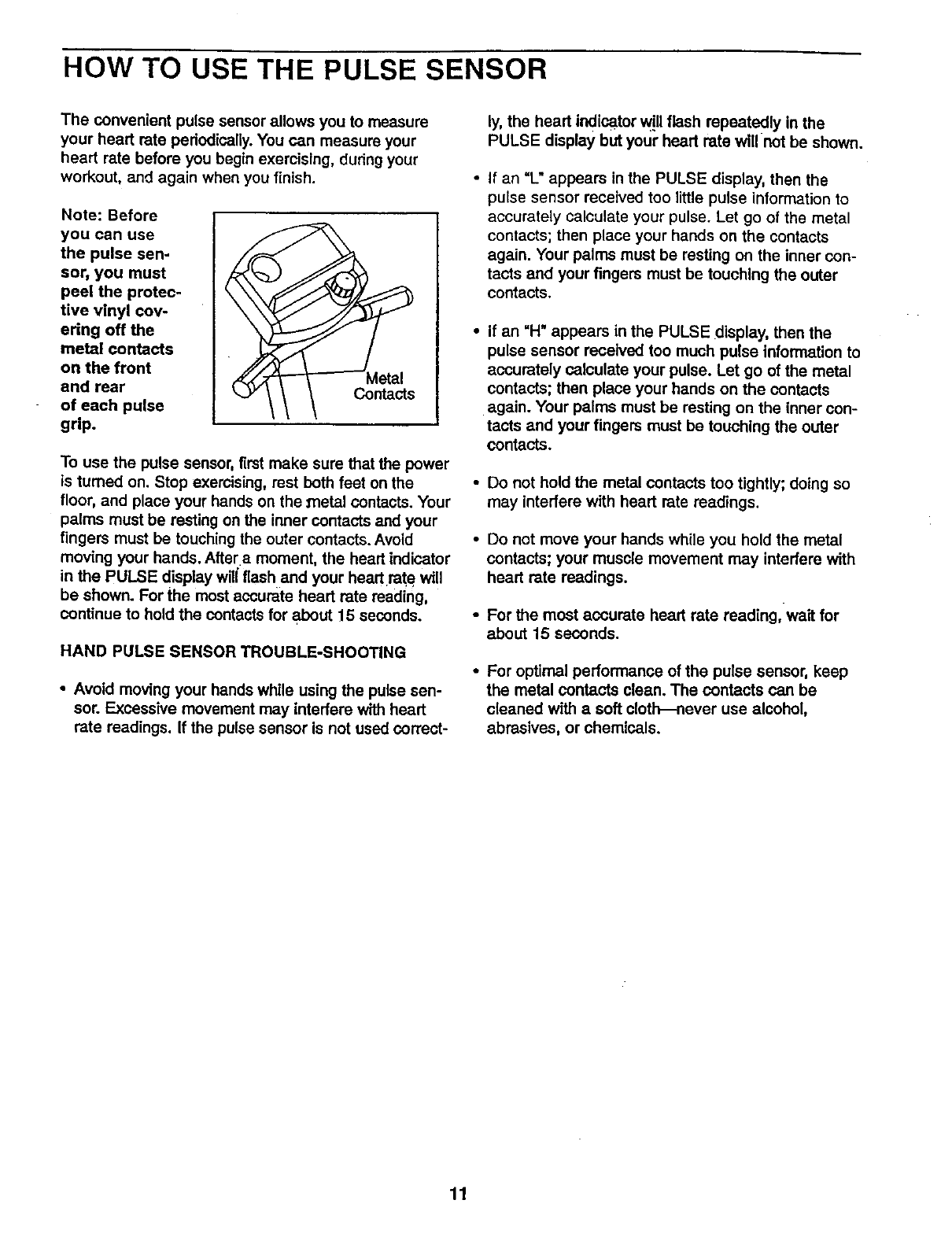
Note: Before
you can use
the pulse sen-
sor, you must
peel the protec-
tive vinyl cov-
ering off the
metal contacts
on the front
end rear
of each pulse
grip.
__...y/ \ \ Contacts
To use the pulse sensor, fimt make sure that the power
is turned on. Stop exercising, rest both feet on the
floor, and place your hands on the _netal contacts. Your
palms must be resting on the inner contacts and your
fingers must be touching the outer contacts. Avoid
moving your hands. After a moment, the heart indicator
in the PULSE display will flash and your hear rate will
be shown. For the most accurate hear rate reading,
continue to hold the contacts for about 15 seconds.
HAND PULSE SENSOR TROUBLE-SHOOTING
•Avoid moving your hands while using the pulse sen-
sor. Excessive movement may interfere with hear
rate readings. If the pulse sensor is not used correct-
ly, the hear indicator w!Uflash repeatedly in the
PULSE display but your hear rate will not be shown.
If an "L" appears in the PULSE display, then the
pulse sensor received too little pulse information to
accurately calculate your pulse. Let go of the metal
contacts; then place your hands on the contacts
again. Your palms must be resting on the inner con-
tacts and your fingers must be touching the outer
contacts,
• If an "H" appears in the PULSE display, then the
pulse sensor received too much pulse information to
accurately calculate your pulse. Let go of the metal
contacts; then place your hands on the contacts
again. Your palms must be resting on the inner con-
tacts and your fingers must be touching the outer
contacts.
•Do not hold the metal contacts too tightly; doing so
may interfere with head rate readings.
Do not move your hands while you hold the metal
contacts; your muscle movement may interfere with
hear rate readings.
For the most accurate heart rate reading, wait for
about 15 seconds.
For optimal performance of the pulse sensor, keep
the metal contacts clean. The contacts can be
cleaned with asoft clo_ever use alcohol,
abrasives, or chemicals.
11
MAINTENANCE AND STORAGE
Inspect and tighten an parts of the PROFOFIM _ 975s
regularly. The 975s can be cleaned with asoft, damp
cloth. To prevent damage to the conso(e, keep liquids
away and keep the console out of direct sunlight.
BA'I-rERY REPLACEMENT
If the console does not function propedy, the batteries
should be replaced. To replace the batten'es, refer to
assembly step 12 on page 7.
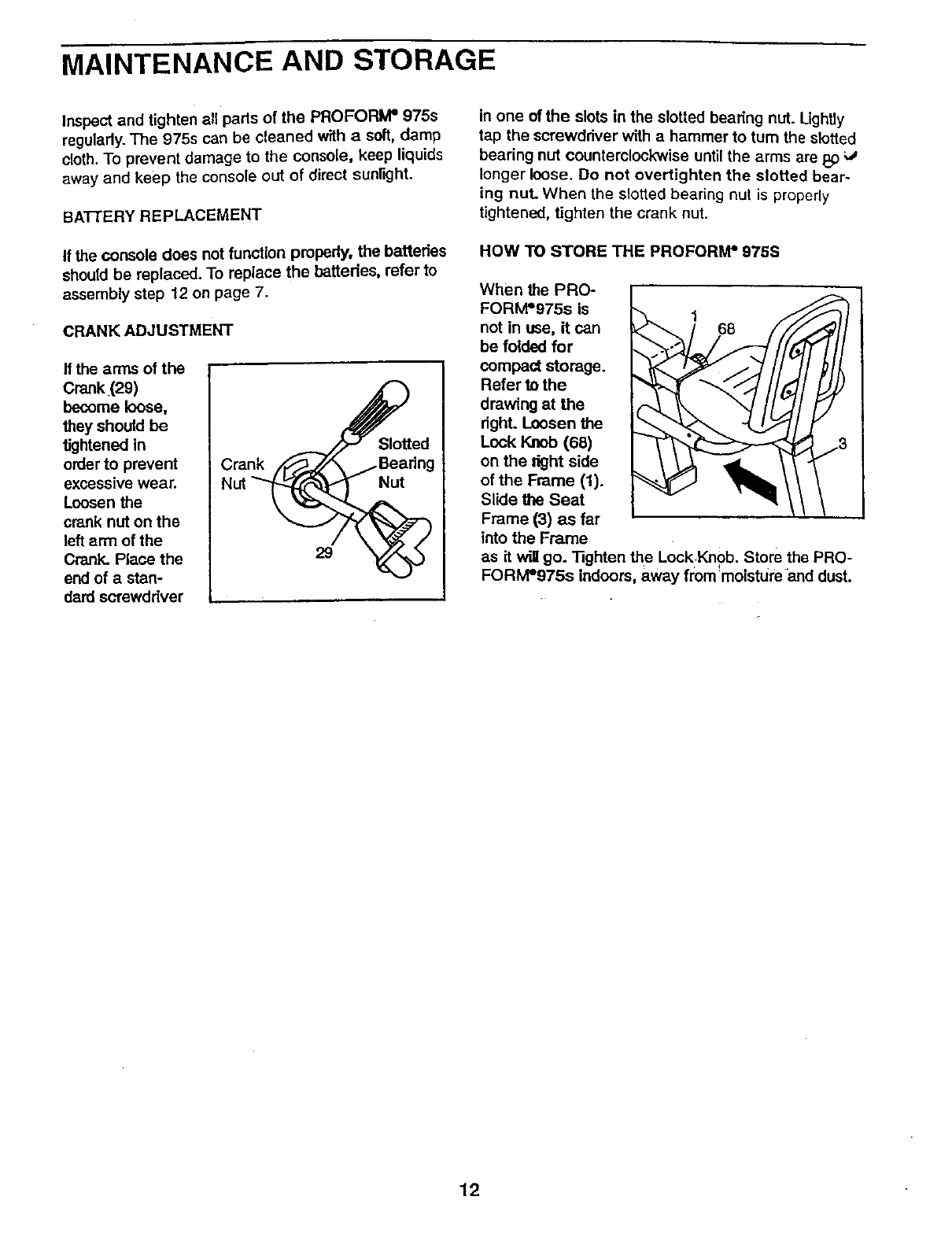
CRANK ADJUSTMENT
If the arms of the
Crank (29)
become loose,
theyshould be
tightened in
order to prevent
excessive wear,
Loosen the
crank nut on the
left arm of the
Crank. Place the
end of a stan-
dard scrawddver
in one of the slots in the slotted bearing nut. Ughtly
tap the screwdriver with a hammer to turn the slotted
bearing nut counterclockwise until the arms are _;)
longer loose. Do not overtighten the slotted bear-
ing nuL When the slotted bearing nut is properly
tightened, tighten the crank nut.
HOW TO STORE THE PROFORIVP 975S
When the PRO-
FORfVP975s is
not in use, it can
be folded for
compact storage.
Refer to the
drawing at the
n'ght. Loosen the
Lock Knob (68)
on the right side
of the Frame (1).
Slide the Seat
Frame (3) as far
fnto the Frame
as it will go. "lighten the Lcok Knob. Store the PRO-
FOFtM_975s _ndoors, away from_mofstu_.e and dust.
12
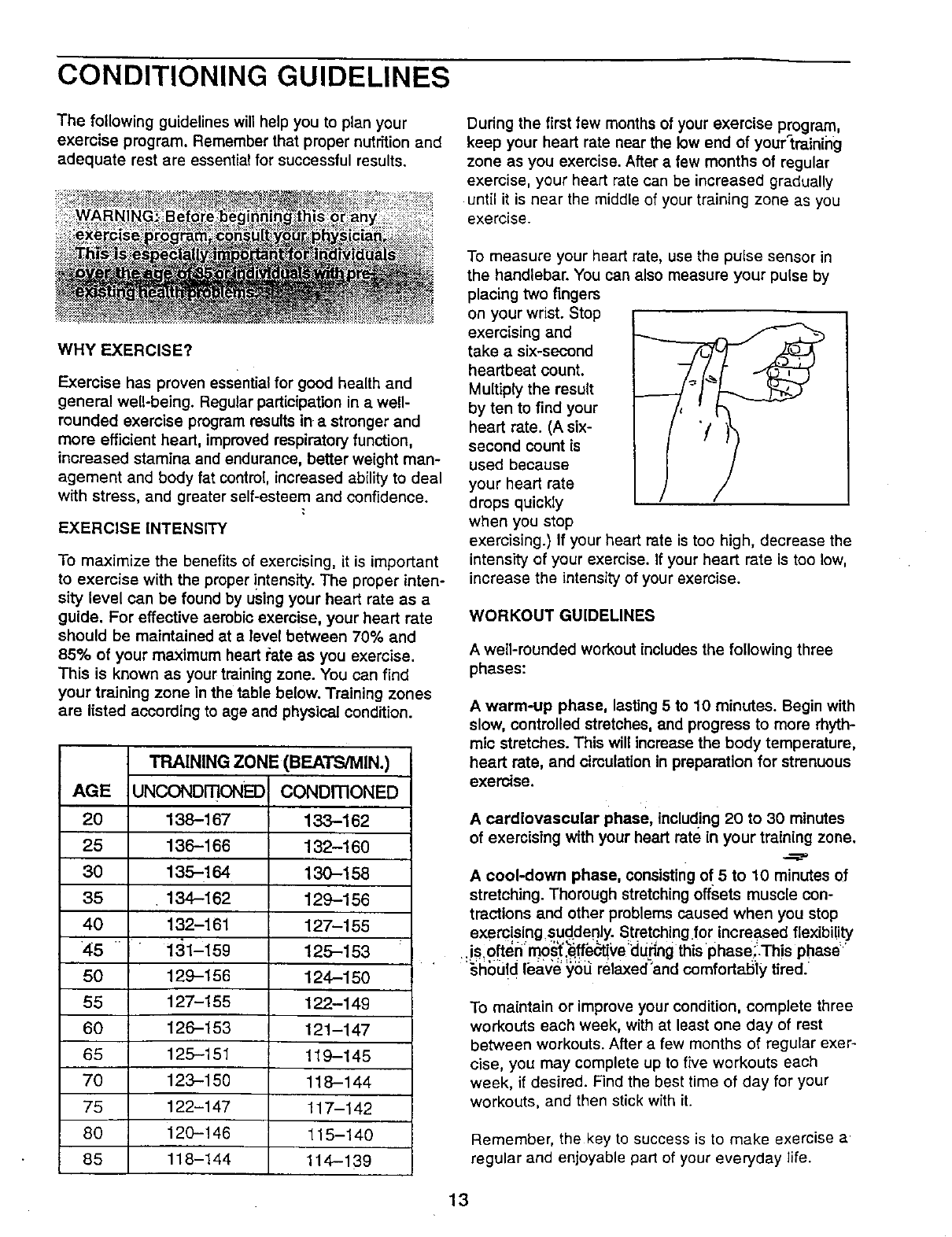
CONDITIONING GUIDELINES
The following guidelines will help you to plan your
exercise program. Remember that proper nutrition and
adequate rest are essential for successful results.
During the first few months of your exercise program,
keep your heart rate near the low end of your_training
zone as you exercise. After a few months of regular
exercise, your heart rate can be increased gradually
until it is near the middle of your training zone as you
exercise.
WHY EXERCISE?
Exercise has proven essential for good health and
general weU-being. Regular participation in a well-
rounded exerc_e program results in a stronger and
more efficient heart, improved respiratory function,
increased stamina and endurance, better weight man-
agement and body fat control, increased ability to deal
with stress, and greater self-esteem and confidence.
EXERCISE INTENSITY
To maximize the benefits of exercising, it is important
to exercise with the proper !ntensity. The proper inten-
sity level can be found by using your heart rate as a
guide. For effective aerobic exercise, your heart rate
should be maintained at elevel between 70% and
85% of your maximum heart ate as you exercise.
This is known as your training zone. You can find
your training zone In the table below. Training zones
are listed according to age and physical condition.
AGE
20
25
30
35
40
45
50
55
60
65
70
75
80
85
TRAINING ZONE (BEATS/MIN.)
UNCONDITIONEI3
138-167
136-166
135-164
134-162
132-161
131-159
129-156
127-155
126-153
125-151
123-150
122-147
120-146
118-144
CONDmONED
133-162
132-160
130-158
129-156
127-155
125-153
124-150
122-149
121-147
119-145
118-144
117-142
115-140
114--139
To measure your heart rate, use the pulse sensor in
the handlebar. You can also measure your pulse by
placing two fingers
on your wrist. Stop
exercising and
take a six-second
heartbeat count.
Multiply the result
by ten to find your
heart rate. (A six-
second count is
used because
your heart rate
drops quickly
when you stop
exercising.) If your heart rate is too high, decrease the
intensity of your exercise. If your heart rate is too low,
increase the intensity of your exercise.
WORKOUT GUIDELINES
A well-rounded workout includes the following three
phases:
A warm-up phase, lasting 5 to 10 minutes. Begin with
slow, controlled stretches, and progress to more rhyth-
mic stretches. This will increase the body temperature,
heart rate, and circulation in preparation for strenuous
exercise.
A cardiovascular phase, including 20 to 30 minutes
of exercising with your heart rate in your training zone.
A cool-down phase, consisting of 5 to 10 minutes of
stretching. Thorough stretching offsets muscle con-
tractions and other problems caused when you stop
exercisingsuddenly. Stretching for increased flexibi ity
•is.ofteri m0s_._ffe_'e:;during this phase;,This phase"
_ll_Li!d Iba_;e_,bL_relaxed-and comfortabiy tired.
To maintain or improve your condition, complete three
workouts each week, with at least one day of rest
between workouts. After a few months of regular exer-
cise, you may complete up to five workouts each
week, if desired. Find the best time of day for your
workouts, and then stick with it.
Remember, the key to success is to make exercise a
regular and enjoyable part of your everyday life.
13
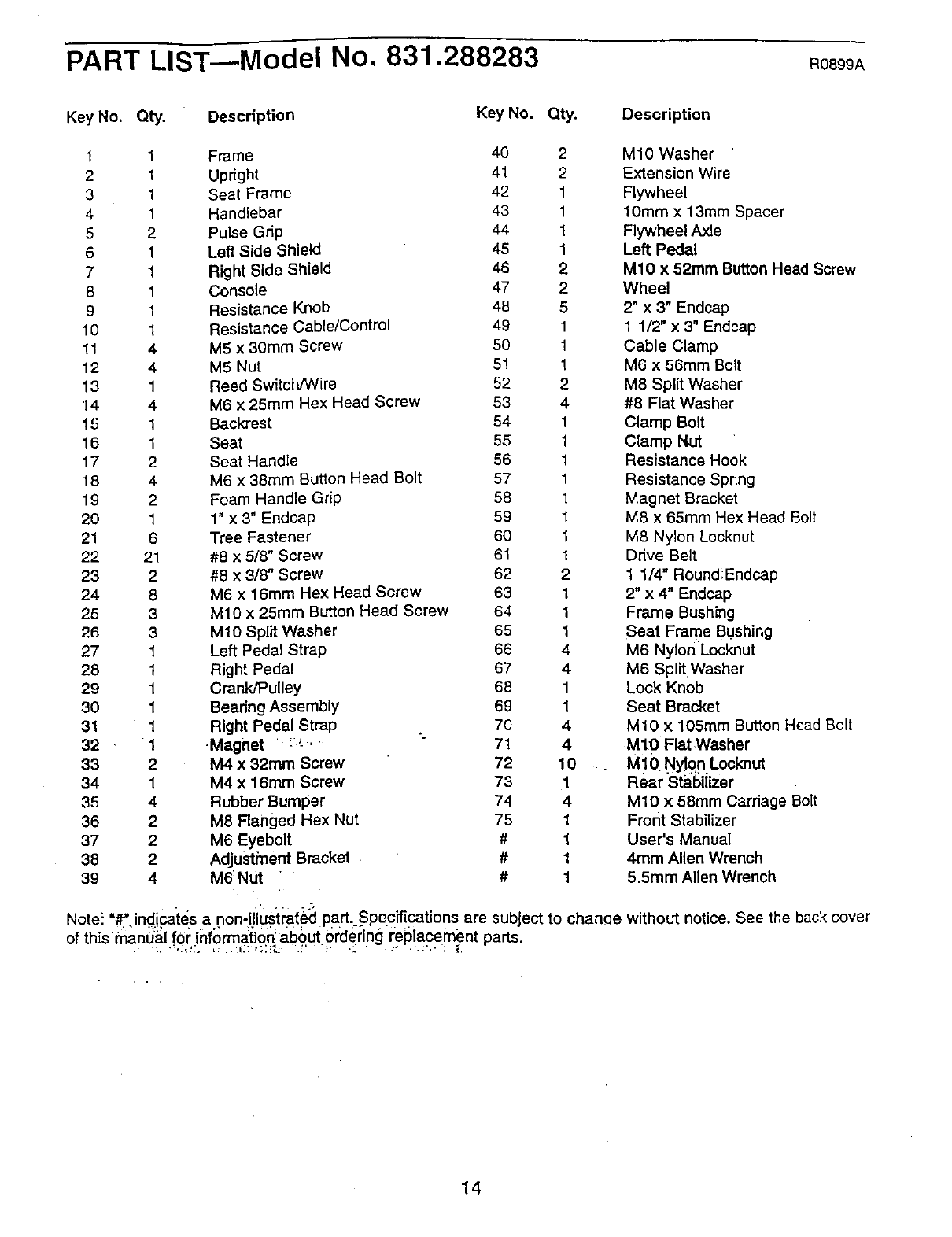
PART LIST---Model No. 831.288283 R0899A
Key No. Qty. Description Key No. Qty. Description
1 1
21
3 1
4 1
5 2
6 1
7 1
8 1
91
10 1
11 4
12 4
13 1
"14 4
15 1
16 1
17 2
18 4
19 2
20 1
21 6
22 21
23 2
24 8
25 3
26 3
27 1
28 1
29 1
30 1
31 1
32 1
33 2
34 1
35 4
36 2
37 2
38 2
39 4
Frame 40 2 M10 Washer
Upright 41 2 Extension Wire
Seat Frame 42 1 Flywheel
Handlebar 43 1 10mm x 13mm Spacer
Pulse Grip 44 1 Flywheel Axle
Left Side Shield 45 1 Left Pedal
Right Side Shield 46 2 M10 x 52ram Button Head Screw
Console 47 2 Wheel
Resistance Knob 48 5 2" x 3" Endcap
Resistance Cable/Control 49 1 1 1/2" x 3" Endcap
M5 x 30mm Screw 50 1 Cable Clamp
M5 Nut 5! 1 M6 x 56mm Bolt
Reed Switch/Wire 52 2 M8 Split Washer
M6 x 25ram Hex Head Screw 53 4 #8 Fiat Washer
Backrest 54 1 Clamp Bolt
Seat 55 1 Clamp Nut
Seat Handle 56 1 Resistance Hook
M6 x 88ram Button Head Bolt 57 1 Resistance Spring
Foam Handle Grip 58 1 Magnet Bracket
1" x 3" Endcap 59 1 M8 x 65ram Hex Head Bolt
Tree Fastener 60 1 M8 Nylon Locknut
#8 x 5/8" Screw 61 1 Ddve Belt
#8 x3/8" Screw 62 2 1 1/4" RoundlEndcap
M6 x 16mm Hex Head Screw 63 1 2" x 4" Endcap
M10 x 25mm Button Head Screw 64 1 Frame Bushing
M10 Split Washer 65 1 Seat Frame Bushing
Left Pedal Strap 66 4 M6 Nylon Locknut
Right Pedal 67 4 M6 Split Washer
Crank/Pulley 68 1 Lock Knob
Beadng Assembly 69 1 Seat Bracket
Right Pedal Strap 70 4 M10 x 105ram Button Head Bolt
Magnet : :.;" " 71 4M10 Flat Washer
M4 x 32mm Screw 72 10 M10 NyJgn Locknut
M4 x 16ram Screw 73 1 Rear Stabilizer
Rubber Bumper 74 4 MIO x 58mm Carriage Bolt
M8 Ranged Hex Nut 75 1 Front Stabilizer
M6 Eyebolt # 1 User's Manual
Adjustment Bracket #14rnm Alien Wrench
M6 Nut " # 1 5.5ram Allen Wrench
Note_."#':,nd:_:,,cates,a.,non-.ustra{ed,_ part --.Specif cat ons are sub'ectj to chanae without notice. See the back cover
of th_s manual for Informatio_about Ordering replacement parts
14
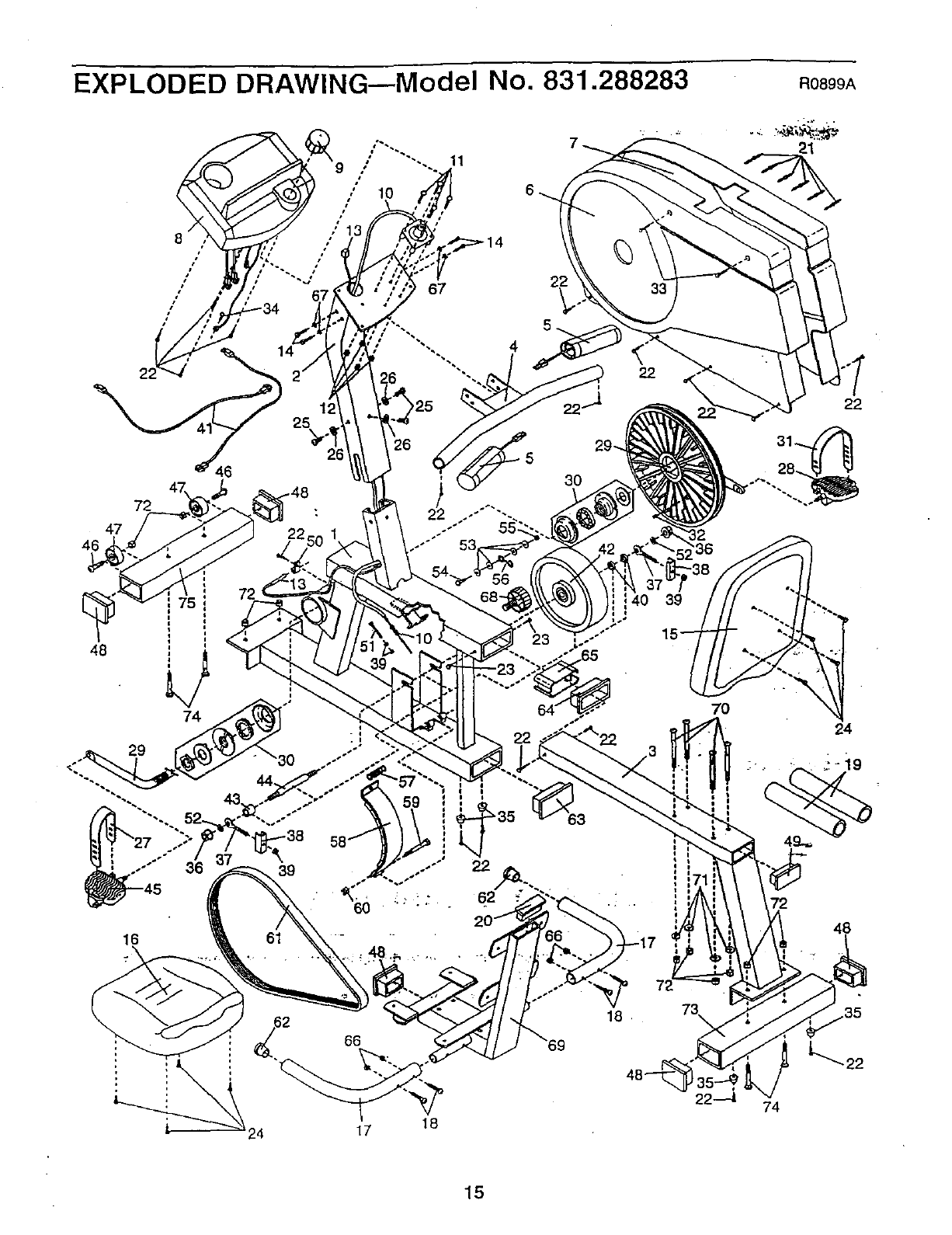
EXPLODED DRAWING--Model No. 831.288283
72
47
46
48
29
72
74
25
26
39 22
63
t
_s
22
39
16
R0899A
21
22
70
24
48
17 18
73\
22.-_1
15
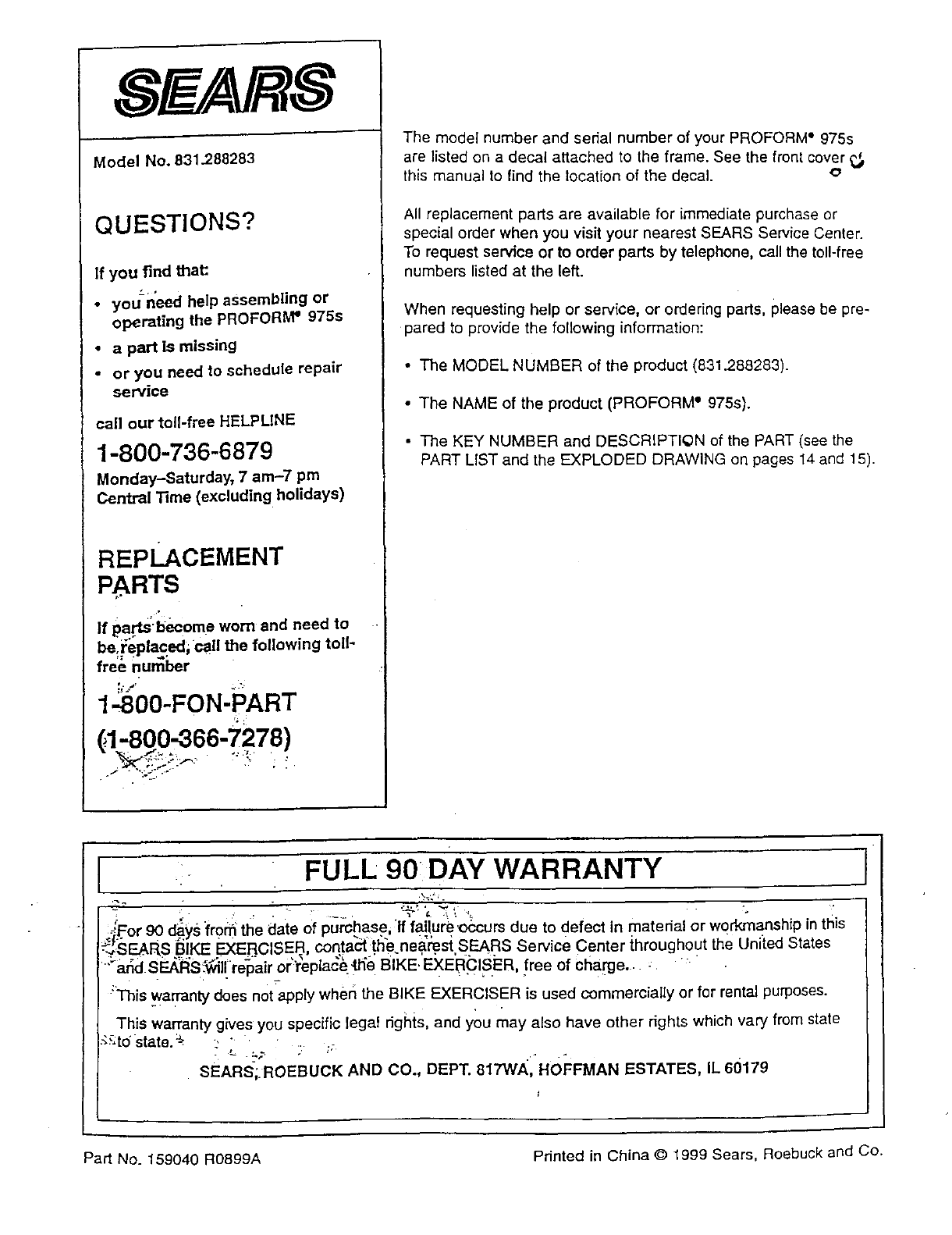
Model No. 831.288283
QUESTIONS?
If you find that:
•you need help assembling or
operating the PROFORM" 975s
•a part is missing
•or you need to schedule repair
service
call our toll-free HELPLINE
1-800-736-6879
Monday-Saturday, 7 am-7 pm
Central Time (excluding holidays)
REPLACEMENT
PARTS
.i ¸ .
If pa.rts'l:_come worn and need to
be,i:eplaced; c@llthe following toll-
free numloer
1-800-FON-PART
r, ;
(}1,800.-866-7278)
The model number and serial number of your PROFORM • 975s
are listed on a decal attached to the frame. See the front cover
this manual to find the location of the decal. .c, --
All replacement parts are availab[e for immediate purchase or
special order when you visit your nearest SEARS Service Center.
To request service or to order parts by telephone, call the toll-free
numbers listed at the left.
When requesting help or service, or ordering parts, please be pre-
pared to provide the following information:
• The MODEL NUMBER of the product (831.288283).
• The NAME of the product (PROFORM" 975s).
•The KEY NUMBER and DESCRIPTI@N of the PART (see the
PART LIST and the EXPLODED DRAWING on pages 14 and 15).
I FULL 90 DAY WARRANTY
._For 90 days from the date of purchase If failure _occurs due to defect n matenal or workmanship in th s
-,.,SEARS B KE EXERC SER contact the nearsst SEARS Serv=ce Center throughout the Un ted States
>ar_€i sEA'Rs f_tlilre_pair or"_eplac_ {h'e BIkE,'EXEB-CISi=R, free of Charge.. :
:l'his warranty does not apply when the BIKE EXERCISER is used commercially or for rental purposes.
This warranty gives you specific Iegaf dghts, and you may also have other dghts which vary from state
-';_,tdstate."_ _ _ , . .. ... ..
SfZARS-;.ROEBUCK AND CO., DEPT. 817WA, HOFFMAN ESTATES, IL 60179
Part No. 159040 R0899A Printed in China © 1999 Sears, Roebuck and Co.
