Proform 831297661 User Manual 585TL Manuals And Guides L0802447
PROFORM Treadmill Manual L0802447 PROFORM Treadmill Owner's Manual, PROFORM Treadmill installation guides
User Manual: Proform 831297661 831297661 PROFORM PROFORM 585TL - Manuals and Guides View the owners manual for your PROFORM PROFORM 585TL #831297661. Home:Fitness Equipment Parts:Proform Parts:Proform PROFORM 585TL Manual
Open the PDF directly: View PDF  .
.
Page Count: 19
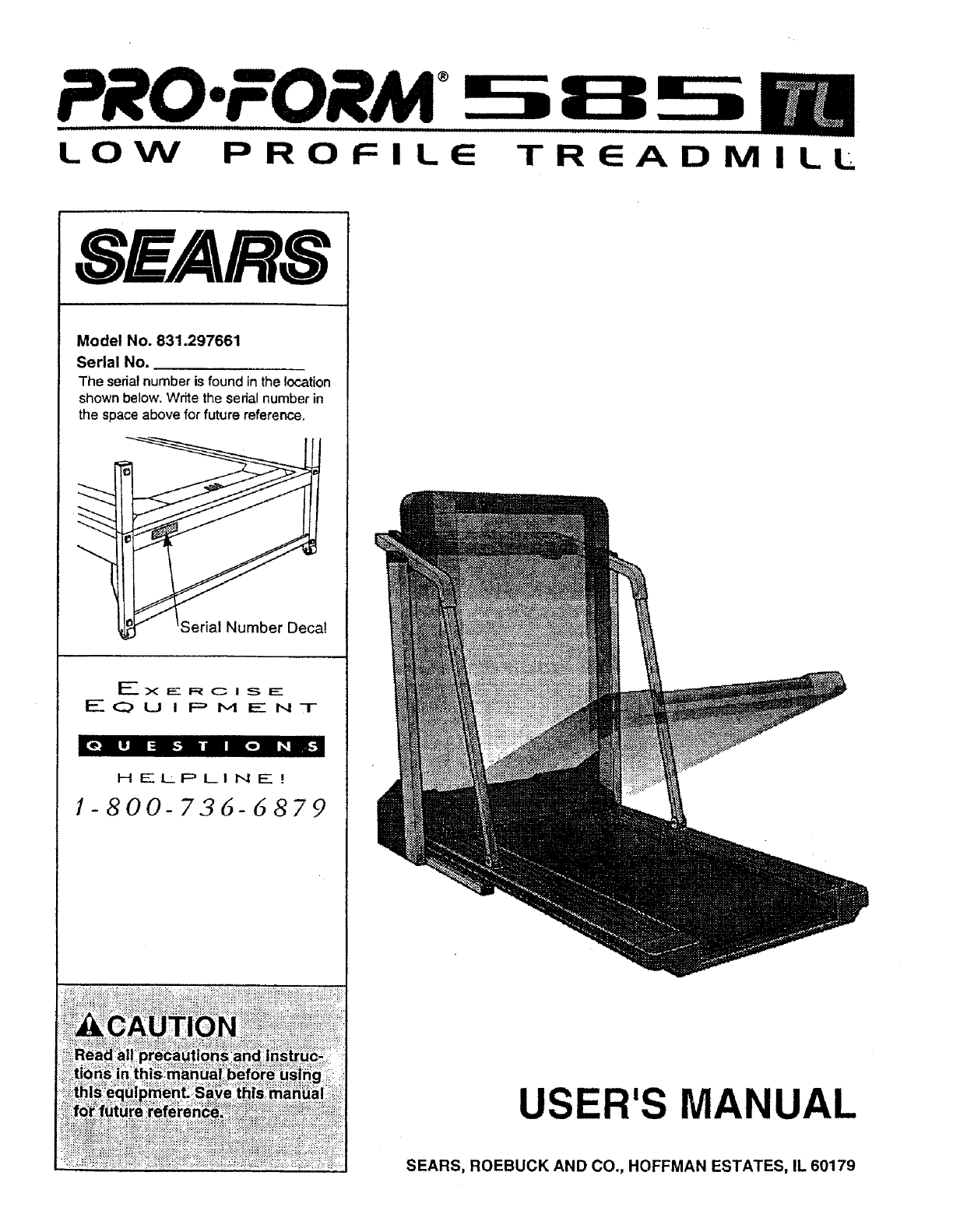
®
LOW PROFILE TREADM
SEARS
Model No. 831.297661
Serial No.
The serial number is found in the location
shown below. Write the sedal number in
the space above for future reference.
I
EX_-.RC ! s___-
EOu I PM ENT
[e,_ IIj il _ _r,e] I _ roll,4
HELPLINE!
1-800-72,6-5879
ILL
USER'S MANUAL
SEARS, ROEBUCK AND CO., HOFFMAN ESTATES, IL 60179
TABLE OF CONTENTS
FULL 90 DAY WARRANTY ........ ........................................................... 2
IMPORTANT PRECAUTIONS ................................................................. 3
BEFORE YOU BEGIN ....................................................................... 5
ASSEMBLY ............................................................................... 6
OPERATION AND ADJUSTMENT ............................................................. 7
HOW TO FOLD AND MOVE THE TREADMILL .................................................. 10
TROUBLE-SHOOTING ..................................................................... 12
CONDITIONING GUIDELINES ............................................................... 14
ORDERING REPLACEMENT PARTS .................................................. Back Cover
Note: A n EXPLODED DRAWING, and a PART LIST are attached to the center of this manual. Please save them
for future reference.
FULL 90 DAY WARRANTY
For 90 days from the date of purchase, if failure occurs due to defect in material or workmanship in this
SEARS TREADMILL EXERCISER, contact the nearest SEARS Service Center throughout the United
States and SEARS will repair or replace the TREADMILL EXERCISER, free of charge.
This warranty does not apply when the TREADMILL EXERCISER is used commercially or for rental pur-
poses.
This warranty gives you specific legal rights, and you may also have other rights which vary from state
to state.
SEARS, ROEBUCK AND CO., DEPT. 817WA, HOFFMAN ESTATES, IL 60179
IMPORTANT PRECAUTIONS
p sma
._.:,.._ treadmill at

iiiiiiiilliiiiii
_LWARHIHG!
• Never allow children
to play on or around
treadmill.
G G
©
° Storage latch must be
fully engaged before
treadmill is moved or
stored. !!
1
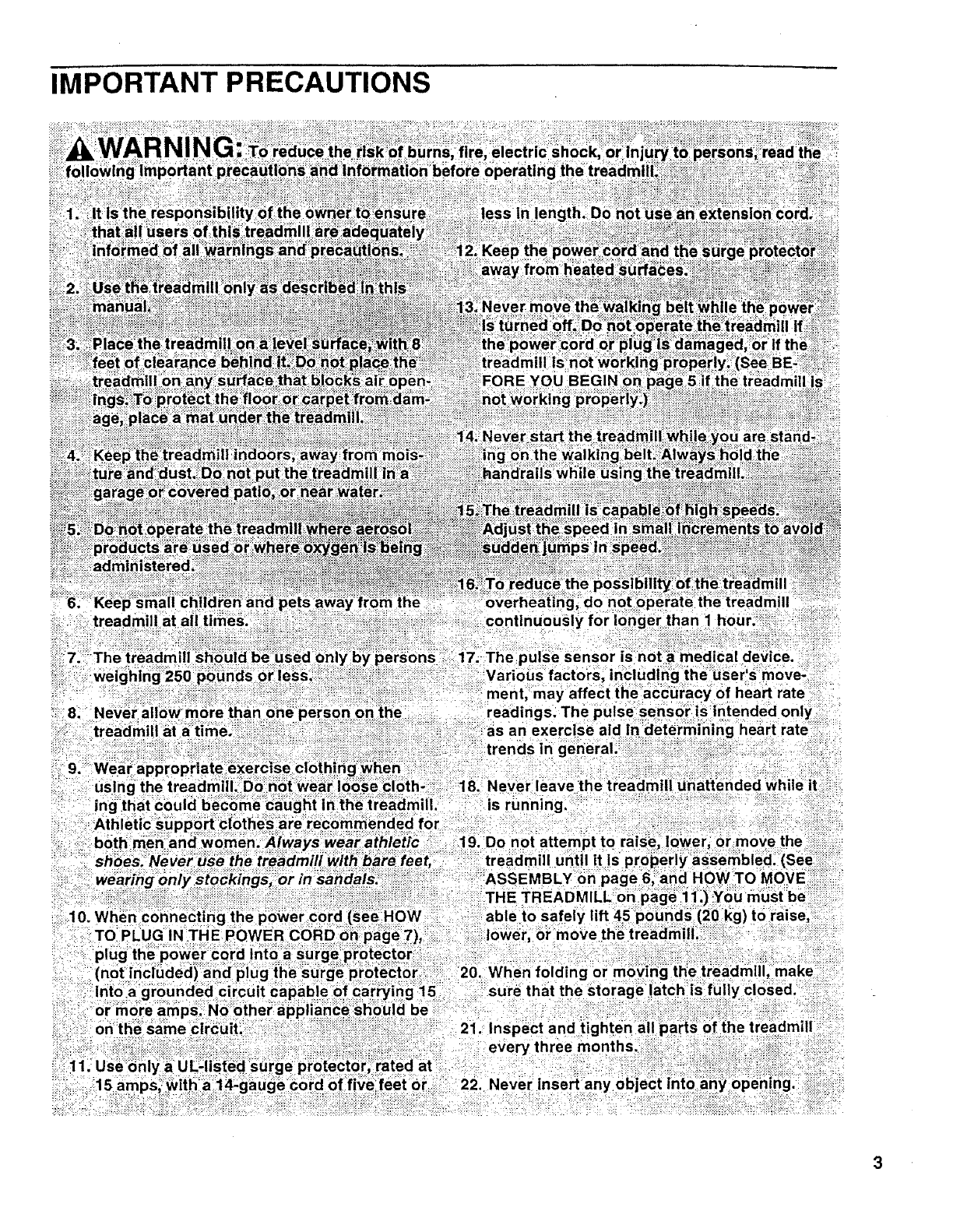
The decals shown have been placed on your treadmill. If a decal Is
missing, or if tt is not legible, please call our toll-tree HELPLINE to order
afree replacement decal (see the back cover of this manual)..Apply the
decals in the location shown.
!
BEFORE YOU BEGIN
Thank you for selecting the PROFORM ®585 TL tread-
mill. The 585 TL treadmill blends advanced technology
with innovative design to let you enjoy an excellent
form of cardiovascular exercise in the convenience
and privacy of your home.
For your benefit, read this manual carefully before
using the treadmill. If you have additional questions,
please call our toll-free HELPLINE at 1-800-736-6879,
Monday through Saturday, 7 a.m. until 7 p.m. Central
Time (excluding holidays). To help us assist you,
please note the product model number and serial num-
ber before calling. The model number of the treadmill
is 831.297661. The serial number can be found on a
decal attached to the treadmill (see the front cover of
this manual for the location).
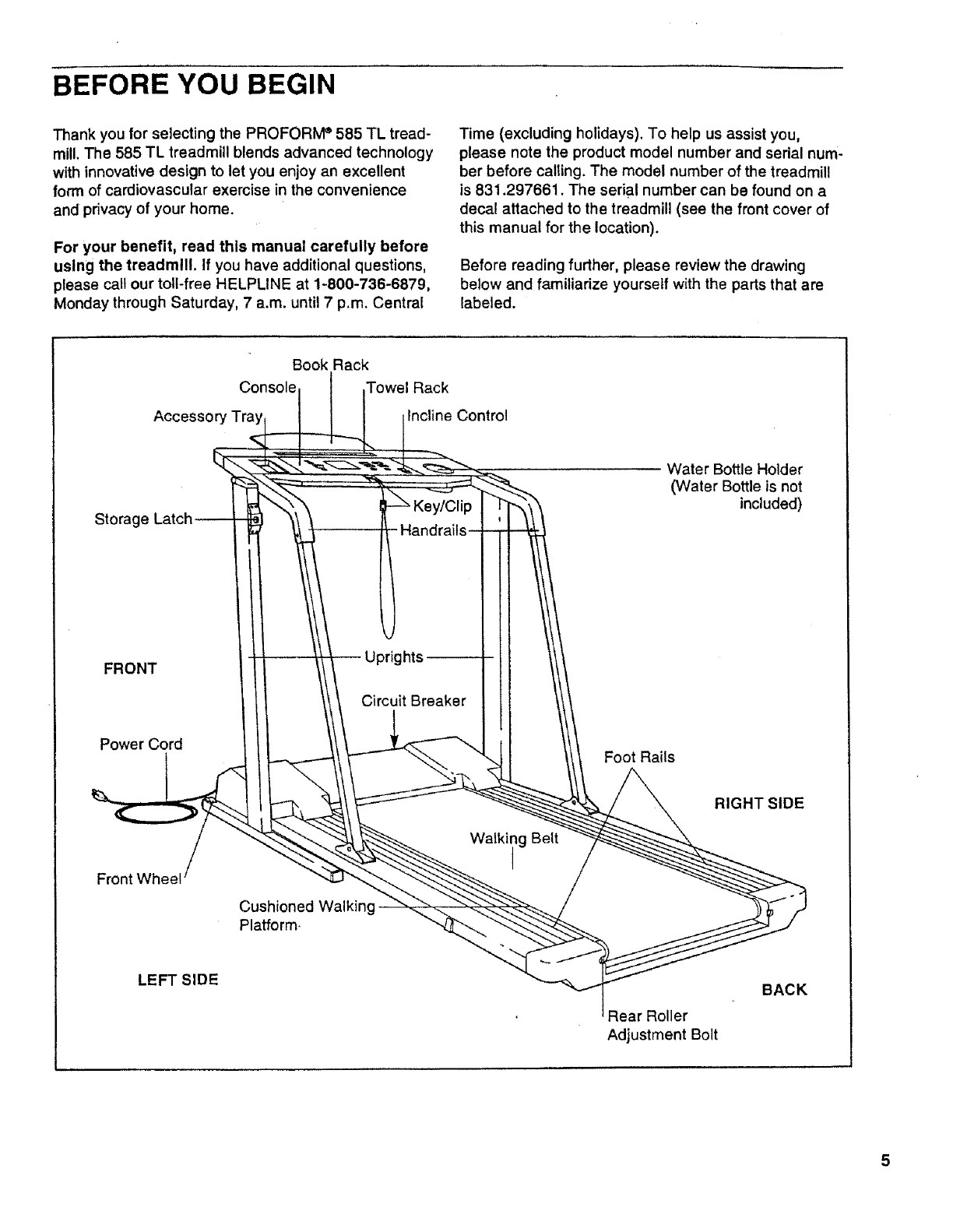
Before reading further, please review the drawing
below and familiarize yourself with the parts that are
labeled.
Book Rack
Console Towel Rack
Accessory Tra Incline Control
FRONT
Power Cord
ht
Circuit Breaker
Foot Rails
Water Bottle Holder
(Water Bottle is not
included)
Front Wheel
Cushioned Walking-
Platform
Walking Belt
RIGHT SIDE
LEFT SIDE
Roller
Adjustment Bolt
BACK
ASSEMBLY
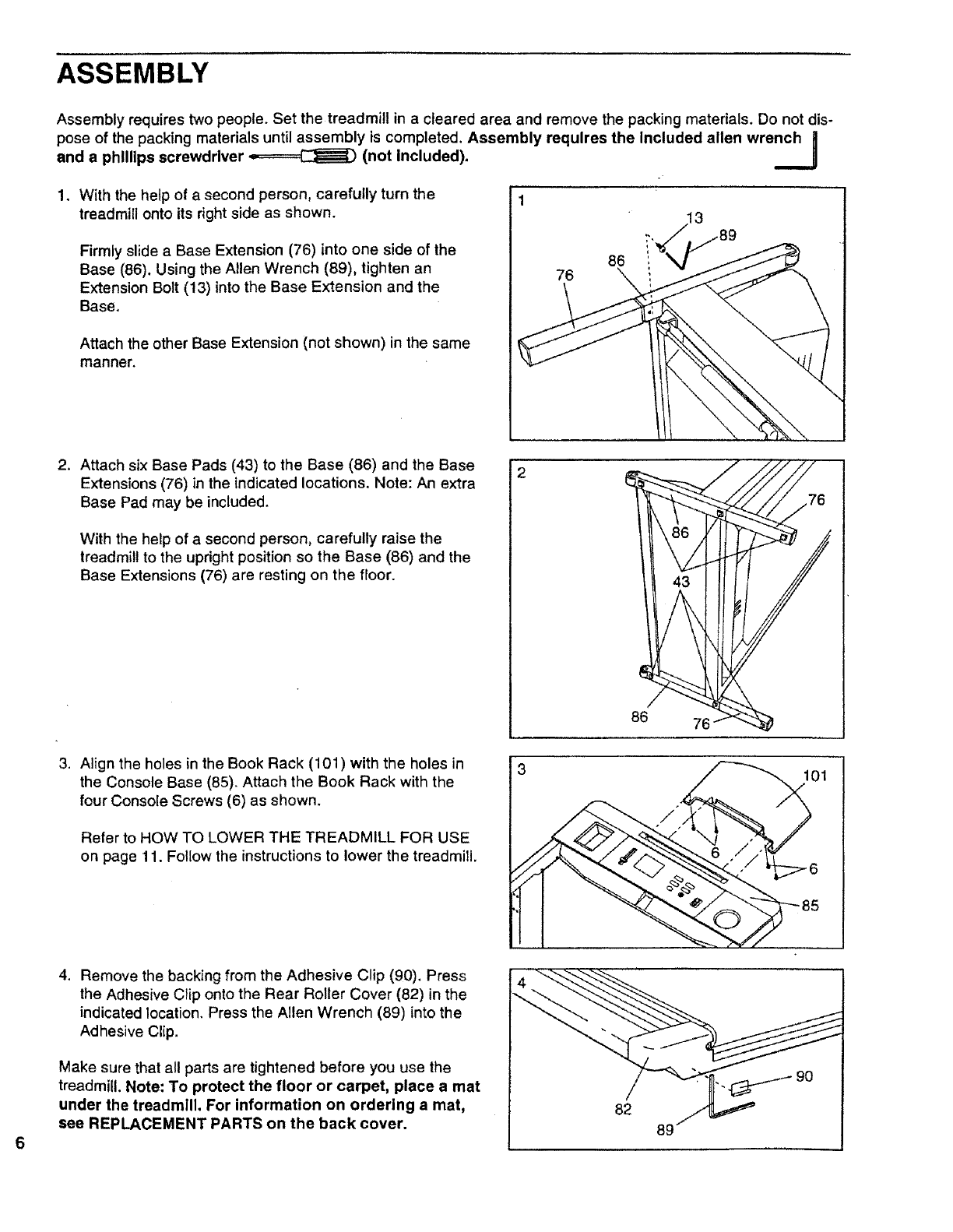
Assembly requires two people. Set the treadmill in a cleared area and remove the packing materials. Do not dis-
pose of the packing materials until assembly is completed. Assembly requires the Included allen wrench|
and a phillips screwdriver _(not Included). __.J
1. With the help of a second person, carefully turn the
treadmill onto its right side as shown.
Firmly slide a Base Extension (76) into one side of the
Base (86). Using the Allen Wrench (89), tighten an
Extension Bolt (13) into the Base Extension and the
Base.
Attach the other Base Extension (not shown) in the same
manner.
86 i
76 \
2. Attach six Base Pads (43) to the Base (86) and the Base
Extensions (76) in the indicated locations. Note: An extra
Base Pad may be included.
With the help of a second person, carefully raise the
treadmill to the upright position so the Base (86) and the
Base Extensions (76) are resting on the floor.
86
3. Align the holes in the Book Rack (101) with the holes in
the Console Base (85). Attach the Book Rack with the
four Console Screws (6) as shown.
Refer to HOW TO LOWER THE TREADMILL FOR USE
on page 11. Follow the instructions to lower the treadmill.
01
4. Remove the backing from the Adhesive Clip (90). Press
the Adhesive Clip onto the Rear Roller Cover (82) in the
indicated location. Press the Allen Wrench (89) into the
Adhesive Clip.
Make sure that all parts are tightened before you use the
treadmill. Note: To protect the floor or carpet, place a met
under the treadmill, For information on ordering a mat,
see REPLACEMENT PARTS on the back cover,
OPERATION AND ADJUSTMENT
THE PERFORMANT LUBE TM WALKING BELT
Your treadmill features a walking belt coated with
PERFORMANT LUBE TM, a high-performance lubricant.
IMPORTANT: Never apply silicone spray or other
substances to the walking belt or the walking plat-
form. They will deteriorate the walking belt and
cause excessive wear.
HOW TO PLUG IN THE POWER CORD
electric shock. This product is equipped with acord
having an equipment-grounding conductor and a
grounding plug. Plug the power cord into a surge
protector, and plug the surge protector into an ap-
propriate outlet that Is properly Installed and
grounded in accordance with all local codes and
ordinances.
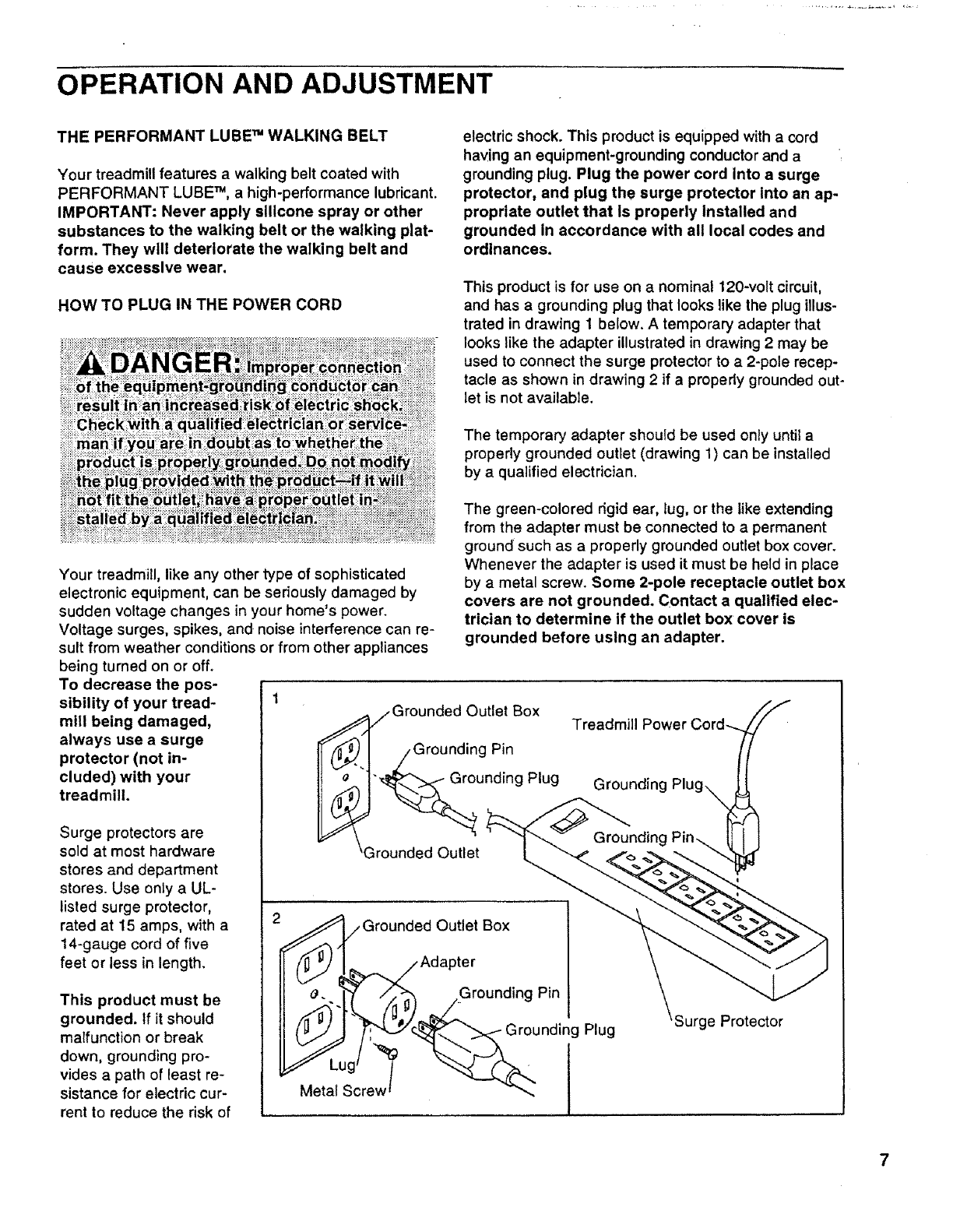
This product is for use on a nominal 120-volt circuit,
and has a grounding plug that looks like the plug illus-
trated in drawing 1 below. A temporary adapter that
looks like the adapter illustrated in drawing 2 may be
used to connect the surge protector to a 2-pole recep-
tacle as shown in drawing 2 if a properly grounded out-
let is not available.
The temporary adapter should be used only until a
properly grounded outlet (drawing 1) can be installed
by a qualified electrician.
Your treadmill, like any other type of sophisticated
electronic equipment, can be seriously damaged by
sudden voltage changes in your home's power.
Voltage surges, spikes, and noise interference can re-
sult from weather conditions or from other appliances
being turned on or off.
To decrease the pos-
sibility of your tread- 1
mill being damaged,
always use a surge
protector (not in-
cluded) with your
treadmill.
Surge protectors are
sold at most hardware
stores and department
stores. Use only a UL-
listed surge protector,
rated at 15 amps, with a
14-gauge cord of five
feet or less in length.
This product must be
grounded. If it should
malfunction or break
down, grounding pro-
vides a path of least re-
sistance for electric cur-
rent to reduce the risk of
The green-colored dgid ear, lug, or the like extending
from the adapter must be connected to a permanent
ground such as a properly grounded outlet box cover.
Whenever the adapter is used it must be held in place
by a metal screw. Some 2-pole receptacle outlet box
covers are not grounded. Contact aqualified elec-
trician to determine if the outlet box cover is
grounded before using an adapter.
/Grounded Outlet Box
/Grounding Pin
"_unding Plug
3rounded Outlet
Treadmill
Grounded Outlet Box
_Adapter
_'..1"_' /×_ /Grounding Pin
___'_ Grou nding Plug
S_MetLUgcrew_ _'_
'Surge Protector
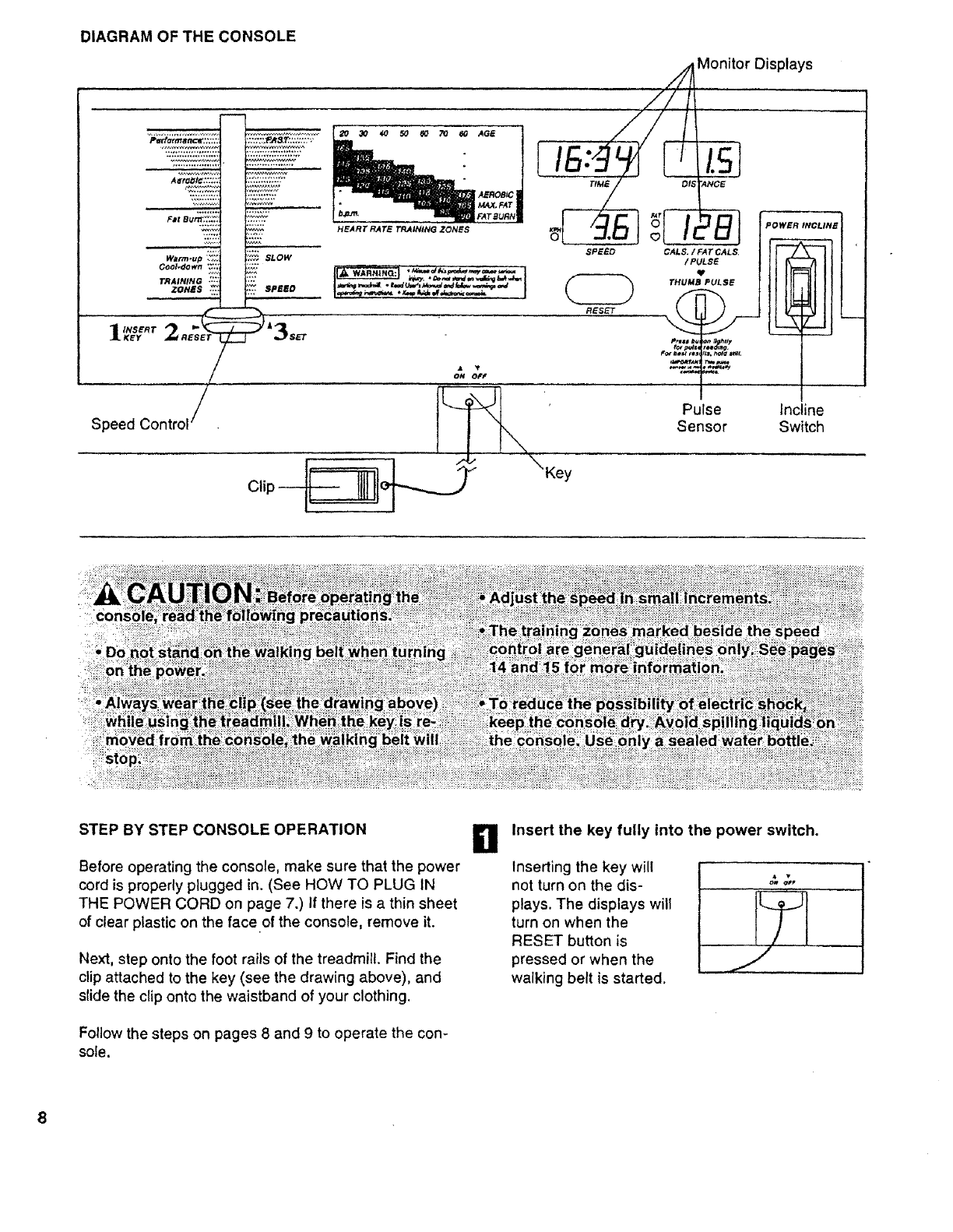
DIAGRAM OF THE CONSOLE
Monitor Displays
pertft/t_tlL-xr.+++;;:+ .
++'++;::j:,+;::..::::+':+"
F=I Bum':'.%?:
Warm+up '_'+;
Cool_lown _:::
TRAINING ....
zones ++++.,_:
1_ ERT2.EsE,
Speed Contrll /
_NEART RATe T_JN_NG ZONES
i_.¢_ SLOW
"P-° ]+.,.,,,+.-.+-..,+,++.,+._,-,..I
Clip --
ON OFF
\
\Key
El
SPEED C/_LS+ / FAT CALS.
/PULSE
THUMB PULSE
1
Pulse
Sensor
+
POWER INCLINE
Incline
Switch
STEP BY STEP CONSOLE OPERATION
Before operating the console, make sure that the power
cord is properly plugged in. (See HOW TO PLUG IN
THE POWER CORD on page 7.) If there is a thin sheet
of clear plastic on the face of the console, remove it.
Next, step onto the foot rails of the treadmill. Find the
clip attached to the key (see the drawing above), and
slide the clip onto the waistband of your clothing.
Follow the steps on pages 8 and 9 to operate the con-
sole.
II Insert the key fully into the power switch.
Inserting the key will
not turn on the dis-
plays. The displays will
turn on when the
RESET button is
pressed or when the
walking belt is started.
B
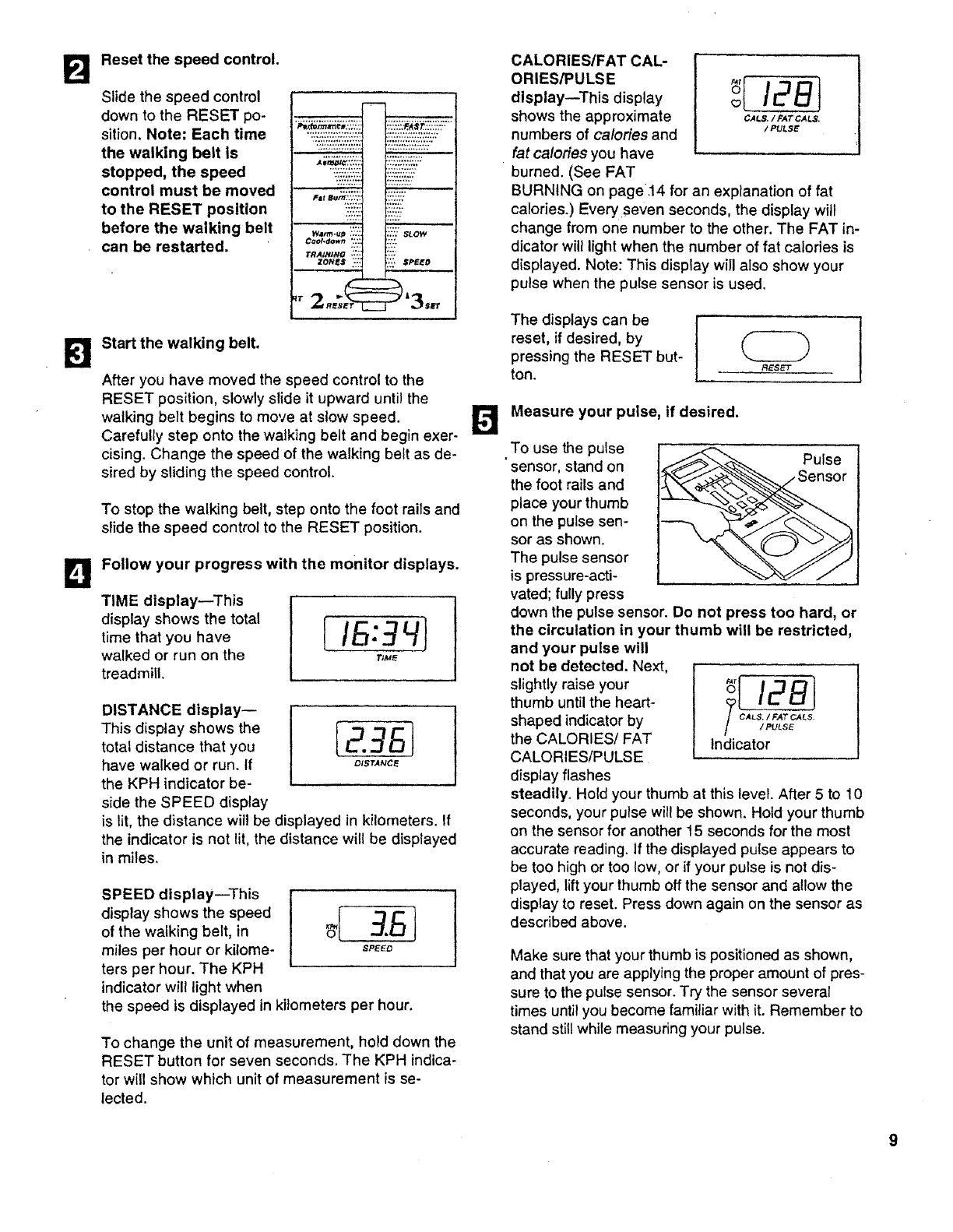
Reset the speed control.
Slide the speed control
down to the RESET po-
sition. Note: Each time
the walking belt is
stopped, the speed
control must be moved
to the RESET position
before the walking belt
can be restarted. W_m-up ,':J,
Ctml.down *:.'.
TRAININO *_;"
ZONES "::
;':';:s_ow
"?i_SPEEO
Start the walking belt.
After you have moved the speed control to the
RESET position, slowly slide it upward until the
walking belt begins to move at slow speed.
Carefully step onto the walking belt and begin exer-
cising. Change the speed of the walking belt as de-
sired by sliding the speed control.
To stop the walking belt, step onto the foot rails and
slide the speed control to the RESET position.
Follow your progress with the monitor displays.
TIME display--This
display shows the total
time that you have
walked or run on the
treadmill.
DISTANCE display--
This display shows the
total distance that you [2.3_J
have walked or run. If o_sT,_c_
the KPH indicator be-
side the SPEED display
is lit, the distance will be displayed in kilometers. If
the indicator is not lit, the distance will be displayed
in miles.
SPEED display--This
of the walking belt, in
miles per hour or kilome- S,'EEO
ters per hour. The KPH
indicator will light when
the speed is displayed in kilometers per hour.
To change the unit of measurement, hold down the
RESET button for seven seconds, The KPH indica-
tor will show which unit of measurement is se-
lected.
CALORIES/FAT CAL-
ORIES/PULSE
display--This display _[ /28t
shows the approximate CALS./rATCA_S.
numbers of calories and /pu_sE
fat calories you have
burned. (See FAT
BURNING on page.14 for an explanation of fat
calories.) Every seven seconds, the display will
change from one number to the other. The FAT in-
dicator will light when the number of fat calories is
displayed. Note: This display will also show your
pulse when the pulse sensor is used.
The displays can be !
reset, if desired, by
pressing the RESET but-
ton. _Es_
Measure your pulse, if desired.
To use the pulse
sensor, stand on
the foot rails and
place your thumb
on the pulse sen-
sor as shown.
The pulse sensor
is pressure-acti-
vated; fully press
down the pulse sensor. Do not press too hard, or
the circulation in your thumb will be restricted,
and your pulse will
not be detected. Next,
slightly raise your _[ 12B]
thumb until the heart-
shaped indicator by _ cA_;
the CALORIES/FAT Indicator
CALORIES/PULSE
display flashes
steadily, Hold your thumb at this level. After 5 to 10
seconds, your pulse will be shown. Hold your thumb
on the sensor for another t5 seconds for the most
accurate reading. If the displayed pulse appears to
be too high or too low, or if your pulse is not dis-
played, lift your thumb off the sensor and allow the
display to reset. Press down again on the sensor as
described above.
Pulse
Make sure that your thumb is positioned as shown,
and that you are applying the proper amount of pres-
sure to the pulse sensor. Try the sensor several
times until you become familiar with it. Remember to
stand still while measuring your pulse.
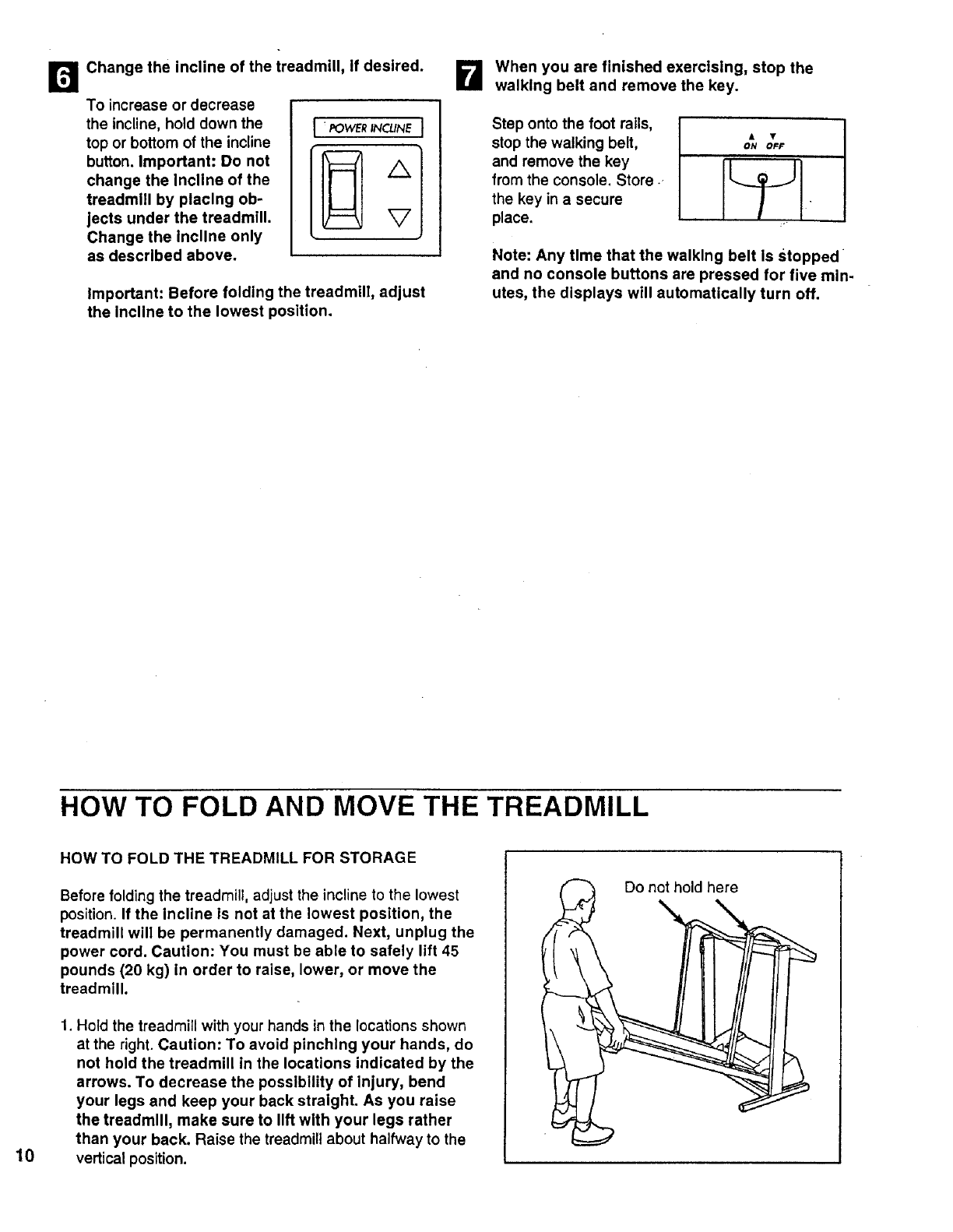
Change the incline of the treadmill, If desired.
To increase or decrease
the incline, hold down the
top or bottom of the incline
button. Important" Do not
change the Incline of the
treadmill by placing ob-
jects under the treadmill.
Change the incline only
as described above.
I _POWER INCI.JNE
V
Important: Before folding the treadmill, adjust
the Incline to the lowest position.
When you are finished exercising, stop the
walking belt and remove the key.
Step onto the foot mils,
stop the walking belt, • •
ON OFF
and remove the key I I
from the console. Store.
the key in a secure
place.
Note: Any time that the walking belt is Stopped
and no console buttons are pressed for five min-
utes, the displays will automatically turn off.
HOW TO FOLD AND MOVE THE TREADMILL
10
HOW TO FOLD THE TREADMILL FOR STORAGE
Before folding the treadmill, adjust the incline to the lowest
position. If the incline is not at the lowest position, the
treadmill will be permanently damaged. Next, unplug the
power cord. Caution: You must be able to safely lift 45
pounds (20 kg) in order to raise, lower, or move the
treadmill.
1. Hold the treadmill with your hands in the locations shown
at the right. Caution: To avoid pinching your hands, do
not hold the treadmill in the locations indicated by the
arrows. To decrease the possibility of Injury, bend
your legs and keep your back straight. As you raise
the treadmill, make sure to lift with your legs rather
than your back. Raise the treadmill about halfway to the
vertical position.
Do not hold here
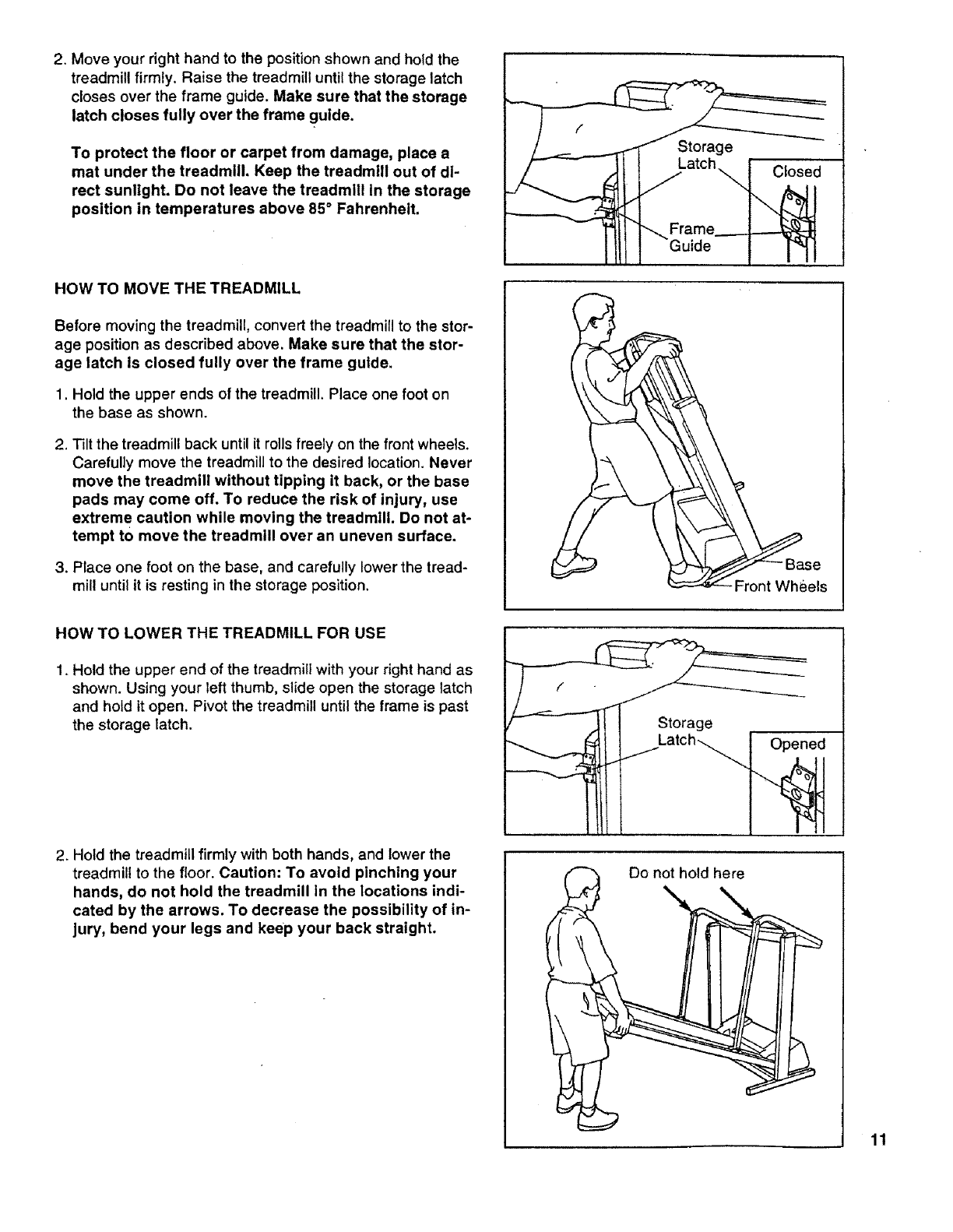
2. Moveyourdghthandtothepositionshownandholdthe
treadmillfirmly.Raisethetreadmilluntilthestoragelatch
closesoverthe frame guide. Make sure that the storage
latch closes fully over the frame guide.
To protect the floor or carpet from damage, place a
mat under the treadmill. Keep the treadmlll out of di-
rect sunlight. Do not leave the treadmill In the storage
position in temperatures above 85°Fahrenheit.
HOW TO MOVE THE TREADMILL
Before moving the treadmill, convert the treadmill to the stor-
age position as described above. Make sure that the stor-
age latch is closed fully over the frame guide.
1. Hold the upper ends of the treadmill. Place one foot on
the base as shown.
2. Tilt the treadmill back until it rolls freely on the front wheels.
Carefully move the treadmill to the desired location. Never
move the treadmill without tipping it back, or the base
pads may come off. To reduce the risk of injury, use
extrem e caution while moving the treadmill. Do not at-
tempt to move the treadmill over an uneven surface.
3. Place one foot on the base, and carefully lower the tread-
mill until it is resting in the storage position.
atchlt _, Frame_ d
J
•_se
Front Whl_els
HOW TO LOWER THE TREADMILL FOR USE
1. Hold the upper end of the treadmill with your right hand as
shown. Using your left thumb, slide open the storage latch
and hold it open. Pivot the treadmill until the frame is past
the storage latch.
2. Hold the treadmill firmly with both hands, and lower the
treadmill to the floor. Caution: To avoid pinching your
hands, do not hold the treadmill In the locations indi-
cated by the arrows. To decrease the possibility of in-
jury, bend your legs and keep your back straight.
atch'_.___ d
_ Do n_hold here
11
TROUBLE-SHOOTING
Most treadmill problems can be solved by following the simple steps below. Find the symptom that ap-
plies, and follow the steps listed. If further assistance is needed, call our toll-free HELPLINE at 1-800-736-
6879, Monday through Saturday, 7 a.m. until 7 p.m. Central Time (excluding holidays).
1. SYMPTOM: THE POWER DOES NOT TURN ON
a. Make sure that the power cord is plugged into a surge protector, and that the surge protector is plugged into.
a properly grounded outlet. (See HOW TO PLUG IN THE POWER CORD on page 7.) Use only a UL-listed
surge protector, rated at 15 amps, with a 14-gauge cord of five feet or less in length.
b. After the power cord has been plugged in, make sure that the key is fully inserted into th e console. (See step
1 on page 8.)
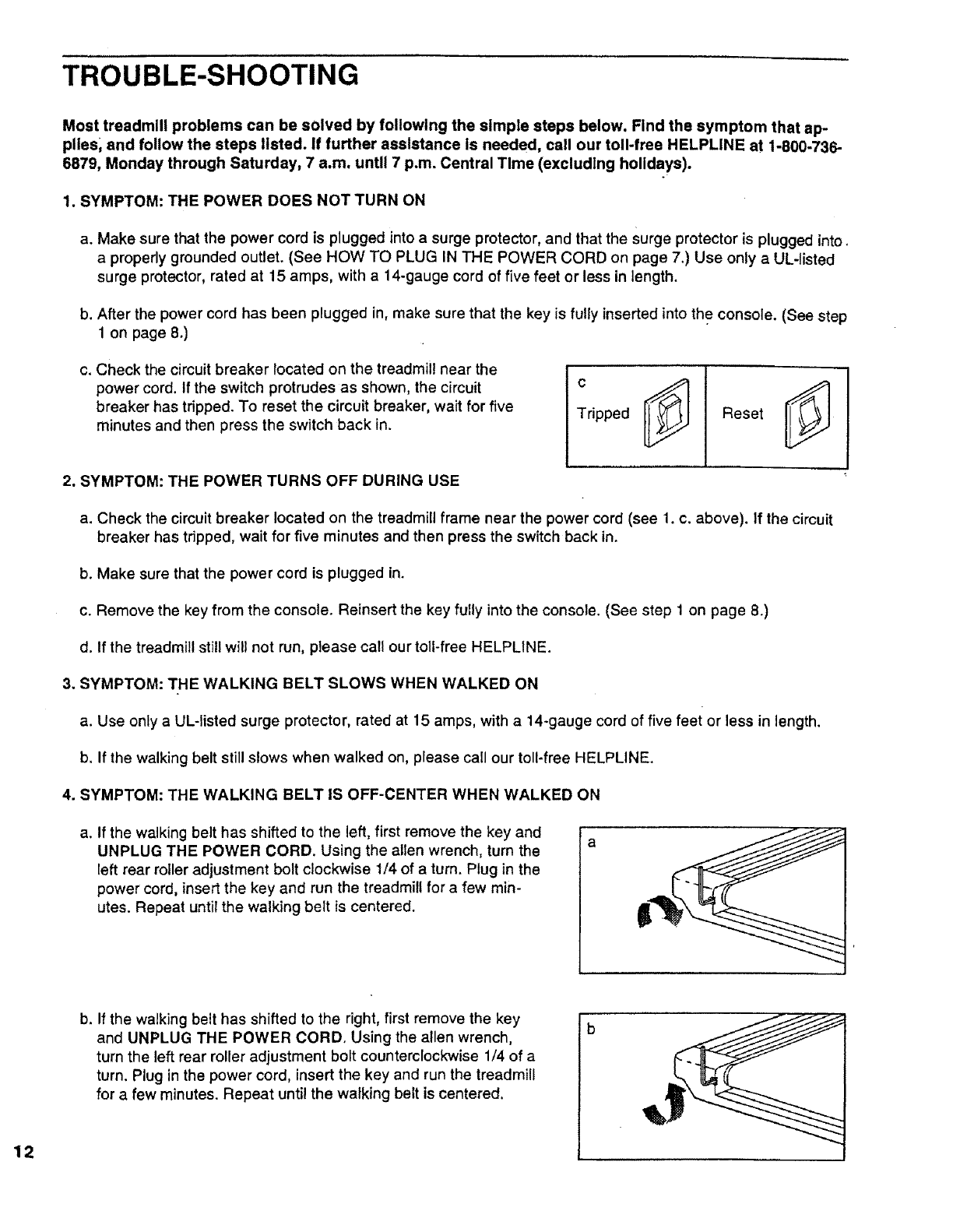
c. Check the circuit breaker located on the treadmill near the
power cord. tf the switch protrudes as shown, the circuit
breaker has tripped. To reset the circuit breaker, wait for five
minutes and then press the switch back in. c
Tripped Reset
2. SYMPTOM: THE POWER TURNS OFF DURING USE
a. Check the circuit breaker located on the treadmill frame near the power cord (see 1. c. above). If the circuit
breaker has tripped, wait for five minutes and then press the switch back in.
b. Make sure that the power cord is plugged in.
c. Remove the key from the console. Reinsert the key fully into the console. (See step 1 on page 8.)
d. If the treadmill still will not run, please call our toll-free HELPLINE.
3. SYMPTOM: THE WALKING BELT SLOWS WHEN WALKED ON
a. Use only a UL-listed surge protector, rated at 15 amps, with a 14-gauge cord of five feet or less in length.
b. If the walking belt still slows when walked on, please call our toll-free HELPLINE.
4. SYMPTOM: THE WALKING BELT IS OFF-CENTER WHEN WALKED ON
a. If the walking belt has shifted to the left, first remove the key and
UNPLUG THE POWER CORD. Using the allen wrench, turn the
left rear roller adjustment bolt clockwise 1/4 of a turn. Plug in the
power cord, insert the key and run the treadmill for a few min-
utes. Repeat until the walking belt is centered.
b. If the walking belt has shifted to the right, first remove the key
and UNPLUG THE POWER CORD. Using the allen wrench,
turn the left rear roller adjustment bolt counterclockwise 1/4 of a
turn. Plug in the power cord, insert the key and run the treadmill
for a few minutes. Repeat until the walking belt is centered.

5. SYMPTOM: THE TREADMILL SITS UNEVENLY ON THE FLOOR
a. Make sure that the six base pads are attached to the treadmill (see assembly step 2 on page 6).
13

CONDITIONING GUIDELINES
The following guidelines will help you to plan your ex-
ercise program. Remember--these are general guide-
lines only. For more detailed exercise information, ob-
tain a reputable book or consult your physician.
EXERCISE INTENSITY
Whether your goal is to burn fat or to strengthen your
cardiovascular system, the key to achieving the desired
results is to exercise with the proper intensity. The
proper intensity level can be found by using your heart
rate as a guide. The chart below shows recommended
heart rates for fat burning and aerobic exercise.
20 30 40 50 60 70 80
b.p.rn.
HEART RATE TRAINING ZONES
AGE
AEROBIC i
MAX. FAT !
FAT BURN_
To find the proper heart rate for you, first find your age
at the top of the chart (ages are rounded off to the
nearest ten years). Next, find the three numbers below
your age. The three numbers are your "training zone."
The lower two numbers are recommended heart rates
for fat burning; the higher number is the recommended
heart rate for aerobic exercise.
Fat Burning
To burn fat effectively, you must exercise at a relatively
low intensity level for asustained period of time. During
the first few minutes of exercise, your body uses easily
accessible carbohydrate calories for energy. Only after
the first few minutes does your body begin to use
stored fat calories for energy. If your goal is to bum fat,
adjust the speed and incline of the treadmill until your
heart rate is near one of the lower two numbers in your
training zone. It may also be helpful to set the speed
control on the console to FAT BURN to help you main-
tain the proper intensity level. (See page 9.)
Aerobic Exercise
If your goal is to strengthen your cardiovascular sys-
tem, your exercise must be "aerobic." Aerobic exercise
is activity that requires large amounts of oxygen for
prolonged periods of time. This increases the demand
on the heart to pump blood to the muscles, and on the
lungs to oxygenate the blood. For aerobic exercise,
adjust the speed and incline of the treadmill until your
heart rate is near the higher number in your training
zone. It may also be helpful to set the speed control on
the console to AEROBIC to help you maintain the
proper intensity level. (See page 9.)
High Performance Athletic Conditioning
If your goat is high performance athletic conditioning,
set the speed control on the console to PERFOR-
MANCE to help you maintain the proper intensity level.
(See page 9.) Note: During the first few weeks of your
exercise program, keep your heart rate near the low
end of your training zone.
To measure your heart rate during exercise, use the
pulse sensor on the console. (See page 9.) If your
heart rate is too high or too low, adjust the speed or in-
cline of the treadmill as needed.
WOR KOUT GUIDELINES
Each workout should include the following three parts:
AWarm-up
Start each workout with 5 to 10 minutes of stretching
and light exercise. A proper warm-up increases your
body temperature, heart rate, and circulation in prepa-
ration for strenuous exercise.
Training Zone Exercise
After warming up, increase the intensity of your exer-
cise until your heart rate is in your training zone for 20
to 60 minutes. (During the first few weeks of your exer-
cise program, do not keep your heart rate in your train-
ing zone for longer than 20 minutes.) Breathe regularly
and deeply as you exercise--never hold your breath.
A Cool-down
Finish each workout with 5 to 10 minutes of stretching
to cool down. This will increase the flexibility of your
muscles and will help to prevent post-exercise prob-
lems.
Exercise Frequency
To maintain or improve your condition, complete three
workouts each week, with at least one day of rest be-
tween workouts. After a few months of regular exer-
cise, you may complete up to five workouts each week
if desired. The key to success is to make exercise a
regular and enjoyable part of your everyday life.
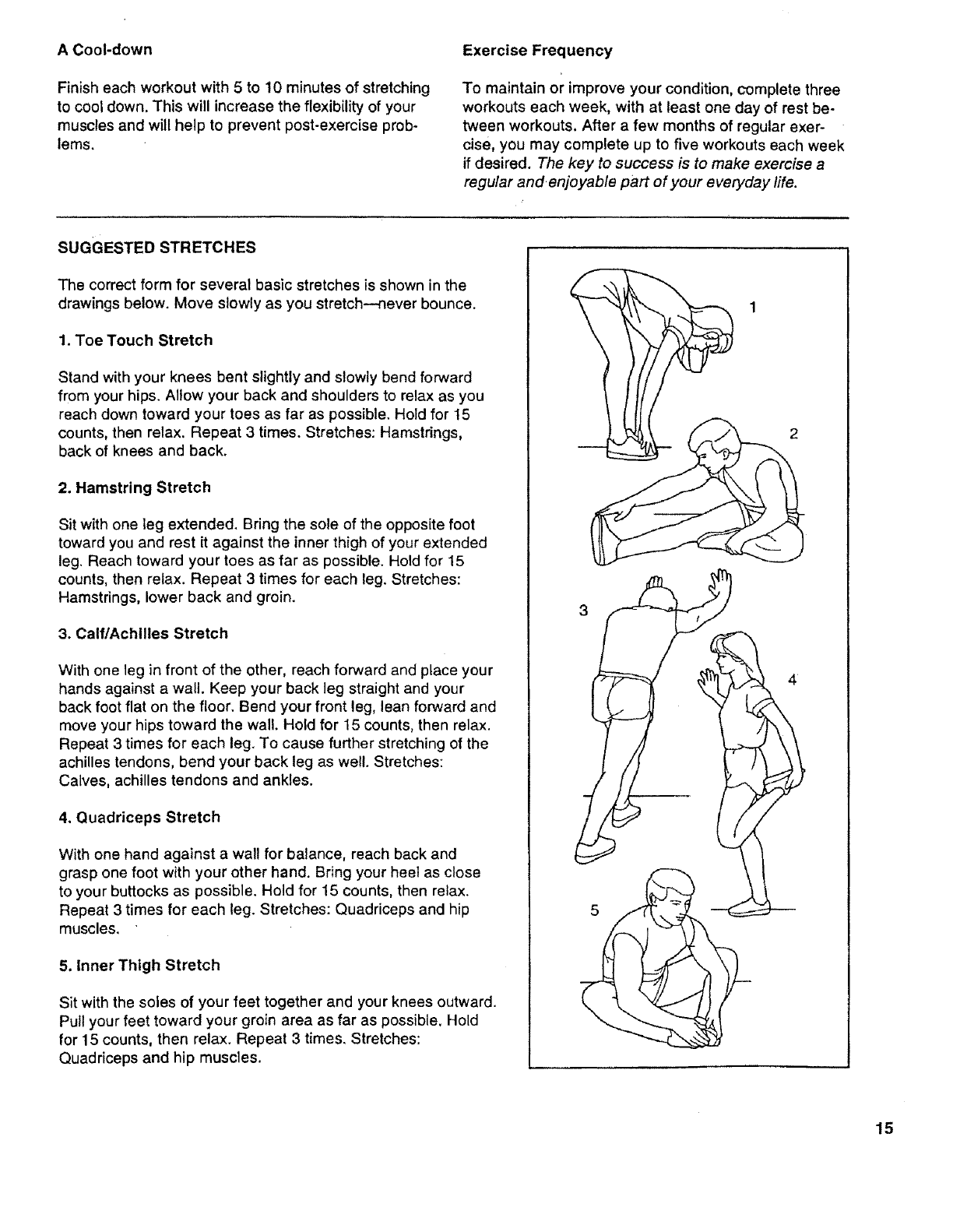
SUGGESTED STRETCHES
The correct form for several basic stretches is shown in the
drawings below. Move slowly as you stretch---never bounce.
1. Toe Touch Stretch
Stand with your knees bent slightly and slowly bend forward
from your hips. Allow your back and shoulders to relax as you
reach down toward your toes as far as possible. Hold for 15
counts, then relax. Repeat 3 times. Stretches: Hamstrings,
back of knees and back.
2. Hamstring Stretch
Sit with one leg extended. Bring the sole of the opposite foot
toward you and rest it against the inner thigh of your extended
leg. Reach toward your toes as far as possible. Hold for 15
counts, then relax. Repeat 3 times for each leg. Stretches:
Hamstrings, lower back and groin.
3. Calf/Achilles Stretch
With one leg in front of the other, reach forward and place your
hands against a wall. Keep your back leg straight and your
back foot flat on the floor. Bend your front leg, lean forward and
move your hips toward the wall. Hold for 15 counts, then relax.
Repeat 3 times for each leg. To cause further stretching of the
achilles tendons, bend your back leg as well. Stretches:
Calves, achilles tendons and ankles.
4. Quadriceps Stretch
With one hand against a wall for balance, reach back and
grasp one foot with your other hand. Bring your heel as close
to your buttocks as possible. Hold for 15 counts, then relax.
Repeat 3 times for each leg. Stretches: Quadriceps and hip
muscles.
5. Inner Thigh Stretch
Sit with the soles of your feet together and your knees outward.
Pull your feet toward your groin area as far as possible. Hold
for 15 counts, then relax. Repeat 3 times. Stretches:
Quadriceps and hip muscles.
1
3
15
IIIIII III II
REMOVE THIS EXPLODED DRAWING
AND PART LIST FROM THE MANUAL
Save this EXPLODED DRAWING and PART LIST for future reference.
II IIIIII
Note: Specifications are subject to change without notice. For information about
ordering replacement parts, see the back cover of the User's Manual.
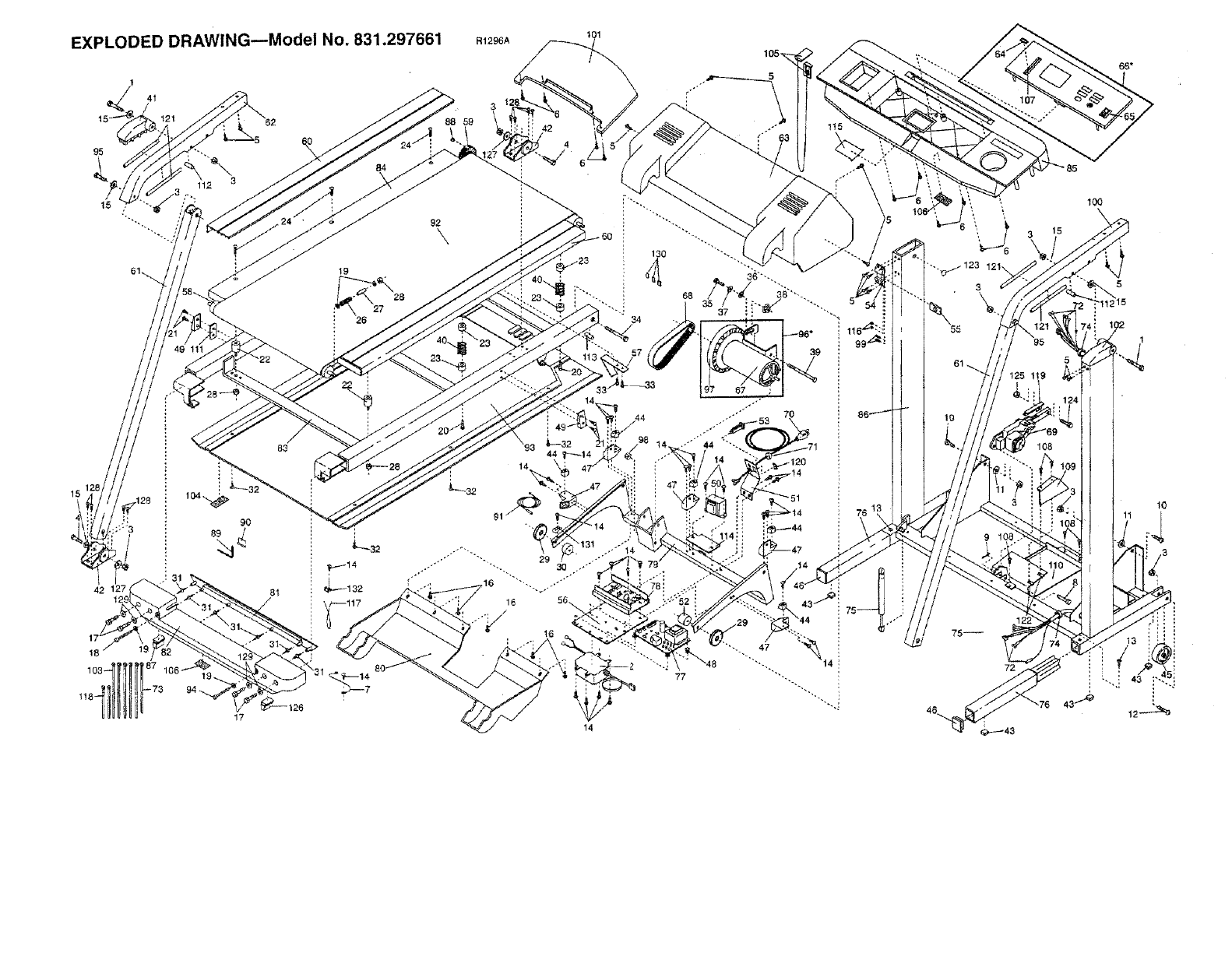
EXPLODED DRAWING--Model NO. 831.297661 R1296A
84
92
\
88 59
83
9O
42 _7
103 '87
_-126
17
%
34
14
76 1
\,
72
1oo
15
10
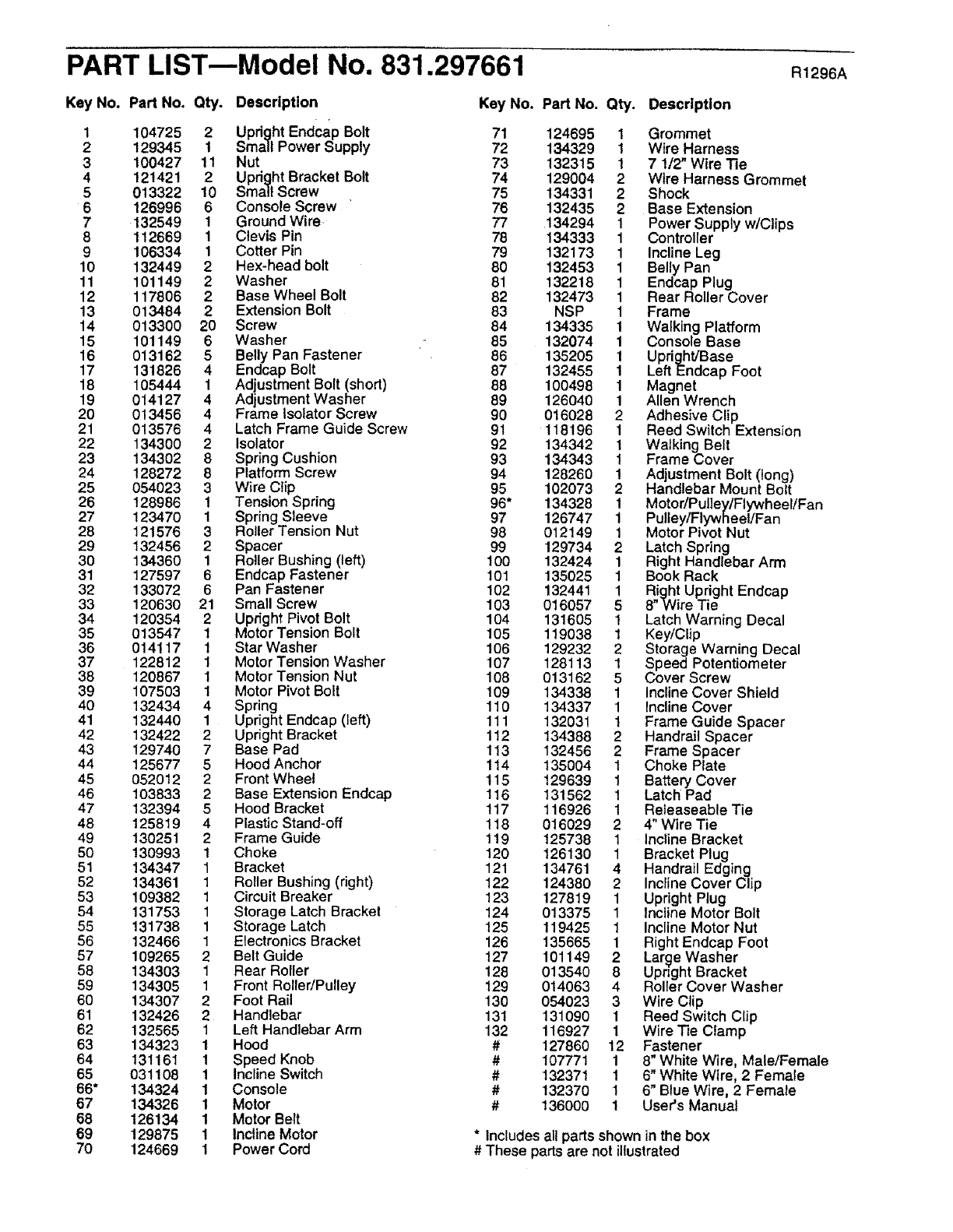
PART LIST---Model No. 831.297661 R1296A
Key No. Part No. Qty. Description
1 104725 2 Upright Endcap Bolt
2 129345 1 Small Power Supply
3100427 11 Nut
4 121421 2 Upright Bracket Bolt
5 013322 10 Small Screw
6 126996 6 Console Screw '
7 132549 1 Ground Wire.
8 112669 1 Clevis Pin
9 106334 1 Cotter Pin
10 132449 2 Hex-head bolt
11 101149 2 Washer
12 117806 2 Base Wheel Bolt
13 013484 2Extension Bolt
14 013300 20 Screw
15 101149 6 Washer
16 013162 5 Belly Pan Fastener
17 131826 4 Endcap Bolt
18 105444 1 Adjustment Bolt (shod)
19 014127 4 Adjustment Washer
20 013456 4 Frame Isolator Screw
21 013576 4 Latch Frame Guide Screw
22 134300 2 Isolator
23 134302 8 Spring Cushion
24 128272 8 Platform Screw
25 054023 3 Wire Clip
26 128986 1 Tension Spring
27 123470 1 Spring Sleeve
28 121576 3 Roller Tension Nut
29 132456 2 Spacer
30 134360 1 Roller Bushing (left)
31 127597 6 Endcap Fastener
32 133072 6 Pan Fastener
33 120630 21 Small Screw
34 120354 2 Upright Pivot Bolt
35 013547 1 Motor Tension Bolt
36 014117 1 Star Washer
37 122812 1 Motor Tension Washer
38 120867 1 Motor Tension Nut
39 107503 1 Motor Pivot Bolt
40 132434 4 Spring
41 132440 1 Upright Endcap (left)
42 132422 2 Upright Bracket
43 129740 7 Base Pad
44 125677 5 Hood Anchor
45 052012 2 Front Wheel
46 103833 2Base Extension Endcap
47 132394 5 Hood Bracket
48 125819 4 Plastic Stand-off
49 130251 2 Frame Guide
50 130993 1 Choke
51 134347 1 Bracket
52 134361 1 Roller Bushing (right)
53 109382 1 Circuit Breaker
54 131753 1 Storage Latch Bracket
55 131738 1 Storage Latch
56 132466 1 Electronics Bracket
57 109265 2 Belt Guide
58 134303 1 Rear Roller
59 134305 1 Front Roller/Pulley
60 134307 2 Foot Rail
61 132426 2 Handlebar
62 132565 1 Left Handlebar Arm
63 134323 1 Hood
64 131161 1 Speed Knob
65 031108 1 Incline Switch
66* 134324 1 Console
67 134326 1 Motor
68 126134 1 Motor Belt
69 129875 1 Incline Motor
70 124669 1 Power Cord
Key No. Part No. Qty. Description
71 124695 1 Grommet
72 134329 1 Wire Harness
73 132315 1 71/2" Wire Tie
74 129004 2 Wire Harness Grommet
75 134331 2 Shock
76 132435 2 Base Extension
77 134294 1 Power Supply w/Clips
78 134333 1 Controller
79 132173 1 Incline Leg
80 132453 1 Belly Pan
81 132218 1 Endcap Plug
82 132473 1 Rear Roller Cover
83 NSP 1 Frame
84 134335 1 Walking Platform
85 132074 1 Console Base
86 135205 1 Upright/Base
87 132455 1 Left Endcap Foot
88 100498 1 Magnet
89 126040 1 Allen Wrench
90 016028 2 Adhesive Clip
91 118196 1 Reed Switch Extension
92 134342 1 Walking Belt
93 134343 1 Frame Cover
94 128260 1 Adjustment Bolt (long)
95 102073 2 Handlebar Mount Bolt
96* 134328 1 Motor/PulleytFlywheeliFan
97 126747 1 Pulley/Flywheel/Fan
98 012149 1 Motor Pivot Nut
99 129734 2 Latch Spring
100 132424 1 Right Handlebar Arm
101 135025 1 Book Rack
102 132441 1 Right Upright Endcap
103 016057 5 8"Wire Tie
104 131605 1 Latch Warning Decal
105 119038 1 Key/Clip
106 129232 2 Storage Warning Decal
107 128113 1 Speed Potentiometer
108 013162 5 Cover Screw
t 09 134338 1 Incline Cover Shield
110 134337 1 Incline Cover
111 132031 1 Frame Guide Spacer
112 134388 2 Handrail Spacer
113 132456 2 Frame Spacer
114 135004 1 Choke Plate
115 129639 1 Battery Cover
116 131562 1 Latch Pad
117 116926 1 Releaseable Tie
118 016029 2 4" Wire Tie
119 125738 1 Incline Bracket
120 126130 1 Bracket Plug
121 134761 4 Handrail Edging
122 124380 2 Incline Cover Clip
123 127819 1 Upright Plug
124 013375 1 Incline Motor Bolt
125 119425 1 Incline Motor Nut
126 135665 1 Right Endcap Foot
127 101149 2 Large Washer
128 013540 8 Upright Bracket
129 014063 4 Roller Cover Washer
130 054023 3 Wire Clip
131 131090 1 Reed Switch Clip
132 116927 1 Wire Tie Clamp
# 127860 12 Fastener
# 107771 1 8" White Wire, Male/Female
# 132371 1 6" White Wire, 2 Female
# 132370 1 6" Blue Wire, 2 Female
# 136000 1 User's Manual
* Includes all parts shown in the box
# These parts are not illustrated
SEARS
Model No, 831.297661
QUESTIONS?
If you find that:
•you need help assembling or
operating the PROFORM ®585
TL treadmill
• a part is missing
• or you need to schedule repair
service
call our toll-free HELPLINE
1-800-736-6879
Monday-Saturday, 7 am-7 pm
Central Time (excluding holidays)
REPLACEMENT
PARTS
If parts become worn and need
to be replaced, call the following
toll-free number
1-800-FON-PART
(1-800-366-7278)
The model number and serial number of your PROFORM e 585 TL
treadmill are listed on a decal attached to the frame. See the front
cover of this manual to find the location of the decal.
All replacement parts are available for immediate purchase or
special order when you visit your nearest SEARS Service Center.
To request service or to order parts by telephone, call the toll-free
numbers listed at the left.
When requesting help or service, or ordering parts, please be pre-
pared to provide the following information:
• The NAME OF THE PRODUCT (PROFORM ®585 TL treadmill)
• The MODEL NUMBER OF THE PRODUCT (831.297661)
• The PART NUMBER OF THE PART (see the EXPLODED
DRAWING and PART LIST included in this manual)
• The DESCRIPTION OF THE PART (see the EXPLODED DRAW-
ING and PART LIST included in this manual).
Part No. 136000 F04098-C R1296A Printed in USA © 1996 Sears, Roebuck and Co.
