Proform 212570 Dual Trainer Bike Rower Users Manual
2015-04-13
: Proform Proform-212570-Dual-Trainer-Bike-Rower-Users-Manual-697077 proform-212570-dual-trainer-bike-rower-users-manual-697077 proform pdf
Open the PDF directly: View PDF  .
.
Page Count: 28
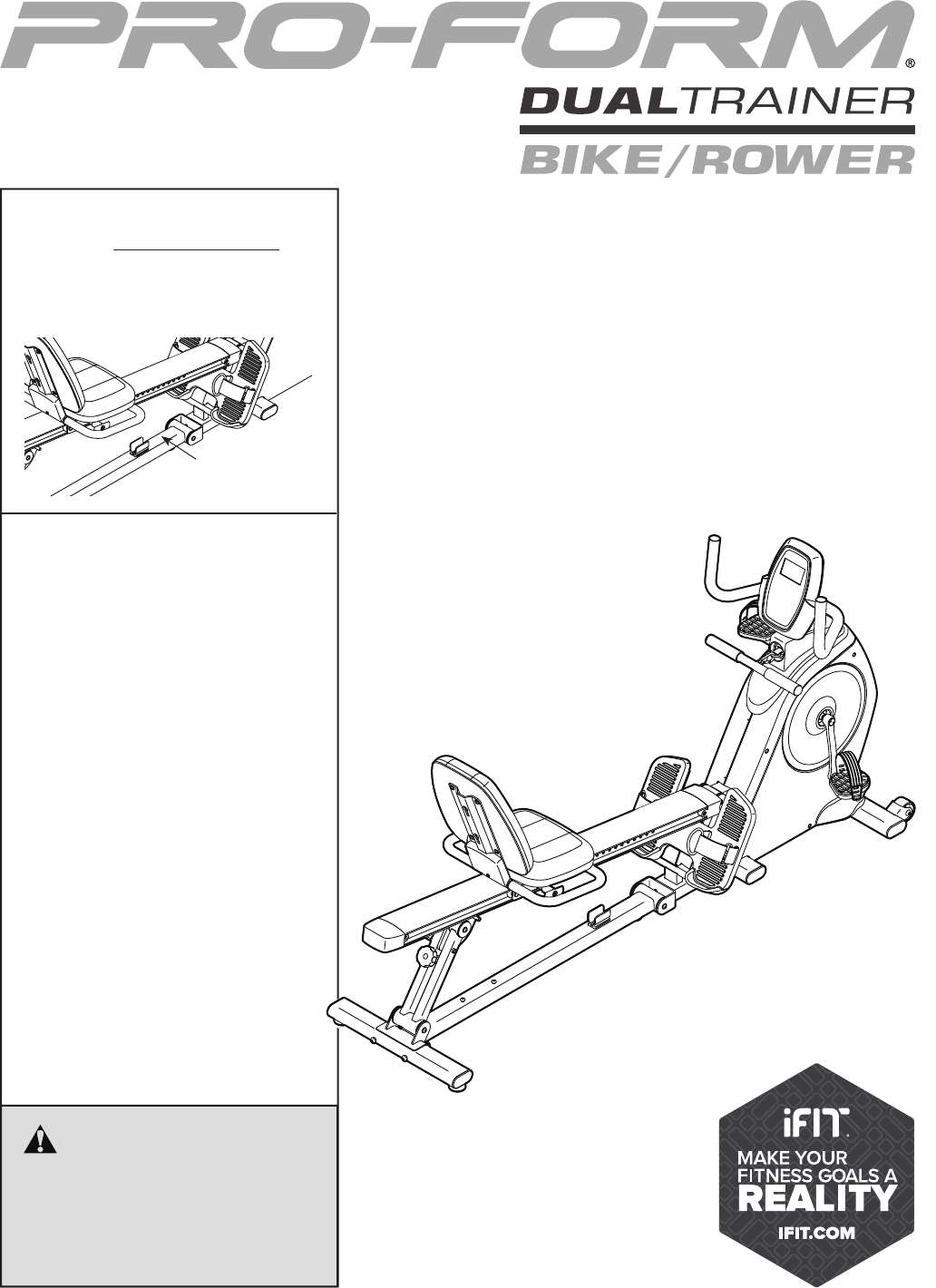
Serial Number
Decal
Model No. 831.21257.0
Serial No.
Write the serial number in the space
above for reference.
CAUTION
Read all precautions and instruc-
tions in this manual before using
this equipment. Keep this manual
for future reference.
DUAL TRAINER EXERCISER
User’s Manual
• Assembly
• Operation
• Maintenance
• Part List and Drawing
Sears, Roebuck and Co.
Hoffman Estates, IL 60179
2
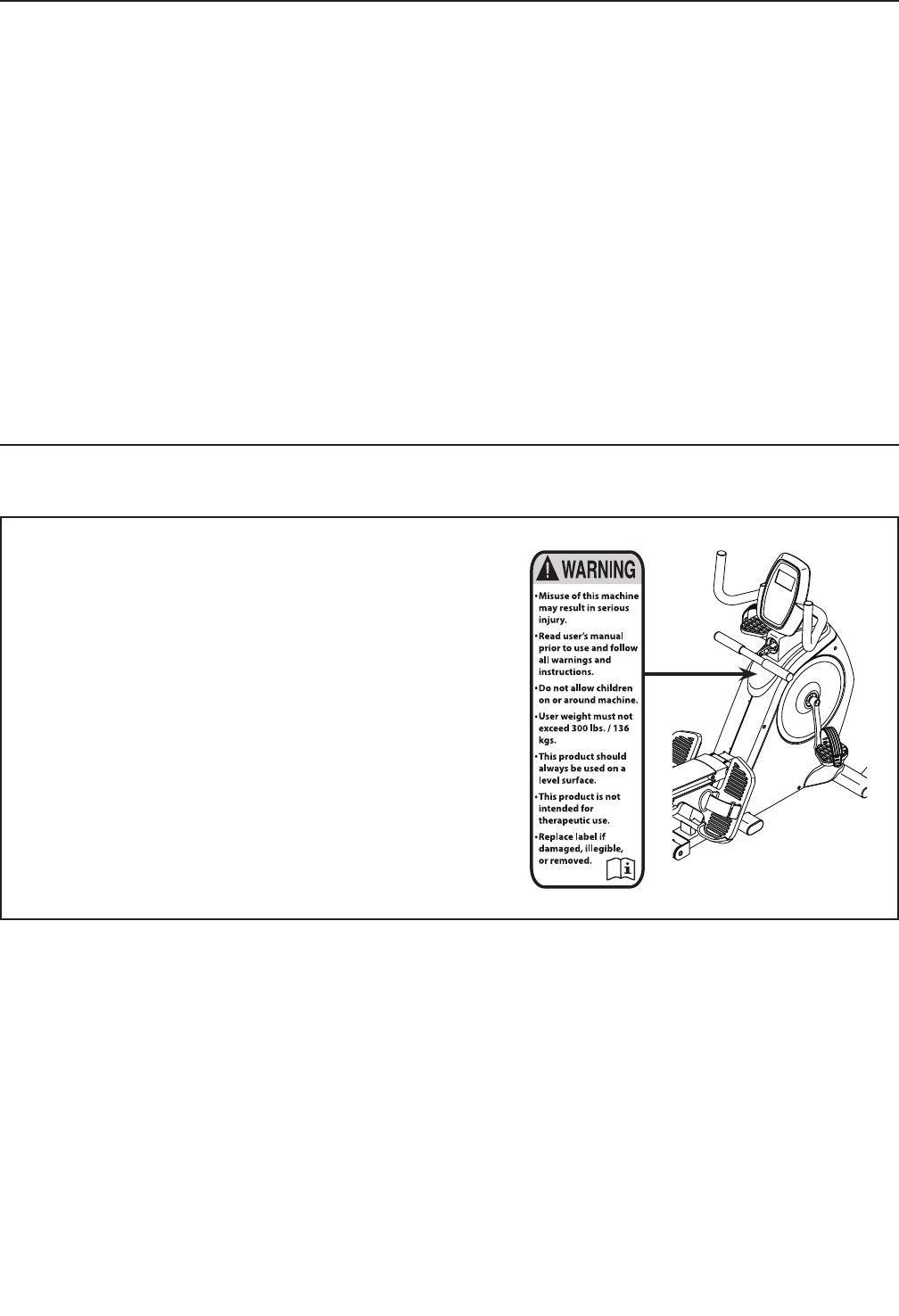
WARNING DECAL PLACEMENT
TABLE OF CONTENTS
WARNING DECAL PLACEMENT . . . . . . . . . . . . . . . . . . . . . . . . . . . . . . . . . . . . . . . . . . . . . . . . . . . . . . . . . . . . . . .2
IMPORTANT PRECAUTIONS . . . . . . . . . . . . . . . . . . . . . . . . . . . . . . . . . . . . . . . . . . . . . . . . . . . . . . . . . . . . . . . . . .3
BEFORE YOU BEGIN. . . . . . . . . . . . . . . . . . . . . . . . . . . . . . . . . . . . . . . . . . . . . . . . . . . . . . . . . . . . . . . . . . . . . . . .4
PART IDENTIFICATION CHART. . . . . . . . . . . . . . . . . . . . . . . . . . . . . . . . . . . . . . . . . . . . . . . . . . . . . . . . . . . . . . . .5
ASSEMBLY . . . . . . . . . . . . . . . . . . . . . . . . . . . . . . . . . . . . . . . . . . . . . . . . . . . . . . . . . . . . . . . . . . . . . . . . . . . . . . . .6
HOW TO USE THE DUAL TRAINER . . . . . . . . . . . . . . . . . . . . . . . . . . . . . . . . . . . . . . . . . . . . . . . . . . . . . . . . . . .12
FCC INFORMATION . . . . . . . . . . . . . . . . . . . . . . . . . . . . . . . . . . . . . . . . . . . . . . . . . . . . . . . . . . . . . . . . . . . . . . . .19
MAINTENANCE AND TROUBLESHOOTING . . . . . . . . . . . . . . . . . . . . . . . . . . . . . . . . . . . . . . . . . . . . . . . . . . . .20
EXERCISE GUIDELINES . . . . . . . . . . . . . . . . . . . . . . . . . . . . . . . . . . . . . . . . . . . . . . . . . . . . . . . . . . . . . . . . . . . .22
PART LIST. . . . . . . . . . . . . . . . . . . . . . . . . . . . . . . . . . . . . . . . . . . . . . . . . . . . . . . . . . . . . . . . . . . . . . . . . . . . . . . .24
EXPLODED DRAWING. . . . . . . . . . . . . . . . . . . . . . . . . . . . . . . . . . . . . . . . . . . . . . . . . . . . . . . . . . . . . . . . . . . . . . 26
ORDERING REPLACEMENT PARTS. . . . . . . . . . . . . . . . . . . . . . . . . . . . . . . . . . . . . . . . . . . . . . . . . . . Back Cover
1 YEAR FULL WARRANTY. . . . . . . . . . . . . . . . . . . . . . . . . . . . . . . . . . . . . . . . . . . . . . . . . . . . . . . . . . . Back Cover
This drawing shows the location(s) of the warning decal(s).
If a decal is missing or illegible, call 1-888-533-1333
and request a free replacement decal. Apply the decal
in the location shown. Note: The decal(s) may not be
shown at actual size.
3
IMPORTANT PRECAUTIONS
WARNING: To reduce the risk of serious injury, read all important precautions and
instructions in this manual and all warnings on your dual trainer before using your dual trainer.
Sears assumes no responsibility for personal injury or property damage sustained by or through the
use of this product.
1. It is the responsibility of the owner to
ensure that all users of the dual trainer are
adequately informed of all precautions.
2. Before beginning any exercise program,
consult your physician. This is especially
important for persons over age 35 or per-
sons with pre-existing health problems.
3. Use the dual trainer only as described in this
manual.
4. The dual trainer is intended for home use
only. Do not use the dual trainer in a com-
mercial, rental, or institutional setting.
5. Keep the dual trainer indoors, away from
moisture and dust. Do not put the dual
trainer in a garage or covered patio, or near
water.
6. Place the dual trainer on a level surface, with
a mat beneath it to protect the floor or carpet.
Make sure that there is at least 2 ft. (0.6 m) of
clearance around the dual trainer.
7. Inspect and properly tighten all parts regu-
larly. Replace any worn parts immediately.
8. Keep children under age 12 and pets away
from the dual trainer at all times.
9. Wear appropriate clothes while exercising;
do not wear loose clothes that could become
caught on the dual trainer. Always wear ath-
letic shoes for foot protection.
10. The dual trainer should not be used by
persons weighing more than 300 lbs.
(136 kg).
11. Be careful when mounting and dismounting
the dual trainer.
12. Always keep your back straight while using
the dual trainer; do not arch your back.
13. Do not attempt to pull the row bar when the
dual trainer is set up in the recumbent mode
(see page 12); do not attempt to pedal the
dual trainer when the dual trainer is set up in
the rower mode (see page 13).
14. Over exercising may result in serious injury
or death. If you feel faint, if you become short
of breath, or if you experience pain while
exercising, stop immediately and cool down.
4
Thank you for selecting the new PROFORM® DUAL
TRAINER BIKE/ROWER. Cycling and rowing are
effective exercises for increasing cardiovascular fit-
ness, building endurance, and toning the body. The
DUAL TRAINER BIKE/ROWER is designed to let you
enjoy these effective exercises in the convenience and
privacy of your home.
For your benefit, read this manual carefully before
you use the dual trainer. If you have questions after
reading this manual, please see the back cover of this
manual. To help us assist you, note the product model
number and serial number before contacting us. The
model number and the location of the serial number
decal are shown on the front cover of this manual.
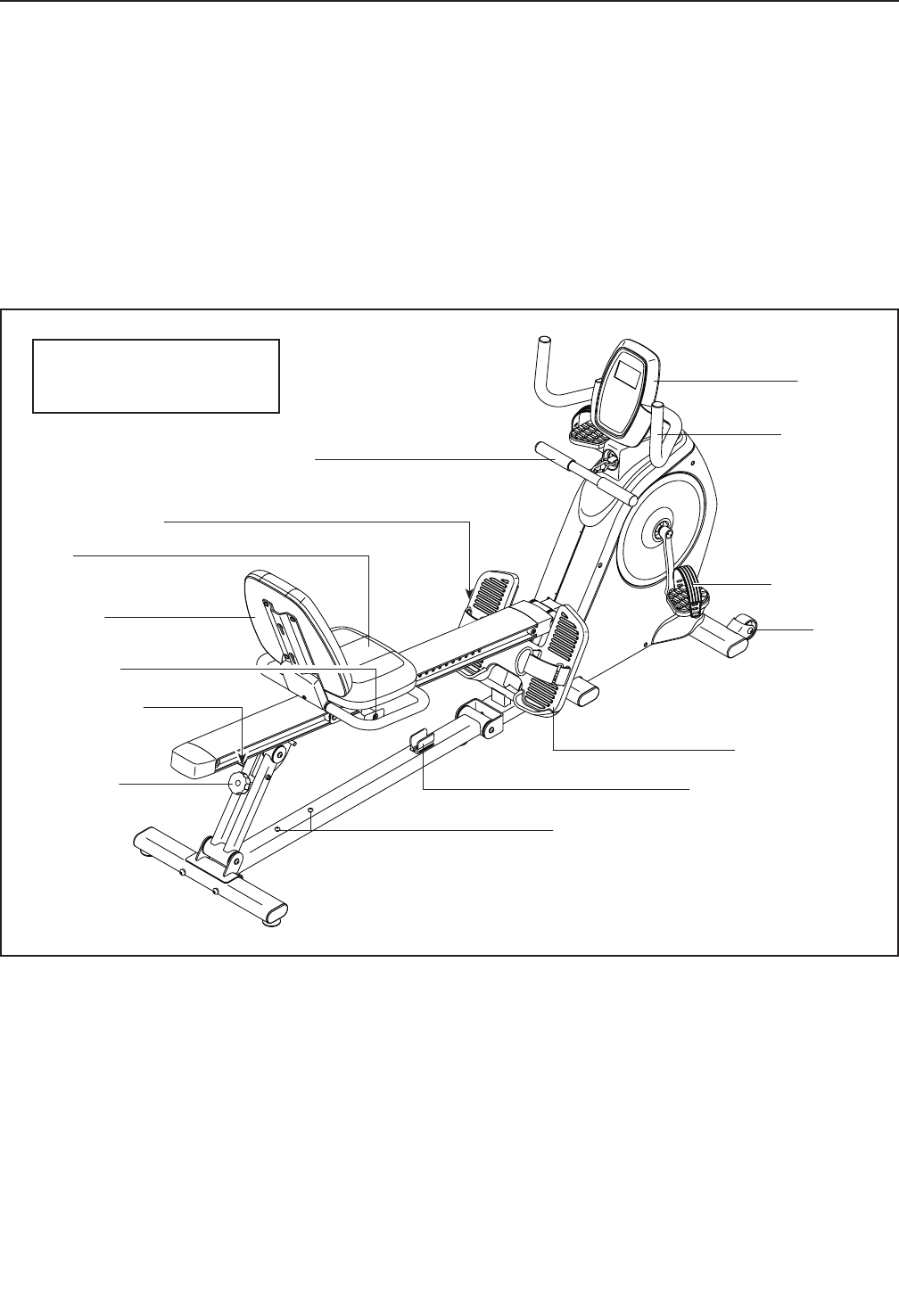
Before reading further, please review the drawing
below and familiarize yourself with the labeled parts.
Foot Plate/Strap
Seat
Backrest Storage Screws
Row Bar Storage Clip
Pedal/Strap
Wheel
Console
Handlebar
Backrest
Foot Plate Knob
Lock Knob
Storage Knob
Seat Knob
Row Bar
BEFORE YOU BEGIN
Length: 6 ft. 7 in. (201 cm)
Width: 1 ft. 9 in. (53 cm)
5
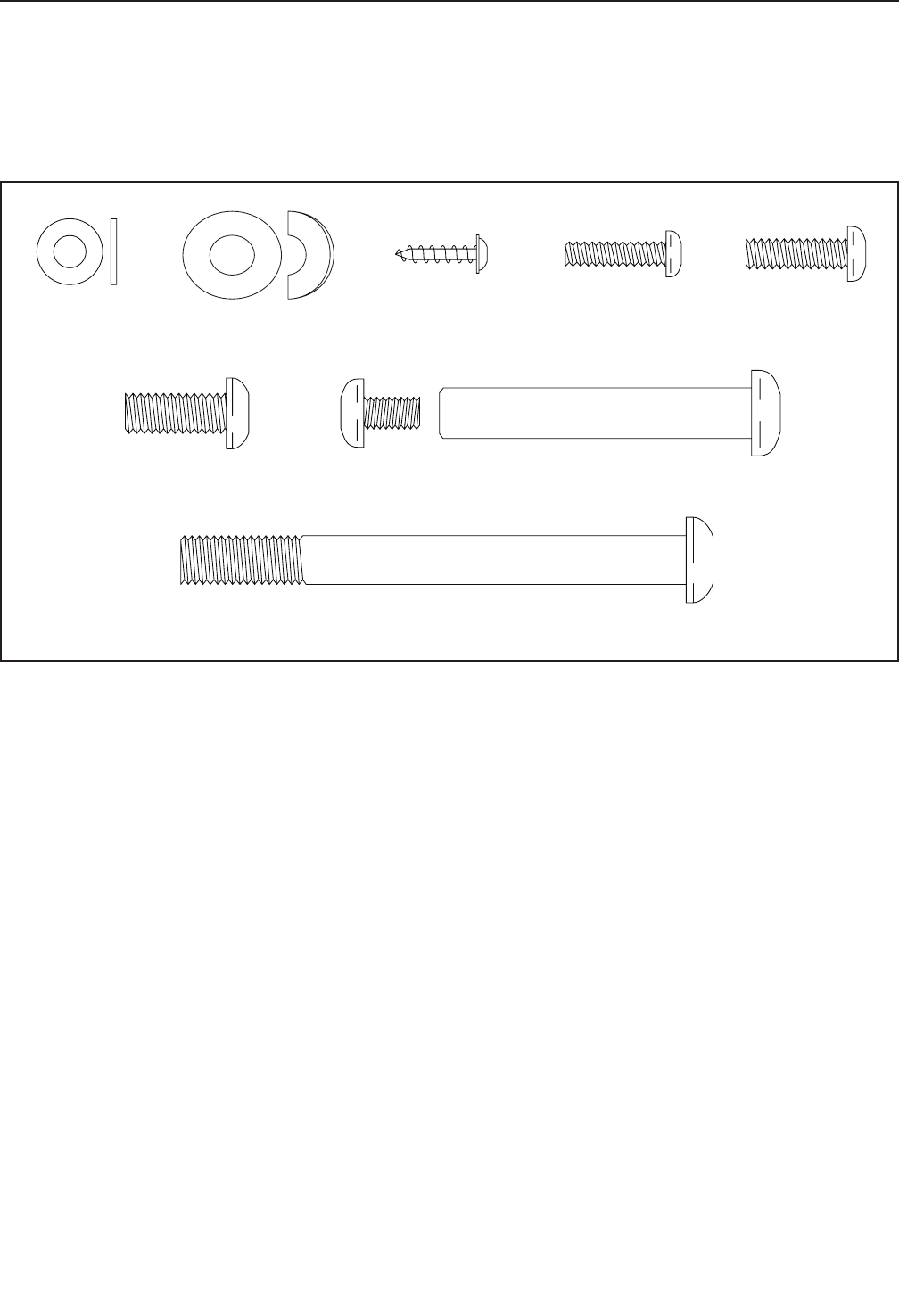
M6 Washer
(34)–2
M10 x 100mm Screw (13)–4
M8 x 20mm
Screw (15)–10
M6 x 20mm
Screw (14)–2
M5 x 20mm
Screw (81)–2
M4 x 16mm
Screw (84)–2
M10 Bolt Set (115)–1
M8 Curved
Washer (114)–2
PART IDENTIFICATION CHART
Use the drawings below to identify the small parts needed for assembly. The number in parentheses below each
drawing is the key number of the part, from the PART LIST near the end of this manual. The number following the
key number is the quantity needed for assembly. Note: If a part is not in the hardware kit, check to see if it
has been preassembled. Extra parts may be included. If a part is missing, please call 1-888-533-1333.
6
• Assembly requires two persons.
• Place all parts in a cleared area and remove the
packing materials. Do not dispose of the packing
materials until you fi nish all assembly steps.
• To identify small parts, see page 5.
• Left parts are marked “L” or “Left” and right parts
are marked “R” or “Right.”
• In addition to the included tool(s), assembly
requires the following tools:
one Phillips screwdriver
one adjustable wrench
Assembly may be easier if you have a set of
wrenches. To avoid damaging parts, do not use
power tools.
ASSEMBLY
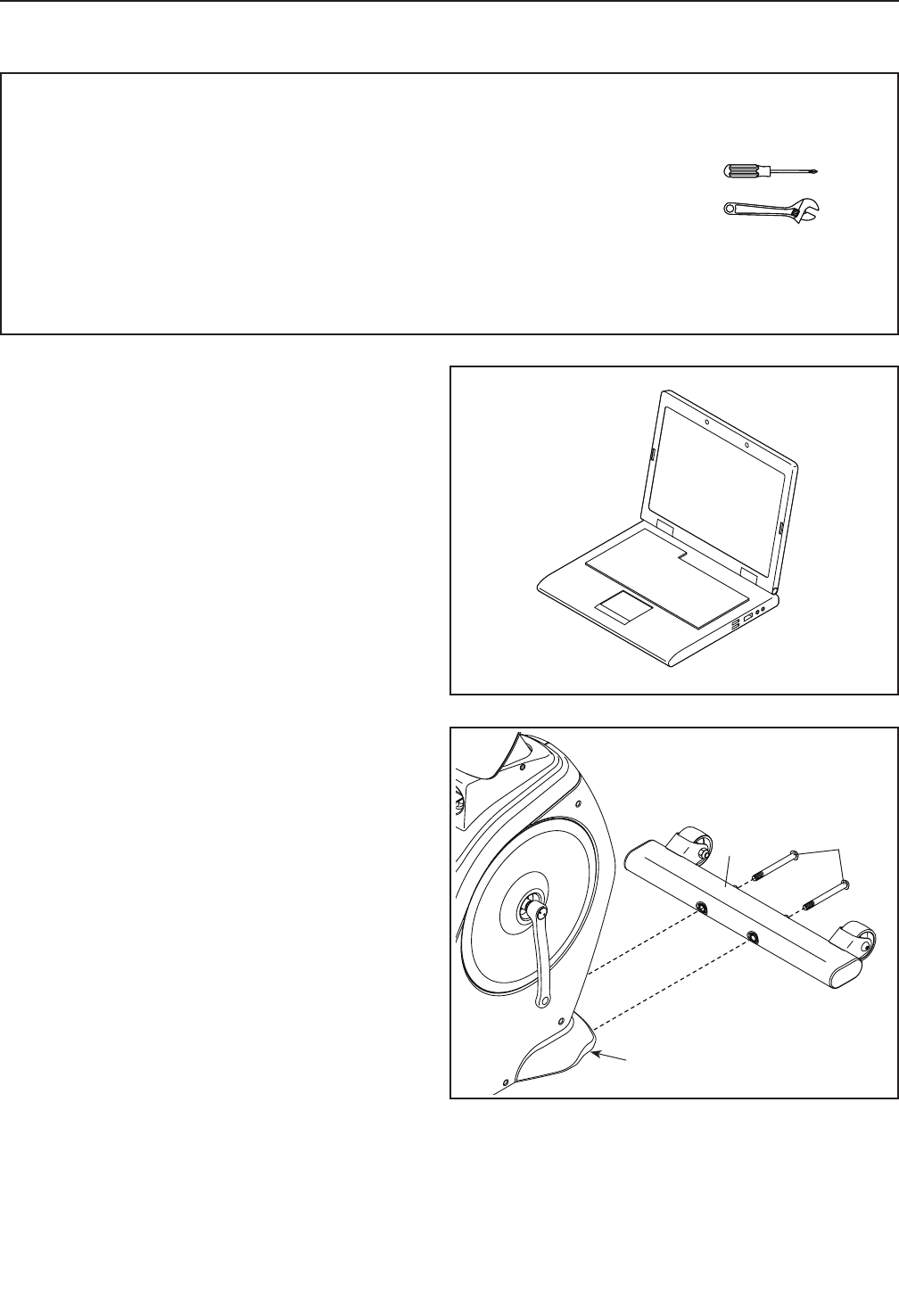
2. Orient the Front Stabilizer (2) as shown.
Attach the Front Stabilizer (2) to the Front Frame
(1) with two M10 x 100mm Screws (13).
213
1
1
2
1. Go to www.proformservice.com/registration
on your computer and register your product.
• activates your warranty
• saves you time if you ever need to contact
Customer Care
• allows us to notify you of upgrades and offers
Note: If you do not have Internet access, call
1-888-533-1333 and register your product.
7
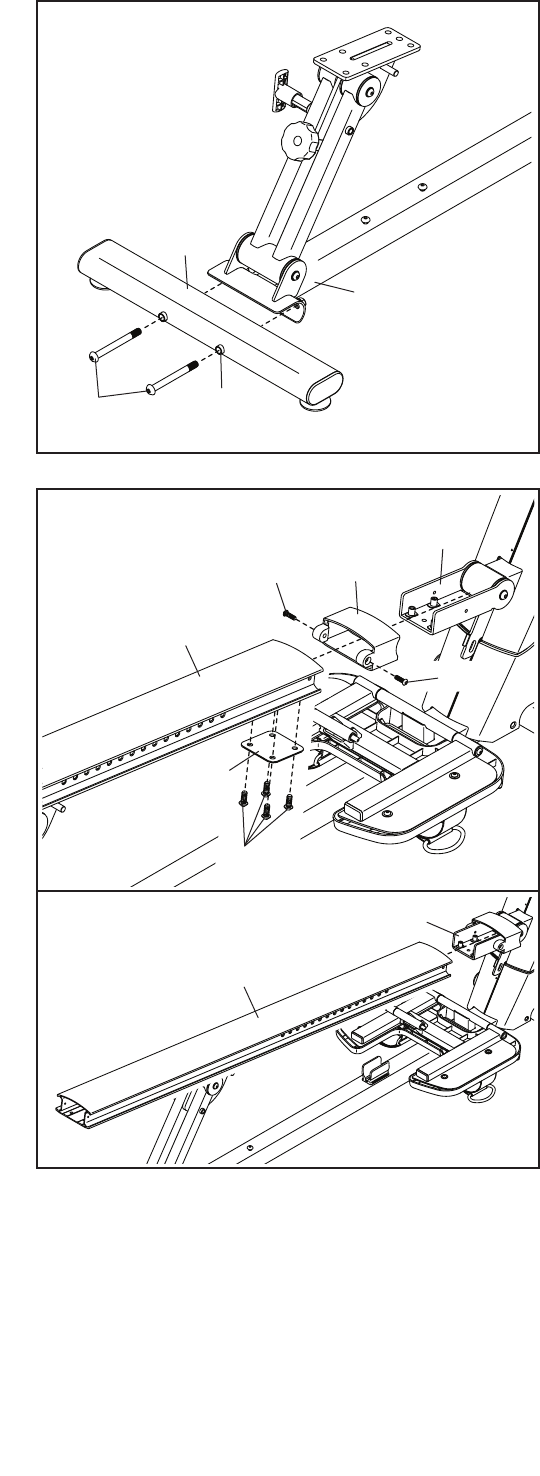
3. Orient the Rear Stabilizer (3) as indicated by the
sticker; make sure that the welded tubes are on
the side shown.
Attach the Rear Stabilizer (3) to the Rear Frame
(18) with two M10 x 100mm Screws (13).
13
3
3
18
4. Orient the Rail Collar (6) as shown, and slide it
onto the Rail Pivot Bracket (96).
See the lower drawing. Orient the Rail (5)
as shown, and slide it onto the Rail Pivot
Bracket (96).
Attach the Rail (5) with four M8 x 20mm Screws
(15) and the Small Rail Plate (7); do not tighten
the Screws yet.
Next, attach the Rail Cover (6) to the Rail (5)
and to the Rail Pivot Bracket (96) with two M6 x
20mm Screws (14).
5
15
14 6
96
7
4
14
5
96
Welded
Tube
8
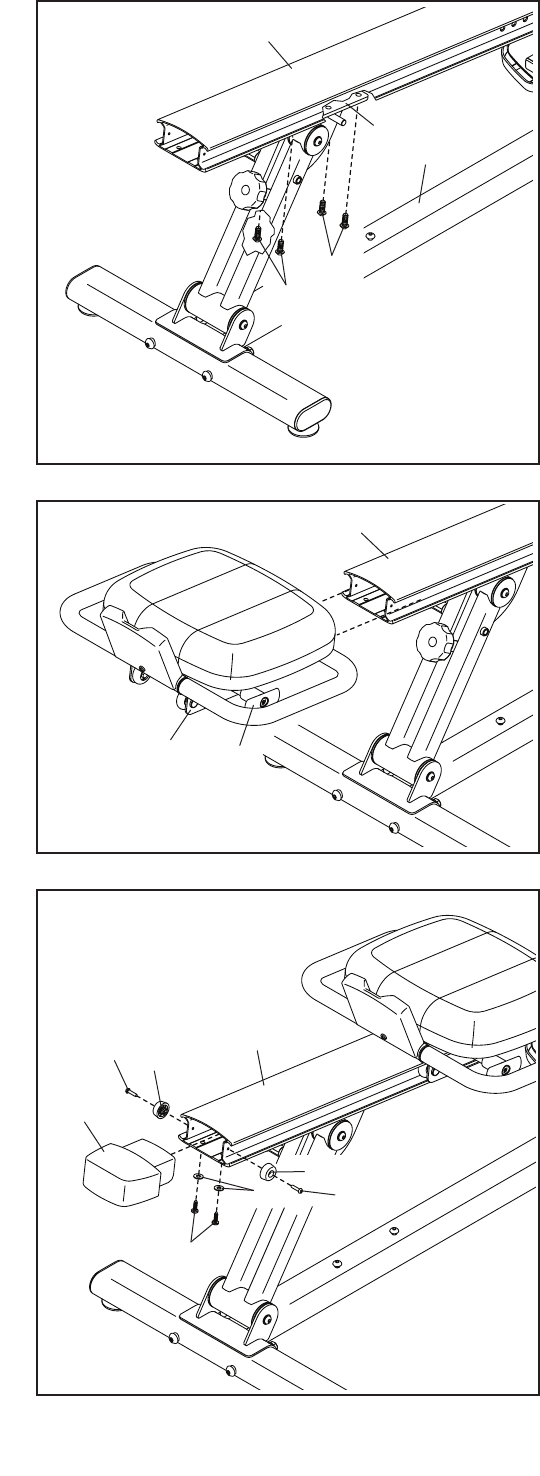
5. Tip: It may be helpful to have a second
person raise and hold the Rail (5) and the
Rear Frame (18) while you do this step.
Attach the Rail Bracket (8) to the underside of
the Rail (5) with four M8 x 20mm Screws (15);
start all the Screws, and then tighten them.
See step 4. Tighten the M8 x 20mm Screws (15).
5
8
5
4
5
6. Orient the Seat Carriage (4) as shown.
Pull the Seat Knob (93), slide the Seat Carriage
(4) onto the Rail (5), and then release the Seat
Knob into one of the adjustment holes (not
shown) near the front of the Rail.
6
7
7. Attach the Rail Cap (82) and two Bumpers (65)
to the Rail (5) with two M4 x 16mm Screws
(84), two M5 x 20mm Screws (81), and two M6
Washers (34); start all the Screws, and then
tighten them.
15
18
93
82
81
84 65
5
65
34
15
84
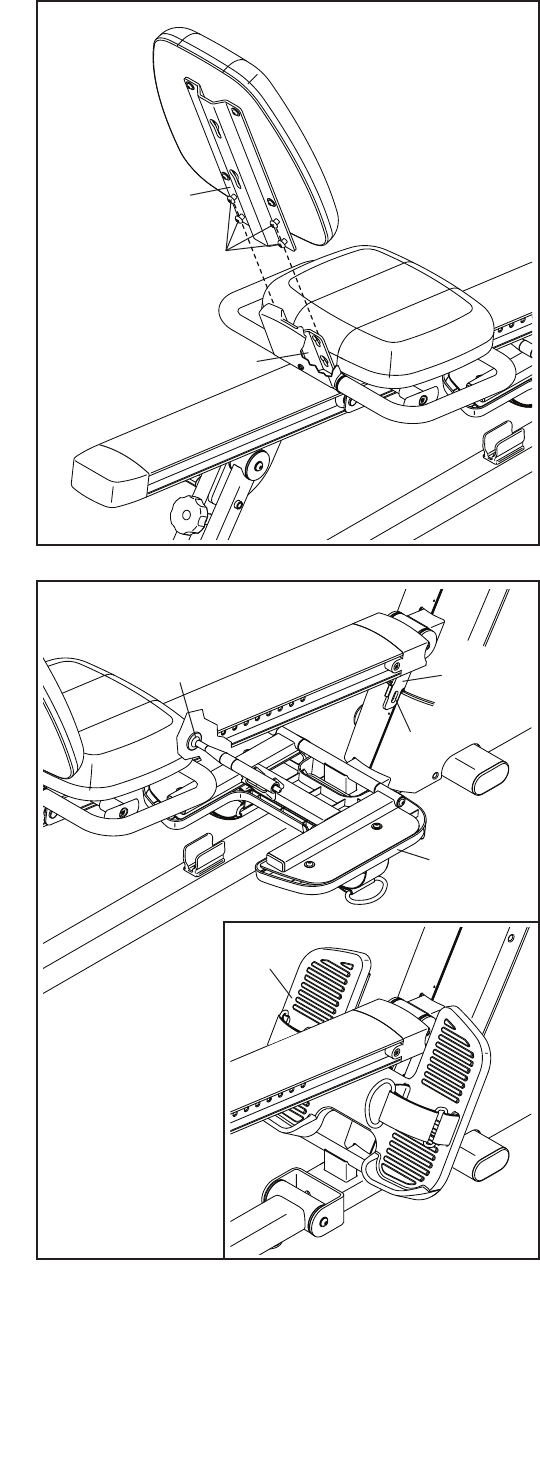
9
8. Locate the four M6 x 13mm Screws (95) in the
lower end of the Backrest Frame (94). Insert the
heads of the Screws into the slotted holes in the
Seat Carriage (4), and then slide the Screws
downward into the slots.
8
9. Pull the Foot Plate Knob (49), raise the Foot
Plate (68) to the position shown in the inset
drawing, and then release the Foot Plate Knob
into the indicated hole in the Front Frame (1).
9
94
95
4
49
68
68
1
Hole
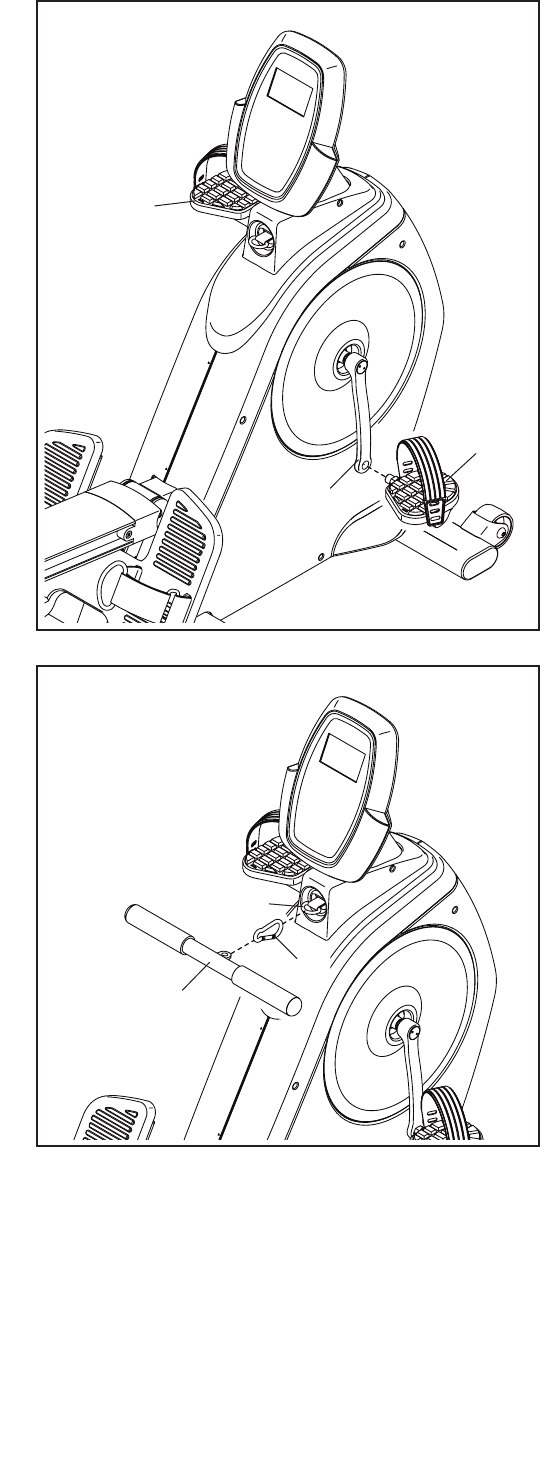
10
10. Identify the Right Pedal (11).
Using an adjustable wrench, firmly tighten the
Right Pedal (11) clockwise into the Right Crank
Arm (86).
Firmly tighten the Left Pedal (10) coun-
terclockwise into the Left Crank Arm (not
shown). IMPORTANT: You must turn the Left
Pedal counterclockwise to attach it.
10
11. Attach the Row Bar (12) to the Strap (59) with
the Row Bar Clip (100). 11
86
11
12
59
10
100
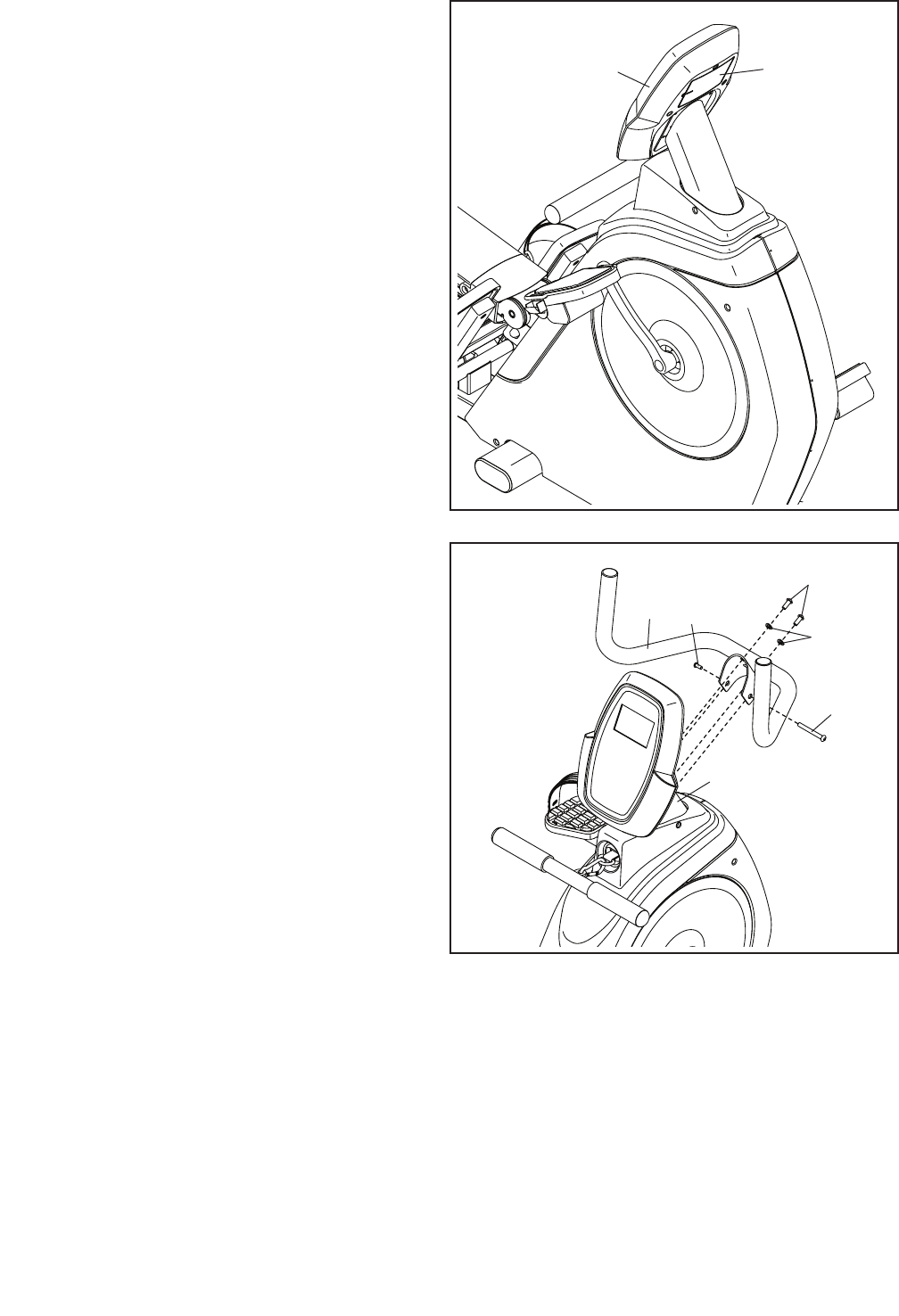
11
30
Battery
Cover
12
12. The Console (30) can use four AA batteries (not
included); alkaline batteries are recommended.
Do not use old and new batteries together or
alkaline, standard, and rechargeable batter-
ies together. IMPORTANT: If the Console has
been exposed to cold temperatures, allow
it to warm to room temperature before you
insert batteries. Otherwise, you may dam-
age the console displays or other electronic
components.
Remove the screw (not shown) from the battery
cover on the back of the Console (30). Next,
remove the battery cover and insert batteries into
the battery compartment. Make sure to orient
the batteries as shown by the diagram inside
the battery compartment. Then, reattach the
battery cover.
14. After the dual trainer is assembled, inspect it to make sure that it is assembled correctly and that it
functions properly. Make sure that all parts are properly tightened before you use the dual trainer.
Extra parts may be included. Place a mat under the dual trainer to protect the floor.
13. Attach the Handlebar (113) to the Front Frame
(1) with two M8 x 20mm Screws (15), two M8
Curved Washers (114), and an M10 Bolt Set
(115); start the Screws and the Bolt Set, and
then tighten them.
13
1
15
115
114
115
113
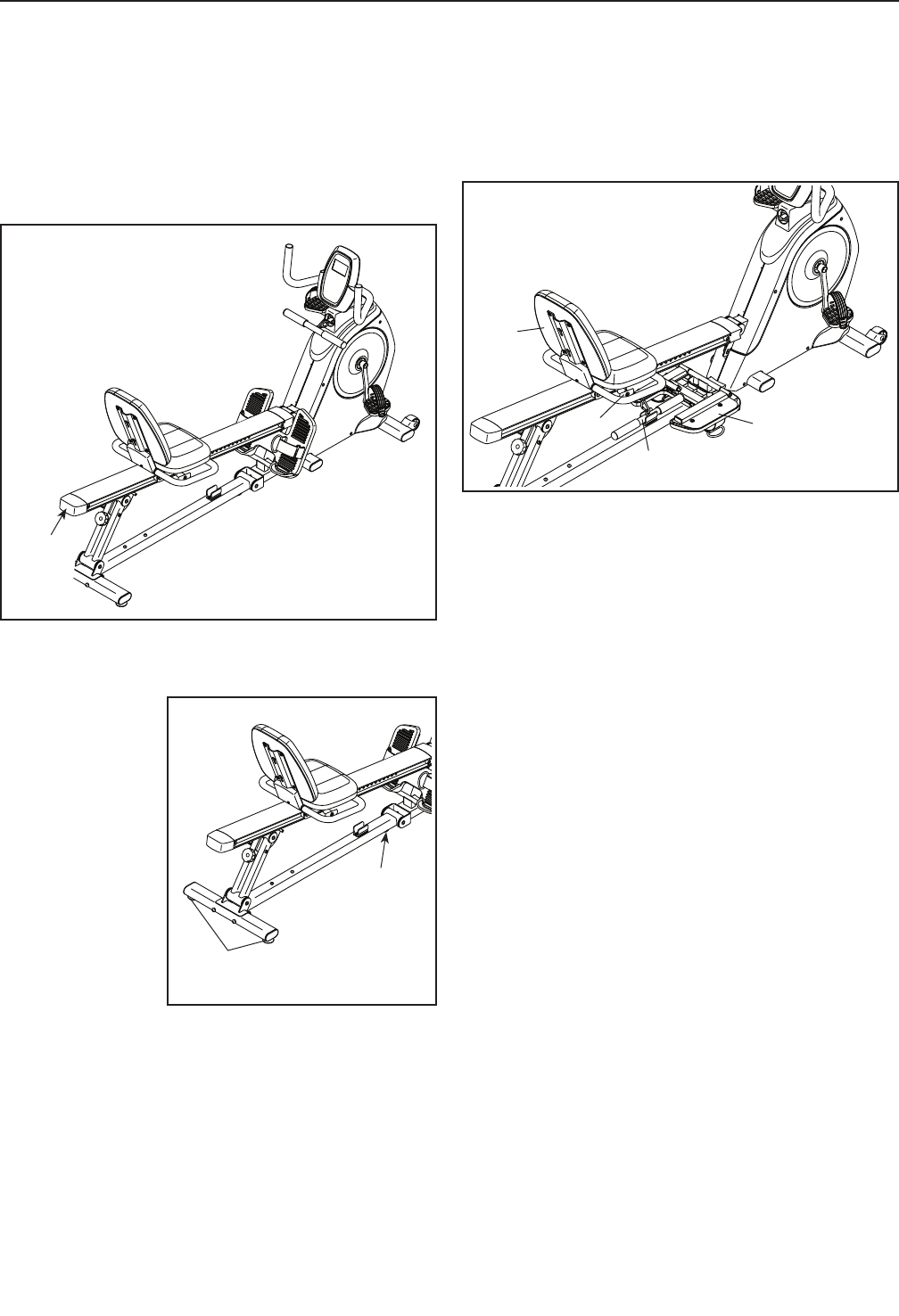
12
HOW TO MOVE THE DUAL TRAINER
Stand behind the dual trainer and lift the rail cap until
the dual trainer will roll on the wheels. Carefully move
the dual trainer to the desired location, and then lower
it to the floor.
HOW TO LEVEL THE DUAL TRAINER
If the dual trainer
rocks slightly
on your floor
during use, turn
one or both of
the leveling feet
beneath the rear
stabilizer, or turn
the leveling foot
beneath the rear
frame until the
rocking motion is
eliminated.
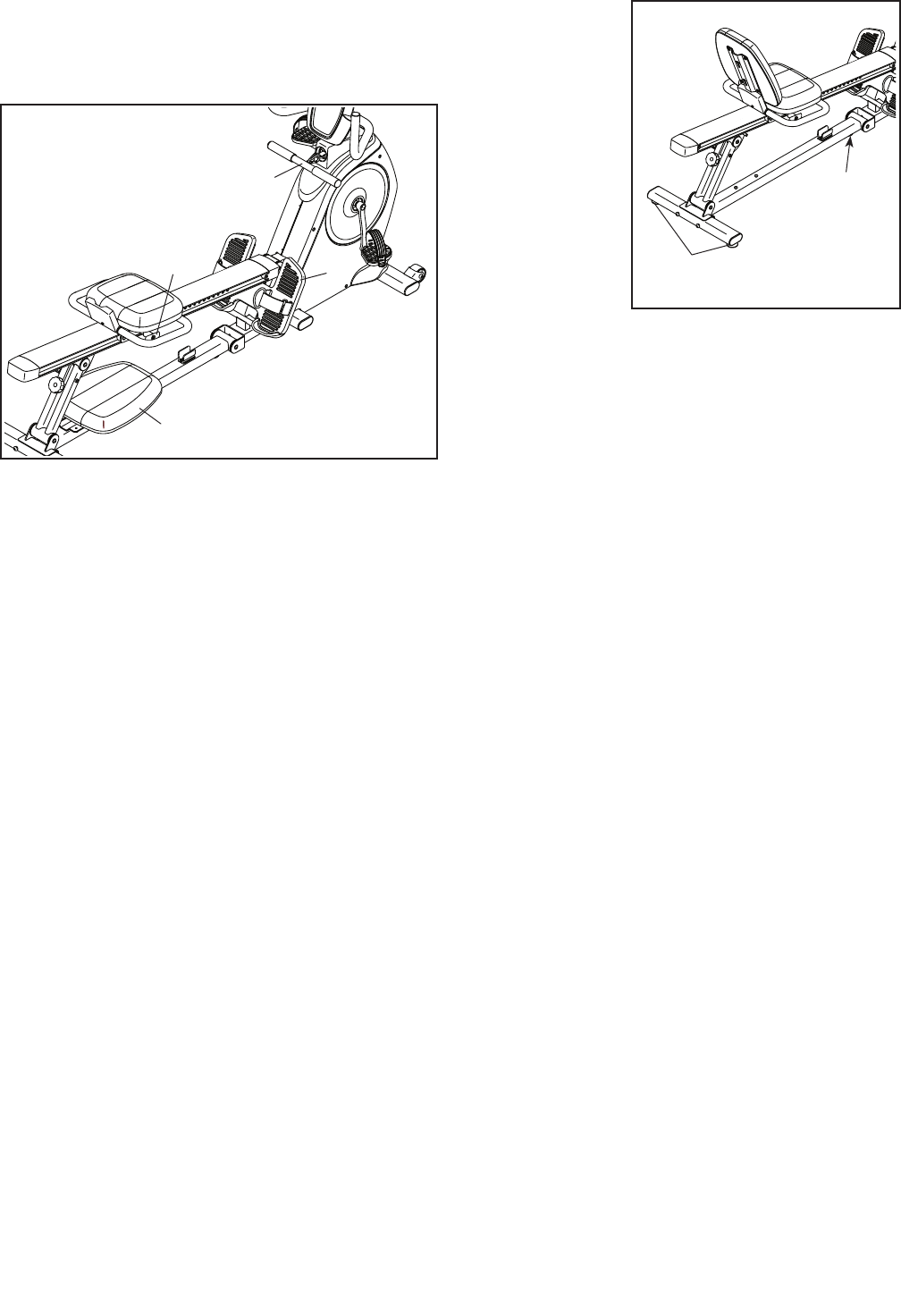
HOW TO SET UP THE RECUMBENT MODE
Follow the instructions below to set up the dual trainer
in the Recumbent mode.
1. Remove the row bar. Remove the row bar from
the row bar clip on the strap (see assembly step
11 on page 10). Then, insert the row bar into the
storage clip on the rear frame.
2. Lower the foot plate. Pull the foot plate knob,
lower the foot plate, and then release the foot plate
knob (see assembly step 9 on page 9).
3. Attach the backrest. Insert the screws on the
lower end of the backrest into the slotted holes in
the seat carriage, and then slide the backrest into
place (see assembly step 8 on page 9).
4. Adjust the seat carriage. Pull the seat knob on
the seat carriage and turn it clockwise. Slide the
seat carriage to the desired position, and then
release the seat knob into an adjustment hole in
the rail (see assembly step 6 on page 8).
HOW TO USE THE RECUMBENT MODE
For effective recumbent exercise, the seat carriage
should be adjusted to the proper position. As you
pedal, there should be a slight bend in your knees
when the pedals are in the most forward position.
HOW TO USE THE DUAL TRAINER
Lift
here
1
2
3
4
Leveling
Feet
Leveling
Foot
13
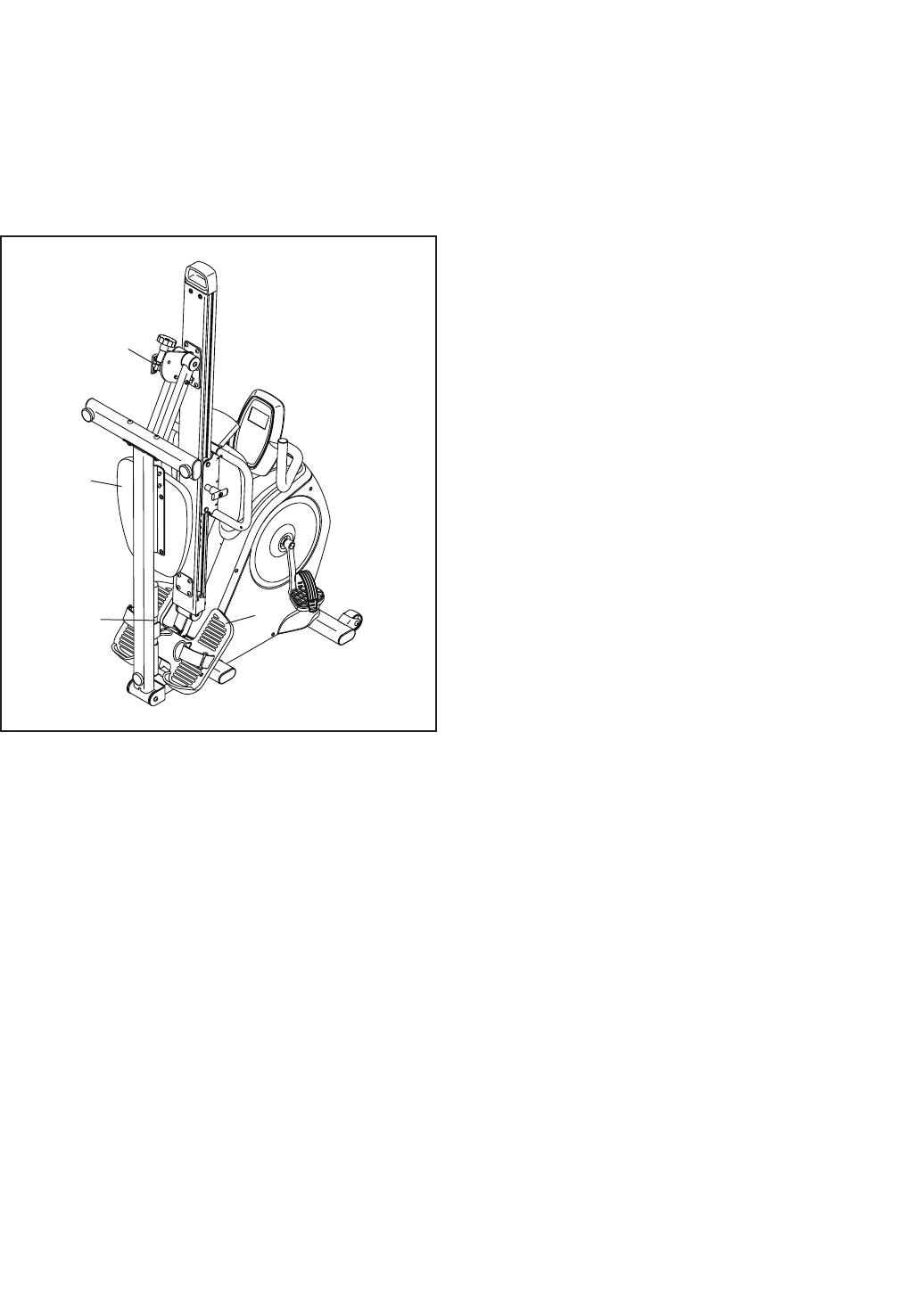
HOW TO SET UP THE ROWER MODE
Follow the instructions below to set up the dual trainer
in the Rower mode.
1. Attach the row bar. Attach the row bar to the strap
with the row bar clip (see assembly step 11 on
page 10).
2. Raise the foot plate. Pull the foot plate knob, raise
the foot plate, and then release the foot plate knob
into the hole in the front frame (see assembly step
9 on page 9).
3. Remove the backrest. Remove the backrest from
the seat carriage (see assembly step 8 on page
9). Then, slide the backrest onto the storage
screws on the rear frame.
4. Release the seat carriage. Pull the seat knob on
the seat carriage (see assembly step 6 on page
8) and turn it counterclockwise. The seat car-
riage will then slide freely along the rail.
Note: If the front
of dual trainer
lifts off the floor
while you are
exercising with
the dual trainer
set up in the
Rower mode,
first turn the
leveling foot
beneath the rear
frame so that it
is tight against
the rear frame.
Then, turn both
of the leveling
feet beneath the rear stabilizer until the lifting motion is
eliminated.
HOW TO USE THE ROWER MODE
Sit on the seat, facing the foot plate. Place your feet in
the foot plate and adjust the straps to fit your feet.
Hold the row bar with an overhand grip. Correct rowing
form consists of three phases:
1. The first phase is the CATCH. Slide the seat
forward until your knees are almost touching your
chest. Pull the row bar until your hands are close to
your feet.
2. The second phase is the DRIVE. Push backward
using your legs. Keep your back straight. Lean
back slightly at the hips (not at the waist) and begin
pulling the row bar toward your chest. Keep your
elbows outward.
3. The third phase is the FINISH. Your legs should
be nearly straight. Continue to pull the row bar until
your hands are even with your chest.
After the finish phase, extend your arms forward and
pull the seat forward using your legs. Repeat, moving
through all three phases with a smooth, fluid motion.
Remember to breathe normally as you row; never hold
your breath.
1
2
3
4Leveling
Feet
Leveling
Foot
14
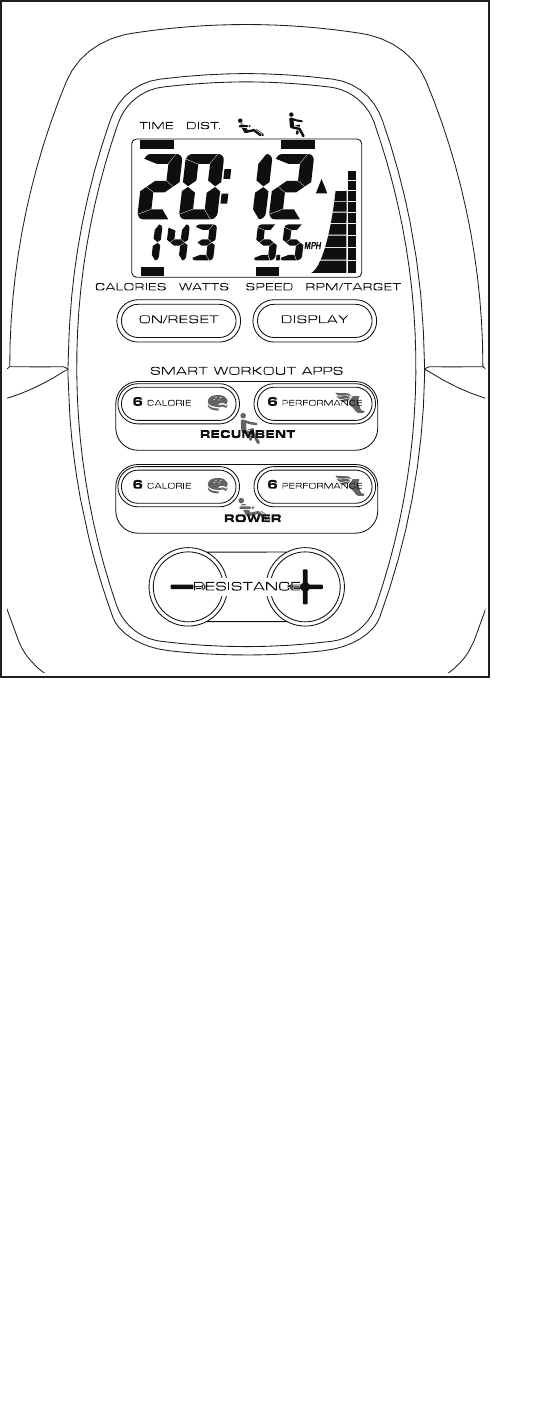
HOW TO FOLD AND STORE THE DUAL TRAINER
The dual trainer can be stored in a folded position to
conserve space. Store the dual trainer in a location
where children cannot tip it. Remove the batteries from
the console when storing the dual trainer for extended
periods.
Follow the instructions at the right to fold and store the
dual trainer.
1. Raise the foot plate. Pull the foot plate knob, raise
the foot plate, and then release the foot plate knob
into the hole in the front frame (see assembly step
9 on page 9). IMPORTANT: The foot plate
must be raised when you fold the dual trainer,
or damage may occur to the foot plate.
2. Remove the row bar if desired. Remove the row
bar from the row bar clip on the strap (see assem-
bly step 11 on page 10). Then, insert the row bar
into the storage clip on the rear frame.
3. Remove the backrest if desired. Remove the
backrest from the seat carriage (see assembly step
8 on page 9). Then, slide the backrest onto the
storage screws on the rear frame.
IMPORTANT: If you choose not to remove the
backrest, you must adjust the seat carriage to
the rearmost adjustment hole in the rail before
you fold the dual trainer, or damage may occur
to the backrest and the console.
4. Fold the dual trainer. Fully loosen the lock knob
on the rear of the dual trainer. Next, loosen and pull
the storage knob, grip the rail cap, raise the rear
frame into the storage position, and then release
the storage knob into the storage hole in the rail
bracket.
HOW TO UNFOLD THE DUAL TRAINER
To unf o l d the du a l t rainer, p ull the s t orage k n o b , grip
the rail cap, lower the rear frame to the floor, and then
tighten the storage knob. Then, tighten the lock knob
on the rear of the dual trainer. Make sure to tighten
the storage knob and the lock knob.
1
2
3
4
15
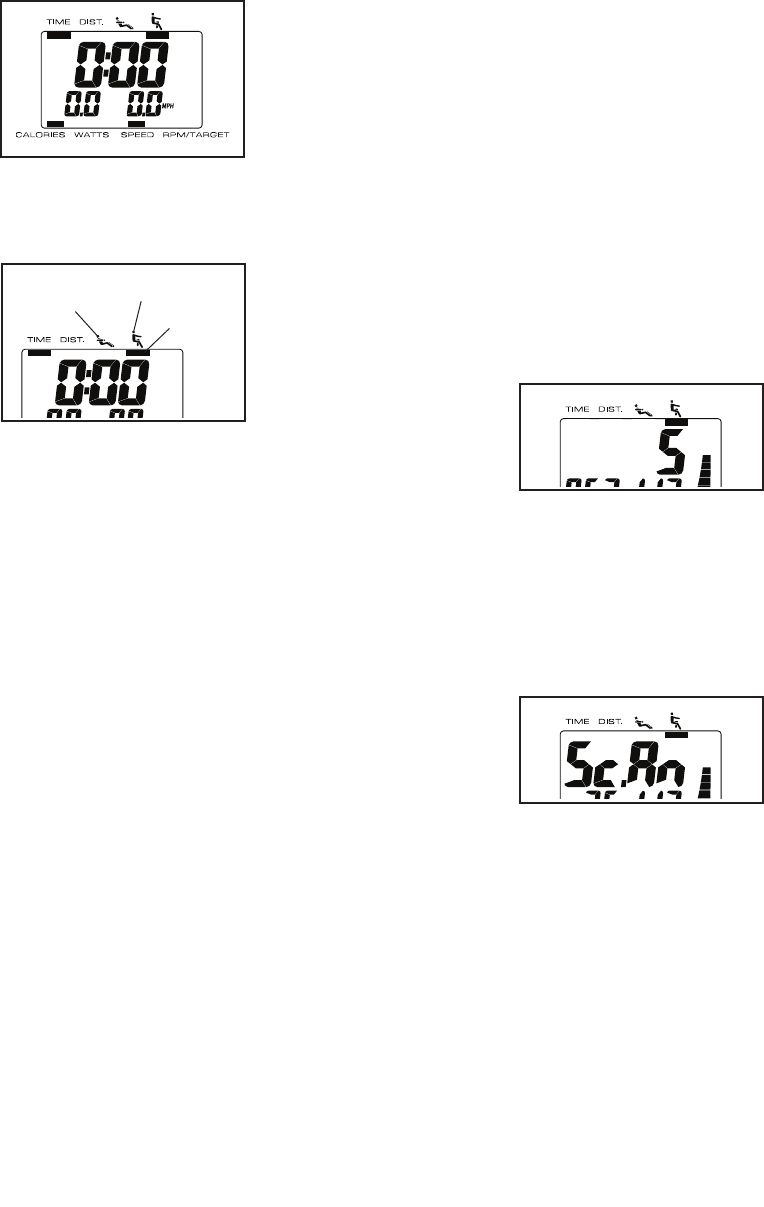
CONSOLE DIAGRAM FEATURES OF THE CONSOLE
The console offers a selection of features designed to
make your dual trainer recumbent and rower workouts
more effective and enjoyable.
Manual Mode—When you use the dual trainer in the
Recumbent mode, you can change the resistance of
the pedals with the touch of a button. When you use
the dual trainer in the Rower mode, you can change
the resistance of the row bar with the touch of a button.
As you pedal or row on the dual trainer, the console will
provide continuous exercise feedback
Smart Workouts—The console also offers twenty-four
smart workouts—twelve workouts for the Recumbent
mode and twelve workouts for the Rower mode. Each
workout automatically changes the resistance of the
pedals or the row bar and prompts you to vary your
pedaling or rowing speed while guiding you through an
effective workout.
To use the manual mode, see page 16. To use
a smart workout, see page 18. To use the user
mode, see page 19.
Before using the console, make sure that batteries are
installed (see assembly step 12 on page 11). If there
is a sheet of plastic on the display, remove the plastic.
16
HOW TO USE THE MANUAL MODE
1. Turn on the console.
To tur n o n the c o n s o le, pre s s the On/ R e s et but-
ton or begin pedaling or rowing. The entire display
will turn on for a moment; the console will then be
ready for use.
2. Select the manual mode.
When you turn
on the console,
the manual mode
will be selected
automatically. If
you have selected
a smart workout,
reselect the manual
mode by pressing any of the Smart Workouts Apps
buttons repeatedly until zeros appear in the display.
As you pedal or
row, an indicator
will appear below
the Recumbent
symbol or the
Rower symbol to
show which mode
of the dual trainer
is being used.
Note: When you turn on the console, an indica-
tor will appear below the Recumbent symbol by
default. If you are using the dual trainer in the
Rower mode, an indicator will appear below the
Rower symbol as soon as the console detects the
movement of the row handle.
3. Change the resistance of the pedals or the row
bar as desired.
As you pedal or row, change the resistance of the
pedals or the row bar by pressing the Resistance
increase and decrease buttons.
Note: After you press the buttons, it will take a
moment for the dual trainer to reach the selected
resistance level.
4. Follow your progress with the display.
The console has several displays that show the
following workout information:
Time—This display shows the elapsed time.
Note: When a workout is selected, the display
shows the time remaining in the workout instead of
the elapsed time.
Distance (Dist.)—This display shows the distance
you have pedaled, in miles or kilometers, or the
distance you have rowed, in miles or kilometers.
Calories—This display shows the approximate
number of calories you have burned.
Watts—This display shows your power output in
watts.
Speed—This display shows your pedaling speed,
in miles per hour (mph) or kilometers per hour
(km/h) or your rowing speed in rows per minute
(rpm).
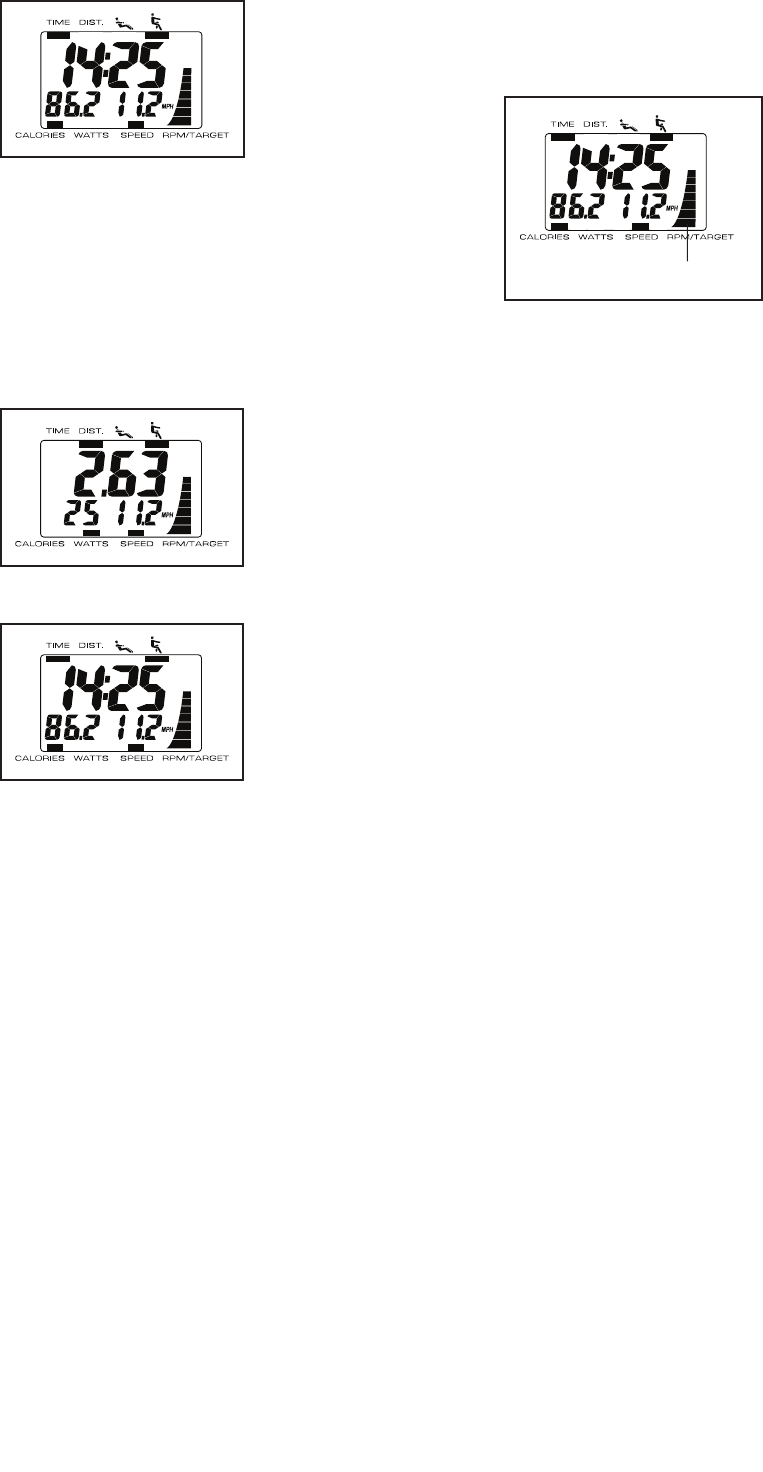
Scan—When this display option is selected, the
upper section of the display will alternately show
time and distance information, the lower-left section
of the display will alternately show calories and
watts information, and the lower-right section of the
display will show speed information.
Resistance—This
display shows the
selected resistance
level in the upper
right section of the
display for a few
seconds whenever the resistance level is adjusted.
Note: The console can show distance and
Recumbent mode pedaling speed in either miles
or kilometers. To change the unit of measurement,
see THE USER MODE on page 19.
When you turn on
the console, the
scan display option
will be selected
automatically. The
word SCAN will
appear in the display to show that the scan display
option is selected.
Recumbent
Indicator
Rower
17
As you exercise,
the upper section
of the display will
alternately show
the elapsed time
and the distance
that you have
pedaled or rowed;
the lower-left section of the display will alternately
show the number of calories you have burned and
your power output in watts. The lower-right section
of the display will show your pedaling or rowing
speed.
To exit the scan display option, press the Display
button.
The upper section
of the display will
then show only dis-
tance information
and the lower-left
section of the dis-
play will show only
watts information.
If you press the
Display button
again, the upper
section of the dis-
play will show only
time information
and the lower-left
display will show
only calories information.
To select the scan mode again, press the Display
button repeatedly until the word SCAN appears in
the display.
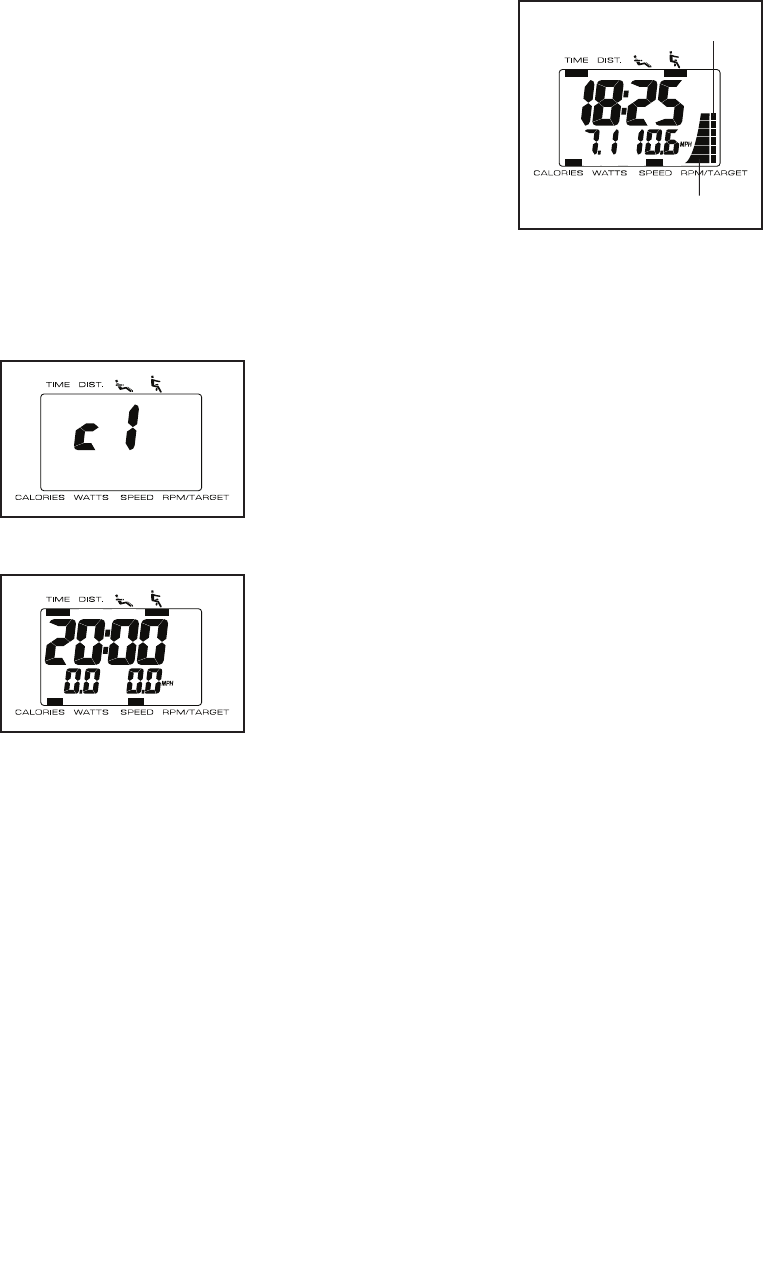
RPM Meter—The
RPM meter on
the right side
of the display
provides a visual
representation
of your pedaling
speed (revolu-
tions per minute)
or your row-
ing speed (rows per minute). As you increase or
decrease your pedaling or rowing speed, bars will
appear or disappear in the RPM meter.
To reset the display, press the On/Reset button. To
pause the console, stop pedaling or rowing. When
the console is paused, the time will flash in the
display. To continue your workout, simply resume
pedaling or rowing.
5. When you are finished exercising, the console
will turn off automatically.
If the pedals do not move or the row bar is not
pulled for a few seconds, the time will flash in the
display and the console will pause.
If the pedals do not move or the row bar is not
pulled for a few minutes, the console will turn off
and the display will be reset.
RPM Meter
18
HOW TO USE A SMART WORKOUT
1. Turn on the console.
To tur n o n the c o n s o le, pre s s the On/ R e s et but-
ton or begin pedaling or rowing. The entire display
will turn on for a moment; the console will then be
ready for use.
2. Select a smart workout.
When you select a Recumbent smart workout,
you must set up the dual trainer in the Recumbent
mode for the console to provide accurate feedback
(see HOW TO SET UP THE RECUMBENT MODE
on page 12).
When you select a Rower smart workout, you
must set up the dual trainer in the Rower mode
for the console to provide accurate feedback
(see HOW TO SET UP THE ROWER MODE on
page 13).
To select a smart
workout, press
the desired Smart
Workout Apps
button repeatedly.
The name of the
workout will appear
in the display.
A few seconds
after you select a
smart workout, the
display will show
the duration of the
workout.
3. Begin pedaling or rowing to start the workout.
The smart workouts consist of several one-minute
segments. One resistance level and one target
speed (rpm) are programmed for each segment.
Whenever the resistance is about to change, the
resistance level will flash in the display for a few
seconds. The resistance of the pedals or the row
bar will then automatically change to the resistance
level programmed for the next segment.
If the resistance level for the current segment is
too high or too low, you can manually override
the setting by pressing the Resistance buttons.
IMPORTANT: When the current segment of the
workout ends, the pedals or the row bar will
automatically adjust to the resistance level pro-
grammed for the next segment.
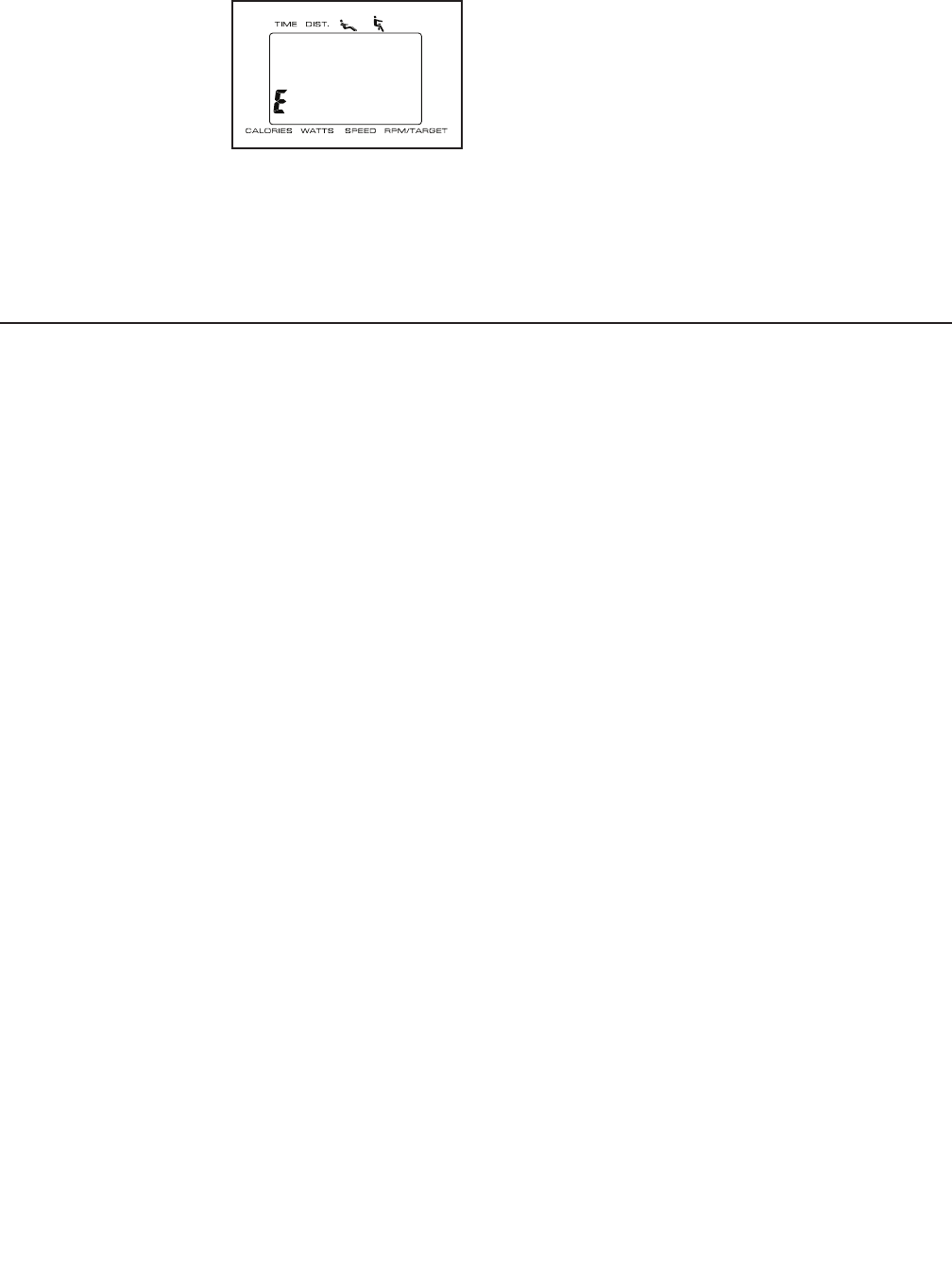
The target speed
settings for the
workout will be
shown by the
target meter in
the display. The
RPM meter will
show your actual
pedaling or rowing
speed.
As the target meter changes in height during the
workout, adjust your pedaling or rowing speed
so that the same number of bars appears in both
meters. If your pedaling or rowing speed is slower
than the current target speed, an arrow will appear
next to the RPM meter to prompt you to increase
your speed; if your pedaling or rowing speed is
faster than the target speed, an arrow will prompt
you to decrease your speed.
IMPORTANT: The target speed settings for
the workout are intended only to provide a
goal. Your actual pedaling or rowing speed
may be slower than the target speed settings,
especially during the first few months of your
exercise program. Make sure to pedal or row at
a speed that is comfortable for you.
The display will show the time remaining in the
workout. If you stop pedaling or rowing for a few
seconds, the workout will pause and the time will
flash in the display. To resume the workout, simply
resume pedaling or rowing.
4. Follow your progress with the display.
See step 4 on page 16.
5. When you are finished exercising, the console
will turn off automatically.
See step 5 on page 17.
Target Meter
RPM Meter
19
THE USER MODE
The console features a user mode that allows you to
select a unit of measurement for the dual trainer.
To select the user
mode, press and hold
down the Recumbent
Performance button for
a few seconds until the
user mode information
appears in the display.
The console can show the distance and the
Recumbent mode pedaling speed in either miles or
kilometers.
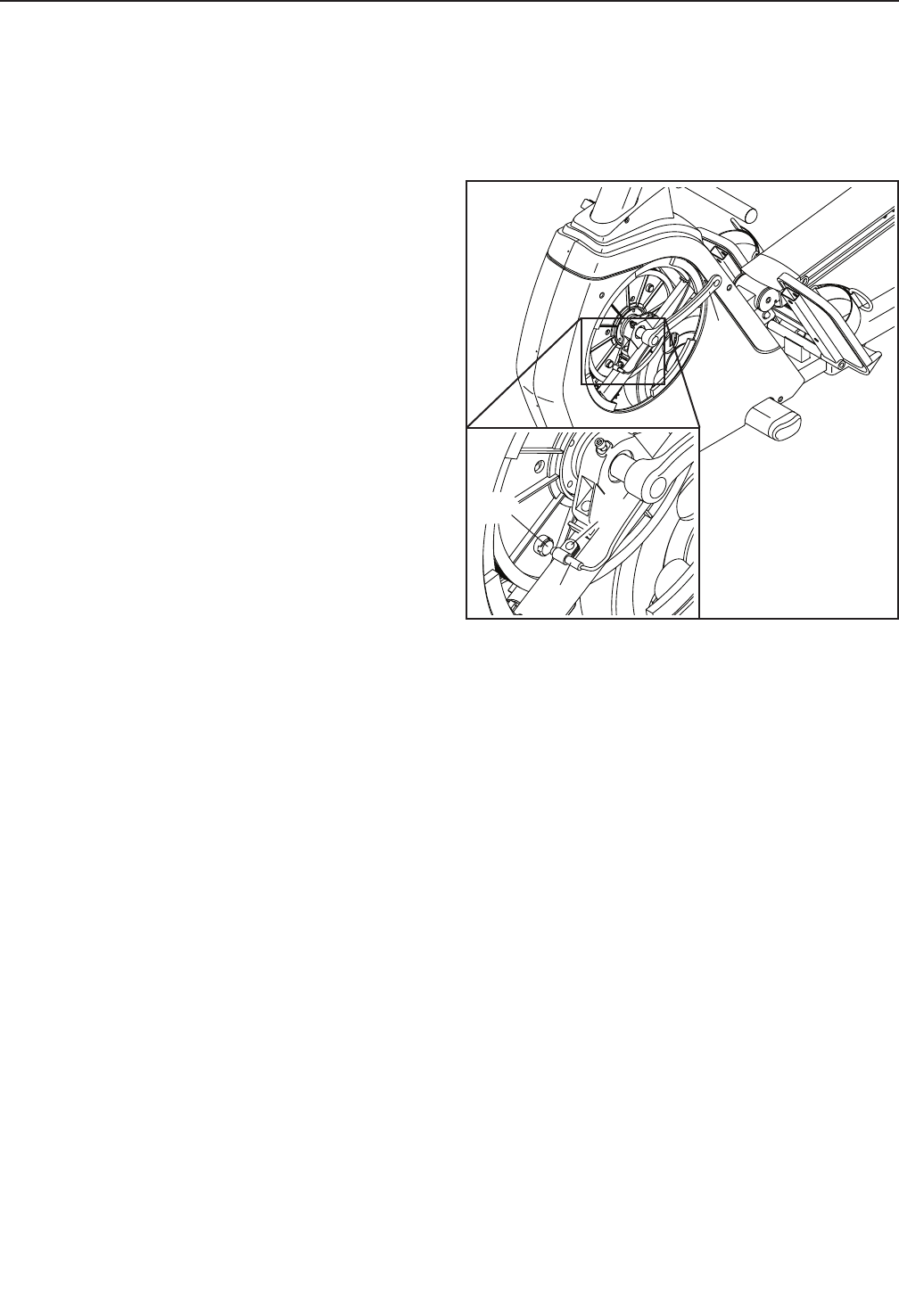
The display will show the selected unit of measure-
ment. An E for English miles or an M for metric
kilometers will appear in the display. To change
the unit of measurement, press the Display button
repeatedly.
Note: When you replace the batteries, it may be
necessary to reselect the unit of measurement.
To exit the user mode, press the On/Reset button.
FCC INFORMATION
This equipment has been tested and found to comply with the limits for a Class B digital device, pursuant to part
15 of the FCC Rules. These limits are designed to provide reasonable protection against harmful interference
in a residential installation. This equipment generates, uses, and can radiate radio frequency energy and, if not
installed and used in accordance with the instructions, may cause harmful interference to radio communications.
However, there is no guarantee that interference will not occur in a particular installation. If this equipment does
cause harmful interference to radio or television reception, which can be determined by turning the equipment off
and on, try to correct the interference by one or more of the following measures:
• Reorient or relocate the receiving antenna.
• Increase the separation between the equipment and the receiver.
• Connect the equipment into an outlet on a circuit different from that to which the receiver is connected.
• Consult the dealer or an experienced radio/TV technician for help.
FCC CAUTION: To assure continued compliance, use only shielded interface cables when connecting to
computer or peripheral devices. Changes or modifications not expressly approved by the party respon-
sible for compliance could void the user’s authority to operate this equipment.
20
MAINTENANCE
Inspect and tighten all parts of the dual trainer
regularly. Replace any worn parts immediately.
To cle a n the dua l t r ainer, u s e a dam p c loth an d a small
amount of mild detergent. IMPORTANT: To avoid
damage to the console, keep liquids away from
the console and keep the console out of direct
sunlight.
CONSOLE TROUBLESHOOTING
Most console problems are the result of low batteries;
see assembly step 12 on page 11 for replacement
instructions.
HOW TO GREASE THE ROLLERS
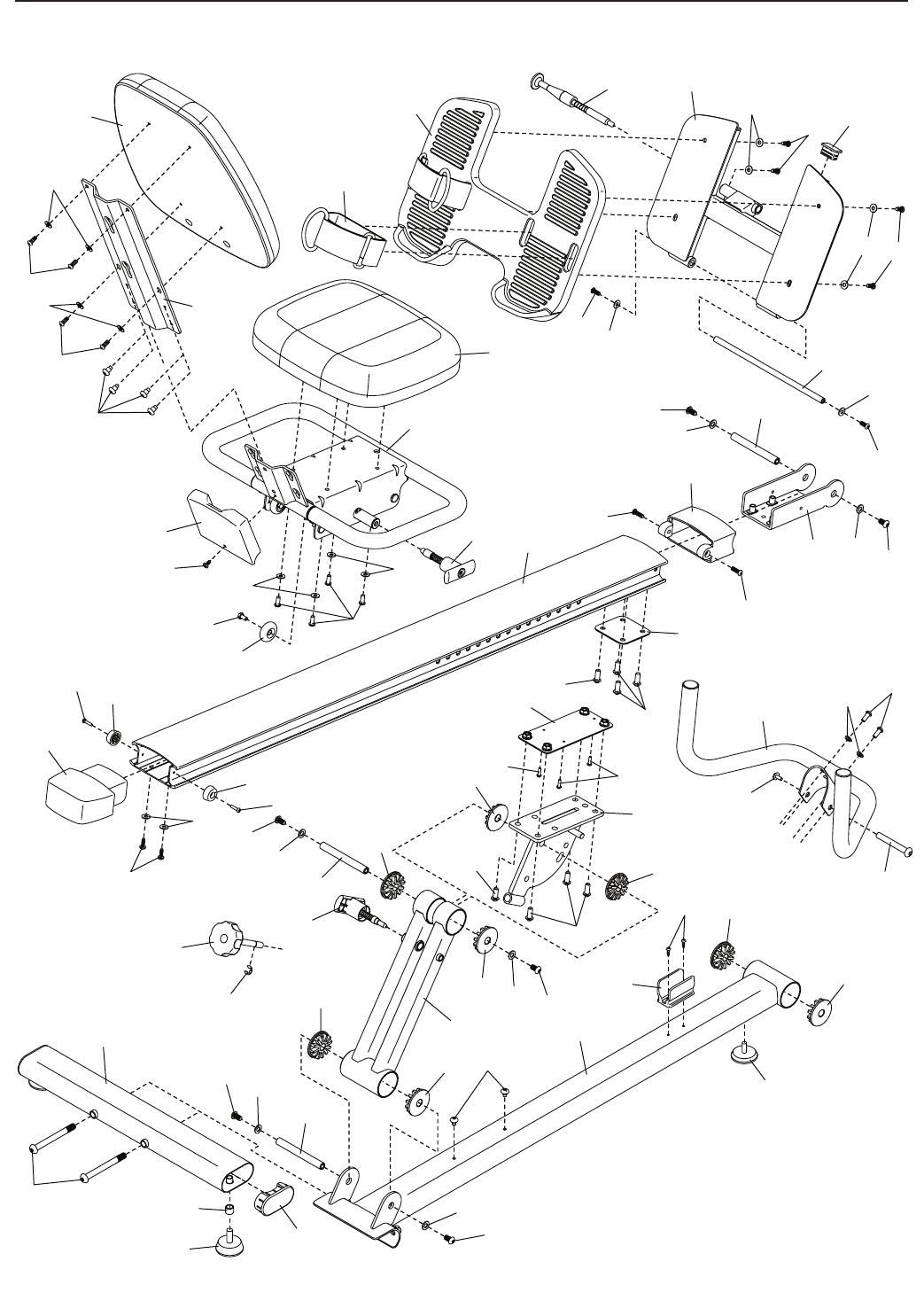
See EXPLODED DRAWING A near the end of this
manual. If the Seat Rollers (92) squeak when moving
on the Rail (5), apply a small amount of the included
PTFE grease to a paper towel. Spread a thin layer
of grease evenly along the Rail. Then, wipe off any
excess grease.
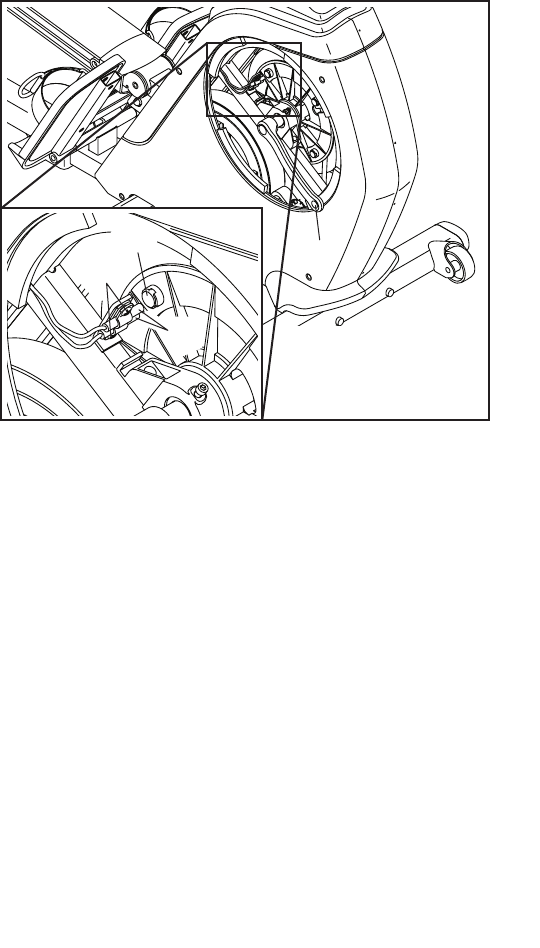
HOW TO ADJUST THE LEFT-SIDE REED SWITCH
If the console does not display correct feedback
when the dual trainer is set up in the Recumbent
mode, the left-side reed switch should be adjusted.
To adjust the left-side reed switch, you must first
remove the left pedal and the left disc as described
below.
See EXPLODED DRAWING B on page 27. Using an
adjustable wrench, turn the Left Pedal (10) clockwise
and remove it. Then, using a flat screwdriver, gently pry
off the left Disc (23).
Locate the left-side Reed Switch (22). Turn the Left
Crank Arm (85) until a Magnet (109) is aligned with
the Reed Switch. Loosen, but do not remove, the #8 x
12mm Flange Screw (28).
Slide the left-side Reed Switch (22) slightly closer to or
away from the Magnet (109), and then retighten the #8
x 12mm Flange Screw (28). Turn the Left Crank Arm
(85) for a moment.
Repeat these actions until the console displays correct
feedback. When the left-side reed switch is correctly
adjusted, reattach the left disc and the left pedal.
22
109
85
28
MAINTENANCE AND TROUBLESHOOTING
21
HOW TO ADJUST THE RIGHT-SIDE REED
SWITCHES
If the console does not display correct feedback
when the dual trainer is in the Rower mode, the
right-side reed switches should be adjusted.
To adj u s t the ri g h t - side re e d switche s , you mus t f irst
remove the right pedal and the right disc as described
below.
See EXPLODED DRAWING B on page 27. Using
an adjustable wrench, turn the Right Pedal (11)
counterclockwise and remove it. Then, using a flat
screwdriver, gently pry off the right Disc (23).
Locate the two right-side Reed Switches (22). Turn
the Right Crank Arm (86) until a Magnet (109) is
aligned with one of the right-side Reed Switches.
Loosen, but do not remove, the two #8 x 12mm Flange
Screws (28).
Slide the right-side Reed Switches (22) slightly closer
to or away from the Magnet (109), and then retighten
the #8 x 12mm Flange Screws (28). Turn the Right
Crank Arm (86) for a moment.
Repeat these actions until the console displays correct
feedback. When the right-side reed switch is correctly
adjusted, reattach the right disc and the right pedal.
HOW TO ADJUST THE DRIVE BELT
If you can feel the pedals slip while you are pedal-
ing when the dual trainer is set up in the Recumbent
mode, even when the resistance is at the highest level,
the drive belt may need to be adjusted.
To adjust the drive belt, you must first remove the left
pedal, the shield cover, and the left shield as described
below.
See EXPLODED DRAWING B on page 27. Using an
adjustable wrench, turn the left pedal clockwise and
remove it.
Next, remove the #8 x 16mm Flat Head Screws (66)
from the Shield Cover (103). Using a flat screwdriver,
gently pry off the Shield Cover.
Then, remove all of the #8 x 16mm Flat Head Screws
(66) and #8 x 25mm Screws (106) from the Right and
Left shields (26, 27); make sure to note which size
of screw you remove from each hole. Then, gently
remove the Left Shield.
Next, loosen the Idler Screw (33). Then, tighten the
Belt Adjustment Screw (32) until the Drive Belt (38) is
tight.
When the Drive Belt (38) is tight, tighten the Idler
Screw (33).
Then, reattach the left shield, the shield cover, and the
left pedal.
86
109
28
22
22
These guidelines will help you to plan your exercise
program. For detailed exercise information, obtain a
reputable book or consult your physician. Remember,
proper nutrition and adequate rest are essential for
successful results.
EXERCISE INTENSITY
Whether your goal is to burn fat or to strengthen your
cardiovascular system, exercising at the proper inten-
sity is the key to achieving results. You can use your
heart rate as a guide to find the proper intensity level.
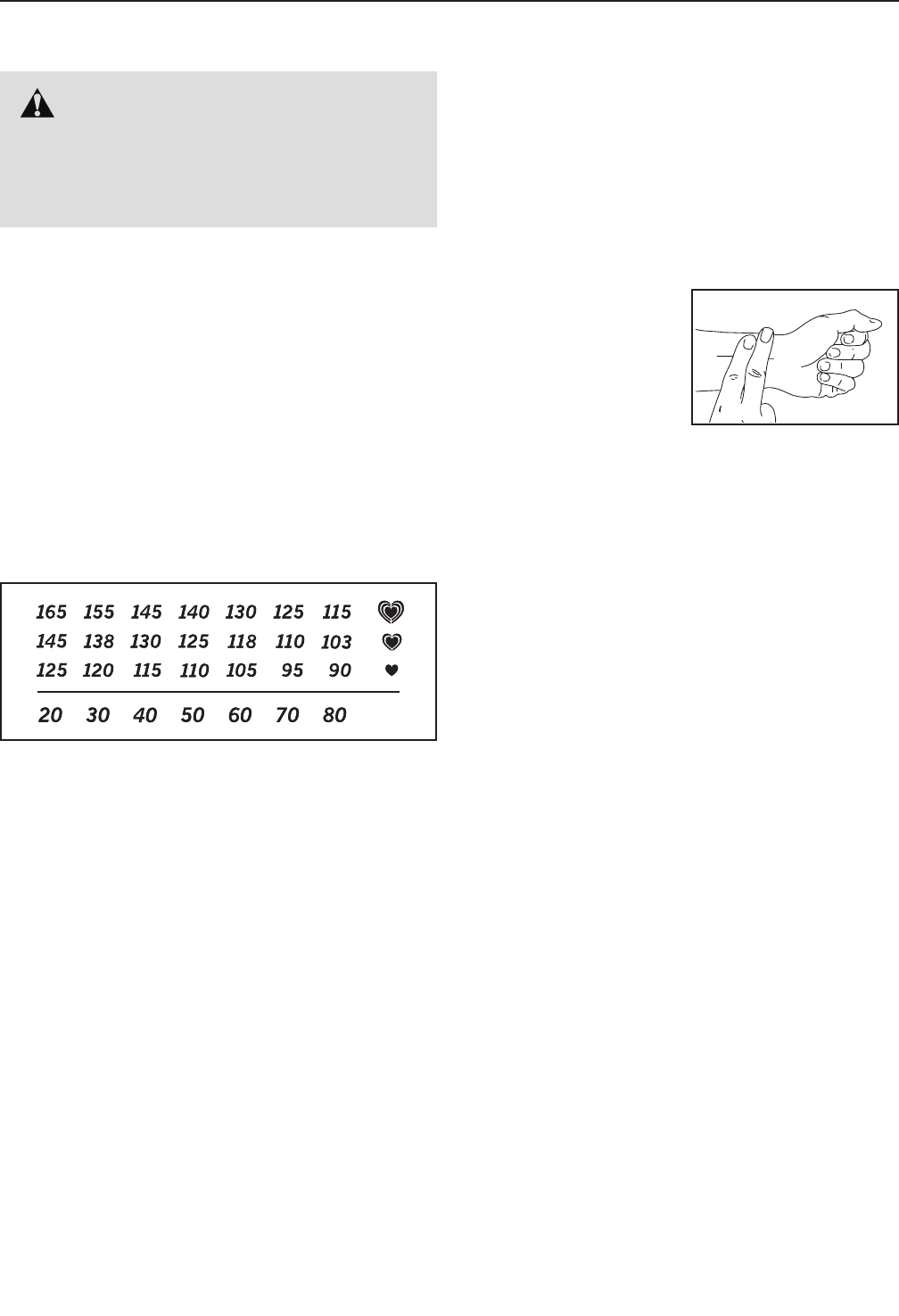
The chart below shows recommended heart rates for
fat burning and aerobic exercise.
To fin d t he prop e r i ntensit y l evel, f i n d your a g e at the
bottom of the chart (ages are rounded off to the near-
est ten years). The three numbers listed above your
age define your “training zone.” The lowest number is
the heart rate for fat burning, the middle number is the
heart rate for maximum fat burning, and the highest
number is the heart rate for aerobic exercise.
Burning Fat—To burn fat effectively, you must exer-
cise at a low intensity level for a sustained period of
time. During the first few minutes of exercise, your
body uses carbohydrate calories for energy. Only after
the first few minutes of exercise does your body begin
to use stored fat calories for energy. If your goal is to
burn fat, adjust the intensity of your exercise until your
heart rate is near the lowest number in your training
zone. For maximum fat burning, exercise with your
heart rate near the middle number in your training
zone.
Aerobic Exercise—If your goal is to strengthen your
cardiovascular system, you must perform aerobic
exercise, which is activity that requires large amounts
of oxygen for prolonged periods of time. For aerobic
exercise, adjust the intensity of your exercise until your
heart rate is near the highest number in your training
zone.
HOW TO MEASURE YOUR HEART RATE
To mea s u r e your h e a r t
rate, exercise for at least
four minutes. Then, stop
exercising and place
two fingers on your
wrist as shown. Take a
six-second heartbeat
count, and multiply the
result by 10 to find your heart rate. For example, if your
six-second heartbeat count is 14, your heart rate is 140
beats per minute.
WORKOUT GUIDELINES
Warming Up—Start with 5 to 10 minutes of stretch-
ing and light exercise. A warm-up increases your body
temperature, heart rate, and circulation in preparation
for exercise.
Training Zone Exercise—Exercise for 20 to 30 min-
utes with your heart rate in your training zone. (During
the first few weeks of your exercise program, do not
keep your heart rate in your training zone for longer
than 20 minutes.) Breathe regularly and deeply as you
exercise; never hold your breath.
Cooling Down—Finish with 5 to 10 minutes of stretch-
ing. Stretching increases the flexibility of your muscles
and helps to prevent post-exercise problems.
EXERCISE FREQUENCY
To mai n t a in or i m p r o ve your c o ndition , c omplete t h ree
workouts each week, with at least one day of rest
between workouts. After a few months of regular exer-
cise, you may complete up to five workouts each week,
if desired. Remember, the key to success is to make
exercise a regular and enjoyable part of your everyday
life.
WARNING: Before beginning this
or any exercise program, consult your physi-
cian. This is especially important for persons
over age 35 or persons with pre-existing
health problems.
EXERCISE GUIDELINES
23
SUGGESTED STRETCHES
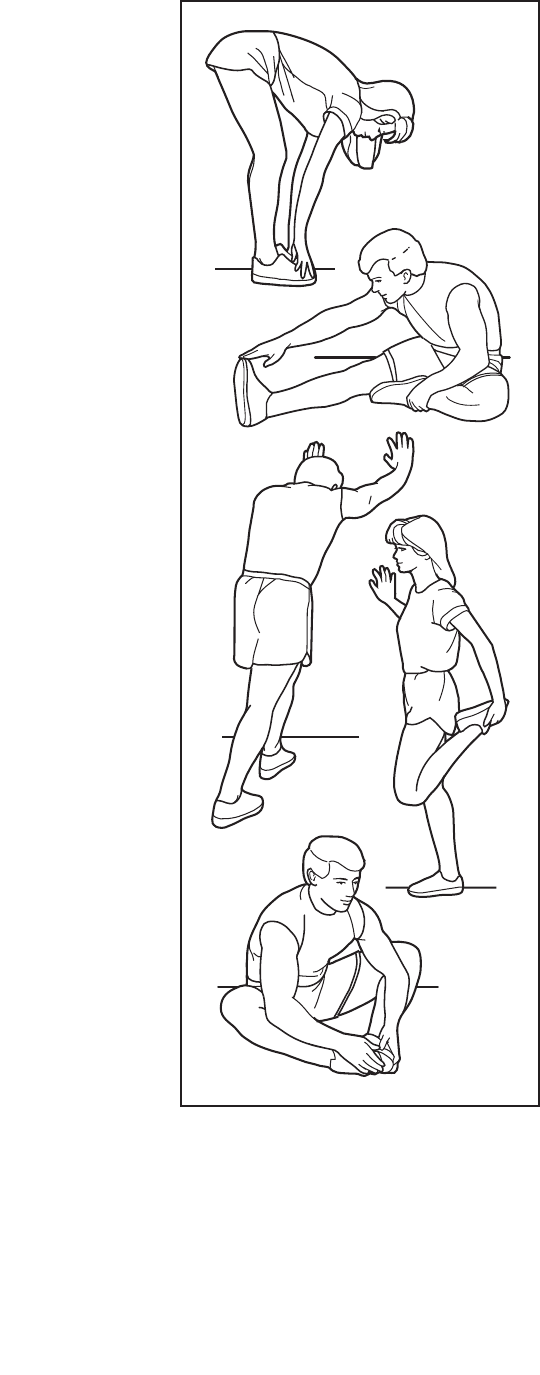
The correct form for several basic stretches is shown at the right. Move slowly as you stretch; never bounce.
1. Toe Touch Stretch
Stand with your knees bent slightly and slowly bend forward from
your hips. Allow your back and shoulders to relax as you reach down
toward your toes as far as possible. Hold for 15 counts, then relax.
Repeat 3 times. Stretches: Hamstrings, back of knees and back.
2. Hamstring Stretch
Sit with one leg extended. Bring the sole of the opposite foot toward
you and rest it against the inner thigh of your extended leg. Reach
toward your toes as far as possible. Hold for 15 counts, then relax.
Repeat 3 times for each leg. Stretches: Hamstrings, lower back and
groin.
3. Calf/Achilles Stretch
With one leg in front of the other, reach forward and place your
hands against a wall. Keep your back leg straight and your back foot
flat on the floor. Bend your front leg, lean forward and move your
hips toward the wall. Hold for 15 counts, then relax. Repeat 3 times
for each leg. To cause further stretching of the achilles tendons,
bend your back leg as well. Stretches: Calves, achilles tendons and
ankles.
4. Quadriceps Stretch
With one hand against a wall for balance, reach back and grasp one
foot with your other hand. Bring your heel as close to your buttocks
as possible. Hold for 15 counts, then relax. Repeat 3 times for each
leg. Stretches: Quadriceps and hip muscles.
5. Inner Thigh Stretch
Sit with the soles of your feet together and your knees outward.
Pull your feet toward your groin area as far as possible. Hold for 15
counts, then relax. Repeat 3 times. Stretches: Quadriceps and hip
muscles.
1
2
3
4
5

24
K e y N o . Q t y . D e s c r i p t i o n K e y N o . Q t y . D e s c r i p t i o n
1 1 Front Frame
2 1 Front Stabilizer
3 1 Rear Stabilizer
4 1 Seat Carriage
5 1 Rail
6 1 Rail Collar
7 1 Small Rail Plate
8 1 Rail Bracket
9 1 Backrest
10 1 Left Pedal
11 1 Right Pedal
12 1 Row Bar
13 4 M10 x 100mm Screw
14 2 M6 x 20mm Screw
15 12 M8 x 20mm Screw
16 1 Rail Support
17 1 Seat
18 1 Rear Frame
19 1 Main Wire
20 1 Dual Reed Switch/Wire
21 1 Pulley Assembly
22 1 Reed Switch/Wire
23 2 Disc
24 2 Pillow Block
25 4 M8 x 56mm Screw
26 1 Right Shield
27 1 Left Shield
28 7 #8 x 12mm Flange Screw
29 1 Resistance Motor
30 1 Console
31 1 Idler
32 1 Belt Adjustment Screw
33 1 Idler Screw
34 17 M6 Washer
35 1 Pivot Screw
36 1 Eddy Mechanism
37 5 M8 Locknut
38 1 Drive Belt
39 3 Reed Switch Clamp
40 1 #8 x 16mm Ground Screw
41 1 Pillow Block Frame
42 4 M8 x 32mm Screw
43 4 Bungee Roller
44 2 52mm Roller Spacer
45 2 9mm Roller Spacer
46 2 M8 Thin Locknut
47 2 M8 x 125mm Bolt
48 10 M8 Washer
49 1 Foot Plate Knob
50 1 M8 x 40mm Bolt
51 1 48mm Roller Spacer
52 1 6mm Roller Spacer
53 1 M8 x 90mm Bolt
54 1 Strap Roller
55 1 19mm Roller Spacer
56 1 14mm Roller Spacer
57 1 M8 x 72mm Bolt
58 1 Bungee
59 1 Strap
60 6 Stabilizer Cap
61 2 Rear Leveling Foot
62 2 M10 x 60mm Bolt
63 2 M10 Locknut
64 2 Wheel
65 7 Bumper
66 23 #8 x 16mm Flat Head Screw
67 2 Foot Strap
68 1 Foot Plate
69 1 Foot Frame Axle
70 1 Foot Frame
71 20 M6 x 15mm Screw
72 2 M6 x 10mm Screw
73 1 Storage Clip
74 8 M8 x 15mm Screw
75 2 Rear Frame Axle
76 8 Thick Bushing
77 2 Thin Bushing
78 1 Rail Support Axle
79 1 Storage Knob
80 1 Large Rail Plate
81 2 M5 x 20mm Screw
82 1 Rail Cap
83 1 Center Leveling Foot
84 2 M4 x 16mm Screw
85 1 Left Crank Arm
86 1 Right Crank Arm
87 2 Crank Arm Screw
88 2 Crank Arm Cap
89 1 M5 x 10mm Screw
90 1 Seat Carriage Cover
91 4 M6 x 12mm Screw
92 4 Seat Roller
93 1 Seat Knob
94 1 Backrest Frame
95 4 M6 x 13mm Screw
96 1 Rail Pivot Bracket
97 1 Rail Pivot Bracket Axle
98 2 Handgrip
99 2 Row Bar Cap
100 1 Row Bar Clip
PART LIST Model No. 831.21257.0 R0714A

25
K e y N o . Q t y . D e s c r i p t i o n K e y N o . Q t y . D e s c r i p t i o n
101 1 Shield Cover Plate
102 2 #8 x 12mm Screw
103 1 Shield Cover
104 1 Motor Bracket
105 1 Console Bracket
106 2 #8 x 25mm Screw
107 2 M6 Locknut
108 2 Foot Frame Cap
109 6 Magnet
110 2 Leveling Foot Spacer
111 1 Lock Knob
112 1 E-clip
113 1 Handlebar
114 2 M8 Curved Washer
115 1 M10 Bolt Set
* – User’s Manual
* – Assembly Tool
* – PTFE Grease Packet
Note: Specifications are subject to change without notice. For information about ordering replacement parts, see
the back cover of this manual. If a part is missing, call 1-888-533-1333. *These parts are not illustrated.
26
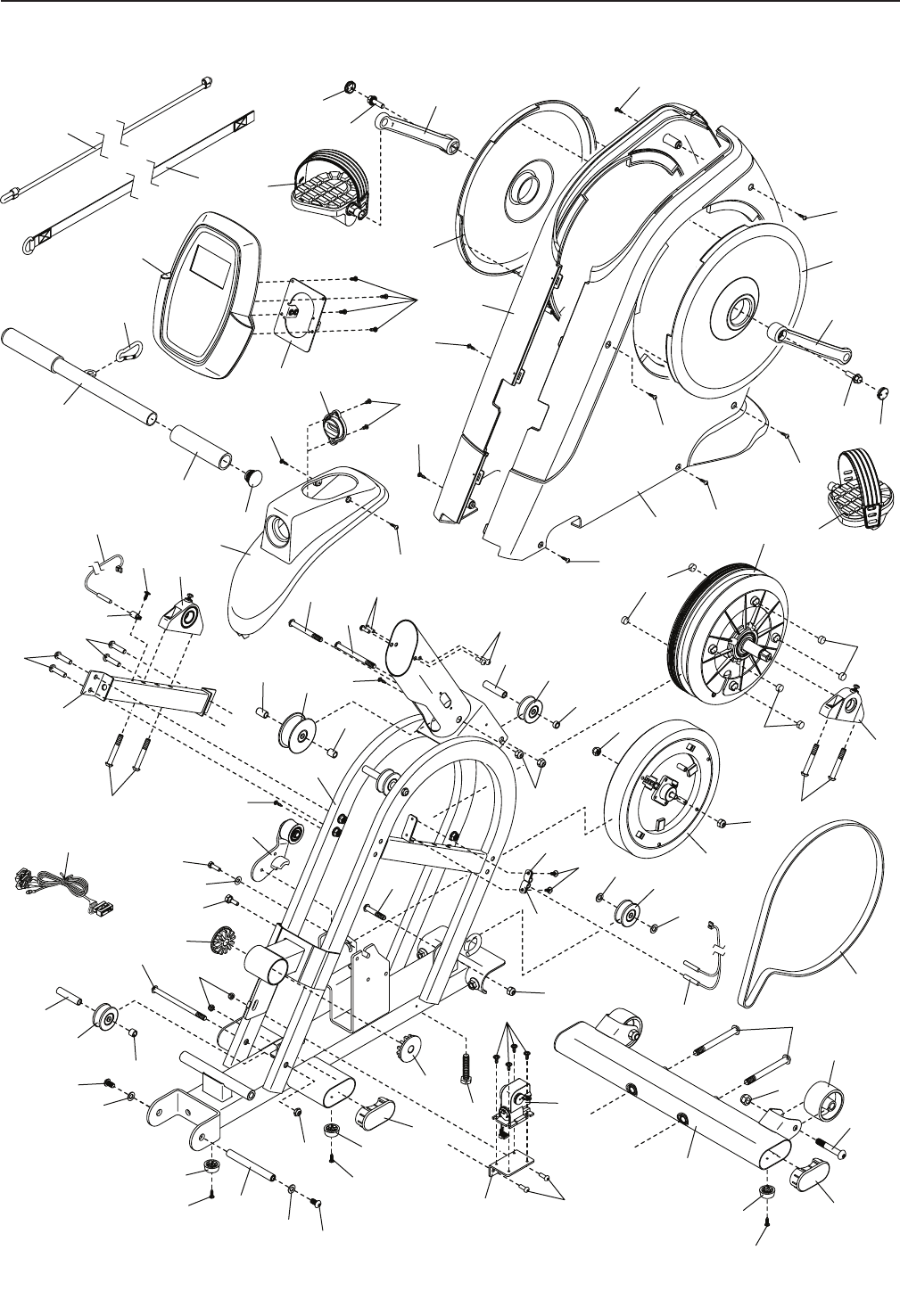
EXPLODED DRAWING A
3
6
8
5
4
7
9
14
14
16 18
13
17
34
34
34
34
34
34
34
34
34
48
48
48
48
48
48
49
60
61
66
66 66
113 114
115
115
68
67
69
70
108
72
71
71
71
71
71
71
71
74
110
74
74
74
74
74
76
76
76
76
83
76 76
78
79
73
15
15
15
15
15
75
77
77
80
81
82
84 65
65
84
89
90
92
91
94
96
93
95 97
111
112
Model No. 831.21257.0 R0714A
27
EXPLODED DRAWING B Model No. 831.21257.0 R0714A
1
10
12
2
11
13
21
23
23
26
30
32
25
25
22
24
109
109
109
24
27
29
36
39
39
37
37
37
37
41
43
43
46
43
48
48
48
48
50
52
45
42
42
44
47
51
54
56
58
59
53
55
57
60
60
63
66
66
66
66
66
106
106
66
66
66
66
66
66
65
65
66
65
62
64
71
71
74
74
76
31
35
34
33
76
28
28
75
86
88
88 85
87
87
98
99
100
101
102
103
105
104 71
107
20
38
19
28
39
66
40

Part No. 362047 R0714A Printed in China © 2014 ICON Health & Fitness, Inc.
If this Sears Dual Trainer Exerciser fails due to a defect in material or workmanship within 1 year of the
date of purchase, call 1-800-4-MY-HOME® (1-800-469-4663) to arrange for free repair (or replacement if
repair proves impossible). The frame is warranted for a lifetime.
This warranty does not apply when the Dual Trainer Exerciser is used commercially or for rental pur-
poses. This warranty gives you specific legal rights, and you may also have other rights which vary from
state to state.
Sears, Roebuck and Co., Hoffman Estates, IL 60179
1 YEAR FULL WARRANTY
