Proform Pfel779082 Spacesaver Dx Elliptical Users Manual PFEL77908.2 265408
Proform-Pfel779082-Owner-S-Manual proform-pfel779082-owner-s-manual
2015-04-14
: Proform Proform-Pfel779082-Spacesaver-Dx-Elliptical-Users-Manual-700114 proform-pfel779082-spacesaver-dx-elliptical-users-manual-700114 proform pdf
Open the PDF directly: View PDF  .
.
Page Count: 28
CAUTION
Read all precautions and instruc-
tions in this manual before using
this equipment. Keep this manual
for future reference.
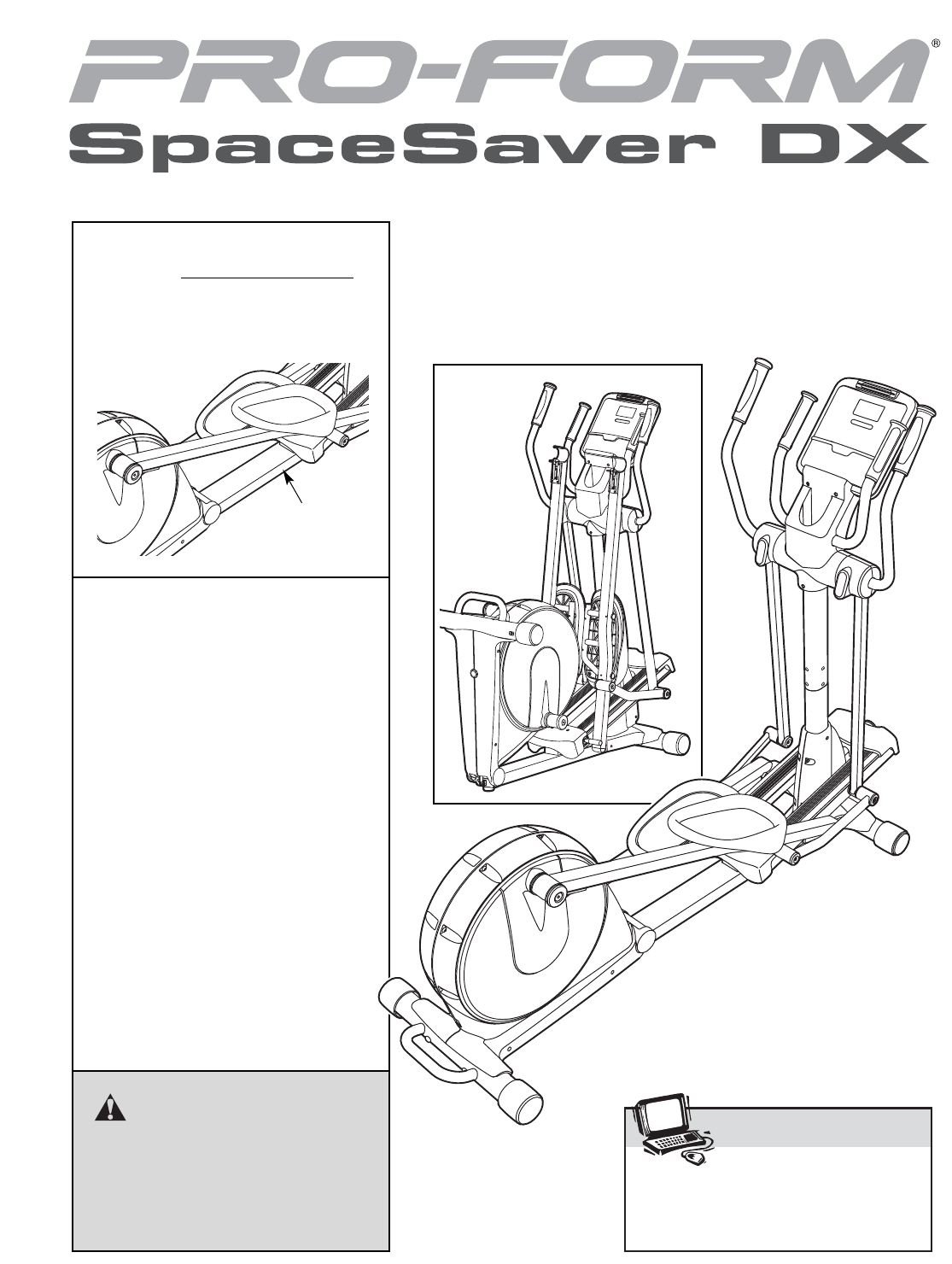
Serial
Number
Decal
Visit our website at
www.proform.com
new products, prizes,
fitness tips, and much more!
USER’S MANUAL
QUESTIONS?
As a manufacturer, we are commit-
ted to providing complete customer
satisfaction. If you have questions,
or if parts are missing, PLEASE DO
NOT CONTACT THE STORE;
please contact Customer Care.
IMPORTANT: You must note the
product model number and
serial number (see the drawing
above) before contacting us:
CALL TOLL-FREE:
1-888-533-1333
Mon.–Fri. 6 a.m.–6 p.m. MST
Sat. 8 a.m.–4 p.m. MST
ON THE WEB:
www.proformservice.com
Model No. PFEL77908.2
Serial No.
Write the serial number in the
space above for reference.
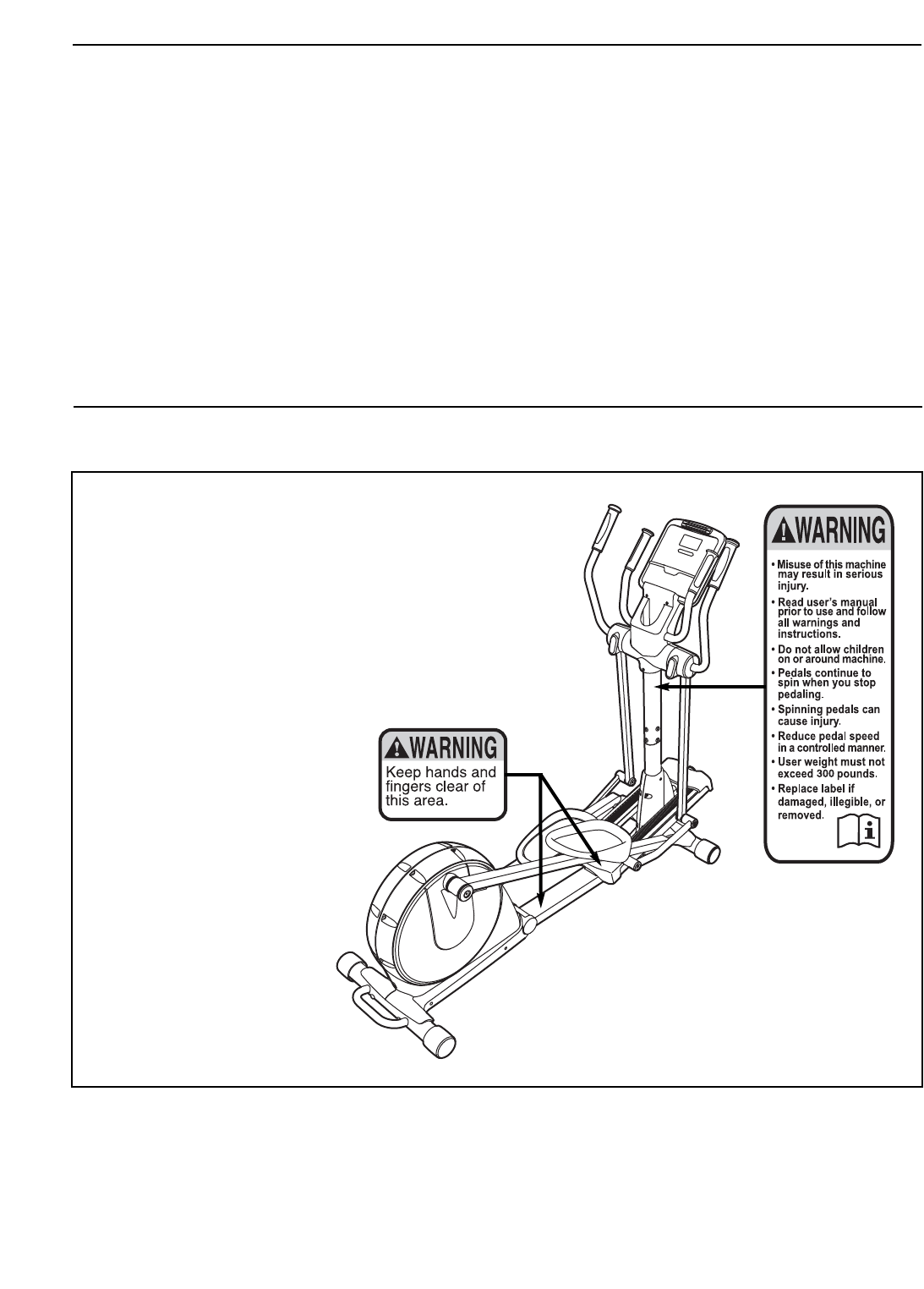
TABLE OF CONTENTS
WARNING DECAL PLACEMENT . . . . . . . . . . . . . . . . . . . . . . . . . . . . . . . . . . . . . . . . . . . . . . . . . . . . . . . . . . . . . .2
IMPORTANT PRECAUTIONS . . . . . . . . . . . . . . . . . . . . . . . . . . . . . . . . . . . . . . . . . . . . . . . . . . . . . . . . . . . . . . . .3
BEFORE YOU BEGIN . . . . . . . . . . . . . . . . . . . . . . . . . . . . . . . . . . . . . . . . . . . . . . . . . . . . . . . . . . . . . . . . . . . . . .4
ASSEMBLY . . . . . . . . . . . . . . . . . . . . . . . . . . . . . . . . . . . . . . . . . . . . . . . . . . . . . . . . . . . . . . . . . . . . . . . . . . . . . . .5
HOW TO USE THE ELLIPTICAL EXERCISER . . . . . . . . . . . . . . . . . . . . . . . . . . . . . . . . . . . . . . . . . . . . . . . . . .12
MAINTENANCE AND TROUBLESHOOTING . . . . . . . . . . . . . . . . . . . . . . . . . . . . . . . . . . . . . . . . . . . . . . . . . . .20
EXERCISE GUIDELINES . . . . . . . . . . . . . . . . . . . . . . . . . . . . . . . . . . . . . . . . . . . . . . . . . . . . . . . . . . . . . . . . . . .21
PART LIST . . . . . . . . . . . . . . . . . . . . . . . . . . . . . . . . . . . . . . . . . . . . . . . . . . . . . . . . . . . . . . . . . . . . . . . . . . . . . .24
EXPLODED DRAWING . . . . . . . . . . . . . . . . . . . . . . . . . . . . . . . . . . . . . . . . . . . . . . . . . . . . . . . . . . . . . . . . . . . .26
ORDERING REPLACEMENT PARTS . . . . . . . . . . . . . . . . . . . . . . . . . . . . . . . . . . . . . . . . . . . . . . . . . .Back Cover
LIMITED WARRANTY . . . . . . . . . . . . . . . . . . . . . . . . . . . . . . . . . . . . . . . . . . . . . . . . . . . . . . . . . . . . . .Back Cover
2
PROFORM is a registered trademark of ICON IP, Inc.
WARNING DECAL PLACEMENT
The warning decals shown here have been
applied in the locations shown. If a decal is
missing or illegible, call the telephone
number on the front cover of this manual
and request a free replacement decal. Apply
the decal in the location shown. Note: The
decals may not be shown at actual size.

3
WARNING: To reduce the risk of serious injury, read all important precautions and
instructions in this manual and all warnings on your elliptical exerciser before using your elliptical
exerciser. ICON assumes no responsibility for personal injury or property damage sustained by or
through the use of this product.
IMPORTANT PRECAUTIONS
1. Before beginning any exercise program,
consult your physician. This is especially
important for persons over the age of 35 or
persons with pre-existing health problems.
2. It is the responsibility of the owner to ensure
that all users of the elliptical exerciser are
adequately informed of all precautions.
3. Your elliptical exerciser is intended for home
use only. Do not use your elliptical exerciser
in a commercial, rental, or institutional set-
ting.
4. Keep your elliptical exerciser indoors, away
from moisture and dust. Place your elliptical
exerciser on a level surface, with a mat
beneath it to protect the floor or carpet.
Make sure that there is enough clearance
around your elliptical exerciser to mount,
dismount, and use it.
5. Inspect and properly tighten all parts regu-
larly. Replace any worn parts immediately.
6. Keep children under age 12 and pets away
from your elliptical exerciser at all times.
7. Your elliptical exerciser should not be used
by persons weighing more than 300 lbs.
(136 kg).
8. Wear appropriate exercise clothes when
exercising; do not wear loose clothes that
could become caught on your elliptical exer-
ciser. Always wear athletic shoes for foot
protection.
9. Hold the handgrip pulse sensor or the upper
body arms when mounting, dismounting, or
using your elliptical exerciser.
10. Keep your back straight while using your
elliptical exerciser; do not arch your back.
11. The pulse sensor is not a medical device.
Various factors, including the user’s move-
ment, may affect the accuracy of heart rate
readings. The pulse sensor is intended only
as an exercise aid in determining heart rate
trends in general.
12. When you stop exercising, allow the pedals
to slowly come to a stop.
13. If you feel pain or dizziness while exercising,
stop immediately and cool down.
14. Use your elliptical exerciser only as
described in this manual.
4
BEFORE YOU BEGIN
Thank you for purchasing the revolutionary
PROFORM®SPACESAVER DX elliptical exerciser.
The SPACESAVER DX elliptical exerciser provides a
wide array of features designed to make your work-
outs at home more effective and enjoyable—and when
you’re not exercising, the unique elliptical exerciser
can be folded out of the way.
For your benefit, read this manual carefully before
you use the elliptical exerciser. If you have ques-
tions after reading this manual, please see the front
cover of this manual. To help us assist you, note the
product model number and serial number before con-
tacting us. The model number and the location of the
serial number decal are shown on the front cover of
this manual.
To avoid a registration fee for any service needed
under warranty, you must register the elliptical
exerciser at www.proformservice.com/registration.
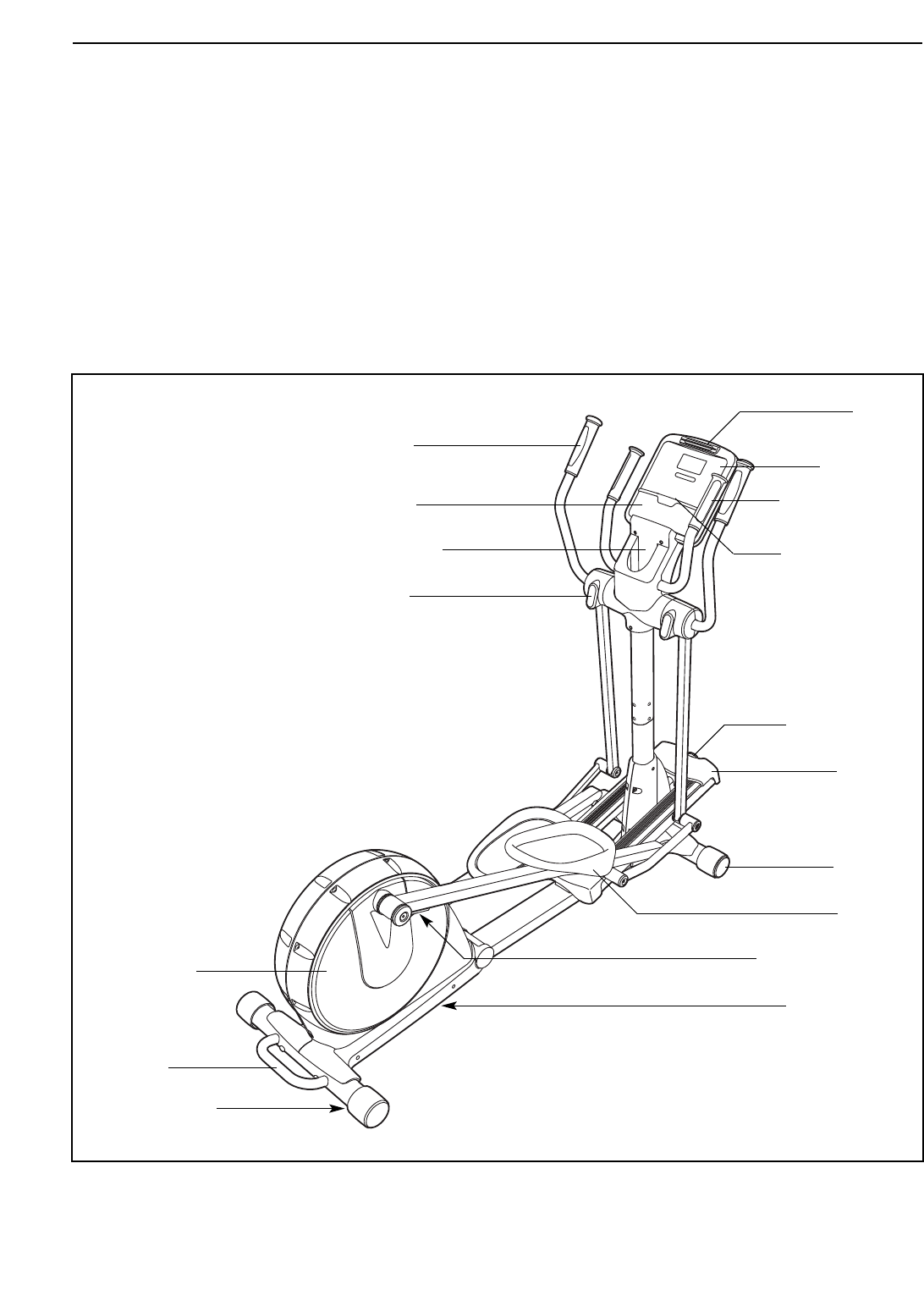
Before reading further, please familiarize yourself with
the parts that are labeled in the drawing below.
Pulse Sensor
Stereo Cable
Upper Body Arm
Pedal Disc
Wheel
Pedal
Stereo Speakers
Water Bottle Holder*
Console
Leveling Foot
Handle
Latch Button
Ramp
Incline Knob
Storage Magnet
Fan
Pedal Arm Latch
*No water bottle is included
5
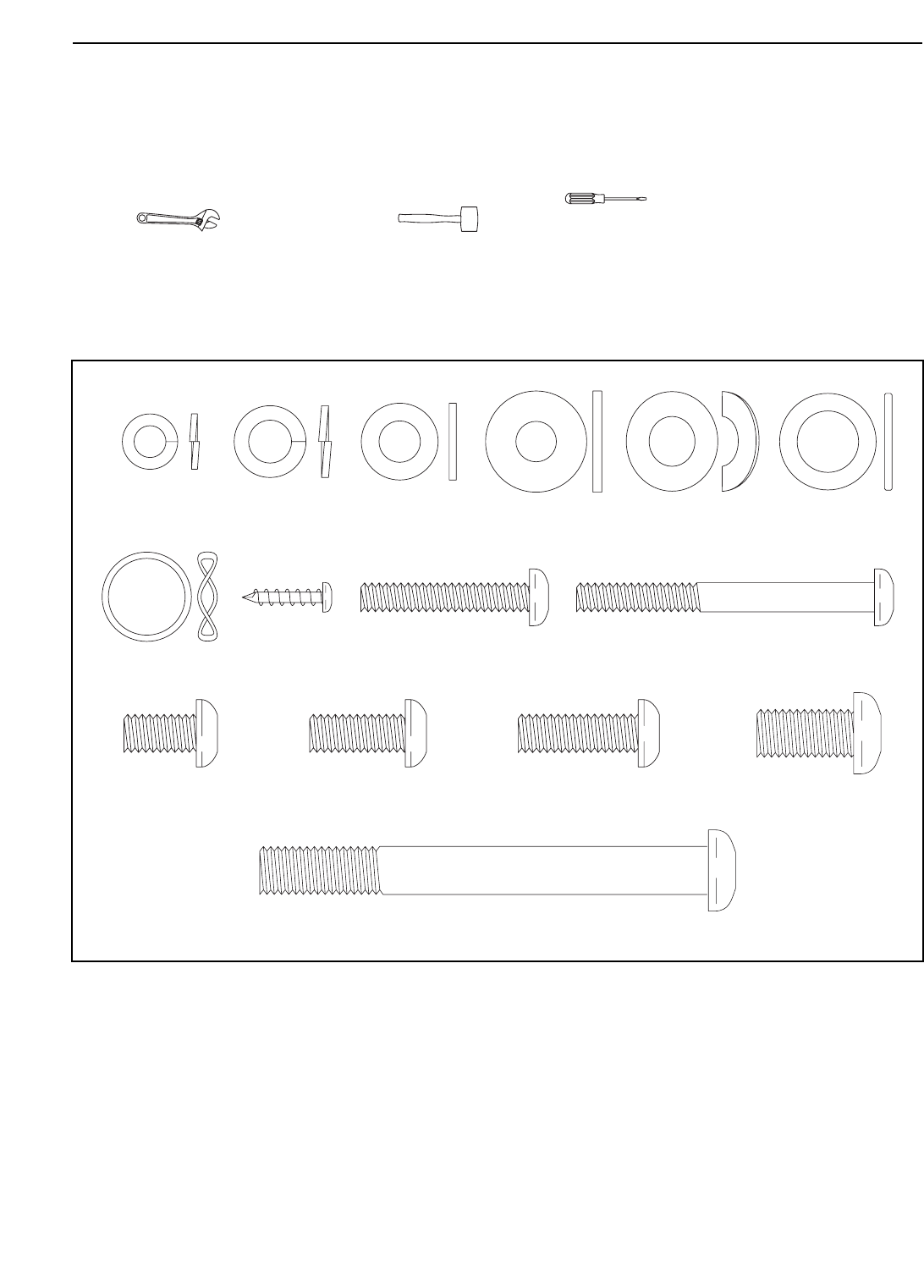
M10 x 93mm Button Screw (82)–4
M10 x 25mm
Washer (87)–2
M8 Split
Washer (101)–4
M4 x 16mm
Screw (97)–16
M6 Split Washer
(102)–8
M6 x 35mm
Screw (109)–4
M6 x 62mm
Screw (108)–4
M8.5 x 16mm x
1.5mm Washer
(103)–6
Link Arm
Spacer (74)–4
M8 x 20mm Button
Screw (107)–4
M8 x 25mm Button
Screw (110)–2
M10 x 20mm Button
Screw (111)–2
M8 x 15mm Button
Screw (106)–10
M10 Curved
Washer (99)–4
Wave Washer
(100)–2
ASSEMBLY
To hire an authorized service technician to assemble the elliptical exerciser, call 1-800-445-2480.
Assembly requires two persons. Place all parts of the elliptical exerciser in a cleared area and remove the
packing materials. Do not dispose of the packing materials until assembly is completed. In addition to the
included hex keys, assembly requires a Phillips screwdriver , an adjustable
wrench , and a rubber mallet .
As you assemble the elliptical exerciser, use the drawings below to identify small parts. The number in parentheses
below each drawing is the key number of the part, from the PART LIST near the end of this manual. The number
following the parentheses is the quantity needed for assembly. Note: Some small parts may have been pre-
assembled. If a part is not in the hardware kit, check to see if it has been preassembled.
6
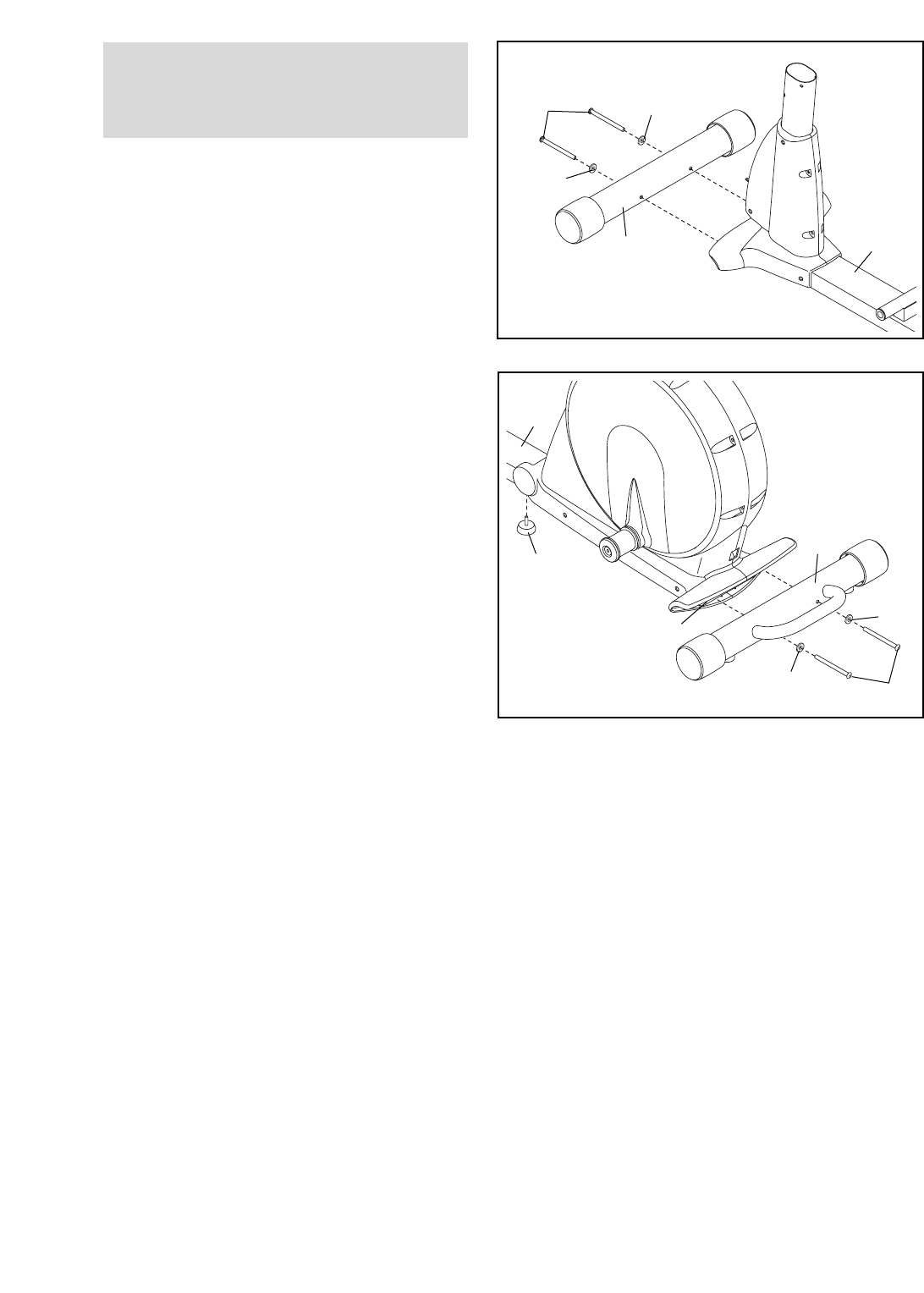
2. While another person lifts the Folding Frame
(2), attach the Rear Stabilizer (3) to the Folding
Frame with two M10 x 93mm Button Screws
(82) and two M10 Curved Washers (99).
Next, tighten the Center Foot (95) into the
Frame (1).
3
82
2
95
1
99
99
2
1.
See HOW TO FOLD AND UNFOLD THE
ELLIPTICAL EXERCISER on page 12 and
unfold the elliptical exerciser.
While another person lifts the front of the Frame
(1), attach the Front Stabilizer (4) to the Frame
with two M10 x 93mm Button Screws (82) and
two M10 Curved Washers (99).
4
99
99
82
1
1
To make assembly easier, read the
information on page 5 before you begin
assembling the elliptical exerciser.
7
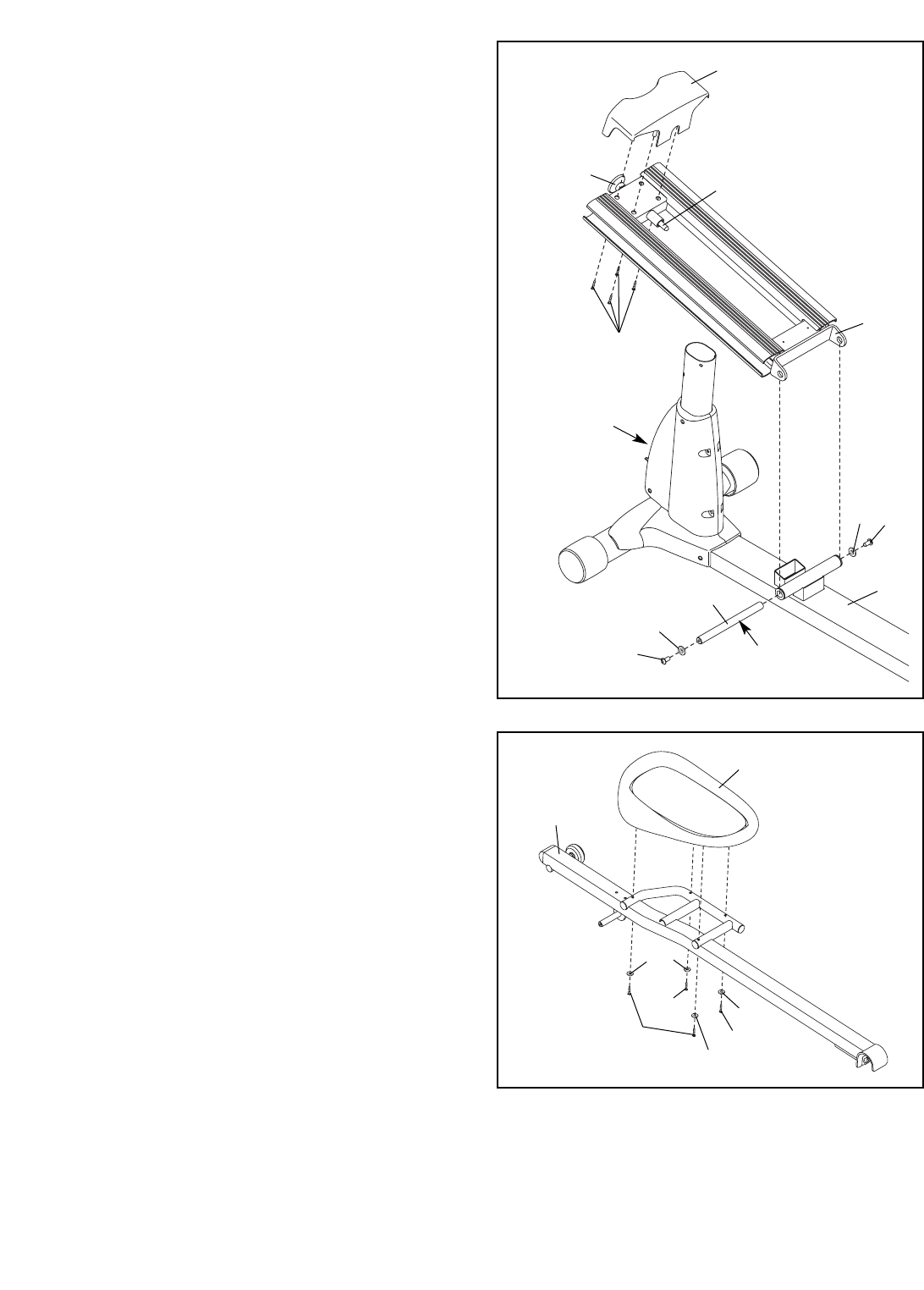
3. Attach the Front Ramp Cover (6) to the
Ramp (5) with four M4 x 16mm Screws (97).
Slide an M10 x 25mm Washer (87) onto an
M10 x 20mm Button Screw (111). Tighten the
Button Screw into one end of the Ramp
Axle (72). Apply a small amount of the included
grease to the Ramp Axle.
Orient the Ramp (5) as shown. Align the lower
end of the Ramp with the welded tube on the
Frame (1). Insert the Ramp Axle (72) into the
Ramp and the welded tube. Then, pull the
Ramp Knob (9), lower the Ramp, and engage
the Ramp Pin (62) into one of the three adjust-
ment holes in the front of the Frame.
Slide an M10 x 25mm Washer (87) onto an
M10 x 20mm Button Screw (111). Tighten the
Button Screw into the open end of the Ramp
Axle (72).
3
962
Adjustment
Holes
5
1
72
Grease
111
97
111
87
87
6
4. Identify the Left Pedal (34) and the Left Pedal
Arm (32), which are marked with stickers.
Attach the Left Pedal (34) to the Left Pedal
Arm (32) with two M6 x 62mm Screws (108),
two M6 x 35mm Screws (109), and four M6
Split Washers (102).
Attach the Right Pedal (not shown) to the
Right Pedal Arm (not shown) in the same
way.
34
108
102
102
109
109
32
4
102
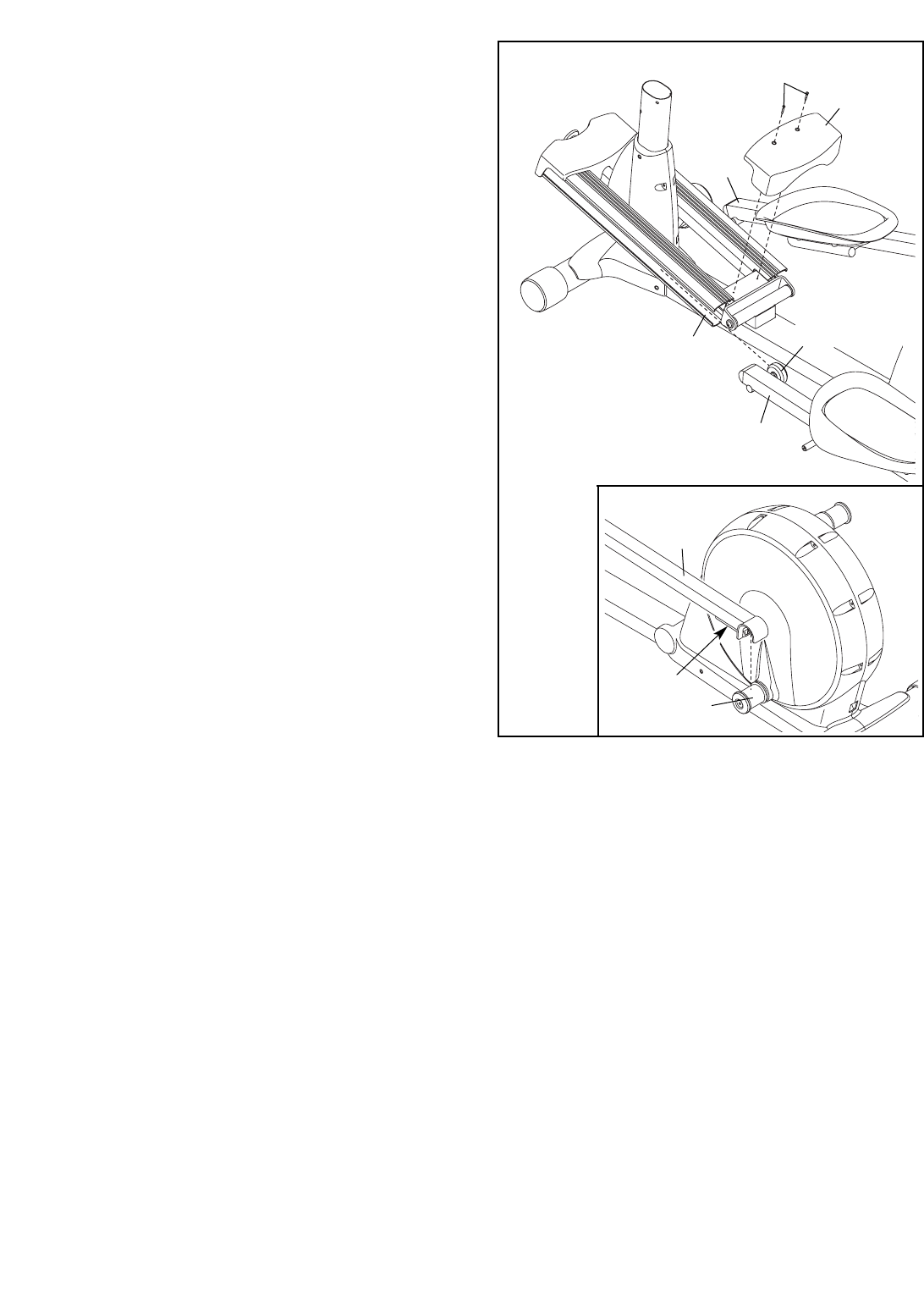
5. Insert the Roller (38) on the Left Pedal Arm (32)
and the Roller on the Right Pedal Arm (33) into
the sides of the Ramp (5).
Attach the Rear Ramp Cover (7) to the
Ramp (5) with two M4 x 16mm Screws (97).
See the inset drawing. Lift the Pedal Arm
Latch (41) on the Left Pedal Arm (32), and set
the end of the Left Pedal Arm on the left Crank
Bushing Sleeve (54). Release the Pedal Arm
Latch, and make sure that the Left Pedal Arm is
securely connected to the Crank Bushing
Sleeve.
Connect the Right Pedal Arm (not shown) to
the right Crank Bushing Sleeve (not shown)
in the same way.
8
97
7
5
5
41
54
32
38
32
33
9
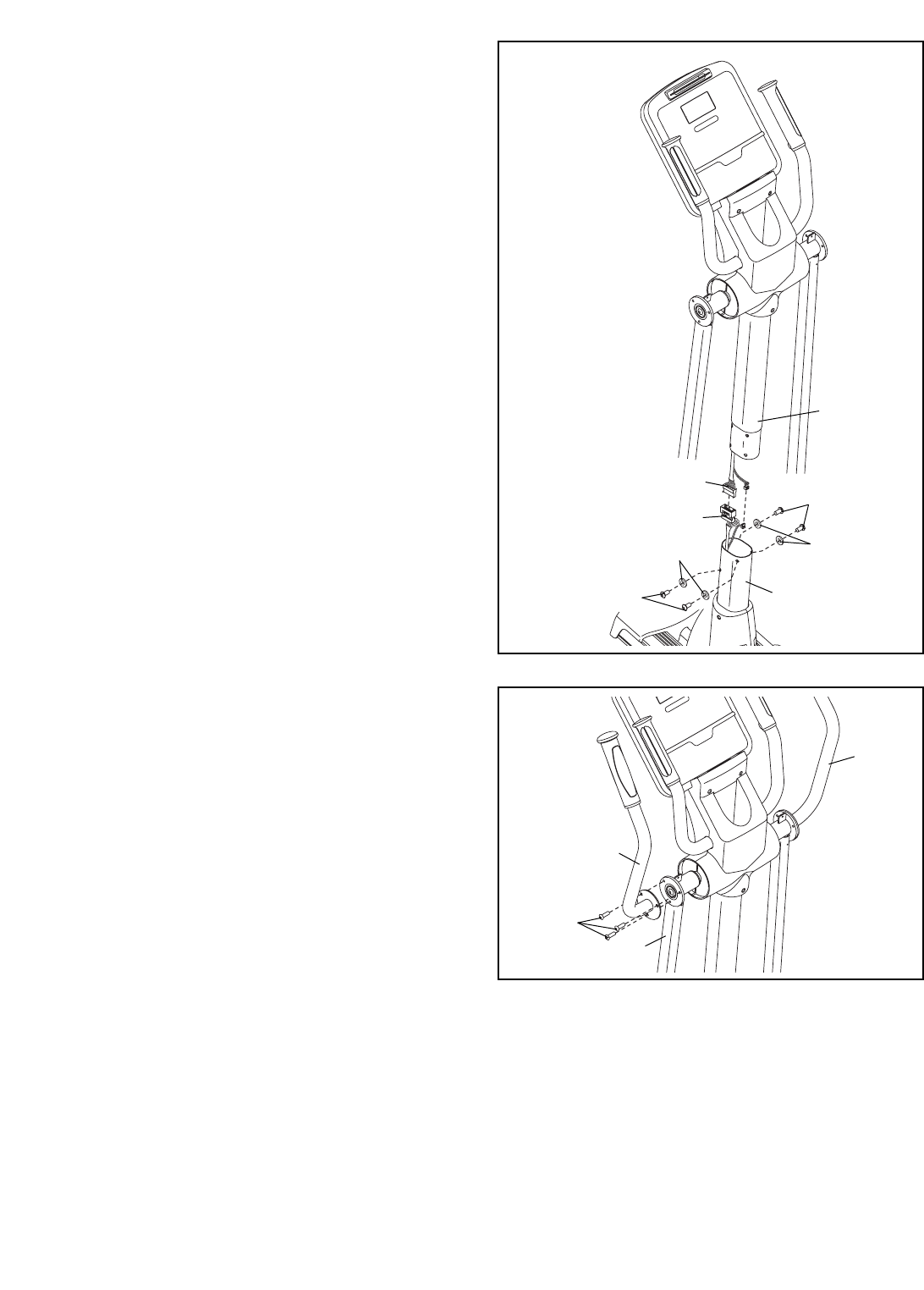
7. Attach the Left Upper Body Arm (22) to the left
Upper Body Leg (24) with three M8 x 15mm
Button Screws (106).
Attach the Right Upper Body Arm (23) in the
same way.
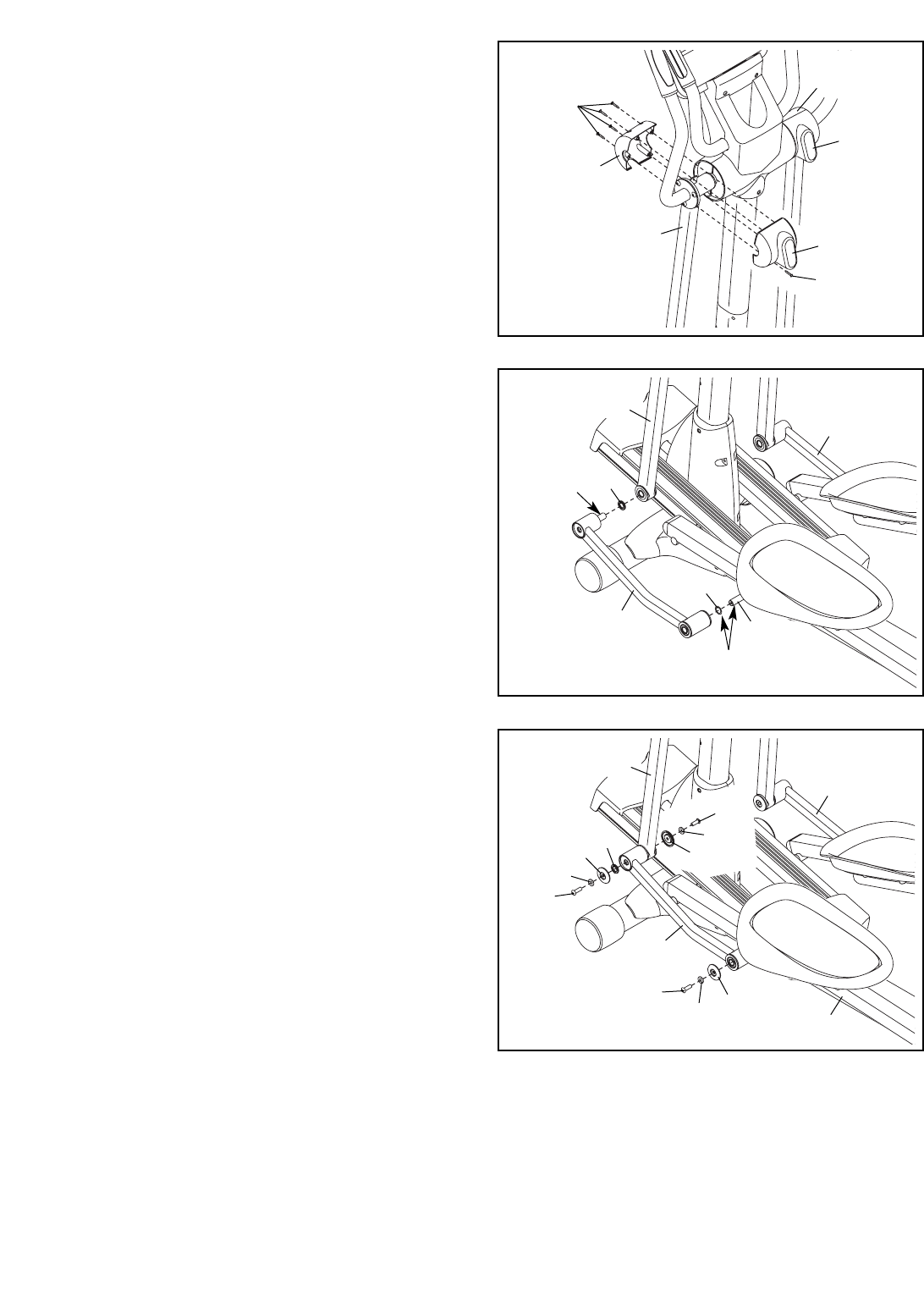
6. While another person holds the Upright (10)
near the Frame (1), connect the ends of the
Upper Wire Harness (65) to the ends of the
Lower Wire Harness (64).
Carefully insert the Upright (10) into the
Frame (1); be careful not to damage the Wire
Harnesses (64, 65). Attach the Upright with
four M8 x 20mm Button Screws (107) and four
M8 Split Washers (101).
22
23
24
106
7
6
65
64
107
101 101
1
10
Avoid pinching
the wires during
this step
107
10
8. Hold the Left Rear Upper Body Cover (26) and
the Left Front Upper Body Cover (27) around
the left Upper Body Leg (24). Attach the Upper
Body Covers with five M4 x 16mm Screws (97).
Attach the Right Rear Upper Body Cover
(28) and the Right Front Upper Body Cover
(29) in the same way.
24
97
26
28
27
97
8
29
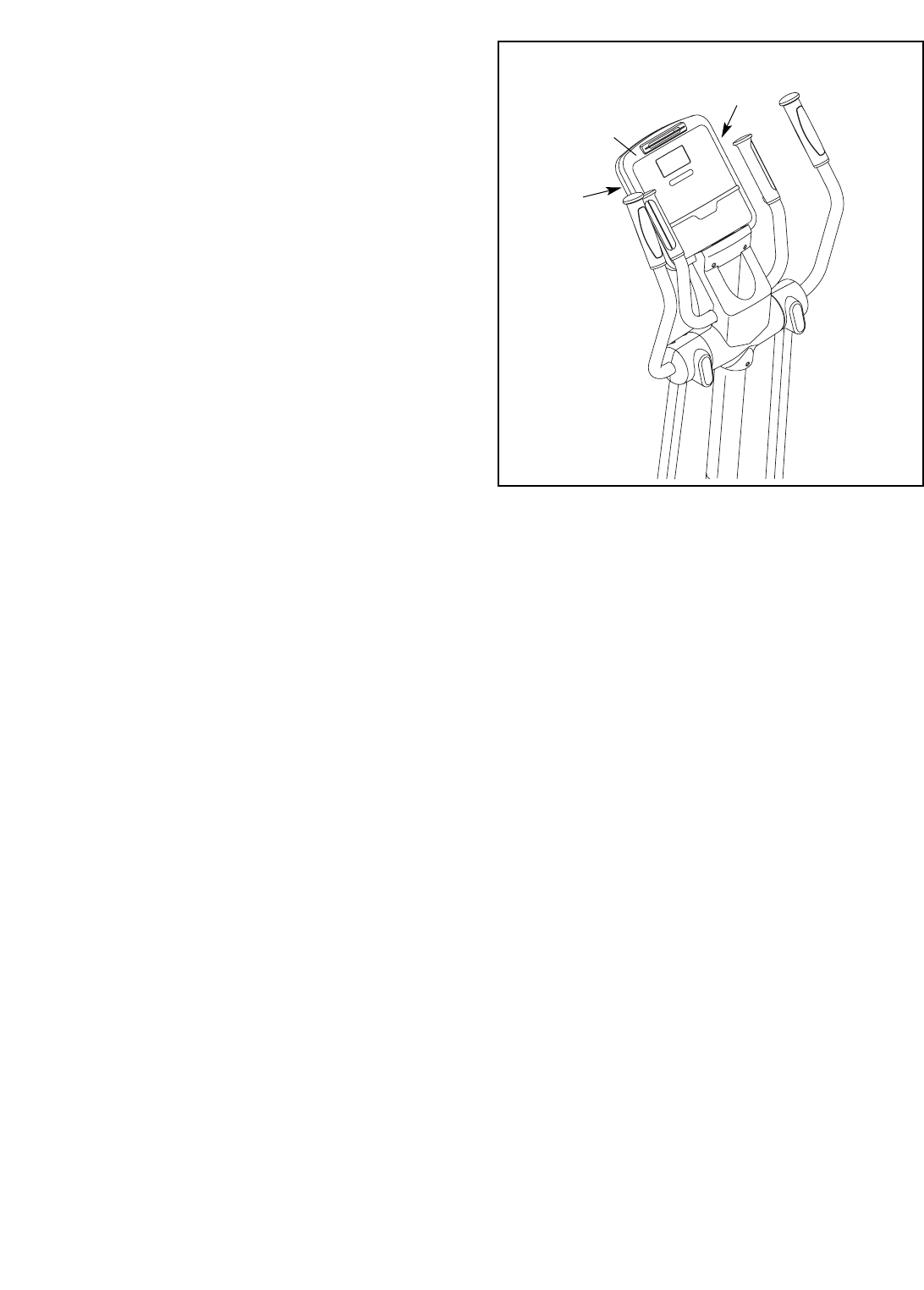
9. Apply a small amount of grease to the axle on
the Left Link Arm (30), to the axle on the Left
Pedal Arm (32), and to a Wave Washer (100).
Slide the Wave Washer (100) onto the axle on
the Left Pedal Arm (32). Next, slide a Link Arm
Spacer (74) onto the axle on the Left Link Arm
(30).
Then, insert the axle on the Left Link Arm (30)
into the left Upper Body Leg (24) while sliding
the Left Link Arm onto the axle on the Left
Pedal Arm (32).
Repeat this step with the Right Link Arm
(31).
9
32
100
30
Grease
Grease
31
24
74
10. Attach the Left Link Arm (30) to the Left Pedal
Arm (32) with an M8 x 15mm Button Screw
(106), an M8.5 x 16mm x 1.5mm Washer (103),
and an Axle Cover (66).
Attach the Left Link Arm (30) to the left Upper
Body Leg (24) with an M8 x 25mm Button
Screw (110), two M8.5 x 16mm x 1.5mm
Washers (103), two Axle Covers (66), a Link
Arm Spacer (74), and an M8 x 15mm Button
Screw (106) as shown.
Attach the Right Link Arm (31) in the same
way.
10
66 74
103
110
66
32
30
31
103
106
24
66
103
106
11
12. Make sure that all parts of the elliptical exerciser are properly tightened. Note: Some hardware may be
left over after assembly is completed. To protect the floor or carpet from damage, place a mat under the
elliptical exerciser.
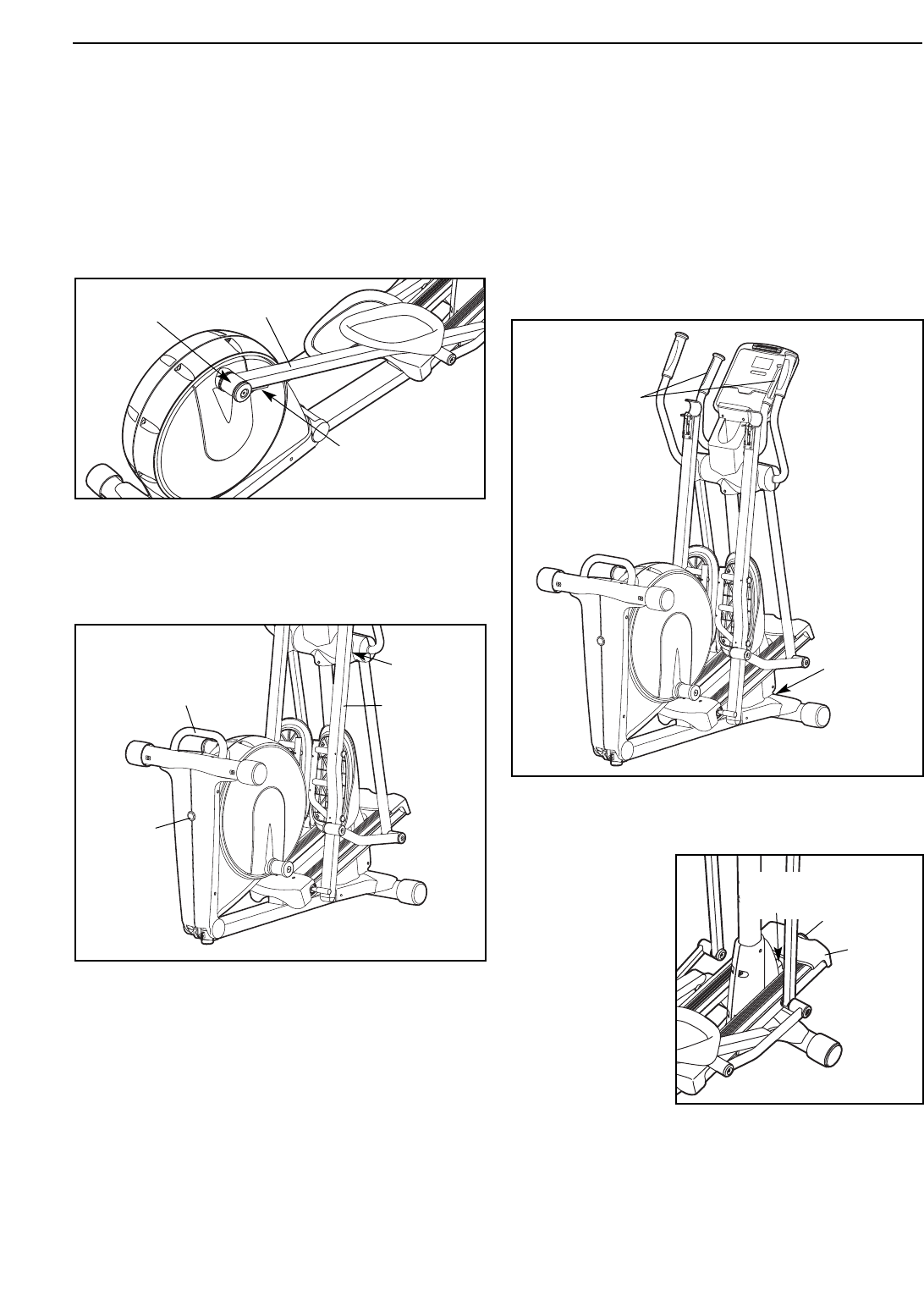
11. The Console (11) can be operated with four
1.5V “D” batteries (not included); alkaline batter-
ies are recommended. Locate the two battery
covers on the back of the Console. Press the
tabs on the battery covers, and remove the bat-
tery covers. Next, insert two batteries into each
battery compartment; make sure that the bat-
teries are oriented as shown by the symbols
inside the battery compartments. Then, reat-
tach the battery covers.
The Console (11) can also be operated with a
regulated 6-volt DC 2-amp power supply (not
included). To purchase a power supply, call
the telephone number on the front cover of
this manual. To avoid damaging the console,
use only a manufacturer-supplied power
supply. Plug one end of the power supply into
the jack on the elliptical exerciser; plug the
other end into an outlet installed in accordance
with all local codes and ordinances.
11
11
Battery
Cover
Battery
Cover
12
HOW TO USE THE ELLIPTICAL EXERCISER
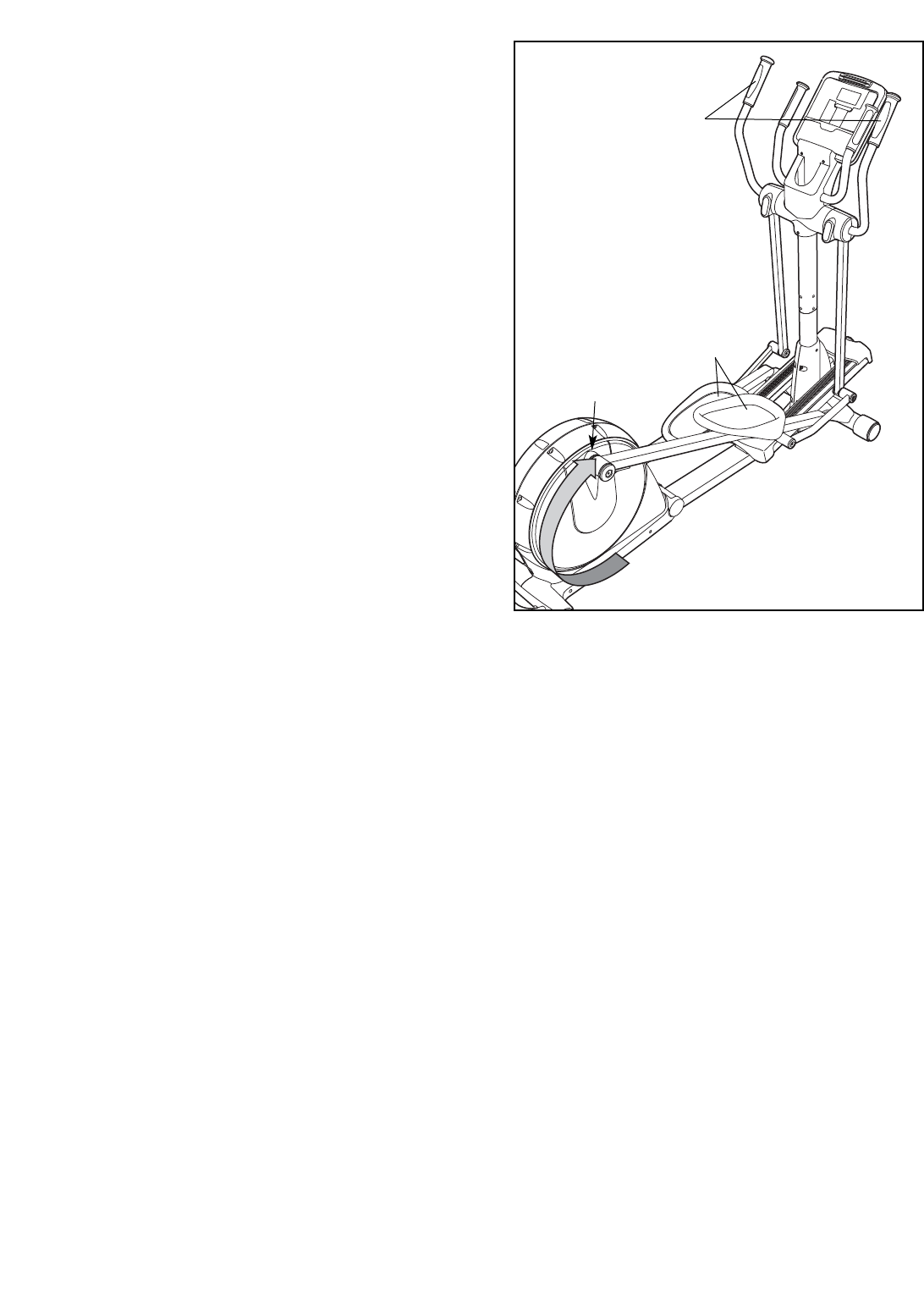
HOW TO FOLD AND UNFOLD THE ELLIPTICAL
EXERCISER
When the elliptical exerciser is not in use, the frame
can be folded out of the way. First, lift the latch under
each pedal arm, and lift the pedal arms off the sleeves
on the crank arms.
Next, raise the pedal arms until they touch the mag-
nets on the upper body legs; the magnets will hold the
pedal arms in place. Then, hold the handle and lift the
frame until it locks in a vertical position.
To use the elliptical exerciser, first hold the handle,
press the latch button, and lower the frame.
Next, pull the pedal arms off the magnets on the upper
body legs. Then, lift the latches under the pedal
arms, and set the pedal arms on the sleeves on the
crank arms. Release the latches, and make sure that
the pedal arms are securely connected to the crank
arms.
HOW TO MOVE THE ELLIPTICAL EXERCISER
To move the elliptical exerciser, first fold it as
described at the left. Next, stand in front of the ellipti-
cal exerciser, hold the handgrip pulse sensors, and
place one foot against the center of the front stabilizer.
Pull the pulse sensors until the elliptical exerciser will
roll on the front wheels. Carefully move the elliptical
exerciser to the desired position, and then lower it.
HOW TO CHANGE THE INCLINE OF THE RAMP
To vary the
motion of the
pedals, you can
change the
incline of the
ramp. To change
the incline, pull
the ramp knob,
raise or lower the
ramp, and
engage the ramp
pin into one of
the three adjust-
ment holes in the
front of the frame.
Latch
Sleeve Pedal Arm
Handle
Place
your foot
here
Magnet
Handgrip
Pulse
Sensors
Latch
Button
Pedal Arm
Ramp
Knob
Ramp
Ramp
Pin
13
HOW TO EXERCISE ON THE ELLIPTICAL
EXERCISER
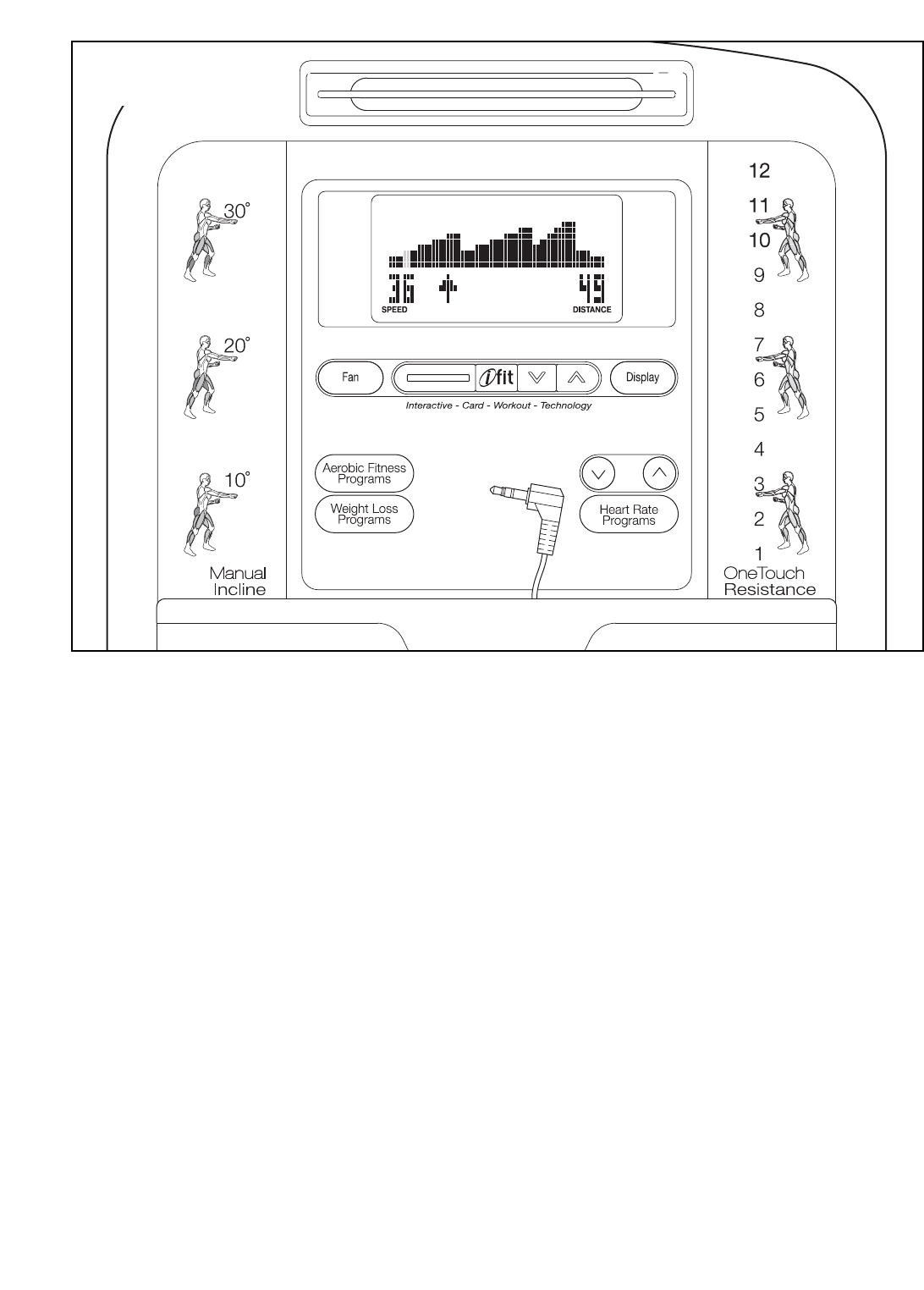
To mount the elliptical exerciser, hold the upper body
arms and step onto the pedal that is in the lower posi-
tion. Next, step onto the other pedal. Push the pedals
until they begin to move with a continuous motion.
Note: The crank arms can turn in either direction.
It is recommended that you turn the crank arms in
the direction shown by the arrow at the right; how-
ever, for variety you can turn the crank arms in the
opposite direction.
To dismount the elliptical exerciser, wait until the ped-
als come to a complete stop. Note: The elliptical
exerciser does not have a free wheel; the pedals
will continue to move until the flywheel stops.
When the pedals are stationary, step off the higher
pedal first. Then, step off the lower pedal.
Pedals
Crank Arm
Upper Body Arms
14
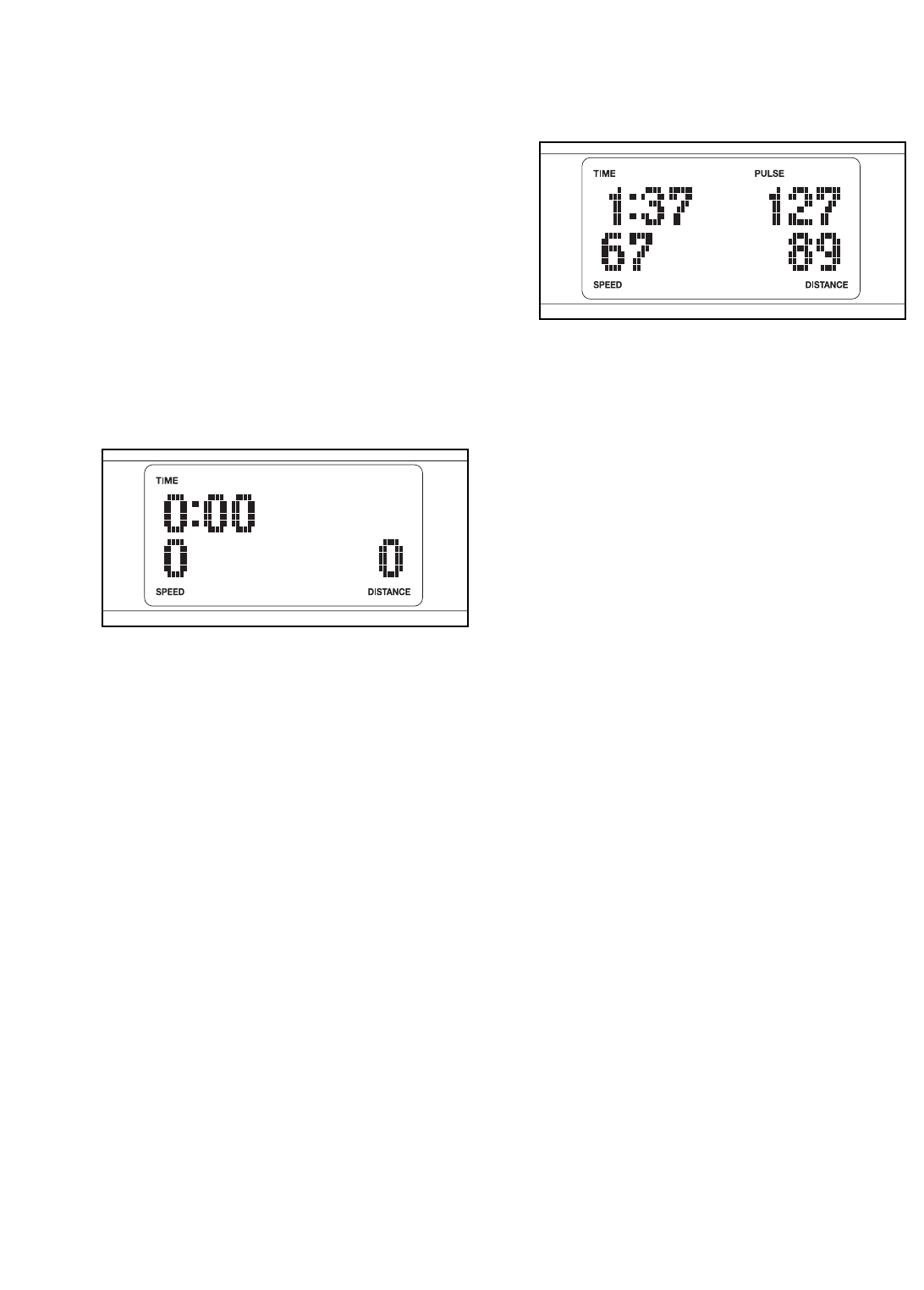
FEATURES OF THE CONSOLE
The advanced console offers an array of features
designed to make your workouts more effective and
enjoyable. When you select the manual mode of the
console, you can change the resistance of the pedals
with the touch of a button. As you exercise, the con-
sole will provide continuous exercise feedback. You
can even measure your heart rate using the handgrip
pulse sensor.
The console also offers six preset programs. Each
program automatically changes the resistance of the
pedals and prompts you to increase or decrease your
pedaling speed as it guides you through an effective
workout.
In addition, the console features two heart rate pro-
grams that change the resistance of the pedals to
keep your heart rate near target heart rate settings
while you exercise.
The console also features the new iFIT Interactive
Workout System. The iFIT Interactive Workout System
is compatible with iFIT cards containing workout pro-
grams designed to help you achieve specific fitness
goals. For example, lose unwanted pounds with the 8-
week Weight Loss program. iFIT programs control the
resistance of the pedals while the voice of a personal
trainer coaches you and motivates you through your
workouts. One iFIT card with three new programs is
included. Additional iFIT cards are available separate-
ly. To purchase iFIT cards, go to www.iFIT.com or
call the telephone number on the front cover of
this manual. iFIT cards are also available at select
stores.
You can even connect your MP3 player or CD player
to the console’s stereo sound system and listen to
your favorite workout music or audio books while you
exercise.
To use the manual mode of the console, follow the
steps beginning on page 15. To use a preset
program, see page 17. To use a heart rate program,
see page 18. To use an iFIT program, see page 19.
To use the stereo sound system, see page 19.
CONSOLE DIAGRAM
15
HOW TO USE THE MANUAL MODE
Note: If there is a sheet of clear plastic on the face of
the console, remove the plastic.
1. Press any button on the console or begin ped-
aling to turn on the console.
When you turn on the console, the display will
light. A tone will then sound and the console will
be ready for use.
2. Select the manual mode.
When you turn on the console, the manual mode
will be selected. If you have selected a program,
reselect the manual mode by pressing any of the
Programs buttons repeatedly until zeros appear in
the display.
3. Begin pedaling and change the resistance of
the pedals as desired.
As you pedal, change the resistance of the pedals
by pressing the OneTouch Resistance buttons.
There are twelve resistance levels. Note: After you
press the buttons, it will take a moment for the
pedals to reach the selected resistance level.
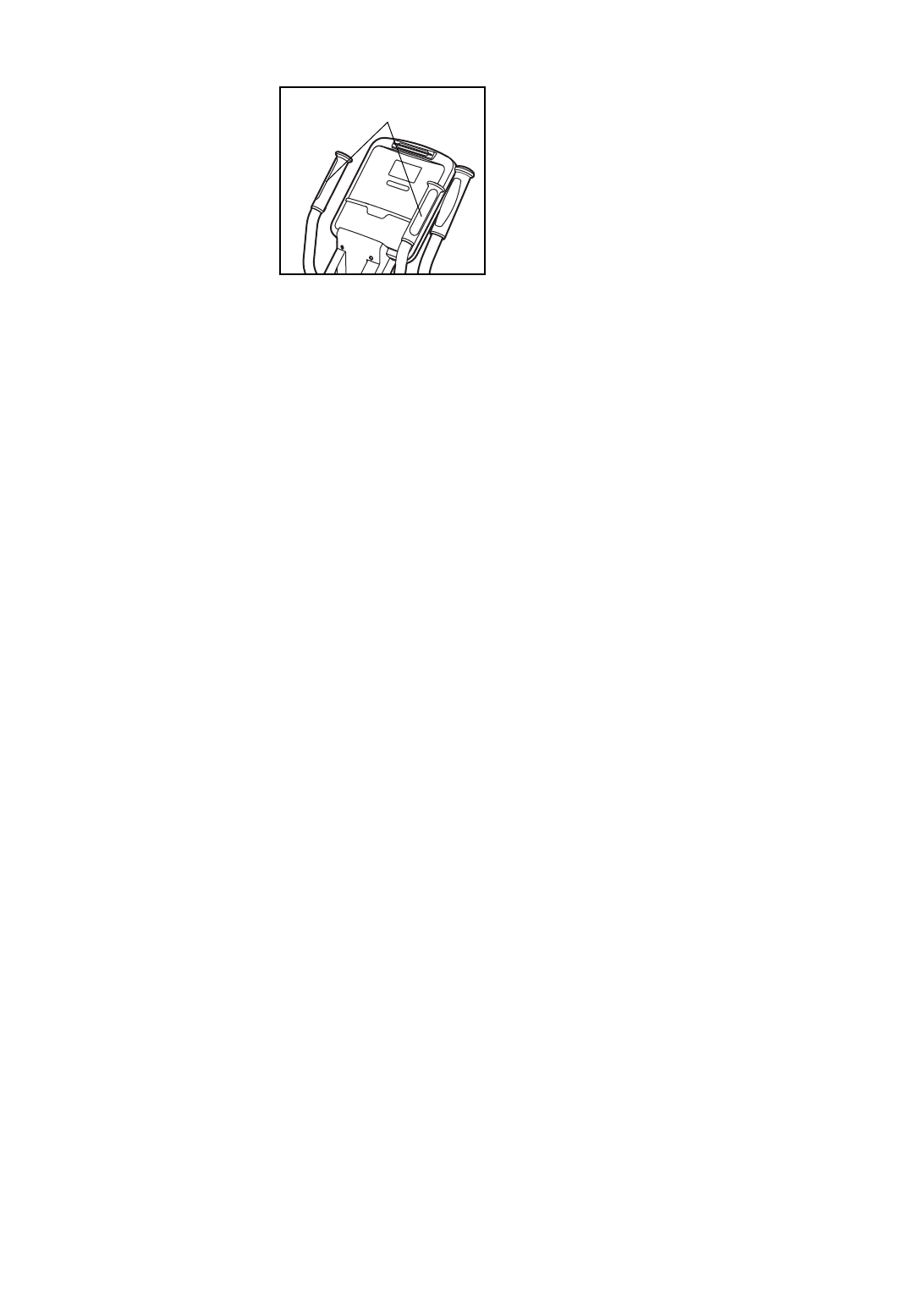
4. Follow your progress with the display.
While you pedal, the upper left corner of the dis-
play will show the elapsed time.
The lower left corner of the display will show your
pedaling speed, in revolutions per minute.
The upper right corner of the display will show
your heart rate when you use the handgrip pulse
sensor (see step 5 on page 16).
The lower right corner of the display will show the
distance (total number of revolutions) that you
have pedaled.
The center of the display will show the resistance
setting of the pedals for a few seconds each time
the resistance setting changes.
To view the approximate number of calories that
you are burning per hour and the approximate
number of calories that you have burned during
your workout, press the Display button.
You can also view selected information at a larger
size. Press the Display button repeatedly to view
the elapsed time, the distance that you have ped-
aled, your pedaling speed, or the approximate
number of calories that you have burned.
To again view the elapsed time, your pedaling
speed, and the distance that you have pedaled,
press the Display button again.
16
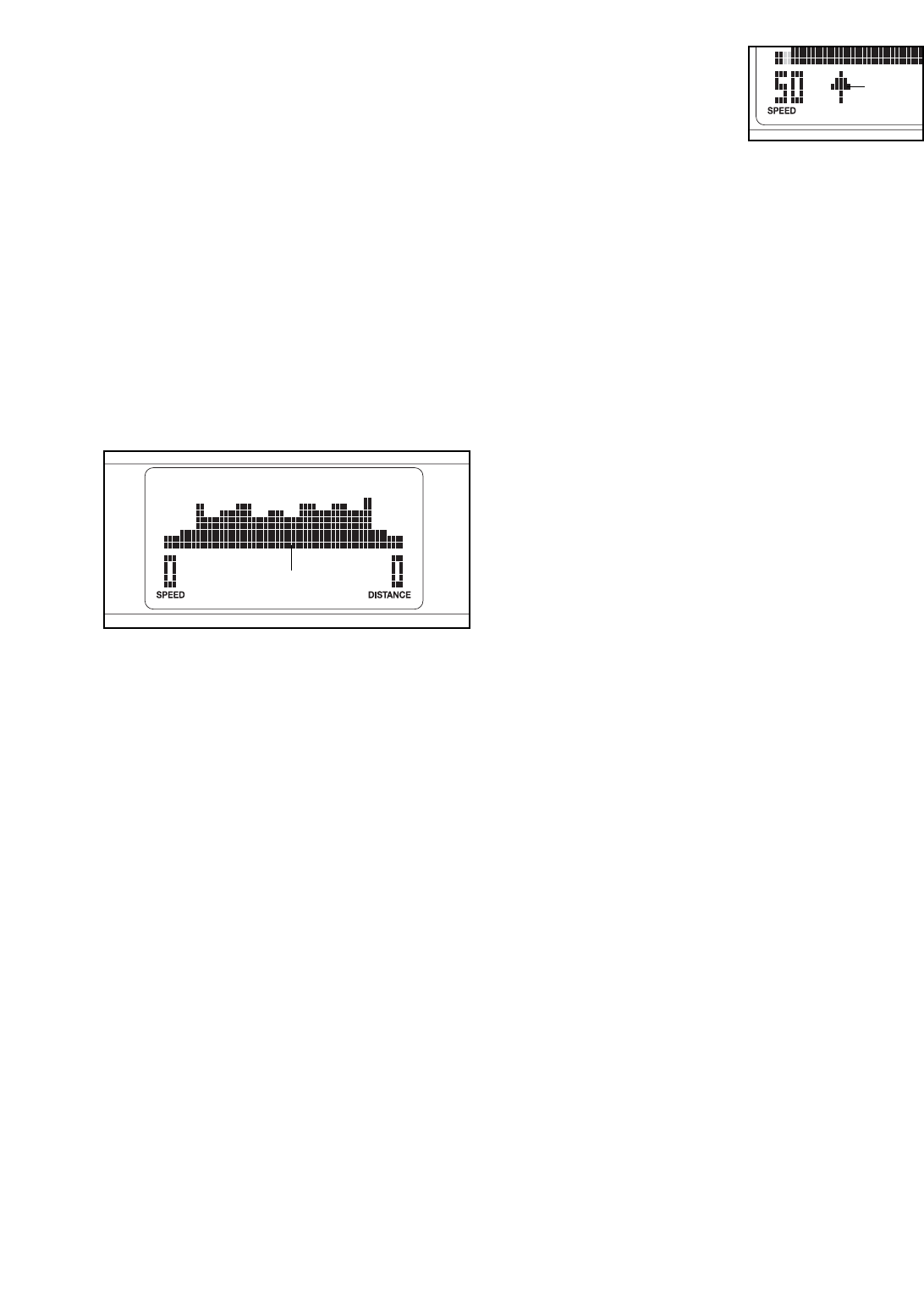
5. Measure your heart rate if desired.
If there are
sheets of clear
plastic on the
metal contacts on
the handgrip
pulse sensor,
remove the plas-
tic. In addition,
make sure that
your hands are
clean. To measure
your heart rate, hold the handgrip pulse sensor
with your palms resting against the metal contacts.
Avoid moving your hands or gripping the con-
tacts tightly.
When your pulse is detected, your heart rate will
be shown in the display. For the most accurate
heart rate reading, hold the contacts for at least 15
seconds.
If your heart rate is not shown, make sure that
your hands are positioned as described. Be care-
ful not to move your hands excessively or to
squeeze the metal contacts tightly. For optimal
performance, clean the metal contacts using a soft
cloth; never use alcohol, abrasives, or chemi-
cals to clean the contacts.
6. Turn on the fan if desired.
To turn on the fan at high speed, press the Fan
button. To turn on the fan at low speed, press the
Fan button a second time. To select the auto
mode, press the Fan button a third time; while the
auto mode is selected, the speed of the fan will
automatically increase or decrease as you
increase or decrease your pedaling speed.
Pivot the fan louvers above the display upward or
downward to direct the airflow from the fan.
To turn off the fan, press the Fan button again.
Note: If the pedals do not move for about thirty
seconds, the fan will automatically turn off to con-
serve the batteries.
7. When you are finished exercising, the console
will turn off automatically.
If the pedals do not move for several seconds, a
series of tones will sound and the console will
pause.
If the pedals do not move for about five minutes,
the console will turn off and the displays will be
reset.
Contacts
17
HOW TO USE A PRESET PROGRAM
1. Press any button on the console or begin ped-
aling to turn on the console.
See step 1 on page 15.
2. Select a preset program.
To select one of the three weight loss programs,
press the Weight Loss Programs button repeated-
ly; to select one of the three aerobic fitness pro-
grams, press the Aerobic Fitness Programs button
repeatedly.
When you select a preset program, the name of
the program will appear in the display for a few
seconds. A profile of the resistance settings of the
program will then appear in the display.
3. Begin pedaling to start the program.
Each program is divided into either 20 or 30 one-
minute segments. One resistance setting and one
target speed setting are programmed for each
segment. Note: The same resistance setting
and/or target speed setting may be programmed
for consecutive segments.
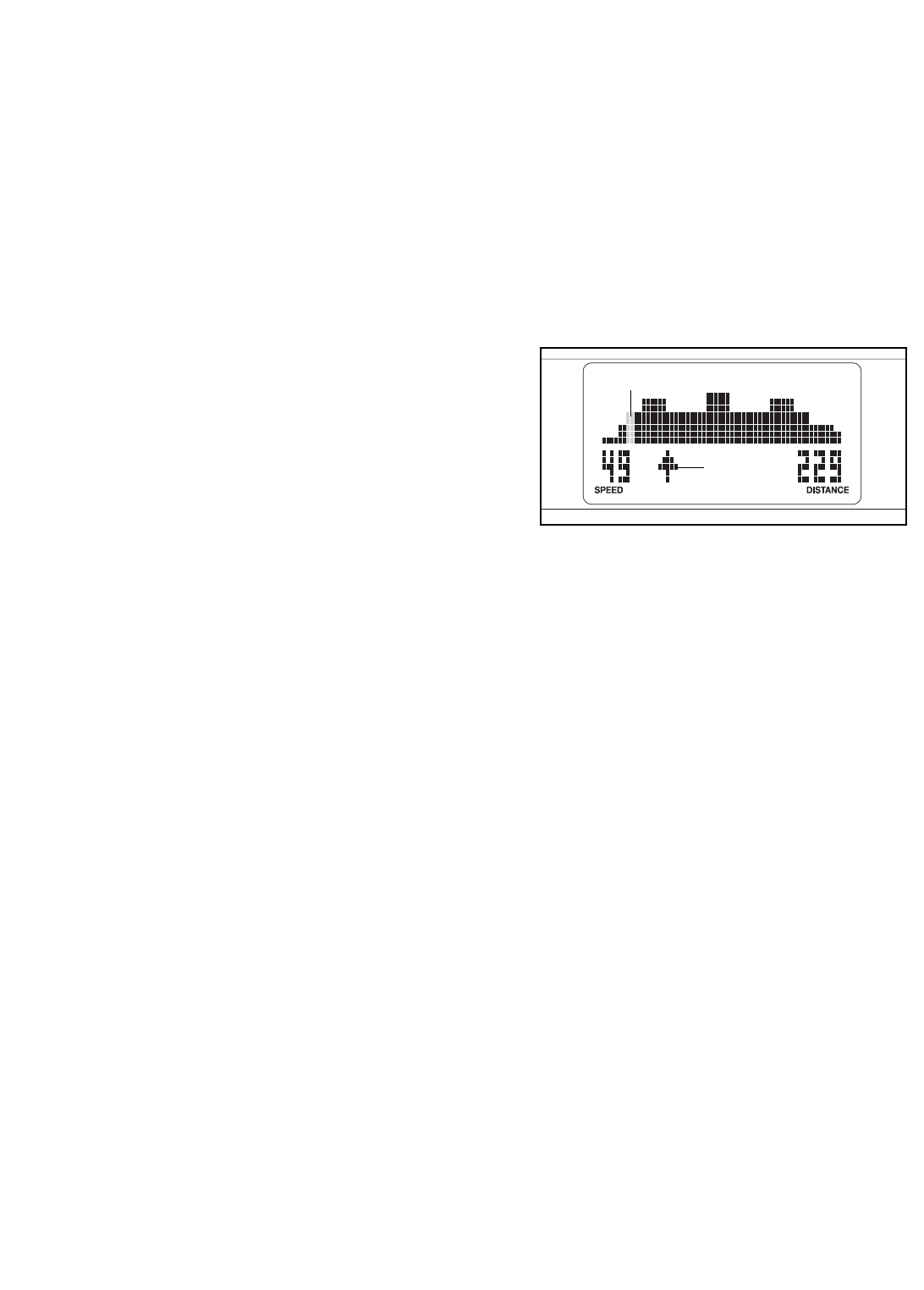
During the program, the program profile will show
your progress (see the drawing above). The flash-
ing column of the profile represents the current
segment of the program. The height of the flashing
column indicates the resistance setting for the cur-
rent segment. At the end of each segment of the
program, a series of tones will sound and the next
segment of the profile will begin to flash. If a differ-
ent resistance setting is programmed for the next
segment, the resistance setting will appear in the
display for a few seconds to alert you. The resis-
tance of the pedals will then change.
As you exercise, you
will be prompted to
keep your pedaling
speed near the target
speed setting for the
current segment. When
an upward-pointing arrow appears in the display,
increase your speed. When a downward-pointing
arrow appears, decrease your speed. When no
arrow appears, maintain your current speed.
IMPORTANT: The target speed settings are
intended only to provide motivation. Make sure
to pedal at a speed that is comfortable for you.
If the resistance setting for the current segment is
too high or too low, you can manually override the
setting by pressing the OneTouch Resistance but-
tons. However, when the current segment ends,
the resistance of the pedals will automatically
adjust to the resistance setting for the next seg-
ment.
If you stop pedaling for several seconds, a series
of tones will sound and the program will pause. To
restart the program, simply resume pedaling. The
program will continue until the last segment of the
profile ends.
4. Follow your progress with the display.
During the program, the display will show the pro-
gram profile, your pedaling speed, and the dis-
tance that you have pedaled.
To view the time remaining in the program instead
of the program profile, press the Display button.
To view the approximate number of calories that
you are burning per hour and the approximate
number of calories that you have burned during
your workout, press the Display button again.
To view the program profile again, press the
Display button again.
5. Measure your heart rate if desired.
See step 5 on page 16.
6. Turn on the fan if desired.
See step 6 on page 16.
7. When you are finished exercising, the console
will turn off automatically.
See step 7 on page 16.
Profile
Arrow
18
HOW TO USE A HEART RATE PROGRAM
1. Press any button on the console or begin ped-
aling to turn on the console.
See step 1 on page 15.
2. Select a heart rate program.
To select one of the heart rate programs, press the
Heart Rate Programs button repeatedly until the
words HEART RATE 1 or HEART RATE 2 appear
in the display.
3. Enter a target heart rate setting.
A few seconds after you select a heart rate pro-
gram, the words ENTER HEART RATE will appear
in the display and the number 110 will begin to
flash.
During heart rate program 1, the same target
heart rate setting will be programmed for all seg-
ments of the program. If you have selected heart
rate program 1, press the increase and decrease
buttons above the Heart Rate Programs button to
enter the desired target heart rate setting (see
EXERCISE INTENSITY on page 21).
During heart rate program 2, different target
heart rate settings will be programmed for different
segments of the program. If you have selected
heart rate program 2, press the increase and
decrease buttons above the Heart Rate Programs
button to enter the desired maximum target heart
rate setting for the program (see EXERCISE
INTENSITY on page 21).
4. Hold the handgrip pulse sensor.
It is not necessary to hold the handgrip pulse sen-
sor continuously during heart rate programs; how-
ever, you should hold the handgrip pulse sensor
frequently for the programs to operate properly.
Each time you hold the handgrip pulse sensor,
keep your hands on the metal contacts for at
least 30 seconds.
5. Begin pedaling to start the program.
Heart rate program 1 is divided into 40 one-
minute segments. Note: For a shorter workout,
stop exercising or select a different program
before the program ends.
Heart rate program 2 is divided into 30 one-
minute segments. One target heart rate setting is
programmed for each segment. Note: The same
target heart rate setting may be programmed for
consecutive segments.
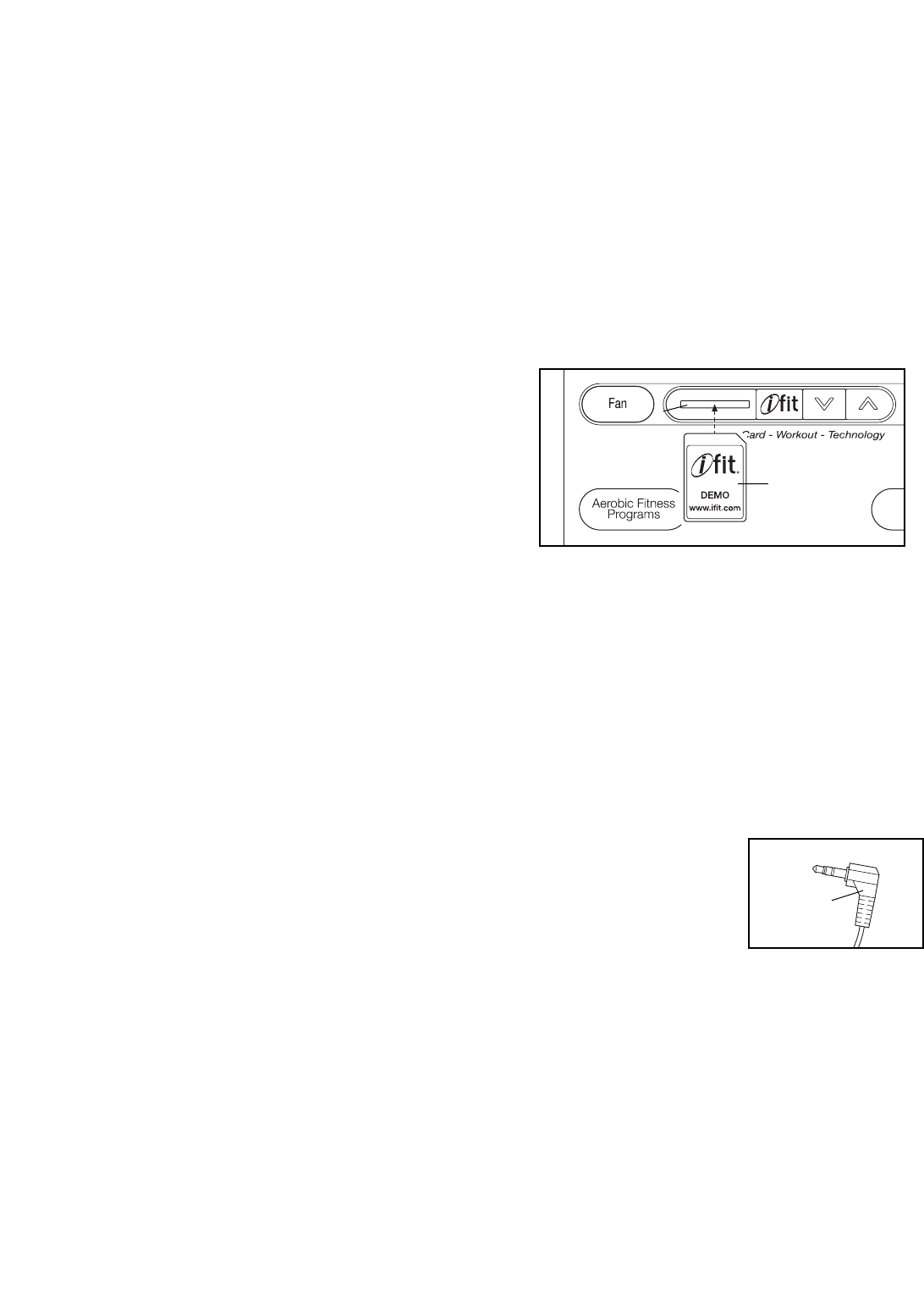
During the program, the program profile in the dis-
play will show your progress. The flashing column
of the profile represents the current segment of the
program. The height of the flashing column indi-
cates the target heart rate setting for the current
segment. At the end of each segment of the pro-
gram, a series of tones will sound and the next
segment of the profile will begin to flash.
During both programs, the console will regularly
compare your heart rate to the target heart rate
setting for the current segment of the program. If
your heart rate is too far below or above the target
heart rate setting, the resistance of the pedals will
automatically increase or decrease to bring your
heart rate closer to the target heart rate setting.
Each time the resistance changes, the resistance
setting will appear in the display for a few seconds
to alert you.
While you exercise, you will be prompted to main-
tain a constant pedaling speed. If an upward-point-
ing arrow appears in the display (see the drawing
above), increase your speed. If a downward-point-
ing arrow appears, decrease your speed. When no
arrow appears, maintain your current speed.
If the resistance setting for the current segment is
too high or too low, you can manually override the
setting by pressing the OneTouch Resistance but-
tons. However, when the console compares your
heart rate to the target heart rate setting, the resis-
tance of the pedals may automatically increase or
decrease to bring your heart rate closer to the tar-
get heart rate setting.
Profile
Arrow
19
If you stop pedaling for several seconds, a series
of tones will sound and the program will pause. To
restart the program, simply resume pedaling. The
program will continue until the last segment of the
program ends.
6. Follow your progress with the display.
During heart rate program 1, the display will
show your heart rate, your pedaling speed, and
the distance that you have pedaled. During heart
rate program 2, the display will show the program
profile, your pedaling speed, and the distance that
you have pedaled.
To view the time remaining in the program instead
of your heart rate or the program profile, press the
Display button.
To view the approximate number of calories that
you are burning per hour and the approximate
number of calories that you have burned during
your workout, press the Display button again.
To view your heart rate or the program profile
again, press the Display button again.
7. Turn on the fan if desired.
See step 6 on page 16.
8. When you are finished exercising, the console
will turn off automatically.
See step 7 on page 16.
HOW TO USE AN IFIT PROGRAM
1. Press any button on the console or begin ped-
aling to turn on the console.
See step 1 on page 15.
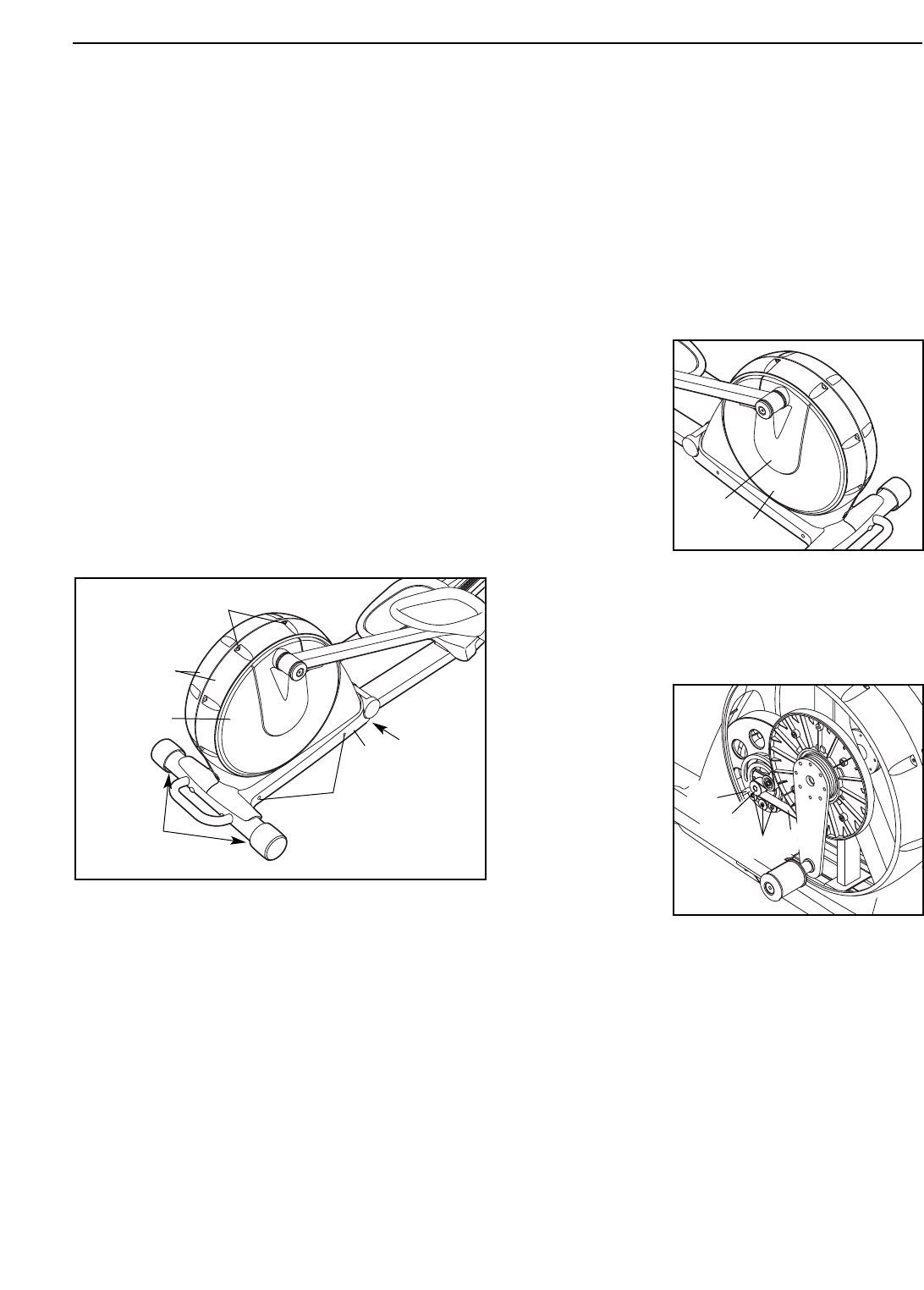
2. Insert an iFIT card and select a program.
To use an iFIT program, insert an iFIT card into
the iFIT slot; make sure that the iFIT card is orient-
ed so the metal contacts are face down and are
facing the slot. When the iFIT card is properly
inserted, the indicator next to the slot will light and
the words IFIT 1 will appear in the display.
Next, select the desired program on the iFIT card
by pressing the up and down buttons next to the
iFIT slot.
A moment after you select a program, the voice of
a personal trainer will begin guiding you through
your workout. iFIT programs work in the same way
as preset programs. To use the program, see
steps 3 to 6 on page 17.
HOW TO USE THE STEREO SOUND SYSTEM
To play music or audio
books through the con-
sole’s stereo sound system
while you exercise, first
locate the stereo audio
cable in the center of the
console above the speak-
ers. Plug the cable into a jack on your MP3 player or
CD player; make sure that the audio cable is fully
plugged in.
Next, press the play button on your MP3 player or CD
player. Adjust the volume of the speakers using the
volume control on your MP3 player or CD player.
When not in use, insert the stereo audio cable into the
storage bracket on the console.
iFIT Slot
iFIT Card
Cable
20
Inspect and tighten all parts of the elliptical exerciser
regularly. Replace any worn parts immediately.
To clean the elliptical exerciser, use a damp cloth and
a small amount of mild soap. IMPORTANT: To avoid
damage to the console, keep liquids away from
the console and keep the console out of direct
sunlight.
BATTERY REPLACEMENT
If the console display becomes dim, the batteries
should be replaced; most console problems are the
result of low batteries. See assembly step 11 on page
11 for replacement instructions.
HOW TO LEVEL THE ELLIPTICAL EXERCISER OR
ELIMINATE FLEXING IN THE FRAME
If the elliptical exerciser rocks on your floor during use,
turn one or both of the Leveling Feet (98) until the
rocking motion is eliminated.
If the elliptical exerciser flexes in the center during
use, turn the Center Foot (95) until the flexing is elimi-
nated.
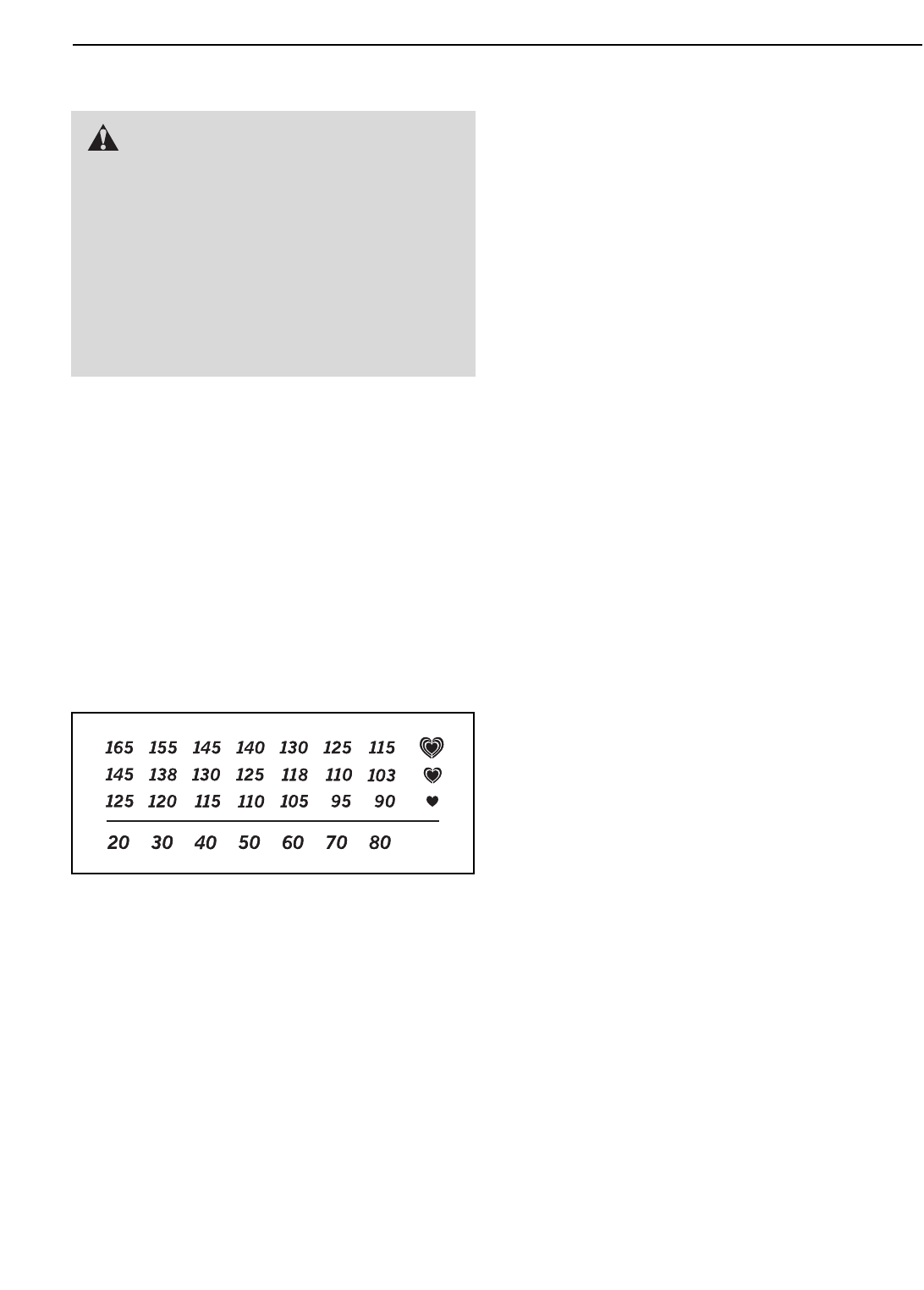
HOW TO ELIMINATE RUBBING OF THE DISCS
See the drawing above. If the Discs (12) rub against
the Side Shields (14, 15) during use, make sure that
the Center Foot (95) is installed in the Folding Frame
(2). If the Center Foot is installed, loosen the two indi-
cated Bolt Sets (88) and the two M4 x 16mm Screws
(97) in each side of the elliptical exerciser.
Adjust the position of the Side Shields (14, 15) until the
Discs (12) no longer rub against them, and then tighten
the Bolt Sets (88) and the M4 x 16mm Screws (97).
HANDGRIP PULSE SENSOR TROUBLESHOOTING
If the handgrip pulse sensor does not function proper-
ly, see step 5 on page 16.
HOW TO ADJUST THE BELT
If the pedals slip
while you are
pedaling, even
while the resis-
tance is adjusted
to the highest set-
ting, the belt may
need to be adjust-
ed. To adjust the
belt, first carefully
pry off the left
Disc Cover (13)
using a flat screwdriver. Next, remove the four Screws
(not shown) from the center of the left Disc (12).
Gently rotate the Disc Cover and the Disc away from
the elliptical exerciser.
Loosen, but do
not remove, the
three 1/4" x
19mm Button
Screws (114).
Insert the shaft of
a screwdriver
downward
between the
Idler (47) and the
Idler Pulley (48).
Pull the top of the
screwdriver
toward the rear of the elliptical exerciser until the Belt
(96) is tight, and then tighten the three Button Screws.
Reattach the left disc with the four screws and then
reattach the left disc cover.
MAINTENANCE AND TROUBLESHOOTING
98
95
97
14, 15
12
2
88
47
13
12
48
114 96
21
These guidelines will help you to plan your exercise
program. For detailed exercise information, obtain a
reputable book or consult your physician. Remember,
proper nutrition and adequate rest are essential for
successful results.
EXERCISE INTENSITY
Whether your goal is to burn fat or to strengthen your
cardiovascular system, exercising at the proper inten-
sity is the key to achieving results. You can use your
heart rate as a guide to find the proper intensity level.
The chart below shows recommended heart rates for
fat burning and aerobic exercise.
To find the proper intensity level, find your age at the
bottom of the chart (ages are rounded off to the near-
est ten years). The three numbers listed above your
age define your “training zone.” The lowest number is
the heart rate for fat burning, the middle number is the
heart rate for maximum fat burning, and the highest
number is the heart rate for aerobic exercise.
Burning Fat—To burn fat effectively, you must exer-
cise at a low intensity level for a sustained period of
time. During the first few minutes of exercise, your
body uses
carbohydrate calories
for energy. Only after
the first few minutes of exercise does your body begin
to use stored
fat calories
for energy. If your goal is to
burn fat, adjust the intensity of your exercise until your
heart rate is near the lowest number in your training
zone. For maximum fat burning, exercise with your
heart rate near the middle number in your training
zone.
Aerobic Exercise—If your goal is to strengthen your
cardiovascular system, you must perform aerobic
exercise, which is activity that requires large amounts
of oxygen for prolonged periods of time. For aerobic
exercise, adjust the intensity of your exercise until
your heart rate is near the highest number in your
training zone.
WORKOUT GUIDELINES
Warming up—Start with 5 to 10 minutes of stretching
and light exercise. A warm-up increases your body
temperature, heart rate, and circulation in preparation
for exercise.
Training Zone Exercise—Exercise for 20 to 30 min-
utes with your heart rate in your training zone. (During
the first few weeks of your exercise program, do not
keep your heart rate in your training zone for longer
than 20 minutes.) Breathe regularly and deeply as you
exercise–never hold your breath.
Cooling down—Finish with 5 to 10 minutes of
stretching. Stretching increases the flexibility of your
muscles and helps to prevent post-exercise problems.
EXERCISE FREQUENCY
To maintain or improve your condition, complete three
workouts each week, with at least one day of rest
between workouts. After a few months of regular exer-
cise, you may complete up to five workouts each
week, if desired. Remember, the key to success is to
make exercise a regular and enjoyable part of your
everyday life.
EXERCISE GUIDELINES
WARNING: Before beginning
this or any exercise program, consult your
physician. This is especially important for
persons over the age of 35 or persons with
pre-existing health problems.
The pulse sensor is not a medical device.
Various factors may affect the accuracy of
heart rate readings. The pulse sensor is
intended only as an exercise aid in determin-
ing heart rate trends in general.
22
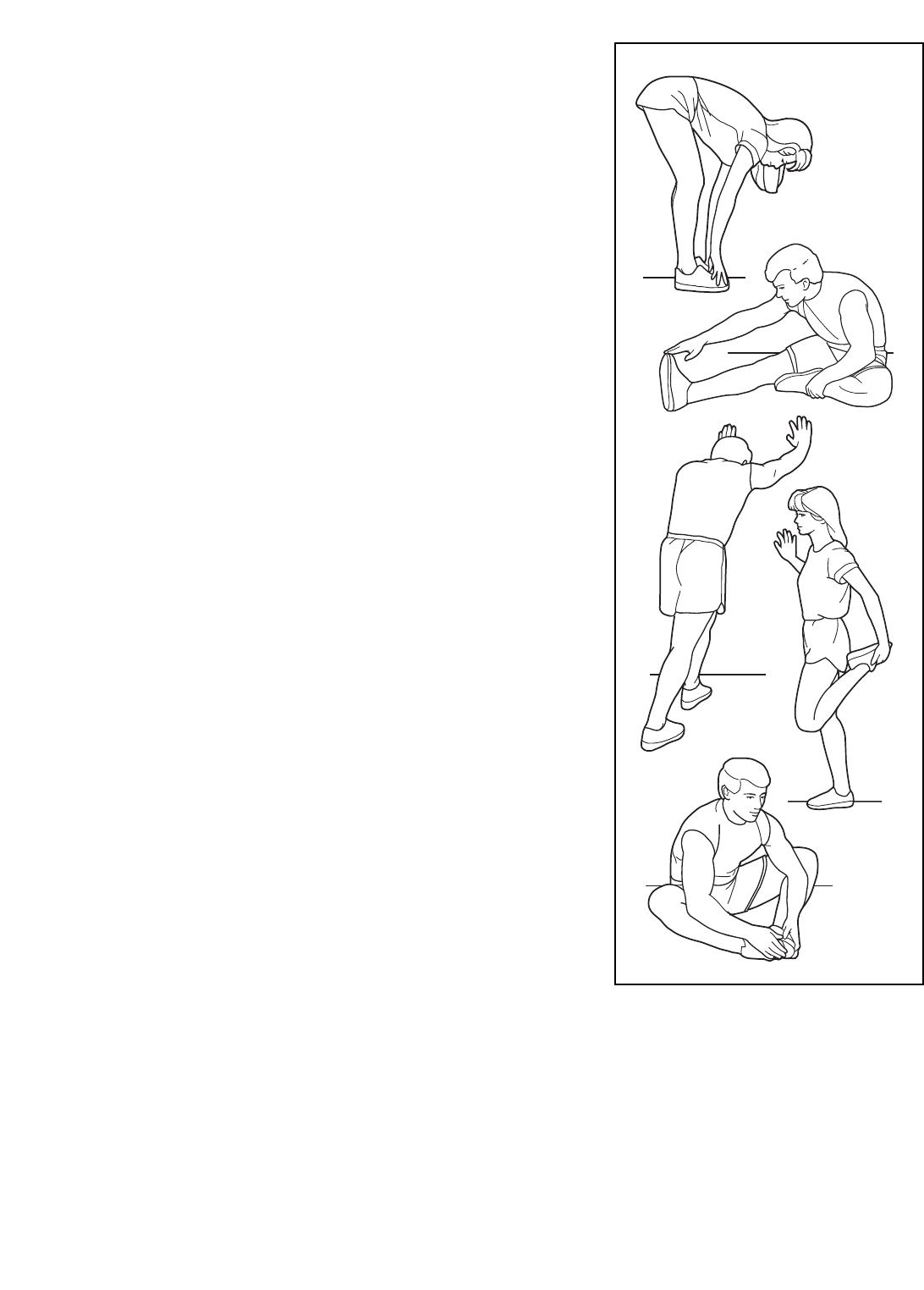
SUGGESTED STRETCHES
The correct form for several basic stretches is shown at the right.
Move slowly as you stretch—never bounce.
1. Toe Touch Stretch
Stand with your knees bent slightly and slowly bend forward from
your hips. Allow your back and shoulders to relax as you reach
down toward your toes as far as possible. Hold for 15 counts, then
relax. Repeat 3 times. Stretches: Hamstrings, back of knees and
back.
2. Hamstring Stretch
Sit with one leg extended. Bring the sole of the opposite foot
toward you and rest it against the inner thigh of your extended leg.
Reach toward your toes as far as possible. Hold for 15 counts,
then relax. Repeat 3 times for each leg. Stretches: Hamstrings,
lower back and groin.
3. Calf/Achilles Stretch
With one leg in front of the other, reach forward and place your
hands against a wall. Keep your back leg straight and your back
foot flat on the floor. Bend your front leg, lean forward and move
your hips toward the wall. Hold for 15 counts, then relax. Repeat 3
times for each leg. To cause further stretching of the achilles ten-
dons, bend your back leg as well. Stretches: Calves, achilles ten-
dons and ankles.
4. Quadriceps Stretch
With one hand against a wall for balance, reach back and grasp
one foot with your other hand. Bring your heel as close to your but-
tocks as possible. Hold for 15 counts, then relax. Repeat 3 times
for each leg. Stretches: Quadriceps and hip muscles.
5. Inner Thigh Stretch
Sit with the soles of your feet together and your knees outward.
Pull your feet toward your groin area as far as possible. Hold for 15
counts, then relax. Repeat 3 times. Stretches: Quadriceps and hip
muscles.
1
2
3
4
5

23
NOTES

24
1 1 Frame
2 1 Folding Frame
3 1 Rear Stabilizer
4 1 Front Stabilizer
5 1 Ramp
6 1 Front Ramp Cover
7 1 Rear Ramp Cover
8 2 Side Ramp Cover
9 1 Ramp Knob
10 1 Upright
11 1 Console
12 2 Disc
13 2 Disc Cover
14 1 Left Side Shield
15 1 Right Side Shield
16 2 Rear Endcap
17 2 Wheel
18 2 Wheel Cover
19 1 Rear Upright Cover
20 1 Front Upright Cover
21 2 Handgrip
22 1 Left Upper Body Arm
23 1 Right Upper Body Arm
24 2 Upper Body Leg
25 2 Pulse Sensor/Wire
26 1 Left Rear Upper Body Cover
27 1 Left Front Upper Body Cover
28 1 Right Rear Upper Body Cover
29 1 Right Front Upper Body Cover
30 1 Left Link Arm
31 1 Right Link Arm
32 1 Left Pedal Arm
33 1 Right Pedal Arm
34 1 Left Pedal
35 1 Right Pedal
36 1 Left Frame Cover
37 1 Right Frame Cover
38 2 Roller
39 2 Pedal Arm Endcap
40 1 Tray
41 2 Pedal Arm Latch
42 4 Pedal Arm Latch Spring
43 6 Pedal Arm Cap
44 1 Eddy Mechanism
45 1 Eddy Crank Assembly
46 1 Pillow Block
47 1 Idler
48 1 Idler Pulley
49 1 Eddy Motor
50 1 Reed Switch/Wire
51 1 Clamp
52 2 Large Axle Cover
53 2 Crank Bushing
54 2 Crank Bushing Sleeve
55 2 Crank Arm
56 1 Crank Arm Spacer
57 1 Large Pulley
58 1 Crank Flange
59 1 Left Crank Bearing Assembly
60 1 Crank Spacer
61 1 Crank
62 1 Ramp Pin
63 1 Ramp Spring
64 1 Lower Wire Harness
65 1 Upper Wire Harness
66 6 Axle Cover
67 8 Bushing Assembly
68 4 Brass Bushing
69 1 Latch Bracket
70 1 Latch Spring
71 1 Upper Body Axle
72 1 Ramp Axle
73 1 Pivot Axle
74 4 Link Arm Spacer
75 1 Latch Axle
76 1 Latch Button
77 1 Latch Frame
78 2 Upright Brass Bushing
79 4 Bearing Assembly
80 4 M6 Nylon Locknut
81 6 M4 x 16mm Cupped Screw
82 4 M10 x 93mm Button Screw
83 2 Crank Snap Ring
84 2 Crank Arm Washer
85 2 Outside Crank Bushing
86 1 Flange Screw
87 4 M10 x 25mm Washer
88 7 Bolt Set
89 2 Small Snap Ring
90 1 Idler Snap Ring
91 1 Eddy Snap Ring
92 1 Idler Spacer
93 2 M10 Nylon Locknut
94 3 Idler Washer
95 1 Center Foot
96 1 Belt
97 51 M4 x 16mm Screw
98 2 Leveling Foot
99 4 M10 Curved Washer
100 4 Wave Washer
Key No. Qty. Description Key No. Qty. Description
PART LIST—Model No. PFEL77908.2 R0308A

25
Note: Specifications are subject to change without notice. See the back cover of this manual for information
about ordering replacement parts. *These parts are not illustrated.
101 4 M8 Split Washer
102 12 M6 Split Washer
103 8 M8.5 x 16mm x 1.5mm Washer
104 4 M8 x 20mm x 2mm Washer
105 4 M8 x 16mm Button Screw
106 10 M8 x 15mm Button Screw
107 4 M8 x 20mm Button Screw
108 4 M6 x 62mm Screw
109 4 M6 x 35mm Screw
110 6 M8 x 25mm Button Screw
111 4 M10 x 20mm Button Screw
112 8 M8 x 25mm Shoulder Screw
113 2 M8 x 30mm Button Screw
114 5 1/4" x 19mm Button Screw
115 3 M4 x 12mm Screw
116 1 Right Crank Bearing Assembly
* – User’s Manual
* – Hex Key
* – Grease Packet
* – Power Supply Wire
Key No. Qty. Description Key No. Qty. Description
26
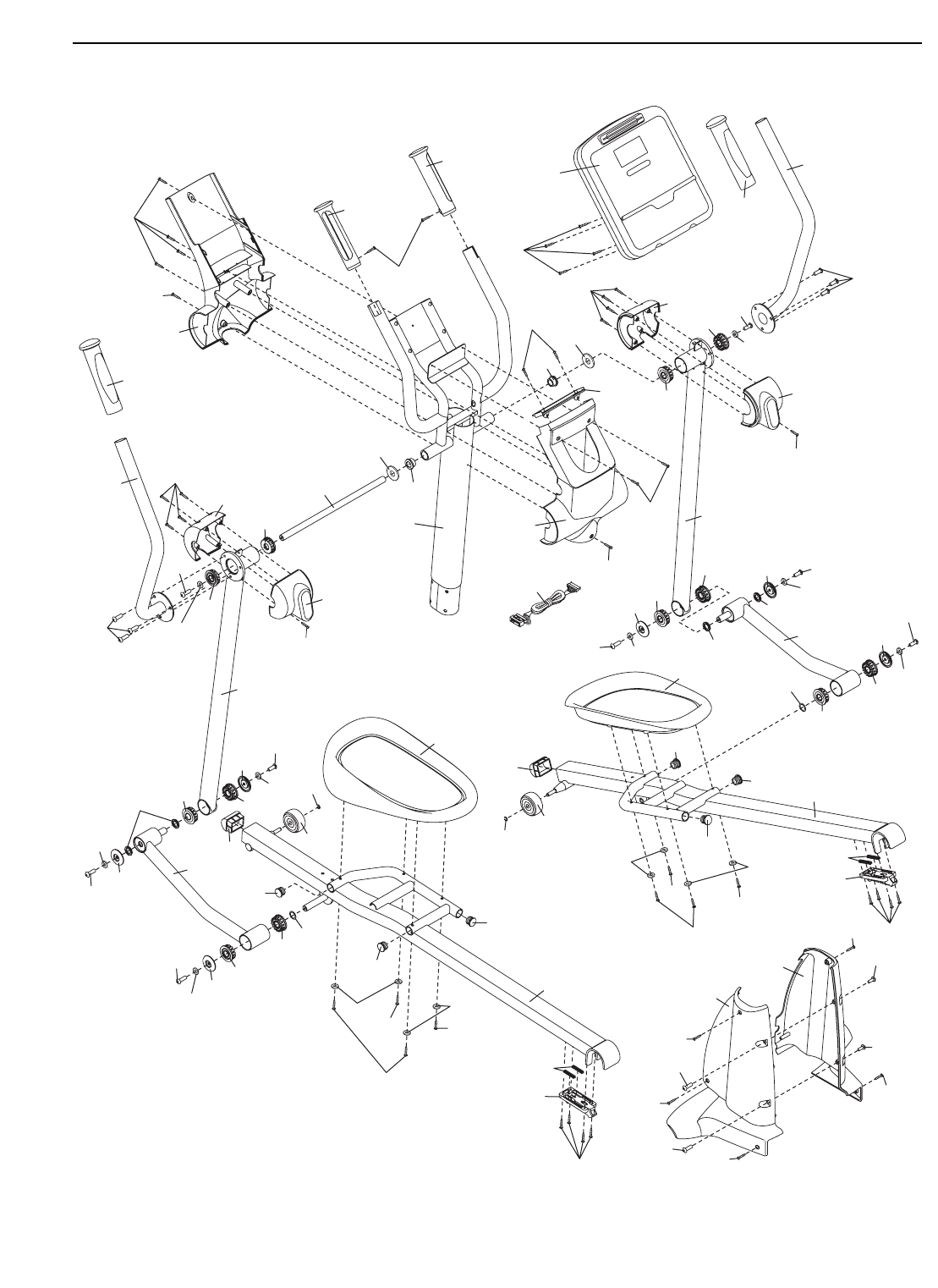
EXPLODED DRAWING A—Model No. PFEL77908.2 R0308A
10
11
19
20
21
21
22
23
24
24
25
25
26
27
28
29
31
30
32
33
34
35
36
37
38
38
39
39
40
41
42
41
42
43
43
43
43
43
43
65
66
66
66
66
66
67 67
66
67
67
67
67
67
67
79
79
79
79
78
78
71
74
74
74
88
88
88
88
89
89
97
97
110
103
103
105
104
106
97
97
81
97
97
97
81
97
104
105
106
97
97
115
100
100
106 103
110
103
106
103
100
106
106
103
100
108
102 102
109 109
102 102
109
108 108
81
97
81
81
81
27
1
2
3
4
5
6
7
8
8
9
62
63 12
13
12
13
14
15
16
16
17
17
18
18
44
45 46
47
48
49 50
51
95
52
54
53
55
56
57
76
59
60
61
116 58
55
52
54
53
64
68
68
68
68
69
70
72
88
75
82
82
83
83
84
85
84 85
86
88
88
88
90
91
92
94
73
93
93
80
80
96
99
99
107
101
107
101
97
97
97 97
111
87
97
97
97
111
87 102
114
102
114
114
97
97
113
103
113
103
112
110
110
87 87
111
111
97
97
97
115
112
98
98
104
105
104
105
77
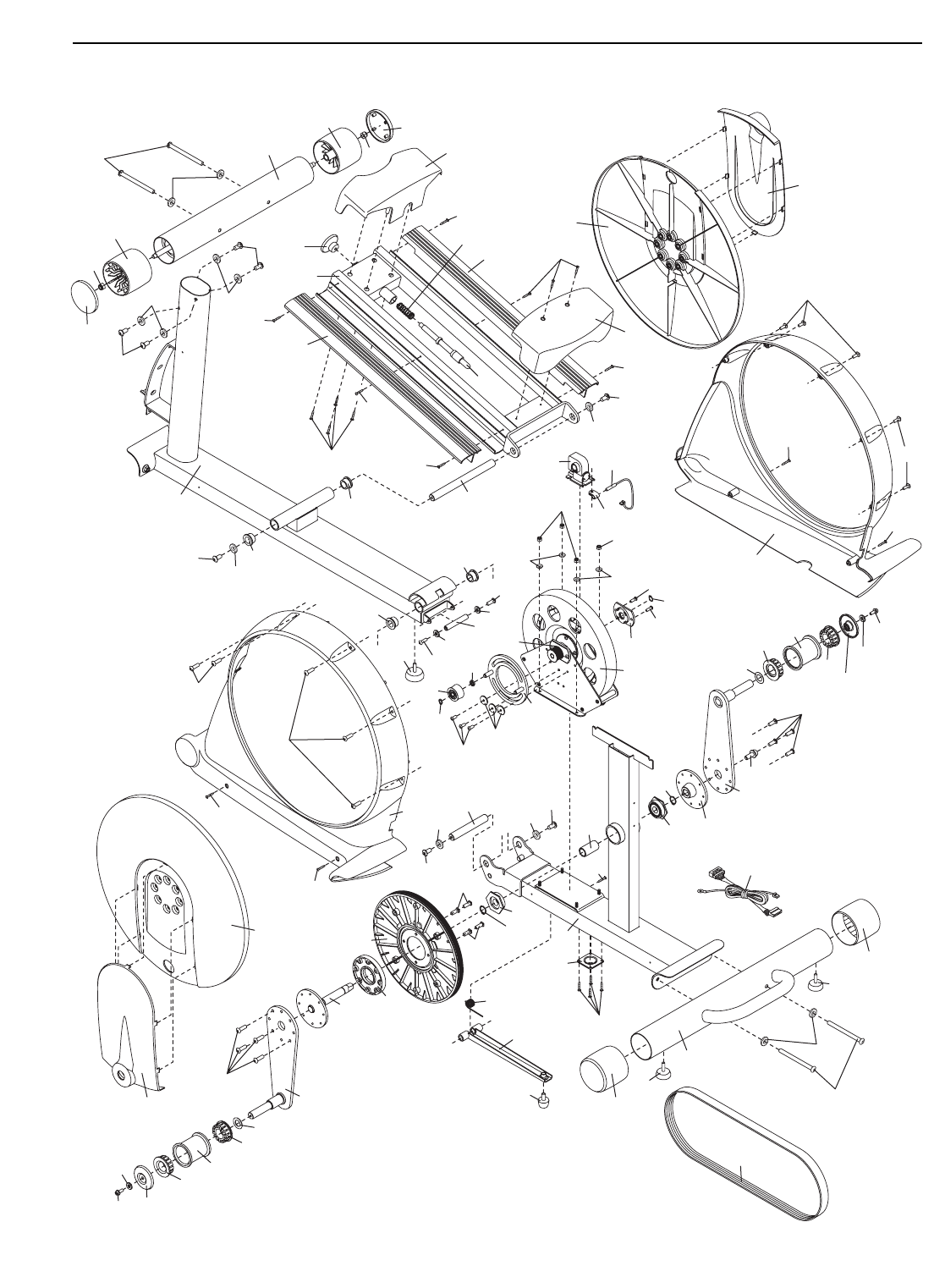
EXPLODED DRAWING B—Model No. PFEL77908.2 R0308A

Part No. 265408 R0308A Printed in USA © 2008 ICON IP, Inc.
LIMITED WARRANTY
ICON Health & Fitness, Inc. (ICON) warrants this product to be free from defects in workmanship and
material, under normal use and service conditions, for a period of one (1) year from the date of purchase.
There is a lifetime warranty on the frame. This warranty extends only to the original purchaser. ICON's
obligation under this warranty is limited to replacing or repairing, at ICON's option, the product through
one of its authorized service centers. All repairs for which warranty claims are made must be pre-autho-
rized by ICON. If the product is shipped to a service center, freight charges to and from the service cen-
ter will be the customer’s responsibility. For in-home service, the customer will be responsible for a mini-
mal trip charge. This warranty does not extend to any product or damage to a product caused by or attrib-
utable to freight damage, abuse, misuse, improper or abnormal usage or repairs not provided by an ICON
authorized service center; products used for commercial or rental purposes; or products used as store
display models. No other warranty beyond that specifically set forth above is authorized by ICON.
ICON is not responsible or liable for indirect, special or consequential damages arising out of or in con-
nection with the use or performance of the product or damages with respect to any economic loss, loss
of property, loss of revenues or profits, loss of enjoyment or use, costs of removal or installation or other
consequential damages of whatsoever nature. Some states do not allow the exclusion or limitation of inci-
dental or consequential damages. Accordingly, the above limitation may not apply to you.
The warranty extended hereunder is in lieu of any and all other warranties and any implied warranties of
merchantability or fitness for a particular purpose is limited in its scope and duration to the terms set forth
herein. Some states do not allow limitations on how long an implied warranty lasts. Accordingly, the above
limitation may not apply to you.
This warranty gives you specific legal rights. You may also have other rights which vary from state to state.
ICON HEALTH & FITNESS, INC., 1500 S. 1000 W., LOGAN, UT 84321-9813
ORDERING REPLACEMENT PARTS
To order replacement parts, please see the front cover of this manual. To help us assist you, be prepared to
provide the following information when contacting us:
• the model number and serial number of the product (see the front cover of this manual)
• the name of the product (see the front cover of this manual)
• the key number and description of the replacement part(s) (see the PART LIST and the EXPLODED
DRAWING near the end of this manual)
